1
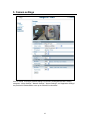
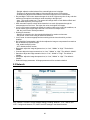
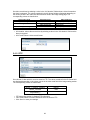
- Daylight: adjust the white balance if the external light source is daylight. - Fluorescent: adjust the white balance if the external light source is fluorescent. - Incandescent: adjust the white balance if the external light source is incandescent. Day and Night: This function detects changes in the level of light at any time of day, and then switches to the optimum surveillance mode according to the light level. - Auto:This mode is always on. The camera will change either to Color Mode or Black and White Mode depending on the light level. AES: automatic exposure values which determine how much light passes through the camera aperture to the focus. The higher the value, the brighter the images. Lumii: Lumii function increases the sensitivity, reduces video noise in low light conditions, as well as makes night images bright and clear. This function is always active. - ON: the Lumii function is always enabled. Working Environment: - Normal: the camera’s color is automatically adjusted for outdoor environment. - Anti-Flicker: reduce color rolling for indoor environment. Lens Format: choose an appropriate lens matching with the lens size which you have installed. BLC (Backlight Compensation): this function adjusts the image to compensate for areas that are too dark due to insufficient light. - ON: enable the BLC function. - OFF: disable the BLC function. Brightness: adjust the image brightness level, to “Low”, “Middle” or “High”. The default is “Middle”. Contrast: adjust the image contrast level, to “Low”, “Middle” or “High”. The default is “Middle”. Saturation: adjust the image saturation level, to “Low”, “Middle” or “High”. The default is “Middle”. Sharpness: adjust the image sharpness level, to “Low”, “Middle” or “High”. The default is “Middle”. Default All Image parameters: All image parameters will be set back to default. 5.2 Network Click “Network” to view the current network settings, including “Network”, “FTP”, “SMTP” and “NTP”. Configure all Network, FTP, SMTP and NTP settings in the Network section. 20