1
Installation
PROFESSIONAL SERIES
D860
Installation
Signal Combining Methods
It is recommended that assistance be available to safely install equipment
in equipment racks.
PICO MACOM recommends connecting the headend components in
the following manner: Each of the modulators, signal processors or
strip amplifiers output are connected to a combining network. Either
a C860, PHC-12G or a PHC-24G headend combiner may be used to
accomplish this purpose.
1.Install chassis in equipment rack (equipment rack sold separately)
by supporting the bottom and rear of D860 at the desired elevation in rack.
2.Line up the side holes of chassis with the tapped equipment rack
holes.
3.Insert the provided screws through the side holes in chassis and
thread into the tapped equipment rack holes.
4.Fasten the bottom screws first, then fasten top screws (tighten
securely).
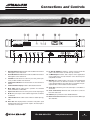
5.Connect a cable from the output of the RF source (antenna or
CATV feed) to the RF IN connector of the D860.
6.Connect a cable from the VIDEO OUT of the D860 to the video
input of the modulator (not provided).
7.Connect a cable from the AUDIO OUT of the D860 to the audio
input of the modulator (not provided).
8.If the modulator provides a 4.5MHz composite audio input,
connect a cable from the 4.5MHz output of the D860 to the
4.5MHz composite input of the modulator.
9.Connect a cable from the output RF connector of the modulator
to the input connector of combining system.
10.Connect D860 power cord to receptacle supplying uninterrupted
line power (LED on front panel will illuminate).
The C860, PHC-12G or PHC-24G passive headend combiners consist
of two rows of directional couplers combined by a hybrid splitter.
Normally, the odd channels are combined on one row while even
channels are combined on the other row of directional couplers for
maximum isolation. The output of the combiners may be connected
to the input of a launch amplifier such as a CA-30RK550 or
CA-30RK1000. The output of the amplifier is connected to the main
distribution line.
The CHC-16U/550 and CHC-16U/860 sixteen channel active combiners provide both signal combining and post amplification of the
headend signals. The combiner gain is 15 dB per channel.
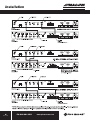
A 24 channel system hook-up is shown below. (The same combining result may be accomplished by using a single PHC-24G). The
outputs are combined via a two-way splitter, which is connected to
an attenuator pad (if necessary) and a launch amplifier, such as an
L860 or CA-30RK1000. The input levels to the combiner, whether from
a modulator, signal processor or a strip amplifier, must be at the same
amplitude.
11.Depress the TV/CATV button until the LED
illuminates next to the desired format.
12.For CATV sub-band receive operation,
slide the switch on the rear panel of the
D860.
13.Select the receive channel by repeatedly
depressing the channel up or down button
until the desired channel number is displayed.
Ph: 800-421-6511
www.picomacom.com
7
Rev. 12/05