1
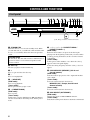
CONTROLS AND FUNCTIONS
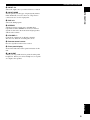
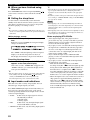
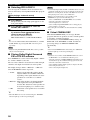
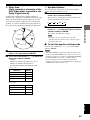
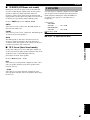
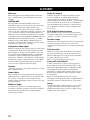
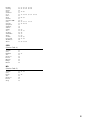
Front panel display (left)
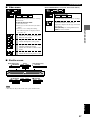
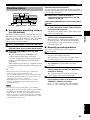
This front panel display mainly displays the information related to the playback of discs.
1
2
PGM RND A – B GROUP TITLE TRACK
DVD V CD
VIDEO
AUDIO
3
CHAP
4
5
D.MIX P.PCM MLT.CH
888888888888
6
7 8
9
1 Play mode indicators
PGM: Programmed play / RND: Random play /
: Repeat play / A-B
: Repeat A-B
6 Disc type indicators
Indicates the type of disc. For example, DVD and AUDIO
lights up when playing a DVD-Audio disc.
2 Mode type indicators
GROUP: Group mode / TITLE: Title mode /
TRACK: Track mode / CHAP: Chapter mode
7 w
Lights up during playback. Blinks while resume function
is working.
3 D.MIX (Down Mix)
Lights up when the currently playing multi-channel audio
track is mixed down into 2-channel.
8 d
Lights up while playback is paused.
4 P.PCM (Packed PCM)
Lights up while a P.PCM signal is input.
5 MLT.CH (Multi Channel)
Lights up while a multi-channel signal is output.
8
9 Multi-information display (left)
Shows various information such as title, chapter or track
number, elapsed playing time etc.