1
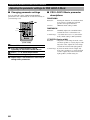
CHANGING THE PARAMETER SETTINGS FOR DSP PROGRAMS
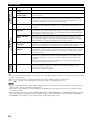
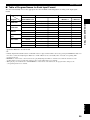
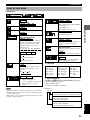
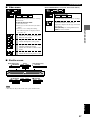
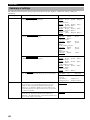
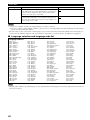
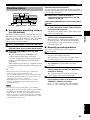
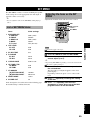
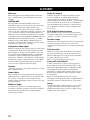
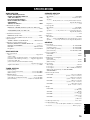
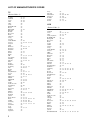
The following table shows factory-set delay time.
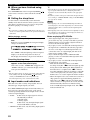
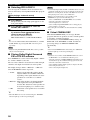
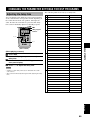
Adjusting the delay time
Program
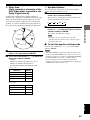
You can adjust the time difference between the beginning
of the sound from the front speakers and the beginning of
the sound effect from the rear speakers. The larger the
value, the later the sound effect is generated. The delay
time can be individually adjusted to all DSP programs.
1
CONCERT HALL
45
2
JAZZ CLUB
30
3
ROCK CONCERT
15
4
DISCO
26
GAME
36
CONCERT VIDEO
21
5
TV SPORTS
10
6
MONO MOVIE
69
7
70 mm SPECTACLE
23
DGTL SPECTACLE
15
DTS SPECTACLE
15
Spectacle 6.1
15
70 mm SCI-FI
20
Sci-Fi 6.1
15
DGTL SCI-FI
15
DTS SCI-FI
15
70 mm ADVENTURE
20
DGTL ADVENTURE
15
DTS ADVENTURE
15
Adventure 6.1
15
70 mm GENERAL
20
DGTL GENERAL
15
DTS GENERAL
15
General 6.1
15
PRO LOGIC/NORMAL
15
DOLBY DIGITAL/NORMAL
5
DTS DIGITAL SUR./NORMAL
5
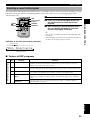
VIDEO 1
CODE SET
CD
SHIFT
DVD
HALL
JAZZ
ROCK
AMP
2
3
4
SETUP
MONO MOVIE
ANGLE
MOVIE 1
MARKER
MOVIE 2
5
/DTS
6
7
8
PLAY MODE
SELECT
REPEAT
MATRIX 6.1
A–B
STEREO
0
>–10
CANCEL
9
GROUP
TOP MENU
LEVEL
MENU
SET MENU
PRESET
DSP program
buttons
PAGE
MUTE
ABCDE
u, d
CH
AMP
ENTERTAINMENT
1
SPORTS
ENTER
CH
PRESET
TEST
ON SCREEN
B. BOOST
RETURN
VOL
j, i
(While playing a source)
3
4
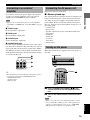
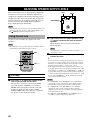
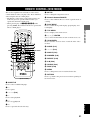
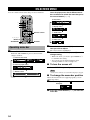
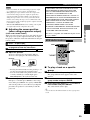
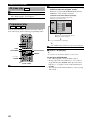
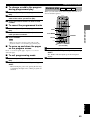
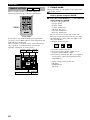
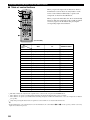
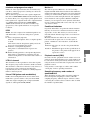
Press AMP.
8
Select a DSP program you want to adjust the
delay time.
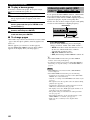
Press u / d so that “DELAY” appears on the
front panel display.
Press j / i to adjust the delay time.
Notes
• Adding too much delay will cause an unnatural effect with
some sources.
• The sound is momentarily interrupted while adjusting the delay
time.
9
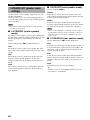
Matrix 6.1
5
PRO LOGIC/ENHANCED
20
DOLBY DIGITAL/ENHANCED
5
DTS DIGITAL SUR./ENHANCED
5
Enhanced 6.1
5
PRO LOGIC II Movie
15
PRO LOGIC II Music
5
ADJUSTMENTS
(U.S.A. model)
1
2
Preset value (ms)
English
65