1
High Definition
Video Recorder with Camera
HDV155
User Manual
FCC statement
This device complies with part 15 of FCC rules. Operation is subject to the following
two conditions: (1) this device may not cause harmful interference, and (2) this
device must accept any interference received, including interference that may cause
undesired operation.
Caution: Changes or modifications to this unit not expressly approved by the party
responsible for compliance could void the user’s authority to operate the equipment.
Note: This equipment has been tested and found to comply with the limits for a Class
B digital device, pursuant to Part 15 of the FCC Rules. These limits are
designed to provide reasonable protection against harmful interference in a
residential installation. This equipment generates, uses, and can radiate radio
frequency energy and, if not installed and used in accordance with the
instructions, may cause harmful interference to radio communications.
However, there is no guarantee that interference will not occur in a particular
installation. If this equipment does cause harmful interference to radio or
television reception, which can be determined by turning the equipment off
and on, the user is encouraged to try to correct the interference by one or
more of the following measures:
Reorient or relocate the receiving antenna.
Increase the separation between the equipment and receiver.
Connect the equipment into an outlet on a circuit different from that to which
the receiver is connected.
Consult the dealer or an experienced radio TV technician for help.
Pertinent testing documentation is available for verification.
This product also complies with Canada standard ICES 003.
1
CONTENTS
1. Parts of the video recorder..................................................................5
2. Preparing for using…………………………………………………………6
Installing the Battery............................................................................6
Inserting the Memory Card..................................................................7
Format the memory card .....................................................................8
Setting the Language...........................................................................9
Setting the date and time...................................................................10
Monitor screen display ...................................................................... 11
3. Using your video recorder.................................................................14
Turning the recorder ON and OFF ....................................................14
Change the MODE of the recorder....................................................14
Recording video clip ..........................................................................15
Taking still images .............................................................................16
Using the Self-timer and Burst snapshot .........................................17
Using the Zoom Function ..................................................................18
2
4. Using the Menu in recording mode...................................................18
Menu in video mode...........................................................................18
Menu in capture mode .......................................................................19
Setup menu / Internal setting ............................................................21
5. Playback..............................................................................................24
Playback still image ...........................................................................24
Playing back movie clips ...................................................................24
Other functions in Playback mode ...................................................25
6. Making connections ...........................................................................30
Connecting the Video Recorder to a TV...........................................30
Connecting the Video Recorder to a PC ..........................................31
7. Software Installation ..........................................................................33
Installing the Software .......................................................................33
8. Troubleshooting .................................................................................36
9. Technical Specifications....................................................................37
3
Thank you for purchasing this video recorder with camera. Please read
these operating instructions carefully in order to use the digital video
camera correctly and maximize your enjoyment. Keep the manual in a safe
place so that you can refer to the instructions later when necessary.
Precautions
Before using the video camera, please ensure that you carefully read and
understand the safety precautions described below.
• Do not try to open the case of the video camera or attempt to modify this
video camera in any way. If required, maintenance and repairs should be
carried out only by authorized service providers.
• Keep the video camera away from water and other liquids. Do not use the
video recorder if your hands are wet; keep your camera dry and clean.
• Use only recommended AAA alkaline batteries.
4
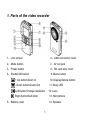
1. Parts of the video recorder
1:LCD screen
6:USB connector/ cover
2:Mode button
7:AV out jack
3:Power button
8:SD card slot/ cover
4:Shutter/OK button
9: Menu button
+ Up button/Zoom In
10: Display/Delete button
- Down button/Zoom Out
11: Busy LED
Left button/Change resolution
Right button/Self-timer
12: Lens
13: Microphone
5:Battery cover
14: Speaker
5
2. Preparing for using
Installing the Battery
1:
Slide down and open the video recorder battery door.
2:
Insert three AAA-size batteries with the positive (+) and negative (-)
poles matching the markings inside the battery compartment.
3:
Slide and close the battery door as shown below.
6
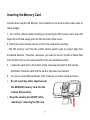
Inserting the Memory Card
Camera does require SD Memory Card inserted to record and store video clips or
taken images.
1. Turn off the camera before inserting or removing the SD memory card. Grip with
fingernail to lift and swing open the SD card slot rubber cover.
2. Orient the card correctly and do not force the card when inserting
- The SD memory card has the LOCK protect switch used to protect data from
accidental deletion. Therefore, whenever you want to record, format or delete files
from the SD card, set the protect switch to the non-LOCKed position.
3.
Locate the card slot on the bottom of the camera and insert the SD card as
illustrated. Press the card until the card is fully down and latched.
4.
To remove; press SD card down, then it will pop up and be easily removed.
•
Do not insert any other object except
the SD/SDHC memory card into the
camera SD card slot.
•
Keep the camera turned OFF while
inserting or removing the SD card.
7
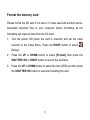
Format the memory card
Please format the SD card if it is new or if it was used with another device.
Download important files to your computer before formatting as the
formatting will erase all data from the SD Card.
1:
Turn the power ON (when the card is inserted) and set the video
recorder to the Setup Menu. Press the RIGHT button to select
[Setup].
2:
Press the UP or DOWN button to select [Format.] then press the
SHUTTER/ OK or RIGHT button to launch the submenu.
3:
Press the UP or DOWN button to select the item [YES] and then press
the SHUTTER/ OK button to execute formatting the card.
8
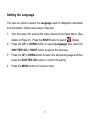
Setting the Language
You have an option to select the Language used for displayed commands
and information; follow below steps if required:
1:
Turn the power ON, and set the video camera to the Setup Menu. (See
2:
Press the UP or DOWN button to select [Language] then press the
details on Page 21). Press the RIGHT button to select
[Setup].
SHUTTER/ OK or RIGHT button to launch the submenu.
3:
Press the UP or DOWN button to select the desired language and then
press the SHUTTER/ OK button to confirm the setting.
4:
Press the MENU button to close the menu.
9
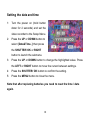
Setting the date and time
1:
Turn the power on (hold button
down for 2 seconds) and set the
video recorder to the Setup Menu.
2:
Press the UP or DOWN button to
select [Date&Time..] then press
the SHUTTER/ OK or RIGHT
button to launch the submenu.
3:
Press the UP or DOWN button to change the highlighted value. Press
the LEFT or RIGHT button to move the cursor between settings.
4:
Press the SHUTTER/ OK button to confirm the setting.
5:
Press the MENU button to close the menu.
Note that after replacing batteries you need to reset the time / date
again.
10
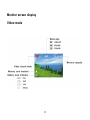
Monitor screen display
Video mode
11
Capture mode
12
Playback mode
Display/ Delete Button (part 10) – Press this display button once in
video mode or Capture mode to display live image (no icons will be visible),
press button again to dim the image and press again to restore original
bright screen with icons. This button (10) is also used as quick delete
button in Playback mode to delete current image. See page 26 for details.
13
3. Using your video recorder
Turning the recorder ON and OFF
1.
Press the POWER button for 2 seconds to turn ON video recorder.
2.
Press the POWER button again to turn OFF the recorder.
To save battery power, the recorder automatically turns off after a short
period of time if no button is pressed. Press the POWER button to power
the camera back ON. You can change the power-OFF time by setting the
function [Power Save] in the Setup menu
Change the MODE of the recorder
Your video camera has three selectable modes: Video, Capture, and
Playback mode. Press Mode button to change modes sequentially.
1.
Press the POWER button and the camera will become active and set
in Video Recording Mode.
2.
Press the MODE button once to select the Capture mode for taking
14
still pictures.
3.
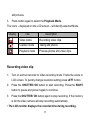
Press button again to select the Playback Mode.
The icons – displayed on the LCD screen – will identify selected Mode.
Display
Title
Description
Video mode
Recording video clips.
Capture mode
Taking still photos.
Playback mode
Preview photos and video clips.
Recording video clip
1:
Turn on and set recorder to Video recording mode. Frame the scene in
2:
Press the SHUTTER/ OK button to start recording. Press the RIGHT
LCD screen. To quickly change resolution setting press LEFT button.
button to pause and press it again to continue.
3:
Press the SHUTTER/ OK button again to stop recording. If the memory
is full the video camera will stop recording automatically.
• The LCD monitor displays the recorded time during recording.
15
Taking still images
1:
Turn ON the video camera.
2:
Press the MODE button to set the video camera to capture mode,
3:
Frame the scene or subject in LCD screen. To quickly change
the icon
appears on the LCD screen.
resolution setting press LEFT button.
4:
Hold the video recorder steady and press the SHUTTER/ OK button to
take a picture.
•
The number displayed on the LCD screen will decrease with each
picture taken.
•
No more pictures can be taken if the “Memory Full” message
appears on the LCD screen – replace the SD card or download
stored images into the computer.
•
Make sure that your fingers do not cover the lens while recording
video or taking still images.
•
Do not remove the memory card or batteries when camera is
saving the image, otherwise the data will be damaged.
16
Using the Self-timer and Burst snapshot
When the Self-timer is set and activated, the camera will auto-take a
picture after the selected delay time. Use the burst snapshot to take
pictures continuously.
1:
Turn the power ON, and set the video camera to the Capture mode.
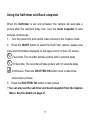
2: Press the RIGHT button to select the Self-Timer options; please note
icons and information displayed on left upper corner of the LCD screen.
2 seconds: The recorder will take picture with 2 seconds delay
10 Seconds: The recorder will take picture with 10 seconds delay
Continuous: Press the SHUTTER/ OK button once to take three
consecutive pictures.
3: Press the SHUTTER/ OK button to take picture.
• You can also set the self-timer and burst snapshot from the Capture
Menu. See the details on page 21.
17
Using the Zoom Function
This camera has a Digital Zoom function that allows you to zoom in (Tele)
or zoom out (Wide) subjects or recorded scene.
1: Turn the camera ON and set it to Capture or Video Recording mode.
2: Press the UP or DOWN buttons to compose the scene as required.
UP: zoom in for a telephoto shot.
DOWN : zoom out for a wide-angle shot.
4. Using the Menu in recording mode
Menu in video mode
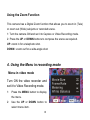
Turn ON the video recorder and
set it to Video Recording mode.
1:
Press the MENU button to display
the menu.
2:
Use the UP or DOWN button to
select menu item.
18
3:
Press the SHUTTER/ OK or RIGHT button to enter the sub-menu.
4:
Use the UP or DOWN button to select the desired setting.
5:
Press the SHUTTER/ OK button to confirm the setting.
6:
Press the MENU button to close the menu.
Menu item
Function
Movie
Select smaller movie size (lower resolution) to record
Resolution
for longer time. There are three settings to choose:
1280x720/640x480/320X240.
To
quickly
change
resolution use the LEFT button
Frame Rate
Select low frame rate to record longer time. There are
two settings to choose: High/ Low.
Metering
See the details on page 20.
White Balance
See the details on page 21.
Menu in capture mode
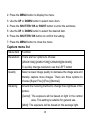
1: Turn ON the video recorder and
set it to capture mode.
19
2: Press the MENU button to display the menu.
3: Use the UP or DOWN button to select menu item.
4: Press the SHUTTER/ OK or RIGHT button to enter the submenu.
5: Use the UP or DOWN button to select the desired item.
6: Press the SHUTTER/ OK button to confirm the setting.
7: Press the MENU button to close the menu.
Capture menu list
Menu item
Resolution
Function
There are four options to choose:
[2592X1944]/[2048X1536]/[1280x960]/[640X480]
To quickly change resolution use the LEFT button
Quality
Select a lower image quality to decrease the image size and
thereby capture more images. There are three options to
choose:[Super Fine] /[Fine] /[Normal].
Metering
Amend the metering method to change the brightness of the
picture.
[Center]: The exposure will be based on light in the central
area. This setting is suitable for general use.
[Multi]: The exposure will be based on the average light.
20
[Spot]: The exposure will be metered based only on the spot
in the center of the LCD screen
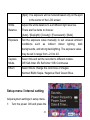
White
Adjust the white balance to suit different light sources.
Balance
There are five items to choose:
[Auto] / [Daylight] / [Cloudy] / [Fluorescent] / [Bulb].
Exposure
Set the exposure value manually to suit unusual ambient
conditions
such
as
indirect
indoor
lighting,
dark
backgrounds, and strong backlighting. The exposure value
may be set in range from –2.0 to 2.0.
Capture
Select this and set the recorder to different modes:
Mode
Off/ Self-timer 2S/ Self-timer 10S/ Continuous
Effect
Select this to change the color tone of images:
Normal/ B&W/ Sepia / Negative/ Red/ Green/ Blue.
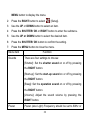
Setup menu / Internal setting
Adjust system settings in setup menu.
1:
Turn the power ON and press the
21
MENU button to display the menu.
[Setup].
2:
Press the RIGHT button to select
3:
Use the UP or DOWN button to select an item.
4:
Press the SHUTTER/ OK or RIGHT button to enter the submenu.
5:
Use the UP or DOWN button to select the desired item.
6:
Press the SHUTTER/ OK button to confirm the setting.
7:
Press the MENU button to close the menu.
Menu item
Sounds
Function
There are four settings to choose:
[Shutter]: Set the shutter sound on or off by pressing
the RIGHT button.
[Start-up]: Set the start-up sound on or off by pressing
the RIGHT button.
[Beep]: Set the operation sound on or off by pressing
the RIGHT button.
[Volume]: Adjust the sound volume by pressing the
RIGHT button.
Power
Power (also Light) Frequency should be set to 60Hz or
22
frequency
50Hz to match local power supply. [50HZ] / [60HZ].
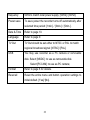
Power save
To save power the recorder turns off automatically after
selected time period: [1min.] / [3min.] / [5min.].
Date & Time
Refer to page 10.
Language
Refer to page 9.
TV Out
TV Out should be set either to NTSC or PAL to match
regional broadcast signal: [NTSC] /[PAL].
USB
You may use recorder as a PC camera or removable
disk. Select [MSDC]: to use as removable disk.
Select [PCCAM]: to use as PC camera;
Format
Refer to page 8 for details.
Reset all
Reset the entire menu and button operation settings to
initial default. [Yes]/ [No].
23
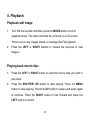
5. Playback
Playback still image
1:
Turn ON the recorder and then press the MODE button to set to
playback mode. The latest recorded file will show on LCD screen.
If there are no any images stored, a message [No File] appears.
2:
Press the LEFT or RIGHT buttons to browse the previous or next
images.
Playing back movie clips
1:
Press the LEFT or RIGHT button to select the movie clips you wish to
play back.
2:
Press the SHUTTER/ OK button to start playing. Press the MENU
button to stop playing. Press the UP button to pause and press again
to continue. Press the RIGHT button to fast forward and press the
LEFT button to rewind.
24
Other functions in Playback mode
Viewing Thumbnail size files
Press the DOWN button to view the file in thumbnail mode. Use the UP,
DOWN, LEFT, RIGHT button to select a file. Press the SHUTTER/ OK
button to view the file in full screen.
Lock files
1:
Press the MENU button in playback mode.
2:
Press the UP or DOWN button to select the item [Lock].
3:
Press the SHUTTER/ OK or RIGHT button to enter the submenu.
4:
Use the UP or DOWN button to select option: [Lock/Unlock one]: Lock
/Unlock current file. [Lock All]: Lock all files. [Unlock all]: Unlock all
files.
5:
Press the SHUTTER/ OK button to confirm the setting.
6:
Press the MENU button to close the menu.
• The “key” icon
will display on the LCD screen if the file has
been locked. The locked file can not be deleted – unless “un-locked.”
25
Delete files
1:
Press the MENU button in playback mode.
2:
Press the UP or DOWN button to select the item [Delete].
3:
Press the SHUTTER /OK or RIGHT button to enter the submenu.
[One]: Delete current file. [All]: Delete all files except locked files.
4:
Use the UP or DOWN button to select the item.
5:
Press the SHUTTER/ OK button to confirm the setting. A dialog box
will appear. Using UP or DOWN button to select the item [Yes].
6:
Press the SHUTTER/ OK button to delete the current file or all files.
*
For quick deletion of the picture or video displayed on LCD, press
the Display/ Delete button. Select Yes or No option by pressing Up or
Down buttons and then press the SHUTTER/ OK button to execute
choice. See page 13 for using button to adjust LCD display.
Play a slide show
1:
Press the MENU button in playback mode.
2:
Press the UP or DOWN button to select the item [Slide Show].
3:
Press the SHUTTER/ OK or RIGHT button to enter the submenu.
26
[Start]: Select this item to start slide show mode.
[Interval]: Set the interval time by pressing the LEFT or RIGHT button. The
interval time range is from 1 second to 10 seconds.
[Repeat]: Press the LEFT or RIGHT button to set the repeat function on or
off.
4:
Use the UP or DOWN button to select [Start].
5:
Press the SHUTTER/ OK button start slide show.
6:
Press the MENU button to end slide show.
• Only still images can be shown as the slide show.
Effect
1:
In Playback mode, select and display the photo you want to change
color tone. Press the MENU button.
2:
Press the UP or DOWN button to select the [Effect].
3:
Press the SHUTTER/ OK or RIGHT button to enter the submenu:
[B&W], [Sepia], [Negative], [Red], [Green], [Blue], [Binarize], [Sunset],
[Warm], [Cold], [Contrast].
4:
Press the UP or DOWN button to select an effect changing color tone
27
of the image.
5:
Press the SHUTTER/ OK button to confirm the setting. A duplicate
photo with the desired color tone will be created and stored in SD card.
Rotate the image
1:
Select an image you want to rotate in playback mode.
2:
Press the MENU button to display the menu.
3:
Press the UP or DOWN button to select the item [Rotate].
4:
Press the SHUTTER/ OK or RIGHT button to launch the submenu:
Rotate: Each time the SHUTTER/ OK button is pressed the image will
rotate 90°.
Save: Select this item to save the rotated image.
Back: Select this item to close the submenu.
Resize
1:
Select an image you want to resize in playback mode.
2:
Press the MENU button to display the menu.
28
3:
Press the UP or DOWN button to select the item [Resize].
4:
Press the SHUTTER/ OK or RIGHT button to launch the submenu:
2048x1536/ 1280x960/ 640x480.
5:
Press the UP or DOWN button to select the item.
6:
Press the SHUTTER /OK button to save the resized image.
• The image can only be resized only to the smaller size.
Add voice memo to image
1:
Select an image to which you wish add voice memo in playback mode.
2:
Press the MENU button to display the menu.
3:
Press the UP or DOWN button to
select the item [voice memo].
4:
Press the SHUTTER/OK or RIGHT
button to display the dialog box as
illustration.
5:
Select the item [Add] and then press the SHUTTER/OK button to start
recording voice memo.
6:
Press the SHUTTER/ OK button to end the recording.
29
7:
To playback voice memo please first select desired photo with
microphone icon and then press the SHUTTER/ OK button
• To cancel the voice memo please select [Delete] when the dialog box
appears and then press the SHUTTER/ OK button to delete the memo.
6. Making connections
Connecting the Video Recorder to a TV
You may connect camera to TV, then display all images and recorded video
on large TV screen!
1.
Connect the recorder to a TV using supplied AV/TV cable.
2.
Turn ON the TV and the camera; set the TV to AV INPUT mode,
review the manual for your TV if necessary.
3.
When recorder is set to recording mode, you can preview the subjects
you wish to record on the TV screen.
4.
At the Playback mode, all the pictures, video and audio clips stored in
the camera can be reviewed and played back on the TV screen.
30
When the TV is connected, the cameras LCD screen becomes blank and
TV screen becomes the monitor for your camera.
Connecting the Video Recorder to a PC
Open the USB cover on the top of the recorder with a fingernail and swing
out the USB connector. Insert connector into computer USB port. If
necessary, use the supplied USB extension cable to gain easier access to
connect. Download files from the recorder’s stored memory to computer.
Alternatively insert the memory card into a card reader to download files.
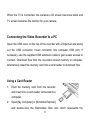
Using a Card Reader
1:
Eject the memory card from the recorder
and insert into a card reader connected to a
computer.
2:
Open [My Computer] or [Windows Explorer]
and double-click the Removable Disk icon which represents the
31
memory card.
3: Copy images from the card into selected directory / storage inside your
computer.
Connecting the Recorder to a PC using USB connector
1:
Select the Item [USB] in Setup Menu and then select [MSDC] option to
set the USB mode to [MSDC] mode. Turn OFF the recorder.
2:
Connect the recorder to the computer USB port with the USB
connector and turn ON the recorder. A message “MSDC” appears on
the screen when connection to the computer has been successfully
completed.
3:
Open [My Computer] or [Windows Explorer]. A "Removable Disk"
appears in the drive list. Double-click the "Removable Disk" icon to
view its contents. The "DCIM" folder contains all stored video and still
4:
images files.
Copy photos or video files into your computer.
32
7. Software Installation
Installing the Software
Supplied installation CD contains bundled Arcsoft MediaImpression
program and the Driver for the camera.
• Installed Driver is necessary to use your camera as PC/ webcam.
• Installed Arcsoft Mediaimpression program is useful for editing pictures
and recorded video clips.
Arcsoft MediaImpression works with Windows 2000/XP, Vista &
Windows 7 platforms.
Install ALL programs BEFORE connecting camera with computer.
-Insert the CD into your CD-ROM drive.
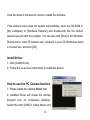
-The auto-run menu appears:
33
Click the items in the autorun menu to install the software.
If the autorun menu does not appear automatically, open the CD-ROM in
[My Computer] or [Windows Explorer] and double-click the file named
[autorun.exe] to start the program. You can also click [Run] in the Windows
Startup menu, enter "D:\autorun.exe" (where D is your CD-ROM drive letter)
in the text box, and click [OK].
Install Driver
1: Click [Install Driver].
2: Follow the on-screen instructions to install the drivers.
How to use the PC Camera function
1: Please install the camera Driver first.
2: Installed Driver will create the Amcap
program icon on computer’s Desktop.
Select the Item [USB] in Setup Menu and
34
then select [PCCAM] option to set the camera to PC CAM mode. Connect
the camera to the computer with the USB connector. Run the program
Amcap on the desktop. Using this function for the first time please select
<Preview> as shown on illustration. Now you can use your recorder as the
PC camera function.
If you want to change the imaging size, select <Video Capture Pin> to
change the Output Size.
35
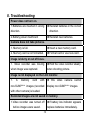
8. Troubleshooting
Power does not turn on.
1.Batteries are inserted in wrong
direction.
★Reinstall batteries in the correct
direction.
2.Battery power insufficient
★Reinstall new batteries.
Camera does not take pictures.
1. Memory is full.
★Insert a new memory card.
2. Memory card is not formatted.
★Format card or use new card.
Image is blurry or out of focus.
1. Video recorder was moving
★Hold the video recorder steady
when image was captured.
when shooting picture.
Image is not displayed on the LCD monitor.
1.
A
memory
card
with
non-SUNP**** images (recorded
★ This video camera cannot
display non-SUNP**** images.
with other camera) is loaded.
Recorded images are not saved in memory.
1.Video recorder was turned off
before images were saved.
★If battery low indicator appears
replace batteries immediately.
36
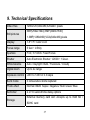
9. Technical Specifications
Video Res
Still pictures
1280x720,640x480,320x240; pixels
5MP(2592x1944);3MP(2048x1536);
1.3MP(1280x960);VGA(640x480);pixels
Display
1.8" TFT Color LCD
Focus range
5 feet ~ infinity
Aperture
F3.0, f=7.0mm. Fixed Focus
Shutter
Auto Electronic Shutter: 1/2000 ~ 1/2sec.
White balance
Auto / Daylight / Bulb / Fluoresce / Cloudy
Digital zoom
Up to 4x range
Exposure control
-2EV to +2EV in 0.3 steps
Burst mode
3 consecutive shots captured
Photo effect
Normal/ B&W/ Sepia / Negative/ Red/ Green/ Blue
Self-timer
2 or 10 second time delay options
Storage
External memory card slot: Accepts up to 8GB SD /
SDHC card
37
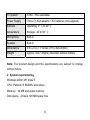
TV system
NTSC / PAL selectable
Power Supply
Three (3) AAA alkaline 1.5V batteries (not supplied)
Ambient
Operating: 0° C to 40° C
temperature
Storage: -20 to 60° C
Microphone
Built-in
Speaker
Built-in
Dimensions
4.5 x 2.4 x 1.1 inches (115 x 62x 28mm)
Weight
Approx. 4oz (120gms) Recorder without battery
Note: The product design and the specifications are subject to change
without notice.
2. System requirements:
Windows 2000/ XP/ Vista/ 7
CPU: Pentium III 800MHz and above
Memory:64 MB and upper memory
Disk space:At least 128 MB space free
38













![[VC120-2] [MENARDS] User Guide [FINAL] 20100618](http://vs1.manualzilla.com/store/data/005701495_1-e41e7e0d778d2f045f29de9890ac0ae7-150x150.png)