1
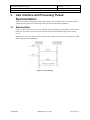
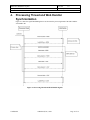
RFID Label Read/Write System Developer's Guide Document ID: DEVG 3.2 Version: 1.0 Date: April 25, 2002 Exiting the Application Figure 3-2 shows the events for exiting the application. When the user chooses to exit the application the user interface firsts checks if the processing thread is running. If the processing thread is running the user interface stops it by signaling stopEvent. The user interface signals killEvent which notifies the processing thread to exit then restarts the processing thread by signaling startEvent. Just before the processing thread exits, it signals threadKilled which tells the user interface it can now exit. Figure 3-2 Exiting the Application 3.3 Thread Died When the processing thread incurs a fatal error and must exit, it sends a WM_THREAD DIED message to the user interface thread. The user interface displays the error then exits. See Figure 3-3 Figure 3-3 Thread Died Confidential Metalcraft, Inc., 2002 Page 11 of 11