1
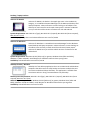
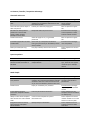
Desktop / Laptop Products mSecure for MacOS mSecure for MacOS, the leader in the Apple App store in the Productivity category, is a standalone Password Manager for the Macintosh desktop and laptop computers. mSecure features a smart-‐looking set of toolbars icons and easy-‐to-‐read record list and record viewer panels. mSecure for MacOS can sync with the mobile versions of mSecure for iOS and Android. System Requirements: Mac OS X 10.4 (Tiger), Mac OS X 10.5 (Leopard), Mac OS X 10.6 (Snow Leopard), Mac OS X 10.7 (Lion) Availability: Apple App Store and mSevenSoftware.com store for $14.99 mSecure for Windows mSecure for Windows is a standalone Password Manager for the Windows-‐ based desktop and laptop computers. mSecure features a smart-‐looking set of toolbars icons and easy-‐to-‐read record list and record viewer panels. mSecure for MacOS can sync with the mobile versions of mSecure for iOS and Android. System Requirements: Windows XP SP3 (32bit only) or greater, Windows Vista (32bit and 64bit), Windows 7 (32bit and 64bit). Install Bonjour for Windows make wireless syncing easier Availability: mSevenSoftware.com store for $14.99 mBackup for Mac / Windows mBackup is a free desktop application that runs on Macintosh and Windows computers that allow users to safely backup and restore multiple data sets from their Android and iPhone handsets. This application is available from the mSeven web site: http://msevensoftware.com/mbackup MacOS System Requirements: Mac OS X 10.4 (Tiger), Mac OS X 10.5 (Leopard), Mac OS X 10.6 (Snow Leopard), Mac OS X 10.7 (Lion) Windows System Requirements: Windows XP SP3 (32bit only) or greater, Windows Vista (32bit and 64bit), Windows 7 (32bit and 64bit). Install Bonjour for Windows make wireless syncing easier Availability: mSevenSoftware.com store for FREE