1
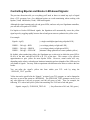
Any control options must be listed after the speed selection (if there is one), and must be enclosed
in parentheses, "( )". A speed value need not be specified, nor is a value required for every
control option. Only those items which you want to change need be specified. Fields which are
not specified will maintain their current values.
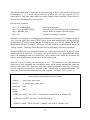
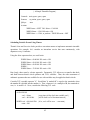
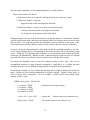
Here are some examples:
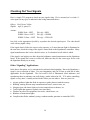
cab1 = 50 (FORWARD)
cab1 = 20% (MOMENTUM_2)
cab1 = (BRAKE_ON)
cab1 = 40
{select speed, direction }
{decrease to 20% of current speed, low momentum}
{activate brake, no change to throttle setting }
{set speed, no change to controls}
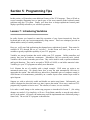
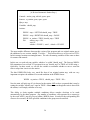
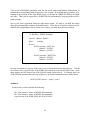
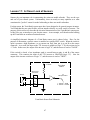
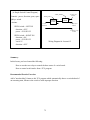
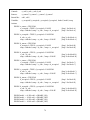
With these few examples as a starting point, the function of this lesson's TCL program should be
clear. First, the Quick-Key labeled "RUN" lets us get the train throttled up to cruising speed (by
clicking the LEFT mouse button), and lets us bring the train to a halt (by clicking the RIGHT
mouse button) when we're through. (Of course, we could already do all that using the Smart Cab
"pop-up" window. Defining a Quick-Key just serves to make things a bit more convenient.)
The third WHEN-DO is our automated station stop. It uses the Train Brain's "at_station" sensor
to detect the arrival of the train. In response to its arrival, the DO clause applies the brake on the
Smart Cab, bringing the train to a smooth stop. After pausing at the station for 10 seconds, the
brake is released and the train throttles back up to cruising speed.
That's all it takes to control your locomotives in TCL. The functions of the Train Brain and
Smart Cab are fully integrated; the Train Brain's sensors can be used to automatically control the
function of the Smart Cab. Many once tricky train control operations are now easy. Your trains
can now respond prototypically to trackside signals, without miles of complicated wiring. The
whole job can now be done automatically by your computer - and Smart Cab, of course !!!
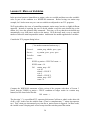
{ An Example of Automated Smart Cab Control }
Controls:
spare, spare, spare, spare
Sensors:
at_station, spare, spare, spare
SmartCabs:
cab1
Qkeys:
run
Actions:
WHEN run = LEFT DO cab1 = 50 (FORWARD, MOMENTUM_4, BRAKE_OFF)
WHEN run = RIGHT DO cab1 = 0 (MOMENTUM_4)
WHEN at_station = TRUE DO cab1 = (BRAKE_ON), wait 10, (BRAKE_OFF)
39