1
The CTI Model Railroad
Control System
User's Guide
Version 4.2
CTI Electronics
P.O. Box 1383
Sykesville, MD. 21784
http://www.cti-electronics.com
Email: [email protected]
Patent Pending. All rights reserved.
2
Table of Contents
Introduction . . . . . . . . . . . . . . . . . . . . . . . . . . .
How to Use This Manual . . . . . . . . . . . . . . . . . . . . .
5
6
Section 1. Installing CTI . . . . . . . . . . . . . . . . . . . . .
7
Introducing the Train Brain . . .
Hooking Up Your CTI System .
Checking Out Your CTI System
Troubleshooting . . . . . . . . .
.
.
.
.
.
.
.
.
.
.
.
.
.
.
.
.
.
.
.
.
.
.
.
.
.
.
.
.
.
.
.
.
.
.
.
.
.
.
.
.
.
.
.
.
7
11
13
14
Section 2: Using CTI . . . . . . . . . . . . . . . . . . . . . . .
15
Lesson 1: Interactive Control. . . . . . . . . . . .
Lesson 2: Running Your TCL Programs . . . . . .
Lesson 3: Fully Automatic Operation . . . . . . . .
Lesson 4: Using Quick-Keys . . . . . . . . . . . .
Variations on a Theme: The Dash-8 and Watchman
.
.
.
.
.
.
.
.
.
.
.
.
.
.
.
.
.
.
16
19
23
27
30
Section 3: Locomotive Speed Control . . . . . . . . . . . . . .
31
Introducing Smart-Cab . . . . . . . . . . . . . . . .
Hooking Up Your Smart-Cab . . . . . . . . . . . . .
Lesson 5: Interactive Train Control Using Smart-Cab.
Lesson 6: Automatic Train Control Using Smart-Cab.
Maximizing Smart-Cab Performance . . . . . . . . .
.
.
.
.
.
.
.
.
.
.
31
33
35
38
40
Section 4: Controlling Signals . . . . . . . . . . . . . . . . . .
42
Introducing the Signalman . . . . .
Choosing a Signalman Configuration
Hooking Up Your Signalman . . . .
Controlling Signals from TCL . . .
.
.
.
.
.
.
.
.
.
.
.
.
.
.
.
.
.
.
.
.
.
.
.
.
.
.
.
.
.
.
.
.
.
.
.
.
.
.
.
.
.
.
.
.
.
.
.
.
.
42
44
45
50
Section 5: Programming Tips. . . . . . . . . . . . . . . . . . .
55
Lesson 7: Introducing Variables . . . . . . . . . . . . . 55
Lesson 8: More On Variables . . . . . . . . . . . . . . 58
Lesson 9: WHILE-DOs . . . . . . . . . . . . . . . . . 62
Lesson 10: Timetables . . . . . . . . . . . . . . . . . . 64
Lesson 11: A Closer Look at Sensors . . . . . . . . . . 67
Lesson 12: Switches . . . . . . . . . . . . . . . . . . . 71
Lesson 13: Optimized Switch Control . . . . . . . . . . 73
Lesson 14: Cab Control . . . . . . . . . . . . . . . . . 77
Lesson 15: Creating Random Events . . . . . . . . . . . 81
Lesson 16: Sound . . . . . . . . . . . . . . . . . . . . 82
Lesson 17: Designing Your Own Control Panels . . . . . 83
Lesson 18: Digital Command Control (DCC) . . . . . . . 98
Lesson 19: Odds and Ends . . . . . . . . . . . . . . . . 99
Appendix A: Applications Notes . . . . . . . . . . . . . 103
3
4
The CTI User's Manual
Introduction:
Welcome to the world of computer controlled model railroading and CTI !!!
By combining the power of the PC with the monitoring and control capability of the "Train
Brain", the CTI system delivers a level of performance and prototypical realism never before
imaginable. Your CTI system will add exciting new dimensions to your model railroad.
This manual contains all the information you’ll need to get the most out of CTI computer control.
So please take the time to read through it carefully.
What Is CTI ?
The CTI system is a new approach to model railroading that makes controlling your layout fast,
easy, and fun. With CTI you can interface your entire model railroad to any IBM-PC or
compatible computer. Tangled wires and overcrowded control panels are a thing of the past.
You can now control every aspect of your layout automatically from a single state-of-the-art
control console displayed in full color on your PC screen.
The CTI system transforms your personal computer into a sophisticated monitoring and control
center, linked electronically to remote sites (called "Train Brains") located throughout your
layout. CTI’s software running on the PC communicates with these sites many times each
second, to monitor and control the operation of your model railroad.
The Train Brain is a simple, yet highly versatile remote control and sensing device that works with
all gauges, AC or DC. Its built-in sensors can be used to detect the location of trains anywhere
on your pike, while its remote-controlled relays can manage the operation of trains, switches,
signals, sound-units, lights, accessories, and much, much more.
The Train Brain's versatility lies in its onboard microprocessor, which allows the Train Brain to
communicate with CTI's software running on the PC. Together, the pair form a powerful
computer control system, able to tackle your railroad’s most demanding remote control needs.
But discrete control and sensing is just the beginning. With CTI’s "Smart Cab" module, you can
now have precise control over your locomotives' speed, direction, momentum, and braking - all
from your PC. Control your trains interactively from the CTI control panel, or let the PC control
them automatically. Your engines can change speed, stop, and start smoothly in response to
signals, make station stops, or run according to timetables, all under computer control. And using
Smart Cab requires no changes to your locomotives !!!
And with CTI’s new “Signalman” module, implementing prototypical signaling operations has
never been easier or more affordable. Your conventional signaling hardware can now respond to
the flow of rail traffic automatically, under full computer control, just like the real thing.
5
The CTI system has been engineered to be remarkably easy to use. All hardware and software is
included. With no electronics to build and no software to write, you can have your CTI system
up and running in minutes. All electrical connections simply plug right in. And CTI interfaces
directly to your PC's external serial port, so no changes to your computer are necessary.
The CTI system is completely modular. You'll buy only as much control capability as you need.
And the system is easy to expand as your model railroad grows. Any number of CTI’s control
modules can be combined in any way to suit the needs of your model railroad. The CTI system is
a single, fully integrated, and cost effective solution to model railroad computer control.
We believe that the CTI system represents the most flexible, the most affordable, and the most
"user-friendly" model railroad control system ever produced. And our users agree !!!
How to Use this Manual:
This User's Manual is divided into five sections.
Section 1 will get you quickly up and running. You'll learn the details of the Train Brain, and see
how easy it is to install and check out your CTI system.
Section 2 introduces the CTI software. You'll learn how to run your model railroad using CTI's
powerful operating system, "tbrain", and how to program the operation of your layout using
CTI's innovative Train Control Language (TCL).
In Section 3 you'll discover the capabilities of the Smart Cab. You'll learn to dispatch trains from
your PC using the CTI control panel, and to make your locomotives respond to trackside signals
automatically, under computer control.
Section 4 illustrates the use of CTI’s Signalman module: the fast, easy, and affordable way to
control trackside signals, crossing gates, traffic lights, etc. -- all automatically from your PC.
Section 5 reveals even more features of the CTI system. You'll get numerous tips and
suggestions, and tackle many of the most common model railroad control problems using CTI.
Finally, you'll learn to create custom control panel displays designed for your model railroad.
Experience truly is the best teacher. That's why we'll frequently use examples throughout this
manual to demonstrate important features of CTI. We recommend that you work through each
example on your own. We have kept each one simple, generally requiring little more than a
simple loop of track and very minimal wiring. So try them !!! You may even find them fun.
Some lessons also suggest one or more follow-up exercises for you to try on your own. These
supplemental examples will give you a chance to practice what you've just learned. In all cases,
the follow-up exercises use the same wiring as the main lesson, so they require very little effort.
So let's get started !!!
6
Section 1: Installing CTI
In this section you'll learn to set up and perform the initial checkout of the hardware components
of your CTI system. When completed, your CTI system should be fully operational.
System Requirements:
We have endeavored to keep the CTI software as simple as possible, for those who may have an
older computer that they wish to dedicate to controlling their model railroad. The CTI system is
designed to work with all IBM-PC or compatible computers with the following configuration:
Memory:
Operating System:
Monitor:
I/O:
Mouse:
640K conventional memory
MS-DOS Version 3.0 or later
CGA, EGA or VGA color monitor
One serial (COM) port is required
Optional, but recommended
CTI will run under both DOS and Windows. However, since Windows configurations vary
widely from machine to machine, we recommend that you try leaving Windows and running
directly from DOS if you experience any problems.
Your CTI system was supplied with all necessary interface hardware and an installation disk. This
disk contains CTI software as well as some example files that will be covered in later sections.
There are no complicated software installation procedures required. We suggest that you create a
new directory on your hard drive to hold your CTI software, then simply copy the distribution
disk's files into that directory.
Introducing the "Train Brain":
Before starting the installation procedure, it will help to become a bit more familiar with the Train
Brain board itself. You may wish to have a Train Brain handy for reference as we go through this
description.
But first, a word of caution. Like all electronics containing integrated circuits, the Train Brain
board can be damaged by exposure to ESD (electrostatic discharge). Your Train Brain board was
delivered in a protective anti-static bag. We recommend that you store it there until ready for use.
Handle the board by the edges - avoid touching its integrated circuits. And avoid handling the
board altogether after you've just walked across the room. Finally, keep plastic, vinyl, and styrofoam away from your work area.
With those few words of warning out of the way, let’s take a brief tour around the Train Brain.
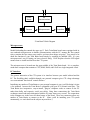
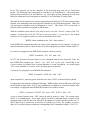
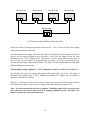
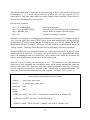
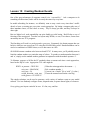
The block diagram below portrays the Train Brain's five primary functions. We'll look at each one
individually. For reference, position the Train Brain board so that its modular "telephone" style
connectors lie near the lower left.
7
Power
Supply
PC
Communications
Sensors
Microprocessor
Controllers
“Train Brain” Block Diagram
Microprocessor:
Model Railroading has entered the space age!!! Each Train Brain board comes equipped with its
own onboard microprocessor to handle communications with the PC, manage the four control
relays, monitor the four sensor ports, and let you know how things are going. You can tell a lot
about the function of your Train Brain board simply by watching its onboard LED. It’s your
microprocessor's way of letting you know what its doing. We'll decipher what the LED signal
means when we install and check out the CTI system.
The microprocessor is located near the upper middle of the Train Brain board. It is a complete,
stand-alone computer that contains a CPU, ROM, RAM, and I/O all in a single integrated circuit.
PC Interface:
The greatest innovation of the CTI system is its interface between your model railroad and the
PC. The flexibility that's available through your personal computer gives CTI a huge advantage
over conventional "hard-wired" control schemes.
Interfacing any number of Train Brains to your personal computer is easy (you'll be doing it in just
a few minutes) because the Train Brain is compatible with your PC's external serial port. The
Train Brain uses inexpensive, easy-to-install, "plug-in" telephone cords to connect to the PC
rather than bulky and expensive serial port cables. Using these connections, the Train Brain
exchanges control and status information with the PC many times every second. The connections
to the computer are in the lower left hand corner of the board. These two connectors allow any
number of Train Brains to connect to the PC. (Since you'll be installing your CTI system
momentarily, we won't dwell on the subject any more here.)
8
Controllers:
Each Train Brain board is equipped with 4 control relays, located from top to bottom along the
right-hand side of the board. You can think of these as single-pole-double-throw (SPDT)
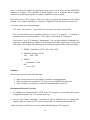
switches, which you can control remotely from the PC. The SPDT switch configuration is a
simple, yet highly versatile one, that's applicable to a wide range of control operations. Here are
just a few:
NO
COM
NO
COM
NC
“Normally Off ” Switch
NO
NO
NC
NC
COM
NC
“Normally On” Switch
COM
Output Selector
Input Selector
SPDT Switch Configurations
You can access the 3 connection points of each SPDT switch using the terminals located along
the right-hand edge of the Train Brain board. Note that the designation of each connector is
written next to it on the surface of the PC board. "NC" (normally closed) indicates the terminal
which is connected to the switch's COMMON input when no power is applied to the relay coil.
"NO" (normally open) designates the terminal which is connected to the switch's COMMON input
when the relay coil is energized.
To connect a device to the controller, simply insert the wires into the openings on the side of the
connector strip. Then screw down the retaining screws on the top of the connector until the wires
are secured. DON'T OVERTIGHTEN !!! A little pressure goes a long way.
Sensors:
Each Train Brain board is equipped with 4 sensor ports located along the upper left side of the
board. Again, notice that each sensor connector is labeled on the surface of the PC board. These
sensors are most commonly used to detect the location of trains, but with a little imagination
you'll think up a wide variety of additional applications. (For example, how about a motion
detector to turn on your railroad whenever someone approaches the layout, or a photo-detector
to automatically turn on the street and house lights in your layout whenever the room lights dim.)
The Train Brain's sensors are designed to detect the flow of current from pin A to pin B on the
sensor connector. The Train Brain supplies its own current for this purpose. NEVER connect
any source of current to the sensor pins.
The Train Brain's sensor ports are compatible with a wide variety of sensing devices. Acceptable
sensors include magnetic reed switches, IR photo-transistors, CdS photocells, Hall-effect
switches, current detection sensors, TTL compatible logic gates, and manual switches.
9
A variety of inexpensive, highly reliable, and easy-to-use sensor kits which plug directly into the
Train Brain's sensor ports, and which are great for use in detecting trains, are available from CTI
Electronics. We recommend that you try these first.
However, for the ardent "do-it-yourselfers" among us, Lesson 11 takes a more detailed look at
the Train Brain's sensor ports, and describes interfacing the Train Brain to an infrared photodetecting sensor built using parts available from Radio Shack.
If you're in doubt whether your sensors are compatible with the Train Brain, or if you need more
information on connecting alternative sensors, contact us at CTI Electronics. We'd be more than
happy to help.
Power Supply:
The Train Brain requires a power supply in the range of 9 to 15 Volts D.C. Around 12 volts is
ideal. Worst case power supply current occurs when all relays are on, and is about 150 milliamps. Power enters the Train Brain board through the power supply jack located almost dead
center along the bottom of the PC board.
CTI Electronics sells an inexpensive U.L. approved power supply that mates directly with this
connector. For those who wish to provide their own power source, the Train Brain board is
shipped with the appropriate power plug to mate with the Train Brain's power supply jack. You
will need to connect your power supply to this plug. The outer conductor is GROUND (-). The
inner connector is 12Volts (+). Don't get it backwards. Your warranty does not cover damage
caused by hooking up your power supply incorrectly !!!
The Train Brain has an onboard voltage regulator to convert your raw power supply to the
precise +5.0 Volts that its integrated circuits require. Nevertheless, the power you supply must be
"clean", i.e. it must always remain within the 9 to 15 Volt window, without any voltage
"dropouts". Don't even think about using the nearest convenient railroad track as a power supply
for the Train Brain. The intermittent inductive loading of the train's motor makes this power
supply too noisy for use in powering a computer. Figure on dedicating a power supply solely to
the Train Brain network.
10
Hooking Up Your CTI System:
Now that you're a little more familiar with the Train Brain board, it’s time to begin installing your
CTI system. The entire process involves just a few simple steps:
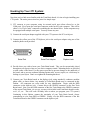
1) CTI connects to your computer using its external serial port (often referred to as the
COM port). First, locate the serial port connector on the back of your computer. This will be
either a 9 or 25 pin "male" connector resembling the one shown below. Some computers may
be equipped with multiple serial ports. You may choose any one.
2) Connect the serial port adapter supplied with your CTI system to the PC's serial port.
3) Connect the yellow port of the CTI diplexer jack to the serial port adapter using one of the
modular phone cords provided.
Serial Port
Serial Port Adapter
Diplexer Jack
4) Decide where you wish to locate your Train Brain boards. They can be conveniently placed
throughout your layout, wherever you desire computer control. Mounting holes are provided
at each corner of the board. Use the spacers provided to prevent damage to the underside of
the board, and to prevent accidental shorting against nails, screws, staples, etc. which may be
lurking on your layout. Don't over-tighten the mounting hardware.
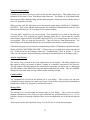
5) Connect your Train Brain boards to the diplexer jack, using standard 4 conductor modular
phone cable, as shown below. Any number of Train Brain boards may be connected in this
fashion. All connectors are color coded for easy identification. Begin with the RED
connector on the diplexer jack. Connect this to the GREEN connector on the first Train
Brain board. Next, wire the RED connector of the first Train Brain to the GREEN connector
of the second Train Brain. (As you go, you may wish to label each Train Brain board in order,
as #1, #2, etc. This will come in handy later on when you program your CTI system.)
Continuing in this fashion, connect the remainder of your Train Brain boards, always
remembering to wire from RED to GREEN. Finally, wire the RED connector of the last
Train Brain board to the GREEN connector on the diplexer jack.
11
That's all there is to it !!! When you're finished, your Train Brain boards should form a closed
loop, as shown below.
Note: Even if you’re only installing a single Train Brain, it's essential to complete the loop.
If you decide to add additional Train Brain boards in the future, simply unplug any one of the
existing connections, and then reconnect with the new board added to the string to form a bigger
loop.
Train Brain #1
G
R
Train Brain #2
G
Train Brain #3
R
G
R
Diplexer Jack
Modular Phone Cable
R
G
Y
To Serial Port
Connect Train Brains To Form A Closed Loop
12
Last Train Brain
G
R
Checking Out Your CTI System:
Now it’s time to check out your CTI network. Begin by applying power to each of the Train
Brain boards. See the description of the Train Brain's power supply requirements in the
Installation section above, if you have any questions.
You can tell a lot about the status of the Train Brain by watching the LED located near the center
of the board. With power applied, the LED should be lit. That means the Train Brain board has
successfully powered up, checked itself out, and is ready to begin communicating with the PC.
Verify that all Train Brain boards are behaving this way. If not, recheck the power supply. If a
voltmeter is available, verify that the voltage is between 9 and 15 volts D.C. If you are using your
own supply, verify that it has been wired correctly.
Once all Train Brain boards are powered up and operational, its time to check out their
communications with the PC. Turn on your PC if you haven't already done so, go to the directory
where you installed the CTI software, and run the program called "tbrain" that was supplied with
your CTI system:
at the DOS prompt, type tbrain then press <ENTER>
What happens next will depend upon the configuration of your PC. The tbrain software
automatically scans your system to find out how many serial ports are installed. If it finds only
one, tbrain assumes that's where CTI is connected, and proceeds immediately to the "Operations"
screen. If your system has more than one serial port, tbrain will first ask you which one is
connected to CTI. Simply answer the question, and you, too, will soon find yourself in the
"Operations" screen.
Lots of information about your layout is displayed on this screen. For now, we don't care about
much of it, since we are only concerned with our initial checkout. (We'll learn what everything
means when we get to Section 2 of the User's Guide.)
For now, just find the network "Status" indicator near the bottom left of the display. Hopefully it
reads: NORMAL, HALTED. If so, your computer is already successfully communicating with
your Train Brain network. The "Units Responding" message on your screen should reflect the
number of Train Brain boards you have installed. If so, congratulations are in order. You're now
ready to move on to Section 2, where you'll learn to put your CTI system to work. At this point,
it might be worth noticing the LEDs on your Train Brain boards. They should be flashing rapidly.
Each time they flash, the Train Brains and your PC have successfully communicated. (If you're
using a more powerful PC, and/or a small number of Train Brains, the flashing may be so fast that
it is invisible to the naked eye, and will simply appear as a dimming of the LED.)
If, on the other hand, things haven't gone quite so smoothly, the next section will hopefully shed
some light on the problem, and get you back on track.
13
Troubleshooting:
When something goes wrong with the Train Brain network, your first objective is to isolate the
problem. Here are some suggestions based on past experience:
Remove each Train Brain board from the network by disconnecting its modular phone cords.
Now try powering up the board again. If the LED lights, the power supply and the Train Brain
board are probably okay, and the problem is most likely in the wiring.
In that case, go back over your wiring to make sure you've always wired from RED to GREEN.
Make sure your wiring forms a closed loop as shown in the Installation section.
If you have multiple Train Brains in your system, try building up the network incrementally. Start
with one Train Brain wired to the PC. If that works, try two, then three, and so on, until the PC
can no longer communicate with the Train Brain boards. At that point you've isolated the
problem to the last board or wire you added. Try swapping one of them. If the problem goes
away, you now know exactly where the problem lies.
If you supplied your own phone cords, look closely at their connectors. Some inexpensive phone
cords come with only two out of the standard 4 wires installed. The Train Brain boards need all 4
wires to work properly.
Use the Train Brain's LED as a troubleshooting guide. As the PC communicates with the Train
Brain boards, their LEDs will begin flashing. Follow along beginning at the first Train Brain
board, and examine the behavior of each board's LED. If you come to a point where the LED
isn't flashing, or is behaving differently than earlier ones, check that board and its connections for
possible problems.
If you can't get the Train Brain board to power up, check the power supply voltage and polarity.
It should be around +12 Volts D.C. Make sure the power supply you are using is "clean", and
always remains between +9 and +15 Volts. Never share a Train Brain power supply with any
inductive load (such as a motor). In general, train transformers make poor power supplies for
computer equipment, because they lack sufficient output filtering. If your Train Brain behaves
intermittently, try adding a capacitor across the power supply's output (observe polarity), or
consider using a regulated power supply.
Once you've isolated the problem and exhausted all other possibilities, if you suspect the Train
Brain board is at fault, just send it back to us at CTI Electronics. We'll fix or replace it free of
charge during the warranty period, or let you know the repair cost if the warranty has expired.
Provide any information you can about the problem. For fastest service, be sure to send us a
phone number where we can reach you.
Remember to keep the protective anti-static bag your board was shipped in, in case you need to
return it. Place the board in its anti-static bag and pack securely in a rigid container.
14
Section 2: Using CTI
In this section, you'll learn to run your model railroad using the CTI system. Incorporating the PC
into your model railroad will provide you with an incredible amount of flexibility. With CTI, your
PC can respond interactively to your commands, or can handle the mundane chores associated
with running your layout (e.g., signaling and block control) for you, completely automatically.
To be able to run your model railroad, the PC must first be taught what to do. To make
programming the operation of your model railroad quick and easy, CTI Electronics invented
"TCL", the Train Control Language. TCL is not a complicated computer language. It uses a
simple set of English language commands to describe the operation of your railroad. Using this
description, the CTI system learns to operate your layout.
You can create TCL "programs" using your favorite word processor. The only requirement is
that the files must be saved in "ASCII" format. ASCII is a widely accepted standard that lets
programs exchange data with one another. Any reasonable word processor will be able to create
ASCII compatible files. Some word processors use the term "DOS text" instead of ASCII.
Check your word processor's documentation if you're not sure how to create ASCII files.
There's no better way to learn TCL than to jump right in and try out some examples. Mastering
the following few lessons will make you an expert. These examples were purposely designed to
be very simple; some may even seem nonsensical. They are solely intended to help you learn to
use CTI with the least amount of effort. You will then be able to apply these concepts to realworld situations on your model railroad.
We highly recommend that you take the time to work through each example. To do so, you will
need a single Train Brain board connected to your PC as described in the Installation section
above, a simple loop of track, and a train.
So without further ado, let’s get started learning TCL.
Note: In the TCL program examples below, italics are used to represent
“keywords”, i.e. words which have a specific meaning in the TCL
language. Normal text refers to items that the user is free to choose.
15
Lesson 1: Interactive Control
This lesson illustrates how to make your layout respond to your commands entered at the PC. In
this simple example we'll use the Train Brain to control the operation of a single device, a train.
Using these same techniques, you'll then be able to control any aspect of your railroad using
commands which you define.
Let's assume that we want the train to run whenever we type "GO" at the keyboard. When we
type "STOP", we want it to stop. When we type "PAUSE", we want the train to stop, wait 5
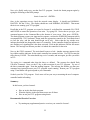
seconds, then continue on its way again. Shown below is a simple TCL program that teaches the
CTI system to respond to these commands. This TCL file is included on your master disk as
"lesson1.tcl", but we suggest you create it yourself to become familiar with using TCL
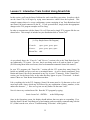
{ A Simple TCL Program }
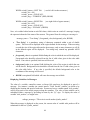
Controls:
Actions:
WHEN
DO
train, spare, spare, spare
“train”
$command = GO
train = ON
NO
1
WHEN
DO
$command = STOP
train = OFF
WHEN
DO
$command = PAUSE
train = OFF,
wait 5,
train = ON
Train Brain
Controller NC
To Train
Transformer
Wiring Diagram for Lesson #1
A Closer Look at a TCL Program:
TCL programs consist of one or more sections. The program above is made up of two sections,
named "Controls:" and "Actions:". In TCL, section names always end in a colon ":".
We use the Controls section to give each of the Train Brain's controllers a meaningful name. In
this example, we are only using the first of our Train Brain's four controllers. Since it's being used
to start and stop a train, that's what we've named it. The remaining 3 controllers on our Train
Brain board are unused, as indicated by the corresponding "spare" entries in the Controls list.
In TCL, a few simple rules govern controller names. Names can be up to 16 characters in length,
and must begin with a letter. This first letter may be followed by any combination of letters,
numbers, or the underscore character "_". Each controller name must be unique.
16
In our TCL program, we list the controllers in the order that they occur on our Train Brain
boards. The first name listed corresponds to controller #1 on Train Brain #1. The second name
listed refers to controller #2 on Train Brain #1, etc. Since there are four controllers on each Train
Brain, the fifth name listed corresponds to controller #1 on Train Brain #2, and so forth.
The order in which controllers are listed is important because that's how CTI forms an association
between your meaningful name and a physical controller in your Train Brain network. That's also
why any unused controllers must be designated as "spare". This allows CTI to keep track of
precisely which controller corresponds to which name.
With the controllers aptly named, we're ready to move on to the "Actions" section of the TCL
program. It's here that you’ll tell CTI how to run your layout. As you can see, the Actions
section of a TCL program consists of a series of statements of the form:
" WHEN <these conditions exist> DO < these actions> "
Each WHEN-DO statement describes one aspect of the operation of your railroad. It's the one
and only statement you'll ever need to know to be able to program your model railroad with TCL.
Lets look at our program's first WHEN-DO statement a bit more closely:
WHEN $command = GO DO train = ON
In TCL, the $command keyword refers to your commands entered at the keyboard. Thus, our
first WHEN-DO statement says, "When I type "GO", turn on the train". Recall that in the
Controls section, we defined "train" to mean controller #1 on our Train Brain. As a result, typing
"GO" causes controller #1's relay to close, providing power to the train.
Conversely, our program's second WHEN-DO statement:
WHEN $command = STOP DO train = OFF
opens controller #1, removing power from the train, when "STOP" is entered at the keyboard.
It's important to note that the conditions following a WHEN and the actions following a DO need
not be limited to single items. In TCL, any combination of conditions or actions are equally valid.
For example, our program's third WHEN-DO includes a list of three actions:
WHEN $command = PAUSE DO train = OFF, WAIT 5, train = ON
As we've already learned, train = OFF causes the train to come to a stop. The second action,
WAIT 5, is something new. As its name implies, the WAIT command causes execution of the
remaining items in the DO list to be delayed by the number of seconds specified (in this case, 5).
WAIT times may be specified to an accuracy of 1/100th of a second. For example, to cause a
delay of five and one-quarter seconds the corresponding WAIT command would be: WAIT 5.25
17
Once 5 seconds have elapsed, the third action restores power to the train, and this WHEN-DO
statement is complete. This capability to chain together a list of operations allows complex
actions to be carried out in response to a single command from the keyboard.
Well, that's our first TCL program. That's all it takes to program the operation of your model
railroad. You're simply describing, in "structured" English, how you want your layout to work.
A few more points are worth mentioning:
TCL is not "case sensitive". Upper and lower case letters are treated exactly alike.
You can (and should) place comments anywhere in your TCL program. A comment is
anything between two curly brackets. { This sentence, for example, is a comment. }
The layout of your TCL program is unimportant. You can place multiple commands on a
single line, or spread them out. Whatever looks best to you is fine. Adopt a style you like, and
stick with it. For example, the following are all perfectly acceptable forms of the same thing:
1) WHEN $command = STOP DO train = OFF
2) WHEN $command = STOP
DO
train = OFF
3) WHEN
$command = STOP
DO
train = OFF
Summary:
In this lesson, you have learned the following:
•
•
•
How to assign each of the Train Brain's controllers a meaningful name.
How to program the operation of CTI using a series of WHEN-DO statements.
How to control your layout from keyboard commands entered at the PC.
Recommended Practice Exercises:
•
Try adding a new command called "STEP" to the TCL program we just created, which causes
a stopped train to start, run for 4 seconds, then stop.
•
Use the Train Brain's remaining 3 controllers to operate additional devices (sound units,
signals, lights, etc.) and write TCL code to control them via commands entered at the PC.
In the next lesson, you'll learn to run your model railroad using your TCL program.
18
Lesson 2: Running Your TCL Programs
Now that we've created a TCL program, it’s time to put it to work on your model railroad. That's
the purpose of the "tbrain" program. Tbrain is a sophisticated, yet easy to use, operating system
designed to run your model railroad using instructions supplied by your TCL programs.
To invoke tbrain, simply type
tbrain <your TCL program name > <ENTER>
at the DOS prompt. For example, to run the train control program we've just examined, type:
tbrain lesson1.tcl <ENTER>
When tbrain is invoked, it loads the TCL program that you listed on the command line, in this
case "lesson1.tcl". If tbrain encounters anything in your TCL program which it doesn't
understand, it will point out the location of your errors and request that you fix them and try
again. The error message which tbrain displays indicates the reason for the error and the line
number in your TCL program where it occurred. For your convenience, error messages are also
put into a file called "errors.tcl" stored in the current directory on your disk. You can send this
file to the printer, or import it into your word processor so that it's readily available as you work
on fixing your mistakes.
Once satisfied there are no errors in your TCL code, tbrain is ready to proceed to the
"Operations" screen, where it will run your model railroad. (Reminder: If tbrain finds more than
one serial port, it will first ask you which one is connected to CTI before moving to the
Operations screen.)
In the Operations screen, you will be presented with a wide variety of information about your
layout and about the CTI network. Let's take a moment to clarify what everything means. A
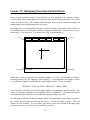
sample snapshot of an operations screen is shown below. The screen is physically divided into a
number of regions. Here's a brief description of what each region contains:
Special Function Menu:
Located across the top of your screen, the "Special Function Menu" lists a variety of control
operations that may be accessed using the "function keys" F1, F2, etc. on your PC's keyboard.
(If your PC has a mouse, you can also perform these functions simply by clicking on the
appropriate function button with the left mouse button.)
F1 and F2 are used to start and stop the execution of your TCL program (more about those in a
moment). F3 selects tbrain's "Quick-Keys" feature. (Quick-Keys are described in Lesson 4.) F4
will reset your CTI system in case something ever "hangs up". F5 may be used to edit your TCL
source code using your favorite editor. F6 is used to exit the tbrain program.
19
Function Buttons
F1 Run
F2 Stop
F3 Qkeys
F4 Reset
Sensors
Sensor Display
Network Status
Display
*
*
*
*
*
*
*
*
*
*
*
*
*
*
*
*
*
*
*
*
*
*
*
*
*
*
*
*
*
*
*
*
*
*
*
*
*
*
*
*
*
*
*
*
*
*
*
*
*
*
*
*
*
*
*
*
*
*
*
*
*
*
*
*
*
*
*
*
*
*
F5 Edit
F6 Exit
Controllers
*
*
*
*
*
*
*
*
*
*
*
*
*
*
*
*
*
*
*
*
*
*
*
*
*
*
*
*
*
*
*
*
*
*
*
*
*
*
*
*
*
*
*
*
*
*
*
*
*
*
*
*
*
*
*
*
*
*
*
*
*
*
*
*
*
*
*
*
*
*
*
*
*
*
*
*
*
*
*
*
*
*
*
*
*
*
*
*
*
*
*
*
*
*
*
*
*
*
*
*
*
*
*
*
*
*
*
*
*
*
*
*
*
*
*
*
*
*
*
*
*
*
*
*
*
*
*
*
*
*
Controller Display
Activity Log
Deactivating TRAIN (5)
Activating SEMAPHORE (2)
Activating WHISTLE (12)
Deactivating WHISTLE (12)
Time: 12:34:56 (00:10:45)
Units Responding: 15
Status: NORMAL, HALTED
Command:
System Activated
Command Bar
Message Bar
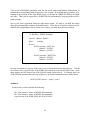
A Sample tbrain Operations Screen
Sensor Display:
Located in the upper left portion of your screen, the "Sensor Display" indicates the status of each
of the sensors in your Train Brain network. Up to 100 sensors can be displayed. Each "*"
indicator represents the state of one sensor.
At this point, you haven't connected any sensors, so all indicators should be "off" (light blue in
color). To see what happens to the display when a sensor is activated, simply connect together
the A and B inputs on one of the Train Brain's sensor ports. The corresponding indicator should
turn red and begin blinking. Remove the connection and the display should return to light blue.
You can determine the name of a sensor by clicking on its indicator with the left mouse button.
Controller Display:
Located in the upper right portion of your screen, the "Controller Display" indicates the status of
each of the controllers in your Train Brain network. Up to 100 controllers can be displayed.
Each "*" represents the state of one controller.
Since we haven't executed any commands, all indicators should be "off" (light blue in color).
Shortly, we'll run the TCL program which we wrote in Lesson #1. At that time, the display will
indicate the state of the controllers on the Train Brain as they respond to your commands.
You can determine the name of a controller by clicking on its indicator with the left mouse button.
20
Network Status Display:
Located near the lower left of your screen is the network status display. This display keeps you
informed of the status of your Train Brain control network. The number of Train Brain boards
that are successfully communicating with the tbrain program is displayed, along with the status of
your TCL program's execution.
When you first enter the Operations screen the network status display should read: "NORMAL,
HALTED". That means that the tbrain program has established communications with the Train
Brain boards, but that your TCL program is not currently running.
Try using the F1 and F2 keys on your keyboard. These function keys are used to start and stop
execution of your TCL program (see Special Function Menu above). Notice that the network
status display toggles between RUNNING and HALTED as you start and stop the execution of
your program. Next, try using the Reset key F4. This will reset the Train Brain network. The
status display will momentarily indicate the reset condition, then return to normal operation.
If the tbrain program is unsuccessful in communicating with the CTI hardware, the network status
display will flash "NETWORK FAILURE". If this occurs, try resetting the network using the F4
key. If that doesn't fix the problem, consult the "Troubleshooting" guide in Section 1. (If you
wish, you can simulate a network failure by momentarily disconnecting one of the phone cords.)
Activity Log Window:
The Activity Log is located in the lower right portion of your display. The tbrain program uses
this region to notify you anytime it makes a change to a controller somewhere in the network.
The log window will list the name of the controller, the action that was taken, and as a debugging
tool, the number of the WHEN-DO statement that brought about the action. Since no controller
changes have yet been made, the log window should currently be blank.
Command Bar:
The command bar is located at the bottom left of your display. This is where you can enter
commands from the keyboard to control your layout. Soon we'll try using keyboard commands in
conjunction with the TCL program we created in Lesson #1.
Message Bar:
The message bar is located along the bottom right of your display. This is where the tbrain
program communicates with you as you enter commands, use special function keys, etc. You've
probably already seen messages displayed here as you investigated the use of the special function
keys.
That's a quick look at the Operations screen. Use the F6 key to exit the tbrain program.
21
Now we're finally ready to try out that first TCL program. Invoke the tbrain program again by
typing the following at the DOS prompt:
tbrain lesson1.tcl <ENTER>
Once in the operations screen, check the network status display. It should read NORMAL,
HALTED. Hit the F1 key. The display should now read NORMAL, RUNNING. That means
tbrain is now running your TCL program.
Recall that in the TCL program we created in Lesson #1 we defined the commands GO, STOP,
and PAUSE to control the operation of our train. Try typing GO. Notice that as you type, your
command appears in the Command Bar at the bottom of your screen. Now press <ENTER>.
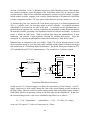
The tbrain program accepts your input and in response, executes the WHEN-DO statement which
accompanied the "GO" command. Tbrain sends the appropriate control to the Train Brain board
to close the relay, and the train should begin on its way. Notice that the log window now
indicates that tbrain has changed the status of a controller. In the controller display an indicator is
now flashing red, signaling that it has been activated. Click on this indicator with the left mouse
button. The message bar informs you that it is indeed the controller for the train.
Now try the STOP command. The train should come to a halt. Another message appears in the
log window and the indicator for the train's controller has returned to blue. Use GO to restart the
train, then try PAUSE. The train should stop, wait 5 seconds, and start again, just like you told it
in TCL.
Try typing in a command other than the three we defined. The message bar should flash
Unknown Command. Next, use the F2 key to halt execution of your TCL program. Try one of
the three commands again. Note that nothing happens. The message bar informs you that your
command was ignored because your TCL program wasn't running. Restart your TCL program
using F1 and tbrain will again respond to your commands.
So that's your first TCL program. You're now well on your way to mastering the art of computer
controlled model railroading.
Summary:
In this lesson, you have learned:
•
•
•
How to invoke the tbrain program.
What the displays in the operations screen are all about.
How to run your TCL programs using tbrain.
Recommended Practice Exercises:
•
Try running any supplemental practice exercises you created in Lesson 1.
22
Lesson 3: Fully Automatic Operation
Thus far, you've learned how to control the operation of your model railroad interactively from
your PC using keyboard commands which you create. In this lesson you'll learn to take the next
big step: having the PC control your layout automatically. To illustrate the point we'll create an
automated station stop. Each time the train arrives at the station it will stop. After 10 seconds,
two whistle blasts will blow to signal its departure and the train will leave the station.
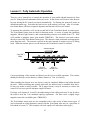
To automate the operation, we'll use the second half of our Train Brain board, its sensor ports.
The Train Brain's sensor ports are ideal for detecting trains. A variety of sensor kits (including
magnetic, infrared, light sensitive, and current-detecting sensors) are available from CTI. Here
we'll consider a magnetic sensor (part number TB002-M1). The detector's two leads connect
directly to one of the Train Brain's sensor ports. The detector is then positioned at an appropriate
point along the track. The actuator is placed on the train, beneath an engine or piece of rolling
stock. When the actuator passes over the detector, the Train Brain's sensor is activated.
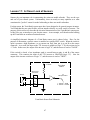
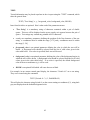
Actuator Magnet
1 cm (0.4”)
Max.
Wire To
Sensor Port
A
Wire To
Sensor Port
B
Correct positioning of the actuator and detector are the keys to reliable operation. The actuator
should pass directly over the detector, within a distance of 1 cm (0.4 inches).
When installing the detector on a new layout, it may be completely hidden in the ballast beneath
the track. When retrofitting into existing trackwork, the detector may be installed from above.
It's tiny size makes it nearly invisible. On N gauge layouts, it may be necessary to remove the
center of a few ties to provide adequate coupler clearance.
For larger scale layouts (S, O and G), the undercarriage of the rolling stock may lie too far above
the track to meet the 1 cm maximum spacing requirement. For these cases a slightly larger
magnetic sensor kit is available (part # TB002-M2).
The Train Brain's sensor ports are also compatible with a wide variety of other sensor types If
you're interested in trying alternative sensors with the Train Brain, now may be a good time to
refer ahead to Lesson 11. (This example will work equally well with other sensor types.)
23
Before we begin programming our station stop, take a few minutes to experiment with the sensor
and actuator. Run the tbrain program (no TCL program is required at this point) by typing:
tbrain <ENTER>
at the DOS prompt.
Proceed to the Operations screen and note the state of the sensor displays, which at this point
should all be off (light blue). Connect the two leads of the detector to the A and B inputs of one
of the sensor ports on your Train Brain board (it doesn't matter which of the two leads gets
connected to A and which to B).
Now note the state of the sensor display as you bring the actuator towards the detector. When
the two are in close proximity the sensor display should indicate that the Train Brain's sensor has
been activated.
Now position the detector along a section of track and install the actuator beneath a piece of
rolling stock. For this simple test, a piece of tape should suffice to hold it in place. Pass the car
back and forth over the detector and note whether the PC's sensor display activates. Experiment
with the detector and actuator positioning until the detector trips reliably.
Once you're satisfied with the detector positioning, its time to write the TCL program to perform
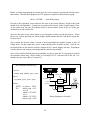
our automatic station stop. Shown below is an example of TCL code that will do the job. It is
included on your source disk as "lesson3.tcl"
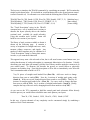
{ An Automated Station Stop }
Detector
Controls:
station_stop, whistle, spare, spare
Sensors:
at_station, spare, spare, spare
1B
Train Brain
Sensor Port
“at_station”
at_station = TRUE
station_stop = ON,
wait 10,
whistle = PULSE 2,
wait 1,
whistle = PULSE 2,
station_stop = OFF
“station_stop”
1 Train Brain
Controller
To Train
Transformer
Actions:
WHEN
DO
1A
...
“whistle”
NO
NC
NO
ACME
Sound Unit
2 Train Brain
Controller NC
Wiring Diagram for Lesson #3
24
There are a few features in this TCL program that you haven't seen before. The first is a new
section, called "Sensors:" This serves the same purpose as the Controls: section. It lets us give
each of the Train Brain's sensors a meaningful name.
The same rules governing controller names also apply here. And just like for controllers, sensor
names must be listed in the order in which they occur on your Train Brain boards. Here, we just
need one sensor, to detect when the train has arrived at the station.
Much of the remainder of the program should look familiar. You've seen the format of the
WHEN-DO statement before, when you used it to accept your commands from the keyboard.
Now you'll use it again, to check for the arrival of the train at the station.
Sensors can trigger events automatically by including them as a condition in a WHEN-DO
statement. In TCL, activated sensors are defined as TRUE. Inactive sensors are defined as
FALSE.
Our station stop's WHEN clause looks like this:
WHEN at_station = TRUE
This statement tells tbrain to monitor the state of the Train Brain's first sensor (which we've
named "at_station"). As the train reaches the station, the sensor is activated (i.e. it becomes
TRUE), and the WHEN condition is satisfied. That causes tbrain to begin executing the list of
commands following the DO. As a result of the first two commands in the list:
station_stop =ON,
WAIT 10,
the train stops and waits for 10 seconds. Notice that turning the "station_stop" controller on
causes the train to stop. That's because we've wired the track power to the "normally closed" side
of the SPDT switch. Activating the relay breaks this connection, stopping the train.
The next command:
whistle = PULSE 2
is something new. But, actually, it’s nothing more than a shortcut. "PULSING" the whistle
controller for 2 seconds is exactly the same as doing the following:
whistle = ON,
WAIT 2,
whistle = OFF
The PULSE command turns the indicated controller on for the number of seconds specified, and
then turns it off again.
25
A second later, another PULSE command activates the whistle again. Having blown two whistle
blasts to signal its departure, the final command allows the train to leave the station.
As with the WAIT command, PULSE times can be controlled to an accuracy of 1/100th of a
second. For example, to produce a quarter second pulse, the appropriate command would be:
PULSE 0.25
Let's try this program. Run tbrain again by typing:
tbrain lesson3.tcl <ENTER>
Proceed to the operations screen as before. Start your train equipped with the actuator. The train
should proceed normally around the track. Now, using the F1 key, start your TCL program.
From now on, every time that the train reaches the station it will stop, wait for 10 seconds, the
whistle will blow, and the train will depart. And it will all happen automatically !!!
Summary:
In this lesson, you have learned the following:
•
•
•
How to install sensors on your layout and connect them to the Train Brain.
How to check the state of a sensor in a TCL program.
How to make your PC monitor and run your model railroad automatically.
Recommended Practice Exercises:
•
Try connecting a manual SPST switch to another of the Train Brain's sensor ports,
and write TCL code to blow three whistle blasts whenever the switch is pressed.
26
Lesson 4: Using Quick-Keys
In Lesson #1, you learned to define keyboard commands that allow interactive control of your
layout. Once you've created a significant number of commands, you'll soon discover two
drawbacks to that technique. First of all, you must remember each of the commands. Second,
you must type them out every time you want to use them. That can certainly get tiresome during
a long operating session. Fortunately, there's an easier way - "Quick-Keys".
Quick-Keys are "soft" keys that appear on your CTI control screen. Quick-Keys are designed to
respond to your PC's mouse. Anything that you can do by typing in a command at the keyboard,
you can also do with a click of the mouse on a Quick-Key. Quick-Keys eliminate typing, and
their function can be displayed right on the key, so there's nothing to remember !!!
To illustrate using Quick-Keys, we'll return to the example of Lesson #1, where we defined
keyboard commands "GO", "STOP", and "PAUSE" to control the operation of a train. We'll
tackle the same problem again, this time using Quick-Keys. (The same wiring used in Lesson #1
can be used here.)
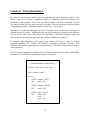
The TCL program listing below illustrates how to create Quick-Keys and use them in WHEN-DO
statements. It’s included on your distribution disk as "lesson4.tcl".
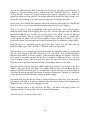
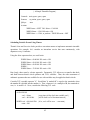
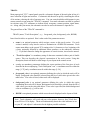
{ A Simple Example of Quick-Keys }
Controls: train, spare, spare, spare
Qkeys: throttle, pause
Actions:
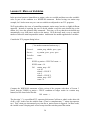
WHEN throttle = LEFT
DO
train = ON
WHEN throttle = RIGHT
DO
train = OFF
WHEN pause = LEFT
DO
train = OFF,
wait 5,
train = ON
27
The first step in using Quick-Keys is to name each of the keys as you want them to appear on
your CTI control panel. That’s the purpose of the "QKeys:" section of the TCL program.
Quick-Key names must begin with a letter, which can be followed by any combination of letters,
numbers, or the underscore character "_". Quick-Key names should be limited to 8 characters or
less, so their name will fit entirely on the key. If you give them a longer name, only the first 8
characters will be displayed.
Once named, Quick-Keys can be used as a condition in a WHEN-DO statement. The possible
values of a Quick-Key are "LEFT", "RIGHT", and "CENTER". These values correspond to the
buttons on your PC's mouse. For example, clicking the left mouse button when the mouse cursor
is positioned over a Quick-Key causes that Quick-Key to take on the value LEFT. (The value
"CENTER" is only defined for systems with a 3 button mouse. If you have a mouse with 2
buttons, use only the values LEFT and RIGHT.)
With those definitions in mind, the function of the TCL program listed above should become
clear. Clicking the left mouse button while positioned over the Quick-Key named "throttle" will
cause the train to run. Clicking the right mouse button while positioned over throttle will cause
the train to stop. Clicking the left button on the "pause" key will cause a running train to stop for
5 seconds, then resume running.
Try out this program in tbrain. Once in the Operations screen, start the program running using
F1, and then use the F3 key to enable Quick-Keys (or click on the Quick-Keys function button
with the left mouse button). The sensor and controller displays will be replaced by the QuickKeys keyboard display.
Notice that the first two keys are labeled with the names that we assigned to them in the QuickKeys section of our TCL program.
Position the mouse cursor over the Quick-Key labeled "throttle". Click the left mouse button.
The train should start running. Click throttle again, this time using the right mouse button. The
train should stop. Start the train again, and try "pause".
Stop the train and use F3 to return to the sensor and controller monitoring display.
This simple example illustrates how easy Quick-Keys are to define and use. Employ Quick-Keys
for all your most commonly used commands. Try to develop a consistent "style", for example,
LEFT button to turn things on, RIGHT button to turn things off.
Using TCL code, you can tailor the "look" of the Quick-Keys control panel to best suit your
railroad's needs. For example, you may prefer to organize Quick-Keys into logical groups on the
control screen. In that case, you can use the "spare" keyword to purposely skip over any unused
keys, so that related keys will line up as desired on the Quick-Keys keyboard.
Alternatively, using the "hide" keyword will prevent an unused key from being displayed at all.
28
In addition, you may individually select the color of the text to be displayed on each Quick-Key
button. Available colors are: RED, GREEN, BLUE, GRAY, BLACK, YELLOW, CYAN,
MAGENTA, and WHITE. The text on each button may also be individually commanded to blink.
By default, Quick-Key buttons are displayed using dark gray text on a light gray background. To
change the color selection, simply add "color modifiers" to the button names in the "QKeys:"
section of your TCL program. For example:
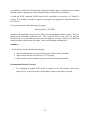
QKeys:
throttle (BLUE), brake (RED, BLINK), whistle (GREEN), hide, hide ...
Colors appear differently on different monitors. Try each of the above colors, and pick two or
three that look best on your monitor. Avoid using too many colors on your control panel; it will
look too disorganized. Use specific colors to convey information.
Summary:
In this lesson, you have learned the following:
•
•
•
How to create Quick-Keys and use them as a condition in WHEN-DO statements.
How to access and use Quick-Keys from within tbrain.
How to tailor the appearance of the Quick-Keys control panel.
Recommended Practice Exercises:
•
Add an additional Quick-Key called "Step" which performs the same function as the "Step"
command you defined in Lesson #1. Experiment with the Quick-Keys customizing options to
find a control panel that best suits your application of Quick-Keys.
Note: Using Quick-Keys requires a DOS or WINDOWS compatible mouse driver to be
running on your system. This is typically installed at power-up using a command in
your “autoexec.bat” file. If your mouse fails to work with the CTI software, your
mouse driver is probably not running. Consult your mouse manufacturer’s
instructions for loading the appropriate driver software.
29
Variations On a Theme: (The Dash-8 and Watchman)
The Train Brain’s unique combination of control and sensing capabilities make it a great choice
for automating almost any aspect of your model railroad. But some applications naturally require
more control than sensing, while others need more sensing than control. Fortunately, there’s a
whole family of Train Brain modules that let you tailor the CTI network to your application.
The “Train Brain-8”, or “Dash-8” for short (CTI Part #TB008), is an all-control version of the
Train Brain. It features 8 SPDT controllers. The Dash-8’s control relays are identical to those on
the original Train Brain. To control the Dash-8’s relays, simply give each one a name, and
include them in the “Controls:” section of your TCL program, based on their location in the CTI
network. They may then be used as part of the condition in a WHEN clause, or as a data source
in a DO. As always, be sure to designate any unused Dash-8 controllers as “spare”.
Conversely, the “Watchman” (CTI Part #TB010) is an all-sensing version of the Train Brain. It
features 8 sensors. The Watchman’s sensor ports are electrically equivalent to those of the
original Train-Brain; however, they’re much more versatile. The sensitivity of each of the
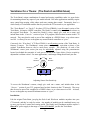
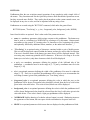
Watchman’s sensor ports sensor port may be individually adjusted using the potentiometer
located just behind the terminals of each port as shown in the figure below. Precise sensitivity
adjustment is seldom critical. For most applications, a mid-range setting should work just fine.
Less
Sensitive
More
Sensitive
Sensor Port
Connector
Sensitivity
Adjust
A
B
Adjusting Sensor Port Sensitivity
To access the Watchman’s sensors, simply give each one a name, and include them in the
“Sensors:” section of your TCL program based on their location in the CTI network. They may
then be used as part of the condition in a WHEN clause, or as a data source in a DO. As usual,
be sure to designate any unused Watchman sensors as “spare”.
Installation:
Like the original Train Brain, just plug the Dash-8 and Watchman modules anywhere into your
CTI network, and they’re ready for action. Any number of modules can be combined in any way
to meet your layout’s control and sensing needs. The Dash-8 and Watchman modules require a
filtered DC power supply in the range of +9 to +15 Volts DC, just like the Train Brain.
30
Section 3: Locomotive Speed Control
By now we hope you're convinced that the Train Brain is the ideal solution to many of the control
problems found around your model railroad. But while the Train Brain is great for "discrete"
control (turning things on or off, throwing switches, etc.), it is not designed to handle one of the
biggest control tasks of all - controlling locomotives!!!
That's why CTI Electronics invented Smart Cab, the fully programmable, computer controlled
throttle that interfaces to your PC. With Smart Cab, train speed, direction, momentum, and
braking can all be controlled by your computer. And best of all, Smart Cab uses the same
interconnect network as the Train Brain and is fully supported by CTI's control software. By
combining the capabilities of the Smart Cab with those of the Train Brain, the CTI system
provides a single, fully integrated solution to all of your railroad's computer control needs.
In this section, you'll see how easy it is to install and use Smart Cab. You will learn how to
control locomotives interactively from the CTI control panel, and how to let your PC control your
locomotives automatically using instructions in your TCL programs. When finished, you will be
able to dispatch trains from your control console. While en route, they will change speed, stop,
and start smoothly, in prototypical response to trackside signals - all automatically under
computer control !!!
Introducing the "Smart Cab":
As with the Train Brain, it is best to begin with a quick look at the Smart Cab board itself. A
block diagram of the Smart Cab is shown below.
PC
Communications
Overload
Protection
Microprocessor
Power Supply
Conditioning
Digitally Controlled
Voltage Adjust
Smart Cab Block Diagram
31
Direction
Control
Smart Cab takes the raw output of any low-cost toy transformer, and using its onboard
microprocessor, digitally controls and conditions the power supplied to your locomotive based
upon commands received from the PC. With digital control, precise speed selection, prototypical
momentum, ultra-low speed pulsed operation, direction control, and braking can all be managed
by your PC. Smart Cab will turn any inexpensive toy transformer into a computer controlled
throttle that outperforms many of the highest priced train power packs available today.
We'll begin by taking a brief "walking tour" around the Smart Cab. You may wish to have a
Smart Cab board handy as we go through this description. As with the Train Brain, observe ESD
precautions when handling the Smart Cab board. For reference, position the board so that its
modular "telephone" style connectors are located to the upper right.
Many of the components on the Smart Cab should be familiar to Train Brain users, since both
boards share a number of common features. Since these functions were already discussed when
we introduced the Train Brain, here we'll concentrate on those items unique to the Smart Cab.
Microprocessor:
The Smart Cab's microprocessor plays the biggest role in controlling locomotive operation.
The microprocessor handles communications with the PC, automatically manages speed changes
to simulate the prototypical effects of momentum, oversees the function of the digitally controlled
voltage selector, controls pulsed operation for optimum ultra-low speed performance, and selects
output voltage polarity for direction control.
Digitally Controlled Voltage Adjust:
The "Digital Voltage Adjustment" unit (DVA) occupies much of the area around the top center of
the board. Under the control of Smart Cab's microprocessor, the DVA performs locomotive
speed control. The DVA unit provides precise output voltage selection in 100 distinct steps.
To optimize performance with a wide variety of model railroad gauges, the maximum output
voltage supplied by the Smart Cab is adjustable using the "tweaking" potentiometer (VR1)
located near the center of the PC board. To change this setting, see "Maximizing Smart Cab
Performance" later in this section. Of course, the voltage output of the Smart Cab will always be
limited by the voltage supplied by your transformer even if the maximum voltage adjustment is set
to a higher value.
Direction Control:
Under command from the Smart Cab's microprocessor, the "Direction Control Unit"
automatically regulates output voltage polarity to control the direction of the locomotive. Onboard safeguard logic will automatically bring a moving train to a full stop before carrying out a
direction change request from the PC. The direction control unit is located near the top left-hand
side of the Smart Cab board.
32
Voltage Regulation/Power Conditioning:
The Smart Cab’s "power module" generates the actual voltage supplied to your locomotive. It’s
key component is a single integrated circuit mounted atop the heatsink which occupies the lower
half of the board.
The power module continually monitors Smart Cab's output voltage, and responds instantly to
maintain voltage regulation accurate to within 0.1%, independent of changes in load. Automatic
overload protection and thermal shutdown circuitry are included in its design.
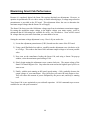
The power module’s heatsink may feel warm during operation. This is perfectly normal. Natural
convection cooling is used to dissipate heat, so locate the Smart Cab board so as to ensure
adequate ventilation. If the power module gets too warm it will automatically shut down. If the
heatsink feels unusually hot, you are overloading the unit. If so, see "Maximizing Smart Cab
Performance" later in this section.
Digital Power Supply:
In addition to the power supplied for use by the locomotive, the Smart Cab board requires a
separate power supply dedicated to its onboard digital computer. This "digital" supply enters the
Smart Cab through the black power supply jack located near dead-center along the top of the PC
board. As with the Train Brain, this power supply should be in the range of +9 to +15 Volts D.C.
Around 12 Volts is ideal.
The same low cost, U.L. approved power supply available from CTI for use with the Train Brain
is also compatible with the Smart Cab. For those who wish to supply their own power source, the
Smart Cab board is shipped with the appropriate power supply plug to mate with Smart Cab's
power jack. You'll need to hook up your power supply to this plug. The outer conductor is
GROUND (-). The inner connector is 12 Volts (+). Always double check your wiring!!!
Hooking Up Your Smart Cab:
Now that you're a bit more familiar with the Smart Cab board, it's time to install it in your CTI
system. If you've already installed one or more Train Brain boards, hooking up Smart Cab should
be a breeze.
The Smart Cab uses the same PC interface wiring as the Train Brain. Any combination of Train
Brains and Smart Cabs may be connected to the PC. The boards can be wired in any order. Since
we've already discussed the details of hooking up the CTI system to your PC, we'll merely provide
a bit of review here. (See "Hooking up your CTI System" in Section 1 for the full story.)
The example below shows a simple CTI system consisting of two Smart Cabs and two Train
Brains. The order in which things get connected doesn't matter. Just remember to connect
whatever boards you use to form a closed loop, always being sure to wire from RED to GREEN.
33
Train Brain #1
G
R
Smart Cab #1
G
Train Brain #2
R
G
R
Smart Cab #2
G
R
Diplexer Jack
R
G
A CTI System Using Train Brains and Smart Cabs
That's all it takes to interface your Smart Cab to the PC. Next, it's time for the power supply
wiring to the transformer and track.
All train-related power enters and leaves the Smart Cab through the blue connector strip (P1)
located near the upper left-hand side of the board. First, wire the output of any toy train
transformer to the "V IN" terminals of P1. Either an A.C. or D.C. power source may be used. If
an A.C. source is used, Smart Cab will perform the necessary A.C. to D.C. conversion for you.
The polarity of the input voltage doesn't matter. The Smart Cab will automatically sense the input
polarity and adjust it as necessary.
The maximum voltage supplied to "V IN" should not exceed 24 Volts D.C or 18 Volts A.C.
Now all that's left to do is to connect the output of the Smart Cab to your track. The output of
the Smart Cab is found on the "V OUT" terminals of connector P1. Simply wire one of the two
outputs to each rail of your track.
That's it!!! Your Smart Cab is ready for action. In the next lesson, we'll check out the operation
of the Smart Cab, and see how easy it is to control your trains interactively from the PC.
Note: As with conventional train power supplies, if multiple Smart Cabs are used to run
more than one train on the same track in a common grounded layout, each Smart Cab
must be powered by a separate transformer.
34
Lesson 5: Interactive Train Control Using Smart-Cab
In this section, you'll put the Smart Cab board to work controlling your trains. In order to check
out the Smart Cab, we'll begin by trying some interactive control from the keyboard. This
example assumes that we've set up a rudimentary system consisting of one Train Brain board and
one Smart Cab board connected to the PC. If your system differs, simply make the appropriate
changes to the TCL program examples we'll be using.
In order to communicate with the Smart Cab, we'll first need a simple TCL program like the one
shown below. This example is included on your distribution disk as "lesson 5.tcl".
{ A Very Simple Smart Cab Program }
Controls:
spare, spare, spare, spare
Sensors:
spare, spare, spare, spare
SmartCabs: cab1
As you already know, the "Controls:" and "Sensors:" sections refer to the Train Brain board in
our rudimentary CTI system. For now, they're not being used at all, and are listed as "spare".
(We'll be using them in the next lesson, when we demonstrate automatic Smart Cab control.)
In your TCL programs, the "SmartCabs:" section tells the CTI system how many Smart Cab
boards are installed and gives each one a meaningful name. As we've already mentioned, Train
Brains and Smart Cabs can be intermixed in any way in your CTI network. In the "SmartCabs:"
section, you list the Smart Cabs, in the order that they appear in your CTI network. It doesn't
matter if there are Train Brains located between them.
Like everything else in the TCL language, Smart Cab names must be 16 characters or less, and
must begin with a letter, which may be followed by any combination of letters, numbers, or the
underscore character "_". Here we've given our only Smart Cab the name "cab1".
Now it's time to try out that Smart Cab. Run this TCL program by typing:
tbrain lesson5.tcl <ENTER>
at the DOS prompt
Once in the Operations screen, the display should indicate that two units are responding. If so,
both the Smart Cab and Train Brain are up and running, and successfully communicating with the
PC. (If that's not the case, refer to "Troubleshooting" in Section 1 of this guide.)
35
Turn on the train transformer that's connected to the Smart Cab, and turn its speed control up to
full power. (The train shouldn't move.) Next press the LEFT or RIGHT arrow key. In place of
the Log Window, a Smart Cab "pop-up" throttle display appears. The name of our Smart Cab
appears across the top of the window. The display indicates the speed of the train (currently 0) as
well as the current settings of its control attributes (direction, momentum, and brake.)
(Note: Once you've installed more than one Smart Cab, repeatedly pressing the LEFT and RIGHT
arrow keys will cycle you forward and backward through each Smart Cab’s display.)
There are a variety of ways to change the train's speed interactively. First, you can enter a
numerical speed setting at the keyboard (from 0 to 100). Second, you can use the UP ARROW
and DOWN ARROW keys. Or third, you can click on the word "Speed" with the left and right
buttons of your mouse. First, try using the UP ARROW key to bring the train to a gradual start.
At low speeds, the Smart Cab uses a pulsed output to ensure smooth, even starts. As speed
increases the Smart Cab's microprocessor switches automatically to a continuous voltage output.
Bring the train to a comfortable cruising speed, then enter a speed of 0, this time using the
keyboard (simply type 0, then <ENTER>). The train comes to an abrupt halt.
Bring the train up to a cruising speed again, then enable the momentum feature by pressing the
‘M’ key, or by clicking on the word "Momentum" with your mouse. Note how the Momentum
indicator in the Smart Cab window changes. Eight momentum settings are available. Each may
be accessed by repeatedly pressing the 'M' key (or repeatedly clicking the mouse). For now,
select a midrange setting. Type in a speed of 0 again. The train now comes to a smooth stop.
That's the Smart Cab's built-in momentum feature simulating the inertia of a real train.
Bring the train up to speed. Now, try the Brake feature by pressing B, or by clicking on the word
"Brake" using your mouse. The Smart Cab window flashes the fact that the Brake has been
engaged, and the train should glide to a smooth stop. Release the brake, by again pressing B.
The train will speed up smoothly and resume its previous cruising speed. Braking is a convenient
way to stop the train without having to change its throttle setting.
Experiment with using the Reverse feature to change the direction of the train. You can even try
reversing the train while it's in motion. Safeguard logic built into the Smart Cab will automatically
bring the train to a full stop before changing direction.
Finally, bring the train to a stop, and press <ENTER>. The Smart Cab pop-up window will
disappear, and the CTI display will return to its normal configuration.
That's how easy it is to use the Smart Cab!!!
36
Joystick Train Control
You can now use your joystick for more than just flying those simulated F-16's. With CTI, you
can use it to run your real trains.
If your PC is equipped with a game port (a 15 pin female connector on the back of your PC), you
can use a joystick to control your Smart Cabs. Just plug in any PC compatible joystick and you're
ready to go.
To let tbrain know you'll be using a joystick, you'll have it invoke it with the "-joy" command line
option. For example:
tbrain myprog.tcl -com1 -joy
Be sure that the joystick is installed before starting tbrain, and don't push or pull on the stick while
tbrain is initializing. This lets tbrain calibrate to your joystick's potentiometer readings as it starts
up.
Joysticks come in two varieties: 2 button and 4 button (indicating the number of push-buttons
they possess). Either type will work with CTI, however, with only 2 buttons you won't have
access to all control features.
The table below shows the Smart Cab control operations available through the joystick. As a
convenient summary, we've also included the other possible ways of performing each operation.
Smart Cab Interactive Train Control Operations
Function
Keyboard
Mouse
Joystick
Throttle Up
UP Arrow
(or enter numerically)
Left click on "Speed"
Stick Forward
Throttle Back
DOWN Arrow
(or enter numerically)
Right click on "Speed"
Stick Back
Change Direction
'D’ Key
Click on "Direction"
Button #1
Apply/Release Brake
'B' Key
Click on "Brake"
Button #2
Change Momentum
'M' Key
Click on "Momentum"
Button #3
Select Cab
LEFT/RIGHT Arrow
Click on cab name
Button #4
37
Lesson 6: Automatic Train Control Using Smart-Cab
In the previous lesson, we controlled the Smart Cab interactively. But that's only half the story.
Your Smart Cab can also be controlled automatically by instructions in your TCL program.
All of the abilities to control speed, direction, momentum and braking that you've exercised using
the keyboard or mouse are also available in TCL. To illustrate, we'll go back to our earlier
example of an automated station stop. This time we'll implement it much more realistically using
the Smart Cab.
In this case, we'll define a Quick Key that lets us get things rolling. Then we'll use one of our
Train Brain's sensors to detect the train's arrival at the station. Using TCL, we'll instruct the
Smart Cab to bring it to a smooth stop, automatically. Then, after a 10 second station stop, the
Smart Cab will automatically throttle up, and the train will pull smoothly away from the station.
TCL code to do the job is shown at the end of this lesson. It’s included on your master disk as
"lesson6.tcl". As this example shows, it is a simple matter to control Smart Cabs using WHENDO statements in a TCL program. The DO clause to control a Smart Cab takes this general form:
<Smart Cab name> = <speed> ( <control options> )
First, let's look at selecting speed. In TCL, speed settings can be "absolute" or "relative". The
difference between the two can best be illustrated by looking at a few examples. (For the
purposes of this example, assume the train's current speed setting is 50.)
Here's an example of absolute speed selection. (Absolute speeds should be specified in the range
from 0 to 100.)
cab1 = 75 { New speed = 75, absolutely }
In relative mode, a new speed is selected in relation to the train's current speed. Here are some
examples:
cab1 = 25+ { New speed = current speed + 25 .......... 50 + 25 = 75 }
cab1 = 15- { New speed = current speed - 15 ............ 50 - 15 = 35 }
cab1 = 50% { New speed = 50% of current speed ..... 0.5 * 50 = 25 }
cab1 = 150% { New speed = 150% of current speed ... 1.5 * 50 = 75 }
In addition to selecting speed, the state of each of the Smart Cab's controls can be specified in
TCL. Available choices for each Smart Cab control option are given in the following list:
Direction:
FORWARD, REVERSE
Momentum:
MOMENTUM_0, MOMENTUM_1, MOMENTUM_2, MOMENTUM_3,
MOMENTUM_4, MOMENTUM_5, MOMENTUM_6, MOMENTUM_7
Brake:
BRAKE_ON, BRAKE_OFF
38
Any control options must be listed after the speed selection (if there is one), and must be enclosed
in parentheses, "( )". A speed value need not be specified, nor is a value required for every
control option. Only those items which you want to change need be specified. Fields which are
not specified will maintain their current values.
Here are some examples:
cab1 = 50 (FORWARD)
cab1 = 20% (MOMENTUM_2)
cab1 = (BRAKE_ON)
cab1 = 40
{select speed, direction }
{decrease to 20% of current speed, low momentum}
{activate brake, no change to throttle setting }
{set speed, no change to controls}
With these few examples as a starting point, the function of this lesson's TCL program should be
clear. First, the Quick-Key labeled "RUN" lets us get the train throttled up to cruising speed (by
clicking the LEFT mouse button), and lets us bring the train to a halt (by clicking the RIGHT
mouse button) when we're through. (Of course, we could already do all that using the Smart Cab
"pop-up" window. Defining a Quick-Key just serves to make things a bit more convenient.)
The third WHEN-DO is our automated station stop. It uses the Train Brain's "at_station" sensor
to detect the arrival of the train. In response to its arrival, the DO clause applies the brake on the
Smart Cab, bringing the train to a smooth stop. After pausing at the station for 10 seconds, the
brake is released and the train throttles back up to cruising speed.
That's all it takes to control your locomotives in TCL. The functions of the Train Brain and
Smart Cab are fully integrated; the Train Brain's sensors can be used to automatically control the
function of the Smart Cab. Many once tricky train control operations are now easy. Your trains
can now respond prototypically to trackside signals, without miles of complicated wiring. The
whole job can now be done automatically by your computer - and Smart Cab, of course !!!
{ An Example of Automated Smart Cab Control }
Controls:
spare, spare, spare, spare
Sensors:
at_station, spare, spare, spare
SmartCabs:
cab1
Qkeys:
run
Actions:
WHEN run = LEFT DO cab1 = 50 (FORWARD, MOMENTUM_4, BRAKE_OFF)
WHEN run = RIGHT DO cab1 = 0 (MOMENTUM_4)
WHEN at_station = TRUE DO cab1 = (BRAKE_ON), wait 10, (BRAKE_OFF)
39
Maximizing Smart Cab Performance
Because it’s completely digital, the Smart Cab requires absolutely no adjustments. However, to
optimize its performance for use with a variety of model railroad gauges, a voltage range selection
potentiometer is provided on the PC board. This adjustment allows the user to determine the
maximum output voltage that the Smart Cab will supply.
The Smart Cab always provides 100 distinct voltage steps from its minimum to maximum outputs.
By setting the maximum output voltage to the highest voltage your trains require, you'll be
guaranteed that all 100 settings are available for use by your locomotives. None will be wasted
on voltages that run your trains faster than you want them to be run.
Setting the maximum voltage adjustment is easy. Here's all you need to do:
1) Locate the adjustment potentiometer (VR1) located near the center of the PC board.
2) Using a small flat-bladed screwdriver, carefully turn the adjustment screw clockwise as far
as it will go. This reduces the Smart Cab's maximum output voltage to its lowest possible
value.
3) Next, turn on the transformer feeding the Smart Cab, and using a Smart Cab pop-up
window, select the maximum speed setting of 100.
4) Slowly begin turning the adjustment screw counter-clockwise. The output voltage of the
Smart Cab should begin to rise. Stop when the train reaches the highest speed you'll ever
want to run.
5) Finally, with the train running at full speed (speed setting = 100), gradually decrease the
output voltage of your transformer. Stop just before you notice the train begin to slow.
This will reduce the amount of power dissipated by the power unit, and keep it running
cool.
Your Smart Cab is now optimized to your railroad's operation. All 100 command steps are now
available for use with your locomotive.
40
Diagnosing Performance Problems
Under normal use, Smart Cab should work fine with all D.C. operated gauges, from Z through G.
In rare circumstances, a few minor adjustments may be required. These are summarized below.
Problem: Some of my ‘Z’ or ‘N’ gauge engines "creep” slowly at a speed setting of 0.
Solution:
To ensure smooth even starts, and for compatibility with layouts using current
detecting sensors, Smart Cab maintains an "idling" voltage of 1.5 Volts at a speed
setting of 0. This may be sufficient to barely start some Z and N Gauge engines when
pulling no load. This problem may be eliminated by installing a pair of diodes
between the Smart Cab and your track as shown below.
1N5400 or equivalent
To Train
Transformer
Smart Cab
Problem: The Smart Cab repeatedly shuts down.
Solution: Smart Cab contains three separate protection circuits, each capable of shutting down
its output. These are: short circuit, over-current, and over-temperature protection.
If a derailment or other short occurs, the Smart Cab will detect the resulting power
surge, and protect itself, and your trains, by temporarily shutting down. Once the
problem is corrected, Smart Cab will automatically come back on-line.
Overloads rarely if ever occur under normal use. If shutdowns occur on a regular
basis, it may be a sign of an intermittent short somewhere on your layout. Watch to
see if the shutdown always occurs with the train at or near the same location.
If shutdowns occur consistently for no apparent reason, you may be overheating the
power module. To reduce the risk of overheating, perform the steps listed under
"Maximizing Smart-Cab Performance", paying particular attention to Step #5.
The power unit's job is to regulate the output voltage supplied by your transformer
down to a voltage which produces the desired speed of your train. As with all
electronic regulators, any excess voltage is converted to heat. By reducing the
transformer's output to a point just above the highest voltage your train will need,
you'll decrease the amount of work the power unit must do, keeping it running cool.
41
Section 4: Controlling Signals
Automated signaling is a natural candidate for computer control on model railroads, just as on
real ones. The CTI system’s unique combination of sensing and control features makes it easy to
implement prototypical, fully automated signaling operations on any model railroad. But with so
many signal lights to control, cost has often limited the amount of automated signaling the
average model railroader can afford.
That’s why CTI invented the “Signalman”, the fast, easy, affordable way to implement fully
automated, computerized signaling operations. In contrast to the profusion of hard-wired,
“single-function” signal control products on the market, the Signalman has been specifically
designed to exploit the flexibility that’s available only through computer control. The Signalman
works equally well with block, searchlight, and positional signals. It’s also ideal for controlling
grade crossing flashers, traffic lights, warning beacons, airport runways, etc. Anywhere a signal
light is required, the Signalman can do the job. It works with all signal technologies, including
common-anode LEDs, common-cathode LEDs, bipolar LEDs, and incandescent bulbs.
Introducing the Signalman:
In this section, you’ll see how easy it is to implement prototypical signaling operations that are
run automatically by your PC. As always, it’s best to begin with a brief look at the Signalman
board itself. A block diagram of the Signalman is shown below.
PC
Communications
Micro-processor
Brightness
Adjust
Power
Supply
Signalman Block Diagram
42
Signal
Control
Microprocessor:
The Signalman’s versatility is achieved through the use of a powerful onboard microprocessor
that communicates with the PC, via the CTI network, to accept and interpret signaling commands
sent by your TCL programs.
This flexibility allows the Signalman to work with any signaling scheme, since no specifics of
signaling protocol are designed into the Signalman board itself. It’s also how we’ve been able to
make signal control so affordable. Rather than build complex signaling logic using expensive,
“hard-wired” electronic circuitry, all signaling decisions can now be centralized, and performed
much more affordably, under software control (just like on real railroads) by the tbrain program.
Signal Controllers:
The Signalman provides 16 general-purpose, transistorized control circuits, each independently
programmable from the PC. The Signalman’s control circuits are accessed via the terminal strips
located along the left and right sides of the board. The numerical designation of each controller is
indicated next to its connector on the PC board.
In contrast to the Train Brain’s powerful 10 Amp relays, the Signalman’s control circuits are
optimized for “small signal” applications (e.g. controlling LEDs and bulbs); jobs where the Train
Brain’s high capacity relays would be wasted. Each of the Signalman’s controllers is designed to
operate a single signal lamp, at a maximum load current of up to 0.5 Amps (most LEDs draw only
a few thousandths of an Amp.)
Power Supply:
The Signalman’s power supply serves two functions. First, it converts raw input power supplied
by the user to the precise +5 Volts required by the Signalman’s microprocessor. Second, it
generates an adjustable output voltage (available at the Signalman’s V+/V- terminals), useful for
powering signals.
The Signalman’s adjustable power supply can be varied over a range from 1.5V to 12V to control
the brightness of signal lights, using potentiometer “VR1” near the upper right hand corner of the
board.
Raw power enters the Signalman through the black power supply jack located along the top of
the board. This raw supply must be filtered, and should be in the range of +9 to +15 Volts DC.
The same power supply available from CTI for use with the Train Brain is also compatible with
the Signalman. Just plug it in, and you’re ready to go.
For those who wish to supply their own power source, the Signalman is shipped with the
appropriate power supply plug to mate with the power jack. You’ll need to hook your power
supply to this plug. The outer conductor is GROUND(-). The inner connector is 12 Volts (+).
Always double check your wiring before applying power.
43
Choosing a Signalman Configuration
To ensure compatibility with the virtually endless variety of signaling products on the market, four
versions of the Signalman are available (identifiable by their part # suffix). Each is optimized for
use with one of four general “families” of signaling hardware. Refer to the chart below to select
the appropriate Signalman model for use with your signals.
Signal Hardware Compatibility Chart
Signal Family
Required Signalman Version
Common-anode LED-based signals
(-CA suffix)
Common-cathode LED-based signals
(-CC suffix)
Bipolar (2 lead) LED-based signals
(-BP suffix)
Incandescent lamp-based signals
(-IC suffix)
Your signal manufacturer’s documentation should tell you all you need to know to select the
correct Signalman for use with your signaling hardware. However, one common source of
confusion surrounds the use of the terms “bipolar” and “bicolor” LED. These devices each
contain a red and a green LED housed inside the same package. The difference lies in the way
these two LEDs are connected.
In a true “bipolar” device, the red and green LEDs are connected in opposite directions (see the
figure below). The polarity of the voltage applied to the device determines which LED is
illuminated. A bipolar LED is easily identified by its two leads. It should be controlled using
the “-BP” version of the Signalman.
In a “bicolor” device, the two LEDs are connected in the same direction, either in common-anode
or common-cathode configuration (see the figure below). A bicolor LED is easily identified by
its three leads. Bicolor LEDs are electrically equivalent to any other common-anode or
common-cathode device, and should be controlled using the -CA or -CC Signalman.
Red
Green
Bipolar LED
- 2 leads
- Use -BP Signalman
Red
Red
Green
Green
Bicolor LED
(Common Cathode)
Bicolor LED
(Common Anode)
- 3 leads
- Use -CC Signalman
- 3 leads
- Use -CA Signalman
44
Hooking Up Your Signalman
Now it’s time to install your Signalman into your CTI system. The Signalman uses the same PC
interface as all of our other modules, so hooking it up should be a breeze.
Since we’ve already described the details of interfacing the CTI system to your PC, we won’t
dwell on the subject in much detail here (see “Hooking Up Your CTI System” in Section 1, if
you’d like more details). As with all CTI modules, simply install your Signalman board(s)
anywhere into your CTI network using the modular phone jacks located near the upper left corner
of the circuit board. Remember to connect your CTI boards to form a closed loop, always wiring
from RED to GREEN. That’s all there is to it. An example of a simple CTI network consisting
of Train Brain and Signalman modules is shown below:
Train Brain #1
G
R
SignalMan #1
G
Train Brain #2
R
G
R
SignalMan #2
G
R
Diplexer Jack
R
G
A CTI System Using Train Brains and SignalMen
Next, you’ll wire your signals to the Signalman.
To hook up your signals, simply consult the wiring instructions for the appropriate version of the
Signalman given in the following illustrations. Once wired, the control of signals from within
your TCL program will be completely independent of the type of signaling hardware used.
As a first experiment, we recommend you hook up just a single signal. Once you have things
wired, jump ahead to the section entitled “Controlling Your Signals from TCL”.
45
Wiring Common-Anode (CA) LED-based Signals:
This is the most common form of LED-based multi-light “block” signal. Members of this family
include products from Tomar, Oregon Rail Supply, Scale Electronics Systems, and NJ
International. In the CA configuration, the anode (+) terminal of all of the signal’s LEDs are
wired together (usually within the signal unit itself), and connected to a positive voltage. Each
signal light is controlled by connecting/disconnecting its cathode (-) terminal to/from Ground.
To control common-anode signals, use the “-CA” version of the Signalman, and follow the wiring
diagram shown below:
SignalMan (-CA Version)
V+
Controllers
‘n’
‘n+1’
‘n+2’
R
G
Y
Common
Anode
Separate
Cathodes
Common-Anode LED-based Signal Wiring
Wiring Common-Cathode (CC) LED-based Signals:
This is a much less common form of LED-based multi-light block signal manufactured by
Integrated Signal Systems (ISS). In the CC configuration, the cathode (-) terminal of all of the
signal’s LEDs are wired together (usually within the signal unit itself), and connected to Ground.
Each signal light is controlled by connecting/disconnecting its anode (+) terminal to/from a
positive voltage.
To control common cathode signals, use the “-CC” version of the Signalman, and follow the
wiring diagram shown below:
SignalMan (-CC Version)
V‘n’
‘n+1’
‘n+2’
R
G
Y
Common
Cathode
Controllers
Separate
Anodes
Common-Cathode LED-based Signal Wiring
46
Wiring Bipolar (BP) LED-based Signals:
This is the most common form of LED-based searchlight signal. It is easily identifiable because it
has only two wire leads. This family includes products from Tomar and Oregon Rail Supply. In
the BP configuration, signal color (red or green) is controlled by the polarity of the voltage
presented across the signal’s two leads. A reasonable approximation to a yellow signal aspect
may be achieved by rapidly switching between the two voltage polarities.
To control bipolar LED-based signals, use the “-BP” version of the Signalman, and follow the
wiring diagram shown below:
SignalMan (-BP Version)
Controllers
‘n’
R
‘n+1’
G
Bipolar LED-based Signal Wiring
Wiring Incandescent (IC) Lamp-based Signals:
This is also a fairly common form of multi-light block signal. Since it employs light bulbs rather
than LEDs, higher current is typically required than in similar LED-based implementations.
To control an incandescent signal, use the “-IC” Signalman, and follow the wiring diagram shown
below:
SignalMan (-IC Version)
V+
Controllers
R
G
Y
‘n’
‘n+1’
‘n+2’
Incandescent Lamp-based Signal Wiring
47
Using an External Supply to Power Incandescent Lamps:
The Signalman’s built-in supply is rated for a maximum output current of 1 Amp, more than
adequate for powering most LED- and miniature lamp-based signaling hardware. However, for
signals using larger, more power hungry incandescent bulbs (e.g. Lionel), higher current may be
required to drive signals under worst-case conditions.
During operation, note the temperature of the Signalman’s heatsink. If it seems unreasonably hot,
you’re probably placing too high a current demand on the Signalman’s voltage regulator. (The
Signalman’s power supply has built-in current limiting and thermal shutdown protection.)
Using a lower voltage supply to the Signalman will reduce the amount of power which must be
dissipated by its regulator. If the regulator still seems overloaded, a separate, external power
supply may be used to power the signal lamps.
To use an external supply, simply wire the common lead of the signal(s) to the (+) terminal of the
external supply, and wire the (-) terminal of the external supply to the V- terminal of the
Signalman, as shown below. The remaining leads of the signals connect as usual to the
Signalman’s controllers:
SignalMan
VExternal
Power Supply
+
R
G
Y
N
N+1
N+2
External Power Supply Wiring with Incandescent Bulbs
Note: When an external supply is used to power signals, power must still be supplied to the
Signalman (via its black power supply jack) to provide power to its microprocessor.
48
Heatsink Installation:
Before powering up your Signalman board(s), install the heatsink supplied with each of the boards
using the mounting hardware provided. The heatsink should be attached to the voltage regulator
designated REG2 located in the upper right-hand corner of the PC board.
Heatsink
Nut
Lock
Washer
Bolt
REG2
Heatsink Mounting Procedure
Adjusting Signal Brightness:
The Signalman provides a tweaking potentiometer (designated VR1, and located near the upper
right-hand corner of the PC board), which allows the user to conveniently adjust the brightness of
signal lamps.
The Signalman board is shipped with this adjustment set to approximately midrange. If you’re
uncertain of the current requirements of your signal hardware, we recommend turning the
adjustment screw fully counter-clockwise (yielding the minimum output voltage level) prior to
powering up your Signalman for the first time. You can then adjust the output voltage, as
needed, to achieve the desired brightness for your signals.
Power-up Signal State:
After initial power-up, or following a reset, the Signalman places all signal controllers in the OFF
state, i.e. no signal lamps illuminated. Your TCL code can then initialize the signals, as desired,
to configure the initial state of your railroad operations.
49
Controlling Your Signals Using TCL
Now that your signals are wired, it’s time to start controlling them automatically from your TCL
programs. To illustrate, we’ll consider a simple example using a Signalman to control a collection
of signals: a 3-color block signal portraying track status, a 2-color signal indicating the direction
of a turnout, a grade crossing flasher, and a blinking warning beacon. The wiring for our simple
example is illustrated below. This example assumes the use of Common Anode signal hardware.
Your wiring may differ slightly (refer to the wiring instructions in the previous section).
V+
V-
“block1”
G
Y
1
2
3
“sidingA”
R
G
4
5
“crossing”
6
7
“beacon”
9
Signalman
R
10
11
12
13
14
15
16
8
Typical Signalman Wiring Example
As usual, we’ll begin by giving each of our signals a meaningful name. This is accomplished using
a new “Signals:” section of our TCL program. In addition to naming our signals, we’ll also need
to let tbrain know how many controllers each signal uses. To do so, simply list the number of
controllers, between braces, following the signal’s name. For our example above, the “Signals:”
section of our TCL program might be:
Signals: block1(3), sidingA(2), crossing(2), beacon(1), spare(8)
Note that we’ve only used 8 of our Signalman’s 16 controllers. As with the Train Brain’s
controllers and sensors, we must designate any unused signal controllers as “spare”. This lets
tbrain keep precise track of which signals are wired to which of the Signalman’s controllers.
50
Programming Signals Using “Color Identifiers”:
With each of our signals named, we can now control them just as we would any other TCL entity,
by making them a destination in the action clause of a WHEN-DO. TCL provides several
mechanisms that facilitate working with signals. The simplest, and most often used, are the “color
identifiers”: “RED”, “GREEN”, and “YELLOW”. A signal can be controlled simply by setting it
equal to the desired color in a WHEN-DO statement. For example:
WHEN block3_occupied = TRUE DO
block3 = RED,
block2 = YELLOW,
block1 = GREEN
The Signalman responds to color identifier commands as follows:
• Setting a signal equal to “RED” activates the first controller to which that signal is
wired. For instance, in our example, setting signal “block1” (wired to Signalman
controllers #1, 2, 3) equal to RED activates controller #1.
• Setting a signal equal to GREEN activates the second controller to which that signal
is wired (controller #2 in the case of signal “block1” above).
• Setting a signal equal to YELLOW activates the third controller to which that signal
is wired (controller #3 in the case of signal “block1” above).
This makes the wiring rules quite simple:
•
For 2-color signals:
1) Wire the RED signal light to any Signalman controller.
2) Wire the GREEN light to the next higher numbered controller.
•
For 3-color signals:
1) Wire the RED signal light to any Signalman controller.
2) Wire the GREEN light to the next higher numbered controller.
3) Wire the YELLOW light to the next higher numbered controller.
Using the color identifiers, it’s also possible to activate more than one signal light simultaneously.
Just list all desired colors, in any order, separated by a dollar sign ‘$’. For example, to light all 3
signal lights, we might write:
WHEN … DO block1 = RED$GREEN$YELLOW
{ turn on all signal lamps }
To turn off all lights of a multi-colored signal, use the keyword “OFF”. For example:
WHEN … DO block1 = OFF
{ turn off all signal lamps }
51
Programming Signals Using “Signal Indicator Strings”:
Color names are great for use with multi-colored signals, but they don’t make much sense when
used with positional signals, crossing flashers, etc., where all signal lamps are the same color.
Another easy method for assigning a value to a signal in TCL is called a “signal indicator string”.
A signal indicator string tells tbrain which signal lamps should be activated (and which should be
turned off) by “graphically” illustrating the desired signal aspect. For example, to control our
crossing gate flasher, we might write:
WHILE at_crossing = TRUE DO
flasher = “*-”, wait 1,
flasher = “-*”, wait 1
Here, we’ve used a signal indicator string to alternately flash each light of the crossing flasher
once per second. An asterisk ‘*’ in the string indicates that a light should be lit, while a dash ‘-‘
indicates it should be turned off. The number of characters between the quotes of the signal
indicator string should always equal the number of Signalman controllers used by the signal being
controlled. The string reads left to right, with the leftmost character representing the lowest
numbered Signalman controller. With that in mind, it should be fairly easy to see that the
following sets of TCL code will have identical results:
WHEN … DO block1 = RED
is the same as
WHEN … DO block1 = GREEN
is the same as
WHEN … DO block1 = YELLOW is the same as
WHEN … DO block1 = “*--“
WHEN … DO block1 = “-*-“
WHEN … DO block1 = “--*“
Controlling Discrete Signal Lights:
When a signal uses only a single Signalman controller, any of the same methods used to activate
Train Brain controllers may be used to control the signal. For example,
WHEN … DO beacon = ON
WHEN … DO beacon = OFF
WHEN … DO beacon = PULSE 0.25
{ Turn the light on }
{ Turn the light off }
{ Flash the light }
These simple techniques are all it takes to control signals from within TCL !!!
52
Controlling Bipolar and Bicolor LED-based Signals:
The previous discussion tells you everything you’ll need to know to control any style of signal
from a TCL program, but a few additional points are worth mentioning when working with
bipolar (2 lead) and bicolor (3 lead) LED-based signals.
Although the signal contains only red and green LEDs, and uses only two Signalman controllers,
you can still set it equal to YELLOW.
For bipolar or bicolor LED-based signals, the Signalman will automatically create the yellow
signal aspect by toggling rapidly between the red and green states to synthesize the yellow color.
For example:
Signals: sig1(2)
{ a single searchlight signal using a bipolar LED }
WHEN … DO sig1 = RED
WHEN … DO sig1 = GREEN
WHEN … DO sig1 = YELLOW
{ set voltage polarity to light red LED }
{ set voltage polarity to light green LED }
{alternate voltage polarities to create synthetic yellow }
By default, when synthesizing yellow, the Signalman uses a color mix in which the green LED is
lit 66% of the time, and the red LED is lit 33% of the time. This creates a very effective
approximation to pure yellow for most bipolar LEDs. However, actual results will vary,
depending on the relative red and green luminous intensities and wavelengths of the LEDs used in
your brand of signals. You may wish to experiment with different color mixes to achieve the best
results.
You can tailor the signal’s yellow tint from within your TCL code by using the
“$YELLOW_TINT” specifier.
Yellow tint can be specified in the “Signals:” section of your TCL program, or can be changed at
any time, as part of the action in a WHEN-DO. The $YELLOW_TINT parameter can be set to
any value between 0 (all red, no green), and 100 (all green, no red). Thus, for example, the
following TCL code would yield a yellow tint consisting of a 50/50 mix of red and green.
Signals: target(2), $YELLOW_TINT=50
53
{ Set yellow tint to 50% red, 50% green }
Checking Out Your Signals
Here’s a simple TCL program to check out your signal wiring. We’ve assumed you’ve wired a 3color signal (of any type) as indicated in the wiring instructions above.
QKeys: Red, Green, Yellow
Signals: sig1(3), spare(13)
Actions:
WHEN Red = LEFT
DO sig1 = RED
WHEN Green = LEFT DO sig1 = GREEN
WHEN Yellow = LEFT DO sig1 = YELLOW
Just click on the appropriate Quick-Key to produce the desired signal aspect. The code should
work with any signal variety.
If the signal doesn’t follow the correct color sequence, or if more than one light is illuminated at
the same time, check the wiring of the signal’s control leads to the Signalman’s controllers. Many
signal manufacturers don’t color code their wires, so it’s often hard to tell which is which.
If the signal is too bright or too dim, adjust the brightness control potentiometer on the Signalman
board. If the signals don’t seem to work at all, make sure they are the correct type for use with
the Signalman board you are using.
Other “Signaling” Applications:
In the above discussion, we’ve concentrated on railroad related signaling. But to the Signalman, a
signal is just a collection of lights. Use your imagination, and you’ll come up with lots of other
applications for the Signalman. The real world is full of illuminated visual indicators, and
reproducing these in miniature can really bring a model railroad to life. TCL makes controlling
signals so easy, there’s virtually no limit to the effects you can achieve. Here are just a few:
•
•
•
•
•
•
•
Airport guidance lights that flash in sequence to guide planes toward the runway
Blinking warning beacons atop communications towers, water towers, etc.
Marquis signs with chaser lights at circuses/carnivals/movie theaters, etc.
Traffic lights that sequence regularly on a timed basis
Flashers on police/fire equipment, tow trucks, school busses, etc.
Blinkers at construction sights
Campfires that flicker randomly (using a random number generator to control the LED)
54
Section 5: Programming Tips
In this section, we'll introduce some additional features of the TCL language. Then we'll look at
several examples illustrating how to attack some of the most common model railroad control
problems using the CTI system. Finally, we'll show how to design sophisticated control panel
displays specifically tailored to your railroad's operations.
Lesson 7: Introducing Variables
In earlier lessons you learned to control the operation of your layout interactively from the
keyboard and to run your layout automatically using sensors. These two techniques provide an
almost endless variety of control possibilities.
However, you'll soon find applications that demand more sophisticated control. That control is
available in TCL through the use of "variables". In this lesson we'll show you how to use
variables to greatly expand the capability of your TCL programs.
Variables are storage locations that reside within your TCL program. Unlike controllers and
sensors, they have no hardware counterparts. Nonetheless, they are powerful tools, indeed.
Variables can be used to remember past events. They can be used to count, or perform arithmetic
and logical functions. They can be set equal to TRUE or FALSE, or can hold a numerical value.
Variables give your TCL programs an entirely new dimension.
Let’s illustrate the use of variables with a simple example. We'll return yet again to our
automated station stop. We already know how to stop the train automatically each time it
approaches the station. But while this may indeed be a remarkable piece of computer control, it
could become a bit monotonous, particularly on a smaller layout where station stops would be
quite frequent.
Suppose we wish to selectively enable and disable our station stop feature. Unfortunately, our
sensor is designed to detect the train every time it passes the station. How can we make our TCL
program only respond to selective ones? The solution, of course, is to use variables.
Let's make a small change to the station stop program we introduced in Lesson 3. (No wiring
changes are needed.) For simplicity, we'll use a Train Brain controller to stop the train when it
arrives at the station. (Of course, the station stop could be implemented more realistically using a
Smart Cab.) The revised TCL program is shown below.
55
{ A Revised Automatic Station Stop }
Controls: station_stop, whistle, spare, spare
Sensors: at_station, spare, spare, spare
Qkeys: stop
Variables: should_stop
Actions:
WHEN stop = LEFT DO should_stop = TRUE
WHEN stop = RIGHT DO should_stop = FALSE
WHEN at_station = TRUE, should_stop = TRUE
DO
station_stop = ON,
wait 10,
whistle = PULSE 2, wait 1, whistle = PULSE 2
The most notable difference between this version of the program and our original station stop is
the addition of a new section, entitled "Variables:”. This section allows us to give each of TCL's
built-in storage locations a meaningful name. The rules for naming variables are the same as those
for sensors and controls.
In this case, we need only one variable, which we’ve called "should_stop". The first two WHENDO statements of our revised TCL program let us set "should_stop" to TRUE or FALSE using a
Quick-Key. In other words, we can use the variable to remember whether or not we want the
train to stop when it arrives at the station.
The third WHEN-DO looks very much like that of our original station stop, with one very
important exception: the addition of a second condition in the WHEN clause:
WHEN at_station = TRUE, should_stop = TRUE DO ...
Now the train will only stop if it is detected at the station AND we have requested that it stop by
setting the variable "should_stop" equal to TRUE. Otherwise, even though the train is detected at
the station, it will simply continue on its way.
This ability to chain together multiple conditions allows complex decisions to be made
automatically by the tbrain program. Any number of conditions, each separated by a comma (or
by the word ‘AND’), may be grouped within a WHEN clause. In order for the corresponding DO
clause to be executed, all of the specified conditions in the group must be satisfied.
56
Furthermore, any number of such condition groups may be combined using the TCL "OR"
operator within a WHEN clause. The corresponding DO clause will then be executed whenever
any one of the condition groups is TRUE.
For example, let’s suppose we wish to have the train stop at the station as described above. In
addition, we would like to be able to force a station stop, regardless of the state of the variable
should_stop, by using a Quick-Key called "OVERRIDE". Finally, we would like to be able to
stop the train at any time using a command called "BRAKE". An appropriate WHEN-DO
statement might be the following:
WHEN at_station = TRUE, should_stop = TRUE
OR at_station = TRUE, override = LEFT
OR $command = BRAKE
DO station_stop = ON
Try running the station stop program above using tbrain. It is included on your distribution disk
as lesson7.tcl. Use the STOP Quick-Key which we've created to enable and disable automatic
station stops.
Summary:
In this lesson, you have learned the following:
•
•
•
How to create variables and use them to remember past events.
How to use variables in a WHEN-DO statement.
How to chain together multiple conditions in a WHEN clause.
.
Recommended Practice Exercises:
Add an additional WHEN-DO statement to the station stop program that blows one long
whistle blast whenever the train arrives at the station, but does not stop.
57
Lesson 8: More on Variables
In the previous lesson we learned how to assign a value to a variable and how to use the variable's
value as part of the condition in a WHEN-DO statement. Before leaving our station stop
example, let’s look at more ways we can use variables to add punch to our TCL programs.
We'll again address the issue of controlling automatic station stops, but take a slightly different
approach. Instead of requiring the user to decide whether or not the train should stop at the
station, let’s leave the operation fully automated. This time, we'll say that the train should stop
automatically every 10th time it arrives at the station. We'll obviously need a way to count the
number of times the train has passed the station. And therein lies another application of variables.
Consider the TCL program listing below:
{ Yet another automated station stop }
Controls:
station_stop, whistle, spare, spare
Sensors:
at_station, spare, spare, spare
Variables:
count
Actions:
WHEN at_station = TRUE DO count = +
WHEN count = 10
DO
station_stop = ON
wait 10,
whistle = PULSE 2
wait 1,
whistle = PULSE 2
station_stop = OFF
count = 0
Compare the WHEN-DO statements of this version of the program with those of Lesson 3.
Notice that the "WHEN at_station = TRUE" condition no longer results in a station stop.
Instead, its DO clause looks like this:
DO count = +
The plus sign "+" is a predefined TCL operator which means "add one to what's on the other side
of the = sign", in this case, the variable count. (There's a complementary "-" minus sign operator,
too.) Thus, count gets incremented every time the at_station sensor is triggered. In other words,
the variable count is keeping track of how many times the train has passed the station.
58
The second WHEN-DO statement looks very much like the WHEN-DO of our original station
stop program. Only this time, the WHEN condition requires that the variable count be equal to
10. Therefore, the tenth time the train passes the station, the train will stop, as desired.
One more important point. Note that at the end of the second WHEN-DO, the program sets
count back to zero, so it can again begin counting to 10. Otherwise, it would just keep
incrementing upwards to 11, 12, etc., and the train would never stop at the station again.
Run tbrain and try out this version of the station stop. It's available on your distribution disk as
lesson8.tcl.
Still More on Variables:
Before leaving the subject, we'll mention a few more features of variables that may come in handy.
When using variables as WHEN conditions, an additional set of "comparison operators" is
available in TCL, above and beyond the traditional "=" that you've used thus far. These additional
operators (<, >, <>) are illustrated in the examples below:
WHEN count < 10
WHEN count > 7
WHEN count <> 5
{ condition is satisfied whenever count is less than 10 }
{ condition is satisfied whenever count is greater than 7 }
{ condition is satisfied whenever count is not equal to 5 }
Comparison operators can be combined to test a variable for a range of values. For example:
WHEN count > 5, count < 10 { condition is satisfied when count = 6, 7, 8, or 9 }
A set of arithmetic operators is available for manipulating variables as part of the action in a DO
clause. These operators are illustrated in the following examples. (For the purpose of illustration,
assume the variable "var1" initially has the value 10.)
WHEN ... DO
var1 =
var1 =
var1 =
var1 =
var1 =
5+
3*
54/
6#
{ var1 =
{ var1 =
{ var1 =
{ var1 =
{ var1 =
10 + 5 = 15 }
15 * 3 = 45 }
45 - 5 = 40 }
40 / 4 = 10 }
10 "modulo" 6 = 4 }
A set of logical operators is available for manipulating variables as part of the action in a DO
clause. These operators are illustrated in the following examples.
WHEN ... DO
var1 = 4 &
var1 = 3 |
var1 = 8^
{ var1 = var1 AND 4 }
{ var1 = var1 OR 3 }
{ var1 = var1 XOR 8 }
59
Variables can interact with one another, as well as with Train Brain controllers, sensors, signals,
and SmartCabs, as part of the condition in a WHEN or the action in a DO. For example:
WHEN var1 < var2 DO
var3 = var4
var5 = var6 *
var7 = smartcab1
smartcab1 = var7
{ copy the value stored in var4 into var3 }
{ multiply var5 by the value stored in var6 }
{ copy the speed setting of smartcab1 into var7 }
{ copy var7 into the speed setting of smartcab1 }
Indirect Addressing Using Variables:
The tbrain program assigns every entity in the CTI system (controllers, sensors, signals,
SmartCabs, and variables) a memory location, or "address" in PC memory, where that entity's
value is stored. When we access the entity as part of the action in a DO or the condition in a
WHEN, we are in reality accessing this memory location. We can set a variable equal to the
address of an entity by using the "address of" operator '&'. For example, the statement:
WHEN ... DO var1 = &controller1
sets the value stored in var1 equal to the address of controller1. In that case, we say var1 "points
to" controller1. Once such an assignment is made, controller1 may be accessed "indirectly" via
the pointer. To do so, we'll use the "pointer to" operator '*'. For example:
WHEN ... DO *var1 = ON
activates controller1. The expression *var1 may be read as "the entity pointed to by var1". The
above WHEN-DO has the same effect as if we had written:
WHEN ... DO controller1 = ON
This technique of accessing an entity through a pointer is known as "indirect addressing".
Operating on Pointer Variables:
Address "arithmetic" is allowed on pointer variables. Most often you'll use the '+' and '-'
operators. Assume we've set var1 to point to controller1 using the '&' operator as illustrated
above. Then the statement:
WHEN ... DO var1 = +
would cause var1 to point to controller2. (Assuming, of course, that "controller2" is the name of
the next sequential controller following "controller1"). In general, adding ‘N’ to a pointer
variable causes it to point to the entity ‘N’ away from the one to which it currently points. This
practice, known as “indexing”, is one we’ll use often when working with pointers.
60
Where are Pointer Variables Allowed:
In general, anywhere that an entity name is required, it's perfectly acceptable to substitute a
"pointer to" instead. That includes the actions in a DO clause and the conditions in a WHEN
clause. Thus the statement:
WHEN *var1 = *var2 DO *var3 = *var4 is perfectly legal.
But why bother accessing an entity indirectly via a pointer when we can simply refer to it directly
by name?
To illustrate, suppose our layout has 50 turnouts. In that case, we would need to write TCL code
to control a switch machine 50 times, once for each turnout. Since all of these 50 copies of code
do exactly the same thing, it seems such a waste to rewrite it so many times. Things would be
much more efficient if we could create a single general-purpose switch control "subroutine"
which we can borrow at any time, simply by telling it which turnout we want it to control.
By using the technique of "indirect addressing", we can. We "tell" our general-purpose routine
which turnout to control by first setting a pointer equal to the address of the selected controller
using the "address-of" operator '&'. Then we activate our switch control WHEN-DO. The
switch control code accesses the controller indirectly using our pointer variable and the "pointerto" operator '*'.
This way, the subroutine does its job without even knowing which turnout it is controlling. Since
no controller names are hard-coded into the routine, it can be used to control any turnout we
desire.
Enough Already !!!
Wow!!! We've hastily introduced many applications of variables in this lesson. It's not important
that you master the more "esoteric" uses of variables at this point. In fact, you may never need
them. For now, simply keep in mind that they exist, and that they can help rescue you from some
of the more tricky control problems that you may encounter in the future.
Summary:
In this lesson, you have learned the following:
How to use TCL's arithmetic and logical operators to change the value of a variable.
How to use TCL's comparison operators to test the value of a variable.
How to perform indirect addressing using variables as pointers.
61
Lesson 9: WHILE-DO's
By now you're probably quite familiar with the use of the WHEN-DO statement to control the
operation of your layout using TCL. In this section, we'll look a bit more closely at the behavior
of the WHEN-DO, and introduce its twin, the WHILE-DO statement.
Although we've used WHEN-DO statements repeatedly, there's one aspect of their use that we've
taken for granted until now -- exactly how they're triggered. We know that the actions in the
WHEN-DO begin executing as soon as all of the conditions in its WHEN clause are satisfied. But
what happens once the list of actions is complete? If all the conditions listed in the WHEN clause
are still satisfied, will the WHEN-DO statement execute again?
The answer is "NO". That's because WHEN-DO statements are "edge-triggered". They detect
the transition from their conditions being not satisfied to being satisfied, and won't trigger again
until another such transition occurs.
That's a fortunate thing !!! Consider, for example, the previous lesson, where we used a sensor to
count the number of times a train passed the station. The small fraction of a second that the train
was positioned over the sensor is a virtual eternity for your PC. It could have executed the
WHEN-DO statement that counted sensor triggerings many, many times. And to make matters
worse, the number of counts at each detection would have been dependent on the speed of the
train. Clearly, things would have been a mess. But because of the edge-triggered logic built into
the WHEN-DO, we don't need to worry about such things. We can take it for granted that the
counter will trigger once-and-only-once each time the sensor is activated.
But are there times when we'd like to have our WHEN-DO statement retrigger if its conditions
remain met? Certainly. Consider, for example, an automated grade crossing. Obviously, we'd
like the gate to remain lowered and the crossbucks to remain flashing all the "while" the train is
positioned in the crossing. That’s exactly the purpose for the "WHILE-DO" statement. In
contrast to the WHEN-DO's edge-sensitive nature, WHILE-DO's are "level-sensitive". As long
as it's conditions remain true, a WHILE-DO will repeatedly continue to execute.
The syntax of a WHILE-DO looks just like that of a WHEN-DO. To illustrate using the WHILEDO, and to contrast its behavior with the WHEN-DO, we'll look at the problem of alternately
flashing the two signal lights at our grade crossing. To avoid the need to do any wiring, we'll just
use a Quick-Key to simulate our grade crossing. But feel free to go ahead and implement the real
thing if you like.
Try running the TCL example below. It’s included on your distribution disk as "lesson9.tcl". In
this example, we've defined a Quick-Key to simulate our grade crossing, and we've created two
statements to control our flashers. The WHEN-DO version will respond to the LEFT mouse
button, and the WHILE-DO will respond to the RIGHT.
62
Click on the CROSSING Quick-Key with the left mouse button and hold the button down to
simulate the train remaining in the crossing for a few seconds. By watching the log window, or by
listening to the clicking of the Train Brain's relays, its obvious the WHEN-DO flashes each light
only once. That's just as expected for a WHEN-DO, but unfortunately, not proper behavior for a
grade crossing.
Now try the same experiment using the right mouse button. As long as you hold the button
down, the warning lights continue to flash alternately. That's the level sensitive behavior of the
WHILE-DO retriggering the list of actions for as long as you hold down the mouse button.
{ A WHEN vs. WHILE Example }
Controls: flasher1, flasher2
Qkeys:
crossing
Actions:
WHEN crossing = LEFT DO
flasher1 = PULSE 1,
flasher2 = PULSE 1
WHILE crossing = RIGHT DO
flasher1 = PULSE 1,
flasher2 = PULSE 1
In some circumstances, you may wish to have a set of actions that simply repeat forever. To help
out in these cases, a special form of the WHILE-DO statement exists, the ALWAYS-DO. As its
name implies, the DO clause of an ALWAYS-DO simply replays forever. To illustrate, here's an
ALWAYS-DO statement that will cause a light (e.g. an aircraft warning beacon) to blink forever:
ALWAYS DO beacon = pulse 1, wait 2
Summary:
In this lesson, you have learned the following:
The "edge sensitive" nature of WHEN-DO statements.
The "level sensitive" nature of WHILE-DO statements.
A special case of the WHILE-DO, the ALWAYS-DO
63
Lesson 10: Timetables
By now you've probably noticed that the tbrain program has a built-in clock display. The clock
display consists of a conventional "time-of-day" clock as well as a "session" clock, that indicates
the elapsed time of the current operating session.
These clocks are more than just ornamental. You can access them from within your TCL
programs to implement prototypical timetable operations.
In TCL, the $time operator refers to tbrain's "time-of_day" clock. The $session operator refers to
tbrain's "elapsed time" clock. You can use both $time and $session as part of a WHEN condition
to trigger time-based events.
The $time and $session operators are accurate to +/- 1 second. Both specify time in 24 hour
military format. Thus, using $time, 15 seconds after half past two in the afternoon would be
indicated by:
14:30:15
(Using $session, this same time specification would represent 14 hours, 30 minutes and 15
seconds into your current operating session !!!)
If you don't need quite that much precision, shorthand time notation is perfectly acceptable. For
example, all of the following are valid representations of 12 noon:
12:00:00 or just 12:00 or even just 12
Prior to their use in a WHEN clause, both the $time and $session clocks may be initialized as part
of the action in a DO clause, allowing simulated time-of-day operations.
Here's a simple program that uses timetables. A Quick-Key named "start" initializes the $time
operator to 12 noon. At 12:01 the train promptly leaves the station, runs for 5 minutes, then
comes to a stop the next time it arrives at the station. You can try out this program using nearly
the same set up used in Lesson 3. Simply switch the connection supplying power to the track to
the "normally open" side of controller #1.
The code is available as lesson10.tcl on your
distribution disk.
You'll think up lots of imaginative uses for TCL's timekeeping features. For example, how about
using timetables to run a regularly scheduled interurban service. Or use it to automatically control
your layout lighting to provide natural day/night transitions.
Timetables can add an interesting challenge to operating sessions. Try managing your freight
switching operations interactively, while tbrain "runs interference" by injecting regularly scheduled
mainline passenger traffic automatically !!!
64
{ A Simple Timetable Program }
Controls: train, spare, spare, spare
Sensors:
at_station, spare, spare, spare
QKeys:
start
Actions:
WHEN start = LEFT DO $time = 12:00:00
WHEN $time = 12:01 DO train = ON
WHEN time >= 12:06, at_station = TRUE DO train = OFF
Scheduling Periodic Events Using Timers:
Tbrain's $time and $session clocks provide a convenient means to implement automatic timetable
operations. For example, let’s consider an interurban service that runs continuously, with
departures every 10 minutes.
Using the $time operator alone, we could write:
WHEN $time = 00:00:00
WHEN $time = 00:10:00
WHEN $time = 00:20:00
WHEN ...
WHEN $time = 23:50:00
DO train = ON
DO train = ON
DO train = ON
DO train = ON
But clearly, there must be a better approach. Fortunately, TCL allows us to transfer data back
and forth between tbrain's clock operators and TCL's variables. Thus, the wide assortment of
arithmetic operators that are available for use with variables may be applied to tbrain's clocks.
Consider TCL's modulo operator "#". Recall that "A modulo B" is equal to the remainder when
the number B is divided into the number A. Thus, whenever A is a multiple of B, the remainder is
zero, i.e. A mod B = 0. Now, consider the following TCL code:
ALWAYS DO
var1 = $time,
var1 = 00:10:00#
{ copy time-of-day clock into variable var1 }
{ test if clock is at a 10 minute interval }
WHEN var1 = 00:00:00 DO { if so, var1 will be zero … start train }
train = ON
65
Variable "var1" continually monitors the value of clock operator $time. Using the modulo
function, the value of $time is checked for a ten minute boundary (by dividing 10 minutes into the
current value of $time, and testing for a zero remainder). The second WHEN-DO then turns on
the train every 10 minutes, as desired. This technique can be used to schedule a wide variety of
periodic events.
"Fast-Clocking":
Tbrain's clock operators can speed up real-time to implement a "scale-time" appropriate to any
model railroad scale. Fast clocking is accomplished using the Fastclock: section of your TCL
programs. For example, to produce a scale-time which is 10 times faster than real-time, simply
add the following section to your TCL program:
Fastclock:
10
Tbrain's clocks will now operate at a rate 10 times faster than real-time. (Any speed-up ratio up
to 1000x may be produced in this manner.)
Summary:
In this lesson, you have learned the following:
How to set and read tbrain's clock functions from within a TCL program.
How to use the $time and $session operators to trigger time-based events.
How to use the clock operators to schedule periodic events.
How to perform fast-clocking via your TCL programs.
Recommended Practice Exercises:
Change the TCL code in the example above to run the interurban service at ten minute intervals
during rush hour (6-9 AM, 4-7 PM), and at 30 minute intervals otherwise. [Hint: use TCL's
"variable comparison" operators]
66
Lesson 11: A Closer Look at Sensors
Sensors play an important role in automating the action on model railroads. They are the eyes
and ears of your control system. Unfortunately, there are nearly as many opinions as to what
constitutes the "perfect" sensor for model railroading as there are model railroaders.
For that reason, the Train Brain's sensor ports have been designed to be general purpose in nature.
You'll find that they are quite flexible, and can interface directly to a wide variety of sensors. The
purpose of this section is to describe the electrical characteristics of the Train Brain's sensor ports,
so they'll be easy to interface to your favorite sensor. As an example, we'll then describe hooking
up the Train Brain to an infrared emitter/detector.
A simplified schematic diagram of a Train Brain sensor port is shown below. Here, for the
purpose of illustration, a generic sensor is modeled as a simple SPST switch. When the switch is
open it presents a high impedance, so no current can flow from pin A to pin B on the sensor
connector. As a result, the input to the TTL inverter is pulled to a logic "1" by the resistor tied to
+5 Volts. In that case, the output of the inverter is logic "0", and the sensor is read as "FALSE".
If the switch is closed, a low impedance path is created between pins A and B of the sensor
connector. This connects the input of the TTL inverter to GROUND (logic "0"). Now the
output of the inverter switches to a logic "1", and the sensor is read as "TRUE".
+5 Volts
Train Brain
Board
Sensor Port
Connector
Sensor
To
Microprocessor
A
B
1: Sensor = TRUE
0: Sensor = FALSE
Train Brain Sensor Port Schematic
67
As such, a Train Brain "sensor" is defined as any device which alternately presents either a high or
low electrical impedance across the inputs of the Train Brain sensor port, in response to some
external stimulus. Many devices exhibit this characteristic, and may be used as sensors. Examples
include manual switches, magnetic reed switches, photo-transistors, CdS photocells, Hall-Effect
switches, temperature sensors, TTL logic gates, motion detectors, pressure sensors, etc., etc., etc.
To illustrate the point, let's interface the Train Brain's sensor port to an infrared photodetector.
This is a popular choice for detecting trains on model railroads. An infrared transmitter
(photodiode) is positioned on one side of the track. An infrared receiver (phototransistor) is
positioned on the opposite side. As long as light from the photodiode reaches the phototransistor,
the transistor conducts, providing a low impedance between its collector and emitter. As the train
passes, it breaks the light beam. With no infrared light hitting the phototransistor, it stops
conducting, and presents a high impedance between its collector and emitter. From this
description, it's clear that the phototransistor meets the definition of a Train Brain "sensor".
Photodetectors are inexpensive, and very reliable. While CTI sells an infrared detector, for the
do-it-yourselfers among us, we'll use parts readily available at Radio Shack to illustrate the design
and construction of a Train Brain infrared photosensor. The Radio Shack part numbers are 276143C (photodiode) and 276-145 (phototransistor). The circuit below is all that's required.
Sensor Port
Connector
R = 3 Ohms
A
Train Brain
Board
Vin
1.5V
B
276-143C
276-145
Train Brain Photodetector Interface
In this case, the 1.5 Volt power supply was chosen for convenience (a D-Size battery). Any D.C.
supply voltage may be used; simply change the value of the current limiting resistor according to
the input voltage. (Be sure to observe resistor wattage ratings when using higher supply voltages.)
Radio Shack specifies an operating current of 100 milli-amps for their photodiode. In that case,
the current limiting resistor's value can be calculated using Ohm's Law as follows:
R = ( Vin - Vphotodiode ) / ( Iphotodiode ) = (Vin - 1.2 Volts) / (0.1 Amps)
In our case, Vin equals 1.5 Volts, so R turns out to be 3 Ohms.
68
Next, we need to be sure that the impedance change of the phototransistor, as it switches from
light to dark, is adequate to trigger the Train Brain's sensor port. To reliably detect the state of
the sensor the Train Brain requires valid "logic levels" at the input of the sensor port. These are:
Logic 0: < 1.0 Volts
Logic 1: > 2.0 Volts
Collector-Emitter Voltage (Volts)
The graph below shows the voltage measured across the phototransistor as the distance between
the transmitter and receiver is increased. These results show the phototransistor voltage to
remain in the valid logic "0" region up to a distance of about 9.5 inches.
4
3
2
1
Detection Threshold (1.0V)
2
4
6
8
10
12
14
16
Separation (inches)
Measured Phototransistor Voltage vs. Transmitter/Receiver Separation
TCL Programming with PhotoSensors:
Now that we've interfaced our photosensor to the Train Brain, programming it in TCL warrants
some discussion, since the characteristics of photodetectors necessitate some special handling.
The most noticeable difference with photodetectors is that they work "backwards". They detect
light (and so, respond as TRUE) whenever the train isn't present. A passing train breaks the light
beam, switching the sensor to FALSE.
All that's required is that this "negative logic" be taken into account when writing TCL code. For
example, here's a simple program that can be used to test our photodetector circuit:
69
Sensors: light_detected
Actions: WHEN light_detected = FALSE DO BEEP (0.25, 1000)
A second nuisance with photodetectors can occur when the gaps between train cars pass the
sensor. The gaps re-establish the light beam, causing the sensor to re-trigger. If a WHEN-DO
statement associated with the sensor has already completed, the gap will cause it to execute again.
Fortunately, tbrain's sensor detection algorithm has built-in filter logic which can recognize and
reject unwanted triggerings caused by car-to-car gaps. To activate this filter you'll simply need to
tell tbrain which of your sensors are infrared. To do so, simply follow the names of any infrared
sensors by an asterisk "*" in the "Sensors:" section of your TCL program. The above TCL
program would be rewritten as:
Controls: relay1
Sensors: light_detected*
Actions: WHEN light_detected = FALSE DO BEEP(0.25, 1000)
The asterisk notifies tbrain that the sensor named "light_detected" is an infrared device, and that it
should apply its filtering algorithm to the raw data received from that sensor. You may wish to
try both versions of the program to see how each responds to the gaps between cars.
Adjusting Sensor Port Sensitivity:
The value of the pull-up resistor on the Train Brain's sensor port determines its sensitivity. The
higher the resistance, the more sensitive the sensor port becomes. The Train Brain is shipped with
3.3 K Ohm resistors installed, but in some applications increased sensitivity may be desired. For
such cases, additional 5.6 KOhm and 10 KOhm resistor packs are supplied with each Train Brain.
The resistor pack is the 6 pin single-inline-package (SIP) device located near the Train Brain's
sensor connector. To switch to a new resistor value, use a pair of pliers to carefully remove the
original resistor pack from its socket. Don't squeeze too tightly as the device is easily crushed.
Locate the "Pin 1" designator dot on the new resistor pack. Install the new pack into the socket
with pin 1 adjacent to the Y1 reference designator printed on the surface of the PC board.
As a rule, its best to use the lowest resistor value that will cause a given sensor to trigger reliably.
We recommend the following values as a starting point:
Sensor Type
Recommended Pull-up Resistor
Magnetic (Reed Switch)
Infrared PhotoTransistor
CdS PhotoCell
Current Detection
3.3 KOhm
3.3 KOhm to 5.6 KOhm
10 KOhm
5.6 KOhm to 10 KOhm
70
Lesson 12: Switches
Switches are an important part of every model railroad, and a natural candidate for computer
control. Using TCL, your trains can be routed through complex switching operations
automatically.
In this lesson, we will illustrate the control of a single solenoid-driven switch via TCL. This
technique can then be extended to allow control of any number of switches. (For other types of
switch machines refer to the Application Note entitled "Switch Control", available free from CTI.)
Thus far, all of our examples have dealt in one way or another with turning things ON or OFF.
Trains either move or sit still, whistles either blow or are silent. Switches, however, are different.
They need to exist in three different states:
1) Transitioning from open to closed.
2) Transitioning from closed to open.
3) Idle, remaining in their current state.
So how do we control switches using the Train Brain's relays which can only be turned on or off ?
One solution is to use two relays, the first to select the direction of the switch, and the second to
apply the power. Then we'll have the three states we need. With that in mind, let’s write a simple
TCL program to control a single switch using a Quick-Key at the PC. Such a program is shown
below, and is included on your distribution disk as lesson12.tcl. A "generic" wiring diagram
suitable for use with most twin-coil solenoid-driven switch machines is also shown. Note,
however, that the exact wiring will vary according to your particular brand of switch track.
Consult your switch manufacturer's specific wiring instructions.
Here's how the program works. To move the switch, the code first sets the Train Brain relay
controlling switch direction to the desired position. It then pulses the power supply relay. Now
note the wiring diagram. The output of the power relay is routed through the direction control
relay to energize the desired input of the switch.
The appropriate duration for the pulse command that supplies the power will depend upon the
type of switches you use. For simple solenoid driven switches a short pulse is needed (long pulses
may damage solenoid driven switches). For motorized slow-motion switch machines a longer
power pulse is required. Experiment with your switches to find the appropriate duration.
One final note concerns the last two commands of the second WHEN-DO statement, which turn
the direction control off after the switch has been moved to the desired position. This is simply
good TCL programming practice. Whenever a controller is no longer being used, it's best to
return it to the OFF condition. This de-energizes the relay, reducing power consumption and
prolonging the life of the relay coil.
71
{ A Simple Switch Control Program }
“switch_direction”
Controls: power, direction, spare, spare
“switch_power”
To “Close” Input
of Switch
NO
QKeys: switch
1 Train Brain
Controller
Actions:
NO
2
Train Brain
Controller NC
NC
To Train
Transformer
To “Open” Input
of Switch
WHEN switch = LEFT DO
direction = OFF,
power = PULSE 0.25
To “Common” Input
of Switch
WHEN switch = RIGHT DO
direction = ON,
power = PULSE 0.25
wait 0.25
direction = OFF
Wiring Diagram for Lesson #12
Summary:
In this lesson, you have learned the following:
How to cascade two relays to control the three states of a switch track.
How to control switch tracks from a TCL program.
Recommended Practice Exercises:
Add a "non-derailing" feature to this TCL program which automatically throws a switch ahead of
an oncoming train, whenever the switch is in the improper direction.
72
Lesson 13: Optimized Switch Control
In the previous example, we learned to use two Train Brain controllers to operate a turnout. That
approach could get quite costly if your layout has many switches. Fortunately, there are a variety
of ways to reduce the number of controllers needed. To illustrate, we'll consider a simple yard
with 4 sidings, and create keyboard commands to automatically route each siding to the mainline.
Switch Banking:
Our first optimization technique is called "switch banking", wherein a group (or "bank") of
switches are controlled together. In practice, switches often occur in natural groupings, as in
railroad yards, industrial sidings, and crossovers. Thus, it often makes sense that they be
controlled together. Switch banking reduces the number of controllers needed to manage N
switches from 2N to N+1.
By banking our yard's 3 switches, they can be controlled by just N+1=4 controllers. The TCL
code and wiring diagram for controlling our yard using switch banking are shown at the end of
this lesson. The code is included as lesson13.tcl on your distribution disk.
Note that each of the three switches has its own "direction control" relay. However, all share a
common "power supply" relay. As a result, all 3 switches will be thrown simultaneously.
Configuring the switch bank consists of setting each switch's direction control relay to the desired
direction, and then pulsing the common supply relay. (Note that since all switches are thrown, the
direction relay for each turnout must be set, even if the switch is already in the desired position.)
The more switches that are banked, the bigger the savings becomes. But be careful not to go too
far. A drawback to this approach is that power is applied to all switches in the bank
simultaneously. As the number of switches grows, this may place an undue burden on the power
supply that generates the switch pulse. A good rule of thumb is to use a Train Brain's 4 relays to
control 3 switches. That simplifies wiring, and keeps the power supply requirements modest.
Time-Sharing:
Switch banking works fine in yards and sidings where turnouts occur in groups, but it's not a
general-purpose solution. Our second approach, called time-sharing, also reduces the number of
controllers needed for N switches from 2N to N+1. But unlike switch-banking, time-sharing
allows each switch to be thrown individually, so there's no limit to the number of switches that
can be controlled. And if the position of a switch hasn't changed, there's no need to throw it.
The trick is to think "backwards" from the way we did in switch-banking. This time we'll use a
single "direction control" relay, and separate "power supply" relays for each switch. Instead of
throwing the switches all at once, we'll now throw them sequentially. That way, since we only
need to control the direction of one switch at a time, the switches can all share the common
direction control relay.
73
A wiring diagram and TCL code to control the same yard ladder using time-sharing are shown at
the end of this lesson. It's worth taking a few minutes to contrast the two pieces of TCL code.
Note that in the time-sharing circuit, "blocking" diodes are required in the return paths for each
turnout coil to prevent current flow via the "sneak paths" that result from multiple turnouts being
wired in parallel. 1N4002 diodes are adequate, and cost just a few pennies per turnout.
So, which approach is better? Of course, the answer depends on the application, but in general,
it's probably safe to say that the advantages of time-sharing win out over those of switch-banking.
The only minor drawback to time-sharing is that turnouts are thrown sequentially, so it takes a bit
longer to configure a yard. But at just a quarter second per turnout, it's unlikely that you'll ever
notice the difference!!! And since time-sharing eliminates the need for a power supply that's rated
to deliver a current burst strong enough to throw multiple turnouts simultaneously, this
combination of features make it the clear winner.
Summary:
In this lesson, you have learned the following:
How to optimize the control of N turnouts, using just N+1 controllers.
How to facilitate yard operations by configuring multiple turnouts automatically.
Siding D
Switch #3
Switch #2
To Mainline
Switch #1
Siding C
Siding B
Siding A
Track Layout For Lesson #13
74
“direction3”
NO
1
“Switch-Banking”
Wiring Diagram
Train Brain
Controller NC
To “Close” Input of Switch #3
To “Open” Input of Switch #3
“direction2”
NO
1
Train Brain
Controller NC
To “Close” Input of Switch #2
To “Open” Input of Switch #2
“direction1”
NO
1
Train Brain
Controller NC
To “Close” Input of Switch #1
To “Open” Input of Switch #1
“power”
NO
Train Brain
Controller NC
1
To Train
Transformer
To “Common” Input of all Switches
“power3”
1
“Time-Sharing”
Wiring Diagram
NO
To “Common” of Switch #3
NO
To “Common” of Switch #2
NO
To “Common” of Switch #1
Train Brain
Controller NC
“power2”
1
Train Brain
Controller NC
“power1”
+12V DC
1
Train Brain
Controller NC
To “Close” Input of Switch #3
“direction”
To “Close” Input of Switch #2
NO
1
To “Close” Input of Switch #1
Train Brain
Controller NC
To “Open” Input of Switch #3
To “Open” Input of Switch #2
To “Open” Input of Switch #1
Note: Diodes are required to eliminate sneak paths through parallel turnouts.
75
{Automating a Yard with Switch-Banking}
{Automating a Yard with Time-Sharing }
Controls:
power, direction1, direction2, direction3
Controls:
direction, power1, power2, power3
Actions:
Actions:
WHEN $command = A DO
direction1 = OFF,
power = PULSE 0.25
WHEN $command = A DO
direction = OFF,
power1 = PULSE 0.25
WHEN $command = B DO
direction1 = ON,
direction2 = ON,
power = PULSE 0.25
wait 0.1
direction1 = OFF,
direction2 = OFF,
WHEN $command = B DO
direction = ON,
power1 = PULSE 0.25,
power2 = PULSE 0.25,
wait 0.1,
direction = OFF
WHEN $command = C DO
direction1 = ON,
direction2 = OFF,
direction3 = ON,
power = PULSE 0.25
wait 0.1
direction1 = OFF,
direction3 = OFF,
WHEN $command = C DO
direction = ON,
power1 = PULSE 0.25,
power3 = PULSE 0.25,
wait 0.1,
direction = OFF,
power2 = PULSE 0.25
WHEN $command = D DO
direction1 = ON,
direction2 = OFF,
direction3 = OFF,
power = PULSE 0.25
wait 0.1
direction1 = OFF
WHEN $command = D DO
direction = ON,
power1 = PULSE 0.25
wait 0.1
direction = OFF
power2 = PULSE 0.25
power3 = PULSE 0.25
76
Lesson 14: Cab Control
In this lesson, we'll look at using CTI to control the operation of multiple trains running on the
same track, using a technique known as cab control.
In cab control, the trackwork is divided into a number of electrically isolated track blocks. A
separate, dedicated throttle is assigned to each train traveling on the mainline. Each throttle is
electronically routed to follow its train as it moves from block to block, providing seamless,
independent speed control of each engine.
Traditionally, cab control has been too complicated to implement automatically, instead requiring
constant operator intervention to manually switch cabs into and out of blocks and to brake trains
as they approach traffic ahead. Since the CTI system integrates the functions of the Train Brain
and Smart Cab, computerized cab control is now easy to implement with virtually no additional
wiring. Throttles can be routed to follow their assigned engines and trains will glide to smooth
prototypical stops as they approach other traffic - all automatically.
In this simple example, we'll consider two trains sharing a common four block mainline. The
techniques described here may then be easily extended to accommodate any number of blocks or
trains. We'll need two Smart Cabs to serve as the throttles for our two engines, and one Train
Brain to manage power routing to our four blocks. The wiring needed to implement our cab
control design in shown in the figure below.
“a_cab”
NO
NC
Train Brain
Controller
1
To Block A
Insulated Rail
“a_sensor”
Block A
“b_cab”
NO
NC
“cab1”
Smart Cab
Train Brain
Controller
1
To Block B
Insulated Rail
“c_cab”
V OUT
“b_sensor”
Direction
of Travel
Block D
Block B
NO
Train Brain
NC Controller
“cab2”
Smart Cab
1
To Block C
Insulated Rail
Block C
“d_cab”
V OUT
NO
NC
Train Brain
Controller
1
To Block D
Insulated Rail
To
Common Rail
77
“d_sensor”
“c_sensor”
The cab control "algorithm" we'll be implementing may be stated as follows:
When a train enters a new block:
1) Flag the new block as "occupied", and flag the block just cleared as "vacant".
2) If the block ahead is "occupied":
Apply the brake on the cab assigned to this block.
3) If the block ahead is "vacant" (or as soon as it becomes vacant):
a) Release the brake on the cab assigned to this block.
b) Change the cab assignment of the block ahead.
Working through a few test cases should convince you that this sequence of operations maintains
a buffer zone between trains, and routes each throttle ahead of its assigned train as it moves from
block to block. TCL code that performs this algorithm is shown at the end of this lesson. (This
code assumes the use of IR or photocell sensors at the transition between each pair of blocks.)
Of course, the speed and momentum of either train can still be controlled manually at any time,
via the pop-up throttle display corresponding to that train's assigned cab, on the tbrain control
screen. Using this TCL program, tbrain will take care of all necessary power routing and traffic
control for you automatically. Whenever traffic is detected ahead, a train will come to a smooth
stop, and will return to its currently selected speed once the track ahead has cleared.
On startup, the algorithm needs to learn the starting location of each train. This can be
accomplished interactively using keyboard commands or Quick-Keys, or if current detection
sensing is used, the code can find the starting location of each train itself, automatically.
For our simple example, we’ll just assume that operation always begins with the trains in block A
and B. In that case, the following initialization is all that’s required. Variable "cabctl_ready" is
used to flag the start of operations. Like all variables, it equals FALSE when tbrain begins
running, or after a reset.)
WHEN cabctl_ready = FALSE DO
a_occupied = TRUE,
b_occupied = TRUE,
c_occupied = FALSE,
d_occupied = FALSE,
{ Initialize block occupancy flags }
a_cab = ON, b_cab = OFF
{ Assign cabs … lead train gets lower numbered cab }
cabctl_ready = TRUE
{ Cab control system is now ready for use }
78
Controls:
a_cab, b_cab, c_cab, d_cab
Sensors:
a_sensor*, b_sensor*, c_sensor*, d_sensor*
SmartCabs:
cab1, cab2
Variables:
a_occupied, b_occupied, c_occupied, d_occupied, brake1, brake2, temp
Actions:
WHEN a_sensor = TRUE DO
a_occupied = TRUE, d_occupied = FALSE
temp = &brake1, temp = a_cab+, *temp = b_occupied
{ Step 1 for block A}
{ Step 2 for block A}
WHEN a_occupied = TRUE, b_occupied = FALSE DO
b_cab = a_cab
temp = &brake1, temp = a_cab+, *temp = FALSE
{ Step 3a for block A}
{ Step 3b for block A}
WHEN b_sensor = TRUE DO
b_occupied = TRUE, a_occupied = FALSE
temp = &brake1, temp = b_cab+, *temp = c_occupied
{ Step 1 for block B}
{ Step 2 for block B}
WHEN b_occupied = TRUE, c_occupied = FALSE DO
c_cab = b_cab
temp = &brake1, temp = b_cab+, *temp = FALSE
{ Step 3a for block B}
{ Step 3b for block B}
WHEN c_sensor = TRUE DO
c_occupied = TRUE, b_occupied = FALSE
temp = &brake1, temp = c_cab+, *temp = d_occupied
{ Step 1 for block C}
{ Step 2 for block C}
WHEN c_occupied = TRUE, d_occupied = FALSE DO
d_cab = c_cab
temp = &brake1, temp = c_cab+, *temp = FALSE
{ Step 3a for block C}
{ Step 3b for block C}
WHEN d_sensor = TRUE DO
d_occupied = TRUE, c_occupied = FALSE
temp = &brake1, temp = d_cab+, *temp = a_occupied
{ Step 1 for block D}
{ Step 2 for block D}
WHEN d_occupied = TRUE, a_occupied = FALSE DO
a_cab = d_cab
temp = &brake1, temp = d_cab+, *temp = FALSE
{ Step 3a for block D}
{ Step 3b for block D}
WHEN brake1 <> 0 DO cab1 = (BRAKE_ON)
WHEN brake1 = 0 DO cab1 = (BRAKE_OFF)
WHEN brake2 <> 0 DO cab2 = (BRAKE_ON)
WHEN brake2 = 0 DO cab2 = (BRAKE_OFF)
79
Summary:
In this lesson, you have learned the following:
•
How to implement a fully automated cab control scheme using CTI.
Recommended Practice Exercises:
•
Create a TCL program which operates the cab control system for trains running in the
other direction.
•
Add the necessary TCL code to the above program segment to initialize the cab control
system interactively, handling trains starting in any blocks.
•
Change the above program for use with current detection sensors, and add code to find
the locations of train automatically on start-up.
[Note: The “Application Notes” page of our Website has several examples illustrating TCL
code for cab control systems using current detection sensors, and for systems with more than
two trains.]
80
Lesson 15: Creating Random Events
One of the great advantages of computer control is its “repeatability”. Ask a computer to do
something a million times, and it will do it exactly the same way every time.
In model railroading for instance, we definitely want to stop a train every time there’s traffic
ahead, or lower a crossing gate every time a train approaches. By letting a computer take care of
these mundane chores, we don’t have to worry. They’ll always get done, and they’ll always be
done right.
But at a higher level, such repeatability can quite frankly get a bit boring. Real life has a way of
factoring in the unexpected. To make our layouts truly lifelike, we can, if we choose, factor some
uncertainty into our TCL programs.
The first thing we’ll need is a random number generator. Fortunately, the tbrain program has one
built-in, which we can access from TCL using the $RANDOM keyword. Random numbers can be
used as a condition in a WHEN clause, or as a data source in a DO.
$RANDOM returns a random value between 0 and 32767. In many cases, you’ll probably want to
limit the random number to a particular range of values. To produce a random number between 0
and ‘n’, simply use the random number generator in conjunction with the modulo operator ‘#’.
To illustrate, suppose we’d like the PC randomly throw a turnout each time a train approaches,
based on the flip of a coin. Appropriate TCL code might be:
WHEN at_turnout = TRUE DO
coin_toss = $RANDOM,
coin_toss = 2#,
switch_direction = coin_toss,
swith_power = PULSE 0.25
{ When the train approaches the turnout … }
{ Pick a random number }
{ Convert it to a “heads” (0) or “tails” (1) value }
{ Throw the turnout based on the coin flip }
This simple technique can be used to generate a wide variety of random events on your model
railroad. Use it to randomly configure routes, dispatch trains, sequence house lights, or whatever.
So try giving your layout a mind of its own. It’s fast, easy, and fun.
81
Lesson 16: Sound
We all invest countless hours to make our model railroads look like the real thing. But for all our
efforts, our trains still glide silently down the track, past cities and towns that, while meticulously
detailed, never raise as much as a whisper. It takes sound to give these motionless scenes the
animated quality they need to seem real. Sound can truly bring a model railroad to life.
If only you could have a vast library of hi-fidelity sounds (diesel horns, steam whistles, air brakes,
crossing bells, track clatter, station announcements, whatever!!!) that could be accessed instantly
and played in full synchronization to the action taking place on our model railroad. You can !!!
Challenge Products, creators of the world’s most popular railroad-oriented computer games, have
just developed the ”Railroad Sound System for CTI”, a great new software utility that lets CTI
users control a SoundBlaster compatible sound card from within their TCL programs. Any sound
you can imagine can now be played automatically, in synchronization to the action taking place
on your layout. “Railroad Sounds” makes it so easy, it just takes a single line of TCL code!!!
You can access your Soundblaster from within your TCL programs by using the $SOUND action
statement. For example:
WHEN at_crossing = TRUE DO $SOUND(1,2,4)
{ Ring bell on approach to crossing }
“$SOUND” takes three parameters (the last two are optional). The first is the sound clip number
(1-32, or 0 to stop playing the current clip). The second parameter specified the play mode, and
can take the value 0, 1, or 2. (0 means play the sound clip immediately, 1 means cue-up the clip
to play after the current clip finishes, 2 means play the clip repeatedly until told to stop. (If no
mode is specified, mode 0 is assumed). The third parameter controls volume, and may take the
values 0 (low volume) through 4 (full volume). If no volume is specified, full volume is assumed.
Thus, the above WHEN-DO would play sound clip #1 (presumably a crossing gate bell)
repeatedly (in mode 2) at full volume (4) whenever a train approaches the crossing. Of course,
since we’ve asked for the sound to be played repeatedly (i.e. mode 2), we’ll need to turn the bell
off after the train passes the crossing. That just takes another TCL one-liner:
WHEN at_crossing = FALSE DO SOUND(0)
{ Turn off bell after train clears crossing }
Challenge Products has been kind enough to put together a “LITE” version of their Railroad
Sound System, that’s available absolutely free (you can download it from our WebSite). The
LITE version comes with a generous library of train-related sounds and all the software needed to
access them via TCL. The “full” version of “Railroad Sounds”, available directly from Challenge
Products ($19.95 plus $2.50 S&H) provides additional utilities that let you create your own
custom railroad sound library.
So put some new life into your old model railroad. With Railroad Sounds, it’s fast, easy, and fun.
82
Lesson 17: Designing Your Own Control Panels
Once you gain experience using CTI and develop your own applications for computer control,
you'll certainly want a control panel that's tailored to your model railroad's operation. In our final
lesson, we'll learn to use CTI's "Control Panel Designer" tools to build custom monitoring and
control displays specifically designed for your layout.
In creating your own control panels, the inner viewport of tbrain's "Operations Screen" will serve
as your blank canvas. Each location within the viewport is identified by a coordinate pair (x,y) as
shown below. The viewport is 72 positions wide (x) by 20 positions tall (y).
(1, 1)
(72,1)
F1 Run
F2 Stop
F3 Qkeys
F4 Reset
F5 Edit
F6 Exit
x
y
(1, 20)
(72,20)
Command:
Within this viewport, we'll build our customized displays. To do so, we first need to introduce
one final section of the TCL language, called "Display:". At our disposal in the Display: section
are a collection of graphics building blocks, called "display-entities". These are named:
WINDOW, TEXT, BUTTON, MESSAGE, TRACK, BEEP
It will be easier to describe each of these display-entities by considering a simple example. The
code we'll be using is included on your distribution disk as "lesson16.tcl". The source code listing
is included at the end of this lesson. Run the tbrain program using lesson16.tcl.
The first thing you'll notice is that the familiar control and sensor display didn't appear. Instead, a
new custom control panel, created using the Display: section, has taken its place. (The old
displays are still available. To access them, click on the arrow icons located at the upper right
viewport border, or use the F3 key if you don't have a mouse.)
83
Using the arrow icons, return to our custom display. We'll now introduce each of the "designentities" from which is was constructed.
WINDOWS:
Two user-defined "windows" appear in our new display. They are entitled "Switch Control" and
"Train Tracker". Each of these windows was created using the "WINDOW" command in the
Display: section of our TCL program. The WINDOW command takes the general form:
WINDOW ("Title", x, y, width, height, background_color, NOBORDER, NOSHADOW)
Items shown in italics are optional. Here's what each of the parameters means:
•
"Title" is an optional string of characters contained within a pair of double quotes. This
text will appear centered across the top of the window. Title text may contain any
printable ASCII characters. If no text is specified the window will be drawn without a
title.
•
x and y are mandatory parameters defining the position of the upper left-hand corner of
the
window. x coordinates must lie within the range [1..72] and y coordinates must lie
within the range [1..20]
•
width and height are mandatory parameters defining the size of the window in the x and y
dimensions, respectively. Width must lie within the range [1..72] and height must lie
within the range [1..20].
•
background_color is an optional parameter defining the color of the window.
Background color should be selected from the list of valid colors given in the color table
below. If no color is specified, a light gray background will be used.
•
NOBORDER and NOSHADOW may be used to optionally disable drawing of the border
and shadows when the window is created. While borders and shadowing improve the
appearance of the window, they do use up space which could otherwise be used to hold
information.
Let's look at the first of our control screen's two windows. It was created using the command:
WINDOW ("Switch Control", 4, 2, 32, 7, LIGHTGRAY)
This command creates a light-gray window, 32 positions wide by 7 positions high, whose upper
left-hand corner is located at viewport coordinate (4,2), and which is entitled "Switch Control".
It should be noted that the use of windows is completely optional. Any of the remaining displayentities may be located within a window, or may be placed directly in the viewport. Windows
simply serve as a visual aid to help the eye in quickly grouping related items on the screen.
84
TEXT:
Textual information may be placed anywhere in the viewport using the "TEXT" command, which
takes the general form:
TEXT ("Text String", x, y, foreground_color, background_color, BLINK)
Items listed in italics are optional. Here's what each of the parameters means:
•
"Text String" is a mandatory string of characters contained within a pair of double
quotes. This text will be displayed on the screen exactly as it appears between the pair of
quotes. Text strings may contain any printable ASCII characters.
•
x and y are mandatory parameters defining the position of the first character of the text
string. x coordinates must lie within the range [1..72] and y coordinates must lie within
the range [1..20]
•
foreground_color is an optional parameter defining the color in which the text will be
drawn. A foreground color should be selected from the list of valid colors given in the
color table below. If no color is specified, black text will be used.
•
background_color is an optional parameter defining the color of the background region in
which the text will be drawn. A background color should be selected from the list of valid
colors given in the color table below. If no color is specified, the default background
color at the text coordinates (x,y) will be used.
•
BLINK is an optional field which will cause the text to blink.
For example, in our custom control panel display, the characters "Switch #1:" are a text string.
They were created using the command:
TEXT ("Switch #1:", 6, 3, DARKGRAY)
This will place the character string Switch #1 on the screen starting at coordinate (6,3), using dark
gray text displayed on the default background color.
85
BUTTONS:
Pushbuttons allow the user to initiate control operations of any complexity with a simple click of
the mouse. They function much like the Quick-Keys that are built into tbrain's Operations screen,
but they are much more flexible. They can be placed anywhere on the custom control screen, can
be displayed in any size or color, and can be imprinted with any string of text.
Pushbuttons are created using the "BUTTON" command, which takes the general form:
BUTTON (name, "Text String", x, y, size, foreground_color, background_color, BLINK)
Items listed in italics are optional. Here's what each of the parameters means:
•
name is a mandatory parameter which assigns a name to this pushbutton. The button may
then be used as a condition in a WHEN-DO by referring to it by this name. Button names
must adhere to the general TCL naming rules: 16 characters or less, beginning with a letter,
and optionally followed by additional letters, numbers, or the underscore character "_".
•
"Text String" is an optional string of characters contained within a pair of double quotes.
This text will be displayed centered within the button, and may be used to label its function.
If no text is listed the name of the button (see name above) will be displayed instead. This
text string may contain any printable ASCII characters. If the text is too long to fit on the
button (see size below), only those characters which fit will be displayed.
•
x and y are mandatory parameters defining the position of the left-hand side of the
pushbutton. x coordinates must lie in the range of [1..72] and y coordinates must lie in the
range of [1..20]
•
size is an optional parameter defining the width of the pushbutton. Size must lie within the
range [1..72]. If no size is specified, the pushbutton will be sized so as to accommodate the
text string (or name) given to the pushbutton (see "Text String" above).
•
foreground_color is an optional parameter defining the color in which the text on the
pushbutton will be drawn. Foreground color should be selected from the list of valid colors
given in the color table below. If no color is listed, black text will be displayed.
•
background_color is an optional parameter defining the color in which the pushbutton itself
will be drawn. Background color should be selected from the list of valid colors given in the
color table below. If no color is listed, a light gray pushbutton will be displayed.
•
NOSHADOW disables drawing of a shadow when a button is created. Shadowing improves
the appearance of the button, but uses space which could otherwise be put to better use.
•
BLINK is an optional parameter which causes the text displayed on the pushbutton to blink.
86
For example, in our custom control panel display, six pushbuttons have been placed within the
"Switch Control" window. They were created using commands similar to the following:
BUTTON (switch1_button, "1", 26, 3, 3, WHITE, CYAN)
This command creates a pushbutton with the name "switch1_button". The number "1" will be
printed on the button when it is displayed. The button will be located at viewport coordinates
(26,3), will be 3 positions wide, and will have WHITE text displayed on a CYAN background.
Using Pushbuttons:
Pushbuttons may be used to trigger events in a manner completely analogous to using QuickKeys.
Positioning the mouse over a pushbutton and clicking will cause that pushbutton to take on one of
the values LEFT, RIGHT, or CENTER. These values refer to the buttons on your mouse. (As
with QuickKeys, if your mouse has just two buttons, use only the values LEFT and RIGHT.)
Pushbuttons may be used as a condition in a WHEN clause by referencing their name, and one of
the three possible pushbutton values. For example, to throw a turnout by clicking on the
pushbutton "switch1_button" which we created above, appropriate TCL code might look
something like the following:
WHEN switch1_button = LEFT DO
{ use left click to throw turnout }
switch1_dir = ON
switch1_power = PULSE 0.25
WHEN switch1_button = RIGHT DO { use right click to bypass turnout }
switch1_dir = OFF
switch1_power = PULSE 0.25
MESSAGES:
Messages provide a means for your TCL programs to communicate back to you, in a much more
user-friendly way than the simple blinking asterisks of tbrain's built-in monitoring display.
Messages let tbrain communicate using English language text to describe exactly what’s going on
in your layout.
Using messages is a two step process. First, in the Display: section of your TCL program, you'll
allocate space in your custom control panel to be used for message communications. That's the
purpose of the "MESSAGE" command, which takes the form:
MESSAGE (name, x, y, size)
87
In the MESSAGE command, all parameters are mandatory. Here's what each one means:
•
name assigns a name to this message. The message may then be used as a destination in a
WHEN-DO statement by referring to it by this name. Message names must adhere to the
general TCL naming rules: 16 characters or less, beginning with a letter, and optionally
followed by additional letters, numbers, or the underscore character "_".
•
x and y define the viewport coordinates where the message text is to begin. x coordinates
must lie within the range [1..72] and y coordinates must lie within the range [1..20]
•
size defines the width of the viewport space to be allocated to this message. Size must lie
within the range [1..72].
For example, there are six message regions in our "Switch Control" window, created with
commands similar to the following:
MESSAGE (switch1_msg, 17, 3, 7)
This command creates a message region named "switch1_msg" at viewport coordinates (17,3)
which is 7 characters wide.
Note that unlike the previous display-entity commands, the MESSAGE command doesn't include
any color selections. That's because in the Display: section, we're only allocating space in the
viewport for the message. Later, in a DO clause, you'll be able to select the specific
characteristics of the message.
It may be worth taking a moment to distinguish between the TEXT and MESSAGE commands.
With the TEXT command, the characters to be displayed on the screen are defined as part of the
command. They are written to the screen once, when the screen is invoked, and can't be changed.
Messages, on the other hand, can be updated "on-the-fly", to inform you of changes in the status
of your railroad's operation (e.g. block occupancy, signal status, turnout position, etc.).
Which brings us to the second stage of our message command - getting the desired information on
the screen. Until we start our TCL program running, the six messages regions within the "Switch
Control" window will remain blank, since as yet, they haven't been written to via TCL code.
Start the program by clicking the left mouse button on the RUN function bar (or by using the F1
key). As soon as the program begins running, the message regions are immediately updated to
show the status of each of our turnouts. Now try clicking the left and right mouse buttons over
each of the pushbuttons ("1" through "6") in the Switch Control window. Notice that as you click
the mouse, the message corresponding to each turnout is updated to reflect its current state.
These updates are accomplished by writing to the appropriate message regions as part of the DO
clause associated with servicing our pushbuttons. Lets revisit the TCL program segment we
wrote a moment ago to respond to our pushbuttons:
88
WHEN switch1_button = LEFT DO
{ use left click to throw turnout }
switch1_dir = ON,
switch1_power = PULSE 0.25,
switch1_msg = "THROWN" (RED, BLINK)
WHEN switch1_button = RIGHT DO { use right click to bypass turnout }
switch1_dir = OFF,
switch1_power = PULSE 0.25,
switch1_msg = "BYPASS" (GREEN)
Now, we've added a third action to each DO clause, which writes to switch #1's message, keeping
the operator informed of the status of the turnout. The general form for writing to a message is:
message_name = "Text String" ( foreground_color, background_color, BLINK)
•
"Text String" is a mandatory string of characters contained within a pair of double
quotes. This text will be displayed in the region defined for the message. If the text string
exceeds the size of the region allocated to the message, only as many characters as will fit
in the defined region will be displayed. Text strings may contain any printable ASCII
characters.
•
foreground_color is an optional field defining the color in which the text will be displayed.
Foreground color should be selected from the list of valid colors given in the color table
below. If no color is specified, black text will be used.
•
background_color is an optional field defining the color of the region in which the text
will be drawn. Background color should be selected from the list of valid colors given in
the color table below. If no color is specified, the default background color at the
coordinates of the message will be used.
•
BLINK is an optional field which will cause the message text to blink.
Displaying Variables via Messages:
The value of a variable, controller, sensor, or Smart Cab speed may be displayed as part of a
message. For instance, consider our control panel's "Train Tracker" window, in which we're
displaying the location and speed of each train. Assume we have a variable named "mile_marker",
used to keep track of the train's progress along the mainline. The value of that variable can be
embedded within a message by preceding its name by the "@" sign. To display the value of
variable "mile_marker", we might write:
mileage_message = "The train is at mile marker @mile_marker"
When this message is displayed on the screen, the current value of variable mile_marker will be
substituted for the text "@mile_marker".
89
TRACK:
Most prototypical "CTC" control panels provide a schematic diagram of the track plan in lieu of a
mere collection of lights and switches. A schematic aids the user in quickly visualizing the effects
of his actions, reducing the risk of operator error. You can create detailed track diagrams in your
custom control screens using the "TRACK" command. Your track schematic can then be updated
in real-time using TCL statements to indicate block occupancy, turnout position, signal status,
etc. Along with your mouse, the schematic can also be used as an interactive input device.
The general form of the "TRACK" command is:
TRACK (name, "Track Description", x, y, foreground_color, background_color, BLINK)
Items listed in italics are optional. Here's what each of the parameters means:
•
name is an optional parameter which assigns a name to this track section. If a track
section is named, it may later be used as a destination in a WHEN-DO statement. Track
names must adhere to the general TCL naming rules: 16 characters or less, beginning with
a letter, optionally followed by additional letters, numbers, or the underscore character
"_". If you don't intend to change the appearance of a track section, it need not be named.
•
"Track Description" is a mandatory string of characters contained within a pair of double
quotes. This text describes the physical construction of the track section. Using this
description, tbrain will build a visual image of your layout in the control screen.
•
x and y are mandatory parameters defining the screen position of the first piece of track
described in the accompanying "Track Description" text. x coordinates must lie within the
range [1..72] and y coordinates must lie within the range [1..20]
•
foreground_color is an optional parameter defining the color in which the track will be
drawn. Foreground color should be selected from the list of valid colors given in the color
table below. If no color is listed, white track will be displayed.
•
background_color is an optional parameter defining the color in which the region
surrounding the track will be drawn. Background color should be selected from the list of
valid colors given in the color table below. If no color is specified, the default background
color at coordinates [x, y] will be used.
•
BLINK is an optional parameter which causes the track displayed on the layout to blink.
Note: Track schematics will work with any color monitor, however, they’ll look best
on an EGA or VGA display. Tbrain will automatically detect the video hardware in use
on your PC, and adjust it’s schematics for the highest possible resolution.
90
The best way to introduce the TRACK command is by considering an example. We'll examine the
simple layout shown below. (It's included on your distribution disk as the second custom control
screen in lesson16.tcl) It's schematic was created with the following three TRACK commands:
TRACK("East 30, CES, South 4, CSW, West 30, CWN, North 4, CNE", 5, 2) {Mainline loop}
TRACK(siding1, "TWS, South, CSW, West 15, STUBW", 12, 5)
{Inner siding}
TRACK(siding 2, "TES, South, CSE, East 15, STUBE", 8, 10)
{Outer siding}
The "Track Description" string in the TRACK
command uses a set of modular track sections to
describe the layout (directly akin to the familiar
sectional track available for model railroads).
Using this modular track "toolkit", tbrain will
build its own version of your layout.
The library of track sections available to tbrain is
shown on the following page. It contains a
variety of templates for straight and curve track,
turnouts, sidings, crossovers, and signals. Any
number of these templates may be combined in a
"Track Description" string by listing their names,
in order, as you want them connected.
This approach may seem a bit awkward at first, but it will soon become second nature once you
realize that the name of each track template is a mnemonic abbreviation of its function. Verbally
describing your track plan will instantly yield the list of library modules needed to construct it on
your control panel. To illustrate, lets describe the process we would follow to physically
construct our mainline loop. From this description we'll be able to immediately write down the
Track command needed to build it in TCL.
"Lay 30 pieces of straight track headed East (East 30). Add curve track to change
direction from east to south (CES). Next lay 4 sections of straight track going south
(South 4). With curve track, change direction from south to west (CSW). Then lay 30
sections of straight track headed west (West 30). Use curve track to change direction
from west to north (CWN). Lay 4 sections of straight headed north (North 4). Finally,
complete the loop with curve track, changing direction from north to east (CNE) ."
As you can see, the TCL commands to build the control panel track schematic follow directly
from the process you would follow to build the same track plan on your layout:
"East 30, CES, South 4, CSW, West 30, CWN, North 4, CNE"
In this way, a layout schematic of any complexity can be constructed simply by combining a
number of such Track statements.
91
Name: EAST
Name: WEST
Names: CEN, CSW
Names: CSE, CWN
Name: TES
Name: TWS
Name: TNW
Name: TNE
Name: TEN
Name: TWN
Name: TSW
Name: TSE
Name: STUBE
Name: STUBW
Name: STUBW
Name: CROSS
Name: SIGNAL
Name: NORTH
Names: CES, CNW
Name: STUBN
Names: CNE, CWS
Name: STUBS
Name: TRAINN
Name: ARROWN
Name: TRAINE
Name: ARROWE
Name: TRAINS
Name: ARROWS
Name: TRAINW
Name: ARROWW
Track Schematic Template Library
92
Name: SOUTH
Updating Track Schematics via TCL:
Once a track schematic is created, we can alter it "on-the-fly" to portray changing layout
conditions. For example, we may want to change the color of individual track blocks to portray
block occupancy, to visually represent the position of turnouts, to indicate the state of trackside
signals, etc.
Changing the state of the track schematic is accomplished by writing to the track display as part
of the action in a DO clause. The general form for altering a track section is:
name = "Track Description" ( foreground_color, background_color, BLINK)
•
"Track Description" is an optional string of characters between a pair of double quotes. It
works just like our original track descriptor string above. A new descriptor is only needed if
we want to change the physical makeup of the track section. In many instances, we'll only
want to change the color of the existing track. In such cases, a new descriptor isn't required.
•
foreground_color is an optional parameter defining the new color in which the track will be
drawn. Foreground color should be selected from the list of valid colors given in the color
table below. If no color is listed, white track will be displayed.
•
background_color is an optional parameter defining the color in which the region surrounding
the track will be drawn. If no color is specified, the background color currently in effect at the
track section's coordinates [x, y] will be used.
•
BLINK is an optional parameter which causes the track displayed on the layout to blink.
As a first example, lets revisit our simple layout above. We'll implement two Pushbuttons to throw
the turnouts controlling access to each of the sidings, and update our track schematic to portray
the state of each siding. When a siding is connected to the mainline, we'll highlight it by
displaying it in white. When it's isolated from the mainline, we'll de-emphasize it by changing its
color to gray.
Look back at the three Track statements which defined our simple layout. Note that each of the
sidings were given names: "siding1" and "siding2". By naming them, we are now allowed to
change them via WHEN-DO's. Typical TCL code to do so might be:
WHEN button1 = LEFT DO siding1 = (WHITE)
WHEN button1 = RIGHT DO siding1 = (LIGHTGRAY)
WHEN button2 = LEFT DO siding2 = (WHITE)
WHEN button2 = RIGHT DO siding2 = (LIGHTGRAY)
That's all it takes. Now, when each pushbutton is clicked with the mouse, tbrain will
automatically repaint the selected siding in the appropriate color to represent its new state.
93
Next, let's take things one step farther. In addition to changing the color of the siding, we'll
physically change each turnout to indicate whether it is opened or closed. To do so, we'll add a
new Track Description string to each of our WHEN-DO's. The new string will replace each
turnout with a straight track when the turnout is opened, or a curve track when it's closed. That
way, the current position of each turnout will be visually displayed in the track schematic.
For reference, here are our original siding definitions:
TRACK(siding1, "TWS, South, CSW, West 4, STUBW", 12, 5)
TRACK(siding 2, "TES, South, CSE, East 8, STUBE", 8, 10)
Appropriate TCL code to visually change the turnout positions might be:
WHEN button1 = LEFT DO siding1 = "CWS, South, CSW, West 4, STUBW" (WHITE)
WHEN button1 = RIGHT DO siding1 = "West, South, CSW, West 4, STUBW" (LIGHTGRAY)
WHEN button2 = LEFT DO siding2 = "CES, South, CSE, East 8, STUBE" (WHITE)
WHEN button2 = RIGHT DO siding2 = "East South, CSE, East 8, STUBE" (LIGHTGRAY)
Now when a pushbutton is clicked, the siding will be redrawn in the appropriate color to
represent its new state, and its turnout will be thrown "before our very eyes"!!!
Using Track Schematics as Input Devices:
In the example above we saw how to use track schematics to monitor the status of our layout.
Now we'll see how schematics can be used as an intuitive means to accept input from an operator.
For example, consider a yard ladder. We now know how to create pushbuttons to route any leg
of the ladder onto the mainline, and how to create and modify a track schematic to show which
siding is connected to the mainline. But it would certainly be more intuitive if we could combine
both functions into one, eliminating the need for the buttons. Preferably, simply clicking on the
schematic image of a siding would cause that siding to be highlighted and routed onto the
mainline. It can !!!
To do so, we'll resort to a bit of trickery known as a "hidden pushbutton". Recall that when
creating a pushbutton with TCL's "Button" command, we specify its appearance, its screen
position, and its size. The tbrain program's mouse server uses the position and size to determine
when a mouse click falls on a pushbutton. The button's appearance is totally irrelevant to tbrain.
Consider the following command:
Button(button1, 5, 5, 10, HIDDEN)
It creates a pushbutton at screen coordinate [5,5] which is 10 spaces wide. However, using the
Hidden keyword makes its completely invisible!!! Yet if we click on it, the button still responds.
94
We can use this technique to place hidden pushbuttons at strategic locations behind our track
schematics. Then, by clicking on that area of our schematic, we are also clicking on an invisible
pushbutton. This button can then be used as a condition in a WHEN-DO, just like any other.
You'll be able to think up numerous applications for this technique, e.g. to throw switches, assign
blocks, etc, simply by clicking on their image in your track schematic.
For further reading:
Of course, these very simple examples were only meant to introduce the techniques needed to use
track schematics. But you can now let your imagination run wild. With these few simple
commands, there's virtually no limit to what your schematics can do. For some further
inspiration, the file "tracks.tcl" on your distribution disk illustrates some additional ideas for using
track schematics (of course, they require nothing more than the simple commands described
above). But don't be limited by what's presented there. Experiment with your own ideas. Be
creative and have fun.
BEEP:
Feedback from your TCL programs doesn't need to be solely visual. Once things get rolling,
you'll soon find yourself watching your trains more and more, paying less attention to your
control display. Urgent information can be missed unless there's a way to call your attention to it.
In such cases, you can activate an audible alarm from within your TCL programs. This could be
used to draw an operator's attention immediately to an "Emergency" window on the control
panel, which is dedicated to displaying urgent information (e.g. an overdue train which has
possibly derailed, a conflicting mainline assignment, etc.)
The audible alarm can be activated as part of the action of a DO clause. The alarm command
takes the general form:
WHEN ... DO BEEP (duration, tone)
The duration and tone parameters are optional. Duration may be used to program the length of
the alarm, up to 10 seconds, with an accuracy of 1/100'th of a second. If no duration is specified,
a half second alarm will be produced. Tone may be used to select the sound frequency (in Hertz),
ranging from 20 (lowest frequency) to 20,000 (highest frequency). If no tone value is listed, a
default midrange frequency will be used.
For example, the command to generate a 1 kHz tone that lasts for a quarter second would be:
BEEP (0.25, 1000)
95
Network Status & Controller Log Displays in Custom Screens:
Tbrain will display the "network status" and "activity log" in your custom screens, provided none
of the display-entities that you create infringe upon the areas allocated to these features. If your
custom display grows into the space occupied by these features, they will no longer be displayed.
Of course, you can still view them at any time by switching to either of tbrain's default screens.
Creating Multiple Custom Control Screens:
As your use of custom screens grows, you may find that the information you wish to display will
no longer fit on a single screen. That's no problem, since TCL allows you to create up to 32
custom screens. Simply begin a new Display: section for each new screen. Then, in tbrain, click
on the screen selector arrows to move back and forth between displays (or use the F3 Key).
Foreground and Background Color Selection:
Foreground and background colors of display-entities may be selected from the following table:
Color Name
Foreground
•
•
•
•
•
•
•
•
•
•
•
•
•
•
•
•
BLACK
BLUE
GREEN
CYAN
RED
MAGENTA
BROWN
LIGHTGRAY
DARKGRAY
LIGHTBLUE
LIGHTGREEN
LIGHTCYAN
LIGHTRED
LIGHTMAGENTA
YELLOW
WHITE
96
Background
•
•
•
•
•
•
•
•
You now know everything you need to create professional looking control panel displays,
customized to your model railroad. Admittedly, we've introduced a lot of new information in this
lesson. Don't be worried if you didn't take it all in at once.
Creating your own custom control screens may seem a bit tedious at first, but the results are well
worth it. After a bit of practice, you'll soon be able to create quite elaborate displays. But keep it
simple at first. Think about the functions you'll be performing, and how they would be laid out on
a physical control panel. Try out a few ideas. Go into tbrain and see how they look. Then go
back and make whatever adjustments are required in the Display: section of your TCL program.
Getting your displays to look good is an iterative process.
Here are a few suggestions:
•
Use a piece of graph paper to initially sketch out your control panel display. Use a grid
square on the paper to correspond to each coordinate position in the viewport.
•
Avoid letting your displays get too cluttered. The eye has trouble focusing on too many
things at once. Use multiple display pages when necessary to avoid overcrowding.
•
Keep things neat and orderly. Arrange text and pushbuttons so that they are aligned in
straight rows and columns. Employ layouts that are familiar to the user, e.g. arrange a
collection of numeric pushbuttons to resemble the appearance of a touch-tone phone.
•
Color is a powerful tool for organizing information in a visual way. But avoid using too
many colors. Limiting your use of color maximizes its effectiveness. Use specific colors
to convey information, not merely as decoration.
•
Take advantage of generally accepted notions of color, e.g.
Red to denote "Stop" or "Danger"
Yellow to denote "Caution" or "Warning"
Green to denote "Go" or "Clear"
•
Use blinking text to draw the operators attention quickly to important information.
97
Lesson 18: Digital Command Control (DCC)
The TCL language provides a powerful set of programming features designed to allow Digital
Command Control (DCC) users to integrate their DCC systems with CTI. Trains running under
command control can now respond automatically to CTI sensors, obey trackside signals, make
station stops, run according to regularly scheduled timetables, and much more, all automatically
under computer control.
Using CTI's software, the operation of the CTI network and DCC system can be fully integrated.
DCC owners can use their command control system to do what is does best - run trains; while
using CTI's control and sensing modules to more cost-effectively manage turnouts, signals,
accessories, etc.
CTI’s innovative control approach allows any external device that can be connected to a PC’s
parallel or serial port (such as a DCC system, printer, modem, custom-designed user hardware, or
even another PC) to be treated just like any other source or destination in a WHEN-DO statement
in your TCL programs. The tbrain program takes care of all the details (servicing hardware
interrupts, checking port status, I/O port handshaking, data buffering, etc.) for you all
automatically.
With this powerful set of software tools, integrating DCC systems with CTI is fast and easy. The
CTI system is currently in use with virtually all major DCC systems currently n the market. The
use of DCC systems with CTI is fully described in the Applications Note entitled “Interfacing
Command Control Systems with CTI”. It’s available for download from out Website. Or if
you’d like a hardcopy, we’d be glad to send you one. Just let us know.
Note: This same set of TCL language features can also be used to allow multiple operators (each
at his or her own PC) to cooperate in the operation of larger model railroads. PCs can be
connected in master-master configuration (each with its own CTI network, responsible for
controlling part of the layout), or in client-server configuration, in which a single PC (the server)
handles all layout control, based on requests sent by a number of “operator stations” (the clients).
The widespread availability and low cost of second-hand PCs (you can find one for less than the
cost of a decent HO engine) make multi-computer networking the way to go for larger layouts.
98
Lesson 19: Odds and Ends
Using Tbrain's Simulator Feature:
The tbrain program provides a simulator feature which allows checking out your TCL code before
using it on your layout. In fact, you don't even need a CTI network installed, so you can run it on
any PC.
Simulator mode is activated by invoking the tbrain program with the "demo mode" command line
option, e.g.
tbrain < your TCL filename> -demo
In demo mode, tbrain will use the information supplied in your TCL code to create simulated CTI
hardware (Train Brains, Smart Cabs, and Signalmen) that function just like the real thing. You
can simulate the activation and deactivation of sensors by right clicking on their "*" indicator in
the tbrain monitor screen. Your TCL code's WHEN-DO statements will respond just as though
an actual sensor triggering had occurred on your layout. All controllers, Smart Cabs, signals, and
user display functions will operate normally. (As before, left clicking on the "*" indicator of a
controller or sensor will display its name and current state.)
Using Quick-Edit:
Tbrain incorporates a "Quick-Edit" feature that allows rapid entry into a text editor of your
choice, to make changes to your TCL code, without having to leave the tbrain program.
The Quick-Edit feature may be invoked from the TCL compiler screen by hitting the <SPACE
BAR> whenever errors are detected in your TCL code, or from the Operations screen by clicking
on the "Edit" command bar (or by using the F5 key).
By default, invoking the Quick-Edit feature from within tbrain is equivalent to typing:
EDIT <your TCL filename>
at the DOS prompt. From within tbrain you will enter directly into the editor, with your current
TCL file open for editing. When you exit the editor you will return directly to the tbrain program.
On most MS-DOS based systems the "EDIT" command invokes the Microsoft editor. If you
wish to use another editor you have two options. First you can simply make a second copy of
your editor on disk in a file named "EDIT.EXE". Alternatively, when you run the tbrain program
you can tell it the name of your favorite editor by using the "-edit" command line option. For
example to use an editor called "myeditor" tbrain may be invoked by typing:
TBRAIN -edit myeditor
at the DOS prompt.
99
To run successfully, enough memory must exist to hold both the tbrain program and your editor
simultaneously. Tbrain de-allocates all nonessential memory prior to invoking the editor, but
some "full- featured" word processors may require more memory than tbrain is able to make
available. If you get an "Out of Memory" error, try using Microsoft’s memmaker program to free
up memory, or switch to a simpler text editor for your "on-the-fly" editing from within tbrain.
Other Command Line Parameters:
Once your CTI system is installed and your TCL code is debugged, it quickly becomes a nuisance
to have to tell the tbrain program the name of your TCL file, and the serial port to which your
CTI system is connected - every time you run your layout !!! Fortunately, tbrain recognizes a set
of command line parameters that can let the system automatically come up running.
-COMx
-RUN
tells the tbrain program which COM port to use (where x = 1, 2, 3 or 4)
tells tbrain to immediately start execution of your TCL code.
These commands can be combined in a batch file for use in starting the tbrain program. For
example, store the following in a file called “tb.bat” Then just by typing “TB” at the DOS
prompt, tbrain will start up, load and compile the TCL file named myprog.tcl, start the TCL
program running, and begin communicating with the CTI network via COM port 2.
tbrain myprog.tcl -COM2 - RUN
Windows or Windows ’95 users can use this technique to create an icon for use with CTI. Then
simply by clicking on the icon, tbrain will automatically come up running your TCL program.
Taking a Break:
Sometimes reality gets in the way, and we need to shut down our layouts. On such occasions,
tbrain can save away the current state of your layout, and restore it later when you power-up
again. To do so, you’ll simply need to use the TCL action statements $SAVE and $RESTORE.
The $SAVE function stores the current state of all Train-Brain controllers, Smart Cab settings,
and tbrain variables to a file called “tbsave.dat”. The $RESTORE function does just the opposite.
It sets all Train Brain controllers, Smart Cabs, and tbrain variables based upon the contents of the
file “tbsave.dat”. For example, the following TCL code uses a pair of Quick-Keys to save and
restore the state of the layout:
QKeys: Power_Up, Power_Dn
Actions:
WHEN Power_Dn = LEFT DO $SAVE
WHEN Power_Up = LEFT DO $RESTORE
100
{ Save away the state of the layout }
{ Restore the layout to its previous state }
Shelling Out to DOS:
From within your TCL programs, you can temporarily exit to DOS, automatically run a DOS
program, and then return to tbrain, picking up right where execution of your TCL program had
previously left off.
You can do so as part of the action in a WHEN-DO statement by using TCL’s "DOS" command,
which takes the general form:
DOS "DOS command line text"
The quoted text accompanying the DOS command represents exactly what you would have typed
to run the program had you done so manually from the DOS prompt.
One note of caution is in order when using DOS shells. While another DOS program is
executing, the tbrain program is suspended, and thus, cannot take any further actions to control
your layout until the execution of the other DOS program has completed. While your Train Brain
boards will continue to monitor their sensors, and thus no detections will ever be missed, there
may be a delay (equal to the time taken to run your DOS program) before they are serviced. This
delay may be important, e.g. when tbrain is being used to control multi-train operations. In
general, leaving tbrain for short periods shouldn’t cause any problems.
101
102
Appendix A: Applications Notes
Applications Note 1: Using CTI’s Infrared Sensor Kit
Infrared (IR) sensors are an inexpensive and reliable means to detect moving trains. IR sensors are fully
compatible with the Train Brain’s sensor ports. Lesson 11 details the interfacing of IR sensors to the Train
Brain and describes how to program with infrared sensors in TCL.
CTI’s Infrared Sensor Kit (CTI Part #TB002-IR) contains:
1) a high intensity, narrow beamwidth infrared transmitter (photodiode)
2) a high photosensitivity infrared receiver (phototransisor)
3) a current limiting resistor assortment
A typical IR sensor circuit is shown below. The transmitter in CTI’s sensor kit is designed for a
photodiode current of 50 mA. The appropriate current limiting resistor may be found using Ohms’ Law:
R = (Vin - Vphotodiode) / Iphotodiode
…
R = (Vin - 1.2 Volts) / 0.05 Amps
CTI’s IR sensor kit contains resistor values for a variety of common supply voltages. For other voltages,
calculate R using the equation above and choose the next higher standard resistor. Be careful to observe
resistor wattage ratings when using higher input voltages.
For: Vin = 5 Volts Use: R ≈ 75 Ohms
For: Vin = 9 Volts Use: R ≈ 160 Ohms
For: Vin = 12 Volts Use: R ≈ 240 Ohms
(Violet-Green-Black)
(Brown-Blue-Brown)
(Red-Yellow-Brown)
Be sure not to mix up the transmitter and the receiver (the receiver is the blue device). And be careful to
observe correct polarity when wiring the circuit (see schematic).
The sensor kit should work well for transmitter-receiver separations up to 6 inches. At longer distances,
care must be taken to aim the transmitter directly at the receiver. Be wary when using IR sensors in areas
which receive direct sunlight or which have strong incandescent lighting, both of which emit significant
infrared radiation. In such cases, it may help to use electrical tape or heatshrink tubing to form an opaque
tube around the receiver to shield it from incidental radiation.
Train Brain Board
R
Clear Lens
Blue Lens
Longer Lead
Longer Lead
Sensor Port
Connector
A
Vin
B
Transmitter
Typical Infrared Sensor Schematic
Receiver
Infrared Components
103
Applications Note 2: Using CTI’s PhotoCell Sensor Kit
Photocells are a simple and reliable means to detect moving trains. Since they respond to visible
light, they can use normal room lighting as their signal source. A train passing overhead shadows
the photocell, triggering the sensor. This note describes the use of CTI’s Photocell Sensor Kit.
Photocells are constructed of a photoconductive material, usually Cadmium Sulfide (CdS), whose
electrical resistance changes with exposure to visible light. The photocell supplied with the CTI
kit exhibits a 10-to-1 resistance change, varying from less than 2 KΩ in moderate room lighting to
greater than 20 KΩ in complete darkness.
CTI’s Photocell Sensor Kit (CTI Part #TB002-PC) contains:
1) a wide dynamic range Cadmium Sulfide photocell
2) a sensor port biasing resistor
To install the photocell, drill two small holes 1/8 inch apart and insert the photocell’s leads down
through the benchwork. Wire one lead to the A input of a Train Brain sensor port and the other
to the B input. (It doesn’t matter which lead gets connected to which input.) Avoid letting
ballast cover the window of the photocell, as this will reduce the amount of light striking the cell.
Under typical indoor lighting conditions, the Train Brain’s sensors ports will respond best with
10 KΩ pullup resistors installed. (See “Adjusting Sensor Port Sensitivity” in Lesson 11.)
Run the tbrain program and check the sensor status indicator corresponding to the photocell.
With light striking the cell, the sensor port should read as TRUE. Pass a piece of rolling stock
over the photocell andverify that the sensor port switches to FALSE.
Under low light conditions the photocell resistance may not drop sufficiently to transition the
sensor port into the TRUE state when no train is present. In that case, simply install the resistor
supplied with the sensor kit across the A and B inputs of the sensor port connector. This will help
bias the sensor port toward the detection region, making it more sensitive to low light conditions.
Functionally, photocells behave the
same as infrared sensors. They employ
“negative” logic, responding as TRUE
when a train is not present, and
FALSE when it is. They are also
prone to retriggering when the gaps
between cars pass over the sensor. To
prevent these false triggers, the same
filter algorithm used with IR sensors
may be used with photocells (see
Lesson 11).
Train Brain Board
Optional Biasing Resistor
A
Sensor Port
B
Typical PhotoSensor Schematic
104
Applications Note 3: Using CTI’s Current Detection Sensor Kit
Current detection is an excellent means to determine train location in layouts employing block
control. The current detecting sensor responds to the presence of the finite resistance of the
train’s motor in an isolated track block. One sensor is required for each block. Since the current
detector is an all-electronic device, it requires no visible sensors on the layout (as in infrared
sensing) and required no actuators mounted on engines (as in magnetic sensing).
CTI’s current detector (CTI Part #TB002-CD) is designed for use with all D.C. and A.C.
operated trains. The circuit requires no additional power supply, since it derives its own power
from the track voltage. It requires a minimum track voltage of 1.5 Volts to guarantee detection.
Note that the Smart Cab maintains an idling voltage of 1.5 Volts for just this purpose (so that a
stopped train will still be detected as occupying the block).
The current detector’s “line” terminals (designated as ‘L’ on the PC board) are wired in series
between the isolated rail of the track block and the power source as shown below. The current
detector’s A and B terminals are then wired to the A and B terminals of a Train Brain sensor port.
From
Track Power
Train’s Motor
Completes Circuit
Current
Detection
Logic
To Sensor Port A
To Sensor Port B
L
To Isolated Rail
A
To Sensor Port A
B
To Sensor Port B
L
To Track Power
To
Track Power
Current Detection Wiring Diagram
Current Detection Sensor
With the current detector installed, run the tbrain program, and check the sensor status indicator
corresponding to the current detector. With no train present, it should read FALSE. Drive an
engine into the isolated block. Once the engine’s wheels have entered the block, the sensor
should respond as TRUE. When the engine vacates the block the sensor should return to FALSE.
Current detection systems can run into problems when used with dirty track. (A dirty spot in the
track can temporarily interrupt current flow, causing a train to “vanish” for a few milliseconds,
which the CTI system is fast enough to detect.) To solve the dirty track problem, the tbrain
program’s sensor detection logic has a built-in filter algorithm specifically designed to deal with
intermittent track contact. To invoke it, simply follow the name of any current detection sensors
with a “#” in the Sensors: section of your TCL code. For example:
Sensors: block 1#, block#, etc…
105
On Your Own
In the few examples we've covered in this User's Guide, you've been introduced to all the
techniques you'll need to know to get the most out of your CTI system. These examples were
purposely kept rather simple to make it easy to learn to use CTI with the least amount of effort.
But you should now be able to build upon these simple techniques to create a sophisticated
computer-controlled model railroad.
As with all new things, practice (and patience) truly do make perfect. So we encourage you to
experiment with CTI on your layout. Start out simple, and then just keep going !!!
Through our newsletter, the "Interface" we periodically publish applications notes highlighting
new and interesting techniques, answer questions, introduce new products, etc. Your purchase of
a CTI system automatically qualifies you for a free subscription.
Our Web-site, at www.cti-electronics.com features up to the minute news on future product
releases, software updates, application notes, and a helpful "tip-of-the-week" feature.
Be sure to let us know how you use CTI. (you can E-Mail us at [email protected]) Your
feedback is important to us. If you have a suggestion on ways to improve our products, or a
capability you'd like to see incorporated, by all means pass your ideas along. Many of the features
of the CTI system were suggested by our users.
And if there's ever something you're confused about, or if there's a question you need answered,
just let us know. We're always happy to help. With our technical support line, help is just a
phone call away. (Online technical support is available at [email protected]) We've
yet to find a problem that couldn't be solved.
So good luck. Enjoy the world of computer control. And most of all, "Happy Railroading" !!!
CTI Electronics
106