1
.endmod;
/* end of boothost.dsp program */
From this point, we’re able to build our executable file.
We’ll use the following command line(s) at the DOS
prompt:
bld21 boothost
asm21 boothost.dsp -o boothost
ld21 boothost -a boothost.ach -e boothost -x -g
The first line creates our architecture file from the file
boothost.sys. The second line assembles the file
boothost.dsp and creates an object file boothost.obj. The
third line creates our executable file boothost.exe using
the boothost.obj and boothost.ach files.
References And Appendices
Please refer to chapters two and five of the 2100 Family
Assembler Tools and Simulator Manual, (System Builder
and PROM Splitter, respectively), as well as the latest
version of the development tools release notes for more
information on the usage and functionality of these tools.
(All of these documents can be downloaded from our
website
at
the
following
URL;
http://www.analog.com/support/product_documentation/d
sp_prdoc.html.) Also included at the end of this
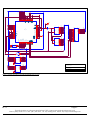
application note is a schematic that shows the interface
used for this design. For more information please contact
Analog
Devices
at
1-800-ANALOGD,
or
http://www.analog.com/dsp.
At this step in the build we need to perform one more
task; we need to manually edit the executable file to
generate a program memory executable file, not a ROM
executable file. This can be done by performing the
following steps;
1.
Edit the file boothost.exe.
2.
Change the first line in the file from @BO to @PA.
(This changes the file from a ROM bootable file to a
program memory executable file.)
3.
Save the file as boothost.exe.
At this point, we are able to perform the final step in our
build, by typing the following command line at the DOS
prompt; spl21 boothost boothost -loader -2181. This will
create the file boothost.bnm, that we can use to burn into
the EPROM for our system.
EN-79
Page 4
Technical Notes on using Analog Devices’ DSP components and development tools
Phone: (800) ANALOG-D, FAX: (781) 461-3010, FTP: ftp.analog.com, EMAIL: [email protected]