1
USING THE OPTIONS KEY
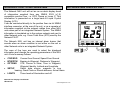
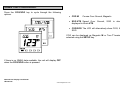
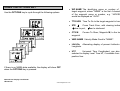
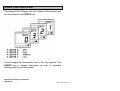
Use the OPTIONS key to cycle through the following options.
• WP NAME The identifying name or number of the
target waypoint, where "NAME" is the first 4 characters
of the waypoint name or number, e.g. "JACKSON"
would be displayed as "JACK".
• TTG HRS Time To Go to the target waypoint in hours.
• XTE
Cross Track Error, with steering indicator.
steer to port, steer to starboard.
• CTS M
waypoint.
Course To Steer, Magnetic M, to the target
• VMG NAME Velocity Made Good to "NAME".
• LAt/LOn Alternating display of present Latitude and
Longitude.
• UTC
Universal Time Coordinated, can also be
selected to display Local Time LT, if available from the
position fixer.
If there is no NMEA data available, the display will show OFF
when the OPTIONS key is pressed.
Network Nav Display User Manual
HB-0523-02
10
www.bandgservice.co.uk