1
WaveCube User Manual
17/03/04
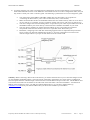
Using Monitor mode to find the assigned IP address (only if all other methods are not working):
1.
2.
Remove the power and the cover from the WaveCube.
Set jumpers PL11 and PL12 into position closer to RJ socket from their default position (closer to 16 pin IC)
The device comes with its serial port preconfigured to:
Speed: 115200 b/s, Char Size: 8, Parity: None, Stop Bit: 1, Flow Control: None
3. Restore the power
4. Connect a PC with a terminal emulation program to serial com port with the setting above.
5. To enter the setup mode, reset the unit by cycling the power off and then back on. The self-test mode will begin. You
have ONE SECOND to enter 3 lowercase z characters (zzz) to enter Monitor Mode with network connection or yyy
without network connection.
NOTE: The easiest way to enter Monitor Mode is to hold down the z or y key while resetting the unit.
(If the above doesn’t work try setting the terminal emulation program: Speed: 9600 b/s)
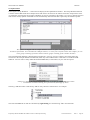
The “0>” prompt indicates that you are in Monitor Mode
6. Type “NC” to get the IP address and press enter
7. Type “QU” to quit the monitor mode
8. Remove power
9. Restore the jumpers jumpers PL11 and PL12
10. Replace the cover and restore power
6.3 Serial Port Login
1.
2.
3.
4.
5.
Remove power and the cover from the WaveCube.
Set PL11 and PL12 into position closer to RJ socket from their default position (closer to 16 pin IC).
The device comes with its serial port preconfigured to:
Speed: 115200 b/s, Char Size: 8, Parity: None, Stop Bit: 1, Flow Control: None
Restore power
Connect a PC with a terminal emulation program (HyperTerminal or TeraTerm for example) to serial com port with
the setting above.
To enter the setup mode reset the unit by cycling the power off and then back on. The self-test mode will begin. You
have ONE SECOND to enter 3 lowercase x characters (xxx)
NOTE: The easiest way to enter Setup Mode is to hold down the x key while resetting the unit
(If the above doesn’t work try setting the terminal emulation program: Speed: 9600 b/s)
Prepared by Michael Waddell and Vladimir Voroncov. Edited by Peter Zeug.
Document G/03156
Issue 2
Page 19