1
ARS1120
WLAN Dual SerialBridge™
User’s Manual
Version 1.4
ARS1120 User’s Manual
Version 1.4
WARNING - Disclaimer
Do not use this device in applications for which any
failure of the wireless link or any data error may
cause death, injury or damage of any kind.
Aboundi Inc., its Sales, Manufacturing and Design Organizations, Reps., Distributors, VARs
and distribution channels are absolutely not liable for any death, injury, property damage, loss
of data, and loss of business of any other unmentioned loss. The aforementioned entities are
not liable even in the event that any of these entities were apprised of the specifics or
generalities of an application or intended installation at any time.
Radio Linkages of any type can be fragile and tenuous. Over 1/5th of the entire population of
the world now owns cellular telephones, and as any user of a cell phone knows, the cell phone
radio communications link may be easily disrupted or completely lost simply by turning your
head or by other small environmental movements or changes. This clearly demonstrates to
everyone the fragility of any radio link and why radio should not be used for critical
implementations, or where death, personal injury, physical damage, property damage or
environmental damage may result.
Aboundi Inc. products are not designed, manufactured, or intended for use or resale as online
control equipment in hazardous environments requiring fail-safe performance, such as, but
not limited to the operation of nuclear facilities, aircraft navigation, vital communication
systems, air traffic control, life support machines, weapons systems, or any industry in which
environmental disruptions or technology failure could lead directly to death, personal injury,
physical damage, property damage or environmental damage.
2
ARS1120 User’s Manual
Version 1.4
Copyright © 2005 by Aboundi Inc. All rights reserved.
No part of this documentation may be reproduced in any form or by any means or used to
make any derivative work (such as translation, transformation, or adaptation) without written
permission from the copyright owner.
All the other trademarks and registered trademarks are the property of their respective owners.
Statement of Conditions
The content described in this manual may be improved or changed at any time and it is
subject to be changed without notice.
Manufacturer assumes no responsibility for errors contained herein or for direct, indirect,
special, incidental or consequential damages with the furnishing, performance, or use of this
manual or equipment supplied with it, even if manufacturer of its suppliers have been advised
of the possibility of such damages.
Electronic Emission Notices
This device complies with Part 15 of the FCC Rules. Operation is subject to the following two
conditions:
(1) This device may not cause harmful interference.
(2) This device will accept any interference received, including interference that may cause
undesired operation.
FCC Radio Frequency Interference Statement
This equipment has been tested and found to comply with the limits for a class B digital
device, pursuant to Part 15 of the FCC rules. These limits are designed to provide reasonable
protection against harmful interference when the equipment is operated in a commercial
environment. This equipment generates, uses, and can radiate radio frequency energy and, if
not installed and used in accordance with the instruction manual, may cause harmful
interference to radio communications. Operation of this equipment in a residential area is
likely to cause harmful interference in which case the user need to correct the interference at
his area. If the equipment causes interference to radio or television reception, try to correct the
interference by using one or more of the following measures:
y
y
y
y
Plug the equipment into an outlet that is on a different circuit from the television or radio.
Change the direction of the television or radio antenna until the interference disappears.
Move the equipment to one side or the other of the television or radio.
Move the equipment farther away from the television or radio.
To assure continued compliance, any changes or modifications not expressly approved by
manufacturer could void the user’s authority to operate the equipment.
3
ARS1120 User’s Manual
Version 1.4
FCC Radiation Exposure Statement
This device and its antennas must operate with a separation distance of at least 20 cm from all
persons and must not be co-located or operating in conjunction with any other antenna or
transmitter. End users must be provided with specific operating instructions for satisfying RF
exposure compliance.
Regulatory Information / Disclaimers
Installation and use of this Wireless LAN device must be in strict accordance with the
instructions included in the user documentation provided with the product. Any changes or
modifications (including the antennas) made to this device that are not expressly approved by
manufacturer may void the user’s authority to operate the equipment. The manufacturer is not
responsible for any radio or television interference caused by unauthorized modification of
this device, or the substitution or attachment of connecting cables and equipment other than
manufacturer specified. It is the responsibility of the user to correct any interference caused
by such unauthorized modification, substitution or attachment. Manufacturer and its
authorized resellers or distributors will assume no liability for any damage or violation of
government regulations arising from failing to comply with these guidelines.
4
ARS1120 User’s Manual
Version 1.4
Limited Warranty
This product is warranted by manufacturer to be free from defects in material and
workmanship for one (1) year from the date of purchase unless otherwise stated.
During this period if this product is found to be defective in material or workmanship,
manufacturer or one of its authorized service facilities will at its option either repair or replace
this product without charge, subject to the following conditions, limitations and exclusions:
1.
2.
3.
4.
This warranty extends to the original consumer purchaser only and is not assignable or
transferable.
This warranty shall not apply to any product which has been subjected to misuse, abuse,
abnormal use, negligence, alteration or accident, or has had its serial number altered or
removed.
This warranty does not apply to any defects or damage directly or indirectly caused by or
resulting from the use of unauthorized replacement parts and/or service performed by
unauthorized personnel.
This warranty does not apply to the software driver that accompanies this product.
This warranty is made expressly in lieu of all other warranties, expressed or implied,
including but not limited to any implied warranty of merchantability of fitness for a particular
purpose, and all other obligations on the part of Manufacturer provided, however, that if the
disclaimer of implied warranties is ineffective under applicable law, the duration of any
implied warranties arising by operation of law shall be limited to one (1) year from the date of
purchase or such longer period as may be required by applicable law.
Manufacturer hereby disclaims any and all liabilities for consequential and incidental
damages arising out of or in connection with any breach of this warranty or any other claim
with respect to this product, including but not limited to claims of negligence, strict liability in
tort or breach of contract.
5
ARS1120 User’s Manual
Version 1.4
Table of Content
1.
2.
3.
4.
5.
Introduction ........................................................................................................................ 9
1.1
Features ............................................................................................................ 10
1.2
Applications ..................................................................................................... 11
Installation........................................................................................................................ 13
2.1
Product Kit ....................................................................................................... 13
2.2
System Minimum Requirements...................................................................... 13
2.3
ARS1120 and AP Location............................................................................... 13
2.4
Serial Port Operation Mode Setting ................................................................. 14
2.5
LED Indicator Label......................................................................................... 16
2.6
Plug in RS232 Cable ........................................................................................ 17
2.7
Plug in Power Cable......................................................................................... 17
2.8
Install SerialComm Utility ............................................................................... 17
2.9
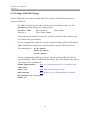
Initial Settings .................................................................................................. 17
2.9.1
Change PC and AP Settings ..................................................................... 18
2.9.2
Change ARS1120 Settings ....................................................................... 19
Web Browser Configuration............................................................................................. 20
3.1
Home Page ....................................................................................................... 20
3.2
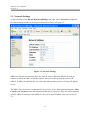
Network Settings .............................................................................................. 21
3.3
Serial Port Settings ........................................................................................... 22
3.4
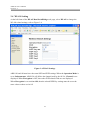
WLAN Setting.................................................................................................. 23
3.5
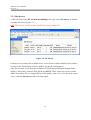
Site Survey ....................................................................................................... 24
3.6
Restore to Default............................................................................................. 25
3.7
Firmware Upgrade............................................................................................ 26
3.8
Password Setting .............................................................................................. 27
3.9
Reboot .............................................................................................................. 28
Command Mode Configuration ....................................................................................... 30
4.1
Console Port Default Settings .......................................................................... 30
4.2
HyperTerminal Settings.................................................................................... 30
4.3
Command Format............................................................................................. 33
4.4
Command Sets.................................................................................................. 34
4.5
Telnet ................................................................................................................ 37
SerialComm™ Utility ...................................................................................................... 38
5.1
Define Virtual Com .......................................................................................... 41
5.2
Create and Stop Virtual Com............................................................................ 45
6
ARS1120 User’s Manual
Version 1.4
6.
7.
8.
9.
5.3
Ident-and-Connect ™ ....................................................................................... 47
5.4
Direct Connect with Discovered IP Device...................................................... 49
5.5
LED Status Graphic Display ............................................................................ 50
5.6
Ping IP Connectivity ........................................................................................ 52
5.7
Utility Version .................................................................................................. 52
Diagnostics – ComSR Utility........................................................................................... 53
6.1
Install ComSR Utility....................................................................................... 54
6.2
Open ComSR utility ......................................................................................... 55
6.3
Select COM port............................................................................................... 56
6.4
COM Port Settings ........................................................................................... 57
6.5
Simple Terminal Simulator .............................................................................. 58
6.6
Send/Receive Text File..................................................................................... 60
Specifications ................................................................................................................... 62
Default Settings ................................................................................................................ 64
8.1
Network............................................................................................................ 64
8.2
WLAN.............................................................................................................. 65
8.3
Serial Port......................................................................................................... 66
Glossary............................................................................................................................ 67
Table 1 Command Sets............................................................................................................. 34
Figure 1-1 Peer to Peer (Ad-Hoc Mode).................................................................................. 11
Figure 1-2 ARS1120 to PC WLAN (Ad-Hoc Mode)............................................................... 11
Figure 1-3 ARS1120 to Access Point (Infrastructure Mode) ................................................... 12
Figure 1-4 ARS1120 over the Internet (Infrastructure Mode) ................................................. 12
Figure 2-1 ARS1120 Rear Panel .............................................................................................. 14
Figure 2-2 DIP Switch and Serial Port Pin Assignment Table ................................................. 15
Figure 2-3 LED Indicator Label............................................................................................... 16
Figure 3-1 Web Configuration Home Page .............................................................................. 20
Figure 3-2 Network Settings .................................................................................................... 21
Figure 3-3 Serial Settings......................................................................................................... 22
Figure 3-4 WLAN Settings ...................................................................................................... 23
Figure 3-5 Site Survey.............................................................................................................. 24
Figure 3-6 Restore Default Settings ......................................................................................... 25
Figure 3-7 Firmware Upgrade.................................................................................................. 26
Figure 3-8 Password Settings................................................................................................... 27
7
ARS1120 User’s Manual
Version 1.4
Figure 3-9 Reboot..................................................................................................................... 28
Figure 3-10 Select Internet Options ......................................................................................... 29
Figure 3-11 Delete Temporary Internet Files ........................................................................... 29
Figure 4-1 Open HyperTerminal .............................................................................................. 30
Figure 4-2 PC/NB COM Port Selection................................................................................... 31
Figure 4-3 PC/NB COM Port Settings..................................................................................... 31
Figure 4-4 Ready to Accept Command .................................................................................... 32
Figure 4-5 Open Telnet Connection ......................................................................................... 37
Figure 4-6 Command Setting via Telnet .................................................................................. 37
Figure 5-1 Uninstall SerialComm™ ........................................................................................ 38
Figure 5-2 Stop SerialCommSvc Service................................................................................. 39
Figure 5-3 Start SerialCommSvc Service ................................................................................ 40
Figure 5-4 Virtual Com Settings .............................................................................................. 41
Figure 5-5 Log Area ................................................................................................................. 42
Figure 5-6 Add to Virtual Com List ......................................................................................... 43
Figure 5-7 Clear from Virtual Com List................................................................................... 44
Figure 5-8 Select COM port..................................................................................................... 45
Figure 5-9 Crate/Stop Virtual COM ......................................................................................... 46
Figure 5-10 Subnet Broadcast Auto Discovery........................................................................ 47
Figure 5-11 IP Range Auto Discovery ..................................................................................... 48
Figure 5-12 Connect with Discovered IP Device..................................................................... 49
Figure 5-13 Select LED Status Graphic Display...................................................................... 50
Figure 5-14 LED Status Graphic Display ................................................................................ 51
Figure 5-15 Ping IP Connectivity............................................................................................. 52
Figure 6-1 ComSR Icon ........................................................................................................... 54
Figure 6-2 ComSR Window..................................................................................................... 55
Figure 6-3 Select Virtual COM ................................................................................................ 56
Figure 6-4 Com Port Settings................................................................................................... 57
Figure 6-5 Connect Com Port .................................................................................................. 58
Figure 6-6 Simple Terminal Simulator..................................................................................... 59
Figure 6-7 Select Com Ports .................................................................................................... 60
Figure 6-8 Send and Receive Text File .................................................................................... 61
Figure 8-1 Network Default Settings ....................................................................................... 64
Figure 8-2 WLAN Default Settings ......................................................................................... 65
8
ARS1120 User’s Manual
Version 1.4
1. Introduction
The ARS1120 WLAN Dual SerialBridge™ easily brings a wireless connection to any serial
device in a simple and secure manner. The ARS1120 enables remote accessibility for services
and support to any legacy serial devices and eliminates cable interference and ground loops.
In addition to expanding beyond cabling limitations, it combines the benefits of data network
with proven asynchronous connectivity to deliver high performance serial connections to
wireless LANs. Its external antenna design also allows the use of third party antenna for
extended range and performance.
The ARS1120 has a broad range of networking functions utilizing TCP/IP to provide serial
tunneling. It is easy to set up using a secure web browser. Its flash-upgradeable firmware
provides future upgradeability. The ARS1120 Site Survey function allows users to browse the
available active Access Points facilitating easy network connection. It also supports full
mobility and seamless roaming from cell to cell.
The Ident-and-Connect™ auto discovery utility allows the user easily find all the available
ARS1120 in the network and can access any specific ARS1120. The SerialComm™ Virtual
COM utility will treat the ARS1120 serial ports as the COM ports of the Windows based
PC/NB running the SerialComm™ Virtual COM utility. The ComSR utility provides the
diagnostic function that allows user to do the loop back test on ARS1120.
ComSR is a diagnostic program for Aboundi Dual SerialBridge™ (ARS1120, ARS1200,
ARS1300). It provides the loop back testing function for user to test the SerialBridge™ units.
From PC running ComSR and SerialComm™ utility, user can send/receive data via two
virtual COM ports connected to SerialBridge™ unit’s two serial ports.
The ARS1120 supports full and half-duplex transmission, software and hardware flow control,
and has programmable baud rates for application optimization. Its enhanced security features
support 64 bit and 128 bit WEP (Wired Equivalent Privacy) encryption.
Overall, the ARS1120 will enable wireless connections for most serial applications including
retail point-of-sales, remote metering and display, industrial and building automation, security
and access control and general data acquisition applications.
9
ARS1120 User’s Manual
Version 1.4
1.1 Features
y
y
y
y
y
y
y
y
y
y
y
y
y
y
y
y
y
y
y
y
y
y
y
y
Easily connect all types of serial devices via IEEE 802.11b WLAN
Dual serial ports, each can be RS232, RS422 or RS485 which is DIP switch selectable
Serial ports can be set up individually via easy-to-use web browser with password
protection
External antenna connector supports third-party products for extended
range/performance
Programmable baud rate (from 110bps to 230,400bps)
Full-duplex (serial data in/data out)
Hardware RTS/CTS flow control
Software flow control (XON/XOF, None)
Supports variant of protocols: TCP, IP, ICMP, HTTP, TFTP, ARP, DHCP Client, SNMP
(get)
Ident-and-Connect™ auto discovery utility allows available ARS1120 in the network to
be automatically discovered and connected
Includes SerialComm™ Virtual COM function
ComSR utility provides the loop back test to diagnose ARS1120 device.
Supports watch dog timer
Supports loop back test utility
Supports watch dog timer
Firmware upgrade via WLAN
Wired Equivalent Privacy (WEP) security feature supports 64 and 128-bit encryption
Unique site survey function lets users browse for all available active Access Point
connections
Supports both “Ad-Hoc” and infrastructure topologies
Supports full mobility and seamless roaming from cell to cell
Full compliment of status LEDs and activity indicators for easy installation, monitoring
and diagnostics
User friendly LED status graphic display for monitoring status remotely
Extended operational temperature range
Optional industrial DIN Rail mounting hardware accessory, DB9 to terminal strip or
RJ-45 termination adaptor
10
ARS1120 User’s Manual
Version 1.4
1.2 Applications
The following describes 4 application examples for ARS1120:
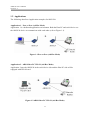
Application 1 – Peer to Peer (Ad-Hoc Mode)
Application 1 is a dedicated application environment. Both the Host PC and serial device use
the ARS1120 device to communicate with each other (refer to Figure 1-1).
Figure 1-1 Peer to Peer (Ad-Hoc Mode)
Application 2 – ARS1120 to PC WLAN (Ad-Hoc Mode)
Application 2 uses the ARS1120 in the serial device side and the Host PC side will be
equipped with WLAN card.
Figure 1-2 ARS1120 to PC WLAN (Ad-Hoc Mode)
11
ARS1120 User’s Manual
Version 1.4
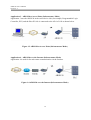
Application 3 – ARS1120 to Access Point (Infrastructure Mode)
Application 3 uses the ARS1120 in the serial device side (for example, Programmable Logic
Controller, PLC) and the Host PC side is connected to the AP via LAN as shown below.
Figure 1-3 ARS1120 to Access Point (Infrastructure Mode)
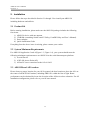
Application 4 – ARS1120 over the Internet (Infrastructure Mode)
Application 4 is used for far end remote communication via the Internet.
Figure 1-4 ARS1120 over the Internet (Infrastructure Mode)
12
ARS1120 User’s Manual
Version 1.4
2. Installation
Please follow the steps described in Section 2.1 through 2.9 to install your ARS1120
including hardware and utilities.
2.1 Product Kit
Before starting installation, please make sure the ARS1120 package includes the following
four items:
1) ARS1120 device with one antenna.
2) CD-ROM (containing SerialComm™ Utility, ComSR Utility and User’s Manual).
3) Power adapter.
4) Quick Installation Guide
If anything from the above items is missing, please contact your vendor.
2.2 System Minimum Requirements
For ARS1120 Application 3 and 4 (Figure 1-3, Figure 1-4), your system should meet the
following minimum requirements to use ARS1120 as the serial data transport platform.
1) A serial Device
2) A WLAN Access Point (AP)
3) A Host PC/server connected to the AP via LAN.
2.3 ARS1120 and AP Location
Please choose a proper location for your AP. In general, the best location to place the AP is at
the center of all the WLAN stations, including ARS1120, within the line of sight. Better
performance can be obtained by locate the elevation of the AP device above obstacles. For AP
installation/configuration, please refer to your AP user manual.
13
ARS1120 User’s Manual
Version 1.4
2.4 Serial Port Operation Mode Setting
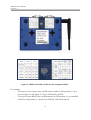
ARS1120 supports dual serial ports. Each port can be a console, RS232, RS422 or RS485 port
selected by the DIP switch, refer to Figure 2-1.
Figure 2-1 ARS1120 Rear Panel
There is a DIP switch and serial port ping assignment table attached at the bottom of
ARS1120. Set the serial port type based on your need, refer to Figure 2-2.
Note: The default DIP switch is set port 1 to console and port 2 to RS232. After the initial
settings, remember to set the DIP switch to meet your need.
Note: After changing the DIP switch, you need to reboot the device to make the change valid.
To reboot the device, you can do it via web browser or by command (console port or
Telnet). Unplug and then re-plug the power can also reboot the device.
14
ARS1120 User’s Manual
Version 1.4
Figure 2-2 DIP Switch and Serial Port Pin Assignment Table
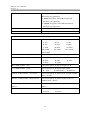
For example,
y
To set port 1 as the console port: set DIP switch 3 and 4 to OFF position (i.e. up),
refer to Figure 2-1 and Figure 2-2. Port 1 LED will be all OFF.
y
To set port 2 as the RS232 port: set DIP switch 1 to OFF position (i.e. up) and DIP
switch 2 to ON position (i.e. down). Port 2 RS232 LED will be all ON.
15
ARS1120 User’s Manual
Version 1.4
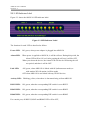
2.5 LED Indicator Label
Figure 2-3 shows the ARS1120 LED indicator label.
Figure 2-3 LED Indicator Label
The function for each LED is described as follow:
Power LED:
ON, green, when power adaptor is plugged into ARS1120
Alarm LED:
When power is applied to ARS1120, it will do self test. During this period, the
Alarm LED will be ON, red. After passing the self test, it will be OFF.
When you reboot the device, the Alarm LED will also be ON during the self
test period, and then it will be OFF.
Link LED:
ON, green, when ARS1120 is linked with AP (infrastructure mode) or
with another WLAN station (Ad-Hoc mode)
OFF when ARS1120 is not linked with any WLAN devices
Activity LED:
Blinking, yellow, when there is data transferring to/from ARS1120
RS232 LED:
ON, green, when the corresponding DIP switch is set to RS232
RS422 LED:
ON, green, when the corresponding DIP switch is set to RS422
RS485 LED:
ON, green, when the corresponding DIP switch is set to RS485
For console port, all RS232, RS422 and RS485 LED will be OFF,
16
ARS1120 User’s Manual
Version 1.4
2.6 Plug in RS232 Cable
Connect PC/NB to the ARS1120 serial port by using an NULL cross cable with DB9 female
connector. This PC/NB will be used to configure ARS1120 via command mode. A NULL
cross cable will cross pins 2 & 3, 7 & 8, and 4 & 6. ARS1120 can be configured either by web
browser or by command mode.
2.7 Plug in Power Cable
Plug the power cord of power adapter into the socket marked with “DC IN” on the rear panel
of ARS1120, and plug the power adapter into an A/C power outlet. When completed, the
green power LED on the top panel should light up.
Warning: Use only power adapter supplied with the ARS1120; otherwise, the ARS1120 may
be damaged.
2.8 Install SerialComm Utility
Please follow the steps below to install SerialComm™ utility into the PC/NB. This utility
support several functions: Virtual Com, Ident-and-Connect™ auto discovery, directly connect
with discovered IP devices, LED status graphic display and Ping IP connectivity.
1) Insert the supplied CD-ROM in the CD-ROM driver.
2) Execute the file Setup.exe in the CD-ROM.
2.9 Initial Settings
For setting up your ARS1120 at the first time, the first thing you should do is to configure the
IP address, SSID and WEP settings. The PC/NB, AP and ARS1120 should be within at the
same IP subnet. AP and ARS1120 should have same SSID and WEP settings.
The default IP address, SSID and WEP of the ARS1120 is set to:
IP address: 192.168.1.200
y
SSID: SerialBridge
y
WEP: Disable
Select one of the following methods for your ARS1120 initial setting.
y
17
ARS1120 User’s Manual
Version 1.4
2.9.1 Change PC and AP Settings
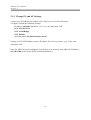
Connect your PC/NB directly with an AP’s LAN port (or via LAN connection).
Configure AP with the following settings:
IP Address: 192.168.1.xxx where “xxx” is a value other than “200”.
Mask: 255.255.255.0
SSID: SerialBridge
WEP: Disable
Operation Mode: AP (Infrastructure mode)
Change your PC/NB IP address to have IP address 192.168.1.yyy where “yyy” is the value
other than “200”.
Now, the ARS1120 can be configured via web browser or telnet by enter ARS1120 IP address:
192.168.1.200 (which is the ARS1120 default IP address).
18
ARS1120 User’s Manual
Version 1.4
2.9.2 Change ARS1120 Settings
Your PC/NB needs to be connected with ARS1120 serial port. Follow the steps below to
configure ARS1120:
y
Set ARS1120 serial port to be the console port as described in section 2.4. The
permanent, default settings for console port are:
Baud Rate: 2,400
Stop Bit: 1
Data Length: 8
Flow Control: None
Parity: None
y
Follow the steps described in section 4.1 and 4.2 to set the PC/NB COM port and
open Microsoft HyperTerminal.
y
Use the commands described in section 4.3 and 4.4 to change ARS1120 IP address.
ARS1120 IP address should have same IP subnet as your PC/NB and AP have.
The commands are: IP <IP_Address>
MASK <IP_Address>
GW <IP_Address>
y
Use the commands described in section 4.3 and 4.4 to change ARS1120 WLAN
Operation Mode, Channel, SSID and WEP settings. They also should be the same as
your AP has. The commands are:
MODE <[B]SS|[A]d-Hoc>
Note: “B” for infrastructure and “A” for Ad-Hoc mode
SSID <SSID>
CHAN <1-11>
Note: Only needed for Ad-Hoc mode.
WEP <0|64|128>
Note: When “0” is set, WK and WKID is not needed.
WK <0|64|128> <1-4> <Key in Hex>
WKID <1-4>
19
ARS1120 User’s Manual
Version 1.4
3. Web Browser Configuration
This section provides directions for ARS1120 web browser configuration: Network Settings,
Serial Settings, WLAN Settings, Site Survey, Restore Default, Firmware Upgrade, Password
Setting and Reboot the System.
3.1 Home Page
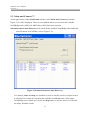
The WLAN Dual SerialBridge home page will be displayed when the ARS1120 IP address
is correctly entered into the web browser, refer to Figure 3-1. It also shows the firmware
version.
Figure 3-1 Web Configuration Home Page
20
ARS1120 User’s Manual
Version 1.4
3.2 Network Settings
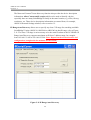
At the left frame of the WLAN Dual SerialBridge web page, select Network to change the
IP related settings and device description information. Refer to Figure 3-2.
Figure 3-2 Network Settings
ARS1120, AP and Gateway must have the same IP subnet. When the ARS1120 needs to
connect to a Host PC that is in another subnet, then you need to specify the gateway IP
address. If ARS1120 and Host PC are at the same subnet, then just leave Gateway IP address
as it is.
The ARS1120 web browser configuration also provides device description information: Alias,
Contact, and Location. Enter the information that meets your need. They are used to identify
specific ARS1120 among several ARS1120 devices in same IP subnet, also refer to section
5.3.
21
ARS1120 User’s Manual
Version 1.4
3.3 Serial Port Settings
At the left frame of the WLAN Dual SerialBridge web page, select Serial to change the
serial port related settings, refer to Figure 3-3.
Figure 3-3 Serial Settings
Depend on the serial port operation mode setting, the ARS1120 web browser configuration
will provide different display for user to enter the serial port parameter. Figure 3-3 shows that
port 1 is a console port while port 2 is a RS232 port.
When the Connection Mode is set to Server, the Remote Port (TCP port) and Remote IP
(IP address) filed will not show up, instead the Local Port (TCP port) will show up.
Note: Local and Remote port number must be between 1024 and 65535 due to TCP port
number 0-1023 are reserved for well known applications.
22
ARS1120 User’s Manual
Version 1.4
3.4 WLAN Setting
At the left frame of the WLAN Dual SerialBridge web page, select WLAN to change the
WLAN related settings, refer to Figure 3-4.
Figure 3-4 WLAN Settings
ARS1120 and AP must have the same SSID and WEP settings. When the Operation Mode is
set to Infrastructure, ARS1120 will follow the channel used by the AP. So, Channel is not
displayed. When Encryption is OFF, then other WEP related fields are not displayed.
When Encryption is set to 64 or 128, then the related WEP Key settings must be set to the
same values as those set in AP.
23
ARS1120 User’s Manual
Version 1.4
3.5 Site Survey
At the left frame of the WLAN Dual SerialBridge web page, select Site Survey to find the
available AP, refer to Figure 3-5.
Note: Wait for few seconds to allow ARS1120 to scan available AP.
Figure 3-5 Site Survey
It allows users to browse the available active Access Points to which ARS1120 can connect
(as long as the AP SSID has not been “hidden” by the AP configuration.)
After few seconds, it will show the available AP’s SSID, Received Signal Strength Index
(RSSI), Link Quality, Channel, WEP, Mode and BSSID. Those values are not saved in the
ARS1120 memory due to varying RSSI and Link Quality values. To review the most current
values, click the Site Survey at the left frame again.
24
ARS1120 User’s Manual
Version 1.4
3.6 Restore to Default
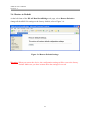
At the left frame of the WLAN Dual SerialBridge web page, select Restore Default to
change all the ARS1120 settings to the factory default, refer to Figure 3-6.
Figure 3-6 Restore Default Settings
Warning: When you restore the device, the configuration settings will be reset to the factory
default. Make sure you have written down the settings for record.
25
ARS1120 User’s Manual
Version 1.4
3.7 Firmware Upgrade
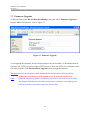
At the left frame of the WLAN Dual SerialBridge web page, select Firmware Upgrade to
upgrade ARS1120 firmware, refer to Figure 3-7.
Figure 3-7 Firmware Upgrade
As an ongoing development, newly released features may be available. To download the new
firmware, the TFTP server must support TFTP protocol. Enter the TFTP server IP address and
file name, and then click Download and Upgrade button to upgrade firmware.
Warning: Do not cut the power while download the new firmware. The period for
loading the new firmware will depend on the IP network traffic load.
Note:
When the firmware upgrade is completed, you need to reboot the device to make
the change valid and then refresh the web browser; otherwise, you might get the
old file from the web browser temporary Internet files.
26
ARS1120 User’s Manual
Version 1.4
3.8 Password Setting
At the left frame of the WLAN Dual SerialBridge web page, select Password Setting to set
the user name and password for ARS1120, refer to Figure 3-8.
Figure 3-8 Password Settings
ARS1120 provides web browser configuration security feature through the support of the
password protection function. The default username and password are:
User Name:
Password:
admin
admin
At the initial setting, it is recommended to change the user name and password.
27
ARS1120 User’s Manual
Version 1.4
3.9 Reboot
At the left frame of the WLAN Dual SerialBridge web page, select Reboot to reboot
ARS1120, refer to Figure 3-9
Figure 3-9 Reboot
For any change on the settings, ARS1120 need to be rebooted in order to make the change
valid.
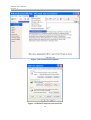
Note: When the reboot is completed, you must refresh the browser, otherwise your web
browser might use the old temporary Internet file. In addition to refresh the web browser,
Figure 3-10 and Figure 3-11 also shows the methods to delete the temporary Internet files.
28
ARS1120 User’s Manual
Version 1.4
Figure 3-10 Select Internet Options
Figure 3-11 Delete Temporary Internet Files
29
ARS1120 User’s Manual
Version 1.4
4. Command Mode Configuration
ARS1120 can be configured by command mode from HyperTerminal via console port or by
command mode via Telnet.
Note: HyperTerminal is a Microsoft Windows™ program usually accessible from Start,
Programs, Accessories, Communications, and HyperTerminal.
Refer to section 2.4 to set ARS1120 serial port as the console port.
4.1 Console Port Default Settings
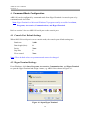
When ARS1120 serial port is set to console mode, the console port default settings are:
Baud rate:
2,400
Data length (bits):
Parity:
Stop bits:
Flow control:
8
None
1
None
Note: These default values are permanent and can not be changed.
4.2 HyperTerminal Settings
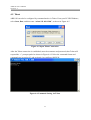
From Windows, click Start, Programs, Accessories, Communications, and HyperTerminal
to open the HyperTerminal and assign a name, e.g. ARS1120 as shown in Figure 4-1.
Figure 4-1 Open HyperTerminal
30
ARS1120 User’s Manual
Version 1.4
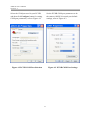
Select the COM port used in your PC/NB,
and then click Configure button for setting
COM port parameters, refer to Figure 4-2.
Set the PC/NB COM port parameters to be
the same as ARS1120 console port default
settings, refer to Figure 4-3.
Figure 4-2 PC/NB COM Port Selection
Figure 4-3 PC/NB COM Port Settings
31
ARS1120 User’s Manual
Version 1.4
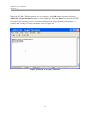
When the PC/NB COM parameters are set complete, click OK button, then the following
ARS1120 – HyperTerminal window will be displayed. Press the Enter key from the PC/NB
keyboard. After entering correct Username and Password, HyperTerminal will prompt “>”
symbol and is ready to accept command, refer to Figure 4-4.
Figure 4-4 Ready to Accept Command
32
ARS1120 User’s Manual
Version 1.4
4.3 Command Format
The command format is:
COMMAND <parameter_1> <parameter_2>
The delimiter among command and parameters is a space. The number of parameter depends
on the need of command.
Note: After using DEFAULT command, you need to enter the SAVE command in order to
save the default value into the flash memory and then enter REBOOT to make the
change valid.
Note: When a command is accepted, ARS1120 will respond “OK”. If ARS1120 does not
respond “OK”, please refer to the command sets in Table 1 to verify the entered
command is correct or not.
Note: When the commands are all entered complete, enter SAVE to store the change into
ARS1120 flash memory and then enter REBOOT to make the change valid.
33
ARS1120 User’s Manual
Version 1.4
4.4 Command Sets
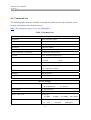
The following table shows the available command sets which provide same function as web
browser configuration described in section 3.
Note: The command is upper/ lower case independent.
Table 1 Command Sets
Administration
VERSION
Show firmware version
HELP
List all commands
?
Same command as HELP
DEFAULT
Restore to default
UPG <TFTP Server IP> <File Name>
Upgrade firmware through TFTP
PWD <Username> <Password>
Set username and password
CLPWD
Clear username and password
HB <0|1>
Heart beat
0: Off
1: On
PING <IP>
Send ICMP echo request packet 4 times
PING2 <IP> <Interval>
Setup background periodic ping <IP> address for
every <interval> seconds
EXIT
Logout
REBOOT
Reboot System
SAVE
Save configuration to flash
WLAN Settings
MODE <[B]SS|[A]d-Hoc>
Set WLAN mode
B : Infrastructure
SSID <SSID>
Set WLAN SSID
CHAN <1-11>
Set RF channel
RATE <1|2|5.5|11>
Set Tx rate
1: 1Mbps
WEP <0|64|128>
2: 2Mbps
A : Ad-Hoc
5: 5.5Mbps
11: 11Mbps
WEP encryption
0:
34
OFF
64: 64bit
128: 128bit
ARS1120 User’s Manual
Version 1.4
WK <0|64|128> <1-4> <Key in Hex>
Set encryption type, WEP Key# used and then
followed by encryption Key
For 64-bit encryption, enter a 10 hexadecimal
characters encryption key.
For 128-bit encryption, enter a 26 hexadecimal
characters encryption key.
WKID <1-4>
Selects one of four key sets to be used for encryption.
SS
Site Survey
Serial Settings
BAUD <COM1|COM2> <1-13>
Select serial port (1 or 2) and set baud rate
1: 110
2: 150
3: 300
4: 600
5: 1200
6: 2400
7: 4800
8: 9600
9: 19200
10: 38400
11: 57600
12: 115200
13: 230400
DL <COM1|COM2> <5|6|7|8>
Select serial port (1, 2) and set data length (5, 6, 7, 8)
PC <COM1|COM2> <0|1|2|3|4>
Select serial port (1, 2) and set parity check
0: None
1: Odd
3: Mark
4: Space
2: Even
SB <COM1|COM2> <1|2>
Select serial port (1, 2) and set stop bit (1, 2)
FC <COM1|COM2> <0|1|2>
Select serial port (1, 2) and set flow control
0:
LPORT <COM1|COM2> <Local Port>
None
1: XON/XOFF
2: Hardware
Select serial port (1, 2) and set local TCP port number
(1024 ~ 65535)
RPORT <COM1|COM2> <Remote Port>
Select serial port (1, 2) and set remote TCP Port
number (1024 ~ 65535)
RIP <COM1|COM2> <Remote IP
Select serial port (1, 2) and set remote device IP
Address>
address
RMODE <COM1|COM2> <1|2>
Select serial port (1, 2) and set connection mode
1: Client
35
2: Server
ARS1120 User’s Manual
Version 1.4
Network Settings
IP <IP address>
Set IP address
MASK <IP address>
Set IP Mask
GW <IP address>
Set Gateway IP address
DHCP <1|0>
Set DHCP client ON (1) or OFF (0)
System Device Information
ALIAS <Alias Name>
Set device alias name
CONT <Contact Information>
Set device contact information
LOCT <Location Information>
Set device location information
36
ARS1120 User’s Manual
Version 1.4
4.5 Telnet
ARS1120 can also be configured by command mode via Telnet. From your PC/NB Windows,
select Start, Run, and then enter “telnet 192.168.1.200”, as shown in Figure 4-5.
Figure 4-5 Open Telnet Connection
After the Telnet connection is established, enter the username and password, then Telnet will
respond the “>” prompt symbol as shown in Figure 4-6. Follow the command format and
command sets in section 4.3 and section 4.4 to configure ARS1120.
Figure 4-6 Command Setting via Telnet
37
ARS1120 User’s Manual
Version 1.4
5. SerialComm™ Utility
SerialComm™ utility provides several useful functions:
y
Virtual Com function will treat the Aboundi Dual SerialBridge units (ARS1120,
/ARS1200/ARS1300) serial ports as the COM ports of the Windows based PC/NB
running the SerialComm™ Virtual Com function.
y
Ident-and-Connect™ auto discovery function lets user find all the available
SerialBridge units in the network.
y
Direct connect with the discovered IP device by clicking target device IP address.
y
LED status graphic display helps user to monitor SerialBridge unit status remotely.
y
Ping IP connectivity function will check the IP connection status between PC/NB
and the specified IP device.
SerialComm™ is provided as a service with service name SerialCommSvc. When Virtual
Com parameters are set up correctly, the Virtual Com ports will be automatically created by
SerialComSvc service every time when you reboot your PC/NB. There is no need to start or
stop SerialCommSvc service during normal operation. If you have to stop and restart
SerialCommSvc service, please see Stop SerialComm Service section and Start
SerialComm Service section in this chapter.
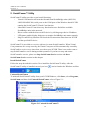
Install SerialComm
Follow the steps described in section 2.8 to install the SerialComm™ utility. After the
SerialComm™ utility is installed correctly, an icon
can be found at the Windows tool bar.
Uninstall SerialComm
To uninstall SerialComm™ utility from your PC/NB Windows, click Start, select Programs,
SerialComm and then click Uninstall SerialComm, refer to Figure 5-1.
Figure 5-1 Uninstall SerialComm™
38
ARS1120 User’s Manual
Version 1.4
Open SerialComm Window
At the Windows tool bar, double click the SerialComm™ utility icon
SerialComm window for configuration ARS1120.
to open the
Stop SerialCommSvc Service
At the Windows tool bar, select Start, Settings, Control Panel, Administrative Tool,
Service, the following window will be displayed. Select SerialCommSvc and then click
button.
Figure 5-2 Stop SerialCommSvc Service
39
ARS1120 User’s Manual
Version 1.4
Start SerialCommSvc Service
At the Windows tool bar, select Start, Settings, Control Panel, Administrative Tool,
Service, the following window will be displayed. Select SerialCommSvc and then click
button.
Figure 5-3 Start SerialCommSvc Service
40
ARS1120 User’s Manual
Version 1.4
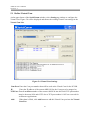
5.1 Define Virtual Com
At the upper frame of the SerialComm window, select Setting tap window to configure the
Virtual Com. Figure 5-4 will be displayed and shows the existing Virtual Com settings in the
Virtual Com List.
Figure 5-4 Virtual Com Settings
Com Port: Enter the Com port number that will be used as the Virtual Com for the PC/NB.
IP:
Enter the IP address of the remote ARS1120 for the Com port to be mapped to.
TCP Port: Enter Local Port number of the remote ARS1120 into this field. TCP port number
must be between 1024 and 65535 due to TCP port number 0-1023 are reserved for
well known applications.
Add:
When data is filled, click Add button to add this Virtual Com port into the Virtual
Com List.
41
ARS1120 User’s Manual
Version 1.4
Save Configuration: Click Save Configuration button to save the settings into the PC/NB
disk file.
Create COM Port: From the Virtual COM List select the virtual COM port then click this
button for mapping this COM port to the corresponding IP/TCP
address.
Stop COM Port: At the Virtual COM List select the virtual COM port then click this
button for removing the COM port <-> IP/TCP Port mapping.
As shown in Figure 5-5, at the bottom of SerialComm window, there is log area to show all
activity. The log file can also be opened from Windows, click Start, select Programs,
SerialComm and then click View Log (refer to Figure 5-1). For example,
At 5:41:39PM, there is a save configuration activity.
At 5:41:59PM, the COM3 is mapped to 192.168.1.200:1025 (IP:TCP) successfully.
At 5:42:07PM, all COM ports mapping is stop complete.
Figure 5-5 Log Area
42
ARS1120 User’s Manual
Version 1.4
Note:
If the Save Configuration button is not clicked then the updated data will not be
saved into the PC disk file.
Note:
The connection mode of the remote ARS1120 should be set to Server.
Add to Virtual Com List
Figure 5-6 shows an example to define COM5 mapping to the ARS1120 with IP address
192.168.1.200 and TCP port number 1026. After clicking Add button, this COM port data
will be added at the last line of the Virtual Com List. Click Save Configuration button to
save the settings into the PC/NB disk file.
Figure 5-6 Add to Virtual Com List
43
ARS1120 User’s Manual
Version 1.4
Clear from Virtual Com List
From the Virtual Com List, select the COM port number by right clicking the row of the
COM port to be deleted. For example, in Figure 5-7 the COM5 is selected, and then click
Clear to delete COM5 from the Virtual Com List.
Figure 5-7 Clear from Virtual Com List
44
ARS1120 User’s Manual
Version 1.4
5.2 Create and Stop Virtual Com
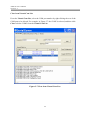
To create and stop the Virtual Com, you must select which COM port will be activated first.
Select COM port
From the Virtual Com List, select the COM port number by clicking the check box under the
COM column. For example, in Figure 5-8 COM 5 is selected.
Figure 5-8 Select COM port
45
ARS1120 User’s Manual
Version 1.4
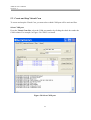
Create/Stop Virtual COM
At the right of the Virtual COM List, click the Create COM Ports or Stop COM Ports
button to crate the virtual COM port or stop it (refer to Figure 5-9).
Figure 5-9 Crate/Stop Virtual COM
When the Virtual COM connection is created correctly, the SerialComm™ log area will
display the messages “COMx Connect to x.x.x.x : yyyy OK”, For example, in Figure 5-9, at
5:58:58PM, in the log area, there is a message “COM5 Connect to 192.168.1.200:1026 OK”
showing the COM <-> IP:TCP mapping is successfully.
When the Virtual COM connection is stopped correctly, the SerialComm™ log area will
display the message “Stop Complete”, refer to Figure 5-9, message at 5:59:03PM.
Note: When there will be any configuration change and then reboot the ARS1120 device, the
Virtual COM port should be stopped first.
46
ARS1120 User’s Manual
Version 1.4
5.3 Ident-and-Connect ™
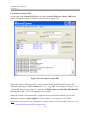
At the upper frame of the SerialComm window, select Ident-and-Connect tap window.
Figure 5-10 will be displayed. There are two methods allow user to search the available
SerialBridge units (ARS1120, ARS1200 or ARS1300) in the network.
Subnet Broadcast Auto Discovery will search all the available SerialBridge units within the
same IP subnet as PC/NB has, refer to Figure 5-10.
Figure 5-10 Subnet Broadcast Auto Discovery
Two buttons, Start and Stop, are available for user to start the search or stop the search.
It will take few seconds for searching the available SerialBridge units. If the target
SerialBridge unit is found, you can use the Stop button to stop the search, or wait until
the utility finish the search.
47
ARS1120 User’s Manual
Version 1.4
The Ident-and-Connect™ auto discovery function also provides the device description
information: Alias, Contact and Location which can be used to identify a device,
especially there are many SerialBridge™ family in the same location, e.g. office, factory,
warehouse, etc. Those device description information are entered from, for example,
ARS1120 Network Settings window, refer to section 3.2.
IP Range Auto Discovery allows user to specify any class C IP range for searching available
SerialBridge™ units (ARS1120, ARS1200 or ARS1300) in that IP range, refer to Figure
5-11. The class C IP range is not necessary to be the same IP subnet as the PC/NB has. IP
Range Auto Discovery supports maximum an IP class C address range, for example,
from 192.168.123.100 to 192.168.123.200. Note: Depend on the network traffic and
configuration, it might take few minutes for the search.
Figure 5-11 IP Range Auto Discovery
48
ARS1120 User’s Manual
Version 1.4
5.4 Direct Connect with Discovered IP Device
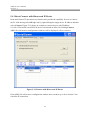
Ident-and-Connect™ auto discovery function also provide the capability for user to connect
the PC with the target SerialBridge unit by right clicking the target device IP address and then
select Connect. Figure 5-12 shows an example to connect device with IP address
192.168.1.200 which is an ARS1120 device and located at office. By clicking Connect,
ARS1120 web browser configuration windows will be displayed, refer to section 3.
Figure 5-12 Connect with Discovered IP Device
If the ARS1120 web browser configuration window does not show up, refer to section 5.6 to
check the IP connection.
49
ARS1120 User’s Manual
Version 1.4
5.5 LED Status Graphic Display
ARS1120 LED Status Graphic Display function provides the capability to remotely monitor
ARS1120 device status. Right clicking the target IP device’s IP address, and then click Status,
refer Figure 5-13 and Figure 5-14.
Figure 5-13 Select LED Status Graphic Display
50
ARS1120 User’s Manual
Version 1.4
Figure 5-14 LED Status Graphic Display
Figure 5-14 shows an example for ARS1120. The Power is ON, Ethernet link is ON. Port 2 is
set to RS232 port while Port 1 is set to console port (all LED is OFF).
51
ARS1120 User’s Manual
Version 1.4
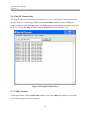
5.6 Ping IP Connectivity
The Ping IP connectivity function provides an easy way to check the IP connection with the
specific IP device. At the upper frame of the SerialComm window, select the Ping tap
window, and then click the Ping button. The Ping function will continue to ping the specified
IP device. To stop the Ping function, click the Stop button, refer to Figure 5-15.
Figure 5-15 Ping IP Connectivity
5.7 Utility Version
At the upper frame of the SerialComm window, select the About tap window to check the
SerialComm utility version if necessary.
52
ARS1120 User’s Manual
Version 1.4
6. Diagnostics – ComSR Utility
Aboundi Dual SerialBridge units (ARS1120/ARS1200/ARS1300) can be diagnosed by the
ComSR utility which provides the loop back test to allow user to send and receive data/file
from the PC/NB virtual COM via the remote SerialBridge two serial ports. The two serial
ports will be connected by a null modem serial cable. In order to do the loop back test
successfully, please make sure that:
y
y
y
y
Both serial ports of a SerialBridge unit should be set up as server ports.
Two virtual Com ports should be set up by using SerialComm, and they should
start/connect successfully to the server ports of the SerialBridge unit.
A null modem serial cable should be used to connect the two physical
serial ports of the SerialBridge unit.
Only text format is supported. Most ASCII control codes are not supported
in this version.
Note: The included Test_Text_File.txt can be used as the text file for testing sending/receiving
file via the loop back path.
53
ARS1120 User’s Manual
Version 1.4
6.1 Install ComSR Utility
Please follow the steps below to install ComSR utility into the PC/NB.
1) Insert the supplied CD-ROM in the CD-ROM driver.
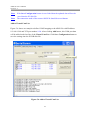
2) Read the Readme.txt file under Diagnostic Tool folder first.
3) Execute the file Setup.exe under Diagnostic Tool folder in the CD-ROM.
After the installation is completed, an icon will be generated as shown in Figure 6-1
Figure 6-1 ComSR Icon
54
ARS1120 User’s Manual
Version 1.4
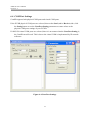
6.2 Open ComSR utility
To open ComSR utility, from your PC/NB Windows, click Start, select Programs,
SerialComm, Diagnostic Tool and then click ComSR, the ComSR window will be displayed
as shown in Figure 6-2.
Figure 6-2 ComSR Window
ComSR provide two methods for loop testing:
Terminal: ComSR is simulated as a simple terminal and allow the characters typed in one
side to be shown up at the other side.
Send/Receive Text File: The text file sent in sending side will be displayed in the receiving
side. The Test_Text_File.txt in the CD-ROM can be used for this file transfer
testing.
Note: Only “Enter” and “Line Feed” ASCII control codes are supported.
Make sure the enter character or character in the text file does not include other ASCII
control code.
55
ARS1120 User’s Manual
Version 1.4
6.3 Select COM port
Assume COM5 and COM6 have been set up via the SerialComm, refer to section 5.1and
section 5.2 for detail on the virtual COM definition and activation.
As shown in Figure 6-3, all available COM ports can be found in the pull down window.
Select the virtual COM port, which has been setup by the SerialComm, for both Send side
and Receive side.
Figure 6-3 Select Virtual COM
56
ARS1120 User’s Manual
Version 1.4
6.4 COM Port Settings
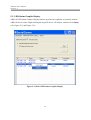
ComSR supports both physical COM ports and virtual COM ports.
If the PC/NB physical COM ports are selected, then on the Send (and/or Receive) side, click
the Setting button to set the Com Port Setting parameters as same values as the
physical COM ports settings of your PC/NB.
If ARS1120 virtual COM ports are selected, then it is no matter what the Com Port Setting is,
the ComSR can still work. This is due to the virtual COM is implemented by IP network
redirector.
Figure 6-4 Com Port Settings
57
ARS1120 User’s Manual
Version 1.4
6.5 Simple Terminal Simulator
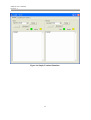
From the Terminal tap window, click the Connect button on both Send and Receive sides. If
the connection is established correctly, the Link LED will be ON (green). The ComSR will be
acted as if a simple terminal simulator. Any character typed in on one side will be displayed
on the other side; and, the Activity LED will be flashing (yellow), refer to Figure 6-5 and
Figure 6-6.
Figure 6-5 Connect Com Port
58
ARS1120 User’s Manual
Version 1.4
Figure 6-6 Simple Terminal Simulator
59
ARS1120 User’s Manual
Version 1.4
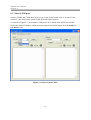
6.6 Send/Receive Text File
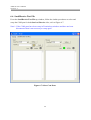
From the Send/Receive Text File tap window, follow the similar procedures to select and
setup the COM port for both Send and Receive sides, refer to Figure 6-7.
Note 1: If the COM ports have been setup in Terminal tap windows and have not been
disconnected then it not necessary to setup again.
Figure 6-7 Select Com Ports
60
ARS1120 User’s Manual
Version 1.4
Follow the steps below to transfer text file for loop back testing:
y
y
At the Receive side, click Receive/Compare File button first.
From the Send side click
button to browse the text file to be sent and then click
the Send button.
The text file will be sent from the Send side and will be loop back to the Receive side via the
remote ARS1120 two serial ports connected by one null modem serial cable. The content of
the text file will be displayed at both sides. At the Receive side, the file will also be checked.
A comparison result will be shown at the Receive side, refer to Figure 6-8.
Figure 6-8 Send and Receive Text File
If the transmission path has no error, then the comparison result will show Error Count: 0.
61
ARS1120 User’s Manual
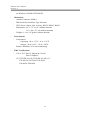
Version 1.4
7. Specifications
y
Serial
- Baud Rate Options: 230400, 115200, 57600, 38400, 19200, 9600, 4800, 2400,
1200, 600, 300, 150, 110 bps
- Data Length Options: 5, 6, 7, 8 Bits
- Parity Options: Even, Odd, None, Mask, Space
- Stop Bit Options: 1 (default), 2 Bits
- Handshake Flow Control:
Hardware Flow Control (RTS/CTS)
Software Flow Control (XON/XOF, None)
- Two Male DB9 RS232 Connectors
- Serial UART Buffer: 4096 Bytes Input, 4096 Bytes Output
y
WLAN Radio
- Protocol Type: 802.11b Standard Compliant
- Operating Range
Open Environment: 1000 ft./300m
Office Environment: 100-330 ft./30-100m
- Security: WEP 64 and 128 Bit Encryption
- Site Survey Function
y
Radio Characteristics
- Spread Spectrum Technology: Direct Sequence Spread Spectrum (DSSS)
- RF Range: 2.4 – 2.4835 GHz
- Data Rate: 11 / 5.5 / 2 / 1 Mbps
- Modulation: DBPSK for 1 Mbps, DQPSK for 2 Mbps, CCK for 5.5 / 11 Mbps
- Operation Channels: US - 11, Canada - 11, Europe - 13, France - 4, Spain - 2
- RF Power Output (Typical): +13 dBm
- Receive Sensitivity (Typical @BER10E-5): - 82 dBm
y
Power
- Voltage Power Source Range: 12 to 28Vdc/Vac
- Current: 350mA Typical @ +12Vdc
y
Software
- No Driver Required
- Utility: Ident-and-Connect™ Auto Discovery and Virtual COM Software Run
62
ARS1120 User’s Manual
Version 1.4
on Windows 95/98/Me/NT/2000/XP
y
Mechanical
- Antenna Connector: RSMA
- DIP Switch for Serial Port Type Selection
- LED: Power, Alarm, Link, Activity, RS232, RS422, RS485
- Dimensions: 4.6” x 3.5” x 0.9” (without antenna)
11.7 x 8.8 x 2.3 cm (without antenna)
- Weight: 11.1 oz./315 grams (without antenna)
y
Environment
- Temperature:
Operating: -20 to +55°C / -4 to +131°F
Storage: -40 to +85°C / -40 to +185°F
- Relative Humidity: 95% (non-condensing)
y
EMC Certifications
- U.S.A.: FCC Part 15 Subpart B, Class B
Part 15 Subpart C
- CE: ETSI EN 300 328, ETSI EN 301 489-1/17
EN 300 826, EN 50385, EN 55022
EN 60950, EN61000
63
ARS1120 User’s Manual
Version 1.4
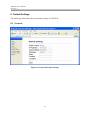
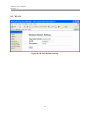
8. Default Settings
The following subsections show the default settings for ARS1120.
8.1 Network
Figure 8-1 Network Default Settings
64
ARS1120 User’s Manual
Version 1.4
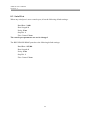
8.2 WLAN
Figure 8-2 WLAN Default Settings
65
ARS1120 User’s Manual
Version 1.4
8.3 Serial Port
When any serial port is set to console port, it has the following default settings:
Baud Rate: 2,400
Data Length: 8
Parity: None
Stop Bit: 1
Flow Control: None
The console port parameter can not be changed.
The RS232/RS422/RS485 ports have the following default settings:
Baud Rate: 115,200
Data Length: 8
Parity: None
Stop Bit: 1
Flow Control: None
66
ARS1120 User’s Manual
Version 1.4
9. Glossary
802.11
802.11 refer to a family of specifications defined by the IEEE for wireless LAN technology.
802.11 specify an over-the-air interface between a wireless client and a base station or
between two wireless clients. There are several specifications in the 802.11 family:
•
802.11 -- applies to wireless LANs and provides 1 or 2 Mbps transmission in the 2.4
GHz band using either Frequency Hopping Spread Spectrum (FHSS) or Direct
Sequence Spread Spectrum (DSSS).
•
802.11a -- an extension to 802.11 that applies to wireless LANs and provides up to 54
Mbps in the 5GHz band. 802.11a uses an Orthogonal Frequency Division multiplexing
(OFDM) encoding scheme rather than FHSS or DSSS.
•
802.11b --An extension of the IEEE 802.11 standards for wireless LAN and provides
11 Mbps transmission with a fallback to 5.5, 2 and 1 Mbps, an operating frequency of
2.4GHz. Devices meet 802.11b requirements can interoperate with each other even
manufactured by different companies.
•
802.11g -- An extension of the IEEE 802.11 standards for wireless LAN and provides
54Mbps using OFDM modulation, an operating frequency of 2.4GHz, backward
compatibility with 802.11b devices.
Access Point
Any entity that acts as a communication hub for the associated wireless stations to connect
with the wired LAN via the wireless medium
Ad-Hoc Network
A network composed solely of stations within mutual communication range of each other via
the wireless medium (WM) and operate on a peer-to-peer bass. An Ad-Hoc network is
typically created in a spontaneous manner. The principal distinguishing characteristic of an Ad
Hoc network is its limited temporal and spatial extent. The term Ad-Hoc is often used as slang
to refer to an independent basic service set (IBSS).
Basic Service Set (BSS)
A set of 802.11-compliant stations that operate as a fully connected wireless network
An Access Point is associated with several wireless stations.
67
ARS1120 User’s Manual
Version 1.4
Baud Rate
The number of pulses of a signal that occur in one second
Thus, baud rate is the speed the digital signal pulses travel.
Bit Rate
The transmission rate of binary symbols (.0. and .1.)
Bit rate is equal to the total number of bits transmitted in one second.
DHCP (Dynamic Host Configuration Protocol)
A protocol that automatically assigns the dynamic IP addresses to devices on a network. With
dynamic addressing, a device can have a different IP address every time it connects to the
network and simplifies network administration because the software keeps track of IP
addresses rather than requiring an administrator to manage the task. When a device newly
added into the network, a dynamic IP address will be assigned to that device. Many ISPs use
dynamic IP addressing for dial-up users.
DNS
Domain Name Server is a server that translates domain names into IP addresses. A domain
name is alphabetic and is meaningful for human to remember and use. However, the Internet
routing is based on IP address. So, when you enter a domain name, the DNS server will
translate the domain name into the corresponding IP address. For example, the domain name
www.example.com might be translated to 198.152.212.140
DSSS (Direct-Sequence Spread Spectrum)
DSSS is a transmission technology used in WLAN transmissions to increases the signal's
resistance to interference. At the sending station, the data signal is combined with a higher
data rate bit sequence to generate the DSSS signal. At the intended receiving station, the
DSSS signal is recognized as valid signal, however, for an unintended station, the DSSS
signal appears as low power wideband noise and is rejected (ignored).
The bit sequence is a redundant bit pattern for each bit that is transmitted. If one or more bits
in the pattern are damaged during transmission, the original data can be recovered due to the
redundancy of the transmission.
Dynamic IP Address
In a TCP/IP network, the client station is automatically assigned an IP address by a DHCP
server. The network devices, such as servers and printers, are usually assigned with static
68
ARS1120 User’s Manual
Version 1.4
(fixed) IP addresses.
ESS (Extended Service Set)
A set of more than two or more BSSs (multiple APs) forming a single network
IEEE (Institute of Electrical and Electronics Engineers)
IEEE is best known for developing standards for the computer and electronics industry
CTS (Clear To Send)
An RS-232 signal sent from the receiving station to the transmitting station to indicate it is
ready to accept data.
Default Gateway
The default gateway is a router used to forward all traffic that is not addressed to a station
within the local subnet. The traffic will be forwarded to a destination outside of the subnet of
the transmitting device.
ESS (Extended Service Set)
More than one BSS can be configured as an Extended Service Set. An ESS is basically a
roaming domain.
Identification (BSSID)
A six-byte address that distinguishes a particular access point from others
Also know as a network ID
Infrastructure
An infrastructure network is a group of computers or other devices, each with a wireless
adapter, connected as an 802.11 wireless LAN. In infrastructure mode, the wireless devices
communicate with each other and to a wired network by first going through an Access Point.
IP Address
IP address is an identifier for a computer or device on a TCP/IP network. Networks use the
TCP/IP protocol to route the messages based on the destination devices’ IP address. IP address
is a 32-bit numeric address written as four numbers separated by periods. Each number can be
0 to 255. For example, 192.168.1.224 could be an IP address.
Within an isolated network, the IP addresses can be assigned at random as long as each one is
69
ARS1120 User’s Manual
Version 1.4
unique. However, to connect a private network to the Internet, it will require a registered IP
addresses to avoid duplicates.
ISP (Internet Service Provider)
ISP is a company that provides service for the individuals or companies to access the Internet.
It also provides other related services such as web site and virtual hosting.
LAN (Local Area Network)
LAN is a group of computers or devices that share a common communications media and
typically share the resources (e.g. server, printer) within a small area (e.g. office).
MAC Address (Media Access Control)
MAC address is a unique hardware number used to identify each node in a network.
OFDM (Orthogonal Frequency Division Multiplexing)
Technology used in WLAN and provides better performance (higher data rates and more
reliable) than previous technology DSSS. OFDM works by splitting the radio signal into
multiple smaller sub-signals that are then transmitted simultaneously at different frequencies
to the receiver, i.e. OFDM divides one high-speed data stream into a number of lower speed
data streams, which are then transmitted in parallel. Each lower speed stream is used to
modulate a sub-carrier. OFDM is also used for other applications, including power line
networking.
Roaming
A function that allows one to travel with a mobile end system (wireless LAN mobile station,
for example) through the territory of a domain (an ESS, for example) while continuously
connecting to the infrastructure
SSID (Service Set Identifier)
SSID is an identification name used by a group of wireless devices to make connections to
each other. In order for wireless devices to communicate with each other, they must all be set
to the same radio channel and must use the same SSID. Even if they are set to the same radio
channel, they cannot communicate unless the SSID is the same.
70
ARS1120 User’s Manual
Version 1.4
Static IP Address
A permanent IP address that is assigned to a node in a TCP/IP network
Subnet Mask
An IP address has two components: network address and host address. Part of the host address
can be used to identify a particular subnet. The system administrator can further divide the
host address into two or more subnets. A mask is used to determine what subnetwork an IP
address belongs to. The subnet mask is the network address plus the bits reserved for
identifying the sub-network. By convention, the bits for the network address are all set to 1
due to it will work the same if the bits were set exactly as in the network address. It's called a
mask because it can be used to identify the subnet to which an IP address belongs by
performing a bitwise AND operation on the mask and the IP address.
TCP (Transmission Control Protocol)
A protocol used along with the IP (Internet Protocol) to send data in message units between
network devices over a LAN or WAN. IP takes care of handling the data routing and TCP
takes care of tracking the individual units of data (called packets) that a message is divided
into for efficient delivery over the network. TCP is a connection oriented protocol due to it
requires the receiver to return an acknowledgment of receipting the packet to the sender.
TCP/IP (Transmission Control Protocol/Internet Protocol)
TCP/IP is a suite of communications protocols used to connect hosts on the Internet. It uses
several protocols, the two major protocols are TCP and IP.
UDP (User Datagram Protocol)
A protocol used along with the IP (Internet Protocol) to send data in message units (datagram)
between network devices over a LAN or WAN. IP takes care of handling the data routing and
UDP takes care of tracking the individual units of data (called packets) that a message is
divided into for efficient delivery over the network. UDP is a connectionless protocol due to it
does not require the receiver to return an acknowledgment of receipting the packet to the
sender (as opposed to TCP). UDP connection is not a reliable connection. It is used primarily
for broadcasting messages over a network.
Wired Equivalent Privacy (WEP)
The optional cryptographic confidentiality algorithm specified by IEEE 802.11 used to
provide data confidentiality that is subjectively equivalent to the confidentiality of a wired
71
ARS1120 User’s Manual
Version 1.4
local area network (LAN) medium that does not employ cryptographic techniques to enhance
privacy.
WLAN (Wireless Local Area Network)
A group of computers and associated devices that use radio frequency to communicate with
each other
72