1
●
Programming Procedure
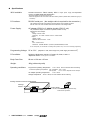
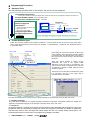
Operation Flow
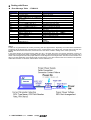
See the following operation flow. In this section, the rest 4 to 8 are explained.
1. Target Board Preparation
See “User’s Guide” to arrange the target board, where the reference circuit diagrams, interface connection etc.
2. Control Software Install See the preceding page.
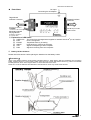
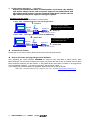
3. Connect PC, FLASH2 and Target See below.
4. Control Software Open
5. Power supply ON
6. Parameters
Power On
PC
F2WinV2
Communication rate and PC port
MCU type name
MCU port control status
7. Target Program Select
8. Programming Execute
Complete
RS232C
Straight
Cable
AC adapter or alkaline cells
Target Cable
FLASH2
Target Board
Power
ON
MCU with flash memory
See the following descriptions about operation procedures.
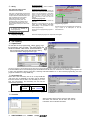
Control Software Open
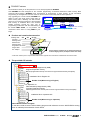
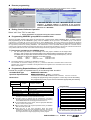
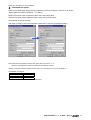
At first, let’s open the installed control software “F2WinV2”. It can be started to click the name form the pull-up menu
“start” button at the left bottom of the corner, from “program” -> “HokutoDenshi” -> “F2WinV2” then application window
is opened like below.
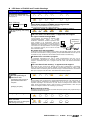
7.File Load
6.Parameter
File-loading can not be done without the MCU type
name selecting. At the file loading, the data address
is examined with the selected MCU type name. If
MCU type name is need to change, close the loaded
file at first.
8.Excecute
Version Information
When this control software is closed, all the
parameters are save in the system folder
“¥windows” as the file name is “FLASH2.INI”. The
control software must be damaged if the initial file
“FLASH2.INI” is moved or delete, while the control
software is opened.
The file box for the third area is indicated only when
it is necessary. One box of the upper step is
indicated with the usual MCU.
Language select dialogue is in the
“Display Language” in the menu of “Set.
Shortcut with Function Key
The shortcuts assignments for function keys are always indicated on the status-bar and in the pull down menu.
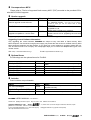
□ Display Language
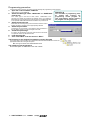
At the first open of “F2WinV2”, the display language confirmation is appeared automatically. Select from English and
Japanese. The selected language can be changed to click the “Other” in the “Set” menu.
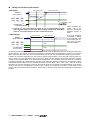
□ Power On
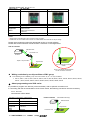
To start the operation, FLASH2 power status must be checked, that is indicated with the UserVCC LED on the
programmer body. It is necessary to supply both power into programmer itself with AC adapter or alkaline dry
cells and with UserVcc from the target. Be careful about the User Vcc voltage steady and properly. It is
important because the FLASH2 uses it as programming voltage to the MCU.
7
HOKUTO DENSHI CO;LTD;
FLASH2
株式会社