1
KIT-VR5400-TP
User’ s Manual
3. RTE FOR WIN32
This chapter describes the setting of RTE for WIN32, with the focus on the aspects specific to KITVR5400-TP.
Starting ChkRTE32.exe
Start ChkRTE32.exe after RTE-100-TP has been connected to the user system and the power to all the
devices is on. When RTE-200-TP is installed for the first time, ChkRTE32.exe must be started once to
select RTE.
<Selecting RTE>
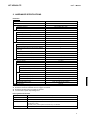
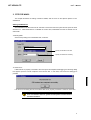
Set the Setup dialog box of ChkRTE32.exe, as follows.
VR5432-TP(xxx)
Specify the interface to be used.
Specify an address as necessary.
<Function test>
If RTE-200-TP is properly connected to the user system and capable of debugging, the following dialog
box appears upon the normal completion of the function test. In this state, control from the debugger is
possible.
If an error occurs during the test, the N-Wire cable is not properly connected. Check its connection.
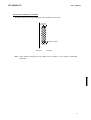
Perform the ChkRTE32.exe function test after the RTE-200-TP has
been connected to the user system and the power to all the devices
has been turned on.
5