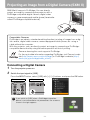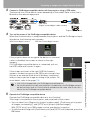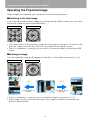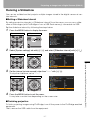
1
Table of Contents
Safety Instructions
MULTIMEDIA PROJECTOR
Before Use
Projecting an Image
User’s Manual
Useful Functions Available During a Presentation
Setting Up Functions from Menus
Projecting an Image from a Digital Camera or an
USB Flash Memory (SX80 II)
Connecting the Projector to Network (SX80 II)
Appendix
Index
ENG
Features of SX80 MarkII/SX800 Multimedia Projector
Thank you for purchasing a Canon projector.
The SX80 MarkII/SX800 Multimedia Projector (hereinafter referred to as "the projector") is
a high-performance projector that is capable of projecting high-resolution computer
screens, high-quality digital images (SX80 MarkII), images from digital cameras and USB
flash memories (SX80 MarkII) on a large screen.
Major Features
Smooth and Beautiful Imaging Capability
Incorporation of AISYS, Canon's unique optical engine, and LCOS (Liquid Crystal On Silicon) achieves high brightness, high contrast ratio, and smooth and beautiful lattice-free
images.
Native SXGA+ Resolution
Native SXGA+ resolution (1400 by 1050 dots) ensures projection of a high-quality image
in a wider projection area with a high degree of resolution.
High-powered 1.5X Zoom Lens
1.5X zoom aspheric lens can project a 100-inch image when placed 3 m (9.8') to 4.9 m
(16.1') away. (P35)
"Auto Setup Function" for Making Setup a Breeze
The keystone distortion is automatically adjusted for quick and easy setup of projector.
(P52)
Equipped with HDMI Input Terminal (SX80 II)
Connecting the projector to AV equipment via HDMI terminal allows you to project high
quality digital images. (P44)
Direct Projection of Images Taken by Digital Camera (SX80 II)
Capable of directly projecting images taken by PictBridge enabled digital cameras.
(P114)
Direct Projection of Data on USB Flash Memories (SX80 II)
Capable of directly projecting JPEG images on USB flash memories. (P118)
"Off and Go" Feature
It can be unplugged and packed away immediately. (P68)
* Wait until the cooling fan stops before putting the projector in the carrying bag.
User-Friendly On-Screen Menu
Settings are organized by four tabs. You can easily find settings for each function. (P76P112)
Compact and Easy-to-use Wireless Remote Control
It comes with a wireless remote control which allows you to control all functions of this
projector. (P26)
2
Features of SX80 MarkII/SX800 Multimedia Projector
Various Image Modes for a Particular Use of Your Projector (SX80 II)
When projecting a digital still photo image or an image that has been processed on an
sRGB-compatible monitor, you can project the image with higher tone on the screen by
incorporating the appropriate image correction function for the particular lighting environment.
It is useful when projecting the image in a photo studio, portrait studio, wedding reception
hall, art museum, gallery, etc.
3
Features of SX80 MarkII/SX800 Multimedia Projector
User's Manual (this document)
This is a User's Manual for the SX80 MarkII/SX800 Multimedia Projector. This manual provides detailed information on how to use the projector. Read this manual thoroughly to
make the most of your projector and ensure safety.
Important Information and Quick Start Guide
First read document. It provides information about projector safety, cautions, quick start
guide*, cleaning and replacing the air filter and lamp replacement.
* This guide shows an outline flowchart of the steps to start and stop the projector, as
well as the functions available for projecting images.
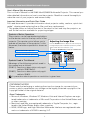
Symbols of Button Operations
The projector can be operated using buttons
on the remote control or the top control of the
projector. The remote control allows you to
operate all functions of the projector. In this
document, the buttons operation is shown as
below.
Top control button operation
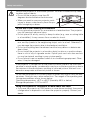
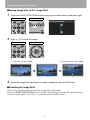
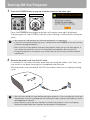
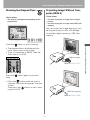
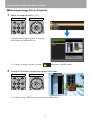
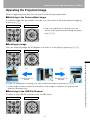
Adjusting the Image Size
Use the ZOOM button to adjust the size of the proj
Change the projector installation position if your de
adjust it with the zoom function. (P35)
1
Press the ZOOM button to pop up a window sho
Remote control
Top control
Remote control button operation
Symbols Used in This Manual
Meanings of the following symbols used in
this manual are as follows:
(SX80 II): Function or description only appliIndicate the buttons to be pressed
cable to SX80 MarkII.
(SX800): Function or description only applicable to SX800.
A precaution about operation or restriction is given here.
COPYRIGHT NOTICE
Please note that enlarging or reducing the size of an image for commercial purposes or public presentation may infringe on the legally protected copyright or the
copyright holder of the original material.
About Trademarks
• Microsoft, Windows, Windows XP, Windows Vista and Internet Explorer are registered trademarks or trademarks of Microsoft Corporation in the United States and/
or other countries.
• Macintosh and Mac are registered trademarks of Apple Computer, Inc., registered in the United States and/or other countries.
• HDMI, HDMI logo, and High Definition Multimedia Interface are registered trademarks or trademarks of HDMI Licensing, LLC.
4
Quick Reference Guide
This Quick Reference Guide will help you find functions that make full use of the projector,
are useful in producing an attractive presentation, and so on.
Connecting the Projector
Producing a Presentation
Connecting to the Computer (P40 – P43)
Connecting to AV Equipment (P44 – P47)
Connecting a Digital Camera (SX80 II)
(P48, P114 – P115)
Connecting an USB Flash Memory (SX80 II)
(P48, P118 – P119)
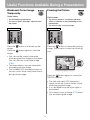
Blackened Out an Image Temporarily (P70)
Freezing the Picture (P70)
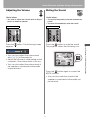
Adjusting the Volume (P71)
Muting the Sound (P71)
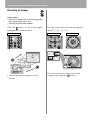
Zooming an Image (P72)
Showing the Elapsed Time (P73)
Projecting an Image
Ceiling Mounted Projection or
Projecting from behind Screen (P87)
Starting Projection (P49 – P51)
Selecting an Input Signal (P54 – P55)
Projecting an Image from a Digital Camera
(SX80 II) (P114 – P117)
Projecting Data on USB Flash Memory
(SX80 II) (P118 – P124)
Changing Remote Control Channel
(P107)
Adjusting Image
Resetting Projector Setting
Adjusting the Image Size and Focus
(P58 – P59)
Adjusting Keystone Distortion (P60 – P61)
Adjusting Aspect Ratio (P62 – P66)
Eliminating Flickers from Computer Screen or
Adjusting Positional Shift (P82)
Resetting the Image Settings (P102)
Resetting the Key Lock (P105)
Resetting Password (P108)
Resetting a Network Setting (SX80 II) (P111)
Resetting to the Default Setting (P111)
Miscellaneous Functions
Adjusting Colors and Image Quality
Reducing the Lamp Brightness (P102)
Using the Power Saving Mode (P103)
Turning on the Projector by Connecting the
Power Cord (P104)
Disabling the Beep During the Operation
(P104)
Disabling Buttons (P105)
Hiding Guide Messages (P106)
Turning Off the Projector LED Lamps (P106)
Setting a Password (P108)
Projecting an Image on a Greenboard (P86)
Selecting an Image Mode Suitable for the
Projecting Image (P93)
Making Fine Color Adjustments (P97, P100)
Removing Noise (P98)
5
Table of Contents
Features of SX80 MarkII/SX800 Multimedia Projector .............................................. 2
Quick Reference Guide................................................................................................ 5
Safety Instructions..................................................................................................... 12
Safety Precautions ................................................................................................................... 13
■ READ AND KEEP THIS OWNER'S MANUAL FOR LATER USE...................................... 14
AC Power Cord Requirement................................................................................................... 16
Federal Communication Commission Notice ........................................................................... 17
Canadian Radio Interference Regulations ............................................................................... 17
Precautions on Handling the Batteries in the Remote Controller ............................................. 18
Lamp Handling Precautions ..................................................................................................... 18
Carrying/Transporting the Projector ......................................................................................... 19
Installation Precautions ............................................................................................................ 19
Before Use ........................................................................................................ 21
Supplied Accessories................................................................................................ 22
■ Installing the Lens Cap ................................................................................................... 22
■ Putting the Projector in the Carrying Bag ....................................................................... 23
Part Names ................................................................................................................. 24
Main Unit of Projector............................................................................................................... 24
■ Front Side........................................................................................................................ 24
■ Rear Side ........................................................................................................................ 24
■ Bottom Side..................................................................................................................... 25
Remote Control ........................................................................................................................ 26
Top Control............................................................................................................................... 28
Input Terminals......................................................................................................................... 29
■ SX80 MarkII..................................................................................................................... 29
■ SX800.............................................................................................................................. 29
Preparing the Remote Control .................................................................................. 31
■ Installing Remote Control Batteries................................................................................. 31
■ Remote Control Operating Range .................................................................................. 31
Projecting an Image ......................................................................................... 33
Steps for Setting Up the Projector and Projecting an Image................................. 34
Setting Up the Projector ............................................................................................ 35
■ Placing in Front of the Screen......................................................................................... 35
■ Placing on a Level Place................................................................................................. 36
■ When Pointing the Projector Up...................................................................................... 37
Connecting the Projector .......................................................................................... 38
Connectable Equipment and Input Terminals .......................................................................... 38
■ SX80 MarkII..................................................................................................................... 38
■ SX800.............................................................................................................................. 39
Connecting the Projector to the Computer ............................................................................... 40
■ Connecting to RGB Monitor Output Terminal (analog connection) ................................ 40
■ Connecting to DVI Monitor Output Terminal (digital connection) (SX80 II) .................... 42
■ Outputting an Image and Audio ..................................................................................... 42
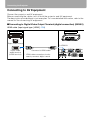
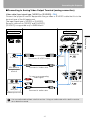
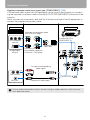
Connecting to AV Equipment ................................................................................................... 44
■ Connecting to Digital Video Output Terminal (digital connection) (SX80 II)................... 44
■ Connecting to Analog Video Output Terminal (analog connection) ............................... 45
6
Table of Contents
Starting Projection .....................................................................................................49
■ When the Language Selection Screen Appears ............................................................. 50
■ When the Password Input Screen Appears .................................................................... 51
■ When "No signal" Appears............................................................................................... 51
■ When Notebook Computer Screen Does Not Appear..................................................... 51
■ Adjusting Image .............................................................................................................. 51
Changing Notebook Computer Screen Output ......................................................................... 51
■ Turning On External Monitor Output................................................................................ 51
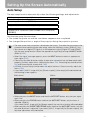
Setting Up the Screen Automatically .......................................................................52
Auto Setup ................................................................................................................................ 52
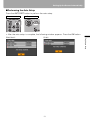
■ Performing the Auto Setup .............................................................................................. 53
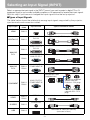
Selecting an Input Signal (INPUT) ............................................................................54
■ Types of Input Signals ..................................................................................................... 54
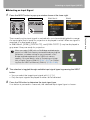
■ Selecting an Input Signal................................................................................................. 55
Adjusting Image .........................................................................................................56
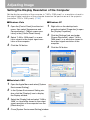
Setting the Display Resolution of the Computer ....................................................................... 56
■ Windows Vista ................................................................................................................. 56
■ Windows XP..................................................................................................................... 56
■ Macintosh OSX ................................................................................................................ 56
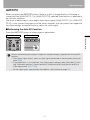
AUTO PC .................................................................................................................................. 57
■ Performing the Auto PC Function .................................................................................... 57
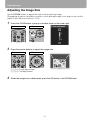
Adjusting the Image Size .......................................................................................................... 58
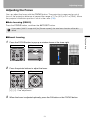
Adjusting the Focus .................................................................................................................. 59
■ Auto focusing (SX80 II).................................................................................................... 59
■ Manual focusing .............................................................................................................. 59
Adjusting Keystone Distortion ................................................................................................... 60
■ Auto adjustment............................................................................................................... 60
■ Manual adjustment .......................................................................................................... 60
■ Resetting the Keystone Adjustment ................................................................................ 61
Selecting Screen Aspect and Aspect .......................................................................62
Selecting Screen Aspect........................................................................................................... 62
■ Moving Image with 16:9 D. Image Shift........................................................................... 64
■ Resetting the Image Shift ................................................................................................ 64
Selecting Aspect Ratio.............................................................................................................. 65
■ Types of Aspect Ratios.................................................................................................... 65
■ How to Select an Aspect Ratio ........................................................................................ 66
Selecting an Image Mode ..........................................................................................67
■ Image modes................................................................................................................... 67
■ How to Select an Image Mode ........................................................................................ 67
Turning Off the Projector...........................................................................................68
Useful Functions Available During a Presentation ....................................... 69
Useful Functions Available During a Presentation .................................................70
Blackened Out an Image Temporarily ...................................................................................... 70
Freezing the Picture.................................................................................................................. 70
Adjusting the Volume ................................................................................................................ 71
7
Table of Contents
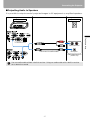
■ Outputting Audio to Speakers ......................................................................................... 47
■ Connecting a Digital Camera or an USB Flash Memory (SX80 II) .................................. 48
Table of Contents
Muting the Sound ..................................................................................................................... 71
Zooming an Image ................................................................................................................... 72
Showing the Elapsed Time....................................................................................................... 73
Projecting Image Without Computer (SX80 II) ......................................................................... 73
Setting Functions from Menus ....................................................................... 75
How to Use Menus ..................................................................................................... 76
■ Menu Configuration......................................................................................................... 76
■ Basic Operation of Menu ................................................................................................ 77
Setting Display Status ............................................................................................... 79
Selecting an Image Projection Mode........................................................................................ 79
Selecting an Input Signal Type (ANALOG PC) ........................................................................ 80
Selecting an Input Signal Type (VIDEO/S-VIDEO) .................................................................. 80
Selecting an Input Signal Type (COMPONENT)...................................................................... 81
Adjusting Input Signal (ANALOG PC) – Total Dots.................................................................. 81
Adjusting Input Signal (ANALOG PC) – Tracking .................................................................... 82
Adjust Input Signal (ANALOG PC) – Horizontal position ......................................................... 82
Adjust Input Signal (ANALOG PC) – Vertical position.............................................................. 83
Adjust Input Signal (ANALOG PC) – Horizontal pixels............................................................. 83
Adjust Input Signal (ANALOG PC) – Vertical pixels................................................................. 84
Selecting HDMI Input Level (SX80 II)....................................................................................... 84
Select HDMI Over Scan (SX80 II) ............................................................................................ 85
Performing Progressive Processing ......................................................................................... 85
Selecting a Menu Position........................................................................................................ 86
Correcting the Screen Color..................................................................................................... 86
Reversing projection................................................................................................................. 87
Capturing a Logo (SX800)........................................................................................................ 88
Selecting the User Logo Display Position (SX800) .................................................................. 88
No Signal Screen (SX80 II) ...................................................................................................... 89
Screen When Blank (SX80 II) .................................................................................................. 89
Selecting a Logo at Startup (SX80 II)....................................................................................... 90
No Signal Screen (SX800) ....................................................................................................... 90
Screen When Blank (SX800) ................................................................................................... 91
Selecting a Logo at Startup (SX800)........................................................................................ 91
Selecting Aspect Ratio of Screen............................................................................................. 92
Setting the Image Quality .......................................................................................... 93
Selecting an Image Quality ...................................................................................................... 93
Adjusting the Brightness........................................................................................................... 94
Adjusting the Contrast .............................................................................................................. 94
Adjusting the Sharpness .......................................................................................................... 95
Making a Gamma Correction ................................................................................................... 95
Making Color Adjustment (HDMI) (SX80 II) ............................................................................. 96
Making Color Adjustment (Digital PC/Analog PC/USB) (SX80 II) ............................................ 96
8
Table of Contents
Making Color Adjustment (COMPONENT/VIDEO/S-VIDEO) (SX80 II).................................... 97
Making Color Adjustment (COMPONENT/VIDEO) (SX800)..................................................... 98
Making Advanced Adjustment (Noise reduction) ...................................................................... 98
Making Advanced Adjustment (Dynamic gamma) .................................................................... 99
Making Advanced Adjustment (Mem. color correct) (SX80 II) .................................................. 99
Making Advanced Adjustment (Auto fleshtone) (SX800)........................................................ 100
Adjusting Fine Color Adjustment (6-axis color adjust) (SX80 II) ............................................. 100
Correcting the Image According to the Ambient Light (SX80 II) ............................................. 101
Reducing the Lamp Brightness............................................................................................... 102
Resetting the Image Settings.................................................................................................. 102
Setting Various Function.........................................................................................103
Setting Auto Setup Function ................................................................................................... 103
Selecting the Power Management Mode ................................................................................ 103
Skip the POWER Button Operation ........................................................................................ 104
Enabling/Disabling the Beep................................................................................................... 104
Prohibiting the Projector Operation......................................................................................... 105
Selecting a Display Language ................................................................................................ 105
Showing/hiding the Guide Screen .......................................................................................... 106
Turning on/off LED Illumination .............................................................................................. 106
Setting for Slideshow (SX80 II) ............................................................................................... 107
Setting up the Remote Control Channel ................................................................................ 107
Extending the Menu Display Time .......................................................................................... 108
Setting a Password................................................................................................................. 108
Registering a Password .......................................................................................................... 109
Resetting the Lamp Counter ................................................................................................... 109
■ About the Display of the Lamp Counter ........................................................................ 110
Initializing network settings (SX80 II) ...................................................................................... 111
Resetting to the Default Setting .............................................................................................. 111
Checking the Information of the Projector ............................................................112
Projecting an Image from a Digital Camera or an USB
Flash Memory (SX80 II) .................................................................................. 113
Projecting an Image from a Digital Camera (SX80 II)............................................114
Connecting a Digital Camera .................................................................................................. 114
Operating the Projected Image............................................................................................... 116
■ Switching to the Next Image.......................................................................................... 116
■ Rotating an Image ......................................................................................................... 116
Running a Slideshow .............................................................................................................. 117
■ Setting a Slideshow Interval .......................................................................................... 117
■ Finishing projection ....................................................................................................... 117
Projecting Data on USB Flash Memory (SX80 II)...................................................118
Connecting an USB Flash Memory ........................................................................................ 118
Description of USB File Browser ............................................................................................ 120
9
Table of Contents
Making Color Adjustment (Analog PC) (SX800) ....................................................................... 97
Table of Contents
Selecting an Image for Projection .......................................................................................... 121
■ Selecting a Drive........................................................................................................... 121
■ Selecting a Folder ......................................................................................................... 121
■ Selecting an Image File for Projection .......................................................................... 122
Operating the Projected Image .............................................................................................. 123
■ Switching to the Previous/Next Image .......................................................................... 123
■ Rotating an Image......................................................................................................... 123
■ Returning to the USB File Browser................................................................................ 123
Running a Slideshow of Data saved in a USB Flash Memory ............................................... 124
■ Creating an Image File Folder ...................................................................................... 124
■ Setting a Slideshow Interval.......................................................................................... 124
Connecting the Projector to Network (SX80 II)............................................ 125
Setting an IP Address (SX80 II)............................................................................... 126
■ Setting IP Address of the Computer ............................................................................. 126
■ Resetting the IP Address Setting of the Computer ....................................................... 127
Setting Network (SX80 II)......................................................................................... 128
■ Displaying the Network Configuration Screen .............................................................. 128
■ Setting the Network....................................................................................................... 129
■ Resetting the Network Setting....................................................................................... 134
■ Error Notification Message............................................................................................ 135
■ Projector Control ........................................................................................................... 136
Appendix ......................................................................................................... 137
Troubleshooting....................................................................................................... 138
WARNING Lamp Flash Patterns............................................................................................ 138
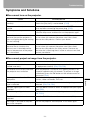
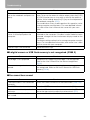
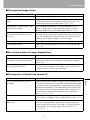
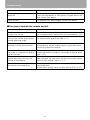
Symptoms and Solutions........................................................................................................ 139
■ You cannot turn on the projector. ................................................................................. 139
■ You cannot project an image from the projector. ......................................................... 139
■ A digital camera or USB flash memory is not recognized. (SX80 II) ............................ 140
■ You cannot hear sound................................................................................................. 140
■ The projected image is blur. ......................................................................................... 141
■ You cannot project an image appropriately. ................................................................ 141
■ The projector is forced to be turned off. ....................................................................... 141
■ You cannot operate the remote control. ....................................................................... 142
Maintenance ............................................................................................................. 143
Cleaning the Projector............................................................................................................ 143
Cleaning and Replacing the Air Filter..................................................................................... 144
■ Cleaning the Air Filter.................................................................................................... 144
■ Replacing the Air Filter.................................................................................................. 144
Replacing the Lamp ............................................................................................................... 145
■ About the Replacing Lamp ........................................................................................... 145
■ Replacing the Lamp...................................................................................................... 146
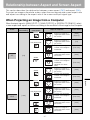
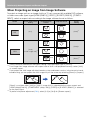
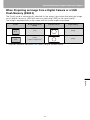
Relationship between Aspect and Screen Aspect................................................ 147
When Projecting an Image from a Computer ......................................................................... 147
When Projecting an Image from Image Software................................................................... 148
When Projecting an Image from a Digital Camera or a USB Flash Memory (SX80 II) .......... 149
10
Table of Contents
■ Projector ........................................................................................................................ 156
■ Remote Control.............................................................................................................. 156
■ External View ................................................................................................................. 157
■ ANALOG PC-1 (SX800), ANALOG PC-2/COMPONENT IN terminal............................. 157
■ Service Port (CONTROL)............................................................................................... 158
Index ..........................................................................................................................160
Menu Configuration .................................................................................................164
11
Table of Contents
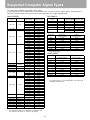
Supported Computer Signal Types ........................................................................150
Relationship between Screen Size and Projecting Distance ...............................151
Glossary ....................................................................................................................152
Specifications ...........................................................................................................156
Safety Instructions
Before operating this projector, read this manual thoroughly in order to operate the
projector properly.
This projector offers many convenient features and functions. Operating the projector
properly enables you to manage those features and maintain it in good condition for a
long period.
Improper operation may result in not only reducing the product-life, but also malfunctions,
fire hazards, or other accidents.
If your projector is not operating correctly, read this manual again, check operations and
cable connections, and try the solutions shown in the "Troubleshooting" section at the end
of this booklet. If the problem still persists, contact the service center or the dealer where
you purchased the projector.
CAUTION
RISK OF ELECTRIC SHOCK
DO NOT OPEN
CAUTION:
TO REDUCE THE RISK OF ELECTRIC SHOCK, DO NOT REMOVE
COVER (OR BACK). THERE ARE NO USER-SERVICEABLE PARTS
INSIDE EXCEPT LAMPS. REFER SERVICING TO QUALIFIED SERVICE
PERSONNEL.
THIS SYMBOL INDICATES THAT DANGEROUS VOLTAGE
CONSTITUTING A RISK OF ELECTRIC SHOCK IS PRESENT WITHIN
THIS UNIT.
THIS SYMBOL INDICATES THAT THERE ARE IMPORTANT OPERATING
AND MAINTENANCE INSTRUCTIONS FOR THIS UNIT IN THE
OWNER'S MANUAL.
CAUTION
Not for use in a computer room as defined in the Standard for the Protection of Electronic
Computer/Data Processing Equipment, ANSI/NFPA 75.
12
Safety Instructions
Safety Precautions
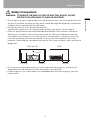
WARNING: TO REDUCE THE RISK OF FIRE OR ELECTRIC SHOCK, DO NOT
EXPOSE THIS APPLIANCE TO RAIN OR MOISTURE.
SIDE and TOP
REAR
1 m (3.3')
1 m (3.3')
1 m (3.3')
1 m (3.3')
• Do not put any flammable objects or spray cans near the projector, as the hot air
exhausted from the ventilation holes may result in an explosion.
• If the projector is not to be used for an extended period of time, unplug it from the
power outlet.
13
Safety Instructions
• This projector projects intense light from the projection lens. Do not stare directly into
the lens if possible, as doing so may result in eye damage. Be especially careful that
children do not stare directly into the beam.
• Install the projector in an appropriate position.
Installing the projector in an inappropriate position may result in a fire hazard.
• Allow for appropriate space above beside and behind of the projector cabinet for
allowing air circulation and cooling of the projector. Minimum clearances must be
maintained. If the projector is to be built into a compartment or similarly space, the
minimum distances must be maintained. Do not cover the ventilation slot on the
projector. Heat build-up can reduce the service life of your projector, and can also be
dangerous.
Safety Instructions
■READ AND KEEP THIS OWNER'S MANUAL FOR LATER USE.
All the safety and operating instructions should be read before beginning to operate the
product.
Read all of the instructions given here and retain them for later use. Unplug this projector
from the AC power supply before cleaning. Do not use liquid or aerosol cleaners on the
projector. Use a damp cloth for cleaning.
Follow all warnings and instructions marked on the projector.
For added protection of the projector during a lightning storm, or when it is left
unattended or unused for long periods of time, unplug it from the wall outlet. This will
prevent damage due to lightning and power surges.
Do not expose this unit to rain or use near water... for example, in a wet basement, near a
swimming pool, etc...
Do not use attachments not recommended by the manufacturer as they may result in
hazards.
Do not place this projector on an unstable cart, stand, or table. The projector may fall,
causing serious injury to a child or adult, and serious damage to the projector. Use only
with a cart or stand recommended by the manufacturer, or sold with the projector. Wall or
shelf mounting should be carried out in accordance with the manufacturer's directions,
and should use a mounting kit approved by the manufacturers.
An appliance and cart combination should be moved with care.
Sudden stops, excessive force, and uneven surfaces may cause the
appliance and cart combination to overturn.
Slots and openings in the back and bottom of the cabinet are provided
for ventilation, to insure reliable operation of the equipment and to
protect it from overheating.
The openings should never be covered with cloth or other materials, and the bottom
opening should not be blocked by placing the projector on a bed, sofa, rug, or other
similar surface. This projector should never be placed near or over a radiator or heat
register.
This projector should not be placed in a built-in installation such as a book case unless
proper ventilation is provided.
14
Safety Instructions
Never push objects of any kind into this projector through cabinet slots as they may touch
dangerous voltage points or short out parts that could result in a fire or electric shock.
Never spill liquid of any kind onto the projector.
Do not install the projector near the ventilation duct of air-conditioning equipment.
Do not overload wall outlets and extension cords as this can result in fire or electric shock.
Do not allow anything to rest on the power cord. Do not locate this projector where the
cord may be damaged by people walking on it.
Do not attempt to service this projector yourself as opening or removing covers may
expose you to dangerous voltages or other hazards. Refer all servicing to qualified
service personnel.
Unplug this projector from the wall outlet and refer servicing to qualified service
personnel under the following conditions:
a. When the power cord or plug is damaged or frayed.
b. If liquid has been spilled into the projector.
c. If the projector has been exposed to rain or water.
d. If the projector does not operate normally after following the operating instructions.
Adjust only those controls that are covered in the operating instructions as improper
adjustment of other controls may result in damage and will often require extensive
work by a qualified technician to restore the projector to normal operating condition.
e. If the projector has been dropped or the cabinet has been damaged.
f. When the projector exhibits a distinct change in performance-this indicates a need
for servicing.
When replacement parts are required, be sure the service technician uses replacement
parts specified by the manufacturer that have the same characteristics as the original
parts. Unauthorized substitutions may result in fire, electric shock, or injury.
Upon completion of any service or repairs to this projector, ask the service technician to
perform routine safety checks to determine that the projector is in safe operating
condition.
15
Safety Instructions
This projector should be operated using only the type of power source indicated on the
marking label. If you are not sure of the type of power supplied, consult your authorized
dealer or local power company.
Safety Instructions
AC Power Cord Requirement
The AC Power Cord supplied with this projector meets the requirements for use in the
country you purchased it.
AC Power Cord for the United States and Canada:
The AC Power Cord used in the United States and Canada is
listed by the Underwriters Laboratories (UL) and certified by the
Canadian Standard Association (CSA).
The AC Power Cord has a grounding-type AC line plug. This is a
safety feature to ensure the plug fits into the power outlet. Do not
try to tamper with this safety feature. Should you be unable to
insert the plug into the outlet, contact your electrician.
Ground
THE SOCKET-OUTLET SHOULD BE INSTALLED NEAR THE EQUIPMENT AND
EASILY ACCESSIBLE.
NOTE FOR CUSTOMERS IN THE US
LAMP(S) INSIDE THIS PRODUCT CONTAIN MERCURY AND MUST BE RECYCLED
OR DISPOSED OF ACCORDING TO LOCAL, STATE OR FEDERAL LAWS.
European Union (and EEA) only.
These symbols indicate that this product is not to be disposed of with
your household waste, according to the WEEE Directive (2002/96/EC),
the Battery Directive (2006/66/EC) and/or your national laws
implementing those Directives. If a chemical symbol is printed beneath
the symbol shown above, in accordance with the Battery Directive, this
indicates that a heavy metal (Hg = Mercury, Cd = Cadmium, Pb =
Lead) is present in this battery or accumulator at a concentration above
an applicable threshold specified in the Battery Directive. This product
should be handed over to a designated collection point, e.g., on an
authorized one-for-one basis when you buy a new similar product or to
an authorized collection site for recycling waste electrical and
electronic equipment (EEE) and batteries and accumulators. Improper
handling of this type of waste could have a possible impact on the
environment and human health due to potentially hazardous
substances that are generally associated with EEE. Your cooperation in
the correct disposal of this product will contribute to the effective usage
of natural resources. For more information about the recycling of this
product, please contact your local city office, waste authority, approved
scheme or your household waste disposal service or visit
www.canon-europe.com/environment.
(EEA: Norway, Iceland and Liechtenstein)
16
Safety Instructions
Federal Communication Commission Notice
Note: This equipment has been tested and found to comply with the limits for a Class B
digital device, pursuant to Part 15 of the FCC Rules. These limits are designed to
provide reasonable protection against harmful interference in a residential installation.
This equipment generates, uses and can radiate radio frequency energy and, if not
installed and used in accordance with the instructions, may cause harmful interference
to radio communications. However, there is no guarantee that interference will not occur
in a particular installation. If this equipment does cause harmful interference to radio or
television reception, which can be determined by turning the equipment off and on, the
user is encouraged to try to correct the interference by one or more of the following
measures:
• Reorient or relocate the receiving antenna.
• Increase the separation between the equipment and receiver.
• Connect the equipment into an outlet on a circuit different from that to which the
receiver is connected.
• Consult the dealer or an experienced radio/TV technician for help.
The cable with a ferrite core provided with the projector must be used with this
equipment in order to comply with Class B limits in Subpart B of Part 15 of the FCC
rules.
Use of a shielded cable is required to comply with class B limits in Subpart B of Part 15
of FCC Rules.
Do not make any changes or modifications to the equipment unless otherwise specified
in the instructions. If such changes or modifications should be made, you could be
required to stop operation of the equipment.
Canon U.S.A. Inc.
One Canon Plaza, Lake Success, NY 11042-1198, U.S.A.
Tel No. (516) 328-5600
Canadian Radio Interference Regulations
This Class B digital apparatus complies with Canadian ICES-003.
17
Safety Instructions
Multimedia Projector, Model: SX80 MarkII/SX800
This device complies with Part 15 of the FCC Rules. Operation is subject to the following
two conditions:
(1) This device may not cause harmful interference, and
(2) this device must accept any interference received, including interference that may
cause undesired operation.
Safety Instructions
Precautions on Handling the Batteries in the Remote Controller
Caution
Warning
Observe the following precautions when handling the batteries. Failure to do so
may cause explosion, heat generation, fire, or leakage of the battery fluid.
• Do not heat or disassemble the batteries, or throw them into fire.
• Do not attempt to recharge the batteries.
Observe the following precautions when handling the batteries. Failure to do so
may cause explosion, heat generation, fire or leakage of the battery fluid.
• Remove the batteries when they have been exhausted or not in use for an
extended period of time.
• Be sure to replace both batteries at the same time. Do not mix batteries of
different types.
• Insert batteries correctly according to the "+" and "–" markings.
• If a fluid from a battery leaks and comes in contact with your skin, rinse the
affected skin thoroughly as soon as possible.
Lamp Handling Precautions
This projector uses a high-pressure mercury lamp which must be handled carefully and
correctly as mentioned below.
The mercury lamp has the following characteristics.
• A lamp may explode with a loud sound or burn out due to a shock, scratch, or use
beyond its expiry date.
• The lamp life may differ from lamp to lamp and according to the usage environment.
There is no guarantee that all lamps will last for the same period of time. Some lamps
may fail in a shorter period of time than other similar lamps.
• A lamp gradually becomes darker over time.
Warning
Caution
If a Lamp Explodes
• If a lamp explodes, gas or dust may come out of the exhaust vent. Open windows and doors for ventilation.
• The gas contains toxic mercury. Always keep your face away from the
exhaust vent when the projector is operating to avoid inhaling mercury
vapors or to prevent it from getting in your eyes or mouth.
• If you inhale the gas or the shards of the broken lamp contact your eyes or
mouth, consult a doctor immediately.
• If a lamp explodes, its shards may scatter inside the projector. Ask the Canon
service representative to clean and check the inside of the projector and
replace the lamp.
If the projector indicates that the lamp should be replaced (i.e., the LAMP
REPLACE indicator lights up twice),
• The chances of an explosion increase. Replace the lamp with a new one
immediately if such is the case.
18
Safety Instructions
Caution
Disposal of Waste Lamp
• Dispose of the projector's mercury lamp according to local regulations just
like the fluorescent lamps.
Caution
• This projector is a precision machine. Do not subject the projector to strong
shocks or vibrations or turn it down.
• Install the lens cap to protect the lens and put the projector in the carrying
bag to protect it from dust and scratches on the surface of it when you carry
the projector. For details, see P23.
• Wait until the cooling fan stops before putting the projector in the carrying
bag. Do not put the projector in the carrying bag until the cooling fan stops
rotating. The projector may be damaged due to the heat.
• Replace the adjustable foot before putting the projector in the carrying bag.
The projector may be damaged if you put it in the bag without replacing the
adjustable foot.
• The carrying bag is not designed to protect the projector from external
shocks. When carrying the projector with it put in the carrying bag, do not
give a shock to it, drop it, or place anything on it. The projector may be damaged or malfunctioned.
• Do not transport the projector through a courier or transport service with the
carrying bag. Put the projector in an impact-resistant transport case if such is
the case.
Installation Precautions
Caution
The area around the exhaust vent and the cabinet above the exhaust vent
become hot when the projector is operating.
• Do not touch these areas, or you may get burnt. In particular, keep children
away from these areas. Do not put anything that may deform or discolor due
to heat on the projector.
Hot air is exhausted from the exhaust vent. Observe
the following:
• Do not put any metallic object on the projector. It
may become hot, resulting in accident or injury.
• Do not seat anyone near the exhaust vent. Otherwise, you may get burned.
Hot air
When placing the projector on a castered stand or table, be sure to lock the
casters.
• Failure to do so may cause the projector to move or topple, resulting in an
injury.
19
Safety Instructions
Carrying/Transporting the Projector
Safety Instructions
Caution
Position the projector in a horizontal position. Incorrect installation may cause
troubles and accidents.
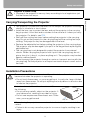
• Do not tilt the projector more than 20
degrees above and below the horizontal.
• When you want to use your projector point- 20°
ing up or down, make sure to place the pro20°
jector straight up or down.
Do Not Use in the Following Environments
• Do not place the projector on an unstable or slanted surface. The projector
may fall causing a personal injury.
• Do not place it in an oily, smoky, or damp location (e.g., near a cooking table
or a humidifier). It may cause a fire or an electric shock.
• Place the projector with a minimum distance of 1 m (3.3') from its left, right,
rear, and top panels to the neighboring object such as a wall. Otherwise, it
may damage the projector due to bad exhaust ventilation.
• Do not put anything near the exhaust vent that may deform or deteriorate
due to heat.
• Do not install the projector in a humid or dusty location or a position where
there is a lot of oily or cigarette smoke. Optical parts such as a lens and mirror may be stained, resulting in poor picture quality.
• Do not place it near an exhaust outlet of air-conditioning equipment. Otherwise, it may be damaged.
If the projector is carried from a cold place to a warm place or the room temperature is raised rapidly, condensation may form on the lens and mirror due to
the moisture in the atmosphere, resulting in a blurred picture. Wait until condensation evaporates and normal picture is shown.
Do not use the projector in a place subject to either very high or very low temperatures. Doing so may cause malfunction. The ranges of the operating and
storage temperatures are as shown below:
Operating temperature: +5°C to +35°C (Humidity: 85% or below)
Storage temperature: -10°C to +60°C
Using the Projector at 1900 Meters or More Above Sea Level
• If you use the projector at 1900 meters or more above sea level, the special
configuration is required to cool down the projector properly. Contact your
dealer.
20
Table of Contents
Safety Instructions
Before Use
Before Use
Projecting an Image
Useful Functions Available During a Presentation
Setting Up Functions from Menus
Projecting an Image from a Digital Camera or an
USB Flash Memory (SX80 II)
Connecting the Projector to Network (SX80 II)
Appendix
Index
21
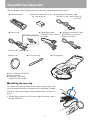
Supplied Accessories
Check whether the following accessories are supplied with the projector.
z Remote control
z Power cord
z Batteries (type AAA, two)
for remote control
z Computer connection cable
(DVI/Mini D-sub, 15-pin) (SX80 II)
YH7-2052
z Component cable
z Computer connection cable
(RCA/Mini D-sub, 15-pin) (VGA/Mini D-sub, 15-pin)
For Continental Europe
YH7-2084
(SX800) YH7-2307
For the U.S.A and Canada
z Lens cap
z Lens cap strap
z Carrying bag
z User's Manual (CD-ROM)
z Warranty card
z Important Information
and Quick Start Guide
■Installing the Lens Cap
As shown in the illustration on the right, put the lens cap
strap through the hole on the lens cap, and then through
the lens cap strap insertion hole at the bottom of the projector.
• When the projector is not in use, attach the lens cap to
protect the lens.
22
Supplied Accessories
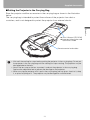
■Putting the Projector in the Carrying Bag
Store the projector and the accessories in the carrying bag as shown in the illustration
below.
The carrying bag is intended to protect the surfaces of the projector from dust or
scratches, and is not designed to protect the projector from external shocks.
Before Use
z User's Manual (CD-ROM)
z Important Information and
Quick Start Guide
Remote control and cables
• Wait until the cooling fan stops before putting the projector in the carrying bag. Do not put
the projector in the carrying bag until the cooling fan stops rotating. The projector may be
damaged due to the heat.
• Attach the lens cap to the lens to protect it and put the projector in the carrying bag.
Replace the adjustable foot to prevent the damage on the projector.
• When carrying the projector with it put in the carrying bag, do not give a shock to it, drop
it, or place anything on it. The projector may be damaged or malfunctioned.
23
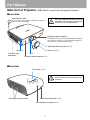
Part Names
Main Unit of Projector (SX80 MarkII is used in the following illustrations)
■Front Side
Anti-theft lock hole
An anti-theft wire cable available on the market can be connected.
Caution
Be sure to remove the lens cap during
projection. Failure to do so will result in
fire hazards or cap deformation.
Ranging window (SX80 II)
Do not place any obstacle between the projector and the screen, as the auto focusing function may fail to operate correctly.
Adjustable foot lock button (P37)
Lens cap (P22)
Speaker
Terminals and
connectors
Lens
Infrared remote receiver (P31)
■Rear Side
Top control (P28)
Caution
Cooling fan exhaust vents
Do not block the air exhaust. Failure to
do so will result in fire hazards or malfunctions.
Power cord connector (P49)
Infrared remote receiver (P31)
24
Part Names
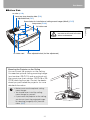
■Bottom Side
Air filter (P144)
Lens cap strap insertion hole (P22)
Adjustable foot (P37)
Screw holes for installation of ceiling-mount hanger (M4x5) (P157)
Lamp cover (P146)
Air intake vent
Air intake vent
Rear adjustable foot (for fine adjustment)
Mounting the Projector on the Ceiling
You can mount the projector on the ceiling.
You need an optional ceiling mounting hanger
(part number: RS-CL10) and an optional ceiling-mount pipe (part number: RS-CL08 or RSCL09) when appropriate. Contact the dealer
where you purchased the projector for more
detailed information.
• Make sure to use the optional ceilingmount hanger.
• You should never install the ceilingmount hanger by yourself.
• If you mount the projector on the ceiling,
you have to invert the projected image
by selecting [Image flip H/V] from the
menu. (P87)
25
Before Use
Caution
Do not block the air exhaust. Failure to do so will result in fire hazards or malfunctions.
Part Names
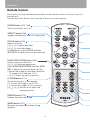
Remote Control
The projector can be operated using buttons on the remote control or the top control on
the main unit.
The remote control allows you to operate all functions of the projector.
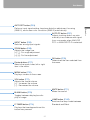
POWER button (P49, P68)
Turns the projector on or off.
ASPECT button (P66)
Toggles between the modes for aspect ratio.
<
<
FOCUS button (P59)
Adjusts focusing.
[ ] [ ]: For rough adjustment.
[<] [>]: For fine adjustment.
In SX80 MarkII, press FOCUS and then
AUTO SET to adjust the focus automatically.
<
<
<
<
D.SHIFT/KEYSTONE button (P60)
Corrects keystone distortion.
[ ] [ ]: For keystone adjustment.
Press D.SHIFT/KEYSTONE and then AUTO
SET to adjust the keystone automatically.
• Moves the image up and down when the
D. image shift is selected. (P64)
• [ ] [ ]: Adjust the vertical position.
<
<
D. ZOOM button (P72)
Zooms the image in or out digitally.
[+]: Zooms the image in (up to 12x).
[ – ]: Zooms the image out (1x minimum).
[ ] [ ] [<] [>]: Moves an im.age to the
desired position.
FREEZE button (P70)
Freezes the projected image.
IMAGE button (P67)
Switches among image modes (image
qualities).
26
Part Names
AUTO PC button (P57)
Adjusts tracking and so on automatically in accordance with signal
from a computer when ANALOG
PC-1 or ANALOG PC-2 is selected.
INPUT button (P55)
Switches among input signals.
<
<
ZOOM button (P58)
Adjusts the image size.
[ ] [ ]: For rough adjustment.
[<] [>]: For fine adjustment.
Pointer buttons (P77)
Selects the upper, lower, left or right
item in the menu.
OK button (P78)
Determines the item selected from
the menu.
MENU button (P76)
Displays a menu on the screen.
VOL button (P71)
Adjusts the sound volume.
[+]: Increases the volume.
[ – ]: Decreases the volume.
MUTE button (P71)
Mutes the sound.
BLANK button (P70)
Toggles between display/non-display of image.
P-TIMER button (P73)
Displays the time elapsed since this
button was pressed.
27
LAMP button (P102)
Switches the lamp mode between
Standard and Silent.
Before Use
AUTO SET button (P53)
Performs input signal setting, keystone distortion adjustment, focusing
(SX80 II), and screen color correction (SX80 II) automatically.
Part Names
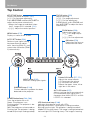
Top Control
ZOOM button (P58)
Adjusts the image size.
[ ] [ ]: For rough adjustment.
[<] [>]: For fine adjustment.
<
MENU button (P76)
Displays a menu on the screen.
AUTO SET button (P53)
Performs input signal setting,
keystone distortion adjustment, focusing (SX80 II), and
screen color correction (SX80
II) automatically.
OK button (P78)
Determines the item selected from the menu.
INPUT button (P55)
Switches among input signals.
WARNING lamp (P138)
Flashes red when a problem has been
detected on the projector.
POWER button/lamp (P49, P68)
Turns the projector on or off.
Green: The projector is on.
Flashing green: The projector is being turned on.
Red: The projector can be turned on.
Flashing red: The projector is being
turned off (the lamp is being cooled).
<
<
<
<
<
<
<
FOCUS button (P59)
Adjusts focusing.
[ ] [ ]: For rough adjustment.
[<] [>]: For fine adjustment.
In SX80 MarkII, press FOCUS and
then AUTO SET to adjust the focus
automatically.
KEYSTONE button
Corrects keystone distortion. (P60)
[ ] [ ]: For keystone adjustment.
Press KEYSTONE and then AUTO SET to
adjust the keystone automatically.
• Moves the image up and down when
the D. image shift is selected. (P64)
• [ ] [ ]: Adjust the vertical position.
Pointer/VOL button (P77, P71)
Adjusts the sound volume.
[<]: Decreases the volume.
[>]: Increases the volume.
Selects the upper, lower, left or
right item in the menu.
AUTO PC button (P57)
Adjusts tracking and so on automatically in accordance with signal from a
computer when ANALOG PC-1 or ANALOG PC-2 is selected.
LED illumination lamp (P106)
Indicates the projector status with LEDs.
Blinking from the left: The projector is being turned on.
Blinking from the right: The projector is being turned off.
Middle LED flashing slowly: The image is being blanked out.
Left and right LEDs flashing slowly: The image is freezing.
28
Part Names
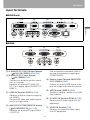
Input Terminals
■SX80 MarkII
(1)-A
(2)
(3)
(4)
(5)
Before Use
(6)
(7)
(8)
(9)
(10)
(11)
■SX800
(1)-B
(3)
(7)
(8)
(10)
(9)
Use a supplied component cable to
receive a component image signal
(COMPONENT).
(1)-A ANALOG PC-1/DVI-I IN Input Terminal
(
DVI-I IN) (SX80 II) (P40, P42)
(1)-B ANALOG PC-1 Input Terminal
(
IN) (SX800) (P40)
Connects an external monitor output
from a computer.
Receives an analog PC (ANALOG
PC-1) or a digital signal (DIGITAL PC,
SX80 II).
(4) Monitor Output Terminal (MONITOR
OUT) (SX80 II) (P42)
Outputs an analog RGB signal to display an image on an external monitor.
(5) USB Terminal (SX80 II) (P48)
Connects a digital camera or an USB
flash memory.
(2) HDMI IN Terminal (SX80 II) (P44)
Receives a digital content image signal (HDMI).
Carries both video and audio signals
across a single cable.
(6) S-VIDEO IN Terminal (SX80 II) (P45)
Receives an S-Video signal from AV
equipment.
(3) ANALOG PC-2/COMPONENT IN Terminal
(
/COMPONENT IN) (P41, P46)
Receives an analog PC signal (ANALOG PC-2).
(7) VIDEO IN Terminal (P45)
Receives a composite video signal
from AV equipment.
29
Part Names
(8)
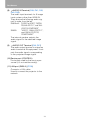
AUDIO IN Terminal (P40, P41, P42,
P45, P46)
The audio input terminals for 3 image
input systems other than HDMI-IN.
They receive the following audio signals in order from the left.
SX80 MarkII: "S-VIDEO or VIDEO", "DIGITAL
PC/ANALOG PC-1", and "ANALOG PC-2/COMPONENT"
SX800:
"VIDEO", "ANALOG PC-1",
and "ANALOG PC-2/
COMPONENT"
The internal speaker outputs the
audio signal for the selected image
signal.
(9)
AUDIO OUT Terminal (P43, P47)
The audio output terminal to output an
audio to external AV equipment. It outputs the audio signal corresponding
to the projected image signal.
(10) Service port (CONTROL)
Exclusively used by the service personnel (it is not used normally).
(11) LAN port (SX80 II) (P126)
Connects a LAN cable.
Used to connect the projector to the
network.
30
Preparing the Remote Control
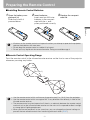
■Installing Remote Control Batteries
1 Open the battery compartment lid.
Slide the lid with it
pressed down.
2 Insert batteries.
3 Replace the compartment lid.
Insert new two AAA-size
batteries in the compartment with the + and –
poles positioned correctly.
Before Use
• If buttons on the remote control are inoperative when you attempt to operate the projector,
replace the batteries with new ones.
• Do not drop the remote control or subject it to impact.
• Do not spill any liquids on the remote controller. Doing so could damage it.
■Remote Control Operating Range
Point the remote control to the infrared remote receiver on the front or rear of the projector
whenever pressing any button.
30°
5m (16.4')
30°
5m (16.4')
30°
30°
• Use the remote control within a distance of approximately 5 m (16.4') from the projector.
• Use the remote control within an angle of 30° in any direction from directly in front of the
infrared remote receiver.
• The remote control may be inoperative if there is an obstacle between the remote control
and main unit or the infrared remote receiver on the main unit is exposed to direct sunlight
or strong light of lighting equipment.
• When you use two projectors at the same time, you can change the channel settings to
prevent the two remote controls from interfering with each other. (P107)
31
32
Table of Contents
Safety Instructions
Projecting an
Image
Before Use
Projecting an Image
Useful Functions Available During a Presentation
Setting Up Functions from Menus
Projecting an Image from a Digital Camera or an
USB Flash Memory (SX80 II)
Connecting the Projector to Network (SX80 II)
Appendix
Index
33
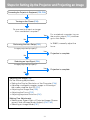
Steps for Setting Up the Projector and Projecting an Image
Connecting the Projector to Equipment (P38, P39)
Turning on the Power (P49)
Do you want to project an image
from a notebook computer?
Yes
No
For a notebook computer, turn on
the monitor output (P51) and then
go to Auto Setup.
In SX800, manually adjust the
focus.
Performing the Auto Setup (P52)
Image projected properly?
Yes
Projection is complete.
No
Selecting an Input Signal (P54)
Image projected properly?
Yes
Projection is complete.
No
Adjusting the Image (P56)
Do the following adjustments.
• Setting the Display Resolution of the Computer (P56)
• Adjusting misaligned computer images or flickering of
the screen using the Auto PC (P57)
• Adjusting the Image Size (P58)
• Adjusting the Focus (P59)
• Adjusting keystone Distortion (P60)
Making Fine Adjustments
• Selecting an Aspect Ratio of Projected Image (Screen
aspect) and a Screen Mode (Aspect) (P62, P65)
• Selecting an Image Mode (P67)
34
Setting Up the Projector
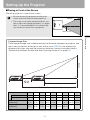
■Placing in Front of the Screen
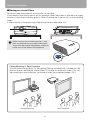
Place the projector in front of the screen.
• Be sure to place the projector parallel to the
screen to ensure distortion-free projections.
• The screen must not be exposed to direct sunlight or light from lighting equipment. In a bright
room, it is recommended to limit ambient lighting in order to improve the image quality.
Screen
Optical axis
Screen
Projection distance (zoom max)
Projection distance (zoom min)
Screen size
40
60
80
100
150
180
200
250
300
Width (cm)
81
122
163
203
305
366
406
508
610
Height (cm)
61
91
122
152
229
274
305
381
457
Projection distance
(zoom max)
1.2 m 1.8 m 2.4 m 3.0 m 4.5 m 5.4 m 6.0 m 7.6 m 9.1 m
(3.9') (5.9') (7.9') (9.8') (14.8') (17.7') (19.7') (24.9') (29.9')
Projection distance
(zoom min)
1.7 m 2.6 m 3.5 m 4.4 m 6.6 m 8.0 m
8.9
(5.6') (8.5') (11.5') (14.4') (21.7') (26.3') (29.2')
35
–
–
Projecting an Image
Projected Image Size
The projected image size is determined by the distance between the projector and
the screen (projection distance) as well as the zoom (P58). For the relationship
between the screen size and the projection distance, see also the table listed in
"Relationship between Screen Size and Projecting Distance" on page151.
Setting Up the Projector
■Placing on a Level Place
Be sure to keep the projector as horizontal as possible.
If you need to point the projector up (for example, when the screen is placed on a higher
position), follow the instruction given in "When Pointing the Projector Up" on the following
page.
• Adjust the tilt of the projecting image using the rear adjustable foot.
Make sure that the installation position is free
from any obstacle that may block the exhaust
vent on the right side of the projector and the air
intake vent on the bottom of the projector.
Ceiling Mounting or Rear Projection
You can mount the projector on the ceiling (Ceiling mounted) with it turned up side
down or place it behind the screen (Rear) if you use a translucent screen. For ceiling mounting or rear projection, you have to invert the projected image. (P87)
Ceiling Mounting
Rear Projection
36
Setting Up the Projector
■When Pointing the Projector Up
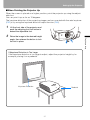
When the screen is placed on a higher position, point the projector up using the adjustable foot.
You can point it up as far as 10 degrees.
The keystone distortion of the projecting image can be corrected with the auto keystone
(P52) or by using the keystone distortion adjust function (P60).
1
Raise the image to the desired height
angle, then release the button to lock
the foot in place.
Projecting an Image
2
Lift the front side of the projector and
push the adjusting foot lock button to
extend the adjustable foot.
If Keystone Distortion is Too Large
If the keystone distortion is too large to adjust, adjust the projector height by, for
example, placing it on a pedestal.
Keystone Distortion
Pedestal
37
Connecting the Projector
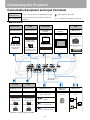
Connectable Equipment and Input Terminals
DIGITAL PC
ANALOG PC-1
DVI-I IN terminal
Use this name to select the appropriate image.
The name of the terminal to which to connect
equipment.
: Video signal or data flow
(Pxxx) : indicates the page(s) to refer to.
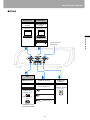
■SX80 MarkII
DIGITAL PC
ANALOG PC-1
HDMI
ANALOG PC-2
COMPONENT
DVI-I IN terminal
HDMI IN terminal
ANALOG PC-2/
COMPONENT IN
terminal
MONITOR OUT
terminal
USB terminal
Computer (P40, P42)
AV equipment (P44)
Computer (P41)
External monitor
(P42)
Digital camera* (P114)
USB
Digital video
camera* (P44)
DVI-I IN terminal
can be used to
connect only
computer.
AV equipment (P46)
USB flash memory
(P118)
HDMI IN terminal can
be used to connect
only AV equipment.
Service terminal
(Reserved)
S-VIDEO
Video
S-VIDEO IN terminal
VIDEO IN terminal
AUDIO IN terminal
AUDIO OUT
terminal
LAN terminal
AV equipment (P45)
AV equipment (P45)
Audio signal for
each image input
Amplified speaker
(P43, P47)
Network
(P126)
Digital video
camera* (P45)
Digital video
camera* (P45)
Digital camera*
(P45)
Digital camera*
(P45)
(P45)
S-VIDEO
VIDEO
DIGITAL PC
(P40, P42) ANALOG PC-1
COMPONENT
(P41, P46) ANALOG PC-2
* Connect to the playback mode.
38
Connecting the Projector
■SX800
ANALOG PC-1
ANALOG PC-2
COMPONENT
ANALOG PC-1
terminal
ANALOG PC-2/
COMPONENT IN
terminal
Computer (P40)
Computer (P41)
Service terminal
(Reserved)
Video
VIDEO IN terminal
AUDIO IN terminal
AV equipment (P45)
Audio signal for
each image input
Digital video
camera* (P45)
VIDEO
(P45)
ANALOG PC-1
Digital camera*
(P45)
(P40)
COMPONENT
(P41, P46) ANALOG PC-2
* Connect to the
playback mode.
39
AUDIO OUT
terminal
Amplified speaker
(P43, P47)
Projecting an Image
AV equipment (P46)
Connecting the Projector
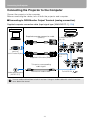
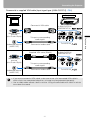
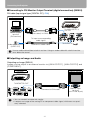
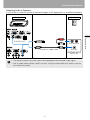
Connecting the Projector to the Computer
Connect the projector to the computer.
Before connecting the cables, turn off both the projector and computer.
■Connecting to RGB Monitor Output Terminal (analog connection)
Supplied computer connection cable (Input signal type: [ANALOG PC-1] - P54)
Computer
Projector
Supplied computer connection cable
(SX80 II)
Monitor output
terminal
(mini D-sub 15-pin)
Supplied VGA cable (SX800)
To ANALOG PC-1/
DVI-I IN
To ANALOG
PC-1
To input a corresponding
audio signal:
Audio output terminal
(AUDIO OUT)
Commercial audio cable
To AUDIO IN
Use an audio cable without a built-in resistor. Using an audio cable with a built-in resistor
turns down the sound.
40
Connecting the Projector
Commercial or supplied VGA cable (Input signal type: [ANALOG PC-2] - P54)
Computer
Projector
Commercial VGA cable
Monitor output
terminal
(mini D-sub 15-pin)
To input a corresponding
audio signal:
Commercial audio cable
Supplied VGA cable (SX800)
Monitor output
terminal
(mini D-sub 15-pin)
Audio output terminal
(AUDIO OUT)
To AUDIO IN
To ANALOG PC-2/
COMPONENT IN
To input a corresponding
audio signal:
Commercial audio cable
To AUDIO IN
• If you use a commercial VGA cable, make sure to use a full connected VGA cable in
which all pins are connected; otherwise, an image may be projected improperly.
• Use an audio cable without a built-in resistor. Using an audio cable with a built-in resistor
turns down the sound.
41
Projecting an Image
Audio output terminal
(AUDIO OUT)
To ANALOG PC-2/
COMPONENT IN
Connecting the Projector
■Connecting to DVI Monitor Output Terminal (digital connection) (SX80 II)
DVI cable (Input signal type: [DIGITAL PC] - P54)
Computer
Projector
To ANALOG PC-1/
DVI-I IN
Monitor output
terminal
(DVI terminal)
DVI digital cable (LV-CA29, option)
To input a corresponding
audio signal:
Audio output terminal
(AUDIO OUT)
Commercial audio cable
To AUDIO IN
Use an audio cable without a built-in resistor. Using an audio cable with a built-in resistor
turns down the sound.
■Outputting an Image and Audio
Outputting an Image (SX80 II)
Images can be output to an external monitor via [ANALOG PC-1], [ANALOG PC-2] and
[COMPONENT].
Projector
External monitor
To MONITOR OUT
Commercial VGA cable
Monitor input
terminal
(mini D-sub 15-pin)
• You can connect one external monitor.
• It outputs an image of the analog PC or component video signal, whichever was previously selected
42
Connecting the Projector
Outputting Audio to Speakers
It is possible to output sound of projected images to AV equipment or amplified speakers.
Projector
Speaker
RCA terminal
Commercial audio cable
Mini jack
Audio input terminal
(AUDIO IN)
• The speaker outputs the audio signal corresponding to the selected image signal.
• Use an audio cable without a built-in resistor. Using an audio cable with a built-in resistor
turns down the sound.
43
Projecting an Image
To AUDIO OUT
Connecting the Projector
Connecting to AV Equipment
Connect the projector and AV equipment.
Before connecting the cables, turn off both the projector and AV equipment.
The description provided here is just examples. For more detailed information, refer to the
manual for the connecting AV equipment.
■Connecting to Digital Video Output Terminal (digital connection) (SX80 II)
HDMI cable (Input signal type: [HDMI] - P54)
AV equipment
Projector
Digital video camera
To HDMI IN
Digital video
output terminal
(HDMI terminal)
Commercial HDMI cable
* HDMI cable connection simultaneously connects digital sound.
44
Connecting the Projector
■Connecting to Analog Video Output Terminal (analog connection)
Video cable (Input signal type: [VIDEO] or [S-VIDEO] - P54)
Connect the projector and AV equipment using a video or S-VIDEO cable that fits to the
terminal type of the AV equipment.
The input signal type is [VIDEO] or [S-VIDEO].
Sound is common to [VIDEO] and [S-VIDEO].
[S-VIDEO] is supported only in SX80 MarkII.
AV equipment
Projector
Projecting an Image
To AUDIO IN
S terminal
RCA terminal
Commercial S-VIDEO cable
To S-VIDEO
IN
Commercial video cable
To VIDEO
IN
Image output
terminal
To input a corresponding
audio signal:
To AUDIO IN
RCA terminal
Mini jack
Commercial audio cable
Audio output terminal
Use an audio cable without a built-in resistor. Using an audio cable with a built-in resistor
turns down the sound.
45
Connecting the Projector
Supplied component cable (Input signal type: [COMPONENT] - P54)
A Component video signal from AV equipment can be input to the projector by connecting the supplied component cable to the ANALOG PC-2/COMPONENT IN terminal of the
projector.
Use a commercial component cable that fits to the terminal type of the AV equipment to
connect the supplied component cable.
AV equipment
Projector
Commercial component cable
with RCA-RCA plugs
To ANALOG PC-2/
COMPONENT IN
RCA Component
terminal
D terminal
Image output
terminal
Supplied component cable
Commercial component adapter cable with
D terminal – RCA plugs
To input a corresponding
audio signal:
RCA terminal
To AUDIO IN
Mini jack
Commercial audio cable
Audio output terminal
Use an audio cable without a built-in resistor. Using an audio cable with a built-in resistor
turns down the sound.
46
Connecting the Projector
■Outputting Audio to Speakers
It is possible to output sound of projected images to AV equipment or amplified speakers.
Projector
Speaker
RCA terminal
Commercial audio cable
Mini jack
Audio input terminal
(AUDIO IN)
Use an audio cable without a built-in resistor. Using an audio cable with a built-in resistor
turns down the sound.
47
Projecting an Image
To AUDIO OUT
Connecting the Projector
■Connecting a Digital Camera or an USB Flash Memory (SX80 II)
SX80 MarkII supports PictBridge.
You can connect a PictBridge enabled digital camera, a digital video camera, an USB
flash memory, or an USB memory card reader to directly project images.
Projector
Digital camera
USB flash memory
To USB terminal
USB flash memory
Digital camera
Digital video
camera
USB memory
card reader
USB cable (recommended by
digital camera manufacturer)
USB cable (supplied with memory
card reader)
48
Starting Projection
1
2
Check the connection between the projector and a computer or AV equipment. (P38 –
P48)
Connect the power cord and make sure that the [POWER] indicator lights up red.
Flashing red [POWER] indicator indicates that the lamp is being cooled. Wait until the
indicator turns a steady red.
3
Remove the lens cap and press the POWER button.
The POWER indicator flushes green, and then lights in green.
Remote control
Top control
The countdown window is displayed for approximately 20 seconds, and then the projection is started. Press the OK button to make the countdown window disappear.
4
Turn on the computer or AV equipment power.
49
Projecting an Image
• Fully insert the power cord plug into the socket.
• Connect the ground terminal on the power plug to ground. Otherwise, an electric
shock may result or the computer may suffer electromagnetic radiation problems or
be subject to poor reception by TV and radio.
• Wait at least 5 minutes before turning on the projector when you turn off the projector.
It may shorten the lamp life if you turn on the projector immediately after turning it off.
• To save power, unplug the power cord when not in use.
Starting Projection
Changing Operations When Projector is Turned On
You can change operations when the projector is turned on as follows:
• You can turn on the projector by connecting the power cord without pressing the
POWER button. (P104)
• You can specify whether to enable or disable the LED illumination lamp. (P106)
• You can change the countdown window. (P90)
• You can skip the countdown window. (P49)
Using the Power Saving Mode (power management)
When you enable the power management mode, the lamp is automatically turned
off if the projector receives no signal input for a certain period of time. (P103)
5
Press the AUTO SET button.
The auto setup function performs the following operations automatically:
SX80 MarkII: focusing and keystone distortion adjustment, input signal setting, and
screen color correction
SX800:
keystone distortion adjustment and input signal setting
For more details, refer to the page 52.
If the projector is projecting an image properly with [AUTO SETUP], the projection is
complete.
In SX800, adjust the focus and correct the screen color manually.
For how to turn off the projector, refer to the page 68. Perform the appropriate operation depending on the following situations.
■When the Language Selection Screen Appears
A window appears when the projector is turned on for the first time. You can select a language to be used by the projector for displaying menus and messages in the window.
Select the desired language with the pointer buttons and press the OK button.
You can change the language from the menu at a later time. (P105)
If you cannot check the language selection screen due to the out of focus, press the
FOCUS button to adjust the focus. (P59)
Remote control
Top control
An item highlighted in orange will be selected.
50
Starting Projection
■When the Password Input Screen Appears
If you have set a password, the Password input screen appears. Enter your password.
(P108)
■When "No signal" Appears
A notebook computer requires to turn on the external monitor output. (P51)
Press the INPUT button to select an appropriate input signal. (P55)
■When Notebook Computer Screen Does Not Appear
Set your notebook computer to output signals to an external monitor. For more details,
refer to "Changing Notebook Computer Screen Output" below.
• For the display resolution of the computer, select "1400 x 1050 pixels" or a resolution
closest to the output signal resolution of the computer. (P56)
• Use the auto PC function to adjust shift in computer image or the flickering of the
screen. (P57)
• Use the ZOOM button to adjust the size of the projecting image. (P58)
• Use the FOCUS button to correct the focus adjustment if necessary. (P59)
• Use the D.SHIFT/KEYSTONE button to adjust keystone correction if necessary. (P60)
• Select the aspect ratio of the projecting image (screen aspect) or a screen mode
(aspect) according to the aspect ratio of the screen, type of input image signal and so
on. (P62 - P66)
• Select an image mode depending on the projecting image. (P67)
Changing Notebook Computer Screen Output
To use a notebook computer, you need to change the screen output on the notebook
computer.
This operation is not required for a desktop computer.
■Turning On External Monitor Output
You can turn on the external monitor output via keyboard operation.
To turn on the external monitor output, press an icon for an external monitor or a function
key ([F1] to [F12]) while holding [Fn] key down.
While holding
key
Press a key such as
or
The function keys you use and the method used to turn on the external monitor output vary
depending on the model. For details, see the instructions of your notebook computer.
51
Projecting an Image
■Adjusting Image
Setting Up the Screen Automatically
Auto Setup
The auto setup function automatically makes the following settings and adjustments.
Setting image input signal (Auto input)
Focusing (Auto focus) (SX80 II)
Keystone correction (Auto keystone)
Screen color correction (Auto screen color correction)
(SX80 II)
Use the auto setup function when:
• You turned the power on and the countdown sequence was completed.
• You changed the position or angle of the projector during the projection process.
• The auto screen color correction is disabled at the factory. To enable the auto screen color
correction when performing the auto setup, select the function in menu. (SX80 II) (P86)
• You cannot set a digital PC signal or an AV equipment signal ([Digital PC] and [HDMI])
with the auto setup function. Select the appropriate signal by pressing the INPUT button.
(SX80 II) (P55)
• When "No signal" message appears, press the INPUT button to select an appropriate
input signal. (P55)
• If focusing, keystone distortion and/or screen color correction have not been performed
properly, manually adjust them. (Adjusting the focus: P59, Correcting keystone distortion:
P60 and Correcting the screen color: P86)
• In SX800, the auto setup function does not adjust the focus. Please manually adjust the
focus. (P59)
• If you select [16:9 D. image shift] for [Screen aspect], [Auto setup] will be disabled and
the following screen appears.
SX80 MarkII
SX800
• When you press the INPUT button and then the AUTO SET button, only the input signal
type is set.
• When you press the FOCUS button and then the AUTO SET button, only the focus is
adjusted. (SX80 II)
If you select [16:9 D. image shift] for [Screen aspect], the auto focus function will be disabled.
• When you press the D.SHIFT/KEYSTONE button and then the AUTO SET button, only the
keystone distortion is adjusted. If you select [16:9 D. image shift] for [Screen aspect], the
keystone adjustment will be disabled.
52
Setting Up the Screen Automatically
■Performing the Auto Setup
Press the AUTO SET button to perform the auto setup.
Remote control
Top control
• After the auto setup is complete, the following window appears. Press the OK button.
SX800
53
Projecting an Image
SX80 MarkII
Selecting an Input Signal (INPUT)
Select an appropriate input signal in the [INPUT] menu if you want to project a digital PC or AV
equipment signal or you connect multiple computers or AV equipment to receive their input signals.
Skip this step if you have not changed the input signal since the last projection.
■Types of Input Signals
The table below shows the relationship among input signals supported by the projector,
input terminals and connection cables.
S
Input signal
Supported
model
HDMI
SX80 II
Input terminal
HDMI IN
DIGITAL PC
SX80 II
SX80 II
Types of connection cables
HDMI cable (commercial item)
ANALOG PC-1/
DVI-I IN
DVI digital cable (LV-CA29, option)
ANALOG PC-1/
DVI-I IN
Computer connection cable (supplied item)
ANALOG
PC-1
ANALOG PC-1
VGA cable (supplied item)
SX800
ANALOG
PC-2
SX80 II
SX800
ANALOG PC-2/
COMPONENT IN
VGA cable (commercial item)
Component cable
(supplied item)
COMPONENT
SX80 II
SX800
Commercial component
adapter cable with
D terminal – RCA plugs
ANALOG PC-2/
COMPONENT IN
Commercial component
cable with RCA – RCA
plugs
VIDEO
SX80 II
SX800
S-VIDEO
SX80 II
USB
SX80 II
VIDEO IN
S-VIDEO IN
Video cable (commercial item)
S-VIDEO cable (commercial item)
USB
USB cable or USB flash memory
(commercial item)
54
Selecting an Input Signal (INPUT)
■Selecting an Input Signal
1
Press the INPUT button to pop up a window shown at the lower right.
Remote control
Top control
SX80 MarkII
SX800
When you select [USB] with no PictBridge enabled equipment or an USB flash memory connected and pressing the
OK button, a window waiting for you to connect a PictBridge enabled equipment or an USB flash memory
appears. For more details, refer to "Projecting an Image
from a Digital Camera (SX80 II)" (P114 – P117) or "Projecting Data on USB Flash Memory (SX80 II)" (P118 – P124).
2
The selection is toggled through available input signal types by pressing the INPUT
button.
3
<
<
• You can select the target input signal with [ ] / [ ].
• Only the input signals displayed in white can be selected.
Press the OK button to determine the input signal type.
If no button is pressed in 4 seconds, the selected input signal type is chosen.
55
Projecting an Image
The currently active input signal is marked with a circle and highlighted in orange.
An input signal that is ready for projection is displayed in white. When no signal is
received, it is displayed in gray.
In SX80 MarkII, [HDMI], [DIGITAL PC], and [ANALOG PC-1] may be displayed in
gray even if they are ready for projection.
Adjusting Image
Setting the Display Resolution of the Computer
Set the display resolution of the computer to "1400 x 1050 pixels" or a resolution closest to
the output signal resolution of the computer based on the performance of the projector
(resolution: 1400 x 1050 pixels). (P150)
■Windows Vista
■Windows XP
1
1
2
3
Open the [Control Panel] from the start
menu, then select [Appearance and
Personalization] - [Adjust screen resolution] in the [Control Panel Home].
2
Select "1400 x 1050 pixels" or a resolution closest to the output signal resolution of the computer.
Click the OK button.
3
■Macintosh OSX
1
2
3
4
Open the Apple Menu and select [System
Environment Setting].
In the System Environment Setting window, click the [Displays] icon to display
the Display window.
Select the [Display] tab and select "1400 x
1050" or a resolution closest to the output
signal resolution of the computer from the
[Resolution] list.
Close [System Environment Setting] window.
56
Right-click on the desktop background and select [Properties] to open
the [Display Properties].
Click the [Settings] tab, and under
[Screen Resolution], select "1400 x
1050 pixels" or a resolution closest to
the output signal resolution of the
computer.
Click the OK button.
Adjusting Image
AUTO PC
When you press the AUTO PC button if there is a shift in image display or flickering of
screen with the [ANALOG PC-1] or [ANALOG PC-2] selected, the projector is adjusted to
an optimum condition.
The result of adjustment is recorded for each input signal ([ANALOG PC-1] or [ANALOG
PC-2]). If you connect the projector to the same computer, you can project the image with
the same settings as before simply by select the input signal.
■Performing the Auto PC Function
Press the AUTO PC button to make projector adjustment.
Remote control
Top control
Projecting an Image
Perform the following if the project image has not been properly adjusted with the auto PC
function.
• From [Input signal select], select an input signal type based on the resolution of the computer. (P80)
• If the adjustment is still insufficient, from [Input signal settings] select [Total dots], [Tracking], [Horizontal position], [Vertical position], [Horizontal pixels] and [Vertical pixels] to
make adjustments. (P81 – P84)
• For the signal types supported by the projector, see the table on page 150.
57
Adjusting Image
Adjusting the Image Size
Use the ZOOM button to adjust the size of the projecting image.
Change the projector installation position if your desired image is too large or too small to
adjust it with the zoom function. (P35)
1
Press the ZOOM button to pop up a window shown at the lower right.
Remote control
2
Top control
Press the pointer buttons to adjust the image size.
Remote control
Top control
3
<
<
[ ] / [ ]: Rough adjustment.
[<] / [>]: Fine adjustment.
When the image size is determined, press the OK button or the ZOOM button.
58
Adjusting Image
Adjusting the Focus
You can adjust the focus with the FOCUS button. The projection image may be out of
focus if the projection distance is beyond the range of 1.2 m (3.9') to 9.1 m (29.6'). Move
the projector installation position if such is the case. (P35)
■Auto focusing (SX80 II)
Press the FOCUS button, and then the AUTO SET button.
If you select [16:9 D. image shift] for [Screen aspect], the auto focus function will be disabled.
1
Press the FOCUS button to pop up a window shown at the lower right.
Remote control
2
Top control
Press the pointer buttons to adjust the focus.
Remote control
Top control
3
<
<
[ ] / [ ]: Rough adjustment.
[<] / [>]: Fine adjustment.
When the focus is adjusted optimally, press the OK button or the FOCUS button.
59
Projecting an Image
■Manual focusing
Adjusting Image
Adjusting Keystone Distortion
The D.SHIFT/KEYSTONE button corrects the keystone distortion.
• Keystone can be adjusted within the range of ± 20 degrees. If the keystone distortion is
too large to adjust, move the projector installation position. (P35)
• The amount of adjustment may be smaller depending on type of input signal.
• The result of keystone adjustment is memorized. If you place the projector at the same
position, the keystone adjustment is not necessary.
• Signals are processed digitally when keystone distortion is corrected. The image may
look different from the original one. In addition, the aspect ratio of the image may change.
• If you select [16:9 D. image shift] for [Screen aspect], the keystone adjustment will be disabled. Project the image at right angle to the screen.
■Auto adjustment
Press the D.SHIFT/KEYSTONE button, and then the AUTO SET button.
■Manual adjustment
Press the D.SHIFT/KEYSTONE button to pop up a window shown at the lower right.
Remote control
2
Top control
Press the pointer buttons to adjust the focus.
Remote control
Top control
[ ]: Reduces the length of
the lower edge.
<
[ ]: Reduces the length of
the upper edge.
<
1
60
Adjusting Image
3
When the keystone distortion has been adjusted, press the OK button.
■Resetting the Keystone Adjustment
Perform the following steps to reset the keystone adjustment.
Press the D.SHIFT/KEYSTONE button twice to display the [Keystone reset] window.
On the window, select [OK] with [<], and then press the OK button.
Projecting an Image
61
Selecting Screen Aspect and Aspect
Select an optimum aspect ratio of the projecting image (screen aspect) or an optimum
screen mode (aspect) according to the aspect ratio of the screen, type of input image
signal and so on for the projection making best use of the screen size.
• [Screen aspect]: Select the same aspect ratio with your screen.
• [Aspect]: Select [Auto] unless the type of input signal is [VIDEO].
You may need to change the setting depending on the resolution of the computer. If the
image is not projected with a desired aspect ratio, see "Relationship between Aspect and
Screen Aspect" in Appendix on page 147.
Selecting Screen Aspect
Select the aspect ratio of projecting image to the aspect ratio of the screen.
Perform the following steps to select the aspect ratio of the projecting image.
Press the MENU button to display a menu window.
Remote control
2
Use [<] / [>] to select the [Display settings] tab.
Remote control
Top control
Select [Screen aspect] with [ ] / [ ], and then press the OK button.
<
3
Top control
Remote control
<
1
Top control
62
Selecting Screen Aspect and Aspect
<
Use [ ] / [ ] to select a screen aspect type.
<
4
Remote control
Top control
16:9
Select this when you use a screen with aspect ratio
of 16:9.
16:9 D. image shift
Select this when you use a screen with aspect ratio
of 16:9. Suitable for projecting visual software having aspect ratio of 16:9.
You cannot correct the keystone distortion in this
mode, but you can move the image up or down with
images being projected horizontally.
See the following page on how to shift the image.
5
Press the OK button to accept your setting and then press the MENU button.
63
Projecting an Image
4:3
Select this when you use a screen with aspect ratio
of 4:3.
Selecting Screen Aspect and Aspect
■Moving Image with 16:9 D. Image Shift
1
Press the D.SHIFT/KEYSTONE button to pop up a window shown at the lower right.
Remote control
<
Use [ ] / [ ] to move the image.
<
2
Top control
Remote control
Top control
[ ]: Moves down the image.
3
<
<
[ ]: Moves up the image.
When the image shift adjustment has been completed, press the OK button.
■Resetting the Image Shift
Perform the following steps to reset the image shift adjustment.
Press the D.SHIFT/KEYSTONE button twice to display the [D.Image Shift reset] window.
On the window, select [OK] with [<], and then press the OK button.
64
Selecting Screen Aspect and Aspect
Selecting Aspect Ratio
Select the aspect ratio of projecting image based on the input signal type, aspect ratio of
the screen and resolution.
For more details on the aspect ratios, refer to "When Projecting an Image from a Computer" on page 147.
■Types of Aspect Ratios
Auto
An image is projected at an aspect ratio of the input signal. Select this mode for normal
image projection.
4:3
An image is projected at an aspect ratio of 4:3. Select this if an image of 4:3 aspect ratio
cannot be appropriately projected in the [AUTO] mode.
16:9
An image is projected at an aspect ratio of 16:9. Select this if an image of 16:9 aspect
ratio cannot be appropriately projected in the [AUTO] mode.
Zoom
An image with 4:3 aspect ratio is projected in the center of the screen enlarged in 16:9
aspect ratio with the upper and lower portion of the image cut off. Select this when projecting visual software having aspect ratio of 4:3 and black belts at the top and bottom of
the image.
• This mode is available when you select [16:9] or [16:9 D. image shift] for [Screen
aspect] and select [HDMI (576p, 480p) (SX80 II)], [COMPONENT (576p, 480p, 576i,
480i)], [VIDEO] or [S-VIDEO (SX80 II)] for input signal.
True size
An image is projected with the original resolution of the input signal. Select this to clearly
project computer screen images having a resolution SXGA+ or lower (VGA, SVGA, XGA
or SXGA) or visual software having a resolution lower than 1035i.
• This mode is available when you select [HDMI (720p, 576p, 480p) (SX80 II)] or [COMPONENT (720p, 576p, 480p)] for input signal.
• It is not available for an image having a resolution higher than SXGA+ or visual software
having a resolution of 1080i, 1080p, 1035i, 576i or 480i.
• It is also available if the input signal is [ANALOG PC-1], [ANALOG PC-2], or [DIGITAL PC
(SX80 II)]; however, it may not be available depending on the screen aspect setting.
65
Projecting an Image
• [Auto] is not available if the input signal type is [VIDEO].
• [Auto] is automatically selected if the input signal type is [USB]. (SX80 II)
Selecting Screen Aspect and Aspect
■How to Select an Aspect Ratio
Press the ASPECT button on the remote control to select an appropriate aspect ratio. The selection
is toggled among types for aspect ratios by pressing the ASPECT button.
For more details on the aspect ratios, refer to "When Projecting an Image from a Computer" on page
147.
Remote control
You can also select any aspect ratio from the menu. (P79)
Some aspect ratios may not appear depending on types of input signals.
66
Selecting an Image Mode
You can select an image mode depending on the projecting image.
In each image mode, you can further adjust the brightness, contrast, sharpness, gamma,
color adjustment, advanced adjustment, and lamp mode. (P93)
■Image modes
Standard
Select this to project an image with near-original quality and a high regard for reproduction of white. It is suited to project text-based computer screens or visual software (moving pictures) in a bright room.
Presentation
Select this to project an image with quality suited for the presentation. It is also suited to
project visual software (moving pictures) with a high regard for the brightness.
sRGB
Select this if you want to project an image in the display mode conforming to the sRGB
standard (P152). It is suited to project an image shot by sRGB-compatible digital camera.
Photo (SX80 II)
If you select [Photo] for [Image mode], make sure to set [Ambient light] in the [Image
adjustment] as well.
You can correct an image according to the ambient light based on [sRGB] in [Image
mode] and project the image with higher tone on the screen by setting [Ambient light]. It
is suited to project an ornamental photo, etc. under an ambient light.
It is available if the input signal is [ANALOG PC-1], [ANALOG PC-2], [DIGITAL PC], or [USB].
■How to Select an Image Mode
Press the IMAGE button on the remote control to select your desired image mode.
The selection is toggled among aspect types by pressing the button.
Remote control
(SX80 II)
You can also select any image mode from the [Image mode] menu. (P93)
67
Projecting an Image
Movie
Select this to project common visual software (moving pictures). It is suited to easily enjoy
the atmosphere of a moving theater in a dim room.
Turning Off the Projector
1
Press the POWER button to pop up a window shown at the lower right.
Remote control
Top control
Press the POWER button again while the confirmation message is displayed.
The lamp goes off, the [POWER] indicator starts flashing in red and the cooling fan
starts.
• You cannot turn the projector on while the cooling fan is in operation.
• If you want to continue projecting, press a button other than POWER or wait until the confirmation message disappears.
• Wait at least 5 minutes before turning on the projector when you turn off the projector. It
may shorten the lamp life if you turn on the projector immediately after turning it off.
• Using the projector for a long time may shorten the life of the lamp and internal optical
components.
2
Remove the power cord from the AC outlet.
It continues to cool down the lamp even after removing the power cord. Thus, you
may move or put away the projector immediately after the use.
With the power cord connected, the LED illumination lamp turns on during cooling
cycle.
• Wait until the cooling fan stops before putting the projector in the carrying bag. Do not put
the projector in the carrying bag until the cooling fan stops rotating. The projector may be
damaged due to the heat.
• Attach the lens cap to the lens to protect it and put the projector in the carrying bag.
Replace the adjustable foot to prevent the damage on the projector.
68
Table of Contents
Safety Instructions
Useful Functions
Available During
a Presentation
Before Use
Projecting an Image
Useful Functions Available During a Presentation
Setting Up Functions from Menus
Projecting an Image from a Digital Camera or an
USB Flash Memory (SX80 II)
Connecting the Projector to Network (SX80 II)
Appendix
Index
69
Useful Functions Available During a Presentation
Blackened Out an Image
Temporarily
Freezing the Picture
Useful when:
Useful when:
• You finished the presentation.
• You want to divert attendees' attention from
the screen.
• You want to perform a computer operation
which is irrelevant to the proceedings of the
presentation.
• You want to stop a moving image.
Remote control
Press the
image.
Press the
image.
Remote control
button to blacken out the
Press the
button to freeze the moving
image. The projector shows the following
icon.
button again to show the
• You can set the screen state while
blackening out the image on the menu.
You can also set a specified image.
(P89)
• The lamp keeps a turn-on state while
blackening out the image.
• The (middle) LED illumination lamp on
the top control flush slowly while blackening out the image.
Press the
button again to cancel the
FREEZE function.
• The (left and right) LED illumination
lamps on the top control flushes slowly
while stopping the image.
• It is cancelled once the input signal is
terminated.
• You cannot zoom an image (P72) when
you are freezing the image.
70
Useful Functions Available During a Presentation
Adjusting the Volume
Muting the Sound
Useful when:
Useful when:
• You want to adjust the volume level of the projectors or external speaker.
• You want to temporality mute the unnecessary
sound.
• You want to immediately mute the sound.
Remote control
button. The following screen
Press the
button to mute the sound.
The projector shows the following icon.
• You can also adjust the volume level
with [<] / [>] of the projector.
• Adjust the volume or mute setting on the
computer if the volume level is too low.
• You can also adjust the volume level of
the speakers connected via the audio
output terminal.
Press the
button again to cancel the
MUTE function.
• You can also mute the sound of the
speakers connected via the audio output terminal.
71
Useful Functions Available During a Presentation
Press the
appears.
Remote control
Useful Functions Available During a Presentation
Zooming an Image
Useful when:
• Zoom in an object such as a small graph during a presentation (up to 12x).
• Focusing on the current subject.
<
<
You can move the area to the enlarged by
using [ ] / [ ] / [<] / [>].
Press the
button. A part of the image is
enlarged each time pressed.
Remote control
Remote control
Projector
You can restore the original size of the
image by pressing the
button.
• The magnification appears on the
screen.
72
Useful Functions Available During a Presentation
Showing the Elapsed Time
Projecting Image Without Computer (SX80 II)
Useful when:
Useful when:
• You want to manage the proceedings of the
presentation.
• You want to project an image from a digital
camera.
• You want to project an image from USB flash
memory.
You can project an image directly by connecting the projector with a PictBridgecompatible digital camera or USB flash
memory.
Press the
button to start counting.
Digital camera
Remote control
Refer to P114 – P117.
Press the
timer.
button again to stop the
• Press the
button while the timer is
stopped. The timer disappears from the
screen.
Then press the
button to start counting from 00:00.
USB flash memory
Refer to P118 – P124.
73
Useful Functions Available During a Presentation
• The elapsed time is displayed at the
lower right corner of the screen.
• Time is counted up to 59:59. Then the
timer returns to 00:00.
74
Table of Contents
Safety Instructions
Setting
Functions from
Menus
Before Use
Projecting an Image
Useful Functions Available During a Presentation
Setting Up Functions from Menus
Projecting an Image from a Digital Camera or an
USB Flash Memory (SX80 II)
Connecting the Projector to Network (SX80 II)
Appendix
Index
75
How to Use Menus
With a menu, you can set the operation of the projector in detail.
■Menu Configuration
The menu screen is divided into four tabs as follows:
[Display settings] tab (P79)
You can set the type of signal or the
method of projection of the images
input.
[System settings] tab (P103)
You can set the operation of the
projector.
[Image adjustment] tab (P93)
You can adjust the image quality
and colors as you like.
[Information] tab (P112)
You can confirm the information about
the signal types of the images projected and other projector-specific
information.
Menu items
Contents of menu
Input Signal Types for which a Menu Item is Displayed
Different menu items are displayed for different input signal types.
In the following explanation of each menu item, the input signal type for which the
menu item is displayed is indicated as follows:
The following is for SX80 MarkII.
Input signal for which the menu item is displayed
Input signal for which the menu item is not displayed
HDMI
DIGITAL PC
ANALOG PC
76
COMPONENT
VIDEO/S-VIDEO
USB
How to Use Menus
■Basic Operation of Menu
1
Press the MENU button to display a menu window.
Remote control
2
Top control
Use [<] / [>] to select a tab.
Remote control
Top control
<
Use [ ] / [ ] to select a item.
<
3
Remote control
Top control
77
<
Setting Up Functions from Menus
<
• If the tab position is not highlighted in orange, use [ ] / [ ] to move the highlight to
the top.
How to Use Menus
4
Select contents.
How to select the contents varies depending on items.
Selection from a list
Example: Aspect
1. Press the OK button or [>], and a list of the
contents is displayed.
<
<
2. Use [ ] / [ ] to select contents.
3. If you found the contents you desired,
press the OK button or [>].
With [<] / [>]
Example: Contrast
Use [<] / [>] to change the adjustment volume.
In a different screen (1)
Example: Menu position
1. Press the OK button to display a different
screen.
2. The follow the instruction on the screen.
In a different screen (2)
Example: Tracking
1. Press the OK button to display a different
screen.
<
<
2. Use [ ] / [ ] to select contents, and use [<]
/ [>] to select a value.
3. If you found the contents you desired,
press the OK button.
5
Press the MENU button, and the menu screen disappears.
78
Setting Display Status
Selecting an Image Projection Mode
[Aspect]
HDMI
DIGITAL PC
ANALOG PC
COMPONENT
VIDEO/S-VIDEO
USB
Zoom
Display settings
Aspect
You can select a projection mode corresponding to the aspect ratio of image.
An image is projected at an aspect
ratio of the input signal. Select this
mode for normal image projection.
4:3
An image is projected at an aspect
ratio of 4:3. Select this if an image of
4:3 aspect ratio cannot be appropriately projected in the [AUTO] mode.
16:9
An image is projected at an aspect
ratio of 16:9. Select this if an image of
16:9 aspect ratio cannot be appropriately projected in the [AUTO] mode.
Press the OK button to accept your setting
and then press the MENU button.
• [Auto] and [True size] are not available
if the input signal type is [VIDEO].
• [Auto] is automatically selected if the
input signal type is [USB]. (SX80 II)
79
Setting Up Functions from Menus
True size An image is projected with the original resolution of the input signal.
Select this to clearly project computer screen images having a resolution SXGA+ or lower (VGA, SVGA,
XGA or SXGA) or visual software having a resolution lower than 1035i.
• This mode is available when you
select [HDMI (720p, 576p, 480p)
(SX80 II)] or [COMPONENT (720p,
576p, 480p)] for input signal.
• It is not available for an image having a resolution higher than
SXGA+ or visual software having a
resolution of 1080i, 1080p, 1035i,
576i or 480i.
• It is also available if the input signal is [ANALOG PC-1], [ANALOG
PC-2], or [DIGITAL PC (SX80 II)];
however, it may not be available
depending on the screen aspect
setting.
• Different contents are displayed for different screen aspects or input signal
types.
• The ASPECT button on the remote control can also be used to select the
Aspect settings.
Auto
An image with 4:3 aspect ratio is projected in the center of the screen
enlarged in 16:9 aspect ratio with the
upper and lower portion of the image
cut off. Select this when projecting
visual software having aspect ratio of
4:3 and black belts at the top and
bottom of the image.
• This mode is available when you
select [16:9] or [16:9 D. image
shift] for [Screen aspect] and
select [HDMI (576p, 480p) (SX80
II)], [COMPONENT (576p, 480p,
576i, 480i)], [VIDEO] or [S-VIDEO
(SX80 II)] for input signal.
Setting Display Status
Selecting an Input Signal Type (ANALOG
PC)
Selecting an Input Signal Type (VIDEO/SVIDEO*)
[Input signal select]
[Input signal select]
HDMI
DIGITAL PC
ANALOG PC
COMPONENT
VIDEO/S-VIDEO
USB
HDMI
DIGITAL PC
ANALOG PC
COMPONENT
VIDEO/S-VIDEO
USB
* is only applicable to SX80 MarkII
Display settings
Display settings
Input signal select
Input signal select
You can select a proper resolution if auto
PC adjustment function (P57) cannot
project a correct image from a computer.
You can select a proper signal type if a
video image from your AV equipment is
not projected correctly.
Press the OK button to accept your setting
and then press the MENU button.
Press the OK button to accept your setting
and then press the MENU button.
Select an input signal corresponding to
the resolution of the computer.
• [Auto] is the factory default.
• Refer to the User's Manual of your AV
equipment connected to the projector to
confirm the input signal type.
• For the signal types supported by the
projector, see the table on page 150.
80
Setting Display Status
Selecting an Input Signal Type (COMPONENT)
Adjusting Input Signal (ANALOG PC) –
Total Dots
[Input signal select]
[Input signal settings] - [Total dots]
HDMI
DIGITAL PC
ANALOG PC
COMPONENT
VIDEO/S-VIDEO
USB
HDMI
DIGITAL PC
ANALOG PC
Display settings
COMPONENT
VIDEO/S-VIDEO
USB
Display settings
Input signal select
Input signal settings
Total dots
You can select a proper component signal
type, if a video image from AV equipment
is not projected correctly.
You can adjust the total number of dots in
the horizontal direction.
Adjust it when stripes are displayed on the
screen.
• [Auto] is the factory default.
• Refer to the User's Manual of your AV
equipment connected to the projector to
confirm the component signal type.
• Perform this adjustment if the [AUTO
PC] function (P57) cannot adjust the
project image correctly.
• You can make adjustment either for
[ANALOG PC-1] or [ANALOG PC-2].
81
Setting Up Functions from Menus
Use [<] / [>] to select a value.
When you have completed the adjustment, press the MENU button.
Press the OK button to accept your setting
and then press the MENU button.
Setting Display Status
Adjusting Input Signal (ANALOG PC) –
Tracking
Adjust Input Signal (ANALOG PC) – Horizontal position
[Input signal settings] - [Tracking]
[Input signal settings] - [Horizontal position]
HDMI
DIGITAL PC
ANALOG PC
COMPONENT
VIDEO/S-VIDEO
USB
HDMI
DIGITAL PC
ANALOG PC
Display settings
COMPONENT
VIDEO/S-VIDEO
USB
Display settings
Input signal settings
Input signal settings
Tracking
Horizontal position
You can fine-tune the timing for generating
an image from the image signal.
Adjusts the tracking when the image distorts or flickers.
You can adjust the horizontal position of
the screen when the projected image is
shifted in the horizontal direction.
Use [<] / [>] to select a value. As the value
increases, the screen moves to the left.
Use [<] / [>] to select a value.
When you have completed the adjustment, press the MENU button.
• Perform this adjustment if the [AUTO
PC] function (P57) cannot adjust the
project image correctly.
• You can make adjustment either for
[ANALOG PC-1] or [ANALOG PC-2].
When you have completed the adjustment, press the MENU button.
• Perform this adjustment if the [AUTO
PC] function (P57) cannot adjust the
project image correctly.
• You can make adjustment either for
[ANALOG PC-1] or [ANALOG PC-2].
82
Setting Display Status
Adjust Input Signal (ANALOG PC) – Vertical
position
Adjust Input Signal (ANALOG PC) – Horizontal pixels
[Input signal settings] - [Vertical position]
[Input signal settings] - [Horizontal pixels]
HDMI
DIGITAL PC
ANALOG PC
COMPONENT
VIDEO/S-VIDEO
USB
HDMI
DIGITAL PC
ANALOG PC
Display settings
COMPONENT
VIDEO/S-VIDEO
USB
Display settings
Input signal settings
Input signal settings
Vertical position
Horizontal pixels
You can adjust the number of the pixels in
the horizontal direction if the length of the
screen is too long or too short in the horizontal direction.
You can adjust the vertical position of the
screen when the projected image is
shifted in the vertical direction.
Use [<] / [>] to select a value.
When you have completed the adjustment, press the MENU button.
When you have completed the adjustment, press the MENU button.
• Perform this adjustment if the [AUTO
PC] function (P57) cannot adjust the
project image correctly.
• You can make adjustment either for
[ANALOG PC-1] or [ANALOG PC-2].
• Perform this adjustment if the [AUTO
PC] function (P57) cannot adjust the
project image correctly.
• You can make adjustment either for
[ANALOG PC-1] or [ANALOG PC-2].
83
Setting Up Functions from Menus
Use [<] / [>] to select a value. As the value
increases, the screen moves upward.
Setting Display Status
Adjust Input Signal (ANALOG PC) – Vertical
pixels
Selecting HDMI Input Level (SX80 II)
[HDMI input level]
[Input signal settings] - [Vertical pixels]
HDMI
DIGITAL PC
ANALOG PC
HDMI
DIGITAL PC
ANALOG PC
COMPONENT
VIDEO/S-VIDEO
USB
COMPONENT
VIDEO/S-VIDEO
USB
Display settings
Display settings
HDMI input level
Input signal settings
You can select this as required when you
project visual software with the HDMI signals.
Vertical pixels
You can adjust the number of the pixels in
the vertical direction if the length of the
screen is too long or too short in the vertical direction.
Use [<] / [>] to select a value.
Press the OK button to accept your setting
and then press the MENU button.
When you have completed the adjustment, press the MENU button.
• [Auto] is the factory default.
• You can select this only when the type of
signal sent from AV equipment is RGB.
• The signal level is select automatically in
[Auto] mode. (Some AV equipment may
not support this.)
• If the HDMI output of your AV equipment
allows switching between [Normal] and
[Expanded], we recommend you to set
[Expanded]. The contrast of images will
be improved and dark scenes will be
rendered more realistically. In this case,
select [Auto] or [Expanded] for the
HDMI input level.
For more detailed information, refer to
the User's Manual of your AV equipment
connected to the projector.
• Perform this adjustment if the [AUTO
PC] function (P57) cannot adjust the
project image correctly.
• You can make adjustment either for
[ANALOG PC-1] or [ANALOG PC-2].
84
Setting Display Status
Select HDMI Over Scan (SX80 II)
Performing Progressive Processing
[HDMI over scan]
[Progressive]
HDMI
DIGITAL PC
ANALOG PC
COMPONENT
VIDEO/S-VIDEO
USB
HDMI
DIGITAL PC
ANALOG PC
Display settings
Display settings
HDMI over scan
Progressive
You can select this as required when you
project visual software with the HDMI signals.
On
You can select this as required when the
images have low resolution.
The entire input signals (100%) are projected.
The images projected may be smaller
than the full projection screen.
Images are projected with disorders at
their peripheral section of images
trimmed off. (The central 95% of the
images are projected.)
A part of peripheral sections of images
may be cut out depending on the resolution of the signals. In such a case, select
[Off].
Off
Do not perform the progressive processing.
On
Performs the progressive processing.
This mode is available when the
HDMI signal is 1080i or, VIDEO/SVIDEO or COMPONENT signal is
1080i, 1035i, 576i, or 480i.
Auto
Performs the appropriate progressive processing according to the
input signal.
Press the OK button to accept your setting
and then press the MENU button.
Press the OK button to accept your setting
and then press the MENU button.
• [Auto] is the factory default.
• You can set this mode for either [HDMI
(SX80 II)], [COMPONENT], [VIDEO] or
[S- VIDEO (SX80 II)].
• Select [Off] when flickers and horizontal lines
are noticeable on a fast-moving picture.
• For the details of the progressive processing, refer to the page 154.
• [On] is the factory default.
85
Setting Up Functions from Menus
Off
COMPONENT
VIDEO/S-VIDEO
USB
Setting Display Status
Selecting a Menu Position
Correcting the Screen Color
[Menu position]
[Screen color]
HDMI
DIGITAL PC
ANALOG PC
COMPONENT
VIDEO/S-VIDEO
USB
HDMI
DIGITAL PC
ANALOG PC
COMPONENT
VIDEO/S-VIDEO
USB
Display settings
Display settings
Menu position
Screen color
You can change the position of menu displayed.
You can adjust the color quality of the images
projected corresponding to the color of the projection screen.
<
Move the menu to the desired position with [ ] /
[<] / [ ] / [>].
<
Normal Select this if a standard type of projection screen is used. The images are
projected in the light quality similar to
that of natural light.
Green- Select this if a greenboard (in dark
board green color) is used for the projection
screen. The color quality similar to [Normal] is obtained on the greenboard.
Adjust
Select this if you make detailed adjustment. The following popup screen will
appear.
When the menu has been moved to the desired
position, press the OK or MENU button.
<
<
Use [ ] / [ ] to select a primary color.
[>] makes the color selected darker.
[<] makes the color selected lighter.
Press the AUTO SET button while the
screen is displayed if you want to perform the auto color correction. (SX80 II)
Press the OK button to accept your setting and
then press the MENU button.
• [Normal] is the factory default.
86
Setting Display Status
Reversing projection
[Image flip H/V]
HDMI
DIGITAL PC
ANALOG PC
None (Normal image)
COMPONENT
VIDEO/S-VIDEO
USB
Display settings
Image flip H/V
You can make this setting if you want to
hang the projector from the ceiling or
project an image from behind the screen.
Ceiling mounted
None
Select this if you project an image
normally.
Ceiling
mounted
Select this if you project an image
with the projector hung from the
ceiling.
The projected images is inverted
in both vertical and horizontal
directions.
Rear
Select this if you project an image
from behind the screen.
The projected images is inverted
in the horizontal direction.
Rear, Ceiling mounted
Rear, Ceil- Select this if you project an image
ing mounted from behind the screen with the
projector hung from the ceiling.
The projected image is inverted in
the vertical direction.
• To hung the projector from the ceiling,
use the optional bracket. Contact your
Canon dealer.
• The keystone distortion adjustment will
be reset.
Press the OK button to accept your setting
and then press the MENU button.
• [None] is the factory default.
87
Setting Up Functions from Menus
Rear
Setting Display Status
Capturing a Logo (SX800)
Selecting the User Logo Display Position
(SX800)
[User screen settings] - [Logo capture]
[User screen settings] - [Logo position]
ANALOG PC
COMPONENT
VIDEO
ANALOG PC
COMPONENT
VIDEO
Display settings
Display settings
User screen settings
User screen settings
Logo capture
Logo position
You can capture a part of the images
being projected as [User logo].
You can select a log display position.
A screen for capturing images is displayed.
Upper L
Upper R
Center
Lower L
Lower R
OK
Cancel
Select a position you want to display a user logo and press the
OK button.
Press the OK button to accept your setting
and then press the MENU button.
Press the OK button, and the image
in the red frame is captured as [User
logo].
• [Center] is the factory default.
• You cannot select [Logo position] if you
have not captured a user logo on the
[Logo capture] screen.
Cancels the image capturing.
• For projecting the captured log on a
screen, select [User logo] on the [Projector on], [No signal screen], [Screen
when blank].
• You may not capture an image depending on the resolution and scan system.
• You cannot capture an image when
[16:9] or [16:9 D. image shift] is
selected for [Screen aspect].
88
Setting Display Status
No Signal Screen (SX80 II)
Screen When Blank (SX80 II)
[User screen settings] - [No signal screen]
[User screen settings] - [Screen when blank]
HDMI
DIGITAL PC
ANALOG PC
COMPONENT
VIDEO/S-VIDEO
USB
HDMI
DIGITAL PC
ANALOG PC
Display settings
COMPONENT
VIDEO/S-VIDEO
USB
Display settings
User screen settings
User screen settings
No signal screen
Screen when blank
You can display either of a black or blue
screen when there is no input signal.
You can display a black or blue screen
when the projected image is blanked off
temporarily by pressing the BLANK button
on the remote control.
The screen is all black.
Black
The screen is all black.
Blue
The screen is blue background.
Blue
The screen is blue background.
Press the OK button to accept your setting
and then press the MENU button.
Press the OK button to accept your setting
and then press the MENU button.
• [Blue] is the factory default.
• [Black] is the factory default.
89
Setting Up Functions from Menus
Black
Setting Display Status
Selecting a Logo at Startup (SX80 II)
No Signal Screen (SX800)
[User screen settings] - [Projector on]
[User screen settings] - [No signal screen]
HDMI
DIGITAL PC
ANALOG PC
COMPONENT
VIDEO/S-VIDEO
USB
ANALOG PC
COMPONENT
VIDEO
Display settings
Display settings
User screen settings
User screen settings
Projector on
No signal screen
You can display a specified logo on a
screen from the moment the projector is
turned on to the moment it is ready fro projection.
Skip
Canon logo
You can display a user logo on a screen
when there is no input signal.
Projects an input signal immediately after turning on the projector.
Black
The screen is all black.
Displays no user logo.
Displays the Canon logo captured at the factory.
Blue
The screen is blue background.
Displays no user logo.
User logo
Displays a user logo.
Press the OK button to accept your setting
and then press the MENU button.
Press the OK button to accept your setting
and then press the MENU button.
• [Canon logo] is the factory default.
• [Blue] is the factory default.
• [User logo] is available only when a
user's logo has been registered.
90
Setting Display Status
Screen When Blank (SX800)
Selecting a Logo at Startup (SX800)
[User screen settings] - [Screen when blank]
[User screen settings] - [Projector on]
ANALOG PC
COMPONENT
VIDEO
ANALOG PC
COMPONENT
VIDEO
Display settings
Display settings
User screen settings
User screen settings
Screen when blank
Projector on
You can display a user logo a screen
when the projected image is blackened
out temporarily by pressing the BLANK
button on the remote control.
The screen is all black.
Displays no user logo.
Blue
The screen is blue background.
Displays no user logo.
User logo
Displays a user logo.
Press the OK button to accept your setting
and then press the MENU button.
Skip
Projects an input signal immediately after turning on the projector.
Canon logo
Displays the Canon logo captured at the factory.
User logo
Displays a user logo captured on
the [Logo capture] screen.
Press the OK button to accept your setting
and then press the MENU button.
• [Black] is the factory default.
• [User logo] is available only when a
user's logo has been registered.
• [Canon logo] is the factory default.
• [User logo] is available only when a
user's logo has been registered.
91
Setting Up Functions from Menus
Black
You can display a specified logo on a
screen from the moment the projector is
turned on to the moment it is ready fro projection.
Setting Display Status
Selecting Aspect Ratio of Screen
[Screen aspect]
HDMI
DIGITAL PC
ANALOG PC
COMPONENT
VIDEO/S-VIDEO
USB
Display settings
Screen aspect
You can select proper option corresponding
to the aspect ratio of the projecting screen.
4:3
Select this when you use a screen with
aspect ratio of 4:3.
You can adjust the keystone distortion
with D.SHIFT/KEYSTONE button.
16:9
Select this when you use a screen
with aspect ratio of 16:9.
You can adjust the keystone distortion
with D.SHIFT/KEYSTONE button.
Select this when you use a screen
16:9
D. image with aspect ratio of 16:9.
You can move the screen upward or
shift
downward with D.SHIFT/KEYSTONE
button.
Press the OK button to accept your setting
and then press the MENU button.
• [4:3] is the factory default.
• If you select [16:9 D. image shift], the
keystone adjustment will be reset. For
more details, refer to the page 63.
• [Auto] may be automatically selected for
[Screen aspect] depending on the
screen aspect setting.
92
Setting the Image Quality
Selecting an Image Quality
[Image mode]
HDMI
DIGITAL PC
ANALOG PC
COMPONENT
VIDEO/S-VIDEO
USB
Standard
Image adjustment
Image mode
Select this to project an image
with near-original quality and a
high regard for reproduction of
white. It is suited to showing a
computer screen or watching
visual software (moving pictures) in a bright room.
Presentation Select this to project an image
with quality suited for the presentation. It is also suited to project
visual software (moving pictures) with a high regard for the
brightness.
SX80 MarkII
Movie
Select this to project moving pictures of all kinds. Its brightness is
suited to easily enjoy the atmosphere of a movie theatre in a
dim room.
sRGB
Select this if you want to project
an image in the display mode
conforming to the sRGB standard (P152). It is suited to project
an image shot by sRGB-compatible digital camera.
Photo *
If you select [Photo] for [Image
mode], make sure to set [Ambient light] in the [Image adjustment] as well.
You can correct an image
according to the ambient light
based on [sRGB] in [Image
mode] and project the image
with higher tone on the screen by
setting [Ambient light]. It is suited
to project an ornamental photo,
etc. under an ambient light.
It is available if the input signal is
[ANALOG PC-1], [ANALOG PC2], [DIGITAL PC], or [USB].
Press the OK button to accept your setting
and then press the MENU button.
• [Standard] is the factory default.
• You can decide the image quality by
adjusting the following items in each
image mode:
[Brightness], [Contrast], [Sharpness],
[Gamma], [Color adjustment],
[Advanced adjustment] and
[Lamp mode].
• The adjustment you have made is
stored as each combination of input signals and an image mode.
* is only applicable to SX80 MarkII
93
Setting Up Functions from Menus
You can select an image mode suitable for
the projecting image.
You can select it also with the IMAGE button on the remote control.
Setting the Image Quality
Adjusting the Brightness
Adjusting the Contrast
[Brightness]
[Contrast]
HDMI
DIGITAL PC
ANALOG PC
COMPONENT
VIDEO/S-VIDEO
USB
HDMI
DIGITAL PC
ANALOG PC
Image adjustment
COMPONENT
VIDEO/S-VIDEO
USB
Image adjustment
Brightness
Contrast
You can adjust the brightness of images.
You can adjust the contrast of images.
If you want to make it more or less vivid,
adjust the difference in tone between the
lightest and darkest portions of the image.
SX80 MarkII
SX80 MarkII
[>]
Increases the brightness of an image.
[<]
Decreases the brightness of an image.
When you have completed the adjustment, press the MENU button.
• The adjustment you have made is
stored as an adjusted value of input signals being projected in an image mode.
[>]
Increases the contrast of an image. It
emphasizes the darker portion and the
bright portion on the projected image.
[<]
Decreases the contrast of an image. The
image becomes less vivid.
When you have completed the adjustment, press the MENU button.
• The adjustment you have made is
stored as an adjusted value of input signals being projected in an image mode.
94
Setting the Image Quality
Adjusting the Sharpness
Making a Gamma Correction
[Sharpness]
[Gamma]
HDMI
DIGITAL PC
ANALOG PC
COMPONENT
VIDEO/S-VIDEO
USB
HDMI
DIGITAL PC
ANALOG PC
Image adjustment
COMPONENT
VIDEO/S-VIDEO
USB
Image adjustment
Sharpness
Gamma
You can adjust the sharpness of images.
You can correct the obscure portion of an
image due to too dark or bright.
SX80 MarkII
SX80 MarkII
Increases the sharpness of an image.
[<]
Decreases the sharpness of an image.
When you have completed the adjustment, press the MENU button.
[>]
Brighten the dark portion.
[<]
Darken the bright portion.
When you have completed the adjustment, press the MENU button.
• The adjustment you have made is
stored as an adjusted value of input signals being projected in an image mode.
• The adjustment you have made is
stored as an adjusted value of input signals being projected in an image mode.
• For the details of the gamma correction,
refer to the page 154.
95
Setting Up Functions from Menus
[>]
Setting the Image Quality
Making Color Adjustment (HDMI) (SX80 II)
Making Color Adjustment (Digital PC/
Analog PC/USB) (SX80 II)
[Color adjustment]
HDMI
DIGITAL PC
ANALOG PC
[Color adjustment]
COMPONENT
VIDEO/S-VIDEO
USB
HDMI
DIGITAL PC
ANALOG PC
Image adjustment
Image adjustment
Color adjustment
Color adjustment
You can adjust the color quality of images for
each of primary colors, red, green and blue.
R/G/B
Gain
Adjust the intensity of each color.
[>] Increases the color intensity.
[<] Decreases the color intensity.
R/G/B
Offset
Adjusts the color reproducibility of
dark portions of each color.
[>] Increases the color reproducibility of color.
[<] Decreases the color reproducibility of color.
COMPONENT
VIDEO/S-VIDEO
USB
You can adjust the color of an image for
each of primary colors, red, green, and blue.
You can also adjust the color temperature.
Color
level*
Adjusts the intensity of each color.
[>] Increases the intensity of color.
[<] Decreases the intensity of color.
Adjusts the color temperature of the
Color
tempera- image.
[>] Changes to the blue color (cold color).
ture*
[<] Changes to the red color (warm color).
When you have completed the adjustment, press the MENU button.
• The adjustment you have made is
stored as an adjusted value of input signals being projected in an image mode.
• Adjusting a color makes
mark shown
in [Color adjustment] in the menu.
R/G/B
Gain
The same as “Making Color Adjustment (HDMI)”.
R/G/B
Offset
The same as “Making Color Adjustment (HDMI)”.
* You can set this if you have selected
[Photo] for [Image mode].
When you have completed the adjustment, press the MENU button.
• The adjustment you have made is
stored as an adjusted value of input signals being projected in an image mode.
• If you change R/G/B Gain or Offset once
color temperature has been specified,
the "*" mark is displayed at the right side
of the setting value to indicate the color
temperature has been specified.
96
Setting the Image Quality
Making Color Adjustment (COMPONENT/
VIDEO/S-VIDEO) (SX80 II)
Making Color Adjustment (Analog PC)
(SX800)
[Color adjustment]
[Color adjustment]
HDMI
DIGITAL PC
ANALOG PC
COMPONENT
VIDEO/S-VIDEO
USB
ANALOG PC
COMPONENT
VIDEO
Image adjustment
Image adjustment
Color adjustment
Color adjustment
You can adjust the color depth and hue of
images for each of primary colors, red,
green and blue.
Adjusts the intensity of each
color.
[>] Increases the intensity of color.
[<] Decreases the intensity of color.
Color balance Adjusts the color balance of a
reddish or greenish image.
[>] Corrects a reddish image.
[<] Corrects a greenish image.
R/G/B Gain
R/G/B
Gain
Adjust the intensity of each color.
[>] Increases the color intensity.
[<] Decreases the color intensity.
R/G/B
Offset
Adjusts the color reproducibility of dark
portions of each color.
[>] Increases the color reproducibility of
color.
[<] Decreases the color reproducibility
of color.
When you have completed the adjustment,
press the MENU button.
The same as “Making Color
Adjustment (HDMI)”.
• The adjustment you have made is stored as
an adjusted value of input signals being projected in an image mode.
• Adjusting a color makes
mark shown in
[Color adjustment] in the menu.
R/G/B Offset The same as “Making Color
Adjustment (HDMI)”.
When you have completed the adjustment, press the MENU button.
• You cannot adjust the [Color balance] in
[Video] or [S-Video] except NTSC.
• The adjustment you have made is
stored as an adjusted value of input signals being projected in an image mode.
97
Setting Up Functions from Menus
Color level
You can adjust the color quality of images for
each of primary colors, red, green and blue.
Setting the Image Quality
Making Color Adjustment (COMPONENT/
VIDEO) (SX800)
Making Advanced Adjustment (Noise reduction)
[Color adjustment]
[Advanced adjustment] - [Noise reduction]
ANALOG PC
COMPONENT
VIDEO
HDMI
DIGITAL PC
ANALOG PC
Image adjustment
Image adjustment
Color adjustment
Advanced adjustment
Noise reduction
You can adjust the color depth and hue of
images for each of primary colors, red,
green and blue.
Color level
You can reduce noise of picture.
Off
Disables noise reduction.
Weak
Select this option for noisy picture.
Strong Select this option for excessively noisy
picture.
Adjusts the intensity of each
color.
[>] Increases the intensity of color.
[<] Decreases the intensity of color.
Press the OK button to accept your setting
and then press the MENU button.
Color balance Adjusts the color balance of a
reddish or greenish image.
[>] Corrects a reddish image.
[<] Corrects a greenish image.
R/G/B Gain
COMPONENT
VIDEO/S-VIDEO
USB
• [Off] is the factory default.
• Noise reduction may produce an afterimage for quick footage.
• Select [Weak] for quick footage. Select
[Strong] for slow footage.
• The setting you have made is stored as
a setting value of input signals being
projected in an image mode.
• Making this setting makes
mark shown
in [Advanced adjustment] in the menu.
The same as “Making Color
Adjustment (Analog PC)
(SX800)”.
R/G/B Offset The same as “Making Color
Adjustment (Analog PC)
(SX800)”.
When you have completed the adjustment, press the MENU button.
• You cannot adjust the [Color balance] in
[Video] except NTSC.
• The adjustment you have made is
stored as an adjusted value of input signals being projected in an image mode.
98
Setting the Image Quality
Making Advanced Adjustment (Dynamic
gamma)
Making Advanced Adjustment (Mem. color
correct) (SX80 II)
[Advanced adjustment] - [Dynamic gamma]
[Advanced adjustment] - [Mem. color correct]
HDMI
DIGITAL PC
ANALOG PC
COMPONENT
VIDEO/S-VIDEO
USB
HDMI
DIGITAL PC
ANALOG PC
Image adjustment
Image adjustment
Advanced adjustment
Advanced adjustment
Dynamic gamma
Mem. color correct
You can adjust the gradation representation of light and dark portions of an image
automatically.
You can correct colors (e.g. blue sky, field
of grass, skin) in our memory so that they
can be projected more vividly.
Dynamic gamma is disabled.
Off
Disables the memorized color correction
function.
L
M
H
Specifies the intensity of the memorized
color correction in three steps.
Weak Dynamic gamma is used a little.
Strong Dynamic gamma is used to a large
extent.
Press the OK button to accept your setting
and then press the MENU button.
Press the OK button to accept your setting
and then press the MENU button.
• [Off] is the factory default.
• The adjustment you have made is
stored as an adjusted value of input signals being projected in an image mode.
• [Off] is the factory default.
• The adjustment you have made is
stored as an adjusted value of input signals being projected in an image mode.
• For the details of the memorized color
correction, refer to the page 155.
99
Setting Up Functions from Menus
Off
COMPONENT
VIDEO/S-VIDEO
USB
Setting the Image Quality
Making Advanced Adjustment (Auto fleshtone) (SX800)
Adjusting Fine Color Adjustment (6-axis
color adjust) (SX80 II)
[Advanced adjustment] - [Auto fleshtone]
[Advanced adjustment] - [6-axis color adjust]
ANALOG PC
COMPONENT
VIDEO
HDMI
DIGITAL PC
ANALOG PC
COMPONENT
VIDEO/S-VIDEO
USB
Image adjustment
Image adjustment
Advanced adjustment
Advanced adjustment
Auto fleshtone
6-axis color adjust
You can represent the skin color impressively.
Off
Disables the [Auto fleshtone] function.
L
M
H
Specifies the intensity of the [Auto fleshtone] in three steps.
You can make fine color adjustment with
RGB (red, green, blue) and CMY (cyan,
magenta, yellow). For the details of 6-axis
color adjust, refer to the page 155.
Press the OK button to accept your setting
and then press the MENU button.
Off
Disables the 6-axis color adjustment.
If you select [Adjust], the previous setting of 6-axis color adjustment
becomes active again.
Adjust
Enables the 6-axis color adjustment.
• The adjustment you have made is
stored as an adjusted value of input signals being projected in an image mode.
Reset
<
<
Use [ ] / [ ] to select [ Hue] or [
Saturation], then adjust them with [<] /
[>].
Returns any adjustment values to zero.
When you have completed the adjustment, press the MENU button.
• [Off] is the factory default.
• The adjustment you have made is
stored as an adjusted value of input signals being projected in an image mode.
100
Setting the Image Quality
Correcting the Image According to the
Ambient Light (SX80 II)
[Ambient light]
HDMI
DIGITAL PC
ANALOG PC
COMPONENT
VIDEO/S-VIDEO
USB
Level L Select this if the ambient light
source is a light bulb or bulb color
fluorescent.
M Select this if the ambient light
source is a day white fluorescent.
H Select this if the ambient light
source is a daylight fluorescent.
Image adjustment
Ambient light
You can correct and project an image
more appropriately according to the ambient light on the screen if you have
selected [Photo] for [Image mode].
An Example of the Ambient Light Setting
Level
Example Location
L
A projection room, sports bar, etc.
M
Photo studio, galley
H
Conference room, lecture room
• [Off] is the factory default.
• You can set this if you have selected
[Photo] for [Image mode].
Off
Projects an image with no correction.
Adjust
You can specify the type and level
(brightness) of the ambient light.
Type
Tungsten
Select this if the ambient light
source is a light bulb or bulb color
fluorescent.
Fluorescent
Select this if the ambient light
source is a day white fluorescent.
Fluorescent H
Select this if the ambient light
source is a daylight fluorescent.
101
Setting Up Functions from Menus
Press the OK button to accept your setting
and then press the MENU button.
Setting the Image Quality
Reducing the Lamp Brightness
Resetting the Image Settings
[Lamp mode]
[Reset]
HDMI
DIGITAL PC
ANALOG PC
COMPONENT
VIDEO/S-VIDEO
USB
HDMI
DIGITAL PC
ANALOG PC
Image adjustment
COMPONENT
VIDEO/S-VIDEO
USB
Image adjustment
Lamp mode
Reset
Reducing the lamp brightness reduces
power consumption and cooling fan noise.
You can enable or disable this mode also
with the LAMP button on the remote control.
You can reset the current image settings to
the default settings.
SX80 MarkII
OK
Resets the image settings.
Cancel
Cancels resetting of the image settings.
Press the OK button to accept your setting
and then press the MENU button.
Normal Projects an image at the normal brightness level.
Quiet
Reduces the lamp brightness and cooling fan noise.
Press the OK button to accept your setting
and then press the MENU button.
• [Normal] is the factory default.
• The setting you have made is stored as
a setting value of input signals being
projected in an image mode.
102
• Only the setting of the combined input
signals being projected and an image
mode is reset.
Setting Various Function
Setting Auto Setup Function
Selecting the Power Management Mode
[Auto setup]
[Power management mode]
HDMI
DIGITAL PC
ANALOG PC
COMPONENT
VIDEO/S-VIDEO
USB
HDMI
DIGITAL PC
ANALOG PC
System settings
System settings
Auto setup
You can select an items you want to enable
in the auto setup function.
COMPONENT
VIDEO/S-VIDEO
USB
Power management mode
You can turn off the lamp or projector automatically for saving power.
SX80 MarkII
Auto focus*
Enables the auto focusing.
Off
Auto keystone Enables the auto keystone correction.
Auto input
Enables the auto input selection.
Auto screen
color*
Adjusts color quality of images
corresponding to the color of
the projection screen.
Standby If no input signal is received for 30
seconds, the projector enters the
standby mode, turning off the lamp
five minutes after start of countdown.
If it receives the input signal or is operated during such period of 30 seconds, it resumes projection.
Press the OK button to accept your setting
and then press the MENU button.
• The factory default settings are as follows:
[Auto focus*]:
[On]
[Auto keystone]:
[On]
[Auto input]:
[On]
[Auto screen color*]: [Off]
• You cannot change any items in [Auto
setup] if [16:9 D. Image shift] is selected
for [Screen aspect]. In addition, you cannot perform the auto setup function. For
the details of the [Auto setup], refer to the
page 52.
* is only applicable to SX80 MarkII
Disables the power management
mode.
Exit
If no input signal is received for 30
seconds, it displays the count down
and turns off the projector after 5 minutes.
Press the OK button to accept your setting
and then press the MENU button.
• [Off] is the factory default.
• The POWER indicator flashes red and
green when the projector is in the
[Standby] power management mode.
• You cannot enable the [Direct power on]
function (see the next item), if you select
[Off].
103
Setting Up Functions from Menus
Select [On] for the items if you want to
enable in auto setup function.
Setting Various Function
Skip the POWER Button Operation
Enabling/Disabling the Beep
[Direct power on]
[Beep]
HDMI
DIGITAL PC
ANALOG PC
COMPONENT
VIDEO/S-VIDEO
USB
HDMI
DIGITAL PC
ANALOG PC
System settings
System settings
Direct power on
Beep
You can turn on the projector only by connecting the power cable without pressing
the POWER button.
Off
You need to press the POWER button to
turn on the projector.
On
You can turn on the projector only by
connecting the power cable.
COMPONENT
VIDEO/S-VIDEO
USB
You can select whether a beep sounds or
not when you operate the projector.
Off
Disables the beep.
On
Enables the beep.
Press the OK button to accept your setting
and then press the MENU button.
Press the OK button to accept your setting
and then press the MENU button.
• [On] is the factory default.
• It does not beep if you mute the projector sound with the MUTE button on the
remote control.
• [Off] is the factory default.
• Before setting the direct power-on to
[On], be sure to set the [Power management mode], described on the
preceding page, to [Standby] or
[Exit].
• Wait at least 5 minutes when you
power on the projector again after
disconnecting it. It may shorten the
lamp life if you turn on the projector
immediately after turning it off.
104
Setting Various Function
Prohibiting the Projector Operation
Selecting a Display Language
[Key lock]
[Language]
HDMI
DIGITAL PC
ANALOG PC
COMPONENT
VIDEO/S-VIDEO
USB
HDMI
DIGITAL PC
ANALOG PC
System settings
System settings
Key lock
You can prohibit the operation of the projector
from either the top control or remote control.
COMPONENT
VIDEO/S-VIDEO
USB
Language
You can select the language in which the
menu is displayed.
Off
Disables the key lock.
Main unit
Prohibit the operation from the
main unit.
Use the remote control.
Remote
control
Prohibit the operation from the
remote control.
Use the main unit.
Press the OK button to accept your setting
and then press the MENU button.
• [Off] is the factory default.
The key lock function becomes effective
from the moment the OK button is
pressed after selecting [Main unit] or
[Remote control]. Be sure to press the
OK button on the top control or remote
control which is not locked.
To Unlock Key Lock Function
Turn off the projector and unplug the power
plug. Hold down the OK button on the top
control and connect the power plug. Make
sure to keep holding down the OK button
until a beep sounds. The key lock is
unlocked.
<
English
Germany
French
Italian
Spanish
Portuguese
Swedish
Russian
Dutch
Finnish
Norwegian
Turkish
Polish
Hungarian
Czech
Danish
Arabic
Chinese (Simplified)
Chinese (Traditional)
Korean
Japanese
When the setting is completed, press the
MENU button.
105
Setting Up Functions from Menus
<
Use [ ] / [ ] / [<] / [>] to select the language to be used in the menu, then press
the OK button.
Setting Various Function
Showing/hiding the Guide Screen
Turning on/off LED Illumination
[Guide]
[LED illumination]
HDMI
DIGITAL PC
ANALOG PC
COMPONENT
VIDEO/S-VIDEO
USB
HDMI
DIGITAL PC
ANALOG PC
System settings
COMPONENT
VIDEO/S-VIDEO
USB
System settings
Guide
LED illumination
You can select whether to show or hide the
guide screen which explains operations.
You can select whether to turn on or off
LED illumination (P28).
Off
Hides the guide screen.
Off
Disables the LED illumination.
On
Shows the guide screen.
On
Enables the LED illumination.
Press the OK button to accept your setting
and then press the MENU button.
Press the OK button to accept your setting
and then press the MENU button.
• [On] is the factory default.
• The guide screen is shown when:
- Power is turned off by pressing the
POWER button (P68).
- No input signal can be detected
(P51).
- An invalid button is pressed in the
[BLANK], [FREEZE], or [D.ZOOM]
mode (P70, 72).
• [On] is the factory default.
• LED illumination is unrelated to turning
on/off of the POWER or WARNING
lamp.
106
Setting Various Function
Setting for Slideshow (SX80 II)
Setting up the Remote Control Channel
[Slideshow interval]
[Other settings] - [Remote control]
HDMI
DIGITAL PC
ANALOG PC
COMPONENT
VIDEO/S-VIDEO
USB
HDMI
DIGITAL PC
ANALOG PC
System settings
System settings
Slideshow interval
You can project the images stored in a
PictBridge-compatible device (P114) or a
USB flash memory (P118) in the slideshow.
• [-- : --] is the factory default.
• The maximum length of slideshow time
is 60 minutes (60:00).
• Use the USB file browser for the projection from the USB flash memory. For
more details, refer to the page 120.
Other settings
Remote control
You can set different channels to different
remote controls, if you use two projectors
at the same time.
Ch1
Ch2
Select the channel of the remote control
used for this projector, and press the OK
button.
Press the OK button to accept your setting
and then press the MENU button.
• The factory defaults is [Ch1] for both
projector and remote control.
• After changing the channel on the
menu, be sure to change the channel of
the remote control, too.
Selecting a Channel on the Remote Control
You can change the channel on the
remote control as follows:
Press the OK button and [ ] for 3 seconds at the same time.
Ch2
Press the OK button and [>] for 3 seconds at the same time.
<
107
Ch1
Setting Up Functions from Menus
Use [<] / [>] to set the interval (minutes:
seconds) of projection (60 minutes = maximum).
Set [-- : --] if no slideshow is performed.
When the setting is completed, press the
MENU button.
COMPONENT
VIDEO/S-VIDEO
USB
Setting Various Function
Extending the Menu Display Time
Setting a Password
[Other settings] - [Menu display time]
[Other settings] - [Password settings]
COMPONENT
VIDEO/S-VIDEO
USB
HDMI
DIGITAL PC
ANALOG PC
System settings
System settings
Other settings
Other settings
Menu display time
Password settings
Disables the projector unless the correct password is entered.
You can extend the menu display time,
which is 30 seconds usually, to 3 minutes.
Normal
COMPONENT
VIDEO/S-VIDEO
USB
The menu is displayed for 30 seconds.
Extended The menu is displayed for 3 minutes.
Off
The projector can be used even if no password is entered.
On
The projector cannot be used unless you
enter your password.
Press the OK button to accept your setting and
then press the MENU button.
Press the OK button to accept your setting
and then press the MENU button.
• [Off] is the factory default.
• You cannot set [On] unless you have completed [Register password].
Once you set a password, the password entry
screen appears at power-on.
Enter a 4-digit password with [ ] / [ ] / [<] / [>].
If the password is valid, the projection starts. If
you enter a wrong passwords three times, the
power will be turned off.
• The power is also turned off if no password is
inputted for 3 minutes.
<
• [Normal] is the factory default.
• You cannot extend the display time for
the window indicating the completion of
Auto setup (P53), the guide window
(P106), the lamp replacement window
(preparation) (P145), or the lamp
replacement window (warning) (P145).
• You cannot use the button holding operation except when you adjust the image
size (P58) or focus (P59).
<
HDMI
DIGITAL PC
ANALOG PC
To Cancel the Password
Turn off the projector and unplug the power
plug. Hold down the MENU button on the top
control and connect the power plug. Make
sure to keep holding down the MENU button
until a beep sounds. The password is cancelled (the registered password is also reset).
108
Setting Various Function
Registering a Password
Resetting the Lamp Counter
[Other settings] - [Register password]
[Other settings] - [Lamp counter]
HDMI
DIGITAL PC
ANALOG PC
COMPONENT
VIDEO/S-VIDEO
USB
HDMI
DIGITAL PC
ANALOG PC
System settings
System settings
Other settings
Other settings
Register password
Lamp counter
You can register a password for starting
projection.
COMPONENT
VIDEO/S-VIDEO
USB
You can reset the lamp counter that indicates the timing to replace the projector
when you replace it.
Do not reset the lamp counter except
when you have replaced the lamp. Otherwise, the lamp counter cannot indicate the correct timing for replacing the
lamp. For the details of the lamp
replacement, refer to the page 146.
Setting Up Functions from Menus
Press the OK button after selecting [Register password], and the following screen
for registering a password appears:
Press the OK button after selecting [Lamp
counter], and the lamp counter is displayed.
<
<
<
<
<
<
<
<
Enter a 4-digit password using [ ] / [<] /
[ ] / [>] (e.g.,
, <<<<, <>).
The 4-digit password is entered from the
left to right digits, the password is automatically registered.
• Press the MENU button to abort the registration.
Select the [Reset] and press the OK button.
109
Setting Various Function
Select [OK] on the screen for confirmation,
press the OK button, and the lamp counter
is reset.
Over 2,000 hours
Displayed in green, yellow and red bar.
A message “Replace with the new lamp.”
appears when power is turned on.
Press the MENU button.
■ About the Display of the Lamp Counter
The lamp counter displays the hours of
use of the lamp in the following way:
Less than 1,800 hours
Displayed in green bar.
1,800 – less than 2,000 hours
Displayed in green and yellow bar.
For 1,800 – less than 2,000 hours, a message "Obtain a new lamp." appears when
power is turned on.
110
Setting Various Function
Initializing network settings (SX80 II)
Resetting to the Default Setting
[Other settings] -[Network setting initialization]
[Other settings] - [Factory defaults]
HDMI
DIGITAL PC
ANALOG PC
COMPONENT
VIDEO/S-VIDEO
USB
HDMI
DIGITAL PC
ANALOG PC
System settings
System settings
Other settings
Other settings
Network setting initialization
Factory defaults
You can Initialize the network settings.
Yes
The network settings is initialized.
No
Initialization is aborted.
You can reset the menu item settings and
restore the system settings to the factory
defaults.
Press the OK button after selecting [Factory defaults], and the following screen for
confirmation appears:
Press the OK button to accept your setting
and then press the MENU button.
• Initialized are “IP address” and other
items set in "Connecting the Projector to
Network (SX80 II)" (P125).
• You can do this initialization also from a
Web browser. (P134)
OK
Settings are reset to default.
Cancel
Settings are not reset to default.
Press the OK button to accept your setting
and then press the MENU button.
• This function cannot reset the value of
[Lamp counter], [Language], [Remote
control], [Input signal] and [Network setting] to default.
• For factory defaults settings, refer to the
page 164 - 166.
111
Setting Up Functions from Menus
Press the OK button after selecting [Network setting initialization], and the following screen for confirmation appears:
COMPONENT
VIDEO/S-VIDEO
USB
Checking the Information of the Projector
[Information]
HDMI
DIGITAL PC
ANALOG PC
COMPONENT
VIDEO/S-VIDEO
USB
Information
You can confirm the information about the signal types of the images projected and other
projector-specific information.
SX80 MarkII
SX800
Information shown
Item
Meaning
Model name
Model name of this projector
Input signal
Details of the input signal currently selected
“Type of signal”, “resolution of signal”, “frequency” and
other information is shown.
Firmware
Current firmware version
Serial no.
Serial number unique to this projector
IP address (SX80 II)
Details of the network settings (P126)
[Not set] is shown for an item having no settings.
Gateway address
(SX80 II)
E-mail sender address
(SX80 II)
E-mail recipient address
(SX80 II)
Projector name (SX80 II)
ID of this projector on the network
System information ID
This is an item of system information. Normally this is not displayed.
112
Table of Contents
Safety Instructions
Projecting an
Image from a
Digital Camera
or an USB Flash
Memory (SX80 II)
Before Use
Projecting an Image
Useful Functions Available During a Presentation
Setting Up Functions from Menus
Projecting an Image from a Digital Camera or an
USB Flash Memory (SX80 II)
Connecting the Projector to Network (SX80 II)
Appendix
Index
113
Projecting an Image from a Digital Camera (SX80 II)
SX80 MarkII supports PictBridge. You can directly
project an image by connecting the projector with a
PictBridge-compatible digital camera, digital video
camera or camera-equipped mobile phone (hereinafter
called "PictBridge-compatible device").
Connectable Cameras
PictBridge is an industry standard enabling the direct printing of images from a digital camera, digital video camera, camera-equipped mobile phone, etc. using a
cable without the computer.
With this projector, you can directly project an image by connecting a PictBridgecompatible device and by using the same operation as that of printing.
Cameras bearing this mark supports PictBridge.
For the up-to-date information regarding PictBridge, visit Cannon's website (http://www.canon.com/pictbridge/) or PictBridge's website (http://
www.cipa.jp/pictbridge/index_e.html).
Connecting a Digital Camera
2
Switch the input signal to [USB].
Press the INPUT button, select [USB] with [ ] / [ ] buttons, and press the OK button.
Remote control
<
Turn the projector power on.
<
1
Top control
If you switch to [USB] when a PictBridge-compatible
device is not connected or not powered on, the screen as
shown in the right appears.
114
Projecting an Image from a Digital Camera (SX80 II)
3
Connect a PictBridge-compatible device with the projector using a USB cable.
The terminal form of the device varies depending on the model. Refer to the User's
Manual for the relevant equipment.
USB cable
Digital camera
(Digital camera/digital video camera)
Digital video camera
4
Turn on the power of the PictBridge-compatible device.
When the communication is ready between the projector and the PictBridge-compatible device, the following mark appears.
With Canon digital camera
With non-Canon digital camera
If the screen as shown in the right (USB file browser)
appears, the device supports the USB mass storage class
(serves as an external hard drive to Windows computers),
and you can project an image according to the system. For
more details, refer to the page 118.
• Use a fully-charged battery for PictBridge-compatible device.
• Do not disconnect the cable until projection is ended unless the PictBridge-compatible device allows to do so. For the removal procedure of the cable, refer to the User's
Manual for the PictBridge-compatible device.
5
Operate the PictBridge-compatible device
Operate the PictBridge-compatible device to start "printing".
The image is transferred to the projector, and projected on the screen.
• You can select from [Single print (project single image)], [Continuous print (project
all images continuously)], and [DPOF print (project specified image)].
With [DPOF print], up to 999 images can be specified for projection.
• To view the next image with [Continuous print] and [DPOF print] selected, press the
OK button.
115
Projecting an Image from a Digital Camera or an USB Flash Memory (SX80 II)
If the projector does not recognize the device or communication is disabled, the screen as shown in the right
appears.
If a PictBridge-compatible device is connected, pull out
the USB cable and connect it again.
Projecting an Image from a Digital Camera (SX80 II)
Operating the Projected Image
When images are projected, you can perform the following operations.
■Switching to the Next Image
If you have specified multiple images for printing with the digital camera, you can switch
to the next image by pressing the OK button.
Remote control
Top control
• You cannot switch to the previous image with the projector operation. To switch to the
previous image, you must retry the print command with the digital camera.
• Even if a slideshow is running, you can switch to the next image by pressing the OK
button.
■Rotating an Image
You can rotate the image by 90 degrees to the left or to the right by pressing [<] / [>].
Remote control
Top control
[<]
[>]
Rotate by 90° to
the left
Rotate by 90° to
the right
• Even if a slideshow is running, you can rotate the image by pressing [<] / [>].
• If the image contains rotational information, the image is rotated to an appropriate
direction automatically.
116
Projecting an Image from a Digital Camera (SX80 II)
Running a Slideshow
You can run a slideshow that projects multiple images stored in the digital camera at certain intervals.
■Setting a Slideshow Interval
By setting projection intervals in [Slideshow interval] from the menu, you can run a slideshow of the images (with PictBridge or from a USB flash memory) connected via USB.
Set the slideshow interval by following the steps below.
Press the MENU button to display the menu.
Remote control
Select [System settings] tab with [<] / [>], and select [Slideshow interval] with [ ] / [ ].
<
2
Remote control
Set the interval (minute:second) other than "--:--" with [<] / [>].
To stop the slideshow, set as "--:--".
Remote control
4
Top control
Top control
Press the MENU button to exit the menu.
It may take a certain time depending on the screen size.
■Finishing projection
To finish projecting images using PictBridge, turn off the power to the PictBridge enabled
equipment.
Then, remove the USB cable from the equipment.
117
Projecting an Image from a Digital Camera or an USB Flash Memory (SX80 II)
3
Top control
<
1
Projecting Data on USB Flash Memory (SX80 II)
You can connect a USB flash memory to the projector
for direct projection of the images (saved in JPEG format) saved in the USB flash memory.
• Images saved only in JPEG format are available for
projection.
USB flash memory
Connectable USB Devices
With this projector, you can connect the USB devices (general USB flash memories
or USB-connected hard disks) that support the mass storage class (serves as an
external hard drive to Windows computers).
Also, you can connect various memory cards via USB memory card readers.
You can also connect a digital camera or digital video camera that supports a USB
mass storage class mode for image projection.
Connecting an USB Flash Memory
2
Turn the projector power on.
<
Switch the input signal to [USB].
Press the INPUT button, select [USB] with [ ] / [ ] buttons, and press the OK button.
Remote control
<
1
Top control
If you switch to [USB] when a USB flash memory is not
connected or the hard disk is not powered on, the screen
as shown in the right appears.
If the projector recognizes a USB flash memory, The "USB
file browser" appears.
118
Projecting Data on USB Flash Memory (SX80 II)
3
Connect a USB flash memory.
Connect a USB flash memory to the USB terminal.
Use a USB cable to connect a digital camera or USB memory card reader.
Be sure to use the USB cable supplied with the equipment connected to the projector.
USB flash memory
USB cable
USB cable
Hard disk
USB memory
card reader
If the projector recognizes a USB flash memory, The "USB file browser" appears.
• Only the drive which has been set in advance is displayed.
• If multiple memory devices are attached to a multiple-card reader, the folder up
one level in the hierarchy is displayed.
If the projector does not recognize the device, the screen as
shown in the right appears.
• If a USB hub is connected, the screen as shown in the right
appears.
• You cannot connect a USB hub to this projector.
• When connecting a device which consumes large amount
of power such as USB hard disk, use a commercial power
supply.
• If the power supplied from the USB terminal is insufficient, malfunction of the USB
flash memory may result or the projector unable to recognize the device.
119
Projecting an Image from a Digital Camera or an USB Flash Memory (SX80 II)
If connection to the USB flash memory fails, the screen as
shown in the right appears.
Disconnect the USB flash memory, and connect it again.
Projecting Data on USB Flash Memory (SX80 II)
Description of USB File Browser
If a USB flash memory is connected to the projector, the USB file browser appears.
In the USB file browser, you can select the image file to be projected by operating the file
list in the USB memory device.
List title
Drive name currently selected
Representation varies depending on the manufacturer and/or model.
Page number of the file list currently displayed
(Current page number/total number of pages)
You can page up and down with [<] / [>].
Preview area
List title
Image selected in the file list
appears with reduced size.
If a folder is currently selected,
the folder icon appears.
File list area
File information area
File information area
File path area
File list area
<
<
File list within the folder appears in the
order of file name. Select an image file or
folder with [ ] / [ ].
Folder
Available image file
File path name
Path name of the image selected
in the file list appears here.
120
Information of the image
selected in the file list
appears here.
• File name
• File size
• Date time original
(date and time of when the
image was taken)
("Last update" may appear
instead.)
• Image size (resolution)
• Model
• Shooting information
(shutter speed, diaphragm,
ISO sensitivity)
Projecting Data on USB Flash Memory (SX80 II)
Selecting an Image for Projection
This section describes the steps for selecting an image in the USB file browser and projecting on the screen.
■Selecting a Drive
Remote control
<
<
If a USB flash memory is connected, skip this step.
If a USB memory card reader having multiple memory slots is connected, the drive (memory slot) list is displayed in the file list.
Select the drive in which the memory card is inserted with [ ] / [ ], and press the OK button.
Top control
• Active drives are displayed in white text, while inactive drives are grayed out.
• Icons indicate the memory card status of each drive. (They differ depending on the
connected equipment.)
Example 1) Memory card is inserted and recognized properly.
■Selecting a Folder
Remote control
<
<
If the image file is located in a folder, select the folder with [ ] / [ ], and press the OK button.
Top control
• To return to upper hierarchy, select
and press the OK button.
121
Projecting an Image from a Digital Camera or an USB Flash Memory (SX80 II)
Example 2) Memory card is inserted but cannot be recognized.
The file system is destroyed or the projector cannot recognize its format.
Projecting Data on USB Flash Memory (SX80 II)
■Selecting an Image File for Projection
Remote control
<
Select an image file with [ ] / [ ].
<
1
Top control
The selected image appears in the preview area with reduced size.
• To return to upper hierarchy, select
2
and press the OK button.
Press the OK button to project the image in full screen.
Remote control
Top control
• To return to the USB file browser, press the OK button.
122
Projecting Data on USB Flash Memory (SX80 II)
Operating the Projected Image
When images are projected, you can perform the following operations.
■Switching to the Previous/Next Image
<
<
If multiple image files are saved in a folder, you can switch to the previous/next image by
pressing [ ] / [ ].
Remote control
Top control
<
<
• Even if a slideshow is running, you can
switch to the previous/next image by pressing [ ] / [ ].
■Rotating an Image
You can rotate the image by 90 degrees to the left or to the right by pressing [<] / [>].
Remote control
Top control
[>]
Rotate by 90° to
the left
Rotate by 90° to
the right
• Even if a slideshow is running, you can rotate the image by pressing [<] / [>].
• If the image contains rotational information, the image is rotated to an appropriate
direction automatically.
■Returning to the USB File Browser
To return to the USB file browser, press the OK button.
Remote control
Top control
123
Projecting an Image from a Digital Camera or an USB Flash Memory (SX80 II)
[<]
Projecting Data on USB Flash Memory (SX80 II)
Running a Slideshow of Data saved in a USB Flash
Memory
You can run a slideshow that projects multiple images stored in a USB flash memory at
certain intervals.
■Creating an Image File Folder
In the slideshow, image files in a folder are displayed in the alphabetical order of file
name. Therefore, create a folder in the USB flash memory and save the image files to be
projected in the slideshow in advance.
To start a slideshow, select and project the first image file in a folder in the full-screen display mode using the USB file browser.
If the "slideshow interval" described below has been set, the image files in a folder are
automatically projected in sequence.
■Setting a Slideshow Interval
To run a slideshow, set the time interval in [Slideshow interval] from the menu in advance.
For the details of the setting step, refer to "Running a Slideshow" on page 117.
124
Table of Contents
Safety Instructions
Connecting the
Projector to
Network (SX80 II)
Before Use
Projecting an Image
Useful Functions Available During a Presentation
Setting Up Functions from Menus
Projecting an Image from a Digital Camera or an
USB Flash Memory (SX80 II)
Connecting the Projector to Network (SX80 II)
Appendix
Index
125
Setting an IP Address (SX80 II)
It is possible to send an error notification e-mail (P135) from the projector to the computer
when you connect the projector to the network.
To connect via the network, an IP address must be assigned to the projector. Set an IP address
by following the steps below. (The examples shown are Windows XP screenshot images.)
■Setting IP Address of the Computer
1
Connect the projector and a computer directly via a cross or straight type LAN cable.
Commercial cross or straight type LAN cable
2
3
4
5
6
7
Turn on the power of the projector and computer.
Open [Control Panel] from the [Start] menu, then select [Network and Internet Connections] - [Network Connections].
Right-click [Local Area Connection], and open [Properties].
Select [Internet Protocol (TCP/IP)] and click the [Properties] button. Take notes of the
original network settings (IP address, subnet mask, DHCP settings, etc).
Select [Use the following IP address] and set as follows:
[IP address]:
192.168.254.1
[Subnet mask]:
255.255.255.0
When you have specified the settings, click the [OK] button and then click the [OK] button on the [Local Area Connection Properties] window to close it.
126
Setting an IP Address (SX80 II)
■Resetting the IP Address Setting of the Computer
1
2
Turn off the projector and remove the LAN cable.
Follow the step 3 to 6 to restore the network setting to the original setting.
Connecting the Projector to Network (SX80 II)
127
Setting Network (SX80 II)
■Displaying the Network Configuration Screen
1
2
3
Turn on the computer and projector.
Launch a web browser, enter "http://192.168.254.254" in the address bar, and press
the Enter key.
The password input screen appears.
The supported web browsers is Microsoft Internet Explorer 6 or later.
In the password input screen, enter "root" for [User name] and "system" for [Password]
and click the [OK] button.
The projector network configuration screen appears on the web browser.
The following information is displayed.
[Projector name]:
The name of the projector on the network
[Location]:
The location of the projector
[MAC address]:
The MAC address of the projector
[IP address]:
The IP address of the projector
[Power Status]:
The power status of the projector
[Lamp Time Normal Mode]:The total lamp used time in its normal mode
[Lamp Time Quiet Mode]: The total lamp used time in its quiet mode
[Lamp Time Converted]: The total lamp used time (converted value)
[Filter Time]:
The total filter used time
Click the [Settings] button to display the menu screen.
128
Setting Network (SX80 II)
■Setting the Network
1
2
In the menu screen, click [Password], input the new user name and password, and
click the [OK] button.
Setting items:
[User name]:
The user name for logging in the network
[New password]:
The new password
[Confirm new password]: The password for confirmation
Click [TCP/IP], enter appropriate values in the following field, and click the [OK] button.
Setting items:
[IP address]:
The IP address of the projector
[Subnet mask]:
The subnet mask of the projector
[Default gateway]:
The default gateway of the projector
Connecting the Projector to Network (SX80 II)
129
Setting Network (SX80 II)
3
Click [Mail], enter appropriate values in the following field for the error report, and click
the [OK] button.
Setting items:
[To:]:
The E-mail address to which the error report is sent
(Within 63 alphanumeric characters)
[Cc:]:
The E-mail address to which the carbon copy of the error
report is sent (Within 63 alphanumeric characters, can be
omitted)
[From:]:
The sender of the E-mail (the projector)
[SMTP server IP address]: The IP address of the available SMTP mail server
[SMTP server port number]: The port number of the available SMTP mail server
[SNTP server IP address]: The IP address of the available SNTP mail server (can be
omitted)
[Time zone]:
The time zone of the installation site
The E-mail resending interval at a transmission failure
[Mail resend interval]:
Setting range: 0 - 59 seconds (the factory default: 10 seconds)
[Mail resend times]:
The number of E-mail resending attempts at a transmission failure
Setting range: 0 - 255 times (the factory default: 3 times)
[Error report]:
Turning ON/OFF the error report sending function (the
factory default: [OFF])
130
Setting Network (SX80 II)
4
If the SMTP mail server authentication is required, click [Mail auth], enter appropriate
values in the following field, and click the [OK] button.
Select one of the following four authentication method in [Mail authentication]. Select
[OFF] if the mail authentication is not required (the factory default is [OFF]).
[LOGIN (SMTP authentication)], [CRAM-MD5 (SMTP authentication)],
[USER/PASS (POP before SMTP)], [APOP (POP before SMTP)]
Setting items:
[User name]:
The user name for the mail authentication
[Password]:
The password for the mail authentication
[Confirm password]:
The password for confirmation
[POP3 server IP address]:
The IP address of the POP3 server
[POP3 server port number]:
The port number of the POP3 server
(The factory default: 110)
[POP before SMTP response time]: The wait time between the POP3 authentication and
the transmission to the SMTP mail server
(millisecond, the factory default: 300)
Connecting the Projector to Network (SX80 II)
131
Setting Network (SX80 II)
5
If you want to monitor the projector, click [SNMP], enter appropriate values in the following field, and click the [OK] button.
Select one of the following four SNMP version in [SNMP]. Select [OFF] if you don't
want to monitor the projector.
(The factory default: [OFF])
[V1], [V2c], [V3 (MD5)], [V3 (DES, MD5)]
Setting items:
[Receive community]:
The name of the community (user)
[Password]:
The password for the community setting
[Confirm password]:
The password for confirmation
[SNMP trap]:
Conditions for sending the SNMP trap
[Trap IP address]:
The IP address to which the SNMP trap is sent
[Trap community]:
The name of the community (user) to which the SNMP
trap is sent
What is the SNMP Agent Function?
This projector supports the SNMP (Simple Network Management Protocol) agent
function that monitors the status of the projector. SNMP consists of the manager (a
monitoring tool, your PC) and agent (a monitored target, the projector).
The information exchange group via SNMP is called "a community." The message
which tells the status of the agent is called "a SNMP trap."
This projector has the following SNMP traps:
• Cold start:
it tells the SNMP agent is under initialization.
• Warm start:
it tells the SNMP agent is under reset (at the SNMP version upgrade).
• Authentication failure:
it tells that it failed the SNMP authentication.
• Faulty lamp:
it tells that a lamp-related error was occurred.
• Faulty power supply:
it tells that a power supply-related error was occurred.
• Temperature abnormality: it tells that a temperature-related error was occurred.
• Lamp status change:
it tells that the status of the lamp used time was
changed.
• Faulty cooling fan:
it tells that a cooling fan-related error was occurred.
• Faulty lamp cover:
it tells that a lamp cover-related error was occurred.
132
Setting Network (SX80 II)
• Filter message:
it tells that the air filter has reached its replacement timing.
• Unknown:
it tells that an unknown error was occurred.
Make sure to install the SNMP manager program on your PC before using the SNMP
agent function.
Authentication and Encryption Protocols
SNMP V3 for the projector uses the DES-CBC for the authentication and encryption
protocols.
6
8
Click [Location], enter the projector location, and click the [OK] button.
• You can input up to 63 alphanumeric characters.
• The factory default is blank.
Click [Apply] when you have completed each menu.
Click the [OK] button when the following dialog box is displayed.
The network setting of the projector is now completed.
133
Connecting the Projector to Network (SX80 II)
7
Click [Projector info] and enter the projector name.
• You can input 1 to 63 alphanumeric characters.
• The factory default is [SX80 MarkII].
Setting Network (SX80 II)
If you want to test the error report transmission, click [Send test mail].
■Resetting the Network Setting
1
Click [Initialize] in the menu screen.
2
Click the [OK] button when the following dialog box is displayed.
If you want to restore to the factory setting from the projector, perform [Network setting initialization] from the menu.
134
Setting Network (SX80 II)
■Error Notification Message
It sends the following message when an error occurs in the projector.
Error list
Errors related to
temperature
Errors related to
the lamp
Errors related to
the lamp cover
Errors related to
the cooling fan
Errors related to
the power supply
Temperature abnormality
Text
The temperature inside the projector is too high for some
reason or the outside air temperature is higher than the
specified one. If the problem is inside the projector,
check whether the projector is installed and operated
normally, turn off the projector to cool its inside, and retry
projection. If the same warning occurs again, the projector may be defective. Contact your dealer.
Error name
Faulty lamp
Text
The lamp has burnt out. Replace the lamp with a new
one. If the same warning occurs again, the lamp drive
circuit may be defective. Contact your dealer.
Error name
Faulty lamp cover
Text
The lamp cover is open. Check whether the lamp cover
is installed properly. If it is installed properly, the lamp
cover detection switch may be defective. Contact your
dealer.
Error name
Faulty cooling fan
Text
The cooling fan or another component may be defective.
Contact your dealer.
Error name
Faulty power supply
Text
The voltage of part of the power supply is abnormally
high or any other problem has occurred in the power
supply. Contact your dealer.
Error name
Unknown Error
Text
Codes in hexadecimal numbers*
* Contact your Canon dealer.
135
Connecting the Projector to Network (SX80 II)
Other types of
errors
Error name
Setting Network (SX80 II)
■Projector Control
1
Click the [Projector control] button on the network setting screen.
The projector control screen appears.
Controlled items:
[Power]:
Turn ON/OFF the projector (P49, P68)
[Input]:
Select an input signal (P54)
[Aspect]:
Select an aspect ratio (P62)
[Image mode]: Select an image mode (P67)
[Blank]:
Blank out the image temporarily (P70)
[Mute]:
Mute the sound temporarily (P71)
[Auto setup]: Perform the auto setup function (P52)
[Auto PC]:
Perform the auto PC function (P57)
• For [Input], [Aspect], and [Image mode], select an item and click the [Apply] button.
• Click the [Refresh] button to display the latest information.
• Click the [Back] button to return to the network setting screen.
• Do not use the [Back], [Forward], or [Refresh] button on your web browser when you control the projector. Using the web browser buttons may cause the projector to be malfunctioned. Be sure to use the buttons on the network setup window.
• Before terminating control of the projector, press the [Refresh] button to check whether
the new setting is properly updated or not.
136
Table of Contents
Safety Instructions
Appendix
Before Use
Projecting an Image
Useful Functions Available During a Presentation
Setting Up Functions from Menus
Projecting an Image from a Digital Camera or an
USB Flash Memory (SX80 II)
Connecting the Projector to Network (SX80 II)
Appendix
Index
137
Troubleshooting
WARNING Lamp Flash Patterns
The WARNING lamp on the Control Panel flashes in red after the projector is turned off
when there is a trouble in the projector.
• Wait until the cooling fan stops and disconnect the power plug from the AC outlet
before dealing with the trouble.
Flash Pattern
Meaning
Countermeasure
One flash
Temperature,
abnormality
The temperature inside the projector is too high for some reason
or the outside air temperature is higher than the specified one. If
the problem is inside the projector, check whether the projector
is installed and operated normally, unplug the projector from the
power outlet to cool down the inside of it and retry projection. If
the air intake or exhaust vent is blocked, remove the obstacle. If
the same warning occurs again, the projector may be defective.
Contact your dealer.
Two flashes
Faulty lamp
The lamp has burnt out. Replace the lamp with a new one. If the
same warning is experienced again, the lamp drive circuit may
be defective. Contact your dealer.
Three flashes
Faulty lamp
cover
The lamp cover is open. Unplug the projector from the power
outlet, then install the lamp cover and turn on the projector
again.
If the lamp cover has been installed properly, the lamp cover
detection switch may be defective. Contact your dealer.
Four flashes
Faulty cooling
fan
The cooling fan or another component may be defective.
Unplug the projector from the power outlet, then plug it to the
outlet and turn on the projector again. Contact your dealer if the
same warning is given.
Five flashes
Faulty power
supply
The abnormal voltage is applied to some parts in the power
supply or any other failure may be occurred. Unplug the projector from the power outlet, then plug it to the outlet and turn on
the projector again. Contact your dealer if the same warning is
given.
138
Troubleshooting
Symptoms and Solutions
■You cannot turn on the projector.
Cause
Countermeasure
The power cord is not connected
correctly.
Check whether the power cord is connected correctly. (P49)
Check that [Key lock] is not enabled. (P105)
The power cord has just been connected.
You cannot turn on the projector until the POWER indicator
turns red after connecting the power plug. (P49)
The lamp cover is open.
Unplug the power cord from the power outlet and correctly
install the lamp cover and then turn on the projector again.
The safety device has activated
because you put the projector in
the carrying bag during the cooling
fan was rotating.
When the safety device is active, the POWER lamp does not
turn on when you connect the power cord. You cannot
release the safety device. Contact your dealer.
The safety device is activated
because the air intake or the
exhaust vent is blocked and the
internal temperature of the projector is increased.
When the safety device is active, the POWER lamp does not
turn on when you connect the power cord. You cannot
release the safety device for safety reason. Remove any
obstacle that is blocking the air intake or exhaust vent and
contact your dealer.
■You cannot project an image from the projector.
Cause
Countermeasure
Check whether the projector is connected to the computer or
AV equipment correctly. (P38, P39, P54)
20 seconds have not passed since
the projector was turned on.
When the projector is turned on, the Opening window is displayed for approximately 20 seconds. To project an image
immediately, press the OK button on the remote control or
top control. (P49)
No image is sent from the AV
equipment.
Check that an image is played on the connected digital
camera, video camcorder, DVD, etc.
The wrong video terminal or signal
type is selected.
Check that the correct video terminal and signal type are
selected. (P38, P39, P54)
No input signal type has been
selected.
Press the INPUT button to select an appropriate input signal
type. (P55)
The video signal type is incorrect.
Check whether the selected signal type is correct. (P80,
P81, P150)
The BLANK function has been
selected.
Press the BLANK button on the remote control. (P70)
No image is sent due to the problem in the computer.
Turn on the projector and computer in this order again.
139
Appendix
Any connection cable is connected incorrectly.
Troubleshooting
Cause
Countermeasure
The external monitor output is not
set on the notebook computer correctly.
Turn on the external monitor output on the notebook computer. To turn on the external monitor output, press the [LCD]
or [VGA] function key or a key with an icon for the external
monitor, while holding down the [Fn] key on the keyboard of
the notebook computer. (P51)
The combination of keys used to perform this operation varies
among computer manufacturers. For more detailed information, refer to the User's Manual that came with your computer.
The displayed image is not the
same as that displayed on the
computer.
Check whether the dual screen (multi-display) mode is
selected on the computer. If the dual screen mode has been
selected, change it to the simultaneous display mode on the
computer.
The output setting method varies among computer manufacturers. For more detailed information, refer to the User's Manual that came with your computer.
The lens cap is not removed.
Remove the lens cap.
■A digital camera or USB flash memory is not recognized. (SX80 II)
Cause
Countermeasure
PictBridge is not supported.
Equipment not supporting PictBridge is not recognized.
Refer to the User's Manual for the relevant equipment.
(P114)
The mass storage class is not supported.
USB flash memory not supporting the mass storage class is
not recognized. Refer to the User's Manual for USB flash
memory. (P118)
■You cannot hear sound.
Cause
The audio cable is not connected
correctly.
Countermeasure
Check the cable connection of the audio cable. (P38, P39)
The MUTE function is enabled.
Press the MUTE button on the remote control. (P71)
The volume level is adjusted to the
minimum.
Press the VOL button on the remote control or the VOL+ button on the top control to adjust the volume level. (P71)
An audio cable with a built-in resistor is used.
Use an audio cable without a built-in resistor.
140
Troubleshooting
■The projected image is blur.
Cause
Countermeasure
The image is out of focus.
Adjust the focus. (P59)
The distance to the screen is too
short.
Check whether the distance to the screen is appropriate. If
the distance is shorter than approximately 1.2m (3.9'), the
projector cannot focus on the screen. (P35, P151)
The projector is not placed straight
in front of the screen.
Check whether the projector is placed obliquely to the
screen. A slight error in the projection angle can be corrected through the keystone adjustment function. (P60)
The projector has been moved to a
place where the temperature varies a lot.
When the projector is moved from a low-temperature place
to a high-temperature place, condensation may form on the
lens. The condensation will evaporate a while later and the
projector will be able to project a normal image.
The lens is stained.
Clean up the lens. (P143)
The tracking is bad.
Adjust the tracking with the AUTO PC or Tracking function.
(P57, P82)
■You cannot project an image appropriately.
Cause
Countermeasure
The projected image is inverted in
the vertical or horizontal direction.
The ceiling mounted/rear projection setting is incorrect.
Check the [Image flip H/V] setting in the [Display settings]
menu. (P87)
Using a VGA cable in which some
pins are not connected.
• Use a supplied VGA cable (for SX800).
• If you use a commercial VGA cable, make sure to use a
cable in which all pins are connected.
■The projector is forced to be turned off.
Cause
Countermeasure
Check whether the air intake or exhaust vent is blocked. If the
air intake or exhaust vent is blocked, the temperature inside
the projector rises and the power is automatically turned off
to protect the projector. (The WARNING lamp flashes once.)
Wait until the internal temperature gets down, and then turn
on the projector without blocking the intake and exhaust
vents. (P24, P25, P49)
The air filter is dirty.
Check whether the bottom air filter is clogged with dust.
If the air filter is clogged, clean or replace the air filter. (P144)
The lamp has exploded (or it is
defective).
Check whether the lamp has exploded.
If the lamp has exploded, replace the lamp according to
"Lamp Handling Precautions" on page 18. Check the lamp
by replacing it with a spare lamp if you have one. (P18,
P145, P146)
141
Appendix
The air intake or exhaust vent is
blocked.
Troubleshooting
Cause
Countermeasure
The operating temperature is inappropriate.
Check whether the operating temperature is 5 to 35°C. (P20)
If you use the projector at 1900 meters or higher above sea
level, contact your dealer.
Other reasons
The projector may be damaged. Contact your dealer.
■You cannot operate the remote control.
Cause
Countermeasure
Batteries are not installed properly
or they have run out.
Check whether batteries are installed correctly. If batteries
are installed correctly, replace them with new batteries. (P31)
You are operating the remote control from the outside of the remote
control operating range.
Check whether you are operating the remote control within
the remote control operating range. (P31)
There is an obstacle between the
projector and the remote control.
Remove the obstacle between the infrared remote receiver
of the projector and the remote control or point the remote
control to an obstacle-free path.
You are operating the remote control under an inappropriate operating environment.
Check whether the infrared remote receiver of the projector
is exposed to direct sunlight or strong light of lighting apparatus. (P31)
The channel setting of the remote
control does not match with the
setting of the projector.
Check whether the channel setting of the remote control has
been changed. You can check the [Remote control] setting
in the [System settings] menu. (P107)
The key lock function is prohibiting
the remote control operation.
Check whether [Key lock] is enabled to disable the remote
control operation.
In the System settings menu, set [Key lock] to [Off]. (P105)
142
Maintenance
Cleaning the Projector
Clean the projector frequently to prevent dust from settling on the surface.
A dirty lens may ruin the quality of the projected image.
Caution
• The main unit is very hot immediately after turning off the projector. Wait until the projector
cools down sufficiently (more than 1 hour) before cleaning the projector. Otherwise, you may
get burned or injured.
• Before cleaning the projector, be sure to remove the power plug from the AC outlet. Otherwise, electric shock or fire may result.
Wipe the projector's main unit softly with a soft cloth.
If the projector is heavily soiled, soak the cloth in water with a small amount of detergent
in it, squeeze the cloth very well, and then wipe the projector with it. After cleaning, wipe
the projector with a dry cloth.
• Never use volatile cleaning liquid or benzine, as these may damage the finish of the projector.
• When using a chemical dust cloth, make sure to read the instructions thoroughly.
• When cleaning the projector's lens, use a commonly available air blower or lens cleaning
paper. The lens surface is easily damaged, so do not use a hard cloth or tissues.
143
Appendix
When Not Used for an Extended Period of Time
Be sure to attach the lens cap on the lens and store in the supplied carrying bag.
Maintenance
Cleaning and Replacing the Air Filter
An air filter is installed in the air intake vent on the bottom of the main body to protect the
internal lens and mirror from dust. Should the air filter become clogged with dust, the projector may be damaged since it will block the air flow into the projector and raises the
internal temperature of the projector. The following screen is displayed when turning on
the projector if the air filter needs to be cleaned. Clean the air filter if such is the case.
• Only [<], [>], the OK button, and the POWER button
are available while this screen is displayed (When
you press the POWER button, "Push POWER button
again to turn off power." message appears).
• After this screen has been displayed for 10 seconds
and disappeared, all buttons become operable.
■Cleaning the Air Filter
• Turn the projector upside down, remove the cover by pushing the latch, remove the air
filter, and clean it with a vacuum cleaner.
• When cleaning dust off the rear exhaust vent and bottom air intake vent, bring the vacuum cleaner nozzle close to them directly.
• If the above screen is displayed when turning on the projector after cleaning the air filter, select [Yes].
■Replacing the Air Filter
Make sure to replace the air filter when replacing the lamp.
Follow the following procedure when replacing the air filter.
1
2
Turn off the projector, disconnect the
power plug from the AC outlet, and let
the projector stand for at least 1 hour.
Remove the filter cover by pushing the
position of the arrow.
3
Remove the air filter.
4
Install a cleaned or new air filter.
5
Install the filter cover securely without
any space.
• Handle the air filter carefully. If damaged, the air filter will not work appropriately
• An air filter can be ordered from your dealer.
144
Maintenance
Replacing the Lamp
When the time of use of the lamp exceeds the certain amount of time, the following message (two types) is displayed for 10 seconds every time the projector is turned on.
1,800 - less than 2,000 hours
Prepare the new lamp when this screen is displayed.
• Only [<], [>], the OK button, and the POWER
button are available while this screen is displayed.
• When you press the POWER button, "Push
POWER button again to turn off power." message appears.
• After this screen has been displayed for 10 seconds and disappeared, all buttons
become operable.
• This message will not be displayed again if you select [Cancel] in response to the message "Do you want to display this message again?".
Over 2,000 hours
Replace the lamp by referring to the procedure
on page 146 when this screen is displayed.
• Only the POWER button is available while this
screen is displayed.
• When you press the POWER button, "Push
POWER button again to turn off the power."
message appears.
■About the Replacing Lamp
This projector uses the following lamp.
Lamp type No.RS-LP05
Caution
• Be sure to use the specified lamp.
• A lamp can be ordered from your dealer.
• When replacing the lamp, turn off the projector, wait until the cooling fan stops, disconnect the
power plug from the AC outlet, and let the projector stand for at least 1 hour. Otherwise, you
may get burned because the main unit is very hot immediately after the projector is turned off.
• Do not touch the inner glass surface when you replace the lamp. Otherwise, the projector 's
performance may degrade.
• Make sure to handle the lamp carefully and correctly since it may explode if it is scratched or
shocked. If a lamp explodes, follow the instructions under "If a Lamp Explodes" on page 18.
• Do not remove screws unless specified.
145
Appendix
• After this screen has been displayed for 10 seconds and disappeared, all buttons
become operable.
• You can check the time of use of the lamp in [Lamp counter] in the [System settings]
menu (P109).
Maintenance
■Replacing the Lamp
1
2
3
4
5
6
7
8
9
Turn off the projector, disconnect the
power plug from the AC outlet, and let
the projector stand for at least 1 hour.
As shown in the figure, insert a flathead screwdriver in the gap and
remove the lamp cover by raising it.
Loosen two screws with a phillipshead screwdriver and then pull up the
handle.
* Pull up the handle as shown in the
figure.
Remove the lamp while holding the
center of the handle.
Fully insert a new lamp and secure it
with two screws.
* After the installation, be sure to
push down the handle.
As shown in the figure, replace the
lamp cover. Check whether the lamp
cover is installed securely.
Turn on the projector.
Bring up the menu and select [System
settings] -> [Other settings] -> [Lamp
counter]. (P109)
Select [Reset] -> [OK] to reset the
lamp counter.
146
Relationship between Aspect and Screen Aspect
This section describes the relationship between screen aspect (P62) and aspect (P65).
To project an image on the whole screen, select the most appropriate screen aspect ratio
and aspect according to the aspect ratio of the screen and input signal type.
When Projecting an Image from a Computer
When the input signal is [ANALOG PC-1], [ANALOG PC-2], or [DIGITAL PC (SX80 II)], select
screen aspect and aspect as follows according to the resolution of the image on the computer.
Screen
Screen Aspect Resolution of ComRatio Setting
puter Screen
Object of Projection
SXGA+
4:3
VGA, SVGA, XGA
4:3
4:3
[4:3]
WXGA
Aspect Setting
Project an image in a
largest possible size on
the screen.
[Auto]
(or [4:3])
Project an image in a
largest possible size on
the screen.
[4:3]
Project the computer
screen in the original
resolution.
[True size]
Project an image in a
largest possible size on
the screen.
[Auto]
Project the computer
screen in the original
resolution.
[True size]
(WUXGA not selectable)
Project an image in a
largest possible size on
the screen.
[Auto]
5:4
Project the computer
screen in the original
resolution.
[True size]
Project an image in a
largest possible size on
the screen.
[Auto]
Project an image in a
largest possible size on
the screen.
[Auto]
Project the computer
screen in the original
resolution.
[True size]
Project an image in a
largest possible size on
the screen.
[Auto]
Project an image in a
largest possible size on
the screen.
[Auto]
SXGA+
4:3
VGA, SVGA, XGA
16:9
[16:9]
4:3
WXGA
SXGA
5:4
147
Appendix
SXGA
Relationship between Aspect and Screen Aspect
When Projecting an Image from Image Software
To project an image such as an image shot by a TV set, commercially available DVD software,
or video camcorder (input signal [HDMI (SX80 II)], [VIDEO], [S-VIDEO (SX80 II)], [COMPONENT]), select an aspect ratio according to the image software format as follows.
Screen
Screen Aspect Ratio
Setting
4:3
[4:3]
Image Software
Format
4:3
Projection Result
Aspect
Setting
[Auto]*1
16:9
4:3
16:9
[Auto]*2
[16:9]
[16:9 D. image shift]*4
16:9
16:9
[Zoom]*3
4:3
*1
*2
*3
*4
[Auto] cannot be selected for the aspect setting if the input signal type is [VIDEO].
If an image from image software with aspect ratio of 16:9 is not projected correctly, select [16:9]
as screen aspect.
If you project the 16:9 image with black borders at top and bottom such as in the terrestrial movie
broadcasting, you can project the 16:9 image fully on the screen by selecting [Zoom] in [Aspect].
[Zoom] is available when [16:9] or [16:9 D. image shift] is selected for the screen aspect and
[HDMI (480p)(SX80 II)], [COMPONENT (480p, 480i)], [VIDEO] or [S-VIDEO (SX80 II)] is selected
for the input signal.
To perform keystone adjustment (P60), select [4:3] or [16:9] for [Screen aspect].
148
Relationship between Aspect and Screen Aspect
When Projecting an Image from a Digital Camera or a USB
Flash Memory (SX80 II)
The [Auto] mode is automatically selected for the aspect ratio when displaying an image
from a digital camera or USB flash memory (selecting [USB] as the input signal).
The image is expanded fully on the screen with the screen aspect maintained.
*
Screen
Screen Aspect Ratio
Setting
4:3
[4:3]
[Auto]
16:9
[16:9]
[16:9 D. image shift]*
[Auto]
Projection Result
Aspect Setting
To perform keystone adjustment (P60), select [16:9] for [Screen aspect].
Appendix
149
Supported Computer Signal Types
This projector supports following signal types.
If your computer or AV equipment is compatible with any one of these signal types, the projector's
auto PC function selects the input signal type to project an image appropriately.
ANALOG RGB
Resolution
(dots)
DVI (SX80 II)
Signal type
640 x 480
VGA
720 x 400
-
800 x 600
1024 x 768
1280 x 768
1280 x 800
1360 x 768
1366 x 768
1152 x 864
SVGA
XGA
WXGA
-
1152 x 900
-
1280 x 960
-
1280 x 1024
SXGA
1400 x 1050
SXGA+
1600 x 1200
640 x 480
640 x 480
832 x 624
1024 x 768
1152 x 870
1280 x 960
UXGA
MAC LC 13
MAC13
MAC16
MAC19
MAC21
MAC
Horizontal
frequency (KHz)
31.469
37.50
37.861
37.861
43.269
31.469
34.50
35.156
37.879
37.898
38.00
38.60
46.875
48.077
53.674
44.028
46.897
47.00
48.363
48.496
56.476
58.032
60.023
60.314
60.994
62.04
63.478
68.677
47.986
49.702
47.712
47.712*1
64.196
61.17
61.846
71.399
60.00
62.50
63.337
63.364
63.735
63.791
63.899
63.981
71.694
76.97
79.976
81.135
63.981
65.317*1
75.00
34.967
35.00
49.725
60.248
68.681
75.00
Vertical
frequency (Hz)
59.94
75.00
72.81
74.38
85.01
70.09
55.38
56.25
60.32
61.03
60.51
60.31
75.00
72.19
85.06
54.63
58.19
58.31
60.00
60.02
70.07
72.00
75.03
74.92
75.77
77.07
79.35
85.00
59.83
60.03
60.02
59.79*1
70.39
65.28
66.00
75.64
60.00
58.63
59.98
59.95
60.01
60.18
60.00
60.02
67.19
72.00
75.03
76.11
60.02
59.98*1
60.00
66.60
66.67
74.55
75.03
75.06
75.08
Resolution
(dots)
640 x 480
800 x 600
1024 x 768
1280 x 1024
1366 x 768
Signal type
1400 x 1050
D-SXGA+
D-VGA
D-SVGA
D-XGA
D-SXGA
-
Horizontal
Vertical
frequency (KHz) frequency (Hz)
31.469
59.94
37.879
60.32
48.363
60.00
63.981
60.02
47.712
59.79
65.317
59.98
63.981
60.02
HDMI (SX80 II)
Signal type
480p
576p
720p
720p
1080i*2
1080i*2
1080p
1080p
*2
Horizontal
frequency (KHz)
31.469
31.250
37.500
44.955
28.125
33.716
56.250
67.433
Vertical
frequency (Hz)
59.94
50.00
50.00
59.94
50.00
59.94
50.00
59.94
Interlaced signal
COMPONENT
Signal type
480p
480i*2
576p
576i*2
720p
720p
1035i*2
1080i*2
1080i*2
1080p
1080p
*2
Horizontal
frequency (KHz)
31.469
15.734
31.250
15.625
37.500
44.955
33.750
28.125
33.716
56.250
67.433
Vertical
frequency (Hz)
59.94
59.94
50.00
50.00
50.00
59.94
60.00
50.00
59.94
50.00
59.94
Interlaced signal
* The specifications in the table above are subject to
change without notice.
*1
is only applicable to SX80 MarkII
* This projector does not support any computer signal of which dot clock is 170 MHz or higher.
150
4:3
Screen size
16:9
Width
Width
Screen size at 4:3 aspect ratio
Type - W x D cm
Height
Height
Relationship between Screen Size and Projecting Distance
Projecting distance
m (feet)
Max. zooming
Projecting distance
m (feet)
Min. zooming
Screen size at 16:9 aspect ratio
W x D cm
40" (81 x 61)
1.2
(3.9')
1.7
(5.6')
81 x 46
50" (102 x 76)
1.5
(4.9')
2.2
(7.1')
102 x 57
122 x 69
60" (122 x 91)
1.8
(5.9')
2.6
(8.5')
70" (142 x 107)
2.1
(6.9')
3.1
(10.0')
142 x 80
80" (163 x 122)
2.4
(7.9')
3.5
(11.4')
163 x 91
90" (183 x 137)
2.7
(8.9')
4.0
(13.1')
183 x 103
100" (203 x 152)
3.0
(9.8')
4.4
(14.6')
203 x 114
110" (224 x 168)
3.3
(10.8')
4.9
(16.1')
224 x 126
120" (244 x 183)
3.6
(11.8')
5.3
(17.4')
244 x 137
130" (264 x 198)
3.9
(12.8')
5.8
(19.0')
264 x 149
140" (284 x 213)
4.2
(13.8')
6.2
(20.2')
284 x 160
150" (305 x 229)
4.5
(14.8')
6.6
(21.7')
305 x 171
160" (325 x 244)
4.8
(15.5')
7.1
(23.3')
325 x 183
170" (345 x 259)
5.1
(16.8')
7.5
(24.6')
345 x 194
180" (366 x 274)
5.4
(17.7')
8.0
(26.3')
366 x 206
190" (386 x 290)
5.7
(18.7')
8.4
(27.6')
386 x 217
200" (406 x 305)
6.0
(19.7')
8.9
(29.2')
406 x 229
210" (427 x 320)
6.4
(20.3')
–
–
427 x 240
6.7
(22.0')
–
–
447 x 251
230" (467 x 351)
7.0
(22.9')
–
–
467 x 263
240" (488 x 366)
7.3
(23.9')
–
–
488 x 274
250" (508 x 381)
7.6
(24.8')
–
–
508 x 286
260" (528 x 396)
7.9
(25.8')
–
–
528 x 297
270" (549 x 411)
8.2
(27.2')
–
–
549 x 309
280" (569 x 427)
8.5
(27.9')
–
–
569 x 320
290" (589 x 442)
8.8
(28.9')
–
–
589 x 331
300" (610 x 457)
9.1
(29.9')
–
–
610 x 343
* The values in the table above are approximations rounded off.
151
Appendix
220" (447 x 335)
Glossary
* is only applicable to SX80 MarkII
HDMI* (P44, P54)
sRGB (P67, P93)
An international standard of color representation (color space) which is applied to
general digital cameras, displays and others. In this projector, if you select [sRGB]
in the [Image mode] setting, the projector
can project the best-quality image conforming to the sRGB Standard.
DVI* (P42, P54)
A digital video signal connection interface
for a computer. This interface allows digital data to be transmitted without converting to analog data, assuring high image
quality with no signal degradation.
The DVI-I (integrated) connector can be
used to transmit both an analog video signal and digital video signal.
Digital PC* (P29, P42)
An abbreviation for High-Definition Multimedia Interface, which is a digital video
signal connection interface for AV equipment. It can transmit non-compressed
images and audio signals simultaneously.
It supports digital contents copy-protected with the HDCP technology. The projector supports HDMI 1.3 standard (10-bit
deep color).
HDCP*
An abbreviation of High-bandwidth Digital
Content Protection which is an encryption
technology for copy protection of digital
image signals. In this projector, you can
project digital contents copy-protected
with the HDCP technology.
VIDEO (P29, P45, P80)
An output terminal widely used in an AV
equipment. It is also called as a composite
output terminal (pin terminal or RCA terminal). For more details, refer to "Composite".
A signal system used to send digital information of individual display dots. This system is free from deterioration of image
quality because of no analog conversion.
Connect the DVI output terminal on the
computer and ANALOG PC-1/DVI-I IN terminal on this projector with an optional DVI
digital cable (LV-CA29). Select [DIGITAL
PC] at projection.
Composite (P29, P45)
A video signal system used to send a
brightness signal (Y) and a color signal
(C) together. Connect the composite output (RCA) terminal on the AV equipment
and the VIDEO IN terminal on this projector with a video cable. Select [VIDEO] at
projection.
Analog PC (P29, P40, P80)
A signal system used to send analog signal information of R (red), G (green), and
B (blue). Connect the analog RGB output
terminal on your computer to ANALOG
PC-1/DVI-I IN terminal or ANALOG PC-2/
COMPONENT IN terminal on the projector
(in SX800, ANALOG PC-1 IN terminal or
ANALOG PC-2/COMPONENT IN terminal), and select [ANALOG PC-1] or [ANALOG PC-2] at the time of projection.
S-VIDEO* (P29, P45, P80)
A signal system (YC separation signal)
used to send a brightness signal (Y) and
color signal (C) separately. Connect the Svideo terminal on the AV equipment and
the S-VIDEO IN terminal on this projector
with an S-video cable. Select [S-VIDEO] at
projection.
152
Glossary
Aspect (P65, P79, P147)
Component (P29, P46, P98)
The aspect ratio is the ratio of the horizontal dimension (width) to the vertical dimension (height) of a screen. It is expressed
as "width : height."
The following aspect ratios are normally
used in Computer or AV equipment.
A signal system in which an image is
transmitted by being broken down the
brightness signal (Y) and the color signal
(C) into the B-Y color difference signal and
the R-Y color difference signal. Its image
quality is higher than that of the composite
video. This system can project a betterquality image as compared with the composite signal system. Connect the component video terminal on the AV equipment
and the ANALOG PC-2/COMPONENT IN
terminal on this projector with a component cable. Select [COMPONENT] at projection.
[4:3]
The aspect ratio for SXGA+ (1400 x 1050)
and XGA (1024 x 768) display resolution in
PC or for the traditional television screen.
The aspect ratio for this projector is 4:3.
[5:4]
The aspect ratio for SXGA (1280 x 1024)
display resolution.
[16:9]
The aspect ratio for the high resolution digital
television or digital terrestrial broadcasting.
For the aspect ratio for movie screens,
"vista vision size" and "cinema scope size",
etc. are used.
"Vista vision size"
The aspect ratio close to 16:9. Select
[Auto] or [16:9] for [Aspect]. The back
belts are added at the top and bottom of
the image.
Resolution (P56)
The number of dots (horizontal dots x vertical dots) that can be displayed on the
screen. It describes the fineness (information amount) of the displayed image.
Resolution
VGA
SVGA
XGA
SXGA
SXGA+
UXGA
153
Number of dots
Horizontal
Vertical
640
480
800
600
1024
768
1280
1024
1400
1050
1600
1200
Appendix
"Cinema scope size"
The landscape-oriented aspect ratio of
8:3. Select [Auto] or [16:9] for [Aspect].
The back belts are added at the top and
bottom of the image.
Tracking (P57, P82)
To reproduce an image from an analog
image signal, the process to accumulate
image information at the appropriate timing with reference to the synchronization
signal within the image signal is required.
This process is called the tracking. This
projector can display an image properly
by automatically adjust the tracking with
the auto PC adjustment function even if
there is a small difference in the synchronization signal from an analog imaging
device.
Glossary
Offset (P97)
A parameter that shifts the reproduction
range of a brightness signal from black to
white within an image signal toward the
higher or lower level of brightness. The
reproducibility of the dark tone is mainly
changed. Since you can adjust the offset
for each RGB color in this projector, you
can also adjust colors.
The offset is normally adjusted with the gain.
Number of dots in each resolution
Color temperature* (P96)
If you select SXGA+ (1400 dots x 1050
dots) as the display resolution for the connecting computer, this projector can
project high-resolution images. If your
computer does not have the SXGA+
option, select the maximum resolution
among the selectable options.
Progressive (P85)
An image display system used to display
the entire screen per scan. For an interlace signal (video signal) that displays one
screen by two scans (one for odd lines
and one for even lines) is input, progressive processing is required. When the progressive function is turned off, one screen
is displayed using image signals per interlace signal, deteriorating the vertical resolution of the image. When the progressive
function is turned on, one screen is displayed using image signals per two interlace signals, improving the vertical
resolution of the image. Turn off the progressive function when flickering and horizontal lines are noticeable on a fastmoving picture.
154
A value that represents the related color in
a light source in general. In this projector,
the color temperature is used to adjust the
RGB color balance for the projected
image to correct the related color influence by the ambient light. If you increase
and decrease the color temperature, white
changes to blue and red, respectively. You
can set the color temperature in the [Color
adjustment] menu if [Photo] has been
selected for [Image mode].
Ambient light* (P101)
Lightning environment around the projector. You can correct and project an image
more appropriately according to the ambient light on the screen via the setting of
[Ambient light] if you have selected
[Photo] for [Image mode].
Gamma Correction (P95, P99)
A tone adjustment system used during
projection of image data. The gamma correction function works effectively when
portions of an image are obscure because
they are too light or dark.
This projector supports manual gamma
correction and dynamic gamma correction
which performs the gamma correction
automatically.
Glossary
Gain (P97)
PictBridge* (P114)
A parameter that adjusts the reproduction
range of a brightness signal from black to
white within the image signal to naturally
reproduce it on the screen. The reproducibility of the bright tone is mainly changed.
Since you can adjust the gain for each
RGB color in this projector, you can also
adjust colors. The gain is normally
adjusted with the offset.
A standard protocol established by CIPA
(Camera & Imaging Products Association)
that supports various digital photo solutions including camera direct print to print
shot images by directly connecting a digital camera to a printer without via a computer. Other than digital cameras, some
digital video camcorders and mobile
phones are compatible with PictBridge. In
this projector, you can project shot images
by directly connecting PictBridge-compatible equipment.
Memorized Color Correction * (P99)
A memorized color is a color in our memory. The memorized color such as blue for
the sky is more vivid than the real color, so
you may feel colors of a projected image
are dull. If such is the case, enable the
memorized color correction function to
make the colors close to the ones in our
memory. You can enable the memorized
color correction function in the image
adjustment menu.
6-axis color adjust* (P100)
DPOF* (P115)
An abbreviation of Digital Print Order Format. It is a protocol to record information
specified for printing such as images to be
printed and the number of copies on a
memory card for PictBridge-compatible
digital camera. In this projector, use this
function to continuously project multiple
shot images from a connected digital
camera.
Appendix
The color adjustment function for an
advanced user. You can adjust color balance and color level for 6 axis of RGB
(red/green/blue) and CMY (cyan/magenta/
yellow) of the projected image to make a
fine color adjustment. You can perform the
6-axis color adjustment in the image
adjustment menu.
155
Specifications
■Projector
SX80 MarkII/SX800
RGB liquid crystal system
Color separation by dichroic mirror/polarizing beam splitter and color composition by
Optical system
prism
Type
Reflective liquid crystal panel
Size/Aspect ratio
0.55" x 3/4:3
Drive system
Active matrix system
Number of pixels/Total Number of pixels 1,470,000 (1400 x 1050) x 3 panels/4,410,000
Zoom ratio/Focal length/F value
1.5/f=16.6 to 24.8mm/F1.95 to F2.6
Zooming and focusing system
Electronic operation/electronic operation (SX80 MarkII: with auto focusing function)
Lens shift
10:0 (fixed)
Light source
230W high-pressure lamp
Screen size (projection distance)
40" to 300" (1.2m/3.9' to 9.1m/12.8')
Number of producible colors
16,770,000 colors (full color)
Brightness*
3,000 lm (at presentation)
Contrast ratio
900:1 (full white:full black, at presentation)
Uniformity*
88% (at presentation)
Speaker
1W monaural x 1
Maximum input resolution
1600 x 1200 dots (compression)
UXGA/SXGA+/SXGA/WXGA/XGA/SVGA/VGA (scan rate: horizontal: 15 to 75KHz,
ANALOG PC input
vertical 50 to 85Hz)
DIGITAL PC input (SX80 II)
SXGA+/SXGA/XGA/SVGA/VGA
COMPONENT input
1080p, 1080i, 1035i, 720p, 576p, 576i, 480p, 480i
HDMI input (SX80 II)
1080p, 1080i, 720p, 576p, 480p
VIDEO/S-VIDEO (SX80 II) input
NTSC, PAL, SECAM, NTSC4.43, PAL-M, PAL-N
ANALOG PC-1/DVI-I IN terminal (SX80 II) DIGITAL PC, ANALOG PC-1 (DVI-I connector 29-pin)
HDMI IN terminal (SX80 II)
HDMI (HDMI ver. 1.3)
ANALOG PC-1 terminal (SX800)
ANALOG PC-1 (mini D-sub 15-pin)
ANALOG PC-2/COMPONENT IN terminal ANALOG PC-2, COMPONENT (mini D-sub 15-pin)
S-VIDEO IN terminal (SX80 II)
S-Video (mini DIN 4-pin)
VIDEO IN terminal
Composite (RCA)
USB terminal (SX80 II)
USB connection, PictBridge input (USB type A)
CONTROL terminal
RS-232C (D-sub 9-pin)
Audio Input terminal
Audio signal (stereo mini jack x 3)
Video Output terminal (SX80 II)
Analog PC (mini D-sub 15-pin)
Audio Output terminal
Audio signal (stereo mini jack)
LAN terminal (SX80 II)
Network connection (RJ-45)
Digital PC (SX80 II)
TMDS (Transition Minimized Differential Signaling)
0.7Vp-p, positive polarity, impedance = 75Ω
Analog PC
Horizontal/vertical synchronization: TTL level, negative or positive polarity
Composite synchronization in G signal: 0.3Vp-p, negative polarity, impedance=75Ω
Video:1Vp-p, negative synchronization, impedance = 75Ω
S-video: Separate YC signal, Y: 1Vp-p, negative synchronization, impedance = 75Ω
C: 0.286Vp-p (burst signal), impedance = 75Ω
Video
Component: Separate Y Cb/Pb Cr/Pr signal
Y: 1Vp-p, Negative synchronization, impedance = 75Ω
Cb/Pb: 0.7Vp-p, impedance = 75Ω Cr/Pr: 0.7Vp-p, impedance = 75Ω
Audio
142mVrms, impedance = 47 KΩ or more
Noise (normal mode/silent mode)
35/31dB
Operating temperature
5 °C to 35 °C
Power supply
AC 100-240 V 50/60 Hz
Power consumption (normal mode/silent
330W/270W/15W (SX80 II) 320W/260W/8W (SX800)
mode/standby state)
Dimensions
332 (W) x 121 (H) x 340 (D) mm/13.3 (W) x 4.8 (H) x 13.6 (D) in (excluding protrusions)
Weight
5.2 kg/11.4 lbs (SX80 II) 5.0 kg/11.0 lbs (SX800)
Remote control, batteries for remote control, power cord, computer connection
Accessories
cable, component cable, carrying bag, lens cover, string for lens cover, User's Manual, and Warranty Card.
Input signals
Input terminals
Video signals
Projection
lens
Display
device
Model name
Display system
*
*
99.99% or more of the LCD panel pixels are effective. During projection, 0.01% or less of pixels may stay lit or unlit due to the characteristics of the LCD panel.
Using the projector continuously for an extended period of time may accelerate the deterioration of optical parts.
■Remote Control
Power supply
Operating range
Dimensions
Weight (not including batteries)
Two 3.0 V, AAA-size batteries
About 5 m (16.4') (to infrared remote receiver)
42 (W) x 22 (H) x 135 (D) mm / 1.7 (W) x 0.9 (H) x 5.3 (D) in
55 g
156
Specifications
45 mm (1.80")
■External View
340 mm (13.60")
121 mm (4.84")
59.3 mm (2.37")
332 mm (13.28")
39.6 mm
(1.58")
135.9 mm (5.44")
113.7 mm
(4.55")
133.0 mm
(5.32")
33.4 mm (1.34")
Screw Holes for Installation
of ceiling-mount hanger
(M4 x 5)
136.8 mm
(5.47")
62.5 mm (2.5")
This terminal is used as a computer analog PC input or component input terminal. Use a
D-sub computer cable for connection.
The terminal specifications for the analog PC input and component input are the same.
Mini D-sub 15-pin
1
2
3
4
5
6
7
8
R
G
B
Monitor ID2
Ground (Horizontal sync.)
Ground (R)
Ground (G)
Ground (B)
157
9
10
11
12
13
14
15
+5 V power
Ground (Vertical sync.)
Monitor ID0
DDC data
Horizontal sync.
Vertical sync.
DDC clock
Appendix
■ANALOG PC-1 (SX800), ANALOG PC-2/COMPONENT IN terminal
Specifications
■Service Port (CONTROL)
D-sub 9pin
Pin No.
1
2
3
4
5
6
7
8
9
Communication format
Signal
OPEN
RxD
TxD
OPEN
GND
OPEN
OPEN
OPEN
OPEN
Communication mode: RS-232-C, asynchronous,
half-duplex communication
Communication speed:19,200 bps
Character length:
8 bits
Stop bits:
2 bits
Parity:
None
Flow control:
None
Control Commands
Function
On
Off
Get
Digital PC
(SX80 II)
HDMI
(SX80 II)
Analog PC-1
Analog PC-2
Input
Component
signals
Video
S-Video
(SX80 II)
USB
(SX80 II)
Get
Standard
Power
supply
ASCII Representation
POWER ON<CR>
POWER OFF<CR>
GET POWER<CR>
Binary Representation
50h 4Fh 57h 45h 52h 20h 4Fh 4Eh 0Dh
50h 4Fh 57h 45h 52h 20h 4Fh 46h 46h 0Dh
47h 45h 54h 20h 50h 4Fh 57h 45h 52h 0Dh
INPUT=D-RGB<CR>
49h 4Eh 50h 55h 54h 3Dh 44h 2Dh 52h 47h 42h 0Dh
INPUT=HDMI<CR>
49h 4Eh 50h 55h 54h 3Dh 48h 44h 4Dh 49h 0Dh
INPUT=A-RGB1<CR>
INPUT=A-RGB2<CR>
INPUT=COMP<CR>
INPUT=VIDEO<CR>
49h 4Eh 50h 55h 54h 3Dh 41h 2Dh 52h 47h 42h 31h 0Dh
49h 4Eh 50h 55h 54h 3Dh 41h 2Dh 52h 47h 42h 32h 0Dh
49h 4Eh 50h 55h 54h 3Dh 43h 4Fh 4Dh 50h 0Dh
49h 4Eh 50h 55h 54h 3Dh 56h 49h 44h 45h 4Fh 0Dh
INPUT=S-VIDEO<CR>
49h 4Eh 50h 55h 54h 3Dh 53h 2Dh 56h 49h 44h 45h 4Fh 0Dh
INPUT=USB<CR>
49h 4Eh 50h 55h 54h 3Dh 55h 53h 42h 0Dh
GET INPUT<CR>
IMAGE=STANDARD<CR>
47h 45h 54h 20h 49h 4Eh 50h 55h 54h 0Dh
49h 4Dh 41h 47h 45h 3Dh 53h 54h 41h 4Eh 44h 41h 52h 44h 0Dh
49h 4Dh 41h 47h 45h 3Dh 50h 52h 45h 53h 45h 4Eh 54h 41h 54h 49h 4Fh
Presentation IMAGE=PRESENTATION<CR>
4Eh 0Dh
Image
Movie
IMAGE=MOVIE<CR>
49h 4Dh 41h 47h 45h 3Dh 4Dh 4Fh 56h 49h 45h 0Dh
mode
sRGB
IMAGE=SRGB<CR>
49h 4Dh 41h 47h 45h 3Dh 53h 52h 47h 42h 0Dh
Photo
IMAGE=PHOTO<CR>
49h 4Dh 41h 47h 45h 3Dh 50h 48h 4Fh 54h 4Fh 0Dh
Get
GET IMAGE<CR>
47h 45h 54h 20h 49h 4Dh 41h 47h 45h 0Dh
Setting
BRI=<value><CR>
42h 52h 49h 3Dh <numeric code> 0Dh
Brightness
Get
GET BRI<CR>
47h 45h 54h 20h 42h 52h 49h 0Dh
Setting
SHARP=<value><CR>
53h 48h 41h 52h 50h 3Dh <numeric code> 0Dh
Sharpness
Get
GET SHARP<CR>
47h 45h 54h 20h 53h 48h 41h 52h 50h 0Dh
Setting
CONT=<value><CR>
43h 4Fh 4Eh 54h 3Dh <numeric code> 0Dh
Contrast
Get
GET CONT<CR>
47h 45h 54h 20h 43h 4Fh 4Eh 54h 0Dh
Auto
ASPECT=AUTO<CR>
41h 53h 50h 45h 43h 54h 3Dh 41h 55h 54h 4Fh 0Dh
4:3
ASPECT=4:3<CR>
41h 53h 50h 45h 43h 54h 3Dh 34h 3Ah 33h 0Dh
16:9
ASPECT=16:9<CR>
41h 53h 50h 45h 43h 54h 3Dh 31h 36h 3Ah 39h 0Dh
Aspect
ratio
Zoom
ASPECT=ZOOM<CR>
41h 53h 50h 45h 43h 54h 3Dh 5Ah 4Fh 4Fh 4Dh 0Dh
True size
ASPECT=TRUE<CR>
41h 53h 50h 45h 43h 54h 3Dh 54h 52h 55h 45h 0Dh
Get
GET ASPECT<CR>
47h 45h 54h 20h 41h 53h 50h 45h 43h 54h 0Dh
158
Specifications
Function
Normal
Quiet
Get
Blank On
BLANK
Blank Off
Get
Lamp
mode
ASCII Representation
LAMP=NORMAL<CR>
LAMP=SILENT<CR>
GET LAMP<CR>
BLANK=ON<CR>
BLANK=OFF<CR> 42h
GET BLANK<CR>
Binary Representation
4Ch 41h 4Dh 50h 3Dh 4Eh 4Fh 52h 4Dh 41h 4Ch 0Dh
4Ch 41h 4Dh 50h 3Dh 53h 49h 4Ch 45h 4Eh 54h 0Dh
47h 45h 54h 20h 4Ch 41h 4Dh 50h 0Dh
42h 4Ch 41h 4Eh 4Bh 3Dh 4Fh 4Eh 0Dh
42h 4Ch 41h 4Eh 4Bh 3Dh 4Fh 46h 46h 0Dh
47h 45h 54h 20h 42h 4Ch 41h 4Eh 4Bh 0Dh
Appendix
159
Index
Numerics
6-axis color adjust (SX80 II) .........100, 155
A
Adjustable foot ...................................... 37
Adjusting keystone distortion ................ 60
Adjusting the focus ............................... 59
Adjusting the volume ............................ 71
Air filter ................................................ 144
Ambient light (SX80 II) ........................ 101
ANALOG PC ....................................40, 54
Analog PC ........................................... 152
ANALOG PC-1 Input Terminal
(SX800) .................................. 29, 40, 54
ANALOG PC-1/DVI-I
IN terminal (SX80 II) ......... 29, 40, 42, 54
ANALOG PC-2/COMPONENT
IN terminal ........................ 29, 41, 46, 54
ASPECT ................................................. 66
Aspect ..........................62, 65, 79, 147, 153
Audio IN terminal ....... 30, 40, 41, 42, 45, 46
Audio OUT terminal .................... 30, 43, 47
Authentication and Encryption
Protocols (SX80 II) .......................... 133
Auto (Aspect) ........................................ 65
Auto fleshtone (SX800) ....................... 100
Auto focus (SX80 II) .......................52, 103
Auto input .......................................52, 103
Auto keystone ................................52, 103
AUTO PC ............................................... 57
Auto screen color (SX80 II) ............52, 103
AUTO SET ............................................. 53
Auto setup ......................................52, 103
B
Beep .................................................... 104
BLANK .................................................. 70
Brightness ............................................. 94
C
Carrying bag ....................................19, 23
Ceiling mounted ...............................36, 87
Channel setting ................................... 107
160
Color adjustment ................................... 97
Color temperature (SX80 II) .................. 96
COMPONENT ............................. 46, 54, 81
Component .......................................... 153
Composite ........................................... 152
Connecting the projector to the
computer .......................................... 40
Contrast ................................................. 94
D
D. ZOOM ............................................... 72
D.SHIFT/KEYSTONE .........................60, 64
Digital camera (SX80 II) ...................... 114
DIGITAL PC (SX80 II) .......................42, 54
Digital PC (SX80 II) .............................. 152
Direct power on ................................... 104
Display resolution
(preparing the computer) ................. 56
Display settings menu ........................... 76
Displays logo ....................................90, 91
DPOF (SX80 II) .............................115, 155
DVI (SX80 II) ............................. 42, 54, 152
DVI-I IN (SX80 II) ........................ 40, 42, 54
Dynamic gamma ................................... 99
E
External monitor (SX80 II) ..................... 42
F
Factory defaults .................................. 111
FOCUS .................................................. 59
FREEZE ................................................. 70
G
Gain .......................................... 96, 97, 155
Gamma correction .........................95, 154
Guide ................................................... 106
H
HDCP .................................................. 152
HDMI (SX80 II) ......................... 44, 54, 152
HDMI IN terminal (SX80 II) ...............29, 44
HDMI input level (SX80 II) ..................... 84
Index
HDMI over scan (SX80 II) ...................... 85
Horizontal pixels .................................... 83
Horizontal position ................................. 82
Monitor output terminal
(SX80 II) ...................................... 29, 42
MUTE .....................................................71
I
N
IMAGE ................................................... 67
Image adjustment menu ....................... 76
Image flip H/V ........................................ 87
Image mode .......................................... 93
Image mode (Image quality) ................. 67
Information .....................................76, 112
INPUT .................................................... 55
Input signal select ............................80, 81
Input terminal ........................................ 29
Connecting the projector
to the computer .................................. 40
Connecting to AV equipment ............. 44
Installation ............................................. 19
IP address (SX80 II) ............................ 126
Network settings (SX80 II) ........... 111, 126
Noise reduction .....................................98
K
Key lock ............................................... 105
Keystone ............................................... 60
L
M
Mem. color correct (SX80 II) ................. 99
Memorized color correction
(SX80 II) .......................................... 155
MENU .................................................... 76
Menu display time ............................... 108
Menu position ........................................ 86
Offset ........................................ 96, 97, 154
OK .........................................................27
P
Password settings ...............................108
PictBridge (SX80 II) ..................... 114, 155
POWER ..................................... 49, 68, 104
Power management ..............................50
Power management mode
(settings) .........................................103
Power saving (power management) .....50
Progressive .................................... 85, 154
Projecting distance ........................ 35, 151
Projector on ..................................... 90, 91
P-TIMER .................................................73
R
Rear projection ................................ 36, 87
Register password ..............................109
Remote control ......................... 26, 31, 107
Reset ........................................... 102, 111
Resolution ...................................... 65, 153
Reverse projection
(ceiling-mounted/rear projection) .....87
S
Screen aspect .......................... 62, 92, 147
Screen color ..........................................86
Screen size ..........................................151
Screen when blank .......................... 89, 91
Selecting a language .................... 50, 105
Selecting an input signal .......................54
Setting Display Status ...........................79
Setting the Image Quality ......................93
161
Index
LAMP ................................................... 102
Lamp counter ...................................... 109
Lamp mode ......................................... 102
Lamp replacement ............... 109, 145, 146
LAN port (SX80 II) ..........................30, 126
Language ............................................ 105
LED illumination ................................... 106
Lens cap ............................................... 22
Logo capture (SX800) ........................... 88
Logo position (SX800) ........................... 88
O
Index
Setting up the projector ...................19, 35
Setting Various Function ..................... 103
Sharpness ............................................. 95
Signal type .......................................... 150
Slideshow (SX80 II) .............. 107, 117, 124
SNMP Agent Function (SX80 II) .......... 132
sRGB ........................................ 67, 93, 152
S-VIDEO (SX80 II) .................... 45, 54, 152
S-VIDEO input terminal
(SX80 II) .......................................29, 45
System settings menu ........................... 76
T
Top control ............................................ 28
Total dots ............................................... 81
Tracking ..........................................82, 153
True size (Aspect) ................................. 65
Turning on external monitor output
(preparing the notebook
computer) ......................................... 51
U
USB (SX80 II) .................................54, 118
USB terminal (SX80 II) ...... 29, 48, 114, 118
V
Vertical pixels ........................................ 84
Vertical position ..................................... 83
VIDEO ...................................... 45, 54, 152
VIDEO IN terminal ............................29, 45
VOL ....................................................... 71
W
WARNING lamp .............................28, 138
Z
ZOOM ................................................... 58
Zoom (Aspect) ...................................... 65
Zoom (image size) ................................ 58
Zooming an Image ................................ 72
162
Options
• Replacement lamp
Part No.: RS-LP05
• Ceiling-mount hanger
Part No.: RS-CL10
• Ceiling-mount pipe
(40 cm/16 in to 60 cm/24 in)
Part No.: RS-CL08*
• Ceiling-mount pipe
(60 cm/24 in to 100 cm/40 in)
Part No.: RS-CL09*
• DVI digital cable
Part No.: LV-CA29
* This part is used to hang the projector from a ceiling.
For more detailed information, refer to the instruction manual that comes with the ceiling-mount
hanger RS-CL10.
163
Menu Configuration
The Display settings menu
Aspect
DIGITAL PC (SX80 II)/
ANALOG PC
P79
Input signal settings
ANALOG PC
Total dots
Tracking
Horizontal position
Vertical position
Horizontal pixels
Vertical pixels
Auto *
4:3
16:9
True size
VIDEO
4:3 *
16:9
Zoom
HDMI input level
(SX80 II)
HDMI
HDMI over scan
(SX80 II)
HDMI
HDMI (SX80 II)
Auto *
4:3
16:9
Zoom
True size
Progressive
P85
VIDEO/S-VIDEO (SX80 II)/
COMPONENT/HDMI (SX80 II)
Auto *
4:3
16:9
Zoom
True size
Menu position
P86
Screen color
Normal *
P86
Greenboard
Adjust
Red/Green/Blue
Image flip H/V
None *
Ceiling mounted
Rear
Rear, Ceiling mounted
USB (SX80 II)
Auto
ANALOG PC
P80
640 x 480
:
1400 x 1050
VIDEO/S-VIDEO (SX80 II)
P81
Auto *
1080p
1080i
1035i
720p
576p
480p
576i
480i
P87
User screen settings
Logo capture (SX800)
OK/Cancel
P88
Logo position (SX800)
Upper L
Upper R
Center *
Lower L
Lower R
P88
No signal screen
Black
Blue *
User logo (SX800)
P89
Screen when blank
Black *
Blue
User logo (SX800)
P89
Projector on
Skip
Canon logo *
User logo (SX800)
P90
4:3 *
16:9
16:9 D. image shift
P92
P80
Auto *
NTSC
PAL
SECAM
NTSC4.43
PAL-M
PAL-N
COMPONENT
P85
Off
On *
Off
On
Auto *
COMPONENT
Input signal select
P84
Auto *
Normal
Expanded
S-VIDEO (SX80 II)
Auto *
4:3
16:9
Zoom
P81
P82
P82
P83
P83
P84
Return
Screen aspect
164
Menu Configuration
The Image adjustment menu
COMMON
Image mode
P93
DIGITAL PC/
ANALOG PC/USB
Standard *
Presentation
Movie
sRGB
Ambient light
(SX80 II) **
P101
Off
Adjust
DIGITAL PC/ANALOG PC/ P93
USB
Type
Tungsten
Fluorescent
Fluorescent H
Level
L
M
H
Photo (SX80 II)
Brightness
Contrast
Sharpness
Gamma
P94
P94
P95
P95
Color adjustment
DIGITAL PC (SX80 II)/ANALOG PC
(SX80 II)/USB (SX80 II)
P97,
P98
Color level
Color balance (only for COMPONENT)
COMMON
P102
Reset
OK/Cancel
P102
* : Factory defaults (setting after reset)
** : You can set this if you have selected [Photo] for
[Image mode].
[DIGITAL PC], [HDMI], [USB], and [S-VIDEO] are supported only in SX80 MarkII.
P96
R Gain
R Offset
G Gain
G Offset
B Gain
B Offset
Advanced adjustment
Noise reduction
Normal *
Quiet
P96
Color level **
Color temperature **
VIDEO/S-VIDEO (SX80 II)/COMPONENT
Lamp mode
P98
VIDEO/S-VIDEO (SX80 II)/
COMPONENT/HDMI (SX80 II)
Off
Weak
Strong
Dynamic gamma
Off
Weak
Strong
P99
Mem. color correct
(SX80 II)
Off
L
M
H
P99
Auto fleshtone
(SX800)
Off
L
M
H
P100
6-axis color adjust
(SX80 II)
Off *
Adjust
Reset
P100
Hue/Saturation
Return
165
Menu Configuration
The System settings menu
Auto setup
P103
Other settings
Auto focus (SX80 II)
Off
On *
Remote control
Ch1 *
Ch2
P107
Auto keystone
Off
On *
Menu display time
Normal *
Extended
P108
Auto input
Off
On *
Password settings
Off *
On
P108
Auto screen color (SX80 II)
Off *
On
Register password
Password input P109
Lamp counter
Return
Reset
(OK/Cancel)
P109
Network setting Initialization (SX80 II)
YES/NO
P111
Factory defaults
OK/Cancel
P111
Return
Power management mode
Direct power on
Off *
Standby
Exit
P103
Off *
On
P104
Beep
Off
On *
P104
Key lock
Off *
Main unit
Remote control
P105
English
Germany
French
Italian
Spanish
Portuguese
Swedish
Russian
Dutch
Finnish
Norwegian
Turkish
P105
Language
Return
Polish
Hungarian
Czech
Danish
Arabic
Chinese
(Simplified)
Chinese
(Traditional)
Korean
Japanese
The Information menu
Model name
Input signal
Firmware
Serial no.
IP address (SX80 II)
Gateway address (SX80 II)
E-mail sender address (SX80 II)
E-mail recipient address (SX80 II)
Projector name (SX80 II)
System information ID
P112
*: Factory defaults (setting after reset)
[DIGITAL PC], [HDMI], [USB], and [S-VIDEO] are supported only in SX80 MarkII.
Guide
Off
On *
P106
LED illumination
Off
On *
P106
Slideshow interval (SX80 II)
--:--
P107
166
167
CANON INC.
30-2, Shimomaruko 3-chome, Ohta-ku, Tokyo
146-8501, Japan
U.S.A.
CANON U.S.A. INC.
One Canon Plaza, Lake Success, NY 110421198, U.S.A.
For all inquires concerning this product, call toll
free in the U.S. 1-800-OK-CANON
CANADA
CANON CANADA INC. HEADQUARTERS
6390 Dixie Road, Mississauga, Ontario L5T
1P7, Canada
CANON CANADA INC. MONTREAL BRANCH
5990, Côte-de-Liesse, Montréal Québec H4T
1V7, Canada
CANON CANADA INC. CALGARY OFFICE
2828, 16th Street, N.E. Calgary, Alberta T2E
7K7, Canada
For all inquiries concerning this product, call toll
free in Canada
1-800-OK-CANON
EUROPE, AFRICA & MIDDLE EAST
CANON EUROPE LTD.
3 The Square Stockley Park, Uxbridge, Middlesex, UB11 1ET United Kingdom
CANON EUROPA N.V.
Bovenkerkerweg 59-61, 1185 XB Amstelveen,
The Netherlands
CANON FRANCE S.A.S
17, quai du President Paul Doumer, 92414
Courbevoie Cedex, France
CANON UK LTD.
Woodhatch Reigate Surrey RH2 8BF, United
Kingdom
CANON DEUTSCHLAND GmbH
Europark Fichtenhain A10, 47807 Krefeld, Germany
CANON ITALIA S.p.A.
Via Milano 8 I-20097 San Donato Milanese, Milano, Italy
CANON Schweiz AG
Geschäftsbereich Wiederverkauf, Industriestrasse 12, CH-8305 Dietlikon,
Switzerland
CANON GMBH
Zetschegasse 11, A-1230 Wien, Austria
CANON España, S.A.
Av. De Europa, 6 Alcobendas 28108 Madrid,
Spain
CANON PORTUGAL S.A.
Rua Alfredo da Silva, 14 Alfragide 2610-016
Amadora, Portugal
CANON Belgium N.V. / S.A.
Berkenlaan 3, 1831 Diegem (Mechelen), Belgium
CANON Netherland NV
Neptunusstraat 1, 2132 JA Hoofddorp, The
Netherlands
CANON LUXEMBOURG S.A.
Rue des Joncs 21, L-1818 Howald, Luxembourg
CANON DANMARK A / S
Knud Hoejgaards Vej 1 DK-2860 Soeborg, Danmark
CANON OY
Huopalahdentie 24 PL 1 00351 Helsinki, Finland
CANON SVENSKA AB
Gustav III:s Boulevard 26 169 88 Solna, Sweden
CANON NORGE as
Hallagerbakken 110, Postboks 33, Holmlia,
1201 Oslo, Norway
CENTRAL & SOUTH AMERICA
CANON LATIN AMERICA, INC.
703 Waterford Way, Ste. 400 Miami, FL 33126,
U.S.A.
ASIA
CANON (China) Co., Ltd.
15F Jinbao Building No.89 Jinbao Street,
Dongcheng District, Beijing 100005, China
CANON HONGKONG CO., LTD.
19 / F., The Metropolis Tower, 10 Metropolis
Drive, Hunghom, Kowloon, Hong Kong
CANON SINGAPORE PTE. LTD.
1 HarbourFront Avenue, #04-01 Keppel Bay
Tower, Singapore 098632
CANON KOREA CONSUMER IMAGING INC.
Canon BS Tower 5F, #168-12 Samseong-dong,
Gangnam-gu, Seoul, Korea
OCEANIA
CANON AUSTRALIA PTY. LTD.
1 Thomas Holt Drive, North Ryde, N.S.W. 2113,
Australia
CANON NEW ZEALAND LTD.
Akoranga Business Park, Akoranga Drive,
Northcote, Auckland, New Zealand
©CANON INC.2008