1
–
Read Me First: Safety and Radio-Frequency Interference
–
Documentation for your hardware
–
Documentation for your software
❑ Tools
–
1/8 in. flathead screwdriver
–
Numbers 1 and 2 Phillips screwdrivers
–
Wire insulation stripper
Software scaling of measurements is not supported on the Macintosh operating
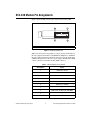
system. Refer to the SCC-A10 Module Pin Assignments section.
Note
You can download NI documents from ni.com/manuals. To download
the latest version of NI-DAQmx, click Download Software at ni.com.
Device Specific Information
For general SCC module installation and signal connection information, and
information about the SC-2345/2350 and SC-68, refer to the SCC Quick Start Guide,
available for download at ni.com/manuals.
Note
Installing the Module
Caution Refer to the Read Me First: Safety and Radio-Frequency Interference document
before removing equipment covers or connecting/disconnecting any signal wires.
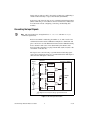
You can plug the SCC-A10 into any analog input socket on the
SC-2345/2350 or SCC-68. The socket you choose determines which E/M
Series DAQ device channels receive the SCC-A10 signals, as explained in
the SCC Quick Start Guide.
For single-stage input conditioning, plug the SCC-A10 into any slot of the
SC-68, or any socket of the SC-2345/2350 J(X+1), where X is 0 to 7.
Connect the input-signal wires to the module as described in the SCC Quick
Start Guide.
If you use the SCC-A10 in a dual-stage configuration in an SC-2345, the
SCC-A10 must be the first-stage module. Plug it into any socket J(X+9) and
plug the second-stage SCC into socket J(X+1), where X is 0 to 7. Connect
the input-signal wires to the SCC-A10 as described in the SCC Quick Start
Guide. The SC-2345 connects the output signals of the SCC-A10 to the
© National Instruments Corporation
3
SCC-A10 Voltage Attenuator Module User Guide