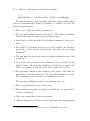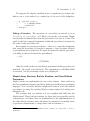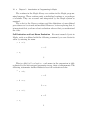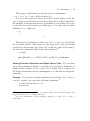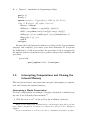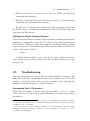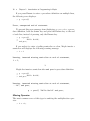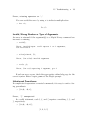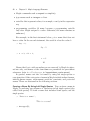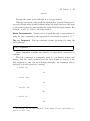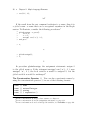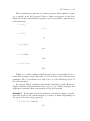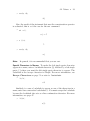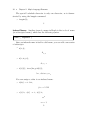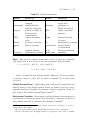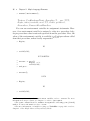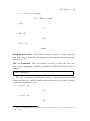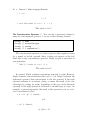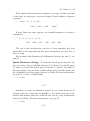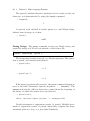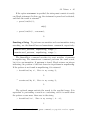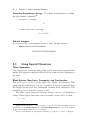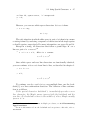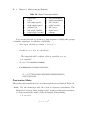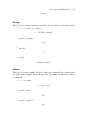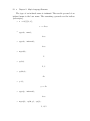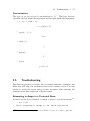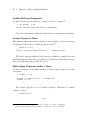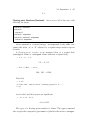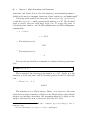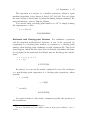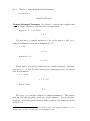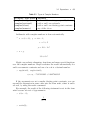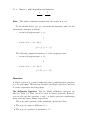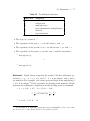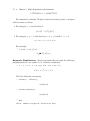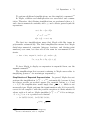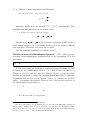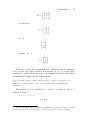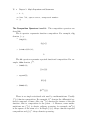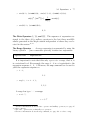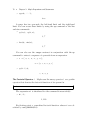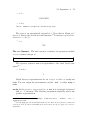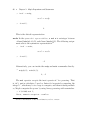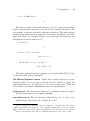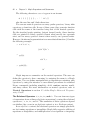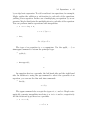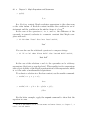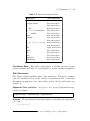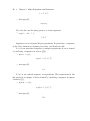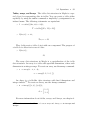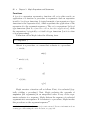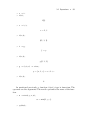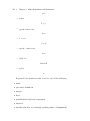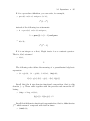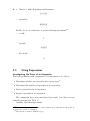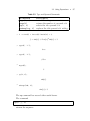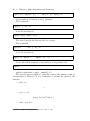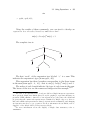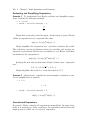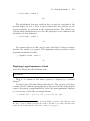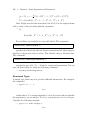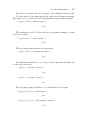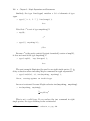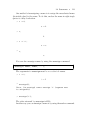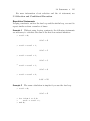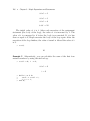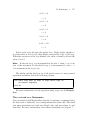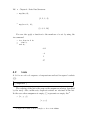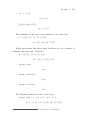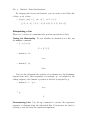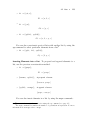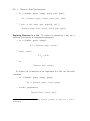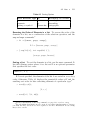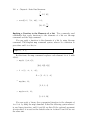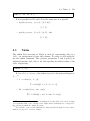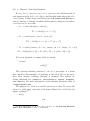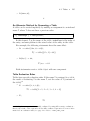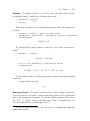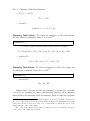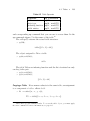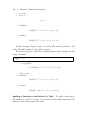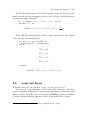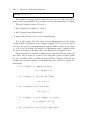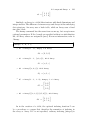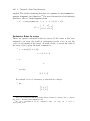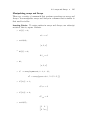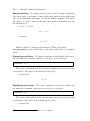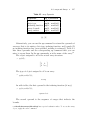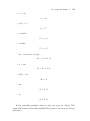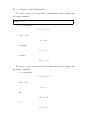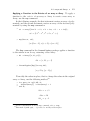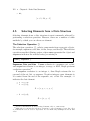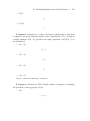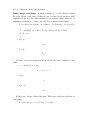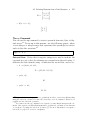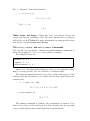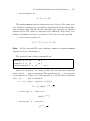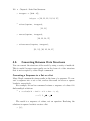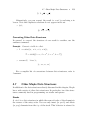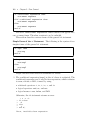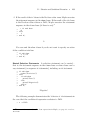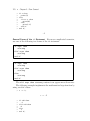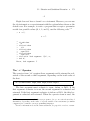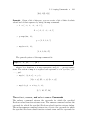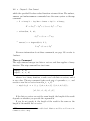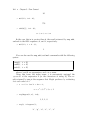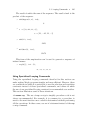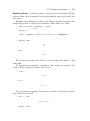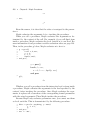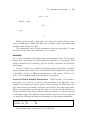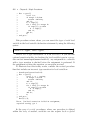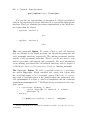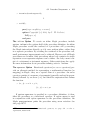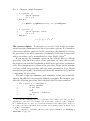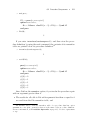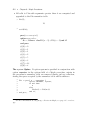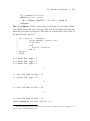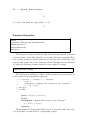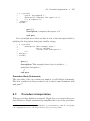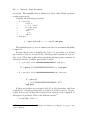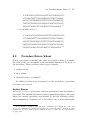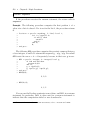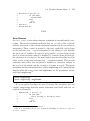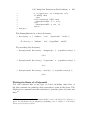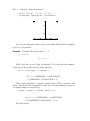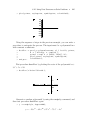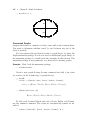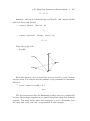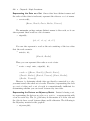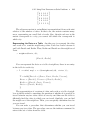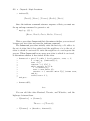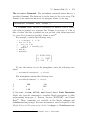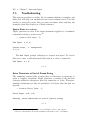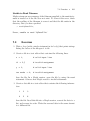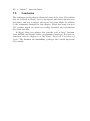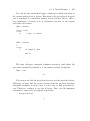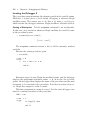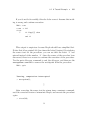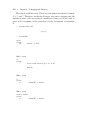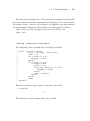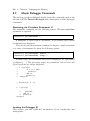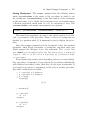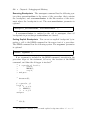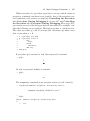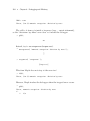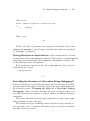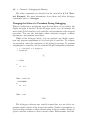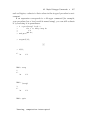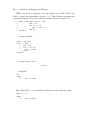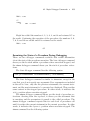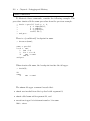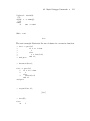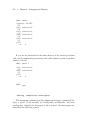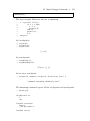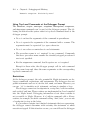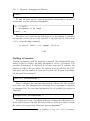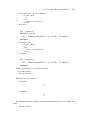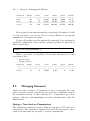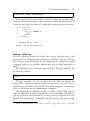
1
Maple Introductory Programming Guide M. B. Monagan K. O. Geddes K. M. Heal G. Labahn S. M. Vorkoetter J. McCarron P. DeMarco Maplesoft, a division of Waterloo Maple Inc. 1996-2008. ii Maplesoft, Maple, and Maplet are all trademarks of Waterloo Maple Inc. © Maplesoft, a division of Waterloo Maple Inc. 1996-2008. All rights reserved. Information in this document is subject to change without notice and does not represent a commitment on the part of the vendor. The software described in this document is furnished under a license agreement and may be used or copied only in accordance with the agreement. It is against the law to copy the software on any medium except as specifically allowed in the agreement. Windows is a registered trademark of Microsoft Corporation. Java and all Java based marks are trademarks or registered trademarks of Sun Microsystems, Inc. in the United States and other countries. Maplesoft is independent of Sun Microsystems, Inc. All other trademarks are the property of their respective owners. This document was produced using a special version of Maple that reads and updates LaTeX files. Printed in Canada ISBN 978-1-897310-46-5 Contents Preface Audience . . . . . . . . . . . . . . . . . Worksheet Graphical Interface . . . . . Manual Set . . . . . . . . . . . . . . . . Conventions . . . . . . . . . . . . . . . . The Maple Programming Language Using This Book . . . . . . . . . . Customer Feedback . . . . . . . . . . . . . . . . . . . . . . . . . . . . . . . . . . . . . . . . . . . . . . . . . . . . . . . . . . . . . . . . . . . . . . . . . . . . . . . . . . . . . . . . . . . . . . . . . . . . . . . 1 Introduction to Programming in Maple In This Chapter . . . . . . . . . . . . . . . . . . . . . . . 1.1 The Maple Software . . . . . . . . . . . . . . . . . . . . . 1.2 Maple Statements . . . . . . . . . . . . . . . . . . . . . . Getting Started . . . . . . . . . . . . . . . . . . . . . . . . Maple Statements . . . . . . . . . . . . . . . . . . . . . . Getting Help . . . . . . . . . . . . . . . . . . . . . . . . . Displaying a Text String . . . . . . . . . . . . . . . . . . . Performing an Arithmetic Operation . . . . . . . . . . . . Assigning to a Name . . . . . . . . . . . . . . . . . . . . . Using Maple Library Routines . . . . . . . . . . . . . . . . 1.3 Procedures . . . . . . . . . . . . . . . . . . . . . . . . . . Defining a Simple Procedure . . . . . . . . . . . . . . . . Maple Library Routines, Built-In Routines, and UserDefined Procedures . . . . . . . . . . . . . . . . . . 1.4 Interrupting Computations and Clearing the Internal Memory . . . . . . . . . . . . . . . . . . . . . . . . . . . . . . . Interrupting a Maple Computation . . . . . . . . . . . . . Clearing the Maple Internal Memory . . . . . . . . . . . . 1.5 Troubleshooting . . . . . . . . . . . . . . . . . . . . . . . . Unexpected End of Statement . . . . . . . . . . . . . . . . iii 1 1 1 2 2 3 3 4 5 5 5 6 6 7 7 7 8 8 9 9 9 13 16 16 17 17 17 iv • Contents . . . . . . . . . . . . 18 19 19 20 21 21 2 Maple Language Elements In This Chapter . . . . . . . . . . . . . . . . . . . . . . 2.1 Character Set . . . . . . . . . . . . . . . . . . . . . . . . 2.2 Tokens . . . . . . . . . . . . . . . . . . . . . . . . . . . . Reserved Words . . . . . . . . . . . . . . . . . . . . . . . Programming-Language Operators . . . . . . . . . . . . Names . . . . . . . . . . . . . . . . . . . . . . . . . . . . Strings . . . . . . . . . . . . . . . . . . . . . . . . . . . . Natural Integers . . . . . . . . . . . . . . . . . . . . . . 2.3 Using Special Characters . . . . . . . . . . . . . . . . . . Token Separators . . . . . . . . . . . . . . . . . . . . . . Blank Spaces, New Lines, Comments, and Continuation Punctuation Marks . . . . . . . . . . . . . . . . . . . . . Escape Characters . . . . . . . . . . . . . . . . . . . . . 2.4 Types and Operands . . . . . . . . . . . . . . . . . . . . Integers . . . . . . . . . . . . . . . . . . . . . . . . . . . Strings . . . . . . . . . . . . . . . . . . . . . . . . . . . . Names . . . . . . . . . . . . . . . . . . . . . . . . . . . . Concatenations . . . . . . . . . . . . . . . . . . . . . . . 2.5 Troubleshooting . . . . . . . . . . . . . . . . . . . . . . . Attempting to Assign to a Protected Name . . . . . . . Invalid Left-Hand Assignment . . . . . . . . . . . . . . . Incorrect Syntax in Parse . . . . . . . . . . . . . . . . . White Space Characters within a Token . . . . . . . . . Incorrect Use of Double and Single Quotes . . . . . . . . 2.6 Exercises . . . . . . . . . . . . . . . . . . . . . . . . . . 2.7 Conclusion . . . . . . . . . . . . . . . . . . . . . . . . . . . . . . . . . . . . . . . . . . . . . . . . . . . 23 23 23 24 24 25 26 38 46 46 46 46 48 51 51 52 53 53 55 55 55 56 56 56 57 58 58 . . . . . 59 59 59 59 60 61 1.6 1.7 Missing Operator . . . . . . . . . . . . . . . . . Invalid, Wrong Number or Type of Arguments Unbalanced Parentheses . . . . . . . . . . . . . Assignment Versus Equality . . . . . . . . . . . Exercises . . . . . . . . . . . . . . . . . . . . . Conclusion . . . . . . . . . . . . . . . . . . . . 3 Maple Expressions and Statements In This Chapter . . . . . . . . . . 3.1 Syntax and Semantics . . . . . . . Syntax . . . . . . . . . . . . . . . . Semantics . . . . . . . . . . . . . . 3.2 Expressions . . . . . . . . . . . . . . . . . . . . . . . . . . . . . . . . . . . . . . . . . . . . . . . . . . . . . . . . . . . . . . . . . . . . . . . . . . . . . . . . . . . . . . . . . . . . . . . . . Contents . . . . . . . . . . . . . . . . . . . . . . . . . . . . . . . . . . . . . . . . . . . . . . . . . . . . . . . . . . . . . . . . . . . . . . . . . . . . . . . . . . . . . . . . . . . . . . . . . . . . . . . . . . . . . . . . . . . . . . . . . . . . . . . . . . . . . . . . . . . . . . . . . . . . . . . . . . . . . . . . . . . . . . . . . . . . . . . . . . . . . . 61 70 89 92 96 96 100 100 103 105 106 110 111 114 115 117 118 118 119 119 119 120 120 121 121 122 4 Basic Data Structures In This Chapter . . . . . . . . . . . . . . . . 4.1 Sets . . . . . . . . . . . . . . . . . . . . . . . Manipulating a Set . . . . . . . . . . . . . . . 4.2 Lists . . . . . . . . . . . . . . . . . . . . . . . Manipulating a List . . . . . . . . . . . . . . 4.3 Tables . . . . . . . . . . . . . . . . . . . . . . An Alternate Method for Generating a Table Table Evaluation Rules . . . . . . . . . . . . Manipulating a Table . . . . . . . . . . . . . 4.4 arrays and Arrays . . . . . . . . . . . . . . . Evaluation Rules for arrays . . . . . . . . . . Manipulating arrays and Arrays . . . . . . . . 4.5 Selecting Elements from a Data Structure . . . . . . . . . . . . . . . . . . . . . . . . . . . . . . . . . . . . . . . . . . . . . . . . . . . . . . . . . . . . . . . . . . . . . . . . . . . . . . . . . . . . . . . . . . . . . 123 123 123 124 126 128 133 135 135 136 141 144 145 152 3.4 3.5 3.6 3.7 . . . . . . . . . . . . . . . . . . . . . . . . . . . . . . . . . . . . . . . . . . . . . . . . . . . . v . . . . . . . . . . . . . . . . . . . . . . . . . . 3.3 Constants . . . . . . . . . . . . . . . . . Operators . . . . . . . . . . . . . . . . . Data Structures . . . . . . . . . . . . . . Functions . . . . . . . . . . . . . . . . . Using Expressions . . . . . . . . . . . . Investigating the Parts of an Expression Evaluating and Simplifying Expressions Unevaluated Expressions . . . . . . . . . Substituting Subexpressions . . . . . . . Displaying Large Expressions: Labels . . Structured Types . . . . . . . . . . . . . Statements . . . . . . . . . . . . . . . . The Assignment Statement . . . . . . . Selection Statements . . . . . . . . . . . Repetition Statements . . . . . . . . . . The read and save Statements . . . . . The break and next Statements . . . . The error and return Statements . . . The use Statement . . . . . . . . . . . . The quit Statement . . . . . . . . . . . Troubleshooting . . . . . . . . . . . . . . Syntax Errors . . . . . . . . . . . . . . . Reserved Word Unexpected . . . . . . . Break or Next Not in Loop . . . . . . . Exercises . . . . . . . . . . . . . . . . . Conclusion . . . . . . . . . . . . . . . . • vi • Contents The Selection Operation [] . . . . . . . . . . . . . . . . The op Command . . . . . . . . . . . . . . . . . . . . . The select, remove, and selectremove Commands . . 4.6 Converting Between Data Structures . . . . . . . . . . . Converting a Sequence to a Set or a List . . . . . . . . . Converting Other Data Structures . . . . . . . . . . . . 4.7 Other Maple Data Structures . . . . . . . . . . . . . . . Stacks . . . . . . . . . . . . . . . . . . . . . . . . . . . . Queues . . . . . . . . . . . . . . . . . . . . . . . . . . . . 4.8 Troubleshooting . . . . . . . . . . . . . . . . . . . . . . . Wrong Number of Parameters in Function . . . . . . . . Invalid Subscript Selector . . . . . . . . . . . . . . . . . Requires Range or Initialization List for Building arrays Error in array Bound or Array Index out of Range . . . 4.9 Exercises . . . . . . . . . . . . . . . . . . . . . . . . . . 4.10 Conclusion . . . . . . . . . . . . . . . . . . . . . . . . . 5 Flow Control In This Chapter . . . . . . . . . . . . . . . . . . . . 5.1 Selection and Conditional Execution . . . . . . . . . The if Statement . . . . . . . . . . . . . . . . . . . The ‘if‘ Operator . . . . . . . . . . . . . . . . . . . 5.2 Repetition . . . . . . . . . . . . . . . . . . . . . . . . The for Loop . . . . . . . . . . . . . . . . . . . . . . The while Loop . . . . . . . . . . . . . . . . . . . . Control within Loops . . . . . . . . . . . . . . . . . . 5.3 Looping Commands . . . . . . . . . . . . . . . . . . The map Command . . . . . . . . . . . . . . . . . . . The select, remove, and selectremove Commands The zip Command . . . . . . . . . . . . . . . . . . . The seq, add, and mul Commands . . . . . . . . . . Using Specialized Looping Commands . . . . . . . . 5.4 Troubleshooting . . . . . . . . . . . . . . . . . . . . . Cannot Evaluate Boolean in if Statement . . . . . . Value in Loop Must Be Numeric or Character . . . . Variable Previously Assigned . . . . . . . . . . . . . Wrong Parameters in Function $ . . . . . . . . . . . 5.5 Exercises . . . . . . . . . . . . . . . . . . . . . . . . 5.6 Conclusion . . . . . . . . . . . . . . . . . . . . . . . 6 Maple Procedures . . . . . . . . . . . . . . . . . . . . . . . . . . . . . . . . . . . . . . . . . . . . . . . . . . . . . . . . . . 152 155 156 158 158 159 159 159 161 162 163 163 164 164 165 166 . . . . . . . . . . . . . . . . . . . . . 167 167 167 167 171 172 173 177 178 180 180 181 182 183 185 187 188 188 189 190 191 191 193 • Contents In This Chapter . . . . . . . . . . . . . . . . Defining a Procedure . . . . . . . . . . . . . . Naming a Procedure . . . . . . . . . . . . . . Executing a Procedure . . . . . . . . . . . . . 6.2 Procedure Components . . . . . . . . . . . . Formal Parameters . . . . . . . . . . . . . . . Variables . . . . . . . . . . . . . . . . . . . . Procedure Options . . . . . . . . . . . . . . . Procedure Description . . . . . . . . . . . . . Procedure Body Statements . . . . . . . . . . 6.3 Procedure Interpretation . . . . . . . . . . . . 6.4 Procedure Return Values . . . . . . . . . . . Explicit Returns . . . . . . . . . . . . . . . . Error Returns . . . . . . . . . . . . . . . . . . Returning Values through Parameters . . . . Returning Unevaluated . . . . . . . . . . . . 6.5 Documenting Your Procedures . . . . . . . . Indicating Copyright . . . . . . . . . . . . . . Formatting Code for Readability . . . . . . . Adding Comments . . . . . . . . . . . . . . . Including a Procedure Description . . . . . . Creating Help Pages . . . . . . . . . . . . . . 6.6 Saving and Retrieving Procedures . . . . . . 6.7 Viewing Maple Library Source Code . . . . . Special Evaluation Rules for Procedures . . . Displaying Maple Library Source Code . . . . 6.8 Alternate Methods for Defining a Procedure . Functional Operators: Mapping Notation . . The unapply Command . . . . . . . . . . . . Unnamed Procedures and the map Command Building a List of Arguments . . . . . . . . . 6.9 The Procedure Object . . . . . . . . . . . . . The procedure Type . . . . . . . . . . . . . . Procedure Operands . . . . . . . . . . . . . . 6.10 Using Data Structures to Solve Problems . . Computing an Average . . . . . . . . . . . . . Testing for Membership . . . . . . . . . . . . Performing a Binary Search . . . . . . . . . . Plotting the Roots of a Polynomial . . . . . . Connected Graphs . . . . . . . . . . . . . . . 6.11 Troubleshooting . . . . . . . . . . . . . . . . . 6.1 . . . . . . . . . . . . . . . . . . . . . . . . . . . . . . . . . . . . . . . . . . . . . . . . . . . . . . . . . . . . . . . . . . . . . . . . . . . . . . . . . . . . . . . . . . . . . . . . . . . . . . . . . . . . . . . . . . . . . . . . . . . . . . . . . . . . . . . . . . . . . . . . . . . . . . . . . . . . . . . . . . . . . . . . . . . . . . . . . . . . . . . . . . . . . . . . . . . . . . . . . . . . . . . . . . . . . . . . . . . . . . . . . . . . . . . . . . . . . . . . . . . . . . . . . . . . . . . . . . . . . . . . . . . . . . . . . . . . . . . . . . . . . . . vii 193 193 194 194 196 196 201 206 214 215 215 217 217 219 220 222 225 225 225 226 226 227 227 228 228 229 231 231 232 232 234 236 236 237 239 239 241 242 243 246 251 viii • Contents Missing Argument . . . . . . . . . . . . . . . . . Incorrect Argument Type . . . . . . . . . . . . . Implicitly Declared Local Variable . . . . . . . . Understanding Names, Functions, and Remember 6.12 Exercises . . . . . . . . . . . . . . . . . . . . . . 6.13 Conclusion . . . . . . . . . . . . . . . . . . . . . 7 Input and Output In This Chapter . . . . . . . . . . . . . . 7.1 Screen and Keyboard I/O . . . . . . . . . Printing Output to the Screen . . . . . . . Interactive Input . . . . . . . . . . . . . . 7.2 Standard Disk I/O . . . . . . . . . . . . . Readable File Formats in Maple . . . . . Using Filenames in Maple Statements . . Reading and Saving Data in Maple . . . . Importing Data from Files . . . . . . . . . Exporting Data to Files . . . . . . . . . . 7.3 Troubleshooting . . . . . . . . . . . . . . . Syntax Error in readstat . . . . . . . . . Extra Characters at End of Parsed String Unable to Read Filename . . . . . . . . . 7.4 Exercises . . . . . . . . . . . . . . . . . . 7.5 Conclusion . . . . . . . . . . . . . . . . . . . . . . . . . . . . . . . . . . . . . . . . . . . . . . . . . . . . . . . . . . . . . . . . . . . . . . . . . . . . . . . . . . . . . . . . . . . . . Tables . . . . . . . . . . . . . . 251 252 252 253 255 256 . . . . . . . . . . . . . . . . . . . . . . . . . . . . . . . . 257 257 257 257 264 269 270 271 271 274 278 280 280 280 281 281 282 . . . . . . . . . . . . . . . . . . . . . . . . . . . . . . . . . . . . . . . . . . . . . . . . 8 Debugging and Efficiency In This Chapter . . . . . . . . . . . . . . . . . . . . . . . 8.1 A Tutorial Example . . . . . . . . . . . . . . . . . . . . . Numbering the Procedure Statements I . . . . . . . . . . Invoking the Debugger I . . . . . . . . . . . . . . . . . . . Controlling the Execution of a Procedure During Debugging I . . . . . . . . . . . . . . . . . . . . . . . . . Invoking the Debugger II . . . . . . . . . . . . . . . . . . 8.2 Maple Debugger Commands . . . . . . . . . . . . . . . . . Numbering the Procedure Statements II . . . . . . . . . . Invoking the Debugger III . . . . . . . . . . . . . . . . . . Controlling the Execution of a Procedure During Debugging II . . . . . . . . . . . . . . . . . . . . . . . . . Changing the State of a Procedure During Debugging . . Examining the State of a Procedure During Debugging . . Using Top-Level Commands at the Debugger Prompt . . 283 283 284 285 285 287 292 296 296 296 305 306 309 314 • Contents 8.3 8.4 8.5 8.6 8.7 Restrictions . . . . . . . . . . . . . . . . Detecting Errors . . . . . . . . . . . . . Tracing a Procedure . . . . . . . . . . . Using Assertions . . . . . . . . . . . . . Handling Exceptions . . . . . . . . . . . Checking Syntax . . . . . . . . . . . . . Creating Efficient Programs . . . . . . . Displaying Time and Memory Statistics Profiling a Procedure . . . . . . . . . . . Managing Resources . . . . . . . . . . . Setting a Time Limit on Computations . Garbage Collection . . . . . . . . . . . . Communicating with the Kernel . . . . Exercises . . . . . . . . . . . . . . . . . Conclusion . . . . . . . . . . . . . . . . . . . . . . . . . . . . . . . . . . . . . . . . . . . . . . . . . . . . . . . . . . . . . . . . . . . . . . . . . . . . . . . . . . . . . . . . . . . . . . . . . . . . . . . . . . . . . . . . . . . . . . . . . . . . . . . . . . . . . . . . . . . . . . . . . . . . . . . . . . . . . . . . . . . . . . ix 314 315 315 320 323 329 330 330 332 334 334 335 336 336 337 9 Introduction to the Maplet User Interface Customization System 339 In This Chapter . . . . . . . . . . . . . . . . . . . . . . . 339 9.1 Uses of Maplet Applications . . . . . . . . . . . . . . . . . 339 Custom Maple Calculators . . . . . . . . . . . . . . . . . . 340 Interfaces to Maple Packages and Routines . . . . . . . . 341 Queries . . . . . . . . . . . . . . . . . . . . . . . . . . . . 342 Messages . . . . . . . . . . . . . . . . . . . . . . . . . . . 342 9.2 The Maplets Package . . . . . . . . . . . . . . . . . . . . . 342 Elements . . . . . . . . . . . . . . . . . . . . . . . . . . . 343 Examples . . . . . . . . . . . . . . . . . . . . . . . . . . . 343 Tools . . . . . . . . . . . . . . . . . . . . . . . . . . . . . . 343 Display . . . . . . . . . . . . . . . . . . . . . . . . . . . . 343 9.3 Terminology . . . . . . . . . . . . . . . . . . . . . . . . . . 343 9.4 Elements . . . . . . . . . . . . . . . . . . . . . . . . . . . 344 Window Body Elements . . . . . . . . . . . . . . . . . . . 344 Layout Elements . . . . . . . . . . . . . . . . . . . . . . . 353 MenuBar Elements . . . . . . . . . . . . . . . . . . . . . . 354 ToolBar Elements . . . . . . . . . . . . . . . . . . . . . . 355 Command Elements . . . . . . . . . . . . . . . . . . . . . 356 Dialog Elements . . . . . . . . . . . . . . . . . . . . . . . 357 Other Elements . . . . . . . . . . . . . . . . . . . . . . . . 361 Reference Options . . . . . . . . . . . . . . . . . . . . . . 363 9.5 Example Maplet Applications . . . . . . . . . . . . . . . . 363 Linear Algebra Subpackage . . . . . . . . . . . . . . . . . 364 x • Contents Using the Example Maplet Applications . . . . . . Tools . . . . . . . . . . . . . . . . . . . . . . . . . . Maplet System Global Variables . . . . . . . . . . 9.7 Running a Maplet Application . . . . . . . . . . . 9.8 Writing a Maplet Application . . . . . . . . . . . . Defining a Maplet Application . . . . . . . . . . . Maplet Application Programming Style Guidelines 9.9 After Reading This Chapter . . . . . . . . . . . . . 9.10 Conclusion . . . . . . . . . . . . . . . . . . . . . . 9.6 Index . . . . . . . . . . . . . . . . . . . . . . . . . . . . . . . . . . . . 364 366 367 367 368 368 368 369 370 371 Preface This manual introduces the basic MapleTM programming concepts, such as expressions, data structures, looping and decision mechanisms, procedures, input and output, debugging, and Maplets. Audience As a Maple user, you may have only used Maple interactively, written Maple programs, or programmed in another computer language. You should be familiar with the following: • Maple online help introduction • Example worksheets • How to use Maple interactively • The Maple User Manual Worksheet Graphical Interface You can access the power of the Maple computation engine through a variety of user interfaces: the standard worksheet, the command-line1 version, r the classic worksheet (not available on Macintosh ), and custom-built TM Maplet applications. The full Maple system is available through all of these interfaces. In this manual, any references to the graphical Maple 1 The command-line version provides optimum performance. However, the worksheet interface is easier to use and renders typeset, editable math output and higher quality plots. 1 2 • Preface interface refer to the standard worksheet interface. For more information on the various interface options, refer to the ?versions help page. Manual Set There are three other manuals available for Maple users, the Maple Getting Started Guide, the Maple User Manual, and the Maple Advanced Programming Guide.2 • The Maple Getting Started Guide provides extensive information for new users on using Maple, and the resources available in the software and on the Maplesoft Web site (http://www.maplesoft.com). • The Maple User Manual provides an overview of the Maple software including Document and Worksheet modes, performing computations, creating plots and animations, creating and using Maplets, creating mathematical documents, expressions, basic programming information, and basic input and output information. • The Maple Advanced Programming Guide extends the basic Maple programming concepts to more advanced topics, such as modules, input and output, numerical programming, graphics programming, and compiled code. In addition to the manuals, Maple has an online help system featuring examples that you can copy, paste, and execute immediately. Conventions This manual uses the following typographical conventions. • courier font - Maple command, package name, and option name • bold roman font - dialog, menu, and text field • italics - new or important concept, option name in a list, and manual titles 2 The Student Edition does not include the Maple Introductory Programming Guide and the Maple Advanced Programming Guide. These programming guides can be purchased from school and specialty bookstores or directly from Maplesoft. Conventions • 3 • Note - additional information relevant to the section • Important - information that must be read and followed The Maple Programming Language Writing a Maple program can be very simple. It can be as straightforward as placing proc() and end proc around a group of Maple commands. However, using the Maple programming language, you can write Maple procedures that perform complex operations. Writing code in Maple does not require expert programming skills. Because Maple has a large library of routines, writing useful programs from these powerful building blocks is easy. Unlike traditional programming languages, with the Maple programming language you can perform complicated tasks by using a single Maple library routine. In addition, you can use the Maple programming language to automate long or repetitive sets of instructions. Ninety percent of the thousands of routines in the Maple language are Maple programs. You can examine these Maple programs and modify them to suit your needs, or extend them so that Maple can solve new types of problems. You can learn the fundamentals of the Maple programming language and write useful Maple programs in a few hours, rather than the days or weeks that it often takes to learn other languages. This efficiency is partly a result of the fact that Maple is interactive. This interaction makes it easier to test and correct programs. Using This Book Examples Perform the examples shown in the manual as you read. To strengthen your knowledge, try variations or refer to the related online help page(s). Troubleshooting At the end of most chapters, there is a Troubleshooting section that lists common errors encountered while performing the examples in the chapter. See this section if you receive an error that you do not understand. Exercises Develop solutions to the problems posed in the Exercises at the end of each chapter. This consolidates and extends your learning. 4 • Preface Customer Feedback Maplesoft welcomes your feedback. For suggestions and comments related to this and other manuals, email [email protected]. 1 Introduction to Programming in Maple Maple provides an interactive problem-solving environment, complete with procedures for performing symbolic, numeric, and graphical computations. At the core of the Maple computer algebra system is a powerful programming language, upon which the Maple libraries of mathematical routines are built. In This Chapter • Components of the Maple software • Maple statements • Procedures and other essential elements of the Maple language • Contrasting the Maple language with traditional programming languages, which cannot perform symbolic calculations 1.1 The Maple Software The Maple software consists of three distinct parts. • User Interface • Kernel • Library 5 6 • Chapter 1: Introduction to Programming in Maple The user interface handles the input of mathematical expressions and commands, the display of output, and the control of the Maple worksheet environment options.1 The basic Maple system, the kernel, is a relatively small collection of compiled C code. When a Maple session is started, the entire kernel is loaded. It contains the essential facilities required to run Maple and perform basic mathematical operations. The components include the Maple programming language interpreter, arithmetic and simplification routines, print routines, memory management facilities, and a collection of fundamental functions. Its small size ensures that the Maple system is compact, portable, and efficient. In this guide, the kernel routines are referred to as built-in routines. The library contains the majority of the Maple routines. It includes functionality related to calculus, linear algebra, statistics, graphics, and many other topics. The Maple library consists of individual routines and packages of routines. These routines are accessed and interpreted by the Maple system as required. As a result of this modularity, the computer consumes resources proportional to only the facilities that are used, enhancing the efficiency of the system. All library routines, which are implemented in the high-level Maple programming language, can be viewed and modified by users. Therefore, it is useful to learn the Maple programming language so that you can modify existing Maple code to produce customized routines. 1.2 Maple Statements Getting Started The Maple software runs on many different platforms. Depending on the platform, you use its specialized worksheet interface or command-line interface. In both cases, when a Maple session is started, the Maple prompt character (>) is displayed. > This prompt character indicates that Maple is waiting to receive input in the form of a Maple statement.2 1 For more information about the Maple user interface and worksheets, refer to the Maple Getting Started Guide or Maple User Manual. 2 Throughout this book, the Maple notation (or one-dimensional) input format is 1.2 Maple Statements • 7 Maple Statements There are many types of valid statements. Examples include statements that request help on a particular topic, display a text string, perform an arithmetic operation, use a Maple library routine, or define a procedure.3 Most Maple statements must have a trailing semicolon (;) or colon (:). If you enter a statement with a trailing semicolon, for most statements, the result is displayed. However, if you enter a statement with a trailing colon, the result is computed but not displayed. > 2 + 3; 5 > 2 + 3: Getting Help To view an online help page for a particular topic, enter a question mark (?) followed by the corresponding topic name. For example, ?procedure displays a help page that describes how to write a Maple procedure.4 This type of Maple statement does not have a trailing colon or semicolon. Displaying a Text String The following statement returns a string. The text that forms the string is enclosed in double quotes, and the result (the text string) is displayed because the statement has a trailing semicolon. In the second example, no result is displayed because the statement has a trailing colon.5 > "Hello World"; “Hello World” > "Hello World": used to enter Maple statements. For more information on starting a Maple session, toggling between Maple notation (the default on most platforms) and standard math notation, and managing your files, refer to the Maple Getting Started Guide and Maple User Manual or enter ?managing at the Maple prompt. 3 For more information about statements in Maple, see chapter 3. 4 For more information about getting help in Maple, refer to ?help and ?HelpGuide. 5 For more information about strings in Maple, see chapter 2 or refer to ?string. 8 • Chapter 1: Introduction to Programming in Maple Performing an Arithmetic Operation The arithmetic operators in Maple are + (addition), - (subtraction), * (multiplication), / (division), and ^ (exponentiation). A statement can be an arithmetic operation that contains any combination of these operators. The standard rules of precedence apply. > 103993/33102; 103993 33102 Maple displays the result—in this case an exact rational number—in the worksheet or on the terminal in use, displaying the result as closely to standard mathematical notation as possible. You can enter statements on one line (as in the previous example) or several lines.6 You can even put the terminating semicolon on a separate line. It is not processed until you complete the command with a semicolon or a colon.7 > 103993 > / 33102 > ; 103993 33102 Assigning to a Name By naming a calculated result or complicated expression, you can reference it. To assign to a name, use the assignment operator, :=.8 > a := 103993/33102; a := 103993 33102 > 2 * a; 6 To enter a statement on more than one line, hold the Shift key and press Enter at the end of each line. 7 For more information about commands that control printing, see Printing Output to the Screen on page 257. For information about arithmetic operators, see page 70. 8 For more information about names and assignment, see chapter 2. 1.3 Procedures • 9 103993 16551 Using Maple Library Routines Once a value is assigned to a name, for example, the value assigned previously to a, you can use the name as if it were the assigned object. For example, you can use the Maple library routine evalf to compute a floating-point (decimal) approximation to 103993/33102 divided by 2 by entering the following statement. > evalf(a/2); 1.570796326 You can use the Maple library of routines, introduced on page 6, for many purposes. For example, you can find the derivative of an expression by using the diff command.9 > diff(x^2 + x + 1/x, x); 2x + 1 − 1.3 1 x2 Procedures This section formally introduces the concept of procedures in Maple. For more information about procedures, see chapter 6. Defining a Simple Procedure A Maple procedure (a type of program) is a prearranged group of statements processed together. The easiest way to create a Maple procedure is to encapsulate a sequence of commands, which can be used to perform a computation interactively, between the proc(...) and end proc statements. 9 For more information about the Maple library routines, refer to the Maple User Manual or the online help. 10 • Chapter 1: Introduction to Programming in Maple Entering a Procedure Definition The following procedure generates the string “Hello WorldÔ. Enter this procedure in a Maple session by entering its definition on one line. > hello := proc() "Hello World"; end proc; hello := proc() “Hello World” end proc For improved readability, enter the procedure on multiple lines: hold Shift and press Enter at the end of each line.10 Indent lines in the procedure by using the spacebar. When you enter the last line, which contains end proc, press Enter. > hello := proc() > "Hello World"; > end proc; hello := proc() “Hello World” end proc To run this procedure, enter its name followed by a set of parentheses and a semicolon. Enclose any input to the procedure—in this case none— between the parentheses and delimited (separated) by commas (,). > hello(); “Hello World” The next example is a procedure that uses the evalf command. > half := proc(x) > evalf(x/2); > end proc; half := proc(x) evalf(1/2 ∗ x) end proc This procedure requires one input, x. The procedure computes the approximation of the value of x divided by 2. A Maple procedure returns the result of the last executed statement. Since evalf(x/2) is the last calculation performed in the procedure half (in fact, it is the only calculation), the approximation of x/2 is returned. 10 For more information, see Unexpected End of Statement on page 17. 1.3 Procedures • 11 The procedure is named half by using the := notation in the same manner that you would assign any other object to a name. Once you have named a procedure, you can use it as a command in the current Maple session with the same syntax used to run a Maple library routine. > half(2/3); 0.3333333333 > half(a); 0.5000000000 a > half(1) + half(2); 1.500000000 By enclosing the evalf(x/2) statement between proc() and end proc, you create a procedure. In the next example, a new procedure is created that corresponds to the following two statements. > a := 103993/33102; a := 103993 33102 > evalf(a/2); 1.570796326 The procedure definition for these statements does not explicitly require input, but it does include a local variable. A local variable a in a procedure is different from the variable a outside the procedure (if one exists). Thus, you can use a as a variable name outside of the procedure f without conflict.11 > f := proc() local a; > a := 103993/33102; > evalf(a/2); > end proc; 11 For more information about local variables, see Variables on page 201. 12 • Chapter 1: Introduction to Programming in Maple f := proc() local a; a := 103993/33102 ; evalf(1/2 ∗ a) end proc The interpretation of this procedure definition appears immediately after the statements that define it. Examine it carefully and note the following characteristics. • The name of this procedure (program) is f. • The procedure definition starts with proc(). The empty parentheses indicate that this procedure does not require input. • Semicolons or colons separate the individual commands of the procedure. • The local a; statement declares a as a local variable. As described previously, a local variable has meaning only inside the procedure definition.12 • The end proc keywords and colon or semicolon mark the end of the procedure. • As you enter the procedure, the commands of the procedure do not display output. The procedure definition is displayed as output only after you complete it with end proc and a semicolon or colon. • The procedure definition that displays as the value of the name f is equivalent to, but not identical to, the procedure definition you enter. The commands of the procedure are simplified if possible. The procedure definition syntax is very flexible. You can: • Enter each statement on one or more lines • Enter multiple statements on one line, provided they are separated by colons or semicolons • Place extra semicolons between statements • Omit the semicolon (or colon) from the statement preceding end proc 12 For more information about local variables, see Variables on page 201. 1.3 Procedures • 13 To suppress the display resulting from a complicated procedure definition, use a colon instead of a semicolon at the end of the definition. > g := proc() local a; > a := 103993/33102; > evalf(a/2); > end proc: Calling a Procedure The execution of a procedure is referred to as an invocation or a procedure call. When you invoke a procedure, Maple executes the statements that form the procedure body one at a time. The result of the last computed statement within the procedure is returned as the value of the procedure call. For example, to execute procedure f—that is, to cause the statements that form the procedure to execute in sequence—type its name followed by parentheses and a semicolon. No input is required to run the procedure, so nothing is entered between the parentheses. > f(); 1.570796326 Only the result of the last calculation performed within procedure f is returned—the result of evalf(a/2). The assignment a:=103993/33102 is executed, but the statement result is not displayed. Maple Library Routines, Built-In Routines, and User-Defined Procedures Maple routines are implemented in one of two formats—those written in the C programming language and those written in the Maple programming language. You can easily include complicated tasks in your user-defined procedures by using the existing Maple routines instead of writing new untested code. The routines that are written in C are compiled and built into the Maple kernel. These built-in routines are those that are generally used in computations, and those that are fundamental to the implementation of the other Maple routines. Since the kernel is compiled, it is usually faster to perform computations by using these built-in routines.13 13 For more information about built-in kernel routines, see page 207 or refer to ?builtin. 14 • Chapter 1: Introduction to Programming in Maple The routines in the Maple library are written in the Maple programming language. These routines exist as individual routines or as packages of routines. They are accessed and interpreted by the Maple system as required. The code for the library routines and the definitions of user-defined procedures can be viewed and modified. However, before exploring that, it is important that you learn about evaluation rules so that you understand the code. Full Evaluation and Last Name Evaluation For most named objects in Maple, such as e defined with the following command, you can obtain its value by entering its name. > e := 3; e := 3 > e; 3 This is called full evaluation—each name in the expression is fully evaluated to the last assigned expression in any chain of assignments. The following statements further illustrate how full evaluation works. > c := b; c := b > b := a; b := a > a := 1; a := 1 > c; 1 1.3 Procedures • 15 This group of statements creates the chain of assignments c ⇒ b ⇒ a ⇒ 1, and c fully evaluates to 1. If you try this approach with a procedure, Maple displays only the name of the procedure instead of its true value (the procedure definition). For example, in the previous section, g is defined as a procedure. If you try to view the body of procedure g by referring to it by name, the procedure definition is not displayed. > g; g This model of evaluation is called last name evaluation and it hides the procedure details. The reason for this approach is that procedures potentially contain many subobjects. To obtain the value of the name g, use the eval command, which forces full evaluation.14 > eval(g); proc() local a; a := 103993/33102 ; evalf(1/2 ∗ a) end proc Viewing Procedure Definitions and Maple Library Code You can learn about programming in Maple by studying the procedure definitions of Maple library routines. To print the body of Maple library routines, set the Maple interface variable verboseproc to 2, and then use the print command. Example Look at the procedure definition for the Maple least common multiple routine, lcm, enter the following statements.15 > interface(verboseproc = 2): > print(lcm); 14 Last name evaluation applies to procedures, tables, and modules in Maple. For more information, refer to ?last_name_eval. 15 For more information about interface variables, see page 258 or refer to ?interface. 16 • Chapter 1: Introduction to Programming in Maple proc(a, b) local q, t; optionremember , ‘Copyright (c) 1990 by the Unive\ rsity of Waterloo. All rights reserved .‘; if nargs = 0 then 1 elif nargs = 1 then t := expand(a) ; sign(t) ∗ t elif 2 < nargs then lcm(a, lcm(op(2..nargs, [args]))) elif type(a, integer ) and type(b, integer ) then ilcm(a, b) else gcd(a, b, q) ; q ∗ b end if end proc Because the built-in kernel routines are written in the C programming language and compiled, you cannot view their definitions. If you print the definition of a built-in procedure, the procedure body is comprised of the option builtin statement and a positive integer that identifies the procedure. > print(add); proc() option builtin; 114 end proc 1.4 Interrupting Computations and Clearing the Internal Memory This section introduces two important concepts: interrupting a computation and clearing the internal memory. Interrupting a Maple Computation To stop a computation, for example, a lengthy calculation or infinite loop, use one of the following three methods.16 • Click the stop icon17 on the toolbar (in worksheet versions). 16 Maple does not always respond immediately to an interrupt request if it is performing a complex computation. You may need to wait a few seconds before the computation is halted. 17 For more information on toolbar icons, refer to ?worksheet,reference,toolbar. 1.5 Troubleshooting • 17 • Hold the Ctrl key and press the C key (in UNIX and Windows command-line versions). • Hold the Command key and press the period key (.) (in Macintosh command-line and worksheet versions). To perform a hard interrupt, which stops the computation and exits the Maple session, in Windows command-line Maple, hold the Ctrl key and press the Break key. Clearing the Maple Internal Memory Clear the internal memory during a Maple session by entering the restart command or clicking the restart icon18 on the toolbar of the worksheet (in GUI versions). When you enter this command, the Maple session returns to its startup state; all identifiers (including variables and procedures) are reset to their initial values.19 > restart: A Maple function that can be used to free space without resetting your session is the garbage collection facility gc. For information on gc, see page 335. 1.5 Troubleshooting This section provides you with a list of common mistakes, examples, and hints that will help you understand and avoid common errors. Use this section to study the errors that you may encounter when entering the examples from this chapter in a Maple session.20 Unexpected End of Statement Most valid statements in Maple must end in either a colon or a semicolon. An error is returned if you press Enter on an input region that is incomplete. 18 For more information on toolbar icons, refer to ?worksheet,reference,toolbar. For more information about clearing the Maple internal memory and the restart command, refer to ?restart. 20 You can use the parse routine for finding errors in statements, and the Maple debugger for finding errors in programs. For more information, see chapter 8, or refer to ?parse and ?debugger. 19 18 • Chapter 1: Introduction to Programming in Maple If you press Enter to enter a procedure definition on multiple lines, the following error displays. > p := proc() Error, unexpected end of statement To prevent this error message from displaying as you enter a procedure definition, hold the Shift key and press the Enter key at the end of each line, instead of pressing only the Enter key. > p := proc() > "Hello World"; > end proc; If you neglect to enter a trailing semicolon or colon, Maple inserts a semicolon and displays the following warning message. > 1 + 2 Warning, inserted missing semicolon at end of statement, 1 + 2; 3 Maple also inserts a semicolon after end proc in procedure definition. > p := proc() > "Hello World"; > end proc Warning, inserted missing semicolon at end of statement, ...ld"; end proc; p := proc() "Hello World" end proc; Missing Operator The most common error of this type is omitting the multiplication operator. > 2 a + b; 1.5 Troubleshooting • 19 Error, missing operator or ‘;‘ You can avoid this error by using * to indicate multiplication. > 2*a + b; 2a + b Invalid, Wrong Number or Type of Arguments An error is returned if the argument(s) to a Maple library command are incorrect or missing. > evalf(); Error, invalid input: evalf expects 1 or 2 arguments, but received 0 > solve(y=3*x+4, 5); Error, (in solve) invalid arguments > cos(x, y); Error, (in cos) expecting 1 argument, got 2 If such an error occurs, check the appropriate online help page for the correct syntax. Enter ?topic_name at the Maple prompt. Unbalanced Parentheses In complicated expressions or nested commands, it is easy to omit a closing parenthesis. > [(1,0), (0,1]; Error, ‘]‘ unexpected In a valid statement, each (, {, and [ requires a matching ), }, and ], respectively. > [(1,0), (0,1)]; [1, 0, 0, 1] 20 • Chapter 1: Introduction to Programming in Maple Assignment Versus Equality When you enter statements in a Maple session, it is important that you understand the difference between equality (using =) and assignment (using :=). The equal sign = creates an equation. An equation is commonly used to test whether two expressions (the left-hand side and the right-hand side) are equal. The test is usually performed by using the Maple evalb command.21 > x = 2; x=2 > x; x > evalb(x=2); false > x + 5; x+5 The assignment operator := assigns to the left-hand side the value of right-hand side. Once an assignment is made, the left-hand side can be used in place of the value of the right-hand side. The left-hand side must evaluate to a name (for example, the left-hand side cannot be a number).22 > x := 2; x := 2 > x; 21 For more information about equations and Boolean testing, see page 84 or refer to ?evalb. 22 For more information about names and assignment, see pages 26 and 111, respectively. 1.6 Exercises • 21 2 > evalb(x=2); true > x + 5; 7 1.6 Exercises 1. Assign the integers 12321, 23432, and 34543 to the names a, b, and c. Use these names to find the sum and difference of each pair of numbers. 2. Write two procedures. The first requires two inputs and finds their sum. The second requires two inputs and finds their product. Use these procedures to add and multiply pairs of numbers. How could you use these procedures to add and multiply three numbers? 3. Display your procedure definitions. Are they identical to the code you entered to write them? 23 1.7 Conclusion This chapter presented a basic overview of the Maple system and the Maple programming language. The Maple system consists of three main components: the kernel, which contains compiled built-in commands; the library which contains routines written in the Maple programming language; and, the interface, which handles the input and output of mathematical expressions and functions. You were introduced to the essential elements of writing and executing Maple procedures, along with common syntax errors related to writing procedures. 23 For more information about procedure definitions, see chapter 6. 22 • Chapter 1: Introduction to Programming in Maple To learn more about the Maple programming language, read the remaining chapters in this guide and, when you encounter other example programs, try to write variations. Study the details, exceptions, and options in these chapters, as the need arises. References to related topics in other chapters, manuals, and online help pages that provide additional information are included where relevant. 2 Maple Language Elements Before programming in Maple, it is important to learn the properties and roles of the basic elements of the Maple language. In This Chapter • Basic elements of the Maple language: the character set and tokens • Maple tokens: reserved words, operators, names, strings, and natural numbers; including the types of each and related functions • Using special characters • Maple data types related to the tokens 2.1 Character Set The Maple character set consists of letters, digits, and special characters. The letters are the 26 lower case letters a b c d e f g h i j k l m n o p q r s t u v w x y z and the 26 upper case letters. A B C D E F G H I J K L M N O P Q R S T U V W X Y Z The 10 decimal digits are: 23 • Chapter 2: Maple Language Elements 24 Table 2.1 Special Characters ; : + * / ^ ! = < > @ $ . , blank semicolon colon plus minus asterisk slash caret exclamation equal less than greater than at sign dollar period comma ( ) [ ] { } ‘ ’ " | & _ % \ # ? left parenthesis right parenthesis left bracket right bracket left brace right brace left single quote (back quote) right single quote (apostrophe) double quote vertical bar ampersand underscore percent backslash pound sign (sharp) question mark 0, 1, 2, 3, 4, 5, 6, 7, 8, 9 There are also 32 special characters, which are listed in Table 2.1. The use of special characters is discussed in 2.3 Using Special Characters. 2.2 Tokens The Maple language combines characters into tokens. The set of tokens consists of reserved words (also called keywords ), programming-language operators, names, strings, and natural integers. Reserved Words The Maple keywords are reserved words that have special meanings. Thus, you cannot change them or use them as variables in procedures. The keywords are listed in Table 2.2. You can find information about a specific keyword in the subsequent chapters of this guide or in the online help pages.1 1 For general information about reserved words in Maple, refer to ?keywords. 2.2 Tokens • 25 Table 2.2 Reserved Words Keywords break, next if, then, elif, else for, from, in, by, to, while, do proc, local, global, option, error, return options, description export, module, use end assuming try, catch, finally read, save quit, done, stop union, minus, intersect, subset and, or, not, xor implies mod Purpose loop control if statement for and while loops procedures modules ends structures assume facility exception handling read and save statements ending Maple set operators Boolean operators implication operator modulus operator Programming-Language Operators There are three types of Maple language operators: nullary, unary, and binary.2 In Maple, there are three nullary operators (operators that take no arguments and return values from the environment of the Maple session). They are constructed from the Maple ditto operator. The percent sign % is the ditto operator. It is a special Maple name used to refer to previously computed non-NULL expressions. Specifically, the following nullary operators are defined as: % %% %%% last expression second-last expression third-last expression The % operator re-evaluates the last expression computed, the %% operator re-evaluates the second-last expression computed, and the %%% operator re-evaluates the third-last expression computed. 2 For more information about the order of precedence of programming-language operators, see Table 3.4 on page 89 or refer to ?precedence. • Chapter 2: Maple Language Elements 26 Table 2.3 Programming Binary Operators Operator + * / ^ $ @ @@ &string , || . .. mod := Meaning addition subtraction multiplication division exponentiation sequence operator composition repeated composition neutral operator expression separator concatenation non-commutative multiplication ellipsis modulo assignment Operator < <= > >= <> -> union minus intersect :: and or xor implies subset Meaning less than less or equal greater than greater or equal not equal arrow operator set union set difference set intersection type declaration, pattern binding logical and logical or exclusive or implication subset Note: The nullary operators do not reference the results of the lines located above the execution groups in which they are used. They reference the results of the most recently performed computations in the Maple session, regardless of the execution group or worksheet that contains them. Also, since the ditto operators do not recall the results of past computations, but re-evaluate the results of these computations, the use of local variables to save and recall computed expressions is preferred in procedures. For more information about local variables, see Variables on page 201.3 The Maple binary and unary operators, and their meanings, are listed in Table 2.3 and Table 2.4, respectively. For additional information about these operators, see page 70. Names A name in Maple is a sequence of one or more characters that uniquely identifies a command, file, variable, or other entity. There are two distinct types of names: indexed names and symbols, which are non-indexed 3 For more information about the ditto operators, refer to ?ditto. 2.2 Tokens • 27 Table 2.4 Programming Unary Operators Operator + ! $ not &string . %integer Meaning unary plus (prefix) unary minus (prefix) factorial (postfix) sequence operator (prefix) logical not (prefix) neutral operator (prefix) decimal point (prefix or postfix) label (prefix) names. For more information about indexed names, see page 34. The simplest instance of a name consists of a sequence of letters, digits, and underscores. If you require a name that includes blank spaces, use left single quotes (for more information, see page 28). > My_Name_1; My _Name_1 You can confirm that the previous statement is a valid name (and symbol) by using the whattype command. > whattype(%); symbol A name cannot begin with a number, and the maximum length of a name is system dependent. > 1myname; on line 258, syntax error, missing operator or ‘;‘: 1myname; ^ Maple is case-sensitive, so, for example, the name Apple is different from the name apple. Other Maple names include: • mathematical functions such as sin and cos 28 • Chapter 2: Maple Language Elements • Maple commands such as expand or simplify • type names such as integer or list • variables that represent values, for example, x and y in the expression x+y • programming variables (A name becomes a programming variable only after Maple assigns it a value. Otherwise, the name remains an unknown.) For example, in the first statement below, y is a name that does not have a value. In the second statement, the variable x has the value 3. > 2*y - 1; 2y − 1 > x := 3; x^2 + 1; x := 3 10 Names that begin with an underscore are reserved by Maple for internal use only, and names of the form ñame are permitted for spreadsheet references (refer to cell references in ?spreadsheet,references). In general, names can also be formed by using left single quotes or concatenation. Other categories of names in Maple include indexed names, initially-known names, environment variables, constants, and protected names. These are discussed in the following sections. Forming a Name By Using Left Single Quotes You can form a name in Maple by enclosing any sequence of characters in left single quotes (also called back quotes). To form a name that includes blank spaces, use left single quotes. > ‘This is a name!‘; This is a name! > whattype(%); 2.2 Tokens • 29 symbol Because the name is not indexed, it is of type symbol. With the exception of keywords and names that contain blank spaces, any valid Maple name formed without using left single quotes is the same as the name formed by surrounding the name with left single quotes. For example, x and ‘x‘ refer to the same name x. Name Concatenation Names can be formed through concatenation by using the cat command or the superseded concatenation operator, ||.4 The cat Command You can construct a name (or string) by using the cat command cat( sequence ) where sequence contains any number of expressions, separated by commas. The cat command is commonly used to concatenate names and strings, and the result returned has the type (name or string) of the first argument to cat. (In the following examples, any argument that is enclosed by double quotes is a string.) > cat(a, b); ab > cat(a, "b"); ab > cat("a", b); “ab” > cat(a, 2); a2 4 You can also use the cat command to form strings. For more information, see page 41 or refer to ?cat. • Chapter 2: Maple Language Elements 30 > cat("a", 2); “a2” If the result from the cat command evaluates to a name, then it is a global name—a name that can be recognized anywhere in the Maple session. To illustrate, consider the following procedures.5 > globalassign := proc() > local a; > a := 5; > assign( cat(’a’), 2 ); > end proc: > a; a > globalassign(); > a; 2 In procedure globalassign, the assignment statement6 assigns 2 to the global name a. If the statement assign( cat(’a’), 2 ) were assign( ’a’, 2 ), the local variable a would be assigned 2, but the global variable a would be unchanged.7 The Concatenation Operator || You can also concatenate names by using the concatenation operator || in one of the following formats. name name name name 5 || || || || name naturalInteger string ( expression ) For more information about procedure syntax, see chapter 6. For more information about the assignment statement, see page 111. 7 For more information about local and global variables, see Variables on page 201. 6 2.2 Tokens • 31 The concatenation operator is a binary operator that requires a name (or a string) as its left operand. Since a name can appear on the lefthand side of any concatenation operator, you can perform a succession of concatenations. > i := 5; i := 5 > i || 7; i7 > p || "in"; pin > a || (2*i); a10 > a || i || b; a5b Maple never fully evaluates the left-most object, but evaluates it to a name. For example, study the result of i||7 and a||i||b in the previous examples. The i is evaluated to 5 only if it is not the left-most object in the concatenation. In general, Maple evaluates expressions from left to right. However, Maple evaluates concatenations from right to left. Maple evaluates the right-most operand, then concatenates to the left operand. Example 1 If the right operand evaluates to an integer, string, or name, then the result of the concatenation is a string or name (depending on the type of the left -most operand). > n := 4: p || (2*n+1); p9 • Chapter 2: Maple Language Elements 32 Example 2 If the right operand evaluates to another type of object, for example, a general expression, the result of the operation is an unevaluated concatenated object. > p || (2*m+1); p||(2 m + 1) Example 3 If the right-hand expression is a sequence or a range and the operands of the range are integers or character strings, then Maple returns a sequence of names. > x || (a, b, 4, 67); xa, xb, x4 , x67 Example 4 If more than one range appears, the extended sequence of names is constructed. > x || (1..2) || (1..3); x11 , x12 , x13 , x21 , x22 , x23 The use of the concatenation operator to form sequences has been superseded by the seq function. For more information, see page 183 or refer to ?seq. Differences Between cat and || Although you can use both cat and || to concatenate, there are subtle differences in the way each performs. The concatenation operator does not evaluate its first argument, whereas cat does.8 > a := 2; a := 2 > a || 4; a4 8 In this example, the result from cat(a,4) is the name 24 not the integer 24. 2.2 Tokens • 33 > cat(a, 4); 24 Also, the result of the statement that uses the concatenation operator is evaluated; this is not the case for the cat command. > a4 := 5; a4 := 5 > a || 4; 5 > cat(a, 4); a4 Note: In general, it is recommended that you use cat. Special Characters in Names To make the left single quote character appear in a name, enter a backslash character (\) followed by a left single quote (‘) where you want the left single quote character to appear. The backslash is the escape character in Maple. For more information, see Escape Characters on page 51 or refer to ?backslash. > ‘a\‘b‘; a‘b Similarly, to cause a backslash to appear as one of the characters in a name, enter two consecutive backslashes, \. You must escape the backslash because the backslash also acts as a line continuation character. For more information, see page 47. > ‘a\\b‘; a\b 34 • Chapter 2: Maple Language Elements The special backslash character is only one character, as is demonstrated by using the length command. > length(%); 3 Indexed Names Another form of a name in Maple is the indexed name (or subscripted name), which has the following syntax. name [ sequence ] Since an indexed name is itself a valid name, you can add a succession of subscripts. > A[1,2]; A1, 2 > A[i,3*j-1]; Ai, 3 j−1 > b[1][1], data[Cu,gold][1]; b11 , data Cu, gold 1 You can assign a value to an indexed name. > f[Cu] := 1.512; fCu := 1.512 > a[1]^2; a[1] := 3; a[1]^2; a1 2 a1 := 3 9 2.2 Tokens • 35 Table 2.5 Initially Known Names Name Catalan Name lasterror false gamma Meaning Catalan’s constant initially-known symbolic constants number of digits in floating-point computations cannot determine value Boolean evaluation Euler’s constant I infinity complex number mathematical infinity true undefined constants Digits FAIL libname NULL Order Pi printlevel Meaning stores most recent error pathname of Maple library(ies) empty expression sequence truncation order for series mathematical constant control display of information Boolean evaluation undefined Note: The use of an indexed name such as A[1,2] does not automatically imply that A is an array, as in some languages. The statement > a := A[1,2] + A[2,1] - A[1,1]*A[2,2]; a := A1, 2 + A2, 1 − A1, 1 A2, 2 forms a formula in four indexed names. However, if A does evaluate to an array, Array, or table, A[1,2] refers to element (1,2) of the array or table.9 Initially Known Names Maple ships with a collection of names that are initially known to the Maple system. These are names of global or environment variables and names of constants related to functions. Table 2.5 lists some of the initially known Maple names.10 Environment Variables Enviroment variables influence the execution of operations in a software program. You can display a sequence of all active environment variables by entering the following command.11 9 For more information about arrays, Arrays, and tables, see chapter 4 or refer to ?array, Array, and ?table. 10 For general information about initially known names, refer to ?ininames. 11 For more information about assigned names, see pages 111–114 or refer to ?anames. 36 • Chapter 2: Maple Language Elements > anames(‘environment‘); Testzero, UseHardwareFloats , Rounding , %, _ans , %%%, Digits , index /newtable, mod , %%, Order , printlevel , Normalizer , NumericEventHandlers You can use environment variables in assignment statements. However, if an environment variable is assigned a value in a procedure body, its pre-procedure value is restored upon exit from the procedure. Also, the value of the environment variable is available to all subprocedures called from that procedure, unless locally superseded.12,13,14 > Digits; 10 > evalf(2/13); 0.1538461538 > envtest := proc() > Digits := 3; > evalf(2/13); > end proc: > envtest(); 0.154 > Digits; 10 > evalf(2/13); 12 For more information about environment variables, refer to ?envvar. For more information about procedures, see chapter 6 or refer to ?procedures. 13 The evalf command is used to evaluate its argument to a floating-point (decimal) number. For more information, refer to ?evalf. 14 For more information on variable scoping, see Variables on page 201 or refer to chapter 1 of the Maple Advanced Programming Guide. 2.2 Tokens • 37 0.1538461538 Constants You can display a sequence of all the currently active symbolic constants in Maple by using the global variable constants. > constants; false, γ, ∞, true, Catalan, FAIL, π Maple also has numeric constants: integers, fractions, floating-point numbers, and complex numbers. For more information, see pages 63–68.15 Protected Names A protected name has a predefined meaning. You cannot directly assign a value to it. For example, the names of builtin functions such as sin (the sine function), utility operations such as degree (computes the degree of a polynomial), commands such as diff (differentiation), and type names such as integer and list, are protected names. If you attempt to assign to any of these names, an error is returned. > list := [1,2]; Error, attempting to assign to ‘list‘ which is protected The Maple system protects these names from re-assignment. However, even though it is not recommended, it is possible to make assignments to these names by first unprotecting them as illustrated by the following statements.16 > unprotect(sin); > sin := "a sin indeed"; sin := “a sin indeed” As a result, components of Maple that rely on the sine function do not work properly. 15 For general information about constants in Maple, refer to ?constants. You can usually undo assignments made to Maple system names by entering a restart command, or by ending the session. However, in general, it is dangerous to reassign Maple system names; using the unprotect command to modify Maple system names is not recommended. 16 38 • Chapter 2: Maple Language Elements > plot( 1, 0..2*Pi, coords=polar ); Plotting error, empty plot To check whether a name is protected, use the type command.17 > type(diff, protected); true To display all the protected names, use the following command.18 select( type, unames(),anames(anything), protected); To prevent a user from assigning a value to a name, use the protect command when writing programs. > mysqr := x -> x^2; mysqr := x → x2 > type(mysqr, protected); false > protect( mysqr ); > mysqr := 9; Error, attempting to assign to ‘mysqr‘ which is protected Strings A string is a sequence of characters that evaluates to itself. To create a string, enclose any sequence of characters in double quotes. > "This is a string"; “This is a string” 17 You can perform type checking for many types of objects in Maple. For more information, see 2.4 Types and Operands or refer to ?type. 18 For more information on the select function, see page 156. 2.2 Tokens • 39 You cannot assign to a string. > "hello" := 5; Error, invalid left hand side of assignment Do not confuse the double quote character, which delimits a string, with the left single quote character (‘), which forms a name (symbol), or right single quote (’), which delays evaluation. For more information on left and right single quotes, see pages 28 and 100, respectively. In the following sections, strings and string operations are described. For information on the StringTools package, refer to ?StringTools. Length of a String There is no practical limit on the length of a Maple string (the maximum string length is system dependent). On most Maple implementations, this means that a string can contain more than half a million characters. Use the length command to determine the length of a string. > length("What is the length of this string?"); 34 All characters between, but excluding, the double quotes are counted. Each blank space is counted as one character. The Empty String The empty string (or null string) is represented by two double quotation marks with no enclosed characters (not even a blank space). > ""; “” > length(%); 0 > whattype(%%); string 40 • Chapter 2: Maple Language Elements The null string is not the same as the global variable NULL, which is an empty expression sequence. The output for the null string consists of zero printed characters. Substrings You can extract a substring of a string by using the substring command, or by using subscripts. The substring command returns the string consisting of the characters specified by range. substring( exprString, range ); If range is a nonzero integer m, then the mth character of exprString is returned as a one-character string. If range is specified as m..n, where m and n are nonzero integers, then the substring starting from the mth character and ending with the nth character of exprString is returned. Negative values in range indicate character positions counted from the right end of the string. > S := "abcdef"; S := “abcdef” > substring(S, 5); “e” > substring(S, 3..7); “cdef” > substring(S, -3..-1); “def” Alternatively, you can access a substring by using a string with a subscripted integer range (also called a selection operation).19 19 It is more efficient to use the selection operation than the substring command to access a substring of a string. Therefore, whenever possible, use a selection operation instead of the substring command for accessing substrings from procedures. For more information about selection, see page 114. 2.2 Tokens • 41 > S := "This is a string"; S := “This is a string” > S[6]; “i” > S[6..9]; “is a” > S[-6..-1]; “string” String Concatenation Like names, strings can also be formed through concatenation by using the cat command or the superseded concatenation operator, ||.20 The cat Command You can construct a string by using the cat command, where sequence contains any number of expressions, separated by commas. cat( sequence ) The cat command is commonly used to concatenate strings with names and integers, and the result returned has the type (name or string) of the first argument to cat. > cat("a", b); “ab” > cat("a", 2); “a2” 20 For more information on the differences between cat and ||, see pages 29–32 or refer to ?cat. 42 • Chapter 2: Maple Language Elements > i := 5; i := 5 > cat( "The value of i is ", i, "." ); “The value of i is 5.” The Concatenation Operator || You can also concatenate strings by using the concatenation operator || in one of the following formats. string string string string || || || || name naturalInteger string ( expression ) The concatenation operator is a binary operator that requires a string (or a name) as its left operand. Since a string can appear on the lefthand side of any concatenation operator, Maple accepts a succession of concatenations. > "The "|| "value of i is " || i; “The value of i is 5” In general, Maple evaluates expressions from left to right. However, Maple evaluates concatenations from right to left. Maple evaluates the right-most operand, then concatenates to the left operand. If the right operand evaluates to an integer, string, or name, the result of the concatenation is a string (or name, depending on the type of the left-most operand). If the right operand is evaluated to another type of object, for example, a general expression, the result of the operation is an unevaluated concatenated object. > n := 4: "p" || (2*n+1); “p9” > "p" || (2*m+1); “p”||(2 m + 1) 2.2 Tokens • 43 If the right-hand expression is a sequence or a range, and the operands of the range are integers or character strings, Maple returns a sequence of strings. > "var" || (a, b, 4, 67); “vara”, “varb”, “var4”, “var67” If more than one range appears, an extended sequence of strings is constructed. > "x" || (1..2) || (1..3); “x11”, “x12”, “x13”, “x21”, “x22”, “x23” The use of the concatenation operator to form sequences has been superseded by the seq function. For more information, see page 183 or refer to ?seq. For examples that illustrate the differences between cat and ||, see page 32. Special Characters in Strings To make the double quote character appear in a string, enter a backslash character (\) followed by a double quote (") where you want the double quote character to appear. You must do this since Maple does not know which double quote ends the string, and the backslash acts as the escape character in Maple. For more information, see page 51 or refer to ?backslash. > "a\"b"; “a“b 00 Similarly, to cause a backslash to appear as one of the characters in a string, enter two consecutive backslashes, \. You must escape the backslash in this manner since the backslash also acts as a line continuation character in Maple. For more information, see page 47. > "a\\b"; “a\b” 44 • Chapter 2: Maple Language Elements The special backslash character mentioned above counts as only one character, as is demonstrated by using the length command. > length(%); 3 A reserved word enclosed in double quotes is a valid Maple string, distinct from its usage as a token. > "while"; “while” Parsing Strings The parse command accepts any Maple string and parses the string as if it had been entered or read from a file. parse( exprString, option ); The string must consist of exactly one Maple expression. The expression is parsed, and returned unevaluated. > parse("a+b"); a+b > parse("a+b;"); a+b If the string is syntactically incorrect, the parse command returns an error of the form "incorrect syntax in parse: ... (number)". The number indicates the offset in characters, counted from the beginning of the string, at which the syntax error was detected. > parse("a++b"); Error, incorrect syntax in parse: ‘+‘ unexpected (4) Partial statements or expressions cannot be parsed. Multiple statements or expressions cannot be parsed, unless they comprise one larger statement (such as a loop, or a procedure definition). 2.2 Tokens • 45 If the option statement is specified, the string must consist of exactly one Maple statement. In this case, the statement is parsed and evaluated, and then the result is returned.21 > parse("sin(Pi)"); sin(π) > parse("sin(Pi)", statement); 0 Searching a String To perform case-sensitive and case-insensitive string searching, use the SearchText and searchtext commands, respectively. SearchText( pattern, exprString, range ); searchtext( pattern, exprString, range ); The SearchText command searches for exact matches of pattern in exprString. The searchtext command performs the same search, but it is case-insensitive. If pattern is found, Maple returns an integer indicating the position of the first character in pattern in exprString. If the pattern is not found in exprString, 0 is returned. > SearchText("my s", "This is my string."); 9 > searchtext("My S", "This is my string."); 9 The optional range restricts the search to the specified range. It is equivalent to performing a search on a substring, and it is useful when the pattern occurs more than once in the string. > SearchText("is", "This is my string.", 4..-1); 3 21 For more information about the parse command, see page 268 or refer to ?parse. 46 • Chapter 2: Maple Language Elements Converting Expressions to Strings To convert an expression to a string, use the convert command.22 > convert(a, string); “a” > convert(a+b-c*d/e, string); “a+b-c*d/e” Natural Integers A natural integer is a sequence of one or more decimal digits.23 > 00003141592653589793238462643; 3141592653589793238462643 2.3 Using Special Characters Token Separators You can separate tokens by using white space characters or punctuation marks. The separator indicates the end of one token and the beginning of the next. Blank Spaces, New Lines, Comments, and Continuation The white space characters are space, tab, return, and line-feed. This guide uses the terminology new line to refer to a return or line-feed since the Maple system does not distinguish between these characters. The terminology blank refers to a space or tab. The white space characters separate tokens, but are not themselves tokens. White space characters cannot normally occur within a token. > a: = b; 22 Maple has the facility to convert a variety of objects. For more information about expressions, see 3.2 Expressions and 3.3 Using Expressions. For more information about conversions in Maple, refer to ?convert. 23 For more information about integers in Maple, see page 62 or refer to ?integer. 2.3 Using Special Characters • 47 on line 26, syntax error, ‘=‘ unexpected: a: = b; ^ However, you can use white space characters between tokens. > a * x + x*y; ax + xy The only situation in which white space is part of a token is in a name or string formed by enclosing a sequence of characters in left single quotes or double quotes, respectively. For more information, see pages 28 and 38. Except in a string, all characters that follow a pound sign “#” on a line are part of a comment.24 > a := 1 + x + x^2; #This is a comment a := 1 + x + x2 Since white space and new line characters are functionally identical, you can continue statements from line to line, as described in chapter 1. > a:= 1 + x + > x^2; a := 1 + x + x2 To continue numbers and strings over multiple lines, use the backslash (\) as a line continuation character. The behavior of line continuation is as follows. If the special character backslash \ immediately precedes a new line character, the Maple parser ignores both the backslash and the new line. If a backslash occurs in the middle of a line, Maple usually ignores it. 25 24 For information about comments in Maple procedures, see 6.5 Documenting Your Procedures. 25 For more information about the backslash and exceptions to this rule, refer to ?backslash. 48 • Chapter 2: Maple Language Elements Table 2.6 Maple Punctuation Marks ; : ‘ ’ | < > semicolon colon left single quote right single quote vertical bar left angle bracket right angle bracket ( ) [ ] { } , left parenthesis right parenthesis left bracket right bracket left brace right brace comma You can use this rule to break up a long sequence of digits into groups of smaller sequences, to enhance readability. > "The input should be either a list of \ > variables or a set of variables"; “The input should be either a list of variables or a se \ t of variables” > G:= 0.57721566490153286060\ > 6512090082402\43104215933593992; G := 0.577215664901532860606512090082402431\ 04215933593992 Punctuation Marks The punctuation marks that act as token separators are listed in Table 2.6. ; and : Use the semicolon and the colon to separate statements. The distinction between these marks is that, during an interactive session, a colon prevents the result of the statement from printing. > f:=x->x^2; f := x → x2 2.3 Using Special Characters • 49 > p:=plot(f(x), x=0..10): ’’ Enclosing an expression, or part of an expression, in a right single quotes (also called apostrophes) delays evaluation of the expression (subexpression) by one level. For more information, see page 100. > ’’sin’’(Pi); ’sin’(π) > %; sin(π) > %; 0 ‘‘ To form names, enclose an expression in left single quotes. > limit(f(x), x=0, ‘right‘); 0 () The left and right parentheses group terms in an expression and group parameters in a function call. > (a+b)*c; cos(Pi); (a + b) c −1 > proc( x, y, z ) > x+y+z; > end proc: 50 • Chapter 2: Maple Language Elements [] Use the left and right square brackets to form indexed (subscripted) names and to select components from aggregate objects such as arrays, tables, and lists. For more information on data structures, see chapter 4. > a[1]; L:=[2,3,5,7]; L[3]; a1 L := [2, 3, 5, 7] 5 [] and {} Use the left and right square brackets to form lists, and the left and right braces to form sets. For more information on sets and lists, see chapter 4. > L:=[2,3,5,2]; S:={2,3,5,2}; L := [2, 3, 5, 2] S := {2, 3, 5} <> and | The left and right angle brackets in conjunction with the vertical bar are used to construct Matrices and Vectors. For more information, refer to ?Matrix and ?MVshortcut. > <<1,2,3> | <4,5,6>>; 1 4 2 5 3 6 , Use the comma to form a sequence, and to separate the arguments of a function call or the elements of a list or set. > sin(Pi), 0, limit(cos(xi)/xi, xi=infinity); 0, 0, 0 2.4 Types and Operands • 51 Escape Characters An escape character indicates that the following character must be handled in a special manner. The escape characters in Maple are ?, !, #, and \. ? The question mark character, if it appears as the first nonblank character on a line, invokes the Maple help facility. The words following ? on the same line determine the arguments to the help procedure. Use either “,” or “/” to separate the words in the argument. For more information, refer to ?help. ! The exclamation mark character, if it appears as the first nonblank character on a line, passes the remainder of the line as a command to the host operating system. This facility is not available on all platforms. For more information, refer to ?system and ?escape. # The pound sign character indicates that the characters that follow it on the line are a comment. For more information, see 6.5 Documenting Your Procedures or refer to ?comment. \ The backslash character is used for continuation of lines and grouping characters in a token. For more information, see page 47 or refer to ?backslash. 2.4 Types and Operands In most programming languages, data is divided into different classes of information—called data types. Types are important in Maple since they are used to decide whether an expression is a valid input in procedure calls and Maple commands. By definition, a type in Maple is any expression that is recognized by the type command. The type command has the following syntax. type( expression, typeName ); If expression is of type typeName, the type command returns true. Otherwise, false is returned. To determine the operands and the number of operands in an expression, use the op and nops commands, respectively. These commands have the following basic syntax. • Chapter 2: Maple Language Elements 52 Table 2.7 Integer Subtypes Subtype negint posint nonnegint nonposint even odd Meaning negative integer positive integer non-negative integer non-positive integer even integer odd integer op( i, expression ); nops( expression ); If the optional first argument i to the op command is a positive integer, the ith operand of expression is returned. The following sections introduce some elementary data types, for example, integers, strings, and names, but the Maple software contains many others.26 Integers The type of an integer is integer. The type command also understands the subtypes of integers listed in Table 2.7. An integer has only one operand, itself. > x := 23; x := 23 > type(x, prime); true > op(x); 23 > op(0, x); 26 For more information about data types and operands in Maple, see chapter 3 or refer to ?type and ?op. 2.4 Types and Operands • 53 Integer Strings The type of a string is string. A string also has only one operand, itself. > s := "Is this a string?"; s := “Is this a string?” > type(s, string); true > nops(s); 1 > op(s); “Is this a string?” Names The type of a name is name. However, the type command also understands the type names symbol and indexed. The type name is defined as symbol or indexed. > x := ‘my name‘; x := my name > type(x, name); true > type(x, symbol); true 54 • Chapter 2: Maple Language Elements The type of an indexed name is indexed. The zeroth operand of an indexed name is the base name. The remaining operands are the indices (subscripts). > x := A[1][2,3]; x := A12, 3 > type(x, name); true > type(x, indexed); true > nops(x); 2 > op(x); 2, 3 > op(0,x); A1 > y:=%; y := A1 > type(y, indexed); true > nops(y), op(0,y), op(y); 1, A, 1 2.5 Troubleshooting • 55 Concatenations The type of an unevaluated concatenation is “||”. This type has two operands, the left-hand side expression and the right-hand side expression. > c := p || (2*m + 1); c := p||(2 m + 1) > type(c, ‘||‘); true > op(0, c); || > nops(c); 2 > op(c); p, 2 m + 1 2.5 Troubleshooting This section provides you with a list of common mistakes, examples, and hints that will help you understand and avoid common errors. Use this section to study the errors that you may encounter when entering the examples from this chapter in a Maple session. Attempting to Assign to a Protected Name An error occurs if you attempt to assign a value to a protected name.27 > int := 10; Error, attempting to assign to ‘int‘ which is protected 27 For more information about protected names, see page 37 or refer to ?protect. 56 • Chapter 2: Maple Language Elements Invalid Left-Hand Assignment An error occurs if you attempt to assign a value to a string.28 > "my string" := 10; Error, invalid left hand side of assignment Use only valid names on the left-hand side of an assignment statement. Incorrect Syntax in Parse The parse command accepts a string as its argument. An error message is returned if the string is syntactically incorrect.29 > parse("a^2--b"); Error, incorrect syntax in parse: ‘-‘ unexpected (6) The error message indicates the character number (counted from the left double quote) where error was detected. In this case, the 6th character (the second minus sign) caused the error. White Space Characters within a Token An error message is normally returned if a white space character occurs in a token. > evalb(2 < = 3); on line 71, syntax error, ‘=‘ unexpected: evalb(2 < = 3); ^ The binary operator <= is a token in Maple. Therefore, it cannot contain a space. > evalb(2 <= 3); true 28 29 For more information about strings, see page 38 or refer to ?string. For more information about parsing, see page 44 or refer to ?parse. 2.5 Troubleshooting • 57 Incorrect Use of Double and Single Quotes In Maple, double quotes form a string, left single quotes form a name, and right single quotes delay evaluation of an expression. Confusing a string with a name, or a name with delayed evaluation causes errors. Study the following examples to see the different uses of these quotes.30 To form a string, enclose the expression in double quotes. > "2 + 3"; “2 + 3” > whattype(%); string To form a name, enclose the expression in left single quotes. > ‘2 + 3‘; 2 + 3 > whattype(%); symbol To delay the evaluation of an expression, enclose it in right single quotes. To evaluate the expression, omit these quotes. > x := 2: y := 3: f := ’x + y’; f := x + y > f := x + y; f := 5 30 For more information about using quotes, see Punctuation Marks on page 48 or refer to ?quotes. 58 • Chapter 2: Maple Language Elements 2.6 Exercises 1. Using the %, %%, and %%% operators, find the: a) Sum of 5434 and 6342. b) Product of 92 and 310. c) Quotient of the result from a) divided by the result from b). d) Quotient of the result from b) divided by the result from a). 2. Estimate π to 10,000 digits. 3. Concatenate the three strings "int", "(x^2,", and "x)". Parse the resulting string. Evaluate the parsed string. 4. The Fibonacci numbers are a sequence of numbers. The first two numbers in the sequence are zero (0) and one (1). For n greater than two, the nth number in the sequence is the sum of the two preceding numbers. Assign values to indexed names representing the first, second, and general Fibonacci numbers. 5. Determine a random integer between 40 and 100 using the command rand(40..100). Concatenate this number with the string, "The student’s grade is ". Extract the student’s grade from the resulting string. 6. Assign the expressions x^2 and x*x to the names a and b. Find the three operands of a and b. Compare the results with those returned by using the dismantle function, that is, dismantle(a) and dismantle(b). The dismantle function displays the internal data structure used. 2.7 Conclusion This chapter introduced the Maple language elements. In particular, tokens are the smallest meaningful elements in Maple. Tokens are used to form Maple expressions and statements. The next chapter shows how to use the information presented in this chapter to build expressions, and discusses how to form Maple statements. 3 Maple Expressions and Statements You construct Maple statements, most importantly expressions, from tokens, which were discussed in chapter 2. In This Chapter • Syntax and semantics of the Maple language • Expressions, the most important type of statement, including the use of expressions and the action of commands on expressions • Other important types of statements 3.1 Syntax and Semantics Syntax and semantics define a language. Syntax, or grammar, refers to the rules that are used to combine basic elements into statements. Semantics refers to the extra information or meaning that syntax cannot capture; it determines the actions Maple performs when you enter a command. Syntax Syntax defines valid forms of input, for example, expressions, statements, and procedures. It dictates, for example: • Whether parentheses are required in the expression x^(y^z) • How to enter a string that is longer than one line • How to enter the floating-point number 2.3 × 10⁻³ 59 60 • Chapter 3: Maple Expressions and Statements If the input is not syntactically correct, a syntax error is reported. Consider the following examples. Adjacent minus signs are not valid. > --1 on line 29, syntax error, ‘-‘ unexpected: --1 ^ You can enter floating-point numbers using many formats. > 2.3e-3, 2.3E-03, +0.0023; 0.0023, 0.0023, 0.0023 However, you must place at least one digit between the decimal point and the exponent suffix. > 2.e-3; on line 42, syntax error, missing operator or ‘;‘: 2.e-3; ^ A correct way to enter this expression is 2.0e-3. Semantics The semantics of a language specifies how expressions, statements, and programs execute—that is, the actions Maple performs with them. It controls: • Whether x/2*z or x/2/z is equal to x/(2*z) or (x/2)*z • The behavior when sin(x)/x is computed with x=0 • The return of 1, instead of an error, for sin(0)/ sin(0) • The value of i after executing the following loop > for i from 1 to 5 do print(i^2) end do; 3.2 Expressions • 61 These are important concepts to understand before writing Maple programs. A common mistake is to think that x/2*z is equal to x/(2*z). Following the operator precedence rules (see Table 3.4 on page 89), this is not true. > x/2*z, x/(2*z); 1x 1 x z, 2 2 z The remainder of this chapter focuses on the Maple programming language syntax. 3.2 Expressions Expressions are the fundamental entities in the Maple language and the most important type of Maple statement. The types of expressions are the following: • constants • operator-based expressions • data structures • function calls Procedures and modules1 are also valid expressions because you can use them wherever an expression is accepted. This is an important feature of the Maple language. Procedures are described separately in chapter 6. Expressions are now presented in detail, beginning with the numeric constants. The presentation shows how to input the expression, gives examples of how and where to use the expression, and illustrates the action of the type, nops, op, and subsop commands on the expression. Constants The Maple language contains both symbolic and numeric constants. 1 For information on modules, refer to chapter 2 of the Maple Advanced Programming Guide or ?module. • Chapter 3: Maple Expressions and Statements 62 Maple has a general concept of symbolic constants. The global variable constants is assigned the expression sequence containing the names of the initially known constants. For more information, see page 35. Maple also has numeric constants. The numeric constants in Maple are integers, rational numbers (fractions), floating-point numbers (decimals), and the special values, infinity and undefined. The complex numeric constants are the complex integers (Gaussian integers), complex rationals, and complex floating-point numbers. The full set of real and complex numeric constants is exactly what is recognized by type(..., complex(extended_numeric)). Generally, a Maple expression is of type constant if it is: • Of type complex(extended_numeric) • One of the initially known constants • An unevaluated function with all arguments of type constant • A sum, product, or power with all operands of type constant. For example, the following expressions are of type constant: 2, sin(1), f(2,3), exp(gamma), 4+Pi, 3+I, 2*gamma/Pi^(1/2). > type(2, constant); true > type(sin(1), constant); true > type(2*gamma/Pi^(1/2), constant); true Integers In Maple, an integer is an optionally signed, arbitrary-length sequence of one or more decimal digits. However, the integer 0 (zero) does not have a sign.2,3 2 The integer zero (0) does not have a sign. However, the floating-point zeros, +0.0 and -0.0, are signed. For more information, see page 65. 3 The evalb command evaluates a Boolean expression. For more information, see page 86 or refer to ?evalb. 3.2 Expressions • 63 > evalb(0 = +0); evalb(0 = -0); evalb( +0 = -0); true true true In Maple, the maximum length of an integer is system dependent and can be obtained by entering kernelopts(maxdigits). The number of digits is approximately: > kernelopts(maxdigits); 268435448 A natural integer is any sequence of one or more decimal digits. A signed integer is indicated by either +natural or -natural, where natural is any natural integer. Hence, an integer is either a natural integer or a signed integer. The type of an integer is integer. > type(-36, integer); true To form arithmetic expressions involving integers in Maple, use the Maple arithmetic operators (see page 70 or refer to ?arithop). In contrast with pocket calculators, when arithmetic expressions containing only integer operands are entered, Maple performs exact arithmetic—the integers are not converted to decimal numbers.4 Rational Numbers (Fractions) A rational number (fraction) is the quotient of two integers, where the denominator is always nonzero. integer/natural As with integers, Maple does exact arithmetic with fractions. Maple simplifies fractions so that the denominator is positive, and reduces the fraction to lowest terms by dividing the greatest common divisor from the numerator and denominator. 4 For more information about integers in Maple, refer to ?integer. 64 • Chapter 3: Maple Expressions and Statements > -30/12; −5 2 If the denominator is 1 after simplifying the fraction, Maple converts the fraction to an integer. > 25/5; 5 > whattype(%); integer The type of a fraction is fraction. The type command also accepts the composite type name rational, which is the union of integer and fraction–that is, rational numbers. > x := 4/6; x := 2 3 > type(x, fraction); true > type(x, rational); true A fraction has two operands, the numerator and denominator. It is recommended that you use the numer and denom commands to extract the numerator and denominator of a fraction. > op(1,x), op(2,x); 2, 3 > numer(x), denom(x); 3.2 Expressions • 65 2, 3 Floating-point Numbers (Decimals) An unsigned float has one of the following six forms: natural.natural natural. .natural natural exponent natural.natural exponent .natural exponent where natural is a natural integer, and exponent is the suffix containing the letter “e” or “E” followed by a signed integer with no spaces between. A floating-point number is an unsigned float or a signed float (+unsigned float or -unsigned float indicates a signed float). > 1.2, -2., +.2; 1.2, −2., 0.2 > 2e2, 1.2E+2, -.2e-2; 200., 120., −0.002 Note that > 1.e2; on line 229, syntax error, missing operator or ‘;‘: 1.e2; ^ is not valid, and that spaces are significant. > .2e -1 <> .2e-1; −0.8 6= 0.02 The type of a floating-point number is float. The type command also accepts the composite types numeric (which is the union of integer, • Chapter 3: Maple Expressions and Statements 66 fraction, and float–that is, the real numbers), and extended_numeric (which is the union of integer, fraction, float, infinity, and undefined).5 A floating-point number has two parts, the mantissa (or significand ) m and the exponent e, which represent the number m × 10e . The decimal point is placed after the right-most digit of m. To access the parts of a floating-point number, use the SFloatMantissa and SFloatExponent commmands. > x := 231.3; x := 231.3 > SFloatMantissa(x); 2313 > SFloatExponent(x); −1 You can also use the Float command to construct floating-point numbers. Float( m, e ); This constructs the floating-point number m × 10e . Again, m is the mantissa, e is the exponent, and the decimal point is located to the right of m. > Float( 1.2, -3 ); 0.0012 The mantissa m is a Maple integer. Hence, it is subject to the same restrictions in terms of number of digits as any Maple integer. Since Maple integers are machine dependent, the maximum number of digits in any integer, and therefore in m, is always at least 268, 435, 448.6 5 For information about the full suite of numeric types and subtypes, refer to ?numeric_type. 6 For more information, see page 62 or refer to ?maxdigits. 3.2 Expressions • 67 The exponent e is subject to a smaller restriction, which is again machine dependent, but is always at least 2, 147, 483, 646. You can obtain the exact values of these limits by using the Maple_floats command. For more information, refer to ?Maple_floats. You can also enter a floating-point number m × 10e by simply forming the expression m * 10^e. > 1.2 * 10^(-3); 0.001200000000 Arithmetic with Floating-point Numbers For arithmetic operations and the standard mathematical functions, if one of the operands (or arguments) is a floating-point number or evaluates to a floating-point number, then floating-point arithmetic is used automatically. The global name Digits, which has the value 10 as its default, determines the number of digits (in the mantissa) that Maple uses for floating-point calculations.7 > x := 2.3: y := 3.7: > 1 - x/y; 0.3783783784 In general, you can use the evalf command to force the evaluation of a non-floating-point expression to a floating-point expression, where possible. > x := ln(2); x := ln(2) > evalf(x); 0.6931471806 An optional index to the evalf command specifies the precision of the evaluation.8 7 For more information, refer to ?Digits. For more information about evaluation using floating-point arithmetic, refer to ?evalf. 8 • Chapter 3: Maple Expressions and Statements 68 > evalf[15](x); 0.693147180559945 Complex Numerical Constants By default, I denotes the complex unit √ −1 in Maple. Therefore, the following are equivalent. > sqrt(-1), I, (-1)^(1/2); I, I, I You can enter a complex number a + bi as the sum a + b*I or by using the Complex command as Complex(a, b). > 2 + 3*I; 2 + 3I > Complex(2, 3); 2 + 3I Maple uses a special representation for complex numeric constants, such as 1.3 + 4.2*I. To select the real and imaginary parts, use the Re and Im commands.9 > z := 2+3*I; z := 2 + 3 I > Re(z), Im(z); 2, 3 The type of a complex number is complex(numeric). This means that the real and imaginary parts are of type numeric—that is, integers, fractions, or floating-point numbers. Other possible type names are listed in Table 3.1. 9 In an expression such as x + y*I, where x and y are symbols, Maple does not assume that x is the real part and y is the imaginary part. 3.2 Expressions • 69 Table 3.1 Types of Complex Numbers Complex Type Name complex(integer) complex(rational) complex(float) complex(numeric) Meaning both a and b are integers, possibly 0 both a and b are rationals both a and b are floating-point constants any of the above Arithmetic with complex numbers is done automatically. > x := (1 + I); y := 2.0 - I; x := 1 + I y := 2.0 − 1. I > x + y; 3.0 + 0. I Maple can evaluate elementary functions and many special functions over the complex numbers. Maple evaluates the result automatically if a and b are numeric constants and one of a or b is a decimal number. > exp(2+3*I), exp(2+3.0*I); e(2+3 I) , −7.315110095 + 1.042743656 I If the arguments are not complex floating-point constants, you can expand the expression in some cases into the form a+bi, where a and b are real, by using the evalc command. For example, the result of the following statement is not in the form a+bi because a is not of type numeric. > 1/(a - I); 1 a−I > evalc(%); 70 • Chapter 3: Maple Expressions and Statements a2 a I + 2 +1 a +1 Note: The evalc command assumes that the symbol a is real. To use another letter, say j, to represent the imaginary unit, use the interface command as follows. > interface(imaginaryunit = j); j > solve( {z^2 = -1}, {z} ); {z = j}, {z = −j} The following command reinstates I as the imaginary unit. > interface(imaginaryunit = I); I > solve( {z^2 = -1}, {z} ); {z = I}, {z = −I} Operators A Maple operator is a symbol indicating that a mathematical operation is to be performed. This section discusses the Maple operators, and how to create expressions involving them. The Arithmetic Operators The six Maple arithmetic operators are listed in Table 3.2. They can all be used as binary operators. However, you can also use the operators + and - as prefix operators representing unary plus and unary minus, respectively. The types and operands of the arithmetic operations follow. • The type of a sum or difference is ‘+‘. • The type of a product or quotient is ‘*‘. 3.2 Expressions • 71 Table 3.2 The Arithmetic Operators Operator + * . / ^ Meaning addition subtraction multiplication non-commutative multiplication division exponentiation • The type of a power is ‘^‘. • The operands of the sum x − y are the terms x and −y. • The operands of the product xy 2 /z are the factors x, y 2 , and z −1 . • The operands of the power xa are the base x and the exponent a. > whattype(x-y); + > whattype(x^y); ^ Arithmetic Maple always computes the result to the five arithmetic operations x + y, −y, x × y, x/y, and xn , if n is an integer, and x and y are numbers. For example, you cannot prevent Maple from simplifying 2 + 3 to 5 in output.10 If the operands are floating-point numbers, Maple performs the arithmetic computation in the floating-point environment. > 2 + 3, 6/4, 1.2/7, (2 + I)/(2 - 2*I); 5, 3 1 3 , 0.1714285714, + I 2 4 4 > 3^(1.2), I^(1.0 - I); 10 For information on displaying output that appears unsimplified, refer to the examples in section 1.3 of the Maple Advanced Programming Guide. 72 • Chapter 3: Maple Expressions and Statements 3.737192819, 0. + 4.810477381 I For numerical constants, Maple reduces fractional powers of integers and fractions as follows. • For integers n, m and fraction b, (n/m)b → (nb )/(mb ). • For integers n, q, r, d and fraction b = q + r/d with 0 < r < d, nb = nq+r/d → nq × nr/d . For example, > 2^(3/2), (-2)^(7/3); √ 2 2, 4 (−2)(1/3) Automatic Simplifications Maple automatically performs the following simplifications for any symbol x or arbitrary expression. > x - x, x + x, x + 0, x*x, x/x, x*1, x^0, x^1; 0, 2 x, x, x2 , 1, x, 1, x Note the following exceptions. > infinity - infinity; undefined > infinity/infinity; undefined > 0/0; Error, numeric exception: division by zero 3.2 Expressions • 73 To perform additional simplifications, use the simplify command.11 In Maple, addition and multiplication are associative and commutative. Therefore, the following simplifications are performed where a, b, and c denote numerical constants, and x, y, and z denote general symbolic expressions. ax + bx → (a + b)x xa × xb → xa+b a(x + y) → ax + ay The first two simplifications mean that Maple adds like terms in polynomials automatically. The third simplification means that Maple distributes numerical constants (integers, fractions, and floating-point numbers) over sums, but does not do the same for non-numerical constants. > 2*x + 3*x, x*y*x^2, 2*(x + y), z*(x + y); 5 x, x3 y, 2 x + 2 y, z (x + y) To force Maple to display an expression in expanded form, use the expand command.12 The simplifications that are most confusing to Maple users relate to simplifying powers xy for non-integer exponents y. Simplification of Repeated Exponentiation In general, Maple does not perform the simplification (xy )z → x(yz) automatically because it does not always provide an accurate answer. For example, letting y = 2 and √ 2 z = 1/2, the simplification would imply that x = x, which is not necessarily true. Maple performs the transformation only if it is provably correct for all complex x with the possible exception of a finite number of values, such as 0 and ∞. Maple simplifies (xa )b → xab if b is an integer, −1 < a ≤ 1, or x is a positive real constant. > (x^(3/5))^(1/2), (x^(5/3))^(1/2); x(3/10) , 11 12 p x(5/3) For more information, refer to ?simplify. For more information, refer to ?expand. • Chapter 3: Maple Expressions and Statements 74 > (2^(5/3))^(1/2), (x^(-1))^(1/2); (5/6) 2 , r 1 x Similarly, Maple does not simplify ab cb → (ac)b automatically. This simplification may introduce more unique roots. > 2^(1/2)+3^(1/2)+2^(1/2)*3^(1/2); √ 2+ √ √ √ 3+ 2 3 √ √ √ Simplifying 2 3 to 6 in the previous expression would create a third unique square root. Calculating with roots is, in general, difficult and expensive. Therefore, new roots are avoided. Use the combine command to combine roots.13 The Non-commutative Multiplication Operator . The . (dot) operator performs (non-commutative) multiplication on its arguments. It is left associative. A . B; If A and B are numbers (including complex and extended numerics such as infinity and undefined), then A . B = A*B. If one of A and B is a Matrix or a Vector, and the other is a Matrix, Vector, or constant, their product is computed by using the LinearAlgebra[Multiply] command. Arguments that are not of type Matrix, Vector, or constant are ignored, and A . B remains unevaluated. There is also a dot product operator in the VectorCalculus package.14 > 7 . 6; 42 > M:=<<1,0,2>|<0,1,2>|<0,0,2>>; 13 For more information, refer to ?combine. For more information about Matrix, Vector, and the LinearAlgebra package in Maple, refer to ?LAOverview. For more information about the non-commutative multiplication operator, refer to ?dot. For more information about the VectorCalculus dot product operator, refer to ?VectorCalculus[DotProduct]. 14 3.2 Expressions • 75 1 0 0 M := 0 1 0 2 2 2 > V:=<10,0,0>; 10 V := 0 0 > M . V; 10 0 20 > lambda . M . V; 10 λ. 0 20 In Maple, . (dot) can be interpreted as a decimal point (for example, 2.3), as part of a range operator (for example, x..y), or as the (noncommutative) multiplication operator. To distinguish between these three circumstances, Maple uses the following rule. Any dot with spaces before and/or after it that is not part of a number is interpreted as the non-commutative multiplication operator. For example, 2.3 is a number, 2 . 3 and 2 .3 return 6, and 2. 3 returns an error.15 > 2.3, 2 . 3, 2 .3; 2.3, 6, 6 15 For more information about floating-point numbers, see page 65 or refer to ?Float. For more information about the range operator, see page 77 or refer to ?range. 76 • Chapter 3: Maple Expressions and Statements > 2. 3; on line 739, syntax error, unexpected number: 2. 3; ^ The Composition Operators @ and @@ The composition operators are @ and @@. The @ operator represents function composition. For example, f@g denotes f ◦ g. > (f@g)(x); f(g(x)) > (sin@cos)(Pi/2); 0 The @@ operator represents repeated functional composition. For example, f@@n denotes f (n) . > (f@@2)(x); (f (2) )(x) > expand(%); f(f(x)) > (D@@n)(f); (D(n) )(f ) There is no single notational rule used by mathematicians. Usually f n (x) denotes composition. For example, Dn denotes the differential operator composed n times. Also, sin−1 (x) denotes the inverse of the sin function, that is, composition to the power −1. However, some mathematicians use f n (x) to denote ordinary powering, for example, sin2 (x) is the square of the sine of x. In Maple f n (x) always denotes repeated composition and f (x)n always denotes powering. 3.2 Expressions • 77 > sin(x)^2, (sin@@2)(x), sin(x)^(-1), (sin@@(-1))(x); sin(x)2 , (sin(2) )(x), 1 , arcsin(x) sin(x) > sin(Pi)^2, (sin@@2)(Pi); 0, 0 The Ditto Operators %, %%, and %%% The sequence of expressions assigned to the three ditto nullary operators is the last three non-NULL results generated in the Maple session independent of where they are located in the session.16,17 The Range Operator .. A range expression is represented by using the binary operator .. (two consecutive periods) between two expressions. expression1 .. expression2 It is important to note that this only represents a range, that is, it is a notational tool. For example, the range 1..3 is not equivalent to the expression sequence 1, 2, 3. However, the seq command can be used to yield the expression sequence.18 > 1..3; 1..3 > seq( i, i = 1..3 ); 1, 2, 3 A range has type ‘..‘ or range. > r:=3..7; r := 3..7 16 For more information about the ditto operator and nullary operators, see page 25 or refer to ?ditto. 17 The ditto operators are technically not operators. 18 For more information about the seq command, see page 183 or refer to ?seq. 78 • Chapter 3: Maple Expressions and Statements > type(r, ‘..‘); true A range has two operands, the left-hand limit and the right-hand limit. You can access these limits by using the op command or the lhs and rhs commands. > op(1,r), op(2,r); 3, 7 > lhs(r), rhs(r); 3, 7 You can also use the range construct in conjunction with the op command to extract a sequence of operands from an expression. > a := [ u, v, w, x, y, z ]; a := [u, v, w, x, y, z] > op(2..5,a); v, w, x, y The Factorial Operator ! Maple uses the unary operator ! as a postfix operator that denotes the factorial function of its operand n. n! The expression n! is shorthand for the command factorial(n). > 0!, 5!; 1, 120 For floating-point n, generalized factorial function values n! are calculated by using GAMMA(n+1). 3.2 Expressions • 79 > 2.5!; 3.323350970 > (-2)!; Error, numeric exception: division by zero The type of an unevaluated factorial is !. Note that in Maple, n!! does not denote the double factorial function.19 It denotes repeated factorial, n!! = (n!)!. > 3!!; 720 The mod Operator The mod operator evaluates an expression modulo m, for a nonzero integer m. e mod m ; The operator syntax e mod m is equivalent to the ‘mod‘(e,m) command.20 > 5 mod 2; 1 Maple has two representations for an integer modulo m: modp and mods. You can assign the environment variable ‘mod‘ to either modp or mods. modp In the positive representation, e mod m is an integer between 0 and m − 1, inclusive. The following assignment explicitly selects the positive representation. 19 For information on the Maple doublefactorial command, refer to ?doublefactorial. 20 Use left single quotes around mod when it is not used as an operator because it is a reserved word. For more information about reserved words, see page 24 or refer to ?keyword. 80 • Chapter 3: Maple Expressions and Statements > ‘mod‘ := modp; mod := modp > 9 mod 5; 4 This is the default representation. mods In the symmetric representation, e mod m is an integer between -floor((abs(m)-1)/2) and floor(abs(m)/2). The following assignment selects the symmetric representation.21 > ‘mod‘ := mods; mod := mods > 9 mod 5; −1 Alternatively, you can invoke the modp and mods commands directly. > modp(9,5), mods(9,5); 4, −1 The mod operator accepts the inert operator &^ for powering. That is, i&^j mod m calculates ij mod m. Instead of separately computing the integer ij , which may be too large to compute, and then reducing modulo m, Maple computes the power by using binary powering with remainders. > 2^(2^100) mod 5; Error, numeric exception: overflow 21 For more information on the floor function, refer to ?floor. 3.2 Expressions • 81 > 2 &^ (2^100) mod 5; 1 The first operand of the mod operator can be a general expression. Maple evaluates the expression over the ring of integers modulo m. For polynomials, it reduces rational coefficients modulo m. The mod operator accepts many functions for polynomial and matrix arithmetic over finite rings and fields, for example, Factor for polynomial factorization and Nullspace for matrix null spaces.22 > 1/2 mod 5; 3 > 9*x^2 + x/2 + 13 mod 5; 4 x2 + 3 x + 3 > Factor(4*x^2 + 3*x + 3) mod 5; 4 (x + 3) (x + 4) The mod command can also compute over a Galois field GF (pk ), that is, the finite field with pk elements.23 The Neutral Operators &name Maple has a neutral operator (or userdefined) facility. You can form a neutral operator symbol by using the ampersand character “&” followed by one or more characters. There are two varieties of &-names: alphanumeric and non-alphanumeric. alphanumeric The & character followed by any Maple name not requiring left single quotes, for example, &wedge. non-alphanumeric The & character followed by one or more nonalphanumeric characters, for example, &+ or &++. 22 Do not confuse the commands factor and Factor or int and Int. The former evaluate immediately; the latter are inert commands which Maple does not evaluate until you make the call to mod. For more information on inert functions, refer to ?inert. 23 For more information and a list of commands that mod accepts, refer to ?mod. 82 • Chapter 3: Maple Expressions and Statements The following characters cannot appear in an &-name & | ( ) [ ] { } ; : ’ ‘ # \ % plus the new line and blank characters. You can use neutral operators as unary prefix operators, binary infix operators, or function calls. In any of these cases, they generate function calls with the name of the function being that of the neutral operator. (In the standard pretty-printing (output format) mode, these function calls are printed in binary operator format when exactly two operands exist, and in unary operator format when exactly one operand exists. However, the internal representation is an unevaluated function.) Consider the following example. > a &~ b &~ c; (a &~ b) &~ c > op(%); a &~ b, c > op(0,%%); &~ Maple imposes no semantics on the neutral operators. The user can define the operator to have a meaning by assigning the name to a Maple procedure. You can define manipulations on expressions containing such operators by using the interface to user-defined procedures for standard library commands, including simplify, diff, combine, series, evalf, and many others. For more information on neutral operators, refer to Neutral Operators in section 1.5 of the Maple Advanced Programming Guide. The Relational Operators <, >, <=, >=, and <> You can form new types of expressions from ordinary algebraic expressions by using the relational operators <, >, <=, >=, and <>. The semantics of these operators depend on whether they occur in an algebraic context or in a Boolean context. In an algebraic context, the relational operators are simply placeholders for forming equations or inequalities. Maple fully supports addition of equations or inequalities, and multiplication of an equation or inequality 3.2 Expressions • 83 by an algebraic expression. To add or subtract two equations, for example, Maple applies the addition or subtraction to each side of the equations, yielding a new equation. In the case of multiplying an equation by an expression, Maple distributes the multiplication to each side of the equation. You can perform similar operations with inequalities. > e := x + 3*y = z; e := x + 3 y = z > 2*e; 2x + 6y = 2z The type of an equation is = or equation. Use the op(0,...) or whattype command to return the principal type. > op(0,e); = > whattype(e); = An equation has two operands, the left-hand side and the right-hand side. In addition to using the op command to select the operands of an equation, you can use the lhs and rhs commands. > lhs(e); x + 3y The type command also accepts the types <>, <, and <=. Maple automatically converts inequalities involving > or >= to < and <=, respectively. All the relational types have two operands. > e := a > b; e := b < a 84 • Chapter 3: Maple Expressions and Statements > op(e); b, a In a Boolean context, Maple evaluates expressions to the value true or the value false. A Boolean context includes the condition in an if statement and the condition in the while clause of a loop.24 In the case of the operators <, <=, >, and >=, the difference of the operands, in general, evaluates to a numeric constant that Maple compares with zero. > if 2<3 then "less" else "not less" end if; “less” You can also use the relational operators to compare strings. > if "f" <= "m" then "first half" else "second half" end if; “first half” In the case of the relations = and <>, the operands can be arbitrary expressions (algebraic or non-algebraic). This equality test for expressions tests object equality of the Maple representations of the expressions, which is not the same as mathematical equivalence. To evaluate a relation in a Boolean context, use the evalb command. > evalb( x + y = y + x ); true > evalb( x^2 - y^2 = (x - y)*(x + y) ); false For the latter example, apply the expand command to show that the equation is true. 24 For more information about if statements and while clauses, see chapter 5, or refer to ?if and ?while. 3.2 Expressions • 85 > evalb( x^2 - y^2 = expand( (x - y)*(x + y) ) ); true You can also use the is command, instead of evalb, to evaluate relations in a Boolean context. > is( x^2 - y^2 = (x - y)*(x + y) ); true > is( 3<Pi ); true The Logical Operators and, or, xor, implies, and not Generally, you can form an expression by using the logical operators and, or, xor, implies, and not. The first four are binary operators and the last is a unary (prefix) operator. An expression containing one or more logical operators is automatically evaluated in a Boolean context. > 2>3 or not 5>1; false > 3 < evalf(Pi) xor evalf(exp(1)) < evalf(Pi); false The precedence of the logical operators and, or, and not is analogous to that of multiplication, addition, and exponentiation, respectively. Here no parentheses are necessary.25 > (a and b) or ((not c) and d); a and b or not c and d The xor operator is of lower precedence than or. The implies operator has the lowest precedence of the logical operators. 25 For more information about precedence of Maple operators, see Table 3.4 on page 89 or refer to ?precedence. 86 • Chapter 3: Maple Expressions and Statements The type names for the logical operators and, or, xor, implies, and not are and, or, xor, implies, and not, respectively. The first four have two operands, the last has one operand. > b := x and y or z; b := x and y or z > whattype(b); or > op(b); x and y, z In expressions with operators of the same precedence, the evaluation of Boolean expressions that involve the logical operators and and or proceeds from left to right, and terminates once Maple can determine the truth of the whole expression. Consider the evaluation of the following. a and b and c If the result of evaluating a is false, the result of the entire Boolean expression is false, regardless of the value of b and c. Therefore, Maple stops evaluating the expression. These evaluation rules are commonly known as McCarthy evaluation rules and they are quite crucial for programming. Consider the following statement. if x <> 0 and f(x)/x > 1 then ... end if; If Maple always evaluated both operands of the and clause, when x is 0, evaluation would result in a division by zero error. The advantage of the above code is that Maple attempts to check the second condition only when x 6= 0. Boolean Expressions In general, a Boolean context requires a Boolean expression. Therefore, you must use the Boolean constants true, false, and FAIL, the relational operators, and the logical operators to form Boolean expressions. The type command accepts all these for the name boolean. 3.2 Expressions • 87 Table 3.3 Truth Tables and false true FAIL false false false false true false true FAIL FAIL false FAIL FAIL not or false true FAIL false true true false false false true FAIL true true true true FAIL FAIL true FAIL FAIL FAIL The evaluation of Boolean expressions in Maple uses three-valued logic. In addition to the special names true and false, Maple also understands the special name FAIL. Maple sometimes uses the value FAIL when it is unable to completely solve a problem. You can interpret it as the value “unknown.” > is(sin(1),positive); true > is(a1,positive); false In the context of the Boolean clause in an if statement or a while statement, Maple determines the branching of the program by treating the value FAIL as if it were the value false. With three-valued logic, you do not need to test for FAIL separately when using the is command. Otherwise, you would need to write if is( a - 1, positive) = true then ... The three-valued logic allows you to write if is( a - 1, positive) then ... The evaluation of a Boolean expression yields true, false, or FAIL according to Table 3.3. It is important to note that three-valued logic leads to asymmetry in the use of if statements and while statements. For example, the following two statements are not equivalent. 88 • Chapter 3: Maple Expressions and Statements if condition then statseq1 else statseq2 end if; if not condition then statseq2 else statseq1 end if; If condition has the value FAIL, statseq2 is executed in the first structure and statseq1 is executed in the second structure. The Set Operators union, minus, intersect, and subset The union, intersect, minus, and subset commands are used for the set union, intersection, difference, and subset operations. The union and intersect commands are infix n-ary operators. The minus and subset commands are binary infix operators. > A:={1,2,3}; B:={2,3,4}; A := {1, 2, 3} B := {2, 3, 4} > A union B; {1, 2, 3, 4} > A intersect B; {2, 3} > A minus B; {1} > A subset B; false Associated with each set operator, there is a type of the same name. For more information, refer to ?type. The assuming Operator The assuming operator performs a single computation under assumptions on the name(s) in the expression. For more information about the assuming command, refer to chapter 3 of the Maple User Manual or ?assuming. 3.2 Expressions • 89 Table 3.4 Operator Precedence Order Operator % &-operators ! ^, @@ ., *, /, @, intersect +, -, union mod subset .. <, <=, >, >=, =, <>, in $ not and or xor implies assuming Associativity non-associative left associative left associative non-associative left associative left associative non-associative non-associative non-associative non-associative non-associative right associative left associative left associative left associative non-associative non-associative Precedence Rules The order of precedence of all the operators in this section is shown in Table 3.4, from highest to lowest binding strengths.26 Data Structures The Maple system includes many data structures. The more common ones are mentioned here in the context of expressions. For a thorough discussion on sequences, sets, lists, tables, arrays, Arrays, and others, see chapter 4. Sequences, Sets, and Lists A sequence is a group of expressions separated by commas. expression1, expression2, expression3 Example The parameter s forms the sequence containing the expressions 5, 6, and 7. > s := 5, 6, 7; 26 For more information about precedence in Maple, refer to ?precedence. 90 • Chapter 3: Maple Expressions and Statements s := 5, 6, 7 > whattype(%); exprseq You can also use the seq operator to form sequences. > seq( i, i=5..7 ); 5, 6, 7 Sequences occur in many Maple expressions. In particular, a sequence is the basic element for forming sets, lists, and function calls. A set is an unordered sequence of unique expressions. A set is formed by enclosing a sequence in braces ({}). > myset := {s}; myset := {5, 6, 7} > whattype(%); set A list is an ordered sequence of expressions. The expressions in the list need not be unique. A list is formed by enclosing a sequence in square brackets ([]). > mylist := [s]; mylist := [5, 6, 7] > whattype(%); list 3.2 Expressions • 91 Tables, arrays, and Arrays The table data structure in Maple is a special object for representing data in tables. You can create a table either explicitly by using the table command or implicitly by assignment to an indexed name. The following statements are equivalent. > T := table([(Na,11) = 23]); T := table([(Na, 11) = 23]) > T[Na,11] := 23; TNa, 11 := 23 They both create a table object with one component. The purpose of a table is to allow fast access to data. > T[Na,11]; 23 The array data structure in Maple is a specialization of the table data structure. An array is a table with specified dimensions, where each dimension is an integer range. To create an array, use the array command. > a := array(1..2,1..2); a := array(1..2, 1..2, []) An Array is a table-like data structure with fixed dimensions and integer indices.27 To create an Array, use the Array command. > A := Array([[1,2],[3,4]]); A := ´ 1 2 3 4 µ For more information about tables, arrays, and Arrays, see chapter 4. 27 For information on the differences between arrays and Arrays, see 4.4 arrays and Arrays. • Chapter 3: Maple Expressions and Statements 92 Functions A function expression represents a function call, or in other words, an application of a function or procedure to arguments. Such an expression is said to be of type function. A typical example of an expression of type function is the expression f(x), which represents the application of the expression f to the argument sequence x. The entire expression f(x) is of type function (that is, a function call or function application), while the expression f is typically not itself of type function (but it is often of type procedure). A function call in Maple takes the following form. f( sequence ) Often f is a procedure, or a name that evaluates to a procedure. > sin(x); sin(x) > min(2,3,1); 1 > g(); g() > a[1](x); a1 (x) Maple executes a function call as follows. First, f is evaluated (typically yielding a procedure). Next, Maple evaluates the operands of sequence (the arguments) in an unspecified order. If any of the arguments evaluates to a sequence, Maple flattens the sequence of evaluated arguments into one sequence. If f evaluates to a procedure, Maple invokes this procedure on the argument sequence.28 28 In the example below, the arrow (->) notation is used. For more information about creating procedures using the arrow notation, see page 207. 3.2 Expressions • 93 > x := 1: > f(x); f(1) > s := 2,3; s := 2, 3 > f(s,x); f(2, 3, 1) > f := g; f := g > f(s,x); g(2, 3, 1) > g := (a,b,c) -> a+b+c; g := (a, b, c) → a + b + c > f(s,x); 6 As mentioned previously, a function object’s type is function. The operands are the arguments. The zeroth operand is the name of the function. > m := min(x,y,x,z); m := min(1, y, z) > op(0,m); 94 • Chapter 3: Maple Expressions and Statements min > op(m); 1, y, z > type(m,function); true > f := n!; f := n! > type(f, function); true > op(0, f); factorial > op(f); n In general, the function name f can be one of the following. • name • procedure definition • integer • float • parenthesized algebraic expression • function • module selection, for example, module_name:-f(sequence) 3.2 Expressions • 95 If f is a procedure definition, you can write, for example, > proc(t) t*(1-t) end proc (t^2); t2 (1 − t2 ) instead of the following two statements. > h := proc(t) t*(t-1) end proc; h := proc(t) t ∗ (t − 1) end proc > h(t^2); t2 (t2 − 1) If f is an integer or a float, Maple treats f as a constant operator. That is, f(x) returns f. > 2(x); 2 The following rules define the meaning of a parenthesized algebraic expression. > (f + g)(x), (f - g)(x), (-f)(x), (f@g)(x); f(x) + g(x), f(x) − g(x), −f(x), f(g(x)) Recall that the @ sign denotes functional composition, that is, f@g denotes f ◦ g. These rules together with the previous rule mean the following. > (f@g + f^2*g +1)(x); f(g(x)) + f(x)2 g(x) + 1 Recall that @@ denotes functional exponentiation, that is, f@@n denotes f (n) which means f composed with itself n times. > (f@@3)(x); 96 • Chapter 3: Maple Expressions and Statements (f (3) )(x) > expand(%); f(f(f(x))) Finally, f can be a function, as in the following statements.29 > cos(0); 1 > f(g)(0); f(g)(0) > D(cos)(0); 0 3.3 Using Expressions Investigating the Parts of an Expression When programming with expressions, it is important to be able to: • Determine whether an expression has a given type30 • Determine the number of operands in an expression • Select operands from an expression • Replace operands in an expression The commands have been introduced previously, but they are now formally presented in Table 3.5. Consider the following formula. 29 For more information about how to define a function by using functional operators, see page 231 or refer to ?unapply. 30 An expression can have multiple types. 3.3 Using Expressions Table 3.5 Type and Operand Commands Command type(f, t) nops(f) op(i, f) subsop(i=g, f) Description tests if f is of type t returns the number of operands of f selects the ith operand of f replaces the ith operand of f with g > f := sin(x) + 2*cos(x)^2*sin(x) + 3; f := sin(x) + 2 cos(x)2 sin(x) + 3 > type(f, ‘+‘); true > type(f, ‘*‘); false > nops(f); 3 > op(1, f); sin(x) > subsop(2=0, f); sin(x) + 3 The op command has several other useful forms. The command op(i..j, f) returns the sequence • 97 • Chapter 3: Maple Expressions and Statements 98 op(i, f), op(i+1, f), ..., op(j-1, f), op(j, f) of operands of f between i and j inclusive. The command op([i, j, k], f) is an abbreviation of op(k, op(j, op(i, f))) The last object in the list can also be a range. The command op([i1, ..., iN, j..k], f) is an abbreviation of op(j..k, op(iN, ..., op(i1, f)...)) To see the whole sequence of operands of an expression, use op(f) which is equivalent to op(1..nops(f),f). The special operand op(0,f) generally returns the primary type of an expression.31 However, if f is a function, it returns the name of the function. > op(0, f); + > op(1..3, f); sin(x), 2 cos(x)2 sin(x), 3 > op(0, op(1,f)); 31 For a complete description of op(0,f), refer to ?op. 3.3 Using Expressions • 99 sin > op(0, op(2,f)); ∗ Using the results of these commands, you can start to develop an expression tree of nodes, branches, and leaves for f. sin(x) + 2 cos(x)2 sin(x) + 3 The complete tree is: + 3 * sin x ^ sin 2 x cos 2 x The first “node” of the expression tree labeled “+” is a sum. This indicates the expression’s type (from op(f, 0)). This expression has three branches corresponding to the three terms in the sum (from op(1..3, f))—that is, sin(x), 2 cos(x)2 sin(x), and 3. The nodes of each branch indicate the type of each term in the sum. The leaves of the tree are the names and integers in this example.32,33 32 The idea of an expression tree closely models how Maple interprets expressions. More precisely, Maple uses DAGs (directed acyclic graphs) to represent arbitrary expressions. While similar to this idea of an expression tree, they have the additional property that all common subexpressions are identified by Maple only once. As a result, since all like subexpressions are shared, expressions are nonmutable, and changing an expression involves a copy operation. For more information about DAGs, refer to chapter 6 of the Maple Advanced Programming Guide. 33 For more information about the display of Maple data structures, refer to ?dismantle. 100 • Chapter 3: Maple Expressions and Statements Evaluating and Simplifying Expressions Example 1 To understand how Maple evaluates and simplifies expressions, consider the following example. > x := Pi/6: > sin(x) + 2*cos(x)^2*sin(x) + 3; 17 4 Maple first reads and parses the input. As the input is parsed, Maple builds an expression tree to represent the value sin(x) + 2 cos(x)2 sin(x) + 3. Maple simplifies the expression tree, and then evaluates the result. The evaluation process substitutes values for variables and invokes any functions or procedures. In this case, x evaluates to π/6. Hence, with these substitutions, the expression is: sin(π/6) + 2 cos(π/6)2 sin(π/6) + 3 Invoking the sin and cos functions, Maple obtains a new “expression tree”, √ 1/2 + 2 × (1/2 3)2 × 1/2 + 3. Maple simplifies this result to obtain the fraction 17/4. Example 2 Alternatively, consider the next example: evaluation occurs, but no simplification is possible. > x := 1; x := 1 > sin(x) + 2*cos(x)^2*sin(x) + 3; sin(1) + 2 cos(1)2 sin(1) + 3 Unevaluated Expressions In general, Maple evaluates all expressions immediately. In some situations, it is necessary to delay evaluation. An expression enclosed in right single quotes is called an unevaluated expression. 3.3 Using Expressions • 101 ’expression’ For example, the statements > a := 1; x := a + b; a := 1 x := 1 + b assign the value 1 + b to the name x, while the statements > a := 1; x := ’a’ + b; a := 1 x := a + b assign the value a + b to the name x if b has no value. Evaluating an expression enclosed in right single quotes removes one level of quotes, so in some cases nested quotes are useful. Note: There is a distinction between evaluation and simplification of statements. Example Consider the following > x := ’2 + 3’; x := 5 which assigns the value 5 to the name x though the expression is enclosed in right single quotes. First ’2+3’ simplifies to ’5’. The evaluator removes the quotes, returning 5. The result of evaluating an expression with two levels of quotes is an expression of type uneval. This expression has only one operand, namely the expression inside the outermost pair of quotes. > op(’’x - 2’’); x−2 102 • Chapter 3: Maple Expressions and Statements > whattype(’’x - 2’’); uneval To reset the value of a name, assign the unevaluated name (its initial value) to the name.34 > x := ’x’; x := x Now the value of x is reset to x. Another special case of unevaluation arises in the function call ’f’(sequence) Suppose the arguments evaluate to the sequence a. Since the result of evaluating ’f’ is not a procedure, Maple returns the unevaluated function call f(a). > ’’sin’’(Pi); ’sin’(π) > %; sin(π) > %; 0 You will find this facility useful when writing procedures that implement simplification rules—refer to the section 1.4 of the Maple Advanced Programming Guide.35 34 For more information about unassigning names, see page 111. For more information and examples regarding unevaluated expressions in Maple, refer to ?uneval. 35 3.3 Using Expressions • 103 Substituting Subexpressions To combine the acts of substitution and evaluation, use the two-parameter version of the eval command. The eval command has the following syntax, where s is an equation, list, or set of equations. eval( expr, s ); > expr := x^3 + 3*x + 1; expr := x3 + 3 x + 1 > eval( expr, x=y ); y3 + 3 y + 1 > eval( expr, x=2 ); 15 > eval( sin(x) + x^2, x=0 ); 0 The subs command performs syntactic substitution. It replaces subexpressions in an expression with a new value; the subexpressions must be operands in the sense of the op command. The subs command has the following syntax where s is an equation, list, or set of equations. subs( s, expr ); The subs command traverses the expression expr and compares each operand in expr with the left-hand side(s) of the equation(s) s. If an operand is equal to a left-hand side of an equation in s, subs replaces the operand with the right-hand side of the equation. If s is a list or set of equations, Maple makes the substitutions indicated by the equations simultaneously. > f := x*y^2; 104 • Chapter 3: Maple Expressions and Statements f := x y 2 > subs( {y=z, x=y, z=w}, f ); y z2 The general syntax of the subs command is subs( s1, s2, ..., sn, expr ); where s1, s2, . . . , sn are equations, or sets or lists of equations, n > 0, and expr is an expression. This is equivalent to the following sequence of substitutions. subs( sn, ..., subs( s2, subs( s1, expr ) ) ) ; Thus, subs substitutes according to the given equations from left to right. Notice the difference between the previous example and the following one. > subs( y=z, x=y, z=w, f ); y w2 The difference between the eval and subs commands is demonstrated in the following example. > subs( x=0, cos(x) + x^2 ); cos(0) > eval( cos(x) + x^2, x=0 ); 1 In the preceding subs command, Maple substitutes 0 (zero) for x and simplifies the result. Maple simplifies cos(0) + 0^2 to cos(0). By using the eval command, Maple evaluates cos(0) to 1 (one). Substitution compares only operands in the expression tree of expr with the left-hand side of an equation. 3.3 Using Expressions • 105 > eval( a*b*c, a*b=d ); abc The substitution does not result in d*c because the operands of the product a*b*c are a, b, c. That is, the products a*b, b*c, and a*c do not appear explicitly as operands in the expression a*b*c. The easiest way to make such substitutions is to solve the equation for one unknown and substitute for that unknown. > eval( a*b*c, a=d/b ); dc You cannot always do this, and you may find that it does not always produce the results you expect. The algsubs routine provides a more powerful substitution facility. > algsubs( a*b=d, a*b*c ); dc Displaying Large Expressions: Labels A label in Maple has the following form. %natural That is, it consists of the unary operator % followed by a natural integer.36 A label is only valid after Maple introduces it. The purpose of labels is to name (label) common subexpressions to decrease the size of the printed output, increasing comprehensibility. After the prettyprinter displays it, you can use a label like an assigned name. > solve( {x^3 - y^3 = 2, x^2 + y^2 = 1}, {x, y}); 36 The percent sign performs two roles in the Maple program: a label indicator and the ditto operator, which represents the result of the last, second last, and third last result. For more information on the ditto operator, see page 25. 106 • Chapter 3: Maple Expressions and Statements 1 {y = %1, x = − %1 (−4 %13 − 3 − %12 + 6 %1 + 2 %14 )} 3 %1 := RootOf(3 _Z 2 + 3 − 3 _Z 4 + 2 _Z 6 + 4 _Z 3 ) After Maple executes this statement, the label %1 is an assigned name with a value of the preceding RootOf expression. > %1; RootOf(3 _Z 2 + 3 − 3 _Z 4 + 2 _Z 6 + 4 _Z 3 ) Two facilities are available for use with labels. The command interface( labelwidth=n ); specifies that Maple should not display expressions less than (approximately) n characters wide as labels. The default value is 20 characters. The command interface( labeling=truefalse ); enables the use of %1, %2, ... labels for output subexpressions. You can turn off this facility by using the following command. > interface(labeling=false); Structured Types A simple type check may not provide sufficient information. For example, the command > type( x^2, ‘^‘ ); true verifies that x^2 is an exponentiation, but it does not indicate whether the exponent is, say, an integer. To do so, you must use structured types. Consider the following example. > type( x^2, name^integer ); true 3.3 Using Expressions • 107 Because x is a name and 2 is an integer, the command returns true. To learn more about structured types, study the following examples. The square root of x does not have the structured type name^integer. > type( x^(1/2), name^integer ); false The expression (x+1)^2 does not have type name^integer, because x+1 is not a name. > type( (x+1)^2, name^integer ); false The type anything matches any expression. > type( (x+1)^2, anything^integer ); true An expression matches a set of types if the expression matches one of the types in the set. > type( 1, {integer, name} ); true > type( x, {integer, name} ); true The type set(type) matches a set of elements of type type. > type( {1,2,3,4}, set(integer) ); true > type( {x,2,3,y}, set({integer, name}) ); true 108 • Chapter 3: Maple Expressions and Statements Similarly, the type list(type) matches a list of elements of type type. > type( [ 2..3, 5..7 ], list(range) ); true Note that e2 is not of type anything^2. > exp(2); e2 > type( %, anything^2 ); false Because e2 is the pretty-printed (output formatted) version of exp(2), it does not match the type anything^2. > type( exp(2), ’exp’(integer) ); true The next example illustrates the need to use right single quotes (’) to delay evaluation when including Maple commands in type expressions.37 > type( int(f(x), x), int(anything, anything) ); Error, testing against an invalid type An error is returned because Maple evaluates int(anything, anything). > int(anything, anything); 1 anything 2 2 This is not a valid type. If you enclose the int command in right single quotes, the type checking works as intended. 37 For more information on delayed evaluation, see page 100. 3.3 Using Expressions • 109 > type( int(f(x), x), ’int’(anything, anything) ); true The type specfunc(type, f) matches the function f with zero or more arguments of type type. > type( exp(x), specfunc(name, exp) ); true > type( f(), specfunc(name, f) ); true The type function(type) matches any function with zero or more arguments of type type. > type( f(1,2,3), function(integer) ); true > type( f(1,x,Pi), function( {integer, name} ) ); true In addition to testing the type of arguments, you can test the number of arguments. The type anyfunc(t1, ..., tn) matches any function with n arguments of the listed types in the correct order. > type( f(1,x), anyfunc(integer, name) ); true > type( f(x,1), anyfunc(integer, name) ); false > type( f(x), anyfunc(integer, name) ); false • 110 Chapter 3: Maple Expressions and Statements Another useful variation is to use the And, Or, and Not type constructors to create Boolean combinations of types. Note that these are different from the logical operators and, or, and not discussed on page 85.38 > type(Pi, ’And( constant, numeric)’); false Pi is of type symbol, not of type numeric. > type(Pi, ’And( constant, Not(numeric))’); true 3.4 Statements The statement is an important component in the Maple language. There are many types of statements in Maple. • assignment statement • selection statements • repetition statements • read and save statements • break and next statements • error and return statements • use statement • quit statement • expressions Expressions have been discussed at length earlier in this chapter. The remainder of this chapter discusses the assignment statement in detail, and introduces the other statements listed previously. 38 For more information on structured types, refer to ?type,structured. For more information on how to define your own types, refer to ?type,definition. 3.4 Statements • 111 The Assignment Statement An assignment statement can take one of the following forms, where expr is any expression. name := expr; (name1, ..., namen) := (expr1, ..., exprn); Once an assignment statement is entered, the left-hand side of the assignment operator is evaluated to a name. Then, the right-hand side is evaluated to an expression. Finally, the assignment is performed.39 > a := 0; a := 0 You can perform multiple assignments in one statement. If the lefthand side is a sequence of names enclosed in parentheses, the right-hand side must evaluate to a sequence of expressions (with the same number of components) enclosed in parentheses. The assignments are then performed, matching each name with the corresponding expression. > (a, b) := (1,2); a, b := 1, 2 > a; b; 1 2 A common error is to confuse an assignment statement with an equation. An assignment statement uses the assignment operator (:=) to assign an evaluated expression to a name. An equation uses an equal sign (=) to represent the equality of two operands, the right-hand side and the left-hand side. Consider the following examples. You can use equations as arguments to the solve command. The first statement assigns the equation on the right-hand side of the assignment statement to the name eq1. The second statement solves the equation. 39 You can also use the assign command to make an assignment. For more information, refer to ?assign. 112 • Chapter 3: Maple Expressions and Statements > eq1 := y = 3*x - 4; eq1 := y = 3 x − 4 > solve(eq1, x); 1 4 y+ 3 3 Testing for Assignment You can test whether a name has an assigned value by using the assigned command. assigned( name ); The assigned command returns true if name has a value different from its name. Otherwise, false is returned. > assigned(a); false To return an expression sequence of names that are currently assigned values different from their names, use the anames command. It has the following syntax. anames(); > a := 0: b:=1: > anames(); b, a You can also use anames to return an expression sequence of userassigned names, names assigned values of certain types, or the current environment variables in the session. For more information, refer to ?anames. Unassigning a Name There are many ways to unassign a name (reset its value to its name). If a name is unassigned, it acts as an unknown. After a name is assigned a value, it acts as a variable. However, it is often desirable to unassign an assigned name, so that you can use the name as an unknown again. 3.4 Statements • 113 One method of unassigning a name is to assign the unevaluated name (its initial value) to the name. To do this, enclose the name in right single quotes to delay evaluation. > a := 4; a := 4 > a; 4 > a := ’a’; a := a > a; a You can also unassign names by using the unassign command. unassign( name1, name2, ... ); The arguments to unassign must be unevaluated names. > i := 1; i := 1 > unassign(i); Error, (in unassign) cannot unassign ‘1’ (argument must be assignable) > unassign(’i’); The value returned by unassign is NULL. Another way you can unassign a name is by using the evaln command. 114 • Chapter 3: Maple Expressions and Statements evaln( name ); The evaln command evaluates name to a name (as opposed to evaluating name to its value as in other calls). Therefore, you can unassign a name by using evaln in the following manner. > a := 4; a := 4 > a := evaln(a); a := a > a; a Selection Statements Selection is an important operation in programming. To perform selection, use the conditional or if statement. It has the following syntax. if Boolean expression then statement sequence elif Boolean expression then statement sequence else statement sequence end if The construct elif conditional expression then statement sequence can be repeated any number of times. > > > > > > a := sin(1.8): b := ln(1.8): if a > b then print( "a is larger" ); else print( "a is not larger" ); end if; “a is larger” 3.4 Statements • 115 For more information about selection and the if statement, see 5.1 Selection and Conditional Execution. Repetition Statements Looping constructs, such as the for loop and the while loop, are used to repeat similar actions a number of times. Example 1 Without using looping constructs, the following statements are necessary to calculate the sum of the first four natural numbers. > total := 0; total := 0 > total := total + 1; total := 1 > total := total + 2; total := 3 > total := total + 3; total := 6 > total := total + 4; total := 10 Example 2 The same calculation is simpler if you use the for loop. > total := 0; total := 0 > for i from 1 to 4 do > total := total + i; > end do; 116 • Chapter 3: Maple Expressions and Statements total := 1 total := 3 total := 6 total := 10 The initial value of i is 1. After each execution of the assignment statement (the body of the loop), the value of i is increased by 1. The value of i is compared to 4 before the body is re-executed. If i is less than or equal to 4, Maple executes the body of the loop again. After the execution of the loop finishes, the value of total is 10 and the value of i is 5. > total; 10 Example 3 Alternatively, you can calculate the sum of the first four natural numbers by using the while loop. > total := 0; i := 0; total := 0 i := 0 > while i <= 4 do > total := total + i; > i := i + 1; > end do; 3.4 Statements • 117 total := 0 i := 1 total := 1 i := 2 total := 3 i := 3 total := 6 i := 4 total := 10 i := 5 Before each cycle through the while loop, Maple checks whether i is greater than 4. If it is not, then Maple executes the body of the loop. When the execution of the loop finishes, the value of total is 10 and the value of i is 5. Note: In the for loop, i is incremented in the for i from 1 to 4 do part of the statement. In the while loop, i is incremented by the i := i+1 statement in the loop body. The while and the for loop are both special cases of a more general repetition statement. It has the following syntax. for name from expr by expr to expr while expr do statement sequence end do; For more information about repetition using loops, see 5.2 Repetition. The read and save Statements You can interact with Maple either directly by entering a command using the keyboard, or indirectly by accessing information from a file. The read and save statements read and save Maple data and procedures to and from files. For more information about these statements, see chapter 7. 118 • Chapter 3: Maple Expressions and Statements The break and next Statements The break and next statements are used for controlling how a repetition statement is executed. The break statement causes Maple to exit from the repetition statement. Execution then proceeds with the first statement that follows the repetition statement. > L := [9,8,7,6]: > for i in L do > if i=8 then > break > end if; > print(i); > end do; 9 The next statement causes Maple to immediately proceed to the next iteration in the repetition statement. > for i in L do > if i=8 then > next > end if; > print(i); > end do; 9 7 6 An error occurs if Maple evaluates break or next in a context outside a repetition statement. For more information about the break or next statement, see page 179. The error and return Statements The error and return statements control flow in procedures. The error statement raises an exception and interrupts the execution of the current statement in a procedure. For more information about the error statement, see page 219. The return statement causes an immediate return to the point where the current procedure was invoked. For more information about the return statement, see page 217. 3.5 Troubleshooting • 119 The use Statement The use statement specifies local bindings of names, module exports, and operator overloading. It has the following syntax: use exprseq in stateseq end use; where stateseq is a sequence of statements and exprseq is a sequence of expressions. The expressions can be any of the following. • equation of the form name = expression • module member selection m:-e, which is equivalent to the equation e=m:-e • module expression m, which is equivalent to the equations e=m:-e for all exports e of m. > use StringTools in > a:=Random(10); > Encode(a, ’encoding’ = ’base64’); > end use; a := “Φd8p!<vΥ” “/9BkOHAhPHaEzw==” The quit Statement The quit statement terminates the current Command-line Maple session. It has the following syntax. quit; The keywords done and stop are equivalent to quit. You can also use quit as a procedure to return a specific integer value to the operating system > ‘quit‘(0); 3.5 Troubleshooting This section provides you with a list of common mistakes, examples, and hints that will help you understand and avoid common errors. Use this 120 • Chapter 3: Maple Expressions and Statements section to study the errors that you may encounter when entering the examples from this chapter in a Maple session. Syntax Errors If input is not syntactically correct, Maple reports a syntax error. > 2+-3; on line 22, syntax error, ‘-‘ unexpected: 2+-3; ^ If the error occurs in a Maple expression and you cannot determine the cause, use the parse command to indicate the location of the error. For more information, see page 44 or refer to ?parse. > parse("2+-3"); Error, incorrect syntax in parse: ‘-‘ unexpected (4) If Maple returns an error after you enter a Maple command, refer to the corresponding online help page, by using ?topic, to determine the correct calling sequence. > plot(x^2); Plotting error, empty plot > ?plot Reserved Word Unexpected An error occurs in Maple if you try to improperly use a reserved word.40 > mod(4, 2); on line 61, syntax error, reserved word ‘mod‘ unexpected: mod(4, 2); ^ 40 For more information about reserved words, see page 24 or refer to ?keyword. 3.6 Exercises • 121 To avoid this error, use left single quotes when you must use reserved words as a name, for example, in function calls. > ‘mod‘(4,2); 0 Break or Next Not in Loop An error occurs if Maple evaluates break or next in a context different from a repetition statement.41 > break; Error, break or next not in loop 3.6 Exercises 1. Find the numerator and denominator of the irreducible form of 4057114691 divided by 4404825097799. 2. Construct floating-point numbers using the floating-point number constructor. Construct the number 917.3366 using a positive exponent, and then using a negative exponent. Construct a floating-point approximation of 1/3. 3. Without using the Digits environmental variable, find the difference between π estimated to 20 digits and 10 digits. 4. Calculate the negative complex root of -1369, and then sum 3 and the root. Find the inverse of this complex sum. Find the inverse of (a*b)/c+((a-d)/(b*e))*I) in standard form, where a, b, c, d, and e are real. 5. Using the time command, determine the time required to multiply two ten-by-ten matrices. 6. Compute 3^(3^98) modulo 7. 41 For more information about break and next, see page 179. • 122 Chapter 3: Maple Expressions and Statements 7. Use Maple to verify de Morgan’s laws. 8. Contrast the behavior of functions and expressions by performing the following commands. a) Define a function f equal to x^3. Define an expression g equal to x^3. b) Evaluate f and g at 2. c) Evaluate f and g at y. d) Assign the value 2 to x. Evaluate f and g. 9. Swap the values of two variables using one statement. 10. Sum the smallest 100 prime integers. Hint : Use the ithprime or nextprime function. 3.7 Conclusion This chapter discussed the syntax and semantics of Maple expressions and statements. There are many expression types in Maple, and by using expression trees you can understand the types and the operands in an expression. Expressions are commonly used in Maple statements. Maple has many types of statements in its language, including assignments, conditional and looping statements, and statements to read from and save to files. With the knowledge of how to form valid Maple statements, you can proceed to the next chapter which discusses Maple data structures. 4 Basic Data Structures Maple supports a variety of data structures such as tables, arrays (a special case of tables), Arrays, stacks, and queues. Two basic data structures commonly used in Maple are sets and lists. In This Chapter • Defining and manipulating sets, lists, tables, arrays, and Arrays • Selecting elements from basic data structures • Converting between data structures • Stacks and queues, two additional data structures that are implemented using tables 4.1 Sets A set is an unordered sequence of unique expressions enclosed in braces ({}). Recall that a sequence is a group of expressions separated by commas. { sequence } Maple removes duplicate members and reorders them in a manner convenient for internal storage. The sequence can be empty, so {} represents an empty set.1 > {x, y, y}; 1 Compare the results of these examples to those in 4.2 Lists. 123 124 • Chapter 4: Basic Data Structures {x, y} > {a, 1, b, 2}; {1, 2, a, b} > {y[1],x,x[1],y[1]}; {y1 , x, x1 } Manipulating a Set There are a variety of commands that perform operations on sets. Set Arithmetic The most commonly used built-in set arithmetic operators are union, minus, and intersect. These operators perform set union, set difference, and set intersection, respectively. > s := {x, y, z}; s := {x, y, z} > t := {w, y, z}; t := {y, z, w} > s union t; {x, y, z, w} > s minus t; {x} > s intersect t; {y, z} 4.1 Sets • 125 Testing Set Equality You can force the evaluation of expressions that involve relational operators by using evalb. To perform equality testing with sets, use the evalb command in conjuction with the relational operator =. > evalb(s = t); false Testing Set Membership To test for set membership, use the member command or the in operator. > member(x, s); true > evalb (x in s); true > member(w, s); false Applying a Function to the Members of a Set To apply a function to the members of a set, use the map command. The simplest form of the map command syntax, where f is a function or procedure and S is a set, is: map( f, S ); In this form, the map command replaces each member Si of S with f(Si). > map(f, {a,b,c}); {f(a), f(b), f(c)} > S := {1,-2,3,-4}; S := {−4, −2, 1, 3} • 126 Chapter 4: Basic Data Structures > map(abs,S); {1, 2, 3, 4} > map(x->x^2, S); {1, 4, 9, 16} You can also apply a function to the members of a set by using the in command. > for elem in S do > elem^3; > end do; −64 −8 1 27 4.2 Lists A list is an ordered sequence of expressions enclosed in square brackets ([]). [ sequence ] The ordering of the list is the same as the sequence ordering (specified by the user). Also, unlike sets, duplicate entries are retained in the list. In the case where sequence is empty, [] represents an empty list.2 > [x, y, y]; [x, y, y] 2 Compare the results of these examples to those in 4.1 Sets. 4.2 Lists • 127 > [a, 1, b, 2]; [a, 1, b, 2] > [y[1],x,x[1],y[1]]; [y1 , x, x1 , y1 ] The elements of a list can be any expression, even other lists. > L := [[1], [2, a], [X, Y, Z]]; L := [[1], [2, a], [X, Y, Z]] Maple gives nested lists whose inner lists have the same number of elements a special name—listlist.3 > M := [[a,b], [1,2], [3, 4]]; M := [[a, b], [1, 2], [3, 4]] > type(M, list); true > type(L, listlist); false > type(M, listlist); true The following command creates a list of sets. > [seq( { seq( i^j, j=1..3) }, i=-2..2 ) ]; [{−8, −2, 4}, {−1, 1}, {0}, {1}, {2, 4, 8}] 3 For more information about nested lists, refer to ?listlist. 128 • Chapter 4: Basic Data Structures By changing the braces and brackets, you can create a set of lists, list of lists, or set of sets. > {seq( [ seq( i^j, j=1..3) ], i=-2..2 ) }; {[−2, 4, −8], [−1, 1, −1], [0, 0, 0], [1, 1, 1], [2, 4, 8]} Manipulating a List There are a variety of commands that perform operations on lists. Testing List Membership To test whether an element is in a list, use the member command. > L := [1,2,3]; L := [1, 2, 3] > member(2, L); true > member(5, L); false You can also determine the position of an element in a list. If member returns true and a third argument, for example ‘p‘, is included in the calling sequence, the element’s position in the list is assigned to p. > member(2, L, ‘p‘); true > p; 2 Concatenating Lists Use the op command to extract the expression sequence of elements from the individual lists. Concatenate two lists by creating a new list from the expression sequences. 4.2 Lists • 129 > L1 := [a,b,c]; L1 := [a, b, c] > L2 := [y,z]; L2 := [y, z] > L3 := [op(L1), op(L2)]; L3 := [a, b, c, y, z] You can also concatenate parts of lists with another list by using the op command to select particular elements from a list.4 > L4 := [op(2, L1), op(L2)]; L4 := [b, y, z] Inserting Elements into a List To prepend and append elements to a list, use the previous concatenation method. > L1 := [grape]; L1 := [grape] > [banana, op(L1)]; # prepend element [banana, grape] > [op(L1), orange]; # append element [grape, orange] You can also insert elements in a list by using the nops command.5 4 For more information about selection using the op command, see page 155. The nops command determines the number of operands in an expression. For more information about nops, refer to ?nops. 5 130 • Chapter 4: Basic Data Structures > L1 := [banana, grape, orange, peach, pear, plum]; L1 := [banana, grape, orange, peach, pear , plum] > [ op(1..2, L1), kiwi, op(3..nops(L1), L1) ]; [banana, grape, kiwi , orange, peach, pear , plum] Replacing Elements in a List To replace an element in a list, use a selection operation in an assignment statement.6 > L1 := [banana, grape, orange]; L1 := [banana, grape, orange] > L1[2] := kiwi; L1 2 := kiwi > L1; [banana, kiwi , orange] To replace all occurrences of an expression in a list, use the eval command. > L1 := [banana, grape, orange, grape]; L1 := [banana, grape, orange, grape] > eval(L1, grape=kiwi); [banana, kiwi , orange, kiwi ] 6 For more information about the selection operation, see page 152 or refer to ?selection. 4.2 Lists • 131 Table 4.1 Sorting Options List Element Type numeric numeric string or symbol F < > lexorder Resulting sort Order ascending descending lexiographic Reversing the Order of Elements in a List To reverse the order of the elements in a list, use a combination of the selection operation, and the seq and nops commands.7 > L1 := [banana, grape, orange]; L1 := [banana, grape, orange] > [ seq( L1[-i], i=1..nops(L1) ) ]; [orange, grape, banana] Sorting a List To sort the elements in a list, use the sort command. It has the following syntax where L is a list and F is an optional parameter that specifies the sort order. sort( L, F ); If F is not specified, the elements of the list L are sorted in ascending order. Otherwise, Table 4.1 displays the permissible values of F and the resulting sort order for lists containing elements of a particular type.8 > sort([z,e,b]); [b, e, z] > sort([2.5, 7/3, 10]); 7 For more information on the seq command, see page 183 or refer to ?seq. The algorithm that Maple uses for sort is a recursive implementation of merge sort with an early detection of sorted sequences. For more information about sorting lists, refer to ?sort. 8 132 • Chapter 4: Basic Data Structures 7 [ , 2.5, 10] 3 > sort([2.5, 7/3, 10], ‘>‘); [10, 2.5, 7 ] 3 Applying a Function to the Elements of a List Two commonly used commands that apply functions to the elements of a list are the map command and the zip command. You can apply a function to the elements of a list by using the map command. The simplest map command syntax, where f is a function or procedure and L is a list, is: map( f, L ); In this form, the map command replaces each element Li of L with f(Li). > map(f, [a,b,c]); [f(a), f(b), f(c)] > L := [1, -2, 3, -4]; L := [1, −2, 3, −4] > map(abs, L); [1, 2, 3, 4] > map(x->x^2, L); [1, 4, 9, 16] You can apply a binary (two parameter) function to the elements of two lists by using the zip command. It has the following syntax where f is any binary function, and L1 and L2 are lists. If the optional argument d is specified, it is used as the default value in f when L1 and L2 are not the same size. 4.3 Tables • 133 zip( f, L1, L2, d ); If d is specified and L1 and L2 are the same size, d is ignored. > zip((x,y)->x+y, [1,2,3], [4,5,6]); [5, 7, 9] > zip((x,y)->x+y, [1,2,3], [4,5], 10); [5, 7, 13] 4.3 Tables The table data structure in Maple is used for representing data in a table—an arrangement of rows and columns. To create a table explicitly, use the table command. The optional parameters F and L specify an indexing function, and a list or set that specifies the initial values of the table, respectively. table( F, L ); If L is a list of entries 9 , the indices are set to the natural integers 1, 2, ....10 > T := table([a, b, c]); T := table([1 = a, 2 = b, 3 = c]) > T0 := table([cos, sin, tan]); T0 := table([1 = cos, 2 = sin, 3 = tan]) 9 The use of a set of initial values is ambiguous because there is no fixed ordering of set elements. Hence, the ordering of the entries in the result may not correspond to the ordering in which the entries are given. 10 You can also create a table implicitly by using an indexed name. For more information, see page 135 or refer to ?table. 134 • Chapter 4: Basic Data Structures If L is a list of equations or a set of equations, the left-hand side of each equation is the table index (key), and the right-hand side is the table entry (value). Unlike arrays and Arrays (see 4.4 arrays and Arrays or refer to ?array or ?Array), in which indices must be integers, the indices of a table can be any value. > T1 := table([0=alpha, 1=beta]); T1 := table([0 = α, 1 = β]) > T2 := table({y1=x, y3=x^2, y2=x^3}); T2 := table([y1 = x, y3 = x2 , y2 = x3 ]) > T3 := table([(shirt, S) = 12, (shirt, M) = 8, (shirt, L) = 9]); T3 := table([(shirt , S) = 12, (shirt , L) = 9, (shirt , M ) = 8]) If L is not specified, an empty table is created. > table(); table([]) The optional indexing function F can be a procedure or a name that describes the semantics of indexing in the table. If F is not specified, then ordinary indexing (integer) is assumed. The built-in indexing functions are: symmetric, antisymmetric, sparse, diagonal, and identity. For more information about indexing functions, refer to ?indexingfunctions. The purpose of a table is to enable fast access to data. To access the value of a table entry, enter the table name followed by a table key (in square brackets).11 > T0[3]; tan 11 For more information about table entry selection, see 4.5 Selecting Elements from a Data Structure or refer to ?selection. 4.3 Tables • 135 > T3[shirt,M]; 8 An Alternate Method for Generating a Table A table can be created implicitly by making an assignment to an indexed name T, where T does not have a previous value. T [ indexExpr ] = entryValue ; In this format, T is the name of the table, indexExpr is the index of the entry, and entryValue is the actual value of the entry in the table. For example, the following statements have the same effect. > T4 := table([(Cu,1) = 64]); T4 := table([(Cu, 1) = 64]) > T4[Cu,1] := 64; T4 Cu, 1 := 64 Both statements create a table object with one component. Table Evaluation Rules Tables have special evaluation rules. If the name T is assigned to a table, the result of evaluating T is the name T, not the value of T (contents of the table).12 > T5 := table([1,2,3,4]); T5 := table([1 = 1, 2 = 2, 3 = 3, 4 = 4]) > T5; T5 12 In Maple, an expression is normally evaluated by using full recursive evaluation— that is, the result of the expression is the fully evaluated expression. For more information about evaluation rules, see page 14 or refer to ?last_name_eval. 136 • Chapter 4: Basic Data Structures To access the value of a table object, apply the eval command. > eval(T5); table([1 = 1, 2 = 2, 3 = 3, 4 = 4]) Manipulating a Table There are a variety of commands that perform operations on tables. Inserting Entries To add new entries to a table, use subscript notation. Thus, T := table([4]) is equivalent to T[1] := 4 (implicit creation). > mytable[1] := apple; mytable 1 := apple If there is no entry in the table at the specified key, a new entry is created. > mytable[2] := banana; mytable 2 := banana > eval(mytable); table([1 = apple, 2 = banana]) If there is already an entry value for the specified key, it is updated to the new value. > mytable[2] := orange; mytable 2 := orange > eval(mytable); table([1 = apple, 2 = orange]) 4.3 Tables • 137 Example To assign a value to a table key, use a procedure that accepts an indexed name. Consider the following procedure. > keyvalues := proc(b) > b^3 > end proc: If the first parameter to procedure keyvalues is valid, the assignment is made. > newtable := table(): #create an empty table > newtable[1]:= keyvalues(2): #assign the value 8 to newtable[1] > eval(newtable); table([1 = 8]) To automatically assign values to table keys, use a flow control statement.13 > newtable := table(); newtable := table([]) > for i to 5 do newtable[i]:= keyvalues(i) end do: > eval(newtable); table([1 = 1, 2 = 8, 3 = 27, 5 = 125, 4 = 64]) To determine whether a table component is assigned, use the assigned command. > assigned(newtable[1]); true Removing Entries To remove an entry from a table, assign an unevaluated table entry to its name by using right single quotes on the right-hand side of an assignment statement, or use the evaln command. For example, T[1] := ’T[1]’ removes the first entry from T. Alternatively, you can use evaln(T[1]) or unassign(’T[1]’). 13 For more information about flow control statements, see 5.1 Selection and Conditional Execution. 138 • Chapter 4: Basic Data Structures > T5[3] := ’T5[3]’; T5 3 := T5 3 > eval(T5); table([1 = 1, 2 = 2, 4 = 4]) Displaying Table Indices To return the sequence of the table entries, use the indices command, where T is a table.14 indices(T ); > T := table([[shirt,S]=42,[shirt,M]=16,[shirt,L]=36]); T := table([[shirt , M ] = 16, [shirt , L] = 36, [shirt , S] = 42]) > indices(T); [[shirt , M ]], [[shirt , L]], [[shirt , S]] Displaying Table Entries To return a sequence of the table values, use the entries command, where T is a table.15 entries(T ); > entries(T); [16], [36], [42] Alternatively, you can use the op command to return the operands of a table, for example, its entries and indexing function. (If no indexing function has been specified, NULL is returned.) Table 4.2 lists the operands 14 The order of the keys in the returned sequence does not necessarily correspond to the order of the keys in the table because tables in Maple are implemented by using hash tables. However, there is a one-to-one correspondence between the order of the indices and the order of the entries. 15 The order of the entries in the returned sequence does not necessarily correspond to the order of the entries in the table. 4.3 Tables • 139 Table 4.2 Table Operands Operand table structure data type indexing function table entries op Command op(T) op(0, eval(T)) op(1, eval(T)) op(2, eval(T)) and corresponding op command that you can use to access them. In the op commands shown, T is the name of the table.16 The call op(T) returns the actual table structure. > op(T4); table([(Cu, 1) = 64]) The object assigned to T4 is a table. > op(0,eval(T4)); table The table T4 has no indexing function and the list of entries has only one key/value pair. > op(1,eval(T4)); > op(2,eval(T4)); [(Cu, 1) = 64] Copying a Table If two names evaluate to the same table, an assignment to a component of either affects both. > T6 := table([w, x, y, z]); T6 := table([1 = w, 2 = x, 3 = y, 4 = z]) 16 Tables have special evaluation rules. To access the table object, you must apply the eval command. For more information, see page 135. 140 • Chapter 4: Basic Data Structures > b := T6: > b[1] := 7; b1 := 7 > eval(T6); table([1 = 7, 2 = x, 3 = y, 4 = z]) > eval(b); table([1 = 7, 2 = x, 3 = y, 4 = z]) In this example, there is only one table. The name b points to the name T6 which points to the table structure. To create a copy of a table that is independent of the original, use the copy command. copy( T ); > c := copy(T6); c := table([1 = 7, 2 = x, 3 = y, 4 = z]) > c[1] := 10: > eval(T6); table([1 = 7, 2 = x, 3 = y, 4 = z]) > eval(c); table([1 = 10, 2 = x, 3 = y, 4 = z]) Applying a Function to the Entries of a Table To apply a function to the entries of a table to create a new table, use the map command. The indices of the table remain the same. 4.4 arrays and Arrays • 141 In the following example, the first statement creates a table of polynomials, and the second statement creates a (new) table of their derivatives by using the map command.17 > T7 := table([x, x^2 + 2, x^3 - x + 1, 1/x^2]): > map(diff, T7, x); table([1 = 1, 2 = 2 x, 3 = 3 x2 − 1, 4 = − 2 ]) x3 To modify the values in-place, that is, change the values in the original table, use the following method. > for entry in op(2,eval(T6)) do > T6[lhs(entry)] := 2*rhs(entry) > end do; T6 1 := 14 T6 2 := 2 x T6 3 := 2 y T6 4 := 2 z > eval(T6); table([1 = 14, 2 = 2 x, 3 = 2 y, 4 = 2 z]) 4.4 arrays and Arrays In Maple, there are two kinds of arrays : arrays and Arrays. An array is a specialization of the table data structure, with zero or more specified dimensions B, where each dimension is an integer range (index bound). As in the case of tables (see 4.3 Tables or refer to ?table), F is the optional indexing function, and L is the initial list of values. 17 For more information about the map command, refer to ?map. 142 • Chapter 4: Basic Data Structures array( F, B, L ); The number of ranges in B is called the dimension of the array. If no index bound is specified in B, it is deduced from the intitial list of values. The list of initial values L can be a: • list of equations (similar to tables) • list of values (one-dimensional) • nested list of lists (row-by-row representation) If L is the empty list, the array is zero-dimensional and the index bound is NULL (a sequence of zero integer ranges). If L is given as a list of n values, the array is one-dimensional and the index bound is the range 1..n. If L is a list of lists, the number of dimensions can be deduced from the level of nesting of the lists and each dimension is indexed from 1. All parameters to the array command are optional and can appear in any order, but at least one bound or one list must appear. If the bounds are not specified, they are deduced from the list of initial values. If the bounds are specified without an initialization list, the array values are unassigned. > a2 := array(1..3); #empty 1-d array a2 := array(1..3, []) > a3 := array(1..3, [a,b,c]); #1-d array a3 := [a, b, c] > a4 := array([a,b,c]); #1-d array a4 := [a, b, c] > a5 := array(1..3, 1..2); #empty 3 x 2 array a5 := array(1..3, 1..2, []) > a6 := array([[1,2,3],[4,5,6]]); #2-d array 4.4 arrays and Arrays • 143 a6 := ´ 1 2 3 4 5 6 µ Similarly, an Array is a table-like structure with fixed dimensions and integer indices. The difference between arrays and Arrays is the underlying data structure. An array uses a hash table, while an Array uses a fixed size data block. The Array command has the same form as array, but accepts more optional parameters. If the bounds are specified without an initialization list, all Array values are assigned 0 (zero). For more information, refer to ?Array. Array( F, B, L ); > A2 := Array(1..3); #empty 1-d Array A2 := [0, 0, 0] > A3 := Array(1..3, [a,b,c]); #1-d Array A3 := [a, b, c] > A4 := Array([a,b,c]); #1-d Array A4 := [a, b, c] > A5 := Array(1..3, 1..2); #empty 3 x 2 Array 0 0 A5 := 0 0 0 0 > A6 := Array([[1,2,3],[4,5,6]]); #2-d Array A6 := ´ 1 2 3 4 5 6 µ As in the creation of a table, the optional indexing function F can be a procedure or a name that describes the semantics of indexing in the array or Array. If F is not specified, ordinary indexing (integer) is 144 • Chapter 4: Basic Data Structures implied. The built-in indexing functions are: symmetric, antisymmetric, sparse, diagonal, and identity.18 For more information about indexing functions, refer to ?indexingfunctions. > a7 := array(symmetric, 1..2, 1..2, [(1,1) = 3]); ´ a7 := a7 1, 2 3 a7 1, 2 a7 2, 2 µ Evaluation Rules for arrays There are special evaluation rules for arrays. If the name a has been assigned to an array, the result of evaluating a is the name a, not the value of a (contents of the array). As with a table, to access the value of the array object, apply the eval command.19 > a := array([1,2,3,4]); a := [1, 2, 3, 4] > a; a > eval(a); [1, 2, 3, 4] In contrast, it is not necessary to use eval for Arrays. > A6; ´ 1 2 3 4 5 6 µ 18 There are additional built-in indexing function names for Arrays. For a complete list, refer to ?rtable_indexingfunctions. 19 For more information about evaluation rules, see page 14 or refer to ?last_name_eval. 4.4 arrays and Arrays • 145 Manipulating arrays and Arrays There are a variety of commands that perform operations on arrays and Arrays. You manipulate arrays and Arrays in a manner that is similar to that used for tables. Inserting Entries To assign entries in arrays and Arrays, use subscript notation, that is, square brackets. > a3[3] := d; a3 3 := d > eval(a3); [a, b, d] > A3[3] := d; A3 3 := d > A3; [a, b, d] > a7 := array(symmetric,1..2,1..2); a7 := array(symmetric, 1..2, 1..2, []) > a7[1,1] := 3; a7 1, 1 := 3 > a7[1,2] := 4; a7 1, 2 := 4 > eval(a7); ´ 3 4 4 ?2, 2 µ 146 • Chapter 4: Basic Data Structures Removing Entries To remove entries from an array, assign an unevaluated array entry to its name by using right single quotes on the right-hand side of an assignment statement, or use the evaln command. For example, a[1] := ’a[1]’ removes the first entry from a. Similarly, you can use evaln(a[1]). > a3[3] := ’a3[3]’; a3 3 := a3 3 > eval(a3); [a, b, ?3] Entries cannot be removed from Arrays. Unless you specify storage=sparse in its definition20 , each entry must have an assigned value. Displaying array Indices To return a sequence of the indices to the array, use the indices command, where a is an array (not an Array). indices( a ); The order of the indices in the returned sequence does not necessarily correspond to the order of the indices in the array. > indices(a3); [1], [2] Displaying array Entries To return a sequence of the array entries, use the entries command, where a is an array (not an Array). entries( a ); The order of the entries in the returned sequence does not necessarily correspond to the order of the entries in the array. > entries(a3); 20 For a list of Array storage formats, refer to ?Array. 4.4 arrays and Arrays • 147 Table 4.3 array Operands Operand array structure data type indexing function array bounds array entries op Command op(a) op(0, eval(a)) op(1, eval(a)) op(2, eval(a)) op(3, eval(a)) [a], [b] Alternatively, you can use the op command to return the operands of an array, that is, its entries, data type, indexing function, and bounds. (If no indexing function has been specified, nothing is returned.) Table 4.3 lists these operands and the corresponding op command that you can enter to access them. In the op commands, a is the name of the array.21 The object assigned to a7 is the actual array structure. > op(a7); ´ 3 4 4 ?2, 2 µ The type of object assigned to a7 is an array. > op(0,eval(a7)); array As with tables, the first operand is the indexing function (if any). > op(1,eval(a7)); symmetric The second operand is the sequence of ranges that indicate the bounds. 21 Recall that arrays (like tables) have special evaluation rules. To access the array object, apply the eval command. 148 • Chapter 4: Basic Data Structures Table 4.4 Array Operands Operand all operands data type indexing function Array bounds Array entries other operands op Command op(A) op(0, A) op(1, A) op(2, A) op(3, A) op(4, A) > op(2,eval(a7)); 1..2, 1..2 The third operand is a list of the entries in the array. > op(3, eval(a7)); [(1, 1) = 3, (1, 2) = 4] The example above displays only two entries in array a7 because the values of the entries located at (2, 1) and (2, 2) are implicitly specified by the symmetric indexing function. Similarly, you can use the op command to return the operands of an Array, that is, the data type, indexing function, bounds, entries, entry data type, storage type, and order. Table 4.4 lists the operands and the corresponding op commands. > op(A6); 1..2, 1..3, {(2, 3) = 6, (2, 1) = 4, (2, 2) = 5, (1, 1) = 1, (1, 3) = 3, (1, 2) = 2}, datatype = anything , storage = rectangular , order = Fortran_order Copying arrays and Arrays If two names evaluate to the same array or Array, an assignment to a component of either affects both. > a8 := array([w,x,y,z]); a8 := [w, x, y, z] 4.4 arrays and Arrays • 149 > b := a8; b := a8 > b[1] := 7; b1 := 7 > eval(a8); [7, x, y, z] > eval(b); [7, x, y, z] > A8 := Array([1,2,4,8]); A8 := [1, 2, 4, 8] > B := A8; B := [1, 2, 4, 8] > B[1] := 0; B1 := 0 > A8; [0, 2, 4, 8] > B; [0, 2, 4, 8] In the preceding examples, there is only one array (or Array). The name b (B) points to the name a8 (A8) that points to the array (or Array) structure. 150 • Chapter 4: Basic Data Structures To create a copy of an array that is independent of the original, use the copy command. copy( a ); > c := copy(a8); c := [7, x, y, z] > c[1] := 10; c1 := 10 > eval(a8); [7, x, y, z] > eval(c); [10, x, y, z] To create a copy of an Array that is independent of the original, use the Array command. > C := Array(A8); C := [0, 2, 4, 8] > C[1] := Pi; C1 := π > A8; [0, 2, 4, 8] > C; [π, 2, 4, 8] 4.4 arrays and Arrays • 151 Applying a Function to the Entries of an array or Array To apply a function to the entries of an array or Array to create a new array or Array, use the map command. In the following example, the first statement creates an array of polynomials, and the second statement creates an array of the factored polynomials by using the map command.22 > a8 := array([2*x^4 - x^2, x^2 + 2*x, x^3 - x + 2*x]); a8 := [2 x4 − x2 , x2 + 2 x, x3 + x] > map(factor, a8); [x2 (2 x2 − 1), x (x + 2), x (x2 + 1)] The Map command in the LinearAlgebra package applies a function to the entries in an Array, returning a new Array. > A8 := Array([x,23,y-2]); A8 := [x, 23, y − 2] > LinearAlgebra[Map](x->x*y,A8); [x y, 23 y, (y − 2) y] To modify the values in-place, that is, change the values in the original array or Array, use the following method.23 > for entry in op(3,A8) do > A8[lhs(entry)] := rhs(entry) + 1 > end do; A8 1 := x + 1 A8 2 := 24 A8 3 := y − 1 22 23 For more information about the map command, refer to ?map. This method (with op(2,...)) is used to modify tables in-place. 152 • Chapter 4: Basic Data Structures > A8; [x + 1, 24, y − 1] 4.5 Selecting Elements from a Data Structure Selecting elements from a data structure is most commonly achieved by performing a selection operation. However, there are a number of other methods by which you can choose an element. The Selection Operation [] The selection operation, [], selects components from aggregate objects, for example, sequences, sets, lists, tables, arrays, and Arrays. The selection operation uses the following syntax, where name represents the object and sequence indicates the selected entry (or entries).24 name [ sequence ] Sequences, Sets, and Lists If name evaluates to a sequence, set, or list, and sequence evaluates to an integer, a range, or NULL, Maple performs a selection operation.25 If sequence evaluates to an integer i, then Maple returns the ith operand of the set, list, or sequence. Negative integers cause elements to be counted from the end of the sequence, set, or list. For example, -1 indicates the last element. > s := x,y,z: > L := [s,s]; L := [x, y, z, x, y, z] > S := {s,s}; S := {x, y, z} 24 For more information about selecting elements, refer to ?selection. Although you can use the selection operation to select elements of a set, the order of elements in a set is session dependent. Do not make any assumptions about this order. 25 4.5 Selecting Elements from a Data Structure • 153 > S[2]; y > L[-4]; z If sequence evaluates to a range, the lower bound must be less than or equal to one more than the upper bound. Specifically, A[3..3] selects a single element, A[3..2] produces an empty selection, and A[3..1] is not permitted. > L[2..3]; [y, z] > L[3..3]; [z] > L[3..2]; [] > L[3..1]; Error, invalid subscript selector If sequence evaluates to NULL, Maple returns a sequence containing all operands of the aggregate object. > S[]; x, y, z 154 • Chapter 4: Basic Data Structures Tables, arrays, and Arrays If name evaluates to a table, Maple returns the value in the table entry, if there is one. If there is not an entry with sequence as its key, the value returned is an indexed name. However, if sequence evaluates to a range, the selection remains unevaluated. > T := table([(1,1)=Bob, (1,2)=Mary, (2,1)=Sally, (2,2)=Joe]); T := table([(1, 1) = Bob, (1, 2) = Mary , (2, 1) = Sally , (2, 2) = Joe ]) > T[2,2]; Joe > T[3,1]; T3, 1 Because arrays are implemented as tables, the array behavior is the same. > a := array([w,x,y,z]); a := [w, x, y, z] > a[3]; y > a[1..3]; a1..3 In this case, Arrays behave like lists. The range selection evaluates to a subArray. > B := Array([[1,2,3],[4,5,6],[7,8,9]]); 4.5 Selecting Elements from a Data Structure • 155 1 2 3 B := 4 5 6 7 8 9 > B[1..2,1..2]; ´ 1 2 4 5 µ The op Command You can use the op command to extract operands from sets, lists, tables, and arrays.26 To use op in this manner, use the following syntax, where i is an integer or integer range that represents the operand(s) to extract and e is the data structure.27 op( i, e ); Sets and Lists Notice that if negative integers are used to indicate the operands in a set or list, the elements are counted from the end: using -1 indicates the last element, using -2 indicates the second last, and so on. > S := {10,11,12,13}; S := {10, 11, 12, 13} > op(1, S); 10 > op(2..3, S); 11, 12 26 In general, the use of op to extract operands from a list or set is less efficient than using the selection operation because the entire list or set is evaluated. Therefore, if possible, use the selection operation. 27 You cannot use the op command on a sequence because Maple interprets the elements of the sequence as individual arguments to op. Instead, you must access elements of a sequence by using the selection operation []. For more information on sequence selection, see page 152 or refer to ?sequence. 156 • Chapter 4: Basic Data Structures > L := [a,b,c,d,e]; L := [a, b, c, d, e] > op(3..-1, L); c, d, e Tables, arrays, and Arrays Unlike sets, lists, and Arrays, tables and arrays have special evaluation rules. For more information on using op with tables, see 4.3 Tables. For more information on using op with arrays and Arrays, see 4.4 arrays and Arrays. The select, remove, and selectremove Commands You can also use the select, remove, and selectremove commands to select the elements of a list or set that satisfy a criterion. The simplest forms are: select( f, x ) remove( f, x ) selectremove( f, x ) where f is a Boolean-valued function and x is an expression which must be a sum, product, list, set, function, or indexed name. The select command returns a new object of the same type as x that contains only the operands of x for which the Boolean-valued function f returns true. > X := [seq(i,i=1..10)]; X := [1, 2, 3, 4, 5, 6, 7, 8, 9, 10] > select(isprime,X); [2, 3, 5, 7] The remove command is (almost) the complement of select. It returns a new object of the same type as x that contains only the operands of x for which the Boolean-valued function f returns false. 4.5 Selecting Elements from a Data Structure • 157 > remove(isprime,X); [1, 4, 6, 8, 9, 10] The selectremove function returns two new objects of the same type as x, the first containing the operands for which the Boolean-valued function f returns true and the second containing the operands for which f returns false. The result is computed more efficiently than using both select and remove because it evaluates f(xi) once for each operand. > selectremove(isprime,X); [2, 3, 5, 7], [1, 4, 6, 8, 9, 10] Note: If f(xi) returns FAIL, none of select, remove, and selectremove returns an object containing xi. The general forms of these commands are select( f, x, y1, ..., yn ) remove( f, x, y1, ..., yn ) selectremove( f, x, y1, ..., yn ) where f is a function, x is a sum, product, list, set, function or indexed name, and y1, ..., yn are expressions. The expressions y1, ..., yn are passed to the function f. That is, for each operand of x, the Boolean evaluation f(xi, y1, ..., yn) is calculated. > X := {2, sin(1), exp(2*x), x^(1/2)}; X := {2, sin(1), e(2 x) , > select(type, X, ’function’); {sin(1), e(2 x) } > remove(type, X, ’constant’); {e(2 x) , √ x} √ x} 158 • Chapter 4: Basic Data Structures > integers := [$10..15]; integers := [10, 11, 12, 13, 14, 15] > select(isprime, integers); [11, 13] > remove(isprime, integers); [10, 12, 14, 15] > selectremove(isprime, integers); [11, 13], [10, 12, 14, 15] 4.6 Converting Between Data Structures You can convert the structure of the result by using a variety of methods. This is useful because some results are in the form of a data structure that is not accepted by other Maple commands. Converting a Sequence to a Set or a List Many Maple commands return results in the form of a sequence. To convert a sequence into a set or list, enclose the result in braces or square brackets, respectively. For example, the solve command returns a sequence of values if it finds multiple solutions. > s := solve(x^4 - 2*x^3 - x^2 + 4*x - 2, x); s := 1, 1, √ √ 2, − 2 The result is a sequence of values, not an equation. Enclosing the solutions in square brackets creates a list. > [s]; 4.7 Other Maple Data Structures [1, 1, √ • 159 √ 2, − 2] Alternatively, you can convert the result to a set by enclosing s in braces. Note that duplicate solutions do not appear in the set. > {s}; {1, √ √ 2, − 2} Converting Other Data Structures In general, to convert the structure of one result to another, use the convert command. Example Convert a table to a list. > T := table([x, x^2, x^3, x^4]); T := table([1 = x, 2 = x2 , 3 = x3 , 4 = x4 ]) > convert(T, ‘list‘); [x, x2 , x3 , x4 ] For a complete list of conversions between data structures, refer to ?convert. 4.7 Other Maple Data Structures In addition to the data structures already discussed in this chapter, Maple has a wide variety of other data structures. In particular, two data structures commonly used in programming are stacks and queues. Stacks A stack is a data structure in which the removal order of the elements is the reverse of the entry order. You can only insert (or push) and delete (or pop) elements from the top of the stack. This behavior is referred to 160 • Chapter 4: Basic Data Structures as LIFO (last in, first out). Stacks are implemented as tables in Maple. They are created by using the stack commands.28 Begin by creating a new (empty) stack. > s := stack[new](); s := table([0 = 0]) Push the letters h, a, t onto the stack. > stack[push](h, s); h > stack[push](a, s); a > stack[push](t, s); t Check the depth, the value of the top element, and the contents of the stack. > stack[depth](s); 3 > stack[top](s); t > eval(‘s‘); table([0 = 3, 1 = h, 2 = a, 3 = t]) 28 For more information about stacks in Maple, refer to ?stack. 4.7 Other Maple Data Structures • 161 Pop the letters off the stack. The original order of the letters is reversed.29 > while not stack[empty](s) do stack[pop](s); end do; t a h Queues A queue is a data structure in which the removal order of elements is the same as the entry order. This behavior is referred to as FIFO (first in, first out). Queues are implemented as tables in Maple and are created by using the queue commands.30 Create a new (empty) queue. > q := queue[new](); q := table([0 = 0]) Place the letters h, a, t in the queue. > queue[enqueue](q, h); h > queue[enqueue](q, a); a > queue[enqueue](q, t); t Check the length, the value of the front element, and the contents of the queue. 29 The order of this result is the reverse of that in the example in the following subsection Queues. 30 For more information about queues in Maple, refer to ?queue. 162 • Chapter 4: Basic Data Structures > queue[length](q); 3 > queue[front](q); h > eval(‘q‘); table([0 = 3, 1 = h, 2 = a, 3 = t]) Remove the letters from the queue. The original order of the letters is maintained.31 > while not queue[empty](q) do queue[dequeue](q); end do; h a t Other important data structures are the connected graph and adjacency matrix. For more information on these data structures, see 6.10 Using Data Structures to Solve Problems. There are many other data structures in Maple. For example, the matrix32 and vector33 constructors create special cases of arrays, and the Matrix34 and Vector35 constructors create special cases of Arrays. 4.8 Troubleshooting This section provides you with a list of common mistakes, examples, and hints that will help you understand and avoid common errors. Use this 31 The order of this result is the reverse of that in the example in the preceding subsection Stacks. 32 For information on the matrix constructor, refer to ?matrix. 33 For information on the vector constructor, refer to ?vector. 34 For information on the Matrix constructor, refer to ?Matrix. 35 For information on the Vector constructor, refer to ?Vector. 4.8 Troubleshooting • 163 section to study the errors that you may encounter when entering the examples from this chapter in a Maple session. Wrong Number of Parameters in Function Maple generates an error if a sequence is used as a parameter to op or nops.36 > s := a, b, c; s := a, b, c > op(2, s); Error, invalid input: op expects 1 or 2 arguments, but received 4 To avoid this error, convert s to a list (by enclosing s in square brackets) in the call to op or nops. > op(2, [s]); b Invalid Subscript Selector Maple generates an error if, during a selection operation, an invalid range is specified. An invalid range occurs if the following rule is broken: the lower bound must be less than or equal to one more than the upper bound. In the case that the range is an integer in a selection operation from a list, you cannot access the zeroth operand because lists are indexed by natural integers 1, 2, ....37 > L := [a, b, c, d]; L := [a, b, c, d] > L[3..1]; Error, invalid subscript selector 36 37 For more information, refer to ?op. For more information about selection and ranges, refer to ?selection. 164 • Chapter 4: Basic Data Structures > L[0]; Error, invalid subscript selector To avoid this error, use a range with a lower bound that is less than the upper bound. > L[1..3]; [a, b, c] Requires Range or Initialization List for Building arrays Maple generates an error if no parameters are specified in a call to array. > a := array(); Error, needs ranges or initialization list for building arrays Unlike a table (for which an empty parameter list is permissible), in a call to array you must specify either the bound or an initialization list. > a := array(1..3); a := array(1..3, []) Error in array Bound or Array Index out of Range Maple generates an error if you try to assign a value to an array or Array index that is outside the array bound. > a := array(1..3); a := array(1..3, []) > a[4] := p; Error, 1st index, 4, larger than upper array bound 3 4.9 Exercises • 165 > A := Array(1..2); A := [0, 0] > A[4] := x^2; Error, Array index out of range To avoid this error, assign the entry to an index within the bound. > a[3] := 100; a3 := 100 > eval(a); [?1 , ?2 , 100] > A[2] := x-y; A2 := x − y > A; [0, x − y] 4.9 Exercises 1. Define a set with elements that are the powers of 13 modulo 100 for exponents ranging from 1 to 1000. Is 5 a member of the set? Why is it beneficial to use a set instead of a list? Hint : You can determine the set by using one statement if you use the seq command. 2. Generate the sums of 4 and the first 100 multiples of 3. Determine the sums that are square-free composite numbers. Hint : The numtheory package has a function that you need to use. 166 • Chapter 4: Basic Data Structures 3. Find floating-point approximations for the sum of the square root and cubic root of each of the first 15 powers of 2. Hint : Use map, seq, and zip. 4. Write a procedure that implements the sieve of Eratosthenes: Count the number of integers (less than or equal to a given integer) that are prime. 4.10 Conclusion When you write a procedure, you generally have freedom to choose the data structure used for the data. The choice of data structure can have a great impact on the complexity and efficiency of the procedure. This chapter presented a variety of data structures that you can use to write procedures in Maple. Procedures were introduced in chapter 1. Detailed information about procedures is provided in chapter 6. The next chapter formally discusses the statements and other constructs that control the number of times and order in which operations are executed. These include the for...while...do looping construct, and the if...then...else selection statement. 5 Flow Control In the Maple programming language, there are control structures that direct the flow of execution in a procedure. In particular, you can organize the Maple statements in a procedure by sequence, selection, or repetition. You have primarily used sequential flow in the preceding chapters. This chapter describes the Maple control structures for selection and repetition.1 In This Chapter • Selection and conditional execution control structures, the if statement and the ‘if‘ operator • Repetition control (looping) structures, the for and while statements • Looping commands: map; select, remove, and selectremove; zip; seq, add, and mul; and $, sum, and product 5.1 Selection and Conditional Execution A selection (or conditional execution) control structure selects one statement to execute from many listed. In Maple, to control the selection of a statement, use the if statement, or the ‘if‘ operator. The if Statement The most general form of the if statement has the following syntax. 1 Procedure calls and exception handlers (try...catch...finally statements) are also forms of flow control in Maple. For more information about procedure calls, see chapter 6. For more information about handling exceptions, see chapter 8. 167 168 • Chapter 5: Flow Control if conditional expression then statement sequence elif conditional expression then statement sequence else statement sequence end if The elif conditional expression then construct can appear zero, one, or many times. The else construct can be excluded. This section describes various forms of this general if statement. Simple Forms of the if Statement The following is the syntax of two simpler forms of the general if statement. if expr then statseq end if if expr then statseq1 else statseq2 end if Maple executes these selection statements as follows. 1. The conditional expression (expr) in the if clause is evaluated. The conditional expression can be any Boolean expression, which evaluates to true, false, or FAIL, formed by using: • relational operators: <, <=, >, >=, =, and <> • logical operators: and, or, and not • logical names: true, false, and FAIL Otherwise, the if statement returns an error. > x := -2: > if x then > 0 > else > 1 > end if; Error, invalid boolean expression 5.1 Selection and Conditional Execution • 169 2. If the result of the if clause is the Boolean value true, Maple executes the statement sequence in the then clause. If the result of the if clause is the Boolean value false or FAIL, Maple executes the statement sequence in the else clause (if there is one).2 > if x<0 then > 0 > else > 1 > end if; 0 You can omit the else clause if you do not want to specify an action if the condition is false. > if x>0 then > x := x-1 > end if; Nested Selection Statements A selection statement can be nested— that is, the statement sequence in the then clause or else clause can be any statement (or sequence of statements), including an if statement. > if x>0 then > print("Positive") > else > if x=0 then > print("Zero") > else > print("Negative") > end if > end if; “Negative” The following example demonstrates the behavior of if statements in the case that the conditional expression evaluates to FAIL. > r := FAIL: 2 For more information about Boolean expressions in Maple, see page 86 or refer to ?boolean. 170 • Chapter 5: Flow Control > if r then > print(1) > else > if not r then > print(0) > else > print(-1) > end if > end if; −1 General Forms of the if Statement For more complicated scenarios, use one of the following two forms of the if statement. if expr then statseq elif expr then statseq end if if expr then statseq elif expr then statseq else statseq end if The elif expr then statseq construct can appear more than once. The following example implements the mathematical sign function by using an elif clause. > x := -2; x := −2 > > > > > > > if x<0 then -1 elif x=0 then 0 else 1 end if; 5.1 Selection and Conditional Execution • 171 −1 Maple does not have a formal case statement. However, you can use the if statement as a case statement with the optional else clause as the default case. For example, to write a program that accepts a parameter n with four possible values (0, 1, 2, and 3), use the following code.3,4 > n := 5; n := 5 > > > > > > > > > > if n=0 then 0 elif n=1 then 1/2 elif n=2 then sqrt(2)/2 elif n=3 then sqrt(3)/2 else error "bad argument: \%1", n; end if; Error, bad argument: 5 The ‘if‘ Operator The operator form ‘if‘ requires three arguments and it returns the evaluation of the second or third argument, depending on the truth value of the first. ‘if‘(conditional expr,true expr,false expr ) The first argument must evaluate to true, false, or FAIL. If the first argument evaluates to true, the second argument is evaluated and returned. If the first argument evaluates to false or FAIL, the third argument is evaluated and returned. When the operator form is used, the 3 A case statement is one that directs a program to choose one action from a list of alternatives, depending on the value of a given variable. Case statements (or similar constructs) are common to most programming languages. 4 For more information about the error statement, see page 219 or refer to ?error. 172 • Chapter 5: Flow Control name of this function must be enclosed in right single quotes (’) because if is a Maple reserved word.5 > b:=4; b := 4 > ‘if‘(b>5, 10, 11); 11 This ‘if‘ operator statement is equivalent to the following if statement. > if b>5 then > 10 > else > 11 > end if; 11 5.2 Repetition A loop structure (repetition statement) executes a section of code multiple times. Maple has two general forms of repetition statements that you can use to perform looping in procedures. They have the following syntax. for name from expr by expr to expr while expr do statement sequence end do 5 For more information about reserved words in Maple, see page 24 or refer to ?reserved. 5.2 Repetition • 173 for name in expr while expr do statement sequence end do Many of the clauses in these general repetition statements are optional. As a result, you can extract two special cases of loop-control statements—the for and the while statements. These special cases provide the ability to execute a statement sequence repeatedly, either for a counted number of times (by using the for clause) or until a condition is satisfied (by using the while clause).6 The for Loop The for loop is used to repeatedly execute a sequence of statements for a counted number of times. The for loop has two forms: the for...from loop and the for...in loop. The for...from Loop A typical for...from loop has the following syntax. for name from expr by expr to expr while expr do statseq end do The following clauses are optional. • for name • from expr • by expr • to expr • while expr You can also omit the sequence of statements statseq. Excluding the for clause, which must appear first, the clauses can appear in any order. If you omit a clause, it has the default value shown in Table 5.1. A typical for...from loop is used to generate a sequence of results. 6 You can replace many of the loops that use for or while statements with more efficient and concise special forms. For more information, see 5.3 Looping Commands. 174 • Chapter 5: Flow Control Table 5.1 for Clauses and Their Default Values Clause for from by to while Default Value dummy_variable 1 1 infinity true > for i from 2 to 5 do > i^2 > end do; 4 9 16 25 This sequence of results is generated as follows. • Maple assigns i the value 2. • Because 2 is less than 5, Maple executes the statement between the do and the end do. • Then i is incremented by 1 to 3, and tested again. • The loop executes until i is strictly larger than 5. In this case, the final value of i is 6. > i; 6 You can also write the previous example by using the following statement. > for i from 2 by 1 to 5 > while true do > i^2 > end do: 5.2 Repetition • 175 When the by clause is negative, the for loop counts down. > for i from 5 to 2 by -1 do > i^2 > end do; 25 16 9 4 Example To find the first prime number greater than 107 , you could write: > for i from 10^7 > while not isprime(i) do > end do; After this statement is executed, i is the first prime larger than 107 . > i; 10000019 Notice that the body of the loop is empty. Maple permits the empty statement. Improve the program by considering only odd numbers. > for i from 10^7+1 by 2 > while not isprime(i) do > end do; > i; 10000019 The following code demonstrates how to repeat an action n times, in this case, throwing a die five times. > die := rand(1..6): 176 • Chapter 5: Flow Control > to 5 do > die(); > end do; 5 2 5 6 2 If all of the clauses in the for statement are omitted, an infinite loop is produced. do statseq end do This has the same effect as the following code, but the do loop does not assign a value to a dummy variable each iteration. for dummy_variable from 1 by 1 to infinity while true do statseq end do Such a loop statement repeats indefinitely unless Maple encounters a break statement (see page 179), return statement (see page 219), quit statement (see page 119), or error. The for...in Loop The for...in loop has the following syntax. for name in expr while expr do statseq end do The loop index name is assigned the operands of the first expr. You can test the value of the index in the optional while clause, and, of course, the value of the index is available when you execute the statseq. If the object in expr contains at least one operand, then the value of the index variable name remains assigned at the end of the loop . For example, given a list L of integers, to find the integers that are less than or equal to 7, use the following for loop. 5.2 Repetition • 177 > L := [7,2,5,8,7,9]; L := [7, 2, 5, 8, 7, 9] > for i in L do > if i <= 7 then > print(i) > end if; > end do; 7 2 5 7 This code cycles through the operands of object L, in this case, a list. The object can be, for example, a set, sum of terms, product of factors, or string of characters. The while Loop The for loop is used to repeatedly execute a sequence of statements until a condition is satisfied. The while loop is a for loop with all of its clauses omitted except the while clause. while expr do statseq end do The expression expr is called the while condition. It must be a Boolean-valued expression. That is, it must evaluate to true, false, or FAIL. > x := 256; x := 256 > while x>1 do > x := x/4 > end do; 178 • Chapter 5: Flow Control x := 64 x := 16 x := 4 x := 1 The while loop behaves as follows. • Maple evaluates the while condition. An error occurs if the while condition does not evaluate to true, false, or FAIL. • If the condition evaluates to true, Maple executes the body of the loop. • The loop repeats until the while condition evaluates to false or FAIL.7 > x := 1/2: > while x>1 do > x := x/2 > end do; > x; 1 2 > while x do > x := x/2 > end do; Error, invalid boolean expression Control within Loops Within the Maple language reside two additional loop control constructs: break and next. 7 Maple evaluates the while condition before it executes the body of the loop. 5.2 Repetition • 179 The break Statement When Maple executes a break statement, the result is to exit from the repetition statement in which it occurs. Execution then proceeds with the first statement following this repetition statement.8 > L := [2, 5, 7, 8, 9]; L := [2, 5, 7, 8, 9] > for i in L do > print(i); > if i=7 then > break > end if; > end do; 2 5 7 The next Statement When Maple executes a next statement, it proceeds immediately to the next iteration. For example, to skip the elements in a list that are equal to 7, use the following for loop. > L := [7,2,5,8,7,9]; L := [7, 2, 5, 8, 7, 9] > for i in L do > if i=7 then > next > end if; > print(i); > end do; 2 5 8 9 8 For more information about the break statement, refer to ?break. 180 • Chapter 5: Flow Control An error occurs if Maple encounters the names break or next in a context different from a repetition statement. > next; Error, break or next not in loop 5.3 Looping Commands The previous section described the for and while loops. Some processes that involve loops are used so often that Maple provides special-purpose commands for them. These commands help to make writing programs simpler and more efficient. You can group these eight loop−based Maple commands into three categories.9 1. map, select, remove, selectremove 2. zip 3. seq, add, mul The map Command The map command applies a function to every element of an aggregate object. The simplest form of the map command is map( f, x ) where f is a function and x is an expression. The map command replaces each operand xi of the expression x with f (xi ).10 > map( f, [a,b,c] ); 9 When possible, use these Maple commands instead of a generic for or while loop since the code for these commands is built into the Maple kernel. Therefore, it is usually more efficient to perform computations by using them. However, there are circumstances in which it is not desirable to use these special looping commands. For more information, see page 185. 10 The exceptions are for a table, array, Array, or rtable. Maple applies the function to the entries of the table, array, or Array not the operands or indices. For an rtable, the function is applied to each element of the rtable, and then returns a new rtable of the mapped result. 5.3 Looping Commands • 181 [f(a), f(b), f(c)] Example Given a list of integers, you can create a list of their absolute values and of their squares by using the map command. > L := [ -1, 2, -3, -4, 5 ]; L := [−1, 2, −3, −4, 5] > q:=map(abs, L); q := [1, 2, 3, 4, 5] > map(x->x^2, L); [1, 4, 9, 16, 25] The general syntax of the map command is map( f, x, y1, ..., yn ) where f is a function, x is any expression, and y1, ..., yn are expressions. The action of map is to replace each operand xi of x by f(xi, y1, ..., yn). > map( f, [a,b,c], x, y ); [f(a, x, y), f(b, x, y), f(c, x, y)] > map( (x,y) -> x^2+y, L, 1); [2, 5, 10, 17, 26] The select, remove, and selectremove Commands The select command returns the operands for which the specified Boolean-valued function returns true. The remove command returns the operands for which the specified Boolean-valued function returns false. The selectremove command returns two objects: the operands for which the specified Boolean-valued function returns true and the operands for 182 • Chapter 5: Flow Control which the specified Boolean-valued function returns false. The select, remove, and selectremove commands have the same syntax as the map command. > X := 2*x*y^2 - 3*y^4*z + 3*z*w + 2*y^3 - z^2*w*y; X := 2 x y 2 − 3 y 4 z + 3 z w + 2 y 3 − z 2 w y > select(has, X, z); −3 y 4 z + 3 z w − z 2 w y > remove( x -> degree(x)>3, X ); 2 x y2 + 3 z w + 2 y3 For more information about these commands, see page 156 or refer to ?select. The zip Command The zip command merges two lists or vectors, and then applies a binary function. The zip command has two forms zip(f, u, v ) zip(f, u, v, d ) where f is a binary function, u and v are both lists or vectors, and d is any value. The zip command takes each pair of operands ui , vi , and creates a new list or vector from f(u_i, v_i).11 > zip( (x,y) -> x || y, [a,b,c,d,e,f], [1,2,3,4,5,6] ); [a1 , b2 , c3 , d4 , e5 , f6 ] If the lists or vectors are not the same length, the length of the result depends on whether you provide the argument d. If you do not specify d, the length of the result is the same as the length of the smaller list or vector. 11 There is a similar command for rtable-based Matrices and Vectors. For more information, refer to ?Zip. 5.3 Looping Commands • 183 > zip( (x,y) -> x+y, [a,b,c,d,e,f], [1,2,3] ); [a + 1, b + 2, c + 3] If d is specified, the length of the result of the zip command is the same as the length of the longer list or vector. Maple replaces the missing value(s) with d. > zip( (x,y) -> x+y, [a,b,c,d,e,f], [1,2,3], xi ); [a + 1, b + 2, c + 3, d + ξ, e + ξ, f + ξ] The seq, add, and mul Commands The seq, add, and mul commands form sequences, sums, and products, respectively. They have the following syntax. seq(f, i = a..b ) add(f, i = a..b ) mul(f, i = a..b ) where f, a, and b are expressions, and i is a name. The expressions a and b must evaluate to numerical constants (except in seq, for which they can be single character strings). The index name i is successively assigned the values a, a+1, ..., b (or up to the last value not exceeding b). The result returned by seq is the sequence that Maple produces by evaluating f at each value of i. > seq(i, i = 4.123 .. 6.1); 4.123, 5.123 > seq(i^2, i=1..4); 1, 4, 9, 16 The result returned by add is the sum of the sequence. The result of mul is the product of the sequence. > add(i^2, i=1..4); 184 • Chapter 5: Flow Control 30 > mul(i^2, i=1..4); 576 > add(x[i], i=1..4); x1 + x2 + x3 + x4 In the case that a is greater than b, the result returned by seq, add, and mul is the NULL sequence, 0, and 1, respectively. > mul(i^2, i = 4..1); 1 You can also use the seq, add, and mul commands with the following syntax. seq(f, i = X ) add(f, i = X ) mul(f, i = X ) where f and X are expressions, and i is a name. Using this form, the index name i is successively assigned the operands of the expression X (or the characters of string X). The result returned by seq is the sequence that Maple produces by evaluating f at each value of i. > a := x^3 + 3*x^2 + 3*x + 1; a := x3 + 3 x2 + 3 x + 1 > seq(degree(i,x), i=a); 3, 2, 1, 0 > seq(i, i="square"); “s”, “q”, “u”, “a”, “r”, “e” 5.3 Looping Commands • 185 The result of add is the sum of the sequence. The result of mul is the product of the sequence. > add(degree(i,x), i=a); 6 > a := [23,-42,11,-3]; a := [23, −42, 11, −3] > add(i^2, i=a); 2423 > mul(abs(i), i=a); 31878 This form of the seq function can be used to generate a sequence of indexed names. > seq(x[i], i=1..5); x1 , x2 , x3 , x4 , x5 Using Specialized Looping Commands Using the specialized looping commands described in this section can make writing Maple programs simpler and more efficient. However, there are conditions in which it is preferable to use the selection and repetition constructs instead of these specialized commands, and others in which the use of one specialized looping construct is recommended over another. This section illustrates some of these situations. if versus map The use of map or zip to simplify procedure code is not always recommmended. For example, it is common for a procedure to move to the next iteration once a result is determined without performing all the operations. In these cases, use an if statement instead of the map or zip command. 186 • Chapter 5: Flow Control Example Consider the following procedure that uses an if statement. > IsStringList := proc( e ) local i; > if type( e, ’list’ ) then > for i from 1 to nops( e ) do > if not type( e[ i ], ’string’ ) then > return false > end if > end do; > true > else > false > end if > end proc: This procedure can be written in a simpler form by using map. > IsStringList := proc( e ) > type( e, ’list’ ) and member( false, map( type, e, > ’string’ ) ) > end proc: However, this “simpler” form allocates storage for a new set that is otherwise unrelated to the problem and tests every element of the list. Procedure IsStringList could also be written by using the following code. > IsStringList := proc( e ) > type( e, ’list’ ) and evalb( remove( type, e, ’string’ ) > = [] ) > end proc: Unfortunately, this version also tests every element of e to perform the test. For example, if you call the latter two versions of IsStringList on a 1,000,000 element list whose third member is not a string, it performs 1, 000, 000 type tests, while the first version of IsStringList (that uses an if statement) stops after the third element. This example illustrates that if a procedure can return early, it is better to implement it by using an if statement. seq, add, and mul versus $, sum, and product The sequence operator, $, and the sum and product commands are very similar to the seq, add, and mul commands. However, they differ in an important way—the index variable i and the end points a and b do not have to be integers. > x[k] $ k=1..n; 5.4 Troubleshooting • 187 xk $ (k = 1..n) > sum(k^2, k=0..n); 1 1 1 1 (n + 1)3 − (n + 1)2 + n + 3 2 6 6 These commands are designed for symbolic sequences, sums, and products. The index variable k is a global variable to which you must not assign a value. If a previous value was assigned to k, an error message is returned. > k := 10; k := 10 > sum(k^2, k=0..n); Error, (in sum) summation variable previously assigned, second argument evaluates to 10 = 0 .. n Using $, sum, and product To produce a symbolic sequence, sum, or product, you must use $, sum, or product. For example, if the end points are unknown, use $, sum, or product. If you are producing an explicit finite sequence, sum, or product—that is, when the range points a and b are integers—use seq, add, or mul.12 For more information about the $ operator, refer to ?$. For more information about the sum and product commands, refer to ?sum and ?product, respectively. 5.4 Troubleshooting This section provides you with a list of common mistakes, examples, and hints that will help you understand and avoid common errors. Use this 12 The sum and product commands are not built into the kernel. Therefore, in general, they are not as efficient as add and mul. For more information about efficiency, see page 330 or refer to ?efficient. 188 • Chapter 5: Flow Control section to study the errors that you may encounter when entering the examples from this chapter in a Maple session.13 Cannot Evaluate Boolean in if Statement The conditional expression in an if clause must be a Boolean expression formed by using relational operators, logical operators, and logical names. Maple generates an error if the Boolean expression cannot be evaluated to true, false, or FAIL.14 > p := proc( x ) > if x < 0 then > -x > else > x > end if > end proc; p := proc(x) if x < 0 then − x else x end if end proc > p(a); Error, (in p) cannot determine if this expression is true or false: a < 0 Instead, you must use a parameter that can be compared to 0 in procedure p. > p(-2); 2 To avoid this error message, use type-checking in the formal parameter list of the procedure definition. For more information, see page 197. Value in Loop Must Be Numeric or Character Maple generates an error if the expression in the from or to part of a for statement does not result in a value of type numeric or a character (string of length 1).15 13 You can also use the Maple debugger to find errors in programs. For more information, see chapter 8 or refer to ?debugger. 14 For more information about Boolean expressions, see page 86 or refer to ?boolean. 15 For more information about types, see 2.4 Types and Operands or refer to ?type. 5.4 Troubleshooting • 189 > for i from a to d do print(i) end do; Error, initial value in for loop must be numeric or character > for i from 1 to "z" do print(i) end do; Error, final value in for loop must have same type as initial Study the following examples to see how to fix these errors. > for i from "a" to "d" do print(i) end do; “a” “b” “c” “d” > for i from 1 to 2 do print(i) end do; 1 2 > for i from evalf(tan(Pi/8)) to evalf(sqrt(17)) by 1.5 > do print(i) end do; 0.4142135625 1.914213562 3.414213562 Variable Previously Assigned Maple generates an error if the index variable in a sum or product command has a previously assigned value. This occurs because the index variable in these commands is the global variable.16 16 For more information about the global variables, see Variables on page 201. 190 • Chapter 5: Flow Control > k := 100; k := 100 > sum(k^2, k=0..4); Error, (in sum) summation variable previously assigned, second argument evaluates to 100 = 0 .. 4 It is recommended (and often necessary) that both the expression and index arguments be enclosed in right single quotes to delay evaluation, so that the name (not value) is used.17 > sum(’k^2’, ’k’=0..4); 30 Wrong Parameters in Function $ Maple generates an error if the index variable in a statement containing the $ operator has an assigned value. This occurs because the index variable, which is the same as the global variable, is evaluated to its value, and hence cannot be used as a counting variable.18 > i := 100; i := 100 > a[i] $ i = 1..3; Error, invalid input: $ expects its 2nd argument, range, to be of type name, but received 100 = 1 .. 3 It is recommended that i be enclosed in right single quotes to delay evaluation.19 > ’a[i]’ $ ’i’ = 1..3; 17 For more information on delaying evaluation, see Unevaluated Expressions on page 100. 18 For more information about the global variables, see Variables on page 201. 19 For more information on delaying evaluation, see Unevaluated Expressions on page 100. 5.5 Exercises • 191 a1 , a2 , a3 5.5 Exercises 1. Find the product of the square root of all prime numbers less than 100. Hint : The function isprime determines the primality of an integer. 2. Find the sum of all odd composite numbers less than 150. 3. Find the sum of the first 30 powers of 2. 4. Write a looping structure that finds the four substrings (of a string assigned to the name MyString) containing only lower case letters, upper case letters, decimal digits, and special characters. Hint : You can use relational operators to compare characters. 5. Write a procedure, SPLIT, that, upon input of a product f and a variable x, returns a list of two values. The first item in the list should be the product of the factors in f that are independent of x, and the second item should be the product of the factors that contain an x. Hint : Use the has, select, remove, and selectremove commands. 5.6 Conclusion This chapter discussed flow control in the Maple programming language. Normally, the statements in a procedure body are executed sequentially. However, you can control the order in which operations are executed by using the if...then...else selection statement, or the for...while...do looping construct. For certain procedures, it is more efficient to use the specialized looping commands: map; select, remove, and selectremove; zip; seq, add, and mul; and $, sum, and product. 192 • Chapter 5: Flow Control 6 Maple Procedures A Maple procedure definition is a prearranged group of statements entered within a proc()...end proc construct. In this construct, you must declare the parameters and variables that the procedure uses, and specify the statements that form the body of the procedure. You can also define simple one-line procedures using functional operators. In chapter 1, a brief introduction to procedures was presented. This chapter describes the syntax and semantics of a Maple procedure in detail, and discusses how to create mathematical functions using functional operators. In This Chapter • Structure of procedures • Using procedures • Automatic simplification of procedures • Procedure return values • Adding comments, such as copyright statements, and help pages for procedures • Alternate methods for defining procedures • The procedure object • Implementing data structures, using procedures, to solve problems 6.1 Defining a Procedure A Maple procedure definition has the following general syntax. 193 194 • Chapter 6: Maple Procedures proc( P ) local L ; global G ; options O ; description D ; procedure body end proc The letter P represents the formal parameter names, which may be NULL (an empty expression). The local variables, global variables, options, description, and procedure body statements are optional. Example The following is a simple Maple procedure definition. It contains two formal parameters, x and y, and one statement in the body of the procedure, but no local variables, global variables, options, or description. > proc(x,y) > x^2 + y^2 > end proc; proc(x, y) x2 + y 2 end proc Naming a Procedure You can name a procedure by using an assignment statement in the same manner as for other Maple objects. In general, a procedure must be assigned to a name so that you can invoke it with procedure calls. For information about unnamed procedures, see page 232.1 > f := proc(x,y) > x^2 + y^2 > end proc; f := proc(x, y) x2 + y 2 end proc Executing a Procedure You can execute (or invoke) a procedure assigned to a name by using a procedure call. 1 You can assign a procedure to any number of names. For example, both f and g are assigned the same procedure by using the following commands. f:=proc(x) x2 end proc; g:=eval(f); map(addressof@eval,[f,g]); 6.1 Defining a Procedure • 195 procedureName( A ); The procedureName is the name to which the procedure definition is assigned, and the letter A represents the expression sequence of actual parameters used in the procedure call. When Maple executes the statements in the body of a procedure, it substitutes the formal parameters P in the procedure definition with the actual parameters A in the procedure call. Normally, the result a procedure returns is the value of the last executed statement in the body of the procedure.2 Note: Maple evaluates the actual parameters before they are substituted for the formal parameters. These parameters are not evaluated again during execution of the procedure. Prior to substitution, each actual parameter is also checked against its specified type, if any (see page 197). If the type checking fails, the procedure returns an error. The order in which Maple tests the types of the actual parameters is unspecified. Type checking actual parameters is optional. In the following procedure call, Maple executes the statements in the body of procedure F and replaces the formal parameters, x and y, with the actual parameters, 2 and 3. The result of the last, and in this case only, statement in the procedure is the returned value of procedure F. > f(2,3); 13 The number of actual parameters need not be the same as the number of specified formal parameters. If too few actual parameters are specified, an error occurs if (and only if) a missing parameter is used during the execution of the procedure body. Maple does not process extra parameters. > f := proc(x,y,z) > if x>y then > x > else > z > end if > end proc: > f(1,2,3,4); 2 For more information about return values, see 6.4 Procedure Return Values. 196 • Chapter 6: Maple Procedures 3 > f(1,2); Error, (in f) f uses a 3rd argument, z, which is missing > f(2,1); 2 6.2 Procedure Components The following sections describe the components of a procedure definition in detail. These are the formal parameters, local variables, global variables, options, description, and body statements. Formal Parameters proc( P ) ... end proc The letter P represents the formal parameter names in a procedure definition. It can be NULL (an empty expression), a sequence of names, or a sequence of names and their type definitions. Procedures without Formal Parameters If no input is required to run a procedure, that is, no formal parameters are required, enter empty parentheses in the heading of the procedure definition and in procedure calls. > F := proc() > "Hello World" > end proc; F := proc() “Hello World” end proc > F(); 6.2 Procedure Components • 197 “Hello World” Specifying Formal Parameters Procedures that do not require formal parameters usually perform very simple tasks. In general, procedure execution requires input. In these cases, you must enter formal parameters as a sequence of names between the parentheses in the heading of the procedure definition. > F := proc(x, y) > gcd(x,y) > end proc; F := proc(x, y) gcd(x, y) end proc You must specify actual parameters between parentheses in the calling sequence. > F(4,6); 2 Type-checking Formal Parameters To restrict the type of parameters, specify the parameter types in the formal parameter list of a procedure definition. To include the type declaration that parameter p must be of type t, the parameter must be specified by using the following syntax. p ::t Although this is optional, it is recommended because it makes the procedure more robust. At invocation, each argument is checked against the type specified for the parameter. If any fail the type check, an error message is generated.3 > F := proc(x :: integer, y :: integer) > gcd(x,y) > end proc; F := proc(x::integer , y::integer ) gcd(x, y) end proc 3 Maple has many expression types. For more information, refer to ?type. For more information about parameters and type checking, refer to ?paramtype. 198 • Chapter 6: Maple Procedures > F(4, 6.3); Error, invalid input: F expects its 2nd argument, y, to be of type integer, but received 6.3 > F(4, 6); 2 If you do not declare the type of a parameter, it can have any type. For example, proc(x) is equivalent to proc(x::anything). In that case it is recommmended that you use the latter form to inform other users that the procedure works for any input. The closing bracket of the formal parameter list can optionally be followed by ::type_name; where type_name specifies a Maple type. Unlike the case of formal parameters, this is not a type declaration, but rather an assertion—a statement about the procedure that you assert to be true. This optional assertion facility checks the return value type if you set kernelopts(assertlevel=2). If the type violates the assertion, an exception is raised.4 > F := proc(x :: numeric ) :: integer; > x/2; > end proc: > F(3); 3 2 > kernelopts(assertlevel=2): > F(3); Error, (in F) assertion failed: F expects its return value to be of type integer, but computed 3/2 In this case, executing procedure F causes an exception because its definition asserted that the return value must be of type integer. 4 For more information about assertions and exceptions, see 8.3 Detecting Errors. 6.2 Procedure Components • 199 Evaluation Rules Parameters play a special role in procedures. Maple replaces them with arguments (actual parameters) when you invoke the procedure. Examine the following procedure that squares its first argument and assigns the answer to the second argument, which must be a name. > Sqr1 := proc(x::anything, y::name) > y := x^2; > end proc; Sqr1 := proc(x::anything , y::name) y := x2 end proc > Sqr1(d, ans); d2 > ans; d2 The procedure squares the value of d and assigns the result to the name ans. To demonstrate parameter evaluation, first assign the name a the value b. Then assign the name b the value c. > a:=b; a := b > b:=c; b := c Use a as the first argument. Reset ans to a name so that the procedure type check does not fail. > ans := ’ans’; ans := ans > Sqr1(a, ans); 200 • Chapter 6: Maple Procedures c2 > ans; c2 From the answer, it is clear that the value c is assigned to the parameter x. Maple evaluates the arguments before invoking the procedure. When you call a procedure, Maple evaluates the arguments as determined by the context of the call. For example, if you call Sqr1 from inside a procedure, Maple evaluates the local variable a to one level. For more information about procedure variable evaluation rules, see page 203. Thus, in the procedure g below, Maple evaluates a to b not c. > g := proc() > local a,b,ans; > a := b; > b := c; > Sqr1(a,ans); > end proc; g := proc() local a, b, ans ; a := b ; b := c ; Sqr1(a, ans ) end proc > g(); b2 Whether you call a procedure from the interactive level or from inside a procedure, Maple evaluates the arguments to the level specified by the context before invoking the procedure. Once Maple evaluates the arguments, it replaces all occurrences of the corresponding formal parameters with the actual arguments. Then Maple invokes the procedure. Because Maple only evaluates parameters once, you cannot use them as local variables. This is demonstrated by the following procedure. > Cube := proc(x::anything, y::name) > y := x^3; > y; > end proc: > ans := ’ans’; 6.2 Procedure Components • 201 ans := ans > Cube(2, ans); ans > ans; 8 Maple replaces each y with ans, but does not evaluate these occurrences of ans again. Thus, the final line of Cube returns the name ans, not the value assigned to ans. Use parameters only to pass information into the procedure. Parameters are objects that are evaluated to zero levels. Variables A variable represents a data item, such as a numerical value or a character string, that can change its value during the execution of a program. This section describes local variables, global variables, and their use in Maple procedures. A local variable is a variable that has meaning only within a particular procedure. If the name of a local variable is used outside the procedure, it (usually) refers to a different instantiation of the name. Global variables are recognized inside and outside the procedure. Local and Global Variable Declarations Variables that occur inside a procedure can be global or local to the procedure. Variables that occur outside a procedure are always global. Local variables in different procedure invocations are distinct variables even if they have the same name. Thus, one procedure can change the value of a local variable without affecting variables of the same name in other procedures, or a global variable of the same name. You should always declare variables as local or global by using the following declaration statement in a procedure definition. local L1, L2, ..., Ln ; global G1, G2, ..., Gm ; In procedure Max, i and m are local variables. 202 • Chapter 6: Maple Procedures > Max := proc() > local i,m; > if nargs = 0 then > return -infinity > end if; > m := args[1]; > for i from 2 to nargs do > if args[i] > m then > m := args[i] > end if; > end do; > m; > end proc: Like procedure return values, you can assert the type of each local variable in the local variable declaration statement by using the following syntax. local L1 ::type1, var2 ::type2, ... This is not a type declaration—it is an assertion. If you use this optional assertion facility for checking the local variable types in a procedure and set kernelopts(assertlevel=2), any assignment to a variable with a type assertion is checked before the assignment is performed. If the assignment violates the assertion, an exception is raised. To illustrate how this facility works, consider the revised procedure Max that includes an incorrect type assertion for local variable m. > > > > > > > > > > > > > > > kernelopts(assertlevel=2): Max := proc() local i, m :: string; if nargs = 0 then return -infinity end if; m := args[1]; for i from 2 to nargs do if args[i] > m then m := args[i] end if; end do; m; end proc: Max(1,2,3); Error, (in Max) assertion failed in assignment, expected string, got 1 In the case of nested procedures, where one procedure is defined within the body of another, variables can also acquire local or global 6.2 Procedure Components • 203 declaration from procedures which enclose them. For more information about nested procedures, refer to chapter 1 in the Maple Advanced Programming Guide or ?examples,lexical. Evaluation Rules for Procedure Variables Maple fully evaluates global variables, even inside a procedure. However, local variables are evaluated in a special way. During the execution of a procedure body, a local variable is evaluated only one level. The following examples clarify this concept. Consider a sequence of Maple statements. > f := x + y; f := x + y > x := z^2/ y; x := z2 y > z := y^3 + 3; z := y 3 + 3 Since these statements undergo normal full recursive evaluation, the following result is returned. > f; (y 3 + 3)2 +y y The actual level of evaluation is controlled by using the eval command. You can use the following commands to evaluate to one, two, or three levels, respectively. > eval(f,1); x+y > eval(f,2); 204 • Chapter 6: Maple Procedures z2 +y y > eval(f,3); (y 3 + 3)2 +y y Unlike the full evaluation of the sequence of statements in the previous example, in procedures, local variables are only evaluated to one level. > f := proc() > local x, y, z; > x := y^2; y := z; z := 3; > x; > end proc: > f(); y2 The concept of one-level evaluation is important for efficiency. It has very little effect on the behavior of programs because most programs have a sequential structure. In the case that a procedure body requires a full (recursive) evaluation of a local variable, use the eval command.5 > f := proc() > local x, y, z; > x := y^2; y := z; z := 3; > eval(x); > end proc: > f(); 9 Without the call to eval, the value of x is y^2. In the same manner as global variables, you can use local variables as unknowns. This use is recommended when it is not necessary to access the variables. For example, in the RootsOfUnity procedure, the local variable x does not have an assigned value. The procedure uses it as the variable in the polynomial x^n-1. 5 The concept of one-level evaluation does not occur in traditional programming languages. However, in Maple, you can assign to a variable a formula involving other variables (to which you can assign values, and so on). 6.2 Procedure Components • 205 > RootsOfUnity := proc(n) > local x; > [solve( x^n - 1=0, x )]; > end proc: > RootsOfUnity(5); √ 1 √ p 1 1√ 5 + I 2 5 + 5, [1, − + 4 4 4 √ √ 1 1√ 1 √ p 1 1√ 1 √ p − − 5 + I 2 5 − 5, − − 5 − I 2 5 − 5, 4 4 4 4 4 4 √ 1 1√ 1 √ p − + 5 − I 2 5 + 5] 4 4 4 Undeclared Variables If a variable is not declared local or global in the one (or more) procedures in which it is enclosed, Maple determines its scope. A variable is automatically made local in the following two cases. • It appears on the left-hand side of an assignment statement. For example, A in A := y or A[1] := y. • It appears as the index variable in a for loop, or seq, add, or mul command. If neither of these two rules applies, the variable is a global variable. To illustrate how Maple reacts to undeclared variables, consider the revised Max procedure. > Max := proc() > if nargs = 0 then > return -infinity > end if; > m := args[1]; > for i from 2 to nargs do > if args[i] > m then > m := args[i] > end if; > end do; > m; > end proc: Warning, ‘m‘ is implicitly declared local to procedure ‘Max‘ Warning, ‘i‘ is implicitly declared local to procedure ‘Max‘ Do not rely on this facility to declare local variables. Declare all your local variables explicitly. Use Maple warning messages to identify variables that you have misspelled or neglected to declare. 206 • Chapter 6: Maple Procedures The NewName procedure creates the next unused name in the sequence C1, C2, .... The name that NewName creates is a global variable since neither of the two previous rules apply to cat(C,N). > NewName := proc() > global N; > N := N+1; > while assigned(cat(C,N)) do > N := N+1; > end do; > cat(C,N); > end proc: > N := 0; N := 0 > NewName() * sin(x) + NewName() * cos(x); C1 sin(x) + C2 cos(x) It is recommended that you do not assign a value to a global variable in a procedure. A change in the value of a global variable updates all instances of the variable, including those of which you are unaware. Therefore, use this technique judiciously.6 Procedure Options proc( ... ) variable declarations options O ; description procedure body end proc The options of a procedure definition must appear immediately after the local and global variable declarations, if any. A procedure can have one or more options. These options are specified by using the options clause in a procedure definition. 6 As is the case with any global side effect, assigning to a global variable in a procedure invalidates that procedure for option remember. For more information about option remember, see page 210. 6.2 Procedure Components • 207 options O1, O2, ...,Om ; You can use any symbol to specify an option name. However, the following terms have special meanings.7 The arrow Option The arrow option has meaning only when specified in conjunction with option operator. The arrow option causes the Maple prettyprinter to print the procedure using arrow notation. For more information, see page 209. > f := proc(x, y) > option operator; > x^2 + y^2 > end proc; f := proc(x, y) option operator ; x2 + y 2 end proc > f := proc(x, y) > option operator, arrow; > x^2 + y^2 > end proc; f := (x, y) → x2 + y 2 The builtin Option Maple has two classes of procedures: kernel procedures written in the C programming language, and library procedures written in the Maple programming language. Because the built-in kernel functions are compiled, you cannot view their procedure definitions. The builtin option is used to identify a kernel procedure. You see this option when you evaluate a built-in procedure. Also, instead of displaying the source code, a number is displayed. This number uniquely identifies each built-in procedure. You cannot create built-in procedures.8 For example, the add function is in the kernel.9 > eval(add); 7 For more information about symbols in Maple, see Names on page 26 or refer to ?symbol. For more information about procedure options, refer to ?options. 8 For information on using external compiled code, see the call_external option in this section. 9 For more information about the Maple system and built-in functions, refer to ?builtin. 208 • Chapter 6: Maple Procedures proc() option builtin; 114 end proc You can also use type-checking to determine if a Maple procedure is built-in. An expression is of type builtin if it is a procedure with option builtin. This type identifies procedures implemented in the Maple kernel, rather than the library. > type(add, ’builtin’); true > type(int, ’builtin’); false The call_external Option To create a link to and call functions that are external to the Maple program, use the define_external and call_external functions, respectively. The define_external function returns a call_external procedure. That is, you do not need to construct a procedure with option call_external. For more information about defining procedures that call external functions, refer to chapter 6 of the Maple Advanced Programming Guide or ?define_external. The Copyright Option To add a copyright notice to a procedure, use option Copyright. Maple considers any option that begins with the word Copyright to be a copyright option. The body of a procedure with a copyright option is not printed unless the interface variable verboseproc is at least 2—this is accomplished with the command interface(verboseproc=2).10 All Maple library routines have the copyright option. > f := proc(expr::anything, x::name) > option ‘Copyright (c) 1684 by G. W. Leibniz‘; > Diff(expr, x); > end proc; f := proc(expr ::anything , x::name) . . . end proc 10 For more information about using the interface variable, see page 258 or refer to ?interface. 6.2 Procedure Components • 209 > interface(verboseproc=2); 1 > eval(f); proc(expr ::anything , x::name) option ‘Copyright (c) 1684 by G . W . Leibniz ‘; Diff(expr , x) end proc The inline Option To create an inline Maple procedure, include option inline in the options field of the procedure definition. An inline Maple procedure avoids the overhead of a procedure call by executing the Maple instructions directly, as if it were written inline, rather than in a separate procedure. By avoiding the overhead of the procedure call, small performance improvements can be achieved. However, not all Maple procedures can be inline. Only procedures whose body consists of a single expression or an expression sequence can be inline—the body cannot consist of a statement or statement sequence. Other restrictions also apply. For more information about procedure inlining, refer to ?inline. The operator Option Functional operators (or arrow operators) provide an alternate method for representing a mathematical function (or mapping) in Maple—they are a special form of a procedure. An arrow operator consists of a sequence of arguments (generally enclosed in parantheses) followed by an arrow (->), and then the expression that defines the function. > (x, y) -> x^2 + y^2; (x, y) → x2 + y 2 If option operator is specified in a procedure definition, it identifies the procedure as a functional operator. If option arrow is used in conjunction with option operator in the procedure definition, the Maple prettyprinter prints the procedure using arrow notation. See also page 207.11 11 For more information about functional operators, see page 231 or refer to ?operators,functional. 210 • Chapter 6: Maple Procedures > f := proc(x, y) > option operator; > x^2 + y^2 > end proc; f := proc(x, y) option operator ; x2 + y 2 end proc > f := proc(x, y) > option operator, arrow; > x^2 + y^2 > end proc; f := (x, y) → x2 + y 2 The remember Option To associate a remember table with a procedure, include option remember in the list of procedure options. If a remember table is not explicitly associated with a procedure, the remember table for the procedure is the NULL expression. A remember table that is associated with a procedure can be manipulated as other Maple tables.12 If you specify the remember option in the options field of a Maple procedure, after each invocation of the procedure, an entry that records the result for the specified arguments is made in the procedure’s remember table. For subsequent invocations of the procedure, Maple checks whether you have called the procedure with the same parameters. If so, Maple retrieves the previously calculated result from the remember table, instead of executing the procedure. The use of option remember and remember tables can drastically improve the efficiency of recursively-defined procedures. For example, consider the following procedure that calculates the Fibonacci numbers.13 > Fib := proc( n :: nonnegint ) > option remember; > if n<2 then > n > else > Fib(n-1) + Fib(n-2) > end if; 12 You can also explicitly associate a remember table with a procedure by direct assignment to the table. For example, if f is the name of the procedure definition, the commands f(0):=0; f(2):=1; creates the remember table table([0=0, 2=1)] for procedure f. For more information about tables and remember tables in Maple, refer to ?table or ?remember. 13 For a comparison of run-time efficiency with option remember, see Profiling a Procedure on page 332. 6.2 Procedure Components • 211 > end proc; Fib := proc(n::nonnegint ) option remember ; if n < 2 then n else Fib(n − 1) + Fib(n − 2) end if end proc > Fib(4); 3 If you enter interface(verboseproc=3), and then view the procedure definition by using the eval command, the contents of its remember table are printed below its procedure definition.14 > interface(verboseproc=3); 1 > eval(Fib); proc(n::nonnegint ) option remember ; if n < 2 then n else Fib(n − 1) + Fib(n − 2) end if end proc # (0) = 0 # (1) = 1 # (2) = 1 # (3) = 2 # (4) = 3 Since Fib has the remember option, if you invoke the procedure again with an argument greater than 4: • The results for all calls to Fib with arguments less than or equal to 4 are read from the Fib remember table, and 14 An alternate way to view the remember table of a procedure that has option remember is to use op(4, eval(f)), where f is the name of the procedure definition. For more information, see Procedure Operands on page 237, or refer to ?procedure or ?op. 212 • Chapter 6: Maple Procedures • All calls to Fib with arguments greater than 4 are computed and appended to the Fib remember table. > Fib(7); 13 > eval(Fib); proc(n::nonnegint ) option remember ; if n < 2 then n else Fib(n − 1) + Fib(n − 2) end if end proc # (0) = 0 # (1) = 1 # (2) = 1 # (3) = 2 # (5) = 5 # (4) = 3 # (7) = 13 # (6) = 8 The system Option If option system is specified in conjunction with option remember in the options field of a Maple procedure, entries in the procedure’s remember table are removed during garbage collection, freeing the space occupied by the remember table and its entries.15 > Fib := proc( n :: nonnegint ) > option remember, system; > if n<2 then > n > else > Fib(n-1) + Fib(n-2) > end if; > end proc; 15 For more information about garbage collection in Maple, see page 335 or refer to ?gc. 6.2 Procedure Components • 213 Fib := proc(n::nonnegint ) option remember , system; if n < 2 then n else Fib(n − 1) + Fib(n − 2) end if end proc The trace Option If the trace option is included in a procedure definition, Maple shows the entry and exit calls, and all the internal statements when the procedure is executed. This effect is independent of the value of the printlevel variable.16 > Fib := proc( n :: nonnegint ) > option remember, system, trace; > if n<2 then > n > else > Fib(n-1) + Fib(n-2) > end if; > end proc: > Fib(3); {--> enter Fib, args = 3 {--> enter Fib, args = 2 {--> enter Fib, args = 1 1 <-- exit Fib (now in Fib) = 1} {--> enter Fib, args = 0 0 <-- exit Fib (now in Fib) = 0} 1 <-- exit Fib (now in Fib) = 1} value remembered (in Fib): Fib(1) -> 1 16 For more information about tracing a procedure and printlevel, see chapter 8 or refer to ?trace and ?printlevel. 214 • Chapter 6: Maple Procedures 2 <-- exit Fib (now at top level) = 2} 2 Procedure Description proc( ... ) variable and option declarations description D ; procedure body end proc The last part of the procedure header is the description field. It is used to specify lines of text that describe a procedure. Its use is optional. However, if used, it must be entered after local variables, global variables, and options, and before the body of the procedure. Descriptions are specified by using the following format, where D is any symbol or string. description string ; The description field has no effect on the execution of a procedure. It is used only for documentation purposes. > f := proc(x :: integer, y :: integer) > local a; > description "compute the average of two integers"; > a := (x + y)/2; > end proc: > eval(f); proc(x::integer , y::integer ) local a; description “compute the average of two integers”; a := 1/2 ∗ x + 1/2 ∗ y end proc Maple prints the description field even if it does not print the body of a procedure because there is a copyright option. 6.3 Procedure Interpretation • 215 > f := proc(x) > option ‘Copyrighted ?‘; > description "computes the square of x"; > x^2; # compute x^2 > end proc: > eval(f); proc(x) description “computes the square of x” ... end proc You can include more than one line of text in the description field by splitting the description string into smaller strings. > f := proc(x) > description "This example shows " > "how to include " > "a multi-line description."; > x^2; > end proc: > eval(f); proc(x) description“This example shows how to include a \ multi-line description.”; x2 end proc Procedure Body Statements The procedure body can contain any number of valid Maple statements. The only condition on the procedure body is that it must terminate with end proc.17 6.3 Procedure Interpretation When a procedure definition is entered, Maple does not execute the procedure. However, Maple automatically simplifies the body of the procedure, 17 For more information about statements to perform numeric, symbolic, and graphical computations, refer to the Maple Advanced Programming Guide. 216 • Chapter 6: Maple Procedures if possible. This simplification is identical to that which Maple performs in interactive mode. Consider the following procedure. > f := proc(x) > local t; > t := x + 0*2; > if true then > sqrt(t) > else > t^2 > end if; > end proc; f := proc(x) local t; t := x ; sqrt(t) end proc The multiplication by zero is omitted and the if statement simplifies to sqrt(t). Because Maple tries to simplify the body of a procedure, you should use caution if you try to hard-code a floating-point constant in a procedure body. (This also applies when specifying floating-point constants in interactive mode.) Consider procedures F and G. > F := proc(x) x*(1/100000000000000000001) end proc; F := proc(x) 1/100000000000000000001 ∗ x end proc > G := proc(x) x*(1/100000000000000000001.0) end proc; G := proc(x) x ∗ 1/0.1000000000000000000010 ∗ 102 1 end proc If these procedures are executed with Pi as the parameter and then evaluated to a floating-point result, procedure F works correctly, but procedure G does not because the reciprocal has already been computed at 10 Digits of precision. Notice the different results.18 > evalf[200]( F(Pi) ); 18 For more information about floating-point numbers and Digits, see page 65 and refer to ?Digits. 6.4 Procedure Return Values • 217 0.3141592653589793238431227456743604951812\ 85712480766977145681602105973970857164083\ 84174374282564006595979737122307183000511\ 14107487243399231214218333256047125138141\ 919369378049854178225429255174431840210−19 > evalf[200]( G(Pi) ); 0.3141592653589793238431227456743604951812\ 85712480766977145681602105973970857164083\ 84174374282564006595979737122307183000511\ 14107487243399231214218333256047125138141\ 919369378049854178225429255174431840210−19 6.4 Procedure Return Values When a procedure is invoked, the value that Maple returns is normally the value of the last statement in the statement sequence in the body of the procedure. There are three other types of returns. • explicit return • error return • return through a parameter19 In addition to these types of returns, it is also possible for a procedure to return unevaluated. Explicit Returns An explicit return occurs when a return statement is executed inside a procedure. The return statement causes an immediate return to the point where the current procedure was invoked. It has the following syntax, where sequence is a sequence, set, or list of zero, one, or more expressions. 19 It is possible to return a value through a parameter in a Maple procedure, but it is not recommended. Parameters in Maple procedures should be treated as input parameters—used for input, but not changed in the procedure. For more information, see page 220. 218 • Chapter 6: Maple Procedures return sequence If the procedure executes the return statement, the return value is sequence. Example The following procedure computes the first position i of a value x in a list of values L. If x is not in the list L, the procedure returns 0. > Position := proc(x::anything, L::list) local i; > for i to nops(L) do > if x=L[i] then > return i > end if; > end do; > 0; > end proc: The following GCD procedure computes the greatest common divisor g of two integers, a and b. It returns the sequence g, a/g, b/g. Procedure GCD treats the case a = b = 0 separately because, in that case, g is zero. > GCD := proc(a::integer, b::integer) local g; > if a=0 and b=0 then > return 0,0,0 > end if; > g := igcd(a,b); > g, iquo(a,g), iquo(b,g); > end proc: > GCD(0,0); 0, 0, 0 > GCD(12,8); 4, 3, 2 You can use the Boolean constants true, false, and FAIL in a return statement. In particular, FAIL is often used in a return statement to indicate that the computation failed or was abandoned.20 20 For more information about return statements, refer to ?return and ?FAIL. 6.4 Procedure Return Values • 219 > Division := proc(x, y) > if y=0 then > return FAIL > else > x/y > end if; > end proc: > Division(2,0); FAIL Error Returns An error return occurs when an error statement is executed inside a procedure. The error statement indicates that an exception has occurred, and the execution of the current statement sequence in the procedure is interrupted. Then, control is passed to the next applicable catch clause in the enclosing try...catch statement (if one exists) to test whether the error can be handled. If control is not passed to a catch clause at this level, or if the exception cannot be handled by a catch clause at this level, the exception is re-raised at the next higher execution handler level (in other words, at the next enclosing try...catch statement). This process continues until either the exception is handled or execution returns to the top level (in which case the exception becomes an error). The error statement has the following syntax, where msgString is the string Maple displays when the error occurs and msgParams are the parameters substituted into msgString.21 error msgString error msgString, msgParams If an exception becomes an error (because the exception was not caught), msgString from the error statement associated with the exception is returned.22 > MyDivision := proc(x, y) > if y=0 then > error "trying to divide by zero" > else > x/y > end if; 21 For more information, refer to ?error. For more information about error returns and handling exceptions, see page 323 or refer to ?error. 22 220 • Chapter 6: Maple Procedures > end proc: > MyDivision(2,0); Error, (in MyDivision) trying to divide by zero Returning Values through Parameters You can write a Maple procedure that returns a value through a parameter. Though creating side effects such as this is possible in Maple, it is not recommended. Consider the following Boolean procedure, Member, which determines whether a list L contains an expression x. Moreover, if you call Member with a third argument, p, the position of x in L is assigned to p. > Member := proc(x::anything, L::list, p::evaln) local i; > for i to nops(L) do > if x=L[i] then > if nargs>2 then > p := i > end if; > return true > end if; > end do; > false > end proc: If Member is called with two arguments, that is, nargs is 2, the part of the body of Member that is executed does not refer to the formal parameter, p. Therefore, Maple does not return an error. > Member( x, [a,b,c,d] ); false If Member is called with three arguments, the type declaration, p::evaln, ensures that Maple evaluates the third actual parameter to a name rather than by using full evaluation.23 > q := 78; q := 78 23 If the third parameter has not been declared as evaln, enclose the name q in single right quotes (’q’) to ensure that the name, and not the value, of q is passed to the procedure. 6.4 Procedure Return Values • 221 > Member( c, [a,b,c,d], q ); true > q; 3 Maple evaluates the actual parameters only once—prior to substituting them for the formal parameters in a procedure call. This means that you cannot use formal parameters in the same manner as local variables in a procedure body. Once you have assigned a value to a formal parameter, you should not refer to that parameter again.24 The Count procedure is an example of this behavior. Procedure Count determines whether a product of factors, p, contains an expression, x. If p contains x, Count returns the number of factors that contain x in the third parameter, n. > Count := proc(p::‘*‘, x::name, n::evaln) local f; > n := 0; > for f in p do > if has(f,x) then > n := n+1 > end if; > end do; > evalb( n>0 ); > end proc: This version of the Count procedure does not work as intended. > Count(2*x^2*exp(x)*y, x, m); 0<m The value of the formal parameter, n, inside the procedure is always m, the actual parameter that Maple determines when you invoke the procedure. Thus, when execution reaches the evalb statement, the value of n is the name m, and not the value of m. Even worse, if you evaluate m one level, you can see that the n:=n+1 statement assigns to m the name m+1. > eval(m, 1); 24 For a simple example, see page 200. 222 • Chapter 6: Maple Procedures m+1 The m in the previous result also has the value m+1. > eval(m, 2); m+2 Therefore, if m is fully evaluated, Maple enters an infinite loop and returns an error message. > eval(m); Error, too many levels of recursion This example shows that, in general, it is not recommended that you use parameters to return values in Maple procedures. Returning Unevaluated If a procedure cannot perform a computation, the unevaluated function invocation may be returned. For example, procedure Max calculates the maximum of two numbers, x and y. > Max := proc(x,y) > if x>y then > x > else > y > end if > end proc: This version of Max requires that its arguments are numerical values. > Max(3.2, 2); 3.2 > Max(x, 2*y); Error, (in Max) cannot determine if this expression is true or false: 2*y < x 6.4 Procedure Return Values • 223 Furthermore, the absence of symbolic capabilities in Max causes problems if you try to plot expressions involving Max. > plot( Max(x, 1/x), x=1/2..2 ); Error, (in Max) cannot determine if this expression is true or false: 1/x < x The error occurs because Maple evaluates Max(x, 1/x) before the plot command is invoked. The solution is to make Max return unevaluated when its parameters, x and y, are not numeric. That is, in such cases Max should return ’Max’(x,y). > Max := proc(x, y) > if type(x, numeric) and type(y, numeric) then > if x>y then > x > else > y > end if; > else > ’Max’(x,y); > end if; > end proc: The new version of Max handles both numeric and non-numeric input. > Max(3.2, 2); 3.2 > Max(x, 2*y); Max(x, 2 y) > plot( Max(x, 1/x), x=1/2..2 ); 224 • Chapter 6: Maple Procedures 2 1.8 1.6 1.4 1.2 1 0.6 0.8 1 1.2 1.4 x 1.6 1.8 2 You can improve Max so that it can find the maximum of any number of arguments. Inside the revised procedure, args is the sequence of actual parameters, nargs is the number of actual parameters, and procname is the name of the procedure. > Max := proc() local m, i; > m := -infinity; > for i in (args) do > if not type(i, numeric) then > return ’procname’(args); > end if; > if i>m then > m := i > end if; > end do; > m; > end proc: > Max(3,1,4); 4 > Max(3,x,1,4); Max(3, x, 1, 4) The sin function and int command (integration) follow the same model as the Max procedure. If Maple can compute the result, it is returned. Otherwise, sin and int return unevaluated. 6.5 Documenting Your Procedures 6.5 • 225 Documenting Your Procedures To minimize the time required to fix code, it is recommended that you annotate code with comments. To improve the readability of the code, include indentation. Other procedure documentation methods include providing a copyright notice, indicating the procedure’s purpose, and writing an online help page. Indicating Copyright The Copyright option is used to indicate a copyright notice for a procedure. For more information, see page 208 or refer to ?options. Formatting Code for Readability In chapter 1, it was shown how you can enter a procedure in a Maple session by entering its definition on one line. > f := proc( x :: integer, y :: integer ) local a; description "compute the average of two integers"; a:= ( x + y ) / 2; end proc: However, for readability, it is recommended that you enter the procedure on multiple lines. Entering Multi-line Procedure Definitions To enter a procedure definition on more than one line, hold the Shift key and press Enter at the end of each line.25 You can indent any of the lines in the procedure by using the spacebar. After you enter the last line, which contains end proc, press the Enter key. > f := proc( x :: integer, y :: integer ) local a; > description "compute the average of two integers"; > a:= ( x + y ) / 2; > end proc: Using Line Continuation Occasionally, it is not possible to fit a statement on one line. In these cases, use the Maple line continuation character, the backslash (\). For more information, see page 47. Including Indentation Formatting code increases readability. However, there are no standard rules for when and how to indent procedure statements. The following are some general guidelines. 25 As described in chapter 1, you can enter Maple commands over multiple lines in interactive mode. 226 • Chapter 6: Maple Procedures • Enter every statement on a distinct line. • Use indentation to indicate that the following line or block of code is a subblock of an if or loop statement. Use two spaces for each level of indentation. For more information about if statements and loops, see chapter 5 or refer to ?if and ?do. > f := proc(x) > local a; > description "odd or even integer"; > a := x/2; > if type(a, integer) then > "even" > else > "odd" > end if; > end proc: • Enter long comments on a separate line. • Use continuation lines to ensure that no line exceeds 80 characters in length, or to break a long sequence of digits into groups of smaller sequences to enhance readability. Adding Comments The pound sign (#) marks the characters following it on a line as a comment. In other words, Maple does not process anything on the line after the #. If you use the eval command to view the contents of a procedure definition, any comments in the definition are not displayed. > f := proc(x) > x^2; # compute x^2 > end proc: > eval(f); proc(x) x2 end proc Including a Procedure Description The desciption field is used to indicate the purpose of a procedure. Unlike a comment, which Maple omits when displaying the code of a procedure, the description field provides a way to attach a one-line comment to a procedure when its code is viewed. For more information, see page 214 or refer to ?procedure. 6.6 Saving and Retrieving Procedures • 227 > f := proc(x) > description "computes the square of x"; > x^2; # compute x^2 > end proc: > eval(f); proc(x) description “computes the square of x”; x2 end proc Creating Help Pages The routines in the Maple library all have an associated online help page. To access a help page, enter ?topic where topic is the name of the function. If you create a procedure, you can create a corresponding help page. You can convert any text file or Maple worksheet to a Maple help file, and then add it to a help database. For more information on creating help pages, refer to ?helppages. 6.6 Saving and Retrieving Procedures As you develop a new procedure, you can save your work by saving the worksheet. When you have finished, save (only) the procedure in a file by using the save command.26 > CMax := proc(x::complex(numeric), y::complex(numeric)) > if abs(x) > abs(y) then > x; > else > y; > end if; > end proc: > save CMax, "myfile"; 26 For more detailed information about Maple I/O features, see chapter 7, or refer to ?read and ?save. 228 • Chapter 6: Maple Procedures The read command reads files that contain Maple statements back into a Maple session. The statements in the file are read and executed as if they were being entered directly into a Maple session.27 > read "myfile"; proc(x::complex(numeric), y::complex(numeric)) if abs(y) < abs(x) then x else y end if end proc You can also use the read command to read Maple procedures written in your favorite text editor. 6.7 Viewing Maple Library Source Code An important feature of Maple is its open architecture. You can access the source code of most Maple library routines (only the code for the built-in kernel routines cannot be viewed). This accessibility is helpful for learning the Maple programming language, and it is essential for enhancing existing routines to meet your specific needs. Prior to learning the commands to display the source code, it is recommended that you learn the evaluation rules for procedures.28 Special Evaluation Rules for Procedures For most named objects in Maple, you can obtain the actual value of the name simply by referring to it. > a := 3; a := 3 > a; 3 27 When using the read command, the statements are not echoed to the display unless interface(echo) is set to 2 or higher. For more information, refer to ?interface. 28 For more information about the built-in kernel routines, see page 207 or refer to ?builtin. 6.7 Viewing Maple Library Source Code • 229 In a chain of assignments, each name is fully evaluated to the last assigned expression. > > > > c := b: b := a: a := 1: c; 1 This is called full evaluation. For a procedure (like a table), Maple displays only the name, not its value (the procedure definition). For example, in the previous section, f was defined as a procedure. If you try to view the body of procedure f by referring to it by name, the procedure definition is not displayed. > f := proc( x ) x^2 end proc: > f; f This model of evaluation that hides the procedure details is called last name evaluation. This approach is used because procedures can contain many subobjects. To obtain the true value of the name f, use the eval command, which forces full evaluation.29 > eval(f); proc(x) x2 end proc Displaying Maple Library Source Code The interface routine is the mechanism by which the Maple computational engine communicates with the user interface. In particular, interface is used to set and query all options that affect the format of the output, but do not affect the computation. To view the source code for Maple library procedures, set the interface option verboseproc to 2. > interface(verboseproc=2); 29 Last name evaluation applies to procedures, tables, and modules in Maple. For more information, refer to ?last_name_eval. 230 • Chapter 6: Maple Procedures 1 Then, to view the code for any Maple library routine that is not builtin or local to a module, use the name of the procedure as the argument to the print command. For example, use the following command to view the source code for the blackscholes routine in the finance package.30 > print(finance[blackscholes]); proc(Amount , Exercise, Rate, Nperiods , Sdev , Hedge) local d1 , d2 , Nd1 , Nd2 ; option‘Copyright (c) 1995 by Waterloo Maple Inc.\ All rights reserved .‘; d1 := ( ln(Amount /Exercise) + (Rate + 1/2 ∗ Sdev 2 ) ∗ Nperiods )/( Sdev ∗ Nperiods (1/2) ); d2 := d1 − Sdev ∗ Nperiods (1/2) ; Nd1 := 1/2 ∗ erf(1/2 ∗ d1 ∗ 2(1/2) ) + 1/2 ; Nd2 := 1/2 ∗ erf(1/2 ∗ d2 ∗ 2(1/2) ) + 1/2 ; if nargs = 6 then Hedge := Nd1 end if ; Amount ∗ Nd1 − Exercise ∗ exp(−Rate ∗ Nperiods ) ∗ Nd2 end proc Once you have viewed the code for a procedure, reset the interface variable to the default output level.31 > interface(verboseproc=1): To view the local routines of a module, set kernelopts(opaquemodules=false). For more information, refer to ?kernelopts. 30 Viewing the source code in this manner does not display any procedure documentation. 31 You must set the interface option verboseproc because Maple library routines use the copyright option, which suppresses the display of the procedure body. Userdefined procedures generally do not use this option. Hence, setting the interface option is not necessary to view user-defined procedures. To view the code of a user-defined procedure, use the eval command. 6.8 Alternate Methods for Defining a Procedure 6.8 • 231 Alternate Methods for Defining a Procedure Encapsulating statements in a proc...end proc construct is not the only way to create a procedure in Maple. Alternatively, you can use functional operators or the unapply command. Functional Operators: Mapping Notation Using a functional operator (arrow operator) is another method by which you can create a special form of a procedure in Maple, which represents a mathematical function (or mapping). ( P ) -> B The sequence, P, of formal parameters can be empty and the body, B, of the procedure must be a single expression or if statement. > F := (x,y) -> x^2 + y^2; F := (x, y) → x2 + y 2 If the procedure requires only one parameter, you can omit the parentheses around the formal parameter. > G := n -> if n<0 then 0 else 1 end if; G := n → if n < 0 then 0 else 1 end if Invoking a function definition is similar to invoking a procedure. > F(1, 2); 5 > G(-1); 0 You can also use declared parameters with the functional operator. > H := (n::even) -> n! * (n/2)!; 1 H := n::even → n! ( n)! 2 232 • Chapter 6: Maple Procedures > H(6); 4320 > H(5); Error, invalid input: H expects its 1st argument, n, to be of type even, but received 5 The arrow notation is designed for simple one-line function definitions. It does not provide a mechanism for specifying local or global variables, or options. If these are required, use the proc...end proc construct.32 The unapply Command Another way to create a function in Maple is by using the unapply command. unapply(B, P ); The sequence, P, represents the formal parameters, and B represents the body of the function.33 > B := x^2 + y^2: > F := unapply(B, x, y); F := (x, y) → x2 + y 2 > F(1, 2); 5 Unnamed Procedures and the map Command Procedures are valid Maple expressions. Therefore, you can create, manipulate, and invoke any procedure definition without assigning it to a name.34 Consider the following mapping. 32 For more information about functional operators, see page 209 or refer to ?functional. 33 For more information about the unapply command, refer to ?unapply. 34 For information about named procedures, see page 194. 6.8 Alternate Methods for Defining a Procedure • 233 > x -> x^2; x → x2 You can invoke this unnamed procedure in the following manner. > (x -> x^2)(t); t2 You can use the same method to invoke an unnamed procedure created by using the proc...end proc construct. > proc(x,y) x^2 + y^2 end proc(u,v); u2 + v 2 When using the map command35 , you can use unnamed procedures. > map( x -> x^2, [1,2,3,4] ); [1, 4, 9, 16] You can add procedures, or, if appropriate, process them by using commands such as the differential operator, D.36 > D( x -> x^2 ); x → 2x > F := D(exp + 2*ln); F := exp + 2 (z → 1 ) z You can apply the result, F, directly to arguments. > F(x); 35 36 For more information on the map command, see page 180. For more information about the differential operator, refer to ?D. 234 • Chapter 6: Maple Procedures ex + 2 x Building a List of Arguments When you enter a procedure definition, it is not always necessary to supply names for the formal parameters (see page 196). You can access the sequence of arguments (actual parameters) in the procedure by using the special name args. For example, the following procedure builds a list of its arguments. > f := proc() > [args] > end proc; f := proc() [args] end proc > f(a,b,c); [a, b, c] > f(c); [c] > f(); [] The ith argument is args[i]. Therefore, the following two procedures are equivalent, provided they are called with at least two actual parameters of type numeric. > Max := proc(x::numeric,y::numeric) > if x > y then > x > else > y > end if; > end proc; 6.8 Alternate Methods for Defining a Procedure • 235 Max := proc(x::numeric, y::numeric) if y < x then x else y end if end proc > Max := proc() > if args[1] > args[2] then > args[1] > else > args[2] > end if; > end proc; Max := proc() if args2 < args1 then args1 else args2 end if end proc The special name nargs is assigned the total number of actual parameters passed to a procedure. Using nargs, it is possible to write a procedure, Max, that finds the maximum of any number of arguments, but does not have any formal parameters declared in the procedure header. > Max := proc() > local i,m; > if nargs = 0 then > return -infinity > end if; > m := args[1]; > for i from 2 to nargs do > if args[i] > m then > m := args[i] > end if; > end do; > m; > end proc: Find the maximum of the three values 2/3, 1/2, and 4/7. > Max(2/3, 1/2, 4/7); 2 3 Find the maximum of the four values 1.3, 4/3, 7/5, and 9/7. > Max(1.3, 4/3, 7/5, 9/7); • 236 Chapter 6: Maple Procedures 7 5 The use of nargs is a convenient way of creating a procedure without specifying the number of formal parameters in the procedure definition. 6.9 The Procedure Object The first part of this chapter described the syntax and semantics of a Maple procedure. This section describes the procedure object, its type and operands. The procedure Type Maple recognizes all procedures (including those created by using the mapping notation and any names to which you assign procedures) as being of type procedure. To verify whether a name or a statement is a procedure, use the type command. > F := proc(x) x^2 end proc: > type(F,name); true > type(F,procedure); true > type(F,name(procedure)); true > type(eval(F),procedure); true As a consequence, you can use the following test to ensure that F is the name of a procedure.37 37 For more information about if statements, see page 167 or refer to ?if. 6.9 The Procedure Object • 237 Table 6.1 Procedure Operands Operand sequence of formal parameters sequence of local variables sequence of options remember table description string sequence of global variables lexical table return type op Command op(1, eval(procName)) op(2, eval(procName)) op(3, eval(procName)) op(4, eval(procName)) op(5, eval(procName)) op(6, eval(procName)) op(7, eval(procName)) op(8, eval(procName)) if type(F, name(procedure)) then ... end if The procedure type is structured. Therefore, you can also perform the following types of tests.38 > G := proc( n::integer, s::string ) print(s); 2*n end proc: > type( G, ’procedure( integer, string )’ ); true Procedure Operands Every Maple procedure has seven operands (the value for any of the operands can be NULL). Table 6.1 lists these operands and the corresponding op command that you can use to access them. In the op commands, procName is the name of the procedure. Example Consider the following procedure. > f := proc(x::name, n::posint) > local i; > global y; > option Copyright; > description "a summation"; > sum( x[i] + y[i], i=1..n ); > end proc: 38 For more information about structured types in Maple, see page 106 or refer to ?structured. 238 • Chapter 6: Maple Procedures The following statements indicate how to access the various parts of a procedure definition.39,40 > f; #name of the procedure f > eval(f); #procedure proc(x::name, n::posint ) description “a summation” ... end proc > op(1, eval(f)); #formal parameters x::name, n::posint > op(2, eval(f)); #local variables i > op(3, eval(f)); #options Copyright > f(t,3) := 12; #place an entry in the remember table f(t, 3) := 12 > op(4, eval(f)); #remember table table([(t, 3) = 12]) > op(5, eval(f)); #description “a summation” 39 For more information about remember tables in procedures, see page 210. The lexical table of a procedure stores information about lexically-scoped variables. For more information, refer to ?examples,lexical. 40 6.10 Using Data Structures to Solve Problems > op(6, eval(f)); • 239 #global variables y > op(7, eval(f)); #lexical table is NULL Alternatively, you can list all of the operands of a procedure with one command. > op(eval(f)); x::name, n::posint , i, Copyright , table([(t, 3) = 12]), “a summation”, y Note: The body of a procedure is not one of its operands, so you cannot use the op command to access it. 6.10 Using Data Structures to Solve Problems When writing procedures you must decide how to represent the data. Sometimes the choice is straightforward, but often it requires considerable thought and planning. The appropriate choice of data structure can make your procedures more efficient, and easier to write and debug.41 In chapter 4, you were introduced to the basic data structures, such as sequences, lists, and sets, and shown how to use them in various Maple commands. This section illustrates, by means of examples, how such data structures are useful in writing procedures and solving problems. Computing an Average A common problem is to write a procedure that computes the average of n > 0 data values x1 , x2 , . . . , xn according to the following equation. n 1X xi . µ= n i=1 Before the procedure is written, think about which data structure and Maple commands to use. You can represent the data for this problem as 41 For a list of built-in Maple types, refer to ?type. 240 • Chapter 6: Maple Procedures a list. The nops command returns the total number of entries in a list X, while the ith entry of the list is found by using X[i]. > X := [1.3, 5.3, 11.2, 2.1, 2.1]; X := [1.3, 5.3, 11.2, 2.1, 2.1] > nops(X); 5 > X[2]; 5.3 You can add the numbers in a list by using the add command. > add( i, i=X ); 22.0 Using these ideas, write the procedure Average which computes the average of the entries in a list. It handles empty lists as a special case. > Average := > > > > > > > end proc: proc(X::list) local n, i, total; n := nops(X); if n=0 then error "empty list" end if; total := add(i, i=X); total / n; Using this procedure you can find the average of list X defined above. > Average(X); 4.400000000 The procedure also works if the list contains symbolic entries. > Average( [ a , b , c ] ); 1 1 1 a+ b+ c 3 3 3 6.10 Using Data Structures to Solve Problems • 241 Testing for Membership You can write a procedure that determines whether a certain object is an element of a list or a set. Procedure Member accomplishes this task by using the return statement discussed on page 217.42 > Member := > > > > > > > end proc: proc( a::anything, L::{list, set} ) local i; for i from 1 to nops(L) do if a=L[i] then return true end if; end do; false; Test procedure Member on a list. > MyList := [1,2,3,4,5,6]; MyList := [1, 2, 3, 4, 5, 6] Use Member to show that 3 is a member of MyList. > Member( 3, MyList ); true The type of loop that Member uses occurs so frequently that Maple has a special version of the for loop for it. Compare the previous version of Member to the one below.43 > Member := > > > > > > > end proc: proc( a::anything, L::{list, set} ) local i; for i in L do if a=i then return true end if; end do; false; Test the new for loop version of the procedure Member on a set. > myset := {1,2,3,4}; 42 43 Instead of using procedure Member, you can use the built-in member command. For more information about loops, see 5.2 Repetition or refer to ?for. 242 • Chapter 6: Maple Procedures myset := {1, 2, 3, 4} > Member( x, myset ); false Performing a Binary Search One of the most basic and well-studied computing problems is that of searching. A typical problem involves searching a list of words (a dictionary, for example) for a specific word w. There are many possible methods. One approach is to search the list by comparing each word in the dictionary with w until Maple either finds w or it reaches the end of the list. Study the code for procedure Search (the first attempt at solving this problem). > Search := > > > > > > > end proc: proc(Dictionary::list(string), w::string) local x; for x in Dictionary do if x=w then return true end if end do; false Unfortunately, if Dictionary is large (say 50,000 entries), this approach can take a long time. You can reduce the execution time required by sorting the dictionary before you search it. If you sort the dictionary into ascending order, then you can stop searching as soon as you encounter a word greater than w. On average, it is necessary to search half the dictionary. Binary searching provides an even better approach. Check the word in the middle of the sorted dictionary. Since the dictionary is already sorted, you can determine whether w is in the first or the second half. Repeat the process with the appropriate half of the dictionary until w is found, or it is determined not to be in the dictionary. The procedure BinarySearch searches the dictionary D for the word w from position s to position f in D. It also uses the built-in lexorder command to determine the lexicographical ordering of two strings. > BinarySearch := proc(D::list(string), w::string, s::integer, > f::integer) local m; > if s>f then > return false > end if; # entry was not found 6.10 Using Data Structures to Solve Problems > > > > > > > > > end proc: • 243 m := iquo(s+f+1, 2); # midpoint of D if w=D[m] then true; elif lexorder(w, D[m]) then BinarySearch(D, w, s, m-1); else BinarySearch(D, w, m+1, f); end if; Test BinarySearch on a short dictionary. > Dictionary := [ "induna", "ion", "logarithm", "meld" ]; Dictionary := [“induna”, “ion”, “logarithm”, “meld”] Try searching the dictionary. > BinarySearch( Dictionary, "hedgehogs", 1, nops(Dictionary) ); false > BinarySearch( Dictionary, "logarithm", 1, nops(Dictionary) ); true > BinarySearch( Dictionary, "melody", 1, nops(Dictionary) ); false Plotting the Roots of a Polynomial You can construct lists of any type of object, including other lists. A list that contains two numbers often represents a point in the plane. The Maple plot command uses this structure to generate plots of points and lines.44 44 For more information about plotting in Maple, refer to the Maple User Manual or ?plot. For information about graphics programming, refer to chapter 5 of the Maple Advanced Programming Guide. 244 • Chapter 6: Maple Procedures > plot( [ [ 0, 0], [ 1, 2], [-1, 2] ], > style=point, symbol=point, color=black ); 2 1.5 1 0.5 –1 –0.5 0.5 1 You can use this approach to write a procedure that plots the complex roots of a polynomial. Example Consider the polynomial x3 − 1. > y := x^3-1; y := x3 − 1 First, find the roots of this polynomial. You can find the numeric solutions to this polynomial by using fsolve. > R := [ fsolve(y=0, x, complex) ]; R := [−0.5000000000 − 0.8660254038 I, −0.5000000000 + 0.8660254038 I, 1.] Next, change this list of complex numbers into a list of points in the plane. The Re and Im commands return the real and imaginary parts of a complex number, respectively. > points := map( z -> [Re(z), Im(z)], R ); points := [[−0.5000000000, −0.8660254038], [−0.5000000000, 0.8660254038], [1., 0.]] Plot the points. 6.10 Using Data Structures to Solve Problems • 245 > plot( points, style=point, symbol=point, color=black); 0.8 0.6 0.4 0.2 –0.4 –0.2 0 –0.2 –0.4 –0.6 –0.8 0.2 0.4 0.6 0.8 1 Using the sequence of steps in the previous example, you can write a procedure to automate the process. The input must be a polynomial in x with constant coefficients. > RootPlot := > > > > > end proc: 3x5 proc( p::polynom(constant, x) ) local R, points; R := [ fsolve(p, x, complex) ]; points := map( z -> [Re(z), Im(z)], R ); plot( points, style=point, symbol=point, color=black ); Test procedure RootPlot by plotting the roots of the polynomial x6 + + 5x + 10. > RootPlot( x^6+3*x^5+5*x+10 ); 1 0.5 –3 –2 –1 1 –0.5 –1 Generate a random polynomial by using the randpoly command, and then test procedure RootPlot again. > y := randpoly(x, degree=100); y := −56 x95 − 62 x42 + 97 x8 − 73 x5 − 4 x3 246 • Chapter 6: Maple Procedures > RootPlot( y ); 1 0.5 –1 –0.5 0 0.5 1 –0.5 –1 Connected Graphs Suppose that there is a number of cities, some with roads between them. You want to determine whether travel by road between any two of the cities is possible. You can express this problem in terms of graph theory by using the Maple networks package. You do not need to understand graph theory or the networks package to benefit from the examples in this section. The networks package is used primarily as a shortcut for drawing graphs. Example First, load the networks package. > with(networks): Create a new graph G using the new command and add a few cities (or vertices, in the terminology of graph theory). > new(G): > cities := {Zurich, Rome, Paris, Berlin, Vienna}; cities := {Rome, Zurich, Paris , Berlin, Vienna} > addvertex(cities, G); Rome, Zurich, Paris , Berlin, Vienna To add roads between Zurich and each of Paris, Berlin, and Vienna, use the connect command. The roads are automatically named e1, e2, and e3. > connect( {Zurich}, {Paris, Berlin, Vienna}, G ); 6.10 Using Data Structures to Solve Problems • 247 e1 , e2 , e3 Similarly, add roads between Rome and Zurich, and between Berlin and both Paris and Vienna. > connect( {Rome}, {Zurich}, G); e4 > connect( {Berlin}, {Vienna, Paris}, G); e5 , e6 Draw the graph of G. > draw(G); Paris Rome Berlin Vienna Zurich From the drawing, it is obvious that you can travel by road between any two cities. You can also use the connectivity command to determine this fact. > evalb( connectivity(G) > 0 ); true The data structures that the networks package uses are complicated because the package supports more general structures than this example requires. You must decide what data structure to use to determine how the cities and roads can best be represented in this example. 248 • Chapter 6: Maple Procedures Representing the Data as a Set Since cities have distinct names and the order of the cities is irrelevant, represent the cities as a set of names. > vertices(G); {Rome, Zurich, Paris , Berlin, Vienna} The networks package assigns distinct names to the roads, so it can also represent these roads as a set of names. > edges(G); {e2 , e1 , e3 , e4 , e6 , e5 } You can also represent a road as the set consisting of the two cities that the road connects. > ends(e2, G); {Zurich, Berlin} Thus, you can represent the roads as a set of sets. > roads := map( ends, edges(G), G); roads := {{Rome, Zurich}, {Zurich, Paris }, {Zurich, Berlin}, {Zurich, Vienna}, {Paris , Berlin}, {Berlin, Vienna}} However, to determine which cities are directly connected to a city, you must search the whole set of roads. Therefore, representing the data as a set of cities and a set of roads is computationally inefficient for determining whether you can travel between any two cities. Representing the Data as an Adjacency Matrix Instead of using a set, try representing the data as an adjacency matrix —a square matrix with a row for each city. The (i,j)th entry in the matrix is 1 if the ith and the jth city have a road between them, and 0 otherwise. The following is the adjacency matrix for the graph G. > adjacency(G); 6.10 Using Data Structures to Solve Problems 0 1 0 1 1 1 0 0 0 1 0 0 0 0 1 1 0 0 0 1 • 249 1 1 1 1 0 The adjacency matrix is an inefficient representation if few roads exist relative to the number of cities. In that case, the matrix contains many zeros, representing an overall lack of roads. Also, though each row in the matrix corresponds to a city, you cannot tell which row corresponds to which city. Representing the Data as a Table Another way to represent the cities and roads is to consider neighboring cities: Paris has roads between it and both Zurich and Berlin. Thus, Berlin and Zurich are the neighbors of Paris. > neighbors(Paris, G); {Zurich, Berlin} You can represent the data as a table of neighbors; there is one entry in the table for each city. > T := table( map( v -> (v)=neighbors(v,G), cities ) ); T := table([Zurich = {Rome, Paris , Berlin, Vienna}, Rome = {Zurich}, Vienna = {Zurich, Berlin}, Berlin = {Zurich, Paris , Vienna}, Paris = {Zurich, Berlin} ]) The representation of a system of cities and roads as a table of neighbors is ideally suited to answering the question of whether it is possible to travel between any two cities. Start at one city and then use the table to efficiently find the cities to which you can travel. Similarly, you can find the neighbors of the neighbors. Thus, you can quickly determine how far you can travel. You can write a procedure that determines whether you can travel between any two cities. The procedure can use the indices command to extract the set of cities from the table. 250 • Chapter 6: Maple Procedures > indices(T); [Zurich], [Rome], [Vienna], [Berlin], [Paris ] Since the indices command returns a sequence of lists, you must use the op and map command to generate a set. > map( op, {%} ); {Rome, Zurich, Paris , Berlin, Vienna} Write a procedure Connected that determines whether you can travel between any two cities and uses the indices command. The Connected procedure initially visits the first city, v. It adds v to the set of cities that it has visited and the neighbors of v to the set of cities to which it can travel. It visits the neighbors of v and repeats the process. When Connected has no more new cities to which it can travel, it determines whether it has visited all the cities. > Connected := proc( T::table ) local canvisit, seen, v, V; > V := map( op, {indices(T)} ); > seen := {}; > canvisit := { V[1] }; > while canvisit <> {} do > v := canvisit[1]; > seen := seen union {v}; > canvisit := ( canvisit union T[v] ) minus seen; > end do; > evalb( seen = V ); > end proc: > Connected(T); true You can add the cities Montreal, Toronto, and Waterloo, and the highways between them. > T[Waterloo] := {Toronto}; TWaterloo := {Toronto} > T[Toronto] := {Waterloo, Montreal}; 6.11 Troubleshooting • 251 TToronto := {Waterloo, Montreal } > T[Montreal] := {Toronto}; TMontreal := {Toronto} You can no longer travel by road between any two cities. For example, you cannot travel from Paris to Waterloo. > Connected(T); false Choosing the Best Data Structure The importance of this example is not to teach you about networks, but to emphasize how the choice of data structures suited to the problem enables you to create an efficient and concise version of the procedure Connected. In this case, sets and tables were the best choices. The best choice for the next problem you solve may be very different. Before writing code to perform your task, consider which structures best suit your needs. The first step in good program design is to choose appropriate structures and methods for the data and task. 6.11 Troubleshooting This section provides you with a list of common mistakes, examples, and hints that will help you understand and avoid common errors. Use this section to study the errors that you may encounter when entering the examples from this chapter in a Maple session.45 Missing Argument Maple generates an error if an argument in a procedure call is missing, but only when it is first required.46 45 You can also use the Maple debugger for finding errors in programs. For more information, see chapter 8 or refer to ?debugger. 46 For more information about the if statement, see 5.1 Selection and Conditional Execution or refer to ?if. 252 • Chapter 6: Maple Procedures > G := proc(x, y) > if x > 2 then > x > else > y > end if > end proc: > G(3); 3 > G(1); Error, (in G) G uses a 2nd argument, y, which is missing > G(1,12); 12 Incorrect Argument Type When a procedure is invoked, Maple tests the types of the actual parameters, before executing the body of the procedure. Any of these tests can generate an error message. If no type error occurs, the procedure executes. > Max := proc(x::numeric, y::numeric) > if x>y then > x > else > y > end if > end proc: > Max(Pi, 3); Error, invalid input: Max expects its 1st argument, x, to be of type numeric, but received Pi Implicitly Declared Local Variable If a variable is used in a procedure definition, but not declared local or global, Maple determines the type of variable and issues a warning. To avoid these warnings, always declare variables as either local or global in the procedure definition. 6.11 Troubleshooting • 253 > F := proc(x) > y := x + 1; > end proc; Warning, ‘y‘ is implicitly declared local to procedure ‘F‘ F := proc(x) local y; y := x + 1 end proc Understanding Names, Functions, and Remember Tables A common mistake is to confuse names, functions, and remember tables. If no value has been assigned to a name, its value is itself. > phi; φ However, you can assign any expression to a name. Study the following examples to see the difference between assigning a value, function, and remember table to a name. Assign the value t^2 to the name phi. > phi := t^2; φ := t2 > phi; t2 > print(phi); t2 Assign a function of t to the name phi.47 > phi := t -> t^2; 47 Functions can be defined by using the arrow notation ->. For more information, see Functional Operators: Mapping Notation on page 231. 254 • Chapter 6: Maple Procedures φ := t → t2 > phi; φ > phi(3); 9 > print(phi); t → t2 Create an entry in the remember table for procedure phi. > phi(t) := t^2; φ(t) := t2 > phi; φ > print(phi); proc() option remember ; ’procname(args)’ end proc > op(4, eval(phi)); table([t = t2 ]) > phi(t); t2 6.12 Exercises 6.12 • 255 Exercises 1. Improve the general Max procedure on page 224 so that Max(3,x,1,4) returns Max(x,4). That is, the procedure returns the maximum numerical value along with all nonnumerical values. √ 3 2. Implement the function f (x ) = 1 − x2 −1, first as a procedure, and then by using the mapping notation. Compute f (1 /2 ) and f (0 .5 ), and comment on the different results. 3. You can use ab/g to compute the least common multiple of two integers, a and b, where g is the greatest common divisor of a and b. For example, the least common multiple of 4 and 6 is 12. Write a Maple procedure, LCM, which takes as input n > 0 integers a1 , a2 , ... , an and computes their least common multiple. By convention, the least common multiple of zero and any other number is zero. 4. Write a Maple procedure called Sigma which, given n > 1 data values, x1 , x2 , . . . , xn , computes their standard deviation. The following equation gives the standard deviation of n > 1 numbers, where µ is the average of the data values. v u n u1 X (xi − µ)2 σ=t n i=1 5. Write a Maple procedure which, given a list of lists of numerical data, computes the mean of each column of the data. 6. Write a Maple procedure called Position which returns the position i of an element x in a list L. That is, Position(x,L) should return an integer i > 0 such that L[i]=x. If x is not in list L, 0 is returned. 7. Demonstrate that the BinarySearch procedure always terminates. Hint : Suppose the dictionary has n entries. How many words in the dictionary D does BinarySearch look at in the worst case? 8. Rewrite BinarySearch to use a while loop instead of a recursive call. 9. The system of cities and roads in Connected Graphs on page 246 splits naturally into two components: the Canadian cities and roads between them, and the European cities and roads between them. In each component you can travel between any two cities, but you cannot 256 • Chapter 6: Maple Procedures travel between the two components. Write a procedure that, given a table of neighbors, splits the system into such components. Hint : Think about the form in which the procedure returns its result. 10. Procedure Connected cannot handle an empty table of neighbors. > Connected( table() ); Error, (in Connected) invalid subscript selector Correct this shortcoming. 6.13 Conclusion This chapter discussed the various parts of a Maple procedure when it is created by using the proc...end proc construct. Alternate methods to create a procedure, such as using functional operators, the unapply command, and the map command were also discussed. Once a procedure is defined, it is beneficial to format and document the code for readability. This saves time in the future when errorcorrecting or adding enhancements. When a procedure is invoked, Maple uses particular evaluation rules. Local variables are, generally, evaluated to one level, and global variables are evaluated fully. The arguments to a procedure are evaluated at the time it is invoked. The manner in which they are evaluated depends upon the environment in which the call occurs, and in some cases, the types specified in the procedure definition. Once evaluated, Maple substitutes the values into the procedure, and then executes it. Maple does no further evaluation on the values which it substituted, unless you specifically use an evaluation command, for example, eval. This rule makes it impractical to use parameters to store temporary results, as you would use local variables. 7 Input and Output Input and output (I/O) in Maple can be divided into two categories: screen and keyboard I/O (for communication within Maple, and between Maple and the user), and standard disk I/O (for communication between Maple and other software). This chapter discusses both types of I/O in relation to writing procedures.1 In This Chapter • Displaying output to the screen • Collecting input interactively from users • Reading data from files • Writing data to files 7.1 Screen and Keyboard I/O This section describes how to present output in various forms on the screen, and how to request input directly from the user during procedure execution. These features make it possible to write interactive procedures. Printing Output to the Screen As each complete statement is entered in a Maple session, it is evaluated and the result is printed on the output device, usually the computer terminal. The printing of expressions is normally presented in a two-dimensional, multi-line format (in command-line versions of Maple), 1 The Sockets package contains routines that perform data exchanges between processes on remote hosts on a network. This allows I/O operations over Intranets and the Internet. For more information, refer to ?Sockets. 257 258 • Chapter 7: Input and Output or as close to typeset mathematical notation as possible (in graphical user interface versions with Maple worksheets). There are several methods for altering the display of expressions: change the interface variable prettyprint, set the global variable printlevel, or use one of the numerous Maple commands that controls the appearance of output, for example, print, lprint, and printf. The interface Command The interface command is a mechanism for communication between the computational component and user interface. It is used to set and query all variables that affect the format of the output. However, it does not affect the computation. In particular, the interface variable prettyprint controls the method that Maple uses to render Maple expressions in the user interface. If the interface variable prettyprint is set to 0 (zero) by using the command interface(prettyprint=0), expressions are printed in one-dimensional line-printing mode.2 > interface(prettyprint=0); 4 > Int(x^2, x=1..10); Int(x^2,x = 1 .. 10) If the interface variable prettyprint is set to 1 (one) by using the command interface(prettyprint=1), expressions are printed in twodimensional character-based format. > interface(prettyprint=1); 0 > Int(x^2, x=1..10); 2 For greater control over the format of output, you can set other interface variables such as verboseproc and screenwidth. For more information about the interface command and these variables, refer to ?interface. 7.1 Screen and Keyboard I/O • 259 10 / | | | 2 x dx / 1 If you are using Maple in a graphical user interface (GUI), you can set the value of prettyprint to higher values, or you can use the Options Dialog in the Maple worksheet to set the Output Display.3 > interface(prettyprint=2); 1 > Int(x^2, x=1..10); 10 / | | | 2 x dx / 1 > interface(prettyprint=3); 2 > Int(x^2, x=1..10); 3 For more information about ?worksheet,managing,preferences. the Options Dialog, refer to 260 • Chapter 7: Input and Output 10 / | | | 2 x dx / 1 The difference between prettyprint=2 (Typeset Notation) and prettyprint=3 (Standard Math Notation) is that with prettyprint=3 you can select and edit subexpressions of the output. You can always determine the current value of the prettyprint variable by entering the command interface(prettyprint). The default value of the prettyprint variable is 1 (for command-line versions) or 3 (for GUI environments). The prettyprint variable is reset to its default value if the restart command is entered or the Maple session is exited. The printlevel Global Variable The global variable printlevel determines how much output is displayed. The default value of printlevel is 1. Setting this variable to -1 prevents the printing of any results. If printlevel is set to a value larger than 1, more information, for example, the routines used when execution errors are encountered, is displayed.4 The print Command The print command displays the values of the expressions that appear as its arguments, separated by a comma and a blank space. print( expr1, expr2, ... ); It is important to note that the value returned by a call to print is NULL. For this reason, the output of the print command is not recalled by using a ditto operator. > print(apple, banana, orange); apple, banana, orange 4 For more information about printlevel, see Tracing a Procedure on page 315 or refer to ?printlevel. 7.1 Screen and Keyboard I/O • 261 > %; Maple checks the interface variable prettyprint to determine the print format for expressions. Because the default value for prettyprint is 1 for Maple command-line versions, the print command normally returns output in a character-based format. Similarly, for Maple GUI versions, the default value of prettyprint is 3 so the print command normally returns output to a worksheet in an editable typeset format. For more information about these formats and the prettyprint variable, see page 258 or refer to ?interface. The print command is most useful for displaying special objects such as tables, arrays, modules, and procedures. These objects have last name evaluation rules. If they are referenced by name, only their name is printed. The print command enables you to see the contents of these objects. > T := table([w,x,y,z]); T := table([1 = w, 2 = x, 3 = y, 4 = z]) > T; T > P := proc(x) x^2 end proc; P := proc(x) x^2 end proc > P; P > print(T); table([1 = w, 2 = x, 3 = y, 4 = z]) 262 • Chapter 7: Input and Output > print(P); proc(x) x^2 end proc The lprint Command The lprint command displays the values of the expressions expr1, expr2, ... as valid Maple syntax in a one-dimensional format. lprint( expr1, expr2, ... ); Like the print command, the value returned by a call to lprint is NULL. For this reason, the output of the lprint command is not recalled by using a ditto operator. > lprint(apple, banana, orange); apple, banana, orange > %; By setting interface(prettyprint)=0, Maple uses lprint to print all expressions in the interface. For more information, see page 258 or refer to ?interface. The lprint command is intended for device-independent printing. To achieve formatted output, use the printf command. The printf Command The printf command is used to display output in accordance with indicated formatting specifications. The values of the expressions that appear in the calling sequence are formatted according to the format string in the first argument.5 printf( formatString, expr1, expr2, expr3, ... ); The formatString is a Maple symbol or string consisting of a sequence of formatting specifications, possibly separated by other characters. Each formatting specification has the following structure: %[flags][width][.precision][modifiers]code 5 The printf function is based on a C standard library function of the same name. 7.1 Screen and Keyboard I/O • 263 where the options in brackets are optional. The % symbol begins the format specification. One or more of the specifications can optionally follow the % symbol. Also, it is important to note that a new line is not automatically started at the end of the output. If a new line is required, the formatString must contain a new line character ("\n"). The flags specify how to format the output. For example, + causes the output to appear with a leading positive or negative sign; - causes left-justified output. The width indicates the minimum number of characters to display. If the formatted value has fewer characters than width, the output is padded with blank spaces. The precision specifies the number of digits that appear after the decimal point for floating-point formats, or the maximum field width for string formats. The modifiers specify the type of the value. For example, Z indicates the formatting of a complex number. The code specifies the format of the output object for integer, floatingpoint number, string, or algebraic formats. For example, d indicates a signed decimal integer, e indicates a floating-point number in scientific notation, s indicates a Maple symbol or string, and c indicates a Maple symbol or string with exactly one character. For a comprehensive list of permissible formatting specifications, refer to ?printf. Study the following examples to gain a better understanding of how to use formatting strings in printf. > printf("%d\n", 12345); 12345 > printf("%10d\n", 12345); 12345 > printf("%+10d\n", 12345); +12345 > printf("%-10d %d\n", 12345, 6789); 264 • Chapter 7: Input and Output 12345 6789 > printf("%+10d %+5s %-c \n", 12345, hi, z ); +12345 hi z > printf("The %-s of the %-s\nis %-a dollars.", price, hat, 10); The price of the hat is 10 dollars. > printf("%-5s is approximately %5.2f.\n", Pi, 3.14159); Pi is approximately 3.14. > printf("The least common multiple of %a and %a is %a.", 4, 6, > lcm(4,6)); The least common multiple of 4 and 6 is 12. Interactive Input Input is normally passed to Maple procedures by using parameters. However, you can write a procedure that requests input from the user while the procedure is executing. For example, you can write a procedure that quizes a student (for example, generates random problems, accepts input, and then verifies the student’s answers). The input can be the value of a certain parameter or whether a number is positive. Maple has two commands for reading input from the terminal: the readline and readstat commands. Reading Text from the Terminal The readline command reads one line of text from a file or the keyboard. It has the following syntax. readline( filename ) If filename is the special name terminal, readline reads a line of text from the keyboard. The text is returned as a string. For example, enter the following statement. 7.1 Screen and Keyboard I/O • 265 > s := readline( terminal ); At the next Maple prompt, enter a line of text. > This is my line of text s := "This is my line of text" A simple application of the readline command6 is the following example that prompts the user for an answer to a question.7 > DetermineSign := proc(a::algebraic) local s; > printf("Is the sign of %a positive? " > "Answer yes or no:\n",a); > s := readline(terminal); > evalb( s="yes" or s = "y" ); > end proc: > DetermineSign(u-1); Is the sign of u-1 positive? Answer yes or no: > y true Reading Expressions from the Terminal You can also write procedures that require the user to input an expression rather than a string. The readstat command reads one Maple statement from the keyboard. 6 You can also use the readline command to read a single line of text from a file. For more information, see page 274 or refer to ?readline. 7 The printf command is used to print expressions. For more information about printf, see page 262 or refer to ?printf. 266 • Chapter 7: Input and Output readstat( promptString ) If the optional string promptString is included, it is displayed as the prompt when the readstat command is executed. If you omit this argument, Maple uses a blank prompt.8 For example, when the following statement is entered, the promptString is immediately displayed, and Maple waits for the user to enter a statement that terminates in a semicolon (or colon). In this case, n-1; was entered. > readstat("Enter degree: "); Enter degree: n-1; n-1 If an incomplete statement is entered (for example, one that does not end in a semicolon or colon), readstat redisplays the promptString to indicate that further input is required. This continues until a complete statement is entered. If a syntax error is discovered, an error message is returned and promptString is redisplayed. Unlike the readline command, which reads only one line, the readstat command accepts a large expression broken across multiple input lines. Another advantage of using the readstat command is that if the user makes a mistake in the input, the readstat command automatically prompts the user for new input, providing an opportunity to correct the error. > readstat("Enter a number: "); Enter a number: 5^^8; syntax error, ‘^‘ unexpected: 5^^8; ^ Enter a number: 5^8; 390625 The following procedure shows how to use readstat to prompt a user about the derivative of a function. 8 For information about other options available to readstat, refer to ?readstat. 7.1 Screen and Keyboard I/O • 267 > InteractiveDiff := > proc() local a, b; > a := readstat("Please enter an expression: "); > b := readstat("Differentiate with respect to: "); > printf("The derivative of %a with respect to %a is %a\n", > a, b, diff(a,b)) > end proc: > InteractiveDiff(); Please enter an expression: x^2 + 1/x; Differentiate with respect to: x; The derivative of x^2 + 1/x with respect to x is 2*x-1/x^2 The final example in this section is an application of the readstat command that implements an interface to the limit command. The procedure does the following: Given the function f(x), assume x is the variable if only one variable is present. Otherwise, ask the user to enter the variable. Ask the user for the limit point.9 > GetLimitInput := > proc(f::algebraic) local x, a, K; > # choose all variables in f > K := select(type, indets(f), name); > if nops(K) = 1 then > x := K[1]; > else > x := readstat("Input limit variable: "); > while not type(x, name) do > printf("A variable is required: received %a\n", x); > x := readstat("Please reinput limit variable: "); > end do; > end if; > a := readstat("Input limit point: "); > x = a; > end proc: The expression sin(x)=x depends only on one variable, so GetLimitInput does not ask for a limit variable. > GetLimitInput( sin(x)/x ); Input limit point: 0; x = 0 9 The indets command finds the indeterminates of an expression. For more information, refer to ?indets. 268 • Chapter 7: Input and Output In the next call to GetLimitInput, the number 1 is entered as the limit variable. Since 1 is not a name, GetLimitInput asks for another limit variable. > GetLimitInput( exp(u*x) ); Input limit variable: 1; A variable is required: received 1 Please re-input limit variable: x; Input limit point: infinity; x = infinity The readstat command can also be used to read one statement from a file. For more information, refer to ?readstat. Controlling the Evaluation of Procedure Input Occasionally, more control is required over how and when Maple evaluates user input to a procedure than the readstat command permits (see page 265). In such cases, use the readline command to read the input as a string, and then the parse command to convert the string to an expression. For information on the readline command, see page 264. The parse command has the following syntax. parse( string, options ) The string must represent a complete Maple expression. When the string is parsed, it becomes an expression. In the following example, the string “a ∗ x2 + 1” is parsed as an expression. > s := "a*x^2 + 1"; s := "a*x^2 + 1" > y := parse( s ); 7.2 Standard Disk I/O • 269 2 y := a x + 1 In this case, the expression is a sum. > type(s, string), type(y, ‘+‘); true, true The parse command does not evaluate the expression it returns. You must use the eval command to evaluate the expression explicitly. For example, Maple does not evaluate the variable a to its value 2 until you explicitly use the eval command. > a := 2; a := 2 > z := parse( s ); 2 z := a x + 1 > eval(z); 2 2 x + 1 For more information about the parse command, refer to chapter 3 of the Maple Advanced Programming Guide or ?parse. 7.2 Standard Disk I/O Previously, the procedures discussed use keyboard input. However, if a large amount of data must be processed, a different method is recommended. To improve efficiency, use data files to store input and output. 270 • Chapter 7: Input and Output This section discusses some basic tools for accessing and storing data in files. Readable File Formats in Maple Maple accepts a variety of different file formats. The remainder of this chapter discusses how to use the Maple I/O utilities with the following file types.10 • Maple worksheet files • Maple language files • general data files created by a text editor Worksheet Files If you are running Maple in a GUI environment, you can save your session as a worksheet file. Worksheet files are identified by filenames that end with the “.mw” extension. You can save and retrieve worksheet files in Maple by using the menus in the GUI environment.11 The Worksheet package contains tools for generating and manipulating worksheets. For more information, refer to ?Worksheet. Note: Maple worksheets use an .mw file extension. Previous releases of Maple create worksheets as .mws files. The two formats are different, but Maple can open and run both file types. Older worksheets might not behave exactly as they would in the version they were created because improvements to the system sometimes result in different forms of responses. Language Files A Maple language file is one that contains statements conforming to the syntax of the Maple language. These statements are the same as those that are entered interactively during a Maple session. Reading a language file is identical to entering the same sequence of statements into a Maple session—each statement is executed and its result is displayed. Maple language files can be created by using a text editor, or by using the save statement in Maple. Any filename consisting of letters, decimal numbers, periods, and the underscore (_) can be used to save a Maple language file. The extension cannot be “.m”, which indicates a 10 For more information about other file formats in Maple, refer to ?filetypes and ?files. 11 For more information about file management with worksheet files in a GUI environment, refer to the Maple Getting Started Guide or ?managing. 7.2 Standard Disk I/O • 271 Maple internal file (refer to ?filenames). In addition, like most software programs, special characters are not permitted in filenames. This excludes the dollar sign ($), question mark (?), and exclamation point (!), which can be used. General Data Files Maple can import and export files that contain formatted numerical data, and files that contain both formatted textual and numerical data. You can create these general data files by using a text editor, and then read them into Maple to perform computations. Using Filenames in Maple Statements If a Maple statement expects a filename as a parameter, enter it as a string. However, if you are entering the filename and it does not contain a slash (\ or / to indicate the directory location) or a period (to indicate a file extension), you can enter the filename as a symbol. In other words, if there are no special characters in the filename, neither single nor double quotes are necessary. For example, MyFile, ‘MyFile‘, and “MyFile” represent the same valid filename. If a filename contains slashes or periods, then the name must be enclosed in double quotes ("). Backslashes that appear in a filename (the directory separator character on some operating systems) must be escaped by “doubling up” (the first backslash acts as an escape character to the second backslash). For example, the filename C:\Maple\Data\MyFile must be written as "C:\\Maple\\Data\\MyFile". Alternatively, you can use the canonical form "C://Maple/Data/MyFile".12 Reading and Saving Data in Maple You can use Maple without understanding how to access data files for input. However, accessing files from a Maple session, instead of re-entering commands and data, is an important feature (especially for commandline versions). You can save time by reading files that contain Maple statements saved from a previous session, or by accessing general data files that contain formatted data to use in Maple and other applications. You can interact with the file system either explicitly by using the read and save statements, or implicitly by executing a command that automatically accesses information from a general data file. Saving Assignment Statements in a Maple Session You can save the values of a sequence of variables by using the save statement. It has 12 For more information about backslashes and filenames, refer to ?backslash and ?filename. 272 • Chapter 7: Input and Output the following syntax where nameseq is a sequence of names of assigned variables, and filename is a valid filename. save nameseq, filename ; Maple saves each variable (and its value) in nameseq in the file filename. Maple evaluates each argument in nameseq to a name. The last argument (filename) is fully evaluated. It must evaluate to a string (or name) that specifies a valid filename. For example, clear the Maple internal memory by using the restart command and assign new values. > > > > > > > > > > > r0 r1 r2 r3 := := := := x^3: diff(r0,x): diff(r1,x): proc(y) local a; a := irem(y, 2); if a=0 then "Even" else "Odd" end if end proc: The following statement saves r0, r1, r2, and r3 in the ASCII file named my_file in the current working directory.13 > save r0, r1, r2, r3, "my_file"; Once this statement is executed, the following lines form the contents of file my_file.14 r0 := x^3; r1 := 3*x^2; r2 := 6*x; r3 := proc (y) local a; a := irem(y,2); if a = 0 then "Even" else "Odd" end if end proc; 13 To determine the current working directory, use the currentdir function. You can also append commands entered in a Maple session to an existing file. For more information, refer to ?appendto. 14 7.2 Standard Disk I/O • 273 Reading Files Containing Maple Assignments into a Maple Session You can read files that contain Maple statements into a Maple session by using the read statement. The read statement has the following syntax, where filename is any Maple language file (a sequence of valid Maple statements, separated by semicolons or colons, entered during a Maple session and saved by using the save statement, or created in a text editor and saved as a text file).15 read filename; The filename must evaluate to the name of a valid file. Reading the file is identical to entering the same sequence of statements interactively into a Maple session, except that the input statements are not echoed to the screen. The system only displays the result of executing each statement read from the file. > read "my_file"; r0 := x3 r1 := 3 x2 r2 := 6 x r3 := proc(y) local a; a := irem(y, 2) ; if a = 0 then “Even” else “Odd” end if end proc If you prefer to display both the input assignment statements and their results, you must set the interface variable echo to 2 or higher. For more information, refer to ?interface.16 15 The read statement is particulary useful for reading long procedure definitions. If you must enter a long procedure that requires much formatting and indentation, it is easier to enter it in a text editor that has a tabulation feature, and then read it into Maple. 16 Because the Maple language contains enhancements with each new release, a conversion utility that translates Maple language files from previous releases is shipped with each new version of Maple that requires it. For more information, refer to ?updtsrc. 274 • Chapter 7: Input and Output > interface(echo=2); > read "my_file"; > r0 := x^3; r0 := x3 > r1 := 3*x^3; r1 := 3 x2 > r2 := 6*x; r2 := 6 x > r3 := proc (y) > local a; > a := irem(y,2); > if a = 0 then > "Even" > else > "Odd" > end if > end proc; r3 := proc(y) local a; a := irem(y, 2) ; if a = 0 then “Even” else “Odd” end if end proc Importing Data from Files You have already seen how to use readline to read text from the keyboard. You can also use readline to read one line of data from a specified file. Alternatively, you can use the readdata command to read numerical data arranged in columns from a file. The readline Command The readline command has the following syntax. 7.2 Standard Disk I/O • 275 readline( filename ); If a readline command is entered, Maple attempts to read the next line from the specified file. If successful, a string consisting of the line read from the file is returned. However, the new line character at the end of the line is excluded from the string. If there are no more lines in the file to read, readline returns 0 to indicate that the end of the file has been reached.17 Study the following example to understand how to use readline for reading files. Suppose that the following three lines of data were saved in the file mydata.txt in the current working directory.18 1 -5.2 2 6.0 3 7.8 You could read this data by entering the following statements. > readline("mydata.txt"); “1 -5.2” The readline statement opens file mydata.txt for reading, and reads the first line of the file. The readline statement returns the data as a string. Numerical data is not very useful to Maple in the form of a string. Thus, if you want to use this data for further calculations, use the string formatting command sscanf to convert the string to a list of values. > sscanf(%, "%d%f"); [1, −5.2] 17 If the file was not opened for reading when the readline command is entered, Maple opens it. Once readline returns 0 to indicate that the end of the file has been reached, the file is automatically closed. 18 To determine the current working directory, use the currentdir function. 276 • Chapter 7: Input and Output The arguments to the sscanf command are very similar to the printf command. Here, d indicates a decimal integer and f indicates a floatingpoint value.19 To read the remaining lines in the file, continue to enter readline statements. > readline("mydata.txt"); “2 6.0” > readline("mydata.txt"); “3 7.8” > readline("mydata.txt"); 0 The value 0 is returned because readline reached the end of the file. You can automate the process of reading this data by using the following procedure. > readfile := proc(s::string) local line; > do > line:=readline(s); > if line = 0 then > break > end if; > print(line); > end do; > end proc: 19 For more information about sscanf, refer to chapter 3 of the Maple Advanced Programming Guide or ?sscanf. 7.2 Standard Disk I/O • 277 > readfile("mydata.txt"); “1 -5.2” “2 6.0” “3 7.8” 0 Since readline returns lines read from a file in the form of a string, it is more useful for reading textual data. If a file contains numerical data formatted into columns, it is more appropriate to use the readdata command. The readdata Command The readdata command has the following syntax where filename is the file that contains numeric data formatted into columns, format specifies whether the data is to be read as integer or floating-point values, and n is the number of columns of data in filename. readdata( filename, format, n ); If only one column of data is read, the output is a list of the data. If more than one column is read, the output is a list of lists of data corresponding to the rows of data in filename. > readdata("mydata.txt", 2); [[1., −5.2], [2., 6.0], [3., 7.8]] The data is automatically returned as floating-point values because no format was specified in the calling sequence and Maple detected a floating-point value in the file. You can specify the format of the values in each column by using the following version of the readdata command. > readdata("mydata.txt", [integer, float]); [[1, −5.2], [2, 6.0], [3, 7.8]] 278 • Chapter 7: Input and Output Once you have read the data from a file, use Maple commands to process the data. For example, plot the data points from file mydata.txt. > points := %; points := [[1, −5.2], [2, 6.0], [3, 7.8]] > plot(points, style=point, color=black); 8 6 4 2 01 1.5 2 2.5 3 –2 –4 Importing Files Containing Non-uniform Data Data files frequently contain both numbers and text. These types of data files can be read as formatted input by using the fscanf command and the low-level I/O routines. For more information about the low-level routines, refer to chapter 3 of the Maple Advanced Programming Guide or the Maple online help system. Exporting Data to Files You can use the writeline command to write strings to a specified file. Alternatively, you can use the writedata command to write numerical data to a text file. The writeline Command The writeline command writes a sequence of strings as strings separated by new line characters to filename. A new line character is also inserted after the last string. writeline( filename, string1, string2,... ); A count of the number of characters written to filename is returned. If no string sequence is specified in the calling sequence, writeline writes a blank line to filename. If filename exists, the file is overwritten. 7.2 Standard Disk I/O • 279 The writedata Command The writedata command writes data to a specified filename. The data can be in the form of a list or an array. The format of the entries in data can be integer, float, or string. writedata( filename, data, format ); If filename exists, the file is overwritten. If data is a list of values, each value is printed on a separate line. If data is an array or a list of lists of values, the data is printed one row per line, with values separated by a tab. If no format is specified, float is used.20 For example, consider the following array. > > > > > > > a := array(1..3, 1..3): for i to 3 do for j to 3 do a[i,j] := evalf(i/j,3) end do end do; print(a); 1. 0.500 0.333 2. 1. 0.667 3. 1.50 1. To save the entries of a to file arraydata, enter the following command. > writedata("arraydata", a, float): File arraydata contains the following data. > writedata(terminal, a, float); 1 2 3 .500 1 1.50 .333 .667 1 C, Fortran, JavaTM , MATLAB, and Visual Basic Code Generation Maple also provides commands to translate Maple expressions to other r programming languages: C, Fortran, JavaTM , MATLAB , and Visual r Basic . These commands are available in the Maple codegen and CodeGeneration packages. For more information, refer to chapter 6 of the Maple Advanced Programming Guide, ?codegen, or ?CodeGeneration. 20 For more information about writedata, refer to ?writedata. • 280 7.3 Chapter 7: Input and Output Troubleshooting This section provides you with a list of common mistakes, examples, and hints that will help you understand and avoid common errors. Use this section to study the errors that you may encounter when entering the examples from this chapter in a Maple session.21 Syntax Error in readstat Maple generates an error if the input statement supplied to a readstat command contains a syntax error.22 > readstat("Bad Input: "); Bad Input: a ++ b; syntax error, ‘+‘ unexpected: a ++ b; ^ The Bad Input prompt redisplays to request new input. To correct this error, enter a valid statement that ends in a colon or semicolon. Bad Input: a + b; a+b Extra Characters at End of Parsed String The readstat routine reads as many lines of characters as necessary to parse a complete statement. Maple generates a warning if the last line contains additional characters after the semicolon or colon. Therefore, multiple statements per line are permitted, but those after the first are ignored. > readstat("Extra Input: "); Extra Input: a+b; c+d; Warning, extra characters at end of parsed string a+b 21 22 For more information about I/O errors in Maple, refer to ?IO_errors. For more information about the readstat statement, refer to ?readstat. 7.4 Exercises • 281 Unable to Read Filename Maple returns an error message if the filename supplied to the read statement is invalid or if the file does not exist. To correct this error, check that the spelling of the filename is correct and that the file exists in the directory that you have specified. > read MyDataFile; Error, unable to read ‘MyDataFile‘ 7.4 Exercises 1. Write a loop (with a single statement in its body) that prints strings listing the cubes of the integers 1 to 10. 2. Create a file in a text editor that contains the following lines. x := 1; # valid input line if := 2;} # invalid assignment y := 3; # valid input line two words := 4; # invalid assignment Save the file. In a Maple session, open the file by using the read statement. Observe how Maple reacts to invalid statements. 3. Create a data file in a text editor that contains the following information. 1 2 3 4 5 6 Save the file. Read this file into a Maple session, convert the data to a list, and reverse its order. Write the reversed data in the same format to a different file. 282 7.5 • Chapter 7: Input and Output Conclusion The techniques in this chapter illustrated some of the basic I/O facilities that are available in Maple—how to incorporate interactive input in your procedures, and how to import and export data from Maple. In addition to the commands discussed in this chapter, Maple has many low-level I/O routines, which are useful for reading formatted and non-uniform data from text files. In Maple, there are packages that generate code in the C, Fortran, Java, MATLAB, and Visual Basic programming languages. For more information, refer to chapter 6 of the Maple Advanced Programming Guide. The Sockets and Worksheet packages also contain important I/O routines. 8 Debugging and Efficiency New programs, whether developed in Maple or any other language, often work incorrectly. Problems that occur in the execution of a program are usually due to syntax errors introduced during implementation, or logic errors in the design of the algorithm. Most errors are subtle and hard to find by visual inspection of the program. Maple provides error detection commands and a debugger to help you find these errors. Maple provides a variety of commands to help you find errors in procedures. Among these are commands to trace procedure execution, check assertions, raise exceptions and trap errors, and verify procedure semantics and syntax. Alternatively, the Maple debugger lets you stop execution in a Maple procedure, inspect and modify the values of local and global variables, and continue execution, either to completion, or one statement or block at a time. You can stop execution when Maple reaches a particular statement, when it assigns a value to a specified local or global variable, or when a specified error occurs. This facility lets you investigate the inner workings of a program. Even when a program is working correctly, you may want to analyze its performance to try to improve its efficiency. Maple commands are available to analyze the time and memory consumption involved in running the program. In This Chapter • Using the Maple debugger • Detailed debugger information • Additional commands for error detection • Measuring and improving program efficiency 283 284 8.1 • Chapter 8: Debugging and Efficiency A Tutorial Example The Maple debugger is a tool that you can use to detect errors in your procedures. Using this facility, you can follow the step-by-step execution of your program to determine why it is not returning the results that you expect. This section illustrates how to use the Maple debugger as a tool for debugging a Maple procedure. The debugger commands are introduced and described as they are applied. Additional information about the commands is provided in 8.2 Maple Debugger Commands. As an alternative to the command-line Maple debugger, you can use the interactive Maple debugger available in the graphical user interface (GUI) version of Maple. The interactive Maple debugger is invoked automatically by Maple when a breakpoint or watchpoint is encountered. An interactive debugger window is displayed, which contains the following: • a main text box that displays a procedure name and the debugger output • a text box for entering commands and an associated Execute button • buttons that perform common debugging functions The interactive Maple debugger functions identically to the command-line Maple debugger. For more information, refer to ?InteractiveDebugger. Example Consider the following procedure, sieve, which is used as a case study. It implements the Sieve of Eratosthenes : Given a parameter n, return a count of the prime numbers less than n (inclusive). To debug the sieve procedure, use breakpoints and watchpoints, which cause Maple to stop the execution of the procedure. > sieve := proc(n::integer) > local i, k, flags, count,twicei; > count := 0; > for i from 2 to n do > flags[i] := true > end do; > for i from 2 to n do > if flags[i] then > twicei := 2*i; > for k from twicei by i to n do > flags[k] = false; > end do; > count := count+l > end if; 8.1 A Tutorial Example > > > • 285 end do; count; end proc: Numbering the Procedure Statements I To use the Maple debugger, you must enter a variety of debugger commands. Many of these debugger commands refer to statements in the procedures that you are debugging. Statement numbers allow such references. The showstat command displays a Maple procedure along with numbers preceeding each line that begins a new statement. > showstat(sieve); sieve := proc(n::integer) local i, k, flags, count, twicei; 1 count := 0; 2 for i from 2 to n do 3 flags[i] := true end do; 4 for i from 2 to n do 5 if flags[i] then 6 twicei := 2*i; 7 for k from twicei by i to n do 8 flags[k] = false end do; 9 count := count+l end if end do; 10 count end proc Note: The numbers preceeding each line differ from line numbers that may display in a text editor. For example, keywords that end a statement (such as end do and end if) are not considered separate commands and are therefore not numbered. Invoking the Debugger I To invoke the Maple debugger, start the execution of a procedure, and stop the execution within the procedure. To execute a Maple procedure, call it by using a Maple command at the top-level, or call it from another procedure. The simplest way to cause execution to stop within the procedure, is to set a breakpoint in the procedure. 286 • Chapter 8: Debugging and Efficiency Setting a Breakpoint Use the stopat command to set a breakpoint in procedure sieve. > stopat(sieve); [sieve] This command sets a breakpoint before the first statement in procedure sieve. When you subsequently execute sieve, Maple stops before executing the first statement. When execution stops, the debugger prompt appears (DBG>).1 The following example demonstrates an initial execution of sieve. > sieve(10); sieve: 1* count := 0; Preceding the debugger prompt are several pieces of information. • The previously computed result (This particular execution stopped at the first statement before making any computations, so no result appears.) • The name of the procedure in which execution has stopped (sieve) • Execution stopped before statement number 1. An asterisk (*) follows this statement number to indicate that a breakpoint was set before the statement. At the debugger prompt, you can evaluate Maple expressions and invoke debugger commands. Maple evaluates expressions in the context of the stopped procedure. You have access to the same procedure parameters, and local, global, and environment variables, as the stopped procedure. For example, since sieve was called with parameter value 10, the formal parameter n has the value 10. 1 If a procedure has a remember table, you may have to execute a restart command before issuing a second or subsequent stopat command. For more information about remember tables, see page 210 or refer to ?remember. 8.1 A Tutorial Example • 287 DBG > n 10 sieve: 1* count := 0; Notice that for each expression that Maple evaluates, it displays: • the result of the expression, • the name of the stopped procedure, • the statement number where the procedure stopped followed by the statement, and • a new debugger prompt. Note: To remove a breakpoint from a procedure, use the unstopat command. Controlling the Execution of a Procedure During Debugging I Debugger commands control the execution of the procedure once the debugger is active. Some commonly used debugger commands are next, step, into, list, outfrom, and cont. The next command executes the next statement at the current nesting level. After the statement is executed, control is returned to the debugger. If the statement is a control structure (an if statement or a loop), the debugger executes any statements within the control structure that it would normally execute. It stops execution before the next statement after the control structure. Similarly, if the statement contains calls to procedures, the debugger executes these procedure calls in their entirety before execution stops. DBG > next 0 sieve: 2 for i from 2 to n do ... end do; 288 • Chapter 8: Debugging and Efficiency The 0 in the first line of the output represents the result of the executed statement—that is, the result of count := 0. A “*” does not appear next to the statement number because there is no breakpoint set immediately before statement 2. The debugger does not show the body of the for loop, which itself consists of statements with their own statement numbers, unless execution actually stops within its body. Maple represents the body of compound statements by ellipses (...). Executing the next command again results in the following output. DBG > next true sieve: 4 for i from 2 to n do ... end do; Execution now stops before statement 4. Statement 3 (the body of the previous for loop) is at a deeper nesting level. Therefore, the loop is executed n-1 times. The debugger displays the last result computed in the loop (the assignment of the value true to flags[10]). To step into a nested control structure (such as an if statement or for loop) or a procedure call, use the step debugger command. DBG > step true sieve: 5 if flags[i] then ... end if DBG > step true sieve: 6 twicei := 2*i; 8.1 A Tutorial Example • 289 If you use the step debugger command when the next statement to execute is not a deeper structured statement or procedure call, it has the same effect as the next debugger command. DBG > step 4 sieve: 7 for k from twicei by i to n do ... end do; At any time during the debugging process, you can use the showstat debugger command to display the current status of the debugging process. DBG > showstat sieve := proc(n::integer) local i, k, flags, count, twicei; 1* count := 0; 2 for i from 2 to n do 3 flags[i] := true end do; 4 for i from 2 to n do 5 if flags[i] then 6 twicei := 2*i; 7 ! for k from twicei by i to n do 8 flags[k] = false end do; 9 count := count+l end if end do; 10 count end proc Maple displays a debugger prompt to indicate that you are still working inside the Maple debugger. The asterisk (*) marks the unconditional breakpoint. An exclamation point (!) that follows a statement number (see line 7) indicates the statement at which the procedure is stopped. 290 • Chapter 8: Debugging and Efficiency To continue the debugging process, issue another debugger command. For example, you can use into or step to enter the innermost loop. The behavior of the into debugger command is between that of the next and step commands. Execution stops at the next statement in the current procedure independent of whether it is at the current nesting level or in the body of a control structure (an if statement or a loop). That is, the into command steps into nested statements, but not procedure calls. It executes called procedures completely, then stops. The into command is a very useful debugging tool. DBG > into 4 sieve: 8 flags[k] = false A debugger command that is related to showstat is the list command. It displays the previous five statements, the current statement, and the next statement, to provide an indication of where the procedure has stopped. DBG > list sieve := proc(n::integer) local i, k, flags, count, twicei; ... 3 flags[i] := true end do; 4 for i from 2 to n do 5 if flags[i] then 6 twicei := 2*i; 7 for k from twicei by i to n do 8 ! flags[k] = false end do; 9 count := count+l end if end do; ... end proc 8.1 A Tutorial Example • 291 You can use the outfrom debugger command to finish execution at the current nesting level or deeper. Execution of the procedure is stopped once a statement at a shallower nesting level is reached, that is, after a loop terminates, a branch of an if statement executes, or the current procedure call returns. DBG > outfrom true = false sieve: 9 count := count+l DBG > outfrom l sieve: 5 if flags[i] then ... end if The cont debugger command continues execution, until either the procedure terminates normally or it encounters another breakpoint. DBG > cont 9l You can now see that the procedure does not give the expected output. Although you may find the reason obvious from the previous debugger command examples, in most cases it is not easy to find procedure errors. Therefore, continue to use the debugger. First, use the unstopat command to remove the breakpoint from sieve. > unstopat(sieve); [] 292 • Chapter 8: Debugging and Efficiency Invoking the Debugger II The procedure sieve maintains the changing result in the variable count. Therefore, a logical place to look during debugging is wherever Maple modifies count. The easiest way to do this is by using a watchpoint, which invokes the debugger whenever Maple modifies a watched variable. Setting a Watchpoint Use the stopwhen command to set watchpoints. In this case, stop execution whenever Maple modifies the variable count in the procedure sieve. > stopwhen([sieve,count]); [[sieve, count ]] The stopwhen command returns a list of all the currently watched variables. Execute the sieve procedure again. > sieve(10); count := 0 sieve: 2 for i from 2 to n do ... end do; Execution stops because Maple has modified count, and the debugger displays the assignment statement count := 0. As in the case of breakpoints, the debugger then displays the name of the procedure and the next statement to be executed in the procedure. Note that execution stops after Maple has assigned a value to count. This first assignment to count is correct. Use the cont debugger command to continue execution of the procedure. DBG > cont count := l sieve: 5 if flags[i] then ... end if 8.1 A Tutorial Example • 293 If you do not look carefully, this also looks correct. Assume that nothing is wrong and continue execution. DBG > cont count := 2*l sieve: 5 if flags[i] then ... end if This output is suspicious because Maple should have simplified 2*1. Notice that it has printed 2*l (two times the letter l) instead. By studying the source text for the procedure, you can see that the letter “l” was entered instead of the number “1”. Since the source of the error has been discovered, there is no reason to continue the execution of the procedure. Use the quit debugger command to exit the debugger, and then use the unstopwhen command to remove the watchpoint from the procedure. DBG > quit Warning, computation interrupted > unstopwhen(); [] After correcting the source text for sieve, issue a restart command, read the corrected version of sieve into Maple, and execute the procedure again. > sieve(10); 9 294 • Chapter 8: Debugging and Efficiency This result is still incorrect. There are four primes less than 10, namely 2, 3, 5, and 7. Therefore, invoke the debugger once more, stepping into the innermost parts of the procedure to investigate. Since you do not want to start at the beginning of the procedure, set the breakpoint at statement 6. > stopat(sieve,6); [sieve] > sieve(10); true sieve: 6* twicei := 2*i; DBG > step 4 sieve: 7 for k from twicei by i to n do ... end do; DBG > step 4 sieve: 8 flags[k] = false DBG > step true = false sieve: 8 flags[k] = false 8.1 A Tutorial Example • 295 The last step reveals the error. The previously computed result should have been false (from the assignment of flags[k] to the value false), but instead true = false was returned. An equation was used instead of an assignment. Therefore, Maple did not set flags[k] to false. Once again, exit the debugger and correct the source text. DBG > quit Warning, computation interrupted The following code represents the corrected procedure. > sieve := proc(n::integer) > local i, k, flags, count,twicei; > count := 0; > for i from 2 to n do > flags[i] := true > end do; > for i from 2 to n do > if flags[i] then > twicei := 2*i; > for k from twicei by i to n do > flags[k] := false; > end do; > count := count+1 > end if; > end do; > count; > end proc: Execute procedure sieve again to test the corrections. > sieve(10); 4 The sieve procedure returns the correct result. 296 8.2 • Chapter 8: Debugging and Efficiency Maple Debugger Commands This section provides additional details about the commands used in the tutorial in 8.1 A Tutorial Example and a description of other debugger commands. Numbering the Procedure Statements II The showstat command has the following syntax. The procedureName parameter is optional. showstat( procedureName ); If showstat is called with no arguments, all procedures that contain breakpoints are displayed. You can also use the showstat command to display a single statement or a range of statements by using the following syntax. showstat( procedureName, number ); showstat( procedureName, range ); In these cases, the statements that are not displayed are represented by ellipses (...). The procedure name, its parameters, and its local and global variables are always displayed. > f := proc(x) > if x <= 2 then > print(x); > end if; > print(-x) > end proc: > showstat(f, 2..3); f := proc(x) ... 2 print(x) end if; 3 print(-x) end proc Invoking the Debugger III This section provides additional information about breakpoints and watchpoints. 8.2 Maple Debugger Commands • 297 Setting Breakpoints The stopat command has the following syntax where procedureName is the name of the procedure in which to set the breakpoint, statementNumber is the line number of the statement in the procedure before which the breakpoint is set, and condition is a Boolean expression which must be true for execution to stop. The statementNumber and condition arguments are optional. stopat( procedureName, statementNumber, condition ); This condition argument can refer to any global variable, local variable, or parameter of the procedure. These conditional breakpoints are marked by a question mark (?) if showstat is used to display the procedure. Since the stopat command sets the breakpoint before the specified statement, when Maple encounters a breakpoint, execution stops and Maple engages the debugger before the statement. This means that you cannot set a breakpoint after the last statement in a statement sequence—that is, at the end of a loop body, an if statement body, or a procedure. If two identical procedures exist, depending on how you created them, they may share breakpoints. If you entered the procedures individually, with identical procedure bodies, then they do not share breakpoints. If you created a procedure by assigning it to the body of another procedure, then their breakpoints are shared. > > > > f := proc(x) x^2 end proc: g := proc(x) x^2 end proc: h := op(g): stopat(g); [g, h] > showstat(); g := proc(x) 1* x^2 end proc h := proc(x) 1* x^2 end proc 298 • Chapter 8: Debugging and Efficiency Removing Breakpoints The unstopat command has the following syntax where procedureName is the name of the procedure that contains the breakpoint, and statementNumber is the line number of the statement where the breakpoint is set. The statementNumber parameter is optional. unstopat( procedureName, statementNumber ); If statementNumber is omitted in the call to unstopat, then all breakpoints in procedure procedureName are cleared. Setting Explicit Breakpoints You can set an explicit breakpoint by inserting a call to the DEBUG command in the source text of a procedure. The DEBUG command has the following syntax. The argument parameter is optional. DEBUG( argument ); If no argument is included in the DEBUG command, execution in the procedure stops at the statement following the location of the DEBUG command, and then the debugger is invoked.2 > f := proc(x,y) local a; > a:=x^2; > DEBUG(); > a:=y^2; > end proc: > showstat(f); f := proc(x, y) local a; 1 a := x^2; 2 DEBUG(); 3 a := y^2 end proc > f(2,3); 2 The showstat command does not mark explicit breakpoints with a “*Ô or a “?Ô. 8.2 Maple Debugger Commands • 299 4 f: 3 a := y^2 DBG > quit Warning, computation interrupted If the argument of the DEBUG command is a Boolean expression, execution stops only if the Boolean expression evaluates to true. If the Boolean expression evaluates to false or FAIL, the DEBUG command is ignored. > f := proc(x,y) local a; > a:=x^2; > DEBUG(a<1); > a:=y^2; > DEBUG(a>1); > print(a); > end proc: > f(2,3); 9 f: 5 print(a) DBG > quit Warning, computation interrupted If the argument of the DEBUG command is anything but a Boolean expression, the debugger prints the value of the argument (instead of the last result) when execution stops at the following statement. 300 • Chapter 8: Debugging and Efficiency > f := proc(x) > x^2; > DEBUG("This is my breakpoint. The current value of x\ > is:", x); > x^3 > end proc: > f(2); "This is my breakpoint. The current value of x is:", 2 f: 3 x^3 Removing Explicit Breakpoints The unstopat command cannot remove explicit breakpoints. You must remove breakpoints that were set by using DEBUG by editing the source text for the procedure. DBG > unstopat [f, g, h] f: 3 x^3 DBG > showstat f := proc(x) 1 x^2; 2 DEBUG("This is my breakpoint. The current value of x is:",x); 3 ! x^3 end proc DBG > quit Warning, computation interrupted 8.2 Maple Debugger Commands • 301 Note: If you display the contents of a procedure by using print (or lprint) and the procedure contains a breakpoint that was set by using stopat, the breakpoint appears as a call to DEBUG. > f := proc(x) x^2 end proc: > stopat(f); [f, g, h] > print(f); proc(x) DEBUG() ; x2 end proc Setting Watchpoints The stopwhen command has the following syntaxes. stopwhen( globalVariableName ); stopwhen( [procedureName, variableName ] ); The first form specifies that the debugger should be invoked when the global variable globalVariableName is changed. Maple environment variables, such as Digits, can also be monitored by using this method. > stopwhen(Digits); [Digits ] The second form invokes the debugger when the (local or global) variable variableName is changed in the procedure procedureName. When any form of stopwhen is called, Maple returns a list of the current watchpoints. Execution stops after Maple assigns a value to the watched variable. The debugger displays an assignment statement instead of the last computed result (which would otherwise be the right-hand side of the assignment statement). Clearing Watchpoints The syntax to call unstopwhen is the same as that for stopwhen. Similar to stopwhen, unstopwhen returns a list of all (remaining) watchpoints. If no arguments are entered in the call to unstopwhen, then all watchpoints are cleared. 302 • Chapter 8: Debugging and Efficiency Setting Watchpoints on Specified Errors You can use an error watchpoint to invoke the debugger when Maple returns a specified error message. When a watched error occurs, execution of the procedure stops and the debugger displays the statement in which the error occurred. Error watchpoints are set by using the stoperror command. The stoperror command has the following syntax stoperror( "errorMessage" ); where errorMessage is a string or a symbol that represents the error message returned from a procedure. A list of the current error watchpoints is returned. If no argument is entered in the call to stoperror, the list of current watchpoints is returned. > stoperror(); [] > stoperror( "numeric exception: division by zero" ); [“numeric exception: division by zero”] > stoperror(); [“numeric exception: division by zero”] If the special name ‘all‘ is used instead of a specific error message as the parameter to the stoperror command, execution of a procedure stops when any error that would not be trapped occurs. Errors trapped by a traperror construct (try...catch statement) do not generate an error message. Hence, stoperror cannot be used to catch them. For more information about the try...catch structure, see Trapping Errors on page 325. If the special name ‘traperror‘ is used instead of a specific error message as the parameter to the stoperror command, execution of a procedure stops when any error that is trapped occurs. If the errorMessage parameter is entered in the form traperror["message"] to stoperror, the debugger is invoked only if the error specified by "message" is trapped. 8.2 Maple Debugger Commands • 303 When execution of a procedure stops due to an error which causes an exception, continued execution is not possible. Any of the execution control commands, such as next or step (see Controlling the Execution of a Procedure During Debugging I on page 287 and Controlling the Execution of a Procedure During Debugging II on page 305), process the error as if the debugger had not intervened. For example, consider the following two procedures. The first procedure, f, calculates 1/x. The other procedure, g, calls f but traps the "division by zero" error that occurs when x = 0. > f := proc(x) 1/x end: > g := proc(x) local r; > try > f(x); > catch: > infinity; > end try; > end proc: If procedure g is executed at x=9, the reciprocal is returned. > g(9); 1 9 At x=0, as expected, infinity is returned. > g(0); ∞ The stoperror command stops execution when you call f directly. > stoperror("numeric exception: division by zero"); [“numeric exception: division by zero”] > f(0); Error, numeric exception: division by zero f: 1 1/x 304 • Chapter 8: Debugging and Efficiency DBG > cont Error, (in f) numeric exception: division by zero The call to f from g is inside a traperror (try...catch statement), so the "division by zero" error does not invoke the debugger. > g(0); ∞ Instead, try to use stoperror(traperror). > unstoperror( "numeric exception: division by zero" ); [] > stoperror( ‘traperror‘ ); [traperror ] This time Maple does not stop at the error in f. > f(0); Error, (in f) numeric exception: division by zero However, Maple invokes the debugger when the trapped error occurs. > g(0); Error, numeric exception: division by zero f: 1 1/x 8.2 Maple Debugger Commands • 305 DBG > step Error, numeric exception: division by zero g: 3 infinity DBG > step ∞ In the case that a particular error message is specified in the form traperror["message"], the debugger is invoked only if the error specified by "message" is trapped. Clearing Watchpoints on Specified Errors Error watchpoints are cleared by using the top-level unstoperror command. The syntax to call unstoperror is the same as for stoperror. Like stoperror, unstoperror returns a list of all (remaining) error watchpoints. If no argument is entered in the call to unstoperror, then all error watchpoints are cleared. > unstoperror(); [ ] Controlling the Execution of a Procedure During Debugging II Once the execution of a procedure is stopped and the debugger is invoked, you can examine the values of variables or perform other experiments (see the following section, Changing the State of a Procedure During Debugging). After you have examined the state of the procedure, you can cause execution to continue by using a number of different debugger commands. The most commonly used debugger commands are into, next, step, cont, outfrom, return, and quit. The return debugger command causes execution of the currently active procedure call to complete. Execution stops at the first statement after the current procedure. 306 • Chapter 8: Debugging and Efficiency The other commands are described in the tutorial in 8.1 A Tutorial Example. For more information about these and other debugger commands, refer to ?debugger. Changing the State of a Procedure During Debugging When a breakpoint or watchpoint stops the execution of a procedure, the Maple debugger is invoked. In the debugger mode, you can examine the state of the global variables, local variables, and parameters of the stopped procedure. You can also determine where execution stopped, evaluate expressions, and examine procedures. While in the debugger mode, you can evaluate any Maple expression and perform assignments to local and global variables. To evaluate an expression, enter the expression at the debugger prompt. To perform assignments to variables, use the standard Maple assignment statement. > f := proc(x) x^2 end proc: > stopat(f); [f ] > f(10); f: 1* x^2 DBG > sin(3.0) .1411200081 f: 1* x^2 DBG > cont 100 The debugger evaluates any variable names that you use in the expression in the context of the stopped procedure. Names of parameters or local variables evaluate to their current values in the procedure. Names of global variables evaluate to their current values. Environment variables, 8.2 Maple Debugger Commands • 307 such as Digits, evaluate to their values in the stopped procedure’s environment. If an expression corresponds to a debugger command (for example, your procedure has a local variable named step), you can still evaluate it by enclosing it in parentheses. > f := proc(step) local i; > for i to 10 by step do > i^2 > end do; > end proc: > stopat(f,2); [f ] > f(3); f: 2* i^2 DBG > step 1 f: 2* i^2 DBG > (step) 3 f: 2* i^2 DBG > quit Warning, computation interrupted 308 • Chapter 8: Debugging and Efficiency While execution is stopped, you can modify local and global variables by using the assignment operator (:=). The following example sets a breakpoint in the loop only when the index variable is equal to 5. > sumn := proc(n) local i, sum; > sum := 0; > for i to n do > sum := sum + i > end do; > end proc: > showstat(sumn); sumn := proc(n) local i, sum; 1 sum := 0; 2 for i to n do 3 sum := sum+i end do end proc > stopat(sumn,3,i=5); [sumn] > sumn(10); 10 sumn: 3? sum := sum+i Reset the index to 3 so that the breakpoint is encountered again. DBG > i := 3 sumn: 3? sum := sum+i 8.2 Maple Debugger Commands • 309 DBG > cont 17 sumn: 3? sum := sum+i Maple has added the numbers 1, 2, 3, 4, 3, and 4 and returned 17 as the result. Continuing the execution of the procedure, the numbers 5, 6, 7, 8, 9, and 10 are added and 62 is returned as the result. DBG > cont 62 Examining the State of a Procedure During Debugging There are two debugger commands available that return information about the state of the procedure execution. The list debugger command shows you the location within a procedure where execution stopped, and the where debugger command shows you the stack of procedure activations. The list debugger command has the following syntax. list procedureName statementNumber[..statNumber] The list debugger command is similar to showstat, except in the case that you do not specify any arguments. If no arguments are included in the call to list, only the five previous statements, the current statement, and the next statement to be executed are displayed. This provides some context in the stopped procedure. In other words, it indicates the static position where execution stopped. The where debugger command shows you the stack of procedure activations. Starting from the top-level, it shows you the statement that is executing and the parameters it passed to the called procedure. The where debugger command repeats this for each level of procedure call until it reaches the current statement in the current procedure. In other words, it indicates the dynamic position where execution stopped. The where command has the following syntax. 310 • Chapter 8: Debugging and Efficiency where numLevels To illustrate these commands, consider the following example. The procedure check calls the sumn procedure from the previous example. > check := proc(i) local p, a, b; > p := ithprime(i); > a := sumn(p); > b := p*(p+1)/2; > evalb( a=b ); > end proc: There is a (conditional) breakpoint in sumn. > showstat(sumn); sumn := proc(n) local i, sum; 1 sum := 0; 2 for i to n do 3? sum := sum+i end do end proc When check calls sumn, the breakpoint invokes the debugger. > check(9); 10 sumn: 3? sum := sum+i The where debugger command reveals that: • check was invoked from the top-level with argument 9, • check called sumn with argument 23, and • execution stopped at statement number 3 in sumn. DBG > where 8.2 Maple Debugger Commands • 311 TopLevel: check(9) [9] check: a := sumn(p) [23] sumn: 3? sum := sum+i DBG > cont true The next example illustrates the use of where in a recursive function. > fact := proc(x) > if x <= 1 then > 1 > else > x * fact(x-1) > end if; > end proc: > showstat(fact); fact := proc(x) 1 if x <= 1 then 2 1 else 3 x*fact(x-1) end if end proc > stopat(fact,2); [fact ] > fact(5); fact: 2* 1 312 • Chapter 8: Debugging and Efficiency DBG > where TopLevel: fact(5) [5] fact: x*fact(x-1) [4] fact: x*fact(x-1) [3] fact: x*fact(x-1) [2] fact: x*fact(x-1) [1] fact: 2* 1 If you are not interested in the entire history of the nested procedure calls, use the numLevels parameter in the call to where to print a specified number of levels. DBG > where 3 fact: x*fact(x-1) [2] fact: x*fact(x-1) [1] fact: 2* 1 DBG > quit Warning, computation interrupted The showstop command (and the showstop debugger command) displays a report of all currently set breakpoints, watchpoints, and error watchpoints. Outside the debugger at the top-level, the showstop command has the following syntax. 8.2 Maple Debugger Commands • 313 showstop(); The next example illustrates the use of showstop. > > > > > > > > f := proc(x) local y; if x < 2 then y := x; print(y^2); end if; print(-x); x^3; end proc: Set breakpoints. > stopat(f): > stopat(f,2): > stopat(int); [f, int ] Set watchpoints. > stopwhen(f,y): > stopwhen(Digits); [Digits , [f, y]] Set an error watchpoint. > stoperror( "numeric exception: division by zero" ); [“numeric exception: division by zero”] The showstop command reports all the breakpoints and watchpoints. > showstop(); Breakpoints in: f int Watched variables: Digits y in procedure f Watched errors: 314 • Chapter 8: Debugging and Efficiency "numeric exception: division by zero" Using Top-Level Commands at the Debugger Prompt The showstat, stopat, unstopat, stopwhen, unstopwhen, stoperror, and showstop commands can be used at the debugger prompt. The following list describes the syntax rules for top-level commands used at the debugger prompt. • Do not enclose the arguments of the command in parentheses. • Do not separate the arguments of the command with a comma. The arguments must be separated by a space character. • Do not use colons or semicolons to end statements. • The procedure name is not required by any command. Commands that use a procedure name assume the currently stopped procedure if one is not specified. • For the stoperror command, double quotes are not required. Except for these rules, the debugger prompt call for each command is of the same form and takes the same arguments as the corresponding top-level command call. Restrictions At the debugger prompt, the only permissible Maple statements are debugger commands, expressions, and assignments. The debugger does not permit statements such as if, while, for, read, and save. However, you can use ‘if‘ to simulate an if statement, and seq to simulate a loop. The debugger cannot set breakpoints in, or step into, built-in routines, such as diff and has. These routines are implemented in C and compiled into the Maple kernel. Debugging information about these routines is not accessible to Maple. However, if a built-in command calls a library routine, for example, the diff command calling ‘diff/sin‘, you can use a breakpoint to stop in the latter. If a procedure contains two identical statements that are expressions, the debugger cannot determine with certainty the statement at which execution stopped. If this situation occurs, you can still use the debugger 8.3 Detecting Errors • 315 and execution can continue. The debugger merely issues a warning that the displayed statement number may be incorrect.3 8.3 Detecting Errors This section describes some simple commands that you can use for detecting errors in procedures that are written in Maple. If you are not successful in finding the error by using these commands, you can use the Maple debugger, which is discussed in 8.1 A Tutorial Example and 8.2 Maple Debugger Commands, to display the stepwise execution of a procedure. Tracing a Procedure The simplest tools available for error detection in Maple are the printlevel global variable, and the trace and tracelast commands. These facilities enable you to trace the execution of both user-defined and Maple library procedures. However, they differ in the type of information that is returned about a procedure. The printlevel variable is used to control how much information is displayed when a program is executed. By assigning a large integer value to printlevel, you can monitor the execution of statements to selected levels of nesting within procedures. The default value of printlevel is 1. Larger, positive integer values cause the display of more intermediate steps in a computation. Negative integer values suppress the display of information. The printlevel global variable is set by using the following syntax, where n is the level to which Maple commands are evaluated. printlevel := n ; To determine what value of n to use, remember that statements within a particular procedure are recognized in levels that are determined by the nesting of conditional or repetition statements, and by the nesting of procedures. Each loop or if condition increases the evaluation level by 1, and each procedure call increases the evaluation level by 5. Alternatively, you can use a sufficiently large value of n to ensure that all levels are traced. 3 This problem occurs because Maple stores all identical expressions as a single occurrence of the expression. The debugger cannot determine at which invocation execution stopped. 316 • Chapter 8: Debugging and Efficiency For example, printlevel := 1000 displays information in procedures up to 200 levels deep. > f := proc(x) local y; y := x^2; g(y) / 4; end proc; f := proc(x) local y; y := x2 ; 1/4 ∗ g(y) end proc > g := proc(x) local z; z := x^2; z * 2; end proc; g := proc(x) local z; z := x2 ; 2 ∗ z end proc > f(3); 81 2 > printlevel := 5; printlevel := 5 > f(3); {--> enter f, args = 3 y := 9 81 2 <-- exit f (now at top level) = 81/2} > printlevel := 10; printlevel := 10 8.3 Detecting Errors • 317 > f(3); {--> enter f, args = 3 y := 9 {--> enter g, args = 9 z := 81 162 <-- exit g (now in f) = 162} 81 2 <-- exit f (now at top level) = 81/2} 81 2 The amount of information that is displayed depends on whether the call to the procedure was terminated with a colon or a semicolon. If a colon is used, only entry and exit points of the procedure are printed. If a semicolon is used, the results of the statements are also printed. To reset the value of the printlevel variable, reassign its value to 1. > printlevel := 1; printlevel := 1 By assigning a large value to printlevel, the trace of all subsequent Maple procedure calls is displayed. To display the trace of specific procedures, you can use the trace command. The trace command has the following syntax, where arguments is one or more procedure names. 318 • Chapter 8: Debugging and Efficiency trace(arguments ); The trace command returns an expression sequence containing the names of the traced procedures. To begin tracing, you must call the procedure. > trace(f,g); f, g > f(3): {--> enter {--> enter <-- exit g <-- exit f f, args g, args (now in (now at = 3 = 9 f) = 162} top level) = 81/2} > f(3); {--> enter f, args = 3 y := 9 {--> enter g, args = 9 z := 81 162 <-- exit g (now in f) = 162} 81 2 <-- exit f (now at top level) = 81/2} 8.3 Detecting Errors • 319 81 2 Like printlevel, the amount of information that is displayed during tracing when trace is used depends on whether the call to the procedure was terminated with a colon or a semicolon. If a colon is used, only entry and exit points of the procedure are printed. If a semicolon is used, the results of the statements are also printed. To turn off the tracing of specific procedures, use the untrace command.4 > untrace(f,g); f, g > f(3); 81 2 If a procedure returns an error message, you can use the tracelast command to determine the last statement executed and the values of variables at the time of the error. The tracelast command has the following syntax. tracelast; When a procedure returns an error message, the following information is returned from a call to tracelast. • The first line displays which procedure was called and what parameter was used. • The second line displays the # symbol, the procedure name with the line number of the statement that was executed, and the statement that was executed. • Finally, if there are any local variables in the procedure, they are displayed with their corresponding values. 4 You can use debug and undebug as alternate names for trace and untrace. 320 • Chapter 8: Debugging and Efficiency > f := proc(x) local i,j,k; > i := x; > j = x^2; > seq(k, k=i..j); > end proc; f := proc(x) local i, j, k; i := x ; j = x2 ; seq(k, k = i..j) end proc > f(2,3); Error, (in f) unable to execute seq > tracelast; f called with arguments: 2, 3 #(f2,3): seq(k,k = i .. j) Error, (in f) unable to execute seq locals defined as: i = 2, j = j, k = k You can find the error in this procedure by studying the results of the tracelast command—the assignment to the local variable j incorrectly uses an equal sign (=) instead of an assignment operator (:=). The information provided by tracelast can become unavailable whenever Maple does a garbage collection. Therefore, it is advisable to use tracelast immediately after an error occurs. 5 Using Assertions An assertion is a statement about a procedure that you assert to be true. You can include assertions in your procedure to guarantee pre- and post-conditions, and loop invariants during execution by using the ASSERT command. You can also use assertions to guarantee the value returned by a procedure or the value of local variables inside a procedure. The ASSERT command has the following syntax. 5 For more information about garbage collection in Maple, see page 335 or refer to ?gc. 8.3 Detecting Errors • 321 ASSERT( condition, message ); If condition evaluates to false, an error is generated and message is printed. If the first argument evaluates to true, ASSERT returns NULL. To check assertions, turn on assertion checking prior to executing a procedure that contains an ASSERT command. To query the current state of assertion checking, or turn assertion checking on or off, use the kernelopts command.6 The default state for assertion checking is false. > kernelopts(ASSERT); #query the current state false If you enter a kernelopts command to turn assertion checking on, kernelopts returns its previous value. > kernelopts(ASSERT=true); false At any time during the Maple session, you can confirm whether assertion checking is on by entering the following command. > kernelopts(ASSERT); true If assertion checking is on and a procedure that contains an ASSERT statement is executed , the condition represented by the ASSERT statement is checked. > f := proc(x,y) local i,j; > i:=0; > j:=0; > while (i <> x) do > ASSERT(i > 0,"invalid index"); > j := j + y; > i := i + 1; > end do; > j; > end proc; 6 For more information about kernelopts, refer to ?kernelopts. 322 • Chapter 8: Debugging and Efficiency f := proc(x, y) local i, j; i := 0 ; j := 0 ; while i 6= x do ASSERT(0 < i, “invalid index”) ; j := j + y ; i := i + 1 end do; j end proc > f(2,3); Error, (in f) assertion failed, invalid index Use the kernelopts command again to turn assertion checking off. (Again, kernelopts returns its previous value.) When assertion checking is off, the overhead of processing an ASSERT statement in a procedure is negligible. > kernelopts(ASSERT=false); true Related to assertions are Maple warning messages. The WARNING command causes a specified warning, preceded by the string "Warning,", to display. The WARNING command has the following syntax. WARNING( msgString, msgParam1, msgParam2, ... ); The msgString parameter is the text of the warning message and msgParami are optional parameters to substitute into msgString, if any. > f := proc(x) > if x < 0 then > WARNING("the result is complex") > end if; > sqrt(x) > end proc; 8.3 Detecting Errors • 323 f := proc(x) if x < 0 then WARNING(“the result is complex”) end if ; sqrt(x) end proc > f(-2); Warning, the result is complex √ 2I You can turn the WARNING command off by using interface(warnlevel=0). In this case, the warning is not displayed and the call to WARNING has no effect. > interface(warnlevel=0); 3 > f(-2); √ 2I Handling Exceptions An exception is an event that occurs during the execution of a procedure that disrupts the normal flow of instructions. Many kinds of errors can cause exceptions, for example, attempting to read from a file that does not exist. Maple has two mechanisms available when such situations arise: • the error statement to raise an exception, and • the try...catch...finally block to handle exceptions. Raising Exceptions The error statement raises an exception. Execution of the current statement sequence is interrupted, and the block and procedure call stack is popped until either an exception handler is encountered, or execution returns to the top-level (in which case the exception becomes an error). The error statement has the following syntax. 324 • Chapter 8: Debugging and Efficiency error msgString, msgParam1, msgParam2, ... The msgString parameter is a string that gives the text of the error message. It can contain numbered parameters of the form %n or %-n, where n is an integer. These numbered parameters are used as placeholders for actual values. In the event that the exception is printed as an error message, the actual values are specified by the msgParams. For example, the error message "f has a 4th argument, x, which is missing" is specified by the following error statement. error "%1 has a %-2 argument, %3, which is missing", f, 4, x A numbered parameter of the form %n displays the nth msgParam in line-printed notation (that is, as lprint would display it). A numbered parameter of the form %-n displays the nth msgParam, assumed to be an integer, in ordinal form. For example, the %-2 in the error statement above is displayed as “4th”. The special parameter %0 displays all the msgParams, separated by a comma and a space. The error statement evaluates its arguments, and then creates an exception object which is an expression sequence with the following elements. • The name of the procedure in which the exception was raised, or the constant 0 if the exception was raised at the top-level. • The msgString. • The msgParams, if any. The created exception object is assigned to the global variable lastexception as an expression sequence.7,8 The error statement normally causes an immediate exit from the current procedure to the Maple session. Maple prints an error message of the following form. 7 The actual arguments to the error statement are also assigned to lasterror for compatibility with older versions of Maple. For more information, refer to ?traperror. 8 To view the value of the lastexception variable inside the debugger, use the showexception debugger command. 8.3 Detecting Errors • 325 Error, (in procName ) msgText In this case, msgText is the text of the error message (which is constructed from the msgString and optional msgParams of the error statement), and procName is the procedure in which the error occurred. If the procedure does not have a name, procName is displayed as unknown. If the error occurs at the top-level, outside of any procedure, the (in procName) part of the message is omitted. The error statement is commonly used when parameter declarations are not sufficient to check that the actual parameters to a procedure are of the correct type. The following pairup procedure takes a list L of the form [x1 , y1 , x2 , y2 , . . . , xn , yn ] as input, and creates from it a list of the form [[x1 , y1 ], [x2 , y2 ], . . . , [xn , yn ]]. A simple type check cannot determine if list L has an even number of elements, so you need to check this explicitly by using an error statement. > pairup := proc(L::list) > local i, n; > n := nops(L); > if irem(n,2) = 1 then > error "list must have an even number of " > "entries, but had %1", n > end if; > [seq( [L[2*i-1],L[2*i]], i=1..n/2 )] > end proc: > pairup([1, 2, 3, 4, 5]); Error, (in pairup) list must have an even number of entries, but had 5 > pairup([1, 2, 3, 4, 5, 6]); [[1, 2], [3, 4], [5, 6]] Trapping Errors The try statement is a mechanism for executing procedure statements in a controlled environment so that if an error occurs, it does not immediately terminate the procedure. The try statement has the following syntax (the finally clause is optional). 326 • Chapter 8: Debugging and Efficiency try tryStatSeq catch catchStrings : catchStatSeq finally finalStatSeq end try If procedure execution enters a try...catch block, the tryStatSeq is executed. If no exceptions occur during the execution of tryStatSeq, procedure execution continues with the statement after end try. If procedure execution enters a try...catch...finally block, the tryStatSeq is executed. If no exceptions occur during the execution of tryStatSeq, the finalStatSeq in the finally clause is executed. Execution then continues with the statement after end try. If an exception occurs during the execution of tryStatSeq (in a try...catch or try...catch...finally block), execution of tryStatSeq terminates immediately. The exception object corresponding to the exception is compared against each catchString. Any number of catch clauses can be provided, and each can have any number of catchStrings separated by commas. Alternatively, a catch clause need not have a catch string. Any given catchString (or a catch clause without one) can appear only once in a try...end try construct. If a matching catch clause is found, or the catch clause contains no catchStrings, the catchStatSeq of that catch clause is executed, and the exception is considered to have been caught. If no matching catch clause is found, the exception is considered not caught, and is re-raised outside the try block. When Maple is looking for a matching catch clause, the following definition of “matching” is used. • Neither the exception object nor the catchStrings are evaluated (the exception object has already been evaluated by the error statement that produced it). • The catchStrings are considered to be prefixes of the exception object’s msgString. If a catchString has n characters, only the first n characters of the msgString need match the catchString. This permits the definition of classes of exceptions. • A missing catchString matches any exception. • The “result” of a try statement (the value that % returns if it is evaluated immediately after execution of the try statement) is the result of the last statement executed in the try statement. 8.3 Detecting Errors • 327 A catchStatSeq can contain an error statement with no arguments, which also re-raises the exception. When an exception is re-raised, a new exception object is created that records the current procedure name, and the message and parameters from the original exception. Under normal circumstances, the finalStatSeq of the finally clause, if there is one, is always executed before control leaves the try statement. This is true in the case that an exception occurs, independent of whether it is caught or whether another exception occurs in the catch clause. This is true even if a catchStatSeq re-raises the exception, raises a new one, or executes a return, break, or next statement. Under certain abnormal circumstances, the finalStatSeq is not executed: • If an exception is raised in a catch clause and this exception is caught by the debugger and the user exits the debugger, the user’s command to stop execution overrides everything. • If one of the following untrappable exceptions occurs, the exception is not caught, and finalStatSeq is not executed: 1. Computation timed out. (This can only be caught by timelimit, which raises a “time expired” exception that can be caught. For more information on the timelimit command, see page 334.) 2. Computation interrupted. (In other words, the user pressed Ctrl+C, Break, or equivalent.) 3. Internal system error. (This indicates a bug in Maple itself.) 4. ASSERT or local variable type assertion failure. (Assertion failures are not trappable because they indicate a coding error, not an algorithmic failure.) 5. Stack overflow. (If a stack overflow occurs, there is generally not enough stack space to do anything, such as running cleanup code.) If an exception occurs during the execution of a catchStatSeq or the finalStatSeq, it is treated in the same way as if it occurred outside the try...end try statement. Example 1 A useful application of the try and error statements is to abort an expensive computation as quickly and cleanly as possible. For example, suppose that you are trying to compute an integral by using one of several methods, and in the middle of the first method, you determine 328 • Chapter 8: Debugging and Efficiency that it will not succeed. You would like to abort that method and try another method. The following code implements this example. > try > result := MethodA(f,x) > catch "FAIL": > result := MethodB(f,x) > end try: MethodA can abort its computation at any time by executing the statement error "FAIL". The catch clause will catch that exception, and proceed to try MethodB. If any other error occurs during the execution of MethodA, or if an error occurs during the execution of MethodB, it is not caught. Another useful application of the try statement is to ensure that certain resources are freed when you are done with them, regardless of whether anything went wrong while you were using them. Example 2 Use the following code to access the Maple I/O facilities to read the lines of a file and process them in some way. > > > > > > > > > > f := fopen("myfile",TEXT,READ): try line := readline(f); while line < 0 do ProcessContentsOfLine(line); line := readline(f) end do finally fclose(f) end try: In this example, if any exception occurs while reading or processing the lines of the file, it is not caught because there is no catch clause. However, fclose(f) is executed before execution leaves the try statement, regardless of whether there was an exception. The next example uses both catch and finally clauses to write to a file instead of reading from one. > > > > > > > > > > f := fopen("myfile",TEXT,WRITE): try for i to 100 do fprintf(f,"Result %d is %q\n",i,ComputeSomething(i)) end do catch: fprintf(f,"Something went wrong: %q\n",lastexception); error finally fclose(f) 8.3 Detecting Errors • 329 > end try: If any exception occurs, it is caught with the catch clause that has no catchString, and the exception object is written into the file. The exception is re-raised by executing the error statement with no msgString. In all cases, the file is closed by executing fclose(f) in the finally clause. Checking Syntax The Maple maplemint command generates a list of semantic errors for a specified procedure, if any. The semantic errors for which maplemint checks include parameter name conflicts, local and global variable name conflicts, unused variable declarations, and unreachable code. The maplemint command has the following syntax. maplemint( procedureName ); In the case where the specified procedure is free of semantic errors, maplemint returns NULL. > f := proc() local a,i; global c; > for i from 1 to 10 do > print(i); > for i from 1 to 5 do > if (a=5) then > a:=6; > return true; > print(‘test‘); > end if; > end do; > end do; > end proc; > maplemint(f); This code is unreachable: print(test) These global variables were declared, but never used: c These local variables were used before they were assigned a value: a These variables were used as the same loop variable for nested loops: i 330 • Chapter 8: Debugging and Efficiency Similar to maplemint, Maple also has an external program utility called mint. The mint program is called from outside Maple and it is used to check both semantic and syntax errors in an external Maple source file. For more information about mint, refer to ?mint. 8.4 Creating Efficient Programs After a Maple procedure is debugged, it is often desirable to improve the performance of the code. Maple commands are available to analyze the time and memory consumption involved in executing individual statements. Maple also provides commands to monitor the efficiency of procedures. During the performance improvement phase, keep in mind that Maple is based on a small kernel written in C, and on large libraries of Maple code which are interpreted. Therefore, whenever possible, it is generally more efficient to perform computations by using the built-in functions in the kernel. The phrase option builtin is used to identify the built-in functions. For example, the add function is a built-in function in Maple. To determine if a function is built-in, use the eval command with the function name as its argument. > eval(add); proc() option builtin; 114 end proc The option builtin phrase identifies this as a built-in function, and the number following builtin is a special number that identifies this particular function in the kernel.9 Displaying Time and Memory Statistics A simple way to measure the time and memory requirements of an executed command at the interactive level is to use the showtime command. The showtime command has the following syntax. 9 For more information about efficiency in Maple programming, refer to ?efficiency. 8.4 Creating Efficient Programs • 331 showtime(); Once the showtime command is entered, subsequent Maple statements that are executed are evaluated normally with the exception that the input statements are assigned to the global variables 01, 02, 03, .... Immediately after the output, the amount of CPU time taken and the amount of memory used is displayed.10 The following statements all return the sum of the same sequence of numbers. However, by using the showtime command, it is clear that statement 03, which uses the add command, is the most efficient method with respect to time and memory consumption. The for...do loop is the least efficient method in this case. > S:=0: #initialize sum > showtime(); 01 := for i from 1 to 100 do S := S + 2^i end do: time = 0.10, bytes = 32166 02 := ‘+‘(seq(2^i, i=1..100)): time = 0.01, bytes = 13462 03 := add(2^i, i=1..100): time = 0.01, bytes = 12450 To turn showtime off, enter the off command. Maple returns to its normal interactive mode using the standard prompt. 04 := off: An alternate method for measuring the time requirements of an executed command at the interactive level is to use the time command. The total CPU time used since the start of the Maple session is returned. The units are in seconds and the value returned is a floating-point number. The time command has the following syntax. 10 For more information about using the global variables 0i at a later time in a Maple session, refer to ?history. 332 • Chapter 8: Debugging and Efficiency time(); To find the time used to execute particular statements or groups of statements, use the following assignments. st := time(): ... statements to be timed ... time() - st; Therefore, you could use the following set of statements to calculate the amount of time (in seconds) required to add the first 10, 000 powers of 2 by using the add command. > st:=time(): add(2^i, i=1..10000): time()-st; 8.402 Profiling a Procedure Used in conjunction with the profile command, the showprofile command is used to display run-time information about a procedure. The run-time information is displayed in tabular form and it contains the number of calls to the procedure, the nesting level of each call, the CPU time used, and the number of bytes used by each call. To turn on profiling, use the profile command. profile( procedureName ); Then, to display the run-time information collected for the specified procedure, use the showprofile command. If no argument is supplied to showprofile, the run-time information for all profiled procedures is displayed. showprofile( procedureName ); To illustrate the use of profiling in Maple, consider the following procedures which compute the nth Fibonacci number. Both procedures contain the same code except that fib1 uses option remember.11 11 For more information about option remember, see page 210 or refer to ?remember. 8.4 Creating Efficient Programs • 333 > fib1:=proc(n) option remember; > if n<2 then > n > else > fib1(n-1)+fib1(n-2) > end if; > end proc; fib1 := proc(n) option remember ; if n < 2 then n else fib1(n − 1) + fib1(n − 2) end if end proc > fib2:=proc(n) > if n<2 then > n > else > fib2(n-1)+fib2(n-2) > end if; > end proc; fib2 := proc(n) if n < 2 then n else fib2(n − 1) + fib2(n − 2) end if end proc Turn on profiling for both procedures. > profile(fib1); > profile(fib2); Execute the procedures. > fib1(10); 55 > fib2(10); 55 Use showprofile to display the run-time information about fib1 and fib2. > showprofile(); 334 • Chapter 8: Debugging and Efficiency function depth calls time time% bytes bytes% -------------------------------------------------------------fib2 10 177 0.040 80.00 95300 88.61 fib1 10 19 0.010 20.00 12244 11.39 -------------------------------------------------------------total: 20 196 0.050 100.00 107544 100.00 By studying the run-time information, particularly the number of calls to each procedure, you can see that it is more efficient to use option remember in a recursive procedure. To turn off profiling, use the unprofile command. If no argument is supplied to unprofile, all procedures currently profiled are returned to their original state. unprofile( procedureName ); When a procedure is unprofiled, all run-time information for that procedure is lost. > unprofile(); > showprofile(); function depth calls time time% bytes bytes% --------------------------------------------------------------------------------------------------------------------------total: 0 0 0.000 0.00 0 0.00 8.5 Managing Resources Maple provides a number of commands to use for managing the computer’s resources during computation. In particular, timelimit controls the maximum amount of time available for a computation, gc causes garbage collection, and kernelopts provides communication with the Maple kernel. Setting a Time Limit on Computations The timelimit command is used to limit the amount of CPU time for a computation. The timelimit command has the following syntax, where time is the time limit (in seconds) to evaluate expression. 8.5 Managing Resources • 335 timelimit( time, expression ); If the expression is successfully evaluated within the specified time, timelimit returns the value of the expression. If the time limit is reached before the expression is evaluated, timelimit generates an error message. > f := proc () > local i; > for i to 100000 do > 2^i > end do > end proc: > timelimit(0.25, f()); Error, (in f) time expired Garbage Collection Garbage collection deletes all objects that are no longer in use by the program and are occupying space in memory. In Maple, garbage collection also clears the remember tables of procedures that use an option system or option builtin by removing entries that have no other references to them.12 The Maple garbage collection function is gc. The gc command has the following syntax. gc(); The gc command explicitly invokes a garbage collection process and returns NULL. Otherwise, garbage collections are done automatically by Maple every 1, 000, 000 words used. To change the frequency of automatic garbage collections, use the kernelopts command. The kernelopts command can also be used to query other garbage collection information such as the number of bytes returned after the last garbage collection, and the number of times garbage collection has been invoked. The kernelopts command is discussed more in the next section. 12 For more information about procedure options, see page 206 or refer to ?options. • 336 Chapter 8: Debugging and Efficiency Communicating with the Kernel The kernelopts command13 is provided as a mechanism of communication between the user and the kernel. You have already seen how to use kernelopts to include assertions in procedures. Specifically, this command is used to set and query variables that affect computations in Maple.14 For example: • kernelopts(gcfreq) sets or queries the frequency of automatic garbage collections. • kernelopts(gcbytesavailable) queries the number of bytes available after the last garbage collection. • kernelopts(gctimes) queries the number of times that garbage collection has been invoked. • kernelopts(memusage) reports the amount of storage used by objects of different types. • kernelopts(stacklimit) sets the total amount of stack space, in kilobytes, that Maple can consume. For more information about kernelopts, refer to ?kernelopts. 8.6 Exercises 1. The following procedure tries to compute 1 − x|a| . > f := proc(a::integer, x::anything) > if a<0 then > a := -a > end if; > 1-x^a; > end proc: Determine what is wrong with this procedure. Hint : Use the Maple debugger described in 8.1 A Tutorial Example and 8.2 Maple Debugger Commands to isolate the error. 13 For information about the KernelOpts Maplet application, which provides a graphical user interface to the kernel options, refer to ?Maplets[Examples][KernelOpts]. 14 For more information about kernelopts, refer to ?kernelopts. 8.7 Conclusion • 337 2. The following recurrence relation defines the Chebyshev polynomials of the first kind, Tn (x). T0 (x) = 1, T1 (x) = x, Tn (x) = 2 x Tn−1 (x) − Tn−2 (x) The following procedure computes Tn (x) in a loop for any given integer n. > T := proc(n::integer, x) local t1, tn, t; > t1 := 1; tn := x; > for i from 2 to n do > t := expand(2*x*tn - t1); > t1 := tn; tn := t; > end do; > tn; > end proc: Warning, ‘i‘ is implicitly declared local to procedure ‘T‘ This procedure has several errors. Which variables must be declared local? What happens if n is zero or negative? Identify and correct all errors, using the Maple debugger where appropriate. Modify the procedure so that it returns unevaluated if n is a symbolic value. 8.7 Conclusion This chapter surveyed a variety of Maple commands that are available to help you find errors in procedures, and those available to analyze the time and memory consumption involved in running a program. In particular, the Maple debugger was presented as a tool that you can use to find and correct errors. 338 • Chapter 8: Debugging and Efficiency 9 Introduction to the Maplet User Interface Customization System A Maplet application is a graphical user interface for Maple, which is launched from a Maple session. It allows a Maple software user to combine packages and procedures with interactive windows and dialogs. This chapter provides an overview of the Maplets package. For detailed information and a tutorial, enter ?Maplets at the Maple prompt. In This Chapter • Uses of Maplet applications • Structure of the Maplets package • Elements used to construct a Maplet application definition • Example Maplet applications and authoring tools provided in the package • Writing and running Maplet applications 9.1 Uses of Maplet Applications The Maplet user interface customization system can be used to create custom Maple calculators, interfaces to Maple packages and routines, queries, and messages. 339 340 • Chapter 9: Introduction to the Maplet User Interface Customization System Custom Maple Calculators The Maplet system can be used to create calculators. Students or professionals, who have little or no experience with Maple, can use the calculators. 9.1 Uses of Maplet Applications • 341 Interfaces to Maple Packages and Routines A Maplet application can facilitate changing default values and options in Maple packages and routines. For example, a package may have a list of global settings, which users need or want to modify occasionally. A Maplet application to a Maple package can also be created to help users learn about a package. For example, many routines have a myriad of associated options. Giving users an interface to options facilitates the use of a package. The following Maplet application is a graphical interface to a function in the LinearAlgebra package.1,2 1 For more information on ?examples/VectorNormMaplet. 2 For information on using ?Maplets[Examples][VectorNorm]. this Maplet application, refer to this Maplet application, refer to 342 • Chapter 9: Introduction to the Maplet User Interface Customization System Queries The Maplet system can be used to create queries. Users can be prompted for information, from the basic name and student number query, to ’Is x positive?’ and arguments to a routine. Messages The Maplet system can be used to create various messages, which display information, a warning, or an error. Additionally, users can be informed of their progress in a session. 9.2 The Maplets Package The Maplets package contains three subpackages: • Elements • Examples • Tools and one top-level function. • Display 9.3 Terminology • 343 Elements Elements are the individual components used to create a Maplet application, for example, windows, buttons, and check boxes. A variety of different elements are used in the Maplets[Examples] subpackage. Each element has a help page, describing various options. Examples Example Maplet applications show how the Maplet system can be used. The more complicated examples have an associated help page and worksheet describing how particular Maplet applications were constructed. The worksheets guide you from simple to complex Maplet applications. Tools Tools are aids for Maple software users developing Maplet applications. Display The Display function is used to display (run) a Maplet application. 9.3 Terminology Maplet Application A Maplet application is a collection of elements, such as window, layout, dialog, and command elements. A Maplet application contains windows and dialogs. Maplet Application Author A programmer who uses Maple code to write a Maplet application. Maplet Application User Someone who interacts with a Maplet application. Layout A layout defines how elements within a Maplet application are visually assembled. Window A window should not be thought of as the Maplet application, but rather as the top-level element within a Maplet application. Window Element An element that creates a window within a Maplet application. A Maplet application can contain more than one window. Each window can contain many elements that control the layout and function of the window. The Window element is classified under Other Elements. 344 • Chapter 9: Introduction to the Maplet User Interface Customization System Window Body Elements Window body elements is a category of elements that specify viewable elements in a window other than menu bars and toolbars. There are many viewable elements in the window body category, including drop-down boxes, sliders, and tables. Dialog Element A dialog element has a predefined layout. For a dialog, a Maplet application author can only specify text. This is different from the Window element, which can contain other elements, for example, buttons and layout elements. The dialog elements in the Maplets package include the color selection and alert dialogs. 9.4 Elements Each element belongs to one of seven categories: • Window Body Elements • Layout Elements • Menubar Elements • Toolbar Elements • Command Elements • Dialog Elements • Other Elements The most significant element, which can be included in a Maplet application, is the Window element. A Window element can contain layout, menu, toolbar, and command elements. The Elements section of this guide provides: • Descriptions of individual elements. • A short section on Reference Options. Window Body Elements Button Defines a button that can appear in a Maplet application window. Each button can be associated with an Action element, which is run when the button is clicked. The text, font, colors, and other properties of the button can be modified. 9.4 Elements • 345 CheckBox Displays a box in a Maplet application window which, when selected, contains a check mark. Like buttons, each check box can be associated with an Action element, which is run when the check box is selected or cleared. ComboBox Displays a box in which users can enter a value or select from a predefined list of strings. An initial value can be specified, otherwise it defaults to the first element in the list. The predefined list of strings can be entered either by using Item elements, or simply as a list of strings. When the combo box is queried for its value, the currently selected string is returned. 346 • Chapter 9: Introduction to the Maplet User Interface Customization System DropDownBox The DropDownBox is similar to the ComboBox, except that users cannot enter a value. This is most useful when users must select from a finite set of objects. To view an example of both elements, compare the VectorNorm and MatrixNorm advanced example Maplet applications in the LinearAlgebra subpackage of the Maplets[Examples] package.3 Label Contains either a single line of text or an image. If multiple lines of text are preferred, a TextBox element is more appropriate. A Label element (text or image) in a running Maplet application cannot be highlighted and copied. To create text that can be highlighted and copied within a Maplet application, use the TextField or TextBox element. For more information, see TextField or TextBox element later in this section. 3 For more information on the MatrixNorm and VectorNorm Maplet applications, refer to ?Maplets[Examples][MatrixNorm] and ?Maplets[Examples][VectorNorm]. 9.4 Elements • 347 ListBox A list box is similar to a drop-down box, in that the user must select from a list, but more than one selection can be made, and more than one entry appears on the screen. The Shift and Control keys are used to make multiple selections. The return value is a comma-delimited (separated) string, which can be converted to a list of strings by using the ListBoxSplit function from the Maplets[Tools] subpackage. 348 • Chapter 9: Introduction to the Maplet User Interface Customization System MathMLEditor Displays, and allows the user to edit and create mathematical expressions. To enter mathematical constructs, use the input expression templates and keyboard. Subexpressions can be deleted, cut, or copied to the clipboard as MathML. From the clipboard, you can paste them into a Maple session. MathMLViewer Displays MathML expressions. The displayed expression cannot be copied and pasted into a Maple session. The expression is displayed by using formatted mathematical notation instead of Maple syntax. For example, the square root symbol is displayed not the Maple function sqrt. 9.4 Elements • 349 Plotter Displays a 2-D or 3-D static Maple plot in a Maplet application. 350 • Chapter 9: Introduction to the Maplet User Interface Customization System RadioButton A radio button is similar to a check box. It appears as a circle, which is filled when selected. Radio buttons should always be grouped together. This is done by using the ’group’ option, in combination with the ButtonGroup element. For more information, see ButtonGroup element in Other Elements on page 361. Slider Allows users to specify an integer value from a range. Table Allows data to be arranged into columns. The TableHeader, TableItem, and TableRow elements are described in the Other Elements section on page 362. 9.4 Elements • 351 TextBox A multiple line box for input, output, or labels. The ’editable’ option can be set to true to create input fields and false to create output fields or labels. Text boxes have pop-up menus, which can be accessed by right-clicking the field. By default, an editable=true text box has the entries Cut, Copy, Paste, Delete, and Select All in the pop-up menu. An editable=false text box has Copy and Select All in the pop-up menu. Note: Other entries can be appended to the associated pop-up menu, by using the ’popupmenu’ option. 352 • Chapter 9: Introduction to the Maplet User Interface Customization System TextField A single line input or output field depending on whether the ’editable’ option is set to true or false. Text fields, like text boxes, have pop-up menus, which can be accessed by right-clicking the field. Entries can be appended to the pop-up menu. For more information, see the previous description for TextBox or the Menu Elements section on page 354. ToggleButton A toggle button is similar to a check box, except in appearance. The toggle button can contain text or an image on the face of the button. 9.4 Elements • 353 Layout Elements The layout of a window describes how various elements in a Maplet application are positioned. Two different forms of layout are provided by the elements BoxLayout and GridLayout. Additionally, nested lists can be used to define box layouts. When writing a Maplet application, text strings, user prompts, or text fields are defined as expressions in lists. A Maplet application window definition includes the main list, which contains the lists of text strings, user prompts, and other elements. The following elements are classified as layout elements: • BoxCell • BoxColumn • BoxLayout • BoxRow • GridCell • GridLayout • GridRow For details about each element, see the help pages. BoxLayout A relative layout scheme in which you can control where items appear horizontally or vertically relative to other elements. For horizontal control in box layout, use the BoxRow element. For vertical control in box layout, use the BoxColumn element. GridLayout A square layout where all elements must appear within a square grid. Grid layout is best used for simple layout designs. For complex layout designs, box layout is recommended. Nested Lists Nested lists (lists of lists) can be used to define box layouts. In Maple, a list is an ordered sequence of comma-delimited expressions that is enclosed in square brackets ([ ]). For example: > List := [1,5,7]; List := [1, 5, 7] A nested list is an ordered sequence of expressions that is enclosed in square brackets, in which each expression can be a list. 354 • Chapter 9: Introduction to the Maplet User Interface Customization System For example: > NestedList:= [1, [2,3], [4,[5,6]], 7, 8, [9,10]]; NestedList := [1, [2, 3], [4, [5, 6]], 7, 8, [9, 10]] MenuBar Elements The following elements are classified as menubar elements: • MenuBar - Must be defined in a Window element. • Menu - Must be defined in a Menu, MenuBar, or PopupMenu element. • MenuItem - Must be defined in a MenuBar or PopupMenu element. • CheckBoxMenuItem - Must be defined in a MenuBar or PopupMenu element. • RadioButtonMenuItem - Must be defined in a MenuBar or PopupMenu element. • MenuSeparator - Must be defined in a MenuBar or PopupMenu element. • PopupMenu - Must be defined in a TextField or TextBox element. A menu bar can contain any number of menus. Each menu can contain items, defined by using the MenuItem, CheckBoxMenuItem, and RadioButtonMenuItem elements, and submenus, defined by nesting Menu elements. Separators can be used to group the menu into logically distinct groups separated by horizontal bars. 9.4 Elements • 355 The default pop-up menu contains Copy and Select All. If the box or field is editable, it also contains the selection items Paste, Delete, and Clear. Other entries can be appended to the pop-up menu. ToolBar Elements A toolbar can contain any number of buttons. The buttons can be grouped into logically distinct groups by using a separator, which produces a large space between adjacent buttons. The following elements are classified as toolbar elements: • ToolBar - Must be defined in a Window element. • ToolBarButton - Must be defined in a ToolBar element. • ToolBarSeparator - Must be defined in a ToolBar element. 356 • Chapter 9: Introduction to the Maplet User Interface Customization System Command Elements A Maplet application can perform actions in response to user actions such as clicking a button or changing the value in a text field. Each command element is performed before the next one is started. These are non-visual elements. The following elements are classified as command elements: • CloseWindow • Evaluate • RunDialog • RunWindow • ShutDown • SetOption CloseWindow Closes a running window by referencing the window. Evaluate The Evaluate command element runs a Maple procedure with the given set of arguments args in the underlying Maple session. An Evaluate element can contain Argument elements. RunDialog Displays a dialog element. The RunDialog element takes only one option ’dialog’, which is a reference to the dialog to be run. If the dialog is already running, nothing happens. RunWindow Displays a Window element. The RunWindow element takes only one option ’window’, which is a reference to the window to be run. If the window is already running, nothing happens. Note: There are separate RunDialog and RunWindow command elements because the Maplets[Elements][Window] element is intrinsically different from the Maplets dialog elements. A dialog has a predefined structure. A Maplet application author can specify options for a dialog, but cannot add elements. A window does not have a predefined structure. A Maplet application author specifies its structure by using elements and options. They also behave differently. For example, a window can be minimized. SetOption Allows values of certain options to be changed while the Maplet application is running. For example, if a user clicks a button, the ’onchange’ option of the button can use the SetOption element to initiate a change such as clearing a text field. The SetOption element is used within a Maplet application and the Set routine (see 9.6 Tools) is used within a procedure. 9.4 Elements • 357 Shutdown Closes a running Maplet application. Optionally, it can send a return value to the Maple session. It can return specific values stored within the Maplet application, for example, the content of a text field, or a fixed value. Dialog Elements Dialogs are small windows that provide information, such as alert or warning messages, and gather input, such as a filename, from users. Users respond to a dialog by clicking a button. The Maplet application author can modify only specific features in the layout, for example, the text in the title bar, in a caption, or on a button. Dialogs are displayed by using the RunDialog element. Important: Dialog element values cannot be queried after the dialog closes. As a Maplet application author, it is important to create a Maplet application that returns relevant information to the Maple session. AlertDialog Draws attention to a potential issue. Allows users to indicate approval to continue (OK) or to heed the warning (Cancel). 358 • Chapter 9: Introduction to the Maplet User Interface Customization System ColorDialog A standard color chooser that provides users with interfaces for choosing a color: Color swatches, RGB palettes, and HSB palettes. ConfirmDialog Allows users to specify whether an action is performed. A dialog box with a statement like: "Is x greater than 0 ?" is displayed with the options Yes (and exit), No (but exit), and Cancel (do not exit). 9.4 Elements • 359 FileDialog A standard file chooser dialog. InputDialog The InputDialog element is similar to the AlertDialog element except that it contains a text field in which the user can enter or modify data. An initial value can be included in the text field of the box when it is displayed. 360 • Chapter 9: Introduction to the Maplet User Interface Customization System MessageDialog Presents users with information and closes the dialog when the OK button is clicked. QuestionDialog Poses a question to the user and allows the user to reply, Yes or No. 9.4 Elements • 361 Other Elements Action Defines an action in a Maplet application. Contains any number of Action or command elements to be executed. Argument Specifies the argument of a Maple function call. It can be used only in an Evaluate element. ButtonGroup A radio button must be associated with a button group so that at any time, only one button in the group can be selected. By using the ’group’ option in combination with the ButtonGroup element, radio buttons are grouped, as required. Font Specifies a font for an element. The fonts available are dependent on your operating system. If you specify a family that is not recognized by your system, the Unrecognized Font message dialog displays. To view the Maplet application using the default font, click OK. To determine which font families are recognized, click Valid fonts.... Image Specifies a jpeg or gif image in a Maplet application. Item Specifies an entry in a ComboBox, DropDownBox, or ListBox element. The Item element cannot contain other elements. Maplet Contains the elements defining a Maplet application. The toplevel Maplet application element. Return Encapsulates values to be returned to the Maple session when the Maplet application closes. It can contain any number of ReturnItem elements. ReturnItem Specifies which values are to be returned to the Maple session when the Maplet application closes. It cannot contain other elements. 362 • Chapter 9: Introduction to the Maplet User Interface Customization System TableHeader A Table element contains up to one TableHeader element, which displays the text in the header of the table, and any number of TableRow elements. Note: A table with a header must be specified in a scroll pane, that is, a BoxCell or GridCell element with the ’vscroll’=’as_needed’ option. Otherwise, the header is not displayed. If a table without a header is specified in a scroll pane, default header values are used: A,...Z, AA,...ZZ... TableItem Specifies an entry in a Maplet application table header or row. TableRow Specifies a row in a Maplet application table. The individual columns in a row are defined by using the TableItem element. Note: Each TableRow must have the same number of TableItem elements. The number of TableItem elements in the TableHeader, if specified, must equal the number of TableItem elements in each TableRow. 9.5 Example Maplet Applications • 363 Window Defines a window in a Maplet application. A Maplet application can contain more than one Window element. Each window can contain many elements that control the layout and function of the window. The MenuBar and ToolBar elements (or a reference to these elements) must be defined within the Window element. When creating a window, the Maplet application author can choose from options that control the height, width, and whether the window is resizable, visible, or contains a title. A complete list of options is listed in the Maplets[Elements][Window] help page. Reference Options Most elements can be given an identifying reference by using the ’reference’ option, or as a short cut, by placing the reference in an index. Long form: TextField(’reference’= ’TF1’, ’value’ = "Hello" ) Short form: TextField[TF1]( ’value’ = "Hello" ) If references are specified by using both an index and an option, the index reference takes precedence. The reference can be a name or a string. Note that the variable name TF1 and the string "TF1" are interpreted as different references. 9.5 Example Maplet Applications The Maplets[Examples] subpackage provides examples of how Maplet applications can be used to solve problems. These Maplet applications provide information to a user, query a user, or display an interface to a package or routine. The Examples package contains the following routines and subpackages: 364 • Chapter 9: Introduction to the Maplet User Interface Customization System • Alert • Confirm • GetColor • GetEquation • GetExpression • GetFile • GetInput • Message • Question • Selection • SignQuery Advanced Example Maplet Applications: • Integration • KernelOpts • ShowTable • LinearAlgebra subpackage. Linear Algebra Subpackage The LinearAlgebra subpackage contains the following example Maplet applications, which are interfaces for some of the LinearAlgebra routines. • Constructors - BezoutMatrix and HilbertMatrix • Queries - ConditionNumber • Solvers - QRDecomposition • Eigenvalue Problems - SingularValues • Standard Routines - MatrixNorm and VectorNorm Using the Example Maplet Applications As stated in 9.1 Uses of Maplet Applications, the Maplet system can be used to create calculators, interfaces to Maple packages and routines, queries, and messages. The following example Maplet applications demonstrate these four major uses. 9.5 Example Maplet Applications • 365 Creating a Calculator and Interface to a Maple Package The LinearAlgebra subpackage shows how Maplet applications can be used to support an existing package. Creating Queries The example GetEquation Maplet application prompts the user for an equation. If the user enters an expression, it is set equal to zero when the user clicks OK. The equation is returned by the Maplet application. 366 • Chapter 9: Introduction to the Maplet User Interface Customization System Creating Messages The example Message Maplet application displays a message to the user. For a list of all example ?examples,ExampleMaplets. 9.6 Maplet applications, refer to Tools Maplets tools are aids for Maplet application authors. The Maplets[Tools] subpackage contains routines for manipulating and interacting with Maplet applications and Maplet application elements. The package can be accessed by using either the long or short form of the function name in the command calling sequence. For example, the short form is with(Maplets[Tools]). For complete details regarding the command calling sequence, see the Maplets[Tools], overview help page. The following functions are available in the Tools subpackage: AddAttribute Adds attributes to a previously constructed element. For example, if you have created and run a Maplet application that displays a button, but want to add color to the button, you must add a color attribute (’color’="#FF00FF") to the Maplet application code. Instead of recoding the Maplet application, you can test the look of the Maplet application by using the AddAttribute function. AddContent Adds content to a previously constructed element. Get Retrieves the value of a specified element option from a running Maplet application. Must be used in a procedure. Cannot be used in a Maplet application definition. ListBoxSplit Converts a list box value to a list of strings. 9.7 Running a Maplet Application • 367 Print Prints the XML data structure of a Maplet application. Default values are included. This is useful when investigating why a Maplet application does not display as expected. Set Cannot be used in a Maplet application definition. Must be used in a procedure. The Set function sets the value of a specified element option in a running Maplet application. The SetOption (a command element) is used in a Maplet application. StartEngine Starts the Maplets environment. StopEngine Stops the Maplets environment. All running Maplet applications are closed. Maplet System Global Variables There are two global variables in the Maplets[Tools] subpackage that are useful tools to Maplet application authors: lastmaplet Each time a user runs a Maplet application by using the Display function, the Maplet application is assigned to the global variable, lastmaplet. This Maplet application can be used to debug or display the last Maplet application run. thismaplet Each time a procedure is evaluated by using an Evaluate action element, the global variable, thismaplet is assigned the handle for the Maplet application that called the procedure. After evaluation, the variable is reset to its previous value. 9.7 Running a Maplet Application To run a Maplet application, you must use the top-level Display function. In the following example, the "Hello World " Maplet application is displayed (or run). > Maplets[Display](Maplet["Hello World", > Button( "OK", Shutdown())]); 368 • Chapter 9: Introduction to the Maplet User Interface Customization System For more information on running a Maplet application, refer to chapter 9 of the Maple User Manual. 9.8 Writing a Maplet Application Defining a Maplet Application Each Maplet application must be defined in a top-level element Maplet. For example, a Button element is defined in the following Maplet element. > Maplet(["Hello World", Button( "OK", Shutdown() )]); Note: To run this Maplet application, use the top-level Display function. For more information, see 9.7 Running a Maplet Application. Maplet Application Programming Style Guidelines 1. Use only one element definition per line. 2. Indent each subsequent nested element or list. 3. Place closing parentheses, brackets of elements, or nested lists at the same level of indentation as the opening line. 4. The Font and Image elements can be defined anywhere. The Maplet application code, however, is easier to read if these elements are defined first in the Maplet application. These two elements are listed under the category of Other Elements on page 361. 5. Keep attributes separate from the content of an element. 6. Place unevaluation quotes (right single quotes) around any symbols or names used as option names or references. Otherwise, if any of the symbols or names are assigned values in the user’s Maple session, your Maplet application definition will generate errors. 9.9 After Reading This Chapter • 369 7. In a procedure, use the use statement rather than the with statement. If another user runs your code, the with command affects that user’s environment, while use does not. The following illustrates correct code structure. > > > > > > > > > > > > > > > > > > > > > > > > > > > > > > > > > > > > > > 9.9 use Maplets[Elements] in maplet := Maplet( ’onstartup’ = RunWindow( ’W1’ ), Font[’F1’]( ’family’ = "times" ), Window[’W1’]("Vector Norm", [ BoxCell( ’left’, TextBox( ’editable’ = ’false’, ’width’ = 50, ’font’ = ’F1’, "A vector norm is a function ||V|| that satisifies the conditions of a norm." ) ), [ "Norm (Select from list or enter non-negative number):", ComboBox[’CoB1’]( ["infinity", "1", "Euclidean (2)", "Frobenius"] ) ], [ "Vector has real entries: ", CheckBox[’ChB1’]( ’true’ ) ], [ "Evaluate result: ", CheckBox[’ChB2’]( ’true’ ) ], [ Button[’B1’]( "OK", Shutdown([’CoB1’,’ChB1’, ’ChB2’]) ), Button[’B2’]( "Cancel", Shutdown() ) ] ] ) ); end use: Maplets[Display](maplet); After Reading This Chapter When first reviewing the help pages: 370 • Chapter 9: Introduction to the Maplet User Interface Customization System 1. Read the short Introduction to Maplets help page (?Maplets). 2. Depending on your experience with the Maple software and Maplets package, you can choose from three paths: • As a Maplet application user, select the Maplet Application User Hints link. • As a beginning Maplet application author, select the Roadmap to Using the Maplet User Interface Customization System link. The roadmap guides you through the Tutorial: Creating a Maplet Application, Maplet Application Code Style Guide worksheet, Maplet Application Layout Guidelines worksheet, Overviews of the Elements and Tools subpackages, and Example Maplet Applications. • If you are an experienced Maplet application author, select the Maplets Package Index link. You can navigate to all the Maplets help pages and worksheets from this index. 9.10 Conclusion This book described the basic programming concepts in the Maple language: the construction of expressions and other statements from tokens, data structures, flow control, procedures, I/O, debugging, and efficiency. In this chapter, the Maple Maplets package, which provides the tools necessary to create graphical user interfaces to Maple, was introduced. For more information about programming topics, refer to the Maple online help system and the Maple Advanced Programming Guide. Index !, 27, 51, 78, 89 $, 26, 27, 89, 187 vs seq, 186 %, 27, 77, 89, 105 %%, 77 %%%, 77 &, 27, 81, 89 &*, 26 ’, 49 (), 49 *, 8, 26, 71, 89 +, 8, 26, 27, 71, 89 ,, 26, 50 -, 8, 26, 27, 71, 89 ->, 26 ., 26, 27, 71, 74, 89 .., 26, 77, 89 /, 8, 26, 71, 89 :, 7, 48 ::, 26 :=, 8, 20, 26 ;, 7, 48 <, 26, 82, 89 <=, 26 <>, 26, 50, 82, 89 =, 20, 26, 89 =>, 82, 89 >, 6, 26, 82, 89 >=, 26, 82, 89 ?, 7, 51 @, 26, 76, 89 @@, 26, 76, 89 [], 50 #, 51 %, 25 \, 51 ", 7 ||, 30, 42 names, 30 strings, 42 vs cat, 32, 33 {}, 50 ^, 26, 71, 89 ‘, 49 2-D, 349 3-D, 349 Action, 361 add, 183 vs sum, 186 AddAttribute, 366 AddContent, 366 adjacency matrices, 248 Advanced Programming Guide, 2 AlertDialog, 357 and, 26, 85, 89 anything, 107 args, 224, 234 Argument, 356, 361 arithmetic operators, 8, 71 Array accessing, 148 bounds, 148 data type, 148 entries, 148 indexing function, 148 op, 148 operands, 148 array accessing, 147 bounds, 147 data type, 147 entries, 147 371 372 • Index indexing function, 147 op, 147 operands, 147 arrow option, 207, 231 ASSERT, 320 assertions in procedures, 320 return value type, 198 variable type, 202 warnings, 322 assignment, 20 :=, 8 names, 8 vs. equality, 20 assignment statement, 111 assuming, 88, 89 audience, 1 binary operators, 26 binary search, 242 BoxCell, 353 TableHeader, 362 BoxColumn, 353 BoxLayout, 353 BoxRow, 353 break statement, 118, 179 breakpoints explicit, 298 removing, 298 removing explicit, 300 setting, 297 built-in routines, 6, 13 builtin option, 16, 207 ButtonGroup, 350, 361 RadioButton, 361 ToggleButton, 361 C programming language and Maple code, 13 code generation, 279 calculator, 340, 365 call_external option, 208 calling procedures, 13 cat, 29, 41 names, 29 strings, 41 vs ||, 32, 33 Catalan, 35 characters special, 24 CheckBox, 345 CheckBoxMenuItem, 354 classic worksheet, 1 CloseWindow, 356 codegen, 279 CodeGeneration, 279 color HSB palettes, 358 RGB palettes, 358 swatches, 358 ColorDialog, 358 columns, 350 ComboBox, 345 Item, 361 comma-delimited expression, 353 comma-delimited string, 347 command calling sequence, 366 command-line interface, 6 command-line version, 1 comments, 47, 226 complex numbers, 68 types of, 68, 69 composition, 76 operators, 26, 76, 89 repeated, 76 concatenation, 29–33, 41–43, 55 names, 29–33 strings, 32–33, 41–43 conditional execution, 167–172 ConfirmDialog, 358 connected graphs, 246 Index constants complex numbers, 37 floating-point numbers, 37 fractions, 37 integers, 37 constants, 35 cont, 305 control key, 347 converting data structures, 158 sequences to sets or lists, 158 Copyright option, 208, 225 creating help pages, 227 customer feedback, 4 data exporting, 278 importing, 274 reading, 271 saving, 271 data structures, 89–91, 123–166 and procedures, 239 converting, 158 DEBUG, 298 debugger, 284, 296 breakpoints, 297, 298 clearing watchpoints, 301 controlling execution, 305 explicit breakpoints, 298 interactive, 284 invoking, 296 numbering statements, 296 removing explicit breakpoints, 300 tutorial, 284 watchpoints, 301, 302 debugging procedures, 284, 296 default pop-up menu, 355 define_external, 208 • 373 defining Maplet applications, 368 procedures, 9 definition procedure, 12 description, 226 detecting errors, 315 Digits, 35 Display, 343, 367 display procedure, 12 displaying library source code, 229 ditto operators, 25, 77 do loop, 176 double quotes ", 7 and strings, 7 DropDownBox, 346 Item, 361 elif, 167 else, 168 end proc, 9, 193 entering input, 6 statements, 6 environment worksheet, 6 equality, 20 testing evalb, 20 vs. assignment, 20 equations, 20 error statement, 118, 219, 323 error return, 219 errors detecting, 315 syntax, 19 trapping, 302, 325 374 • Index eval, 15 evalb, 20 Evaluate, 356 thismaplet, 367 evaluation delayed, 49 eval, 15 evalb, 20 full, 14 last name, 14 of parameters, 200 evaluation rules parameters, 199 variables, 203 exceptions, 323 executing procedures, 10, 13, 194 explicit return, 217 exponent, 66 exporting data, 278 factorial operator, 78 FAIL, 35 false, 35 FileDialog, 359 files data, 271 language, 270 reading, 273, 274 worksheet, 270 writing, 271, 278 floating-point numbers parts, 66 flow control, 167–191 Font, 361 for clauses, 174 loop, 173 default clause values, 174 for..from loop, 172, 173 for..in loop, 173, 176 Fortran programming language code generation, 279 full evaluation, 14 and chained assignments, 14 and named objects, 14 vs. last name evaluation, 14 functional operators, 231 functions composition of, 76 gamma, 35 Get, 366 Getting Started Guide, 2 gif, 361 global variables, 201, 367 global variables, 201 graphical interface versions, 1 graphical user interface, 6 graphs connected, 246 GridCell, 353 TableHeader, 362 GridLayout, 353 definition, 353 GridRow, 353 GUI, see graphical user interface help, 7 ?, 7 online, 7 help pages creating, 227 Introduction to Maplets, 370 Maplets Package Index, 370 Roadmap, 370 User Hints, 370 I, 35 I/O, 257–282 Index • disk, 269 file formats, 270 files data, 271 language, 270 worksheet, 270 keyboard, 257–269 screen, 257–269 Maple computation, 16 intersect, 26, 88, 89 into, 305 invalid arguments, 19 invoking debugger, 296 procedures, 10, 13 Item, 361 vs map, 185 if operator, 171 if statement, 167 general form, 168, 170 nested, 169 Image, 361 implies, 26, 85, 89 importing data, 274 in, 89 indent, 368 infinity, 35 initially known names, 35 inline option, 209 input and output, 257–282 data, 271 entering, 6 file, 273, 274 interactive, 264 prompt (>), 6 terminal, 264, 265 InputDialog, 359 integer subtypes, 52 interactive debugger, 284 interactive input, 264 interface command-line, 6 worksheet, 6 interface, 15, 258, 322 interrupting Java programming language code generation, 279 jpeg, 361 375 if kernel about, 6 built-in routines, 6, 13 C programming language, 13 fast computations, 13 size, 6 kernelopts, 320 keywords, 25 Label, 346 last name evaluation, 14, 229 and procedures, 15 and tables, 15 vs. full evaluation, 15 last statement return, 195 lasterror, 35 lastexception, 324 lastmaplet, 367 libname, 35 library about, 6 code viewing, 15 packages, 6 routines, 6 in statements, 9 library source code displaying, 229 line continuation, 47, 225 376 • Index LinearAlgebra subpackage, 364 MatrixNorm, 346 VectorNorm, 346 VectorNorm Maplet example application, 341 list, 309 list of lists, 353 ListBox, 347 Item, 361 ListBoxSplit, 366 lists, 126 applying functions to, 132 concatenating, 128 inserting elements, 129 manipulating, 128 replacing elements, 130 reversing order, 131 sorting, 131 testing membership, 128 local variable, 12 in procedures, 11, 12 local variables, 201 logical operators truth tables of, 87 loop invariants, 320 looping, 172–187 do loop, 176 for loop, 173 for..from loop, 172, 173 for..in loop, 173, 176 while loop, 177 lprint, 262 mantissa, see significand manual audience, 1 conventions, 2 customer feedback, 4 set, 2 using, 3 map, 180, 232 vs if, 185 Maple clearing memory, 17 commands, 9 components, 5 computation interrupting, 16 stopping, 16 kernel, 6 library, 6, 14 library routines, 9 memory clearing, 17 modularity of, 6 parts of, 5 platforms, 6 programming, 3 prompt (>), 6 restart, 17 restarting, 17 statements, 7 user interface, 6 vs. traditional languages, 3 worksheet, 6 Maple Advanced Programming Guide, 2 Maple Debugger, 284, 296 tutorial, 284 Maple Getting Started Guide, 2 Maple session returning information, 357 returning values, 361 Maple User Manual, 2 maplemint, 329 Maplet applications, 1 Maplet top-level, 361, 367 Maplet application alert message, 357 Index calculator, 340 close, 357 defining, 368 definition, 339, 343 layout, 343 message, 342 programming indent, 368 programming style, 368 running, 343, 367 Shutdown, 357 window, 343 window body elements, 344 window definition, 353 with statement, 369 writing, 368 Maplet application author, 343 tools, 366 Maplet application button, 344 ButtonGroup, 361 group, 352, 355 RadioButton, 350 ToggleButton , 352 Maplet application calculator, 365 Maplet application categories, 344 Maplet application command elements, 356 Maplet application default table header values, 362 Maplet application default options changing, 341 Maplet application default values changing, 341 Maplet application dialog elements, 357 definition, 344 Maplet application dialogs AlertDialog, 357 ColorDialog, 358 ConfirmDialog, 358 FileDialog, 359 • InputDialog, 359 MessageDialog, 360 QuestionDialog, 360 Maplet application elements Action, 361 AlertDialog, 357 Argument, 361 BoxCell, 353 BoxColumn, 353 BoxLayout, 353 BoxRow, 353 Button, 344 ButtonGroup, 361 CheckBox, 345 CheckBoxMenuItem, 354 CloseWindow, 356 ColorDialog, 358 ComboBox, 345 command, 356 ConfirmDialog, 358 dialog, 357 DropDownBox, 346 Evaluate, 356 FileDialog, 359 Font, 361 GridCell, 353 GridLayout, 353 GridRow, 353 Image, 361 InputDialog, 359 Item, 361 Label, 346 layout, 353 ListBox, 347 MathMLEditor, 348 MathMLViewer, 348 Menu, 354 MenuBar, 354 MenuItem, 354 MenuSeparator, 354 MessageDialog, 360 377 378 • Index non-visual, 356 other, 361 Plotter, 349 PopupMenu, 354 QuestionDialog, 360 RadioButton, 350 RadioButtonMenuItem, 354 Return, 361 ReturnItem, 361 RunDialog, 356 RunWindow, 356 SetOption, 356 Shutdown, 357 Slider, 350 Table, 350 TableHeader, 362 TableItem, 362 TableRow, 362 TextBox, 351 TextField, 346, 352 ToggleButton , 352 ToolBar, 355 ToolBarButton, 355 ToolBarSeparator, 355 Window, 363 window, 344 window body, 344 Maplet application examples, 363, 364 advanced, 364 GetEquation, 365 help page, 366 Message, 366 Maplet application layout boxlayout, 353 complex, 353 horizontal, 353 nested lists, 353 simple, 353 vertical, 353 Maplet application layout elements, 353 Maplet application menu bar elements, 354 CheckBoxMenuItem, 354 Menu, 354 MenuBar, 354 MenuItem, 354 MenuSeparator, 354 PopupMenu, 354 RadioButtonMenuItem, 354 Maplet application message alert, 357 warning, 357 Maplet application options changing, 356 editable, 351, 352 group, 350, 361 height, 363 reference, 363 resizable, 363 title, 363 visible, 363 vscroll, 362 width, 363 Maplet application queries creating, 342 GetEquation, 365 Maplet application reference options, 363 Maplet application title Window element, 363 Maplet application toolbar elements, 355 Maplet application tools, 366 AddAttribute, 366 AddContent, 366 Get, 366 global variables, 367 lastmaplet, 367 ListBoxSplit, 366 Index Print, 366 Set, 367 StartEngine, 367 StopEngine, 367 thismaplet, 367 Maplet application top-level function, 367 Maplet application user, 343 Maplet application vscroll as needed, 362 Maplet application window body elements, 344 Maplet system Display function, 343, 367 global settings, 341 uses, 339 Maplet system help pages Introduction to Maplets, 370 Maplets Package Index, 370 Roadmap, 370 User Hints, 370 Maplets, 1 Maplets elements, 343 Maplets examples, 343 Maplets tools, 343 Maplets Elements subpackage, 344– 363 Examples subpackage, 363– 366 LinearAlgebra subpackage, 341, 364 constructors, 364 eigenvalue problems, 364 queries, 364 solvers, 364 standard routines, 364 package, 339–370 Tools subpackage, 366–367 Maplets[Elements], 343 Maplets[Examples], 343 • 379 Maplets[Tools], 343 MathMLEditor, 348 MathMLViewer, 348 MATLAB programming language code generation, 279 matrices adjacency, 248 Matrix, 162 matrix, 162 MatrixNorm Maplet application, 346 memory clearing the internal, 17 Menu, 354 MenuBar, 354 Window element, 363 MenuItem, 354 MenuSeparator, 354 message, 342 MessageDialog, 360 mint, 329 minus, 26, 88, 89 missing operator, 18 mod, 26, 79, 89 modp, 79 mods, 79, 80 mul, 183 vs product, 186 multiple selections, 347 multiplication *, 18 missing operator, 18 non-commutative, 26, 74 names assignment, 8 initially known, 35 procedure, 12 special characters in, 33 nargs, 224, 235 nested 380 • Index if statements, 169 lists, 353 networks, 246 neutral operators, 81 new, 246 next, 305 next statement, 118, 179 non-commutative multiplication operator, 74 non-visual Maplet application elements, 356 nops, 97 not, 27, 85, 89 NULL, 35 nullary operators, 25 numbering statements, 296 one-level evaluation, 204 online help, 7 op, 97 operands procedures, 237 operator option, 209, 231 operators !, 78 %, 77 %%, 77 %%%, 77 ., 74 .., 77 <, 82 <>, 82 =>, 82 >, 82 >=, 82 @, 76 @@, 76 and, 85 arithmetic, 8, 71 assuming, 88 binary, 26 composition, 76 ditto, 77 factorial, 78 if, 171 implies, 85 intersect, 88 logical, 85 minus, 88 mod, 79 modp, 79 mods, 79 neutral, 81 non-commutative multiplication, 74 not, 85 or, 85 precedence rules, 89 range, 77 relational, 82 set, 88 subset, 88 unary, 27 union, 88 xor, 85 options arrow, 207 builtin, 16, 207 call_external, 208 Copyright, 208, 225 inline, 209 operator, 209, 231 remember, 210 system, 212 trace, 213 or, 26, 85, 89 Order, 35 order sort, 131 of evaluation, 200 other Maplet application elements, 361 Index outfrom, 305 output and input, 257–282 data, 271 file, 271, 278 screen, 257 packages library, 6 parameter return, 220 parameters actual, 195, 197 evaluating, 200 evaluation rules, 199 formal, 195, 196 type-checking, 197 parse, 268 Pi, 35 plot, 349 Plotter, 349 plotting polynomial roots, 243 pop-up menu, 351 appended entries, 351, 355 default, 355 PopupMenu, 354 precedence rules operator, 89 predefined structure, 356 preface, 1 premature end of input, 17 pretty print MathMLViewer, 348 Print, 366 print, 15, 260 printf, 262 printlevel, 35, 260, 315 proc, 9, 193 procedure type, 236 procedures, 9, 193–256, 366, 367 • 381 accessing operands, 237 actual parameters, 195, 197 and colons, 12 and data structures, 239 and semicolons, 12 assertions, 320 body, 215 breakpoints, 297, 298 built-in, 13 C programming language, 13 calling, 13, 194 characteristics of, 12 clearing watchpoints, 301 comments, 226 components, 196 controlling execution, 305 Copyright, 208, 225 debugging, 284, 296 defining, 9, 193 alternate methods, 231 functional operators, 231 unapply, 232 unnamed, 232 definitions, 11, 12, 193 components, 196 displaying, 13 multi-line, 225 omitting semicolons, 12 suppressing display, 13 vs value, 12 description, 214, 226 display, 12 suppressing, 13 documenting, 225 empty parentheses, 12 end proc, 9, 193 entering, 10 on multiple lines, 10 on one line, 10 error return, 219 evaluation rules, 228 382 • Index exceptions, 323 executing, 10, 194 explicit breakpoints, 298 explicit return, 217 formal parameters, 195, 196 formatting, 225 functional operators, 231 global variables, 201 individual commands, 12 input required, 11 interpretation, 215 introduction, 9 last name evaluation, 15, 229 last semicolon, 12 last statement executed, 10, 13 last statement return, 195 local variables, 11, 12, 201 Maple library, 13 multi-line, 225 name, 11, 12 naming, 194 numbering statements, 296 omitting semicolons, 12 one-level evaluation, 204 op, 237 operands, 237 options, 206–214 output, 12 parameter return, 220 parameters actual, 195, 197 evaluation rules, 199 formal, 195, 196 type-checking, 197 proc, 9, 193 read, 228 readability, 10 removing explicit breakpoints, 300 result, 10, 13 returns, 217–224 error, 219 explicit, 217 last statement, 195 parameter, 220 unevaluated, 222 reusing code, 13 running, 10 save, 227 simple, 3, 9 simplification, 215 special evaluation rules, 228 statements within, 12 syntax, 329 tracing, 315, 317, 319 undeclared variables, 205 unevaluated return, 222 unnamed, 232 use statement, 369 user-defined, 13 using, 10, 11 value, 12, 13 variables, 201 declarations, 201 evaluation rules, 203 global, 201 local, 11, 12, 201 one-level evaluation, 204 type assertions, 202 undeclared, 205 viewing built-in routines, 16 definitions, 15 watchpoints, 301, 302 writing, 3 procname, 224 product, 187 vs mul, 186 programming indent, 368 Index Maple vs. traditional languages, 3 rationale for learning, 3 style, 368 programs, see procedures prompt (>), 6 punctuation marks, 48 queries creating, 342 GetEquation Maplet application, 365 QuestionDialog, 360 queues, 161 quit, 305 quit statement, 119 RadioButton, 350 RadioButtonMenuItem, 354 raising exceptions, 323 range operator, 77 read statement, 117, 228 readdata, 277 reading data, 271 file data, 274 from terminal, 264, 265 variable values, 273 readline, 264, 266, 268 readstat, 265, 268 reference options, 363 long form, 363 short form, 363 relational operators, 82 remember option, 210 remember tables, 210 remove, 181 repetition, 115, 172–187 reserved words, 25 restart, 17 result • 383 computing, 7 displaying, 7 preventing display, 7 Return, 361 return, 305 return statement, 118, 217 return values, 217–224 type assertion, 198 returning information to Maple session, 357 values to Maple session, 361 ReturnItem, 361 returns error, 219 explicit, 217 last statement, 195 parameter, 220 unevaluated, 222 right single quotes, 368 routines built-in, 13 library, 6 reusing code, 13 user-defined, 13 rules precedence, 89 RunDialog, 356, 357 running Maplet applications Display, 343, 367 procedures, 10, 194 RunWindow, 356 save statement, 117, 227 saving data, 271 variable values, 271 scroll pane, 362 search binary, 242 384 • Index select, 181 selection, 167–172 operation, 152 statements, 114 selectremove, 182 semicolons omitting in procedures, 12 separators, 354 seq, 77, 183 Set, 367 set operators, 88 SetOption, 356 reference options, 363 Set routine, 356 sets, 123 applying functions to, 125 arithmetic, 124 manipulating, 124 testing equality, 125 testing membership, 125 shift key, 347 showstat, 296, 297 showstop, 312 Shutdown, 357 significand, 66 SingularValues, 365 Slider, 350 software Maple, 5 sort order, 131 special characters >, 6 *, 8 +, 8 -, 8 /, 8 :, 7 :=, 8, 20 ;, 7 =, 20 ?, 7 ", 7 list of, 24 using, 46 square brackets, 353 sscanf, 275 stacks, 159 standard worksheet, 1 start, 367 StartEngine, 367 statements, 7 arithmetic, 8 assignment, 8, 111 break, 118, 179 displaying strings, 7 entering, 6, 8 error, 118 help, 7 if, 167 library routines, 9 Maple commands, 9 next, 118, 179 quit, 119 read, 117 repetition, 115 return, 118, 217 save, 117 selection, 114 try..catch, 219 use, 119 step, 305, 306 stop, 367 stopat, 297, 306 StopEngine, 367 stoperror, 302 stopping Maple computation, 16 stopwhen, 301 strings, 7, 366 ", 7 double quotes, 7 Index entering, 7 special characters in, 43 subset, 26, 88, 89 subsop, 97 subtype integer, 52 sum, 187 vs add, 186 syntax checking procedures, 329 errors, 19 system Maple, 5 system option, 212 Table, 350 TableHeader, 362 table accessing, 139 data type, 139 entries, 139 indexing function, 139 op, 139 operands, 139 TableHeader, 350, 362 TableRow, 362 TableItem, 350, 362 TableHeader, 362 TableRow, 362 TableRow, 350, 362 tables last name evaluation, 15 remember, 210 TextBox, 346, 351, 352 TextField, 346, 352 thismaplet, 367 ToggleButton, 352 ToolBar, 355 Window element, 363 ToolBarButton, 355 ToolBarSeparator, 355 • 385 top-level Maplet, 361, 367 Maplet function, 342 trace, 315, 317 trace option, 213 tracelast, 315, 319 tracing procedures, 315, 317, 319 traperror, 324 trapping errors, 325 troubleshooting, 17, 162 invalid arguments, 19 missing operator, 18 premature end of input, 17 syntax errors, 19 true, 35 truth tables, 87 try, 302, 323, 325 try..catch statement, 219 type, 97 ||, 55 complex(float), 69 complex(integer), 69 complex(numeric), 68, 69 complex(rational), 69 concatenation, 55 even, 52 extended_numeric, 62, 66 float, 65, 66 fraction, 64, 66 indexed, 53 integer, 52, 62–66 integer subtypes, 52 name, 53 negint, 52 nonnegint, 52 nonposint, 52 numeric, 65, 68 numeric_type, 66 odd, 52 386 • Index of complex numbers, 68 posint, 52 prime, 53 procedure, 236 rational, 64 string, 53 symbol, 53 unapply, 232 unary operators, 27 undeclared variables, 205 undefined, 35 unevaluated return, 222 unevaluation quotes, 368 union, 26, 88, 89 unnamed procedures, 232 unstopat, 298, 300 unstopwhen, 301 untrace, 319 use statement, 119, 369 user interface, see graphical user interface User Manual, 2 uses calculators, 340 variables, 201, 367 evaluation rules, 203 global, 201 local, 11, 12, 201 one-level evaluation, 204 reading values, 273 saving values, 271 type assertions, 202 undeclared, 205 Vector, 162 vector, 162 VectorNorm Maplet example application, 341 VectorNorm Maplet application, 346 verboseproc, 15 version classic worksheet, 1 command-line, 1 standard worksheet, 1 viewing library code, 15 print, 15 procedure definitions, 15 interface(verboseproc), 15 Visual Basic programming language code generation, 279 WARNING, 322 warning message, 357 warnlevel, 322 watchpoints clearing, 301 setting, 301, 302 where, 309 while loop, 177 Window element, 344, 363 definition, 343 RunWindow, 356 title, 363 toolbar, 363 with statement, 369 worksheet, 6 classic, 1 graphical interface, 1 standard, 1 versions, 1 worksheet interface, 6 writedata, 278, 279 writeline, 278 writing file data, 278 Maplet applications, 368 wrong number of arguments, 19 wrong type of arguments, 19 Index XML data structure, 366 xor, 26, 85, 89 zip, 182 • 387 388 • Index