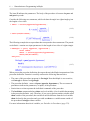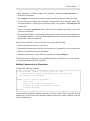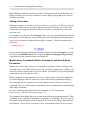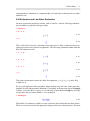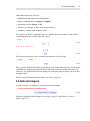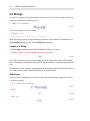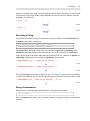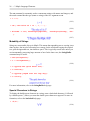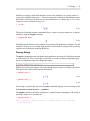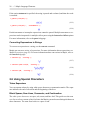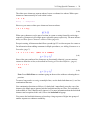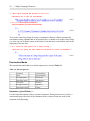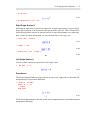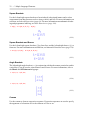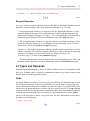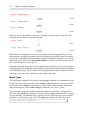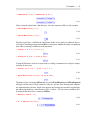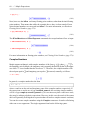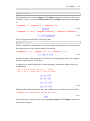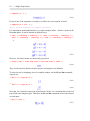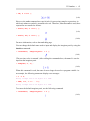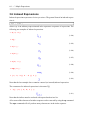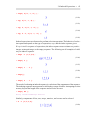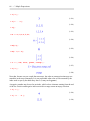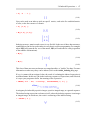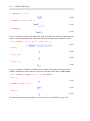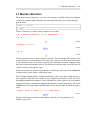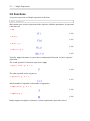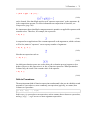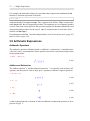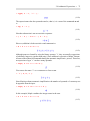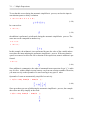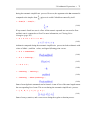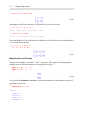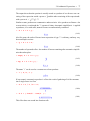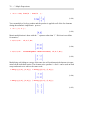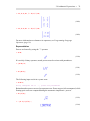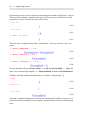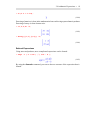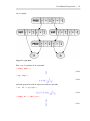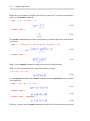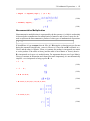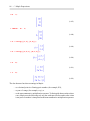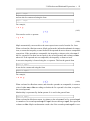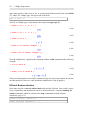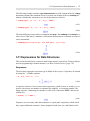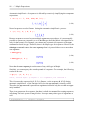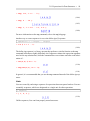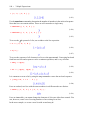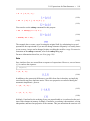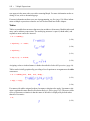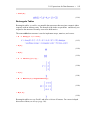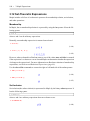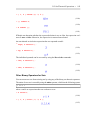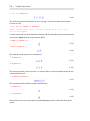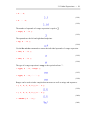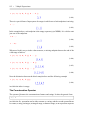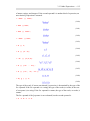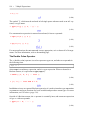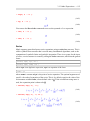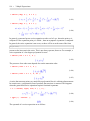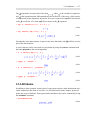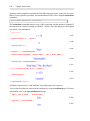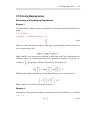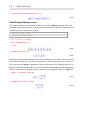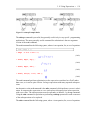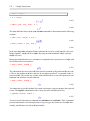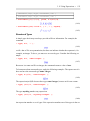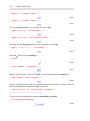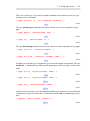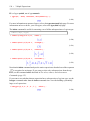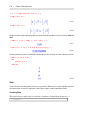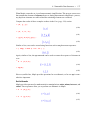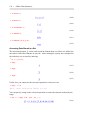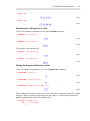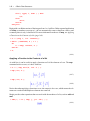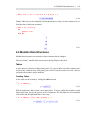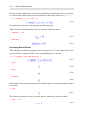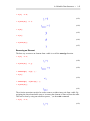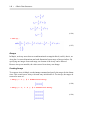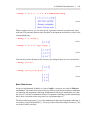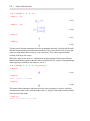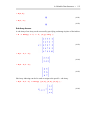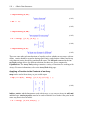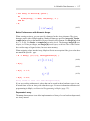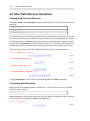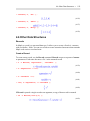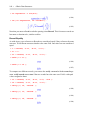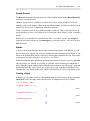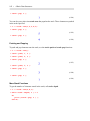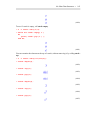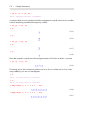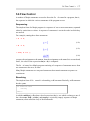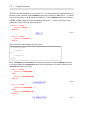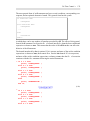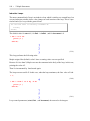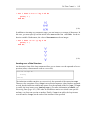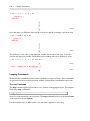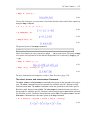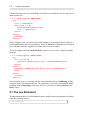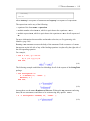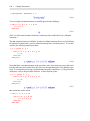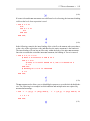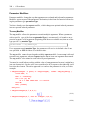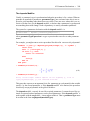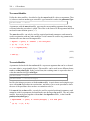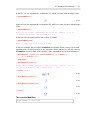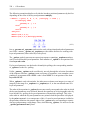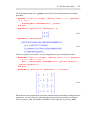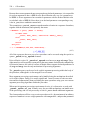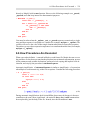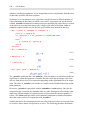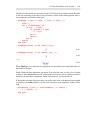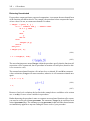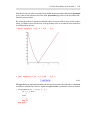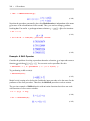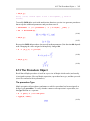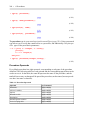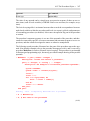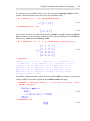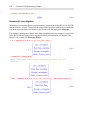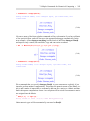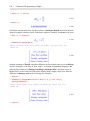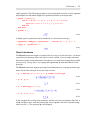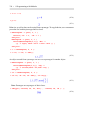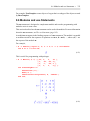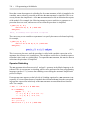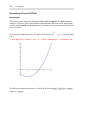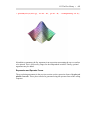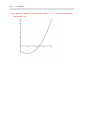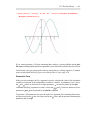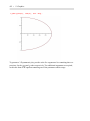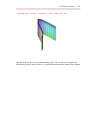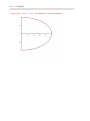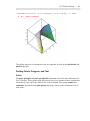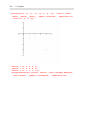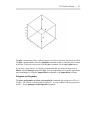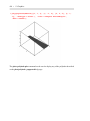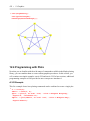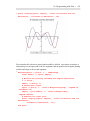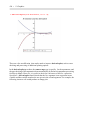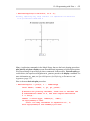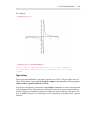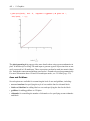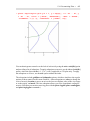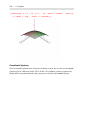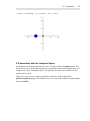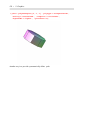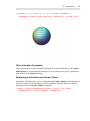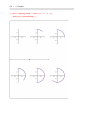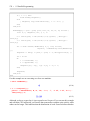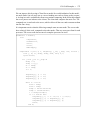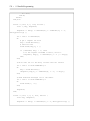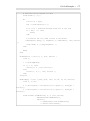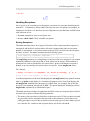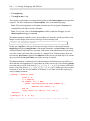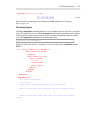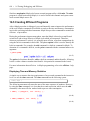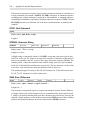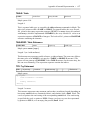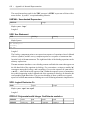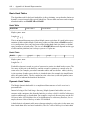
1
Maple Programming Guide L. Bernardin P. Chin P. DeMarco K. O. Geddes D. E. G. Hare K. M. Heal G. Labahn J. P. May J. McCarron M. B. Monagan D. Ohashi S. M. Vorkoetter Copyright © Maplesoft, a division of Waterloo Maple Inc. 2012 Maple Programming Guide by L. Bernardin, P. Chin, P. DeMarco, K. O. Geddes, D. E. G. Hare, K. M. Heal, G. Labahn, J. P. May, J. McCarron, M. B. Monagan, D. Ohashi, and S. M. Vorkoetter Copyright Maplesoft, Maple, MapleNet, MaplePrimes, Maplet, Maple T.A., and OpenMaple are all trademarks of Waterloo Maple Inc. © Maplesoft, a division of Waterloo Maple Inc. 1996-2012. All rights reserved. No part of this book may be reproduced, stored in a retrieval system, or transcribed, in any form or by any means — electronic, mechanical, photocopying, recording, or otherwise. Information in this document is subject to change without notice and does not represent a commitment on the part of the vendor. The software described in this document is furnished under a license agreement and may be used or copied only in accordance with the agreement. It is against the law to copy the software on any medium except as specificall allowed in the agreement. Adobe and Acrobat are either registered trademarks or trademarks of Adobe Systems Incorporated in the United States and/or other countries. Java is a registered trademarks of Oracle and/or its affiliates MATLAB is a registered trademark of The MathWorks, Inc. Microsoft and Windows are registered trademarks of Microsoft Corporation. NAG is a registered trademark of The Numerical Algorithms Group Ltd. All other trademarks are the property of their respective owners. This document was produced using Maple and DocBook. Printed in Canada. ISBN 978-1-926902-25-8 Contents Preface ..................................................................................................... xxiii 1 Introduction to Programming in Maple .............................................................. 1 1.1 In This Chapter ...................................................................................... 1 1.2 The Maple Software ................................................................................ 1 The User Interface .................................................................................. 1 The Computation Engine .......................................................................... 1 1.3 Maple Statements ................................................................................... 2 Getting Help .......................................................................................... 2 Displaying a Text String ........................................................................... 2 Performing an Arithmetic Operation ........................................................... 3 Assigning to a Name ............................................................................... 3 Using Maple Library Commands .............................................................. 3 1.4 Procedures ............................................................................................ 4 Definin a Simple Procedure ..................................................................... 4 Entering a Procedure Definitio ................................................................. 4 Adding Comments to a Procedure .............................................................. 7 Calling a Procedure ................................................................................. 8 Maple Library Commands, Built-In Commands, and User-Define Procedures ....................................................................................................... 8 Full Evaluation and Last Name Evaluation .................................................. 9 Viewing Procedure Definition and Maple Library Code ............................... 10 1.5 Interrupting Computations and Clearing the Internal Memory ........................ 11 Interrupting a Maple Computation ............................................................ 11 Clearing the Maple Internal Memory ........................................................ 12 1.6 Avoiding Common Problems ................................................................... 12 Unexpected End of Statement .................................................................. 12 Missing Operator .................................................................................. 13 Invalid, Wrong Number or Type of Arguments ........................................... 14 Unbalanced Parentheses ......................................................................... 14 Assignment Versus Equality .................................................................... 14 1.7 Exercises ............................................................................................. 15 2 Maple Language Elements ............................................................................ 17 2.1 In This Chapter ..................................................................................... 17 2.2 Character Set ....................................................................................... 17 2.3 Tokens ................................................................................................ 18 Reserved Words .................................................................................... 18 Programming-Language Operators ........................................................... 19 Names ................................................................................................ 22 2.4 Natural Integers .................................................................................... 23 2.5 Strings ................................................................................................ 24 Length of a String ................................................................................. 24 iii iv • Contents Substrings ............................................................................................ 24 Searching a String ................................................................................. 25 String Concatenation ............................................................................. 25 Mutability of Strings .............................................................................. 26 Special Characters in Strings ................................................................... 26 Parsing Strings ..................................................................................... 27 Converting Expressions to Strings ............................................................ 28 2.6 Using Special Characters ........................................................................ 28 Token Separators .................................................................................. 28 Blank Spaces, New Lines, Comments, and Continuation ............................... 28 Punctuation Marks ................................................................................ 30 Escape Characters ................................................................................. 33 2.7 Types and Operands .............................................................................. 33 DAGs ................................................................................................. 33 Maple Types ........................................................................................ 34 Operands and op ................................................................................... 36 2.8 Avoiding Common Problems ................................................................... 39 Attempting to Assign to a Protected Name ................................................. 39 Invalid Left-Hand Assignment ................................................................. 40 Incorrect Syntax in Parse ........................................................................ 40 White Space Characters within a Token ..................................................... 40 Incorrect Use of Double and Single Quotes ................................................ 40 Avoid Using Maple Keywords as Names ................................................... 41 2.9 Exercises ............................................................................................. 42 3 Maple Expressions ....................................................................................... 43 3.1 In This Chapter ..................................................................................... 43 3.2 Introduction ......................................................................................... 43 Expressions and Statements .................................................................... 43 Automatic Simplificatio and Evaluation ................................................... 43 Syntax and Constructors ........................................................................ 43 3.3 Names ................................................................................................ 44 Creating Names: Lexical Conventions ....................................................... 45 3.4 Unevaluated Expressions ........................................................................ 48 Protecting Names and Options ................................................................. 49 Generic Expressions .............................................................................. 50 Pass by Reference ................................................................................. 50 Displaying the Original Command ............................................................ 51 Unassigning Names ............................................................................... 51 Evaluation and Automatic Simplificatio ................................................... 51 Example: Definin a Procedure that Is Returned Unevaluated ........................ 53 3.5 Numbers ............................................................................................. 55 Integers ............................................................................................... 55 Fractions ............................................................................................. 55 Contents • v Floats .................................................................................................. 56 Complex Numbers ................................................................................ 60 3.6 Indexed Expressions .............................................................................. 64 3.7 Member Selection ................................................................................. 69 3.8 Functions ............................................................................................ 70 Calls to Procedures ................................................................................ 71 3.9 Arithmetic Expressions .......................................................................... 72 Arithmetic Operators ............................................................................. 72 Noncommutative Multiplication ............................................................... 85 Factorials ............................................................................................. 87 Forming Sums and Products .................................................................... 88 3.10 Boolean and Relational Expressions ........................................................ 89 Boolean Constants ................................................................................. 89 Boolean Operators ................................................................................. 89 Relational Operators .............................................................................. 92 Efficien Boolean Iteration ...................................................................... 96 3.11 Expressions for Data Structures .............................................................. 97 Sequences ............................................................................................ 97 Lists ................................................................................................... 99 Sets .................................................................................................. 101 Tables ............................................................................................... 102 Rectangular Tables .............................................................................. 103 3.12 Set-Theoretic Expressions ................................................................... 104 Membership ....................................................................................... 104 Set Inclusion ....................................................................................... 104 Other Binary Operators for Sets ............................................................. 105 3.13 Other Expressions .............................................................................. 107 Functional Operators ............................................................................ 107 Composition ....................................................................................... 108 Neutral Operators ................................................................................ 109 Ranges .............................................................................................. 110 The Concatenation Operator .................................................................. 112 The Double Colon Operator ................................................................... 114 Series ................................................................................................ 115 3.14 Attributes ......................................................................................... 117 3.15 Using Expressions ............................................................................. 119 Evaluating and Simplifying Expressions .................................................. 119 Substituting Subexpressions .................................................................. 120 Structured Types ................................................................................. 123 3.16 Exercises ......................................................................................... 127 4 Basic Data Structures ................................................................................. 129 4.1 In This Chapter ................................................................................... 129 4.2 Introduction ....................................................................................... 129 vi • Contents 4.3 Immutable Data Structures .................................................................... 129 Lists .................................................................................................. 130 Sets .................................................................................................. 136 4.4 Mutable Data Structures ....................................................................... 141 Tables ............................................................................................... 141 Arrays ............................................................................................... 148 4.5 Other Data Structure Operations ............................................................. 158 Filtering Data Structure Elements ........................................................... 158 Converting Data Structures .................................................................... 158 4.6 Other Data Structures ........................................................................... 159 Records ............................................................................................. 159 Stacks ............................................................................................... 161 Queues .............................................................................................. 164 4.7 Data Coercion ..................................................................................... 167 4.8 Data Structure Performance Comparisons ................................................ 167 Indexing ............................................................................................ 167 Membership ....................................................................................... 167 Building a Collection of Data ................................................................. 168 4.9 Avoiding Common Problems ................................................................. 169 Passing Sequences into Functions ........................................................... 169 Incorrect Index Values .......................................................................... 170 Do Not Treat Lists and Sets as Mutable ................................................... 171 4.10 Exercises ......................................................................................... 171 5 Maple Statements ...................................................................................... 173 5.1 In This Chapter ................................................................................... 173 5.2 Introduction ....................................................................................... 173 5.3 Statement Separators ............................................................................ 173 5.4 Expression Statements .......................................................................... 174 5.5 Assignments ....................................................................................... 174 Multiple Assignment ............................................................................ 175 5.6 Flow Control ...................................................................................... 177 Sequencing ........................................................................................ 177 Branching .......................................................................................... 177 Loops ................................................................................................ 181 Looping Commands ............................................................................. 186 Non-Local Flow Control ....................................................................... 188 5.7 The use Statement ............................................................................... 192 5.8 Other Statements ................................................................................. 196 The quit Statement ............................................................................... 196 The save Statement .............................................................................. 197 The read Statement .............................................................................. 197 5.9 Exercises ........................................................................................... 198 6 Procedures ................................................................................................ 199 Contents • vii 6.1 Terminology ....................................................................................... 199 6.2 Definin and Executing Procedures ........................................................ 200 6.3 Parameter Declarations ......................................................................... 201 Required Positional Parameters .............................................................. 201 Optional Ordered Parameters ................................................................. 202 Expected Ordered Parameters ................................................................ 204 Keyword Parameters ............................................................................ 204 The End-of-Parameters Marker .............................................................. 206 Default Value Dependencies .................................................................. 207 Parameter Modifier ............................................................................. 208 Procedures without Declared Parameters .................................................. 212 6.4 Return Type ....................................................................................... 213 6.5 The Procedure Body ............................................................................ 213 Description ........................................................................................ 214 Options ............................................................................................. 214 Variables in Procedures ......................................................................... 221 Non-Variable Name Bindings ................................................................ 224 The Statement Sequence ....................................................................... 224 Referring to Parameters within the Procedure Body .................................... 224 6.6 How Procedures Are Executed ............................................................... 231 Binding of Arguments to Parameters ....................................................... 232 Statement Sequence Interpretation .......................................................... 236 6.7 Using Data Structures with Procedures .................................................... 244 Passing Data Structures to Procedures ..................................................... 244 Returning Data Structures from Procedures .............................................. 245 Example: Computing an Average ............................................................ 246 Example: Binary Search ....................................................................... 247 Example: Plotting the Roots of a Polynomial ............................................ 248 6.8 Writing Usable and Maintainable Procedures ............................................ 252 Formatting Procedures for Readability ..................................................... 252 Commenting Your Code ....................................................................... 253 6.9 Other Methods for Creating Procedures ................................................... 255 Functional Operators: Mapping Notation .................................................. 255 The unapply Function ........................................................................... 256 Anonymous Procedures ........................................................................ 258 6.10 Recursion ......................................................................................... 259 6.11 Procedures that Return Procedures ........................................................ 261 Example: Creating a Newton Iteration ..................................................... 261 Example: A Shift Operator .................................................................... 264 6.12 The Procedure Object ......................................................................... 265 The procedure Type ............................................................................. 265 Procedure Operands ............................................................................. 266 6.13 Exercises ......................................................................................... 269 viii • Contents 7 Numerical Programming in Maple ................................................................ 271 7.1 In This Chapter ................................................................................... 271 7.2 Numeric Types in Maple ....................................................................... 271 Integers ............................................................................................. 271 Rationals ........................................................................................... 273 Floating-Point Numbers ........................................................................ 274 Hardware Floating-Point Numbers .......................................................... 276 Extended Numeric Types ...................................................................... 277 Complex Numbers ............................................................................... 278 Non-numeric Constants ........................................................................ 279 7.3 More about Floating-Point Numbers in Maple .......................................... 279 Representation of Floating-Point Numbers in Maple ................................... 280 Precision and Accuracy ........................................................................ 282 Floating-Point Contagion ...................................................................... 283 More on the Floating-Point Model .......................................................... 286 7.4 Maple Commands for Numerical Computing ............................................ 287 The evalf Command ............................................................................. 287 Numeric Solvers .................................................................................. 290 The evalhf Command ........................................................................... 291 Numerical Linear Algebra ..................................................................... 294 7.5 Writing Efficien Numerical Programs ..................................................... 297 Writing Flexible Numerical Procedures .................................................... 297 Example: Newton Iteration .................................................................... 299 Example: Jacobi Iteration ...................................................................... 303 8 Programming with Modules ......................................................................... 309 8.1 In This Chapter ................................................................................... 309 8.2 Introduction ....................................................................................... 309 Encapsulation ..................................................................................... 309 Creating a Custom Maple Package .......................................................... 309 Creating Objects ................................................................................. 309 Creating Generic Programs .................................................................... 310 8.3 A Simple Example .............................................................................. 310 8.4 Syntax and Semantics .......................................................................... 311 The Module Definitio ......................................................................... 311 The Module Body ................................................................................ 311 Module Parameters .............................................................................. 311 Named Modules .................................................................................. 312 Declarations ....................................................................................... 314 Exported Local Variables ...................................................................... 316 Module Options .................................................................................. 320 Special Exports ................................................................................... 320 Implicit Scoping Rules ......................................................................... 325 Lexical Scoping Rules .......................................................................... 326 Contents • ix Modules and Types .............................................................................. 328 8.5 Records ............................................................................................. 330 Creating Records ................................................................................. 330 Record Types ...................................................................................... 332 Using Records to Represent Quaternions .................................................. 332 Object Inheritance ............................................................................... 333 8.6 Modules and use Statements .................................................................. 335 Operator Rebinding ............................................................................. 336 8.7 Interfaces and Implementations .............................................................. 340 Generic Programming as a Good Software Engineering Practice ................... 340 Distinction between Local and Exported Variables ..................................... 341 Interfaces ........................................................................................... 341 A Package for Manipulating Interfaces .................................................... 342 The load Option .................................................................................. 346 9 Object Oriented Programming ...................................................................... 347 9.1 In This Chapter ................................................................................... 347 9.2 Introduction To Object Oriented Programming .......................................... 347 Terminology ....................................................................................... 347 Benefit of Object Oriented Programming ................................................ 347 9.3 Objects in Maple ................................................................................. 348 Creating a New Class of Objects ............................................................ 348 Creating More Objects ......................................................................... 348 Objects and Types ............................................................................... 349 9.4 Methods ............................................................................................ 349 Methods Can Access Object Locals ........................................................ 349 Method Names Should Be Declared static ................................................ 349 Methods Are Passed the Objects They Manipulate ..................................... 349 Calling Methods .................................................................................. 349 Objects in Indexed Function Calls .......................................................... 350 Special Methods .................................................................................. 350 9.5 Overloading Operators ......................................................................... 350 Supported Operators ............................................................................ 351 Implementing Operators ....................................................................... 351 9.6 Overloading Built-in Routines ............................................................... 351 Overridable Built-in Routines ................................................................ 351 9.7 Examples ........................................................................................... 352 9.8 Avoiding Common Mistakes ................................................................. 357 Overloaded Operators and Built-in Routines Must Handle All Possibilities ..... 357 Make Sure to Access the Correct Routine ................................................. 358 Be Aware of NULL .............................................................................. 358 Lexical Scoping Does Not Circumvent local ............................................. 359 10 Input and Output ...................................................................................... 361 10.1 In This Chapter ................................................................................. 361 x • Contents 10.2 Introduction ...................................................................................... 10.3 Input and Output in the Worksheet ........................................................ Interfaces ........................................................................................... Interactive Output ................................................................................ Interactive Input .................................................................................. Customization ..................................................................................... 10.4 Input and Output with Files ................................................................. Introduction ........................................................................................ Working with General Files ................................................................... Importing and Exporting Numerical Data ................................................. Files Used by Maple ............................................................................ 10.5 Reading and Writing Formatted Data ..................................................... The scanf and printf Commands ............................................................. Format Strings .................................................................................... Related Commands .............................................................................. 10.6 Useful Utilities .................................................................................. The StringTools Package ....................................................................... Conversion Commands ......................................................................... 10.7 2-D Math ......................................................................................... Introduction ........................................................................................ The Typesetting Package ....................................................................... Additional Tips ................................................................................... 10.8 Exercises ......................................................................................... 11 Writing Packages ..................................................................................... 11.1 In This Chapter ................................................................................. 11.2 What Is a Package .............................................................................. Packages in the Standard Library ............................................................ Packages Are Modules ......................................................................... Package Exports .................................................................................. Using Packages Interactively ................................................................. 11.3 Writing Maple Packages By Using Modules ........................................... A Simple Example ............................................................................... Custom Libraries ................................................................................. 11.4 A Larger Example .............................................................................. ModuleLoad ....................................................................................... The Preprocessor and Structured Source Files ........................................... Subpackages ....................................................................................... 11.5 Example: A Shapes Package ............................................................... Source Code Organization ..................................................................... Package Architecture ........................................................................... The Package API ................................................................................. The make Procedure ............................................................................ The area Procedure .............................................................................. 361 362 363 364 366 366 366 366 367 372 374 375 375 377 378 378 378 379 379 379 380 380 381 383 383 383 383 383 384 384 385 385 387 389 389 390 392 392 393 394 395 395 395 Contents • xi The circumference Procedure ................................................................. 395 Shape Representation ........................................................................... 396 Procedure Dispatching .......................................................................... 396 Dispatching on Submodule Exports ......................................................... 396 Conditional Dispatching ....................................................................... 397 Table-based Dispatching ....................................................................... 398 Shape-specifi Submodules ................................................................... 399 The point Submodule ........................................................................... 399 The circle Submodule ........................................................................... 399 12 Graphics ................................................................................................. 401 12.1 In This Chapter ................................................................................. 401 12.2 Introduction ...................................................................................... 401 Plots in Maple ..................................................................................... 401 Generating a Plot ................................................................................. 402 12.3 The Plot Library ................................................................................ 403 Generating 2-D and 3-D Plots ................................................................ 404 Plotting Points, Polygons, and Text ......................................................... 415 Combining Plots .................................................................................. 421 Specialty Plots .................................................................................... 423 Other Packages ................................................................................... 429 12.4 Programming with Plots ...................................................................... 432 A 2-D Example ................................................................................... 432 A 3-D Example ................................................................................... 437 12.5 Data Structures .................................................................................. 441 Types of Data Structures ....................................................................... 442 Creating Plot Structures ........................................................................ 446 Altering Plot Structures ........................................................................ 447 12.6 Customizing Plots .............................................................................. 449 Controlling the Sampling ...................................................................... 449 Colors ............................................................................................... 452 View ................................................................................................. 458 Typesetting ......................................................................................... 461 Axes and Gridlines .............................................................................. 462 Coordinate Systems ............................................................................. 464 Setting Options ................................................................................... 468 12.7 Animations ....................................................................................... 470 Building an Animation with plots:-display ................................................ 470 The plots:-animate command ................................................................. 471 3-D Animations with the viewpoint Option ............................................... 473 Other Animation Commands ................................................................. 475 Displaying an Animation as an Array of Plots ........................................... 475 12.8 Miscellaneous Topics ......................................................................... 478 Efficienc in Plotting ........................................................................... 478 xii • Contents Interfaces and Devices .......................................................................... 12.9 Avoiding Common Problems ............................................................... Mixing Expression and Operator Forms ................................................... Generating Non-numeric Data ............................................................... 13 Programming Interactive Elements .............................................................. 13.1 In This Chapter ................................................................................. 13.2 Programming Embedded Components ................................................... Adding Embedded Components to a Document ......................................... Editing Component Properties ............................................................... Example: Creating a Tic-Tac-Toe Game ................................................... Retrieving and Updating Component Properties ........................................ Using the GetProperty Command to Retrieve Properties ............................. Using the SetProperty Command to Update Properties ................................ Using the Do Command to Retrieve and Update Component Properties ......... 13.3 Programming Maplets ........................................................................ Layout Managers ................................................................................. Box Layout ........................................................................................ Grid Layout ........................................................................................ Border Layout .................................................................................... 14 Advanced Connectivity ............................................................................. 14.1 In This Chapter ................................................................................. Connecting to the Maple Engine ............................................................. Using External Libraries in Maple .......................................................... Connecting Maple to Another Program ................................................... Code Generation ................................................................................. 14.2 MapleNet ......................................................................................... Computation on Demand ...................................................................... Embedding a Maple Application in a Web Application ............................... 14.3 OpenMaple ...................................................................................... Runtime Environment Prerequisites ........................................................ Interface Overview .............................................................................. C/C++ Example .................................................................................. C# Example ....................................................................................... Java Example ..................................................................................... Visual Basic 6 Example ........................................................................ Visual Basic .NET Example .................................................................. Memory Usage ................................................................................... 14.4 The Maple Command-line Interface ...................................................... Batch Files ......................................................................................... Directing Input to a Pipeline .................................................................. Specifying Start-up Commands .............................................................. 14.5 External Calling: Using Compiled Code in Maple .................................... Calling a Function in a Dynamic-link Library ........................................... 479 479 479 482 487 487 487 487 488 489 491 491 492 492 493 493 494 496 498 503 503 503 503 503 504 504 504 505 506 507 507 509 511 512 514 515 516 516 517 517 517 518 518 Contents • xiii Specifying Parameter Types for Function Specification ............................. 521 Scalar Data Formats ............................................................................. 521 Structured Data Formats ....................................................................... 522 External Function Interface ................................................................... 523 Specifying Parameter Passing Conventions ............................................... 526 Generating Wrappers Automatically ........................................................ 526 Passing Arguments by Reference ............................................................ 528 External API ....................................................................................... 529 System Integrity .................................................................................. 529 14.6 Accessing Data over a Network with TCP/IP Sockets ............................... 530 Socket Server ..................................................................................... 530 Socket Client ...................................................................................... 531 14.7 Code Generation ................................................................................ 531 Calling CodeGeneration Commands ........................................................ 531 Notes on Code Translation .................................................................... 532 Translation Process .............................................................................. 532 Example 1: Translating a Procedure to Java .............................................. 533 Example 2: Translating a Procedure to C .................................................. 533 Example 3: Translating a Procedure to Fortran .......................................... 534 Example 4: Translating an Expression to MATLAB ................................... 534 Example 5: Translating a Procedure to Visual Basic ................................... 535 Example 6: Using the defaulttype and deducetypes Options ......................... 535 Example 7: Using the declare Option ....................................................... 536 The Intermediate Code ......................................................................... 536 Extending the CodeGeneration Translation Facilities .................................. 537 The Printing Phase ............................................................................... 537 Definin a Custom Translator ................................................................ 537 Using a Printer Module ......................................................................... 538 Language Translator Definitio .............................................................. 539 Using the Defin Command ................................................................... 539 Creating a Language Definitio Module ................................................... 540 Using a New Translator ........................................................................ 541 14.8 CAD Connectivity ............................................................................. 541 14.9 Maple Plug-in for Excel ...................................................................... 542 14.10 Connecting MATLAB and Maple ........................................................ 543 Accessing the MATLAB Computation Engine from Maple .......................... 544 Accessing the Maple Computational Engine from MATLAB ....................... 544 15 Parallel Programming ............................................................................... 547 15.1 In This Chapter ................................................................................. 547 15.2 Introduction ...................................................................................... 547 15.3 Introduction to Parallel Programming with Tasks ..................................... 548 Parallel Execution ................................................................................ 548 Controlling Parallel Execution ............................................................... 552 xiv • Contents 15.4 Task Programming Model ................................................................... 556 Tasks ................................................................................................ 556 The Task Tree ..................................................................................... 557 Starting Tasks ..................................................................................... 557 Task Management ................................................................................ 559 15.5 Examples ......................................................................................... 564 The N Queens Problem ......................................................................... 564 15.6 Limitations of Parallel Programming ..................................................... 567 Library Code ...................................................................................... 567 Maple Interpreter ................................................................................. 567 15.7 Avoiding Common Problems ............................................................... 567 Every Execution Order Will Happen ....................................................... 567 Lock around All Accesses ..................................................................... 567 Debugging Parallel Code ...................................................................... 568 15.8 Introduction to Grid Programming ........................................................ 568 Starting a Grid-Based Computation ......................................................... 568 Communicating between Nodes ............................................................. 569 15.9 Grid Examples .................................................................................. 571 Computing a Mandelbrot Set ................................................................. 571 15.10 The Grid Computing Toolbox ............................................................. 578 15.11 Limitations ..................................................................................... 578 Memory Usage ................................................................................... 578 Cost of Communication ....................................................................... 579 Load Balancing ................................................................................... 579 15.12 Troubleshooting ............................................................................... 579 Deadlocking ....................................................................................... 579 'libname' and Other Engine Variables ....................................................... 579 Missing Functions ............................................................................... 579 16 Testing, Debugging, and Efficienc ............................................................. 581 16.1 In This Chapter ................................................................................. 581 16.2 The Maple Debugger: A Tutorial Example ............................................. 581 Example ............................................................................................ 582 Numbering the Procedure Statements I .................................................... 583 Invoking the Debugger I ....................................................................... 584 Setting a Breakpoint ............................................................................. 584 Controlling the Execution of a Procedure during Debugging I ...................... 585 Invoking the Debugger II ...................................................................... 589 Setting a Watchpoint ............................................................................ 589 16.3 Maple Debugger Commands ................................................................ 593 Numbering the Procedure Statements II ................................................... 593 Invoking the Debugger III ..................................................................... 594 Controlling the Execution of a Procedure during Debugging II ..................... 601 Changing the State of a Procedure during Debugging ................................. 601 Contents • xv Examining the State of a Procedure during Debugging ................................ 604 Using Top-Level Commands at the Debugger Prompt ................................. 608 Restrictions ........................................................................................ 608 16.4 Detecting Errors ................................................................................ 609 Tracing a Procedure ............................................................................. 609 Using Assertions ................................................................................. 612 Handling Exceptions ............................................................................ 615 Checking Syntax ................................................................................. 617 16.5 Creating Efficien Programs ................................................................. 618 Displaying Time and Memory Statistics ................................................... 618 Profilin a Procedure ............................................................................ 620 16.6 Managing Resources .......................................................................... 624 Setting a Time Limit on Computations ..................................................... 625 Garbage Collection .............................................................................. 626 Other Kernel Options for Managing Resources .......................................... 626 16.7 Testing Your Code ............................................................................. 627 Verifying Results with verify ................................................................. 627 A Simple Test Harness ......................................................................... 628 Writing Good Tests .............................................................................. 629 Test Coverage ..................................................................................... 629 16.8 Exercises ......................................................................................... 630 A Internal Representation .............................................................................. 633 A.1 Internal Functions ............................................................................... 633 Evaluators .......................................................................................... 633 Algebraic Functions ............................................................................. 634 Algebraic Service Functions .................................................................. 634 Data Structure Manipulation Functions .................................................... 634 General Service Functions ..................................................................... 634 A.2 Flow of Control .................................................................................. 634 A.3 Internal Representations of Data Types ................................................... 635 AND: Logical AND ............................................................................. 635 ASSIGN: Assignment Statement ............................................................ 636 BINARY: Binary Object ....................................................................... 636 BREAK: Break Statement ..................................................................... 636 CATENATE: Name Concatenation ......................................................... 636 COMPLEX: Complex Value .................................................................. 637 CONTROL: Communications Control Structure ........................................ 637 DCOLON: Type Specificatio or Test ..................................................... 637 DEBUG: Debug .................................................................................. 637 EQUATION: Equation or Test for Equality ............................................... 638 ERROR: Error Statement ...................................................................... 638 EXPSEQ: Expression Sequence ............................................................. 638 FLOAT: Software Floating-Point Number ................................................ 639 xvi • Contents FOR: For/While Loop Statement ............................................................ 639 FOREIGN: Foreign Data ...................................................................... 640 FUNCTION: Function Call ................................................................... 640 GARBAGE: Garbage ........................................................................... 640 HFLOAT: Hardware Float ..................................................................... 641 IF: If Statement ................................................................................... 641 IMPLIES: Logical IMPLIES ................................................................. 641 INEQUAT: Not Equal or Test for Inequality ............................................. 642 INTNEG: Negative Integer .................................................................... 642 INTPOS: Positive Integer ...................................................................... 642 LESSEQ: Less Than or Equal ................................................................ 643 LESSTHAN: Less Than ....................................................................... 643 LEXICAL: Lexically Scoped Variable within an Expression ........................ 643 LIST: List .......................................................................................... 644 LOCAL: Local Variable within an Expression ........................................... 644 MEMBER: Module Member ................................................................. 644 MODDEF: Module Definitio ............................................................... 644 MODULE: Module Instance .................................................................. 646 NAME: Identifie ................................................................................ 647 NEXT: Next Statement ......................................................................... 647 NOT: Logical NOT .............................................................................. 647 OR: Logical OR .................................................................................. 647 PARAM: Procedure Parameter in an Expression ........................................ 647 POLY: Multivariate Polynomials with Integer Coefficient .......................... 649 POWER: Power .................................................................................. 650 PROC: Procedure Definitio .................................................................. 650 PROD: Product, Quotient, Power ........................................................... 651 RANGE: Range .................................................................................. 652 RATIONAL: Rational .......................................................................... 652 READ: Read Statement ........................................................................ 652 RETURN: Return Statement .................................................................. 652 RTABLE: Rectangular Table .................................................................. 653 SAVE: Save Statement ......................................................................... 654 SDPOLY: Sparse Distributed Multivariate Polynomial ................................ 654 SERIES: Series ................................................................................... 655 SET: Set ............................................................................................ 655 STATSEQ: Statement Sequence ............................................................. 655 STOP: Quit Statement .......................................................................... 656 STRING: Character String .................................................................... 656 SUM: Sum, Difference ......................................................................... 656 TABLE: Table .................................................................................... 657 TABLEREF: Table Reference ................................................................ 657 TRY: Try Statement ............................................................................. 657 Contents • xvii UNEVAL: Unevaluated Expression ......................................................... 658 USE: Use Statement ............................................................................. 658 XOR: Logical Exclusive-Or .................................................................. 658 ZPPOLY: Polynomials with Integer Coefficient modulo n .......................... 658 A.4 Hashing in Maple ............................................................................... 659 Basic Hash Tables ............................................................................... 660 Dynamic Hash Tables ........................................................................... 660 Cache Hash Tables ............................................................................... 661 The Simplificatio Table ....................................................................... 662 The Name Table .................................................................................. 663 Remember Tables ................................................................................ 663 Maple Language Arrays and Tables ......................................................... 664 Maple Language Rectangular Tables ....................................................... 664 Portability .......................................................................................... 664 Index ........................................................................................................ 667 xviii • Contents List of Figures Figure 1.1: Maple Toolbar ............................................................................... 12 Figure 2.1: Expression Tree ............................................................................. 37 Figure 2.2: Expression DAG ............................................................................ 38 Figure 2.3: Actual Expression DAG .................................................................. 39 Figure 3.1: expr DAG ..................................................................................... 83 Figure 3.2: subsop Example DAGs .................................................................. 121 Figure 11.1: Organization of Package Source Files .............................................. 393 Figure 11.2: Design of Package ....................................................................... 394 Figure 13.1: Code Region for an Embedded Component ...................................... 489 Figure 13.2: Border Layout Diagram ................................................................ 499 Figure 14.1: Maple in Excel ........................................................................... 543 Figure 16.1: The Maple Debugger in the Standard Interface .................................. 582 xix xx • List of Figures List of Tables Table 2.1: Special Characters ............................................................................ 17 Table 2.2: Reserved Keywords ......................................................................... 18 Table 2.3: Binary Operators ............................................................................. 19 Table 2.4: Unary Operators .............................................................................. 20 Table 2.5: Element-wise Operators .................................................................... 21 Table 2.6: Token Separators ............................................................................. 30 Table 2.7: Subtype ......................................................................................... 35 Table 3.1: Initially Known Names ..................................................................... 46 Table 5.1: Operators That Can Be Rebound ....................................................... 196 Table 6.1: Procedure Operands ........................................................................ 266 Table 7.1: Floating-Point Contagion Rules ........................................................ 286 Table 11.1: RandomnessTests ......................................................................... 390 Table 14.1: Basic Data Types .......................................................................... 521 Table 14.2: Compound Data Types .................................................................. 522 Table 14.3: Printer Commands ........................................................................ 538 Table 16.1: sieveTest.mpl ............................................................................... 628 Table 16.2: sieveTest2.mpl ............................................................................. 629 Table 16.3: Modifie sieveTest2.mpl ................................................................ 630 Table A.1: Maple Structures ........................................................................... 633 xxi xxii • List of Tables Preface Technical computation forms the heart of problem solving in mathematics, engineering, and science. To help you, Maple™ offers a vast repository of mathematical algorithms covering a wide range of applications. At the core of Maple, the symbolic computation engine is second to none in terms of scalability and performance. Indeed, symbolics was the core focus when Maple was firs conceived at the University of Waterloo in 1980 and to this day Maple continues to be the benchmark software for symbolic computing. Together with a large repository of numeric functionality, including industry-standard libraries such as the Intel® Math Kernel Library (MKL), Automatically Tuned Linear Algebra Software (ATLAS), and the C Linear Algebra PACKage (CLAPACK), as well as a broad selection of routines from the Numerical Algorithms Group (NAG® ) libraries, you can rely on Maple to support you a across many domains and applications. Using its unique hybrid technology, Maple integrates the symbolic and numeric worlds to solve diverse problems more efficientl and with higher accuracy. The Maple user interface allows you to harness all this computational power by using contextsensitive menus, task templates, and interactive assistants. The firs steps are intuitively easy to use and quickly lead you into the captivating, creative, and dynamic world of Maple. As you get more proficient you will want to explore more deeply and directly access all of the computational power available to you. You can accomplish this through the Maple programming language. Combining elements from procedural languages (such as Pascal), functional languages (such as Lisp) and object-oriented languages (such as Java™ ), Maple provides you with an exceptionally simple yet powerful language to write your own programs. High-level constructs such as map allow you to express in a single statement what would take ten lines of code in a language like C. Maple allows you to quickly focus and reliably solve problems with easy access to over 5000 algorithms and functions developed over 30 years of cutting-edge research and development. Maple's user community is now over two million people. Together we have built large collections of Maple worksheets and Maple programs, much of which is freely available on the web for you to reuse or learn from. The majority of the mathematical algorithms you fin in Maple today are written in the Maple Programming Language. As a Maple user, you write programs using the same basic tools that the Maple developers themselves use. Moreover you can easily view most of the code in the Maple library and you can even extend the Maple system, tying your programs in with existing functionality. xxiii xxiv • Preface This guide will lead you from your firs steps in Maple programming to writing sophisticated routines and packages, allowing you to tackle problems in mathematics, engineering, and science effectively and efficientl . You will quickly progress towards proficienc in Maple programming, allowing you to harness the full power of Maple. Have fun! Audience This guide provides information for users who are new to Maple programming, as well as experienced Maple programmers. Before reading this guide, you should be familiar with the following. • The Maple help system • How to use Maple interactively • The Maple User Manual Maple User Interfaces You can access Maple functionality through several user interfaces. Maple interfaces accept user input, communicate with the Maple computational engine, and display solutions to mathematical problems. The Standard Interface The standard interface facilitates the performance of computations and lets you manipulate mathematical expressions. It also provides layout and document processing features that you can use to annotate your problem-solving process. The standard interface will be the focus of this guide. To display the standard interface, double-click your Maple desktop icon (Windows® and Macintosh®) or run the xmaple command (UNIX®). Other Maple Interfaces • MapleNet™ lets you publish your interactive Maple documents on the web. Users with an Internet connection can then view and manipulate your published documents in a web browser. MapleNet also provides a web service interface that allows connected applications to pass data to Maple, run a program, and retrieve results. It also lets you create custom JavaServer™ Pages (JSP) applications and Java applets. For more information about MapleNet, see MapleNet (page 504). • OpenMaple™ is the Maple application programming interface (API) that lets you build custom user interfaces or embed Maple in an existing application. OpenMaple can be Preface • xxv used with a variety of languages including C, C++, Java, Fortran, Visual Basic®, and C#. For more information about OpenMaple, see OpenMaple (page 506). • The Maple command-line interface is a console-based application that can be used for batch processing Maple command files For more information, see The Maple Command-line Interface (page 516). • Maplet™ applications are custom interfaces that are created using the Maple programming language. For more information, see Programming Interactive Elements (page 487). For more information about the Maple user interfaces, refer to the Maple User Manual or the versions help page. Programming in the Standard Interface Most of the time, you will enter Maple code directly in a worksheet or document. The standard interface also provides other functionality for entering Maple code. For example, you can enter your code in a startup code region if you want to run certain commands or procedures automatically when a Maple document is opened. You can also enter your code in a code edit region if you want to keep a set of Maple commands or procedures in a confine region within your document. For more information, refer to the worksheet,documenting,startupcode and CodeEditRegion help pages. You can also include your code in an external text fil to be read by a worksheet or document, or batch processed. For more information, refer to the fil help page. Document Mode and Worksheet Mode Two modes of interactive operation are available in the standard interface: document mode and worksheet mode. In document mode, you enter mathematical expressions within document blocks; no Maple input prompt (>) or execution group boundaries are displayed in the document. You can use this mode to create professional reports that combine text and typeset math with plots, images, and other interactive components. In worksheet mode, you enter mathematical expressions at input prompts, which are displayed at the start of each input line in a Maple document. When you type an expression and press Enter, the expression is evaluated and a new input prompt is displayed in the next line. In both modes, the default format for entering mathematical text is 2-D math notation. Both modes are equally suitable for creating and running programs in Maple. Select the mode that suits your preferences and tasks. For more information about both modes, refer to the worksheet,help,documentsvsworksheets help page. xxvi • Preface 1-D and 2-D Math Notation When programming in Maple, you must also consider whether to use 2-D math notation or 1-D math notation. In 2-D math notation, typeset mathematical text is displayed in black italicized characters. In 1-D math notation (or Maple input), mathematical text is displayed in a red fixed-widt font that is not typeset. > int(sin(x),x): 1-D math notation can be used in external text file to write Maple code that can be read by a worksheet or batch processed. You can enter individual statements in 1-D math notation or configur Maple to display mathematical input in 1-D math by default in all future Maple sessions. Note: While 2-D math is the recommended format for mathematical text and equations and can be used for short command sequences and procedures, it is generally not recommended for long programs and package definitions Most input in this guide is shown in 1-D math notation. To clearly distinguish commands and input, this guide uses a leading prompt character (>) and all input is entered in worksheet mode. For more information on starting Maple, toggling between 1-D and 2-D math notation, and managing your files refer to the Maple User Manual or enter ?managing at the Maple prompt. Web Resources • Maplesoft Application Center: The Application Center provides thousands of complete applications that you can download and use in Maple. For more information, visit http://www.maplesoft.com/applications. • MaplePrimes™: MaplePrimes is an online forum where you can search for tips and techniques, read blogs, and discuss your work in Maple with an active community. For more information, visit http://www.mapleprimes.com. • Maplesoft Online Help: Documentation included with Maple is also posted online. The web version offers the latest updates, Google™-based searching, and an easy way to provide feedback on help documentation. For more information, visit, http://www.maplesoft.com/support/help. Preface • xxvii • Teacher Resource Center: The Teacher Resource Center provides course content, lecture notes, demonstrations, and other resources to help teachers incorporate Maple in their classrooms. For more information, visit http://www.maplesoft.com/TeacherResource. • Student Resource Center: The Student Resource Center provides online forums, training videos, and other resources to help students with their work in Maple. For more information, visit http://www.maplesoft.com/studentcenter. For additional resources, visit http://www.maplesoft.com. Conventions This guide uses the following typographical conventions. • bold font - Maple command, package name, option name, dialog box, menu, or text fiel • italics - new or important concept • Note - additional information that is relevant to a concept or section • Important - information that must be read and followed Customer Feedback Maplesoft welcomes your feedback. For suggestions and comments related to this and other manuals, contact [email protected]. xxviii • Preface 1 Introduction to Programming in Maple Maple provides an interactive problem-solving environment, complete with procedures for performing symbolic, numeric, and graphical computations. At the core of the Maple computer algebra system is a powerful programming language, upon which the Maple libraries of mathematical commands are built. 1.1 In This Chapter • Components of the Maple software • Maple statements • Procedures and other essential elements of the Maple language 1.2 The Maple Software The Maple software consists of two distinct parts. • The user interface • The computation engine The User Interface You can use the Maple user interface to enter, manipulate, and analyze mathematical expressions and commands. The user interface communicates with the Maple computation engine to solve mathematical problems and display their solutions. For more information about the Maple user interface, refer to the Maple User Manual. The Computation Engine The Maple computation engine is the command processor, which consists of two parts: the kernel and math library. The kernel is the core of the Maple computation engine. It contains the essential facilities required to run and interpret Maple programs, and manage data structures. In this guide, the kernel commands are referred to as built-in commands. The Maple kernel also consists of kernel extensions, which are collections of external compiled libraries that are included in Maple to provide low-level programming functionality. These libraries include Basic Linear Algebra Subprograms (BLAS), GNU Multiple Precision (GMP), the NAG® C Library, and the C Linear Algebra PACKage (CLAPACK). The math library contains most of the Maple commands. It includes functionality for numerous mathematical domains, including calculus, linear algebra, number theory, and combinatorics. Also, it contains commands for numerous other tasks, including importing 1 2 • 1 Introduction to Programming in Maple data into Maple, XML processing, graphics, and translating Maple code to other programming languages. All library commands are implemented in the high-level Maple programming language, so they can be viewed and modifie by users. By learning the Maple programming language, you can create custom programs and packages, and extend the Maple library. 1.3 Maple Statements There are many types of valid statements. Examples include statements that request help on a particular topic, display a text string, perform an arithmetic operation, use a Maple library command, or defin a procedure. Statements in 1-D notation require a trailing semicolon (;) or colon (:). If you enter a statement with a trailing semicolon, for most statements, the result is displayed. If you enter a statement with a trailing colon, the result is computed but not displayed. > 2 + 3; (1.1) > 2 + 3: For more information about statements in Maple, see Maple Statements (page 173). Getting Help To view a help page for a particular topic, enter a question mark (?) followed by the corresponding topic name. For example, ?procedure displays a help page that describes how to write a Maple procedure. For more information about getting help in Maple, refer to the help and HelpGuide help pages. This type of Maple statement does not have a trailing colon or semicolon. Displaying a Text String The following statement returns a string. The text that forms the string is enclosed in double quotes, and the result (the string itself) is displayed because the statement has a trailing semicolon. > "Hello World"; (1.2) Normally, you would create a string as part of another statement, such as an assignment or an argument for a procedure. 1.3 Maple Statements • 3 For more information about strings in Maple, see Maple Language Elements (page 17). Performing an Arithmetic Operation The arithmetic operators in Maple are + (addition), - (subtraction), * (multiplication), / (division), and ^ (exponentiation). A statement can be an arithmetic operation that contains any combination of these operators. The standard rules of precedence apply. > (44*3+13)^2/116; (1.3) Maple computes this result as an exact rational number. Assigning to a Name By naming a calculated result or complicated expression, you can reference it. To assign to a name, use the assignment operator, :=. > a := 103993/33102; (1.4) > 2 * a; (1.5) For more information about names and assignment, see Maple Language Elements (page 17). Using Maple Library Commands After a value is assigned to a name, for example, the value assigned previously to a, you can use the name as if it were the assigned object. For example, you can use the Maple library command evalf to compute a floating-poin (decimal) approximation to 103993/33102 divided by 2 by entering the following statement. > evalf(a/2); (1.6) You can use the Maple library of commands, introduced in The Computation Engine (page 1), for many purposes. For example, you can fin the derivative of an expression by using the diff command. 4 • 1 Introduction to Programming in Maple > diff(x^2 + x + 1/x, x); (1.7) Note the difference between the names used in these two examples. In the firs example, a is a variable with an assigned value. In the second example, x is a symbol with no assigned value. Maple can represent and compute with symbolic expressions. For more information about the Maple library commands, refer to the Maple User Manual or the help system. 1.4 Procedures This section introduces the concept of procedures in Maple. For more information about procedures, see Procedures (page 199). Defining a Simple Procedure A Maple procedure (a type of program) is a group of statements that are processed together. The easiest way to create a Maple procedure is to enclose a sequence of commands, which can be used to perform a computation interactively, between the proc(...) and end proc statements. Entering a Procedure Definition The following procedure generates the string "Hello World". Enter this procedure in a Maple session by entering its definitio on one line. > hello := proc() return "Hello World"; end proc; (1.8) You can also enter a procedure or any Maple statement on multiple lines. To move the cursor to the next line as you are entering a multiline statement, hold the Shift key and press Enter at the end of each line. Note: This is necessary in the interactive worksheet environment only. If you enter code in a code edit region, you can simply type the text and press Enter to move the cursor to next line. For more information on code edit regions, refer to the CodeEditRegion help page. For more information about using Shift+Enter, see Unexpected End of Statement (page 12). You can indent lines in a procedure by using the spacebar. After you enter the last line, end proc;, press Enter. 1.4 Procedures • 5 > hello := proc() end proc; return "Hello World"; (1.9) To run this procedure, enter its name followed by a set of parentheses and a semicolon: > hello(); (1.10) Procedures can also accept arguments. Consider the following example. > half := proc(x) end proc; evalf(x/2); (1.11) This procedure requires one input, x. The procedure computes the approximation of the value of x divided by 2. When a return statement is not specified a Maple procedure returns the result of the last statement that was run. Since evalf(x/2) is the last calculation performed in the procedure half (in fact, it is the only calculation), the result of that calculation is returned. The procedure is named half by using the := notation in the same way that you would assign any other object to a name. After you have named a procedure, you can use it as a command in the current Maple session. The syntax to run your procedure is the same syntax used to run a Maple library command: enter the procedure name followed by the input to the procedure enclosed in parentheses. > half(2/3); (1.12) > half(a); (1.13) > half(1) + half(2); (1.14) The basic syntax for a procedure is given below. proc( P ) ... end proc 6 • 1 Introduction to Programming in Maple The letter P indicates the parameters. The body of the procedure is between the proc and end proc keywords. Consider the following two statements, which calculate the angle in a right triangle given the lengths of two sides. > theta := arcsin(opposite/hypotenuse); (1.15) > evalf(180/Pi*theta); (1.16) The following example shows a procedure that corresponds to these statements. The procedure definitio contains two input parameters for the length of two sides of a right triangle. > GetAngle := proc( opposite, hypotenuse ) local theta; theta := arcsin(opposite/hypotenuse); evalf(180/Pi*theta); end proc; (1.17) When you run the procedure definition the output shown is the Maple interpretation of this procedure definition Examine it carefully and note the following characteristics. • The name of this procedure (program) is GetAngle. Note that Maple is case-sensitive, so GetAngle is distinct from getangle. • The procedure definitio starts with proc( opposite, hypotenuse ). The two names in parentheses indicate the parameters, or inputs, of the procedure. • Semicolons or colons separate the individual commands of the procedure. • The local theta; statement declares theta as a local variable. A local variable has meaning in the procedure definitio only. Therefore, if you were to declare another variable called theta outside of the procedure, that variable would be different from the local variable theta declared in the procedure and you could use theta as a variable name outside of the procedure GetAngle without conflict For more information about local variables, see Variables in Procedures (page 221). 1.4 Procedures • 7 • Pi is a predefine variable in Maple. Two predefine functions, evalf and arcsin, are used in the calculation. • The end proc keywords and a colon or semicolon indicate the end of the procedure. • As you enter the procedure, the commands of the procedure do not display output. The procedure definitio is displayed as output only after you complete it with end proc and a semicolon. • There is no explicit return statement, so the result of calling the procedure is the result of the last calculation. • The procedure definitio that displays in the output is equivalent to, but not identical to, the procedure definitio you enter. When Maple parses the statement, the commands of the procedure may be simplified The procedure definitio syntax is flexible You can do the following: • Enter each statement on one or more lines • Enter multiple statements on one line, provided they are separated by colons or semicolons • Place extra semicolons between statements • Omit the semicolon (or colon) from the statement preceding end proc To hide the output resulting from a complicated procedure definition use a colon instead of a semicolon at the end of the definition Adding Comments to a Procedure Consider the following example. (* this procedure computes an interior angle of a right triangle given the length of the side opposite the angle, and the length of the hypotenuse. *) GetAngle := proc( opposite, hypotenuse ) local theta; theta := arcsin(opposite/hypotenuse); # convert the angle from radians to degrees evalf(180/Pi*theta); end proc: You can include single line comments anywhere in the procedure. They begin with a pound character (#). You can also enter multiline comments between (* and *) symbols as shown in the example above. 8 • 1 Introduction to Programming in Maple Note: Multiline comments cannot be entered in 2-D math notation. As an alternative, in a Maple document, you can enter comments as text by adding a paragraph above or below the Maple statement. Calling a Procedure Running a procedure is referred to as an invocation or a procedure call. When you invoke a procedure, Maple runs the statements that form the procedure body one at a time. The result of the last computed statement within the procedure is returned as the value of the procedure call. For example, to run the procedure GetAngle--that is, to cause the statements that form the procedure to be run in sequence--enter its name followed by parentheses enclosing the inputs, in this case, two numbers delimited (separated) by commas (,). End the statement with a semicolon. > GetAngle(4,5); (1.18) Only the result of the last calculation performed within the procedure GetAngle is returned-the result of evalf(180/Pi*theta). The assignment theta:=arcsin(opposite/hypotenuse); is performed, but the statement result is not displayed. Maple Library Commands, Built-In Commands, and User-Defined Procedures Maple comes with a large collection of commands and packages. Before writing custom procedures, refer to the Maple help system to fin out which commands are available. You can easily include complex tasks in your user-define procedures by using existing Maple commands instead of writing new code. Maple commands are implemented in one of two formats: those written and compiled in an external language such as C and those written in the Maple programming language. The commands that are compiled as part of the Maple kernel are referred to as built-in commands. These are widely used in computations, and are fundamental for implementing other Maple commands. For more information about built-in kernel commands, see The Computation Engine (page 1) and The builtin Option (page 215). The commands in the Maple library are written in the Maple programming language. These commands exist as individual commands or as packages of commands. They are accessed and interpreted by the Maple system as required. The code for the library commands and the definition of user-define procedures can be viewed and modified However, before 1.4 Procedures • 9 exploring library commands, it is important that you learn about evaluation rules to understand the code. Full Evaluation and Last Name Evaluation For most expressions assigned to a name, such as e define with the following statement, you can obtain its value by entering its name. > restart; > e := 3; (1.19) > e; (1.20) This is called full evaluation--each name in the expression is fully evaluated to the last assigned expression in any chain of assignments. The following statements further illustrate how full evaluation works. > c := b; (1.21) > b := a; (1.22) > a := 1; (1.23) > c; (1.24) This group of statements creates the chain of assignments. evaluates to 1. , and c fully If you try this approach with a procedure, Maple displays only the name of the procedure instead of its value (the procedure definition) For example, in the previous section, GetAngle is define as a procedure. If you try to view the body of procedure GetAngle by referring to it by name, the procedure definitio is not displayed. > GetAngle; (1.25) This model of evaluation is called last name evaluation and it hides the procedure details. There are several reasons for this approach relating to advanced evaluation topics. The most 10 • 1 Introduction to Programming in Maple important concept to understand is that you will only see the name of a procedure when you reference it by itself or when it is returned unevaluated; you will not see the full procedure definition To obtain the value of the name GetAngle, use the eval command, which forces full evaluation. Last name evaluation applies to procedures, tables, and modules in Maple. For more information, refer to the last_name_eval help page. > eval(GetAngle); (1.26) Viewing Procedure Definitions and Maple Library Code You can learn about programming in Maple by studying the procedure definition of Maple library commands. To print the body of Maple library commands, set the Maple interface variable verboseproc to 2, and then use the print command. For example, to view the procedure definitio for the Maple least common multiple command, lcm, enter the following statements. For more information about interface variables, refer to the interface help page. > interface(verboseproc = 2): 1.5 Interrupting Computations and Clearing the Internal Memory • 11 > print(lcm); (1.27) Because the built-in kernel commands are compiled in machine code, and not written in the Maple language, you cannot view their definitions If you print the definitio of a built-in procedure, you will see that the procedure has only an option builtin statement and no visible body. > print(add); (1.28) 1.5 Interrupting Computations and Clearing the Internal Memory Interrupting a Maple Computation To stop a computation, for example, a lengthy calculation or infinit loop, use one of the following three methods. Note: Maple may not always respond immediately to an interrupt request if it is performing a complex computation. You may need to wait a few seconds before the computation stops. • Click the stop icon in the toolbar (in worksheet versions). 12 • 1 Introduction to Programming in Maple • Click the interrupt icon in the toolbar (in worksheet versions). See Figure 1.1. Figure 1.1: Maple Toolbar Note: For more information on the toolbar icons, refer to the worksheet/reference/WorksheetToolbar help page. • Hold the Ctrl key and press the C key (in UNIX and Windows command-line versions). • Hold the Command key and press the period key (.) (in Macintosh command-line and worksheet versions). To perform a hard interrupt, which stops the computation and exits the Maple session, in the Windows command-line interface, hold the Ctrl key and press the Break key. Clearing the Maple Internal Memory Clear the internal memory during a Maple session by entering the restart command or clicking the restart icon in the worksheet toolbar. When you enter this command, the Maple session returns to its startup state, that is, all identifier (including variables and procedures) are reset to their initial values. > restart; For more information on clearing the Maple internal memory and the restart command, refer to the restart help page. For more information on the toolbar icons, refer to the worksheet/reference/WorksheetToolbar help page. Maple tracks the use of permanent and temporary objects. Its internal garbage collection facility places memory that is no longer in use on free lists so it can be used again efficientl as needed. For more information on garbage collection and the gc command, see Garbage Collection (page 626). 1.6 Avoiding Common Problems This section provides a list of common mistakes, examples, and hints that will help you understand and avoid common errors. Use this section to study the errors that you may encounter when entering the examples from this chapter in a Maple session. Unexpected End of Statement Most valid statements in Maple must end in either a colon or a semicolon. An error message is displayed if you press Enter in an input region that is incomplete. 1.6 Avoiding Common Problems • 13 Tip: You can use the parse command to fin errors in statements, and the Maple debugger to fin errors in programs. For more information on the debugger, see The Maple Debugger: A Tutorial Example (page 581) or refer to the parse and debugger help pages. If you press Enter to move the cursor to a new line when you are entering a procedure definitio on multiple lines, the following error is displayed. > p:=proc() Warning, premature end of input, use <Shift> + <Enter> to avoid this message. To prevent this error message from displaying as you enter a procedure definition hold the Shift key and press Enter at the end of each line, instead of pressing only Enter. > p := proc() "Hello World"; end proc; (1.29) In 1-D math notation, if you do not enter a trailing semicolon or colon, Maple inserts a semicolon and displays the following warning message. > 1 + 2 Warning, inserted missing semicolon at end of statement (1.30) Maple also inserts a semicolon after end proc in procedure definitions > p := proc() "Hello World"; end proc Warning, inserted missing semicolon at end of statement (1.31) Missing Operator The most common error of this type is omitting the multiplication operator. > 2 a + b; Error, missing operator or `;` You can avoid this error by entering an asterisk (*) to indicate multiplication. 14 • 1 Introduction to Programming in Maple > 2*a + b; (1.32) Implicit multiplication, which can be used in 2-D math input, is not valid syntax in 1-D math input. Invalid, Wrong Number or Type of Arguments An error is displayed if the argument(s) to a Maple library command are incorrect or missing. > evalf(); Error, invalid input: evalf expects 1 or 2 arguments, but received 0 > solve(y=3*x+4, 5); Warning, solving for expressions other than names or functions is not recommended. Error, (in solve) a constant is invalid as a variable, 5 > cos(x, y); Error, (in cos) expecting 1 argument, got 2 If such an error occurs, check the appropriate help page for the correct syntax. Enter ?topic_name at the Maple prompt. The same type of error message is displayed if you call a user-define procedure, such as GetAngle, with the wrong number of the arguments. Unbalanced Parentheses In complicated expressions or nested commands, it is easy to omit a closing parenthesis. > {[1,0], [0,1}; Error, `}` unexpected In a valid statement, each (, {, and [ requires a matching ), }, and ], respectively. > {[1,0], [0,1]}; (1.34) Assignment Versus Equality When you enter statements in a Maple session, it is important to understand the difference between equality (using =) and assignment (using :=). The equal sign, =, is used in equality tests or to create equations. Creating an equation is a valid Maple statement. 1.7 Exercises • 15 > x = y^2+3; (1.35) > solve(%,y); (1.36) > x; (1.37) In the example above, % is a special name that stores the value of the last statement. The solve command is used to isolate y in the equation define in the firs statement. The firs statement is not an assignment; x remains a symbol with no assigned value. You can use the assignment operator, :=, to assign x the value y^2+3. The assignment operator assigns the value of the right-hand side to the left-hand side. After an assignment is made, the left-hand side can be used in place of the value of the right-hand side. The lefthand side cannot be a number; it must be a name, indexed name, function call, or sequence of these values. > x := y^2+3; (1.38) > solve(x,y); (1.39) > x; (1.40) For more information about equations and Boolean testing, see Boolean and Relational Expressions (page 89) or refer to the evalb help page. For more information about names and assignment, see Names (page 44) and Assignments (page 174). 1.7 Exercises 1. Assign the integers 12321, 23432, and 34543 to the names a, b, and c. Use these names to fin the sum and difference of each pair of numbers. 2. Write two procedures. The firs requires two inputs and find their sum. The second requires two inputs and find their product. Use these procedures to add and multiply pairs of numbers. How could you use these procedures to add and multiply three numbers? 3. Display your procedure definitions Are they identical to the code you entered to write them? 16 • 1 Introduction to Programming in Maple 2 Maple Language Elements Before programming in Maple, it is important to learn the properties and roles of the basic elements of the Maple language. This chapter introduces some of the main concepts, which will be described in more detail later in this guide. 2.1 In This Chapter • Basic elements of the Maple language: the character set and tokens • Maple tokens: reserved words, operators, names, strings, and natural numbers; function types • Using special characters • Maple data types related to the tokens 2.2 Character Set The Maple character set consists of letters, digits, and special characters. These include 26 lowercase letters, 26 uppercase letters, and 10 decimal digits. a b c d e f g h i j k l m n o p q r s t u v w x y z A B C D E F G H I J K L M N O P Q R S T U V W X Y Z 0, 1, 2, 3, 4, 5, 6, 7, 8, 9 There are also 33 special characters, which are listed in Table 2.1. These characters, or combinations of these characters, have special meanings in the Maple language. Table 2.1: Special Characters Character ; : + * / ^ ! = < Meaning blank semicolon colon plus minus asterisk slash caret exclamation equal less than Character ( ) [ ] { } ` ' " | & 17 Meaning left parenthesis right parenthesis left bracket right bracket left brace right brace left single quote (back quote) right single quote (apostrophe) double quote vertical bar ampersand 18 • 2 Maple Language Elements Character > @ $ . , ~ Meaning greater than at sign dollar period comma tilde Character _ % \ # ? Meaning underscore percent backslash pound sign (sharp) question mark These are the only characters used in the Maple language. However, all character types can be used in names and strings, including international characters. For more information on how to create names using international characters, see Names (page 22). Note: When you manipulate a string or determine the length of a string, non-ASCII and international characters may be counted as more than one byte. Many string manipulation commands interpret multibyte characters as multiple characters. > s := "\xC3\xBC"; (2.1) > convert(s, bytes); (2.2) 2.3 Tokens The Maple language combines characters into tokens. The set of tokens consists of reserved words (also called keywords), programming-language operators, names, strings, and natural integers. Reserved Words Maple keywords are reserved words that have special meanings. Therefore, you cannot change them or use them as variables in procedures. The keywords are listed in Table 2.2. You can fin information about specifi keywords in later chapters of this guide or the help system. For more information about reserved words in Maple, refer to the keyword help page. Table 2.2: Reserved Keywords Keywords break, next Purpose loop control 2.3 Tokens • 19 Keywords if, then, elif, else for, from, in, by, to, while, do proc, local, global, option, error, return, options, description export, module, use end assuming try, catch, finall read, save quit, done, stop union, minus, intersect, subset and, or, not, xor implies mod Purpose if statement for and while loops procedures modules ends structures assume facility exception handling read and save statements ending Maple set operators Boolean operators implication operator modulus operator Programming-Language Operators There are two main types of Maple language operators: unary and binary. Simply put, a unary operator acts on one operand, as in -a, where the operator - is applied to a. A binary operator acts on two operands, as in a+b, where + is the operator and the operands are a and b. The Maple binary and unary operators, and their meanings, are listed in Table 2.3 and Table 2.4. For more information about these operators, refer to the operators,binary and operators,unary help topics. For information about the order of precedence of programming-language operators, refer to the operators/precedence help page. Table 2.3: Binary Operators Operator + * / ^ $ @ @@ &string Meaning addition subtraction multiplication division exponentiation sequence operator composition repeated composition neutral operator Operator < <= > >= <> = union minus intersect Meaning less than less or equal greater than greater or equal not equal equal or equation set union set difference set intersection 20 • 2 Maple Language Elements Operator , Meaning Operator expression separator :: || . concatenation non-commutative multiplication arrow operator ellipsis modulo assignment -> .. mod := in and Meaning type declaration and pattern binding membership logical and or xor implies subset logical or exclusive or implication subset Table 2.4: Unary Operators Operator + ! $ not &string . Meaning unary plus (prefix unary minus (prefix factorial (postfix sequence operator (prefix logical not (prefix neutral operator (prefix decimal point (prefi or postfix Most of the unary and binary operators can also be used in element-wise form with objects that have multiple elements. To perform an element-wise operation, add a trailing tilde (~) after an operator that has an element-wise form. An element-wise operation allows you to apply an operation to the elements of a list, set, table, Array, Matrix, or Vector. For example, compare Matrix multiplication with element-wise multiplication of paired entries in a Matrix. > <1,2;3,4> . <2,2;2,2>; (2.3) > <1,2;3,4> .~ <2,2;2,2>; (2.4) The Maple element-wise operators are listed in Table 2.5. For more information about these operators, refer to the operators,elementwise help page. 2.3 Tokens • 21 Table 2.5: Element-wise Operators Element-wise Oper- Meaning ator +~ addition or unary plus -~ subtraction or unary minus *~ multiplication /~ division ^~ exponentiation !~ factorial (unary postfix @~ composition @@~ repeated composition neutral operator &name ~ neutral operator (un&name ~ ary prefix subset~ subset .~ non-commutative multiplication ||~ concatenation mod~ modulo funct~ element-wise Element-wise Oper- Meaning ator <~ less than <=~ less or equal >~ >=~ <>~ =~ greater than greater or equal not equal equal or equation union~ minus~ intersect~ in~ set union set difference set intersection membership or~ and~ logical or logical and xor~ implies~ not~ exclusive or implication logical not (unary prefix Also, three special nullary operators (also called ditto operators) can be used in interactive sessions. These are special Maple names that can be used to refer to previously computed non-NULL expressions. % last expression %% second-last expression %%% third-last expression While they can be used for simple computations, the ditto operators should be avoided when writing programs. For results that need to be used in subsequent expressions, assign values to variables instead. Note: In a worksheet, the ditto operators do not necessarily reference the results of the lines located above the execution groups in which they are used. They reference the results of the most recently performed computations in the Maple session, regardless of the execution group or document in which they are located. Also, in terms of evaluation, the ditto operators are treated differently than local variables in a procedure. They are fully evaluated, which may require more processing than one-level evaluation of local variables. For more information about local variables, see Local Variables (page 222). 22 • 2 Maple Language Elements For more information about the ditto operators, refer to the ditto help page. Names A name in Maple is a sequence of one or more characters that uniquely identifie a command, file variable, or other entity. The simplest instance of a name consists of a letter followed by a sequence of letters, digits, and underscores. > My_Name_1; (2.5) If you need to create a name that includes blank spaces or international characters, use left single quotes (`). > `A quoted name`; (2.6) > `1. A silly name`; (2.7) In general any name that can be formed without left single quotes is identical to the same name with quotes. For example, x and `x` refer to the same name x. Left single quotes are similar to double quotes in that double quotes are used to build strings while left single quotes are used to build names. Note that the reverse is not true, some names can be formed with left single quotes that are not identical to expressions typed in without quotes. One example is the name `2`. By putting quotes around the 2 here, a name is formed instead of a number. Another example is a quoted keyword, like `module`. To test if an expression is of type module, check type(expr,`module`). Without the quotes, the Maple parser determines that this is the start of a module definitio and the parser will fla a syntax error. Characters in Maple are case-sensitive. Therefore, for example, the name Apple is different from the name apple. > Apple := 4; (2.8) > apple := 5; (2.9) > Apple + apple; (2.10) 2.4 Natural Integers • 23 Other Maple names are used for • mathematical functions such as sin and cos • Maple commands such as expand or simplify • type names such as integer or list • symbols, for example, x and y in the expression x+y • variables, or names with assigned values For example, in the firs statement below, y is a name that does not have a value. In the second statement, the variable x has the value 3. > 2*y - 1; (2.11) > x := 3; x^2 + 1; (2.12) You can create an empty name, which has no characters in its spelling. > type( ``, 'name' ); (2.13) Early versions of Maple did not have separate types for names and strings. As a result, many commands for string processing will also accept names and process their characters the same way. It is generally better to use strings for such processing as strings can never have assigned values. For more more information about names, see Names (page 44). 2.4 Natural Integers A natural integer is a sequence of one or more decimal digits. > 00003141592653589793238462643; (2.14) For more information about integers, see Integers (page 55) and Numeric Types in Maple (page 271). 24 • 2 Maple Language Elements 2.5 Strings A string is a sequence of characters that evaluates to itself. To create a string, enclose any sequence of characters in double quotes. > "This is a string"; (2.15) You cannot assign a value to a string. > "hello" := 5; Error, invalid left hand side of assignment In the following sections, strings and string operations are described. For information on the StringTools package, refer to the StringTools help page. Length of a String Use the length command to determine the number of bytes in a string. > length("What is the length of this string?"); (2.16) All of the characters between, but excluding, the double quotes are counted. Each blank space is counted as one character. Non-ASCII characters may be counted as more than one byte. The maximum string length is system-dependent and ranges from about 268 million bytes on 32-bit systems to more than 34 billion bytes on 64-bit systems. Substrings You can extract a substring of a string by using a subscripted integer range (also called a selection operation). > S := "This is a string"; (2.17) > S[6]; (2.18) > S[6..9]; (2.19) 2.5 Strings • 25 Negative numbers in the range count backwards from the end of the string. -2 is the second last character in the string. Either range endpoint can also be left off to indicate from the beginning, or to the end. > S[-6..-1]; (2.20) > S[11..]; (2.21) Searching a String To perform case-sensitive and case-insensitive string searching, use the SearchText and searchtext commands, respectively. SearchText( pattern, exprString, range ); searchtext( pattern, exprString, range ); The SearchText command searches for exact matches of pattern in exprString. The searchtext command performs the same search, but it is case-insensitive. If pattern is found, Maple returns an integer indicating the position of the firs character in pattern in exprString. If the pattern is not found in exprString, 0 is returned. > SearchText("my s", "This is my string."); (2.22) > searchtext("My S", "This is my string."); (2.23) The optional range restricts the search to the specifie range. It is equivalent to performing a search on a substring, and it is useful when the pattern occurs more than once in the string. > SearchText("is", "This is my string.", 4..-1); (2.24) String Concatenation Strings can be formed through concatenation by using the cat command. cat( sequence ) Here, the sequence parameter can contain any number of expressions that are separated by commas. 26 • 2 Maple Language Elements The cat command is commonly used to concatenate strings with names and integers, and the result returned has the type (name or string) of the firs argument to cat. > i := 5; (2.25) > cat( "The value of i is ", i, "." ); (2.26) > filename := cat( kernelopts(mapledir), kernelopts(dirsep), "lib" ); (2.27) Mutability of Strings Strings are not mutable objects in Maple. This means that appending text to a string is not done in-place, but involves allocating new storage for the result and copying the original text, plus the appended text, into that new space. This is typically not an issue unless you are incrementally processing large amounts of text. In the latter case, the StringBuffer command may be useful. > with(StringTools): > s := StringBuffer(); (2.28) > s:-append("The quick brown fox"): > s:-newline(): > s:-append("jumped over the lazy dog"): > s:-value(); (2.29) For more information, refer to the StringBuffer help page. Special Characters in Strings To display the double quote character in a string, enter a backslash character (\) followed by a double quote (") where you want the double quote character to appear. For more information, refer to the backslash help page. > "a\"b"; (2.30) 2.5 Strings • 27 Similarly, to display a backslash character as one of the characters in a string, enter two consecutive backslash characters, \\. You must escape the backslash in this manner because backslash is itself a special character. For more information, see Blank Spaces, New Lines, Comments, and Continuation (page 28). > "a\\b"; (2.31) The special backslash character mentioned above counts as only one character, as demonstrated by using the length command. > length((2.31)); (2.32) Doubling up backslashes is most notable when entering full path names in Maple. For this situation it is easier to use forward slash instead. Forward slash is recognized as a directory separator on all platforms including Windows. Parsing Strings The parse command accepts any Maple string and parses the string as if it had been entered or read from a file This is especially useful when you want to interpret commands typed into text-components inside your Maple document. parse( exprString, option ); Without specifying extra options, the string should contain exactly one Maple expression. The expression is parsed and returned unevaluated. > parse("a+b"); (2.33) > parse("a+b;"); (2.34) If the string is syntactically incorrect, the parse command displays an error message of the form incorrect syntax in parse: ... (number). The number indicates the offset in characters, counted from the beginning of the string, at which the syntax error was detected. > parse("a++b"); Error, incorrect syntax in parse: `+` unexpected (near 3rd character of parsed string) 28 • 2 Maple Language Elements If the option statement is specified the string is parsed and evaluated, and then the result is returned. > parse("sin(Pi)"); (2.35) > parse("sin(Pi)", 'statement'); (2.36) Partial statements or incomplete expressions cannot be parsed. Multiple statements or expressions can be interpreted via multiple calls to parse using the lastread and offset options. For more information, refer to the parse help page. Converting Expressions to Strings To convert an expression to a string, use the convert command. Maple can convert a variety of expressions. For more information about expressions, see Maple Expressions (page 43). For more information about conversions in Maple, refer to the convert help page. > convert(a, 'string'); (2.37) > convert(a+b-c*d/e, 'string'); (2.38) > convert(42, 'string'); (2.39) 2.6 Using Special Characters Token Separators You can separate tokens by using white space characters or punctuation marks. The separator indicates the end of one token and the beginning of the next. Blank Spaces, New Lines, Comments, and Continuation The white space characters are space, tab, return, and line-feed. This guide uses the term new line to refer to a return or line-feed since the Maple system does not distinguish between these characters. The term blank refers to a space or tab. 2.6 Using Special Characters • 29 The white space characters separate tokens, but are not themselves tokens. White space characters cannot normally be used within a token. > a: = b; Error, `=` unexpected However, you can use white space characters between tokens. > a * x + x*y; (2.40) White space characters can be part of a token in a name or string formed by enclosing a sequence of characters in left single quotes or double quotes respectively. For more information, see White Space Characters within a Token (page 40). Except in a string, all characters that follow a pound sign "#" on a line are part of a comment. For information about adding comments in Maple procedures, see Adding Comments to a Procedure (page 7). > a := 1 + x + x^2; #This is a comment (2.41) Since white space and new line characters are functionally identical, you can continue statements from line to line, as described in Entering a Procedure Definitio (page 4). > a:= 1 + x + x^2; (2.42) Note: Press Shift+Enter to continue typing on the next line without evaluating the expression. To enter a long number or string on multiple lines, use the backslash character (\) as a line continuation character. Line continuation functions as follows: if a backslash \ immediately precedes a new line character, the Maple parser ignores both the backslash and the new line. If a backslash is in the middle of a line, Maple usually ignores it. For more information about the backslash character and exceptions to this rule, refer to the backslash help page. You can use the backslash character to break up a long sequence of digits into groups of smaller sequences to enhance readability. 30 • 2 Maple Language Elements > "The input should be either a list of \ variables or a set of variables"; (2.43) > G:= 0.57721566490153286060\ 6512090082402\43104215933593992; (2.44) You can also enter long strings by using a continuation character. Maple automatically concatenates string constants that are on separate lines, so another way to enter a long string is to close one set of double quotes at the end of a line and enter a new double quote at the beginning of the next line. > S:= "This is the start of a long string " "and this is part of the same string with no line in between"; (2.45) Punctuation Marks The punctuation marks that act as token separators are listed in Table 2.6. Table 2.6: Token Separators ; : ` ' | < > semicolon colon left single quote right single quote vertical bar left angle bracket right angle bracket ( ) [ ] { } , left parenthesis right parenthesis left bracket right bracket left brace right brace comma Semicolon (;) and Colon (:) Use the semicolon and the colon to separate statements. During an interactive session, a semicolon displays the result of the statement while a colon prevents the result of the statement from displaying. 2.6 Using Special Characters • 31 > f:=x->x^2; (2.46) > p:=plot(f(x), x=0..10): Right Single Quotes (') Enclosing an expression, or part of an expression, in right single quotes (or apostrophes) delays the evaluation of an expression (subexpression) by one level. This is often used to ensure that procedure options are passed correctly as unevaluated names even when they have a value. For more information, see Unevaluated Expressions (page 48). > 'sin'(Pi), sin(Pi); (2.47) > right := 42; (2.48) > limit(1/x, x=0, 'right'); (2.49) Left Single Quotes (`) To form a name, enclose an expression in left single quotes. > `My Var` := 4; (2.50) Parentheses The left and right parentheses group terms in an expression, arguments in a function call, and parameters in a procedure definition > (a+b)*c; cos(Pi); proc( x, y, z ) x+y+z; end proc: (2.51) The left and right parentheses are also used to select components from certain data structures (programmer indexing). 32 • 2 Maple Language Elements Square Brackets Use the left and right square brackets to form indexed (subscripted) names and to select components from data structures such as Arrays, tables, and lists. For more information on selection, see Indexed Expressions (page 64). For more information on mathematical indexing and programmer indexing, see Basic Data Access (page 149). > a[1]; L:=[2,3,5,7]; L[3]; (2.52) Square Brackets and Braces Use the left and right square brackets ([]) to form lists, and the left and right braces ({}) to form sets. For more information on sets and lists, see Immutable Data Structures (page 129). > L:=[2,3,5,2]; S:={2,3,5,2}; (2.53) Angle Brackets The left and right angle brackets (<>) in conjunction with the the comma, semicolon, and/or vertical bar (|) can be used to create Matrices and Vectors. For more information, refer to the Matrix and MVshortcut help pages. > <1,2,3; 4,5,6>; (2.54) > <1,2,3| 4,5,6>; (2.55) Comma Use the comma to form an expression sequence. Expression sequences are used to specify the arguments of a function call or the elements of a list or set. 2.7 Types and Operands • 33 > sin(Pi), 0, limit(cos(xi)/xi, xi=infinity); (2.56) Escape Characters An escape character indicates that the character that follows the escape character must be handled in a special manner. The escape characters in Maple are ?, !, #, and \. ? - The question mark character, if it appears as the firs non-blank character on a line, opens the Maple help system. The words following ? on the same line determine the terms used to display a help page. Use either "," or "/" to separate the words that follow the question mark character. For more information, refer to the help help page. ! - The exclamation mark character, if it appears as the firs non-blank character on a line, passes the remainder of the line as a command to the host operating system. For more information, refer to the system and escape help pages. # and (*, *) - The pound sign character indicates that the characters that follow it on the line are a comment. The multiline comment characters, (*, and *) indicate the beginning and end of a comment. For more information, see Adding Comments to a Procedure (page 7) or refer to the comment help page. \ - The backslash character is used to continue lines, to group characters in a token, and introduce control characters. For more information, refer to the backslash help page. 2.7 Types and Operands In most programming languages, data is divided into different classes of information called data types. In Maple, there is a logical or mathematical notion of type that is related to, but distinct from, the underlying data structure. DAGs All data in Maple is stored as a directed acyclic graph (DAG). An identifying tag for each DAG indicates what type of data it stores and how it is stored. Names, strings, lists, and positive and negative integers are examples of some DAG types. For a list of DAG types and how they are stored in memory, see Internal Representation (page 633). The op command (short for operand) can often be used to determine the DAG type of the underlying data by returning the zeroth operand. This only applies to certain data structures where op(0,e), where e is an expression, is define as a special case. For more information, see the particular data structure help page. > op(0, [1,2,3]); (2.57) 34 • 2 Maple Language Elements > op(0, "some text"); (2.58) > op(0, `some name`); (2.59) > op(0, 123456); (2.60) However, the correspondence is not exact. A notable exception to this is function calls where the zeroth operand is the function name. > op(0, f(x)); (2.61) > op(0, op(0, f(x))); (2.62) When names are assigned to data, they act as pointers in other languages. However, for most purposes, the Maple evaluation rules are such that you can think of them as variables. If you want to manipulate an assigned name rather than the data assigned to it, you can use right single quotes (also called unevaluation quotes), which are described in more detail in Unevaluated Expressions (page 48). Assigned names that are pointers do not require type declarations as in low-level programming languages. This means that a name a may be assigned an integer and then later assigned a list without discretion. This system of weak typing means that, when writing robust code, you must verify types since variables may be assigned any value. Maple Types The type facility in Maple is accessed by using the type command. It is a mathematical type facility; however, some basic types such as integer or list map directly to the type of DAG. Some types, such as numeric, encapsulate a group of many different kinds of structures and structured types, such as name^integer, can match a very specifi value. Type checking is important in Maple to decide whether an expression is valid input for procedure calls and Maple commands. You can use the the type command or the :: operator for type checking. The operator form is primarily used to declare the type of a procedure parameter (see Procedures (page 199)). The type command has the following syntax. type( expression, typeName ); 2.7 Types and Operands • 35 If the expression is of type typeName, the type command returns a value of true. Otherwise, a value of false is returned. > type([1,2,3], 'list'); (2.63) > type("string", 'list'); (2.64) > type(123456, 'integer'); (2.65) > type(f(x), 'function'); (2.66) The type of any integer is integer. The type command can also interpret many subtypes of integers, some of which are listed in Table 2.7. Table 2.7: Subtype Subtype integer[8] integer[4] negint posint nonnegint nonposint even odd prime Meaning 64-bit sized integer 32-bit sized integer negative integer positive integer non-negative integer non-positive integer even integer odd integer prime number For more information, refer to the type help page, which also contains a complete list of types in Maple. The type facility can also interpret compound or structured types such as list(integer) for a list of integers or list({negint,prime}) for a list of negative or prime integers. > type([-1, 2, 11], 'list({negint,prime})'); (2.67) > type([0, 2, 11], 'list({negint,prime})'); (2.68) For more information about structured types, see type,structure. 36 • 2 Maple Language Elements Operands and op In addition to providing information about the underlying type, the op command can provide information about the other operands or parts of a data structure. Most data structures in Maple can be divided into components. For example, an equation of the form x=y+x can be divided as follows. • the operator, = • the left-hand side, x • the right-hand side, y+x To determine the operands and the number of operands in an expression, use the op and nops commands respectively. These commands have the following basic syntax. op( i, expression ); nops( expression ); If the optional firs argument i to the op command is a positive integer, the ith operand of expression is returned. > eq := x=y+x: > nops(eq); (2.69) > op(0, eq); (2.70) > op(1, eq); (2.71) > op(2, eq); (2.72) > op(0, eq)(op(1,eq), op(2,eq)); (2.73) The op command can also determine the operands of an expression at various levels of a structure with the following syntax. op( [i1, i2, ...], expression ); This syntax is equivalent to and more efficien than a nested call to the op command. 2.7 Types and Operands • 37 > op([2,0], eq); (2.74) > op(0,op(2, eq)); (2.75) This hierarchical structure of expressions explains the name DAG. The internal representation of looks like an infi expression tree. See Figure 2.1 Figure 2.1: Expression Tree For efficienc , Maple does not store multiple copies of identical objects, so the two x nodes in the tree can be represented in a picture like the one in Figure 2.2. In Figure 2.1 you see two "x" nodes in the tree, implying a copy of each "x". Figure 2.2 shows that the same instance of "x" is referred to in both places. 38 • 2 Maple Language Elements Figure 2.2: Expression DAG The term directed acyclic graph simply refers to this variation of a tree where nodes may have multiple parents. The tree form of an expression can be displayed using the dismantle command. > dismantle(eq); EQUATION(3) NAME(4): x SUM(5) NAME(4): y INTPOS(2): 1 NAME(4): x INTPOS(2): 1 This model is not exactly what is used in practice but the principle of uniqueness, with respect to nodes, still applies. Maple uses a more sophisticated internal representation for sums as described in Internal Representation (page 633). The real structure of the DAG shown in Figure 2.3. 2.8 Avoiding Common Problems • 39 Figure 2.3: Actual Expression DAG The next three chapters introduce many of the other types in Maple and describe how to create and use them in programs. 2.8 Avoiding Common Problems This section provides you with a list of common mistakes, examples, and hints that will help you understand and avoid common errors. Use this section to study the errors that you may encounter when entering the examples from this chapter in a Maple session. Attempting to Assign to a Protected Name An exception is raised if you attempt to assign a value to a protected name. To resolve this error, specify a different name. For more information about protected names, see Protected Names (page 47) or refer to the protect help page. > int := 10; Error, attempting to assign to `int` which is protected 40 • 2 Maple Language Elements Invalid Left-Hand Assignment An exception is raised if you attempt to assign a value to a string. For more information about strings, see Strings (page 24) or refer to the string help page. > "my string" := 10; Error, invalid left hand side of assignment Use only valid names on the left-hand side of an assignment statement. Incorrect Syntax in Parse The parse command accepts a string as its argument. An exception is raised if the string is syntactically incorrect. For more information, refer to the parse help page. > parse("a^2--b"); Error, incorrect syntax in parse: `-` unexpected (near 5th character of parsed string) The error message indicates the character number (counted from the left double quote) where the error was detected. In this case, the 6th character (the second minus sign) caused the error. White Space Characters within a Token An exception is normally raised if a white space character occurs in a token. > evalb(2 < = 3); Error, `=` unexpected The less-than-or-equal operator <= is a token in Maple. Therefore, it cannot contain a space. > evalb(2 <= 3); (2.76) Incorrect Use of Double and Single Quotes In Maple, double quotes form a string, left single quotes form a name, and right single quotes delay evaluation of an expression. Confusing a string with a name, or a name with delayed evaluation causes errors. Study the following examples to see the different uses of these quotes. For more information about using quotes, see Punctuation Marks (page 30) or refer to the quotes help page. 2.8 Avoiding Common Problems • 41 To form a string, enclose the expression in double quotes. > "2 + 3"; (2.77) > type((2.77),'string'); (2.78) To form a name, enclose the expression in left single quotes. Unlike a string, which is displayed with double quotes around it, names are usually printed without quotes. The name in this example only looks like an expression. > `2 + 3`; (2.79) > type((2.79),'name'); (2.80) To delay the evaluation of an expression, enclose it in right single quotes. > x := 2: y := 3: f := 'x + y'; (2.81) > eval(f); (2.82) Avoid Using Maple Keywords as Names If you use a Maple keyword in a name, and do not enclose it in left single quotes, an exception is raised. > 1 + end; Error, reserved word `end` unexpected To resolve this issue, select a variable name that is not a Maple keyword. Note: It is possible to use a Maple keyword as a name by enclosing it in left single quotes. For example, > `end` := 2; (2.83) > 1 + `end`; (2.84) 42 • 2 Maple Language Elements However, this approach is not recommended, since it makes it very likely that errors will be introduced if, for example, you forget to place back-ticks around keywords. When possible, avoid using keywords as names. 2.9 Exercises 1. Using Maple operators, do the following: a Compute the sum of 5434 and 6342. b Compute the product of 92 and 310. c Compute the quotient of the result from a) divided by the result from b). d Create a list containing the numbers from a), b), and c). e Square each element of the list from d). 2. Create variables named "my quotient" and "my remainder". Use these variables and the irem command to fin the integer quotient and remainder of 12345 divided by 234. Tip: Because the irem command stores extra results by assigning to the third argument you will need to make sure the name is passed and not its assigned value. Do this by using uneval quotes ('). 3. Compute 3^(3^98) modulo 7. 4. Concatenate the three strings "int", "(x^2,", and "x)". Parse the resulting string. Evaluate the parsed string. 5. Determine a random integer between 40 and 100 using the command rand(40..100). Concatenate this number with the string, "The student's grade is ". Extract the student's grade from the resulting string. 6. Assign the expressions x^2 and x*x to the names a and b. Find the three operands of a and b. Compare the results with those returned by using the dismantle command, that is, dismantle(a) and dismantle(b). The dismantle command displays the internal data structure used. 3 Maple Expressions This chapter introduces Maple expressions associated with scalar data structures. 3.1 In This Chapter • Introduction: automatic simplificatio and evaluation; syntax and constructors • Using names, strings, and numbers in expressions • Unevaluated expressions • Expression types: arithmetic, Boolean, relational, and set-theoretic expressions; expressions for data structures; indexed expressions; function and member selection expressions • Assigning attributes • Classifying, examining, and manipulating expressions 3.2 Introduction Expressions and Statements Maple language elements can be classifie as either expressions or statements. An expression is a first-clas data element in the Maple language. In other words, expressions can be stored in data structures, passed as arguments to procedures, and manipulated in various ways; they are often used to represent mathematical objects. Statements, on the other hand, are not first-clas data elements; they generally describe non-mathematical programming constructs and are used to affect the state of Maple. This chapter describes expressions associated with scalar data structures. For information about non-scalar data structures, see Basic Data Structures (page 129). For more information about Maple statements, see Maple Statements (page 173). Automatic Simplification and Evaluation Maple uses two processes to compute expressions: automatic simplificatio and evaluation. Automatic simplificatio is a process that Maple applies to the input immediately; this process cannot be controlled. Expression evaluation occurs after an initial round of automatic simplification this process can be controlled in certain ways. For each kind of expression described in this chapter, the rules for both automatic simplificatio and expression evaluation are described. Syntax and Constructors You can create most expressions by entering the appropriate syntax. However, some expressions, such as expressions that include tables or a series, can only be created by calling a 43 44 • 3 Maple Expressions constructor. A constructor is a command that can be used as an alternative method of creating certain expressions. For example, a sum that would normally be entered using the syntax for addition > a + b + c + d; (3.1) can also be entered using the constructor `+`. > `+`( a, b, c, d ); (3.2) With some exceptions (for example, series, lists, sets, and procedures), the name of the constructor for an expression can be displayed by using the op command with its firs argument equal to 0. > op( 0, a + b + c + d ); (3.3) The example above shows that the constructor for the expression a + b + c + d is the command assigned to the name `+`. 3.3 Names Names have several purposes in Maple. They can be used to reference algebraic indeterminates, symbols, and variables in your code. Names (page 22) provided a basic introduction to Maple names. The following section describes concepts related to names in more detail. A Maple name can be either global or local, depending on its scope. In this chapter, only global names are used. A global name is created either by referring to it at the top level of your program or by declaring it to be global in either a procedure or module definition For more information about scope, see Variables in Procedures (page 221). Two names are the same if they have the same spelling and scope. Maple keeps only one copy of any name in memory, so in a large expression that includes an indeterminate x, only one copy of the name x is kept in memory. Each occurrence of x in the expression refers to the same name x. The polynomial > x^3 - 3*x^2 + 3*x - 1; (3.4) 3.3 Names • 45 contains three occurrences of the name x, but all three point to the same location in memory. Maple is unique in that names can represent themselves. As a result, you can use names as algebraic indeterminates, for example, to construct polynomials or other algebraic expressions. Names can also be used to represent variables in your code. When a name is assigned a value, that name is associated with another expression and evaluating the name results in its assigned value being returned. When a name is unassigned, evaluating the name results in the name itself. In this example, the name a is assigned to the value 2. > a := 2; (3.5) Before using a name on the left side of an assignment, the name has no assigned value. > b; (3.6) When a value is assigned to a name, subsequent evaluation of the name results in its assigned value. > a; (3.7) For more information about assigning values, see Assignments (page 174). Creating Names: Lexical Conventions When creating names in Maple, you must be aware of certain lexical conventions. Environment Variables Names beginning with an underscore character (_) are reserved for use by the Maple library. You should not create names that begin with an underscore. As a special case, any name beginning with the four character sequence "_Env" is treated as an environment variable. Environment variables are a special kind of variable in that an assignment to one within a procedure is automatically unassigned when the procedure has finishe running. Therefore, environment variables only affect subprocedures called from that procedure, unless they are superseded locally. 46 • 3 Maple Expressions The following predefine environment variables do not begin with _Env: Testzero, UseHardwareFloats, Rounding, %, %%, %%%, Digits, _ans, index/newtable, mod, Order, printlevel, Normalizer, NumericEventHandlers. Environmental Variables Scope Unlike a local variable, whose scope is restricted to the procedure containing the local variable itself, an environment variable can be referenced globally by all sub procedures called by or deeper than the current procedure, but the environment variable cannot be referenced by procedures above the current procedure. For more information about environment variables, refer to the envvar help page. For more information about procedures, see Procedures (page 199) or refer to the procedure help page. Constants In addition to keywords, as described in Reserved Words (page 18), Maple has several predefine constants. You can display a sequence of all the names that represent symbolic constants in Maple by using the global variable constants. > constants; (3.8) > seq(i=evalf(i), i in constants); (3.9) Maple also has several other special constants. Table 3.1 lists some of them. For more information, refer to the initialconstants help page. Table 3.1: Initially Known Names Name lasterror Meaning the most recent error Name constants libname path of the Maple libraries Digits NULL Order I empty expression sequence truncation order for series complex number FAIL printlevel undefine Meaning initially known symbolic constants number of digits in floating point computations cannot determine value control display of information undefine numeric quantity For more information about constants in Maple, refer to the constant help page. 3.3 Names • 47 Protected Names A protected name has a predefine meaning; you cannot directly assign a value to a protected name. For example, the names of built-in commands such as sin; utility operations such as degree; commands such as diff; and type names such as integer and list, are protected names. An error occurs if you attempt to assign a value to any of these names. > list := [1,2]; Error, attempting to assign to `list` which is protected The Maple system prevents these names from re-assignment. However, even though it is not recommended, it is possible to reassign values to these names by firs unprotecting them as illustrated by the following statements. Note: You can unassign values to Maple system names by entering a restart command or by ending your Maple session. In general, using the unprotect command to modify Maple system names is not recommended. > unprotect(sin); > sin := "a sin indeed"; (3.10) As a result, Maple components that rely on the sine function may not work as expected. > plot( sin, 0..2*Pi, coords=polar ); Error, invalid input: plot expects its 1st argument, p, to be of type {array, list, rtable, set, algebraic, procedure, And(`module`, appliable)}, but received a sin indeed To check whether a name is protected, use the type command. > type(sin, protected); (3.11) > type(sine, protected); (3.12) To prevent values from being assigned to a name, use the protect command. > mysqr := x -> x^2; (3.13) > type(mysqr, protected); (3.14) 48 • 3 Maple Expressions > protect( mysqr ); > mysqr := 9; Error, attempting to assign to `mysqr` which is protected 3.4 Unevaluated Expressions In general, Maple evaluates all expressions immediately. In some situations, it is necessary to delay the evaluation of an expression. An expression enclosed in right single quotes is called an unevaluated expression. It takes the general form 'expr' where expr is an arbitrary expression. All of the expressions contained within the right single quotes are not evaluated. For example, the sin command normally performs the following computations. > sin( 0.5 ); (3.15) > sin( Pi / 2 ); (3.16) To prevent the evaluation of these computations, you can enclose the expressions in right single quotes (also called unevaluation quotes) as follows. > 'sin( 0.5 )'; (3.17) > 'sin( Pi / 2 )'; (3.18) You can enclose expressions of any length or complexity in unevaluation quotes. > 'sin( 0.5 )^2 + cos( 0.5 )^2'; (3.19) Also, you can enclose subexpressions in unevaluation quotes to prevent certain parts of an expression from evaluating. > 'sin( 0.5 )'^2 + cos( 0.5 )^2; (3.20) 3.4 Unevaluated Expressions • 49 The sections below describe cases in which you may want to delay evaluation. Protecting Names and Options Unevaluation quotes can be used to prevent the evaluation of names. > a := x^2 + x + 1; (3.21) > a; (3.22) > 'a'; (3.23) This is important when you want to use a variable as a name, regardless of whether it has an assigned value. Also, unevaluation quotes can be used to protect options. Names are often used as options to control the behavior of a command. If the name of that option has been used as a variable, the command that has been called uses the value of the variable and not the option name as expected. Unevaluation quotes can be used around option names to protect against this. > periodic := 4; (3.24) > numtheory:-cfrac(3^(1/2),'periodic'); (3.25) In the next example, an exception is raised because the name of a command option is not enclosed in unevaluation quotes. > output := 2: > CodeGeneration:-C( x^2, output = string ); Error, (in Translate) options [2 = string] not recognized In this example, the best way to use the output option is to quote the name, thus preventing its evaluation in case the name output has an assigned value. 50 • 3 Maple Expressions > CodeGeneration:-C( x^2, 'output' = 'string' ); (3.26) Tip: It is also recommended that you also use unevaluation quotes for the names of types and conversions. For more information, see Structured Types (page 123). For more information on types and conversions, refer to the type and convert help pages. Generic Expressions Expressions sometimes describe the operation to take place in a generic sense. For example, B[i] can be used in certain contexts with unevaluation quotes to denote a generic index into B. If unevaluation quotes are not used, Maple will try to look up the specifi ith element of B. > B := <1,2,3,4>; (3.27) > sum(B[i], i = 1..4); Error, bad index into Vector > sum('B[i]', i = 1..4); (3.28) Pass by Reference Some commands accept a name as an argument, with the intent that it will be used to store a result. Unevaluation quotes ensure that the variable name (and not the value assigned to the variable) is used in the procedure. > remainder := irem(45,3,'quotient'); quotient; (3.29) > remainder := irem(44,3,'quotient'); quotient; (3.30) 3.4 Unevaluated Expressions • 51 If quotient is not enclosed in unevaluation quotes, the second call in the above example raises an exception because 15, the value of quotient, is not a valid third argument to the irem command. Displaying the Original Command For display purposes, it is sometimes useful to show the original command before a solution is computed. > v := 'int(x*y^2, [x=0..1, y=0..1] )'; (3.31) > v; (3.32) Unassigning Names To reset the value of a name, assign the unevaluated name (its initial value) to the name. For example, > x := 2+3; (3.33) > x := 'x'; (3.34) Now, the value of x is reset to x. Evaluation and Automatic Simplification It is important to note the differences between computations that occur during the evaluation process and those that occur during the automatic simplificatio process. Unevaluation quotes do not prevent automatic simplification from occurring. For example, basic numeric arithmetic is one form of automatic simplification In the following expression, the unevaluation quotes do not prevent the numeric addition from occurring. > '2 +3'; (3.35) 52 • 3 Maple Expressions In this example, Maple firs simplifie the unevaluated sum '2 + 3' to the expression '5'. During the evaluation process, Maple "removes" the right single quotes and produces the numeric result 5. All unevaluated expressions are of the type uneval. You can use the type command to check whether an expression is an unevaluated expression. > type( ''x'', 'uneval' ); (3.36) In the example above, the firs argument to the call to the type command is the name x, which is enclosed in two sets of unevaluation quotes. The result of evaluating the firs argument is the unevaluated expression 'x' because the evaluation process removes one set of unevaluation quotes. The resulting expression is therefore of type uneval. On the other hand, if you enclose the firs argument to type in only one set of unevaluation quotes, the evaluation process removes the only set of unevaluation quotes, leaving the result as the name x, which is not an unevaluated expression. > type( 'x', 'uneval' ); (3.37) In other words, the type command accesses the name x, rather than the unevaluated expression 'x', since the type command accesses the result of its arguments that have been evaluated. In the example above quotes were also used around the type name uneval. This provides a measure of protection just in case the variable name, uneval has an assigned value (which is unlikely because uneval is protected). During normal function evaluation, each argument, x and uneval is evaluated. With quotes, 'x' becomes x, and 'uneval' becomes uneval as seen by the type procedure. Without quotes, x would become the value of x (which may be the symbol x itself), and uneval would become the value of uneval, which is usually the symbol uneval itself. Unevaluation quotes make the displayed call robust against cases where the variable you are using unexpectedly has a value. It is rarely necessary to use this level of caution in interactive use, but when you write programs, it is a good practice to include unevaluation quotes to make your code as robust as possible. Another special case of unevaluation arises in function calls. 'f'(a) Suppose f is not assigned to anything. Since evaluating f does not call a procedure, Maple returns the unevaluated function call f(a). 3.4 Unevaluated Expressions • 53 > f(a); (3.38) Similarly, using uneval quotes around a function evaluation will cause Maple to behave as if the named function had no value. > ''sin''(Pi); (3.39) > (3.39); (3.40) > (3.40); (3.41) You will fin this facility useful when writing procedures that need to act on the whole original expression, not the evaluated result. For more examples and information on unevaluated expressions, refer to the uneval help page. Example: Defining a Procedure that Is Returned Unevaluated You may need to use unevaluation quotes when you are definin a procedure that is returned unevaluated. This is necessary, for example, when you are definin a procedure that evaluates a numeric result for numeric inputs, but does not produce a numeric result otherwise. (The procedure may perform normalizations and apply symmetries, if appropriate.) It is important to write procedures using this method so that they can be plotted, optimized, or numerically integrated, for example. Consider the following procedure. > f := proc( x ) if x > 2 then x else 2 end if end proc: Using the wrong calling sequence in a call to plot results in an error. 54 • 3 Maple Expressions > plot( f( x ), x = -10 .. 10 ); Error, (in f) cannot determine if this expression is true or false: 2 < x The correct calling sequence would be either plot( 'f'(x), x=-10..10), which puts uneval quotes around f, or plot( f, -10..10), which avoids computing f(x) by omitting the variable altogether. Remember that arguments in a function call are evaluated firs before the called procedure sees them. Here, the precursor evaluation of f(x) tries to apply f to the unassigned symbol, x. > f( x ); Error, (in f) cannot determine if this expression is true or false: 2 < x The procedure could be rewritten so that it returns unevaluated whenever it encounters arguments that cannot be processed. This trick causes f(x) to evaluate to itself when non-numeric input is passed in. > f := proc( x ) if type( x, 'numeric' ) then if x > 0 then x else 2 end if else 'procname( _passed )' end if end proc: The unevaluated expression 'procname( _passed )' returns the full calling sequence unevaluated. > f( x ); (3.42) The expression procname( _passed ) must be enclosed in unevaluation quotes to prevent an infinit loop. 3.5 Numbers • 55 3.5 Numbers Maple supports computation with exact numerical quantities, as well as approximate computation to arbitrarily high accuracy with floating-poin numbers. Integers A natural integer is any sequence of one or more decimal digits. > 12345; (3.43) The maximum number of digits is system-dependent. To determine the maximum number of digits, use the following command. > kernelopts( 'maxdigits' ); (3.44) A signed integer is formed by appending + or - before any natural integer. > -42; (3.45) > +42; (3.46) An integer is either a natural integer or a signed integer. You can use the length command to determine the number of digits in an integer. > 2^42; (3.47) > length( 2^42 ); (3.48) Fractions A rational number (fraction) is the quotient of two integers, where the denominator is always positive. Use the division operator (forward slash) / to enter a fraction. integer / natural 56 • 3 Maple Expressions For example, > 2 / 3; (3.49) You can enter a fraction in which the numerator and denominator have a common (integer) factor, but Maple automatically simplifie this to the lowest terms. > 4 / 6; (3.50) In addition, Maple automatically moves a negative sign to the numerator. > 2/(-3); (3.51) Fractions are automatically simplifie to an integer if the denominator is a divisor of the numerator. > 6/3; (3.52) You can use the numer and denom commands to extract the numerator and denominator, respectively, of a fraction. > numer( 2/3 ); (3.53) > denom( 2/3 ); (3.54) Fractions can also be created by using the Fraction constructor with the numerator and denominator as arguments. > Fraction( 2, 3 ); (3.55) Floats Maple supports computation with floating-poin numbers to arbitrary precision. 3.5 Numbers • 57 A floa can be input using a period for the decimal. > 2.3; (3.56) > 2.; (3.57) > .7; (3.58) > -.567; (3.59) Or, using exponent form using a suffi containing the letter "e" or "E" followed by an integer with no spaces between. > 4e3; (3.60) > 2.3e6; (3.61) > .2E3; (3.62) Observe that spaces are significant The firs example is a difference rather than a floa in exponent form. > .2e -3; (3.63) > .2e-3; (3.64) Also, the following is invalid. > 3.e4; Error, missing operator or `;` Floats represent numbers of the form s*10^e, where the number s is called the significan or mantissa of the float and the number e is called the exponent. The significan is a Maple integer. Therefore, it is restricted to values that have, at most, the number of digits indicated by the kernelopts( 'maxdigits') command. 58 • 3 Maple Expressions > kernelopts( 'maxdigits' ); (3.65) The maximum value of the exponent is a platform-dependent quantity whose value may be queried by using the Maple_float command. > Maple_floats( 'MAX_EXP' ); (3.66) Similarly, the minimum value of the exponent is given by the value > Maple_floats( 'MIN_EXP' ); (3.67) returned by the Maple_float command. For more information, refer to the Maple_float help page. You can also create software float by using the constructor SFloat. This constructor accepts the significan and exponent as arguments, and has the general form SFloat( m, e ) > SFloat( 23, -1 ); (3.68) To extract the significan and exponent of a software float use the SFloatMantissa and SFloatExponent commands. > SFloatMantissa( 2.3 ); (3.69) > SFloatExponent( 2.3 ); (3.70) The significan and exponent are also the operands of a software float > op( 2.3 ); (3.71) Two software float are equal if they represent the same number. However, equal float by themselves do not need to be the same object in memory. > evalb( 2.3 = 2.30 ); (3.72) 3.5 Numbers • 59 > addressof( 2.3 ); addressof( 2.30 ); (3.73) Observe that the significand (and therefore, also, the exponents) differ in this example. > SFloatMantissa( 2.3 ); (3.74) > SFloatMantissa( 2.30 ); (3.75) Note that equal float with different significand inside of two otherwise identical objects will require something stronger than evalb for comparison. evalb is the implicit comparison used when evaluating conditionals in if statements. > evalb( 2.3 + x = 2.30 + x ); (3.76) > evalb(<2.3,4.5> = <2.30,4.50>); (3.77) Testing the difference of the two expressions, or calling a command to do a deeper comparison may be necessary. > evalb( (2.3 + x) - (2.30 + x) = 0 ); (3.78) > EqualEntries(<2.3,4.5>, <2.30,4.50>); (3.79) The names of the constructor SFloat and accessors SFloatMantissa and SFloatExponent all begin with the letter S. The S stands for "software" because these floating-poin numbers are implemented in software. Maple also supports the floating-poin numbers supported by the underlying hardware, called hardware float or hfloat . You can create a hardware floa by using the hardware floa constructor HFloat. > HFloat( 24375, -3 ); (3.80) > h := HFloat( 24.375 ); (3.81) 60 • 3 Maple Expressions > op( h ); (3.82) Note, however, that hfloat are binary floating-poin numbers, rather than decimal floating point numbers. That means that unlike the example above, there is often round-off error when decimal numbers are converted into hfloat . For more information, see Hardware Floating-Point Numbers (page 276). > op( HFloat(2.3) ); (3.83) The SFloatMantissa and SFloatExponent commands also accept hardware float as input. > SFloatMantissa( h ); (3.84) > SFloatExponent( h ); (3.85) For more information on floating-poin numbers, see Floating-Point Numbers (page 274). Complex Numbers , where is Maple supports arithmetic with complex numbers of the form the imaginary unit. In Maple, the imaginary unit is normally denoted by I; that is, the uppercase letter "I" is used rather than the lowercase "i". Therefore, the complex number with the real part equal to and imaginary part equal to is entered, naturally, as follows. > 2 + 3*I; (3.86) In general, a complex number has the form re + im * I where re and im are the real and imaginary parts of the complex number, respectively. If the expressions re and im are of type extended_numeric; the resulting complex number will be of type complex( extended_numeric ). (It is not necessary that re and im are reals; they may be arbitrary algebraic expressions. However, in this case, the result of the syntax above will generally be an algebraic expression that will not be a complex numeric constant.) You can also create complex numbers using the Complex constructor. It can be called using either one or two arguments. The single-argument form has the following syntax. 3.5 Numbers • 61 Complex( expr ) If the argument expr is of type complex, the Complex constructor returns the value of expr. Otherwise, if expr is of type extended_numeric, the Complex constructor returns expr * I. > Complex( 2 ), Complex( 0 ), Complex( 0.0 ); (3.87) > Complex( 2 + 3*I ), Complex( infinity ), Complex( undefined ); (3.88) The two-argument form has the following syntax. Complex( re, im ) The firs argument is interpreted as the real part and the second argument is interpreted as the imaginary part, of the complex number constructed. > Complex( 2, 3 ), Complex( 2.1, 3 ), Complex( 0, 0 ); (3.89) Note that if either of the arguments is a float the real and imaginary parts of the complex number created are both of type float A complex zero with floating-poin real and imaginary components can have four sign combinations. > z1 := 0.0 + 0.0*I; z2 := 0.0 - 0.0*I; z3 := -0.0 - 0.0*I; z4 := -0.0 + 0.0*I; (3.90) Similar to 0.0 = -0.0, numerically, these four complex zeros are numerically equivalent. > evalb( z1 = z2 and z2 = z3 and z3 = z4 ); (3.91) If the arguments re and im are not of type extended_numeric, the Complex constructor is returned unevaluated. 62 • 3 Maple Expressions > Complex( u, v ); (3.92) Except if one of the arguments is complex, in which case, an exception is raised. > Complex( 2 + 3*I, 1 ); Error, invalid arguments for Complex constructor It is important to understand that there is a single complex infinit , which is a point on the Riemann sphere. It can be denoted in different ways: > inf1 := infinity + infinity * I; inf2 := infinity - infinity * I; inf3 := -infinity - infinity * I; inf4 := -infinity + infinity * I; (3.93) However, all of these forms are numerically equivalent. > evalb( inf1 = inf2 and inf2 = inf3 and inf3 = inf4 ); (3.94) They are all treated as distinct from the positive and negative real infinities To select the real or imaginary part of a complex number, use the Re and Im commands, respectively. > Re( 2.3 + sqrt(2)*I ); (3.95) > Im( 2.3 + sqrt(2)*I ); (3.96) Note that, for a symbolic expression of the form a + b*I, it is not assumed that a is the real part and b is the imaginary part. Therefore, the Re and Im commands are not unevaluated on such input. > Re( a + b*I ); (3.97) 3.5 Numbers • 63 > Im( a + b*I ); (3.98) However, the evalc command uses special rules for processing complex expressions, in which any unknown symbol is assumed to be real. Therefore, when the evalc is used, these expressions are returned as follows. > evalc( Re( a + b*I ) ); (3.99) > evalc( Im( a + b*I ) ); (3.100) For more information, refer to the evalc help page. You can change the default name used to input and display the imaginary unit by using the interface command. > interface( 'imaginaryunit' = i ); (3.101) (The previous value is returned.) After calling the command above, the name i is used to represent the imaginary unit. > Complex( 2, 3 ); (3.102) When this command is used, the name i can no longer be used as a program variable. As an example, the following statements display error messages. > i := 2; Error, illegal use of an object as a name > add( i^2, i = 1 .. 5 ); Error, illegal use of an object as a name To restore the default imaginary unit, use the following command. > interface( 'imaginaryunit' = I ); (3.103) 64 • 3 Maple Expressions 3.6 Indexed Expressions Indexed expressions represent selection operations. The general form of an indexed expression is expr [ index ] where expr is an arbitrary expression and index represents a sequence of expressions. The following are examples of indexed expressions. > 2[ 3, 4 ]; (3.104) > a[]; (3.105) > a[ 1 ]; (3.106) > a[ b ]; (3.107) > a[ b, c ]; (3.108) > map[ 2 ]; (3.109) > [ 1, 2, 3 ][ 2 ..3 ][ 1 ]; (3.110) Note that the last example above contains a nested (or iterated) indexed expression. The constructor for indexed expressions is the name ?[]. > `?[]`( S, [ a, b, c ] ); (3.111) Note that the indices must be enclosed with square brackets in a list. All or some of the elements of an index sequence can be extracted by using the op command. The nops command will tell you how many elements are in the index sequence. 3.6 Indexed Expressions • 65 > nops( a[ b, c, d ] ); (3.112) > op( a[ b, c, d] ); (3.113) > op( 2, a[ b, c, d ] ); (3.114) > op( 2..3, a[ b, c, d ] ); (3.115) Indexed expressions are often used to perform selection operations. The behavior of a selection operation depends on the type of expression, expr, and the index sequence given. If expr is itself a sequence of expressions, the index sequence must evaluate to a positive integer, an integral range, or the empty sequence. The following are all examples of valid ways to index a sequence. > expr := (1,2,3,4); (3.116) > expr[ 3 ]; (3.117) > expr[ 1 .. 3 ]; (3.118) > expr[]; (3.119) > expr[ 2 .. 1 ]; The result of evaluating an indexed sequence is a selection of the components of the sequence. The indexing sequence must represent a valid index or range of indices. Attempting to select an entry beyond the length of the sequence and will raise an error. > expr[ 88 ]; Error, invalid subscript selector Similarly, components of lists, sets, arrays, matrices, and vectors can be selected > L := [1,2,3,4]; (3.120) 66 • 3 Maple Expressions > L[ 3 ]; (3.121) > L[ 1 .. 3 ]; (3.122) > L[]; (3.123) > M := <1,2,3;4,5,6>; (3.124) > M[2,3]; (3.125) > M[1..2,1..2]; (3.126) > S := { red, blue, green, orange }; (3.127) > S[ 3 ]; (3.128) Note that, because sets are sorted data structures, the order at construction time may not match the order stored internally. It is not predictable what color will be returned by the index used to specify the third entry above. (It may not be green.) A negative number may be used as an index, which selects elements starting from the end of the list. Positive and negative indices mixed in a range return an empty selection. > L[ -1 ]; (3.129) > L[ -3 .. -2 ]; (3.130) 3.6 Indexed Expressions • 67 > L[ -3 .. 1 ]; (3.131) Lists can be used as an index to pick out specifi entries, such as the firs and third entries of a list, or the four corners of a matrix. > L[ [1,3] ]; (3.132) > M[[1,2],[1,3]]; (3.133) Indexing on arrays, matrices and vectors is very flexible In the case of these data structures, round-brackets can also be used to index in a way that is useful to programming. For example, where M[1] will return the firs row of the matrix, M(1) will return the firs entry (regardless of the number of dimensions). > M[1]; (3.134) > M(1); (3.135) This class of data structures are known as rectangular tables, or "rtables" for short. For more information on what ways they can be indexed, refer to the rtable_indexing help page. If expr is a name with no assigned value, the result of evaluating the indexed expression is an indexed name. In this case, the index can be any sequence of expressions, and if desired, it is up to your program to defin the meaning of the expression. > aName[ x^2 - 3*x, "a string", anotherName[ 2, b ] ]; (3.136) A string may be indexed by a positive integer, a positive integral range, or a general sequence. The indexed string expression evaluates to itself, unless the indexing sequence is an integer or integral range, in which case, the result is a substring of the indexed string. > "abcde"[ 3 ]; (3.137) 68 • 3 Maple Expressions > "abcde"[ 2 .. 4 ]; (3.138) > "abcde"[ u, v^2 - s*t ]; (3.139) > "abcde"[]; (3.140) If expr evaluates to a table, and if the index given is found in the table the expression evaluates to the corresponding entry. Otherwise, the indexed expression evaluates to itself. > t := table( [ a = 1, b = 2, (c,d) = 3 ] ); (3.141) > t[ a ]; (3.142) > t[ c, d ]; (3.143) > t[ u, v ]; (3.144) If expr evaluates to a module, the index must evaluate to the name of an export of the module, and then the entire indexed expression evaluates to the value of expr:-index. > m := module() export e, f := 2; end module: > m[ e ]; (3.145) > evalb( e = m[ e ] ); (3.146) > m[ f ]; (3.147) For more information about modules, see Programming with Modules (page 309). 3.7 Member Selection • 69 3.7 Member Selection The member selection operator :- is used to select exports of a module, and also to designate a symbol as a global symbol. Member selection expressions have one of the following general forms. modexpr :- expname :- name The firs form above is used to select a member of a module. > m := module() export e, f:= 2; end module: > m:-e; (3.148) > evalb( e = m:-e ); (3.149) > m:-f; (3.150) The firs operand, modexpr, must evaluate to a module. The second operand, expname, must be a literal name; it is not evaluated. If expname is not a name, or is not the name of an export of the module modexpr, an exception is raised. The syntax m:-e is similar to m[e], in that they both evaluate module m's export e. The difference is that the index selection form will evaluate e before resolving the export. In the second form, the operand name must be a literal name. The expression :-name then evaluates to the global instance of the name name. The following example defines and then immediately calls, a procedure which declares a local variable t. Since this local variable is never assigned, it evaluates to itself. The call to the evalb command then compares, on the left-hand side of the equation, the local name t to the global name t resulting from applying the member selection operator to t. The result is false because the global name t and the name t local to the procedure are different expressions. > proc() local t; evalb( t = :-t ) end proc(); (3.151) For more information on modules and member selection, see Programming with Modules (page 309). 70 • 3 Maple Expressions 3.8 Functions A function expression is a Maple expression of the form expr( sequence ) that contains zero or more expressions in the sequence within the parentheses. It represents a function call. > F(); (3.152) > F( x ); (3.153) > F( x, y ); (3.154) > sin( x + y ); (3.155) Typically, expr is the name of a procedure or mathematical function. It can be a general expression. The zeroth operand of a function expression is expr. > op( 0, F( x, y, z ) ); (3.156) The other operands are the arguments, > op( F( x, y, z ) ); (3.157) and the number of operands is the number of arguments. > nops( F( x, y, z ) ); (3.158) > nops( F() ); (3.159) Maple supports an algebra of operators, so that complicated expressions such as 3.8 Functions • 71 > (f^2 + g@h - 2)( x ); (3.160) can be formed. Note that Maple applies such "operator expressions" to the arguments. @ is the composition operator. For more information on composition of functions, see Composition (page 108). It is important to know that Maple computes numeric quantities as applicable operators with constant values. Therefore, for example, the expression > 2( x ); (3.161) is computed as an application of the constant operator 2 to the argument x, which evaluates to 2. In fact, numeric "operators" can accept any number of arguments. > 2( x, y, 3 ); (3.162) Note that an expression such as > '2( 3 )'; (3.163) (in which unevaluation quotes are used to delay the evaluation process) appears to be a product. However, this expression is, in fact, a function expression. When permitted to evaluate fully, the result is the constant value of the operator. > 2( 3 ); (3.164) Calls to Procedures The most important kind of function expression to understand is the case in which the zeroth operands is a procedure or, more commonly, an expression (typically, as a name) that evaluates to a procedure. p( arg1, arg2, ..., argN ) In this case, p is a procedure or an expression, such as a name, that evaluates to a procedure, and arg1, arg2, ..., argN are zero or more argument expressions. 72 • 3 Maple Expressions For example, the name sin evaluates to a procedure that computes the mathematical sin function. A function expression of the form sin( expr ) computes the sin of its argument expr. This is performed as follows: Maple evaluates the name sin and find that it is assigned a procedure. The argument expr is evaluated to produce a result. That result is then passed to the procedure assigned to the name sin and the result computed by that procedure for the specifi input is returned as the overall value of the function call sin( expr ). For information on definin functions and procedures, see Functional Operators (page 107) and Procedures (page 199). 3.9 Arithmetic Expressions Arithmetic Operators The arithmetic operators in Maple include + (addition), - (subtraction), * (multiplication), / (division), and ^ (exponentiation). These operators are used to create rational expressions, such as polynomials. > x^2 - 3*x + 1; (3.165) Addition and Subtraction The addition operator `+` and the subtraction operator `-` are typically used as binary infi operators, but may also be used as unary prefi operators to indicate a signed expression. > a + b + 3; (3.166) > u - v; (3.167) > +7; (3.168) > -42; (3.169) A sum resulting from the evaluation of either an addition or subtraction operation is an expression of type `+`. 3.9 Arithmetic Expressions • 73 > type( u - v, '`+`' ); (3.170) The expression u-v has the operands u and -v; that is, it is a sum of the summands u and -v. > op( u - v ); (3.171) Note that subtraction is not an associative operator. > ( 1 - 2 ) - 3 <> 1 - ( 2 - 3 ); (3.172) However, addition is both associative and commutative: > b + a + c = a + b + c; (3.173) Although sums are formed by using the binary operator `+`, they are actually expressions of arbitrarily large arity (greater than unity). Since addition is associative, Maple "flattens all sums of more than two summands during the automatic simplificatio process. Therefore, an expression of type `+` can have many operands. > nops( a + b + c + d + e ); (3.174) You can use the name `+` as a constructor to form a sum. > `+`( a, b, c ); (3.175) Since Maple performs automatic simplification the number of operands of a sum may not be apparent from the input. > nops( a + 2 + b + 3 + c + 4 ); (3.176) In this example, Maple combines the integer terms in the sum. > a + 2 + b + 3 + c + 4; (3.177) 74 • 3 Maple Expressions To see that this occurs during the automatic simplificatio process, enclose the input in unevaluation quotes to delay evaluation. > 'a + 2 + b + 3 + c + 4'; (3.178) In a sum such as > '2 + 3'; (3.179) the addition is performed, as indicated, during the automatic simplificatio process. The same sum can be computed in another way: > u := 3: > '2 + u'; (3.180) In this example, the arithmetic is not performed because the value of the variable u does not replace the name u during the automatic simplificatio process. If the unevaluation quotes are removed to allow the full evaluation of the expression, numeric addition is performed. > 2 + u; (3.181) Since addition is commutative, the order of summands in an expression of type `+` is arbitrary. It is fixe within a Maple session, but may vary from one session to another. Therefore, you must not rely on the operands of a sum occurring in any specifi order. Operands of a sum are automatically simplified recursively. > '2/3 + sin( 5*Pi/6 - 2*Pi/3 )'; (3.182) Since procedures are not called during the automatic simplificatio process, the example above does not fully simplify to the result > 2/3 + sin( 5*Pi/6 - 2*Pi/3 ); (3.183) 3.9 Arithmetic Expressions • 75 during the automatic simplificatio process. However, the argument to the sin command is computed to the simpler form , just as it would if it had been entered by itself. > '5*Pi/6 - 2*Pi/3'; (3.184) If any numeric literal in a sum is a float all the numeric operands are converted to float and their sum is computed as a float For more information, see Floating-Point Contagion (page 283). > 'a + 2 + b + 3.7 + c + Pi'; (3.185) Arithmetic computed during the automatic simplificatio process includes arithmetic with values of infinit , undefine values, and signed (floating-point zeroes. > '2.3 + undefined'; (3.186) > '2.3 + infinity'; (3.187) > '-0.0 + 0'; (3.188) > 'infinity - infinity'; (3.189) > 'infinity - Float(infinity)'; (3.190) Sums of non-algebraic summands can be formed. A sum of lists of the same length returns the corresponding list of sums. This occurs during the automatic simplificatio process. > '[ a, b, c ] + [ x, y, z ]'; (3.191) Sums of arrays, matrices, and vectors occur during the regular evaluation process. 76 • 3 Maple Expressions > <1,2;3,4> + <5,6;7,8>; (3.192) Attempting to add lists or matrices of different sizes results in an error. > [ 1, 2 ] + [ 1, 2, 3 ]; Error, adding lists of different length > <1,2;3,4> + <1,2>; Error, (in rtable/Sum) invalid arguments Since the addition of sets (which are not ordered) is not well-defined a sum formed with a set is returned unevaluated. > { 1, 2 } + { 3, 4 }; { 1, 2 } + [ 3, 4 ]; (3.193) Multiplication and Division Products are formed by using the `*` and `/` operators. The result of evaluating either a multiplication or division operation is an expression of type `*`. > type( a * b, '`*`' ); type( a / b, '`*`' ); (3.194) You can use the dismantle command to print a representation of the internal structure of any Maple expression. > dismantle( a / b ); PROD(5) NAME(4): a INTPOS(2): 1 NAME(4): b INTNEG(2): -1 3.9 Arithmetic Expressions • 77 The output shows that the quotient is actually stored as a product of two factors: one consisting of the expression a with a power of and the other consisting of the expression b with a power of : . Similar to sums, products are commutative and associative. Also, products are flattene due to associativity, even though the `*` operator is binary. Automatic simplificatio is applied to products, so as with sums, numeric factors are automatically combined. > '2 * 3 * x * y'; (3.195) Also like sums, the order of factors in an expression of type `*` is arbitrary, and may vary between Maple sessions. > 'y * x * 3 * 2'; (3.196) The number of operands reflect the number of factors remaining after automatic simplific ation has taken place. > nops( 2 * 3 * x * y ); (3.197) > op( 2 * 3 * x * y ); (3.198) The name `*` can be used as a constructor to form products. > `*`( a, b, c ); (3.199) If any numeric constant in a product is a float the result of gathering all of the constants into a single factor is a float > '3.1 * a / 2 / b * 4'; (3.200) > '2.3 * ( 5*Pi/6 - 2*Pi/3 )'; (3.201) This effect does not extend into function calls. 78 • 3 Maple Expressions > '2.3 * sin( 5*Pi/6 - 2*Pi/3 )'; (3.202) You can multiply a list by a number and the product is applied to all of the list elements during the automatic simplificatio process. > '2 * [ 2, 3 ]'; (3.203) Matrix multiplication is done with the `.` operator rather than `*`. Division is not define for matrices. > <1,2;3,4> . <5,6;7,8>; (3.204) > <1,2;3,4> . LinearAlgebra:-MatrixInverse( <5,6;7,8>); (3.205) Multiplying or dividing two arrays of the same size will perform paired element-wise operations on the individual entries. The element-wise operators *~ and /~ can be used on both arrays and matrices to achieve the same result. > Array([[1,2],[3,4]]) * Array([[5,6],[7,8]]); (3.206) > Array([[1,2],[3,4]]) / Array([[5,6],[7,8]]); (3.207) 3.9 Arithmetic Expressions • 79 > <1,2;3,4> /~ <5,6;7,8>; (3.208) > <1,2;3,4> *~ <5,6;7,8>; (3.209) For more information on element-wise operators, see Programming-Language Operators (page 19). Exponentiation Powers are formed by using the `^` operator. > a^b; (3.210) It is strictly a binary operator; nested powers must be written with parentheses. > (a^b)^c; (3.211) > a^(b^c); (3.212) The following input results in a syntax error. > a^b^c; Error, ambiguous use of `^`, please use parentheses Rational number powers are used to represent roots. Exact roots are left uncomputed, while floating-poin roots are computed during the automatic simplificatio process. > 4^(1/2); (3.213) > '(2.1)^(1/3)'; (3.214) 80 • 3 Maple Expressions Expressions to a power of 0 are reduced to unity during the automatic simplificatio process. The type of the resulting 1 depends on the type of the zero power, unless the base of the expression is a float in which case the result is a float > 'a ^ 0'; (3.215) > 'a ^ 0.0'; (3.216) > '(x^2 - 1 + 3)^0'; (3.217) There are some exceptions when infinit and undefine values are raised to a floa zero power. > 'Float( undefined ) ^ 0.0'; (3.218) > 'Float( infinity ) ^ 0.0'; (3.219) > 'Float( -infinity ) ^ (-0.0)'; (3.220) Note the distinction between Float( -infinit ) ^ (-0.0) and -Float( infinit ) ^ (-0.0): the latter is firs automatically simplifie to - Float(undefined and then to Float(undefined . In Maple, the indeterminate form 0^0 with an exact base is interpreted as . > 0^0; (3.221) > 0.0 ^ 0; (3.222) > 0 ^ 0.0; (3.223) Although a complex floating-poin zero does not automatically simplify to a real zero, expressions raised to a complex zero are simplifie automatically to an exact or floating-poin unity. 3.9 Arithmetic Expressions • 81 > a^(0.0 + 0.0*I); (3.224) Powering of matrices is done in the mathematical sense achieving repeated matrix products. Powering of arrays is done element-wise. > <1,2;3,4> ^3; (3.225) > Array([[1,2],[3,4]]) ^3; (3.226) Rational Expressions Using sums and products, more complicated expressions can be formed. > expr := ( a + a*b ) / ( a*b - b ); (3.227) By using the dismantle command, you can see the tree structure of the expression that is formed. 82 • 3 Maple Expressions > dismantle( expr ); PROD(5) SUM(5) NAME(4): a INTPOS(2): 1 PROD(5) NAME(4): a INTPOS(2): NAME(4): b INTPOS(2): INTPOS(2): 1 INTPOS(2): 1 SUM(5) PROD(5) NAME(4): a INTPOS(2): NAME(4): b INTPOS(2): INTPOS(2): 1 NAME(4): b INTNEG(2): -1 INTNEG(2): -1 1 1 1 1 3.9 Arithmetic Expressions • 83 Or, as a graph: Figure 3.1: expr DAG Here, expr is a product of two operands > nops( expr ); (3.228) > op( expr ); (3.229) and each operand is itself an expression with two operands. > e1, e2 := op( expr ); (3.230) > nops( e1 ); nops( e2 ); (3.231) 84 • 3 Maple Expressions Maple does not automatically simplify the following expression. To perform such simplific ations, use the normal command. > expr := (x - 1)/(x^2 - 1); (3.232) > normal( expr ); (3.233) The normal command only performs normalization of rational expressions with rational coefficients > expr := ( (sin(t)^2 + cos(t)^2)*(x - 1)/(x^2 - 1)); (3.234) > normal( expr ); (3.235) Note: Use the simplify command to apply more powerful simplifications Maple also does not automatically expand the products of sums. > (a + b) * (c + d); (3.236) Use the expand command (or the normal command, with the expanded option) to perform such expansions. > expr := (a + b) * (c + d); (3.237) > expand( expr ); (3.238) > normal( expr, 'expanded' ); (3.239) Similarly, you must use the normal command to simplify the following rational expression. 3.9 Arithmetic Expressions • 85 > expr2 := expand( expr ) / (a + b); (3.240) > normal( expr2 ); (3.241) Noncommutative Multiplication Noncommutative multiplication is represented by the dot operator (.), which is used mainly in linear algebra computations for multiplication of matrices and vectors. It may also be used to represent the noncommutative product of other types of mathematical expressions. A . B; If A and B are of type constant, then A . B = A * B during the evaluation process (but not during the automatic simplificatio process). However, if one of A and B is a Matrix or a Vector, and the other is a Matrix, Vector, or constant, the product is interpreted as a matrix or vector product. If A or B is an Array (and the other is not a Matrix or Vector), then A . B is interpreted as element-wise multiplication. For arguments that are not of type Matrix, Vector, or constant, A . B remains unevaluated, but more importantly, it is not automatically simplifie to or interpreted as being equal to B . A. > 7 . 6; (3.242) > '7 . 6'; (3.243) > A.B <> B.A; (3.244) > M:=<<1,0,2>|<0,1,2>|<0,0,2>>; (3.245) > V:=<10,0,0>; (3.246) 86 • 3 Maple Expressions > M . V; (3.247) > lambda . M . V; (3.248) > A := Array([[1,2],[3,4]]); (3.249) > B := Array([[a,b,c],[d,e,f]]); (3.250) > A . B; (3.251) > 3 . B; (3.252) The dot character has three meanings in Maple: - as a decimal point in a floating-poin number (for example, 2.3), - as part of a range (for example, x..y), or - as the noncommutative multiplication operator. To distinguish between these three cases, Maple uses the following rule: any dot with spaces before and/or after it that is not part of a number is interpreted as the noncommutative multiplication operator. 3.9 Arithmetic Expressions • 87 For example, 2.3 is a number, 2 . 3 and 2 .3 return 6, and 2. 3 displays an error. > 2.3, 2 . 3, 2 .3; (3.253) > 2. 3; Error, unexpected number Factorials The unary, postfi factorial operator ! is used to represent the mathematical factorial operation. > 5!; (3.254) Maple can compute large factorials quickly. > length( 1000000! ); (3.255) If the argument of the ! operator is symbolic, it is returned unevaluated. > (a + b)!; (3.256) The argument of the ! operator is subject to automatic simplification but factorials are not computed during the automatic simplificatio process. > '(2+3)!'; (3.257) If the argument of the ! operator is a float the expression is computed using the GAMMA function. > 2.3! = GAMMA( 3.3 ); (3.258) If the argument is a non-negative integer, Maple computes the factorial. If the argument is a negative integer, a numeric event is triggered. > (-3)!; Error, numeric exception: division by zero 88 • 3 Maple Expressions However, if the argument is a negative integer float the complex number Float(-infinity - Float(infinity)* is returned. > (-3.0)!; (3.259) For other arguments, the factorial operator is returned unevaluated after firs evaluating its argument. > sin( Pi / 6 )!; (3.260) The command factorial is the same as the ! operator. > factorial( 5 ); (3.261) Forming Sums and Products Since creating structures within loops may be inefficient Maple provides commands for creating sums and products efficientl . add( expression, i=m .. n); mul( expression, i=m .. n); where i is a name, m and n are numeric values, and expression is an expression that depends on i. The add command is semantically equivalent to the following loop: > S := 0; old := i; for i from m to n do S := S+expression; end do; i := old; S; # the result The add command is more efficien since it does not build each of the many intermediate sums. The semantics of mul are similar with the exception that if , the result is 1, rather than 0. > mul(a+i, i=1..4); (3.262) 3.10 Boolean and Relational Expressions • 89 > add(a||i, i=0..3); (3.263) In the loop example shown above, each of the expressions , , and are constructed, stored in memory, and then removed by the garbage collector. That overhead is part of what makes the loop less efficien than the add command in this case. For more information on the add and mul commands, refer to the add help page. For more information on the concatenation operator, ||, see The Concatenation Operator (page 112). Note: The add and mul commands differ from sum and product in that the former are straightforward construction commands while the latter are commands for computing closed forms for symbolic sums and products. 3.10 Boolean and Relational Expressions Boolean Constants The Boolean constants in Maple are the names true, false and FAIL. These are otherwise ordinary names, but have a special meaning in a Boolean context. When you call the Boolean evaluator evalb, the expression passed as its argument is interpreted as a Boolean-valued expression if possible, and evaluated as such. Boolean Operators Maple supports several operators for the Boolean combination of expressions: not, and, or, xor, and implies. The not Operator The not operator represents logical negation. It has the following general syntax. not expr When applied to a Boolean-valued expression, it returns a value according to the following table. expr true false FAIL not expr false true FAIL 90 • 3 Maple Expressions For example, > not true; (3.264) > not false; (3.265) > not FAIL; (3.266) The and Operator The and operator represents logical conjunction. It is a binary operator of the form expr1 and expr2 If both operands evaluate to a truth value, the entire expression is evaluated according to the following truth table. expr1 expr2 true true true false false false FAIL FAIL FAIL true false FAIL true false FAIL true false FAIL expr1 and expr2 true false FAIL false false false FAIL false FAIL If a truth value cannot be determined, the expression is returned unevaluated. > x and y; (3.267) However, some automatic simplification are applied to and expressions. > true and x; (3.268) The or Operator The or operator represents logical disjunction. It is a binary operator of the form 3.10 Boolean and Relational Expressions • 91 expr1 or expr2 If both operands evaluate to a truth value, the entire expression is evaluated according to the following truth table. expr1 expr2 true true true false false false FAIL FAIL FAIL true false FAIL true false FAIL true false FAIL expr1 or expr2 true true true true false FAIL true FAIL FAIL If a truth value cannot be determined, the expression is returned unevaluated. > x or y; (3.269) However, some automatic simplification are applied to or expressions. > false or x; (3.270) The xor Operator The xor operator represents logical exclusive disjunction. It is a binary operator of the form expr1 xor expr2 If both of its operands evaluate to truth values, the entire expression is evaluated according to the following truth table. expr1 expr2 true true true false false false true false FAIL true false FAIL expr1 xor expr2 false true FAIL true false FAIL 92 • 3 Maple Expressions expr1 expr2 FAIL FAIL FAIL true false FAIL expr1 xor expr2 FAIL FAIL FAIL The implies Operator The implies operator represents logical implication. It is a binary operator of the form expr1 implies expr2 If both of its operands evaluate to truth values, the entire expression is evaluated according to the following truth table. expr1 expr2 true true true false false false FAIL FAIL FAIL true false FAIL true false FAIL true false FAIL expr1 implies expr2 true false FAIL true true true true FAIL FAIL If a truth value cannot be determined, the expression is returned unevaluated. > x implies y; (3.271) Some automatic simplification are applied to implies expressions. > false implies x; (3.272) > x implies true; (3.273) Relational Operators Relational operators are used to form comparisons to be evaluated in a Boolean context. The relational operators in Maple are =, <>, <, <=, and in. Each is a binary operator that 3.10 Boolean and Relational Expressions • 93 accepts two operands. When evaluated in a Boolean context, each of these operators determines whether its two operands have a certain relationship. An equation is formed by using the = operator. > x = y; (3.274) This has the general form expr1 = expr2 It represents an equation with expr1 as the left-hand side and expr2 as the right-hand side. When evaluated in a Boolean context, it returns a value of true if its operands are equal, and returns a value of false otherwise. > evalb( 1 = 2 ); (3.275) > evalb( 2 = 2 ); (3.276) Note that comparing distinct unassigned names returns a value of false. > evalb( x = y ); (3.277) The names x and y are distinct and unequal names in Maple and, when they are unassigned, they are considered different expressions in a Boolean comparison. If the names x and y have assigned values, those values are firs substituted into the comparison, and the equality computation is performed on the assigned values, rather than the names themselves. In general, expressions are compared for equality according to their memory address. That is, two expressions are considered equal in a Boolean context if they have the same address in memory. However, for certain expressions, a more mathematical test for equality is used. For example, the floating-poin numbers 2.0000 and 2.0 are considered numerically equal, even though they are distinct objects in memory. > evalb( 2.0000 = 2.0 ); (3.278) > addressof( 2.0000 ); (3.279) 94 • 3 Maple Expressions > addressof( 2.0 ); (3.280) In fact, when the floating-poin number 2.0 is compared to the integer 2, they are considered equal. > evalb( 2.0 = 2 ); (3.281) Determining whether two procedures are semantically equivalent is an undecidable problem in Computer Science. However, procedures which are detectably equivalent by simple transformations are considered to be equal. For example, it is clear that the name of a procedure parameter is not normally important, so the following two simple procedures are considered equal, although they are distinct expressions in memory. > evalb( proc(x) 2*x end proc = proc(y) 2*y end proc ); (3.282) An inequation can be formed by using the <> operator. The general form is expr1 <> expr2 This expression represents non-equality and returns a value of true if its operands are unequal, and false if its operands are equal. > x <> y; (3.283) > evalb( 1 <> 2 ); (3.284) > evalb( 2 <> 2 ); (3.285) Testing for inequality is performed similarly to testing for equality. Comparing two distinct unassigned names using the <> operator computes the equality of the names. The expression > evalb( x <> y ); (3.286) returns a value of true because the names x and y are distinct as names. A strict inequality is created by using the < operator. This has the general form 3.10 Boolean and Relational Expressions • 95 expr1 < expr2 and can also be constructed using the form expr1 > expr2 For example, > x < y; (3.287) You can also use the > operator. > y > x; (3.288) Maple automatically converts this to the same expression as results from the firs form. When evaluated in a Boolean context, Maple performs the indicated mathematical comparison, or returns the inequality as unevaluated if the operands do not evaluate to comparable expressions. If the operands are comparable, the inequality evaluates to the value true if the firs operand is less than, but not equal to, the second operand, and evaluates to false otherwise. If the operands are not comparable, the inequality evaluates to itself. A non-strict inequality is formed using the <= operator. This has the general form expr1 <= expr2 It can also be constructed using the form expr1 >= expr2 For example, > x <= y; (3.289) When evaluated in a Boolean context, and when the operands are comparable, it returns a value of either true or false according to whether the firs operand is less than, or equal to, the second operand. Membership is represented by the in operator. It is used in the general form expr1 in expr2 When evaluated in a Boolean context, it evaluates to the value true if its firs operand expr1 is a member of its second operand expr2. If expr1 does not belong to expr2, the expression evaluates to false. Maple can determine a truth value if the second operand expr2 is a con- 96 • 3 Maple Expressions tainer object; that is, either a set or list, or an unevaluated function call of the form SetOf( T ), where T is a Maple type. An expression of the form expr in SetOf( T ) where T is a Maple type is equivalent to the expression type( expr, T ). > evalb( 1 in { 1, 2, 3 } ); (3.290) > evalb( 5 in { 1, 2, 3 } ); (3.291) > evalb( x in X ); (3.292) > evalb( 2 in SetOf( integer ) ); (3.293) > evalb( 2/3 in SetOf( integer ) ); (3.294) Note the simplificatio applied to the statement with the evalb command in the following example. > x in A union B; (3.295) > evalb( x in A union B ); (3.296) If the second operand is not an explicit container object, the expression remains an unevaluated in expression. However, some automatic simplification may be applied. Efficient Boolean Iteration In the same way the commands add and mul can be used to efficientl form + and * expressions, conjunctions and disjunctions can be evaluated efficientl using the andmap and ormap commands, which are similar to the map command described in Maple Statements (page 173). andmap( procedure, expression, ... ) ormap( procedure, expression, ... ) 3.11 Expressions for Data Structures • 97 The following example considers type(element,name) for each element of the list. ormap determines whether this statement is true for at least one element of the list. andmap determines whether this statement is true for all the elements of the list. > ormap(type, [1, "a", `a`, a()], name); (3.297) > andmap(type, [1, "a", `a`, a()], name); (3.298) The main difference between these commands and map is that andmap and ormap have short-circuit ("McCarthy") semantics, which means that an answer is returned as soon as it can be determined. > andmap(proc(x) print(x); x<2 end proc, [1,2,3,4]); (3.299) 3.11 Expressions for Data Structures This section describes basic concepts related to data structure expressions. For more information on programming with data structures, see Basic Data Structures (page 129). Sequences The most basic aggregate expression type in Maple is the sequence. Sequences are formed by using the `,` (comma) operator. > a, 2/3, sin( x ), 5.1; (3.300) A sequence consists of zero or more other expressions, called elements or members. A sequence with exactly one member is automatically simplifie to its unique member. The empty sequence, containing zero members, is the value of the name NULL, and may be written as (). > evalb( () = NULL ); (3.301) Sequences occur in many other data structures as a (principal) component, within which they acquire additional semantics. Some examples include lists, sets, and function calls. 98 • 3 Maple Expressions Automatic simplificatio of sequences is affected by recursively simplifying the component expressions. > '2 + 3, 1 - 7, 0^0, sin( Pi / 6 )'; (3.302) Nested sequences are also flattene during the automatic simplificatio process. > '( 1, 2 ), 3, ( 4, 5 )'; (3.303) Because sequences are used to pass multiple arguments to procedures, it is not normally possible to operate on a sequence as such (the list type described below is designed for exactly for that reason). For example, you cannot pass a (nontrivial) sequence to the type command to check its type. Therefore, there is no Maple type for sequences. However, the whattype command returns the name exprseq when it is passed either zero or more than one argument. > whattype(); (3.304) > whattype( 1, 2 ); (3.305) Note that the name exprseq is not the name of any valid type in Maple. Similarly, you cannot query the zeroth operand of a sequence. For example, the following results in an error. > op( 0, ( 1, 2, 3 ) ); Error, invalid input: op expects 1 or 2 arguments, but received 4 This is because the sequence 0, ( 1, 2, 3 ) is flattene to the sequence 0, 1, 2, 3 during automatic simplificatio of the function call before the op command is actually called. Therefore, the op command is passed four arguments instead of only the two that are apparently intended. There is no constructor for sequences, but there is a built-in command for creating sequences, called seq. The basic syntax of seq is below. It accepts many other types of arguments as well. seq(expression, i = integer1..integer2) 3.11 Expressions for Data Structures • 99 > seq( i^2, i = 1 .. 5 ); (3.306) > seq( 2 .. 14 ); (3.307) > seq( i, i = 0.4 .. 1.1, 0.3 ); (3.308) For more information on the seq command, refer to the seq help page. Another way to create sequences is to use the dollar sign ($) operator. expression $ i = integer1 .. integer2 > i^2 $ i = 1 .. 5; (3.309) The dollar sign operator is a binary operator that performs a similar function to the seq command, but behaves slightly differently: the $ operator evaluates the expression argument once before any substitutions, while the command does not evaluate until after each substitution of i. > cat(a,x) $ x= 1..2; (3.310) > seq(cat(a,x), x= 1..2); (3.311) In general, it is recommended that you use the seq command instead of the dollar sign operator. Lists Lists are created by enclosing a sequence of expressions between square brackets. Lists are essentially sequences, which are designated as a single unit for other operations. [ sequence ] > [ 1, 2, 3 ]; (3.312) Unlike sequences, lists can form properly nested structures. 100 • 3 Maple Expressions > [ 1, 2, [ 3, 4 ] ]; (3.313) Use the numelems command to determine the number of members in the enclosed sequence. Note that lists can contain sublists. These are still counted as a single entry. > numelems( [ 1, 2, 3 ] ); (3.314) > numelems( [ 1, 2, [ 3, 4 ] ] ); (3.315) To access the -th operand of a list, use an index to the list expression. > L := [ a, b, c, d ]; (3.316) > L[ 3 ]; (3.317) To access the sequence of all elements in a list, use the op command. Converting back and forth between lists and sequences can be a common operation, and is very efficient > Lseq := op(L); (3.318) > L2 := [ op(L), op(L) ]; (3.319) It is common to create a list by using the seq command to create the enclosed sequence. > [ seq( i^2, i = 1 .. 5 ) ]; (3.320) Lists are ordered; two lists with the same members in a different order are distinct. > evalb( [ 1, 2, 3 ] = [ 2, 1, 3 ] ); (3.321) Lists are immutable; you cannot change the elements of a list once it has been created. You can, however, create a new list using members of an existing list or lists. In the next example, we create a new list with second entry d. 3.11 Expressions for Data Structures • 101 > L := [ a, b, c ]; (3.322) > L2 := [ L[ 1 ], d, L[ 3 ] ]; (3.323) You can also use the subsop command for this purpose. > L3 := subsop( 2 = d, L ); (3.324) > evalb( L2 = L3 ); (3.325) The example above creates a new list using the original list L by substituting its second operand for the expression d. If you need to change elements frequently it is usually better to use an array. Arrays can be changed in-place avoiding the need for a copy. For more information on the subsop command, refer to the subsop help page. For more information about lists, see Lists (page 130). Sets Sets, similar to lists, are created from a sequence of expressions. However, sets use braces ({}) to enclose the sequence. { sequence } > {3, 2, 1}; (3.326) In addition to the syntactical differences, sets differ from lists in that they are implicitly sorted and do not have duplicate entries. These two properties are enforced during the automatic simplificatio process. > '{3, -1, 0}'; (3.327) > '{1, 1, 1, 1}'; (3.328) In Maple 11 and earlier, the ordering of sets was unpredictable as it was based on the positions of the elements in memory. In Maple 12 and later, set ordering is deterministic, session independent, and based on properties of the contents. This just means that the same set will 102 • 3 Maple Expressions now appear in the same order even after restarting Maple. For more information on the ordering of sets, refer to the set help page. For more information on how to use sets in programming, see Sets (page 136). More information on Maple expressions related to sets will be described later in this chapter. Tables Tables are mutable data structures that associate an index with an entry. Both the index and entry can be arbitrary expressions. The underlying structure is sparse (a hash table), and expands as more entries are inserted. > T := table(); (3.329) > T[color] := "red"; (3.330) > T[color]; (3.331) > T[1,2,3] := x^2+4; (3.332) Assigning values to indexed names is further described in Indexed Expressions (page 64). Tables can be initially populated by providing a list of equations as an argument to the table constructor. > T := table([a=1, b=2, c=3, d=4]); (3.333) > T[a] + T[c]; (3.334) For names with tables assigned to them, last name evaluation rules apply. Last name evaluation is explained in more detail in Evaluation Rules for Tables (page 145). The most visible effect of last name evaluation is that the name of the table is displayed by default rather than all of its entries. > T; (3.335) 3.11 Expressions for Data Structures • 103 > eval(T); (3.336) Rectangular Tables Rectangular tables, or rtables, are mutable data structures that associate a numeric index sequence with an arbitrary entry. The bounds of the index are predefine and directly correspond to the amount of memory reserved to hold entries. The same rtable data structure is used to implement arrays, matrices, and vectors. > A := Array(0..5,i->2*i); (3.337) > A[0]; (3.338) > A[5]; (3.339) > V := Vector([1,2,3]); (3.340) > V[1]; (3.341) > M := Matrix(3,3,shape=identity); (3.342) > M[2,2]; (3.343) Rectangular tables are very flexibl and offer a rich set of features. For a more in-depth discussion of them, see Arrays (page 148). 104 • 3 Maple Expressions 3.12 Set-Theoretic Expressions Maple includes a full set of set-theoretic operators for membership relation, set inclusion, and other operations. Membership In Maple, the set membership relation is expressed by using the in operator. It has the following syntax. a in b where a and b can be arbitrary expressions. Normally, a membership expression is returned unevaluated. > a in b; (3.344) > 1 in { 1, 2, 3 }; (3.345) However, when evaluated in a Boolean context, one of the values true and false is returned if the expression b evaluates to a set or list and Maple can determine whether the expression a belongs to the expression b. For more information on Boolean evaluation of membership expressions, see Boolean and Relational Expressions (page 89). Use the rhs and lhs commands to extract the right or left hand side of the an in operator. > lhs( a in b ); (3.346) > rhs( a in b ); (3.347) Set Inclusion Set inclusion (the subset relation) is represented in Maple by the binary subset operator. It has the following syntax. a subset b where a and b are arbitrary expressions that can evaluate to sets. > a subset b; (3.348) 3.12 Set-Theoretic Expressions • 105 > { 1, 2 } subset {2, 3, 5 }; (3.349) > {} subset T; (3.350) > T subset {}; (3.351) If Maple can determine whether the expressed relation is true or false, the expression evaluates to true or false. Otherwise, the expression is returned unevaluated. An unevaluated set inclusion expression has two operands a and b. > nops( a subset b ); (3.352) > op( a subset b ); (3.353) The individual operands can be accessed by using the lhs and rhs commands. > lhs( a subset b ); (3.354) > rhs( a subset b ); (3.355) Other Binary Operators for Sets You can create new sets from existing sets by using any of the binary set-theoretic operators. The union of two sets is created by using the union operator, which has the following syntax. a union b where a and b are expressions that can evaluate to a set. > a union b; (3.356) > { 1, 2 } union { 2, 3, 4 }; (3.357) 106 • 3 Maple Expressions > { 1, 2 } union T; (3.358) The following expression displays an error message, since the second operand cannot evaluate to a set. > { a, b, c } union "a string"; Error, invalid input: `union` received a string, which is not valid for its 2nd argument A union expression may be returned unevaluated, and the operands of an unevaluated union expression a union b are the expressions a and b. > nops( a union b ); (3.359) > op( a union b ); (3.360) Note that the union operation is commutative. > a union b; (3.361) > b union a; (3.362) The union operation is also associative. A union of three or more operands returns an unevaluated function call. > a union b union c; (3.363) The union operation performs certain normalizations. > a union a; (3.364) > {} union a; (3.365) Intersections of sets are represented using the intersect operator, which has the general syntax. 3.13 Other Expressions • 107 a intersect b The operands a and b are expressions that can evaluate to a set. > a intersect b; (3.366) > { 1, 2, 3 } intersect { 3, 4, 5 }; (3.367) > {} intersect T; (3.368) Note that although union and intersection are mutually distributive, neither distributes automatically over the other in a symbolic expression. However, the expand command can distribute intersections over unions. > expand( a intersect (b union c) ); (3.369) Maple takes the canonical form of a set-theoretic expression to be a union of intersections, so the expand command does not distribute symbolic unions over intersections. > expand( a union (b intersect c) ); (3.370) 3.13 Other Expressions Functional Operators The operator -> (arrow) can be used as a short-hand form to create procedures inline in commands which take procedures as arguments such as Array constructors and the map command. ( vars ) -> result The following two procedures are identical except in how they are displayed: > x -> x^2; (3.371) > proc(x) x^2 end proc; (3.372) 108 • 3 Maple Expressions as are these two: > (x,y,z) -> sqrt(x^2+y^2+z^2); (3.373) > proc(x,y,z) sqrt(x^2+y^2+z^2) end proc; (3.374) For more information on the arrow operator, refer to the operators,functional help page. For more information on procedures, see Procedures (page 199). Composition Use the operators @ and @@ to represent the composition (of functions). The operator @ denotes the composition of functions and takes the general form f @ g where each of f and g can be an arbitrary expression. > (f@g)(x); (3.375) Note that @ has lower precedence than function application, so that the parentheses surrounding f@g above are necessary: > f@g(x); (3.376) The @ operator performs numerous simplification and normalizations, and is (left) associative. > (exp @ ln)( s ); (3.377) > a @ b @ c @ d; (3.378) Repeated composition is represented by the operator @@. It has the general form f @@ n This denotes the -fold composition of a function . 3.13 Other Expressions • 109 > expand( (f@@3)( x ) ); (3.379) Note that the iterated composition is not automatically expanded in the example above. It is necessary to apply the expand command. It is important to distinguish repeated composition of an expression from the arithmetic power. The former is represented in Maple using the @@ operator, while the latter is represented using the ^ operator. > expand( (f@@2)( x ) ); (3.380) > (f^2)( x ); (3.381) The firs example above denotes the -fold composition of with itself, while the second denotes the arithmetic square of . In particular, although the inverses of the circular functions are commonly denoted by a power-like notation in written mathematics, in Maple, for exfunction, while sin@@(-1) denotes the ample, sin^(-1) denotes the reciprocal of the arcsine (arcsin). > sin@@(-1); (3.382) > (sin@arcsin)( x ); (3.383) > sin^(-1); (3.384) > (sin^(-1))( x ); (3.385) Neutral Operators Neutral operators are constructions that are treated as operators by Maple, but that have no predefine meaning so that they can be customized. 110 • 3 Maple Expressions A neutral operator symbol is formed by the ampersand character (&) followed either by a valid Maple name not containing ?, or by a sequence of one or more special characters. For more information, refer to the neutral help page. a &name b > expr := a &your_operator_name_here b; (3.386) A commonly used neutral operator is &* which is often used for representing a non-commutative multiplication. Unlike dot (.), it does not automatically combine scalar constants. > 1 &* 2; (3.387) > 1 . 2; (3.388) Ranges The .. operator is used to construct ranges, and usually has the following syntax. a .. b in which the endpoints a and b can be arbitrary expressions. It is important to distinguish between a range expression, such as 3 .. 7, with explicit numeric endpoints, and the corresponding sequence 3, 4, 5, 6, 7. The seq command can be used to produce the latter from the former. Often, a range is used in an expression of the form i = a .. b, as an argument to a command (such as add), and denotes the range over which an index such as i is to vary. > add( i^2, i = 1 .. 5 ); (3.389) A consecutive sequence of two or more dots (.) is parsed as a range operator. For example, > 2 ......... 7; (3.390) If the left-hand endpoint of a range is a floa ending with a decimal point, or if the righthand endpoint is a floa beginning with a decimal point, it is therefore necessary to separate the endpoint from the range operator with one or more space characters. 3.13 Other Expressions • 111 > 2....3; (3.391) > 2. .. .3; (3.392) The number of operands of a range expression is equal to . > nops( a .. b ); (3.393) The operands are the left and right-hand endpoints. > op( a .. b ); (3.394) Use the lhs and rhs commands to extract the individual operands of a range expression. > lhs( a .. b ); (3.395) > rhs( a .. b ); (3.396) The type of a range expression is range or the equivalent form `..`. > type( a .. b, 'range' ); (3.397) > type( a .. b, '`..`' ); (3.398) Ranges can be used to index complex data structures as well as strings and sequences. > [ 1, 2, 3, 4, 5 ][ 2 .. 3 ]; (3.399) > { 1, 2, 3, 4, 5 }[ 2 .. 3 ]; (3.400) > "abcde"[ 2 .. 3 ]; (3.401) 112 • 3 Maple Expressions > ( 1, 2, 3, 4, 5 )[ 2 .. 3 ]; (3.402) There is a special form of input syntax for ranges in which one or both endpoints is missing. > ..; (3.403) In the example above, each endpoint is the empty sequence () (or NULL). It is valid to omit just one of the endpoints. > a ..; (3.404) > .. b; (3.405) When used in this way to index a data structure, a missing endpoint denotes the end of the valid range of indices. > [ 1, 2, 3, 4, 5 ][ 3 .. ]; (3.406) > [ 1, 2, 3, 4, 5 ][ .. 4 ]; (3.407) > [ 1, 2, 3, 4, 5 ][ .. ]; (3.408) Note the distinction between the third example above and the following example > [ 1, 2, 3, 4, 5 ][]; (3.409) in which the index is empty. The Concatenation Operator The operator || denotes the concatenation of names and strings. It takes the general form a || b in which the firs operand a can be either a name or a string, and the second operand b can be a name, a string, an integer, an integral range, a character range, or an expression sequence 3.13 Other Expressions • 113 of names, strings, and integers. If the second operand b is another kind of expression, an unevaluated || expression is returned. > "foo" || "bar"; (3.410) > foo || bar; (3.411) > foo || "bar"; (3.412) > "foo" || bar; (3.413) > x || 1; (3.414) > x || (1..3); (3.415) > "x" || (1,2,3); (3.416) > x || ("a" .. "f"); (3.417) > x || ("s", "t", "w" ); (3.418) > f( y ) || t; (3.419) The type of the result, if not an unevaluated || expression, is determined by the type of the firs operand. If the firs operand a is a string, the type of the result (or results, in the case of a sequence) is a string. If the firs operand is a name, the type of the result, or results, is a name. The firs operand of the || operator is not evaluated, but the second operand is. > u := 2: v := 3: 114 • 3 Maple Expressions > u || v; (3.420) The symbol `||`, which must be enclosed in left single quotes when not used as an infi operator, is a type name. > type( f( y ) || t, '`||`' ); (3.421) If a concatenation expression is returned unevaluated, it has two operands. > nops( f( s ) || t ); (3.422) > op( f( s ) || t ); (3.423) For most applications, the cat command is more appropriate, as it evaluates all of its arguments. For more information, refer to the cat help page. The Double Colon Operator The :: (double colon) operator is used to represent a type test, and takes two operands in the following form. expr :: t where expr is an arbitrary expression, and t is a type expression. When evaluated in a Boolean context, it is equivalent to type( expr, t ). > evalb( [ 1, 2, 3 ] :: list ); (3.424) > [ 1, 2 ] :: list and 2 > 3; (3.425) In addition to its use as a general Boolean expression, it is used to introduce type annotations on parameters and type assertions for local variables and procedure return types. For more information, see Procedures (page 199). Outside of a Boolean context, the :: operator is essentially inert, and returns an expression of type :: with two operands. > type( a :: b, '`::`' ); (3.426) 3.13 Other Expressions • 115 > nops( a :: b ); (3.427) > op( a :: b ); (3.428) You can use the lhs and rhs commands to access the operands of a :: expression. > lhs( a :: b ); (3.429) > rhs( a :: b ); (3.430) Series Maple supports generalized power series expansions using a series data structure. This is a basic symbolic data structure that is used in many fundamental algorithms, such as the computation of symbolic limits and symbolic integration. There is no syntax for the input of series; a series structure is created by calling the series constructor, which has the general forms series( expr, eqn, ord ) series( expr, name, ord ) where expr is an algebraic expression, eqn is an equation of the form name = pt where name is a name and pt is the point of series expansion. The optional argument ord specifie the order of truncation of the series. This is, by default, equal to the value of the environment variable Order, whose default value is . If the second form using name is used, the expansion point is taken to be . > series( exp( x ), x ); (3.431) > series( exp( x ), x, 10 ); (3.432) 116 • 3 Maple Expressions > series( exp( x ), x = 0 ); (3.433) > series( exp( x ), x = 1 ); (3.434) In general, a truncated power series expansion to order ord of expr, about the point pt is computed. If the expansion point pt is infinit , then an asymptotic expansion is computed. In general, the series expansion is not exact, so there will be an order term of the form O( pt^ord ) present as the last term in the series. This is not always present, however. For example, a series expansion of a low-degree polynomial is exact. > series( x^2 + x + 1, x ); (3.435) The presence of an order term depends also on the truncation order. > series( x^20 + x + 1, x ); (3.436) > series( x^20 + x + 1, x, 30 ); (3.437) A series data structure prints very much like a polynomial, but it is a distinct data structure. In certain cases, a polynomial (sum of product) data structure is returned. This happens when the generalized series expansion requires fractional exponents. > s := series( sqrt( sin( x ) ), x ); (3.438) > type( s, 'series' ); (3.439) The operands of a series expression are as follows. 3.14 Attributes • 117 The th operand is an expression of the form , where is the variable of expansion, and is the expansion point. Odd operands are the coefficient of the series, while positive even operands are the exponents. In general, for a series expression s, op(2*i-1,s) evaluates to the th coefficien of s, while op(2*i,s) evaluates to the th exponent. > op( 0, series( F( x ), x = a ) ); (3.440) > op( series( exp( x^2 ), x ) ); (3.441) Note that the series data structure is sparse in the sense that terms with part of the data structure. coefficien are not A series structure can be converted to a polynomial by using the convert command with the name polynom as the second argument. > s := series( exp( x ), x ); (3.442) > type( s, 'series' ); (3.443) > p := convert( s, 'polynom' ); (3.444) > type( p, 'polynom' ); (3.445) 3.14 Attributes In addition to their operands, certain types of expressions can have other information associated with them in the form of attributes. As described earlier in this chapter, protected names are a type of attribute. If an expression has attributes, they can be examined by using the attributes command. > attributes(sin); (3.446) 118 • 3 Maple Expressions Attributes can be assigned to expressions of the following types: name, string, list, set, Array, Matrix, Vector, equation, procedure, unevaluated function call, or floa using the setattribute command. setattribute(expression, attributes) The setattribute command returns a copy of the expression with the attributes assigned. If the expression is a symbol or string, it is modifie in-place. For other data types, the original expression is left unchanged. > x := 1.0; (3.447) > setattribute('x', "blue"); (3.448) > attributes('x'); (3.449) > myname := "Johanessphere": > setattribute(myname, "Great Name", "Not a Real Name"); (3.450) > attributes("Johanessphere"); (3.451) > y := setattribute('f(z)',"common"); (3.452) > attributes(y); (3.453) > attributes('f(z)'); All Maple expressions are valid attributes, including expression sequences. You can check whether an expression has attributes by using the attributed type. For more information, refer to the type,attributed help page. > type(`just a name`, 'attributed'); (3.454) > type(sin, 'attributed'); (3.455) 3.15 Using Expressions • 119 3.15 Using Expressions Evaluating and Simplifying Expressions Example 1 To understand how Maple evaluates and simplifie expressions, consider the following example. > x := Pi/6: > sin(x) + 2*cos(x)^2*sin(x) + 3; (3.456) Maple firs reads and parses the input. As the input is parsed, Maple builds an expression tree to represent the value. Maple simplifie the expression tree and then evaluates the result. The evaluation process substitutes values for variables and invokes any commands or procedures. In this case, x evaluates to . Therefore, with these substitutions, the expression is When the sin and cos commands are called, Maple obtains a new "expression tree," Maple simplifie this result to obtain the fraction 17/4. Example 2 Alternatively, consider the next example: evaluation occurs, but no simplificatio is possible. > x := 1; (3.457) 120 • 3 Maple Expressions > sin(x) + 2*cos(x)^2*sin(x) + 3; (3.458) Substituting Subexpressions The simplest method of substitution in Maple is to use the subsop command. This is an operation on the expression tree. It creates a new expression by replacing an operand in the original expression with the given value. subsop( n=value, expr); subsop( list=value, expr); > L := [a, b, [c,d,e]]: > M := subsop(1=A, L): > L, M; (3.459) > subsop([3,1]=C, L); (3.460) Note that most operations in Maple do not alter expressions in-place but, in fact, create new expressions from old ones. For a list of exceptions, see Mutable Data Structures (page 141). Also, note that the subsop command acts on the expression tree by changing an arrow in the DAG, and not by changing the value of a node which would change all identical instances. That is, in the following example only one instance of a is changed, not all. See Figure 3.2. > expr := (a+a*b)/(a*b-b); (3.461) > subsop([1,1]=2*c, expr); (3.462) 3.15 Using Expressions • 121 Figure 3.2: subsop Example DAGs The subsop command is powerful, but generally useful only in very specifi programming applications. The most generally useful command for substitution is the two-argument version of the eval command. The eval command has the following syntax, where s is an equation, list, or set of equations. eval( expr, s ); > expr := x^3 + 3*x + 1; (3.463) > eval( expr, x=y ); (3.464) > eval( expr, x=2 ); (3.465) > eval( sin(x) + x^2, x=0 ); (3.466) The eval command performs substitution on the expression considered as a DAG rather than a tree, so it can be quite efficien for large expressions with many repeated subexpressions. An alternative to the eval command is the subs command, which performs syntactic substitution. It computes the expression as a tree and replaces subexpressions in an expression with a new value. The subexpressions must be operands, as identifie by the op command. Using the subs command is equivalent to performing a subsop operation for each occurrence of the subexpressions to be replaced. The subs command has the following syntax, where s is an equation, list, or set of equations. 122 • 3 Maple Expressions subs( s, expr ); > f := x*y^2; (3.467) > subs( {y=z, x=y, z=w}, f ); (3.468) The other difference between the eval and subs commands is demonstrated in the following example. > subs( x=0, cos(x) + x^2 ); (3.469) > eval( cos(x) + x^2, x=0 ); (3.470) In the preceding subs command, Maple substitutes 0 (zero) for x and simplifie the result. Maple simplifie cos(0) + 0^2 to cos(0). By using the eval command, Maple evaluates cos(0) to 1 (one). During the substitution process, operands are compared in the expression tree of expr with the left-hand side of an equation. > eval( a*b*c, a*b=d ); (3.471) The substitution does not result in d*c because the operands of the product a*b*c are a, b, c. That is, the products a*b, b*c, and a*c do not appear specificall as operands in the expression a*b*c. The easiest way to make such substitutions is to solve the equation for one unknown and substitute for that unknown. > eval( a*b*c, a=d/b ); (3.472) You cannot always use this method; for certain expressions, it may not produce the expected results. The algsubs command provides a more powerful substitution facility. > algsubs( a*b=d, a*b*c ); (3.473) Two more useful substitution commands are subsindets and evalindets. These commands perform substitution on all subexpressions of a given type; the former uses the subs functionality and the latter uses the eval functionality. 3.15 Using Expressions • 123 subsindets( expr, atype, transformer, rest ) evalindets( expr, atype, transformer, rest ) > evalindets([1,2,3,4,5], prime, x->(x+1)^2); (3.474) > evalindets((x+1)^2+x^4-1, {`*`,`^`}, expand); (3.475) Structured Types A simple type check may not always provide sufficien information. For example, the command > type( x^2, `^` ); (3.476) verifie that x^2 is an exponentiation, but does not indicate whether the exponent is, for example, an integer. To do so, you must use structured types. Consider the following example. > type( x^2, 'name^integer' ); (3.477) Because x is a name and 2 is an integer, the command returns a value of true. To learn more about structured types, study the following examples. The square root of x does not have the structured type name^integer. > type( x^(1/2), 'name^integer' ); (3.478) The expression (x+1)^2 does not have type name^integer, because x+1 is not a name. > type( (x+1)^2, 'name^integer' ); (3.479) The type anything matches any expression. > type( (x+1)^2, 'anything^integer' ); (3.480) An expression matches a set of types if the expression matches one of the types in the set. 124 • 3 Maple Expressions > type( 1, '{integer, name}' ); (3.481) > type( x, '{integer, name}' ); (3.482) The type set(type) matches a set of elements of type type. > type( {1,2,3,4}, 'set(integer)' ); (3.483) > type( {x,2,3,y}, 'set({integer, name})' ); (3.484) Similarly, the type list(type) matches a list of elements of type type. > type( [ 2..3, 5..7 ], 'list(range)' ); (3.485) is not of type anything^2. Note that > exp(2); (3.486) > type( (3.486), 'anything^2' ); (3.487) Because is the typeset version of exp(2), it does not match the type anything^2. > type( exp(2), 'exp'(integer) ); (3.488) The next example illustrates why you should use unevaluation quotes (') to delay evaluation when including Maple commands in type expressions. > type( int(f(x), x), int(anything, anything) ); Error, testing against an invalid type An error occurs because Maple evaluates int(anything, anything). > int(anything, anything); (3.489) 3.15 Using Expressions • 125 This is not a valid type. If you enclose the int command in unevaluation quotes, the type checking works as intended. > type( int(f(x), x), 'int'(anything, anything) ); (3.490) The type specfunc(type, f) matches the function f with zero or more arguments of type type. > type( exp(x), 'specfunc(name, exp)' ); (3.491) > type( f(), 'specfunc(name, f)' ); (3.492) The type function(type) matches any function with zero or more arguments of type type. > type( f(1,2,3), 'function(integer)' ); (3.493) > type( f(1,x,Pi), 'function( {integer, name} )' ); (3.494) In addition to testing the type of arguments, you can test the number of arguments. The type anyfunc(t1, ..., tn) matches any function with n arguments of the listed types in the correct order. > type( f(1,x), 'anyfunc(integer, name)' ); (3.495) > type( f(x,1), 'anyfunc(integer, name)' ); (3.496) > type( f(x), 'anyfunc(integer, name)' ); (3.497) Another useful variation is to use the And, Or, and Not type constructors to create Boolean combinations of types. Note that these are different from the and, or, and not logical operators. > type(Pi, 'And( constant, numeric)'); (3.498) 126 • 3 Maple Expressions Pi is of type symbol, not of type numeric. > type(Pi, 'And( constant, Not(numeric))'); (3.499) For more information on structured types, refer to the type,structured help page. For more information on how to defin your own types, refer to the type,defn help page. The indets command is useful for extracting a set of all the subexpressions of a given type. indets( expr, atype) > indets(z-exp(x^2-1)+1, 'name'); (3.500) > indets(Pi+3^(1/2)+4.1, 'integer'); (3.501) > indets(Pi+3^(1/2)+4.1, 'numeric'); (3.502) > indets(Pi+3^(1/2)+4.1, 'constant'); (3.503) Note that the indets command analyzes the entire expression so that the base of the exponent is recognized as an integer. If you want to select only subexpressions from the top level, use the command select described in The select, remove, and selectremove Commands (page 187). If you want to test whether that an expression has a subexpression of a given type, use the hastype command rather than the indets command since it avoids building a potentially large set of expressions. > hastype([1,2,3.,5.,6.,7.], 'float'); (3.504) 3.16 Exercises • 127 3.16 Exercises 1. Find the numerator and denominator of the irreducible form of 4057114691 divided by 4404825097799. 2. Construct floating-poin numbers using the floating-poin number constructor. Construct the number 917.3366 using a positive exponent, and then using a negative exponent. Construct a floating-poin approximation of 1/3. 3. Without using the Digits environmental variable, fin the difference between to 20 digits and 10 digits. estimated 4. Calculate the negative complex root of -1369, and then sum 3 and the root. Find the inverse of this complex sum. Find the inverse of (a*b)/c+((a-d)/(b*e))*I) in standard form, where a, b, c, d, and e are real. 5. The Fibonacci numbers are a sequence of numbers. The firs two numbers in the sequence are zero (0) and one (1). For n greater than two, the th number in the sequence is the sum of the two preceding numbers. Assign values to indexed names representing the first second, and general Fibonacci numbers. 6. Using the time command, determine the time required to multiply two ten-by-ten matrices. 7. Use Maple to verify de Morgan's laws. 8. Contrast the behavior of functions and expressions by performing the following commands. a Defin a function f equal to . Defin an expression g equal to b Evaluate f and g at 2. c Evaluate f and g at y. d Assign the value 2 to x. Evaluate f and g. 9. Swap the values of two variables using one statement. 10. Sum the smallest 100 prime integers. Hint: Use the ithprime or nextprime function. . 128 • 3 Maple Expressions 4 Basic Data Structures The appropriate use of data structures is an important part of writing efficien programs. Maple provides various data structures that can be used to help make your programs efficient 4.1 In This Chapter • Definin and manipulating sets, lists, tables, Arrays, records, stacks, and queues • Converting between data structures • Mathematical versus programmer indexing for Arrays • Performance comparisons of data structures 4.2 Introduction Maple provides various data structures that you can use for programming and interacting with Maple functions. This chapter focuses on the use of data structures in programming. However, the sections Lists (page 130) and Sets (page 136) may be useful for users who want to construct arguments for Maple functions. Maple has many data structures that provide similar functionality, but certain data structures are better suited for certain types of operations. Therefore, when choosing which data structures to use, it is important to select a structure that performs well on the operations used in your code. Many aspects affect the performance of data structures. However, in Maple, the provided data structures can be divided into two basic classes: mutable and immutable. The mutable data structures can be modified that is, the values they store can change. The immutable data structures cannot be changed after they are created. Instead, copies of these structures can be made with different contents. This difference in behavior can have significan impact on the performance of code that uses these structures. 4.3 Immutable Data Structures Immutable data structures can be useful when storing a fixe collection of elements. Also, because immutable structures are more compact than mutable data structures, especially when storing a small number of elements, they are more memory efficient Immutable structures are created with their contents fixed This means that they cannot be modifie in-place. When you change an immutable data structure, a new copy is created with the modifie contents and stored as a distinct object in memory. Thus, immutable structures may not be the correct choice if you want to modify the contents of a structure. In Maple, there are two basic immutable data structures: lists and sets. 129 130 • 4 Basic Data Structures Lists A list stores an ordered sequence of expressions. The ordering of the elements in a list is fixe when the list is created. Lists, in contrast to sets, will maintain duplicate elements. Creating Lists The easiest way to create a list is to enclose a sequence of expressions in square brackets ([]). A sequence of expressions is a series of comma-separated expressions. [ sequence ] This creates a list that contains the elements of sequence in the specifie order. In the case where sequence is empty, [] represents an empty list. Compare the results of these examples to those in the Sets (page 136) section. > [x, y, y]; (4.1) > [a, 1, b, 2]; (4.2) > [y[1], x, x[1], y[1]]; (4.3) The elements of a list can be any expressions, even other lists. > L := [[1], [2, a], [X, Y, Z]]; (4.4) In Maple, nested lists whose inner lists have the same number of elements have a special name, listlist. > M := [[a,b], [1,2], [3, 4]]; (4.5) > type(M, list); (4.6) > type(L, listlist); (4.7) > type(M, listlist); (4.8) 4.3 Immutable Data Structures • 131 Many Maple functions return sequences. Thus, enclosing a call to one of those functions in square brackets [] creates a list. For example, the seq command generates sequences. > [ seq( x^j, j=1..3) ]; (4.9) The op command can be used to extract the sequence of elements in a list. > L := [1,2,3]; (4.10) > op(L); (4.11) Thus op can be used to create new lists based on existing lists. For example, you can create a new list with an additional element added to the start of the list. > L2 := [ 0, op(L) ]; (4.12) A list with another element added to the end of the list can be created in a similar way. > L3 := [ op(L2), 4 ]; (4.13) Multiple lists can also be combined into a single list. > L4 := [ op(L), op(L2), op(L3) ]; (4.14) Accessing Data Stored in a List The selection operation, [], can be used to read an element from a list. > L := [1,2,3]; (4.15) > L[1]; (4.16) > L[2]; (4.17) 132 • 4 Basic Data Structures > L[3]; (4.18) You can also specify a range in the selection operation to extract a sublist containing the elements that are indexed by that range. > L := [ seq( i^2, i=1..10 ) ]; (4.19) > L[3..6]; (4.20) > L[5..8]; (4.21) While it is possible to make an assignment to a list index, this operation can be inefficien since it creates a new list. In fact, assignment to a large list is not permitted in Maple and will produce an error. Assigning a list element is a common error, so if you fin yourself wanting to do this, consider using a mutable data structure instead. For more information, see Mutable Data Structures (page 141). > L := [1,2,3]: > L[1] := 3; (4.22) > L; (4.23) L is now a new list with a different element at index 1. Thus, assigning to a single element of a list causes the entire list to be copied in the same way as using the subsop command. In fact, the previous example is equivalent to the following except in how the result is displayed. > L := [1,2,3]: > L := subsop(1=3, L); (4.24) If you attempt to assign to an index to a large list, an error will occur. Therefore, if you need to make a copy of a list with one changed element, it is recommended that you use the subsop command instead. > LL := [ seq( i, i=1..200 ) ]: 4.3 Immutable Data Structures • 133 > LL[1] := -1; Error, assigning to a long list, please use Arrays > subsop(1=-1, LL); (4.25) Determining If an Element Is in a List To test if an expression is contained in a list, use the member function. > member( 1, [ 1,2,3 ] ); (4.26) > member( 1, [ 2,3,4 ] ); (4.27) You can also use the in operator. > evalb( 1 in [1,2,3] ); (4.28) > evalb( 1 in [2,3,4] ); (4.29) 134 • 4 Basic Data Structures Getting the Number of Elements in a List To fin the length of a list, use the numelems command. > numelems( [ 1,2,3 ] ); (4.30) > numelems( [ 1,2,3,4,5 ] ); (4.31) > numelems( [ seq( i, i=1..127 ) ] ); (4.32) This can be useful for many tasks, for example, using lists in a loop. For more information on selectremove, see Filtering Data Structure Elements (page 158). > L := [seq( i, i=2..100)]: > divisor := 2: > while ( numelems( L ) > 0 ) do divisible, L := selectremove( i->(i mod divisor = 0), L ): n := numelems( divisible ); if ( n > 0 ) then printf( "%d integer%s whose smallest prime divisor is %d\n", n, `if`( n > 1, "s", "" ), divisor ): end if; divisor := nextprime( divisor ); end do: 4.3 Immutable Data Structures • 135 50 integers whose smallest prime divisor is 2 17 integers whose smallest prime divisor is 3 7 integers whose smallest prime divisor is 5 4 integers whose smallest prime divisor is 7 1 integer whose smallest prime divisor is 11 1 integer whose smallest prime divisor is 13 1 integer whose smallest prime divisor is 17 1 integer whose smallest prime divisor is 19 1 integer whose smallest prime divisor is 23 1 integer whose smallest prime divisor is 29 1 integer whose smallest prime divisor is 31 1 integer whose smallest prime divisor is 37 1 integer whose smallest prime divisor is 41 1 integer whose smallest prime divisor is 43 1 integer whose smallest prime divisor is 47 1 integer whose smallest prime divisor is 53 1 integer whose smallest prime divisor is 59 1 integer whose smallest prime divisor is 61 1 integer whose smallest prime divisor is 67 1 integer whose smallest prime divisor is 71 1 integer whose smallest prime divisor is 73 1 integer whose smallest prime divisor is 79 1 integer whose smallest prime divisor is 83 1 integer whose smallest prime divisor is 89 1 integer whose smallest prime divisor is 97 Sorting a List The sort command can create a new list with sorted elements from any given list. By default, sort arranges elements in ascending order. > sort( [ 4,2,3 ] ); (4.33) The sort command can also accept a second argument that specifie the ordering to use when sorting the elements. > sort( [4,2,3], `>` ); (4.34) Applying a Function to the Contents of a List It is often useful to be able to apply a function to all the elements of a list. The map command performs this operation in Maple. 136 • 4 Basic Data Structures > L := [ seq( Pi*i/4, i=0..3 ) ]: > map( sin, L ); (4.35) > map( cos, L ); (4.36) Maple provides other operations that can work with the members of a list, such as add and mul. > add( i, i in [ seq( j, j=1..100 ) ] ); (4.37) > mul( i^2, i in [ 1,2,3,4,5,6,7,8,9,10 ] ); (4.38) Finally, a for loop can be combined with the in operator to loop over the contents of a list. > for i in [1,2,3,4] do print( i^2 ); end do; (4.39) Sets A set is an unordered sequence of unique expressions. When a set is created, Maple reorders the expressions to remove duplicate values and to make certain operations faster. Creating Sets The easiest way to create a set is to enclose a sequence of expressions in braces ({}). { sequence } 4.3 Immutable Data Structures • 137 When Maple creates the set, it performs automatic simplification This process creates a set that contains the elements of sequence; however, during the automatic simplificatio process, any duplicate elements are removed and the remaining elements are reordered. Compare the results of these examples to those in the Lists (page 130) section. > {x, y, y}; (4.40) > {a, 1, b, 2}; (4.41) > {y[1],x,x[1],y[1]}; (4.42) Similar to lists, sets can be created using functions such as seq that return sequences. > { seq( i mod 3, i=1..10 ) }; (4.43) Again, similar to lists, the op command can be used to extract the sequence of elements in a set. > S := {1,2,3}; (4.44) > op(S); (4.45) However, unlike lists, Maple provides operations for set arithmetic, so for sets op is somewhat less important. Set Arithmetic Maple provides operators for mathematical set manipulations: union, minus, intersect, and subset. These operators allow you to perform set arithmetic in Maple. > s := {x,y,z}; (4.46) > t := {y,z,w}; (4.47) 138 • 4 Basic Data Structures > s union t; (4.48) > s minus t; (4.49) > s intersect t; (4.50) > s subset t; (4.51) > s subset {w,x,y,z}; (4.52) Accessing Data Stored in a Set The selection operation, [], can be used to read an element from a set. However, unlike lists, the order in which the elements are specifie when creating the set may not correspond to the order they are accessed by indexing. > S := {3,2,1}: > S[1]; (4.53) > S[2]; (4.54) > S[3]; (4.55) Unlike lists, you cannot use the selection operation to create new sets. > S[1] := 4; Error, cannot reassign the entries in a set You can specify a range in the selection operation to extract the elements indexed by the range. > S2 := { seq( i^2, i=1..10 ) }; (4.56) 4.3 Immutable Data Structures • 139 > S2[3..6]; (4.57) > S2[5..8]; (4.58) Determining If an Element Is in a Set To test if an element is contained in a set, use the member function. > member( 1, {1,2,3} ); (4.59) > member( 1, {2,3,4} ); (4.60) You can also use the in operator. > evalb( 1 in {1,2,3} ); (4.61) > evalb( 1 in {2,3,4} ); (4.62) Getting the Number of Elements in a Set To fin the number of elements in a set, use the numelems command. > numelems( {1,2,3} ); (4.63) > numelems( {1,2,3,4,5} ); (4.64) > numelems( {seq( i, i=1..127 )} ); (4.65) In this example, the features of sets are used to test Collatz's conjecture on the firs million integers. Collatz's conjecture states that given any integer, i, if the following function is applied repeatedly, the result will eventually be 1. > collatz := proc( i ) if ( i = 1 ) then 1; 140 • 4 Basic Data Structures elif ( type( i, even ) ) then i/2; else 3*i+1; end if; end proc: Begin with a set S that consists of the integers from 1 to 1 million. Under repeated application of collatz, as numbers converge to 1, the set automatically removes duplicate values, until eventually there is only 1 element left. For more information on the use of map, see Applying a Function to the Contents of a Set (page 140). > S := {seq( i, i=1..1000000)}: > while ( numelems( S ) > 1 ) do S := map( collatz, S ): end do: > S; (4.66) Applying a Function to the Contents of a Set As with lists, it can be useful to apply a function to all of the elements of a set. The map command works on sets, as it does with lists. > S := { seq( Pi*i/4, i=0..3 ) }: > map( sin, S ); (4.67) > map( cos, S ); (4.68) Notice that when applying a function to a set, the output is also a set, which means the elements are reordered and duplicate elements are removed. Maple provides other operations that can work with the members of a list, such as add and mul. > add( i, i in { seq( j, j=1..100 ) } ); (4.69) 4.4 Mutable Data Structures • 141 > mul( i^2, i in { 1,2,3,4,5,6,7,8,9,10 } ); (4.70) Finally a for loop can be combined with the in operator to loop over the contents of a set. Note that the set has been reordered. > for i in {1,4,3,2} do print( i^2 ); end do; (4.71) 4.4 Mutable Data Structures Mutable data structures are structures whose contents can be changed. The most flexibl mutable data structure provided by Maple is the table. Tables A table stores a collection of index/entry pairs. For a given index, the table contains a particular value, called an entry. Index/entry pairs can be created or removed, or the value associated with an index can be modified Creating Tables A new table can be created by calling the table function. > t := table(); (4.72) With no arguments, table creates a new empty table. To create a table that contains certain index/entry pairs, specify the pairs as a list of equations. The left-hand side of an equation is the index and the right-hand side is the entry. > t := table( [ 1=2, a=b, f(x)=y ] ); (4.73) 142 • 4 Basic Data Structures If the given list contains one or more expressions that are not equations, the list is treated as a list of entries and the indices are the positions of the entries in the list (1, 2, 3, ...). > t := table( [ a, b, c=d ] ); (4.74) Note that c=d is treated as a entry and not an index/entry pair. Tables are also created implicitly when you assign to an indexed name. > t2[new] := 10; (4.75) > eval(t2); (4.76) Accessing Stored Values Table indexing is performed using the selection operation, []. To extract data from a table, specify an index in square brackets. The corresponding entry is returned. > t := table( [1=2,a=b,f(x)=y] ); (4.77) > t[1]; (4.78) > t[a]; (4.79) > t[f(x)]; (4.80) If the table does not contain a entry associated with the index, an unevaluated table reference is returned. > t[2]; (4.81) The selection operation can also be used to add new index/entry pairs to the table. > t[2] := 3; (4.82) 4.4 Mutable Data Structures • 143 > t[c] := d; (4.83) > t[sin(x)] := 1; (4.84) > t[2]; (4.85) > t[c]; (4.86) > t[sin(x)]; (4.87) Removing an Element The best way to remove an element from a table is to call the unassign function. > t[1] := x; (4.88) > t[sin(x)] := y; (4.89) > unassign( 't[1]' ); > t[1]; (4.90) > unassign( 't[sin(x)]' ); > t[sin(x)]; (4.91) The selection operation can also be used to remove an index/entry pair from a table. By assigning the unevaluated table entry to its name, that element is removed from the table. This can be done by using unevaluation quotes ( ' ) or the evaln command. > t[1] := x; (4.92) 144 • 4 Basic Data Structures > t[1] := 't[1]'; (4.93) > t[1]; (4.94) > t[sin(x)] := y; (4.95) > t[sin(x)] := evaln(t[sin(x)]); (4.96) > t[sin(x)]; (4.97) Getting the Number of Elements Stored in a Table The numelems function returns the number of elements stored in a table. > numelems( table( [1] ) ); (4.98) > numelems( table( [1,2,3,4,5] ) ); (4.99) > numelems( table( [seq( i, i=1..127)] ) ); (4.100) Checking If an Index Is Used It is often useful to know if a particular index has a value in a table. Use the assigned function to check if a table index has an associated entry. > t := table( [1=1] ): > assigned( t[1] ); (4.101) > assigned( t[2] ); (4.102) 4.4 Mutable Data Structures • 145 Evaluation Rules for Tables Tables, like procedures, use last name evaluation. If a name is assigned a table, the result of evaluating that name is the name and not the table assigned to the name. For more information about last name evaluation, refer to the last_name_eval help page. > t := table([1,2,3,4]); (4.103) > t; (4.104) To get the assigned value (the table), use the eval command. > eval(t); (4.105) Extracting Data Tables are often used as simple containers for data. Sometimes, it is useful to have a list of the indices used in the table. Maple provides the indices function for this purpose. > t := table( [a=1, b=2, c=3, d=4] ); (4.106) > indices( t ); (4.107) You may not expect to see that indices returns a sequence of lists, where each list contains the index. This is because Maple allows sequences to be used as indices in tables. > t2 := table( [ a=1, b=2, (a,b,c)=3 ] ); (4.108) > indices( t2 ); (4.109) If the indices were not wrapped in a list, it would be impossible to determine if an index is a single expression or a sequence of expressions. Since using sequences as indices is uncommon, indices accepts a nolist option, for which indices returns a simple sequence and does not wrap each index in a list. > indices( t, 'nolist' ); (4.110) 146 • 4 Basic Data Structures Note that, with the nolist option, indices that are sequences are not returned properly. > indices( t2, 'nolist' ); (4.111) You can also use the entries function to get all the values stored in the table. > entries( t ); (4.112) > entries( t, 'nolist' ); (4.113) To extract the index/entry pairs as a sequence of equations, use the pairs option to either of the indices or entries commands. > entries( t, 'pairs' ); (4.114) Copying Tables If you assign a table to multiple names, all the names reference the same table. Thus, changes to the table using one name are visible from the other names. > t := table( [a=1,b=2,c=3] ); (4.115) > t1 := eval( t ); (4.116) > t[d] := 4; (4.117) > eval( t ); (4.118) > eval( t1 ); (4.119) If you want to create a copy of a table, use the copy function so that the tables can be modifie independently. 4.4 Mutable Data Structures • 147 > t1 := copy( t ); (4.120) > t[e] := 5; (4.121) > eval( t ); (4.122) > eval( t1 ); (4.123) Applying a Function to the Contents of a Table The map function works with tables as it does with lists and sets. When executing a map on a table, the mapped function is given the value associated with an index. In the returned table, the result is the entry associated with the index. > t := table( [ x, x^2+2, x^3-x+1, 1/x^2 ] ); (4.124) > map( diff, t, x ); (4.125) You can use the indices and entries functions to produce a list that can be mapped over or used in a for-in loop. You can also use this technique to modify the original table. > for i in entries(t,'pairs') do t[lhs(i)] := int( rhs(i), x ); end do; 148 • 4 Basic Data Structures (4.126) > eval(t); (4.127) Arrays In Maple, an Array stores data as an n-dimensional rectangular block (rtable), that is, an Array has 1 or more dimensions and each dimension has an range of integer indices. By specifying one integer from each range, an element of the Array can be indexed. Because Arrays are mutable, the values stored in an Array can change. Creating Arrays To create an Array in Maple, use the Array command and specify the ranges for the dimensions. This creates a new Array with each entry initialized to 0. For Arrays, the ranges do not need to start at 1. > Array( 1..3 ); # 1 dimensional Array (4.128) > Array( 1..3, 1..4 ); # 2 dimensional Array (4.129) 4.4 Mutable Data Structures • 149 > Array( 1..3, 2..5, -1..1 ); # 3 dimensional Array (4.130) When creating an Array, you can also specify a generator function to populate the Array with data. The generator function takes an index as an argument and returns a value for the corresponding entry. > Array( 1..3, x->x+1 ); (4.131) > Array( 1..3, 1..4, (x,y)->(x+y) ); (4.132) You can also provide the data for the Array by specifying the data as a list or nested lists. > Array( [1,2,3] ); (4.133) > Array( [[1,2],[3,4],[5,6]] ); (4.134) Basic Data Access Arrays are implemented in Maple as a type of rtable, a structure also used for Matrices and Vectors. This means that Arrays have two different indexing mechanisms: mathematical indexing and programmer indexing. Mathematical indexing is intended for use when the Array is viewed as a mathematical object. Programmer indexing provides functionality that is more convenient when using Arrays as a programming tool. The basic indexing operator, [], provides mathematical indexing. Programmer indexing is accessed by using round brackets, (). For Arrays whose dimension ranges all start at 1, the two indices behave similarly. 150 • 4 Basic Data Structures > A := Array( 1..2, 1..3 ): > A[1,1] := 1; (4.135) > A(2,1) := 2; (4.136) > A(1,1); (4.137) > A[2,1]; (4.138) You may notice that the assignment that uses programmer indexing is displayed differently than the assignment that uses mathematical indexing. This is because the result of an assignment to a programmer indexed Array is the entire array. This can be important when working with large sub-Arrays. When the ranges do not start at 1, mathematical and programmer indexing are different. Mathematical indexing requires that the indices match the specifie ranges, but programming indexing always normalizes the ranges to start at 1. > A := Array( 3..4, 5..6, (x,y)->x+y ): > A[3,5]; (4.139) > A(3,5); Error, index out of bounds > A(1,1); (4.140) This means that programmer indexing can always take advantage of negative indexing, which normally only works when the ranges start at 1. Negative indexing counts backwards from the end of the range. > A[3,-1]; Error, Array index out of range 4.4 Mutable Data Structures • 151 > A[3,6]; (4.141) > A(1,-1); (4.142) Sub-Array Access A sub-Array of an Array can be accessed by specifying a subrange in place of the indices. > A := Array( 1..5, 1..5, (x,y)->x+y ); (4.143) > A[1..2,1..3]; (4.144) > A(2..4,2..3); (4.145) Sub-Array indexing can also be used to assign to the specifie sub-Array. > A[2..4,2..3] := Array( [[a,a],[a,a],[a,a]] ); (4.146) 152 • 4 Basic Data Structures > A(4..5,4..5) := Array( [[b,b],[b,b]] ); (4.147) Note that the commands perform the same operation, but display the result differently. This is the consequence of an important difference in how the modificatio is performed. This can be important when working with large sub-Arrays. Compare the time to perform the assignment in the following examples: > N := 4000: > A := Array( 1..N, 1..N, (x,y)->rand() ): > B := Array( 1..N, 1..N ): > t := time(): > B[1001..4000,1001..4000]:=A[1..3000,1..3000]: > time()-t; (4.148) > t := time(): > B(1001..4000,1001..4000):=A(1..3000,1..3000): > time()-t; (4.149) The difference in running time of these copies is due to the difference in the result of an assignment to an Array index. For mathematical indexing, a new 3000 by 3000 Array must be created as the result. With programmer indexing, the result is the Array being assigned to in its entirety - an object that already exists. Automatic Resizing One of the most important differences between mathematical and programmer indexing is automatic resizing. When reading from or writing to an entry using mathematical indexing, an index that is outside the bounds of the Array will raise an exception. 4.4 Mutable Data Structures • 153 > A := Array( [[1,2,3],[4,5,6]] ); (4.150) > A[1,4]; Error, Array index out of range > A[1,4] := a; Error, Array index out of range However, programmer indexing allows you to write to an entry that is outside the bounds of the current Array. Instead of raising an exception, the Array are automatically resized so that the element can be stored. Reading from an out-of-bounds index will still raise an exception. > A(1,4) := a; (4.151) > A(3,5); Error, index out of bounds > A(3,5) := b; (4.152) More Array Indexing There are more features of, and differences between, mathematical and programmer indexing. For more information on Array indexing, refer to the rtable_indexing help page. Getting the Number of Elements in an Array The numelems function returns the number of elements define by the bounds of an Array. > numelems( Array( [1,2,3,4,5] ) ); (4.153) > numelems( Array( [[1,2,3],[4,5,6]] ) ); (4.154) 154 • 4 Basic Data Structures Getting the Bounds of an Array As Array bounds may not start at , it is important that procedures that accept Arrays be aware of this possibility. The upperbound and lowerbound functions can be used to get the bounds on the ranges of an Array. > printer := proc( A ) local lower, upper, i, j; lower := lowerbound( A ); upper := upperbound( A ); for i from lower[1] to upper[1] do for j from lower[2] to upper[2] do printf( "%a ", A[i,j] ); end do; printf( "\n" ); end do; end proc: > printer( Array( [[1,2],[3,4]] ) ): 1 2 3 4 > printer( Array( 2..5, 5..7, (x,y)->(x+y) ) ): 7 8 9 8 9 10 9 10 11 10 11 12 Copying an Array As with tables, having multiple variables referencing the same Array does not create new copies of the Array. You can use copy to copy the Array. > A := Array( 1..2, 1..2 ): > B := A; (4.155) > A[1,1] := 1: 4.4 Mutable Data Structures • 155 > B; (4.156) > B := copy(A): > A[1,2] := 2: > A; (4.157) > B; (4.158) Testing If Two Arrays Are Equal For Arrays, there are two notions of equality: do two references point to the same Array, or are they different Arrays that store the same values. To determine if two references refer to the same Array, use = and evalb. To test if two Arrays contain the same elements, use the EqualEntries command. > CompareArray := proc( A, B ) if A = B then print("two names for one array"); elif EqualEntries(A,B) then print("same elements"); else print("at least one element is different"); end if; end proc: > A := Array( [[1,2],[3,4]] ); (4.159) > AC := copy(A); (4.160) 156 • 4 Basic Data Structures > CompareArray(A,AC); (4.161) > AR := A; (4.162) > CompareArray(A,AR); (4.163) > B := Array( [[1,2],[3,5]] ); (4.164) > CompareArray(A,B); (4.165) There are some other advanced notions of equality such as whether or not arrays with undefine entries should be treated as having equal entries, and whether a Matrix and Array with identical entries should be considered the same. The IsEqual command in the ArrayTools package allows for different solutions for these two issues compared to EqualEntries. The ArrayTools package contains a variety of functions for working with Arrays. For more information, refer to the ArrayTools help page. Applying a Function to the Contents of an Array map can be used with an Array as you would expect > map( x->(x/2), Array( [[1,2,3],[4,5,6]] ) ); (4.166) indices, entries, and the in operator work with Arrays, so you can use Arrays in add, mul, and for loops. entries(A,pairs) can also be used to obtain a list of index/value pairs in the same way that it does for tables. > A := Array( [x,x^3,sin(x)] ): 4.4 Mutable Data Structures • 157 > for entry in entries(A,'pairs') do A[lhs(entry)] := diff( rhs(entry), x ): end do: > A; (4.167) Better Performance with Numeric Arrays When creating an Array, you can specify a datatype for the Array elements. The given datatype can be either a Maple type or a hardware datatype specifier integer[n], float[n , complex[n]. n refers to the number of bytes of data for each element. For integer[n], n can be 1, 2, 4, or 8. For float[n or complex[n], n can be 4 or 8. The datatype integer[4] uses 4-bytes, or 32-bits per integer, and integer[8] uses 8-bytes, or 64-bits. The 64-bit version has a wider range of signed values, but uses more memory. When assigning values into the Array, Maple will raise an exception if the given value does not match the specifie type. > A := Array( [1,2,3,4], datatype=float[8] ); (4.168) > A[1]; (4.169) > A[1] := 1.5; (4.170) > A[2] := x^2; Error, unable to store 'x^2' when datatype=float[8] If you are working with numeric values that can be stored in these hardware types, it can be much faster to use an Array with a hardware type. For more information on numerical programming in Maple, see Numerical Programming in Maple (page 271). Deprecated: array The array data structure is an older implementation of Arrays. Its use has been deprecated; use Array instead. 158 • 4 Basic Data Structures 4.5 Other Data Structure Operations Filtering Data Structure Elements The select, remove, and selectremove functions provide ways to filte the elements of data structures. select( f, x ) remove( f, x ) selectremove( f, x ) The parameter f must be a Boolean-valued function. This function is applied to each of the elements of the data structure x. select returns the a data structure containing those elements for which f returns true. remove returns a data structure containing those elements for which f returns false. selectremove returns two structures, the firs consisting of the elements for which f returned true and the second consisting of the elements for which f returns false. The type of the return value of these functions matches the type of the argument x. > x := [seq(i,i=1..10)]; (4.171) > select( isprime, x ); (4.172) > remove( isprime, x ); (4.173) > selectremove( isprime, x ); (4.174) Calling selectremove is more efficien than calling select and remove separately. Converting Data Structures Maple provides the convert function, which allows various expressions to be converted from one form to another. convert( x, t ) convert attempts to convert the expression x into the form t. In particular, Maple supports conversions between the list, set, table, and Array types. > x := [1,2,3,4]; (4.175) 4.6 Other Data Structures • 159 > convert( x, 'set' ); (4.176) > convert( x, 'table' ); (4.177) > convert( x, 'Array' ); (4.178) 4.6 Other Data Structures Records In Maple, a record is a structured data type. It allows you to create a fixed-siz structure with user-define fields You can use records to create customized structures that can make Maple code easier to read and write. Create a Record To create a new record, use the Record command. Record accepts a sequence of names as parameters. Each name becomes a fiel in the returned record. > r := Record( 'expression', 'variable' ); (4.179) > r:-expression := x^2; (4.180) > r:-variable := x; (4.181) > int( r:-expression, r:-variable ); (4.182) If Record is passed a single record as an argument, a copy of that record is returned. > r2 := Record( eval(r,1) ); (4.183) 160 • 4 Basic Data Structures > r2:-expression := sin(x^2); (4.184) > int( r2:-expression, r2:-variable ); (4.185) Note that you must call eval on r before passing it into Record. This is because records use last name evaluation rules, similar to tables. Record Equality As with Arrays, two references to Records are considered equal if they reference the same structure. Two different structures that have the same field and values are not considered equal. > r := Record( 'a'=1, 'b'=2, 'c'=3 ): > rc := r: > r2 := Record( 'a'=1, 'b'=2, 'c'=3 ): > evalb( r = rc ); (4.186) > evalb( r = r2 ); (4.187) To compare two different records, you can use the verify command with the record argument. verify/record returns true if the two records have the same set of field with equal values assigned to them. > r3 := Record( 'a'=1, 'b'=2, 'c'=3, 'd'=4 ): > r4 := Record( 'a'=1, 'b'=2, 'c'=4 ): > verify( r, r2, 'record' ); (4.188) > verify( r, r3, 'record' ); (4.189) > verify( r, r4, 'record' ); (4.190) 4.6 Other Data Structures • 161 Packed Records The Record constructor function can also be called with the indexed name Record[packed], to produce a packed record. Unlike a regular record, a packed record does not create a unique instance of each fiel name for each record instance. When working with thousands of similar records each with many fields this can save a significan amount of memory. Fields of packed records do not exhibit last name evaluation. That is, the expression r:-a always produces a value, even if that value is a procedure, table, Matrix, Vector, or another record. Similarly, it is not possible for a packed record fiel to not have a value. The assigned function will always return true, and unassigning a packed record fiel will set its value to NULL instead. Stacks A stack is an abstract data type that provides two main operations: push and pop. A push places a new value onto the top of the stack and pushes the existing elements down. A pop removes the element from the top of the stack, moving the elements below up. This creates a element access order referred to as last in firs out (LIFO). Stacks are useful for many operations. A typical use of a stack is to turn a recursive algorithm into an iterative one. Instead of recursing on elements, those elements get pushed onto a stack. When the current element has been handled, the element on top of the stack is removed and handled next. By using a stack, the recently discovered elements are handled before elements that were already in the stack, which is similar to how a recursive algorithm works. Creating a Stack In Maple, you can create a stack by calling stack:-new. If you do not specify any arguments, stack:-new creates an empty stack. Maple stacks are implemented on top of tables. > s := stack:-new(): > stack:-push( 1, s ); (4.191) > stack:-push( 2, s ); (4.192) > stack:-pop( s ); (4.193) 162 • 4 Basic Data Structures > stack:-pop( s ); (4.194) You can also pass values into stack:-new that populate the stack. These elements are pushed in the order specified > s := stack:-new(1,2,3,4,5): > stack:-pop( s ); (4.195) > stack:-pop( s ); (4.196) Pushing and Popping To push and pop elements onto the stack, use the stack:-push and stack:-pop functions. > s := stack:-new(): > stack:-push( 1, s ): > stack:-push( 2, s ): > stack:-pop( s ); (4.197) > stack:-push( 3, s ): > stack:-pop( s ); (4.198) > stack:-pop( s ); (4.199) More Stack Functions To get the number of elements stored in the stack, call stack:-depth. > s := stack:-new(a,b,c): > while stack:-depth( s ) > 0 do print( stack:-pop( s ) ); end do; 4.6 Other Data Structures • 163 (4.200) To test if a stack is empty, call stack:-empty. > s := stack:-new(c,b,a): > while not stack:-empty( s ) do print( stack:-pop( s ) ); end do; (4.201) You can examine the element on the top of a stack, without removing it, by calling stack:top. > s := stack:-new(x,x^2,sin(x)): > stack:-depth(s); (4.202) > stack:-top(s); (4.203) > stack:-pop(s); (4.204) > stack:-depth(s); (4.205) > stack:-top(s); (4.206) > stack:-pop(s); (4.207) 164 • 4 Basic Data Structures > stack:-depth(s); (4.208) > stack:-top(s); (4.209) Queues The queue is an abstract data type similar to a stack; however, instead of the most recently added element being returned first the oldest element in the queue is returned first Elements in a queue are analogous to people waiting in a line. The main operations provided by a queue are enqueue, which adds an element to the queue, and dequeue, which removes an element from the queue. The access order used by a queue is called firs in firs out, or FIFO. A queue is used when you want to handle elements in the order that they are discovered. A typical example of using a queue is a breadth-firs search of a graph. You dequeue a node and then enqueue any unvisited nodes that are neighbors of the current node. By using a queue, the order in which the nodes are visited is breadth-first Create a Queue To create a queue in Maple, use the queue:-new command. > q := queue:-new(): > queue:-enqueue( q, 1 ); (4.210) > queue:-enqueue( q, 2 ); (4.211) > queue:-dequeue( q ); (4.212) > queue:-dequeue( q ); (4.213) You can also pass values into queue:-new to populate the new queue. The elements are enqueued in the order they are specified > q := queue:-new( 1,2,3 ): > queue:-dequeue( q ); (4.214) 4.6 Other Data Structures • 165 > queue:-dequeue( q ); (4.215) > queue:-dequeue( q ); (4.216) Enqueue and Dequeue You can insert a new element into a queue using queue:-enqueue and remove an element from the queue using queue:-dequeue. > q := queue:-new(): > queue:-enqueue( q, 1 ): > queue:-enqueue( q, 2 ): > queue:-dequeue( q ); (4.217) > queue:-enqueue( q, 3 ): > queue:-dequeue( q ); (4.218) > queue:-dequeue( q ); (4.219) More Queue Functions You can get the number of elements stored in the queue by calling queue:-length. > q := queue:-new(a,b,c): > while queue:-length( q ) > 0 do print( queue:-dequeue( q ) ); end do; (4.220) You can test if a queue is empty by calling queue:-empty. 166 • 4 Basic Data Structures > q := queue:-new(c,b,a): > while not queue:-empty( q ) do print( queue:-dequeue( q ) ); end do; (4.221) You can examine the front element of a queue, without removing it, by calling queue:front. > q := queue:-new(x,x^2,sin(x)): > queue:-length(q); (4.222) > queue:-front(q); (4.223) > queue:-dequeue(q); (4.224) > queue:-length(q); (4.225) > queue:-front(q); (4.226) > queue:-dequeue(q); (4.227) > queue:-length(q); (4.228) > queue:-front(q); (4.229) 4.7 Data Coercion • 167 4.7 Data Coercion Data Coercion refers to the ability to take one data type and automatically convert it into a different data type. This is particularly useful for arguments passed into a procedure, where the expected data type for the procedure is explicitly declared. For more information on data coercion in Maple, see the coercion help page. Maple provides two methods for enabling data coercion. For more information see The coercion Modifier (page 211). 4.8 Data Structure Performance Comparisons Maple provides many different data structures, many of which can be used together to perform specifi tasks. However, the different performance characteristics of the data structures means that some are better than others in certain situations. Indexing The time to perform an indexed look-up into a list, set, table, and Array are all constant time operations. This means that the time needed to fin the element does not vary based on the number of elements stored in the structure. Time to perform a look-up into a list or set is relatively similar and is faster than Arrays, which is faster than a table. Similarly, writing into a table or Array is also a constant time operation, with Array lookups being slightly faster than table look-ups. Membership The member function determines if a particular element is stored in a structure. For lists, this requires a linear search of the data in the list. Therefore, the time is proportional to the total length of the list. A set is sorted, so searches of the list can be performed more quickly. Searching within a set takes time proportional to the log[2] of the number of elements in the set. You can use a table for very fast membership testing. Use the table key as objects you want to test for, and anything you want for the value. You can then call the assigned command to test if the element exists in the table. A table index is a constant time operation, so this membership test is also constant time. > N := 2*10^5: > memtest := proc( D, N ) local i; for i from 1 to N do 168 • 4 Basic Data Structures member( i, D ): end do: end proc: > L := [seq( i, i=1..N )]: > time(memtest(L,N)); (4.230) > S := {seq( i, i=1..N )}: > time(memtest(S,N)); (4.231) > t := table( [seq( i=1, i=1..N ) ] ): > start := time(): for i from 1 to N do assigned( t[i] ): end do: time()-start; (4.232) Note that to benchmark the list and set membership functions, the call to member is within a function. This is because of the Maple evaluation rules. If the call to the member command is at the top level, the list or set is fully evaluated, which requires inspecting each element of the list or set for each call to member. The overhead required for these full evaluations would distort the results. For more information on the Maple evaluation rules, see Unevaluated Expressions (page 48). Building a Collection of Data It is often necessary to build a collection of data when you do not know how many elements you are going to have. You should use a table, Array (using programmer indexing), stack, or queue. All of these mutable structures support adding elements in constant time. Using an immutable data structure is slower; the use of a list or a set is not recommended in this situation. > N := 5*10^4: > A := Array( [] ): start := time(): for i from 1 to N do 4.9 Avoiding Common Problems • 169 A( i ) := 1: end do: time()-start; (4.233) > t := table(): start:=time(): for i from 1 to N do t[i] := 1: end do: time()-start; (4.234) > l := []: # using a list is quite slow start := time(): for i from 1 to N do l := [ op(l), i ]: end do: time()-start; (4.235) 4.9 Avoiding Common Problems When working with data structures, there are a few common problems that you may encounter. This section describes some of these problems to help you avoid making these mistakes yourself. Passing Sequences into Functions When a sequence is passed into a procedure, each element of the sequence is treated as a separate argument. This can lead to errors if the procedure is unable to handle the multiple arguments, for example, with the op command. > s := a,b,c; (4.236) > op( 2, s ); Error, invalid input: op expects 1 or 2 arguments, but received 4 Instead, wrap the sequence in a list. 170 • 4 Basic Data Structures > op( 2, [s] ); (4.237) Incorrect Index Values Be careful with the values used for indexing. Specifying values outside valid ranges will raise exceptions. In particular, in Maple, lists and sets start indexing at 1, not 0. > L := [1,2,3,4,5,6,7,8]; (4.238) > L[0]; Error, invalid subscript selector > L[9]; Error, invalid subscript selector Further, when specifying the endpoints of a range, make sure that the left-hand side of the range specifie an element before the element specifie by the right-hand side. > L[6..3]; Error, invalid subscript selector > L[6..-5]; Error, invalid subscript selector The only exception to this is if the left-hand side of the range is n, then the right-hand side can be n-1 and the result of this range is an empty structure (list or set). > L[6..5]; (4.239) Similar exceptions happen with using [] for selection from Arrays. > A := Array( [5,6,7,8,9,10] ); (4.240) > A[7]; Error, Array index out of range > A[5..3]; Error, inverted range in Array index 4.10 Exercises • 171 Array Indices Do Not Always Start at 1 In an Array, the lower bound of the indices may not be 1. If you write a procedure that accepts an Array, you should be prepared to handle Arrays that have been define for a range of indices that does not start at 1. For more information on how to write procedures that can handle such Arrays, see Getting the Bounds of an Array (page 154). Do Not Treat Lists and Sets as Mutable You can use commands such as op and subsop with lists and sets to create new structures. It is, therefore, possible to treat lists and sets like mutable structures. However, by doing so, you can add a significan amount of processing time to your computations. Make sure that you use actual mutable structures instead. > N := 2*10^4: > l := [seq( i=i, i=1..N)]: > t := table( l ): start:=time(): for i from N to 1 by -1 do t[i] := evaln(t[i]): end do: time()-start; (4.241) > start := time(): for i from N to 1 by -1 do l := subsop( i=NULL, l ); end do: time()-start; (4.242) 4.10 Exercises 1. Defin a set with elements that are the powers of 13 modulo 100 for exponents ranging from 1 to 1000. Is 5 a member of the set? Why is it beneficia to use a set instead of a list? Hint: You can determine the set by using one statement if you use the seq command. 2. Generate the sums of 4 and the firs 100 multiples of 3. Determine the sums that are square-free composite numbers. 172 • 4 Basic Data Structures Hint: The numtheory package has a function that you need to use. 3. Find floating-poin approximations for the sum of the square root and cubic root of each of the firs 15 powers of 2. Hint: Use map, seq, and zip. 4. Write a procedure that implements the sieve of Eratosthenes: Count the number of integers (less than or equal to a given integer) that are prime. 5 Maple Statements 5.1 In This Chapter • Introduction • Expression Statements • Assignments • Flow Control • The use Statement • Other Statements 5.2 Introduction A statement is a single complete piece of code that Maple can execute. There are many types of statements in Maple, including expression statements, assignment statements, selection statements (if ... then), repetition statements (loops), and program instructions (quit, save, read). A statement differs from an expression in that it is normally evaluated for effect, rather than for its value. Most statements that do not consist of a single expression are formed so as to have a side effect. 5.3 Statement Separators Statements in Maple must be terminated with a semicolon (;) or a colon (:). Statements can be run in Maple one at a time, or multiple statements can be run on one line. If multiple statements are run on one line, the statements must be separated by a statement separator, either a semicolon (;) or a colon (:). At the top level, the output of a statement that ends with a colon is hidden. > a:=2: a^2; (5.1) Note: In the standard interface, for input in 2-D math, the semicolon at the end of a statement can be omitted. 173 174 • 5 Maple Statements 5.4 Expression Statements The simplest kind of statement in Maple is the expression statement. It consists of an arbitrary expression, whose evaluation constitutes the effect of the statement. > Pi; (5.2) > sin( Pi - x ); (5.3) > int( sin( Pi - x ), x ); (5.4) 5.5 Assignments Assignment statements allow you to associate a value or expression with a name. The assignment statement has the general form lhs := rhs Evaluating the assignment associates the value on the right-hand side of the assignment with the name on the left-hand side. After the assignment has taken effect, the result is the associated value when the assigned name is evaluated. Here, the name a has no assigned value, so it evaluates to itself. > a; (5.5) The following assignment statement associates the value 2 / 3 with the name a. > a := 2 / 3; (5.6) Subsequent evaluation of the name a results in the assigned value 2 / 3. > a; (5.7) > a + 1 / 3; (5.8) 5.5 Assignments • 175 Associate the symbolic expression Pi / 2 with the name b by executing the following assignment statement. > b := Pi / 2; (5.9) Subsequently, the assigned value of b is used whenever the name b appears in an expression. > sin( b ); (5.10) In this expression, the assigned value Pi / 2 of the name b is substituted to yield the expression sin( Pi / 2 ), and then the value of the procedure sin at this expression is computed, resulting in the overall value 1 for the expression. Multiple Assignment You can perform several assignments in a single statement, known as a multiple assignment. This has the general form (lhs1, lhs2, ..., lhsN) := (rhs1, rhs2, ..., rhsN) The parentheses on the right- and left-hand sides of the assignment are not required, but are considered good practice. For example, the multiple assignment statement > (x, y, z) := ( sin( t ), cos( t ), tan( t ) ); (5.11) establishes assigned values for all three names x, y, and z. > x; (5.12) > y; (5.13) > z; (5.14) The number of components on each side of the assignment operator := must be the same. 176 • 5 Maple Statements > (a, b, c) := (2, 3); Error, ambiguous multiple assignment A common idiom is to use a multiple (double) assignment to swap the values of two variables without introducing an additional temporary variable. > (x, y) := (1, 2): > x; (5.15) > y; (5.16) > (x, y) := (y, x): > x; (5.17) > y; (5.18) Note that using the swap idiom with unassigned names will lead to an infinit recursion. > (u, v) := (v, u); (5.19) Evaluating u or v (full evaluation) produces an error. If you evaluate one level at a time using eval(u, i), you can see what happens. > u; Error, too many levels of recursion > v; Error, too many levels of recursion > seq( eval( u, i ), i = 1 .. 10 ); (5.20) > seq( eval( v, i ), i = 1 .. 10 ); (5.21) 5.6 Flow Control • 177 5.6 Flow Control A number of Maple statements are used to direct the flo of control in a program; that is, the sequence in which the various statements of the program are run. Sequencing The simplest form of a Maple program is a sequence of zero or more statements, separated either by semicolons or colons. A sequence of statements is run in the order in which they are entered. For example, running these three statements > a := 2; (5.22) > b := 3; (5.23) > sin( a + b ); (5.24) executes the assignment to the name a, then the assignment to the name b is executed and, finall , the value of the expression sin( a + b ) is computed. The flo of control in a Maple program consisting of a sequence of statements moves from one statement to the next, in order. Many Maple statements are compound statements that contain statement sequences as constituents. Branching The simplest form of flo control is a branching, or if statement. Basically, an if statement has the syntax if condition then statseq end if in which condition is a Boolean-valued expression (that is, one which evaluates to one of the values true, FAIL, or false), and statseq is a (possibly empty) sequence of Maple statements, often called the body of the if statement. 178 • 5 Maple Statements The effect of an if statement is to divert the flo of control, under the right conditions, to the body of the statement. If the condition expression evaluates to true, the flo of control moves into the body of the if statement. Otherwise, if the condition expression evaluates to FAIL or false, Maple exits the if statement and the flo of control continues at the statement (if any) following the if statement. > if 2 < 3 then print( "HELLO" ) end if; (5.25) > if 2 > 3 then print( "GOODBYE" ) end if; More generally, an if statement has the syntax if condition then consequent else alternative end if Here, consequent and alternative are statement sequences. If the condition expression evaluates to true, the consequent branch of the if statement is executed. Otherwise, the alternative branch is executed. > if 2 < 3 then print( "CONSEQUENT" ) else print( "ALTERNATIVE" ) end if; (5.26) > if 2 > 3 then print( "CONSEQUENT" ) else print( "ALTERNATIVE" ) end if; (5.27) 5.6 Flow Control • 179 The most general form of an if statement can have several conditions, corresponding consequents, and an optional alternative branch. This general form has the syntax: if condition1 then consequent1 elif condition2 then consequent2 .... else alternative end if in which there can be any number of branches preceded by elif. The effect of this general form of the if statement is to divert the flo of control into the firs branch whose conditional expression evaluates to true. This means that the order of the elif branches can affect the behavior of the if statement. The branch introduced by else is optional. If it is present, and none of the earlier condition expressions evaluates to true, then control flow into the else branch. If it is not present, and none of the earlier condition expressions evaluates to true, then the flo of execution continues with the firs statement following the entire if statement. > if 2 > 3 then print( "CONSEQUENT1" elif 3 > 4 then print( "CONSEQUENT2" elif 1 < 5 then print( "CONSEQUENT3" elif 2 < 5 then print( "CONSEQUENT4" else print( "ALTERNATIVE" end if; ) ) ) ) ) (5.28) > if 2 > 3 then print( "CONSEQUENT1" ) elif 3 > 4 then print( "CONSEQUENT2" ) elif 1 > 5 then print( "CONSEQUENT3" ) elif 2 > 5 then 180 • 5 Maple Statements print( "CONSEQUENT4" ) else print( "ALTERNATIVE" ) end if; (5.29) The else branch, if present, must appear last. An if statement can appear at the top level, as in the examples shown above, but is most commonly used within a procedure or module definition A typical use of the if statement is to control the flo of execution inside a procedure, depending on information coming from the arguments passed to it. > p := proc( expr ) if type( expr, 'numeric' ) then sin( 2 * expr ) elif type( expr, { '`+`', '`*`' } ) then map( thisproc, _passed ) else 'procname'( _passed ) end if end proc: > p( 2 ); (5.30) > p( x ); (5.31) > p( x + 1 ); (5.32) In this example, the procedure p uses the type command to examine its argument expr. If the argument is numeric, then it computes the value as sin( 2 * expr ). Otherwise, if the argument is either a sum or a product, the procedure maps itself over the operands of the expression. Otherwise, the procedure returns unevaluated. The `if` Command There is an operator form of branching that can be used within an expression. In this form, if is always called with three arguments. The if operator has the following syntax: `if`( condition, consequent, alternative ) 5.6 Flow Control • 181 The firs argument condition is a Boolean-valued expression. The second argument consequent is an expression to evaluate if the firs argument evaluates to the value true. The third argument is an expression to evaluate if the firs argument evaluates to either false or FAIL. > `if`( 1 < 2, a, b ); (5.33) > `if`( 1 > 2, a, b ); (5.34) Note that the name if must be enclosed in name (left) quotes in this form. The if command evaluates only one of its second and third arguments, determined based on the value of the firs argument. The other argument is not evaluated. The value of the if command (as opposed to the statement form) is that you can embed it within a larger expression. > a := 2/3: > sin( `if`( a > 0, Pi / 2, -Pi / 2 ) ); (5.35) However, the if command is much more limited than the if statement. The consequent and alternative must be single expressions, and there is nothing corresponding to the elif parts of the statement form. Loops To cause a statement, or sequence of statements, to be run more than once, use a loop statement. Maple has a general and flexibl loop statement. The simplest loop has the form do end do. This loop does not perform any tasks. A loop statement has one of the following general forms. for var from start to finish by increment while condition do statseq end do for var in container while condition do statseq end do 182 • 5 Maple Statements The firs line in each of these forms is called the loop header or, more formally, the loop control clause. The statseq part of the loop is a (possibly empty) sequence of statements, referred to as the body of the loop. Each clause that occurs before the keyword do in the loop header is optional. Since most of the examples below are infinit loops; you must interrupt the Maple computation to terminate the loop. For more information, see Interrupting a Maple Computation (page 11). > do end do; > by -14 do end do; > for i do end do; > from 42 do end do; > to 3 do end do; > while true do end do; If more than one of the optional clauses appears in the loop header, they may appear in any order. While Loops One simple kind of terminating loop is the while loop. while condition do statseq end do; The loop header of a while loop involves only a single termination condition introduced by the keyword while. The loop repeats the statement sequence statseq until the Boolean-valued expression condition does not hold. In this example, a loop counts the number of primes whose square is less than 1000. > count := 0: p := 2: while p^2 < 1000 do count := 1 + count; p := nextprime( p ) end do: count; (5.36) 5.6 Flow Control • 183 This example uses the nextprime command, which returns the least prime greater than its argument. The name count is given the initial value 0, and the name p, which is used to store the current prime, is initially set to 2. The loop condition is the expression p^2 < 1000, appearing after the keyword while and before the keyword do. This condition is evaluated at the beginning of each iteration of the loop. If the condition evaluates to true, the body of the loop is executed. If the condition evaluates to false or FAIL, the code continues to execute at the next statement following the loop statement. If the condition expression evaluates to a value other than true, false or FAIL, an exception is raised. > while 3 do end do; Error, invalid boolean expression: 3 > while u < v do end do; Error, cannot determine if this expression is true or false: u < v For more information on Boolean expressions, see Boolean and Relational Expressions (page 89). Counted Loops You can use a loop to repeatedly execute a sequence of statements a fixe number of times. These loops use the from and to clauses. > from 1 to 3 do print( "HELLO" ) end do; (5.37) or equivalently > to 3 do print( "HELLO" ) end do; (5.38) If the from clause is omitted, the default value of 1 is used. 184 • 5 Maple Statements Inductive Loops The most common kind of loop is an inductive loop which is similar to a counted loop, but uses an induction variable whose value changes at each iteration of the loop. This is a particular kind of for loop with the general form for var from start to finish by increment do statseq end do; The default value for start is 1, for finis is infinit , and for increment is 1. > for i to 3 do print( i ) end do; (5.39) This loop performs the following tasks: Maple assigns i the (default) value 1 since a starting value was not specified Because 1 is less than 3, Maple executes the statement in the body of the loop, in this case, printing the value of i. Then i is incremented by 1 and tested again. The loop executes until i>3. In this case, when the loop terminates, the fina value of i is 4. > i; (5.40) > for i from 7 to 2 by -2 do print( i ) end do; (5.41) Loop control parameters (start, finis , and increment) do not need to be integers. 5.6 Flow Control • 185 > for i from 0.2 to 0.7 by 0.25 do print( i ) end do; (5.42) In addition to iterating over a numeric range, you can iterate over a range of characters. In this case, you must specify both the initial value start and the fina value finis for the induction variable. Furthermore, the value of increment must be an integer. > for i from "a" to "g" by 2 do print( i ) end do; (5.43) Iterating over a Data Structure An alternative form of the loop statement allows you to iterate over the operands of an expression (often, a data structure such as a set or list). for var in expr do statseq end do; The induction variable var takes on, successively, the operands of the expression expr. There are a few exceptions. First, if expr is an expression sequence, it does not have operands as such, but the induction variable var iterates over the operands of the list [ expr ]. If expr is a table, the loop iterates over [entries]( expr ). (For more information on entries, see Extracting Data (page 145).) The order in which these entries are visited is not specifie and may vary from one session to another. Finally, if expr is an rtable, the loop iterates over the entries of expr, but the order of the iteration is not specified 186 • 5 Maple Statements > for i in [ 1, 2, 3 ] do print( i ) end do; (5.44) Note that there is a difference between the loop above and the seemingly equivalent loop > for i from 1 to 3 do print( i ) end do; (5.45) The difference is the value of the induction variable i at the end of the loop. To see this, evaluate the induction variable i immediately after running the loop to display its value. > for i in [ 1, 2, 3 ] do end do: i; (5.46) > for i from 1 to 3 do end do: i; (5.47) Looping Commands Maple provides commands to create some commonly used types of loops. These commands are generally meant to build expressions without creating many intermediate expressions. The map Command The map command applies a function to every element of an aggregate object. The simplest form of the map command is map( f, x ) where f is a function and x is an expression. The map command replaces each operand elem of the expression x with f(elem). For tables and Arrays (or other rtables), the function is applied to each entry. 5.6 Flow Control • 187 > map( f, [a,b,c] ); (5.48) Given a list of integers, you can create a list of their absolute values and of their squares by using the map command. > L := [ -1, 2, -3, -4, 5 ]; (5.49) > q:=map(abs, L); (5.50) > map(x->x^2, L); (5.51) The general syntax of the map command is map( f, x, y1, ..., yn ) where f is a function, x is any expression, and y1, ..., yn are expressions. The action of map is to replace each operand of x such that the ith operand of x is replaced by f(op(i,x), y1, ..., yn). > map( f, a+b+c, x, y ); (5.52) > map( (x,y) -> x^2+y, L, 1); (5.53) For more information and examples, see Basic Data Structures (page 129). The select, remove, and selectremove Commands The select, remove, and selectremove commands also operate on the operands of an expression. The select command returns the operands for which the specifie Boolean-valued function returns true. The remove command returns the operands for which the specifie Boolean-valued function returns false. The selectremove command returns two objects: the operands for which the specifie Boolean-valued function returns true and the operands for which the specifie Boolean-valued function returns false. The select, remove, and selectremove commands have the same syntax as the map command. > X := 2*x*y^2 - 3*y^4*z + 3*z*w + 2*y^3 - z^2*w*y; (5.54) 188 • 5 Maple Statements > select(has, X, z); (5.55) > remove( x -> degree(x)>3, X ); (5.56) For more information on these commands, see Other Data Structure Operations (page 158) or refer to the select help page. The zip Command The zip command merges two lists or Arrays and then applies a binary function. The zip command has two forms zip(f, u, v) zip(f, u, v, d) where f is a binary function, u and v are both lists or rtables, and d is any value. The zip command takes each pair of operands u[i], v[i], and creates a new list or vector from f(u[i], v[i]). > zip( (x,y) -> x || y, [a,b,c,d,e,f], [1,2,3,4,5,6] ); (5.57) If the lists or vectors are not the same length, the length of the result depends on whether you provide the argument d. If you do not specify d, the length of the result is the same as the length of the smaller list or vector. > zip( (x,y) -> x+y, [a,b,c,d,e,f], [1,2,3] ); (5.58) If d is specified the length of the result of the zip command is the same as the length of the longer list or vector. Maple replaces the missing value(s) with d. > zip( (x,y) -> x+y, [a,b,c,d,e,f], [1,2,3], xi ); (5.59) Non-Local Flow Control There are a couple of statements that are generally used in procedures to control how execution of the procedure ends: return and error. For more information on these statements, see Procedures (page 199). 5.6 Flow Control • 189 The return Statement The return statement causes an immediate return to the point where the current procedure was invoked. In Command-line Maple, the return statement causes an error if it is run at the top level: Error, return out of context. In the Standard worksheet interface, return can be used at the top level in conjunction with DocumentTools:-RunWorksheet. The error Statement and Exception Handling The error statement raises an exception and interrupts the execution of the current statement. If the exception is not caught (see the following section), a message is printed indicating that an error occurred. error string error string, parameter1, parameter2, ... In the firs case, an error message is given as a string. > error "my error"; Error, my error In the second case, string contains several placeholders of the form %n or %-n, where n is a positive integer, to include the provided parameters in the message. The placeholder %n is replaced by the nth parameter given. The placeholder %-n is replaced by the ordinal form of the nth parameter, which should evaluate to an integer. The special placeholder %0 is replaced with the sequence of all parameters separated by commas and spaces. > x := a+b: n := 10; (5.60) > error "my error in %1 of the %-2 kind", x, n; Error, my error in a+b of the 10th kind Trapping Errors The try statement is a mechanism for executing procedure statements in a controlled environment so that if an error occurs, it does not immediately terminate the procedure. The try statement has the following syntax try tryStatSeq catch catchStrings : catchStatSeq 190 • 5 Maple Statements finally finalStatSeq end try This statement can include several catch clauses. The finall clause is optional. If procedure execution enters a try...catch block, the tryStatSeq is executed. If no exceptions occur during the execution of tryStatSeq, the finalStatSe in the finall clause (if present) is executed. Execution then continues with the statement after end try. If an exception occurs during the execution of tryStatSeq, execution of tryStatSeq terminates immediately. The exception object corresponding to the exception is compared against each catchString. Any number of catch clauses can be provided, and each can have any number of catchStrings separated by commas. Alternatively, a catch clause does not need to have a catch string. Any given catchString (or a catch clause without one) can appear only once in a try...end try construct. If a matching catch clause is found, or the catch clause contains no catchStrings, the catchStatSeq of that catch clause is executed, and the exception is considered to have been caught. If no matching catch clause is found, the exception is considered not caught, and is re-raised outside of the try block. When Maple searches for a matching catch clause, the following definitio of "matching" is used. • Neither the exception object nor the catchStrings are evaluated (the exception object has already been evaluated by the error statement that produced it). • The catchStrings are considered to be prefixe of the exception object's msgString. If a catchString has n characters, only the firs n characters of the msgString need to match the catchString. This permits the definitio of classes of exceptions. • A catch clause without a catchString matches any exception. • The "result" of a try statement (the value that % returns if it is evaluated immediately after execution of the try statement) is the result of the last statement executed in the try statement. A catchStatSeq can contain an error statement with no arguments, which also re-raises the exception. When an exception is re-raised, a new exception object is created that records the current procedure name, and the message and parameters from the original exception. Normally, the finalStatSe of the finall clause, if there is one, is always executed before control leaves the try statement. This is true in the case that an exception occurs, independent of whether it is caught or whether another exception occurs in the catch clause. This is true even if a catchStatSeq re-raises the exception, raises a new one, or executes a return, break, or next statement. 5.6 Flow Control • 191 Under certain abnormal circumstances, the finalStatSe is not executed: • If an exception is caught in an interactive debugger session and you exit the debugger • If one of the following untrappable exceptions occurs, the exception is not caught, and finalStatSe is not executed: 1. A computation timed out. This exception can only be caught by the timelimit command, which raises a "time expired" exception that can be caught. For more information on the timelimit command, refer to the timelimit help page. 2. A computation has been interrupted. In other words, you pressed Ctrl+C, Break, or equivalent. 3. Internal system error. This exception indicates a bug in Maple itself. 4. ASSERT or local variable type assertion failure. Assertion failures cannot be trapped because they indicate a coding error, not an algorithmic failure. 5. Stack overflo . If a stack overflo occurs, there is generally not enough stack space to perform tasks such as running cleanup code. If an exception occurs during the execution of a catchStatSeq or the finalStatSe , it is treated in the same way as if it occurred outside the try...end try statement. Example 1 A useful application of the try and error statements is to stop a large computation as quickly and cleanly as possible. For example, suppose that you are trying to compute an integral by using one of several methods, and in the middle of the firs method, you determine that it will not succeed. You want to stop that method and try another one. The following code implements this example. > try result := MethodA(f,x) catch "FAIL": result := MethodB(f,x) end try: MethodA can stop its computation at any time by executing the statement error "FAIL". The catch clause catches that exception, and proceeds to try MethodB. If any other error occurs during the execution of MethodA, or if an error occurs during the execution of MethodB, it is not caught. Example 2 Another useful application of the try statement is to ensure that certain resources are made available when you are done with them, regardless of whether anything went wrong while you were using them. 192 • 5 Maple Statements Use the following code to access the Maple I/O facilities to read the lines of a fil and process them in some way. > f := fopen("myfile",READ,TEXT): try line := readline(f); while line < 0 do ProcessContentsOfLine(line); line := readline(f) end do finally fclose(f) end try: In this example, if any exception occurs while reading or processing the lines of the file it is not caught because there is no catch clause. However, fclose(f) is executed before execution leaves the try statement, regardless of whether there was an exception. The next example uses both catch and finall clauses to write to a fil instead of reading from one. > f := fopen("myfile",WRITE,TEXT): try for i to 100 do fprintf(f,"Result %d is %q\n",i,ComputeSomething(i)) end do catch: fprintf(f,"Something went wrong: %q\n",lastexception); error finally fclose(f) end try: If an exception occurs, it is caught with the catch clause that has no catchString, and the exception object is written into the file The exception is re-raised by executing the error statement with no msgString. In all cases, the fil is closed by executing fclose(f) in the finall clause. 5.7 The use Statement The use statement specifie local bindings of names, module exports, and operator overriding. It has the following syntax: use exprseq in 5.7 The use Statement • 193 stateseq end use where stateseq is a sequence of statements and exprseq is a sequence of expressions. The expressions can be any of the following. • equation of the form name = expression • module member selection m:-e, which is equivalent to the equation e = m:-e • module expression m, which is equivalent to the equations e = m:-e for all exports e of m. For more information about modules and member selection, see Programming with Modules (page 309). Running a use statement executes the body of the statement. Each occurrence of a name that appears on the left side of any of the binding equations is replaced by the right side of the corresponding equation. For example, > use f = sin, g = cos in f( x )^2 + g( x )^2 end use; (5.61) The following example establishes local bindings for all of the exports of the StringTools package. > use StringTools in s := Random( 10, 'lower' ); Reverse( s ) end use; (5.62) Among these are the names Random and Reverse. Without the use statement enclosing them, the two statements would have to be written using fully qualifie names. > s := StringTools:-Random( 10, 'lower' ); (5.63) 194 • 5 Maple Statements > StringTools:-Reverse( s ); (5.64) You can employ the use statement to establish general name bindings. > use a = 2, b = 3, c = 4 in a + b + c end use; (5.65) (This is useful when the names bound are used many times within the body of the use statement.) The use statement is unique in Maple. It is the only Maple statement that is resolved during the automatic simplificatio process rather than during the evaluation process. To see this, consider the following simple procedure. > p := proc( x, y ) use a = x + y, b = x * y in a / b end use end proc; (5.66) Note that there is no use statement in the procedure after it has been processed, and a and b in the body have been replaced by the values on the right-hand side of the binding equations. To see that this processing occurred during automatic simplificatio (of the procedure definition) enclose the procedure definitio in unevaluation quotes. > p := 'proc( x, y ) use a = x + y, b = x * y in a / b end use end proc'; (5.67) use statements can be nested. > use a = 2, b = 4 in use x = 3, y = 5 in a * x + b * y end use end use; 5.7 The use Statement • 195 (5.68) If a name is bound in use statements at two different levels of nesting, the innermost binding visible at the level of an expression is used. > use a = 2 in a^2; use a = 3 in a^2 end use end use; (5.69) In the following example, the inner binding of the value 3 to the name a takes precedence, so the value of the expression a + b (and therefore the entire statement) is the number 6. The inner binding of 3 to a has an effect only within the body of the inner use statement. Once the execution has exited the inner use statement, the binding of 2 to a is restored. > use a = 2, b = 3 in # here a is bound to 2 and b to 3 use a = 3 in # here, b is still bound to 3, but a is bound to 3 a + b end use; # binding of a to 2 is restored a + b end use; (5.70) The use statement also allows you to rebind Maple operators to override their default behavior. The following is an example in which addition and multiplication are replaced by nonstandard meanings. > use `+` = ((x,y) -> (x+y) mod 3), `*` = ((x,y) -> (x*y) mod 3) in 1 + 2 * 4 end use; (5.71) 196 • 5 Maple Statements The following operators can have their default behavior overridden by a use statement. Table 5.1: Operators That Can Be Rebound @ @@ % %% %%% . + * - / mod ^ ! union minus intersect subset in $ and or not xor implies = <> < <= assuming <|> <,> [] {} ?() ?[] ~ Notes: • The following operators cannot be rebound: concatenation operator (||), member selection operator (:-), type operator (::), range (..), comma (,), functional operator (->), and the assignment operator (:=). The relational operators > and >= can be rebound, but not independently of < and <=, respectively. • All of the element-wise operators are processed through the element-wise operator (~). • The operators - and / are treated as unary operators (that represent negation and inversion, respectively). Subtraction is represented internally in Maple by forming addition and negation: a - b = a + (-b). Division is formed in a similar way. Therefore, it is not necessary to override the binary infi operators - and /. Note also that an expression such as a + b + c + d is treated as though it were parenthesized as ((a + b) + c) + d, so that each + operator is binary. For example, > use `+` = F in a + b + c + d; a + ( ( b + c ) + d ) end use; (5.72) 5.8 Other Statements The quit Statement The Maple keywords quit, done, and stop perform the same task and, when entered in the command-line interface, cause the Maple process to terminate. > quit 5.8 Other Statements • 197 > done > stop Note: The quit statement cannot be used in the Maple standard interface. In the standard interface, use File > Close Document to end your Maple session. quit, stop, and done are available as command names if quoted using name quotes. These forms allow you to exit Maple while passing an integer in the range 0 .. 255 as an argument to be returned to the calling process as exit status. The save Statement You can save Maple expressions to a fil by using the save statement. It has the general form save name1, name2, ..., nameN, file The names namei are names (that have assigned values) to be saved to the fil fil . Normally, the fil name fil is a string. For example, make the following three assignments and run the subsequent save statement. > a := proc( x ) sin( x / 2 ) end proc: > b := 42: > c := "some text": > save a, b, c, "myfile.txt"; The fil myfile.tx is created in the current directory (assuming adequate fil permissions) containing the following Maple assignment statements. a := proc (x) sin(1/2\*x) end proc; b := 42; c := "some text"; The read Statement The read statement takes the following form. read filename where filenam is a string. 198 • 5 Maple Statements > read "myfile.txt"; (5.73) The fil named by filenam must consist of valid Maple language statements. The statements in the fil are executed as they are read, as though they were input into the Maple session in which the read statement was entered. Maple displays the results of executing each statement. However, the input statements are not echoed to the interface, by default. To change this, set the interface variable echo to a value of or higher. > interface( 'echo' = 2 ): 5.9 Exercises 1. Find the product of the square root of all prime numbers less than 100. Hint: The function isprime determines the primality of an integer. 2. Find the sum of all odd composite numbers less than 150. 3. Find the sum of the firs 30 powers of 2. 4. Write a looping structure that find the four substrings (of a string assigned to the name MyString) containing only lowercase letters, uppercase letters, decimal digits, and special characters. Hint: You can use relational operators to compare characters. 5. Write a procedure, SPLIT, that, upon input of a product f and a variable x, returns a list of two values. The firs item in the list should be the product of the factors in f that are independent of x, and the second item should be the product of the factors that contain an x. Hint: Use the has, select, remove, and selectremove commands. 6 Procedures A Maple procedure is a sequence of parameter declarations, variable declarations, and statements that encapsulates a computation. Once defined a procedure can be used to perform the same computation repeatedly for different argument values, from different places in a program, or both. A procedure in Maple corresponds to a function in languages such as C or Java, a procedure or function in Pascal, or a subroutine in FORTRAN and modern versions of BASIC. Chapter 1 gave a brief introduction to procedures. This chapter describes the syntax and semantics of procedures in detail, and discusses how to best make use of procedures in your programs. 6.1 Terminology Several terms are used frequently when discussing procedures in Maple and other programming languages. Some of these terms are sometimes used interchangeably, but the distinctions between them are important: Procedure - In Maple, a procedure is an object that can be invoked by a function call, be passed arguments, perform some operations, and return a result. A procedure definitio begins with the keyword proc, and ends with end proc. Function Call - A function call, of the form name(arguments), evaluates the arguments and then invokes a procedure if name has a value that is a procedure. The value of the function call is then the value returned by the procedure. If name has no value, then the value of the function call is just name(evaluatedArguments). Argument - An argument is one of one or more values explicitly included in a function call. Note that a default value is not an argument. Parameter or Formal Parameter - A parameter is a name that is declared in a procedure definitio to receive the value of an argument. The parameter name is used to refer to that value within the body of the procedure. Actual Parameter - An actual parameter is neither an argument nor a (formal) parameter. The term refers to the value that a formal parameter takes during the execution of a procedure. This value can come from an argument or a default value. The term is define here for completeness; it is not further used in this chapter. Instead we will refer to the value of the parameter. 199 200 • 6 Procedures 6.2 Defining and Executing Procedures A Maple procedure definitio has the following general syntax: proc( parameterDeclarations ) :: returnType; description shortDescription; option optionSequence; local localVariableDeclarations; global globalVariableDeclarations; statementSequence end proc A procedure definitio is considered to be an expression in Maple, the evaluation of which produces the procedure itself. The resulting procedure is usually assigned to a name, but it can also be used in other ways such as passing it as an argument to another procedure, or invoking it immediately. The following is a simple procedure definition It contains two formal parameters, x and y, and one statement in the procedure body. There is no description, there are no options, and the procedure does not make use of any local or global variables. In order to be able to use the procedure later, we'll assign it to a name: > SumOfSquares := proc( x, y ) x^2 + y^2 end proc; (6.1) This procedure computes the sum of the squares of its two arguments. The procedure can be called with any two arguments and Maple will attempt to compute the sum of their squares. Like any computation in Maple, the result can be symbolic. If you want to restrict the types of arguments that are permitted, it is possible to specify the type for each argument in the parameter declarations, as described in the next section. You can invoke (or execute) a procedure by using it in a function call: procedureName( argumentSequence ) The procedureName is usually the name that the procedure was assigned to, although it can also be an actual procedure definition or another expression that evaluates to a procedure. The argumentSequence is a sequence of expressions that will be evaluated, and then substituted for the corresponding parameters before the execution of the statements comprising the body of the procedure. Note that the arguments are evaluated only once before the exe- 6.3 Parameter Declarations • 201 cution of the procedure begins. They are not evaluated again during execution of the procedure. The value returned by the procedure is the result of the last statement executed within the procedure. In the following function call, Maple executes the statements in the body of the procedure SumOfSquares, replacing the formal parameters x and y with the arguments a and 3. The result of the last (and in this case, only) statement in the procedure is the returned value: > SumOfSquares(a,3); (6.2) For more information about return values, see Returning Values from a Procedure (page 238). 6.3 Parameter Declarations In the procedure definition parameterDeclarations is a sequence of parameter declarations. Procedure parameter declarations can range from very simple to very sophisticated. In its simplest form, a parameter declaration is just the parameter's name. When you call the procedure, you can pass any value as an argument for such a parameter, and if you pass no value at all, the parameter will have no value. You can extend a parameter declaration by adding a type specificatio and/or a default value. A type specificatio ensures that, when the procedure is called, the value of the parameter within the procedure will be of the indicated type, and a default value ensures that a parameter will always have a value even if no corresponding argument was passed. Maple procedures can also have keyword parameters. When invoking a procedure, the corresponding arguments are of the form keyword=value, and can appear anywhere in the argument sequence. When you call a procedure, the arguments are evaluated and then bound to the parameters. In the simplest case, there is a one-to-one correspondence between arguments and parameters; the firs argument is bound to the firs parameter, the second argument to the second parameter, and so on. The presence of default values and keyword parameters can change this correspondence, as described in this section. Required Positional Parameters A required positional parameter is called required because a corresponding argument must have been passed in the function call that invoked the procedure if the parameter is used during the execution of the procedure. It is called positional because the argument's position within argumentSequence must correspond to the position of the parameter in parameterDeclarations. 202 • 6 Procedures The syntax to declare a required positional parameter is: parameterName :: parameterType The parameterName must be a valid symbol, and is used to refer to the parameter within the procedure body. The :: parameterType is optional. If it is present and the corresponding argument does not match the specifie type, an exception is raised. In this example, the procedure Adder is define with two parameters, a and b. The procedure returns the sum of its two arguments. For the parameter a, Adder expects an argument of type integer. > Adder := proc( a::integer, b ) a+b end proc: > Adder(2,3); (6.3) The next call to Adder raises an exception because the second argument is missing. > Adder(3); Error, invalid input: Adder uses a 2nd argument, b, which is missing This call raises an exception because the supplied firs argument does not match the parameter's specifie type. > Adder(2.5,4); Error, invalid input: Adder expects its 1st argument, a, to be of type integer, but received 2.5 If a procedure has both required and ordered parameters (described below), all of the required parameters must appear before the ordered parameters. Optional Ordered Parameters An optional ordered parameter is declared in the same way as a required positional parameter, with the addition of a default value: parameterName :: parameterType := defaultValue The presence of defaultValue allows the parameter to be optional. If there are no remaining arguments or the next unused argument does not match the specifie parameterType, the parameter receives the default value. The non-matching argument, if any, remains available for binding to a later parameter. As was the case with a required positional parameter, :: parameterType can be omitted. The parameter will receive its default value only when there are no more available arguments, since any available argument would have been valid for an untyped parameter. 6.3 Parameter Declarations • 203 Usually, defaultValue will be of the type specifie by parameterType, but this need not be the case. The default value can be a literal value of any other type, or NULL. If the default value is not a literal value, but is an expression that evaluates to something other than itself, then the result of that evaluation must conform to parameterType. This class of parameters is called ordered because the arguments are bound to parameters in the order they were passed. If the firs unused argument is not bound to the current parameter, it remains as the firs available argument for the next parameter. In this example, the procedure Adder is define with two optional ordered parameters, a and b, both of type integer, and returns their sum: > Adder := proc(a::integer := 10, b::integer := 100.1) a + b end proc: > Adder(3,4); (6.4) > Adder(3); (6.5) > Adder(); (6.6) > Adder(3,6.6); (6.7) In the firs call to Adder, the arguments 3 and 4 were bound to the parameters a and b, and their sum returned. In the second call, only a single argument was passed, so b received its default value. Notice that the default value is not an integer, but since it is a literal value, is an acceptable default. In the third call, no arguments were passed and both parameters received their default values. You may have expected the result of the fourth call to Adder to be 9.6, but this is not the case. Why? First, parameter a was given the value 3. Next, 6.6 was considered a candidate for parameter b, but was rejected because it is not of type integer. Instead, b received its default value. This illustrates an important aspect of calling procedures in Maple, which is that in general, it is acceptable to call a procedure with more arguments than it expects. You will see later how to access these within a procedure, allowing you to write procedures that accept a variable number of arguments, or how to disallow the passing of extra arguments. 204 • 6 Procedures Expected Ordered Parameters An expected ordered parameter is similar to an optional ordered parameter, except that the corresponding argument can be omitted only if all further arguments are also omitted. If there is an argument available, it must match parameterType or an exception is raised. The declaration of an expected ordered parameter declaration differs from that of an optional ordered parameter by enclosing parameterType in expects(): parameterName :: expects( parameterType ) := defaultValue The procedure below is identical to the one from the previous section, except that parameter b has been declared as an expected parameter. When it is called with a second argument of the wrong type, instead of saving that argument for a later parameter, Maple raises an exception: > Adder := proc(a::integer := 10, b::expects(integer) := 100.1) a + b end proc: > Adder(3,6.6); Error, invalid input: Adder expects its 2nd argument, b, to be of type integer, but received 6.6 Keyword Parameters Keyword parameters are not positional and not ordered. A keyword parameter is bound to a value when an argument of the form keyword=value appears in a procedure invocation. The left-hand side of such an argument specifie the keyword parameter name, and the right-hand side specifie the value it will receive. If true is an acceptable value for the parameter, then an argument of the form keyword is equivalent to keyword=true. The declaration of a keyword parameter looks very much like that of an optional ordered parameter, except that all keyword parameter declarations are enclosed in braces, much like a set is: { ... parameterName :: parameterType := defaultValue ... } The :: parameterType can be omitted, in which case any value can be passed as the righthand side of the keyword argument. If parameterType is specified then the passed value must be of that type. As is the case with an ordered parameter, if defaultValue is a literal value, it need not match parameterType. A procedure can have multiple keyword parameters, which can be declared within a single set of braces, or grouped into multiple sets of braces as desired to improve source code 6.3 Parameter Declarations • 205 readability. When a procedure is compiled into Maple's internal form, the keyword parameters are consolidated into a single set. If you then display that procedure using Maple's print command, the keyword parameters are displayed as a single set, sorted lexicographically. The simplest and most frequently encountered form of keyword parameter declaration has a single Maple symbol for parameterName: > Simple := proc( { simple::integer := 2 } ) sprintf("simple=%d",simple) end proc: > Simple(simple=3); (6.8) > Simple(); (6.9) > Simple(simple=4.5); Error, invalid input: Simple expects value for keyword parameter simple to be of type integer, but received 4.5 It is also possible to declare keyword parameters that can be referred to by indexed names when the procedure is called. If parameterName is of the form `symbol[symbol]` or `symbol[integer]`, it matches indexed names. The indexed parameter names are still symbols because of the enclosing left single quotes, and are referenced that way within the procedure, but the argument names can be actual indexed names. For more information on indexed keyword arguments, see Binding of Arguments to Parameters (page 232). As a convenience to the user of a procedure, multiple spellings of the keyword are allowed by specifying a list of the permitted spellings in the declaration: { ... [ parameterName1, parameterName2, ... ] :: parameterType := defaultValue ... } Within the procedure's statementSequence, you can refer to the parameter by any of the declared spellings. If you display the procedure using print, however, only the firs spelling is used. 206 • 6 Procedures > Spellings := proc( { [color,colour]::symbol := RED } ) sprintf("color=%a -- colour=%a", color, colour) end proc; (6.10) > Spellings(); (6.11) > Spellings(color=BLUE); (6.12) > Spellings(colour=GREEN); (6.13) > Spellings(color=ORANGE,colour=PURPLE); (6.14) > Spellings(colour=YELLOW,color=42); Error, invalid input: Spellings expects value for keyword parameter [color, colour] to be of type symbol, but received 42 If more than one keyword argument matches a keyword parameter, only the last one takes effect. Alternate spellings and indexed keywords can be combined by including the indexed keyword symbols in the list of alternate spellings. The End-of-Parameters Marker Recall from earlier that Maple usually allows extra arguments to be passed to a procedure. This is useful when implementing procedures that can accept a variable number or type of arguments, but for many procedures, the presence of extra arguments indicates a programming error. A procedure can be declared to disallow extra arguments (that is, arguments that were not bound to any declared parameter) by ending the sequence parameterDeclarations with $. If extra arguments remain at the end of argument processing, Maple raises an exception: > TwoSine := proc( x::float := 0.0, $ ) 2 * sin(x) end proc: > TwoSine(2.3); (6.15) 6.3 Parameter Declarations • 207 > TwoSine(); (6.16) > TwoSine(2.3,-4.5); Error, invalid input: too many and/or wrong type of arguments passed to TwoSine; first unused argument is -4.5 > TwoSine(42); Error, invalid input: too many and/or wrong type of arguments passed to TwoSine; first unused argument is 42 Default Value Dependencies You can express the default value defaultValue of a parameter in terms of other parameters, as long as the resulting value conforms to the specifie type parameterType, if any. The parameters on which defaultValue depends can appear earlier or later in parameterDeclarations. For example, here is a list extraction function that expects a list, a starting index, and an ending index. If the ending index is omitted, the length of the list is used: > SubList := proc( s::list, f::integer := 1, t::integer := numelems(s) ) s[f..t] end proc: > SubList([a,b,c,d,e],2,3); (6.17) > SubList([a,b,c,d,e],2); (6.18) There can be no cyclic dependencies, such as two parameters' default values depending on each other: > NotGood := proc( s := sin(c), c := cos(s) ) s^2 + c^2 end proc; Error, cyclic dependency detected in parameter s := sin(c) in procedure NotGood Usually, Maple evaluates the arguments of a function call from left to right. The use of parameter dependencies in default values will alter this order to ensure that the required values are available by the time they are needed. This is only of consequence if the evaluation of one or more arguments has side effects. 208 • 6 Procedures Parameter Modifiers Parameter modifier change the way that arguments are evaluated and/or bound to parameters. Modifier appear as part of the parameter's declaration, in the form of a function call enclosing the parameter type parameterType. You have already seen the expects modifie , which changes an optional ordered parameter into an expected ordered parameter. The seq Modifier The seq modifie allows the parameter to match multiple arguments. When a parameter with a specifie type of the form seq(memberType) is encountered, it is bound to an expression sequence of all arguments (beginning with the next available one) that are of the type specifie by memberType. parameterName :: seq(memberType) If no arguments match memberType, the parameter will receive its default value if one was specified or NULL if there is no default value. The seq modifie cannot be used together with the expects modifie , because seq is allowed to match zero arguments, whereas expects implies that at least one argument must match. The seq modifie also cannot be used with a keyword parameter. You must be careful when working with the value of a seq parameter because it might have just one element in it. Such a value is not considered to be a sequence, thus indexing it will not select the element. The safest approach is to enclose the parameter in a list, as in this example: > LargestInteger := proc( x::seq(integer), other::seq(anything) ) local max, n; max := -infinity; for n in [x] do if n > max then max := n end if end do; max, [other] end proc: > LargestInteger(4,7,8,2,1); (6.19) > LargestInteger(4,7,"not an integer",8,2,1); (6.20) 6.3 Parameter Declarations • 209 The depends Modifier Usually, a parameter's type is predetermined when the procedure is firs written. When arguments are matched to parameters, parameterType is not evaluated since this is not expected to yield anything other than what was written. There are cases where this is too restrictive. In that case, use the depends modifie to declare that a parameter's type depends on something that could change. Such a dependency is usually on another parameter. The syntax for a parameter declaration with the depends modifie is: parameterName :: depends( parameterTypeExpression ) where parameterTypeExpression is a type expression that can refer to other parameter names. For example, you might want to write a procedure like this to fin one root of a polynomial: > OneRoot := proc( p::depends(polynom(integer,v)), v::symbol ) local sols; sols := [ solve(p=0,v) ]; if sols = [] then error "no solution" else sols[1] end if end proc: > OneRoot(x^2+3*x+5,x); (6.21) > OneRoot(x^2+3*x+5,y); Error, invalid input: OneRoot expects its 1st argument, p, to be of type polynom(integer, y), but received x^2+3*x+5 This procedure expects as an argument for its firs parameter, p, a polynomial in the variable specifie by the second parameter, v. If the depends modifie were omitted, the procedure would only accept polynomials in the global variable v. The depends modifie can only be used for required parameters. It cannot be used for optional or expected ordered parameters, nor keyword parameters. If the depends modifie is used together with the seq modifie , it must appear within it. That is, parameterType must be written in the form seq(depends(memberType)). 210 • 6 Procedures The uneval Modifier Unlike the other modifier described so far, the uneval modifie takes no arguments. That is, it does not enclose another type or modifie type. Instead it is used as the parameterType. parameterName :: uneval A parameter with the uneval modifie prevents the corresponding argument from being evaluated when the procedure is called. The effect is the same as if the argument had been enclosed in unevaluation quotes ('...'). The uneval modifie can only be used for required positional parameters, and cannot be used in conjunction with any other modifiers It also cannot be used for any parameter declaration after one that uses the seq modifie . > Square := proc( x::uneval ) x^2 end proc: > (a, b) := (3, 4.5): > r := Square(a+b); (6.22) > eval(r); (6.23) The evaln Modifier A parameter declared with the evaln modifie expects an argument that can be evaluated to a name (that is, an assignable object). This modifie can be used in two different forms, evaln or evaln(valueType). In the second form, the resulting name is expected to have a value that matches the type valueType. parameterName :: evaln parameterName :: evaln(valueType) In effect, declaring a parameter with the evaln modifie is equivalent to enclosing the argument with evaln at procedure invocation time, and allows you to write procedures where the user of the procedure does not have to remember to do so. Like uneval, the evaln modifie can only be used for required positional parameters, and cannot be used for a parameter declaration after one having a seq modifie . The only other modifie that can be used together with evaln is the depends modifie , in the form depends(evaln(valueType)). > SquareName := proc( x::evaln(integer) ) x^2 end proc: > (a, b) := (3, 4.5): 6.3 Parameter Declarations • 211 In the firs call, the argument a is evaluated to 'a', which is a name with an integer value. > SquareName(a); (6.24) In the next call, the argument b is evaluated to 'b', which is a name, but not with an integer value. > SquareName(b); Error, invalid input: SquareName expects its 1st argument, x, to be of type evaln(integer), but received b := 4.5 In the next call, the argument does not evaluate to a name. > SquareName(a+b); Error, illegal use of an object as a name In the next example, the procedure Accumulate accumulates all the values of its second argument in the variable passed as its firs argument. Notice that the firs call fails, because Accumulate expects a name with a numeric value, but total has not been initialized yet. > Accumulate := proc( r::evaln(numeric), n::numeric ) r := eval(r) + n end proc: > Accumulate(total,2); Error, invalid input: Accumulate expects its 1st argument, r, to be of type evaln(numeric), but received total := total > total := 0; (6.25) > Accumulate(total,2); (6.26) > Accumulate(total,3.5); (6.27) > total; (6.28) The coercion Modifiers parameterName :: (valueType) 212 • 6 Procedures parameterName :: coerce(valueType,coercion procedure) As stated previously in Chapter 4, coercion refers to the ability to pass one type of data to a procedure and have it receive a different type. Coercion can be enabled in two ways: • Coercion Using ~Type: You can use a short form notation to invoke Maple built-in coercion functions. This short form notation is a tilde (~) followed by a data type. For example, the command ~Matrix will accept, among other things, a listlist and return a Matrix. This type of ~ function can be used in place of the data type in a procedure declaration. This tells Maple to try testing if the passed parameter is of that type, and if not, call the ~ function to coerce it into that type. • Coercion Using coerce(): You can use long form notation to enable data coercion by using the coerce() modifie . The coerce modifie allows you to specify a sequence of types and coercion procedures. A coercion procedure is a procedure that accepts a single typed parameter and converts that parameter into a new expression. When the main procedure is called, the argument is type checked against the parameter types handled by the coercion procedure. The firs coercion procedure whose parameter's type matches the type of the argument is called. The return value of the matching coercion procedure is then used as the parameter's value. > p_string :=proc(s::coerce(string, (s::name)->convert(s,string))) s; end proc; (6.29) > p_string("a string"); (6.30) > p_string(`a name`); (6.31) Procedures without Declared Parameters You can defin a procedure without any declared parameters. Some procedures, such as one that generates random numbers, might not depend on any arguments. Other procedures might operate directly on global values, although this is considered poor programming practice. 6.4 Return Type • 213 However, just because a procedure has no declared parameters does not mean that it cannot be passed arguments. Unless a procedure's parameterDeclarations ends with $, it is always permissible to pass more arguments than there are declared parameters. All of the arguments are accessible via the special sequence _passed, which has one entry corresponding to each argument that was passed. The number of entries is given by _npassed. For example, the following procedure produces the sum of all its arguments: > SumOfArgs := proc( ) add(_passed[i], i=1.._npassed) end proc: > SumOfArgs(42,3.14,sin(-2.5)); (6.32) For more information on _passed and _npassed as well as other special names for working with parameters, see Special Sequences for Referring to Parameters and Arguments (page 227). 6.4 Return Type The closing parenthesis following a procedure's parameter declarations can be followed by :: and a returnType assertion. This is optional. Unlike a parameterType specification returnType is only an assertion. If kernelopts(assertlevel) is set to 2, the type of the value returned by the procedure is checked against the type specifie by returnType, and if it does not match, an exception is raised: > ReturnInteger := proc( x ) :: integer; x^2 end proc: > kernelopts(assertlevel=2): > ReturnInteger(3); (6.33) > ReturnInteger(Pi); Error, (in ReturnInteger) assertion failed: ReturnInteger expects its return value to be of type integer, but computed Pi^2 6.5 The Procedure Body The body of the procedure is where most of the computation is carried out (although some computation may already have occurred while resolving the defaultValue for optional parameters). The procedure body consists of an optional description, option declarations, local and global variable declarations, and executable statements. 214 • 6 Procedures The description, option, local variable, and global variable declaration parts are each introduced by their own keyword, and can appear in any order. There can be only one description clause and one option clause. There can be any number of variable declaration clauses. Description Use the description clause to give a procedure a short description that is displayed when the procedure is displayed. The description has no effect on the execution of the procedure. It is only used for documentation purposes. description string, string, ... ; The description keyword is followed by one or more string literals, separated by commas. > Average := proc( x::integer, y::integer ) description "Compute the average of two integers.", "Returns a rational."; (x + y) / 2; end proc; (6.34) Options A procedure can be tagged with one or more options which alter the behavior or display of the procedure. Options are specifie by the keyword option or options, followed by one or more option names or equations, separated by commas: option optionNameOrEquation, ... ; options optionNameOrEquation, ... ; Each optionNameOrEquation is a symbol or an equation of the form optionName=value. Any symbol is allowed as an option name that you can use to tag procedures for your own purposes, but there are several options that are known to Maple. The arrow and operator Options The arrow option and the operator option have meaning when specifie together. These options cause Maple to print the procedure using arrow notation: > SumOfSquares := proc( x, y ) option operator, arrow; 6.5 The Procedure Body • 215 x^2 + y^2; end proc; (6.35) For information on definin a procedure using arrow notation, see Functional Operators: Mapping Notation (page 255) The builtin Option Maple has two classes of procedures: kernel built-in procedures implemented in the C programming language, and library procedures written in the Maple programming language. Because the kernel built-in functions are compiled, you cannot view their procedure defin itions. The builtin option identifie a kernel procedure. This option is shown when you display a purely built-in procedure. Instead of displaying the procedure statements, only the builtin option is displayed. For example, the add procedure is built into the kernel: > print(add); (6.36) A procedure can have both the builtin option and a statement sequence. In that case, invoking the procedure will firs invoke the kernel built-in version. If that indicated that it did not compute a result, the statement sequence is executed instead. This mechanism allows the kernel to process common cases very quickly, and defer to library code to handle other cases. You can use the type function to test if an expression is a built-in procedure. An expression is of type builtin if it is a procedure with option builtin: > type(add, 'builtin'); (6.37) > type(int, 'builtin'); (6.38) You cannot create built-in procedures, although there is a mechanism for creating procedures based on externally compiled code. Such procedures have the call_external option. The call_external Option The call_external option appears in procedures generated by the define_externa procedure. This option indicates that the implementation of the procedure resides in a pre-compiled 216 • 6 Procedures external library. For more information, see External Calling: Using Compiled Code in Maple (page 518). The hfloat Option The hfloa option forces all floating-poin operations within a procedure to be performed using hardware floating-poin values. Depending on the operations performed, this can significantl speed up execution of the procedure at the cost of floating-poin accuracy. Procedures that perform many floating-poin operations or manipulate the contents of Arrays, Matrices, or Vectors of hardware floating-poin values will benefi the most from this option. The hfloa option causes the following differences in the procedure's definitio and execution: Any floating-poin constants appearing in the procedure body are converted into hardware floating-poin values when the procedure is firs created. Numeric arguments passed to the procedure are converted into hardware floatin point values when the procedure is invoked. Extracting values from hardware floating-poin Arrays, Matrices, and Vectors does not incur a conversion to arbitrary precision floating-poin form. Instead, the hardware floating-poin values are used directly. Calls to evalhf made from within the procedure return a hardware floatin point value, and thus do not incur a conversion to arbitrary precision floating-poin form. These differences, together with the rules for contagion of hardware floating-poin values in expressions, will usually cause arithmetic operations in the procedure to be performed using hardware floating-poin arithmetic. The use of the hfloa option differs from using evalhf in a few ways: When a procedure is executed within the evalhf environment, everything is computed using hardware floats and the operations available are restricted to those that can be done using hardware floats No other basic data types, such as integers or strings, are available. The only data structures available within the evalhf environment are Arrays. Performance of a procedure having option hfloa is generally better than one operating with arbitrary precision floats but usually not as good as a procedure operating within evalhf. But, a procedure with option hfloa has the full power of Maple available to it. All Maple operations, data types (except arbitrary precision software floatin point), and data structures can be used in such a procedure. The hfloa option cannot be used in conjunction with the builtin, call_external, or inline options. 6.5 The Procedure Body • 217 Hardware floating-poin numbers and computations are discussed in detail in Numerical Programming in Maple (page 271). For more information on hardware floating-poin contagion, see Floating-Point Contagion (page 283). The inline Option Use the inline option to create a procedure that can be expanded inline wherever it is called from. An inline procedure avoids the overhead of a procedure invocation by executing the procedure's statements directly as if it were written in-line instead of in a separate procedure. This can result in improved execution speed and reduced memory usage. Not all Maple procedures can take advantage of the inline option. Only procedures whose body consists of a single expression or an expression sequence can be expanded in-line. The body cannot consist of a statement or statement sequence. For details on further restrictions that may apply, refer to the inline help page. The overload Option The presence of option overload in a procedure indicates that the procedure will operate only on arguments matching the declared parameters (as is normally the case), and that if the arguments do not match the parameters, the next in a sequence of such procedures is tried. A sequence of procedures with option overload can be combined into a single procedure using the overload command. This will produce a new procedure that will, when called, try each overload procedure in turn until one is encountered that will accept the arguments, or no procedures remain. In the latter case, an exception will be raised. The following example uses the overload command and procedures with the overload option to append an entry to either a list (by creating a new list) or a 1-dimensional Array (inplace): > Append := overload( [ ): ] proc( L::list, x::anything ) option overload; [ op(L), x ] end proc, proc( A::Array(..), x::anything ) option overload; A(ArrayNumElems(A)+1) := x end proc > Append([1,2],3); (6.39) 218 • 6 Procedures Option overload can also be used to specify that a procedure exported by a package is only applied to arguments of specifi type. If non-matching arguments are passed, the default behavior occurs instead. For example, you can defin a new implementation of `+` that works only on set arguments. The system default `+` operator is used for all other cases. > SetOperations := module() option package; export `+` := proc( a::set, b::set ) option overload; a union b end proc; end module: > with(SetOperations); (6.40) > {1,2,3} + {4,5}; (6.41) > 123 + 45; (6.42) For more information on packages, see Writing Packages (page 383). The procname Option As you will read later, the special name procname used within a procedure refers to the name by which the procedure was called. Among other things, this name is used to describe the location that an exception occurred when displaying an error message. It can also be used to return unevaluated calls to the procedure, and to make recursive calls. If a procedure has the procname option, then the value of the procname special name within the procedure is inherited from the procedure that called it. If an error then occurs within the called procedure, the error is reported as having occurred in the calling procedure. This allows you, for example, to break up your procedure into sub-procedures, yet still have any errors reported as if they occurred in your main procedure. For more information on the uses of procname, see Returning Unevaluated (page 242) and Recursion (page 259). The remember, cache, and system Options The remember option activates a procedure's remember table. For a procedure with an active remember table, at the end of each invocation of the procedure, an entry that records the computed result for the specifie arguments is made in the procedure's remember table. 6.5 The Procedure Body • 219 Subsequent calls to the procedure with the same arguments simply retrieve the result from the remember table instead of invoking the procedure. The remember option allows writing an inherently recursive algorithm in a natural manner without loss of efficienc . For example, the Fibonacci numbers can be computed by the procedure: > Fibonacci := proc( n::nonnegint ) option remember; if n < 2 then n else Fibonacci(n-1) + Fibonacci(n-2) end if end proc: Without the remember option, the time required to compute Fibonacci(n) is exponential in n. With option remember, the behavior becomes linear. For a comparison of the efficienc of this procedure with and without option remember, see Profilin a Procedure (page 620). Entries can be explicitly inserted into a procedure's remember table by writing a function call on the left-hand side of an assignment. For example, the Fibonacci procedure can be written: > Fibonacci := proc( n::nonnegint ) option remember; Fibonacci(n-1) + Fibonacci(n-2) end proc: > Fibonacci(0) := 0: > Fibonacci(1) := 1: A procedure's remember table can grow without bound, and for some procedures, may eventually contain many entries that will never be needed again. Adding the system option to a procedure allows Maple's garbage collector to clear out the remember table whenever garbage collection occurs. If a discarded result is needed again later, it will be recomputed. As an alternative to remember tables, Maple also provides the cache option. Unlike a remember table, which can grow without bound, a cache has a maximum number of entries. When the cache becomes full, old entries are removed as new ones are inserted. The cache option can be specifie as just the symbol cache, or with an optional argument, in the form cache(N) where N is an integer specifying the size of the cache. If (N) is not specified the cache is sized to hold 512 entries. 220 • 6 Procedures You can explicitly insert permanent entries into a procedure's cache using the Cache:-AddPermanent function. When the interface variable verboseproc is 3, displaying a procedure also displays the contents of its remember table or cache as comments following the procedure definition > Fibonacci(7); (6.43) > interface(verboseproc=3): > print(Fibonacci); (6.44) The remember and cache options are mutually exclusive, and the system option can only be used in conjunction with the remember option. The trace Option If a procedure is given the trace option, Maple will log each entry to and exit from the procedure, and the result of any assignment made during the execution of the procedure: > Fibonacci := proc( n::nonnegint ) option remember, trace; Fibonacci(n-1) + Fibonacci(n-2) end proc: > Fibonacci(0) := 0: > Fibonacci(1) := 1: 6.5 The Procedure Body • 221 > Fibonacci(3); {--> enter Fibonacci, args = 3 {--> enter Fibonacci, args = 2 value remembered (in Fibonacci): Fibonacci(1) -> 1 value remembered (in Fibonacci): Fibonacci(0) -> 0 <-- exit Fibonacci (now in Fibonacci) = 1} value remembered (in Fibonacci): Fibonacci(1) -> 1 <-- exit Fibonacci (now at top level) = 2} (6.45) Variables in Procedures A variable is a name representing an item of data, such as a numerical value, character string, or list of polynomials. The value of the variable, that is, which data item it represents, can change during the execution of a procedure (or sequence of Maple commands at the top-level, outside of any procedure). There are three different classes of variables that can be used within a procedure: global, local, and lexically scoped. Global Variables A global variable has meaning within an entire Maple session. Many procedures may access a global variable, and all those procedures will refer to the same instance of that variable. A value assigned to a global variable during one function call will still be there the next time the procedure is called (if it was not changed by another procedure in the meantime). Global variables are introduced by the global keyword, followed by one or more declarations: global variableName := value, ... ; The optional := value part is an assignment that is executed at the beginning of procedure execution. Semantically, it is equivalent to writing a separate assignment statement immediately after all the variable declaration clauses. A global variable continues to exist and retain its value after the procedure exits, and conceptually, existed (and possibly had a value) before the procedure was executed. Its lifetime is thus the duration of the entire Maple session. 222 • 6 Procedures Local Variables A local variable has meaning only within a particular procedure. If the same variable name is referenced outside of the procedure or within a different procedure, it refers to a different instance of that name, and is therefore a different variable. The lifetime of a local variable is the time that the procedure is executing. The variable is created when the procedure is firs invoked, and is usually discarded when the procedure has finishe executing. If the same procedure is later executed again, a new instance of the variable is created. The variable does not retain its value from its previous lifetime. Local variables are declared using the following syntax: local variableName :: typeAssertion := initialValue, ... ; The only required part of the declaration is variableName. The optional :: typeAssertion assertion specifie that the variable is expected to always refer to values of the specifie type. Since this is an assertion, if kernelopts(assertlevel) is set to 2, the type is checked every time a new value is assigned to the variable. If the value is not of the specifie type, an exception is raised. The optional := initialValue ensures that the variable is assigned the specifie value before its firs use. The initialValue can be any Maple expression. If the value is a literal expression sequence, it must be enclosed in parentheses, since otherwise the comma separating the elements of the sequence is interpreted as the comma separating individual variable declarations. Lexically Scoped Variables When one procedure is define within another procedure (or within a module), variables in the outer procedure (or module) are visible to the nested procedure. This is called lexical scoping. Consider the following procedure, which given a list, produces a new list in which every element has been divided by the element with the largest magnitude, and then raised to a specifie integer power: > PowerList := proc( L::list, power::integer ) local largest := max(abs~(L)); map( proc(x) (x / largest) ^ power end proc, L ) end proc: > PowerList([1,1/2,-3.14],2); (6.46) This example uses an anonymous nested procedure, declared directly within the expression that uses it. Notice that this inner procedure refers to both of the symbols power and largest. Because there are no variable or parameter declarations in the inner procedure that declare 6.5 The Procedure Body • 223 these symbols, lexical scoping ensures that they are automatically bound to the corresponding symbol in the outer procedure. In other words, power in the inner procedure refers to the parameter power of the outer procedure, and largest in the inner procedure refers to the local variable largest of the outer procedure. Scoping Rules If you want a variable to be local to a procedure or global, you should declare that variable using a local or global declaration. Declaring the scope of variables makes it easier to debug your code, and also makes it easier for someone else to understand your procedure. On the other hand, if a variable is intended to refer to a parameter or local variable declared in an enclosing procedure, you must not declare it in the enclosed procedure. Doing so would defeat lexical scoping by making the variable local to the enclosed procedure, and thus a different variable with no connection to the one in the enclosing procedure. If an undeclared variable does not correspond to a parameter or declared variable in a surrounding procedure, Maple determines its scope, and either automatically declare the variable as local or assume that it is global. When the variable is automatically declared local, such an implicit declaration generates a warning: > ImplicitLocal := proc( x, y ) z := x + y; if z < 0 then z^2 else z^3 end if end proc: Warning, `z` is implicitly declared local to procedure `ImplicitLocal` Whether a variable is implicitly declared local or assumed to be global depends on how it is used: If the variable appears on the left-hand side of an assignment statement or as the controlling variable of a for loop, Maple adds the variable to the procedure's local declarations. This means that if an enclosed procedure also refers to the variable (without declaration), lexical scoping binds it to the implicitly declared variable of the enclosing procedure. If a procedure in which such an implicit local declaration is displayed using the print function, the variable appears within the procedure's local declaration clause. Otherwise, Maple assumes the variable is global. However, the variable is not added to the procedure's global declaration clause, which means that it is not subject to lexical scoping if the same name is used within an enclosed procedure. Here is a summary of how the scope of a variable is determined: If the variable is declared as a parameter, local, or global variable in the procedure in which the variable is encountered, the scope is specifie by the declaration. 224 • 6 Procedures If the variable is not declared and there is a surrounding procedure (or module), the parameter, local (including implicit local), and global declarations of the surrounding procedure are examined. If the variable is found there, that binding is used. If it is not found, the search continues outward through the layers of surrounding procedures. If the top level (outside of any procedure or module) is reached, the usage of the variable in the original procedure is examined. If it appears on the left-hand side of an assignment or as the controlling variable of a for loop, it is added to the procedure's local declarations. Otherwise it is assumed to be a global variable. Non-Variable Name Bindings In addition to the binding of names to parameters, local variables, and global variables, you can also explicitly bind other names to objects outside of the procedure with the uses clause: uses bindingSpecification, ... The uses keyword is followed by one or more bindings, in a form identical to those of the use statement, introduced in The use Statement (page 192). These bindings are in effect over the entire body of the procedure, in the same way they would be if the procedure body had been enclosed in a use statement. The uses clause must appear at the top of the procedure body, together with the option, description, and initial local and global declarations. If you wish to bind names in a subset of the procedure body, use a use statement instead. The Statement Sequence The statementSequence section of the procedure can contain any number of Maple statements, nested arbitrarily deeply. Other than one level evaluation and references to parameters, the semantics of statements within a procedure are the same as if those statements were executed outside of any procedure. Referring to Parameters within the Procedure Body When referring to parameters in the body of a procedure, there are some things to keep in mind. Parameters Are Not Variables Although a parameter declaration has a similar form to a local variable declaration, and parameters are referred to by name the same way that variables are, parameters are not variables. In Maple, a parameter always represents the argument that was bound to it. 6.5 The Procedure Body • 225 Consider this example, which tries to use a parameter on the left-hand side of an assignment statement: > Add2 := proc( x, y ) x := x + y end proc: > Add2(3,4); Error, (in Add2) illegal use of a formal parameter This call to Add2 results in an error because the statement x := x + y is interpreted as 3 := 3 + 4. This is in contrast to languages such as C or C++, where a parameter is effectively a local variable that has been initialized to the argument value. A parameter can be used on the left-hand side of an assignment if the value of the parameter is a name. The evaln parameter modifie can ensure that this is the case. Here is an example you saw earlier: > Accumulate := proc( r::evaln(numeric), n::numeric ) r := eval(r) + n end proc: > total := 0; (6.47) > Accumulate(total,2); (6.48) > Accumulate(total,3.5); (6.49) > total; (6.50) Here, the parameter r evaluates to the name `total`, an assignable object. Although it appears that an assignment to the parameter r is being made within the procedure, it is really the value of r, which in this case is the global variable total, that is being assigned to. Required Parameters Recall that a required parameter is one for which a corresponding argument must have been passed if the parameter is used during the execution of the procedure. Failure to pass an argument for a required parameter only raises an exception if an attempt is made to use that parameter during the particular invocation of the procedure. 226 • 6 Procedures For example, a procedure may determine, based on the value of its firs required parameter, that it does not have to refer to the second required parameter. > Require := proc( x::integer, y::integer ) if x < 0 then x^2 else x * y end if end proc: > Require(-3); (6.51) > Require(3,4); (6.52) > Require(3); Error, invalid input: Require uses a 2nd argument, y (of type integer), which is missing Parameters with the seq Modifier If a required (or optional) parameter was declared with the seq modifie , then the parameter will always have a value. That value will be a sequence of the specifie type, a single item of that type, or NULL (or the default value for an optional parameter). To do anything with a seq parameter other than pass it on to another procedure, you should convert the parameter value to a list and then work with the list: > AddAndMax := proc( x::seq(numeric) ) local a := 0, i; for i in [x] do a := a + i end do; a, max(x) end proc: Without the [] brackets around x, this procedure would produce unexpected results if called with a single floating-poin number. A for var in expr loop iterates over the operands of expr. If expr is a sequence of two or more numbers, it works as expected, but if expr were a single float the loop would iterate over the floa s operands (the significan and exponent). By enclosing x in a list, the loop will always iterate over the arguments bound to x. Parameters with the uneval or evaln Modifiers Parameters declared with the uneval or evaln modifier are used like any other. Because Maple uses one level evaluation rules inside procedures, these parameters do not evaluate any further than they did when the arguments were initially evaluated. The eval function can be used to evaluate such parameters further. 6.5 The Procedure Body • 227 Optional and Expected Ordered Parameters Both optional and expected ordered parameters are always declared with default values, so using such a parameter within a procedure always yields a value. If an argument was bound to the parameter during procedure invocation, the parameter's value is that argument. Otherwise, the value of the parameter is the declared default value. Keyword Parameters Keyword parameters also have declared default values, so using the parameter always yields a value. Unlike ordered parameters, keyword parameters receive their values from arguments of the form keyword=value. The value of a keyword parameter is the value portion of such an argument, not the entire argument. Special Sequences for Referring to Parameters and Arguments Maple provides a number of special named expression sequences to make it easy to work with parameters and arguments. These are useful in cases when it would be awkward if they could only be referred to by name. The special names _params and _nparams can be used within a procedure to refer to the current values of the positional and ordered parameters. The _params symbol represents an expression sequence with _nparams members, one corresponding to each declared parameter (excluding keyword parameters). For a given procedure, _nparams is constant. The _params symbol can only be used when immediately followed by an index enclosed in square brackets, _params[indexExpr]. It cannot be used in any other context. indexExpr can evaluate to one of the following: An integer, N, in the range 1 to _nparams, or -_nparams to -1. This is just the selection operation on the sequence _params. It yields the value of the Nth parameter when N > 0, or the (_nparams+1+N)th parameter when N < 0 (negative integers index _params from the end instead of the beginning). If no argument was passed for the requested parameter and no default was declared, the result is NULL. A range of such integers. This yields an expression sequence of values, with any NULL values omitted. A sequence of all the non-NULL positional and ordered parameter values can be obtained using _params[..]. Note that due to elision of NULLs, this could produce fewer than _nparams values. An unevaluated parameter name. The notation _params['parameterName'] is equivalent to just writing parameterName, except when referring to a required positional parameter that was not bound to an argument. In that case _params['parameterName'] yields NULL whereas referring directly to parameterName would raise an exception. 228 • 6 Procedures The following example multiplies or divides the last three positional parameters by the first depending on the value of the keyword parameter multiply: > MulDiv := proc( a, b, c, d, { multiply := true } ) if multiply then _params[-3..] * a else _params[-3..] / a end if end proc: MulDiv(100,1,2,3); MulDiv(100,1,2,3,multiply=false); (6.53) Just as _params and _nparams can be used to work with positional and ordered parameters in a flexibl manner, _options and _noptions provide similar facilities for working with keyword parameters (often called keyword options). The _options symbol represents an expression sequence containing _noptions members, one for each declared keyword parameter. Each member of _options is an equation of the form keyword=value. If a keyword parameter was declared with multiple spellings, the corresponding member of _options uses the firs spelling. Unlike _params, _options can be used directly, not only through the selection of members of the sequence. Because _options returns a sequence of equations, even a member corresponding to an argument with a NULL value is non-NULL. It is an equation of the form keyword=NULL. When _options is used with an index, the index must evaluate to an integer (or a range of integers) in the range 1 to _noptions or -(_noptions) to -1, or the unevaluated name of a keyword parameter. The order of the equations in _options does not necessarily correspond to the order in which the keyword parameters were declared. Instead, the equations are in lexicographic order by keyword (the firs spelling for keyword parameters with multiple spellings). This is the same order in which the keyword parameters are printed when the procedure is displayed by the print command. As a consequence of this, if a new keyword parameter is added to the procedure definition the numeric index of the _options entry corresponding to a particular keyword parameter could change. Thus, when indexing _options, it is safest to use the _options['parameterName'] form. 6.5 The Procedure Body • 229 The following example uses _options to pass all the keyword arguments on to another procedure: > MyRanMat := proc( a::integer, {density::float := 1.0, generator := 0..0.5} ) LinearAlgebra:-RandomMatrix(a, _options) end proc: > MyRanMat(2, density=0.75, generator=1..9); (6.54) > MyRanMat(3, density=0.88); (6.55) The next example selects specifi keyword arguments to pass to another procedure: > MulRanMat := proc( a::integer, {density::float := 1.0, generator := 0..0.5, mult := 1.0} ) mult * LinearAlgebra:-RandomMatrix(a, _options['density'], _options['generator']) end proc: > MulRanMat(4, density=0.75, generator=1..9, mult=x/2); (6.56) When there are more arguments in a function call than needed to match the called procedure's parameters, you can access the remaining arguments inside the procedure by using the special sequence _rest. The number of members in this sequence is given by _nrest. 230 • 6 Procedures Because these extra arguments do not correspond to any declared parameters, it is not possible for such an argument to have a NULL value. Recall that the only way for a parameter to be NULL is for no argument to have matched a parameter with no declared default value (or a default value of NULL). Since there is no declared parameter corresponding to any value in _rest, these conditions cannot hold. This example uses _rest and _nrest to return the number of entries in a sequence of numbers, together with the maximum, and optionally the mean: > MaxMean := proc( {mean := false}) if mean then _nrest, max(_rest), Statistics:-Mean([_rest]) else _nrest, max(_rest) end if end proc: > c := MaxMean(6,200,400, mean=true); (6.57) All of the arguments that were passed to a procedure can be accessed using the special sequence _passed, having _npassed elements. Prior to Maple version 10, _passed and _npassed were known as args and nargs. These older names are still accepted as synonyms for the newer names for backwards compatibility. Of historical interest, the earliest versions of Maple did not support declared parameters at all; args and nargs were the only mechanism for processing arguments. The _passed sequence can be used to do explicit argument processing within the body of the procedure, although this is discouraged for two reasons: Most argument processing requirements can be handled using the mechanisms described so far in this chapter. Doing so is usually significantl faster (in terms of both execution time and development time) than performing the same operations using your own custom argument processing algorithms within the procedure. When special argument processing requirements do arise, it is often easier to work with _params, _options, and _rest. In many cases, the provided mechanisms can handle most of the processing, and it is only necessary to look at _rest to handle additional arguments. The clearest and most efficien way to write a procedure to fin the maximum of an arbitrary sequence of numbers is to use a single parameter with a seq modifie , and pass that parameter 6.6 How Procedures Are Executed • 231 directly to Maple's built-in max function. However, the following example uses _passed, _npassed, and a for loop instead for demonstration purposes: > Maximum := proc( ) local max := _passed[1], i; for i from 2 to _npassed do if _passed[i] > max then max := _passed[i] end if end do; max end proc: Care must be taken when the _options, _rest, or _passed sequences contain only a single entry and that sequence is assigned to a variable (for example, myOpts := _options). The variable will receive the value of that single element rather than an expression sequence. The safest way to use these expression sequences is to transform them into lists (for example, myOpts := [_options]). 6.6 How Procedures Are Executed When a procedure definitio is entered in Maple or read from a file Maple does not execute the procedure. It does however translate the procedure into an internal representation, process all the parameter and variable declarations, perform lexical scoping and implicit local declaration, and simplify the procedure's statementSequence. Automatic simplificatio of statementSequence is similar to simplificatio of expressions when Maple is used interactively, with a few exceptions. Consider the following procedure: > f := proc(x) local t := x + 3 + 0/2; if true then sqrt(x * 2.0 / 3.0) else t^2 end if end proc; (6.58) During automatic simplification the division 0/2 has been removed (because it does not contribute to the sum). More significantl , the entire if...then...else...end if statement has been replaced by just the body of the firs branch, since the if-condition is true. 232 • 6 Procedures Notice that the expression sqrt(x * 2.0 / 3.0) has not been simplifie to .8164965809*x^(1/2) as it would have been if entered at the top level, outside of a procedure. If this simplificatio had been performed, then the result produced by the procedure would depend on the setting of Digits (and other aspects of the floating-poin environment) both when the procedure was simplified and a possibly different setting of Digits when the procedure is later executed. By not performing any floating-poin arithmetic during procedure simplification the procedure will depend only on the state of the floating-poin environment at execution time. A procedure is executed after it has been invoked by a function call. Generally, the process is: A function call, of the form functionName(functionArguments) is encountered during evaluation of an expression, either at the interactive level or while executing another procedure. The functionName is examined to see if has been assigned a procedure. The functionArguments are evaluated, usually from left to right. The evaluated arguments are bound to the parameters of the procedure. All of the procedure's local variables are instantiated. That is, for each local variable, a unique instance of the variable's name is created, with no prior value. Interpretation of the procedure's statementSequence begins. Interpretation continues until the last statement has been executed, an exception is raised (either as the result of an operation, or by an explicit error statement), or a return statement is encountered. Binding of Arguments to Parameters Argument processing occurs when a function call results in the invocation of a procedure. First, all the arguments are evaluated (except those corresponding to parameters with the uneval or evaln modifiers) and then they are matched to the parameters of the procedure. Binding of Keyword Arguments Keyword arguments are always matched firs unless the procedure has parameters declared with the uneval or evaln modifiers Maple makes a pass through the entire sequence of arguments looking for keyword=value equations where the keyword matches a declared keyword parameter of the procedure. Whenever a matching keyword parameter is encountered, the right-hand side of the equation becomes the value for that parameter, and the equation is removed from further consideration as an argument. If more than one keyword argument matches a keyword parameter, only the last one takes effect. 6.6 How Procedures Are Executed • 233 Keyword parameter names (the keyword part) are Maple symbols like any other. If that symbol is in use as a variable, then using it in a keyword argument may not work as expected since the variable may evaluate to its value. To ensure that this does not happen, it is best to always use unevaluation quotes around the keyword part of a keyword argument: > f := proc( x::integer, { y::integer := 1 }, $ ) x * y end proc: > y := sin(z): > f(3,y=2); Error, invalid input: too many and/or wrong type of arguments passed to f; first unused argument is sin(z) = 2 > f(3,'y'=2); (6.59) This is a good practice when calling any function, whether it is a procedure you define or a Maple command. See Protecting Names and Options (page 49). When calling a procedure that accepts a keyword argument from within another procedure that has a parameter with the same name as the keyword argument, you must use both unevaluation quotes and the scope resolution operator, :-, to ensure that (the global instance of) the name itself is used instead of the value of the parameter: > f := proc( x::integer, { y::integer := 1 }, $ ) x * y end proc: > g := proc( y::rational ) f(numer(y), ':-y'=denom(y)) end proc: > g(3/2); (6.60) If a keyword parameter has a declared parameterType for which true is a valid value (for example, the types truefalse or boolean), the keyword name alone is interpreted as a synonym for keyword=true. > f := proc( x::integer, { square::truefalse := false } ) if square then x^2 else x end if end proc: > [ f(2), f(3,square=true), f(4,square) ]; (6.61) If a keyword parameter's keyword is a symbol of the form `symbol[symbol]` or `symbol[integer]`, the parameter is treated specially at during argument processing. Although such a keyword is still a symbol (because of the enclosing left single quotes), it matches indexed name keyword arguments. Specificall , if an equation whose left-hand side is an indexed name of the form symbol[symbol] or symbol[integer] is encountered, it matches the 234 • 6 Procedures keyword parameter whose keyword symbol looks like the indexed name. For example, the keyword argument, axis_label[1] = "time" matches the keyword parameter: `axis_label[1]` :: string := "x" Keyword arguments with multiple indices are also recognized by attempting to match them using one index at a time. For example, the keyword argument, axis_label[1,2] = "" matches both of the keyword parameters, `axis_label[1]` :: string := "x", `axis_label[2]` :: string := "y" and sets them both to the empty string. The following example illustrates these behaviors: > Indexed := proc( { `name[1]`::string := "hello", `name[2]`::string := "goodbye" } ) sprintf("name[1]=\"%s\" -- name[2]=\"%s\"",`name[1]`,`name[2]`) end proc: > Indexed(name[1]="hi"); (6.62) > Indexed(name[1]="bonjour",name[2]="aurevoir"); (6.63) > Indexed(name[1,2]="good day"); (6.64) > Indexed(name[2]=42); Error, invalid input: Indexed expects value for keyword parameter `name[2]` to be of type string, but received 42 The Special Case of evaln and uneval Modifiers There is one case in which the firs stage of argument processing is not keyword matching. If the procedure was declared with any parameter(s) having an uneval or evaln modifie , arguments are firs assigned to positional parameters from left to right until the rightmost 6.6 How Procedures Are Executed • 235 uneval or evaln parameter has been bound to an argument or until all the arguments have been exhausted, whichever happens first For each argument/parameter pair: If the parameter has no parameterType, the argument matches trivially, and becomes the value for that parameter. If the parameter has a parameterType specification the argument may or may not match. If it matches, the argument becomes the value for that parameter. If it does not match, an exception is raised. > Accumulate := proc( r::evaln(numeric), n::numeric, { operation::symbol := `+` } ) r := operation(eval(r),n) end proc: > total := 0: > Accumulate(total, 2.3); (6.65) > Accumulate(total, operation=`*`, 10); (6.66) > Accumulate(operation=`*`, total, 100); Error, illegal use of an object as a name In the last call, an exception is raised because the firs argument does not evaluate to a name. Binding of Arguments to Positional and Ordered Parameters After all arguments matching keyword parameters have been processed, matching of required positional and optional or expected ordered parameters is carried out. If any parameter had an uneval or evaln modifie , all parameters up to the rightmost of these will already have received arguments, so further matching begins with the next positional or ordered parameter after that. Matching is done by traversing the parameter declarations from left to right. As each parameter is examined, an attempt is made to match it to the next unused argument as follows: If the parameter has no parameterType, the argument matches trivially, and becomes the value for that parameter. If the parameter has parameterType, but no defaultValue, the argument may or may not match. If it matches, the argument becomes the value for that parameter. If it does not match, an exception is raised. 236 • 6 Procedures If the parameter has both parameterType and defaultValue, the argument may or may not match. If it matches, the argument becomes the value for that parameter. If it does not match, the parameter receives its default value, and the argument remains available for matching a subsequent parameter. In last two cases above, if the parameter's type uses the seq modifie , Maple continues to match additional arguments against the parameter until one is encountered that is not of the correct type. A seq parameter never results in an exception, because even if no arguments match, a valid sequence has been produced (the empty sequence). At the end of this process, if there are any arguments left over, they are either put into the _rest sequence, or, if the procedure was declared with the end-of-parameters marker, $, an exception is raised. Conversely, if all the arguments were bound to parameters, but there are parameters remaining to be assigned values, these receive their default values if they have one. Otherwise, they have no value, and attempting to use them (by name) within the procedure raises an exception. Statement Sequence Interpretation After all the arguments in a function call have been successfully bound to the procedure's parameters, Maple begins interpreting the procedure's statement sequence. Each statement is examined in turn and the necessary actions carried out. For example, an assignment statement is interpreted by evaluating the right-hand side (the expression to be assigned), and resolving the left-hand side (the target of the assignment). The latter involves evaluating any indices if the left-hand side contains indexed names. Finally, the value of the right hand side is assigned to the resolved variable on the left-hand side. When an if-statement is encountered, Maple evaluates the condition. If it is true, statement sequence interpretation continues with the firs statement within the firs branch of the if-statement. When the statements within that branch have all been executed, interpretation continues with the firs statement after the end if. If if-condition was false, Maple looks for an elif or else branch and continues in a similar manner. When there are no further statements remaining, Maple behaves as if a return statement had been encountered. Variable Evaluation Rules within Procedures Maple fully evaluates global variables whenever they are referenced, even within procedures, but local variables are evaluated in a special way. When a local variable is encountered 6.6 How Procedures Are Executed • 237 during procedure execution, it is evaluated only one level. Consider the following Maple statements, outside of any procedure: > f := x + y; (6.67) > x := z^2 / y; (6.68) > z := y^3 + 3; (6.69) Since these statements undergo normal full recursive evaluation, the following result is returned: > f; (6.70) The same sequence of steps within a procedure would yield a different result: > OneLevelEval := proc( ) local f, f := x + x := z^2 z := y^3 f end proc: x, y, z; y; / y; + 3; > OneLevelEval(); (6.71) The concept of one-level evaluation is unique to symbolic languages like Maple, where the value of a variable can be, or include, the name of another variable. One-level evaluation avoids arbitrarily deep computation at every step of a procedure and is thus important for efficienc . It has very little effect on the behavior of procedures, because most procedures have a sequential structure. When full evaluation of a local variable is required within a procedure, use the eval function: > FullEval := proc( ) local f, x, y, z; f := x + y; x := z^2 / y; 238 • 6 Procedures z := y^3 + 3; eval(f) end proc: > FullEval(); (6.72) In addition to illustrating one level evaluation, this example also introduces the idea of an escaped local. The expression returned by OneLevelEval is x + y and contains the symbols x and y. However, these are not the global variables of the same names; they are the local x and y declared in OneLevelEval. Because these variables have escaped, they continue to exist beyond their normal lifetime even though the procedure has finishe executing. Usually, an escaped local indicates a programming error such as forgetting to assign a value to a local variable before using it. There are situations where letting a local escape can be useful, such as generating unique instances of a name that will be guaranteed never to evaluate further. Returning Values from a Procedure When a procedure has finishe executing, a value is returned. If the procedure was invoked by a function call, possibly within a larger expression, the returned value is used as the value of that function. At the interactive level, the returned value is displayed (unless the input was terminated by a colon instead of a semicolon). Except when a procedure raises an exception, a value is always returned. In the absence of an explicit return statement, the returned value is the value of the last statement executed in the procedure. The value of a statement means: The value computed by the right-hand side of an assignment statement. The value of the expression when the statement is an expression. The value of the last statement executed within the branches of an if statement or within the body of a loop. Note that NULL is a valid expression (and thus a valid statement). A procedure that returns NULL is still returning a value, although at the interactive level, nothing is displayed. You can use an explicit return statement to end the execution of the procedure and return a value immediately: return expression; 6.6 How Procedures Are Executed • 239 Upon encountering a return statement during execution, Maple evaluates the expression, and then immediately terminates the execution of the procedure, with the result of the evaluation as the returned value. This example uses an explicit return statement to immediately return the position i of a value x in a list when the value is found. If the value is not found, the procedure returns 0: > Position := proc( x::anything, L::list ) local i; for i to numelems(L) do if x = L[i] then return i end if end do; 0 end proc: > Position(3, [2,3,5,7,1,3,7,9,3,9]); (6.73) > Position(4, [2,3,5,7,1,3,7,9,3,9]); (6.74) The following procedure computes the greatest common divisor, g, of two integers a and b. It returns the expression sequence g, a/g, b/g. The case a = b = 0 is treated separately because in that case, g is zero: > GCD := proc( a::integer, b::integer, $ ) local g; if a = 0 and b = 0 then return 0, 0, 0 end if; g := igcd(a,b); g, iquo(a,g), iquo(b,g) end proc: > GCD(0,0); (6.75) > div, quo1, quo2 := GCD(12,8); (6.76) This example illustrates that you can return a sequence of values from a procedure, and that those values can then be assigned to a sequence of names by the caller. Whenever a procedure returns a sequence of values, the result can be assigned to a sequence of the same number 240 • 6 Procedures of names (a multiple assignment). If you assigned the result to a single name, then the value of that name would be the entire sequence. Sometimes, it is convenient to write a procedure which will return a different number of values depending on the context in which it was called. A procedure can use the special variable _nresults to determine how many results are expected by the caller. Here is a version of the previous procedure that returns only a single result when called from within an arithmetic expression (the tests for the case a = b = 0 has been omitted for brevity): > GCD := proc( a::integer, b::integer, $ ) local g := igcd(a,b); if _nresults = 1 or _nresults = undefined then g else g, iquo(a,g), iquo(b,g) end if end proc: > div := GCD(12,8); (6.77) > GCD(12,8) ^ 2; (6.78) > { GCD(12,8) }; (6.79) > div, quo1, quo2 := GCD(12,8); (6.80) The _nresults variable has the value undefine if the procedure was called from within an expression or within the arguments of another function call. It has an integer value if the call was from the top level of an expression appearing on the right-hand side of an assignment. The value of _nresults is the number of variables on the left-hand side of the assignment statement. Do not use _nresults in a procedure with the remember or cache options. Only the firs computed result is stored in the remember table or cache. Subsequent calls with the same input but a different number of expected results will not return the expected number of results. (The Cache package can be used to manually implement a simulated remember table that works correctly in conjunction with _nresults.) Another alternative for returning more than one value from a procedure is to assign values to variables whose names were passed in as values. The following procedure determines 6.6 How Procedures Are Executed • 241 whether a list L contains an expression of type T. If found, the procedure returns the index of the (firs matching) expression. If the procedure is called with a third argument, then it also assigns the expression to that name. > FindType := proc( T::type, L::list, V::evaln, $ ) local i; for i to numelems(L) do if L[i] :: T then if _npassed = 3 then V := L[i] end if; return i end if end do end proc: > FindType(string, [2,3/4,"Hello",x+y]); (6.81) > FindType(string, [2,3/4,"Hello",x+y], s); (6.82) > s; (6.83) When FindType was called with two arguments, the procedure just returned the index of the found list element. When called with three arguments, parameter V received the name, not the value of global variable s. The evaln declaration of V ensures that V will always refer to a name. Just before returning, the procedure assigned the found expression to s, as referenced by V. If, during the execution of the procedure, you need to refer to the value that has been assigned to a name via an evaln parameter, enclose such references to the parameter within a call to eval: > Accumulate := proc( r::evaln(numeric), n::numeric ) r := eval(r) + n end proc: 242 • 6 Procedures Returning Unevaluated If a procedure cannot perform a requested computation, it can return the unevaluated form of the function call that invoked it. For example, the procedure below computes the larger of two values if it can, or returns unevaluated if it cannot: > Larger := proc( x, y ) if x :: numeric and y :: numeric then if x > y then x else y end if else 'Larger'(x,y) end if end proc: > Larger(3.2, 2); (6.84) > r := Larger(a, 2*b); (6.85) The unevaluation quotes around Larger within the procedure specify that the function call expression will be constructed, but no procedure invocation will take place (therefore this is not a recursive call). The returned unevaluated function call can later be re-evaluated. If a and b have numeric values at that time, Larger will return a number, otherwise it will return unevaluated once again. > a, b := 3, 2; (6.86) > r; (6.87) Because of one level evaluation, the last line in the example above would have to be written as r := eval(r) if r were a local variable in a procedure. Rather than using the procedure's name to construct an unevaluated function call to return, you can also use the special name procname. The statement, 'Larger'(x,y) could have been written 'procname'(x,y). The advantage to using procname is that such unevaluated returns are immediately apparent to anyone reading the source code of your procedure. 6.6 How Procedures Are Executed • 243 Note that if your procedure was called from within another procedure and has the procname option, then an unevaluated call of the form 'procname'(x,y) refers to the procedure that invoked your procedure. By writing procedures to return unevaluated when it is not possible to carry out the computation, you make it easier for the user of the procedure to use it in contexts where otherwise it would produce an error: > plot( Larger(x, 1/x), x = 1/2 .. 2 ); > int( Larger(x, 1/x), x = 0.25 .. 2.0 ); (6.88) If Larger had been implemented without the unevaluated return, both of the above commands would have failed because the firs argument to plot and int could not have been evaluated: > LargerNoUneval := proc( x, y ) if x > y then x else y end if end proc: 244 • 6 Procedures > plot( LargerNoUneval(x, 1/x), x = 1/4 .. 2 ); Error, (in LargerNoUneval) cannot determine if this expression is true or false: 1/x < x > int( LargerNoUneval(x, 1/x), x = 0.25 .. 2.0 ); Error, (in LargerNoUneval) cannot determine if this expression is true or false: 1/x < x Many Maple functions use the technique of returning unevaluated. For example, the sin and int functions return a result when they can, or return unevaluated when it is not yet possible to compute a result. 6.7 Using Data Structures with Procedures The choice of appropriate data structures to solve a particular problem has already been discussed in Basic Data Structures (page 129), but it is worth keeping in mind how your procedure might be used by you or others in the future. If the problem you are solving involves a small amount of data, you may have been tempted to choose a data structure without regard to efficienc or scalability when writing your procedure. If the procedure is used later to solve a larger problem, it may not be able to handle the problem in a reasonable amount of time or memory if you chose a data structure only suitable for small problems. Passing Data Structures to Procedures Traditional procedural programming languages such as Pascal or C usually pass arguments to procedures by value. This means that the procedure receives a copy of the data passed to it. Such languages also allow values to be passed by reference. Pascal does this by prefixin the parameter declaration with the var keyword. C requires that the parameter be declared as a pointer, using the * prefix and that the caller explicitly pass the address of the argument using the & prefi (except when passing pointers to arrays). Passing arguments by value ensures that the procedure cannot modify the passed data as a side-effect, but requires making a copy of the data. Passing by reference is more efficien for large data objects, but allows the procedure to (possibly unintentionally) modify the caller's copy of the data. In Maple, data is always passed by reference, but the immutability of most data types ensures that the procedure cannot modify the caller's copy of the data. The exceptions are Maple's mutable data structures: tables, Arrays, Matrices, Vectors, records, and objects. Modifying these within a procedure will modify the caller's copy. Fortunately, these larger data structures are the ones that you would most often want to pass by reference, since copying such data consumes time and space. A third argument passing convention seen in some programming languages is passing by name. In this case, instead of passing the value of a variable, the variable itself is passed. 6.7 Using Data Structures with Procedures • 245 The called procedure can then assign a new value to the variable, which will remain in effect when the procedure returns to the caller. Maple allows passing by name via the evaln parameter declaration modifie , or by explicitly quoting the name when calling the procedure. This does not contradict the earlier statement that Maple always passes by reference, because it is now the variable name that is being passed by reference. Returning Data Structures from Procedures Just as values are always passed by reference, they are returned from procedures by reference, too. Thus, the cost in time and space of returning a large structure such as a list is not any more than that of a small piece of data like an integer. When returning a table or procedure from a procedure, care must be taken to ensure that it is the data structure itself and not the name referring to it that is returned. This is because tables and procedures use last name evaluation. > IncorrectListToTable := proc( L :: list ) local T := table(), i; for i to numelems(L) do T[i] := L[i] end do; T end proc: > IncorrectListToTable(["String",123,Pi]); (6.89) The example above returns the local variable T instead of the actual table. Although the returned value can be used as if it were the actual table, every access to it involves an extra level of addressing behind the scenes, thus consuming more time. > ListToTable := proc( L :: list ) local T := table(), i; for i to numelems(L) do T[i] := L[i] end do; eval(T) end proc: > ListToTable(["String",123,Pi]); (6.90) 246 • 6 Procedures Example: Computing an Average A common problem is to write a procedure that computes the average of n data values , ..., , according to the following equation: Before writing the procedure, think about which data structure and Maple functions to use. You can represent the data for this problem as a list. The numelems function returns the total number of entries in a list X, while the ith entry of the list is obtained by using X[i]: > X := [1.3, 5.3, 11.2, 2.1, 2.1]; (6.91) > numelems(X); (6.92) > X[2]; (6.93) > add( i, i=X ); (6.94) Using these ideas, write the procedure Average which computes the average of the entries in a list. It handles empty lists as a special case: > Average := proc( L::list, $ ) local n := numelems(L), i, total; if n = 0 then error "empty list" end if; total := add(i,i=L); total / n end proc: Using this procedure you can fin the average of list X define above: > Average(X); (6.95) 6.7 Using Data Structures with Procedures • 247 The procedure also works if the list contains symbolic entries: > Average([a, b, c]); (6.96) Calling Average with an empty list raises an exception: > Average([]); Error, (in Average) empty list A list is a good choice for the data in this example because the data is stored and used in a calculation, but the list itself does not need to be modified Example: Binary Search One of the most basic and well-studied computing problems is that of searching. A typical problem involves searching a list of words (a dictionary, for example) for a specifi word w. There are many possible methods. One approach is to search the list by comparing each word in the dictionary with w until either w is found, or the end of the list is reached. Study the code for procedure LinearSearch (the firs attempt at solving this problem): > LinearSearch := proc( D::list(string), w::string ) local x; for x in D do if x = w then return true end if end do; false end proc: Unfortunately, if the dictionary is large, this approach can take a long time. You can reduce the execution time required by sorting the dictionary before you search it. If you sort the dictionary into ascending order, then you can stop searching as soon as you encounter a word greater than w. On average, it is still necessary to search half the dictionary. Binary searching provides an even better approach. Check the word in the middle of the sorted dictionary. Since the dictionary is already sorted, you can determine whether w is in the firs or the second half. Repeat the process with the appropriate half of the dictionary until w is found, or it is determined not to be in the dictionary. > BinarySearch := proc( D::list(string), w::string ) local low := 1, high := numelems(D), mid; while low <= high do mid := trunc((low + high) / 2); 248 • 6 Procedures if w < D[mid] then high := mid - 1 elif w > D[mid] then low := mid + 1 else return true end if end do; false end proc: > Dictionary := [ "induna", "ion", "logarithm", "meld" ]; (6.97) > BinarySearch( Dictionary, "hedgehogs" ); (6.98) > BinarySearch( Dictionary, "logarithm" ); (6.99) > BinarySearch( Dictionary, "melody" ); (6.100) Example: Plotting the Roots of a Polynomial You can construct lists of any type of object, including other lists. A list that contains two numbers can represent a point in the plane, and a list of such list can represent several such points. The Maple plot command uses this structure to generate plots of points and lines. 6.7 Using Data Structures with Procedures • 249 > plot([ [0, 0], [1, 2], [-1, 2] ], style=point, symbol=point, color=black); You can make use of this to write a procedure that plots the complex roots of a polynomial. For example, consider the polynomial . > y := x^3-1; (6.101) First, fin the roots of this polynomial. You can fin the numeric roots of this polynomial by using fsolve. By enclosing the call to fsolve in square brackets, you create a list of the roots. > R := [ fsolve(y=0, x, complex) ]; (6.102) Next, change this list of complex numbers into a list of points in the plane. The Re and Im functions return the real and imaginary parts of a complex number respectively. You can use the map function and an anonymous procedure to convert the entire list at once. 250 • 6 Procedures > points := map(z -> [Re(z), Im(z)], R); (6.103) Finally, plot the resulting list. > plot(points, style=point, symbol=point, color=black); You can automate the process by writing a procedure that follows the same sequence of steps. The input must be a polynomial in x with constant coefficients > RootPlot := proc( p::polynom(constant,x) ) description "Plots the roots of a polynomial in x"; local R := [ fsolve(p, x, complex) ]; local points := map( z -> [Re(z), Im(z)], R ); plot(points, style=point, symbol=point, color=black) end proc: Test the RootPlot procedure by plotting the roots of the polynomial . 6.7 Using Data Structures with Procedures • 251 > RootPlot( x^6+3*x^5+5*x+10 ); Generate a random polynomial using the randpoly function, and then test the RootPlot procedure again. > y := randpoly(x, degree=100); (6.104) 252 • 6 Procedures > RootPlot( y ); 6.8 Writing Usable and Maintainable Procedures As with any programming language, it is easy to write a Maple procedure that others cannot easily comprehend (or that you, as the author, have trouble understanding when you look at it, or try to modify it, in the future). Maple's syntax provides you with several facilities to alleviate such problems and produce maintainable code. Formatting Procedures for Readability Although it is possible to enter an entire procedure on a single very long line, this makes it difficul to understand and edit. For example, the binary search procedure shown earlier could have been written this way: > BinarySearch := proc( D::list(string), w::string ) local low := 1, high := numelems(D), mid; while low <= high do mid := trunc((low + high) / 2); if w < D[mid] then high := mid - 1 elif w > D[mid] then low := mid + 1 else return true end if end do; false end proc: 6.8 Writing Usable and Maintainable Procedures • 253 Procedures are more easily readable if written with one statement per line, and with the statements enclosed within the bodies of loops and if-statements indented: > BinarySearch := proc( D::list(string), w::string ) local low := 1, high := numelems(D), mid; while low <= high do mid := trunc((low + high) / 2); if w < D[mid] then high := mid - 1 elif w > D[mid] then low := mid + 1 else return true end if end do; false end proc: Sometimes, a single statement is too long to fi on a single line. Maple's syntax allows you to insert line breaks and white space between any two syntactic tokens such as reserved words, variable names, numbers, and punctuation. Indentation can be used within a statement to clarify the grouping of expressions. For example, the polynomial root plotting procedure could have been written like this: > RootPlot := proc( p::polynom(constant,x) ) description "Plots the roots of a polynomial in x"; plot(map(z -> [Re(z), Im(z)], [fsolve(p, x, complex)]), style=point, symbol=point, color=black) end proc: In this version of RootPlot, the procedure body consists of a description and a single statement. The indentation makes it clear that z -> [Re(z), Im(z)] and [fsolve(p, x, complex)] are arguments of the call to map, and that the result of this call together with the style, symbol, and color options are the arguments of plot. Commenting Your Code Comments are one of the most important tools in writing maintainable code. There are two ways of writing comments in Maple procedures: # Comment text until the end of the line. (* Delimited comment text. *) 254 • 6 Procedures A # character anywhere within a procedure except inside a "string" or `quoted name` introduces a comment. Everything following # until the end of the line is considered to be a comment and is ignored by Maple. This form is useful for short comments of one or two lines, or to annotate a line. > Average := proc( ) # Compute total. local total := add(_passed[i],i=1.._npassed); # Divide total by number of values. total / _npassed; end proc; (6.105) Comments enclosed in (* and *) can begin and end anywhere except within a "string" or `quoted name`. Everything between the delimiters is ignored by Maple. This form can be used within a line or to write a multiline comment. > BetterAverage := proc( ) (* This procedure computes the average of its arguments. It is an error if no arguments were passed. *) if _npassed = 0 then error "too few values" else add(_passed[i],i=1.._npassed) (*TOTAL*) / _npassed end if end proc; (6.106) Notice that comments are discarded by Maple when the procedure is simplified Comments are purely for the benefi of the programmer(s) who write, read, and maintain the procedure. 6.9 Other Methods for Creating Procedures • 255 As described earlier, a procedure in Maple can also have a description section. One or more strings can follow the description keyword. Like comments, these have no effect on the execution of the procedure, but they are retained when the procedure is simplified > AnotherAverage := proc( ) description "Compute the average of one or more values.", "At least one value must be passed."; if _npassed = 0 then error "too few values" else add(_passed[i],i=1.._npassed) / _npassed end if end proc: You can use Maple's Describe command to print a procedure's declared parameters, return type, and description. > Describe(AnotherAverage); # Compute the average of one or more values. # At least one value must be passed. AnotherAverage( ) > Describe(RootPlot); # Plots the roots of a polynomial in x RootPlot( p::polynom(constant,x) ) 6.9 Other Methods for Creating Procedures Enclosing a sequence of statements in proc...end proc is not the only way to create a procedure in Maple. You can also use functional operator notation or the unapply function. Functional Operators: Mapping Notation Functional operator notation (or arrow notation) is a method by which you can create a special form of procedure which represents a mathematical function or mapping. The syntax is: ( parameterSequence ) -> expression The parameterSequence can be empty, and the expression must be a single expression or an if statement. 256 • 6 Procedures > F := (x,y) -> x^2 + y^2; (6.107) If the procedure requires only a single parameter, you can omit the parentheses around parameterSequence: > G := n -> if n < 0 then 0 else 1 end if; (6.108) Internally, a procedure created using operator notation is the same as any other procedure, except that it will have options operator, arrow. You can invoke such a procedure in the usual way: > F(1,2); (6.109) > G(-1); (6.110) You can use declared parameter types when definin a functional operator: > H := ( n::even ) -> n! * (n/2)!; (6.111) > H(6); (6.112) > H(5); Error, invalid input: H expects its 1st argument, n, to be of type even, but received 5 The arrow notation is designed for simple one-line function definitions It does not provide a mechanism for specifying local or global variables, options, a description, or more than a single statement. If these are required, use the more general proc...end proc notation. The unapply Function Another way to create a procedure is with the unapply function: unapply( expression, parameterSequence ) The expression must be a single expression, and parameterSequence a sequence of symbols. 6.9 Other Methods for Creating Procedures • 257 > B := x^2 + y^2; (6.113) > F := unapply(B, x, y); (6.114) > F(3,4); (6.115) The functional operator notation (or arrow notation) is a syntax for writing an operator. The unapply function is a function mapping expressions to procedures. Use the unapply function to create a procedure from an expression that was computed instead of one that was entered. This works because unapply firs evaluates the expression and then encloses the result in a procedure. The arrow notation always produces a procedure containing the expression that was entered. > IntExpr := int(1/(x^3+1), x); (6.116) > IntFunc := unapply(evalf(IntExpr), x); (6.117) > IntFunc(3.5); (6.118) If you had tried to use operator notation to create the IntFunc procedure, you would not get what you expected: > BadIntFunc := x -> evalf(IntExpr); (6.119) > BadIntFunc(3.5); (6.120) 258 • 6 Procedures Notice that the result still contains the symbol x. This is because the x appearing in IntExpr is the global variable x, not the parameter x of BadIntFunc. Anonymous Procedures Recall from the beginning of this chapter that a procedure is a valid Maple expression, independent from any name that it may have been assigned to. You can in fact create, manipulate, and invoke a procedure without ever assigning it to name. Such procedures are called anonymous. Consider the following mapping (a procedure in functional operator notation): > x -> x^2; (6.121) You can invoke this anonymous procedure in the following manner: > (x -> x^2) (t); (6.122) Syntactically, this is a Maple function call. Instead of specifying the procedure to call by giving its name, the procedure is given directly. The same method can be used to directly call a procedure define using the proc...end proc notation: > proc( x, y ) x^2 + y^2 end proc (u, v); (6.123) Anonymous procedures are often used with the map function: > map( x -> x^2, [1,2,3,4] ); (6.124) They are also used to initialize Arrays in Arrays (page 148). You can fin numerous other examples of anonymous procedures in this guide. Procedures, whether anonymous or not, can be combined in expressions, or processed by operators such as D, the differential operator: > D( x -> x^2 ); (6.125) 6.10 Recursion • 259 > F := D( exp + 2 * ln ); (6.126) > F(x); (6.127) 6.10 Recursion A procedure is termed recursive if it contains a call to itself, either directly, or indirectly through another procedure that it calls. In order for a recursive procedure to produce a result, it must test for some condition under which the recursion terminates. Otherwise, it would go on calling itself forever (until Maple runs out of stack space). You have already seen one example of recursion used to compute Fibonacci numbers in The remember, cache, and system Options (page 218). Another well-known example of recursion is the computation of the factorial of an integer. For any integer , the factorial (denoted by ) is define by . For , is define to be equal to . This definitio naturally lends itself to a recursive implementation: > Fact := proc( n::nonnegint, $ ) if n > 0 then n * Fact(n-1) else 1 end if end proc; (6.128) > Fact(0); (6.129) > Fact(4); (6.130) 260 • 6 Procedures > Fact(-4); Error, invalid input: Fact expects its 1st argument, n, to be of type nonnegint, but received -4 The if-statement ensures that Fact only calls itself when . Rather than using the name to which the procedure has been assigned to make the recursive call, you can also use procname or thisproc. This ensures that the recursion continues to work even if the procedure body is later assigned to a different name. The special symbol procname refers to the name that the procedure was called with. In the Fact example, procname would be equivalent to Fact. The symbol thisproc on the other hand refers to the procedure itself. Calling the procedure recursively using thisproc is slightly more effi cient, and works within anonymous procedures. This example uses an anonymous version of the Fact procedure above to compute the factorials of a list of numbers: > map( n -> if n > 0 then n * thisproc(n-1) else 1 end if, [0, 1, 2, 3, 4] ); (6.131) The BinarySearch procedure you saw earlier also lends itself to a recursive implementation. > BinarySearch := proc( D::list(string), w::string, low::integer := 1, high ::integer := numelems(D) ) local mid; if low > high then # Nothing left to search. Word is not in list. false else mid := trunc((low + high) / 2); if w < D[mid] then # Search within the left part of the range. thisproc(D,w,low,mid-1) elif w > D[mid] then # Search within the right part of the range. thisproc(D,w,mid+1,high) else # Word was found in middle of current range. true end if end if end proc: 6.11 Procedures that Return Procedures • 261 > Dictionary := [ "induna", "ion", "logarithm", "meld" ]; (6.132) > BinarySearch( Dictionary, "hedgehogs" ); (6.133) > BinarySearch( Dictionary, "logarithm" ); (6.134) > BinarySearch( Dictionary, "melody" ); (6.135) You use this procedure by passing it a sorted list of strings and a word to search for. The two optional parameters, low and high, specify which range of list elements to search and have default values specifying the entire list. After determining that the word is lexicographically less than or greater than the middle value, this procedure calls itself recursively, passing the list and word, as well as appropriate values for the low and high parameters to restrict the search. The recursion (and thus the search) ends when the procedure is asked to search a zero-length section of the list (in which case the word was not found), or when the middle element of the specifie range contains the word. If your procedure has the procname option, any attempt to make a recursive call via procname instead of thisproc calls the procedure that invoked your procedure. 6.11 Procedures that Return Procedures Some of the built-in Maple commands return procedures. For example, rand returns a procedure which in turn produces randomly chosen integers from a specifie range. The dsolve function with the type=numeric option returns a procedure which supplies a numeric estimate of the solution to a differential equation. You can write procedures that return procedures too. This section discusses how values are passed from the outer procedure to the inner procedure. Example: Creating a Newton Iteration The following example demonstrates how locating the roots of a function by using Newton's method can be implemented in a procedure. To use Newton's method to fin the roots of a function graphically: Choose a point on the -axis that you think might be close to a root. 262 • 6 Procedures Draw the tangent to the curve at that point and observe where the tangent intersects the -axis. For most functions, this second point is closer to the real root than the initial guess. Use the new point as a new guess and repeat this process. The same process can be expressed numerically as an iteration: where is the initial guess, and is the result of the kth iteration. The following procedure takes a function and creates a new procedure which expects an initial guess and, for that particular function, generates the next guess. The new procedure is specifi to the function that it was generated for, and does not work for other functions. To fin the roots of a new function, use MakeIteration to generate a new iterating procedure. > MakeIteration := proc( expr::algebraic, x::name ) local iteration := x - expr / diff(expr, x); unapply(iteration, x); end proc: The procedure returned by the MakeIteration procedure maps the name x to the expression assigned to the iteration. 6.11 Procedures that Return Procedures • 263 Test the procedure on the expression : > expr := x - 2 * sqrt(x); (6.136) > iter := MakeIteration(expr,x); (6.137) The generated procedure, which is assigned to iter, returns the solution, iterations. after a few > x0 := 2.0: > to 4 do x0 := iter(x0); print(x0) end do: (6.138) Observe that the MakeIteration procedure above requires its firs argument to be an algebraic expression. You can also write a version of MakeIteration that works on other procedures (such as functional operators). > MakeIteration := proc( f::procedure ) (x->x) - eval(f) / D(eval(f)); end proc: This example uses Maple's ability to treat expressions containing procedures as procedures. The result of calling this version of MakeIteration is an expression with procedures as operands (x->x is just a procedure that maps any value to itself). Because of last name evaluation, MakeIteration will accept either a procedure or a name whose value is a procedure. The calls to eval within MakeIteration ensure that the result refers to the actual procedure that was passed in, instead of to the name of that procedure. > g := x -> x - cos(x); (6.139) 264 • 6 Procedures > iter := MakeIteration(g); (6.140) Note that the procedure generated by the call to MakeIteration is independent of the name g (because of the aforementioned calls to eval). Thus, you can later change g without breaking iter. You can fin a good approximate solution to in a few iterations. > x0 := 1.0; (6.141) > to 4 do x0 := iter(x0); print(x0) end do: (6.142) Example: A Shift Operator Consider the problem of writing a procedure that takes a function, , as input and returns a function, , such that . You can write such a procedure like this: > ShiftLeft := ( f::procedure ) -> ( x -> f(x+1) ): Try performing a shift on sin(x). > ShiftLeft(sin); (6.143) Maple lexical scoping rules declare the f within the inner procedure to be the same f as the parameter of the outer procedure. Therefore, the ShiftLeft procedure works as written. The previous example of ShiftLeft works with univariate functions but it does not work with functions of two or more variables. > h := (x,y) -> x*y; (6.144) > hh := ShiftLeft(h); (6.145) 6.12 The Procedure Object • 265 > hh(x,y); Error, (in hh) invalid input: h uses a 2nd argument, y, which is missing To modify ShiftLeft to work with multivariate functions, rewrite it to generate procedures that accept the additional parameters and pass them on to f. > ShiftLeft := ( f::procedure ) -> ( x->f(x+1, _rest) ): > hh := ShiftLeft(h); (6.146) > hh(x,y); (6.147) Because the ShiftLeft procedure does not call eval on parameter f, the function hh depends on h. Changing the value assigned to h implicitly changes hh: > h := (x,y,z) -> y*z^2/x; (6.148) > hh(x,y,z); (6.149) 6.12 The Procedure Object Recall that a Maple procedure is itself an expression in Maple which can be (and usually is) assigned to a name. Like any Maple expression, a procedure has a type, and has operands (not to be confused with its parameters). The procedure Type Maple recognizes all procedures (and names to which a procedure has been assigned) as being of type procedure. To verify whether a name or an expression is a procedure, use the type function or :: operator: > F := proc( x ) x^2 end proc: > type(F, name); (6.150) 266 • 6 Procedures > type(F, procedure); (6.151) > type(F, name(procedure)); (6.152) > type(eval(F), name); (6.153) > type(eval(F), procedure); (6.154) The procedure type is a structured type (see Structured Types (page 123)). Using a structured type allows you to verify that a name refers to a procedure, and additionally verify the specifie types of the procedure's parameters. > G := proc( n::integer, s::string ) print(s); 2 * n * length(s) end proc: > type(G, procedure(integer,string)); (6.155) Procedure Operands Every Maple procedure has eight operands, corresponding to sub-parts of the procedure definition The following table lists each operand and the corresponding op call that can be used to access it. In the table, the name P represents the name of the procedure, and the eval call is necessary so that op will be passed the procedure, not the name (because procedures have last name evaluation). Table 6.1: Procedure Operands Operand Parameters All local variables Options Remember table Description Declared global variables Lexical scoping table op Command op(1,eval(P)) op(2,eval(P)) op(3,eval(P)) op(4,eval(P)) op(5,eval(P)) op(6,eval(P)) op(7,eval(P)) 6.12 The Procedure Object • 267 Operand Return type op Command op(8,eval(P)) The value of any operand can be a single item, an expression sequence if there are two or more items (such as local variables), or NULL if there were no items (for example, no options). The lexical scoping table is an internal structure that records the correspondence between undeclared variables within the procedure and locals (or exports), globals, and parameters of surrounding procedures (or modules). It does not correspond to any part of the procedure as written. The procedure's statement sequence is not one of the operands of the procedure, and thus cannot be extracted by op. This is because statements and statement sequences are not expressions, and thus cannot be assigned to names or otherwise manipulated. The following nested procedure illustrates how the parts of the procedure map to the operands. Note that this example refers to the procedure that appears within, and is returned by procedure MakeProc (in order to illustrate lexical scoping). This procedure is not intended to illustrate good programming style, but merely provide an example showing all the possible operands. > MakeProc := proc( offset::integer ) description "Create and return a procedure"; proc( n::integer, s::string ) :: integer; description "An example to illustrate procedure operands"; option remember; global codes := convert(s,bytes); local i; total := 0; for i to nops(codes) do total := total + codes[i] end do; total * n + offset end proc: end proc: Warning, `total` is implicitly declared local to procedure > P := MakeProc(3): > P; # The name of the procedure (6.156) 268 • 6 Procedures > eval(P); # The procedure (6.157) > op(1,eval(P)); # Parameters (6.158) > op(2,eval(P)); # All local variables (6.159) > op(3,eval(P)); # Options (6.160) > P(3,"nonsense"); # Place an entry in the remember table (6.161) > op(4,eval(P)); # Show the remember table (6.162) > op(5,eval(P)); # Description (6.163) > op(6,eval(P)); # Declared global variables (6.164) > op(7,eval(P)); # Lexical table (6.165) > op(8,eval(P)); # Return type (6.166) 6.13 Exercises • 269 6.13 Exercises 1. Implement the function , firs as a procedure, and then by using the mapping notation. Compute f(1/2) and f(0.5), and comment on the different results. 2. You can use to compute the least common multiple of two integers, a and b, where g is the greatest common divisor of a and b. For example, the least common multiple of 4 and 6 is 12. Write a Maple procedure, LCM, which takes as input n>0 integers , , ... , and and computes their least common multiple. By convention, the least common multiple of zero and any other number is zero. 3. Write a Maple procedure called Sigma which, given n>1 data values, , , ..., , computes their standard deviation. The following equation gives the standard deviation is the average of the data values. of n>1 numbers, where 4. Write a Maple procedure which, given a list of lists of numerical data, computes the mean of each column of the data. 5. Write a Maple procedure called Position which returns the position i of an element x in a list L. That is, Position(x,L) should return an integer i>0 such that L[i]=x. If x is not in list L, 0 is returned. 270 • 6 Procedures 7 Numerical Programming in Maple An important part of efficien scientifi and mathematical programming is numerical computation. Maple provides many tools for computing with floating-poin numbers, some for improving efficienc and some for improving accuracy. 7.1 In This Chapter • An Overview of Numeric Types in Maple • An Explanation of Floating-Point Numbers in Maple • Maple Commands for Numerical Computing • Efficien Numerical Programs 7.2 Numeric Types in Maple Before discussing numerical computing in Maple, we will firs introduce the various numeric data types used in Maple and briefl describe how they are represented. All of the real numbers discussed in this section will pass checks of type,numeric or type,extended_numeric. Integers The most basic numeric type in Maple is the integer. Small integers are represented directly as hardware integers (similar to the int type in C or integer type in Fortran), which allows for maximum efficienc of both CPU time used for arithmetic and memory used for storage. That is, the number can be stored in one machine word and arithmetic operations can be performed with one CPU operation. On 32-bit architectures, integers in the range to are stored in this way, while on 64-bit architectures, integers in the range to . Integers stored in this way are referred to as immediate integers. Larger integers are stored in DAGs of type INTPOS or INTNEG, which contain pointers to arrays of digits that can store integers up to magnitude and on 64-bit architectures. > dismantle(2^80-1); INTPOS(6): 1208925819614629174706175 271 on 32-bit architectures 272 • 7 Numerical Programming in Maple > dismantle(-2^101+6); INTNEG(6): -2535301200456458802993406410746 The arithmetic for these large integers is computed using the GNU Multiple Precision Arithmetic (GMP) library. This library is quite efficient but still several orders of magnitude slower than arithmetic on immediate integers since each arithmetic operation will require more than one CPU operation and the larger the integer, the more operations and memory will be needed for arithmetic. > CodeTools:-Usage(add(i,i=-2^15..2^16)); memory used=160.50KiB, alloc change=0 bytes, cpu time=14.00ms, real time=13.00ms (7.1) > CodeTools:-Usage(add(i,i=2^88-2^15..2^88+2^16)); memory used=8.92MiB, alloc change=8.00MiB, cpu time=24.00ms, real time=24.00ms (7.2) > CodeTools:-Usage(add(i,i=2^4097-2^15..2^4097+2^16)); memory used=109.33MiB, alloc change=117.05MiB, cpu time=118.00ms, real time=117.00ms (7.3) Any transitions between GMP integers and immediate integers will be completely transparent and it is not possible to tell them apart in general without use low-level tools such as addressof. However, you can check if an integer is small enough to fi into a single machine word with types integer[4] and integer[8] for 4-byte and 8-byte words respectively. Integers of all types pass a type,integer type check. The Integer constructor is guaranteed to return an integer, an extended numeric symbol such as infinit or undefined a complex number with integer parts, or return unevaluated. > Integer(-2^160); (7.4) 7.2 Numeric Types in Maple • 273 > Integer(infinity); (7.5) > Integer(1/2); (7.6) The system dependent value for the largest immediate integer can be found with kernelopts(maximmediate), the maximum number of decimal digits in an integer can be found with kernelopts(maxdigits), and the version of the GMP library being used can be found with kernelopts(gmpversion). Rationals Exact rational numbers are stored in DAGs of type RATIONAL, which consist of a pair of integers. The firs integer is the numerator and can be a POSINT or NEGINT. The second integer is the denominator and is a POSINT. Most low-level programming languages such as C or Fortran do not have an equivalent rational number type. > dismantle(1/2); RATIONAL(3): 1/2 INTPOS(2): 1 INTPOS(2): 2 > dismantle(-10/3); RATIONAL(3): -10/3 INTNEG(2): -10 INTPOS(2): 3 Rational numbers can be constructed by using the division operator or the Fraction constructor. In either case, automatic simplificatio will occur to ensure that the denominator is positive and that the fraction is in lowest terms (the numerator and denominator do not have factors in common). This means that the Fraction constructor may return integers in some cases. > dismantle(Fraction(21,7)); INTPOS(2): 3 274 • 7 Numerical Programming in Maple > dismantle(Fraction(40,-14)); RATIONAL(3): -20/7 INTNEG(2): -20 INTPOS(2): 7 Rational number arithmetic is performed in the natural way using integer arithmetic and the igcd and ilcm operations to reduce to lowest terms. > Fraction(2^20+2^12,2^27-2^13) + Fraction(2^12-1,2^13); (7.7) > Fraction(2^20+2^12,2^27-2^13) * Fraction(23,187); (7.8) Rational numbers of all types will pass a type,rational type check. Only rational numbers that are not also integers will pass a type,fraction type check. Additionally, type,extended_rational includes all rationals as well as the extended numeric symbols infinit , -infinit , and undefine . > type(1, fraction); (7.9) Like the Integer constructor, the Fraction constructor will return unevaluated if it cannot return a value of type extended_rational. > Fraction(x,1); (7.10) > Fraction(infinity); (7.11) Floating-Point Numbers Floating-point numbers are stored in DAGs of type FLOAT. In Maple, as in nearly every programming language, floating-poin numbers can be constructed using and visually distinguished from integers with a decimal point symbol, '.'. The floating-poin number is often treated as equal to the exact integer . 7.2 Numeric Types in Maple • 275 > evalb(1. = 1); (7.12) Maple floating-poin numbers can also be constructed with the SFloat constructor (or the equivalent Float constructor) and can be checked with the nearly equivalent type,sfloa and type,floa types. We will generally refer to these numbers as sfloat to when we need to distinguish them from hardware floating-poin numbers (hfloat ), introduced below. > Float(1); (7.13) > dismantle(SFloat(0.3333)); FLOAT(3): .3333 INTPOS(2): 3333 INTNEG(2): -4 > type(.1, float); (7.14) > type(.1, sfloat); (7.15) > type(1, float); (7.16) A floating-poin number represents a rational number with a fixe precision. That rational number can be recovered with convert/rational. > convert(.3333333333, rational, exact); (7.17) However, not every rational number can be represented exactly by a floating-poin number. For example, the closest floating-poin number to is . > convert(1/3, float); (7.18) 276 • 7 Numerical Programming in Maple Also, unlike numeric types integer and rational, integer and floa do not have compatible arithmetic. Floating-point arithmetic has a fixe finit precision, and does round off if the result of arithmetic does not fi into that precision. > 9123456789 + 8123456789 <> convert( 9123456789. + 8123456789., rational, exact); (7.19) > 123456 * 1234567 <> convert( 123456.*1234567., rational, exact); (7.20) Unlike many other programming languages the precision of sfloa arithmetic can be changed. For this reason, sfloat are known as arbitrary precision floating-poin numbers. More information on sfloat and how they differ from the floating-poin types in languages such as C and Fortran will be discussed in greater detail in More about Floating-Point Numbers in Maple (page 279). Hardware Floating-Point Numbers Floating-point numbers of the type used in languages such as C and Fortran can also be constructed in Maple; they are known as hardware floating-poin numbers or hfloat . These types are stored as 8-byte double precision IEEE floating-poin numbers contained in DAGs of type HFLOAT. Since the . notation is used to construct Maple sfloats hfloat must be constructed with the HFloat constructor. Maple will display sfloat and hfloat the same way, using decimal notation. > HFloat(1); (7.21) > dismantle(HFloat(0.3333)); HFLOAT(2): .3333 The advantage of hfloat over sfloat is that their arithmetic is computed directly using a single CPU operation for each arithmetic operation. Maple sfloats however, offer much more flexibilit and precision. In many ways the difference is analogous to the difference between immediate integers and GMP integers. Hardware float can be distinguished from sfloat with the type,hfloa type. > type(HFloat(1), float); (7.22) 7.2 Numeric Types in Maple • 277 > type(HFloat(1), sfloat); (7.23) > type(HFloat(1), hfloat); (7.24) > type(SFloat(1), hfloat); (7.25) For more information on hardware float and how they differ from sfloats see More about Floating-Point Numbers in Maple (page 279). Extended Numeric Types The special built-in symbols infinit ( ), and undefine can be used in numeric arithmetic simplify automatically to a signed infinit or in Maple. In general, operations involving a complex infinit . For details, refer to the type,infinit help page. > -1*infinity; (7.26) > 1/2*infinity; (7.27) > 1/infinity; (7.28) The undefine symbol is usually produced as the result of attempting to carry out an operation that cannot result in a number for the given operands. Almost every arithmetic operation involving undefine returns undefine . For details, refer to the type,undefine help page. > infinity-infinity; (7.29) > undefined-undefined; (7.30) > undefined+1; (7.31) Integer and rational numbers share exact undefine and infinit symbols while sfloa and hfloa numbers have their own versions of these, which are displayed differently but treated similarly. 278 • 7 Numerical Programming in Maple > Float(infinity); (7.32) > HFloat(undefined); (7.33) Complex Numbers A complex number in Maple is a DAG of type COMPLEX, which consists of a pair of any of the two numeric types. They can be constructed in the natural way using the symbol for the imaginary unit, or using the Complex constructor. > dismantle(1+I); COMPLEX(3) INTPOS(2): 1 INTPOS(2): 1 > dismantle(Complex(1/2,1/3)); COMPLEX(3) RATIONAL(3): 1/2 INTPOS(2): 1 INTPOS(2): 2 RATIONAL(3): 1/3 INTPOS(2): 1 INTPOS(2): 3 Automatic simplificatio will ensure that if one of the parts of a complex number is a floa (or hfloat) then other will be made into a floa (hfloat) > dismantle(Complex(1., 1/1001)); COMPLEX(3) FLOAT(3): 1. INTPOS(2): 1 INTPOS(2): 0 FLOAT(3): .9990009990e-3 INTPOS(2): 9990009990 INTNEG(2): -13 7.3 More about Floating-Point Numbers in Maple • 279 > dismantle(Complex(HFloat(1.), 1/1001)); COMPLEX(3) HFLOAT(2): 1. HFLOAT(2): .000999000999 > dismantle(Complex(HFloat(1.), 1.)); COMPLEX(3) HFLOAT(2): 1. HFLOAT(2): 1. Complex numbers are not of type type,numeric but can be checked with type type,complex which can also be structured to check for the numeric subtypes of its two components. > type(1+I,numeric); (7.34) > type(1+I,complex(integer)); (7.35) Non-numeric Constants Many Maple expressions represent constants, but are not considered to be of type numeric. This means that arithmetic performed on these constants will be more generic symbolic operations on DAGs of type SUM, PROD, NAME, or FUNCTION. Some examples of nonnumeric constants are Pi ( ), , , , and . > type(Pi, numeric); (7.36) > type(sqrt(5)-1, constant); (7.37) 7.3 More about Floating-Point Numbers in Maple To take full advantage of floating-poin numbers and to avoid many common pitfalls in numerical computing, it is important to understand exactly what floating-poin numbers are and how they are represented. 280 • 7 Numerical Programming in Maple Representation of Floating-Point Numbers in Maple The dismantle command shows that the two numbers and have different internal representations. is simply stored as an integer while is stored as a pair of integers. > dismantle(1); INTPOS(2): 1 > dismantle(1.); FLOAT(3): 1. INTPOS(2): 1 INTPOS(2): 0 Similarly, the numbers and are also different even though they are both stored as pairs of integers. > dismantle(1/2); RATIONAL(3): 1/2 INTPOS(2): 1 INTPOS(2): 2 > dismantle(0.5); FLOAT(3): .5 INTPOS(2): 5 INTNEG(2): -1 In Maple, the FLOAT DAG-type represents a floating-poin number in the form S * 10^E and the expowhere both S and E are integers. For , the significan (or mantissa) is . In addition to being specifie in decimal notation, float of this form can be nent is constructed by using scientifi notation, or the Float constructor. > Float(2,0); (7.38) 7.3 More about Floating-Point Numbers in Maple • 281 > 2*1e0; (7.39) The advantage of using this significand-exponen representation is that fixe precision approximations of large and small numbers can be stored compactly and their arithmetic can be done efficientl . Storing the integer 10^50 needs at least 167 bits or 3 words on a 64-bit machine. The floating-poin number 1e50 can be stored in less than 8 bits but in in practice uses 2 words (one for each integer). > dismantle(10^50); INTPOS(8): 100000000000000000000000000000000000000000000000000 > dismantle(1e50); FLOAT(3): .1e51 INTPOS(2): 1 INTPOS(2): 50 Using two immediate integers, a floa can store a much larger range of numbers than a rational number with two immediate integers. The range a rational can represent is about while a floa can represent a range of about . This is a much larger range for the same storage cost. Of course, that larger range means that float of a fixe size can represent fewer numbers in that range. And since floating point numbers are always of a fixe size, this means that arithmetic will always be of limited precision. That is, each operation will have to round the result to a number that can be represented as another floating-poin number. In Maple, the significan is limited to 10 decimal digits of precision by default but can be changed while the exponent is restricted to being a word-sized integer. More information on the restrictions on the size of software float in Maple can be found by using the Maple_float command. By contrast, hfloats are represented in base 2, rather than base 10. So they represent numbers using the form S * 2^E, where the significand S, is a 52-bit integer and the exponent, E, is a 10-bit integer. Thus, the range of numbers representable as hardware float is . Because the largest possible significan of a hardware floa has about base-10 digits of precision, hardware float can be converted to software float without meaningful loss of precision when Digits 282 • 7 Numerical Programming in Maple is 15. Conversely, so long as their exponent is smaller than 307 and their significan had fewer than 15 digits sfloat can be converted to hfloat without loss of precision. Precision and Accuracy By default, 10-digit precision is used for floating-poin arithmetic, which means that the arithmetic will be rounded to 10 digits. This means any single floating-poin operation will be accurate to 10 digits. For example, storing 10^50+1 requires 50 decimal digits so it will be rounded in floating point arithmetic. By contrast, 10^50+10^41 can be stored with 10 digits so it will still be computed accurately. > .1e51 + 1.; (7.40) > .1e51 + .1e42; (7.41) The Digits environment variable can be used to change the working precision used by Maple. Larger values of Digits will allow more accurate computation, but at the cost of slower arithmetic. > Digits := 100: > .1e51 + 1.; (7.42) The maximum value for Digits is system dependent and can be found with the Maple_float command. > Maple_floats(MAX_DIGITS); (7.43) For the default value of Digits, the significan is an immediate integer and so arithmetic will be fast in general. It also means that some numerical function evaluations (such as sin in the following example) will be able to use the CPU's native hardware floating-poin arithmetic to achieve the needed precision. However, raising Digits about the default value will lead to slower arithmetic and slower function evaluation. > Digits:=10: > CodeTools:-CPUTime(add(sin(1e-6*i),i=1..100000)); (7.44) 7.3 More about Floating-Point Numbers in Maple • 283 > Digits:=22: > CodeTools:-CPUTime(add(sin(1e-6*i),i=1..100000)); (7.45) Reducing Digits below its default value does not usually lead to large improvements in performance. > Digits:=5: > CodeTools:-CPUTime(add(sin(1e-6*i),i=1..100000)); (7.46) It is also important to note that changing Digits does not necessarily change the accuracy of sequences of multiple floating-poin computations; it changes only the precision of the individual operations performed. The following example computes two additions using 10 digits of precision, but catastrophic cancellation leads to a mere one digit of accuracy in the fina answer. > Digits := 10: > x := 1234567890.; (7.47) > y := -x+1; (7.48) > z := 3.141592654; (7.49) > x+z+y<>z+1; (7.50) Ensuring accuracy requires careful study of the problem at hand. In this example, you need 19 digits of precision to get 10 digits of accuracy. > Digits := 19: > x+z+y=z+1; (7.51) Floating-Point Contagion An important property of floating-poin numbers in Maple, and nearly every other computing environment, is contagion. When numerical expressions are created involving both floating 284 • 7 Numerical Programming in Maple point numbers and exact numbers, the floatin property is contagious and causes the answer to become a floating-poin number. > 1. * 10; (7.52) > 0. + 10; (7.53) As you can see, this contagion property can be used as a quick method to convert exact values to floating-poin numbers. However, while floating-poin contagion extends to all Maple structures of type numeric (except, in some cases, hfloats) it does not apply to nonnumeric constants. > type(3/4, numeric); (7.54) > 4/3 + 0.; (7.55) > 1.*sqrt(3); (7.56) The hfloa type is also contagious, but the precise behavior of the contagion is determined by the UseHardwareFloats environment variable. By default, hfloat are contagious for small values of Digits: > type(4/3 + HFloat(0.), hfloat); (7.57) > type(1. + HFloat(0.), hfloat); (7.58) > HFloat(1.1) * sin(4*Pi/7) -1; (7.59) For large values of Digits, hfloat in computations will be converted to sfloat so that the results are sfloats > Digits := 20; (7.60) 7.3 More about Floating-Point Numbers in Maple • 285 > type(1 + HFloat(0.), hfloat); (7.61) > type(1 + HFloat(0.), sfloat); (7.62) If UseHardwareFloats=true then hfloat are completely contagious. > UseHardwareFloats := true; (7.63) > Digits := 20; (7.64) > a := 10.^19+1; (7.65) > b := a + HFloat(0.1); (7.66) > type(b, hfloat); (7.67) If UseHardwareFloats=false then hfloat will always be converted to sfloat in computations, regardless of the setting of Digits. The HFloat constructor will still create hfloats however. > UseHardwareFloats := false; (7.68) > Digits := 10; (7.69) > c := 1 + HFloat(0.1); (7.70) > type(c, hfloat); (7.71) > type(HFloat(0.1), hfloat); (7.72) 286 • 7 Numerical Programming in Maple Table 7.1 summarizes the floating-poin contagion rules. Table 7.1: Floating-Point Contagion Rules UseHardwareFloats Digits hfloa + hfloa hfloa + sfloa sfloa + sfloa true any hfloa hfloa sfloa false any sfloa sfloa sfloa deduced 1...15 hfloa hfloa sfloa deduced 16... sfloa sfloa sfloa More on the Floating-Point Model The software floating-poin system is designed as a natural extension of the industry standard for hardware floating-poin computation, known as IEEE 754. Thus, there are representations for infinit and undefine (what IEEE 754 calls a NaN, meaning Not a Number) as discussed in Extended Numeric Types (page 277). The IEEE 754 standard define fiv rounding algorithms. Two methods called nearest and simple round to nearest values, and the other three are directed roundings that round up or down (as needed) towards , , or 0. Maple implements all of these rounding modes and the desired mode can be selected by setting the Rounding environment variable. > Rounding; (7.73) > 1.4^10; (7.74) > Rounding := 0; (7.75) > 1.4^10; (7.76) Another important feature of this system is that the floating-poin representation of zero, 0., retains its arithmetic sign in computations. That is, Maple distinguishes between +0. and -0. when necessary. In most situations, this difference is irrelevant, but when dealing with , preserving functions that have a discontinuity across the negative real axis, such as the sign of the imaginary part of a number on the negative real axis is important. For more intricate applications, Maple implements extensions of the IEEE 754 notion of a numeric event, and provides facilities for monitoring events and their associated status flags For more information about this system, refer to the numerics help page. 7.4 Maple Commands for Numerical Computing • 287 7.4 Maple Commands for Numerical Computing In this section we will discuss some of the commands available in Maple for floating-poin computation. The evalf Command The evalf command is the primary tool in Maple for performing floating-poin calculations in software floating-poin mode. You can use evalf to compute approximations of non-numeric constants. > evalf(Pi); (7.77) You can alter the number of digits of the approximation by changing the value of the environment variable Digits, or by specifying the number as an index to evalf (which leaves the value of Digits unchanged). > Digits := 20: > evalf(Pi); (7.78) > evalf[200](Pi); (7.79) > evalf(sqrt(2)); (7.80) > Digits := 10: Remember that the Digits command specifie the precision in decimal digits, unlike hardware floating-poin numbers which specify precision in binary digits. All floating-poin computations are performed in finit precision, with intermediate results generally being rounded to Digits precision. As such, it is possible for round-off errors to accumulate in long computations. Maple ensures that the result of any single floating-poin arithmetic operation (+, -, *, /, or sqrt) is fully accurate. Further, many of the basic functions in Maple, such as the trigonometric functions and their inverses, the exponential and logarithmic functions, and some of the other standard special functions for mathematics, are accurate to within .6 units in the last place (ulps), meaning that if the Digits + 1st digit of the true result is a 4, Maple may round it up, or if it is a 6, Maple may round it down. Most 288 • 7 Numerical Programming in Maple mathematical functions in Maple, including numerical integration, achieve this accuracy on nearly all inputs. It is possible to create software float with different precisions. Changing the value of Digits will not change these numbers; it affects only the precision of subsequent operations on those numbers. > Digits := 50; (7.81) > a := evalf(Pi); (7.82) > Digits := 10; (7.83) > a; (7.84) > a+1; (7.85) > evalf(a); (7.86) From this example, you can see that evalf can be used to create a lower precision floa from one of higher precision. This can be used to round a result to a desired number of digits. However, evalf will not increase the precision of a low precision float > evalf[100](1.0); (7.87) > evalf[10000](a); (7.88) The evalf command also provides an interface to purely numerical computations of integrals, limits, and sums. Some definit integrals have no closed-form solution in terms of standard mathematical functions. You can use evalf to obtain a numerical answer directly using numerical techniques. 7.4 Maple Commands for Numerical Computing • 289 > r := Int(exp(x^3), x=0..1); (7.89) > value(r); (7.90) > evalf(r); (7.91) In other cases, Maple can fin an exact solution, but the form of the exact solution is almost in the following example is a special function that incomprehensible. The function appears in mathematical literature. > q := Int( x^99 * (1-x)^199 / Beta(100, 200), x=0..1/5 ); (7.92) > value(q); (7.93) 290 • 7 Numerical Programming in Maple > evalf(q); (7.94) The two previous examples use the Int command rather than int for the integration. If you use int, Maple firs tries to integrate the expression symbolically. Thus, when evaluating the following commands, Maple determines a symbolic answer and then converts it to a floating-poin approximation, rather than performing direct numerical integration. In general, the symbolic computation is more difficult and thus slower than the numerical computation. > evalf( int(x^99 * (1-x)^199 / Beta(100, 200), x=0..1/5) ); (7.95) Similarly, evalf can be used on the inert forms Limit and Sum to compute using numerical algorithms for computing numeric limits and sums. > evalf(Limit(sin(erf(1)*x)/(erf(1)^2*x),x=0)); (7.96) > evalf( Sum(exp(x), x=RootOf(_Z^5+_Z+1)) ); (7.97) When Not to Use evalf In general the symbolic commands in Maple are able to handle floating-poin numbers in their input, but, by their nature float are not as precise as rationals or symbolic constants. So, even if you want a numerical answer from a command, you should avoid calling evalf on the input. The following command does not compute the expected answer of . > limit(n*(evalf(1/3) - 1/(3+1/n)), n=infinity); (7.98) It would have been computed correctly with non-floa values in the input. > evalf( limit(n*(1/3 - 1/(3+1/n)), n=infinity) ); (7.99) Numeric Solvers There are also a number of numerical algorithms available in Maple in commands other than evalf. One of the most important is fsolve which is short for floating-poin solve. This command computes numerical solutions to equations or systems of equations. In general, 7.4 Maple Commands for Numerical Computing • 291 it is much more efficien than calling evalf on the result of solve, especially if you are interested in only a single solution. > fsolve( exp(x) + 2*sin(x), x); (7.100) The fsolve command is a sophisticated heuristic that chooses among many different algorithms depending on the input. There are several more special purpose solving tools available in the RootFinding package. Several symbolic solvers in Maple also have numeric modes. The dsolve and pdsolve commands both accept a numeric option, which indicates that a numerical answer should be computed using purely numeric methods. For extensive information on these numeric commands, refer to the dsolve/numeric and pdsolve/numeric help pages. The evalhf Command Like evalf, evalhf computes an numerical approximation of its input. However, evalhf uses hardware float in all intermediate calculations before returning an sfloat > dismantle( evalhf(1/3) ); FLOAT(3): .333333333333333315 INTPOS(2): 333333333333333315 INTNEG(2): -18 The evalhf command is affected by the value of Digits, but since intermediate calculations are done with hfloats at most 18 digits will be returned. > Digits := 100; (7.101) > evalhf(1/3) ; (7.102) Notice that in this example the result is only correct to 16 digits. In general, the results from evalhf are guaranteed to 15 digits of accuracy. To fin the number of guaranteed digits for your version of Maple, use evalhf(Digits): > evalhf(Digits); (7.103) In fact, evalhf is, despite superficia similarities, very different from evalf. The evalhf command uses a completely separate evaluation environment which uses only simple types 292 • 7 Numerical Programming in Maple rather that the Maple DAG types. This means that it can be very fast, but at the cost of being limited in the types of computations it can perform. > Digits := 15; (7.104) > c := 10.^14; (7.105) > CodeTools:-Usage( evalhf( add( (i+c), i=1..10^6) ) ); memory used=0.86KiB, alloc change=0 bytes, cpu time=27.00ms, real time=27.00ms (7.106) > CodeTools:-Usage( ( add( (i+c), i=1..10^6) ) ); memory used=126.06MiB, alloc change=119.01MiB, cpu time=718.00ms, real time=720.00ms (7.107) > c := HFloat(c); (7.108) > CodeTools:-Usage( ( add( (i+c), i=1..10^6) ) ); memory used=67.02MiB, alloc change=32.00MiB, cpu time=462.00ms, real time=463.00ms (7.109) In particular evalhf only handles a specifi list of functions. For the list of functions that evalhf recognizes, refer to the evalhf/fcnlist help page. > evalhf(sin(exp(gamma+2)+ln(cos(Catalan)))); (7.110) > evalhf( b /3 ); Error, cannot handle unevaluated name `b` in evalhf evalhf works with Arrays of hardware floats It cannot handle symbols, lists, sets, and most other Maple data structures. > evalhf(map(t->t+1, [1, 2, 3, 4])); Error, unable to evaluate expression to hardware floats: [1, 2, 3, 4] 7.4 Maple Commands for Numerical Computing • 293 To create an Array of hardware floats you can use the option datatype=float[8 , which specifie that the elements in the Array are 8-byte hardware floats > A := Array([1, 2, 3, 4], datatype=float[8]); (7.111) > evalhf(map(t->t+1, A)); (7.112) You can also create an Array that can be used by evalhf by using the constructor hfarray. Both constructors create an Array of hardware floats The only difference is that hfarray defaults to C_order instead of Fortran_order. > A := hfarray(1..4, 1..4, (i,j)->ithprime(i)*isqrt(3*(i+j))); (7.113) > lprint(A); Array(1 .. 4, 1 .. 4, {(1, 1) = HFloat(4.), (1, 2) = HFloat(6.), (1, 3) = HFloat(6.), (1, 4) = HFloat(8.), (2, 1) = HFloat(9.), (2, 2) = HFloat(9.), (2, 3) = HFloat(12.), (2, 4) = HFloat(12.), (3, 1) = HFloat(15.), (3, 2) = HFloat(20.), (3, 3) = HFloat(20.), (3, 4) = HFloat(25.), (4, 1) = HFloat(28.), (4, 2) = HFloat(28.), (4, 3) = HFloat(35.), (4, 4) = HFloat(35.)}, datatype = float[8], storage = rectangular, order = C_order) User-define Maple procedures can be evaluated in the evalhf environment as long as they comply with the restrictions outlined in the evalhf/procedure help page. > SlowPower := proc(a,n) local i, s; s:=1; for i to n do s := a*s; end do; end proc; (7.114) > SlowPower(2,10); (7.115) 294 • 7 Numerical Programming in Maple > evalhf( SlowPower(2,10) ); (7.116) Numerical Linear Algebra Maple has access to many libraries for fast numeric computation such as BLAS, CLAPACK, and the NAG® C Library. To take full advantage of the speed provided by these commands, you need to provide them with Matrices and Vectors with the appropriate datatype. For example, floating-poin Matrix times Matrix products can been computed very quickly in the BLAS libraries and quickest dispatch to the BLAS commands will happen if the Matrices are created with datatype=float[8 . > A := Matrix(5^3,5^3,(i,j)->(i-j+1)/(i+j)); (7.117) > CodeTools:-Usage(A^2); memory used=0.60GiB, alloc change=130.82MiB, cpu time=2.39s, real time=2.39s (7.118) > Ahf := Matrix(5^3,5^3,(i,j)->(i-j+1)/(i+j), datatype=float[8]); (7.119) 7.4 Maple Commands for Numerical Computing • 295 > CodeTools:-Usage(Ahf^2); memory used=333.62KiB, alloc change=0 bytes, cpu time=5.00ms, real time=5.00ms (7.120) Of course, many of the linear algebra commands will try to determine if you have a Matrix of low precision float and will convert to the appropriate datatype automatically. In the next example, Af has datatype=anything, but the result of Af^2 has datatype=float[8 and requires only a small, but noticeable, copy and conversion overhead. > Af := Matrix(5^3,5^3,(i,j)->(i-j+1.)/(i+j)); (7.121) > CodeTools:-Usage(Af^2); memory used=0.54MiB, alloc change=0 bytes, cpu time=7.00ms, real time=6.00ms (7.122) We recommend that you specify datatype=float[8 in your constructors explicitly if you intend to perform numeric computations. This makes the numeric nature of the Matrix explicit, and it makes it impossible to accidentally add non-floa entries to a Matrix and thus make subsequent computations slower. An exception will be raised if non-numeric entries are assigned into the Matrix. > Ahf[1,1] := sqrt(3); Error, unable to store '3^(1/2)' when datatype=float[8] Other numeric types will be automatically converted to float[8 . 296 • 7 Numerical Programming in Maple > Ahf[1,1] := 45/111; (7.123) > Ahf[1,1]; (7.124) If a Matrix contains only floats but does not have a datatype=float[8 restriction, then addition of symbolic elements results in the more expensive symbolic commands to be used. > Af[1,1] := sqrt(3); (7.125) > CodeTools:-Usage(Af^2); memory used=406.73MiB, alloc change=198.03MiB, cpu time=2.54s, real time=2.55s (7.126) Another advantage of float[8 is that these Matrices are stored in the same way as an hfarray which is analogous to an array of float in the C or Fortran programming languages and different from a Matrix of datatype=anything or datatype=sfloa which are arrays of Maple DAGs each of which will take more memory than a single 8-byte float Note the difference in memory used in the following two examples. > restart; > CodeTools:-Usage(Matrix(10^3,3*10^3,(i,j)->10.^4*j+j, datatype=sfloat)); memory used=0.80GiB, alloc change=118.32MiB, cpu time=6.62s, real time=6.64s (7.127) > restart; 7.5 Writing Efficien Numerical Programs • 297 > B1:=CodeTools:-Usage(Matrix(10^3,3*10^3,(i,j)->10^4*j+i, datatype=float[8])); memory used=218.62MiB, alloc change=181.98MiB, cpu time=1.86s, real time=1.86s (7.128) It is also important to note that elements extracted from a float[8 rtable will be of type hfloa and so hfloa contagion will apply subject to the current setting of UseHardwareFloats. > type(B1[1,1], hfloat); (7.129) There are also many optimized commands for Matrices of complex hfloats These Matrices can be created using the option datatype=complex[8], and work similarly to those of datatype=float[8 . If you are constructing very large Matrices in your programs, use the ArrayTools package to construct and copy Matrices as efficientl as possible. 7.5 Writing Efficient Numerical Programs Two main points to keep in mind when trying to write efficien numerical programs are: Try to use hardware floating-poin arithmetic when Digits allows Try to minimize memory usage where possible Writing Flexible Numerical Procedures You can use the evalhf(Digits) construct to determine whether hardware floating-poin arithmetic provides sufficien precision in a particular application. If Digits is less than evalhf(Digits), then you can take advantage of the faster hardware floating-poin calculations. Otherwise, you should use software floating-poin arithmetic, with sufficien digits, to perform the calculation. In the following example, the procedure myevalf takes an unevaluated parameter, expr. Without the uneval declaration, Maple would evaluate expr symbolically before invoking myevalf. 298 • 7 Numerical Programming in Maple > myevalf := proc(expr::uneval) if Digits < evalhf(Digits) then evalf(evalhf(expr)); else evalf(expr); end if; end proc: The evalhf command evaluates many Maple functions, but not all. For example, you cannot evaluate an integral using hardware floating-poin arithmetic. > myevalf( Int(exp(x^3), x=0..1) ); Error, (in myevalf) unable to evaluate function `Int` in evalhf You can improve the procedure myevalf so that it traps such errors and tries to evaluate the expression using software floating-poin numbers instead. > myevalf := proc(expr::uneval) if Digits < evalhf(Digits) then try return evalf(evalhf(expr)); catch: end try; end if; return evalf(expr); end proc: > myevalf( Int(exp(x^3), x=0..1) ); (7.130) This procedure provides a model of how to write procedures that use hardware floating point arithmetic whenever possible. The myevalf procedure returns sfloats A version that returns hfloat is easiest to write using the hfloa procedure option. This option will cause the procedure to use hfloa arithmetic as much as possible so long as digits less than 15. In particular it convert all float in the procedure definitio into hfloats and causes evalhf to not convert its output to an sfloat > myevalf := proc(expr::uneval) option hfloat; if Digits < evalhf(Digits) then try return evalhf(expr); catch: end try; 7.5 Writing Efficien Numerical Programs • 299 end if; return evalf(1. * expr); end proc: The multiplication by was added to the evalf return line to induce hfloa contagion causing the output to be an hfloa when possible. > type( myevalf( Int(exp(x^3), x=0..1) ), hfloat); (7.131) For more information on the hfloa option, see The hfloa Option (page 216) or refer to the option_hfloa help page. Example: Newton Iteration This section illustrates how to take advantage of hardware floating-poin arithmetic to calculate successive approximations using Newton's method. You can use Newton's method to fin numerical solutions to equations. As Example: Creating a Newton Iteration (page 261) describes, if is an approximate solution to the equation , then , given by the following formula, is typically a better approximation. The procedure iterate takes a function, f, its derivative, df, and an initial approximate solution, x0, as input to the equation . The procedure iterate calculates at most N successive Newton iterations until the difference between the new approximation and the previous one is small. The procedure prints the sequence of approximations to show successive approximations. > iterate := proc( f::procedure, df::procedure, x0::numeric, N::posint, $ ) local xold, xnew; xold := x0; xnew := evalf( xold - f(xold)/df(xold) ); to N-1 while abs(xnew-xold) > 10^(1-Digits) do xold := xnew; print(xold); xnew := evalf( xold - f(xold)/df(xold) ); end do; return xnew; end proc: 300 • 7 Numerical Programming in Maple The following procedure calculates the derivative of f and passes all the necessary information to iterate. > Newton := proc( f::procedure, x0::numeric, N::posint:=15, $ ) local df; df := D(f); print(x0); return iterate(f, df, x0, N); end proc: Use Newton to solve the equation . > f := x -> x^2 - 2; (7.132) > Newton(f, 1.5); (7.133) This version of Newton uses sfloat unless the arguments passed in are hfloats If you add option hfloa to the procedure iterate, then hfloat are used automatically, provided the value of Digits is small enough. > iterate := proc( f::procedure, df::procedure, x0::numeric, N::posint, $ ) option hfloat; local xold, xnew; xold := 1. * x0; xnew := 1. * evalf( xold - f(xold)/df(xold) ); to N-1 while abs(xnew-xold) > 10^(1-Digits) do xold := xnew; print(xold); xnew := evalf( xold - f(xold)/df(xold) ); end do; return xnew; end proc: 7.5 Writing Efficien Numerical Programs • 301 Now the procedure Newton will return hfloat instead of sfloat when Digits is less than 15. > type( Newton(f, 1.5), hfloat); (7.134) In this case, the procedure is simple enough that we can go beyond option hfloa and use the evalhf command to achieve best performance. This next version of Newton uses evalhf for floating-poin arithmetic if possible and reverts to sfloat otherwise. Since iterate only tries to fin a solution to an accuracy of 10^(1-Digits), Newton uses evalf to round the result of the hardware floating-poin computation to an appropriate number of digits. > Newton := proc( f::procedure, x0::numeric, N::posint:=15, $ ) local df, result; df := D(f); print(x0); if Digits < evalhf(Digits) then try return evalf( SFloat( evalhf(iterate(f, df, x0, N)) )); catch: end try; end if; return evalf( SFloat( iterate(f, df, x0, N) ) ); end proc: Newton uses hardware floating-poin arithmetic for the iterations and rounds the result to software precision. Hardware floating-poin numbers have more digits than the software floating-poin numbers, given the present setting of Digits. 302 • 7 Numerical Programming in Maple > Newton(f, 1.5); (7.135) Newton must use software floating-poin arithmetic to fin a root of the following Bessel function. > F := z -> BesselJ(1, z); (7.136) > Newton(F, 4); (7.137) Software arithmetic is used because evalhf does not recognize BesselJ and the symbolic code for BesselJ uses the type command and remember tables, which evalhf does not allow. > evalhf( BesselJ(1, 4) ); Error, unsupported type `('complex')('float')` in evalhf Using a try-catch block (as in the previous Newton procedure) allows the procedure to work when evalhf fails. The previous Newton procedure prints many digits when it is trying to fin a ten-digit approximation. The reason is that the print command is located inside the iterate procedure, which is inside a call to evalhf, where all numbers are hardware floating-poin numbers, and print as such. 7.5 Writing Efficien Numerical Programs • 303 Example: Jacobi Iteration Jacobi iteration is an iterative method for numerically solving systems of linear equations that are diagonally dominant (meaning that the diagonal elements of the matrix representing the system are larger than the sum of all other elements in any given row of the matrix). Given a initial guess of for the solution to , the process is: if is an approximation for the solution, then the next approximation is onal of and where is the diag- . The procedure Jacobi is a straight forward implementation of Jacobi iteration as it is usually presented in a numerical analysis course. > Jacobi := proc(A::Matrix(numeric), b::Vector(numeric), x0::Vector(numeric):=b, MAXIter::posint:=25, tolerance::positive:=evalf(LinearAlgebra:-Norm(b,2)*10^(1-Digits)), $) local i,j,k, x_old, x_new, s, residual, n; x_new := evalf(x0); n := LinearAlgebra:-Dimension(b); x_old := Vector(n, 0, rtable_options(x_new)); residual := evalf(LinearAlgebra:-Norm(A . x_new-b,2)); for k to MAXIter while residual > tolerance do ArrayTools:-Copy(x_new, x_old); for i from 1 to n do s := 0; for j from 1 to n do if i<>j then s := s + A[i,j] * x_old[j]; end if; end do; x_new[i] := (b[i] - s) / A[i,i]; end do; residual := evalf(LinearAlgebra:-Norm(A . x_new-b,2)); end do; if k < MAXIter then return x_new; else WARNING("Residual %1 greater than tolerance %2 after %3 iterations", residual, tolerance, k-1); return x_new; 304 • 7 Numerical Programming in Maple end if; end proc: Here we construct a random Matrix that is strongly diagonally dominant to test the procedure. Note that, while in practice Jacobi iteration would not be used on dense Matrices, we use dense Matrices in these examples to illustrate some efficienc principles. > N := 25: > M := Matrix(N,N,(i,j)->`if`(i<>j, RandomTools:-Generate(integer(range=-100..100))/1000., RandomTools:-Generate(integer(range=100..10000))/10.),datatype=float); (7.138) > b := LinearAlgebra:-RandomVector(N,datatype=float); (7.139) > CodeTools:-Usage( Jacobi(M, b) ); memory used=0.64MiB, alloc change=1.00MiB, cpu time=13.00ms, real time=13.00ms (7.140) The code is written in such a way that it will automatically work for software float at higher values of digits. > Digits := 50: 7.5 Writing Efficien Numerical Programs • 305 > M := Matrix(N,N,(i,j)->`if`(i<>j, RandomTools:-Generate(integer(range=-100..100))/1000., RandomTools:-Generate(integer(range=100..10000))/10.),datatype=float); (7.141) > b := LinearAlgebra:-RandomVector(N,datatype=float); (7.142) > CodeTools:-Usage( Jacobi(M, b) ); memory used=14.13MiB, alloc change=13.01MiB, cpu time=81.00ms, real time=80.00ms (7.143) This implementation works well for small Matrices, but when the dimension becomes large, it becomes very slow. > Digits := 10: > N := 500: > M := Matrix(N,N,(i,j)->`if`(i<>j, RandomTools:-Generate(integer(range=-100..100))/1000., RandomTools:-Generate(integer(range=100..10000))/10.),datatype=float); (7.144) 306 • 7 Numerical Programming in Maple > b := LinearAlgebra:-RandomVector(N,datatype=float); (7.145) > CodeTools:-Usage( Jacobi(M, b) ); memory used=177.99MiB, alloc change=48.01MiB, cpu time=1.89s, real time=1.90s (7.146) Adding option hfloa to Jacobi is not likely to increase performance, since hfloa contagion from the float[8 Matrix elements means that hfloa arithmetic is likely being used everywhere possible already. However, it is possible to rewrite the internal loops as a procedure that can be evaluated with evalhf. (It might be possible to rewrite all of Jacobi to be evaluatable to evalhf, but it would be difficul and potential gains would be modest.) > JacobiHelper := proc(A, b, x_old, x_new, n) local s, i, j, l; option hfloat; # this procedure acts by side effect on x_new for i from 1 to n do s := 0; for j from 1 to n do if i<>j then s := s + A[i,j] * x_old[j]; end if; end do; x_new[i] := (b[i] - s) / A[i,i]; end do; end proc: And the rest of the procedure with option hfloa . > Jacobi := proc(A::Matrix(numeric), b::Vector(numeric), x0::Vector(numeric):=b, MAXIter::posint:=25, 7.5 Writing Efficien Numerical Programs • 307 tolerance::positive:=evalf(LinearAlgebra:-Norm(b,2)*10^(1-Digits)), $) option hfloat; local i,j,k, x_old, x_new, s, residual, n; x_new := evalf(x0); n := LinearAlgebra:-Dimension(b); x_old := Vector(n, 0, rtable_options(x_new)); residual := evalf(LinearAlgebra:-Norm(A . x_new-b,2)); for k to MAXIter while residual > tolerance do ArrayTools:-Copy(x_new, x_old); # JacobiHelper acts by side effect on x_new if Digits <= evalhf(Digits) then evalhf( JacobiHelper(A, b, x_old, x_new, n) ); else ( JacobiHelper(A, b, x_old, x_new, n) ); end if; residual := evalf(LinearAlgebra:-Norm(A . x_new-b,2)); end do; if k < MAXIter then return x_new; else WARNING("Residual %1 greater than tolerance %2 after %3 iterations", residual, tolerance, k-1); return x_new; end if; end proc: > CodeTools:-Usage( Jacobi(M, b) ); memory used=3.98MiB, alloc change=0 bytes, cpu time=345.00ms, real time=345.00ms (7.147) Using evalhf here achieves an impressive speed-up but you can achieve even better speed by taking advantage of the built-in Matrix and Vector operations. In general you code will be faster if you can replace nested loops with calls to external commands for Vectors or Matrices. Those commands will be highly optimized for your platform taking advantage of multiple cores and cache hierarchy where possible. 308 • 7 Numerical Programming in Maple > Jacobi := proc(A::Matrix(numeric), b::Vector(numeric), x0::Vector(numeric):=b, MAXIter::posint:=25, tolerance::positive:=evalf(LinearAlgebra:-Norm(b,2)*10^(1-Digits)), $) local k, x_new, S, S_inv, residual; x_new := evalf(x0); S := LinearAlgebra:-Diagonal(A,datatype=float); S_inv := 1 /~ S; residual := evalf(LinearAlgebra:-Norm(A.x_new-b,2)); for k to MAXIter while residual > tolerance do # computing R.x as A.x - S.x is probably a bad idea numerically # but we do it anyway to avoid making the code overly complicated x_new := S_inv *~ (b - ( A . x_new - S *~ x_new)); residual := evalf(LinearAlgebra:-Norm(A . x_new-b,2)); end do; if k < MAXIter then return x_new; else WARNING("Achieved tolerance of only %1 after %2 iterations", residual, i-1); return x_new; end if; end proc: > CodeTools:-Usage( Jacobi(M, b) ); memory used=4.13MiB, alloc change=0 bytes, cpu time=42.00ms, real time=41.00ms (7.148) This sort of speed-up is typical. The built-in numerical linear algebra commands are easily an order of magnitude faster than loops run in Maple, and generally also faster than loops in evalhf. 8 Programming with Modules This chapter describes the structure and flexibilit of Maple modules. Modules allow you to associate related procedures and data in one structure. By creating a module, you can write code that can be reused, transported, and easily maintained. You can also use modules to implement objects in Maple. This chapter provides several example modules, many of which are available as Maple source code in the samples directory of your Maple installation. You can load these examples into the Maple library to modify and extend them, and use them in custom programs. 8.1 In This Chapter • Syntax and semantics • Using modules as records or structures • Modules and use statements • Interfaces and implementations 8.2 Introduction You may decide to create a module for one of the purposes described below. Encapsulation Encapsulation is the act of grouping code together in one structure to separate its interface from its implementation. By doing so, you can create applications that are transportable and reusable and that offer well-define user interfaces. This makes your code easier to maintain and understand--important properties for large software systems. Creating a Custom Maple Package A package is a means of bundling a collection of Maple procedures related to a domain. Most of the Maple library functionality is available in packages. Creating Objects Objects can be represented using modules. In software engineering or object-oriented programming, an object is define as an element that has both a state and behavior. Objects are passed the same way as ordinary expressions, but also provide methods which defin their properties. 309 310 • 8 Programming with Modules Creating Generic Programs Generic programs accept objects with specifi properties or behaviors. The underlying representation of the object is transparent to generic programs. For example, a generic geometry program can accept any object that exports an area method, in addition to other objects. The framework of the program would rely on information in each given object to determine specifi behaviors, while the overall program implements a common pattern between the objects. 8.3 A Simple Example In the following example, a module generates a sequence of numbers. > Counter := module() description "number generator"; export getNext; local count; count := 0; getNext := proc() count := 1 + count; end proc; end module: Counter:-getNext(); Counter:-getNext(); Counter:-getNext(); (8.1) The module definitio format, which will be described in more detail in the next section, is similar to a procedure definitio in that the body is contained within a delimited code block. Also, elements such as local variables, options, and description are declared at the top of the module. Unlike a procedure, the body of the module is evaluated only once when it is declared. The values that are define during this evaluation process, and the values that are define in subsequent usage of the module, are stored and can be used again. In a module definition you can declare exported variables, which are names that will be made available once the module has been run. These exported variables can be accessed by using the member selection operator (:-) or the indexing operation ( [] ) , while local variables remain private (that is, they are accessible only by methods within the module). The example above declares and uses one exported local variable called getNext and one local variable called count. 8.4 Syntax and Semantics • 311 8.4 Syntax and Semantics Module definition have the following general syntax. module() local L; export E; global G; options O; description D; B end module The Module Definition All module definition begin with the keyword module, followed by an empty pair of parentheses. This is similar to the parentheses that follow the proc keyword in a procedure definition Following that is an optional declaration section and the module body. The keywords end module (or simply end) terminate a module definition The simplest valid module definitio is > module() end; (8.2) which does not contain exported variables, local variables, references, global variables, or a body of statements. The Module Body The body of a module definitio contains the following components: • Zero or more Maple statements. The body is executed when the module definitio is evaluated, producing a module. • Assignment statements that assign values to the exported names of the module. Also, the body can optionally contain the following components: • Assignments to local variables and arbitrary computations. • A return statement, which cannot contain a break or next statement outside of a loop. Running a return statement terminates the execution of the body of the module definition Module Parameters Unlike procedures, module definition do not have explicit parameters because modules are not called (or invoked) with arguments. 312 • 8 Programming with Modules Implicit Parameters All module definition have an implicit parameter called thismodule. Within the body of a module definition this special name evaluates to the module in which it occurs. You can, therefore, refer to a module within its own definitio before the result of evaluating it has been assigned to a name. thismodule is similar to thisproc in procedures, but is not the same as procname. The difference between thismodule and procname is that procname evaluates to a name, while thismodule evaluates to the module expression itself. There is no concept of a modulename implicit variable because the invocation phase of evaluating a module definitio is part of its normal evaluation process, and it occurs immediately. Procedures, on the other hand, are not invoked until they are called with arguments. Normally, at least one name for a procedure is known by the time it is called; this is not the case for modules. Implicit parameters related to passing arguments (for example, _params, _options, _passed, and others) cannot be referenced in module definitions They are only available within the scope of a procedure. For more information on procedures, see Procedures (page 199). Named Modules In a module definition an optional symbol can be specifie after the module keyword. Modules created in this way are called named modules. Semantically, named modules are almost identical to normal modules, but the exported variables of named modules are printed differently, allowing the module from which it was exported to be identifie visually. In the following example, a normal module is assigned to the name NormalModule. > NormalModule := module() export e; end module; NormalModule:-e; (8.3) In the following example, the symbol (the name of the module) after the module keyword is NamedModule. > module NamedModule() export e; end module; (8.4) > NamedModule:-e; (8.5) 8.4 Syntax and Semantics • 313 When the definitio of a named module is evaluated, the name (which appears immediately after the module keyword) is assigned the module as its value and the name is protected (that is, it cannot be modified) Therefore, a named module is usually created only once. For example, an error occurs when the same named module definitio above is executed. > module NamedModule() export e; end module; Error, (in NamedModule) attempting to assign to `NamedModule` which is protected Executing the normal module definitio again creates a new instance of the module and does not result in an error. It simply reassigns the variable NormalModule to the new module instance. > NormalModule := module() export e; end module; (8.6) If you save a normal module to a Maple library archive, which is a fil used to store a collection of internal files the normal module becomes a named module the next time it is loaded from the library archive. The savelib command, which is the command used to save a fil to a library archive, takes the name of the variable assigned a module, and saving the fil associates this name with the module. For more information about library archive files see Writing Packages (page 383). Important: Do not assign a named module to another variable, for example, > SomeName := eval( NamedModule ); (8.7) > SomeName:-e; (8.8) Exports of named modules are printed using the distinguished name that was given to the module when it was created, regardless of whether it has been assigned to another name. Whether a module has a name also affects the reporting of errors that occur during its evaluation. When the second attempt to evaluate the named module definitio above generated an error, the error message reported the location of the error by name. In contrast, when an error occurs during the evaluation of a normal module definition the name unknown is used instead. > NormalModule := module() export e; error "oops"; end module; Error, (in unknown) oops 314 • 8 Programming with Modules This process differs from procedure error reporting. Maple cannot report the name of a normal module (that is, the name of the variable to which the module is assigned) because the evaluation of the right-hand side of an assignment occurs before the assignment to the name takes place. Therefore, the error occurs before the association between a variable and the module has occurred. Declarations The declarations section of the module must appear immediately after the parentheses. All of the statements in the declarations section are optional, but, at most, one of each kind can be specified Most module declarations are the same as those for procedures. For more information, see Parameter Declarations (page 201). Description Strings You can provide a brief description to summarize the purpose and function of your modules. Providing a description is valuable to other users who read your code. Include text after the description keyword as you would in a procedure definition > Hello := module() description "my first module"; export say; say := proc() print( "HELLO WORLD" ) end proc; end module: When the module is printed, its description string is displayed. > eval( Hello ); (8.9) The export declaration is described later in this chapter. Global Variables Global variables referenced in a module definitio are declared by using the global keyword. Following the global keyword is a sequence of one or more symbols, which are associated with their global module instances. In certain cases, you must declare a name as a global variable to prevent implicit scoping rules from making it local. 8.4 Syntax and Semantics • 315 > Hello := module() export say; global message; say := proc() message := "HELLO WORLD!" end proc; end module: > message; (8.10) > Hello:-say(); (8.11) > message; (8.12) Local Variables You can defin variables that are local to the module definitio by using the local declaration. Its format is the same as for procedures. The following example is a variant of the previous Hello module, which uses a local variable. > Hello := module() local loc; export say; loc := "HELLO WORLD!"; say := proc() print( loc ) end proc; end module: Local variables (or locals) cannot be used or changed outside of the module definitio in which they occur. In other words, they are private to the module. A local variable in a module is a distinct object from a global variable with the same name. While local variables in procedures are typically used only for the duration of the execution time of the procedure body, module local variables are stored after the module definitio is executed. They can be used to maintain a state. For example, in the Counter example described at the beginning of this chapter, a local count variable stores the current value of the counter. The count local variable increments each time the getNext procedure is invoked. Its new value is stored and can be used the next time the procedure is called. At the same time, because count is local, no external programs can change its value and end the sequence define by the module. 316 • 8 Programming with Modules Exported Local Variables Procedures and modules both support local variables. However, only modules support exported local variables, which are often called exports. Module exports are declared by using the export declaration. It begins with the keyword export, followed by a (nonempty) sequence of symbols. A name is never exported implicitly; exports must be declared. The result of evaluating a module definitio is a module. You can view a module as a collection of its exports, which are also referred to as members of the module. These are simply names that can (but need not) be assigned values. You can establish initial values for the exports by assigning values to them in the body of the module definition The word export is a short form for exported local variable. In most cases, a module export is a local variable such as those declared with the local declaration. The difference is that you can access the exported local variables of a module after it has been created. To access an export of a module, use the member selection operator (:-). Its general syntax is modexpr :- membername modexpr must be an expression that evaluates to a module and membername must be the name of an export of the module to which modexpr evaluates. Anything else signals an exception. You cannot access the local variables of an instantiated module by using this syntax. The Hello example above has one export named say. In the following example, say is assigned a procedure. To call it, enter > Hello:-say(); (8.13) The following expression raises an exception because the name noSuchModule is not assigned a module expression. > noSuchModule:-e; Error, `noSuchModule` does not evaluate to a module In the following example, a module expression is assigned to the name m and the member selection expression m:-e evaluates to the value of the exported variable e of m. > m := module() export e; e := 2 end module: m:-e; (8.14) 8.4 Syntax and Semantics • 317 Since m does not export a variable named noSuchExport, the following expression raises an exception. > m:-noSuchExport; Error, module does not export `noSuchExport` In addition to the :- syntax, square brackets can also be used to reference a module export. > m[e]; (8.15) The square bracket notation has different evaluation rules than member selection. When using the member selection operator (:-), the export name must be known in advance. When using [], the name of the export can be computed. In this example, an exported variables value can be selected from an arbitrary module. > m := module() export a := 1, b := 2, c := 3; end module: FirstExport := proc( m::`module` ) local ex := exports(m); return m[ex[1]]; end proc; FirstExport(m); (8.16) Important: Exports do not need to have assigned values. The following module exports an unassigned name. This illustrates the importance of distinguishing module exports from global variables. > m := module() export e; end module: References to the exported name e in m evaluate to the name e. > m:-e; (8.17) Note, however, that this is a local name e and not the global instance of the name. > evalb( e = m:-e ); (8.18) The firs e in the previous expression refers to the global e, while the expression m:-e evaluates to the e that is local to the module m. This distinction between a global and export 318 • 8 Programming with Modules of the same name is useful. For example, you can create a module with an export sin. Assigning a value to the export sin does not affect the protected global name sin. Determining the Export Names You can determine the names of the exports of a module by using the exports procedure. > exports( Hello ); (8.19) > exports( NormalModule ); (8.20) This procedure returns the global instances of the export names. > exports( m ); (8.21) > evalb( (8.21) = e ); (8.22) You can also obtain the local instances of those names by using the option instance. > exports( m, 'instance' ); (8.23) > evalb( (8.23) = e ); (8.24) > evalb( (8.23) = m:-e ); (8.25) You cannot have the same name declared as both a local variable and an exported local variable. > module() export e; local e; end module; Error, export and local `e` have the same name (The declared exports and locals actually form a partition of the names that are local to a module.) Testing for Membership in a Module As described in previous chapters, the member command can be used to test whether a value is a member of a set or list. 8.4 Syntax and Semantics • 319 > member( 4, { 1, 2, 3 } ); (8.26) This command can also be used for membership tests in modules. > member( say, Hello ); (8.27) > member( cry, Hello ); (8.28) The firs argument is a global name whose membership is to be tested, and the second argument is the name of a module. The member command returns the value true if the module has an export whose name is the same as the firs argument. The member command also has a three-argument form that can be used with lists to determine the firs position at which an item occurs. > member( b, [ a, b, c ], 'pos' ); (8.29) The name pos is now assigned the value 2 because b occurs at the second position of the list. [ a, b, c]. > pos; (8.30) When used with modules, the third argument is assigned the local instance of the name whose membership is being tested, provided that the return value is true. > member( say, Hello, 'which' ); (8.31) > which; (8.32) > eval( which ); (8.33) If the return value from the member command is false, the name remains unassigned or maintains its previously assigned value. > unassign( 'which' ): 320 • 8 Programming with Modules > member( cry, Hello, 'which' ); (8.34) > eval( which ); (8.35) Module Options Similar to procedures, a module definitio can contain options. The options available for modules are different from those for procedures. Only the options trace and copyright are common to both procedures and modules. The following four options have a predefine meaning for modules: load, unload, package, and record. The load and unload options cover functionality define by the ModuleLoad and ModuleUnload special exports described in the next section. For more information, refer to the module,option help page. The package Option A package is a collection of procedures and other data that can be treated as a whole. Packages typically gather several procedures that allow you to perform computations in a well-define problem domain. Packages can contain data other than procedures and can even contain other packages (subpackages). The package option is used to designate a module as a Maple package. The exports of a module created with the package option are automatically protected. For more information, see Writing Packages (page 383). The record Option The record option is used to identify records, which are fixed-siz collections of items. Records are created by using the Record constructor and are represented using modules. For more information, see Records (page 330). Special Exports Certain specially named exports, when define in a module, affect how modules behave in Maple. These special exports are described below. In most cases, they can be declared as either exported local variables or local variables. The ModuleApply Procedure When a procedure named ModuleApply is declared as an export or local of a module, the module name can be used as if it were a procedure name. 8.4 Syntax and Semantics • 321 Consider the Counter example described at the beginning of this chapter. Since it only has one method, the calling sequence can be shortened by using the ModuleApply function. > Counter := module() export ModuleApply; local count; count := 0; ModuleApply := proc() count := 1 + count; end proc; end module: Counter(); Counter(); Counter(); (8.36) In this example, calls to Counter:-ModuleApply() are not needed and the results are the same as those generated by the original Counter example. The ModuleApply function can specify and accept any number of parameters. You can also use the ModuleApply function to create module factories, a standard objectoriented design pattern described later in this chapter. The ModuleIterator Procedure The ModuleIterator procedure define how a module functions when it is used as the in clause of a for loop. > for e in myModule do # Do something with e end do; In the example below, the ModuleIterator procedure returns two procedures: hasNext and getNext. These procedures can have any names, and in fact, do not require names. When the ModuleIterator procedure is called, an iterator is initialized for the instance, the details of which are kept hidden from the caller. The two returned procedures can then be used to iterate over the instance to perform a specifi task. For example, consider a class that implements a form of a set of which mySet is an instance. You can iterate over this set as follows: > (hasNext,getNext) := ModuleIterator(mySet); while hasNext() do e := getNext(); 322 • 8 Programming with Modules od; # Do something with e. The example above is an explicit use of the ModuleIterator procedure. However, this mechanism is also used implicitly by the Maple for-loop construct, The hasNext procedure returns a value of true or false depending on whether remaining elements need to be processed. Successive calls to hasNext with no intervening calls to getNext return the same result. The getNext procedure returns the next element to process, and increments the iterator. These procedures should be implemented so that it is always safe to call getNext after the most recent call to hasNext returns a value of true. The result of calling getNext after hasNext has returned a value of false, or before hasNext has ever been called, is up to the implementer of the class. The Counter example already contains a getNext procedure. A bounded count should be added so that the iteration can terminate by using lower and upper exported values. A statement also needs to be added to determine if any numbers are left in the sequence. The hasNext and getNext procedures are returned directly by ModuleIterator. > Counter := module() export getNext, ModuleIterator, lower := 0, upper := 5; local hasNext, count := 0; hasNext := proc() evalb( count < upper ); end proc; getNext := proc() count := 1 + count; return count; end proc; ModuleIterator := proc() return hasNext, getNext; end proc; end module; for e in Counter do e; end do; 8.4 Syntax and Semantics • 323 (8.37) When the module iterator is used by the seq, add, or mul commands, Maple firs checks if the module is an object that exports the numelems command. If so, it will call the numelems command to determine how large to preallocate the result, and the hasNext and getNext procedures will return exactly that many elements. If the module does not export a numelems method, Maple will increase the result, which will consume more space (as intermediate results are discarded) and time (garbage collection). The ModuleLoad Procedure The ModuleLoad procedure is executed automatically when a module is loaded from the Maple library archive in which it has been saved. In a normal session, initialization code can be included in the module body. When loading a saved module, extra initialization code is sometimes required to set up run-time properties for the module. For example, a module that loads procedures from a dynamic-link library (.dll) fil may need to call the define_externa function during the initialization process. For more information on the define_externa function, see Advanced Connectivity (page 503). Consider the Counter example at the beginning of the chapter. The count index can have any value when it is saved. The next time you use it, you might want to reset the count to zero so that it is ready to start a new sequence. This can be done by using the ModuleLoad procedure. > Counter := module() export getNext, ModuleLoad; local count; ModuleLoad := proc() count := 0; end proc; 324 • 8 Programming with Modules ModuleLoad(); getNext := proc() count := 1 + count; end proc; end module: Counter:-getNext(); (8.38) Note that the initialization code is contained within the ModuleLoad procedure. After that, the ModuleLoad procedure is also called. By definin the module in this way, you will get the same results when executing the module definitio as you would when loading a saved module from a library archive. The results of ModuleLoad can be duplicated using a procedure with a different name by using the load=pname option in the option sequence of the module. ModulePrint If a module has an export or local named ModulePrint, the result of the ModulePrint command is displayed instead of the module when a command in that module is executed. The ModulePrint procedure does not display output. Instead, it returns a standard Maple expression that will be displayed. The expression returned can be customized to another object that portrays or summarizes the module. In the following example, the Counter example will be extended from the ModuleIterator example to display a summary of what the module does. > Counter := module() export ModuleIterator, getNext, lower := 0, upper := 5; local ModulePrint, hasNext, count := 0; hasNext := proc() evalb( count < upper ); end proc; getNext := proc() count := 1 + count; return count ; end proc; ModuleIterator := proc() return hasNext, getNext; end proc; ModulePrint := proc() return [[ sprintf("Counter from %d to %d", lower, upper) 8.4 Syntax and Semantics • 325 ]]; end proc; end module; (8.39) ModuleUnload The ModuleUnload procedure is called immediately before a module is discarded. A module is discarded either when it is no longer accessible and is garbage collected, or when you end your Maple session. > M := module() export ModuleUnload; ModuleUnload := proc() print("I am gone"); end proc; end module: unassign(M); 1;2;3;4; gc(); (8.40) You may not see the "I am gone" message after executing the code above because several factors determine exactly when memory is free to be garbage collected. At a minimum, no references can be left in the module. It must not be assigned or contained in any other live expression. This includes the ditto operators and the list of display reference handles (that is, the undo/redo buffer of the GUI). Also, it must not be identifie as being alive by the garbage collector (i.e. a reference to the module is not found by the collector). A module can become inaccessible, and therefore subject to garbage collection before the unload= procedure is executed, but can then become accessible again when that procedure is executed. In that case, the module is not garbage collected. When it eventually is garbage collected, or if you end your Maple session, the unload= procedure is not executed again. The behavior of ModuleUnload can be duplicated using a procedure with a different name by using the unload=pname option in the option sequence of the module. Implicit Scoping Rules The bindings of names that appear within a module definitio are determined when the module definitio is simplified Module definition are subject to the same implicit scoping rules that apply to procedure definitions Under no circumstances is a name ever implicitly 326 • 8 Programming with Modules determined to be exported by a module; implicitly scoped names can resolve only to exported local variables or global names. Lexical Scoping Rules Module definitions along with procedure definitions follow standard lexical scoping rules. Modules can be nested, in the sense that a module can have any of its exports assigned to a module whose definitio occurs within the body of the outer module. Here is a simple example of a submodule. > m := module() export s; s := module() export e; e := proc() print( "HELLO WORLD!" ) end proc; end module end module: The global name m is assigned a module that exports the name s. Within the body of m, the export s is assigned a module that exports the name e. As such, s is a submodule of m. The Shapes package, which is described in Writing Packages (page 383), illustrates the use of submodules. Modules and procedures can both be nested to an arbitrary depth. The rules for the accessibility of local variables (including exported locals of modules) and procedure parameters are the same as the rules for nested procedures. Module Factory The Counter example used up to this point would be more useful if you could have many Counter modules running at the same time, and if they could be specialized according to specifie bounds. Modules do not take explicit parameters, but you can write a generic module that could be specialized by using the factory design pattern. To do this, write a constructor procedure for the module that accepts the lower and upper bound values as arguments. The following module creates a Counter. > MakeCounter := proc( lower::integer, upper::integer ) return module() export ModuleIterator, getNext; local ModulePrint, hasNext, count := lower; 8.4 Syntax and Semantics • 327 hasNext := proc() evalb( count < upper ); end proc; getNext := proc() count := 1 + count; return count ; end proc; ModuleIterator := proc() return hasNext, getNext; end proc; ModulePrint := proc() return [[ sprintf("Counter from %d to %d", lower, upper) ]]; end proc; end module; end proc; c1 := MakeCounter(6,10); c1:-getNext(); c1:-getNext(); c2 := MakeCounter(2,4); c2:-getNext(); c1:-getNext(); 328 • 8 Programming with Modules (8.41) In the above example, two specialized Counters operate at the same time with different internal states. Modules and Types Two Maple types are associated with modules. First, the name module is a type name. Naturally, an expression is of type module only if it is a module. When used as a type name, the name module must be enclosed in name quotes (`). 8.4 Syntax and Semantics • 329 > type( module() end module, '`module`' ); (8.42) > type( LinearAlgebra, '`module`' ); (8.43) Second, a type called moduledefinitio identifie expressions that are module definitions In the previous example, the module definitio > module() end module: was evaluated before being passed to type, so the expression that was tested was not the definition but the module to which it evaluates. You must use unevaluation quotes (') to delay the evaluation of a module definition > type( 'module() end module', 'moduledefinition' ); (8.44) Other important type tests satisfie by modules are the types atomic and last_name_eval. > type( module() end module, 'atomic' ); (8.45) The procedure map has no effect on modules; modules passed as an argument to map remain unchanged. > map( print, module() export a, b, c; end module ); (8.46) Modules also follow last name evaluation rules. For more information on last name evaluation rules, refer to the last_name_eval help page. > m := module() end module: m; type( m, 'last_name_eval' ); (8.47) Although the type module is a surface type, which checks information at the top level of your code, it acts also as a structured type. Parameters passed as arguments to the unevaluated name module are interpreted as export names. For example, the module > m := module() export a, b; end module: 330 • 8 Programming with Modules has the structured module type `module`( a, b ): > type( m, '`module`( a, b )' ); (8.48) It also has the type `module`( a ) > type( m, '`module`( a )' ); (8.49) because any module that exports symbols a and b is a module that exports the symbol a. For more information about structured types, refer to the type,structure help page. 8.5 Records The Record command, which was introduced in Records (page 159), is an example of a module factory that can help you to write reusable code. Like an Array, a record is a fixed size collection of items but, like a table, individual items stored within the record can be referenced by a name, rather than a numeric offset. In Maple, records, which are called structures in C++, are implemented as modules. Creating Records To create a record, use the Record constructor. In the simplest form, it takes the fiel names as arguments. > rec := Record( 'a', 'b', 'c' ); (8.50) The name rec is now assigned a record with field named a, b, and c. You can access and assign values to these field by using the expressions rec:-a, rec:-b, and rec:-c. > rec:-a := 2; (8.51) > rec:-a; (8.52) If unassigned, a record fiel evaluates to the local instance of the fiel name. > rec:-b; (8.53) 8.5 Records • 331 > evalb( (8.53) = b ); (8.54) This is useful because the entire record can be passed as an aggregate data structure. The record constructor accepts initializers for record fields That is, you can specify an initial value for any fiel in a new or unassigned record by passing an equation with the fiel name on the left side and the initial value on the right. > r := Record( 'a' = 2, 'b' = sqrt( 3 ) ); (8.55) > r:-b; (8.56) In addition, you can associate Maple types with record fields To associate a type, use the `::` operator with the fiel name specifie as the firs operand. Type assertions can be used in combination with initializers. An incompatible initializer value triggers an assertion failure when the assertlevel kernel option is set to 2. For more information, refer to the kernelopts help page. > kernelopts( 'assertlevel' = 2 ): > Record( a::integer = 2.3, b = 2 ); (8.57) > r := Record( 'a'::integer = 2, 'b'::numeric ); (8.58) > r:-b := "a string"; Error, assertion failed in assignment, expected numeric, got a string If the initializer for a record fiel is a procedure, you can use the reserved name self to refer to the record you are creating. This allows records to be self-referential. The name self is applicable only to creating records and not to modules in general. For example, you can write a complex number constructor as follows. > MyComplex := ( r, i ) -> Record( 're' = r, 'im' = i, 'abs' = (() -> sqrt( self:-re^2 + self:-im^2 )) ): > c := MyComplex( 2, 3 ): 332 • 8 Programming with Modules > c:-re, c:-im, c:-abs(); (8.59) Combined with prototype-based inheritance, described in Object Inheritance (page 333), this facility makes the Record constructor a powerful tool for object-oriented programming. Record Types Expressions created with the Record constructor are of the type record. > type( rec, 'record' ); (8.60) This is a structured type that works the same way as the `module` type, but recognizes records specificall . > r := Record( a = 2, b = "foo" ): > type( r, 'record( a::integer, b::string )' ); (8.61) Note: In a record type, the fiel types are used to test against the values assigned to the field (if any), and are not related to type assertions on the fiel names (if any). > r := Record( a::integer = 2, b::{symbol,string} = "foo" ): > type( r, 'record( a::numeric, b::string )' ); (8.62) Using Records to Represent Quaternions Records can be used to implement simple aggregate data structures for which you want named access to slots. For example, four real numbers can be combined to form a quaternion and you can represent this using a record structure as follows. > MakeQuaternion := proc( a, b, c, d ) Record( 're' = a, 'i' = b, 'j' = c, 'k' = d ) end proc: > z := MakeQuaternion( 2, 3, 2, sqrt( 5 ) ); (8.63) In this example, z represents the quaternion 2 + 3i + 2j + sqrt(5)*k (where i, j, and k are the nonreal quaternion basis units). The quaternion records can now be manipulated as 8.5 Records • 333 single quantities. The following procedure accepts a quaternion record as its only argument and computes the Euclidean length of the quaternion that the record represents. > qnorm := proc( q ) use re = q:-re, i = q:-i, j = q:-j, k = q:-k in sqrt( re * re + i * i + j * j + k * k ) end use end proc: > qnorm( z ); (8.64) A Maple type for quaternions can be introduced as a structured record type. > TypeTools:-AddType( 'quaternion', 'record( re, i, j, k )' ); > type( z, 'quaternion' ); (8.65) Object Inheritance The Record constructor supports a simple form of prototype-based inheritance. An object system based on prototypes does not involve classes; instead, it uses a simpler and more direct form of object-based inheritance. New objects are created from existing objects (called prototypes) by cloning, that is, by copying and augmenting the data and behavior of the prototype. The Record constructor supports prototype-based inheritance by accepting an index argument, which is the prototype for the new object record. > p := Record( a = 2, b = 3 ); # create a prototype (8.66) > p:-a, p:-b; (8.67) > r := Record[p]( c = 4 ); (8.68) > r:-a, r:-b, r:-c; (8.69) In this example, the record p is the prototype, and the second record r inherits the field a and b, and their values, from the prototype p. It also augments the field obtained from p with a new fiel c. The prototype p is not changed. 334 • 8 Programming with Modules > r:-a := 9; (8.70) > p:-a; (8.71) Behavior, as well as data, can be copied from a prototype. To copy behavior, use a constructor procedure for both the prototype and its clones. > BaseComplex := proc( r, i ) Record( 're' = r, 'im' = i ) end proc: NewComplex := proc( r, i ) Record[BaseComplex(r,i)]( 'abs' = (() -> sqrt( self:-re^2 + self:-im^2 )) ) end proc: > c := NewComplex( 2, 3 ): > c:-re, c:-im, c:-abs(); (8.72) An object created from a prototype can serve as a prototype for another object. > NewerComplex := proc( r, i ) Record[NewComplex(r,i)]( 'arg' = (() -> arctan(self:-im,self:-re)) ) end proc: > c2 := NewerComplex( 2, 3 ): > c2:-re, c2:-im, c2:-abs(), c2:-arg(); (8.73) Note: Prototypes are supertypes of their clones. > subtype( 'record( re, im, abs )', 'record( re, im )' ); (8.74) 8.6 Modules and use Statements • 335 For example, NewComplex creates objects of a type that is a subtype of the objects created by BaseComplex. 8.6 Modules and use Statements The use statement is designed to complement models and to make programming with modules easier in some cases. This section describes how the use statement can be used with modules. For more information about the use statement, see The use Statement (page 192). A module m can appear in the binding sequence of a use statement. The module is regarded as an abbreviation for the sequence of equations a = m:-a, b = m:-b, ..., where a, b, ... are the exports of the module m. For example, > m := module() export a, b; a := 2; b := 3; end module: use m in a + b end use; (8.75) This is useful for programming with packages. > m := Matrix( 4, 4, [[ 26, 0, 0, 30 ], [ 0, -41, -90, 0], [ 0, -7, -56, 0 ], [ 0, 0, 0, 0]] ); use LinearAlgebra in Determinant( m ); Rank( m ); CharacteristicPolynomial( m, 'lambda' ) end use; (8.76) 336 • 8 Programming with Modules Note that a name that appears in a binding list for a use statement, which is intended to be a module, must evaluate to a module at the time the use statement is simplified This is necessary because the simplificatio of the use statement must be able to determine the exports of the module. For example, the following attempt to pass a module as a parameter to a procedure does not work, and an error occurs when the procedure is simplified > proc( m, a, b ) use m in e( a, b ) end use end proc; Error, no bindings were specified or implied The correct way to use a module as a parameter is to specify the names to be bound explicitly, for example, > proc( m, a, b ) use e = m:-e in e( a, b ) end use end proc; (8.77) This is necessary because, until the procedure is called with a module expression as firs argument, the reference to e is ambiguous. The variable e could refer to a module export or to another value (such as a global name). To expand the use statement, this must be known at the time the procedure is simplified Operator Rebinding The use statement also allows most infi and prefi operators in the Maple language to be rebound. This is not operator overloading, which can be performed in some programming languages (such as C++), because the rebinding occurs during the automatic simplificatio process in Maple. If an operator name appears on the left side of a binding equation for a use statement (consequently, if it is an exported name of a module that is bound with use), then the corresponding operator expressions in the body of the use statement are transformed into function calls. For example, > use `+` = F in a + b end use; m := module() export `*`, `+`; `+` := ( a, b ) -> a + b - 1; `*` := ( a, b ) -> a / b; end module: s * ( s + t ); use m in s * ( s + t ) end use; 8.6 Modules and use Statements • 337 (8.78) When a module-based package is loaded by running the with command, all of exported operators are rebound at the top level so you do not need to write use statements to get the overloaded implementations. If a module, M, exports a procedure named +, and you use the command with(M), subsequent sums will be processed through M:-+. In most cases, the new operator procedure should contain the overload function. This provides a softer binding where your operator implementation will only be invoked when the arguments passed in match the specifie type. > PairMath := module() option package; export `+`; `+` := proc( a::PAIR(integer,integer), b ) option overload; if type(b,PAIR(integer,integer)) then PAIR( op(1,a) + op(1,b), op(2,a) + op(2,b) ); else PAIR( op(1,a) + b, op(2,a) + b ); end if; end proc; end module; with(PairMath); PAIR(2,3) + 4; PAIR(1,1) + PAIR(3,4); 1+1; (8.79) 338 • 8 Programming with Modules In the example above, PairMath:-+ will only be invoked when the left side of + is a PAIR structure. No error occurs when computing 1+1, which is not handled by PairMath:-+ because option overload has been specifie for the PairMath:-+ procedure. When option overload is specified a mismatched type simply moves on to the next + implementation. Bypassing the current overload occurs on a mismatched parameter type check, or on any invalid input: exception raised within the procedure. The module above can be rewritten as follows. > PairMath := module() option package; export `+`; `+` := proc( a, b ) option overload; if type(a,PAIR(integer,integer)) then if type(b,PAIR(integer,integer)) then PAIR( op(1,a) + op(1,b), op(2,a) + op(2,b) ); else PAIR( op(1,a) + b, op(2,a) + b ); end if; elif type(b,PAIR(integer,integer)) then PAIR( a + op(1,b), a + op(2,b) ); else error("invalid input: a or b should be a PAIR structure"); end if; end proc; end module; with(PairMath); 1 + PAIR(2,3); 2 + 2; (8.80) Another option is to use the overload function to achieve polymorphism. 8.6 Modules and use Statements • 339 > PairMath := module() ) option package; export `+`; local PP, PA, AP; PP := proc( a::PAIR(integer,integer), b::PAIR(integer,integer) option overload; print("in PP"); PAIR( op(1,a) + op(1,b), op(2,a) + op(2,b) ); end proc; PA := proc( a::PAIR(integer,integer), b ) option overload; print("in PA"); PAIR( op(1,a) + b, op(2,a) + b ); end proc; AP := proc( a, b::PAIR(integer,integer) ) option overload; print("in AP"); PAIR( a + op(1,b), a + op(2,b) ); end proc; `+` := overload( [ PP, PA, AP ] ); end module; with(PairMath); 1 + PAIR(2,3); PAIR(2,3) + 4; PAIR(1,1) + PAIR(3,4); 5+5; 340 • 8 Programming with Modules (8.81) For more information, see the overload help page. 8.7 Interfaces and Implementations Generic programming is a programming style and a software engineering methodology for writing reusable code. Many Maple built-in operations are generic, for example, the addition operator + computes sums of integers, rational numbers, complex numbers, polynomials, special functions, and so on. When using the addition operator +, you do not need to defin how an expression is represented-- the automatic simplifie recognizes how Maple expressions are represented. As with any dynamically typed language, Maple allows for generic programming. Most built-in Maple operations (including many standard library commands) are naturally polymorphic in that they can perform successfully with many data formats. Generic Programming as a Good Software Engineering Practice When working on any large project, it is important to write reusable code; that is, code that can perform a well-define function in a variety of situations. Generic programs do not rely on the details of how their inputs are represented. They can perform their function on any inputs that satisfy a specifie set of constraints. Normally, these constraints are described in terms of the behavior of the inputs rather than on their physical representation or the storage layout of their concrete representation. This behavior is sometimes called a contract. 8.7 Interfaces and Implementations • 341 Generic programs rely only on the object behavior specifie by the contract. They do not rely on information of how an object is implemented; therefore, generic programs separate interfaces from implementations. Distinction between Local and Exported Variables The behavior specifie by the contract for a module includes any module exports. Whatever is expressed through its local variables is private to the module, and is not to be relied on, or even known, by clients of the module. (Client access is, in fact, the only technical difference between module locals and exports.) Before the introduction of the module system, design by contract was enforced in Maple only by convention. Maple commands whose names had to be enclosed in name quotes (`) were considered private, and not for client use. However, this was only a convention. Also, it was necessary to use global variables to communicate information and state among the commands that comprised a subsystem (such as solve or assume). Now, using modules, it is possible to design software systems that enforce their contracts by a mechanism embedded in the Maple language. Interfaces In Maple, contracts are represented by an interface, which is a special kind of structured type. It has the form `module`( symseq ); where symseq is a sequence of symbols or expressions of the form symbol::type. For example, an interface for a ring can be written as > `type/ring` := '`module`( `+`, `*`, `-`, zero, one )': while an (additive) abelian group can take the form > `type/abgroup` := '`module`( `+`, `-`, zero )': These symbols are the ones to which clients have access as module exports. A module is said to satisfy, or to implement, an interface if it is of the type define by the interface. > z5 := module() description "the integers modulo 5"; export `+`, `*`, `-`, zero, one; `+` := (a,b) -> a+b mod 5; `*` := (a,b) -> a*b mod 5; `-` := s -> 5-s mod 5; zero := 0; 342 • 8 Programming with Modules one := 1; end module: > type( z5, 'ring' ); (8.82) A module can satisfy more than one interface. > type( z5, 'abgroup' ); (8.83) Interfaces are an abstraction that form part of the Maple type system. They provide a form of constrained polymorphism. Not every Maple type is an interface; only those that have the form described are interfaces. You can defin a Maple type (that, as it happens, is not itself an interface) to describe interfaces. > `type/interface` := 'specfunc( {symbol,symbol::type}, `module` )': This is a structured type. It describes expressions that are themselves structured types. They have the form of an unevaluated function call with the operator symbol `module` and all arguments of type symbol, or of type symbol::type. In the two previous examples in this section, the types type/ring and type/abgroup are the interface expressions, and the names ring and abgroup are the respective names of those interfaces. A Package for Manipulating Interfaces The following example illustrates a package for manipulating interfaces. The package is small enough that it can be included here, in full, but it is also available in the samples/ProgrammingGuide directory of your Maple installation. > Interface := module() description "a package for manipulating interfaces"; global `type/interface`; export define, # define an interface extend, # extend an interface extends, # test for an extension equivalent,# test equivalence savelib, # save an interface satisfies; # test whether a module satisfies # an interface local gassign, # assign to a global variable totype, # convert from interface name to type toset, # convert from interface name to a set setup; # install `type/interface` globally 8.7 Interfaces and Implementations • 343 option package, load = setup; # Define a global type for interfaces. # This assignment takes care of installing the type # in the Maple session in which this module definition # is evaluated. Calling `setup()' ensures that this also # happens when the instantiated module is read from a # Maple library archive. `type/interface` := 'specfunc( {symbol, `::`}, `module` )'; # Ensure that `type/interface` is defined. This thunk is # called when the instantiated `Interface' module is read # from a Maple library archive. setup := proc() global `type/interface`; `type/interface` := 'specfunc( {symbol, `::`}, `module` )'; NULL # quiet return end proc; # Assign to the global instance of a name gassign := proc( nom::symbol, val ) option inline; eval( subs( _X = nom, proc() global _X; _X := val end proc ) )() end proc; # Convert an interface name to the corresponding type. totype := ( ifc::symbol ) -> ( `type/` || ifc ); # Convert an interface name to a set of symbols. toset := ( ifc::symbol ) -> { op( ( `type/` || ifc ) ) }; # Install a new interface into the type system. define := proc( ifc ) description "define an interface"; if map( type, {args}, 'symbol' ) <> { true } then error "arguments must all be symbols" end if; gassign( `type/` || ifc, '`module`'( args[ 2 .. nargs ] ) ); ifc # return the interface name end proc; # Implement subtyping. 344 • 8 Programming with Modules extend := proc( new, old ) description "extend an existing inteface"; if map( type, {args}, 'symbol' ) <> { true } then error "arguments must all be symbols" end if; if not type( totype( old ), 'interface' ) then error "cannot find an interface named %1", old end if; define( new, op( totype( old ) ), args[3..nargs] ) end proc; # Test whether ifc2 is an extension of ifc1. extends := proc( ifc1, ifc2 ) description "test whether the second interface " "extends the first"; local t1, t2; t1, t2 := op( map( totype, [ ifc1, ifc2 ] ) ); if not type( [t1,t2], '[interface,interface]' ) then if not type( t1, 'interface' ) then error "arguments must be interface names, " "but got %1", ifc1 else error "arguments must be interface names, " "but got %1", ifc2 end if end if; toset( ifc1 ) subset toset( ifc2 ) end proc; # Save an interface to the Maple library archive. savelib := proc() description "save a named interface to a " "Maple library archive"; local ifc; for ifc in map( totype, [ args ] ) do if not type( ifc, 'interface' ) then error "arguments must be interfaces, " "but got %1", ifc end if; :-savelib( totype( ifc ) ) end do end proc; # Test whether a module satisfies an interface. # This is simply an alternative to a call 8.7 Interfaces and Implementations • 345 # to `type()'. satisfies := proc( m, ifc ) description "test whether a module satisfies an interface"; if not type( totype( ifc ), 'interface' ) then error "second argument must be an interface name, " "but got %1", ifc end if; type( m, ifc ) end proc; # Test whether two interfaces are equivalent. # Since unevaluated function calls compare # differently if their arguments are in a # different order, we convert them to sets first, # and then test for equality. equivalent := proc( ifc1, ifc2 ) description "test whether two interfaces " "are equivalent"; local t1, t2; t1, t2 := totype( ifc1 ), totype( ifc2 ); if not type( t1, 'interface' ) then error "expecting an interface name, " "but got %1", ifc1 elif not type( t2, 'interface' ) then error "expecting an interface name, " "but got %1", ifc2 end if; evalb( { op( t1 ) } = { op( t2 ) } ) end proc; end module: This package implements the interface abstraction. It allows you to manipulate interfaces without having to consider how they fi into the Maple type system. > with( Interface ); (8.84) > define( 'abgroup', '`+`', '`-`', 'zero' ); (8.85) > type( `type/abgroup`, 'interface' ); (8.86) 346 • 8 Programming with Modules > type( z5, 'abgroup' ); (8.87) > satisfies( z5, 'abgroup' ); (8.88) > extend( 'ring', 'abgroup', '`*`', 'one' ); (8.89) > type( `type/ring`, 'interface' ); (8.90) > extends( abgroup, ring ); (8.91) > satisfies( z5, 'ring' ); (8.92) > type( z5, 'ring' ); (8.93) The load Option This package provides an abstraction of the interface concept in Maple and illustrates a module feature that was not previously demonstrated: the load=procedure_name option. In the Interface package, this option is used in a typical way. The declaration option load = setup; that appears in the module definitio indicates that, when the instantiated module is read from a Maple library archive, the procedure setup is to be called. The procedure named must be a local variable or an exported local variable of the module. The local procedure setup in this module simply ensures that the global variable type/interface is assigned an appropriate value. This assignment is also made in the body of the module so that the assignment is also executed in the session in which the module is instantiated. This is done for illustrative purposes. A better approach would be to invoke setup in the body of the module definition 9 Object Oriented Programming 9.1 In This Chapter • A brief introduction to Object Oriented Programming will be presented. • A description of how Object Oriented Programming is implemented in Maple. • How to override operators and engine routines using Objects. 9.2 Introduction To Object Oriented Programming Objects are a programming tool that allows data and procedures to be encapsulated together. For example, an object could be created to represent a car. A car object might have variables to track its position, velocity and steering position. The car object might also have procedures to accelerate the car and to adjust the steering. A further procedure could be implemented to update the car's position and velocity based on the current acceleration, velocity and steering. Multiple car objects could be used to represent multiple cars, each with their own positions and velocities, but sharing the same procedures for how the cars move. Objects can also restrict access to certain variables and procedures. For example the car object would allow other code to call a routine to adjust the steering, but may not allow external code to set the value of the steering variable directly. Although this may seem restrictive, it allows the object to control its internal state. In the car example, it could limit the range of steering. Terminology The variables in an object that store the data and procedures are referred to as the object's members. Procedures associated with an object are called methods. Object members have access controls which limit where the members can be accessed from, similar to modules. Members declared exported can be accessed from anywhere. Members declared local can only be accessed from within the object's methods. Objects are instances of a class. A class describes the exports and locals that each instance of the class (the objects) will have. Benefits of Object Oriented Programming Benefit of object oriented programming are: - The implementation of a class can be changed radically without changing the interface of exported methods. Thus code that uses the objects will not need to change when the internal implementation changes. - As objects are self contained, they can be reused. - Objects can defin methods that allow them to integrate with existing Maple routines. Thus users can create objects that can be used like built-in types. 347 348 • 9 Object Oriented Programming - A set of classes can implement a common set of exports. Thus a procedure that uses only the common exports will work with any objects from any of the classes without needing to know which classes the objects belong to. Good object oriented design can be difficult In particular, identifying which concepts should be represented as objects can be tricky. A good rule of thumb is that objects should be your "nouns" and methods should be "verbs". Thus you would create an object to represent a car and you call a method to accelerate the car. 9.3 Objects in Maple Creating a New Class of Objects To create a new class of objects, use the named module declaration syntax with option object. > module NewObject() option object; ... end module; This will create a new object and assign the new object to the module name (NewObject in the example above). An object created this way will be referred to as a prototype object. In Maple, any object (prototype or other) can be used as a representative of the class. When declaring an object the members must be declared as either local to the object, using a local declaration or exported, using an export declaration. A member that is declared local can only be accessed from the object's methods, or other object's methods of the same class. A member that is exported, can be accessed anywhere. By default, the values assigned to the object's members are unique to the object. That is, two objects of the same class can have different values assigned to their members. However some members, member procedures in particular, are shared among all objects of a class. Thus members can also be declared as static. A static member stores only one value that is common to all objects of a class. Creating More Objects Once a prototype object exists, it can be used to create new objects using the Object routine. The Object routine creates a new object of the same class as the object passed into Object. > newObj := Object( existingObject ); By default, the newly created object will have its members assigned the same values as the object passed to Object. However by implementing a ModuleCopy routine, the object can perform different actions when new instances are created. A ModuleCopy routine can accept additional arguments that are passed into the Object routine. 9.4 Methods • 349 > newObj := Object( existingObject, arg1, arg2, ... ); Objects and Types All objects are of type object. In addition type and :: can be used to determine if an object is a instance of a particular class by passing an object of the expected class as the type. You can refin this type checking by definin the ModuleType method. 9.4 Methods Methods are procedures assigned to the members of an object. Methods have a few differences from normal procedures. Methods Can Access Object Locals A method belonging to a particular class can access both the local and exported members of any object of that class. This allows methods to access and manipulate the internal states of their objects without requiring the objects to export accessor procedures. Method Names Should Be Declared static In Maple, most method names should be declared as static. In most cases, all objects of the same class use the same procedures for their methods. If the method name is not declared static, each object will have a separate copy of the procedure. This can be quite wasteful. There are some instances where an object will have a non-static method. However unless you intend different objects to have different procedures assigned to the method, your method should be static. Methods Are Passed the Objects They Manipulate Some object oriented languages associate method calls with a particular object. That object is represented via a self variable or by allowing direct access to that object's members. Maple does not give a particular object special significanc in that way. Instead, all objects that a method needs to manipulate must be passed as parameters. Calling Methods To call an object's method, call the method as a standard function call and pass the object in as an argument. > method( ..., object, ... ); When a function call is evaluated and an object is passed in as an argument, the object is searched for an exported procedure with a matching name. If one is found, that member procedure is called with the given arguments. 350 • 9 Object Oriented Programming This search proceeds from left to right, so the firs object with a matching method is used as the class whose method is invoked. Objects in Indexed Function Calls When making an indexed function call (of the form func[index](args)) Maple will also check the indices (index) for a matching object as well as the arguments. If a matching object is found in the indices, that object will be used before one found in the arguments. Search an index sequence is also performed from left to right. Special Methods There are a set of special methods that a class can defin that will automatically be used in various situations. Not all of these methods make sense for all objects. See the method specifi help pages for complete details. ModuleCopy: The ModuleCopy method is invoked when a object is copied via the Object routine. ModuleType: The ModuleType method is invoked when an object is passed into the type routine. It allows a module to have a more precise type check of objects of a particular class. ModulePrint: The ModulePrint method is invoked when an object is pretty-printed. ModuleDeconstruct: The ModuleDeconstruct method is invoked when an object is converted to a 1 dimensional form, usually Maple syntax. ModuleApply: The ModuleApply method is invoked when an object is used as a function in a function call expression. ModuleLoad: The ModuleLoad method is invoked when the object class is read in from a library. ModuleUnload: The ModuleUnload method is invoked when an object is collected. ModuleIterator: The ModuleIterator method creates an interface that can be used to iterate over the contents of the object. 9.5 Overloading Operators Objects can defin methods which allow them to control what happens when those objects are used with various operators. For example, if an object implements a + method, then that method will be invoked if the object appears in a sum expression. > 1 + Obj1 + n; 9.6 Overloading Built-in Routines • 351 By overloading operators, objects can be used in Maple expressions. This, combined with overloading built-in routines, allows objects to be used naturally in general Maple expressions. Supported Operators The following operators can be overloaded by an object: + - and [] * / or not {} ^ ! xor . implies ?[] = <> < intersect union @ <= minus @@ > subset &* >= in &name The following operators, in particular, cannot be overridden: : ?() :- , -> := Note: These lists are not the same as the operators that can and cannot be overridden using a use statement. Implementing Operators In general implementing operators is similar to implementing normal methods. However particular operators have rules that must be followed if they are to be implemented correctly. The rules for the various operators are documented on the Object,operators help page. 9.6 Overloading Built-in Routines Objects can implement methods to override some built-in routines (like convert or abs). These methods will be invoked when objects are passed as arguments to the corresponding built-in routines. By overriding built-in routines, user-define objects can be used in normal Maple expressions. This, combined with overloading operators, allows objects to be used naturally in general Maple expressions. Any routine implemented in Maple code can be overloaded. However, not all built-in routines (routines implemented in the Maple kernel) can be overloaded. Overridable Built-in Routines The following built-in routines can be overloaded by object methods: abs expand map, map2, map[n] aname has member conjugate convert hastype Im normal numboccur diff Re subs eval implies trunc evalhf indets type evalf length 352 • 9 Object Oriented Programming Some overloadable built-in routines have a specifi interface that must be followed. The interfaces for the overloadable built-ins can be found on the object,builtins help page. 9.7 Examples The following example shows a class for objects representing integers modulo a given base. (* create a new class of objects with a prototype object named 'IntMod' *) module IntMod() option object; (* These locals maintain the internal state of the ModInt objects. base is the modulus, value is the integer. These members are not declared as 'static' so each object has its own values for these members. *) local base := 1; local value := 0; a (* We implement the 'ModuleApply' and 'ModuleCopy' routines to create nice object factory. With these defined the prototype object can be applied to generate new objects. These routines are declared as 'static', so they are shared between objects of this class. *) export ModuleApply::static := proc() Object( IntMod, _passed ); end; (* The ModuleCopy routine initializes 'self' using 'proto' and the passed arguments. If a value or base is given as a parameter, those are used. Otherwise, these values are copied from 'proto'. *) export ModuleCopy::static := proc( self::IntMod, proto::IntMod, v::integer, b::integer, $ ) if ( _npassed < 4 ) then self:-base := proto:-base; else self:-base := b; end; if ( _npassed < 3 ) then self:-value := proto:-value; else self:-value := v mod self:-base; end; end; 9.7 Examples • 353 (* Implement a 'ModulePrint' routine to allow the objects to display nicely *) export ModulePrint::static := proc( self::IntMod ) nprintf( "%d mod %d", self:-value, self:-base ); end; (* We implement a 'ModuleType' routine to allow better type checking. This allows a base to be specified in the type check *) export ModuleType::static := proc( self, type, b, $ ) if ( _npassed = 2 ) then true; else evalb( self:-base = b ); end; end; (* A getter function to access the value feild *) export getValue::static := proc( self::IntMod ) self:-value; end; (* Overload the + operator. This routine accepts any number of arguments, it sums any IntMod objects and integers appropriately. If there are other terms, a sum expression is returned with one IntMod and the remaining terms. *) export `+`::static := proc( ) local ints, imods, total, base, other; ( ints, other ) := selectremove( type, [_passed], { 'IntMod', 'integer' } ); ( imods, ints ) := selectremove( type, ints, 'IntMod' ); base := imods[1]:-base; if ( not andmap( type, imods, 'IntMod'( base ) ) ) then error "all IntMods must be of the same base" end; total := ( `if`( numelems(ints) > 0, ints[1], 0 ) + add( getValue(i), i in imods ) ); IntMod( total, base ), op( other ); end; (* Overload the * operator. Similar to the + operator, we multiply out all the IntMod's and integers, and maintian other terms to be returned as part of a product expression. *) export `*`::static := proc( ) local ints, imods, total, base, other; 354 • 9 Object Oriented Programming ( ints, other ) := selectremove( type, [_passed], { 'IntMod', 'integer' } ); ( imods, ints ) := selectremove( type, ints, 'IntMod' ); base := imods[1]:-base; if ( not andmap( type, imods, 'IntMod'( base ) ) ) then error "all IntMods must be of the same base" end; total := ( `if`( numelems(ints) > 0, ints[1], 1 ) * mul( getValue(i), i in imods ) ); end; IntMod( total, base ), op( other ); (* ^ operator. We need to handle 3 cases, IntMod as base, IntMod as exponent, and both base and exponent are IntMods *) export `^`::static := proc( b, e, $ ) if ( b::IntMod ) then if ( e::IntMod ) then IntMod( b:-value^e:-value, b:-base ); elif ( e::integer ) then IntMod( b:-value^e, b:-base ); else error( "integer expected for exponent" ); end; else b^e:-value; end; end; (* For the comparison operators, handle the cases where there is only one argument or one of the arguments is not an IntMod by returning false. *) export `=`::static := proc( l, r, $ ) if ( _npassed <> 2 or not l::IntMod or not r::IntMod ) then return false; end; evalb( l:-base = r:-base and l:-value = r:-value ) end; export `<`::static := proc( l, r, $ ) if ( _npassed <> 2 or not l::IntMod or not r::IntMod ) then return false; end; 9.7 Examples • 355 evalb( l:-base = r:-base and l:-value < r:-value ) end; export `<=`::static := proc( l, r, $ ) if ( _npassed <> 2 or not l::IntMod or not r::IntMod ) then return false; end; evalb( l:-base = r:-base and l:-value <= r:-value ) end; export `>`::static := proc( l, r, $ ) if ( _npassed <> 2 or not l::IntMod or not r::IntMod ) then return false; end; evalb( l:-base = r:-base and l:-value > r:-value ) end; export `>=`::static := proc( l, r, $ ) if ( _npassed <> 2 or not l::IntMod or not r::IntMod ) then return false; end; evalb( l:-base = r:-base and l:-value >= r:-value ) end; end: (* override the convert function to allow conversions from IntMods to integers. *) export convert::static := proc( v, toType, $ ) if ( v::IntMod ) then if ( toType = ':-integer' ) then v:-value; else error "cannot convert from IntMod to %1", toType; end; else error "cannot convert into IntMod from %1", v end; end; > i0m5 := IntMod( 0, 5 ); (9.1) > i1m5 := Object( i0m5, 1 ); (9.2) 356 • 9 Object Oriented Programming > type( i1m5, 'IntMod' ); (9.3) > type( i1m5, 'IntMod'(3) ); (9.4) > type( i1m5, 'IntMod'(5) ); (9.5) > i2m5 := i1m5 + 1; (9.6) > i3m5 := i2m5 + 1; (9.7) > i4m5 := i3m5 + 1; (9.8) > i4m5 + 1; (9.9) > i3m5+i4m5; (9.10) > i1m5 + 9 + i4m5; (9.11) > convert( i3m5, 'integer' ); (9.12) > convert( 3, IntMod ); Error, (in IntMod:-convert) cannot convert into IntMod from 3 > i2m5 * i4m5 * y * f(x); (9.13) > i2m5^1; (9.14) > i2m5^2; (9.15) 9.8 Avoiding Common Mistakes • 357 > i2m5^3; (9.16) > i2m5^4; (9.17) > i2m5^5; (9.18) > evalb(i2m5 < i4m5); (9.19) > evalb(i3m5 > i2m5); (9.20) > evalb(i2m5 <= i4m5); (9.21) > evalb(i3m5 >= i2m5); (9.22) > evalb(i3m5 = i2m5); (9.23) 9.8 Avoiding Common Mistakes Overloaded Operators and Built-in Routines Must Handle All Possibilities A object's method will be invoked whenever that object appears in a matching function call, regardless of the object's position in the argument sequence. Thus when implementing operators and overloading built-in routines, it is important the handle all the cases where the object could appear. In the following example it might be easy to assume that when member is called the object will be the firs argument (the container). However, it is also possible that the object will appear as the second argument (the element being searched for). > module Container() option object; local t := table(); export insert::static := proc( c::Container, a, $ ) c:-t[a] := 1; 358 • 9 Object Oriented Programming NULL; end; export member::static := proc( c, e, $ ) if ( c::Container ) then if ( c:-t[e] = 1 ) then return e; else return 0; end; else return ':-member'( c, e ); end; end; end: > container := Object( Container ): > insert( container, a ): > member( container, a ); (9.24) > member( [container], container ); (9.25) For some possibilities, the correct approach is to simply pass the arguments on to the Maple routine. When doing so, care must be taken to access the correct version of the routine. Make Sure to Access the Correct Routine When overloading operators and built-in routines, those overloads will be used within the implementation of the object itself. This means that care should be taken to call the global version of a routine when it is required. In the member overload shown earlier, the code invokes the global version of member, by using quotes and :-. Failing to do so can lead to infinit recursions and other unexpected behavior. Be Aware of NULL Be careful when assuming that operators and built-in routines will always be passed a certain number of arguments. Many will accept NULL as an argument, and this may lead to fewer arguments then expected. > module Wrapper() option object; local value := 10; 9.8 Avoiding Common Mistakes • 359 export `=`::static := proc( l, r, $ ) ( l::Wrapper and r::Wrapper and l:-value = r:-value ); end; end: > cp := Object( Wrapper ): > evalb( cp = Wrapper ); (9.26) > evalb( cp = 11 ); (9.27) > evalb( cp = NULL ); (9.28) Lexical Scoping Does Not Circumvent local Members that are declared as local can only be accessed from within the class's methods. This means that methods cannot use lexical scoping to pass values to nested procedures. > module LexicalObj() option object; local a; export b :: static := proc(mm :: m, f, lst :: list, $) print(mm:-a); return map(x -> f(mm:-a, x), lst); end; end: > b(m, `+`, [1,2,3]); (9.29) In this example, we can print the value of a in b because b is a method. However the map fails because the arrow procedure is not a member and thus does not have access to a. 360 • 9 Object Oriented Programming 10 Input and Output 10.1 In This Chapter • Introduction • Input and output in the worksheet • Input and output with file • Reading and writing formatted data • Useful utilities • 2-D math 10.2 Introduction This chapter explores the ways in which you can read input and write output programmatically. Here are a few examples of I/O operations in Maple. • Example 1: An integral can be printed in various ways. The two outputs below show the integral in 2-D and 1-D representations, respectively. > y := Int(x^2, x=1..2); (10.1) > lprint(y); Int(x^2, x = 1 .. 2) • Example 2: The checkfil procedure define below uses commands in the FileTools package to examine the properties of a file > checkfile := proc(fname :: string) return FileTools:-Exists(fname) and FileTools:-IsReadable(fname); end proc: • Example 3: A Matrix is written to a fil using the ExportMatrix command. 361 362 • 10 Input and Output > M := LinearAlgebra:-RandomMatrix(5, 4); (10.2) > ExportMatrix("testfile", M); (10.3) • Example 4: The sscanf command is used here to read three floating-poin numbers from the string given as the firs argument. > z := sscanf("X=123.4 Y=-27.9 Z=2.3E-5", "X=%f Y=%f Z=%f"); (10.4) The firs example shows the difference between 1-D and 2-D output in Maple. Note that input can also be provided in both forms. In Maple, 1-D math is character-based, is available in all interfaces, and can be controlled by many of the basic I/O commands discussed in this chapter. Typeset or 2-D math is available only with the standard worksheet interface and is generally manipulated interactively using the Maple GUI tools. However, it can be controlled programmatically in a limited way. Most of this chapter is devoted to the manipulation of files which is the main way data is shared between Maple and external applications. Many of the file-processin commands also apply to interactive input and output, when 1-D mode is used. For example, the command for formatted writing, printf, produces output in a Maple worksheet or document. However, it is essentially identical to the fprintf command for printing to a file This chapter starts with a discussion of input and output in the worksheet, including some notes on using other interfaces. The next section covers manipulation of files Tools for importing and exporting general file as well as those specially designed for numerical data are discussed. Later in the chapter, low-level commands for formatted reading and writing, along with other useful utilities, are shown. The chapter concludes with an explanation of 2-D math and how it can be customized programmatically. 10.3 Input and Output in the Worksheet This section introduces common ways of reading from the keyboard and writing to the screen. In contrast, the following section discusses I/O through the use of files There is some overlap between the two sections, as the keyboard and screen themselves can be 10.3 Input and Output in the Worksheet • 363 considered files This is explained further in the "Default and Terminal Files" section of the file_type help page. Interfaces Maple has several user interfaces, all described on the versions help page. In this chapter, it is assumed you are using either the standard worksheet interface or the command-line interface. Most of the I/O operations described here apply to either interface. The major exception is typeset or 2-D math, which is available only with the standard worksheet interface. You can use the interface command to communicate with the user interface. It allows you to query or set certain user interface variables. This is one way of controlling the look of the output. Note that the interface command does not affect the actual computation. A few examples are shown below. A complete list of the variables is available on the interface help page. The version variable returns the interface version, platform information, build date and build number. > interface(version); (10.5) The prettyprint variable controls how Maple expressions are rendered as output. > interface(prettyprint=1): Diff(f(x), x); d --- f(x) dx (10.6) > interface(prettyprint=3): Diff(f(x), x); (10.7) The rtablesize variable specifie the largest-sized rtable that will be displayed inline. If an rtable has a dimension that is larger than this integer, then it is displayed as a placeholder. > interface(rtablesize); (10.8) 364 • 10 Input and Output > Matrix(5, 5, (i,j)->i+j); (10.9) > Matrix(15, 15, (i,j)->i+j); (10.10) Interactive Output By default, the output from a statement entered in the worksheet is automatically printed to the screen, unless the statement is terminated by a colon. In the previous section, you saw how to use the interface command to customize certain aspects of the output. Another way to adjust the output is to set the printlevel environment variable. The default value of printlevel is 1. When it is set to a higher value, additional information pertaining to procedure calls is printed. This is one way of tracing a procedure for debugging purposes. For more information about debugging programs, see Testing, Debugging, and Efficienc (page 581). The print command prints Maple expressions using the current setting of the prettyprint interface variable. In the worksheet, the default output is 2-D math and in the commandline version, the default is a simulated math notation using text characters. Note that the print command returns NULL and thus the output cannot be regenerated with the ditto commands. The print command is particularly useful in two situations. First, it can be used to print intermediate results calculated within a procedure. Normally, only the returned value of a procedure is printed when it is called. > p := proc(n) local i; for i to n do i^2; end do; end proc: 10.3 Input and Output in the Worksheet • 365 > p(5); (10.11) > q := proc(n) local i; for i to n do print(i^2); end do; end proc: > q(5); (10.12) The print command can also be used to print procedures and other expressions that follow last name evaluation rules. For more information, refer to the last_name_eval help page. > print(q); (10.13) The lprint command prints Maple expressions in a character-based notation that is similar to the format used for 1-D input. Like the print command, the value returned by a call to lprint is NULL, and the output cannot be recalled using the ditto operator. When the prettyprint interface variable is set to 0, Maple uses lprint to print all expressions to the interface. > lprint(expand(x+y)^5); (x+y)^5 Another commonly used command is printf, which produces formatted output. This command will be discussed in Reading and Writing Formatted Data (page 375). If you want to redirect all output that normally goes to the screen to a file use the writeto and appendto commands. This is an easy way to log the input and output of a Maple session, particularly if you are using the command-line interface. In the standard worksheet interface, you can simply save the current worksheet or document. For more information on writing to files see Input and Output with Files (page 366). 366 • 10 Input and Output Interactive Input Normally, input is passed to Maple procedures directly through the procedure's parameters. In the standard worksheet interface, input can also be provided through Maplets and components. For more information about these topics, see Programming Interactive Elements (page 487). The readline and readstat commands are also available for interactive input, though these are less commonly used. The readline command reads the next line from the terminal or a fil and returns it as a string, while the readstat command reads the next statement from the terminal and returns the value of that statement. Customization You can customize the prettyprinting of a function fnc in a limited way by definin a print/fnc procedure. In the following example, expressions of the form g(x) should be printed so that the argument is repeated three times in a list. > `print/g` := proc(x) [x, x, x] end proc: > g(b^2); (10.14) > g(5.8); (10.15) There is a similar facility for prettyprinting a module. If a module has an export or local named ModulePrint, then the result of the ModulePrint command is displayed instead of the module when a command in the module is executed. For more information, see Programming with Modules (page 309). 10.4 Input and Output with Files Introduction This section covers input and output using files which is recommended when you have a large amount of data to process. This also provides a way for Maple to share data with external applications. In this chapter, the term "file is not limited to a disk file but can include the default output stream to a terminal or worksheet output region. Below is a brief introduction to a few concepts related to files For more detailed information, refer to the fil and file_type help pages. • Text and binary files The Maple I/O library works with both text file (streams of characters) and binary file (streams of bytes). The I/O commands allow you to specify the type of fil and generally assume a text fil if no information is given. 10.4 Input and Output with Files • 367 • Read and write modes: At any given time, a fil may be open either for reading or for writing. If you attempt to write to a fil which is open for reading, Maple closes and reopens the fil for writing. If you do not have permission to write to the file then an error occurs. • The default and terminal files The Maple I/O library treats the user interface as a file The identifie default refers to the current input stream, the one from which Maple reads and processes commands. The identifie terminal refers to the top-level input stream, the current input stream when you started Maple. When Maple is run interactively, default and terminal are equivalent. • File names and descriptors: Maple I/O commands refer to file in one of two ways: by name (given as a string) or by descriptor. A fil descriptor identifie a fil after you have opened it using its name and offers slight advantages in terms of efficienc and flexibilit . The commands described in this section accept either a name or a descriptor as the fil identifie . • Current directory: If you create file using the examples in this chapter, the file are saved in the current directory. To query or set the current working directory, use the currentdir command. Working with General Files This section covers the manipulation of general files If you are working with file of numerical data, it is recommended that you use the commands described in ImportMatrix and ExportMatrix (page 372). There are two sets of commands that you can use. The firs subsection below describes the basic top-level commands for fil manipulation. Alternatively, you can use the FileTools package, which provides a simpler interface to the other commands and offers additional functionality. For most fil operations, the FileTools package is recommended, but the two sets of commands are generally compatible and can be used interchangeably on a file The Maple I/O Library Below is a description of commonly used commands in the Maple I/O library. • Opening and closing file Before you can read from or write to a file you must open it. When referring to file by name, this happens automatically with the firs fil operation. When you use descriptors, however, you must explicitly open the fil firs to create the descriptor. The fopen command takes as arguments the filename a mode (READ, WRITE or APPEND) and optionally, the fil type (TEXT or BINARY). > f := fopen("testfile", 'WRITE', 'TEXT'); 368 • 10 Input and Output When you are finishe with a file you can close it with the fclose command, which takes the fil identifie as its argument. This operation ensures that all information is written to the disk. When you exit Maple or use the restart command, Maple automatically closes any open files whether they were opened explicitly with fopen or implicitly through one of the other I/O commands. • Reading and writing lines of text The readline command reads one newline-terminated line from a fil and returns a string containing that line. The writeline command writes one or more strings to a file separated with newline characters, and returns a count of the characters. If the fil is not already open with type TEXT, then the readline or writeline command will open the fil automatically. > writeline("testfile", "The first line", "The second line"); • Reading and writing bytes The readbytes command reads one or more or bytes from a fil and returns a list of integers. Optionally, you can specify that the fil is to be opened in text rather than binary mode, and in this case, a string is returned. You can also provide a previously created rtable to the readbytes command and it will return the data in the rtable. Similarly, the writebytes command writes bytes from a string or list to a file More information about both commands can be found on their help pages. • Reading and writing formatted input and output The fscanf command parses expressions from a fil based on a format string. Similarly, the fprintf command prints expressions to a fil based on a format string. Both commands are similar to the C standard library commands of the same names. Both fscanf and fprintf are described in greater detail in Reading and Writing Formatted Data (page 375). • Other fil utilities There are a number of other useful fil utilities, including iostatus (obtain the status of an open file) fremove (remove a file) fflus (flus output), filepo (sets or returns the position), and feof (check if the current position is at the end). For more information about these commands, refer to their help pages. Below is a simple example that uses a few of the commands introduced here. The fil generated will be placed in your current working directory, which you can set with the currentdir command. First, defin a Vector of floating-poin values. > V := Vector([1.20, 4.85, 6.23, 2.45, 7.99]): > n := LinearAlgebra:-Dimension(V): 10.4 Input and Output with Files • 369 Next, create a new fil called prices1.txt and write a number of lines, one for each Vector entry. > fid := fopen("prices1.txt", 'WRITE', 'TEXT'): > writeline(fid, "List of Prices"): for i to n do fprintf(fid, "Item %d costs %.2f\n", i, V[i]): end do: > fclose(fid): Now open the fil again and read the values from each line, adding them up as they are read. > fid := fopen("prices1.txt", 'READ', 'TEXT'): > readline(fid): > pricesum := 0.: while not feof(fid) do t := fscanf(fid, "Item %d costs %f\n"): pricesum := pricesum + t[2]: end do: > fclose(fid): Finally, reopen the fil to append a line showing the sum of the prices. > fid := fopen("prices1.txt", 'APPEND', 'TEXT'): > fprintf(fid, "\nThe sum of the prices is: %.2f\n", pricesum): > fclose(fid): If you encounter an error while using any of the I/O commands listed in this section, refer to the IO_errors help page for more information about the source of the error. Common mistakes include reading from a fil that does not exist and writing to a fil for which you do not have permission to alter. The FileTools Package The FileTools package is a collection of fil manipulation utilities. It covers most of the functionality described in the previous section and provides an easy-to-use interface. It also contains a large number of additional commands that are useful when working with files The FileTools package contains two subpackages: FileTools:-Text and FileTools:-Binary. These subpackages contain commands to work with text file and binary files respectively. Some of the commonly used commands are listed below. A full list of commands is available in the FileTools help page. 370 • 10 Input and Output • Opening and closing file The FileTools:-Text:-Open command allows a fil to be opened, with options to indicate whether Maple can create the fil if it does not already exist, overwrite it, or append to it. It returns a fil descriptor. As with the situation described in the previous section, it is not always necessary to open a fil before using it, as a fil is automatically opened when you use a FileTools command to access it. The FileTools:-Text:-Close command closes a fil and ensures all data is written to disk. When you exit Maple, all open file are automatically closed. The FileTools:-Text:-OpenTemporaryFile command causes a temporary fil to be opened. Corresponding commands are available in the Binary subpackage: FileTools:-Binary:-Open, FileTools:-BinaryClose, and FileTools:-Binary:OpenTemporaryFile. • Reading from and writing to binary file The FileTools:-Binary:-Read and FileTools:-Binary:-Write commands are available for reading and writing binary data. Unlike the readbytes and writebytes commands, the FileTools commands support a number of hardware data types and allows the byte order to be specified There is also a FileTools:-Binary:-CountBytes command for returning the total number of bytes left in a file • Reading from and writing to text file The FileTools:-Text subpackage has a large number of commands for reading and writing text. The FileTools:-Text:-Readline and FileTools:-Text:-Writeline commands read and write a line at a time. The FileTools:-Text:-ReadFile command reads all lines in a fil at once. The FileTools:-Text:-ReadFloat and FileTools:-Text:-WriteFloat commands offer simple ways to read and write a single float The FileTools:-Text:-ReadNextFloat command is useful if you want to read the next floa while ignoring all characters preceding it. The FileTools:-Text:-CountFloats command counts the number of floating-poin numbers remaining in the file Similar commands are available for integers, characters, and strings as well. • Checking and modifying properties of file The FileTools package has commands that allow you to examine the properties of a file such as FileTools:-Status, FileTools:-Exist, and FileTools:-AtEndOfFile. There are a number of additional commands that check if a fil is open, readable, writable, lockable, or executable. The package also includes commands that return a file' size and position. It is possible to modify files by using, for example, the FileTools:-Rename and FileTools:-Remove commands. There are also commands for copying, locking, and unlocking files • Performing directory operations 10.4 Input and Output with Files • 371 The FileTools package also includes commands to work with directories and fil paths, such as FileTools:-ListDirectory, FileTools:-MakeDirectory and FileTools:-AbsolutePath. The following example is similar to the one shown in the previous section using the basic I/O commands, but this time, you will use the FileTools package. First, create a new fil prices2.txt containing a title and a line for each of the values in V. Here, you can use the commands for writing strings, integers and floats without worrying about specifying the formatting precisely. > with(FileTools:-Text): > V := Vector([1.20, 4.85, 6.23, 2.45, 7.99]): > fid := Open("prices2.txt", 'overwrite'): > WriteLine(fid, "List of Prices"): for i to n do WriteString(fid, "Item"); WriteInteger(fid, i, 'delim'=" "); WriteString(fid, "costs"); WriteFloat(fid, V[i], 'leftdelim'=" "): WriteLine(fid, "."); end do: > Close(fid); Now, open the fil again and read the floating-poin values from each line. The CountLines and ReadNextFloat commands make this task easier, as you do not have to check for the end of fil or explicitly read other characters in each line. > fid := Open("prices2.txt"): > ReadLine(fid): > pricesum := 0.: numlines := CountLines(fid): for i to numlines do ReadNextInteger(fid): pricesum := pricesum + ReadNextFloat(fid): end do: > Close(fid): Finally, open the fil again to append a line showing the sum of the prices. > fid := Open("prices2.txt", 'append'): > WriteLine(fid, "", "The sum of the prices is:"): 372 • 10 Input and Output > WriteFloat(fid, pricesum): > Close(fid): Importing and Exporting Numerical Data The basic I/O commands and the FileTools package can be used to read from and write to any text or binary file However, if the fil that you want to read or write consists exclusively of numeric data, then it is much easier to use one of the commands designed for this type of file ImportMatrix and ExportMatrix The ImportMatrix and ExportMatrix commands read and write data that can be stored in a Matrix or Vector. These commands support different types of files including some that are generated or recognized by other software applications. The formats supported are: MATLAB®, Matrix Market, comma-separated values (.csv), and generic delimited files The source and target options are used to indicate the desired format. Files created with MATLAB versions 5, 6 or 7 can be imported. By default, the ExportMatrix command generates a MATLAB Version 7 binary file using data compression as described on the StringTools:-Compress help page, when the target=Matlab option is provided. However, it is possible to generate a Version 6 fil without compression by adding the mode=v6 option. You can also read and write MATLAB ASCII file using the mode=ascii option. Import and export of both dense and sparse Matrices are supported with MATLAB format. Matrix Market file are imported and exported using the MatrixMarket value for the source and target options. The Matrix Market coordinate and array formats are supported; the pattern format is not supported. For .csv and general delimited files the format option can be used to indicate whether the storage is dense or sparse. In the latter case, only the nonzero entries are present in the imported or exported file Below is a small example showing how ImportMatrix and ExportMatrix work with MATLAB arrays. The fil will be placed in your current working directory. Generate two random Matrices and export them to a MATLAB Version 6 file The number of bytes written is returned by the ExportMatrix command. 10.4 Input and Output with Files • 373 > A := LinearAlgebra:-RandomMatrix(3, 4, 'datatype'=float[8]); (10.16) > B := LinearAlgebra:-RandomMatrix(2, 5, 'datatype'=float[8]); (10.17) > ExportMatrix("testfile.mat", [A, B], 'target'='Matlab', 'mode'='v6'); (10.18) Now, read the MATLAB arrays back into Maple using the ImportMatrix command. It is not necessary to use the source and mode options in this case. The ImportMatrix command can automatically recognize MATLAB binary files With most text file (MATLAB or otherwise), you will have to specify the source type. > M := ImportMatrix("testfile.mat"); (10.19) A sequence of two lists is returned, with each list containing a string and a Matrix. The string shows the name stored with each matrix in the MATLAB file The names are automatically assigned by the ExportMatrix command, but you can specify your own names with the arraynames option. Now, export the Matrix A to a text fil with values delimited by spaces. > ExportMatrix("anotherfile.txt", A, 'target'='delimited', 'delimiter'=" "); (10.20) Import the contents of the fil back into Maple. In this case, it is necessary to specify the source and the character used as delimiter. 374 • 10 Input and Output > ImportMatrix("anotherfile.txt", 'source'='delimited', 'delimiter'=" "); (10.21) Notice that only a single Matrix is returned. Multiple Matrices can be exported to MATLAB, but with other formats, only a single Matrix can be saved in a file Also, only MATLAB arrays have names associated with them. Other Commands The readdata command reads numeric data from a text fil into Maple. The data in the fil must consist of integers or floating-poin values arranged in columns, separated by white space, and it is returned in a list or list of lists. The writedata command writes numeric data from a Maple vector, matrix, list or list of lists into a text file This command accepts an optional argument in the form of a procedure that allows you to control the formatting of the output. Files Used by Maple In additional to the general file that can be manipulated by the I/O commands described earlier in this section, several other file are used implicitly by Maple. A few are described briefl below. For more information, refer to the fil help page. • Maple language file A Maple language fil contains statements conforming to the syntax of the Maple language. These are the same as statements that can be entered interactively. Any filenam can be used for a Maple language file but the name cannot end with ".m". The standard fil extension for Maple language file is ".mpl". Maple language file can be created using a text editor or the save statement. Maple procedures and complex scripts of commands are usually written in a text editor, while the save statement is used to save results or procedures that were entered into Maple interactively. Maple language file may be read using the read statement. The statements within the fil are read as if they were being entered into Maple interactively, except that they are not echoed to the screen unless the echo interface variable has been set to 2 or higher. 10.5 Reading and Writing Formatted Data • 375 Maple includes a preprocessor modeled on the C preprocessor and Maple language file may include preprocessor directives such as $include and $defin . • Internal format file Maple internal format file are used to store expressions compactly. Expressions stored in this format can be read by Maple faster than those stored in the Maple language format. These file are identifie by filename ending with the two characters ".m" (or ".M" on platforms where filename are not case-sensitive). Like Maple language files Maple internal format file are read and written using the read and save statements. The presence of the ".m" ending in the filenam specifie that the fil is an internal format file and not a language file • Library archives Maple uses library archive file to store collections of internal format files These file end with the extension ".mla" (or, for older library archive files with extension ".lib"). For more information about creating Maple libraries, see Writing Packages (page 383). • Help databases A Maple help database is a fil that stores a collection of file representing help pages in the Maple help system. It contains the information required to index, navigate, and search the help system, and its filenam has the extension ".hdb". For more information, refer to the worksheet/reference/maplehdb help page. • Worksheet file If you are using Maple with a graphical user interface, you can save your worksheet. In the standard worksheet interface, file are identifie by names ending with ".mw". In the classic worksheet interface, file end in ".mws". Both types of file are portable between the graphical user interfaces on different platforms. • Maplet Files Maple worksheets can be saved as ".maplet" files The MapletViewer runs such file independent of the Maple worksheet environment. 10.5 Reading and Writing Formatted Data The scanf and printf Commands The scanf and printf commands allow you to read from and write to the terminal using a specifie format. The formatting information is provided by a format string. Below is an example showing how the printf command is used to display floating-poin values. 376 • 10 Input and Output Enter the following Vector of values: > V := Vector([.8427007929, .9953222650, .9999779095, .9999999846, 1.000000000]); (10.22) Print each value on a single line, preceded by an integer indicating its position. The format string is the firs argument to the printf command. This string consists of two conversion specifications "%d" and "%.2e", along with other characters to be printed, including the newline character "\n". The firs conversion specificatio indicates that the firs argument following the format string should be printed as an integer. The second conversion specific ation indicates that the second argument following the format string should be printed in scientifi notation, with two digits after the decimal point. > for i to LinearAlgebra:-Dimension(V) do printf("%d%12.2e\n", i, V[i]); end do; 1 8.43e-01 2 3 4 5 9.95e-01 1.00e+00 1.00e+00 1.00e+00 The scanf and printf commands belong to a family of related commands that provide formatted I/O capabilities. The other commands will be discussed later in this chapter. These commands are based on similarly named functions from the C programming language library. For example, the sscanf command below reads an integer, a space, a character, and a floating-poin value from the string given as the firs argument. The conversion specifications "%d", "%c" and "%f", will be explained in the next section. > sscanf("892 123.456E7","%d %c%f"); (10.23) 10.5 Reading and Writing Formatted Data • 377 Format Strings As you saw in the previous examples, the format string passed to scanf or printf specifie exactly how Maple is to parse the input or write the output. It consists of a sequence of conversion specification that may be separated by other characters. First, consider the specificatio for the scanf command, which has the format shown below. What follows is a brief explanation of the specification For more information, refer to the scanf help page. %[*][width][modifier ]code • The character "%" begins each conversion specification • The optional character "*" indicates that the item scanned is to be discarded and not returned as part of the result. • The optional width indicates the maximum number of characters to be scanned for this object. You can use this to scan one larger object as two smaller objects. • The optional modifie affects the type of value to be returned. The most common of these is "Z", which, when preceding any of the numeric format codes, indicates that a complex value is to be scanned. • Several format codes are available for use with scanf. A few of the more commonly used ones are mentioned here. "d" -- integer "f" -- floating-poin number "c" -- character "s" -- string "a" -- Maple expression The specificatio for the printf command is similar to that for scanf. The differences are summarized here. For more information, refer to the printf help page. The specificatio has the following format. %[flag ][width][.precision][modifier ]code • As with scanf, the conversion specificatio for printf begins with "%". The optional width and modifier are similar to those described earlier. The width value indicates the minimum number of characters to output for the field • The optional fla can be one of several characters affecting how numeric values are displayed. For example, the fla "+" indicates that signed numeric values are output with a leading "+" or "-" sign. 378 • 10 Input and Output • The format codes for printf are similar to those for scanf. One notable difference is that, while "e" and "g" are equivalent to "f" for scanf, they produce different output in printf. The code "e" causes a numeric value to be printed in scientifi notation, while output using the code "g" uses one of integer, fixed-poin or scientifi notation, depending on the numeric value. The scanf and printf commands can also be used to print rtables. For more information about the flag used for this purpose, refer to the rtable_printf help page. Related Commands Several commands are related to scanf and printf: • fscanf and fprintf These commands read from and write to a fil instead of the terminal. They take a filenam or descriptor as an additional argument, but otherwise use the same calling sequence as scanf and printf. • sscanf and sprintf These commands read from and write to a string (which is then returned) instead of the terminal. The sscanf command takes a string as an additional argument, but otherwise these commands use the same calling sequence as scanf and printf. • nprintf This command is the same as sprintf except that it returns a Maple symbol instead of a string. All these commands are described fully on the scanf and printf help pages. 10.6 Useful Utilities This section describes other tools that are useful for input and output. The StringTools Package The StringTools package is a collection of utilities for manipulating strings. These commands are frequently used in conjunction with the basic input and output commands, for analyzing or converting data that is read or written. The StringTools package includes numerous commands; for brevity, we will describe only a few commands that may be of interest to users performing input/output operations in Maple. These include commands for • converting the case of characters (e.g., StringTools:-LowerCase) • performing character class tests (e.g., StringTools:-HasDigit) • comparing strings (e.g., StringTools:-IsPrefi ) 10.7 2-D Math • 379 • doing pattern-matching and text searching (e.g., StringTools:-Substitute) • handling whitespace (e.g., StringTools:-TrimRight) Two commands that are relevant to fil I/O are StringTools:-Compress and StringTools:Uncompress. The firs command uses an algorithm from the zlib library to compress the input into a lossless and more compact format, while the second reverses the process. These commands are compatible with the commands for reading and writing bytes described in Input and Output with Files (page 366). For more information about the zlib library, visit http://www.zlib.net. Conversion Commands Some additional commands may be useful when you are performing input and output operations in Maple. • The convert/bytes help page shows how to transform strings into bytes using the convert command. • The parse command allows you to parse a string as a Maple statement. For example, the following command parses the given string, evaluates it, and returns the expression 4*x^2. > parse("x^2+3*x^2"); (10.24) 10.7 2-D Math Introduction Typeset or 2-D math is available with the standard worksheet interface. Normally, input and output of 2-D math is done interactively using the Maple GUI tools. However, certain aspects of the input and output can be controlled programmatically in a limited way. There are two available modes for typesetting: standard and extended. The mode can be changed by using the interface command. The following command shows the current setting in your worksheet or document: > interface(typesetting); (10.25) Standard typesetting uses default rules for displaying expressions. With extended typesetting, the rules can be customized using the Typesetting Rule Assistant (TypesettingRuleAssist) or exports from the Typesetting package. The Typesetting Rules Assistant and the Typesetting package exports can also be used to adjust how 2-D input is parsed, regardless of the typesetting mode used for output. 380 • 10 Input and Output The Typesetting Package The Typesetting package provides commands for programmatically customizing extended typesetting output in certain situations and for controlling how particular 2-D expressions are parsed. It also includes internal-use commands that are not intended for general use. Additionally, the package exports a number of names that act as Maple typesetting tags similar to MathML tags. The commands available to users are described on the Typesetting help page. A subset of the commands are listed below: • Typesetting:-Settings: adjust general extended typesetting settings, such as whether dot notation for derivatives is used and whether functions such as should be interpreted as implicit multiplication. • Typesetting:-Suppress: suppress dependencies of functions (so that can be interpreted as , for example). • Typesetting:-EnableTypesetRule, Typesetting:-EnableParseRule and Typesetting:EnableCompletionRule: control specifi typesetting, parsing and command-completion rules. • Typesetting:-UseSymbolForTypeset: control the display of operator symbols. Extended typesetting output is produced by the Typeset command When this command is called, an unevaluated function is returned. This output, which is recognized by the Maple GUI, is not intended to be altered by users. Because the structure is meant for internal use, the tag names and format of the structure may change from one Maple release to another. > lprint(Typesetting:-Typeset(BesselJ(v, x))); Typesetting:-mrow(Typesetting:-msub(Typesetting:-mi("J", fontstyle = "normal", Typesetting:-msemantics = "BesselJ"), Typesetting:-mi("v")), Typesetting:-mo("⁡"), Typesetting:-mfenced(Typesetting:mi("x"))) Additional Tips • Users are discouraged from manipulating the typesetting structures created for internal use. However, in rare circumstances, it may be useful to call the Typesetting:-Typeset command. For example, standard typesetting mode is generally used for typeset text in plots. Extended typesetting output produced by the Typeset command may be passed to plays inside the typeset structure. For more information, see Typesetting (page 461). • Occasionally, you may fin it necessary to manipulate a typeset expression programmatically without having the expression evaluate. For example, you want to print + 10.8 Exercises • 381 without having it evaluate to , or you want to use , which gives an error when evaluated in Maple. In theses situations, it is useful to create an atomic identifie . To do this, you must be working in the standard worksheet interface. Enter the expression in the input line, select it and then use the 2-D math context menu to convert to an atomic identifie . If you lprint the result, you will see a name (such as `#mrow(mi("x"),mo("+"))`, for ) that can now be used within a Maple program written in 1-D math. 10.8 Exercises 1. Write a loop (with a single statement in its body) that prints strings listing the cubes of the integers 1 to 10. 2. Create a fil in a text editor that contains the following lines. x := 1; # valid input line if := 2;} # invalid assignment y := 3; # valid input line two words := 4; # invalid assignment Save the file In a Maple session, open the fil by using the read statement. Observe how Maple reacts to invalid statements. 3. Create a data fil in a text editor that contains the following information. 1 2 3 4 5 6 Save the file Read this fil into a Maple session, convert the data to a list, and reverse its order. Write the reversed data in the same format to a different file 382 • 10 Input and Output 11 Writing Packages This section describes how to collect a large software project in Maple into a package that is easy to maintain. Packages can be configure to load automatically when you start Maple and distributed to other users as a library rather than as Maple source code. 11.1 In This Chapter • What is a package • Writing Maple packages by using modules • Examples of custom packages 11.2 What Is a Package A package is a collection of procedures and other data that can be treated as a whole. Packages typically gather a number of procedures that enable you to perform computations in a well-define problem domain. Packages may contain data other than procedures, and may even contain other packages (subpackages). Packages in the Standard Library A number of packages are shipped with the standard Maple library. For example, the group, numtheory, CodeGeneration, and LinearAlgebra packages are all provided with Maple, along with several dozen others. The group package provides procedures for computing with groups that have a finit representation in terms of permutations, or of generators and definin relations. The LinearAlgebra package provides numerous procedures for computational linear algebra. Packages Are Modules Modules are the implementation vehicle for packages. A module represents a package by its exported names. The exported names can be assigned arbitrary Maple expressions, typically procedures, and these names form the package. For more information about modules, see Programming with Modules (page 309). Some older and deprecated Maple packages such as simplex and networks are not implemented using modules; they are implemented using tables. In table-based packages, the name of a package command is used as the index into a table of procedures. It is not recommended to write new packages using tables since modules allow much more flexibilit . 383 384 • 11 Writing Packages Package Exports Some of the data in a package is normally made accessible to the user as an export of the package. For packages implemented as modules, the package exports are the same as the exports of the underlying module. For packages implemented as tables, the package exports are the names used to index the underlying table. Accessing the exports of a package is a fundamental operation that is supported by all packages. If P is a Maple package, and e is one of its exports, you can access e by using the fully qualifie reference P[ e ]. If P is a module, you can also use the syntax P:-e. These methods of accessing the exports of a module are normally used when programming with a package. Note that the member selection operator (:-) is left-associative. If S is a submodule of a module P, and the name e is exported by S, then the notation P:-S:-e is parsed as (P:-S):e, and so it refers to the instance of e, which is local to S. This concept is important for referencing members of subpackages. For example, > CodeTools:-Profiling:-Coverage:-Print(); calls the procedure Print in the subpackage Coverage in the subpackage Profilin , which is part of the CodeTools package. You can use indexed notation for this. > CodeTools[Profiling][Coverage][Print](); Using Packages Interactively For interactive use, it is inconvenient to enter fully qualifie references to all of the exports of a package. To facilitate the process of entering package command names, the Maple procedure with is provided for the interactive management of package namespaces. By using with, you can globally impose the exported names of a package. This allows you to access the package exports, without typing the package prefix by making the names of the exports accessible at the top level of the Maple session. For example, to use the numtheory package, enter the command 11.3 Writing Maple Packages By Using Modules • 385 > with( numtheory ); (11.1) This command makes the names exported by the numtheory package (a list of which is returned by the call to with) available temporarily as top-level Maple commands. > cfrac( ( 1 + x )^k, x, 5, 'subdiagonal', 'simregular' ); (11.2) 11.3 Writing Maple Packages By Using Modules A Simple Example The simplest type of package is a collection of related procedures that are bundled together for convenience, for example, PolynomialTools or ArrayTools are packages which are both included with Maple. The following is an example of a custom package. > SomeTools := module() description "Some useful tools"; option package; export axpy, sqrm1, identity; axpy := proc(a::algebraic, x::algebraic, y::algebraic, $) description "compute a times x plus y"; return a*x + y; end proc; # axpy identity := proc() description "return the arguments"; return _passed; 386 • 11 Writing Packages end proc; # axpy sqrm1 := proc(x::algebraic, $) description "square minus one"; return x^2 - 1; end proc; end module; # Some Tools (11.3) This example is simply a module that consists of a few exported members that are procedures and an option called package. As with all modules, its members can be accessed by using the :- and [] operators. > SomeTools:-axpy(1,1,1); (11.4) > SomeTools[sqrm1](2); (11.5) The package option also allows you to call the package by using the with command to access the package exports. > with(SomeTools); (11.6) > identity("nothing"); (11.7) If the with command is used to call a module that does not include the package option, an exception will occur: > SomeOtherTools := module() export Nothing; Nothing := x->x; end module; (11.8) 11.3 Writing Maple Packages By Using Modules • 387 > with(SomeOtherTools); Warning, SomeOtherTools is not a correctly formed package - option `package' is missing (11.9) Packages generally include many lines of Maple code, so you will probably want to create and modify them in a specialized editor designed for programming such as vim or emacs. In the example above, the definitio of the module SomeTools have been put in a fil called SomeTools.mpl in the samples/ProgrammingGuide/ directory of your Maple installation). If you copy this fil into the current directory, it can then be loaded in Maple by using the read command. > read("SomeTools.mpl"); This allows you to access the SomeTools package commands in a Maple worksheet or document. You can include a read statement as the firs executed command or in the startup code of a Maple worksheet or document. Custom Libraries If you prefer not to call the read command to load your custom package, you can save your package as a Maple library archive (.mla) file This allows your package to be available whenever Maple is started; however, it is loaded into memory only if it is required. In contrast, the read method automatically loads the package into memory. Before a package can be saved to a library archive, it must be loaded into Maple, either directly in a worksheet or by using the read command. Then, the simplest method for saving it to a library archive is to call the savelib command. Before calling the savelib command, you may want to set up a directory to store your custom library. For example, you can create a directory called maple in your home directory and use the LibraryTools commands to create an empty .mla fil in which to store your library. > mylibdir := cat(kernelopts(homedir), kernelopts(dirsep), "maple", kernelopts(dirsep), "toolbox", kernelopts(dirsep), "personal", kernelopts(dirsep), "lib"); (11.10) > FileTools:-MakeDirectory(mylibdir, 'recurse'); > LibraryTools:-Create(cat(mylibdir, kernelopts(dirsep), "packages.mla")); 388 • 11 Writing Packages > libname := mylibdir, libname; (11.11) To save a new value for libname (a predefine variable, which specifie the location of the main Maple library, and package and user libraries), and to make sure that this directory is the default location for saving in the future after you use the restart command, add the line above to your Maple initialization file which specifie initialization settings for Maple. For more information on initialization files see the worksheet/reference/initialization help page. Note: Maple automatically adds lib subdirectories of directories in HOMEDIR/maple/toolbox to the predefine variable libname. Therefore, modifying the .mapleinit or maple.ini fil is only necessary if you want to designate this directory as the default location in which the savelib command will save your library files You can modify the Maple initialization fil manually in a text editor or by using the FileTools commands in Maple: > mapleinitfile := cat(kernelopts(homedir), kernelopts(dirsep), `if`(kernelopts(platform)="unix", ".mapleinit", "maple.ini")); (11.12) > FileTools:-Copy(mapleinitfile, cat(mapleinitfile, ".mpl.bak")); > FileTools:-Text:-Open( mapleinitfile, 'append'); > FileTools:-Text:-WriteLine(mapleinitfile, cat("libname := \"",mylibdir,"\", libname:")); > FileTools:-Text:-Close( mapleinitfile ); Restart, and verify that your libname is set now correctly. > restart; > libname; Finally, save the package to the library archive by calling the savelib command. > savelib( 'SomeTools' ); Enter the restart command, followed by the ShowContents command in LibraryTools to verify that the package has been added to the library archive. If everything has worked correctly, you can now use the with command to access the package commands. 11.4 A Larger Example • 389 > restart; > LibraryTools:-ShowContents(libname[1]); > with(SomeTools); Running the savelib command saves the module to the firs library archive found in the path specifie by the global variable libname or the library archive in the path specifie by the global variable savelibname, if it is defined (At least one of these values must be defined. You can save your package to a different library archive by using the LibraryTools:-Save command or by providing a fil name as a second argument to the savelib command. You will want to remove this example package from your library when you are done. This can be done using the Delete command in the LibraryTools package. > LibraryTools:-Delete('SomeTools', libname[1]); You can confir that it has been deleted. > LibraryTools:-ShowContents(libname[1]); Important: Always make sure that the standard Maple library directory is write-protected to avoid saving expressions in it. If you accidentally save a fil to the standard Maple library, you may need to reinstall Maple to restore the main library archive. 11.4 A Larger Example Several additional techniques are useful for writing larger packages. Some of these techniques will be described in the context of an example package called RandomnessTests whose full source can be found in the samples/ProgrammingGuide/RandomnessTests directory, which is located in the directory where Maple is installed. It is a package containing procedures to analyze the randomness of a sequence of bits. ModuleLoad Often, a package needs to initialize the internal or global state when it is loaded. For example, many packages defin new types for the type system. Generally, these types are not needed unless the package is loaded, and so they are created by the ModuleLoad local member of the package. In this example, we will defin a type BinarySequence that is a linear data type containing only zeros and ones. > ModuleLoad := proc() TypeTools:-AddType ( ':-BinarySequence', proc(L) 390 • 11 Writing Packages type(L, list({identical(0),identical(1)})) or type(L, 'Vector'({identical(0),identical(1)})) or ( type(L, 'Array'({identical(0),identical(1)})) and nops([rtable_dims(L)])=1 and op([1,1], [rtable_dims(L)])=1 ); end proc ); end proc; The local named ModuleLoad will automatically run when a module is loaded from a library. If you are using the read command to load the definitio of the module into Maple or if you enter it in a worksheet, this procedure will not run automatically. You can also defin the local ModuleUnload, which will run if the module is removed from memory because it is not being used. In this case, the custom type definitio BinarySequence is removed. > ModuleUnload := proc() TypeTools:-RemoveType(':-BinarySequence'); end proc; It is also possible to use the load=proc and unload=proc options in the module definitio to specify different procedures to be invoked when a package is loaded and unloaded respectively. However, the use of the ModuleLoad and ModuleUnload procedures is recommended. The Preprocessor and Structured Source Files If a package has many exports, it often useful to put each export into its own source file The Maple preprocessor is similar to the preprocessor of a C compiler. It allows you to specify the names of source file and macro definition to include in a master .mpl file which define the contents of your package. To include the fil name of an export in an .mpl file you can use the $include directive. To defin macros, you can use the $defin directive. In our example, we have a fil called RandomnessTests.mpl, which has several exports stored in the same directory in the files WaldWolfowitz.mm, BitFrequency.mm, Compressibility.mm, BinaryRank.mm. The following example shows the contents of the RandomnessTests.mpl file Table 11.1: RandomnessTests ##MODULE RandomnessTests ## ##DESCRIPTION 11.4 A Larger Example • 391 ##- A package containing commands for testing the randomness of ## binary sequences. $define RANDINFO ':-RandomnessTests' $define MAINLEVEL 2 RandomnessTests := module() option package; export WaldWolfowitz, BitFrequency, Compressibility, BinaryRank; local Runs, ModuleLoad, ModuleUnload; ModuleLoad := proc() TypeTools:-AddType ( ':-BinarySequence', proc(L) type(L, list({identical(0),identical(1)})) or type(L, 'Vector'({identical(0),identical(1)})) or ( type(L, 'Array'({identical(0),identical(1)})) and nops([rtable_dims(L)])=1 and op([1,1], [rtable_dims(L)])=1 ); end proc ); end proc; ModuleUnload := proc() TypeTools:-RemoveType(':-BinarySequence'); end proc; $include "WaldWolfowitz.mm" $include "BitFrequency.mm" $include "Compressibility.mm" $include "BinaryRank.mm" end module; # RandomnessTests When this fil is loaded into Maple from the command-line interface or by using the read command in a Maple worksheet or document, Maple automatically replaces each $include directive with the contents of the fil specified The fil also includes two $defin directives which are macros that are not used in this file but will be used in the included files Including them in the top-level source fil allows us to make package-wide changes by editing the macros in one place. In our example, these 392 • 11 Writing Packages macros will be used to control the userinfo definition throughout the package. The following line appears in the WaldWolfowitz.mm file userinfo(MAINLEVEL, RANDINFO, nprintf("sequence has %d runs", runs)); When loaded, the preprocessor will transform this line into the following: > userinfo(2, ':-RandomnessTests', nprintf("sequence has %d runs", runs)); Macros can also have parameters such as the following macro in the BinaryRank.mm file $define GF2RankProbability(m,n,r) 2^(r*(n+m-r)-m*n)*mul(((1-2^(l-n))*(1-2^(l-m)))/(1-2^(l-r)),l=0..(r-1)) which allows GF2RankProbability to be used as if it were a procedure. However, it will be replaced inline by the preprocessor. This is similar to how procedures with option inline function, but with more restrictions. Subpackages When creating large packages, it is useful to organize commands into smaller subpackages. Our package does this with a Visualization subpackage and a Data submodule to store sample random inputs. Achieving this is as simple as including the definitio for these other modules and packages within the top-level package. 11.5 Example: A Shapes Package In this section, a sample package is presented to illustrate concepts that may be helpful when working with modules and submodules, and putting them together into a package. Modules allow you to create packages with a hierarchical structure; this cannot be done with table-based implementations of packages. This section covers the following topics: • Organizing the source code for a large package that has a nontrivial substructure. • A description of the Shapes package, including details of its design and implementation • Hints related to source code organization. The package presented in this section provides the means to compute areas and circumferences of various planar figures which are called shapes. Note: Only portions of the source code for this package are shown. The fully commented source code can be found in the samples/ProgrammingGuide/shapes directory of your Maple installation. 11.5 Example: A Shapes Package • 393 Source Code Organization The Shapes package is organized into several source files • shapes.mpl • point.mm • segment.mm • circle.mm • square.mm • triangle.mm To avoid platform-specifi differences, all of the source file are located in the same directory or folder. Figure 11.1: Organization of Package Source Files To defin the module that implements this package, use the Maple preprocessor to include the remaining source file at the appropriate point in the master source fil shapes.mpl. A number of $include directives are included in shapes.mpl, such as $include $include "point.mm" "segment.mm" 394 • 11 Writing Packages Splitting a large project into several source file makes it easier to manage and allows several developers to work on a project at the same time. The source fil is divided into shapespecifi functionality. Most of the functionality for points, for instance, is implemented by the source code stored in the point.mm file Package Architecture The Shapes package is structured as a module with several exported procedures. Individual submodules provide specifi functionality for each shape type supported by the package. Each of these shape-specifi submodules is stored in its own source file these file are included into the main package source file shapes.mpl. The package module Shapes has a submodule, which is also called Shapes. The submodule Shapes:-Shapes contains one submodule for each shape supported. The submodule hierarchy is illustrated in Figure 11.2. Figure 11.2: Design of Package The result of preprocessing the main fil shapes.mpl produces a module whose source has the following general form. Shapes := module() option package; export make, area, circumference; local Shapes, circum_table; Shapes := module() export point, segment, circle, square, triangle; point := module() ... end module; segment := module() ... end module; ..... end module; 11.5 Example: A Shapes Package • 395 make := proc() ... end proc; area := proc() ... end proc; circum_table := table(); ... circumference := proc() ... end proc; end module: The Package API The Shapes package exports the following procedures: • make • area • circumference The make Procedure The exported procedure make creates shapes. It is used to create a shape expression from the input data. For example, points are derived from their x and y coordinates. > org := make( 'point', 0, 0 ); (11.13) A circle is created from its center and radius. > circ := make( 'circle', org, 2 ); (11.14) In each case, the name of the shape is passed as the firs argument to specify which kind of shape to return. The area Procedure To compute the area of a shape, call the exported procedure area with the shape as its argument. > area( circ ); (11.15) The circumference Procedure The exported procedure circumference computes the circumference of a given shape. > circumference( circ ); (11.16) 396 • 11 Writing Packages Shape Representation Shapes are represented as unevaluated function calls. The arguments to the call are the instance-specifi data for the shape. For example, a point with coordinates (2,3) is represented by the unevaluated function call POINT( 2, 3 ). Some instance data are shapes themselves. For example, a segment is represented, using its endpoints, as an unevaluated function call of the form SEGMENT( start_point, end_point ). The start and end points of the segment can be obtained by calling the point constructor. Procedure Dispatching The Shapes package illustrates three types of procedure dispatching. • Dispatching on submodule exports • Conditional dispatching • Table-based dispatching Dispatching on Submodule Exports The make procedure, which is exported from the Shapes package, uses the Shapes:-Shapes submodule for procedure dispatching. To test whether a method for a given shape is available, the make procedure tests whether there is a submodule by that name in the Shapes:-Shapes submodule. If no such submodule is found, an exception is raised. Otherwise, the make export from the submodule is passed the arguments that were given to the top-level Shapes:-make procedure. The make source code is as follows. > make := proc( what::symbol ) description "constructor for shapes"; local ctor, # the shape constructor, # if found theShape; # the submodule for the # kind of shape requested if not member( what, Shapes, 'theShape' ) then error "shape `%1' not available", what end if; if member( ':-make', theShape, 'ctor' ) then ctor( args[ 2 .. nargs ] ) else error "no constructor provided for " "shape %1", what end if end proc: 11.5 Example: A Shapes Package • 397 The firs argument to make is a symbol that specifie the shape to create (point, circle, triangle). This symbol is used as an index in the Shapes:-Shapes submodule. The firs statement uses the member command to test whether the symbol passed in the what parameter is exported by the Shapes:-Shapes submodule. If it is not found, an appropriate diagnostic is issued and an exception raised. If member returns the value true, then its third argument, the local variable theShape, is assigned the export found in the submodule. For example, if what is the symbol circle, then the local variable theShape is assigned the submodule Shapes:-Shapes:-circle that implements operations on circles. The same idea is used to select the shape-specifi constructor; it is the value assigned to the local variable ctor when the value true is returned from the second call to the member command. Any remaining arguments are used as data to construct the shape. These are passed to the make export in a shape-specifi submodule, if found, and are not checked further at this level. This design localizes the shapes to the corresponding submodule. Conditional Dispatching The procedure area uses a simple conditional dispatching mechanism. The tag of the input shape is extracted and is used in direct comparisons with hard-coded values to determine which shape-specifi area subcommand to call to perform the area computation. > area := proc( shape ) description "compute the area of a shape"; local tag; if not type( shape, 'function' ) then error "expecting a shape expression, " "but got %1", shape end if; # Extract the "tag" information from the shape tag := op( 0, shape ); # Dispatch on the "tag" value if tag = ':-POINT' then Shapes:-point:-area( shape ) elif tag = ':-SEGMENT' then Shapes:-segment:-area( shape ) elif tag = ':-CIRCLE' then Shapes:-circle:-area( shape ) elif tag = ':-SQUARE' then Shapes:-square:-area( shape ) elif tag = ':-TRIANGLE' then Shapes:-triangle:-area( shape ) else error "not a recognized shape: %1", tag 398 • 11 Writing Packages end if end proc: Table-based Dispatching The third dispatch method illustrated in the Shapes package is table-based. This technique is used by the exported procedure circumference, which references the table circum_table to look up the appropriate procedure to call. This table is built by assigning its entries in the body of the Shapes package. > circum_table := table(); > circum_table[ 'POINT' ] := Shapes:-point:-circumference; > circum_table[ 'SEGMENT' ] := Shapes:-segment:-circumference; > circum_table[ 'CIRCLE' ] := Shapes:-circle:-circumference; > circum_table[ 'SQUARE' ] := Shapes:-square:-circumference; > circum_table[ 'TRIANGLE' ] := Shapes:-triangle:-circumference; The source code for the procedure circumference is as follows. > circumference := proc( shape ) description "compute the circumference of a " "shape expression"; if not type( shape, 'function' ) then error "expecting a shape, but got %1", shape end if; if assigned( circum_table[ op( 0, shape ) ] ) then circum_table[ op( 0, shape ) ]( shape ) else error "no circumference method available " "for shape %1. Supported shapes " "are: %2", tag, sprintf( "%q", op( ALL_SHAPES ) ) end if end proc: Minimal checking is done to ensure that the input has the right structure. If an entry is found in the table circum_table for the shape tag (as with the area procedure), the corresponding procedure is called with the given shape as an argument. (The shape must be passed as an argument, so that the shape-specifi submodule can extract the instance data from it.) Otherwise, a diagnostic is issued and an exception is raised. 11.5 Example: A Shapes Package • 399 Shape-specific Submodules As already noted, each shape is implemented in a shape-specifi submodule. The set of exports of each module varies, but each supports the required exports make, area, and circumference in the top-level Shapes module. Certain shapes support other operations. Only two submodules are described here. You can see the source for the other submodules in the sample source code. The point Submodule The submodule that implements points is fairly simple. In fact, it makes no reference to any lexically scoped variables in its parent modules (Shapes and Shapes:-Shapes). > point := module() description "support commands for points"; export make, area, circumference, xcoord, ycoord; option package; make := ( x, y ) -> 'POINT'( x, y ); area := () -> 0; circumference := () -> 0; xcoord := p -> op( 1, p ); ycoord := p -> op( 2, p ); end module: Since the area and circumference of a point are both 0, these procedures are easy to implement. In addition to the required exports, the point submodule also exports two utility procedures, xcoord and ycoord, for retrieving the x and y coordinates of a point. Providing these values makes it possible for clients of this submodule to use it without requiring information about the concrete representation of points. This makes it easier to change the representation later, if required. Within this submodule, the names make, area, and circumference are the same as the names with the same external representation at the top-level Shapes module. The circle Submodule This submodule provides the circle-specifi commands for the Shapes package. > circle := module() export make, center, radius, diameter, area, circumference; option package; make := proc( cntrPt, radius ) 'CIRCLE'( cntrPt, radius ) end proc; 400 • 11 Writing Packages center := circ -> op( 1, circ ); radius := circ -> op( 2, circ ); diameter := circ -> 2 * radius( circ ); circumference := circ -> Pi * diameter( circ ); area := circ -> Pi * radius( circ )^2; end module: Again, some extra commands are provided in addition to those required at the top level of the Shapes package. The exported procedure radius is used to defin other commands. It can be made local to this submodule. 12 Graphics Maple offers a variety of ways to generate 2-D and 3-D plots. This chapter shows you how to create and manipulate such plots programmatically. You will learn about the Maple plotting library, the plot data structure, and how to write your own graphics procedures. 12.1 In This Chapter • Introduction • The Plot Library • Programming with Plots • Data Structures • Customizing Plots • Animations • Miscellaneous Topics • Avoiding Common Problems 12.2 Introduction Plots in Maple A plot in Maple is a 2-D or 3-D graphical representation of a mathematical object, such as a function or a set of statistical data. In most of this chapter, we will be assuming a Cartesian coordinate system. We will generally refer to the horizontal and vertical axes in 2-D plots as the and axes, respectively, while the axes in 3-D plots will be called the , , and axes. The following command generates a 2-D plot of the function 2 to 2. 401 over the range - 402 • 12 Graphics > plot(x^3-x^2+3, x=-2..2, 'title'="A First Plot"); The plot command is commonly used to create 2-D plots and it is described in more detail in Generating 2-D and 3-D Plots (page 404). There is a corresponding plot3d command for creating 3-D plots. In the previous statement, the three arguments to the plot command are the Maple expression x^3-x^2+3 representing the function to be plotted, an equation specifying the plotting variable and range, and an option indicating that a title be added. If you are using Maple's Standard Interface, executing the previous statement produces a plot in the current document. You can also create plotting output for other interfaces (for example, plots that open in a different window) and plots that are saved as a graphics file For more information, see Interfaces and Devices (page 479). Generating a Plot The plot and plot3d commands are not the only ways to generate plots. Maple has an extensive library of commands for plotting and related tasks. These are described in The Plot Library (page 403). A plot that is generated with a library command is returned as a plot data structure. This is described in the section Data Structures (page 441). Maple also provides interactive ways to create and modify plots, including: • the Interactive Plot Builder, • dragging and dropping, and 12.3 The Plot Library • 403 • context menus. More information about these topics can be found in the Maple User Manual. If you are interested in simply creating a plot to be displayed in a Maple worksheet, then these easyto-use, interactive methods are recommended. However, if you want to write programs that build and manipulate plots, then it is necessary to be familiar with Maple's plotting library commands. Plots can also be used as embedded components, which means they are created as graphical interface components that can be manipulated through various actions. For more information, see Programming Interactive Elements (page 487) 12.3 The Plot Library This section provides an overview of the most commonly used plotting commands in the library. Refer to the Maple Plotting Guide (Help > Manuals, Resources, and more > Plotting Guide) for a pictorial listing of the kinds of plots that can be generated in Maple. The commands described here can be entered in the worksheet to generate individual plots, or they can be used in combination within procedures. Many of the commands introduced in this section are from the plots package, so we will make the short form of the names available. > with(plots); (12.1) Most plotting commands accept optional arguments that change the default look of the plots. These options are summarized on the plot/option and plot3d/option help pages, and the most commonly used ones are described in Customizing Plots (page 449). We will refer to options that apply to the entire plot, such as title or gridlines, as global options. Options that apply to individual elements, such as color, are called local options. 404 • 12 Graphics Generating 2-D and 3-D Plots Introduction There are two basic plotting commands in Maple: plot and plot3d. The plot command produces 2-D curves from representations of mathematical functions in one independent variable, and the plot3d command generates 3-D surfaces from representations of functions in two variables. The following command generates a 2-D plot of the function 1 to 5. over the range > plot(exp(x/2)-5*x+x^2, x=1..5, 'color'="NavyBlue", 'thickness'=2); The following command generates a 3-D plot of the function ranges of to . over and 12.3 The Plot Library • 405 > plot3d(sin(x)*sin(y), x=-Pi..Pi, y=-Pi..Pi, 'transparency'=0.2); In both these statements, the firs argument is an expression representing the curve or surface to be plotted. This is followed by ranges for the independent variables. Finally, optional arguments may be added. Expression and Operator Forms The two plotting statements in the previous section use the expression form of the plot and plot3d commands. These plots can also be generated using the operator form of the calling sequence. 406 • 12 Graphics > plot(proc(x) exp(x/2)-5*x+x^2 end proc, 1..5, 'color'="NavyBlue", 'thickness'=2); 12.3 The Plot Library • 407 > plot3d((x, y)->sin(x)*sin(y), -Pi..Pi, -Pi..Pi, 'transparency'=0.2); In the operator form of the calling sequence, the firs argument must be a procedure. It can be written using proc ... end proc, as in the call to plot or with arrow notation, as in the call to plot3d. It can be the name of any predefine procedure, including ones from the Maple library, as in the following example. 408 • 12 Graphics > plot3d(binomial, 0..5, 0..5); The procedure must accept one floating-poin input argument in the 2-D case and two such arguments in the 3-D case, and it must return a floating-poin value. For the operator form of the calling sequence, the range arguments are simple ranges rather than equations, as with the expression form of the calling sequence. The operator form is primarily used when the function to be plotted is not easily written as a Maple expression in the plotting variables. > p := proc(x) if abs(x)<0.1 then 100*x elif abs(x)>0.5 then 4*x else 1/x end if; end proc: 12.3 The Plot Library • 409 > plot(p, -1..1); Normally, ranges given to a plotting command must have endpoints that evaluate to floating point numbers. However, you can get an infinit plot by including infinit as one of the endpoints. For more information, refer to the plot/infinit help page. With 3-D plots, you can also use, in the range for one variable, an expression that depends on the other variable. 410 • 12 Graphics > plot3d(x*y, x=-1..1, y=-x^2..x^2); To display multiple curves or surfaces in a single plot, provide a list of expressions or procedures to the plot or plot3d command. With the plot command, the options that affect the look of an individual curve, such as color or thickness, also accept lists of values. 12.3 The Plot Library • 411 > plot([sin(x), cos(x)], x=-Pi..Pi, 'color'=["Niagara BlueGreen", "Niagara DarkOrchid"]); If you want to generate a 3-D plot containing three surfaces, you must add the option plotlist=true to distinguish this plot from a parametric plot, which is described in the next section. Occasionally, users get unexpected results by mixing the two calling sequences. Common errors are described in Mixing Expression and Operator Forms (page 479) Parametric Form In the previous examples, the firs argument is used to calculate the value of the dependent variable as a function of the independent variable or variables. A parametric curve, where the and values are functions of a single parameter , can also be plotted by the plot command. Similarly, a parametric surface, where the , , and values are functions of two parameters and , can be plotted by the plot3d command. To generate a 2-D parametric plot, provide as the firs argument a list containing three items: an expression for the value, an expression for the value, and an equation containing the parameter and its range. 412 • 12 Graphics > plot([sin(t), cos(t), t=0..Pi]); To generate a 3-D parametric plot, provide as the firs argument a list containing three expressions, for the , , and values respectively. Two additional arguments are required, each in the form of an equation containing one of the parameters and its range. 12.3 The Plot Library • 413 > plot3d([s^2, cos(s), t*cos(t)], s=0..2*Pi, t=0..Pi); Operator form can also be used with parametric plots. The two previous examples are written using operator form as follows. As with non-parametric plots, options may be added. 414 • 12 Graphics > plot([sin, cos, 0..Pi], thickness=3, linestyle=dash); 12.3 The Plot Library • 415 > plot3d([(s,t)->s^2, (s,t)->t*cos(s), (s,t)->cos(t)], 0..2*Pi, 0..Pi, 'axes'='boxed'); The calling sequences for parametric plots are explained in detail on the plot/details and plot3d help pages. Plotting Points, Polygons, and Text Points The plots:-pointplot and plots:-pointplot3d commands are used to plot collections of 2D or 3-D points. These points can be provided as lists of two-element or three-element lists. Alternatively, they can be provided as two or three Vectors. The options symbol and symbolsize, described on the plot/options help page, can be used to change the look of each point. 416 • 12 Graphics > pointplot([[0, 1], [1, -1], [3, 0], [4, -3]], 'color'= ["Red", "Green", "Black", "Blue"], 'symbol'='asterisk', 'symbolsize'=15, 'view'=[-1..5, -4..2]); > xvector := <1, 2, 3, 4, 6>: yvector := <1, 3, 5, 8, 9>: zvector := <0, 1, 0, 1, 0.5>: pointplot3d(xvector, yvector, zvector, 'color'="Niagara Burgundy", 'axes'='boxed', 'symbol'='solidsphere', 'symbolsize'=20); 12.3 The Plot Library • 417 The plot command also offers a calling sequence in which a collection of points is provided. The plot command differs from the pointplot command in that a connecting line is drawn by default. To draw discrete points with the plot command, use the style=point option. If you have a large data set, it is highly recommended that you create the data set as a Matrix with the datatype option set to floa . You can import data sets created by applications other than Maple by using the ImportMatrix command or the ImportData assistant. Polygons and Polyhedra The plots:-polygonplot and plots:-polygonplot3d commands plot polygons in 2-D or 3D space. The vertices of the polygons are specifie in a way similar to the way points are specifie for the pointplot and pointplot3d commands. 418 • 12 Graphics > polygonplot3d(Matrix([[0, 1, 1], [1, -1, 2], [3, 0, 5], [1, 1, 1]], 'datatype'='float'), 'color'="Niagara BluishPurple", 'axes'='boxed'); The plots:-polyhedraplot command can be used to display any of the polyhedra described on the plots/polyhedra_supported help page. 12.3 The Plot Library • 419 > polyhedraplot([0, 0, 0], 'polytype' = 'dodecahedron', 'scaling' = 'constrained', 'orientation'=[76, 40]); The polyhedraplot command makes use of the geometry and geom3d packages. Use these packages if you want to do more computations with geometric objects. These objects can be plotted with the geometry:-draw and geom3d:-draw commands. The plottools package also offers commands to create geometric objects. The result of these commands is a plot data structure. For more information about this package, see Creating Plot Structures (page 446). Text on Plots Text can be added to plots with the title and caption options. Axis and tickmark labels can also be specifie with the labels and tickmarks options. For details on specifying tickmarks, refer to the plot/tickmarks help page. The text can be a string, a Maple expression, or an unevaluated typeset call, which allows you to combine mathematical expressions and strings. The mathematical expressions are typeset as described in Typesetting (page 461). 420 • 12 Graphics > plot(x^2, x=-2..2, 'title'='typeset'("A plot of the function ", x^2)); The plots:-textplot and plots:-textplot3d allow you to create plots containing text objects at arbitrary locations. The firs argument is a list consisting of the coordinate values followed by the text to be placed at the location define by the coordinates. Common options used with the textplot and textplot3d commands include the font option, to change the font type and size, and the align option, to position the text relative to the coordinate values. 12.3 The Plot Library • 421 > textplot([1, 2, f(x)], 'font'=['times', 20], 'align'='above'); Usually, text objects are displayed in combination with other plot elements. In the next section, you will learn how to merge plots created with the commands introduced so far. Combining Plots This section describes how to use the plots:-display command to combine plots, or more specificall , plot data structures. Two or more plots can be merged into a single plot or they can be placed side-by-side in a tabular arrangement. When a plot is generated using any library command, a plot data structure is created. This structure can be assigned to a variable to be reused or modified A detailed explanation of how the structures are formed is available in Data Structures (page 441), but it is not necessary to understand the details in order to manipulate the structures as described here. Merging Plots To combine the elements of two or more plots into a single plot, use the plots:-display command, with the plots contained in a list as the firs argument. > sinecurve := plot(sin(x), x=-Pi..Pi): > maxtext := textplot([Pi/2, 1, "maximum"], 'align'='above'): 422 • 12 Graphics > display([sinecurve, maxtext], 'caption'="This plot shows a local maximum of the sin function."); Any combination of plot structures created from arbitrary Maple plotting commands can be combined using the display command, with a some restrictions. Usually, different types of plots (2-D, 3-D, arrays of plots, and animations) cannot be mixed. When plots are merged, their options are also merged if possible. If there is a conflict the display command will try to resolve it. For example, if two plots with different titles are merged, the display command will arbitrarily choose one for the merged plot. The display command allows additional options to be provided. In the case of global options (ones that apply to the entire plot such as caption), these additional options will override those given for the individual plots. However, local options specifie within the plots are generally not overridden. The display command accepts the option insequence=true, which causes the plots to be displayed sequentially in an animation rather than merged. This use of the display command is discussed in Animations (page 470). Generating an Array of Plots The display command can be used to generate a tabular display of plots by providing a onedimensional or two-dimensional Array of plot structures as the firs argument. An animation 12.3 The Plot Library • 423 plot structure can also be given, in which case the frames of the animation are displayed in tabular form. Unlike the situation where plots are merged, you can mix different types of plots in an array of plots. For example, you can create an array containing both 2-D and 3-D plots. A limited number of options can be passed to this command. Most global plot options are accepted and are applied to each plot in the Array individually. For more information about this feature, including the aligncolumns option that allows you to align the -axes of plots within a column, refer to the plot/arrayplot help page. Specialty Plots In this section, a few commonly used commands for specialty plots are introduced. Refer to the Maple Plotting Guide for a complete list of commands available. The plots:-implicitplot and plots:-implicitplot3d commands generate plots of implicitly define curves and surfaces. > implicitplot(x^2-y^2 = 1, x = -Pi .. Pi, y = -Pi .. Pi, 'color'="Niagara BluishPurple", 'thickness'=2, 'gridrefine'=2); The plots:-contourplot command generates a contour plot for an expression in two variables. The plots:-contourplot3d command does the same but generates a 3-D display. 424 • 12 Graphics > contourplot3d(-5*x/(x^2+y^2+1), x=-3..3, y=-3..3, 'filledregions'=true, 'coloring'=["Niagara Burgundy", "Niagara Navy"]); The plots:-polarplot command generates a plot in polar coordinates with polar axes. This command offers a number of options to control the look of the radial and angular axes. 12.3 The Plot Library • 425 > polarplot(theta, theta = 0..2*Pi, 'axis'['radial']=['color'="Niagara DeepBlue"]); To plot in other coordinate systems, you can use the coords option. However, unlike with the polarplot command, these plots are drawn with Cartesian axes. For a complete list of supported coordinate systems, refer to the coords help page, 426 • 12 Graphics > plot3d(z, theta=0..2*Pi, z=-1..1, 'coords'='cylindrical'); The plots:-dualaxisplot command creates a plot with two -axes located at the left and right sides of the plot. You can provide either two expressions or two plot data structures. 12.3 The Plot Library • 427 > dualaxisplot(plot(x^2, x=0..10, 'labels'=[x, x^2], 'legend'=x^2), plot(x^3, x =0..10, 'color'="Niagara Navy", 'labels'=[x, x^3], 'legend'=x^3), 'title'="A Comparison"); The plots:-densityplot command creates a plot of a function of two variables colored by the function value. You can create a grayscale or RGB-colored plot. 428 • 12 Graphics > densityplot(sin(x+y), x=-1..1, y=-1..1); The plots:-fieldplo and plots:-fieldplot3 commands generate plots of 2-D or 3-D vector fields 12.3 The Plot Library • 429 > fieldplot3d([(x, y, z)->2*x, (x, y, z)->2*y, (x, y, z)->1], -1..1, -1..1, -1..1); Other Packages Many of the plotting commands introduced so far are part of the plots package. Several other packages in Maple also contain visualization commands. The plottools package includes commands for generating and transforming graphical objects. This package is described in Creating Plot Structures (page 446). The Student package consists of several subpackages designed to assist with the teaching and learning of mathematics. Each Student package has a collection of visualization commands. For example, for Calculus, refer to the Student/Calculus1/VisualizationOverview help page. 430 • 12 Graphics > Student:-Calculus1:-RollesTheorem(sin(x), x=1..3*Pi-1); The Statistics package contains a large number of commands for visualizing univariate and multivariate data. These are listed in the Statistics/Visualization help page. 12.3 The Plot Library • 431 > chartvalues := [seq(i=sqrt(i), i=1..15)]: Statistics:-PieChart(chartvalues, sector=0..180); As mentioned in Polygons and Polyhedra (page 417), geometric objects can be created and displayed with the geometry and geom3d packages. In the GraphTheory package, directed and undirected graphs can be drawn with the GraphTheory:-DrawGraph command. In addition, the package provides many predefine graphs as well as visualizations of some algorithms. 432 • 12 Graphics > with(GraphTheory): with(SpecialGraphs): DrawGraph(PetersenGraph()); 12.4 Programming with Plots Now that you are familiar with the wide range of commands available in the Maple plotting library, you can combine them to create custom graphics procedures. In this section, you will examine two simple examples: one in 2-D and one in 3-D. In later sections, additional programming examples will be provided as new concepts are introduced. A 2-D Example This firs example shows how plotting commands can be combined to create a single plot. > f := x*sin(x): fderiv := diff(f, x): fplot := plot(f, x=-2*Pi..2*Pi, 'color'="Niagara Burgundy", 'legend'=f, 'thickness'=2): fdplot := plot(fderiv, x=-2*Pi..2*Pi, 'color'="Niagara Navy", 'legend'=fderiv): 12.4 Programming with Plots • 433 > plots:-display([fplot, fdplot], 'title'="A function and its derivative", 'titlefont'=["Helvetica", 16]); You can make this code more general and reusable by definin a procedure to produce a similar plot given an expression as the firs argument, and an equation involving the plotting variable and range as the second argument. > derivativeplot := proc(f, r :: name=range) local fderiv, v, fplot, fdplot; # Extract the plotting variable and compute derivative. v := lhs(r); fderiv := diff(f, v); # Create both curves. fplot := plot(f, r, 'color'="Niagara Burgundy", 'legend'=f, 'thickness'=2): fdplot := plot(fderiv, r, 'color'="Niagara Navy", 'legend'=fderiv): # Combine into final plot. plots:-display([fplot, fdplot], 'title'="A function and its derivative", 'titlefont'=["Helvetica", 16]); end proc: 434 • 12 Graphics > derivativeplot(t^3-4*t^2+2*t, t=-3..3); There are a few modification that can be made to improve derivativeplot, such as errorchecking and processing of additional plotting options. In the derivativeplot procedure, the name=range type is specifie for the r parameter, and the type-checking of this argument is done automatically by the built-in parameter processing facilities in Maple. However, it is useful to check for correctness of the firs expression. Specificall , derivativeplot should check that the firs argument is an expression in one variable and that variable matches the one given in the second argument. For example, the following incorrect call would produce an empty plot. 12.4 Programming with Plots • 435 > derivativeplot(x^3-4*x^2+2*x, t=-3..3); Warning, expecting only range variable t in expression x^3-4*x^2+2*x to be plotted but found name x Many visualization commands in the Maple library that use the basic plotting procedures plot, plot3d, and plots:-display assume that additional arguments are global plot options to be passed along for processing by these commands. In the modifie derivativeplot procedure below, the unprocessed arguments in _rest are passed to the display command. For more information on _rest, see Special Sequences for Referring to Parameters and Arguments (page 227). Here is the new derivativeplot procedure. > derivativeplot := proc(f, r :: name=range) local fderiv, vnames, v, p1, p2, pfinal; # Extract the plotting variable, check that it matches the # indeterminate names in f, and then compute derivative. v := lhs(r); vnames := select(type, indets(f), 'name'); if nops(vnames)>1 then error "too many variables in expression %1", f; elif nops(vnames)=1 and vnames[1]<>v then 436 • 12 Graphics v; error "variable in expression %1 does not match %2", f, end if; fderiv := diff(f, v); # Create both curves. p1 := plot(f, r, 'color'="Niagara Burgundy", 'legend'=f, 'thickness'=2): p2 := plot(fderiv, r, 'color'="Niagara Navy", 'legend'=fderiv): # Combine into final plot. plots:-display([p1, p2], 'title'="A function and its derivative", 'titlefont'=["Helvetica", 16], _rest); end proc: > derivativeplot(x^3-4*x^2+2*x, x=-3..3, 'axes'='boxed', 'title' = "My latest plot"); Notice that the title option in the last derivativeplot call replaces the default title specifie within the procedure. The convention followed by many Maple commands is that, when there are duplicate option names in the calling sequence, the last value given is the one that is applied. However, if you added the option color="Green", that would not change the default colors of the two curves. That is because the color="DarkRed" and color="Navy" 12.4 Programming with Plots • 437 options have been saved in the plot data structures p1 and p2 as local options, and they will not be overridden by plot options passed to the display command. A 3-D Example The next example define a procedure that accepts a list of expressions in one variable and displays these as "ribbons" in a 3-D plot. The following ribbonplot procedure accepts a list of expressions in one variable, an equation containing the variable name and range, and an optional keyword parameter, numberpoints. The numberpoints option specifie the number of points along the ribbon and is set to 25 by default. For brevity, this procedure does not include the error-checking of the list of expressions as for the derivativeplot example. > ribbonplot := proc(f::list, r::name=range, {numberpoints::posint := 25}) local i, p, y, n; n := nops(f); p := Vector(n); # Generate a 3-D plot for each expression and combine with # plots:-display. for i to n do p[i] := plot3d(f[i], r, y=i-0.75..i, 'grid'=[numberpoints, 2]); end do; plots[display](convert(p, 'list'), _rest); end proc: In the procedure ribbonplot, a Vector is used to store the n plot structures generated by the plot3d command. The grid option is passed to plot3d to specify the number of sample points in each plot direction. As with the previous example, additional global plot options are passed directly to the plots:-display command. Call ribbonplot with four expressions as the input and using the default options. Then, call it again with more sample points and constrained scaling. 438 • 12 Graphics > ribbonplot([cos(x), cos(2*x), sin(x), sin(2*x)], x=-Pi..Pi); 12.4 Programming with Plots • 439 > ribbonplot([cos(x), cos(2*x), sin(x), sin(2*x)], x=-Pi..Pi, 'numberpoints'=40, 'scaling'='constrained'); Now, change the ribbonplot procedure so that it accepts input in operator form instead of expression form. Following the convention of the plot and plot3d command, in the modifie procedure, the second argument is the plotting range, with no plotting variable specified In addition, this version of ribbonplot allows a ribboncolors option that lets the user specify the color of each ribbon. If no such option is provided, the ribbons are colored with the default surface shading for 3-D plots. > ribbonplot := proc(f::list, r::range, {numberpoints::posint := 25, of ribboncolors::list({name,string}):=[]}) local i, p, y, n, nr; n := nops(f); p := Vector(n); # Check that the number of ribbon colors matches the number # procedures. nr := nops(ribboncolors); if nr>0 and nr<>n then error "%1 ribbon colors needed", nr; end if; 440 • 12 Graphics # Generate a 3-D plot for each procedure and combine with # plots:-display. Include a ribbon color if provided. for i to n do p[i] := plot3d((u,v)->f[i](u), r, i-0.75..i, 'grid'=[numberpoints, 2], `if`(nr=0, NULL, 'color'=ribboncolors[i])); end do; plots[display](convert(p, 'list'), _rest); end proc: This procedure contains a check to ensure that the number of ribbon colors is the same as the number of procedures in the list f. Also, each procedure in f must be turned into a procedure with two input parameters before being passed to the plot3d command. In the call to plot3d, the color option is passed only if the ribboncolors option had originally been provided. > g := proc(x) if x < 0 then cos(x) else cos(2*x); end if; end proc: ribbonplot([g, sin, cos+sin], -Pi..Pi, 'transparency'=0.5, 'ribboncolors'=["DarkBlue", "DarkRed", "DarkGreen"]); 12.5 Data Structures • 441 12.5 Data Structures When you generate a plot in Maple, a plot data structure is created. The data structure is in the form of an unevaluated PLOT, PLOT3D, or _PLOTARRAY function call. The function arguments specify the objects to be plotted, as well as properties such as color or line thickness. > PLOT(POINTS([0., 0.], [1., 1.]), SYMBOL(_SOLIDBOX, 20)); These structures are Maple expressions; therefore, they can be assigned to variables and used in the same way as other expressions. When you enter a plotting command, the plot data structure is generated. Then, the output displayed depends on the current interface or plotting device requested. If you are using the standard worksheet interface and the plot output has not been redirected to a non-default device, you will see the plots rendered as they are shown in this guide. In this section, you will learn about the components of the plot data structure and the tools available to manipulate them. An understanding of the internal data structure is useful when writing programs that create and transform plots. However, it is strongly recommended that you use the available Maple library commands to generate plots and plot components whenever possible, rather than building the structures directly. Because these structures are part of the internal representation of plots, new graphics features offered in future Maple releases may necessitate minor updates to the format. 442 • 12 Graphics Types of Data Structures This section provides an overview of the major components in plot data structures. Full details are available in the plot/structure help page. Note that some data structure names, those introduced in Maple 10 or later versions, are prefixe with underscores. Basic Structures • PLOT -- 2-D plot. Contains any of the object data structures listed below, except for MESH and ISOSURFACE, followed by any number of 2-D option structures. Can also contain an ANIMATE structure. • PLOT3D -- 3-D plot. Contains any of the object data structures listed below, followed by any number of 3-D option structures. Can also contain an ANIMATE structure. • _PLOTARRAY -- Array of plots. Contains a single Matrix, each element of which is a PLOT or PLOT3D structure. • ANIMATE -- Animation. Contains a sequence of lists, each corresponding to a single frame in the animation and containing object and option structures. Object Structures In the following description, refers to the dimension (2 or 3) of the plot object. A collection of points in dimensions is specifie as a list of -element sublists or as an by Matrix. Each sublist or Matrix row holds the coordinates of a single point. • CURVES -- 2-D or 3-D curve(s). Contains one or more collections of points in list or Matrix format as described above. Each collection of points define a single curve. • POLYGONS -- 2-D or 3-D polygon(s). Contains one or more collections of points in list or Matrix format, each definin the vertices of a single polygon. • POINTS -- 2-D or 3-D points. Contains a collection of points in list or Matrix format. • TEXT -- 2-D or 3-D text object. Contains a point in list format followed by the string or expression to be displayed. • GRID -- 3-D surface over a regular grid. Contains ranges in the and directions, followed by a two-dimensional Array or list of lists containing the grid data. • MESH -- 3-D surface over an arbitrary grid. Contains the , , and coordinates corresponding to points over an by grid. This data is contained in a three-dimensional Array or in nested lists. • ISOSURFACE -- 3-D volume of data, which consists of function values over a regular grid. This results in a rendering of a 3-D surface approximating the zero surface of the 12.5 Data Structures • 443 function. Contains , , , and values over an by contained in a four-dimensional Array or in nested lists. by grid. The data is Each object structure may contain one or more local option structures following the required data. For example, the following structure produces two polygons, one blue and one purple. > PLOT(POLYGONS([[0., 0.], [0., 1.], [1., 1.], [1., 0.]], COLOR(RGB, 0., 0., 1.)), POLYGONS([[1., 1.], [1., 2.], [2., 2.], [2., 1.]], COLOR(RGB, .5, 0., .5))); Option Structures There are a large number of option structures, some used for either 2-D plots or 3-D plots only, and some that apply to both. Most of the option structures have a direct correspondence to plot options described on the plot/options and plot3d/option help pages. (Note that the converse is not necessarily true. Several plot options do not have associated option structures.) Here are a few examples. • The symbol=asterisk option is translated to SYMBOL(_ASTERISK) in the plot data structure. • The color="Turquoise" option is translated to COLOUR(RGB, 0.25098039, 0.87843137, 0.81568627). 444 • 12 Graphics • The title="Another Plot" and titlefont=["Helvetica", 30] options together translate to TITLE("Another plot", FONT("Helvetica", 30)). In The Plot Library (page 403), the concept of global options (options that apply to the entire plot) and local options (ones that apply to a particular plot object) was introduced. This concept applies in a similar way to plot structures. Local option structures, such as STYLE or TRANSPARENCY can appear inside one or more plot object structures (CURVES, TEXT, etc.). Global option structures, such as TITLE, appear outside the plot object structures and usually there is only one instance of each kind of structure. Some options, such as COLOR, can appear as a global option as well as a local option. In this situation, the value of the local option is applied to the plot object with which it is associated, and it is not overridden by the global option. If a plot structure has duplicate options at the same level (all global, or all local within the same plot object structure), such as two CAPTION entries, then the last one appearing in the structure is the one that is applied when the plot is rendered. The plots:-display command can be used to merge plot data structures. Details on how option structures are combined are given in Merging Plots (page 421). The display command can also be used to add an option structure to an existing plot. In the following example, the display command accepts the thickness=3 plot option and adds THICKNESS(3) to the data structure. > p := plot(x^2-2*x+1, x=-4..4, 'color'="Niagara DarkOrchid"): 12.5 Data Structures • 445 > p; 446 • 12 Graphics > plots:-display(p, 'thickness'=3); Creating Plot Structures Complete plot structures are normally created with commands such as the ones in the plots package. If you want to generate data structures for individual plot objects, it is recommended that you use the commands in the plottools package rather than build them yourself. • Frequently used commands include ones for generating the basic plot objects, such as plottools:-curve, plottools:-point, and plottools:-polygon. Note that the plots:-surfdata command can be used to generate 3-D surfaces. Other commands include ones for generating common geometric shapes, such as plottools:-ellipse, plottools:-sphere, and plottools:-tetrahedron. The plottools commands do not produce complete plots, so the output will consist of the data structure in text form rather than a rendered image. To view the result of a plottools command, you must pass it to the plots:-display command. > with(plottools): > t := torus([1, 1, 1], 1, 2, 'color'="LightBlue", 'transparency'=.5): > s := sphere([5, 2, 3], 2, 'color'="LightGreen", 'transparency'=.7): 12.5 Data Structures • 447 > plots:-display([t, s], 'scaling'='constrained'); As shown in this example, options may be passed to the plottools commands. These must be local options that are applicable to the type of structure that is produced. The color option applies to any plot object, while the transparency option is used only with plot objects that are rendered as surfaces. The scaling option is a global option that applies to an entire plot; thus, it is included in the call to display instead of the calls to torus and sphere. Altering Plot Structures In addition to the commands for building plot structures, the plottools package also contains commands for altering structures. These commands, which accept 2-D or 3-D plots as input, include ones for translation, scaling, and rotation of a plot. > p := plots:-arrow([0,1], 'color'="Orange"): > pr := rotate(p, Pi/2): 448 • 12 Graphics > plots[display]([p, pr], 'scaling'='constrained', 'axes'='boxed'); You can apply an arbitrary transformation to a 2-D or 3-D plot using the plottools:-transform command. To do this, defin a procedure f that represents a mapping from to , where and can take values 2 or 3. The procedure must take as input arguments and return a list of components. If you pass f to the transform command, it returns a procedure that takes a 2-D or 3-D plot data structure as its argument and returns a transformed plot. > p := plots:-contourplot(2*x^2+y^2, x=-3..3, y=-3..3, 'filled', 'coloring'=["Purple", "Teal"]): > f := (x, y)->[x, y, 0]: > tf := transform(f): 12.6 Customizing Plots • 449 > plots:-display(tf(p), 'axes'='boxed', 'view'=['default', 'default', -2..2], 'scaling'='constrained'); 12.6 Customizing Plots In this section, you will look at different ways of customizing plots by providing options to the Maple plotting commands. The complete list of options is available in the plot/options and plot3d/option help pages. Here, a few of the more commonly used ones are described. In the descriptions in this section, it is assumed that you are using the plot and plot3d commands. However, many other plotting commands in Maple accept these options as well. Controlling the Sampling The commands for plotting curves and surfaces generate points by sampling the function to be plotted over the specifie range or ranges. Several options are available to control how the sampling is done. All these options must be provided when the curve or surface is firs created. They cannot be used with the plots:-display command or with the plottools commands that alter existing plot structures. 450 • 12 Graphics Number of Points The numpoints option sets the minimum number of sampling points used by the plot and plot3d commands. Because the plot command uses an adaptive plotting scheme, it usually generates more points than this number. The plot3d command does not use an adaptive scheme and generates a number of points close to the specifie numpoints value. The grid option is an alternative way of specifying the number of sample points in 3-D plots. This option takes a list of two positive integers that specify the dimensions of the rectangular grid over which the points are generated. > p1 := plot3d(.5*sin(x+y), x = -Pi .. Pi, y = -Pi .. Pi, grid = [10, 10]): > p2 := plot3d(.5*sin(x+y)+1, x = -Pi .. Pi, y = -Pi .. Pi): > p3 := plot3d(.5*sin(x+y)+2, x = -Pi .. Pi, y = -Pi .. Pi, grid=[40, 40]): > plots:-display([p1, p2, p3]); Adaptive Plotting In 2-D plotting, the numpoints value is used to set the initial sample points. When the adaptive option value is set to true (the default value), the intervals define by the initial sample points are further subdivided in an attempt to get a better representation of the 12.6 Customizing Plots • 451 function. The attempts at subdivision are based on the current sample values, and intervals are subdivided a maximum of six times. The adaptive option can also take a positive integer value that controls the maximum times intervals are subdivided. If the adaptive option is set to false, the number of points generated is the same as the numpoints value (or the default value, if it is not provided). The sample option allows you to provide a set of points at which the function is to be sampled. If adaptive plotting is allowed, the fina set of sample points includes those in the provided list but normally consists of many more. To use exactly the list of points given by the sample option, specify adaptive=false. > plot(x^2, x=0..4, 'adaptive'='false', 'sample'=[seq(0.1*i, i=0..40)], style=point); The adaptive and sample options are not available for 3-D plotting. Discontinuities If a function with a discontinuity is being plotted, then evaluation at the point of discontinuity will lead to an undefine value, which results in a gap in the plotted curve or surface. It is more likely that the function is evaluated at points very close to the discontinuity, and this can lead to a distorted view of the plot when the values are extremely large or small and an inappropriate connecting of the points over the discontinuity. 452 • 12 Graphics In the 2-D case, the discont option can be used with the plot command when you suspect a discontinuity. The plot command uses the discont and fdiscont commands to detect discontinuities and divides the plotting range into subranges over which the plot is continuous. In the following example, the plot on the left contains extraneous vertical lines. These are avoided in the right-hand-side plot generated with the discont option. > plots:-display(Array([plot(tan(x), x=-Pi..Pi, y=-4..4), plot(tan(x), x=-Pi..Pi, y=-4..4, 'discont'=true)])); Usually, removable discontinuities are ignored. However, you can use the showremovable suboption to draw a circle on the plot to mark the point of discontinuity. Another suboption is usefdiscont, which controls how the fdiscont command is used to fin discontinuities numerically. For more information about all the suboptions available for the discont option, refer to the plot/discont help page. Colors The color option is used to specify the color of plot objects in 2-D and 3-D plots, and its value can take several forms. A few of these are described in this section. For more details, refer to the plot/color help page. Default colors are chosen by Maple when none are specified Specifying a Single Color The easiest way to apply a color to a plot object is to provide the name of a color known to the Maple plotting commands. The list of all such color names and their associated RGB 12.6 Customizing Plots • 453 values is available on the plot/colornames help page. These names correspond to commonly used HTML color names. > plot3d(binomial, 0..5, 0..5, 'color'="Niagara GreenishBlue"); Alternatively, a plot color structure can be used as the value for the color option. This takes one of the following forms: COLOR(RGB, v1, v2, v3), COLOR(HSV, v1, v2, v3), or COLOR(HUE, v1). More information about the COLOR structure is available in the plot/structure help page. Using Multiple Colors The color option can be applied to individual objects that are then combined using the plots:-display command. Some commands, such as plot, allow you to provide a list of objects to be plotted as well as a list of colors to be applied in order. 454 • 12 Graphics > plot([seq(i+sin(x), i = 1 .. 4)], x = 0 .. 4*Pi, 'color'= ["Niagara Navy", "Niagara Burgundy", "Niagara Olive", "Niagara PaleRed"]); If no colors are provided, the plot command uses a default list of colors. To see the default list used by plot and several other 2-D plotting commands, use the plots:-setcolors command. > plots:-setcolors(); (12.3) 12.6 Customizing Plots • 455 > plot([seq(i+sin(x), i = 1 .. 4)], x = 0 .. 4*Pi); The plots:-setcolors command also allows you to set new default colors. If there are fewer colors than curves, the colors are repeated in order. > plots:-setcolors(["Indigo", "ForestGreen"]): 456 • 12 Graphics > plot([seq(i+sin(x), i = 1 .. 4)], x = 0 .. 4*Pi); The following command resets the colors to the original default colors. > plots:-setcolors('default'): The ColorTools Package The ColorTools package contains commands for working with colors and color palettes, as well as converting between supported color formats. For a complete list of ColorTools commands and supported color formats, see the ColorTools help page. Coloring 3-D Surfaces When you plot a 3-D surface, the surface is shaded using a default shading scheme based on the coordinates of the points that defin the surface. As with 2-D plots, a single color can be provided through the color option. Alternatively, a different shading may be specifie with the shading option. 12.6 Customizing Plots • 457 > plot3d(x^2*y, x=-1..1, y=-1..1, 'shading'='zgreyscale'); You can obtain a customized shading parametrized by the plot variables. To do this, provide an expression or a list of three expressions in terms of the plot variables. If a single expression is given, it is taken to be a hue value; if a list of three expressions is given, the triplet is taken to be RGB values. 458 • 12 Graphics > plot3d(x^2*y, x = -Pi/2 .. Pi/2, y = -1 .. 1, color = y^2*cos(x)); Similarly, if the input is given as procedures instead of expressions in two plotting variables, the color can be specifie by a procedure or a list of three procedures that take two input parameters and return a single value. More details are provided in the plot3d/colorfunc help page. View The view option determines the extent of the axes in the rendered plot. In the next example, the plot data structure produced by the plot command contains all the points generated from the given range, -2..4. However, the view is restricted to the portion of the plot in the box define by values in the range -1..3 and values in the range -3..0. 12.6 Customizing Plots • 459 > plot(-x^2+2*x-1, x=-2..4, 'axes'='boxed', 'thickness'=3, 'view'=[-1..3,-3..0]); In the next example, the specifie -axis view is much larger than the range. Since the computed points are based on the range , the displayed curve is only shown for this range. To generate the curve for the entire range from -5 to 7, you must re-execute the plot with x=-5..7 as the second argument. 460 • 12 Graphics > plot(-x^2+2*x-1, x=-2..4, axes=boxed, thickness=3, view=[-5..7, -10..2]); In certain cases, the plotting command automatically sets the view option based on the provided ranges. Otherwise, the default view is determined by the minimum and maximum values of the data points generated. smartview option The plot command generates data based on the range provided by the user or on a default range, if the user does not provide range data. When the smartview=true option is provided, the view is restricted to the most important regions of the plot. To prevent such a restriction use the smartview=false option. 12.6 Customizing Plots • 461 For example: > plot(1/(x-1)); > plot(1/(x-1),view=alldata); Error, (in plot) expecting option view to be of type {"default", list({"default", range(realcons)}), range(realcons)} but received alldata Typesetting Typeset text and mathematics can appear anywhere in a 2-D or 3-D plot where text is allowed. This includes text provided by the plots:-textplot command and the following options: caption, labels, legend, tickmarks, and title. You can provide arbitrary expressions to the textplot command or as values for the options to the command. These expressions are displayed on the plot as typeset output whenever possible. Strings are displayed as plain text without the quotation marks, but names such as x, y, and Pi are typeset. To concatenate several expressions, wrap them inside a typeset structure. 462 • 12 Graphics > plot(x^2/(x+5), x=1..5, 'caption'='typeset'("A plot of ", x^2/(x+5), ".")); The plot/typesetting help page provides more details about using typeset mathematics in plots. It includes tips on using 2-D math input to generate typeset expressions that are not easily expressed in 1-D math input. These expressions can then be made into atomic identifier through the context menu and then converted to 1-D math to be used programmatically. For more information about 1-D and 2-D math input modes, see 2-D Math (page 379). Axes and Gridlines Several options are available for customizing the look of axes and gridlines, including: • axes and axesfont for specifying the style of axes and the font for tickmark labels • labels and labelfont for adding labels to axes and specifying the font for the labels • gridlines for adding gridlines to 2-D plots. • tickmarks for controlling the number of tickmarks or for specifying custom tickmarks and labels 12.6 Customizing Plots • 463 > plots:-implicitplot([x^2-y^2 = 1, y = exp(x)], x = -Pi .. Pi, y = -Pi .. Pi, 'color' = ["Blue", "DarkGreen"], 'axes' = 'boxed', 'tickmarks' = [3, 3], 'labelfont' = ["Times", 16]); You can obtain greater control over the look of each axis by using the axis or axis[dir] option and providing a list of suboptions. To apply suboptions to one axis, use the indexed axis[dir] option, where the direction dir is 1, 2, or 3, with 3 applicable to 3-D plots only. To apply the suboptions to all axes, use the axis option without the index. The suboptions include gridlines and tickmarks options, which are similar to the regular options of these names but offer more flexibilit . Other suboptions are color (to change the color of an axis), location (to move an axis to the lowest or highest value of the view range or to the origin), and mode. This last suboption allows you to use logarithmic scaling for an axis. (Note that you can also create log plots with the plots:-logplot, plots:-semilogplot, and plots:-loglogplot commands.) 464 • 12 Graphics > plot3d(x*y, x = 1 .. 10, y = 1 .. 10, 'axes' = 'normal', 'axis'[3] = ['mode' = 'log', 'color' = "Crimson"]); Coordinate Systems Plots are normally plotted in the Cartesian coordinate system, but you can use the coords option to plot in a different system. The 2-D and 3-D coordinate systems recognized by Maple and the transformations that they represent are listed in the coords help page. 12.6 Customizing Plots • 465 > plot3d(y, x=-Pi..Pi, y=0..2*Pi, 'coords'='cylindrical'); The coords option must be used at the time the plot is generated. However, the plots:changecoords command can be used to transform a plot structure that has already been created to one that uses a different coordinate system. When working with alternate coordinate systems, two useful commands are plots:-coordplot and plots:-coordplot3d, which provide graphical representations of coordinate systems using lines or surfaces of constant value. 466 • 12 Graphics > plots:-coordplot('rose', 'color'=["Blue", "Magenta"]); Because the polar coordinate system is commonly used, Maple has a plots:-polarplot command for plotting in this system. Polar axes are displayed by default, and special options are available for customizing the look of these axes. In particular, the coordinateview option can be used to restrict the view in the polar coordinate system. 12.6 Customizing Plots • 467 > plots:-polarplot([[t, t, t = -Pi .. Pi], [2*cos(t), sin(t), t = -Pi .. Pi]], 'color' = ["DarkRed", "Brown"], 'axis'['angular'] = ['color' = "Navy"], 'coordinateview'=[0..4, 0..Pi]); The style of the coordinate axes (either polar or cartesian) can be changed with the axiscoordinates option. This option is available for 2-D plots in general and is not restricted to the polarplot command. 468 • 12 Graphics > plot([s*sin(s), s*cos(s), s = 0 .. 4*Pi], 'axiscoordinates' = 'polar'); Setting Options The section Colors (page 452) describes the use of the plots:-setcolors commands to set the default curve colors for 2-D plots. More general commands for setting options for all 2-D and 3-D plotting commands are plots:-setoptions and plots:-setoptions3d. The plots:-setoptions command allows you to specify options that are applied to all 2-D plots created in the same Maple session. The plots:-setoptions3d command performs a similar function for 3-D plots. These settings are recognized by the plot, plot3d, and plots:display commands, as well as a number of other plotting commands in Maple. In the following example, the default symbol for point plots is set to solidcircle with a symbol size of 20. > plots:-setoptions('symbol'='solidcircle','symbolsize'=20); 12.6 Customizing Plots • 469 > plots:-pointplot([seq([i, i^2], i=0..10)]); The default value is overridden in the following example, which provides the symbol option explicitly in a command. 470 • 12 Graphics > plots:-pointplot([seq([i, i^2], i=0..10)], 'symbol'='box'); 12.7 Animations Building an Animation with plots:-display The plots:-display command can be used to build an animation. The calling sequence is plots:-display(L, insequence=true) where L is a list of plot structures, all 2-D or all 3-D. An animation will be created in which the plots in L appear in sequence, one in each frame. > for i to 10 do plotframe[i] := plot(0.75*x^i, x=0..1): end do: plots:-display([seq(plotframe[i], i=1..10)], insequence=true, scaling=constrained); 12.7 Animations • 471 The plots:-animate command The plots:-animate command can be used to create an animation from a single command with one varying parameter. Any Maple plotting command that produces a 2-D or 3-D plot, including ones in packages not primarily intended for plotting, can be used. The following example shows how to create an animation with the plots:-spacecurve command. The firs argument to animate is the procedure name. The second argument is the list of arguments to be passed the the given procedure. This list contains a parameter whose range, over which the animation will vary, is given in the fina argument to animate. 472 • 12 Graphics > plots:-animate(plots:-spacecurve, [[cos(t), sin(t), (2+sin(a))*t], t=0..20, 'thickness'=5, 'numpoints'=100, 'color'="Black"], a=0..2*Pi); You can animate a custom procedure instead of a Maple library command. > p := proc (s, t) plots:-display([plottools:-disk([s*cos(s), s*sin(s)], 1, 'color' = "Orange"), plottools:-disk([t*cos(t), t*sin(t)], 2, 'color' = "Blue")], 'scaling' = 'constrained') end proc: 12.7 Animations • 473 > plots:-animate(p, [a, a+3*Pi], a=0..4*Pi); 3-D Animations with the viewpoint Option An animation can be generated from any static 3-D plot with the viewpoint option. This option allows you to create the animation by varying the viewpoint through the plot, as if a camera were flyin through the space. The position, direction, and orientation of the camera can be varied. There are several ways to create the animation, which are all described on the plot3d/viewpoint help page. The simplest way is to use one of the standard viewpoint paths, such as circleleft. 474 • 12 Graphics > plots:-polyhedraplot([0, 0, 0], 'polytype'='OctagonalPrism', 'scaling'='constrained', 'viewpoint'='circleleft', 'lightmodel'='light3', 'glossiness'=1); Another way is to provide a parametrically define path. 12.7 Animations • 475 > plot3d(1, x = 0..2*Pi, y = 0..Pi, 'coords'='spherical', 'viewpoint'=['path'=[[50*t, 80*cos(t), 100*sin(t)], t=-3*Pi..Pi]]); Other Animation Commands There are a number of other commands in Maple for creating animations, such as plots:animatecurve (for visualizing the drawing of a curve) and ones for specifi applications such as those in the Student package. Displaying an Animation as an Array of Plots Animations, like other plots, can be combined using the plots:-display command and put into arrays of plots. You can display an entire animation, frame by frame, in a table by passing it directly to the plots:-display command. > anim := plots:-animatecurve([sin(t), cos(t), t=0..2*Pi], 'thickness'=3, 'color'="Indigo", 'frames'=9): 476 • 12 Graphics > plots:-display(anim, 'view'=[-1..1, -1..1], 'scaling'='constrained'); 12.7 Animations • 477 If you specify the insequence option to plots:-display, then it is displayed as a regular animation. 478 • 12 Graphics > plots:-display(anim, 'view'=[-1..1, -1..1], 'scaling'='constrained', 'insequence'=true); 12.8 Miscellaneous Topics Efficiency in Plotting The Floating-Point Environment The plotting commands attempt to evaluate the input expressions or procedures using the floating-poin hardware of the underlying system whenever possible. This is done through calls to the evalhf command. If the environment variable Digits is greater than the value of evalhf(Digits), or if an initial attempt using evalhf fails, then the slower evalf command is used for numerical evaluation. For an introduction to the evalhf and evalf commands, see Maple Commands for Numerical Computing (page 287). To maximize efficienc , expressions and procedures passed to plotting commands should be written so that they can be evaluated by evalhf if possible. For more information on the functions and constructs supported by evalhf, refer to the evalhf/procedure and evalhf/fcnlist help pages. 12.9 Avoiding Common Problems • 479 Lists and rtables Plotting large datasets of points is much more efficien when you use rtables rather than lists. For instance, for efficienc , when using the plots:-pointplot and plots:-pointplot3d commands, provide the input as a Matrix of datatype float[8 . If your data is in an external file it can be imported directly into a Matrix with the ImportMatrix command. It is recommended that you build plot structures by using the commands in the plotting library. However, if you want to build the plot structures directly, similar guidelines apply. Most plot data structures (described in Data Structures (page 441)) allow the data to be stored in either a list or an rtable. rtables should be used for those structures that support them, and they should be created with the datatype=float[8 and order=C_order options. Interfaces and Devices The Maple standard worksheet interface provides all of the functionality for plotting described in this chapter. If you are using another interface, then some of the plotting features will not be available. For more details about the differences, refer to the plot/interface help page. With any of these interfaces, you can redirect plotting output to an alternative device. The devices available are listed in the plot/device help page and include common graphics formats such as JPEG and PostScript®. Plot output is controlled by a number of interface variables such as plotdevice (the name of the plotting device) and plotoutput (the name of an output file) These are described in the interface help page. The plotsetup command provides a simpler way to set up these interface variables, without having to use the interface command directly. For example, the following command specifie that all subsequent plot output be in PostScript format and be saved in a fil called plot.ps. Furthermore, the PostScript driver will use a portrait orientation with no border. The plotsetup(default) command restores the default output options. > plotsetup('ps', 'plotoutput'="plot.ps", 'plotoptions' = "portrait,noborder"); > plotsetup('default'); 12.9 Avoiding Common Problems Mixing Expression and Operator Forms If the firs argument to a plotting command is an expression in the plotting variable, these same plotting variables must appear in the range arguments. A common mistake is to omit the plotting variable in the ranges or to use a different variable name accidentally. It is also 480 • 12 Graphics a mistake to provide a procedure as the firs argument but then to use variable names in the subsequent range arguments. The firs example below generates an error, while the next one produces an empty plot with a warning that the plotting function could not be evaluated to numeric values. > plot(sin, x=0..Pi); Error, (in plot) expected a range but received x = 0 .. Pi > plot(sin(x), 0..Pi); Error, (in plot) procedure expected, as range contains no plotting variable Another common mistake is to use the expression form when you mean to provide an operator. A typical example is the following: > p := proc(x) if type(x, 'positive') then sqrt(x) else 0 end if; end proc; (12.4) The correct way to plot this procedure over the range -1 to 1 is the use operator form. 12.9 Avoiding Common Problems • 481 > plot(p, -1..1, 'axes'='boxed'); If you attempt to use expression form, then p(x) is evaluated immediately, the value 0 is passed to the plot command as the firs argument, and the resulting plot is a horizontal line. 482 • 12 Graphics > plot(p(x), x=-1..1, 'axes'='boxed'); Generating Non-numeric Data Most of the Maple plotting commands are meant to work with real-valued functions, though specialized commands such as plots[complexplot] are available for plotting complex-valued functions. Generally, when evaluation of the input expression or procedure results in a complex value, the value is replaced by an undefine value. Many plotting commands check for numbers with very small imaginary parts and will convert these numbers to real numbers, with the criteria for dropping an imaginary part depending on the Digits environment variable and on its relative size compared to the real part. This procedure helps to avoid problems caused by round-off errors during the computation. However, it is advisable to ensure that the input expression or procedure always evaluates to a numeric value. In the firs example below, the ragged edge is caused by the fact that some of the values are undefined The second example, which has the range of t going from 0 to s instead of 0 to 1, produces a more accurate plot. 12.9 Avoiding Common Problems • 483 > plot3d(sqrt(s^2-t^2), s=0..1, t=0..1); 484 • 12 Graphics > plot3d(sqrt(s^2-t^2), s=0..1, t=0..s); Non-numeric data can also be produced as the result of mistyping a variable name. In the example below, the second argument mistakenly contains the variable z instead of x. Consequently, when a numeric value in the range 0..Pi is substituted for the variable z in the expression sin(x), the result remains the algebraic expression sin(x), which is non-numeric. This leads to a warning from Maple and an empty plot. 12.9 Avoiding Common Problems • 485 > plot(sin(x), z=0..Pi); Warning, expecting only range variable z in expression sin(x) to be plotted but found name x 486 • 12 Graphics 13 Programming Interactive Elements The Maple standard interface provides several tools for building interactive mathematical content. It includes a set of embedded components, which are configurabl graphical controls, buttons, meters, and other interactive components that you can insert in a Maple document to analyze, manipulate, and visualize equations and Maple commands. For example, several task templates in Maple use embedded components to demonstrate mathematical concepts. The Maple library also includes a package called Maplets for building custom user interfaces to allow users to perform analysis tasks related to your mathematics. Several Maple commands, such as the tutors in the Student package, use Maplets that allow users to perform various tasks. 13.1 In This Chapter • Programming embedded components • Programming Maplets 13.2 Programming Embedded Components In the Maple standard interface, embedded components are available in the Components palette. These components include boxes, lists, gauges, and dials. Adding Embedded Components to a Document When you click an icon in the Components palette, the corresponding embedded component is inserted in your document at the current cursor location. For example, you can insert a within a paragraph, or you can include a series of plot components, sliders, button and check boxes that function together. You can use a table to lay out the components in your document. To insert a table, from the Insert menu, select Table. You can then insert buttons, plots, gauges, math, text, and so on in each table cell. 487 488 • 13 Programming Interactive Elements Editing Component Properties Embedded components can be programmed to accomplish specifi tasks when mouse actions are performed. For example, button components and sliders can be programmed to display information when they are clicked or dragged, and a plot component can be programmed to display points when it is clicked. To program an embedded component to perform a task, you must edit the properties of the embedded component and, in most cases, provide the code needed to accomplish the task. For example, if you want to provide code for a button component, you would right-click (Control-click for Macintosh) the button component that you inserted in your document and select Properties. You would then click the Edit button beside Action When Clicked 13.2 Programming Embedded Components • 489 to display a window in which you can enter the code (see Figure 13.1). By default, this window contains sample code that you can start with. Figure 13.1: Code Region for an Embedded Component Each embedded component has different properties that you can edit. For more information about the properties for a specifi component, refer to the EmbeddedComponents help page and browse to the page of the component that you want to use. Tip: If you are working with multiple components in a document, you may fin it easier to include the code for all of the component actions in one area, for example, the startup code region of your document. For more information, see the worksheet,documenting,startupcode help page. Example: Creating a Tic-Tac-Toe Game In the following example, a tic-tac-toe game will be created using embedded components in Maple. This example contains nine list boxes that are organized in a 3 by 3 table. It is possible to associate code with each of the list boxes individually. However, if you want to change this code in the future, you would need to change it in nine places. A simpler approach is to write a Maple module that contains the code to perform the action and call that code from each list box. 1. Open a new Maple document. 2. To insert a table, from the Insert menu, select Table... 490 • 13 Programming Interactive Elements 3. In the Rows and Columns fields enter 3, and click OK. 4. Place your cursor in the top-left cell of your table. 5. On the left side of the Maple window, open the Components palette and click the list box component icon. 6. In your document, right-click (Control-click for Macintosh) the list box component that you inserted and select Component Properties... 7. Click the Edit button beside Item List. 8. In the item list, double-click ListBox, replace this value with a hyphen character (-), and press Enter. 9. Click the Add button, double-click the new field enter X in this field and press Enter. Repeat this step to add a list item for O. 10. To close the dialog box, click OK. 11. Click the Edit button beside Action When Selection Changes and replace the default code with TicTacToe:-Select( %this);, and click OK. 12. In the Name field specify the name ListBox0 for the component. Tip: Make sure that all of the embedded components in your document have unique names. 13. To close the Properties dialog box, click OK. 14. In the document, select the list box, and then copy and paste it into all of the remaining cells. Note: You can copy and paste embedded components within a document or from one document to another. A unique name is assigned to each pasted component - the number in the component name is incremented. Other details associated with the component, for example, properties and actions, are copied in their original form. 15. Below the table, enter the following module to perform the action. > TicTacToe := module() uses DT = DocumentTools; export Select; Select := proc( what ) if DT:-GetProperty( what, 'value' ) <> "-" then DT:-SetProperty( what, 'enabled', false ); end if; end proc; end module; The %this argument, which is passed as the value of the what parameter to the TicTacToe:Select procedure, is set to the name of the component that generates the action. Therefore, 13.2 Programming Embedded Components • 491 the result is that if you select either the "X" or the "O" list element, the list box is dimmed and the user's selection cannot be changed. For more information about modules, see Programming with Modules (page 309). Alternatively, you can save this module in a Maple library archive, which is a separate fil in which you can store Maple procedures, modules, and other data. For more information, refer to the repository help page. Retrieving and Updating Component Properties The examples above use commands from the DocumentTools package to retrieve information from components and update component properties. This package includes the following commands. • GetProperty: Retrieve information from a component. • SetProperty: Update a component. • Do: An alternate interface to both GetProperty and SetProperty. This command can be used to retrieve and update components. For more information about the properties that can be retrieved and set for each component, refer to the EmbeddedComponents help page and browse to the help page of the component that you want to use. Using the GetProperty Command to Retrieve Properties You can specify two arguments for the DocumentTools:-GetProperty command: the name of the component and the property (or option) to be retrieved. Note: The value returned by the GetProperty command will either be a number or a string. For example, the command DocumentTools:-GetProperty( component_name, 'visible' ) returns a value of "true" or "false". To retrieve the corresponding Boolean value, the result must be processed by the parse command: parse( DocumentTools:-GetProperty( component_name, 'visible' ) ) returns a value of true or false. However, in many cases, this extra step is not necessary. For example, the comparison > if DocumentTools:-GetProperty( component_name, 'visible' ) = "true" then will be faster than > if parse( DocumentTools:-GetProperty( component_name, 'visible' ) ) then 492 • 13 Programming Interactive Elements Using the SetProperty Command to Update Properties You can specify the following arguments for the DocumentTools:-SetProperty command: the name of the component to update, the property to update, the new value for that property, and an optional parameter to indicate whether the update occurs immediately. Code associated with a component can perform many different tasks. In particular, it can update other components. For example, you can create a plot component that returns certain values displayed in TextArea components or makes changes to other plots when the plot component is clicked. When code is run as a result of a mouse event that updates other components, those updates occur after that code runs successfully. While this process is efficient in some cases, you might want these updates to occur immediately. In such cases, you can use the optional refresh = true parameter, or simply refresh. Using the Do Command to Retrieve and Update Component Properties The DocumentTools:-Do command is a convenient interface to both the DocumentTools:GetProperty and DocumentTools:-SetProperty commands. Components can be referenced as variables in expressions. For example, suppose that you have a math container component, two text area components, a button, and a plot component. You can enter a math expression in the variable x in the math container, numbers in each of the text areas and click the button, causing the expression to be plotted over the range specifie by the numbers. Assuming the components that you inserted in your document are named MathContainer0, TextArea0, TextArea1, Button0, and Plot0, respectively, you can accomplish this task by using the single command DocumentTools:-Do( %Plot0 = plot( %MathContainer0, 'x' = %TextArea0 .. %TextArea1 ) ). Consider the following points when deciding whether to use the DocumentTools:-Do command to retrieve or update components. • The embedded component type determines the default property retrieved or set by the Do command. For most components, the value property is the default property that is retrieved or set. This means that the Do command must query the GUI to determine which information to retrieve. The GetProperty and SetProperty commands avoid this step by requiring you to specify which property to retrieve. However, if you are working with a small number of components, this extra step will usually be insignificant • The names of components appearing in the firs argument to Do must be literal names prefixe by %. That is, you cannot use the Do command to access or update a component with a name that is determined programmatically. 13.3 Programming Maplets • 493 13.3 Programming Maplets You can use Maplet technology to build custom interfaces for any Maple functionality. Maplets can be run in the Maple standard interface. In Windows, you can also run Maplets in the Maplet Viewer, which is an application that you can run outside of the Maple standard interface. For more information about the Maplet Viewer, refer to the MapletViewer help page. Maplets support standard UI elements including buttons, drop lists, text fields and sliders. Some of the available UI elements are specifi to Maple, for example, math field and plot regions. For more information about these elements, refer to the Maplets,Elements help page. Before creating a Maplet, familiarize yourself with the features of the various layout managers, which defin how the elements of your Maplets are positioned and laid out. This section describes basic information related to laying out elements in Maplets. For advanced information, refer to the examples,AdvancedMapletsLayout worksheet. Layout Managers A layout manager define the locations and positions of the UI elements in a Maplet window. Three layout managers are available. • Box layout (BoxLayout): this layout manager can be used to create boxes that contain elements positioned horizontally or vertically relative to other elements. • Grid layout (GridLayout): this layout manager positions elements in a specifi cells in a grid, similar to a spreadsheet. • Border layout (BorderLayout): this layout manager allows you to lay out elements in specifi regions, according to compass directions. For simple Maplets, using a layout manager is often sufficient however, for more complex Maplets, you may need to use multiple layout managers or nest layout managers one inside the other. Note: For clarity, the full command for each layout control is used in this chapter. The three layout managers are available in the Maplets,Elements subpackage of the Maplets package. In this chapter, assume that the following command has been run. > with(Maplets:-Elements): This command allows the Maplets:-Elements package commands to be used without prefixin them with Maplets:-Elements:-.... 494 • 13 Programming Interactive Elements Box Layout The box layout is the most commonly used layout manager. It is a nested construct of containers where elements can be displayed either horizontally or vertically in the Maplet window. For example, > mlet := Maplet(BoxLayout(border=true, caption="outer", BoxColumn(border=true, caption="inner1", Button("OK1", onclick=Shutdown()), Button("OK2", onclick=Shutdown()) ), BoxColumn(border=true, caption="inner2", TextBox("Misc. Text", height=5) ) )): Maplets:-Display(mlet); As shown in the example above, you can use a BoxColumn element to specify a column in a box layout. You can also use a BoxRow element to specify a row in a box layout. For detailed information about box layouts, refer to the Maplets,Elements,BoxLayout help page. Controlling the Spacing in a Box Layout In a box layout, box row, or box column you can use the inset option to specify the amount of spacing between the border of the box element and its contents. In a row or column of a box layout, you can also use the spacing option to specify the amount of spacing that separates individual elements in that row or column. The following examples demonstrate the use of these options.(Note: In both cases, the outer BoxLayout element has the inset option set to 0 so that the formatting of the BoxColumn element can be displayed more easily): Example 1: Using the inset Option In this example, the spacing option is set to 0, so the buttons are positioned close to each other in the generated Maplet window. The buttons are positioned in the center of the Maplet because the inset value displays space between the buttons and the border of the box element. > mlet := Maplet(BoxLayout(inset=0, BoxColumn(inset=10, spacing=0, Button("OK1", onclick=Shutdown()), Button("OK2", onclick=Shutdown()) ) 13.3 Programming Maplets • 495 )): Maplets:-Display(mlet); Example 2: Using the spacing Option In this example, the spacing option displays space between the buttons in the generated Maplet window. Also, since the inset option is set to 0, no spacing is displayed between the border of the box element and the buttons. As a result, the buttons are closely aligned with the top and bottom borders of the box element. > mlet := Maplet(BoxLayout(inset=0, BoxColumn(inset=0, spacing=10, Button("OK1", onclick=Shutdown()), Button("OK2", onclick=Shutdown()) ) )): Maplets:-Display(mlet); Displaying Elements Vertically and Horizontally in a Box Layout The vertical option can be specifie for box layouts only. When the vertical option is set to false, elements are displayed horizontally in the Maplet window; when the vertical option is set to true, elements are displayed vertically. For more control over the spacing of the elements in a box layout, use the box layout with either a BoxRow element (when the vertical option is set to false) or a BoxColumn element (when the vertical option is set to true). The following example shows two buttons that are positioned vertically and closely spaced. > mlet := Maplet(BoxLayout(inset=0, vertical=true, Button("OK1", onclick=Shutdown()), Button("OK2", onclick=Shutdown()) )): Maplets:-Display(mlet); In the following example, the spacing has been removed by nesting the buttons in a BoxColumn element. > mlet := Maplet(BoxLayout(inset=0, BoxColumn(inset=0, spacing=0, Button("OK1", onclick=Shutdown()), Button("OK2", onclick=Shutdown()) ) )): Maplets:-Display(mlet); 496 • 13 Programming Interactive Elements Grid Layout In a grid layout, all of the elements are displayed in a rectangular grid. Each grid layout must contain one or more GridRow elements which must, in turn, contain one or more GridCell elements. Note: Each row or column of the grid is sized according to the maximum height or width of all the elements in that row or column. By default, no spacing is displayed between the largest elements in a grid layout. The following is a simple example of a grid layout. > mlet := Maplet(GridLayout(border=true, caption="grid", GridRow( GridCell(Label("Button1:")), GridCell(Button("OK1", onclick=Shutdown())) ), GridRow( GridCell(Label("Button2:")), GridCell(Button("OK2", onclick=Shutdown())) ) )): Maplets:-Display(mlet); For detailed information about grid layouts, refer to the Maplets,Elements,GridLayout help page. Specifying the Width and Height of Grid Cells You can specify the width and height of a GridCell element. The GridCell element must be added in the top-left cell in the grid. For example, if you want to create a GridCell element with a height of two grid cells, the element must appear in the firs GridRow that contains it, and the GridRow element that follows it will be adjusted to allow it to fit > mlet := Maplet(GridLayout( GridRow( GridCell(height=2, Button("2h", width=52, height=2*25, onclick=Shutdown()) ), GridCell( Button("1a", width=52, height=25, onclick=Shutdown()) ), GridCell( 13.3 Programming Maplets • 497 Button("1b", width=52, height=25, onclick=Shutdown()) ) ), GridRow( # This is where the button above extends into GridCell( Button("1c", width=52, height=25, onclick=Shutdown()) ), GridCell( Button("1d", width=52, height=25, onclick=Shutdown()) ) ), GridRow( GridCell( Button("1e", width=52, height=25, onclick=Shutdown()) ), GridCell(width=2, Button("2w", width=2*52, height=25, onclick=Shutdown()) ) ) )): Maplets:-Display(mlet); In the following example, the full alignment option is used, so it is not necessary to specify a size for each button. > mlet := Maplet(GridLayout(halign=full, valign=full, GridRow( GridCell(height=2, Button("2h", onclick=Shutdown()) ), GridCell( Button("1a", onclick=Shutdown()) ), GridCell( Button("1b", onclick=Shutdown()) ) ), 498 • 13 Programming Interactive Elements GridRow( # This is where the button above extends into GridCell( Button("1c", onclick=Shutdown()) ), GridCell( Button("1d", onclick=Shutdown()) ) ), GridRow( GridCell( Button("1e", onclick=Shutdown()) ), GridCell(width=2, Button("2w", onclick=Shutdown()) ) ) )): Maplets:-Display(mlet); Border Layout Unlike the other layout managers, the border layout is a container element for other layout managers, though, it can be used for simple Maplets. Five positions in the layout can be filled north, south, west, east, and center, each of which has its own layout rules. See Figure 13.2. 13.3 Programming Maplets • 499 Figure 13.2: Border Layout Diagram In terms of resizing, north and south extend horizontally, east and west extend vertically, and center extends in both directions. Positioning Elements in a Border Layout The constraint option can be used in GridCell elements to indicate where its elements should be placed in the Maplet window. Valid options are north, south, west, east, and center. The following is a simple example of a border layout. > mlet := Maplet(BorderLayout( GridCell2(constraint=north, Label("This is a long title")), GridCell2(constraint=south, Label("This could be a status bar")), GridCell2(constraint=east, Button("East", onclick=Shutdown())), GridCell2(constraint=west, Button("West", onclick=Shutdown())), GridCell2(constraint=center, 500 • 13 Programming Interactive Elements Button("Center", onclick=Shutdown())) )): Maplets:-Display(mlet); Not all constraint options need to be specified however, including more than one of the same constraint returns an error. Example: > mlet := Maplet(BorderLayout(border=true, caption="borderlayout", GridCell2(constraint=north, Label("This is a long title")), GridCell2(constraint=south, Label("This could be a status bar")), GridCell2(constraint=east, Button("East", onclick=Shutdown())), GridCell2(constraint=west, Button("West", onclick=Shutdown())), GridCell2(constraint=center, Button("Center", onclick=Shutdown())) )): Maplets:-Display(mlet); For detailed information about border layouts, refer to the Maplets,Elements,BorderLayout help page. Aligning Elements in a Border Layout In a BorderLayout the north, south, and center cells can extend horizontally, and the east, west, and center cells can extend vertically. As a result, the elements in the border layout can be stretched. Unlike the other layout managers, the elements are stretched to fi within the layout, so alignment must occur in the elements themselves. Note that horizontal alignment options (halign) can only be specifie for the elements in the north, south, and center GridCell2 elements, and vertical alignment options (valign) can only be specifie for the elements in the east, west, and center GridCell2 elements. Examples The following example is the same as the example above, except that the halign option has been specifie for the north and south labels (note the alignment is specifie in the Label elements): > mlet := Maplet(BorderLayout( GridCell2(constraint=north, Label("This is a long title", halign=left)), GridCell2(constraint=south, 13.3 Programming Maplets • 501 Label("This could be a status bar", halign=left)), GridCell2(constraint=east, Button("East", onclick=Shutdown())), GridCell2(constraint=west, Button("West", onclick=Shutdown())), GridCell2(constraint=center, Button("Center", onclick=Shutdown())) )): Maplets:-Display(mlet); In the following example, the element in the center cell stretches to fi a larger layout. > mlet := Maplet(BorderLayout( GridCell2(constraint=north, Label("This is a very long title which causes " "the center to stretch") ), GridCell2(constraint=east, Button("East", onclick=Shutdown())), GridCell2(constraint=west, Button("West", onclick=Shutdown())), GridCell2(constraint=center, Button("Center", onclick=Shutdown())) )): Maplets:-Display(mlet); 502 • 13 Programming Interactive Elements 14 Advanced Connectivity This chapter describes how to connect Maple to other applications. Maple can be connected as the main interface (for example, to a database), as a hidden engine (for example, as part of a Microsoft® Excel® plug-in), or side-by-side with another application (for example, a CAD application). You can also use Maple to generate code. 14.1 In This Chapter • Connecting to the Maple engine • Embedding external libraries in Maple • Connecting Maple to another program • Code generation Connecting to the Maple Engine There are several ways to use the Maple computation engine in other applications. For example, you can create a financia application that runs calculations using the MapleNet web service API; create a plug-in for Microsoft Excel in both Visual Basic and C++ to perform Maple computations in a spreadsheet; and create an engineering process to generate and batch process scripts using the Maple command-line interface. These are examples of real situations where you can use Maple as a calculation engine embedded in an external interface. For more information, see MapleNet (page 504), OpenMaple (page 506), and The Maple Command-line Interface (page 516). Using External Libraries in Maple Most dynamic link-libraries (.dlls) that contain mathematical functions written in another programming language can be linked directly in Maple. Using the commands in these libraries usually requires you to translate the Maple data into a format that the external library can interpret. Maple provides an extensive API for data conversions, evaluation, and process control. You can, therefore, use a custom library of functions in Maple as if it were a regular Maple package. You can also use the Maple external API to connect Maple to a hardware device for data acquisition, link with an open source suite of utilities, or to avoid rewriting legacy code. For more information, see External Calling: Using Compiled Code in Maple (page 518). Connecting Maple to Another Program You can set up Maple to communicate with another program by using the Maple external API. For example, by using the CAD package, you can set up Maple to communicate with 503 504 • 14 Advanced Connectivity CAD applications. Other methods are available, such as setting up a communication channel to the other program using the Sockets package. For more information, see CAD Connectivity (page 541), Maple Plug-in for Excel (page 542), Connecting MATLAB and Maple (page 543), and Accessing Data over a Network with TCP/IP Sockets (page 530). Code Generation The Maple programming language and the worksheet environment are ideal for creating prototypes. They are also ideal for error-free algebraic manipulations and long calculations. When you create a prototype that includes various formulas, you can easily write that program in the native language that is used by your application. The generated code can then be compiled and embedded directly in your application. The CodeGeneration package provides commands for translating Maple code into other programming languages such as C, Visual C#, Fortran, Java, MATLAB®, and Visual Basic. The resulting code can be compiled and used in applications other than Maple. For more information, see Code Generation (page 531). 14.2 MapleNet You can use MapleNet to publish your Maple applications on the web. Two key features are provided by MapleNet: in-browser interfaces and the ability to connect to a Maple computation engine over the Internet or an intranet. MapleNet is a Maple add-on product. For more information, visit http://www.maplesoft.com/products/maplenet/index.aspx. Computation on Demand A web service is software on a web server that listens for requests and waits to perform a specifi job. The MapleNet web service, in particular, waits to run Maple commands. A desktop application that has a network connection can communicate with the MapleNet web service to perform computations. The client computer that runs the desktop application does not require Maple, a Maple license, or specifi software to communicate with the web service. The server-side infrastructure for Maple web services is provided by the MapleNet API. You can build client applications to use the MapleNet web service by using tools such as the Microsoft C# toolkit, Apache™ Axis plug-in for Eclipse, IBM® WebSphere®, and the NetBeans IDE. 14.2 MapleNet • 505 Web services are define by using a fil containing the Web Services Description Language (WSDL). Before creating a client application, download the definitio of the MapleService by using the WSDL fil located at the following URL. http://yourserver.com:port/maplenet/services/MapleService?wsdl This URL points to a link on your server where MapleNet is installed. yourserver.com is the name or IP address of your MapleNet server and port is the HTTP port on which your server listens for requests (for example, 80 or 8080). This URL can be used in your web services toolkit so that you can create the code to connect to the MapleService web service. The following language-independent APIs are the most commonly used methods in the web service. String result = evaluate(String expression); String[] results = callMaple(String[] expressions); The evaluate method accepts a string that is a valid Maple expression and returns a string corresponding to the results generated by Maple after evaluating that expression. The callMaple method accepts an array of strings of valid Maple expressions and returns an equivalent number of strings corresponding to the results generated by Maple after each expression is evaluated. When a call to the web service is complete, the Maple kernel is released. In other words, the state (for example, variable assignments) is not preserved. Results are returned from the web service call as text. The text can either be a 1-D Maple output expression or a Base64-encoded plot. Plot results take the following form. "_Base64GIF(width,height,data)" In this example, _Base64GIF is a literal text string, which indicates that the result is an encoded plot. Following this string are two integers indicating the width and height of the output plot. Finally, data is the binary plot data, which is a Base64-encoded .gif image. A Base64 decoder must be used to translate the data into binary data that can either be rendered by your client application or written out to form the bytes of a .gif file For more information and examples, refer to the MapleNet Publisher's Guide. Embedding a Maple Application in a Web Application Embedding a Maple application is easy: save your Maple document on a MapleNet server, open a web browser, and point to the saved .mw file Your worksheet is not only visible, but also interactive if you included buttons, plots, or other embedded components in the .mw file 506 • 14 Advanced Connectivity Maplet applications are also easy to publish over the web. Maple can also be embedded in larger web applications and used as the underlying computation engine for your application. For example, by using MapleNet functionality, you can use Maple as the graphics engine for scientifi or business plots; you can also create an equation editor to read formula input or display formatted equations. You can also use two other technologies to include Maple as part of your web applications: Java applets and JavaServer Pages (JSP). Java applets, in conjunction with the MapleNet Java API, extend the browser capabilities beyond those provided by HTML alone. For example, the Maple equation editor is an applet that you can use to capture input using natural math notation. Another applet allows you to embed 3-D plots with controls for rotation, zooming, and changing properties such as constrained access and color shading. By using the Java API, you can create custom applets, for example, an applet that plots points in-place where you click, and uses Maple to compute a smooth curve that interpolates the points. To run applets, you require a Java-enabled browser. JSP provides an alternate technology. Unlike applets, JSP pages are resolved on the server; the client computer only processes HTML code. Therefore, no special requirements are needed for the browser or computer running the browser to display the JSP results. JSP is an extension to HTML. An HTML fil can be extended by adding <maple> tags. When the web server displays one of these pages, it replaces the <maple> tags with the result of the specifie computation. The result is an embedded image, text, or any other element that you want to include. MapleNet comes with complete documentation and detailed examples. For more information on the Java applet and JSP APIs, refer to the MapleNet Publisher's Guide. 14.3 OpenMaple OpenMaple is an interface that lets you access the Maple computation engine by referencing its dynamic-link library (.dll) file Note: The OpenMaple interface is available on all platforms supported by Maple. The convention in this guide is to use the terminology related to .dll files in place of .so or .dylib on other systems. You can use this interface to embed calls to Maple in other applications. Interfaces to access the OpenMaple API are provided for use with C, C++, Java, Fortran, C#, and Visual Basic. All of these interfaces are built on the C API, so they all reference the primary library, maplec.dll, which is located in your Maple binary directory. This library 14.3 OpenMaple • 507 can be accessed from other languages by following the protocol established in the maplec.dll file Complete example programs are available in the samples/OpenMaple subdirectory of your Maple installation. In conjunction with reading this section, you may want to try extending one or more of those examples before creating your own programs. Application-specifi header file can be found in the extern/include subdirectory of your Maple installation. If you are developing a Java application, you can fin the jopenmaple.jar fil in the java subdirectory of your Maple installation. Runtime Environment Prerequisites To run your application, two paths must be set up in your local environment. • the path to the maplec.dll fil • the path to the top-level directory in which Maple is installed In Windows, depending on the source programming language, calls to initialize the OpenMaple interface will locate these paths automatically so that the Maple commands will work without additional configuratio steps. Note: If your application does not initialize, set your Windows %PATH% environment variable to include the Maple bin.win or bin.X86_64_WINDOWS directory. To fin out which path to use, run the kernelopts(bindir) command in Maple. In UNIX, Linux, Solaris, and Macintosh, the MAPLE, and LD_LIBRARY_PATH or DYLD_LIBRARY_PATH environment variables must be set before starting your application. To set these environment variables, add the following lines to the start-up script of your calling application, where $MAPLE is your Maple installation directory. #!/bin/sh export MAPLE="/usr/local/maple" . $MAPLE/bin/maple -norun myapp $* These commands run the maple launch script to configur your environment without starting Maple. The period (.) prefi in a Bourne shell causes the commands to be sourced, thus, applying the settings to future sessions. Starting the application would be done via the above script rather than calling the executable directly. Interface Overview Each OpenMaple application contains the following components: • a text callback to display or hide the output generated by Maple when an expression is evaluated 508 • 14 Advanced Connectivity • commands to initialize the Maple engine • calls to API commands to compute with Maple The examples in this section show how to run a Maple computation using the OpenMaple API. Each example evaluates an expression and then exits. The examples in this section are intended to help you get started using the API. For detailed examples and descriptions, refer to the OpenMaple help page. Text Callbacks In each example, a text callback is defined Output that would normally be displayed after an expression is evaluated in a Maple session is routed through callbacks. This output includes the following: • results from evaluated commands that are terminated with a semicolon • output from the print command, the printf command, and other display-related commands • userinfo and warning messages • diagnostic output from the debugger, high settings from printlevel, and trace output • error messages if no error callback is define • resource status messages if no status callback is define • displayed help pages The text callback is not the only way to control output in your OpenMaple application. For more control, individual results can be converted to strings, which can be displayed in text boxes or directed in any way you want. When using this method of controlling output, the text callback can be define as a procedure that does not perform any operations (that is, does not direct the output anywhere). Note that the Java example below uses the predefine EngineCallBacksDefault class, which configure a method to print output using the System.out method. In general, if the text callback is left undefine by setting it to 0 or null, the output is directed to the console. Initializing the Maple Engine You can initialize the Maple engine by calling the StartMaple function in most versions of the API, or by creating an Engine class in the Java version of the API. In all cases, the initialization process loads the maplec.dll fil and sets up the initial state so that the OpenMaple interface can evaluate commands. Despite the name StartMaple, this is only an initialization step; no separate Maple process is started. The initialization process follows standard Maple start-up steps, including reading and running initialization files setting library paths, and setting default security options. The startup state can be controlled by using the firs parameter passed to the StartMaple function. 14.3 OpenMaple • 509 This parameter is an array of strings that specify options accepted by the command-line interface. For more information about these options, refer to the maple help page. Calling API Commands to Compute with Maple When the OpenMaple interface is initialized, a kernel vector handle (or engine class), can be used to access all of the other methods in the API. The most common method lets you parse and evaluate arbitrary Maple commands. If a command is terminated with a semicolon, the display output is directed to your define callbacks. This command also returns the result as a Maple data structure. The return value can be passed to other API commands for further analysis. The OpenMaple interface manages Maple internal data structures and performs garbage collection. The data structures that are returned by an API function are automatically protected from garbage collection. The Maple command unprotect:-gc must be called to clean the memory reserved for these tasks. The OpenMaple Java interface is the only exception to this rule. Because the OpenMaple Java interface implements Maple structures as native objects, it manages object references by using a weak hash map, and therefore Maple data does not need to be unprotected. Maple data structures are all declared as a single black box ALGEB, IntPtr, or similar type. Methods for inspecting and manipulating these data structures are provided. The API methods should be used, rather than dereferencing them directly in the data. C/C++ Example #include <stdio.h> #include <stdlib.h> #include "maplec.h" /* callback used for directing result output */ static void M_DECL textCallBack( void *data, int tag, char *output ) { printf("%s\n",output); } int main( int argc, char *argv[] ) { char err[2048]; /* command input and error string buffers */ MKernelVector kv; /* Maple kernel handle */ MCallBackVectorDesc cb = { textCallBack, 0, /* errorCallBack not used */ 0, /* statusCallBack not used */ 0, /* readLineCallBack not used */ 0, /* redirectCallBack not used */ 0, /* streamCallBack not used */ 0, /* queryInterrupt not used */ 0 /* callBackCallBack not used */ 510 • 14 Advanced Connectivity } }; ALGEB r; /* Maple data-structures */ /* initialize Maple */ if( (kv=StartMaple(argc,argv,&cb,NULL,NULL,err)) == NULL ) { printf("Fatal error, %s\n",err); return( 1 ); } r = EvalMapleStatement(kv,"int(x,x);"); StopMaple(kv); return( 0 ); This example can be entered in a fil called "test.c". Additional examples are available in the samples/OpenMaple directory of your Maple installation. The method used to build this program depends on which compiler you are using. The following command is specifi to the GCC compiler on a 64-bit version of Linux; it is useful as a reference for other platforms. gcc -I $MAPLE/extern/include test.c -L $MAPLE/bin.X86_64_LINUX -lmaplec -lmaple -lhf -lprocessor64 In this example, $MAPLE is your Maple installation directory. Note that the C header file can be found in the $MAPLE/extern/include directory and the library file can be found in the $MAPLE/bin.$SYS directory. In this case,$SYS is X86_64_LINUX; check the library path you need to specify by running the kernelopts(bindir) command in Maple. The remaining -l options specify which libraries need to be linked. In Windows, you only need to link to the maplec.lib library. Other platforms may require several libraries to be linked, including libmaplec.so, libmaple.so, and libhf.so. If you do not specify a library as required, the compiler returns a message indicating that undefine references to functions exist, or a dependent library cannot be found. When this example is built, a fil called test.exe is created. Note: The fil might be called a.out or another name, depending on your compiler. Before this executable fil can be run, you must specify the path of the Maple dynamic libraries. For more information, see Runtime Environment Prerequisites (page 507). After setting up your environment, run the binary fil as you would run any other executable file For example, create a shortcut icon and double-click it, or enter the fil name at a command prompt. test.exe The following output is displayed. 1/2*x^2 14.3 OpenMaple • 511 C# Example using System; using System.Text; using System.Runtime.InteropServices; class MainApp { // When evaluating an expression, Maple sends all of the displayed // output through this function. public static void cbText( IntPtr data, int tag, String output ) { Console.WriteLine(output); } public static void Main(string[] args) { MapleEngine.MapleCallbacks cb; byte[] err = new byte[2048]; IntPtr kv; // pass -A2 which sets kernelopts(assertlevel=2) just to show // how in this example. The corresponding argc parameter // (the first argument to StartMaple) should then be 2 // argv[0] should always be filled in with a value. String[] argv = new String[2]; argv[0] = "maple"; argv[1] = "-A2"; // assign callbacks cb.textCallBack = cbText; cb.errorCallBack = null; cb.statusCallBack = null; cb.readlineCallBack = null; cb.redirectCallBack = null; cb.streamCallBack = null; cb.queryInterrupt = null; cb.callbackCallBack = null; try { kv = MapleEngine.StartMaple(2,argv,ref cb,IntPtr.Zero,IntPtr.Zero,err); } catch(DllNotFoundException e) { Console.WriteLine(e.ToString()); return; } catch(EntryPointNotFoundException e) { Console.WriteLine(e.ToString()); return; } // make sure we have a good kernel vector handle back 512 • 14 Advanced Connectivity if( kv.ToInt64() == 0 ) { // If Maple does not start properly, the "err" parameter will be filled // in with the reason why (usually a license error). // Note that since we passed in a byte[] array, we need to remove // the characters past \0 during conversion to string Console.WriteLine("Fatal Error, could not start Maple: " + System.Text.Encoding.ASCII.GetString(err,0,Array.IndexOf(err,(byte)0)) ); return; } MapleEngine.EvalMapleStatement(kv,"int(x,x);"); MapleEngine.StopMaple(kv); } } This example can be entered in a fil called "test.cs". To build this example, you can open a Microsoft .NET Framework SDK Command Prompt. Browse to the directory that contains the test.cs fil and enter the following command. csc test.cs $MAPLE\\extern\\include\\maple.cs $MAPLE is the directory in which Maple is installed. The maple.cs fil contains the MapleEngine class definition and define an interface to the maplec.dll file When this example is built, a fil called test.exe is created. This fil can usually be run without additional environment settings. For more information, see Runtime Environment Prerequisites (page 507). Run the binary fil as you would run any other executable file For example, create a shortcut icon and double-click it, or enter the fil name at a command prompt. test.exe The following output is displayed. 1/2*x^2 Java Example import com.maplesoft.openmaple.*; import com.maplesoft.externalcall.MapleException; class test { public static void main( String args[] ) { String a[]; 14.3 OpenMaple • 513 } } Engine t; int i; a = new String[1]; a[0] = "java"; try { t = new Engine( a, new EngineCallBacksDefault(), null, null ); t.evaluate( "int( x,x );" ); } catch ( MapleException e ) { System.out.println( "An exception occurred" ); return; } System.out.println( "Done" ); This example can be entered in a fil called test.java. This example and others are available in the samples/OpenMaple/Java/simple subdirectory of your Maple installation. To build this program, enter the following at a command prompt, where $JDKBINDIR is the directory in which your Java development tools are installed, and $MAPLE is the directory in which Maple is installed. $JDKBINDIR/javac -classpath "$MAPLE/java/externalcall.jar;$MAPLE/java/jopenmaple.jar" test.java Note: The same command can be used to build the example in UNIX and Macintosh; however, use a colon (:) to separate the directories in the classpath instead of a semicolon. When this example is built, a test.class fil is created in the current directory. Before this fil can be run, the path of the Java OpenMaple native library must be specifie for your Java Virtual Machine. For more information, see Runtime Environment Prerequisites (page 507). In Windows, Java OpenMaple applications also require the %PATH% environment variable to be set. You can use the Java Virtual Machine to run the generated class fil by entering the following command. Note that the third entry in the classpath is a period (.) indicating the current directory. $JDKBINDIR/java -classpath "$MAPLE/java/externalcall.jar;$MAPLE/java/jopenmaple.jar;." test 514 • 14 Advanced Connectivity Note: The same command can be used to build the example in UNIX and Macintosh; however, use a colon (:) to separate the directories in the classpath instead of a semicolon. The following output is displayed. 1/2*x^2 Done Visual Basic 6 Example Public kv As Long Public cb As MapleCallBack Public Sub TextCallBack(data As Long, ByVal tag As Integer, ByVal output As Long) Dim OutputString As String OutputString = MaplePointerToString(output) MainForm.OutputText.Text = MainForm.OutputText.Text + vbCrLf + OutputString End Sub Private Sub Form_Load() Dim error As String Dim args(0 To 1) As String 'init callbacks cb.lpTextCallBack = GetProc(AddressOf TextCallBack) cb.lpErrorCallBack = 0 cb.lpStatusCallBack = 0 cb.lpReadLineCallBack = 0 cb.lpRedirectCallBack = 0 cb.lpQueryInterrupt = 0 cb.lpCallBackCallBack = 0 ' start Maple kv = StartMaple(0, args, cb, 0, error) If kv = 0 Then MsgBox "Error starting Maple: " + StrConv(error, vbUnicode), vbCritical, "" Unload Me End End If dim result as Long = EvalMapleStatement(kv, "int(x,x);" ) End Sub This example can be entered in a fil called "test.bas". Other examples are available in the samples/OpenMaple/msvb directory of your Maple installation. 14.3 OpenMaple • 515 To build this example, create a new project, and add both the test.bas and $MAPLE/extern/include/maple.bas file to your project. $MAPLE is the directory in which Maple is installed. Create a form called "MainForm" and add a text box named "OutputText" to the form. Build and run this example by pressing F5. When this example is built, a form that shows a text box fille with the value 1/2*x^2 is displayed. Visual Basic .NET Example Friend Class MainForm Inherits System.Windows.Forms.Form Public kv As IntPtr Public cb As MapleCallBack Public Sub MyTextCallBack(ByRef data As Integer, ByVal tag As Short, ByVal output As String) tbOutput.Text = tbOutput.Text & vbCrLf & " (" & tag & ") " & output End Sub Public Sub MyErrorCallBack(ByRef data As Integer, ByVal Offset As Short, ByVal output As String) MsgBox(" at offset " & Str(Offset) & " " & output, MsgBoxStyle.Information, "") End Sub Private Sub MainForm_Load(ByVal eventSender As System.Object, ByVal eventArgs As System.EventArgs) Handles MyBase.Load Dim args(1) As String 'init callbacks cb.lpTextCallBack = AddressOf MyTextCallBack cb.lpErrorCallBack = AddressOf MyErrorCallBack cb.lpStatusCallBack = 0 cb.lpReadLineCallBack = 0 cb.lpRedirectCallBack = 0 cb.lpQueryInterrupt = 0 cb.lpCallBackCallBack = 0 ' start Maple Try args(1) = "-A2" kv = StartMaple(1, args, cb, 0) Catch e As StartMapleException MsgBox("Error starting Maple: " & e.Message, "") Me.Close() End Try Dim result As IntPtr result = EvalMapleStatement(kv, "int( x,x );" ) If result = 0 Then tbOutput.Text = "invalid expression" 516 • 14 Advanced Connectivity Else tbOutput.Text = MapleToString(kv, MapleALGEB_SPrintf1(kv, "%a", result)) End If End Sub End Class This example can be entered in a fil called "test.bas". To build this example, create a new project, and add both the test.bas and $MAPLE/extern/include/maple.vb file to your project. $MAPLE is the directory in which Maple is installed. Create a form called "MainForm" and add a text box named "tbOutput" to the form. Build and run the example by pressing F5. When this example is built, a form that shows a text box fille with the value 1/2*x^2 is displayed. Memory Usage Maple allocates memory from the operating system in large portions. On most platforms, this process is performed by the C malloc function; 64KB of memory is allocated during a Maple session. This memory is not returned to the operating system (that is, by free) until the Maple session ends. When Maple no longer requires a block of memory, that memory block is added to an internal list of free storage. Maple has several storage lists for different sizes of memory blocks so that it can quickly fin blocks of the required size. For example, Maple uses three-word blocks, so it maintains a list of blocks of that size that are free. Maple allocates additional memory from the operating system only when it cannot respond to a request using its storage lists. The more memory Maple is allocated by the operating system, the less it is allocated in the future because it reuses memory. For most applications, 4MB of memory must be available for allocation. 14.4 The Maple Command-line Interface When considering how to use the Maple engine as part of another application, interface, or automatic process, several options are available. One of the simplest options is to use the Maple command-line interface. The command-line version of Maple is a simple interface that, when used interactively, displays an input prompt (>), runs commands, and displays the output as text-based results. You can use this interface in batch mode to direct input to an application, specify a text fil to run, or evaluate a command using the -c option. 14.4 The Maple Command-line Interface • 517 In Windows, the command-line interface is called cmaple.exe. You can run this fil from either the bin.win or bin.X86_64_WINDOW directory of your Maple installation, depending on your platform. On other platforms, you can start the command-line interface by running the maple script located in the bin directory of your Maple installation. Starting the Maple command-line interface, automatically executing a command file and stopping the Maple session can take about one tenth of a second, depending on which commands are run and the speed of your system. The quick start-up time and the minimal amount of processing required make the Maple command-line interface suitable to be called from other applications, even for quick calculations. Batch Files A batch fil is a Maple script that can run in the Maple command-line interface, run statements, and exit. The results can be displayed or directed to a file One method of using the command-line interface to solve a problem is to create an .mpl script, which includes the input data. If this script is called solve.mpl, you could run the script as follows. cmaple solve.mpl > solve.output In this example, the output is redirected to a fil named solve.output. You can configur an application to read this output fil to capture the result. Note: .mpl is the standard fil extension for a Maple language file which is a text fil that can contain Maple statements. For more information, refer to the fil help page. You can use the -q option to hide extra output that interferes with parsing results automatically. For more options on the Maple command-line interface, refer to the maple help page. Directing Input to a Pipeline To avoid using the fil system, input to the command-line interface can be directed to a pipeline. The following example shows how to perform this task at a command prompt. echo "int(x,x);" | cmaple Specifying Start-up Commands You can use the -c option to specify start-up commands to be run by the Maple commandline interface. Although the -c option can be followed by any valid Maple statement, the syntax must be carefully quoted to avoid being interpreted by the shell of the calling system. For example, the following syntax can be entered at a Windows command prompt. cmaple -c "datafile := `c:/temp/12345.data`" -c N:=5; The equivalent command in a UNIX shell requires different quoting. 518 • 14 Advanced Connectivity /usr/local/maple/bin/maple -c 'datafile:="/tmp/12345.data";' -c N:=1; Statements that do not use characters that are special to the system interpreter can be left unquoted, as with the case of -c N:=1; above. This statement does not use spaces, pipe characters, redirect symbols, quotes, or other characters that have meaning to the interpreter. 14.5 External Calling: Using Compiled Code in Maple In Maple, you can load a dynamic-link library (.dll) fil that contains functions written in a programming language other than Maple, and then use those functions in Maple as you would use any other commands. External functions that accept and return basic types (for example, integers and floats can be called directly in Maple after definin the calling sequence of the external function. Alternatively, if you want to call functions that use complicated types, or if you require more control over the conversion of data structures you want to access, you can use the Maple external function interface to create and compile a wrapper file Calling a Function in a Dynamic-link Library Most external functions that are compiled in a .dll fil use standard hardware types such as integers, floating-poin numbers, strings, pointers (to strings, integers, and floating-poin numbers), matrices, and vectors. Maple can translate the hardware representation of these external functions so that the external functions are recognized in Maple. This method is efficien and easy to use because it does not require the use of a compiler. This method of directly calling the external code allows you to use an external library without modifying the Maple library. To understand the Maple external calling facility, consider the following C code, which adds two numbers and returns the result. int add( int num1, int num2 ) { return num1+num2; } Three basic steps are required to call a function in a .dll library. • Create or obtain a .dll fil • Create a function specificatio in Maple • Call the external function from within Maple 14.5 External Calling: Using Compiled Code in Maple • 519 Create or Obtain a .dll file The external functions that you want to call from Maple must be compiled in a .dll file You can either create the code and compile the .dll fil yourself or obtain an existing .dll fil that contains the functions you want to use in Maple. The external library functions in a .dll fil must have been compiled using the _stdcall calling convention, which is the default convention used by most compilers in UNIX, Macintosh, and 64-bit Windows, but must be specifie when using most 32-bit Windows compilers. Options are also available for calling .dll file created by Fortran compilers and classes created in Java. Create a Function Specification Before using an external function in Maple, you must provide a description (or function specificatio ), which includes the following information. • Name of the function in the .dll file In the example above, the name is add. • Type of parameters the function passes and returns. In the example above, all of the parameters are of type int. • Name of the .dll fil that contains the function. In the example above, assume that the C code has been compiled into a .dll fil called mylib.dll. A function specificatio translates the external function into a form that can be recognized and interpreted by Maple. At a Maple prompt, you can defin the function specificatio by calling define_externa as follows. > myAdd := define_external( ); 'add', 'num1'::integer[4], 'num2'::integer[4], 'RETURN'::integer[4], 'LIB'="mylib.dll" Examine this function and note the following characteristics. • The firs argument of the define_externa function (in this example, add) is the name of the external function as exported by the .dll file In the C code, the function is called add. However, because the define_externa function is assigned to the name myAdd above, the Maple procedure that will be generated after you defin the function specific ation will be called myAdd. This is the command that you will use to call the external function within Maple. 520 • 14 Advanced Connectivity • If Java or Fortran was used to create the external function, you must specify JAVA or FORTRAN as the second argument to indicate the programming language. The default language is C, so this parameter does not need to be specifie in the example above since the add function was written in C. • The parameters num1 and num2, which are both of type int, describe the arguments of the function to be called. These values should be specifie in the order in which they appear in your documentation or source code for the external function, regardless of issues such as the passing order (left to right versus right to left). By doing so, the Maple procedure returned by the define_externa function has the same calling sequence as the external function when it is used in the language for which it was written. The only exception is that one argument can be assigned the name RETURN. This argument specifie the type returned by the function rather than a parameter passed to the function. In the example above, the return type does not have a name, so the keyword RETURN is used. For information on specifying parameter types, see Specifying Parameter Types for Function Specification (page 521). • Specifying the parameter types is independent of the compiler. The specificatio is always define in the same way, regardless of the method used to compile the .dll file The example above uses the C type int, which is specifie as integer[4] in Maple. The 4 in the square brackets indicates the number of bytes used to represent the integer. Some C compilers use 4-byte (32-bit) long data types, but other compilers use 8-bytes (64-bit) for the same data structure. If you are using the long data type, the specificatio in Maple will need to be either integer[4] or integer[8], depending on the way your .dll fil was built. For more information about common type relations, see Table 14.2. • The name of the .dll fil containing the external function is specifie by definin the LIB parameter. In the example above, mylib.dll specifie the fil name of the library in which the function is located. The format of this name is system-dependent and certain systems require a full path to the file In general, the name should be in the same format as you would specify for a compiler on the same system. If you are calling a Java method, dllName is the name of the class containing the method. Important: Specify the function exactly and make sure that the arguments are in the correct order. Failure to do this will not cause any problems when you are definin the specification however, unexpected results may be produced or your program may stop responding when the external function is called within Maple. Calling the External Function Calling the define_externa function for myAdd returns a Maple procedure that translates the Maple types to hardware types that can work with an external function. This procedure can be used in the same way as other Maple commands. 14.5 External Calling: Using Compiled Code in Maple • 521 > myAdd(1,2); (14.1) > a := 33: > b := 22: > myAdd(a,b); (14.2) > r:= myAdd(a,11); (14.3) Specifying Parameter Types for Function Specifications Maple uses its own notation to provide a generic well-define interface for calling compiled code in any language. The format of each type descriptor parameter is as follows. argumentIdentifier :: dataDescriptor The return value description is also define by using a data descriptor, with the name RETURN as the argumentIdentifie . If the function returns no value, no RETURN parameter is specified Also, if no parameters are passed, no argument identifier are required. Scalar Data Formats External libraries generally handle scalar data formats that are supported by your platform. All array, string, and structured formats are created from these. The data descriptors used to represent scalar formats usually contain a type name and size. The size represents the number of bytes needed to represent the given hardware type. Table 14.1 lists the basic type translations for standard C, Fortran, and Java compilers. Table 14.1: Basic Data Types Maple Data C Type Fortran Java Type integer[1] char BYTE byte integer[2] short INTEGER2 short integer[4] int or INTEGER or int integer[8] long^1 or INTEGER8 Descriptor long^1 long long Type INTEGER4 long 522 • 14 Advanced Connectivity Maple Data C Type Descriptor Fortran Java Type Type float[4] float REAL or float float[8] double DOUBLE double REAL4 PRECISION or REAL8 char[1] char CHARACTER char boolean[1] char LOGICAL1 boolean boolean[2] short LOGICAL2 boolean[4] int or LOGICAL or boolean[8] long^1 or LOGICAL8 long^1 long long LOGICAL4 Note: The C type long is typically 4 bytes on 32-bit systems and 4 or 8 bytes on 64-bit systems. Use the sizeof operator or consult your compiler documentation to verify sizeof(long). Structured Data Formats In addition to the basic types listed in Table 14.1, Maple also recognizes certain compound types that can be derived from the basic types, such as arrays and pointers. These compound types are listed in Table 14.2. For a complete list and a detailed specification refer to the define_external,type help page. Table 14.2: Compound Data Types Maple Data Descriptor C Type Fortran Type Java Type ARRAY( type A type A type[] A string[n] char x[n] CHARACTER2 string complex[4] struct{ float COMPLEX or NA datatype = float[8], ... ) re, im; } COMPLEX8 14.5 External Calling: Using Compiled Code in Maple • 523 Maple Data Descriptor C Type complex[8] struct{ double DOUBLE COMPLEX NA REF(typename) TYPENAME re, im; } Fortran Type Java Type or COMPLEX16 NA NA External Function Interface Alternatively, you may want to call call a .dll fil that directly manipulates Maple data structures, rather than converting them automatically to standard data types. By doing so, you can either write custom applications that are integrated with Maple or provide custom conversions for data passed to prebuilt .dll files Maple provides an API for directly managing Maple data structures and operations performed on them. This API, or external function interface, is a subset of the API provided by the OpenMaple interface. Unlike the OpenMaple interface, you do not need to defin stream callbacks because Maple is the primary interface. Also, the kernel-vector handle returned from a call to the StartMaple function in the OpenMaple API is, instead, passed as an argument to the external function define in your .dll file Currently, the API is define for C/C++ and Fortran, and certain portions of the API can be used for external functions written in Java. Other languages such as Visual C# and Visual Basic can interface through a small C++ layer. The API function prototypes for manipulating Maple data structures are located in the $MAPLE/extern/include directory where $MAPLE is the directory in which Maple is installed. The header fil maplec.h must be included when writing custom C wrappers. One of the header files maplefortran.hf or maplefortran64bit.hf, must be included when writing custom Fortran wrappers. Other header files mplshlib.h, and mpltable.h contain macros, types, and data structures that are needed for direct manipulation of Maple data structures. In your C code, Maple uses the following lines as an entry point to call the external function directly with no argument conversion. ALGEB myExternalFunction( MKernelVector kv, ALGEB args ); Two parameters are in the external function declaration. The firs is a handle that will be required to call any Maple API function. The second is a Maple expression sequence of all the arguments passed when the external function is called. The API function MapleNumArgs can be used to determine the number of elements in the expression sequence. This variable 524 • 14 Advanced Connectivity can be treated as an array of DAGs starting at index 1 (not 0). Therefore, args[1] is the firs parameter passed to the external function. > myFunc := define_external('myExternalFunction', 'MAPLE', 'LIB'= "myStuff.dll"): When using the define_externa function to declare an interface to an external function that directly manipulates Maple structures, you do not need to provide a description of the arguments and their types. Instead, add the keyword option, MAPLE. Again, consider the simple example that adds two numbers passed by Maple. This time, with explicit data type conversions using the API, and definin the external function prototype, as described above, the C function appears as follows. /* Program to add two numbers from Maple */ #include <stdio.h> #include <stdlib.h> #include <maplec.h> ALGEB myAdd( MKernelVector kv, ALGEB args ) { int a1, a2, r; if( MapleNumArgs(kv,args) != 2 ) MapleRaiseError(kv,"Incorrect number of arguments"); a1 = MapleToInteger32(kv,((ALGEB*)args)[1]); a2 = MapleToInteger32(kv,((ALGEB*)args)[2]); r = a1 + a2; return( ToMapleInteger(kv,(M_INT) r) ); } This program firs checks if the Maple function call passes exactly two arguments. It then converts the two arguments to hardware integers and adds them. The result is converted to a Maple integer and returned. This program can be compiled into a .dll fil using a C compiler of your choice. Ensure that you link with the Maple API .dll file The .dll fil can be placed in the Maple binary directory, as given by kernelopts(bindir), or a subdirectory within the directory specifie by the PATH environment variable. If you are using .dll file outside of the Maple binary directory, you may need to specify the full path to the .dll fil in the LIB argument to the define_ex ternal function. UNIX developers may also need to set their load-library path. To complete the example, the myAdd function can be linked in Maple and used as any other Maple procedure. > myAdd := define_external('myAdd', 'MAPLE', 'LIB'= "myAdd.dll"): > myAdd(2,3); (14.4) 14.5 External Calling: Using Compiled Code in Maple • 525 > myAdd(2.2,1); Error, (in myAdd) integer expected for integer[4] parameter > myAdd(2^80,2^70); Error, (in myAdd) integer too large in context The equivalent Fortran wrapper is as follows. Program to add two numbers from Maple INTEGER FUNCTION myAdd(kv, args) INCLUDE "maplefortran.hf" INTEGER kv INTEGER args INTEGER arg INTEGER a1, a2, r CHARACTER ERRMSG*20 INTEGER ERRMSGLEN ERRMSGLEN = 20 IF ( maple_num_args(kv, args) .NE. 2 ) THEN ERRMSG = 'Incorrect number of arguments' CALL maple_raise_error( kv, ERRMSG, ERRMSGLEN ) myAdd = to_maple_null( kv ) RETURN ENDIF arg = maple_extract_arg( kv, args, 1 ) a1 = maple_to_integer32(kv, arg) arg = maple_extract_arg( kv, args, 2 ) a2 = maple_to_integer32(kv, arg) r = a1 + a2 myAdd = to_maple_integer( kv, r ) END Once compiled into a .dll file the same syntax can be used in Maple to access the function. The only difference is the additional keyword 'FORTRAN' in the define_externa call. > myAdd := define_external('myAdd','MAPLE','FORTRAN','LIB'= > myAdd(2,3); "myAdd.dll"): (14.5) For more examples, refer to the define_external,Custom rapper help page. 526 • 14 Advanced Connectivity Specifying Parameter Passing Conventions Each programming language uses a specifi convention for parameter passing. For example, C uses the pass-by-value convention; passing parameters by reference must be performed explicitly by passing an address. Fortran uses the pass-by-reference convention. Pascal uses either, depending on how the parameter was declared. The Maple external calling mechanism supports C, Fortran, and Java calling conventions. There is an external API for writing custom wrappers for C and Fortran, but not for Java. The default convention used is C. To use Fortran calling conventions, specify the name FORTRAN as a parameter to the define_externa function. > f := define_external(`my_func`,`FORTRAN`, ...); To use Java calling conventions, specify the name JAVA as a parameter to the define_ex ternal command. Also, specify the CLASSPATH= option to point to the classes used. > f := define_external(`my_func`,`JAVA`, CLASSPATH="...", ...); Some other compiler implementations, such as Pascal and C++, can work with C external calling by using the correct definition and order of passed parameters. Generating Wrappers Automatically When you specify the keyword WRAPPER in the call to the define_externa function, Maple generates code for data translations. Maple compiles this code into a .dll fil and dynamically links to the new library. Subsequently invoking the procedure that is returned by the define_externa function calls the newly generated conversion command before calling the external function in the library you provided. The C code generated by Maple wraps the Maple data structures by translating them to hardware equivalent types. Therefore, the code fil is called the wrapper, and the library generated by this code is called the wrapper library. Generating wrappers can provide an easy way to start writing custom code that references the Maple external function interface. The term wrapper also refers to the code you write to communicate with existing .dll files as it does for the code Maple generates for the same reason. Your code is sometimes called a custom wrapper. Consider the original add function that was introduced at the beginning of this chapter. In the following example, the WRAPPER option is used to generate a wrapper using the define_externa function. As shown, you can also use the NO_COMPILE option to prevent the generated wrapper from compiling. The name of the generated fil is returned instead. > myAdd := define_external( 'add', 'WRAPPER', 14.5 External Calling: Using Compiled Code in Maple • 527 ); 'NO_COMPILE', 'num1'::integer[4], 'num2'::integer[4], 'RETURN'::integer[4] myAdd := "mwrap_add.c" The fil mwrap_add.c resembles the following. /* MWRAP_add Wrapper Generated automatically by Maple Do not edit this file. */ #include <stdio.h> #include <stdlib.h> #include <string.h> #include <mplshlib.h> #include <maplec.h> MKernelVector mapleKernelVec; typedef void *MaplePointer; ALGEB *args; /* main - MWRAP_add */ ALGEB MWRAP_add( MKernelVector kv, INTEGER32 (*fn) ( INTEGER32 a1, INTEGER32 a2 ), ALGEB fn_args ) { INTEGER32 a1; INTEGER32 a2; INTEGER32 r; ALGEB mr; int i; mapleKernelVec = kv; args = (ALGEB*) fn_args; if( MapleNumArgs(mapleKernelVec,(ALGEB)args) != 2 ) MapleRaiseError(mapleKernelVec,"Incorrect number of arguments"); /* integer[4] */ a1 = MapleToInteger32(mapleKernelVec,args[1]); /* integer[4] */ a2 = MapleToInteger32(mapleKernelVec,args[2]); r = (*fn)(a1, a2); mr = ToMapleInteger(mapleKernelVec,(long) r); return( mr ); } 528 • 14 Advanced Connectivity The generated wrapper is a good starting point for writing your own code. Some extra variables and declarations may be used because the wrapper generation is generic. For example, the use of args rather than fn_args avoids the need for a cast with args[1], but it is also a static global variable which is useful when working with callbacks that need access to the argument sequence outside the main entry point. Passing Arguments by Reference External functions follow normal Maple evaluation rules in that the arguments are evaluated during a function call. It therefore may be necessary to enclose assigned names in right single quotes (unevaluation quotes) when passing arguments by reference. For example, consider the following function that multiplies a number by two in-place. void double\_it( int *i ) { if( i == NULL ) return; *i *= 2; } In Maple, the definitio of this function could appear as follows. > double_it := define_external('double_it', i::REF(integer[4]), LIB="libtest.dll"); When running this function, the argument 'i' is converted from the Maple internal representation of an integer to a 4-byte hardware integer. A pointer to the hardware integer is then passed to the external function, 'double_it'. Although 'i' is declared as a pointer to an integer, you can call 'double_it' with non-pointer input. > double_it(3); In this case, a pointer to the hardware integer 3 is sent to 'double_it'. The modifie value is not accessible from Maple. To access the modifie value, the parameter must be assigned to a name. The name must be enclosed in unevaluation quotes to prevent evaluation. > n:=3; > double_it(n); > n; # n is evaluated first, so 3 is passed (14.6) > double_it('n'); > n; # use unevaluation quotes to pass 'n' (14.7) 14.5 External Calling: Using Compiled Code in Maple • 529 For numeric data, the string "NULL" can be passed as a parameter to represent the address 0 (the C NULL). For strings, because "NULL" is a valid string, the integer 0 represents the address 0. > double_it("NULL"); concat := define_external('concat', RETURN::string, a::string, b::string, LIB="libtest.dll"): concat("NULL","x"); (14.8) > concat(0,0); (14.9) In the concat example, the C code might look like the following. Note that this function does not clean the memory as it should. char * concat( char* a, char *b ) { char *r; if( !a \\ !b ) return( NULL ); r = (char*)malloc((strlen(a)+strlen(b)+1)*sizeof(char)); strcpy(r,a); strcat(r,b); return( r ); } External API An external API is provided if you want to expand existing wrappers or write custom wrappers. Because this API is the same as that of OpenMaple, most of the internal documentation is referenced in the OpenMaple help pages. In particular, refer to the OpenMaple,C,API and OpenMaple,VB,API help pages and related pages. Additional examples can be found in the examples,ExternalCalling page. Sample code is provided in the samples/ExternalCall directory of your Maple installation. In particular, all of the external calling sample code provided in the individual help pages in OpenMaple,C,API can be found in the samples/ExternalCall/HelpExamples directory. This code is precompiled in the HelpExamples.dll fil provided with Maple so that you can run the examples in your Maple session. System Integrity The Maple kernel cannot control the quality or reliability of external functions. If an external function performs an illegal operation, such as accessing memory outside of its address 530 • 14 Advanced Connectivity space, that operation may result in a segmentation fault or system error. The external function may stop responding and cause Maple to stop responding as well. If an external function accesses memory outside of its address space but within the Maple address space, the external function will likely not stop responding, but certain parts of Maple may not function correctly, resulting in unexpected behavior or a crash later in the Maple session. Similarly, an external function that directly manipulates Maple data structures can produce unexpected results by misusing the data structure manipulation facilities. Therefore, use external calling at your own risk. Whether an external function is one that you have written, or supplied by a third party to which you have declared an interface (that is, by using the define_externa function), Maple must rely on the integrity of the external function when it is called. 14.6 Accessing Data over a Network with TCP/IP Sockets The Sockets package allows Maple to communicate with data sources over the Internet, such as web sites and remote Maple sessions running on a network. You can create a Maple server in a Maple session and configur the server to send a message to that session. Socket Server A socket server can be a public web service such as a stock quote service. The following example shows how to create a Maple procedure that acts as a service that listens for a socket connection and sends a message when a connection is found. The server action is define in the following procedure. > myServer := proc( sid ) uses Sockets; Write( sid, sprintf( "Hello %s on port %d, from %s\r\n", GetPeerHost( sid ), GetPeerPort( sid ), GetHostName() ) ) end proc: The following commands cause the Maple session in which they are called to start the servicing requests. This call is not returned. To run the code, enter the procedure definitio above and the Serve command below in a Maple worksheet. (Remove the comment character (#) before running the code.) > #Sockets:-Serve( 2525, myServer ); 14.7 Code Generation • 531 Socket Client To write a simple client, the socket must firs be opened. To do so, specify the name of the host and the port number of the host to which you want to connect. > sid := Sockets:- Open ( "localhost", 2525 ); To get information from the server, the socket must be read. > Sockets:-Read(sid); When you are finished close the socket. > Sockets:-Close(sid); 14.7 Code Generation In Maple, code generation is one of several powerful tools for deploying results to other systems. Maple can translate formulas, numerical procedures, data sets, and matrices to compiled languages. Maple supports translation to C, Visual C#, MATLAB, Java, Visual Basic, and Fortran. > with( CodeGeneration ); (14.10) Calling CodeGeneration Commands You can call the CodeGeneration commands using the following syntax, where L is one of the supported languages, for example, C. CodeGeneration[*L*]( *expression*, *options* ) The expression can take one of the following forms. • A single algebraic expression: Maple generates a statement in the target language assigning this expression to a variable. • A list of equations of the form *name*=*expression*: Maple interprets this list as a sequence of assignment statements and generates the equivalent sequence of assignment statements in the target language. • A list, array, or rtable: Maple generates a statement or sequence of statements assigning the elements to an array in the target language. • A Maple procedure or module: Maple generates an equivalent structure in the target language. For example, to translate a procedure to C, Maple generates a function along with any necessary directives for library inclusion. To translate a module to Java, Maple 532 • 14 Advanced Connectivity generates a Java class declaration with exports translated to public static methods and module locals translated to private static methods. For more information on translating code to a specifi language, refer to the CodeGeneration help page and browse to the help page for the target programming language that you want to use. You can use many options with the CodeGeneration commands. For more information, refer to the CodeGenerationOptions help page. Some of the commonly used options are listed below. • optimize=value: This option specifie whether the Maple code is optimized before it is translated. The default value is false. When this option is set to true, the codegen[optimize] function is used to optimize the Maple code before it is translated. • output=value: This option specifie the form of the output. By default, the formatted output is printed to the console. If a name (different from the name string) or a string is specifie as the value, the result is appended to a fil of that name. If the value is the name string, a string containing the result is returned. This string can then be assigned and manipulated. • declare=[declaration(s)]: This option specifie the types of variables. Each declaration has the form varname::vartype where varname is a variable name and vartype is one of the Maple type names recognized by the CodeGeneration package, as described in the TranslationDetails help page. Declarations specifie using this option override any other type declarations in the input code. Notes on Code Translation Because the Maple programming language differs from the target languages supported by the CodeGeneration package, the generated output may not be completely equivalent to the input code. The CodeGeneration/Details help page provides more information on the translation process and hints on how to take full advantage of the facilities. In addition, some help pages contain notes that are relevant to specifi languages. For more information, refer to the help pages for the corresponding target language, for example, CodeGeneration/General/CDetails. Translation Process The CodeGeneration commands recognize a subset of the Maple types, which are listed in the CodeGeneration/Details help page. The Maple types are translated to appropriate types in the target language. Compatibility of types is checked before operations are translated, and type coercions are performed if necessary. The CodeGeneration commands attempt to determine the type of any untyped variables. You can control type analysis and deduction by using the coercetypes, declare, deducetypes, and defaulttype options. For more information, refer to the CodeGenerationOptions help page. 14.7 Code Generation • 533 The CodeGeneration commands can translate a subset of the Maple commands, which are listed on the CodeGeneration/Details help page. Some commands are translated only to certain target languages. For more information about a specifi language, refer to its detailed help page, for example, CodeGeneration/General/CDetails. The return type of a procedure is determined automatically if you do not declare it. If more than one return statement is specified the types of all objects returned must be compatible in the target language. If a return statement contains a sequence of objects, the sequence is translated into an array. Implicit returns are recognized in some cases, but translations to explicit returns can be suppressed by using the deducereturn=false option. When necessary, an automatically generated return variable is used to store a return value. Lists, Maple data structures of the type array, and rtables are translated to arrays in the target language. It is recommended that you declare the type and ranges for all arrays. In some target languages, arrays are reindexed to begin at index 0. Example 1: Translating a Procedure to Java > f := proc(x) local y; y := ln(x)*exp(-x); printf("The result is %f", y); end proc: > CodeGeneration[Java](f); import java.lang.Math; class CodeGenerationClass { public static void f (double x) { double y; y = Math.log(x) * Math.exp(-x); System.out.print("The result is " + y); } } Example 2: Translating a Procedure to C In this example, the defaulttype option sets the default type to integer and the output option specifie that a string is returned. In this case, the output is assigned to the variable s. > g := proc(x, y, z) return x*y-y*z+x*z; end proc: 534 • 14 Advanced Connectivity > s := CodeGeneration[`C`](g, defaulttype=integer, output=string); (14.11) Example 3: Translating a Procedure to Fortran In this example, because Fortran 77 is not case-sensitive, the variable X is renamed to avoid a conflic with the variable x. > h := proc(X::numeric, x::Array(numeric, 5..7)) return X+x[5]+x[6]+x[7]; end proc: > CodeGeneration[Fortran](h); Warning, the following variable name replacements were made: ["cg"] = ["x"] doubleprecision function h (X, cg) doubleprecision X doubleprecision cg(5:7) h = X + cg(5) + cg(6) + cg(7) return end Example 4: Translating an Expression to MATLAB In this example, the optimize option is used to minimize the number of arithmetic operations called in the exported code. The default exported code would have recomputed a value for (3 - c * b + a * b), which appears many times. To avoid recomputing the value, common subexpressions are evaluated once and stored in variables so that other expressions can refer to the value. > M := 1 / < a,3,c; 1,b,2; -1,0,-1 >; (14.13) 14.7 Code Generation • 535 > CodeGeneration:-Matlab(M, optimize = true); t1 = -729 + 22 * c; t1 = t2 = t3 = cg = -t3 1 / t1; 22 * t1; 3 * t1; [-t2 t3 (6 - 22 * c) * t1; -t1 (-33 + c) * t1 (-66 + c) * t1; t2 723 * t1;]; Example 5: Translating a Procedure to Visual Basic In the following example, all of the parameters are assigned a floating-poin type by default. The defaulttype option determines how to interpret variables that do not have a type. > f := proc(x, y, z) return x*y-y*z+x*z; end proc: > CodeGeneration:-VisualBasic(f,defaulttype=integer); Public Module CodeGenerationModule Public Function f( _ ByVal x As Integer, _ ByVal y As Integer, _ ByVal z As Integer) As Integer Return x * y - y * z + x * z End Function End Module Example 6: Using the defaulttype and deducetypes Options Maple attempts to determine the types of variables that do not have a type automatically. The default type is assigned only to those variables that do not have a type after the automatic type deduction process. In the following example, the parameters y and z are assigned a floating-poin type because they are in an expression involving the floa variable x. Therefore, the default type, integer, is not assigned. > f := proc(x::float, y, z) x*y-y*z+x*z; end proc: > CodeGeneration:-C( f, defaulttype=integer ); double f (double x, double y, double z) { } return(x * y - y * z + x * z); You can turn off the automatic type deduction process by setting the deducetypes option to false. In the following example, the parameters y and z are now assigned the default type. 536 • 14 Advanced Connectivity > CodeGeneration:-C(f, defaulttype=integer, deducetypes=false); double f (double x, int y, int z) { } return(x * (double) y - (double) (y * z) + x * (double) z); You can turn off the explicit type coercion process by setting the coercetypes option to false. > CodeGeneration:-C(f, defaulttype=integer, deducetypes=false, coercetypes=false); double f (double x, int y, int z) { } return(x * y - y * z + x * z); Example 7: Using the declare Option You can control how types are assigned by specifying the parameter, local variable, and return types explicitly in procedures or by using the declare option with expressions. > CodeGeneration:-C(1+x+y, declare=[x::float, y::integer]); cg0 = 0.1e1 + x + (double) y; The Intermediate Code All Maple input to the CodeGeneration translators is processed and converted to an inert intermediate form called intermediate code. The intermediate code is the basic object on which all CodeGeneration translators operate. For information about the intermediate code, refer to the CodeGeneration/General/IntermediateCodeStructure help page. The names that appear in intermediate code expressions are part of the CodeGeneration:Names subpackage. Error and warning messages displayed from CodeGeneration package commands sometimes refer to the intermediate form of the Maple expression that triggered the message. When determining the cause of an error message or writing and debugging custom language definitions it is recommended that you determine the intermediate form of a Maple expression input. In general, you can determine the intermediate form by using the CodeGeneration:-IntermediateCode translator. However, because some aspects of the intermediate code are specifi to the language to which you are translating, it may help to see the intermediate code for a specifi translator. This can be done by setting the command infolevel[CodeGeneration] to a value greater than 3 and performing a translation. 14.7 Code Generation • 537 The following example shows the intermediate code for the expression 2x^2-1. The firs argument of the Scope structure is the name of a type table used internally during the translation process. > CodeGeneration[IntermediateCode](2*x^2-1); Scope( nametab, StatementSequence( Assignment(GeneratedName("cg1"), Sum(Product(Integer(2), Power(Name("x"), Integer(2))), Negation(Integer(1)))) ) ) Extending the CodeGeneration Translation Facilities The CodeGeneration package is distributed with translators for several programming languages. In addition, you can defin new translators to enable the CodeGeneration package to generate code for other languages. Tools for this task are available in the LanguageDefin ition subpackage of CodeGeneration. Custom translators can defin a complete language, extend existing language definitions overriding and extending only those language components that need to be changed. To view a list of languages that are currently supported by the CodeGeneration package, and thus available for extending, use the CodeGeneration:-LanguageDefinition: ListLanguages command. The Printing Phase As described previously, the CodeGeneration package firs processes the Maple input and translates it to an intermediate form. This step is followed by the printing phase, which translates the intermediate form to a Maple string according to transformation rules specifi to the target language. For each name used in the intermediate form, there is a print handler procedure. During the printing phase, Maple traverses the intermediate form recursively. For each subexpression of the intermediate form, Maple invokes the print handler associated with that class of expressions. Defining a Custom Translator This section explains the process of definin a translator for a target language. 538 • 14 Advanced Connectivity Using a Printer Module For each CodeGeneration language definition there is an associated Maple module called a Printer module, which contains language-specifi print handlers and data. A Printer module has several functions, which set and reference language-specifi printing data. There are two ways to obtain a Printer module: the LanguageDefinition:-GenericPrinter( returns a generic Printer module containing no language-specifi data, and the LanguageDefinition:-Get(language_name):-Printe command returns a copy of the Printer module used for a previously define language language_name. The most frequently used Printer package command is Print. When it is given a string, the Print command prints the string to a buffer. When given an intermediate-form expression, the Print command invokes the print handler appropriate for the expression. In this manner, Print recurses through the intermediate form until it is printed in its entirety to the buffer. At this point, the translation process is complete. Table 14.3 lists the important Printer commands. For a complete list and more detailed information, refer to the CodeGeneration/LanguageDefinition/Printe help page. Table 14.3: Printer Commands AddFunction AddOperator AddPrintHandler GetFunction GetOperator GetPrintHandler Indent Print PrintTarget Defin a translation for a command name and type signature Defin a translation for a unary or binary operator Set a procedure to be the print handler for an intermediate form name Get a translation for a command name and type signature Get a translation for a unary or binary operator Get the current print handler' procedure for an intermediate form name Indent a printed line when supplied as an argument to Print Print arguments to buffer Initiate printing of an intermediate form The following commands illustrate how data is stored and retrieved from a Printer module. > with(CodeGeneration:-LanguageDefinition): 14.7 Code Generation • 539 > Printer := GenericPrinter(): > Printer:-AddOperator( Addition = "+" ); (14.14) > Printer:-AddFunction( "sin", [numeric]::numeric, "sine" ); (14.15) > Printer:-GetOperator( Addition ); (14.16) > Printer:-GetFunction( "sin", [numeric]::numeric ); (14.17) Within a language definition the Printer module associated with the language definitio can be referenced by the name Printer. Note: This applies to both of the language definitio methods described in the next section. Language Translator Definition There are two distinct methods of definin a language translator for use by the CodeGeneration package: using the LanguageDefinition:-Defi command and creating a language definitio module. For simple languages or small extensions of existing languages, use the LanguageDefini tion:-Defin command. To create a translator that preprocesses or postprocesses the generated output, or makes frequent use of a utility function in translations, create a language definitio module. The language definitio module approach is used for all translators supplied with the CodeGeneration package. Using the Define Command The Defin command takes a series of function call arguments f1, f2, ... where the command names are, for example, AddFunction, AddFunctions, AddOperator, AddPrintHandler, AddType, and SetLanguageAttribute. These function calls accept identical syntax and perform the same actions as the Printer commands of the same name. That is, they defin print handlers and other data specifi to the language translation you are defining For more information on these commands, refer to the CodeGeneration/LanguageDefinition/Printe help page. The Defin command automatically creates a Printer module for the language. You do not need to create one using the LanguageDefinition:-GenericPrinte or LanguageDefinition: Get commands. 540 • 14 Advanced Connectivity This example illustrates a C translator, in which the translated code uses a specialized library function mymult for multiplication instead of the built-in * operator. > CodeGeneration:-LanguageDefinition:-Define("MyNewLanguage", ): extend="C", AddPrintHandler( CodeGeneration:-Names:-Product = proc(x,y) Printer:-Print("mymult(", args[1], ", ", args[2], ")"); end proc ) Note that in the previous example, one of the arguments of the LanguageDefinition:-Defi command is the function call AddPrintHandler, which takes a name and a procedure as arguments. The supplied procedure therefore prints any Product subexpression of the intermediate form. The call to Printer:-Print specifie that the translator uses the automatically generated Printer module. Creating a Language Definition Module A language definitio module is a Maple module with the exports PrintTarget and Printer. The module exports must satisfy the following criteria. • Printer: A Printer module, that is, either a generic Printer module returned by the CodeGeneration:-LanguageDefinition:-GenericPrinte command or a Printer module obtained from another language definitio module using the LanguageDefinition: Get("language_name"):-Printer command. • PrintTarget: Returns the translated output as a string. In most cases, the PrintTarget command calls the Printer:-PrintTarget command. The body of the module definitio must contain a sequence of calls to Printer commands that defin language-specifi data and utility procedures. Once defined a language definitio module can be added to to the set of languages recognized by the CodeGeneration package by using the CodeGeneration:-LanguageDefini tion:-Add command. When creating your language definitio module, you must delay the evaluation of the module by using unevaluation quotes before adding it using the LanguageDefinition:-Ad command. That is, the language definitio module must be added as a module definitio and not as a module. The following example adds a definitio module. Note the use of unevaluation quotes around the module definitio to delay its evaluation. 14.8 CAD Connectivity • 541 > UppercaseFortran77 := 'module() export Printer, PrintTarget; Printer := eval(CodeGeneration:-LanguageDefinition:-Get( "Fortran")):-Printer; PrintTarget := proc(ic, digits, prec, func_prec, namelist) Printer:-SetLanguageAttribute("Precision" = prec); StringTools:-UpperCase(Printer:-PrintTarget(args)); end proc: end module': > CodeGeneration:-LanguageDefinition:-Add("UppercaseFortran", UppercaseFortran77); Using a New Translator After creating the language definitio using either the LanguageDefinition:-Defi or LanguageDefinition:-Ad commands, translate your code to the new language using the CodeGeneration:-Translate command. The following example demonstrates the use of a new translator. Compare the output of the Fortran command with that of the new translator. > p1 := proc() sin(x+y*z)+trunc(x); end proc: > CodeGeneration:-Fortran(p1); doubleprecision function p1 () p1 = sin(x + y * z) + dble(int(aint(x))) return end > CodeGeneration:-Translate(p1, language="UppercaseFortran"); DOUBLEPRECISION FUNCTION P1 () P1 = DSIN(X + Y * Z) + DBLE(INT(DINT(X))) RETURN END 14.8 CAD Connectivity If Autodesk Inventor®, NX®, or SolidWorks® software is installed on your computer, you can set up Maple to communicate with your computer aided design (CAD) application. By connecting your CAD application to Maple, you can retrieve parameters from a CAD drawing, work with those values in Maple, and send the new values to the CAD application to incorporate them in your drawing. 542 • 14 Advanced Connectivity The commands available to the interface depends on the CAD application that you are using. Each application uses a different naming convention for parts and hierarchies of parts in a CAD drawing. In Maple, you can use the CAD Link Assistant as a starting point to fin out about the information available from your CAD application and how to reference it. For more information, refer to the CADLink help page. The Maple CAD package contains subpackages that are specifi to individual CAD applications. After selecting the relevant subpackage to use, the firs step is to establish a connection to the CAD system. The OpenConnection command opens the CAD application, or connects to a session that is already running on your computer. Both Maple and the CAD application can run side-by-side; updates in either system are automatically reflecte in the other system. The next step is to connect to a particular part or assembly within the CAD application. The GetActiveDocument, OpenPart, or another related command will establish this connection. When a connection is established with the CAD application and part of the CAD drawing is opened, Maple can extract parameter values, properties, and in some cases the geometry of the part. Maple can then be used to analyze these values to optimize the configuratio or test aspects of the design (for example, whether the part can withstand applied force or heat). If necessary, modifie parameters can be saved in the CAD application. 14.9 Maple Plug-in for Excel Maple is available as an add-in to Microsoft Excel for Windows. The Maple Excel link allows you to use Maple commands, including commands that generate Maple plots, as formulas in Microsoft Excel spreadsheets. 14.10 Connecting MATLAB and Maple • 543 Figure 14.1: Maple in Excel In the following example, an Excel formula forms a quadratic polynomial from the coeffi cients in cells C1, D3, and B6. You can enter this formula in cell A1 of the Excel spreadsheet. =Maple( "&1*x^2 + &2*x + &3;", $C$1, $D$3, $B$6 ) In the Excel spreadsheet, enter a string containing the Maple code that you want to return, substituting any parameters contained in spreadsheet cells using an ampersand character (&) followed by a number. Include a semicolon (;) after the Maple command. After the string, list the cell references that should be substituted into the string in the order of the numbers you entered. For more examples, refer to the Excel help page. 14.10 Connecting MATLAB and Maple If MATLAB is installed on your computer, you can access the MATLAB computation engine to perform computations in Maple and you can access the Maple computation engine to perform computations in MATLAB. You must firs configur Maple to communicate with MATLAB. For more information, refer to the Matlab,setup help page. 544 • 14 Advanced Connectivity Accessing the MATLAB Computation Engine from Maple If you have a MATLAB .m fil fil with legacy code that you want to run as a step in a longer calculation within Maple, you can run the following commands in Maple. > with(Matlab); (14.18) > a := <1,2,3 ; 4,5,6; 7,8,9>; (14.19) > b := <3,2,5 ; 1,8,2; 7,3,4>; (14.20) > setvar("ma",a) > setvar("mb",b) > evalM("result = yourmfile(ma,mb)") > getvar("result") The example above illustrates how Maple and MATLAB maintain separate name spaces, and the specifi commands for transferring data between both applications. The matrices a and b are initially define as Maple variables. By using the setvar command, they are copied into MATLAB data structures and assigned to the MATLAB variables ma and mb. By using the evalM command, you specify a command for MATLAB to parse and run. The result can be copied into a Maple data structure by using the getvar command. For more information, refer to the Matlab help page. Accessing the Maple Computational Engine from MATLAB Maple provides the Maple Toolbox, which contains hundreds of MATLAB commands to communicate directly with the Maple engine. To perform a computation, you enter Maple Toolbox commands in MATLAB, for example, >> >> syms x y f = x^2+3*y^2-5*x*y+2*x-7*y-12 14.10 Connecting MATLAB and Maple • 545 f = 2 2 x + 3 y - 5 y x + 2 x - 7 y - 12 >> P = solve( diff(f,x), diff(f,y) ) P = x: -23/13 y: -4/13 In MATLAB, the variables x and y are declared as symbolic by using the syms command. These variables can then be used with normal MATLAB operators to create larger symbolic expressions. The Maple Toolbox provides commands, such as solve and diff, to manipulate the Maple expressions you created. In addition to these commands you can use a generic maple command to evaluate arbitrary Maple commands. 546 • 14 Advanced Connectivity 15 Parallel Programming Computers with multicore processors are now commonplace. To take advantage of the power of multicore computers, Maple provides tools for parallel programming. This chapter provides a basic introduction to parallel programming in Maple. 15.1 In This Chapter • The two forms of parallel programming available in Maple, shared memory and multiple process. • An introduction to shared memory programming using the Task Programming Model. • An introduction to multiple process programming using the Grid Programming Model 15.2 Introduction Maple provides tools for two different types of parallel programming. The Task Programming Model enables parallelism by executing multiple tasks within a single process. The second type of parallelism comes from the Grid package, which enables parallelism by starting multiple processes. Each type of parallelism has advantages and disadvantages. The Task Programming Model is a high level programming tool that simplifie many aspects of parallel programming. In the Task Programming Model, tasks share memory thus they can work closely together, sharing data with low overhead. However because they share memory, code running one task must be careful not to interfere with code running in other tasks. As the Task Programming Model is very new to Maple, much of the Maple library has not been verifie to work correctly with tasks. This means that much of Maple's core functionality cannot be used in task-based code. As Grid uses multiple process parallelism it does not suffer from this problem, each process has its own independent memory. Thus you can use all of Maple's library routines in multiple process execution. Further, with the addition of the Grid Computing Toolbox, you can execute multiple process parallelism across multiple computers which can allow you to access far more computing power. However because the processes are independent the cost of communication between processes can be quite high. As well, balancing the computation evenly across all the available processors, especially those on remote computers, can be difficult 547 548 • 15 Parallel Programming 15.3 Introduction to Parallel Programming with Tasks Parallel Execution Consider two procedures, f and g. f contains a sequence of statements, contains the sequence, , , ..., , , ..., , and g . If these two procedures are run in serial, they can be run in two possible orders: f followed by g, or g followed by f. In other words, the order in which the statements are run can be either , , ..., , , , ..., or , , ..., , , , ..., if . The programmer define the order in which the statements are run. For example, must run before for the code to execute correctly, the programmer can call f before g to make sure that the statements run in the correct order. > f := proc() local i; for i from 1 to 5 do print( procname[i] ); end do; end proc: 15.3 Introduction to Parallel Programming with Tasks • 549 > g := eval(f): f(); g(); (15.1) If f and g are called in parallel (that is, at the same time), different sequences can be generated. Although will run before , the order in which runs relative to cannot be controlled. Therefore, the order could be , , , , , , , , .... or it could be , , , , ... or any other valid order. Also, the statements can be ordered differently each time these procedures are run; every possible order will eventually happen, given enough iterations. The following example uses functions from the Task Programming Model. These functions are described in the Task Programming Model (page 556) section of this chapter. For now, consider these functions as a way to start tasks, which are functions that can run in parallel. 550 • 15 Parallel Programming > Threads:-Task:-Start( null, Task=[f], Task=[g] ); (15.2) Running the statement above multiple times generates different sequences. If the code requires to execute before may produce errors, even if to run correctly, running these functions in parallel is the firs statement of f and is the last statement of g. Every possible order will eventually occur; therefore, to write correct parallel code, you must guarantee that every possible order of execution leads to a correct result. > f := proc( n ) local i, tmp; global shared; for i from 1 to n do tmp := shared; shared := tmp+1; end do; NULL; end proc: > g := eval(f): 15.3 Introduction to Parallel Programming with Tasks • 551 > shared := 0: > Threads:-Task:-Start( null, Task=[f,1000], Task=[g,1000] ): > shared; (15.3) In the example above, f and g increment the global variable shared 1000 times. You might expect the fina value of shared to be 2000; however, this is not the case. The for loop contains two statements: - : - : When f and g are running in parallel, these statements could run in the following order: - : - : - : - : and the increment performed by g is lost. In some orders, the total will be 2000 and, in fact, every value from 1000 to 2000 could occur. Therefore, even for this simple example, there are 1001 different possible outcomes and even more possible orders. In sequential programs, the order in which statements are run are define by the programmer. In parallel code, the order in which statements run is not define exclusively by the code. In other words, a programmer who writes parallel code must consider all of the different possible orders to determine if the code is correct. Functions that work correctly when run in parallel with other code are called safe. Functions that do not work correctly when run in parallel with other code are called unsafe. How the Ordering Is Determined The operating system can interrupt and pause a task that is running for many reasons. If the task tries to access a memory location, the operating system may need to transfer the value into a register. This process could take hundreds, thousands, or even millions of cycles. If the task tries to access a system resource (for example, by reading or writing data, allocating memory, and so on), the operating system may need to pause the task while it waits for the 552 • 15 Parallel Programming resource to become available. Also, the operating system may move a task from a core to allow another process to run. Therefore, many factors may cause a task to pause for a brief or long time period. In some cases, the task may pause as a result of the action that is being performed; however, other factors are beyond the task's control. Issues Caused by Multiple Orders These multiple potential orders may cause other issues when developing parallel code. For example, parallel code can be difficul to test because orders that cause issues may not occur during testing. This is particularly true if you are developing code on a single-core computer. Many orders that are possible on multiple-core computers may never occur on a single-core computer. Controlling Parallel Execution The previous section provided a simple example of parallel code with 1001 possible outcomes. Each outcome can result from multiple statement orders and there are numerous potential statement orders for even simple code. The only way to write correct parallel programs is to get a handle on all of these orders. Execution Orders That Do Not Matter Many of the possible orders will not cause problems. Consider the following example, which is similar to the previous one. > f := proc( n ) local i, tmp; global shared; shared[procname] := 0; for i from 1 to n do tmp := shared[procname]; shared[procname] := tmp+1; end do; NULL; end proc: > g := eval(f): > shared := table(): > Threads:-Task:-Start( null, Task=[f,1000], Task=[g,1000] ): 15.3 Introduction to Parallel Programming with Tasks • 553 > shared[f]+shared[g]; (15.4) In this case, the result is 2000 each time you run the code. The difference between this example and the example above is that although there are just as many statement orders, the orders do not cause conflicts In this example the two tasks are not writing to the same location in memory. In general, statements that cause issues are statements that access shared data. In the firs example, the two tasks share the value stored by the variable, shared. As the two tasks modify shared, conflict occur. In this example, both threads write to different variables, so no conflict occur. The regions of code that contain statements that cause conflict are called critical sections. By understanding this concept, you can limit yourself to worrying about the orderings that involve critical sections. This also implies that if you have fewer critical sections in your parallel code, it will be easier to make the code work properly. Shared Data in Maple Since sharing data may cause issues in parallel programming, it is useful to consider how data can be shared in Maple. A piece of data is shared if it is accessible from multiple tasks that are running in parallel. Also, data that can be accessed from a shared value is also shared. In particular, if a shared variable is assigned a module, all of the data in the module is also shared, including the module locals. Similarly, remember tables of shared procedures are also shared. The most common way data is shared is using global variables. A global variable can be accessed from anywhere in the code, so whenever a procedure uses a global variable, it could conflic with another procedure running in parallel. In a similar way, lexically scoped variables that are used in tasks that run in parallel are also shared. Another way to share data is to pass the same value into multiple tasks as an argument. For more information, see Variables in Procedures (page 221). Sharing Data Safely It is often necessary to share data to implement a parallel algorithm, so you must consider how to share data safely. The simplest method for sharing data safely is to treat the shared data as read-only. If the tasks do not modify the shared data, no conflict will occur. However, if even one task modifie the shared data, all of the tasks (even the ones that simply read data) must access shared data carefully. Another method is to share a data structure, such as an Array, but limit which elements of the structure are accessible by certain tasks. For example, two tasks can share an Array if 554 • 15 Parallel Programming each task only accesses one half of the Array. In such an example, the tasks share a structure, but not the data within the structure. In the following example, an Array is shared between two tasks. > task := proc( A, lo, hi ) local i, x; for i from lo to hi do x := A[i]; A[i] := x^4+4*x^3+6*x^2+4*x+1; end do; end proc: > N := 10^5: > N2 := floor(N/2): > A := Array( 1..N, x->(Float(x)/N) ): Threads:-Task:-Start( null, Task=[task,A,1,N2], Task=[task,A,N2+1,N] ): Protecting Critical Sections If you can't avoid creating critical sections using techniques like the ones described in the previous section, you will need to protect them by creating mutual exclusion sections of your code. These sections guarantee that at most one task can execute code in the protected sections at a time. To create a mutual exclusion zone, use a Mutex. A mutex can be in one of two states: locked or unlocked. If a mutex is unlocked, any task can lock it. If a mutex is locked and a task attempts to lock it, the task waits until the mutex is unlocked, and then it attempts to lock the mutex again. This means that only one task can lock the mutex. If all of the tasks only access the critical section while holding the lock, there will never be more than one task accessing the shared data at a time. Therefore, by using a mutex, multiple tasks can run in parallel and share data without conflictin with other tasks. The following example takes the unsafe code from the firs example and adds a mutex to make it safe. > task := proc(m, n) local i, tmp; global common_variable; for i to n do 15.3 Introduction to Parallel Programming with Tasks • 555 Threads:-Mutex:-Lock(m); tmp := common_variable; common_variable := tmp + 1; Threads:-Mutex:-Unlock(m) end do; NULL end proc: > common_variable := 0: > m := Threads:-Mutex:-Create(): > Threads:-Task:-Start( null, Task=[task,m,1000], Task=[task,m,1000] ): > common_variable; (15.5) Note: The excessive use of mutexes may cause performance issues. First, simply having to lock and unlock a mutex will add processing time to your code. However, more significantl , if a thread tries to lock a mutex that is already locked, it must wait. This waiting period reduces the parallelism of the algorithm. The mutex example shown above falls into this category. The body of the task runs while holding a lock, which means that, at most, one task can run that code at a time. To fi this, limit the access to the global variable. For this example, a local variable can be used and the local results can be combined once at the end of the execution. > task := proc(m, n) local i, local_sum; global common_variable; local_sum := 0; for i to n do local_sum := local_sum + 1; end do; Threads:-Mutex:-Lock(m); common_variable := common_variable + local_sum; Threads:-Mutex:-Unlock(m) end proc: > common_variable := 0: > m := Threads:-Mutex:-Create(): 556 • 15 Parallel Programming > Threads:-Task:-Start( null, Task=[task,m,1000], Task=[task,m,1000] ): > common_variable; (15.6) 15.4 Task Programming Model The Task Programming Model is a high-level parallel programming interface. It is designed to make parallel programming easier. Tasks Consider the following Maple procedure. > f := proc() fc( f1(args1), f2(args2), ..., fn(argsn) ); end proc; To evaluate , the values are evaluated and their return values are computed. These return values are then passed to as arguments. When completes, its return value is passed as the return value of . The Task Programming Model takes this pattern, but creates tasks for the values and . A task is a piece of executable code. In Maple, a task is a procedure combined with a set of arguments to that procedure. Once a task is created, the Maple kernel can run it. By allowing the kernel to schedule tasks, Maple can automatically distribute them to available processors of your computer. In the example above, a function call, , can be replaced by a task, , in a straightforward way: the procedure is and the arguments are . However, the task, , corresponding to the function call is more complex. The function call will not run until all the calls have completed, thus supplying their return values to as arguments. Similarly, the task must wait for values from before it can run. The procedure of is , and its arguments are the values returned by the other tasks. These other tasks are called the child tasks of . Similarly, is called the parent of the tasks. The task is called the continuation task. In the example code above, the value returned by is the return value of . Similarly, when a task, , creates a continuation task, the value returned by the continuation task is given to the parent of . When this happens, any value returned by the task is discarded. is effectively replaced by . This occurs because, in the Task Programming Model, tasks always run until they are complete. A task , does not need to stop in the middle of its execution to wait for child tasks to complete; instead it can finis and the continuation task will handle the return values of the child tasks. If does not create any tasks, its return value is given to its parent. 15.4 Task Programming Model • 557 The Task Tree In the Task Programming Model, any task can replace itself with child tasks and a continuation task. Therefore, these newly created tasks can also create additional tasks. This process creates a tree of tasks. Leaf nodes are the tasks that do not have child tasks and internal nodes are the tasks that have child tasks. A leaf task does not have child tasks, so it can run at any time. As leaf tasks complete, their parent tasks may become leaf tasks, allowing them to run. Starting Tasks To create the firs task, call the Threads:-Task:-Start function. > Start( task, arg1, arg2, ..., argn ): task is the procedure to run as the firs task and arg1, arg2, ..., argn are the arguments to task. > task := proc( ) `+`( _passed ); end proc: > Threads:-Task:-Start( task, 1,x^3,q/3 ); (15.7) This procedure creates one task. After the task runs and returns a value (or a continuation function returns a value), that value is the returned by the Start function. Starting a task by itself is not as useful as starting multiple tasks that run in parallel. To start child tasks and a continuation function, call the Threads:-Task:-Continue function. > Continue( cont, arg1, arg2, ..., argn ): cont is the procedure to use for the continuation task. arg1, arg2, ..., argn are either arguments to cont or child task specifier of the form Task=[task, targ1, targ2, ..., targn ] Tasks=[task, [targs1], [targs2], ..., [targsm] ] The firs task specifie creates one task with the procedure task and arguments targ1, targ2, ..., targn. The second task specifie creates m tasks, each using task as the procedure and the sequence of expressions targsi as arguments to task i. As Continue replaces a running task with child tasks and a continuation task, it can only be called from within a running task. In addition, it can only be called once per task. However Continue can be called from any running task, including a continuation task. 558 • 15 Parallel Programming When a child task completes, its return value is passed to its parent as a parameter. The position of the parameter corresponds to the position the task was specifie in the call to the Continue function. The following example illustrates how this passing works. > task := proc(i) cat( t, i ); end proc: > start := proc( ) Threads:-Task:-Continue( print, 1, Task=[task,2], 3, Tasks=[task,[4],[5]], 6 ); end proc: > Threads:-Task:-Start( start ); (15.8) The simple example shown earlier can be modifie to use the Task Programming Model. > task := proc(n) local sum, i; sum := 0; for i from 1 to n do sum := sum+1; end do; sum; end proc: > start := proc( ) Threads:-Task:-Continue( `+`, Task=[task,1000], Task=[task,1000] ); end proc: > Threads:-Task:-Start( start ); (15.9) By using the value passing behavior of the Task Programming Model, this problem can be solved without using global variables or a mutex. The return values of the two child tasks are passed to the continuation function, +. It adds them together and returns the computed value. This value is then returned by the Start function. 15.4 Task Programming Model • 559 Task Management Now that you have the functions to create tasks, you must determine how many tasks to start. To understand this, a few parallel programming concepts must be considered. Parallel algorithms are said to scale if they get faster when they run on more cores. A good parallel algorithm will scale linearly with the number of available processors. To achieve linear scaling, a parallel algorithm must consider load balancing. Load balancing refers to techniques used to distribute the work evenly over all the cores of your computer. If you want to use n cores, you would want to divide the work into n even parts. However, you may not be able to determine how to divide the work evenly. Dividing the input into n evenly sized parts may not divide the work evenly. It is possible that one task will require more time to evaluate than the others. Once the other tasks complete, their cores will be idle while the remaining task runs. One way to solve this problem is to create a large number of small tasks. This way, each task is relatively small. However, even if one task requires more time to run, the other cores can run many other tasks while one core is running the long task. Another advantage is that you can create the tasks without considering the number of cores. Thus your code does not need to know about the underlying hardware. One limitation is that creating tasks requires resources. If the tasks are too small, the resources required to create the tasks may dominate the running time. Consider the following example, which is run on a computer with four cores. > add_range := proc(lo, hi) local i; add( i, i = lo..hi ); end proc: The add_range function adds the numbers from lo to hi. > N := 3*10^7: > start := time[real](): add_range( 1, N ); time[real]()-start; (15.10) > parallel_add_range := proc( lo, hi, n ) local i,step,d; d := hi-lo+1; step := floor( d/n ); 560 • 15 Parallel Programming Threads:-Task:-Continue( `+`, Tasks=[ add_range, seq( [i*step+lo,(i+1)*step], i=0..n-2 ), [ (n-1)*step+lo,hi ] ] ); end proc: The parallel_add_range function also adds the numbers from lo to hi, but it distributes the work over n tasks. > start := time[real](): Threads:-Task:-Start( parallel_add_range, 1, N, 2 ); time[real]()-start; (15.11) > start := time[real](): Threads:-Task:-Start( parallel_add_range, 1, N, 4 ); time[real]()-start; (15.12) > start := time[real](): Threads:-Task:-Start( parallel_add_range, 1, N, 100 ); time[real]()-start; (15.13) Increasing the number of tasks from 2 to 4 increases the performance, as you would expect on a 4 core computer. However further increasing the number of cores from 4 to 100 also increases the performance. By using a larger number of tasks, Maple is better able to schedule the work onto available cores. > start := time[real](): Threads:-Task:-Start( parallel_add_range, 1, N, 10000 ); time[real]()-start; (15.14) However, running 10000 tasks introduces a slowdown. The overhead of managing the tasks begins to become significant The Task Programming Model is a relatively new feature in Maple, so this overhead will be reduced in future versions of Maple. 15.4 Task Programming Model • 561 Coarse-grained Versus Fine-grained Parallelism Consider the following example. > work := proc(n) # do O(n) "work" local i; for i from 1 to n do end do; n; end proc: > N := 100000000: # the total amount of work M := 100: n := N/M: A := [ seq( M, i=1..n ) ]: # evenly distributed work > t:=time[real](): add( work( A[i] ), i=1..nops(A) ); time[real]()-t; (15.15) In this example, the time taken by the work function depends on the input value n. This process can be parallelized at a high level by subdividing over the input Array until a base case is reached. > task := proc( A, low, high ) local i, count, mid; mid := high-low; if ( mid > 10000 ) then mid := floor(mid/2) + low; Threads:-Task:-Continue( `+`, Task=[ task, A, low, mid ], Task=[ task, A, mid+1, high ] ); else count := 0; for i from low to high do count := count + work(A[i]); end do; count; end if; end proc: 562 • 15 Parallel Programming > t:=time[real](): Threads:-Task:-Start( task, A, 1, nops(A) ); time[real]()-t; (15.16) You can see that this provides a reasonable speedup. High-level parallelism, as shown in the example above, is called coarse-grained parallelism. Generally, coarse-grained parallelism refers to dividing a problem into subproblems at a high level, and then running the subproblems in parallel with each other. However, if a different input is specified the weakness of coarse-grained parallelism can be seen. For example, if work is distributed unevenly, the speedup is not as significant > N2 := N/2: n := N2/M: A2 := [ N2, seq( M, i=1..n ) ]: > t:=time[real](): Threads:-Task:-Start( task, A2, 1, nops(A2) ); time[real]()-t; (15.17) This happens because subdividing over the range does not take into account the actual amount of work necessary to compute the subranges. In the example above, the firs subrange contains over half the work. Therefore, it may be difficul to divide the work into equal subsections, by only looking at the input. Another approach to parallelizing a problem like this is to parallelize the work function. > workTask := proc(n) local i, m; if ( n > 10000 ) then m := floor( n/2 ); Threads:-Task:-Continue( `+`, Task=[ workTask, m ], Task=[workTask, n-m ] ); else for i from 1 to n do end do; 15.4 Task Programming Model • 563 n; end if; end proc: > work := proc(n) # do O(n) "work" local i; if ( n > 10000 ) then Threads:-Task:-Start( workTask, n ); else for i from 1 to n do end do; n; end if; end proc: > t:=time[real](): add( work( A2[i] ), i=1..nops(A2) ); time[real]()-t; (15.18) Low-level parallelism, as shown in the example above, is called fine-graine parallelism. Simply using the parallel work function gives a speedup in this case. However, fine-graine parallelism also has flaws In particular, although the work function is faster for large inputs, it is not faster than the sequential version for small inputs. Thus, when you have an even distribution of work, there is no advantage to using this approach. > t:=time[real](): add( work( A[i] ), i=1..nops(A) ); time[real]()-t; (15.19) The best solution is to use both coarse and fine-graine parallelism. Note: The work function has been redefined so task will now use the new definition 564 • 15 Parallel Programming > t:=time[real](): Threads:-Task:-Start( task, A2, 1, nops(A2) ); time[real]()-t; (15.20) Using both coarse and fine-graine parallelism combines the best of both of these approaches. 15.5 Examples The N Queens Problem On an N by N chess board, fin the positions for N queens such that no two queens can capture each other. A queen can capture other chess pieces in the row and column in which it is positioned, and along the two diagonals that pass through the queen's position. We will represent the board position by an Array of length N. Each element of the Array is an integer in the range 1..N, and each integer only appears once. The combination of the Array index and the element stored at that index specify the position of a queen. This representation is sufficien because only one queen can be in each row and column at a time. These restrictions can be specifie while creating the positions, so when the chess board layouts are checked for valid solutions, we only need to look for conflict along the diagonals. nQueens := module() local checkBoard, completeBoardAndCheck, searchTask, continuation, subInit; export ModuleApply; (* Check a board layout to see if it is a valid solution. Row and column conflicts have already been filtered out based on how the board was constructed, so we only need to look for conflicts along the diagonals. *) checkBoard := proc( n, board::Array ) local i, j, index; for i from 1 to n-1 do index := board[i]+1; 15.5 Examples • 565 for j from i+1 to n while index <= n do if ( index = board[j] ) then return NULL; end if; index := index + 1; end do; index := board[i] - 1; for j from i+1 to n while index >= 0 do if ( index = board[j] ) then return NULL; end if; index := index - 1; end do; end do; return Array(board); # return a copy with this instance end proc; and *) (* Given an incomplete board, fill in all the remaining possibilities then test them. This is the main sequential part of the algorithm. completeBoardAndCheck := proc( n, board, i, unused ) local j; if ( i < n ) then return op( map( proc( j ) board[i] := j; completeBoardAndCheck( n, board, i+1, unused minus {j} ) end proc, unused ) ); else board[n] := unused[1]; return checkBoard( n, board ); end if; end proc; (* This is the high-level search. We create partial layouts and either create tasks to create additional layouts or perform the deep searches. *) 566 • 15 Parallel Programming searchTask := proc( i::posint, n::posint, m::nonnegint, board::list ) local j, k, boards, a, used, unused; unused := { $1..n } minus convert( board[1..i-1], set ); ); if ( i <= m ) then Threads:-Task:-Continue( passed, Tasks = [ searchTask, seq( [i+1, n, m, [ op(board), j] ], j in unused ) ] else # Turn lists into Arrays because we work in-place to save memory return completeBoardAndCheck( n, Array( 1..n, board, datatype=integer[8]), i, unused ); end if; return NULL; end proc; (* The main entry point. n is the size of the board and m is how deep to create new tasks *) ModuleApply := proc( n::posint, m::nonnegint ) local board; Threads:-Task:-Start( searchTask, 1, n, m, [] ); end proc; end module: By passing 0 as the second argument, child tasks are not actually created. The following is the running time for sequential execution. > time[real]( nQueens( 9, 0 ) ); (15.21) New tasks are created for all of the permutations for the firs two rows of the chess board. > time[real]( nQueens( 9, 2 ) ); (15.22) 15.6 Limitations of Parallel Programming • 567 15.6 Limitations of Parallel Programming Parallel programming in Maple is a relatively new feature. Maple has some limitations that affect the performance of parallel code. As new versions of Maple are released, these limitations will change. For more details about the following limitations, refer to the multithreaded help page. Library Code Only certain Maple library commands are thread-safe. If a Maple command is thread-safe, a note is included in its help page. If a Maple command that is not thread-safe is used in parallel code, may not work correctly. A list of all the thread safe functions is available in the Maple help system on the index/threadsafe help page. Maple Interpreter The Maple interpreter executes all the code written in Maple. It is able to execute most Maple statements in parallel, however there are some internal systems that can reduce parallelism. For a description of the performance issues in your version of Maple, see the multithreaded/performancelimitations help page. 15.7 Avoiding Common Problems This section provides a list of hints and common mistakes that will help you understand and avoid common errors made in parallel programming. Every Execution Order Will Happen In parallel code, all possible execution orders will eventually occur. Therefore, never assume that a statement of one task will complete before another statement in another task, no matter how unlikely it seems that the other statement could run first Always use the parallel programming tools in Maple (that is, the task dependencies in the Task Programming Model or mutexes) to enforce the order of execution. Lock around All Accesses It is common to think that if you have shared data, you only need to lock when modifying the data, but not when reading from the data. In general, this is not correct. If one task is reading data and another task starts writing data, the task that writes data can interfere with the parallel task that reads data. (Do not forget that tasks can pause at any time.) The only 568 • 15 Parallel Programming way to keep the task that writes data from interfering with the task that reads data is by having the task that reads data acquire the lock. Debugging Parallel Code Debugging parallel code can be difficul in many ways. The multiple possible orders can make bugs difficul to find In particular, running your parallel code on a single-core machine may not produce orders that occur on a multicore machine. Sometimes, the best way to debug parallel code is to do careful code inspections (that is, reading over the code) with the implications of parallel execution in mind. In the most extreme case, you can consider the shared data as the state in a state machine and the critical sections as transitions. This can allow you to see potential states and transitions that you did not consider. 15.8 Introduction to Grid Programming The Grid package allows the user to launch multiple copies of Maple's computation engine. Each copy of the engine is independent, thus they do not share memory as in the Task Programming Model. This means if the engines need to share data they must communicate by sending messages back and forth. Starting a Grid-Based Computation To start a new computation using the Grid package, use the Grid:-Launch command. This starts new copies of computation engine, called Nodes, and passes a command to each node. > hello := proc() printf("I'm node %d of %d\n",Grid:-MyNode(),Grid:-NumNodes()); end: Grid:-Barrier(); > Grid:-Launch(hello); I'm node 2 of 8 I'm I'm I'm I'm I'm I'm I'm node node node node node node node 3 1 4 5 6 7 0 of of of of of of of 8 8 8 8 8 8 8 This example creates a number of nodes, and executes the hello function on each node. The Grid:-NumNodes command returns the number of nodes that were started by Launch. 15.8 Introduction to Grid Programming • 569 Grid:-MyNode returns an integer in the range 0 to NumNodes()-1 which can be used to identify the executing node. The Grid:-Barrier command creates a synchronization point. All the nodes must execute the Barrier command before any of them can proceed past it. Node 0 is given special significanc in Grid programming. The value returned by the function executing in node 0 is returned by the Launch command. Thus when node 0 returns a value, the whole Grid computation is considered complete. Nodes that are still running are terminated. This is why the call to Barrier is necessary in the previous example, without it node 0 could exit before the other threads have completed executing their commands. Communicating between Nodes As nodes are independent processes, to share data you need to explicitly send data from one node to another. Launch Launch allows you to specify data that will be passed to the given functions as arguments. Additionally, Launch can automatically import global names to each node when nodes are started. As well, Launch can export global names from node 0 when it exits. In the following example, we pass two arguments into func, arg1 and arg2, and import the global variable data1 into each node using the imports argument. We also set the value of data2 in node 0 and use the exports argument to update the value in the main context. > func := proc(arg1, arg2) global data1, data2; printf( "%d: %a %a %a\n", Grid:-MyNode(), arg1, arg2, data1 ); Grid:-Barrier(); if ( Grid:-MyNode() = 0 ) then data2 := 1; end; end: 570 • 15 Parallel Programming > Grid:-Launch( func, 10, 20, imports=[ 'data1'=30 ], exports=[ 'data2' ] ): 4: 10 20 30 5: 6: 2: 3: 1: 0: 7: 10 10 10 10 10 10 10 20 20 20 20 20 20 20 30 30 30 30 30 30 30 > data2; (15.23) One important use of the imports option is the ability to pass user define functions that are needed on the nodes. These functions will not be available on the nodes if they are not explicitly imported to the nodes. The Grid package also contains two commands for explicitly sending data from one node to another, Grid:-Send and Grid:-Receive. Send Send allows one node to send a Maple expression to another node. Send accepts two arguments, an integer that identifie the destination node and the expression to send. Send does not wait for the target node to receive the message before returning. Receive Receive receives an expression that was sent from another node. Receive has one optional argument, an integer, that identifie the sender from whom an expression should be read. Without the argument Receive will return an expression from any sender. If there is no expression available, a call to Receive will wait until an expression is received. Some care should be taken as it is possible to cause a deadlock if all nodes are waiting to receive a message and no one is sending. An Example Using Send and Receive > circ := proc() local r, me := Grid:-MyNode(), n := Grid:-NumNodes(); if me = 0 then Grid:-Send(1,0); r := Grid:-Receive(n-1); else r := Grid:-Receive(me-1); 15.9 Grid Examples • 571 Grid:-Send(me+1 mod n, r, me); end if; end: > [ Grid:-Launch( circ ) ]; (15.24) The next section includes a more complex example using Send and Receive. 15.9 Grid Examples Computing a Mandelbrot Set Here is a simple function for computing the Mandelbrot set. It creates a 2 dimensional Array that stores the computed values. Mandelbrot := module() local MandelLoop, ModuleApply; MandelLoop := proc( X, Y, imageArray, i_low, i_high, j_low, j_high, iter, bailout ) local i, j, Xc, Yc, Xtemp, Ytemp, Xold, Yold, k, t; option hfloat; for i from i_low to i_high do for j from j_low to j_high do Xtemp := X[i]; Ytemp := Y[j]; Xc := Xtemp; Yc := Ytemp; k := 0; while k < iter do Xold := Xtemp; Yold := Ytemp; Xtemp := Xold^2-Yold^2+Xc; Ytemp := 2*Xold*Yold+Yc; t := Xtemp^2+Ytemp^2; if Xtemp^2+Ytemp^2 >= bailout then imageArray[i, j, 1] := k - ln( ln( t ) )/ln(2.); imageArray[i, j, 2] := imageArray[i, j, 1]; imageArray[i, j, 3] := imageArray[i, j, 1]; break; end if; k := k+1; 572 • 15 Parallel Programming end do end do; end do; end proc: ModuleApply := proc ( ptsY, ptsX, iter, X1, X2, Y1, Y2, bailout ) local X, Y, imageArray, i: X := Vector(ptsX, i->X1+(X2-X1)*(i-1)/(ptsX-1) , datatype = float[8]); Y := Vector(ptsY, i->Y1+(Y2-Y1)*(i-1)/(ptsY-1) , datatype = float[8]); imageArray := Array(1 .. ptsY, 1 .. ptsX, 1 .. 3, datatype = float[8]); MandelLoop( X, Y, imageArray, 1, ptsX, 1, ptsY, iter, bailout ); end: return imageArray; end proc: > N := 500: s := time[real](): points := Mandelbrot( N, N, 100, -2.0, .7, -1.35, 1.35, 10.0 ): time[real]()-s; (15.25) We can implement a Grid-based implementation by dividing the input range into evenly sized chunks. In the following example a node uses its node identifie to determine which chuck of the fina Array it should use. Once a node has completed its computation, it sends the computed Array to node 0. Node 0 collects all the results and returns them. These results are then combined into a single output Array. Mandelbrot := module() local MandelLoop, MandelGrid, ModuleApply; MandelLoop := proc( X, Y, imageArray, i_low, i_high, j_low, j_high, iter, bailout ) local i, j, Xc, Yc, Xtemp, Ytemp, Xold, Yold, k, t; option hfloat; for i from i_low to i_high do for j from j_low to j_high do 15.9 Grid Examples • 573 Xtemp := X[i]; Ytemp := Y[j]; Xc := Xtemp; Yc := Ytemp; k := 0; while k < iter do Xold := Xtemp; Yold := Ytemp; Xtemp := Xold^2-Yold^2+Xc; Ytemp := 2*Xold*Yold+Yc; t := Xtemp^2+Ytemp^2; if t >= bailout then imageArray[i, j, 1] := k - ln( ln( t ) )/ln(2.); imageArray[i, j, 2] := imageArray[i, j, 1]; imageArray[i, j, 3] := imageArray[i, j, 1]; break; end if; k := k+1; end do end do; end do; end proc: MandelGrid := proc( X, Y, iter, bailout ) local i, n, step, imageData, start, endp; n := Grid:-NumNodes(); i := Grid:-MyNode(); step := floor( numelems( X )/n ); if ( i = 0 ) then start := 1; endp := step; elif ( i = n-1 ) then start := step*(n-1)+1; endp := numelems(X); else start := step*i+1; endp := step*(i+1); end; imageData := Array( start..endp, 1..numelems(Y), 1..3, datatype=float[8] ); MandelLoop( X, Y, imageData, start, endp, 1, numelems(Y), iter, bailout ); 574 • 15 Parallel Programming if ( i > 0 ) then Grid:-Send(0,imageData); else [ imageData, seq( Grid:-Receive(i), i = 1..n-1 ) ]; end; end proc: ModuleApply := proc ( ptsX, ptsY, iter, X1, X2, Y1, Y2, bailout ) local X, Y, imageData, ret, i, l, u: X := Vector(ptsX, i->X1+(X2-X1)*(i-1)/(ptsX-1) , datatype = float[8]); Y := Vector(ptsY, i->Y1+(Y2-Y1)*(i-1)/(ptsY-1) , datatype = float[8]); ] ); ret := Grid:-Launch( MandelGrid, X, Y, iter, bailout, imports=[ ':-MandelLoop'=eval(MandelLoop) imageData := Array( 1..ptsX, 1..ptsY, 1..3, datatype=float[8] ); for i in ret do l := lowerbound( i ); u := upperbound( i ); imageData[l[1]..u[1], l[2]..u[2], 1..3] := i; end; end: imageData; end proc: For this example we are executing on a four core machine. > Grid:-NumNodes(); (15.26) > s := time[real](): points := Mandelbrot( N, N, 100, -2.0, .7, -1.35, 1.35, 10.0 ): time[real]()-s; (15.27) Although we do see a speed up, it is not a good as we'd expect. If you execute this example and watch the CPU utilization, you'll notice that some nodes complete quite quickly, while others run for longer. This indicates that the distribution of work is uneven between nodes. 15.9 Grid Examples • 575 We can improve this by using a Client/Server model for work distribution. In this model, one node (node 0 in our case) acts as a server handing out work to clients as they request it. As long as work is available the clients can continue computing. In the following example the server passes row indexes to the clients. The client then computes the entire row. The computed row is sent back to the server, which collects all the rows and reconstructs them into the fina Array. It is important to notice that the following example starts an extra node. The server node does relatively little work, compared to the other nodes. Thus we create one client for each processor. The server node does not need a complete processor for itself. Mandelbrot := module() local ComputeLine, GridFunction, Server, Client, ModuleApply; ComputeLine := proc( X, Y, imageArray, j_low, j_high, iter, bailout ) local j, Xc, Yc, Xtemp, Ytemp, Xold, Yold, k, t; option hfloat; for j from j_low to j_high do Xtemp := X; Ytemp := Y[j]; Xc := Xtemp; Yc := Ytemp; k := 0; imageArray[j, 1] := 0.0; imageArray[j, 2] := 0.0; imageArray[j, 3] := 0.0; while k < iter do Xold := Xtemp; Yold := Ytemp; Xtemp := Xold^2-Yold^2+Xc; Ytemp := 2*Xold*Yold+Yc; t := Xtemp^2+Ytemp^2; if t >= bailout then imageArray[j, 1] := k - ln( ln( t ) )/ln(2.); imageArray[j, 2] := imageArray[j, 1]; imageArray[j, 3] := imageArray[j, 1]; break; end if; 576 • 15 Parallel Programming k := k+1; end do; end do; end proc: Server := proc( X, Y, iter, bailout ) local i, msg, imageData; imageData := Array( 1..numelems(X), 1..numelems(Y), 1..3, datatype=float[8] ); for i from 1 to numelems(X) do # get a request for work msg := Grid:-Receive(); # send out work Grid:-Send( msg[1], i ); end; if ( numelems( msg ) > 1 ) then # if the request included a result, store it imageData[ msg[2], 1..numelems(Y), 1..3 ] := msg[3]; end; # we've sent out all the data, receive the last results for i from 1 to Grid:-NumNodes()-1 do msg := Grid:-Receive(); imageData[ msg[2], 1..numelems(Y), 1..3 ] := msg[3]; end; # send terminate messages out to the nodes. for i from 1 to Grid:-NumNodes()-1 do Grid:-Send( i, -1 ); end; end; imageData; Client := proc( i, X, Y, iter, bailout ) local msg, imageData; imageData := Array( 1..numelems(Y), 1..3, datatype=float[8] ); 15.9 Grid Examples • 577 # send the initial request for data Grid:-Send( 0, [i] ); do # wait for a reply msg := Grid:-Receive( 0 ); # if it is a terminate message break out of the loop if ( msg = -1 ) then break; end; # calculate the row, send it back to the master ComputeLine( X[msg], Y, imageData, 1, numelems(Y), iter, bailout ); Grid:-Send( 0, [i,msg,imageData] ); end; NULL; end; GridFunction := proc( X, Y, iter, bailout ) local i; i := Grid:-MyNode(); if ( i = 0 ) then Server( X, Y , iter, bailout ); else Client( i, X, Y , iter, bailout ); end; end proc: ModuleApply := proc ( ptsX, ptsY, iter, X1, X2, Y1, Y2, bailout ) local X, Y, ret: X := Vector(ptsX, i->X1+(X2-X1)*(i-1)/(ptsX-1) , datatype = float[8]); Y := Vector(ptsY, i->Y1+(Y2-Y1)*(i-1)/(ptsY-1) , datatype = float[8]); Grid:-Launch( GridFunction, X, Y, iter, bailout, numnodes=Grid:-NumNodes()+1, imports=[ ':-ComputeLine'=eval(ComputeLine), ':-Server'=eval(Server), 578 • 15 Parallel Programming end: end proc: ':-Client'=eval(Client) ] ); > s := time[real](): points := Mandelbrot( N, N, 100, -2.0, .7, -1.35, 1.35, 10.0 ): time[real]()-s; (15.28) Using the client/server model to better distribute the work over the nodes, we get speed ups that match our expectations, four processors leads to a four times speed up. 15.10 The Grid Computing Toolbox In addition to the Grid package included in Maple, the Grid Computing Toolbox is available as an add-on for Maple. The Grid Computing Toolbox enables nodes to run on remote Grid servers. These remote servers can support a much larger number of nodes distributed over multiple computers. An algorithm implemented on top of the Grid package that ships with Maple should work on top of the Grid Computing Toolbox. The Grid Computing Toolbox does introduce new functions, however these functions are mostly dedicated to managing remote servers. There are a few differences between local and remote execution. First, local nodes may start with local Maple libraries available. These libraries will generally not be available to remote nodes. Instead of relying on sharing the libraries via libname, explicitly pass the routines you need using the Launch command's imports parameter. 15.11 Limitations There are a few situations where it may be difficul to effectively take advantage of the Grid package. Memory Usage With the Grid package, multiple processes run on the local machine. If the original computation requires a significan amount of memory, then each Grid node may still require a significan amount of memory, effectively multiplying the amount of memory needed by the number of nodes. This could consume all the memory resources on the machine, which can make the entire computation slower in the long run. 15.12 Troubleshooting • 579 Cost of Communication Passing data between nodes can be slow. Algorithms where each node needs to have access to a large amount of data may be difficul to speed up using the Grid package. Minimizing the amount of data passed between nodes can be an effective way to optimize a Grid-based computation. Load Balancing The Grid package currently does not have any built in load balancing. Therefore the programmer is responsible for making sure that all the nodes are kept busy. This can be difficult You need to balance the need to have work available for nodes to compute with the overhead of excessive communication. 15.12 Troubleshooting Deadlocking Some care must be taken when using Send and Receive. A call to Receive will wait until a message is received, so if all nodes call Receive when there are no messages to be read, the execution will deadlock. In addition there are a few limitations on what types of expressions can be used for messages. See the Grid:-Send help page for more information. When an unhandled exception is raised on a node this will cause the node to exit prematurely. This may cause a Send or Receive to be missed, leading to a deadlock. 'libname' and Other Engine Variables The nodes started by the Grid package are independent from the main engine. Thus changes in the state of the main engine will not be reflecte in the other nodes. In particular the value of libname on the nodes may not be the same as the value of libname in the main engine. When running local grid, the local nodes will use the same libname as used in the main engine when the firs Grid computation is started. Later changes to libname will not effect the nodes. In general, it is better to use the Launch command's imports argument to pass values to the nodes instead of relying on libname. With remote servers and the Grid Computing Toolbox, the value of libname in the main engine will have no effect on the value of libname set in the remote nodes. Missing Functions Forgetting to send all the necessary functions to the nodes may lead to nodes exiting without properly executing the work they have been given. This may occur without any exceptions being raised. 580 • 15 Parallel Programming 16 Testing, Debugging, and Efficiency New programs, whether developed in Maple or any other language, sometimes work incorrectly. Problems that occur when a program is run can be caused by syntax errors introduced during implementation, logic errors in the design of the algorithm, or errors in the translation of an algorithm's description into code. Many errors can be subtle and hard to fin by visually inspecting your program. Maple provides error detection commands and a debugger to help you fin these errors. Maple has several commands to help you fin errors in procedures. Among these are commands to trace procedure execution, check assertions, raise exceptions and trap errors, and verify procedure semantics and syntax. Additionally, the Maple debugger lets you stop in an executing Maple procedure, inspect and modify the values of local and global variables, and continue the execution process, either to completion, or one statement or block at a time. You can stop the execution process when Maple reaches a particular statement, when it assigns a value to a specifie local or global variable, or when a specifie error occurs. This facility lets you investigate the inner workings of a program. Even when a program is working correctly, you may want to analyze its performance to try to improve its efficienc . Maple commands are available to analyze the time and memory consumption involved in running a program. 16.1 In This Chapter • Using the Maple debugger • Detailed debugger information • Additional commands for error detection • Measuring and improving program efficienc 16.2 The Maple Debugger: A Tutorial Example The Maple debugger is a tool that you can use to detect errors in your procedures. Using this facility, you can follow the step-by-step execution of your code to determine why it is not returning the results that you expect. This section illustrates how to use the Maple debugger as a tool for debugging a Maple procedure. The debugger commands are introduced and described as they are applied. For more information about the debugger commands, see Maple Debugger Commands (page 593). You can use the command-line Maple debugger or you can use the interactive Maple debugger available in the standard interface. 581 582 • 16 Testing, Debugging, and Efficienc Figure 16.1: The Maple Debugger in the Standard Interface In the standard interface, the interactive Maple debugger is opened automatically by Maple when a breakpoint or watchpoint is encountered during the execution of a program. An interactive debugger window is displayed, which contains the following components: • a main text box that displays a procedure name and the debugger output • a fiel for entering commands and an associated Execute button • buttons that perform common debugging functions While the interactive debugger has a different user interface, it otherwise functions identically to the command-line Maple debugger. For more information, refer to the InteractiveDebugger help page. This section introduces various debugger commands. To present and describe all of the options available for these commands, the command-line debugger will be used instead of the interactive debugger. Note that the Common Debugger Commands buttons in the interactive debugger always implement the corresponding commands with their default options. To run a debugger command with non-default options in the interactive debugger, enter the command and options in the Enter a debugger command: fiel and click the Execute button. Example Consider the following procedure, sieve, which is used as a case study. It implements the Sieve of Eratosthenes: given a parameter n, return a count of the prime numbers less than or equal to n. To debug the sieve procedure, breakpoints and watchpoints will be used to stop the the execution of the procedure at selected points or on selected events. 16.2 The Maple Debugger: A Tutorial Example • 583 > sieve := proc(n::integer) local i, k, flags, count,twicei; count := 0; for i from 2 to n do flags[i] := true; end do; for i from 2 to n do if flags[i] then twicei := 2*i; for k from twicei by i to n do flags[k] = false; end do; count := count+l; end if; end do; count; end proc: Numbering the Procedure Statements I To use the Maple debugger, you can enter several debugger commands. Many of these debugger commands refer to statements in the procedures that you are debugging. Statement numbers allow such references. The showstat command displays a Maple procedure along with numbers preceding each line that begins a new statement. 584 • 16 Testing, Debugging, and Efficienc > showstat(sieve); sieve := proc(n::integer) local i, k, flags, count, twicei; 1 count := 0; 2 for i from 2 to n do 3 flags[i] := true end do; 4 for i from 2 to n do 5 if flags[i] then 6 twicei := 2*i; 7 for k from twicei by i to n do 8 flags[k] = false end do; 9 count := count+l end if end do; 10 count end proc Note: The numbers preceding each line differ from line numbers that may be displayed in a text editor. For example, keywords that end a statement (such as end do and end if) are not considered separate Maple commands and are therefore not numbered. Invoking the Debugger I To invoke the Maple debugger, execute a procedure and then stop the execution process within the procedure. To execute a Maple procedure, call it by using a Maple command at the top level or call it from another procedure. The simplest way to stop the execution process is to set a breakpoint in the procedure. Setting a Breakpoint Use the stopat command to set a breakpoint in the sieve procedure. > stopat(sieve); (16.1) This command sets a breakpoint before the firs statement in the procedure sieve. When you subsequently execute the sieve procedure, Maple stops before executing the firs statement and waits for you to provide instructions on what to do next. When the execution process stops, the debugger prompt is displayed (DBG>). Note: If a procedure has a remember table or a cache table, you may have to run the restart command before running a second or subsequent stopat command. For more in- 16.2 The Maple Debugger: A Tutorial Example • 585 formation about remember tables and cache tables, see The remember, cache, and system Options (page 218) or refer to the remember or CacheCommand help pages. In the following example, the sieve procedure is called. > sieve(10); sieve: 1* count := 0; DBG> Several pieces of information are displayed after the debugger prompt. • The previously computed result. This particular execution process stopped at the firs statement before making any computations, so no result appears. • The name of the procedure in which the execution process has stopped (sieve). • The execution process stopped before statement number 1. An asterisk (*) follows this statement number to indicate that a breakpoint was set before the statement. At the debugger prompt, you can evaluate Maple expressions and call debugger commands. Maple evaluates expressions in the context of the stopped procedure. You have access to the same procedure parameters, and local, global, and environment variables as the stopped procedure. For example, since the sieve procedure was called with parameter value 10, the formal parameter n has the value 10. DBG> n 10 sieve: 1* count := 0; For each expression that Maple evaluates, • the result of the expression is displayed; if there is no result, the most recent previous result is displayed (this output can be suppressed by using a colon to terminate the command entered at the DBG> prompt) • the name of the stopped procedure • the statement number where the procedure stopped followed by the statement, and • a new debugger prompt. Note: To remove a breakpoint from a procedure, use the unstopat command. Controlling the Execution of a Procedure during Debugging I Debugger commands control how the procedure is executed once the debugger is started. Some commonly used debugger commands are next, step, into, list, outfrom, and cont. 586 • 16 Testing, Debugging, and Efficienc The next command runs the next statement at the current nesting level. After the statement is run, control is returned to the debugger. If the statement is a control structure (for example, an if statement or a loop), the debugger runs any statements within the control structure that it would normally run. It stops the execution process before the next statement after the control structure. Similarly, if the statement contains calls to procedures, the debugger executes these procedure calls in their entirety before the execution process stops. DBG> next 0 sieve: 2 for i from 2 to n do ... end do; DBG> The 0 in the firs line of the output represents the result of the statement that was run--that is, the result of count := 0. A "*" does not appear next to the statement number because there is no breakpoint set immediately before statement 2. The debugger does not show the body of the for loop, which itself consists of statements with their own statement numbers, unless the execution process actually stops within its body. Maple represents the body of compound statements by ellipses (...). Running the next command again results in the following output. DBG> next true sieve: 4 for i from 2 to n do ... end do; DBG> The execution process now stops before statement 4. Statement 3 (the body of the previous for loop) is at a deeper nesting level. The loop is executed n-1 times. The debugger displays the last result computed in the loop (the assignment of the value true to flags[10 ). Tip: If you want to repeat the previous debugger command, as shown in the second next command above, you can press Enter at the DBG> prompt. You can also view your recent command history using the up and down arrow keys on your keyboard. To step into a nested control structure (such as an if statement or for loop) or a procedure call, use the step debugger command. DBG> step true sieve: 5 if flags[i] then 16.2 The Maple Debugger: A Tutorial Example • 587 ... end if DBG> step true sieve: 6 twicei := 2*i; DBG> If you use the step debugger command when the next statement to run is not a deeper structured statement or procedure call, it has the same effect as the next debugger command. DBG> step 4 sieve: 7 for k from twicei by i to n do ... end do; DBG> At any time during the debugging process, you can use the showstat debugger command to display the current status of the debugging process. DBG> showstat sieve := proc(n::integer) local i, k, flags, count, twicei; 1* count := 0; 2 for i from 2 to n do 3 flags[i] := true end do; 4 for i from 2 to n do 5 if flags[i] then 6 twicei := 2*i; 7 ! for k from twicei by i to n do 8 flags[k] = false end do; 9 count := count+l end if end do; 10 count end proc DBG> 588 • 16 Testing, Debugging, and Efficienc Maple displays a debugger prompt to indicate that you are still working within the Maple debugger. The asterisk (*) indicates the unconditional breakpoint. An exclamation point (!) that follows a statement number (see line 7) indicates the statement at which the procedure is stopped. To continue the debugging process, run another debugger command. For example, you can use into or step to enter the innermost loop. The behavior of the into debugger command is between that of the next and step commands. The execution process stops at the next statement in the current procedure independent of whether it is at the current nesting level or in the body of a control structure (an if statement or a loop). That is, the into command steps into nested statements, but not procedure calls. It executes called procedures completely and then stops. DBG> into 4 sieve: 8 flags[k] = false DBG> A debugger command that is related to showstat is the list command. It displays the previous fiv statements, the current statement, and the next statement to indicate where the procedure has stopped. DBG> list sieve := proc(n::integer) local i, k, flags, count, twicei; ... 3 flags[i] := true end do; 4 for i from 2 to n do 5 if flags[i] then 6 twicei := 2*i; 7 for k from twicei by i to n do 8 ! flags[k] = false end do; 9 count := count+l end if end do; ... end proc DBG> 16.2 The Maple Debugger: A Tutorial Example • 589 You can use the outfrom debugger command to finis the execution process at the current nesting level or at a deeper level. Execution of the procedure is stopped once a statement at a shallower nesting level is reached, that is, after a loop terminates, a branch of an if statement executes, or the current procedure call returns. DBG> outfrom true = false sieve: 9 count := count+l DBG> outfrom l sieve: 5 if flags[i] then ... end if DBG> The cont debugger command continues the execution process until either the procedure stops normally or encounters another breakpoint. DBG> cont (16.2) The procedure does not give the expected output. Although you may fin the reason obvious from the previous debugger command examples, in other cases, it may not be easy to fin procedure errors. Therefore, continue to use the debugger. First, use the unstopat command to remove the breakpoint from the sieve procedure. > unstopat(sieve); (16.3) Invoking the Debugger II The procedure sieve maintains the changing result in the variable count. Therefore, a logical place to look during debugging is wherever Maple modifie count. The easiest way to do this is by using a watchpoint, which starts the debugger whenever Maple modifie a variable that you identify. Setting a Watchpoint Use the stopwhen command to set watchpoints. In this case, the execution process will stop whenever Maple modifie the variable count in the procedure sieve. 590 • 16 Testing, Debugging, and Efficienc > stopwhen([sieve,count]); (16.4) The stopwhen command returns a list of all the currently watched variables (that is, the variables that you provided to the stopwhen command). Execute the sieve procedure again. > sieve(10); count := 0 sieve: 2 for i from 2 to n do ... end do; DBG> The execution process stops because Maple modifie count and the debugger displays the assignment statement count := 0. Similar to breakpoints, the debugger then displays the name of the procedure and the next statement to be run in the procedure. Note that the execution process stops after Maple assigns a value to count. This firs assignment to count is correct. Use the cont debugger command to continue the execution process. DBG> cont count := l sieve: 5 if flags[i] then ... end if DBG> At firs glance, this may look correct. Assume that the output is correct and continue the execution process. DBG> cont count := 2*l sieve: 5 if flags[i] then ... end if DBG> 16.2 The Maple Debugger: A Tutorial Example • 591 This output appears to be incorrect because Maple should have simplifie 2*1. Note that it printed 2*l (two times the letter l) instead. By examining the source text for the procedure, you can see that the letter "l" was entered instead of the number "1". Since the source of the error has been discovered, you can stop the procedure. Use the quit debugger command to stop the debugger, and then use the unstopwhen command to remove the watchpoint from the procedure. DBG> quit Interrupted > unstopwhen(); (16.5) After correcting the source code for sieve, run the restart command, re-execute that source code (for example, read it into your command-line session or re-execute that code region in your worksheet), and execute the procedure again. > restart; > sieve := proc(n::integer) local i, k, flags, count,twicei; count := 0; for i from 2 to n do flags[i] := true; end do; for i from 2 to n do if flags[i] then twicei := 2*i; for k from twicei by i to n do flags[k] = false; end do; count := count+1; end if; end do; count; end proc: > sieve(10); (16.6) This result is still incorrect. There are four primes less than 10, namely 2, 3, 5, and 7. Therefore, start the debugger once more, stepping into the innermost parts of the procedure to investigate. Since you do not want to start executing the procedure from the start, set the breakpoint at statement 6. 592 • 16 Testing, Debugging, and Efficienc > stopat(sieve,6); (16.7) > sieve(10); true sieve: 6* DBG> step 4 sieve: 7 DBG> step 4 sieve: 8 twicei := 2*i; for k from twicei by i to n do ... end do; flags[k] = false DBG> step true = false sieve: 8 flags[k] = false DBG> The last step reveals the error. The previously computed result should have been false (from the assignment of flags[k to the value false), but instead the value true = false was returned. An equation was used instead of an assignment. Therefore, Maple did not set flags[k to false. Once again, stop the debugger and correct the source text. DBG> quit Interrupted The following code represents the corrected procedure. > sieve := proc(n::integer) local i, k, flags, count,twicei; count := 0; for i from 2 to n do flags[i] := true end do; 16.3 Maple Debugger Commands • 593 end proc: for i from 2 to n do if flags[i] then twicei := 2*i; for k from twicei by i to n do flags[k] := false; end do; count := count+1; end if; end do; count; Execute the sieve procedure again to test the corrections. > sieve(10); (16.8) The sieve procedure returns the correct result. 16.3 Maple Debugger Commands This section provides additional details about the commands used in The Maple Debugger: A Tutorial Example (page 581) and a description of other debugger commands. Numbering the Procedure Statements II The showstat command has the following syntax. The procedureName parameter is optional. showstat( procedureName ); If showstat is called with no arguments, all procedures that contain breakpoints are displayed. You can also use the showstat command to display a single statement or a range of statements by using the following syntax. showstat( procedureName, number ); showstat( procedureName, range ); In these cases, the statements that are not displayed are represented by ellipses (...). The procedure name, its parameters, and its local and global variables are always displayed. > f := proc(x) if x <= 2 then print(x); end if; 594 • 16 Testing, Debugging, and Efficienc print(-x); end proc: > showstat(f, 2..3); f := proc(x) ... 2 print(x) end if; 3 print(-x) end proc Invoking the Debugger III This section provides additional information about breakpoints and watchpoints. Setting Breakpoints The stopat command has the following syntax, where procedureName is the name of the procedure in which to set the breakpoint, statementNumber is the line number of the statement in the procedure before which the breakpoint is set, and condition is a Boolean expression which must be true to stop the execution process. The statementNumber and condition arguments are optional. stopat( procedureName, statementNumber, condition ); The condition argument can refer to any global variable, local variable, or parameter of the procedure. These conditional breakpoints are indicated by a question mark (?) if the showstat command is used to display the procedure. Since the stopat command sets the breakpoint before the specifie statement, when Maple encounters a breakpoint, the execution process stops and Maple starts the debugger before the statement. Note: This means that you cannot set a breakpoint after the last statement in a statement sequence--that is, at the end of a loop body, an if statement body, or a procedure. If two identical procedures exist, depending on how you created them, they may share breakpoints. If you entered the procedures individually, with identical procedure bodies, they do not share breakpoints. If you created a procedure by assigning it to the body of another procedure, their breakpoints are shared. > f := proc(x) x^2 end proc: g := proc(x) x^2 end proc: h := op(g): stopat(g); 16.3 Maple Debugger Commands • 595 (16.9) > showstat(); g := proc(x) 1* x^2 end proc h := proc(x) 1* x^2 end proc Removing Breakpoints The unstopat command has the following syntax, where procedureName is the name of the procedure that contains the breakpoint, and statementNumber is the line number of the statement where the breakpoint is set. The statementNumber parameter is optional. unstopat( procedureName, statementNumber ); If statementNumber is omitted in the call to unstopat, all breakpoints in the procedure procedureName are cleared. Setting Explicit Breakpoints You can set an explicit breakpoint by inserting a call to the DEBUG command in the source text of a procedure. The DEBUG command has the following syntax. The argument parameter is optional. DEBUG( argument ); If no argument is included in the DEBUG command, execution in the procedure stops at the statement following the location of the DEBUG command, and then the debugger is started. Note: The showstat command does not mark explicit breakpoints with an "*" or a "?". > f := proc(x,y) local a; a:=x^2; DEBUG(); a:=y^2; end proc: 596 • 16 Testing, Debugging, and Efficienc > showstat(f); f := proc(x, y) local a; 1 a := x^2; 2 DEBUG(); 3 a := y^2 end proc > f(2,3); 4 f: 3 a := y^2 DBG> quit Interrupted If the argument of the DEBUG command is a Boolean expression, the execution process stops only if the Boolean expression evaluates to true. If the Boolean expression evaluates to false or FAIL, the DEBUG command is ignored. > f := proc(x,y) local a; a:=x^2; DEBUG(a<1); a:=y^2; DEBUG(a>1); print(a); end proc: > f(2,3); 9 f: 5 print(a) DBG> quit Interrupted If the argument of the DEBUG command is a value other than a Boolean expression, the debugger prints the value of the argument (instead of the last result) when the execution process stops at the following statement. > f := proc(x) x); x^2; DEBUG("This is my breakpoint. The current value of x is:", 16.3 Maple Debugger Commands • 597 x^3; end proc: > f(2); "This is my breakpoint. The current value of x is:", 2 f: 3 x^3 DBG> Removing Explicit Breakpoints The unstopat command cannot remove explicit breakpoints. You must remove breakpoints that were set by using DEBUG by editing the source text for the procedure. DBG> unstopat [f] f: 3 x^3 DBG> showstat f := proc(x) 1 x^2; 2 DEBUG("This is my breakpoint. The current value of x is:", x); 3 ! x^3 end proc DBG> quit Interrupted Note: If you display the contents of a procedure by using the print command (or lprint) and the procedure contains a breakpoint that was set by using stopat, the breakpoint appears as a call to DEBUG. > f := proc(x) x^2 end proc: > stopat(f); (16.10) > print(f); (16.11) 598 • 16 Testing, Debugging, and Efficienc Setting Watchpoints The stopwhen command can take the following forms. stopwhen( globalVariableName ); stopwhen( [procedureName, variableName] ); The firs form specifie that the debugger should be started when the global variable globalVariableName is changed. Maple environment variables, such as Digits, can also be monitored by using this method. > stopwhen(Digits); (16.12) The second form starts the debugger when the (local or global) variable variableName is changed in the procedure procedureName. When any form of stopwhen is called, Maple returns a list of the current watchpoints. The execution process stops after Maple assigns a value to the watched variable. The debugger displays an assignment statement instead of the last computed result (which would otherwise be the right-hand side of the assignment statement). Clearing Watchpoints The syntax to call unstopwhen is the same as that for stopwhen. Similar to the stopwhen command, the unstopwhen command returns a list of all (remaining) watchpoints. If no arguments are included in the call to unstopwhen, then all watchpoints are cleared. Setting Watchpoints on Specified Errors You can use an error watchpoint to start the debugger when Maple returns a specifie error message. When a watched error occurs, the procedure stops executing and the debugger displays the statement in which the error occurred. Error watchpoints are set by using the stoperror command. The stoperror command has the following syntax stoperror( "errorMessage" ); where errorMessage is a string or a symbol that represents the error message returned from the evaluation of a Maple expression. If the argument is a string, the debugger will be started when an error for which the given string is a prefi is encountered. A list of the current error watchpoints is returned. If no argument is entered in the call to stoperror, the list of current (error) watchpoints is returned. 16.3 Maple Debugger Commands • 599 > stoperror(); (16.13) > stoperror( "numeric exception: division by zero" ); (16.14) > stoperror(); (16.15) If the special name `all` is used instead of a specifi error message as the parameter to the stoperror command, a procedure stops executing when any error that would not be trapped occurs. Errors trapped by an error trapping construct (try...catch statement) do not generate an error message. Therefore, the stoperror command cannot be used to catch them. For more information about the try...catch structure, see Trapping Errors (page 189). If the special name `traperror` is used instead of a specifi error message as the parameter to the stoperror command, a procedure stops executing when any error that is trapped occurs. If the errorMessage parameter is entered in the form traperror["message"] to stoperror, the debugger starts only if the error specifie by "message" is trapped. When a procedure stops executing because of an error which causes an exception, continued execution is not possible. Any of the execution control commands, such as next or step (see Controlling the Execution of a Procedure during Debugging I (page 585) and Controlling the Execution of a Procedure during Debugging II (page 601)), process the error as if the debugger had not intervened. For example, consider the following two procedures. The firs procedure, f, calculates 1/x. The other procedure, g, calls f but traps the "division by zero" error that occurs when x = 0. > f := proc(x) 1/x end proc: g := proc(x) local r; try f(x); catch: infinity; end try; end proc: If procedure g is executed at x=9, the reciprocal is returned. > g(9); (16.16) 600 • 16 Testing, Debugging, and Efficienc At x=0, as expected, a value of infinit is returned. > g(0); (16.17) The stoperror command stops the execution process when you call f directly. > stoperror("numeric exception: division by zero"); (16.18) > f(0); Error, numeric exception: division by zero f: 1 1/x DBG> cont Error, (in f) numeric exception: division by zero The call to f from g is within a try...catch statement, so the "division by zero" error does not start the debugger. > g(0); (16.19) Instead, try using the stoperror(traperror) command. > unstoperror( "numeric exception: division by zero" ); (16.20) > stoperror( `traperror` ); (16.21) This time, Maple does not stop at the error in f. > f(0); Error, (in f) numeric exception: division by zero However, Maple starts the debugger when the trapped error occurs. > g(0); Error, numeric exception: division by zero f: 1 1/x DBG> step Error, numeric exception: division by zero 16.3 Maple Debugger Commands • 601 g: 3 infinity DBG> step (16.22) In the case that a particular error message is specifie in the form traperror["message"], the debugger is started only if the error specifie by "message" is trapped. Clearing Watchpoints on Specified Errors Error watchpoints are cleared by using the top-level unstoperror command. The syntax to call the unstoperror command is the same as for the stoperror command. Like the stoperror command, the unstoperror command returns a list of all (remaining) error watchpoints. If no argument is included in the call to unstoperror, all error watchpoints are cleared. > unstoperror(); (16.23) Controlling the Execution of a Procedure during Debugging II After stopping the execution of a procedure and starting the debugger, you can examine the values of variables or perform other experiments (see the following section, Changing the State of a Procedure during Debugging). After you have examined the state of the procedure, you can continue the execution process by using several different debugger commands. The most commonly used debugger commands are into, next, step, cont, outfrom, return, and quit. The return debugger command causes execution of the currently active procedure call to complete. The execution process stops at the firs statement after the current procedure. The other commands are described in the tutorial in The Maple Debugger: A Tutorial Example (page 581). For more information on these and other debugger commands, refer to the debugger help page. Changing the State of a Procedure during Debugging When a breakpoint or watchpoint stops the execution of a procedure, the Maple debugger is started. In the debugger mode, you can examine the state of the global variables, local variables, and parameters of the stopped procedure. You can also determine where the execution process stopped, evaluate expressions, and examine procedures. 602 • 16 Testing, Debugging, and Efficienc While in the debugger mode, you can evaluate any Maple expression and perform assignments to local and global variables. To evaluate an expression, enter the expression at the debugger prompt. To perform assignments to variables, use the standard Maple assignment statement. > f := proc(x) x^2 end proc: > stopat(f); (16.24) > f(10); f: 1* x^2 DBG> sin(3.0); .1411200081 f: 1* x^2 DBG> cont (16.25) The debugger evaluates any variable names that you use in the expression in the context of the stopped procedure. Names of parameters or local variables evaluate to their current values in the procedure. Names of global variables evaluate to their current values. Environment variables, such as Digits, evaluate to their values in the stopped procedure's environment. If an expression corresponds to a debugger command (for example, your procedure has a local variable named step), you can still evaluate it by enclosing it in parentheses. > f := proc(step) local i; for i to 10 by step do i^2 end do; end proc: > stopat(f,2); (16.26) > f(3); f: 2* DBG> step i^2 16.3 Maple Debugger Commands • 603 1 f: 2* i^2 DBG> (step) 3 f: 2* i^2 DBG> quit Interrupted When the execution process is stopped, you can modify local and global variables by using the assignment operator (:=). The following example sets a breakpoint in the loop only when the index variable is equal to 5. > sumn := proc(n) local i, sum; end proc: sum := 0; for i to n do sum := sum + i end do; > showstat(sumn); sumn := proc(n) local i, sum; 1 sum := 0; 2 for i to n do 3 sum := sum+i end do end proc > stopat(sumn,3,i=5); (16.27) > sumn(10); 10 sumn: 3? sum := sum+i Reset the index to 3 so that the breakpoint is encountered again. DBG> i := 3 sumn: 3? sum := sum+i 604 • 16 Testing, Debugging, and Efficienc DBG> cont 17 sumn: 3? sum := sum+i DBG> cont (16.28) Maple has added the numbers 1, 2, 3, 4, 3, and 4 and returned 17 as the result. By continuing the execution of the procedure, the numbers 5, 6, 7, 8, 9, and 10 are added and 62 is returned as the result. Examining the State of a Procedure during Debugging You can use two debugger commands to return information about the state of the procedure execution. The list debugger command shows you the location where the execution process stopped within the procedure and the where debugger command shows you the stack of procedure activations. The list debugger command has the following syntax. list procedureName statementNumber[..statNumber] The list debugger command is similar to the showstat command, except that you do not need to specify arguments. If no arguments are included in the call to list, only the fiv previous statements, the current statement, and the next statement to be executed are displayed. This provides some context in the stopped procedure. In other words, it indicates the static position where the execution process stopped. The where debugger command shows you the stack of procedure activations. Starting from the top level, it shows you the statement that is executing and the parameters it passed to the called procedure. The where debugger command repeats this for each level of procedure call until it reaches the current statement in the current procedure. In other words, it indicates the dynamic position where execution stopped. The where command has the following syntax. where numLevels To illustrate these commands, consider the following example. The procedure check calls the sumn procedure from the previous example. > check := proc(i) local p, a, b; p := ithprime(i); a := sumn(p); b := p*(p+1)/2; 16.3 Maple Debugger Commands • 605 end proc: evalb( a=b ); There is a (conditional) breakpoint in sumn. > showstat(sumn); sumn := proc(n) local i, sum; 1 sum := 0; 2 for i to n do 3? sum := sum+i end do end proc When check calls sumn, the breakpoint starts the debugger. > check(9); 10 sumn: 3? sum := sum+i The where debugger command shows that • check was called from the top level with argument 9, • check called sumn with argument 23, and • the execution process stopped at statement number 3 in sumn. DBG> where TopLevel: check(9) [9] check: a := sumn(p) [23] sumn: 3? sum := sum+i DBG> cont (16.29) The next example illustrates the use of where in a recursive function. > fact := proc(x) if x <= 1 then 1 else 606 • 16 Testing, Debugging, and Efficienc end proc: x * fact(x-1) end if; > showstat(fact); fact := proc(x) 1 if x <= 1 then 2 1 else 3 x*fact(x-1) end if end proc > stopat(fact,2); (16.30) > fact(5); fact: 2* 1 DBG> where TopLevel: fact(5) [5] fact: x*fact(x-1) [4] fact: x*fact(x-1) [3] fact: x*fact(x-1) [2] fact: x*fact(x-1) [1] fact: 2* 1 DBG> If you do not want to view the entire history of the nested procedure calls, use the numLevels parameter in the call to the where debugger command to print a specifie number of levels. DBG> where 3 fact: x*fact(x-1) [2] fact: x*fact(x-1) [1] fact: 16.3 Maple Debugger Commands • 607 2* 1 DBG> quit Interrupted The showstop command (and the showstop debugger command) displays a report of all the currently set breakpoints, watchpoints, and error watchpoints. Outside the debugger at the top level, the showstop command has the following syntax. showstop(); The next example illustrates the use of the showstop command. > f := proc(x) local y; if x < 2 then y := x; print(y^2); end if; print(-x); x^3; end proc: In the following example, breakpoints are set. > stopat(f): > stopat(f,2): > stopat(int); (16.31) In the following example, watchpoints are set. > stopwhen(f,y): > stopwhen(Digits); (16.32) In the following example, an error watchpoint is set. > stoperror( "numeric exception: division by zero" ); (16.33) The showstop command reports all the breakpoints and watchpoints. 608 • 16 Testing, Debugging, and Efficienc > showstop(); Breakpoints in: f int Watched variables: Digits y in procedure f Watched errors: "numeric exception: division by zero" Using Top-Level Commands at the Debugger Prompt The showstat, stopat, unstopat, stopwhen, unstopwhen, stoperror, and showstop commands can be used at the debugger prompt. The following list describes the syntax rules for top-level commands used at the debugger prompt. • Do not enclose the arguments of the command in parentheses. • Do not separate the arguments of the command with a comma. The arguments must be separated by a space character. • Do not use colons or semicolons to end statements. • The procedure name is not required by any command. Commands that use a procedure name assume the currently stopped procedure if one is not specified • For the stoperror command, double quotes are not required. Except for these rules, the debugger prompt call for each command is of the same form and takes the same arguments as the corresponding top-level command call. Restrictions At the debugger prompt, the only permissible Maple statements are debugger commands, expressions, and assignments. The debugger does not permit statements such as if, while, for, read, and save. However, you can use `if` to simulate an if statement and seq to simulate a loop. The debugger cannot set breakpoints in, or step into, built-in commands, such as diff and has. These commands are implemented in C and compiled into the Maple kernel. Debugging information about these commands is not accessible to Maple. However, if a builtin command calls a library command, for example, the diff command calling `diff/sin`, you can use a breakpoint to stop in the latter. 16.4 Detecting Errors • 609 If a procedure contains two identical statements that are expressions, the debugger cannot always determine the statement at which the execution process stopped. If this situation occurs, you can still use the debugger and the execution process can continue. The debugger issues a warning that the displayed statement number may be incorrect. Note: This issue occurs because Maple stores all identical expressions as a single occurrence of the expression. The debugger cannot determine at which invocation the execution process stopped. 16.4 Detecting Errors This section describes some simple commands that you can use for detecting errors in procedures that are written in Maple. If you are not successful in findin the error by using these commands, you can use the Maple debugger, which is discussed in The Maple Debugger: A Tutorial Example (page 581) and Maple Debugger Commands (page 593), to display the stepwise execution of a procedure. Tracing a Procedure The simplest tools available for error detection in Maple are the printlevel environment variable, and the trace and tracelast commands. You can use these facilities to trace the execution of both user-define and Maple library procedures. However, they differ in the type of information that is returned about a procedure. The printlevel variable is used to control how much information is displayed when a program is executed. By assigning a large integer value to printlevel, you can monitor the execution of statements to selected levels of nesting within procedures. The default value of printlevel is 1. Larger, positive integer values cause the display of more intermediate steps in a computation. Negative integer values suppress the display of information. The printlevel environment variable is set by using the following syntax, where n is the level to which Maple commands are evaluated. printlevel := n; To determine what value of n to use, note that statements within a particular procedure are recognized in levels that are determined by the nesting of conditional or repetition statements, and by the nesting of procedures. Each loop or if condition increases the evaluation level by 1, and each procedure call increases the evaluation level by 5. Alternatively, you can use a sufficientl large value of n to ensure that all levels are traced. For example, printlevel := 1000 displays information in procedures up to 200 levels deep. > f := proc(x) local y; y := x^2; g(y) / 4; end proc: g := proc(x) local z; z := x^2; z * 2; end proc: 610 • 16 Testing, Debugging, and Efficienc > f(3); (16.34) > printlevel := 5; > f(3); {--> enter f, args = 3 y := 9 81/2 <-- exit f (now at top level) = 81/2} 81/2 > printlevel := 10; > f(3); {--> enter f, args = 3 {--> enter g, args = 9 y := 9 z := 81 162 <-- exit g (now in f) = 162} <-- exit f (now at top level) = 81/2} 81/2 81/2 The amount of information that is displayed depends on whether the call to the procedure was terminated with a colon or a semicolon. If a colon is used, only the entry and exit points of the procedure are printed. If a semicolon is used, the results of the statements are also printed. To reset the value of the printlevel variable, reassign its value to 1. > printlevel := 1; By assigning a large value to printlevel, the trace of all subsequent Maple procedure calls is displayed. To display the trace of specifi procedures, you can use the trace command. The trace command has the following syntax, where arguments is one or more procedure names. 16.4 Detecting Errors • 611 trace(arguments); The trace command returns an expression sequence containing the names of the traced procedures. To begin tracing, call the procedure. > trace(f, g); (16.35) > f(3): {--> enter {--> enter <-- exit g <-- exit f f, args g, args (now in (now at = 3 = 9 f) = 162} top level) = 81/2} Similar to printlevel, the amount of information that is displayed during tracing when trace is used depends on whether the call to the procedure was terminated with a colon or a semicolon. If a colon is used, only entry and exit points of the procedure are printed. If a semicolon is used, the results of the statements are also printed. To turn off the tracing of specifi procedures, use the untrace command. > untrace(f, g); (16.36) > f(3); (16.37) Note: You can use debug and undebug as alternate names for trace and untrace. If running a procedure results in the display of an error message, you can use the tracelast command to determine the last statement executed and the values of variables at the time of the error. The tracelast command has the following syntax. tracelast; After an error message is displayed, the following information is returned from a call to tracelast. • The firs line displays which procedure was called and what values were used for the parameters. • The second line displays the # symbol, the procedure name with the line number of the statement that was executed, and the statement that was executed. • Finally, if there are any local variables in the procedure, they are displayed with their corresponding values. 612 • 16 Testing, Debugging, and Efficienc > f := proc(x) local i, j, k; i := x; j = x^2; seq(k, k=i..j); end proc: > f(2, 3); Error, (in f) unable to execute seq > tracelast; f called with arguments: 2, 3 #(f,3): seq(k,k = i .. j) Error, (in f) unable to execute seq locals defined as: i = 2, j = j, k = k You can fin the error in this procedure by studying the results of the tracelast command-the assignment to the local variable j incorrectly uses an equal sign (=) instead of an assignment operator ( := ). The information provided by tracelast can become unavailable whenever Maple does a garbage collection. Therefore, it is advisable to use tracelast immediately after an error occurs. For more information about garbage collection in Maple, see Garbage Collection (page 626). Using Assertions An assertion is a verificatio of the state of Maple at the time the assertion is made. You can include assertions in your procedure to guarantee pre- and post-conditions, and loop invariants during execution by using the ASSERT command. You can also use assertions to guarantee the value returned by a procedure or the value of local variables inside a procedure. The ASSERT command has the following syntax. ASSERT( condition, message ); If condition evaluates to false, an error is generated and message is printed. If the firs argument evaluates to true, ASSERT returns NULL. To check assertions, turn on assertion checking before executing a procedure that contains an ASSERT command. To query the current state of assertion checking, or turn assertion checking on or off, use the kernelopts command. The default state for assertion checking is no assertion checking (assertlevel=0). Programming note: You should use assertions to verify that your program is working as intended. You should not use assertions to validate computations or values which are not completely in the control of your program, such as user input. 16.4 Detecting Errors • 613 Turn assertion checking on: > kernelopts(assertlevel=1); (16.38) Note that when you set a kernelopts variable, such as when you turn assertion checking on or off, kernelopts returns its previous value. At any time during the Maple session, you can check the setting for assertion checking by entering the following command. > kernelopts(assertlevel); (16.39) If assertion checking is on and a procedure that contains an ASSERT statement is executed, the condition represented by the ASSERT statement is checked. > f := proc(x, y) local i, j; i := 0; j := 0; while (i <> x) do ASSERT(i > 0, "invalid index"); j := j + y; i := i + 1; end do; j; end proc; (16.40) > f(2, 3); Error, (in f) assertion failed, invalid index 614 • 16 Testing, Debugging, and Efficienc Use the kernelopts command again to turn assertion checking off. (Again, kernelopts returns its previous value.) When assertion checking is off, the overhead of processing an ASSERT statement in a procedure is minimal. > kernelopts(assertlevel=0); (16.41) For information on assertion checking and procedures, see Return Type (page 213)) and Variables in Procedures (page 221). Related to assertions are Maple warning messages. The WARNING command causes a specifie warning message to display. The warning is preceded by the string '"Warning, "'. The WARNING command has the following syntax. WARNING( msgString, msgParam1, msgParam2, ... ); The msgString parameter is the text of the warning message and msgParami are optional parameters to substitute into msgString, if any. For more information on message parameters, see Handling Exceptions (page 615). > f := proc(x) if x < 0 then WARNING("sqrt(%1) is complex", x); end if; sqrt(x); end proc; (16.42) > f(-2); Warning, sqrt(-2) is complex (16.43) By default, warning messages are displayed. You can hide warning messages by using the interface(warnlevel=0) command. In this case, the warning is not displayed and the call to WARNING has no effect. > interface(warnlevel=0); (16.44) 16.4 Detecting Errors • 615 > f(-2); (16.45) Handling Exceptions An exception is an event that occurs during the execution of a procedure that disrupts the normal flo of instructions. Many kinds of actions can cause exceptions, for example, attempting to read from a fil that does not exist. Maple has two mechanisms available when such situations occur: • the error statement to raise an exception, and • the try...catch...finall block to handle exceptions. Raising Exceptions The error statement raises an exception. Execution of the current statement sequence is interrupted, and the block and procedure call stack is popped until either an exception handler is encountered, or execution returns to the top level (in which case the exception becomes an error). The error statement has the following syntax. error msgString, msgParam1, msgParam2, ... The msgString parameter is a string that gives the text of the error message. It can contain numbered parameters of the form %n or %-n, where n is an integer. These numbered parameters are used as placeholders for actual values. In the event that the exception is printed as an error message, the actual values are specifie by the msgParam values. For example, > error "%1 has a %-2 argument, %3, which is missing", f, 4, x; Error, f has a 4th argument, x, which is missing A numbered parameter of the form %n displays the nth msgParam in line-printed notation (that is, as lprint would display it). A numbered parameter of the form %-n displays the nth msgParam, assumed to be an integer, in ordinal form. For example, the %-2 in the previous error statement is displayed as "4th". The special parameter %0 displays all the msgParams, separated by a comma and a space. The error statement evaluates its arguments and then creates an exception object which is an expression sequence with the following elements. • The name of the procedure in which the exception was raised. If the exception occurred in a procedure local to a module, then the name of the innermost visible (non-local) calling procedure is used. If the exception occurred at the top level (not within a procedure), then the firs element of the exception object will be the constant 0. 616 • 16 Testing, Debugging, and Efficienc • The msgString. • The msgParams, if any. The created exception object is assigned to the global variable lastexception as an expression sequence. For more information on lastexception, refer to the error help page. Note: The actual arguments to the error statement are also assigned to lasterror for compatibility with older versions of Maple. Note: To view the value of the lastexception variable within the debugger, use the showexception debugger command. The error statement normally causes an immediate exit from the current procedure to the Maple session. Maple prints an error message of the following form. Error, (in procName) msgText In this case, msgText is the text of the error message (which is constructed from the msgString and optional msgParams of the error statement), and procName is the name of the procedure in which the error occurred, or the name of the innermost non-local procedure in the current call stack if the procedure is a module local. If the procedure does not have a name, procName is displayed as unknown. If the error occurs at the top level, outside any procedure, the (in procName) part of the message is omitted. The error statement is commonly used when parameter declarations are not sufficien to check that the actual parameters to a procedure are of the correct type. The following pairup procedure takes a list L of the form [x_1, y_1, x_2, y_2, ..., x_n, y_n] as input, and creates from it a list of the form [[x_1, y_1], [x_2, y_2], ..., [x_n, y_n]]. A simple type check cannot determine if list L has an even number of elements, so you must check this explicitly by using an error statement. > pairup := proc(L::list) end proc: local i, n; n := nops(L); if irem(n, 2) = 1 then error "list must have an even number of " "entries, but had %1", n; end if; [seq( [L[2*i-1], L[2*i]], i=1..n/2 )]; > pairup([1, 2, 3, 4, 5]); Error, (in pairup) list must have an even number of entries, but had 5 16.4 Detecting Errors • 617 > pairup([1, 2, 3, 4, 5, 6]); (16.46) For information on trapping errors using a try...catch statement, see Trapping Errors (page 189). Checking Syntax The Maple maplemint command generates a list of semantic errors for a specifie procedure, if any. The semantic errors for which maplemint checks include parameter name conflicts local and global variable name conflicts unused variable declarations, and unreachable code. The maplemint command has the following syntax. maplemint( procedureName ); In the case where the specifie procedure is free of semantic errors, maplemint returns NULL. > f := proc() local a, i; global c; for i from 1 to 10 do print(i); for i from 1 to 5 do if a = 5 then a := 6; return true; print(`test`); end if; end do; end do; end proc: > maplemint(f); This code is unreachable: print(test) These global variables were declared, but never used: c These local variables were used before they were assigned a value: a These variables were used as the same loop variable for nested loops: i 618 • 16 Testing, Debugging, and Efficienc Similar to maplemint, Maple also has an external program utility called mint. The mint program is called from outside Maple; it is used to check both semantic and syntax errors in an external Maple source file 16.5 Creating Efficient Programs After a Maple procedure is debugged, you would normally want to improve the performance of the code. Maple commands are available to analyze the time and memory consumption involved in executing individual statements. Maple also provides commands to monitor the efficienc of procedures. During the performance improvement phase, note that Maple is based on a small kernel written in C and on large libraries of Maple code which are interpreted. Therefore, whenever performance is critical, it is generally most efficien to perform computations by using the built-in commands in the kernel. The phrase option builtin is used to identify the built-in commands. For example, the add command is a built-in command in Maple. To determine if a command is built-in, use the print command with the command name as its argument. > print(add); (16.47) The option builtin phrase identifie add as a built-in command, and the identifie following builtin is either a name or number that identifie this particular command in the kernel. For more information about efficienc in Maple programming, refer to the efficienc help page. Displaying Time and Memory Statistics A simple way to measure the time requirements of an executed command at the interactive level is to use the time command. The time command has the following syntax. time( expr ) The following statements all return the sum of the same sequence of numbers. However, by using the time command, it is clear that the second expression, which uses the add command, is the most efficien method with respect to time consumption. > time( `+`(seq(2^i, i=1..10^5) ) ); (16.48) > time( add(2^i, i=1..10^5) ); (16.49) 16.5 Creating Efficien Programs • 619 Two options are available to compare these expression with the equivalent for...do statement. The firs is to wrap the statement in an anonymous function call: > time( proc() local S, i; S:=0: for i from 1 to 10^5 do S := S + 2^i end do: end proc() ); (16.50) Another solution is to use the other form of the time command with no arguments, which returns the total CPU time used since the start of the Maple session. The time is reported in seconds and the value returned is a floating-poin number. time() To fin the time used to execute a particular statement or group of statements, use the following statements. st := time(): ... statements to be timed ... time() - st; Therefore, you could use the following set of statements to calculate the amount of time (in seconds) required to add the firs 10,000 powers of 2 by using the add command. > st:=time(): S:=0: for i from 1 to 10^5 do S := S + 2^i end do: time()-st; (16.51) CPU time is not the only important measure of efficienc . For most code, the amount of memory used is equally important. This can be measured with the command kernelopts(':-bytesused') For parallel code, the real or wall clock time is also important. The time command with the index real measures real time used: time[':-real']() time[':-real']( expr ) A uniform interface to all of these metrics is available in the CodeTools package. CodeTools:-Usage(expression, options) By default, CodeTools:-Usage prints the time and memory usage in evaluating the expression. If you want to save the results, you can specify an output option, which ensures that values that can be saved are returned. 620 • 16 Testing, Debugging, and Efficienc > CodeTools:-Usage( `+`(seq(sign(i)*2^abs(i), i=-10^4..10^4)), 'output'='all'); (16.52) > CodeTools:-Usage( `+`(Threads:-Seq(sign(i)*2^abs(i), i=-10^4..10^4)), 'output'='all'); (16.53) > CodeTools:-Usage( add(sign(i)*2^abs(i), i=-10^4..10^4), 'output'='all'); (16.54) > CodeTools:-Usage( Threads:-Add(sign(i)*2^abs(i), i=-10^4..10^4), 'output'='all'); (16.55) > CodeTools:-Usage( proc() local S, i; S:=0: for i from -10^4 to 10^4 do S := S + sign(i)*2^abs(i) end do: end proc(), 'output'='all'); (16.56) For most computers, the third expression above will have the lowest cputime and bytesused values. Depending on the parallelism available, the fourth expression, which uses Threads:Add, may have the lowest realtime value. The firs two expressions will have the highest bytesused values since they both create large sequences of 2*10^4 numbers before adding them to 1. Profiling a Procedure The Profilin subpackage of CodeTools can be used to display run-time information about a procedure (or procedures). The run-time information is displayed in tabular form and it contains the number of calls to the procedures, the CPU time used, and the number of bytes used by each call. To turn on profiling use the Profil command. CodeTools:-Profiling:-Profile( procedureNames ) 16.5 Creating Efficien Programs • 621 Then, to display the run-time information collected for the profile procedures use the SortBy command. CodeTools:-Profiling:-SortBy( ) To display the line-by-line profilin information for the specifie procedure, use the PrintProfile command. If no argument is given to PrintProfile , the run-time information for all profile procedures is displayed. CodeTools:-Profiling:-PrintProfiles( procedureName ) To illustrate the use of profilin in Maple, consider the following procedures that compute the nth Fibonacci number. Both procedures contain the same code except that Fibonacci1 uses option remember. For more information about option remember, see The remember, cache, and system Options (page 218). > Fibonacci1:=proc(n) option remember; if n<2 then n else Fibonacci1(n-1)+Fibonacci1(n-2) end if; end proc: > Fibonacci2:=proc(n) if n<2 then n else Fibonacci2(n-1)+Fibonacci2(n-2) end if; end proc: Turn on profilin for both procedures. > with(CodeTools:-Profiling): > Profile(Fibonacci1); > Profile(Fibonacci2); Execute the procedures. > Fibonacci1(25); (16.57) 622 • 16 Testing, Debugging, and Efficienc > Fibonacci2(25); (16.58) Use the SortBy command to display the run-time information about Fibonacci1 and Fibonacci2. > SortBy(); function words% calls time time% words -------------------------------------------------------------------------Fibonacci1 26 0.001 0.17 478 0.04 Fibonacci2 242785 0.605 99.83 1213923 99.96 -------------------------------------------------------------------------total: 242811 0.606 100.00 1214401 100.00 Use PrintProfile to display the line-by-line run-time information. > PrintProfiles(Fibonacci1); Fibonacci1 Fibonacci1 := proc(n) |Calls Seconds Words| PROC | 26 0.001 478| 1 | 26 0.000 78| if n < 2 then 2 | 2 0.000 0| n else 3 | 24 0.001 400| Fibonacci1(n-1)+Fibonacci1(n-2) end if end proc 16.5 Creating Efficien Programs • 623 > PrintProfiles(Fibonacci2); Fibonacci2 Fibonacci2 := proc(n) |Calls Seconds Words| PROC |242785 0.605 1213923| 1 |242785 0.266 728355| if n < 2 then 2 |121393 0.054 0| n else 3 |121392 0.285 485568| Fibonacci2(n-1)+Fibonacci2(n-2) end if end proc By studying the run-time information, particularly the number of calls to each procedure, you can see that it is more efficien to use option remember in a recursive procedure. To turn off profiling use the UnProfil command. If no argument is given to UnProfil , all procedures currently profile are returned to their original state. UnProfile( procedureName ) When a procedure is unprofiled all run-time information for that procedure is lost. > UnProfile(); > SortBy(); Warning, total execution time is 0 Warning, total words used is 0 function calls time time% words words% --------------------------------------------------------------------------------------------------------------------------------------------------total: 0 0.000 100.00 0 100.00 The CodeTools:-Profilin package has several other useful commands, including LoadProfile and SaveProfile , which can be used to save and load profil information to and from a file By using these commands, you can collect profilin information from commands run with restart commands in between. In the following code, both calls to myproc will be profile and the data collected as if they had been executed right after each other. > CodeTools:-Profiling:-Profile(myproc); > myproc( input1 ); 624 • 16 Testing, Debugging, and Efficienc > CodeTools:-Profiling:-SaveProfiles( "myproc.profile", 'overwrite' ); > restart; > CodeTools:-Profiling:-LoadProfiles( "myproc.profile" ); > myproc( input2 ); The older profil facility is also still available but it is slower and does not provide line-byline profilin information. It is still useful for profilin the use of built-in procedures, which are not supported by CodeTools:-Profilin . For more information, refer to the profil help page. In some cases, it is useful to collect profilin information on every procedure which is invoked during the evaluation of a Maple expression. In this situation, use the exprofil command with the profil kernel option. The output of exprofil can be verbose for moderately complicated code. > a:=proc(); b(100); end proc: > b:=proc(n); if n>0 then c(n-2); end if; end proc: > c:=proc(n); if n>0 then b(n+1); end if; end proc: > kernelopts(profile=true): > writeto('output'); > a(); > kernelopts(profile=false); > writeto(terminal); > exprofile('output',alpha); 16.6 Managing Resources Maple provides several commands for managing computer resources during computation. In particular, the timelimit command controls the maximum amount of time available for a computation, gc starts the garbage collection process, and kernelopts provides communication with the Maple kernel. 16.6 Managing Resources • 625 Setting a Time Limit on Computations The timelimit command is used to limit the amount of CPU time for a computation. The timelimit command has the following syntax, where time is the time limit (in seconds) to evaluate expression. timelimit( time, expression ) If the expression is successfully evaluated within the specifie time, timelimit returns the value of the expression. If the time limit is reached before the expression is evaluated, timelimit raises an exception. > f := proc() local i; for i to 100000 do 2^i end do end proc: > timelimit(0.25, f()); The exception raised by timelimit can be caught with a try...catch construct. > try timelimit(0.25, f()); catch "time expired": NULL; end try; Multiple calls to timelimit can be nested, causing both limits to be active at once. > g := proc(t) try timelimit(t, f()); catch "time expired": error "time expired in g"; end try; end proc: > timelimit(10, g(0.25) ); > timelimit(0.25, g(10) ); Note that in the second of these examples, the inner call, g(10) would normally have finishe without triggering the time limit exception. The outer time limit of 0.25 cpu seconds prevented the inner call from completing. Thus, the time-out event did not occur inside g and so is not trapped by the catch clause in g. This illustrates that a try-catch construct cannot capture a time limit exception event generated by a timelimit call in a surrounding scope. 626 • 16 Testing, Debugging, and Efficienc For more information on catching time expired exceptions and nested time limits, refer to the timelimit help page. Garbage Collection Garbage collection deletes all objects that are no longer in use by the program and are occupying space in memory. In Maple, garbage collection will also recover storage from the remember tables of procedures that use an option system or option builtin by removing entries that have no other references to them. For more information about procedure options, see Options (page 214). Garbage collection is also used to clear cache tables that have temporary entries when a memory usage threshold is reached. The Maple garbage collection command is gc. It has the following syntax. gc() Garbage collection occurs automatically when the memory management system determines that memory resources are low. Alternatively, the gc command explicitly schedules a garbage collection cycle and returns a value of NULL. However, the use of gc is discourage since the underlying memory management system attempts to balance memory usage and performance by tracking the memory behavior of the program. The decision of when to initiate a garbage collection can be skewed by directly calling gc. The kernelopts command is used to query garbage collection information such as the number of bytes returned after the last garbage collection and the number of times the garbage collection process has run. > kernelopts( gcbytesavail ); > kernelopts( gcbytesreturned ); > kernelopts( gctimes ); Other Kernel Options for Managing Resources The kernelopts command is provided as a mechanism of communication between the user and the Maple kernel. You have already seen several uses of kernelopts in this guide, including how to use kernelopts to check assertions in procedures. Specificall , this command is used to set and query variables that affect kernel computations in Maple. The following kernelopts options can be used to limit Maple's use of system resources. The cpulimit, datalimit, and stacklimit options can be used to set limits on the resources available to Maple and must be used carefully. Unlike the timelimit command, once one of these limits is reached, Maple may shut down without warning without prompting you 16.7 Testing Your Code • 627 to save your work. This makes these limit options most useful for running in non-interactive sessions. On some platforms, including all Windows platforms, the detection of limit violations is tied to garbage collection and therefore the detection of limit violations will be inaccurate for code that rarely starts the garbage collection process. If the garbage collection process does not occur, Maple does not detect limit violations. These options can also be set using the -T command-line option. For more information, refer to the maple help page. The filelimi and processlimit limit options can similarly be used to limit the number of open file and external processes that Maple can use at one time. Some internal Maple commands open file or run processes and thus will fail if these limits are too low. If the option limitjvmheap is set to true then the Java external calling virtual machine is limited to the amount of memory given in the limit option jvmheaplimit. The option cacheclearlimit is used to set a threshold at which Maple is allowed to clear temporary elements from cache tables during garbage collection. An informational kernelopts option is memusage which will display how much memory is currently in use, listed by DAG type. > kernelopts( memusage ); Note: There is a Maplet application that provides a graphical user interface to a subset of the kernel options. This Maplet can be opened by calling Maplets:-Examples:-KernelOpts(). 16.7 Testing Your Code Occasionally, code may be incorrect after it is firs written or changed. For that reason, it is very important that code is tested. In Maple, you can create tests for code in many ways. This section introduces some useful Maple commands for testing and provides suggestions on how to create useful tests. Verifying Results with verify One common difficult in producing good tests is verifying that the computed results match the expected result. Maple provides the general and powerful command verify to make this possible in many cases. The default mode of the verify command is simple evalb equality checking. > verify(10, 20); > verify(10, 10.00); 628 • 16 Testing, Debugging, and Efficienc More complicated objects require more complicated tests. > verify(10+x, 10.00+x); > verify(Array(1..3,[1,2,3]), Array([1,2,3],'readonly')); The verify command called with a third argument provides numerous different structured verifiers many of which are similar to the structured type of the expressions being compared. For full details, refer to the verify and verify/structured help pages. > verify(10+x, 10.00+x, 'float(10)' ); > verify(Array(1..3,[1,2,3]), Array([1,2,3],readonly), 'Array'); > verify({0.32}, {0.320002, 0.319996},'set(float(1e5))'); A Simple Test Harness An easy way to test code is to write a series of verify statements into a text fil which can then be read directly by the command-line interface or the read command. For the sieve example introduced in The Maple Debugger: A Tutorial Example (page 581), the following statements can be saved in a fil called sieveTest.mpl: Table 16.1: sieveTest.mpl verify(sieve(1), 0); verify(sieve(2), 1); verify(sieve(10), 4); verify(sieve(100), 25); verify(sieve(1223), 200); verify(sieve(-1), 0); verify(sieve(-1000), 0); If the sieve function works properly, reading or running this fil from the command line maple -s -q < sieveTest.mpl should produce output that contains true values. true true true true true true true This output is easy to inspect visually for correctness. If the number of tests in one fil is large, you may want to produce errors for failures, and let successful tests proceed without further action. The command CodeTools:-Test is a front-end to verify that provides this 16.7 Testing Your Code • 629 functionality as well as allowing you to test expected errors and customize verifications The output format is quite flexible In the following example, we use the quiet option to suppress output for passed tests, and the label option to give each test a unique identifie , so we can easily identify failures. Here is the new version of the test harness: Table 16.2: sieveTest2.mpl with(CodeTools): Test(sieve(1), 0, quiet, label=10); Test(sieve(2), 1, quiet, label=20); Test(sieve(10), 4, quiet, label=30); Test(sieve(100), 25, quiet, label=40); Test(sieve(1223), 200, quiet, label=50); Test(sieve(-1), 0, quiet, label=60); Test(sieve(-1000), 0, quiet, label=70); Test(sieve(sqrt(2)), "invalid input", testerror, quiet, label=80); Test(sieve(1), -1, quiet, label=90); which should produce just one line of output: Error, (in CodeTools:-Test) TEST FAILED: 90 This new test harness has the advantage that failures are highlighted as errors, so they stand out visually. If you remove the quiet option, you will also get a short message for each test that passes. That can be useful to ensure that false positive results are less likely to occur due to tests being skipped. Writing Good Tests Much has been written on the subject of writing good sets of tests. In general, it is best to test as many of the corner cases as possible in addition to a few typical cases. For example, if a procedure takes a list as input, there should be a test case for the empty list. For more comprehensive references on testing software, see for example: - B. Beizer. Software Testing Techniques. Van Nostrand Reinhold, second edition, 1990. - C. Kaner, J. Falk, H.Q. Nguyen. Testing Computer Software. Wiley, second edition, 1999. - G.J. Myers. The Art of Software Testing. Wiley, second edition, 2004. Test Coverage Good suites of tests exercise every statement in the code that is being tested. Maple provides a package to measure the coverage of a suite of tests in CodeTools:-Profiling:-Coverag . 630 • 16 Testing, Debugging, and Efficienc To use this code, activate profilin of the procedure (or procedures) you want to test as described in Profilin a Procedure (page 620). Then run your test suite and use the command CodeTools:-Profiling:-Coverage:-Prin to get a report on which lines in your procedures were not run while running the test suite. For example, we could add the following to the test fil for sieve in the previous section: Table 16.3: Modifie sieveTest2.mpl with(CodeTools): Profiling:-Profile(sieve); ... Profiling:-Coverage:-Print(); When run, in addition to the test output, this produces the message: sieve (8): all statements covered which informs us that the procedure was called 8 times and every statement in the procedure was executed at least once. If statements had been missed, those missed statements would be printed. The command CodeTools:-Profiling:-Coverage:-Pe cent provides much more compact output, and in this case would produce: sieve 100.00% 16.8 Exercises 1. The following procedure tries to compute . > f := proc(a::integer, x::anything) if a<0 then a := -a end if; 1-x^a; end proc: Determine what is wrong with this procedure. Hint: Use the Maple debugger described in The Maple Debugger: A Tutorial Example (page 581) and Maple Debugger Commands (page 593) to isolate the error. 2. The following recurrence relation define the Chebyshev polynomials of the firs kind, . 16.8 Exercises • 631 The following procedure computes in a loop for any given integer . > T := proc(n::integer, x) local t1, tn, t; t1 := 1; tn := x; for i from 2 to n do t := expand(2*x*tn - t1); t1 := tn; tn := t; end do; tn; end proc: This procedure has several errors. Which variables must be declared local? What happens if is zero or negative? Identify and correct all errors, using the Maple debugger where appropriate. Modify the procedure so that it returns unevaluated if is a symbolic value. 632 • 16 Testing, Debugging, and Efficienc Appendix A Internal Representation The table below lists the structures that are currently implemented in Maple. Each structure, along with the constraints on its length and contents, is described in the sections that follow. Table A.1: Maple Structures AND COMPLEX ERROR FUNCTION IF LESSEQ MEMBER NOT PROC RETURN SDPOLY TABLE XOR ASSIGN CONTROL EXPSEQ GARBAGE IMPLIES LESSTHAN MODDEF OR PROD RTABLE STATSEQ TABLEREF ZPPOLY BINARY DCOLON FLOAT HASH INEQUAT LEXICAL MODULE PARAM RANGE SAVE STOP TRY BREAK DEBUG FOR HASHTAB INTNEG LIST NAME POLY RATIONAL SERIES STRING UNEVAL CATENATE EQUATION FOREIGN HFLOAT INTPOS LOCAL NEXT POWER READ SET SUM USE A.1 Internal Functions The internal functions in Maple are divided into fiv groups: Evaluators The evaluators are the main functions responsible for evaluation. There are six types of evaluations: statements, algebraic expressions, Boolean expressions, name forming, arbitrary precision floating-poin arithmetic, and hardware floating-poin arithmetic. The user interface calls only the statement evaluator, but thereafter there are many interactions between evaluators. For example, the statement if a > 0 then b||i := 3.14/a end if; is firs analyzed by the statement evaluator, which calls the Boolean evaluator to resolve the if condition. Once completed (for example, a true result is returned), the statement evaluator is invoked again to perform the assignment, for which the name-forming evaluator is invoked with the left-hand side of the assignment, and the expression evaluator 633 634 • Appendix A Internal Representation with the right-hand side. Since the right-hand side involves floating-poin values, the expression evaluator calls the arbitrary precision floating-poin evaluator. Normally, you do not specificall call any of the evaluators. However, in some circumstances, when a nondefault type of evaluation is needed, you can directly call evalb (the Boolean evaluator), evaln (the name-forming evaluator), evalf (the arbitrary precision floating-poin evaluator), or evalhf (the hardware floating-poin evaluator). Algebraic Functions Algebraic functions are commonly called basic functions. Some examples are taking derivatives (diff), dividing polynomials (divide), findin coefficient of polynomials (coeff), computing series (series), mapping a function (map), expanding expressions (expand), and findin indeterminates (indets). Algebraic Service Functions These functions are algebraic in nature, but serve as subordinates of the functions in the previous group. In most cases, these functions cannot be explicitly called. Examples of such functions are the internal arithmetic packages, the basic simplifie , and retrieval of library functions. Data Structure Manipulation Functions These are similar to the algebraic functions, but instead of working on mathematical objects, such as polynomials or sets, they work on data structures, such as expression sequences, sums, products, or lists. Examples of such functions are operand selection (op), operand substitution (subsop), searching (has), and length determination (length). General Service Functions Functions in this group are at the lowest hierarchical level. That is, they can be called by any other function in the system. They are general purpose functions, and not necessarily specifi to symbolic or numeric computation. Some examples are storage allocation and garbage collection, table manipulation, internal I/O, and exception handling. A.2 Flow of Control The flo of control does not need to remain internal to the Maple kernel. In many cases, where appropriate, a decision is made to call functions that are written in Maple and are a part of the Maple library. For example, many uses of the expand function are handled in the kernel. However, if an expansion of a sum to a large power is required, the internal expand function calls the external Maple library function 'expand/bigpow' to resolve it. Functions such as diff, evalf, series, and type make extensive use of this feature. Appendix A Internal Representation • 635 Therefore, for example, the basic function diff cannot differentiate any function. All of that functionality is included in the Maple library in procedures named 'diff/functionName'. This is a fundamental feature of Maple since it permits: • Flexibility (the ability to change the Maple library) • Customization (by definin your refine handling functions) • Readability (much of the Maple functionality is visible at the user level) Maple allows the kernel to remain small by offloadin nonessential functions to the library. A.3 Internal Representations of Data Types The parser and some internal functions build all of the data structures used internally by Maple. All of the internal data structures have the same general format: Header ... The header field stored in one or more machine words, encodes the length of the structure and its type. Additional bits are used to record simplificatio status, garbage collection information, persistent store status, and various information about specifi data structures (for example, whether a for loop contains a break or next statement). The length is encoded in 26 bits on 32-bit architectures, resulting in a maximum single object size of 67,108,863 words (268,435,452 bytes, or 256 megabytes). On 64-bit architectures, the length is stored in 32 bits, for a maximum object size of 4,294,967,295 words (34,359,738,360 bytes or 32 gigabytes). Every structure is created with its own length, and that length does not change during the existence of the structure. Furthermore, the contents of most (but not all) data structures are never changed during execution because it is unpredictable how many other data structures are referring to them and relying on them not to change. The normal process for modifying a structure is to copy it and then to modify the copy. Structures that are no longer used are eventually reclaimed by the garbage collector. The following sections describe each of the structures currently implemented in Maple, along with the constraints on their lengths and contents. The 6-bit numeric value identifying the type of structure is of little interest, so symbolic names will be used. The notation ^something in the data structure depictions indicates that the value stored in that fiel of the structure is a pointer to the value (something), rather than being the something itself. AND: Logical AND AND ^expr1 ^expr2 636 • Appendix A Internal Representation Maple syntax: expr1 and expr2 Length: 3 ASSIGN: Assignment Statement ASSIGN ^name-seq ^expr-seq Maple syntax: name1, name2, ... := expr1, expr2, ... Length: 3 The left-hand side name entries must evaluate to assignable objects: NAME, FUNCTION, MEMBER or TABLEREF structures, or a sequence thereof. If the left-hand side is a sequence, the right-hand side must be a sequence of the same length. BINARY: Binary Object BINARY data ... Maple syntax: none Length: arbitrary The BINARY structure can hold any arbitrary data. It is not used directly as a Maple object, but is used as storage for large blocks of data within other Maple objects (currently only RTABLE structures). It is also sometimes used as temporary storage space during various kernel operations. BREAK: Break Statement BREAK Maple syntax: break Length: 1 CATENATE: Name Concatenation CATENATE ^name ^expr Maple syntax: name || expr Length: 3 • If the name entry is one of NAME, CATENATE, LOCAL, or PARAM, and if the expr entry evaluates to an integer, NAME, or STRING, the result is a NAME. • If the name entry is a STRING or CATENATE that resolves to a STRING, and if the expr entry evaluates to an integer, NAME, or STRING, the result is a STRING. Appendix A Internal Representation • 637 • If expr is a RANGE, the result is to generate an EXPSEQ of the NAME or STRING structures. COMPLEX: Complex Value COMPLEX ^re COMPLEX ^im ^im Maple syntax: Complex(re,im), Complex(im), re + im * I or im * I Length: 2 or 3 The re and im field must point to INTPOS, INTNEG, RATIONAL, or FLOAT structures, one of the NAMEs infinit or undefine , or a SUM structure representing -infinit . In the length 3 case, if either re or im is a FLOAT, the other must be a FLOAT as well. CONTROL: Communications Control Structure CONTROL ^integer Maple syntax: none Length: 2 This is an internal structure used for communication between the kernel and user interface. Such a structure never reaches the user level, or even the mathematical parts of the kernel. DCOLON: Type Specification or Test DCOLON ^expr ^type-expr Maple syntax: expr :: typeExpr Length: 3 This structure has three interpretations depending on the context in which it is used. When it appears in the header of a procedure definition it is a parameter declaration that has a type. When it appears in the local section of a procedure or on the left-hand side of an assignment, it is a type assertion. When it appears elsewhere (specificall , in a conditional expression), it is a type test. DEBUG: Debug DEBUG Maple syntax: none Length: 2 or more ^expr1 ^expr2 ... 638 • Appendix A Internal Representation This is another structure that is only used internally. It is used by the kernel when printing error traceback information to transmit that information up the call stack. EQUATION: Equation or Test for Equality EQUATION ^expr1 ^expr2 Maple syntax: expr1 = expr2 Length: 3 This structure has two interpretations depending on the context in which it is used. It can be either a test for equality, or a statement of equality (not to be confused with an assignment). ERROR: Error Statement ERROR ^expr Maple syntax: error "msg", arg, ... arg Length: 2 This structure represents the Maple error statement. The expr is either a single expression (if only a message is specifie in the error statement), or an expression sequence (if arguments are also specified) The actual internal tag used for the ERROR structure is MERROR to prevent a conflic with a macro define by some C compilers. EXPSEQ: Expression Sequence EXPSEQ ^expr1 ^expr2 ... Maple syntax: expr1, expr2, ... Length: 1 or more An expression sequence is an ordered sequence of expressions. It is most commonly used to construct lists, sets, and function calls. Extracting an expression sequence from a list or set L can be done by using the command op(L). This operation is very efficien as it does not involve creation of a new structure. Similarly, if E is an expression sequence, then constructing a list using [E] involves almost no work and is also very efficient Constructing a set using {E} requires E to be sorted. A function call data structure is made up of the function name plus the expression sequence of arguments. During evaluation of a function call, the argument sequence gets flattene into one expression sequence. That is, f(E1,E2) is turned into f(e11,e12,...e1n,e21,e22,...e2m) where e1i constitutes the members of the expression sequence E1, and e2i constitutes the members of the expression sequence E2. Thus it is not possible to pass raw expression sequences as arguments to functions. Typically sequences are wrapped in lists, as f([E1],[E2]) in order to keep the Appendix A Internal Representation • 639 element groupings intact. The special value NULL is represented by an empty expression sequence. Thus, [NULL] is equivalent to [], and f(NULL) is equivalent to f(). FLOAT: Software Floating-Point Number FLOAT ^integer1 ^integer2 ^attrib-expr Maple syntax: 1.2, 1.2e3, Float(12,34), Float(infinity Length: 2 (or 3 with attributes) A floating-poin number is interpreted as integer1 * 10^integer2. A floating-poin number can optionally have attributes, in which case, the length of the structure is 3 and the third word points to a Maple expression. This means that several floating-poin numbers with the same value but different attributes can exist simultaneously. The integer2 fiel can optionally be one of the names, undefine or infinit , in which case the FLOAT structure represents an undefine floating-poin value (not-a-number, or NaN, in IEEE terminology), or a floating-poin infinit . When integer2 is undefine , integer1 can accept different small integer values, allowing different NaN values to exist. When integer2 is infinit , integer1 must be 1 or -1. FOR: For/While Loop Statement FOR ^name FOR ^from-expr ^name ^by-expr ^in-expr ^to-expr ^cond-expr ^cond-expr ^stat-seq ^stat-seq Maple syntax: for name from fromExpr by byExpr to toExpr while condExpr do statSeq end do Maple syntax: for name in inExpr while condExpr do statSeq end do Length: 7 or 5 The name follows the same rules as the name fiel of the ASSIGN structure, except that it can also be the empty expression sequence (NULL), indicating that there is no controlling variable for the loop. 640 • Appendix A Internal Representation The from-expr, by-expr, to-expr, and cond-expr entries are general expressions. All are optional in the syntax of for loops and can therefore be replaced with default values (1, 1, NULL, and true respectively) by the parser. The stat-seq entry can be a single Maple statement or expression, a STATSEQ structure, or NULL indicating an empty loop body. An additional bit in the header of the FOR structure is used to indicate whether the stat-seq entry contains any break or next statements. FOREIGN: Foreign Data FOREIGN ... Maple syntax: none Length: 1 or more This structure is similar to the BINARY structure, except that it is for use by Maple components outside the kernel, such as the user interface. A FOREIGN structure is exempt from garbage collection, and the external component is responsible for freeing this structure when it is finishe using it. FOREIGN data structures can be created and managed in external code by using the MaplePointer API functions. For more information, refer to the OpenMaple,C,MaplePointer help page. FUNCTION: Function Call FUNCTION ^name ^expr-seq ^attrib-expr Maple syntax: name( exprSeq ) Length: 2 (or 3 with attributes) This structure represents a function invocation (as distinct from a procedure definitio that is represented by the PROC structure). The name entry follows the same rules as in ASSIGN, or it can be a PROC structure. The expr-seq entry gives the list of actual parameters; this entry is always an expression sequence (possibly of length 1, which indicates that no parameters are present). GARBAGE: Garbage GARBAGE Maple syntax: none Length: 1 or more ... Appendix A Internal Representation • 641 This structure is used internally by the Maple garbage collector as a temporary object type for free space. HFLOAT: Hardware Float HFLOAT floatwor HFLOAT floatwor floatwor Maple syntax: none Length: 2 on 64-bit architectures; 3 on 32-bit architectures This structure is used to store a hardware floating-poin value. The one or two words (always 8 bytes) after the header store the actual double-precision floating-poin value. HFLOAT objects can appear as the result of floating-poin computations, I/O operations, or by extracting elements from hardware floating-poin RTABLE structures. They look like and are treated as indistinguishable from software FLOAT objects. IF: If Statement IF ^cond-ex- ^stat-seq1 ^cond-ex- ^stat-seq2 ... pr1 pr2 ... ^stat-seqN Maple syntax: if condExpr1 then statSeq1 elif condExpr2 then statSeq2 ... else statSeqN end if Length: 3 or more This structure represents the if ... then ... elif ... else ... end if statements in Maple. If the length is even, the last entry is the body of an else clause. The remaining entries are interpreted in pairs, where each pair is a condition of the if or elif clause, followed by the associated body. IMPLIES: Logical IMPLIES IMPLIES ^expr1 Maple syntax: expr1 implies expr2 Length: 3 ^expr2 642 • Appendix A Internal Representation INEQUAT: Not Equal or Test for Inequality INEQUAT ^expr1 ^expr2 Maple syntax: expr1 < > expr2 Length: 3 This structure has two interpretations, depending on the context in which it is used. It can be either a test for inequality or an inequality statement. INTNEG: Negative Integer INTNEG GMP-integer Maple syntax: -123 Length: 2 or more This data structure represents a negative integer of arbitrary precision. For a complete description of the integer representation, including positive integers, see the following section. INTPOS: Positive Integer INTPOS GMP-integer Maple syntax: 123 Length: 2 or more This data structure represents a positive integer of arbitrary precision. Integers are represented internally in a base equal to the full word size of the host machine. On 32-bit architectures, this base is . On 64-bit architectures, the base is 2^64. Integers in this range use the GNU Multiple Precision Arithmetic (GMP) library for integer arithmetic. Small integers are not represented by data structures. Instead of a pointer to an INTPOS or INTNEG structure, a small integer is represented by the bits of what would normally be a pointer. The least significan bit is 1, which makes the value an invalid pointer (since pointers must be word-aligned). Such an integer is called an immediate integer. The range of integers that can be represented in this way is -1,073,741,823 to 1,073,741,823 (that is, about +-10^9) on 32-bit architectures, and 4,611,686,018,427,387,903 to 4,611,686,018,427,387,903 (that is, about +-410^18) on 64-bit architectures. (Note that the maximum (non-immediate) integer magnitude in Maple is about 2^2,147,483,488 on 32-bit architectures and 2^274,877,906,688 on 64bit architectures.) Appendix A Internal Representation • 643 LESSEQ: Less Than or Equal LESSEQ ^expr1 ^expr2 Maple syntax: expr1 <= expr2, expr2 >= expr1 Length: 3 This structure has two interpretations, depending on the context. It can be interpreted as a relation (that is, an inequation) or as a comparison (for example, in the condition of an if statement, or the argument to a call to evalb). Maple does not have a greater-than-orequal structure. Any input of that form is stored as a LESSEQ structure. LESSTHAN: Less Than LESSTHAN ^expr1 ^expr2 Maple syntax: expr1 < expr2, expr2 > expr1 Length: 3 Similar to the LESSEQ structure above, this structure has two interpretations, depending on the context. It can be interpreted as a relation (that is, an inequation), or as a comparison (for example, in the condition of an if statement, or the argument to a call to evalb). Maple does not have a greater-than structure. Any input of that form is stored as a LESS structure. LEXICAL: Lexically Scoped Variable within an Expression LEXICAL integer Maple syntax: name Length: 2 This represents an identifie within an expression in a procedure or module that is not local to that procedure, but is instead declared in a surrounding procedure or module scope. The integer fiel identifie which lexically scoped variable of the current procedure is being referred to. The integer, multiplied by 2, is an index into the lexical-seq structure referred to by the PROC DAG of the procedure. Specificall , |integer| * 2 - 1 is the index to the NAME of the identifie , and |integer| * 2 is the index to a description (LOCAL, PARAM, or LEXICAL) relative to the surrounding scope. The value of integer can be positive or negative. If integer is a positive value, the original identifie is a local variable of a surrounding procedure; if integer is a negative value, it is a parameter of a surrounding procedure. 644 • Appendix A Internal Representation LIST: List LIST ^expr-seq ^attrib-expr Maple syntax: [ expr, expr, ... ] Length: 2 (or 3 with attributes) The elements of the expr-seq are the elements of the list. The list can optionally have attributes. LOCAL: Local Variable within an Expression LOCAL integer Maple syntax: name Length: 2 This structure indicates a local variable when it appears within an expression in a procedure or module. The integer is an index into the procedure local-seq. At procedure execution time, it is also an index into the internal data structure storing the active locals on the procedure activation stack, and stores private copies of the NAMEs of the local variables (private copies in the sense that these NAMEs are not the same as the global NAMEs of the same name). MEMBER: Module Member MEMBER ^module ^name Maple syntax: module:-name Length: 3 This structure represents a module member access in an expression. MEMBER objects typically do not persist when a statement is simplified Instead, they are replaced by the actual member that they refer to (an instance of a NAME). MODDEF: Module Definition MODDEF param-seq global-seq lexical-seq local-seq option-seq mod-seq static local-seq Maple syntax: module modName ( ) description d1, d2, ...; local l1, l2, ...; local sl1::static, sl2::static, ...; export e1, e2, ...; export-seq stat-seq static export-seq desc-seq static name-seq Appendix A Internal Representation • 645 export se1::static, se2::static, ...; global g1, g2, ...; option o1, o2, ...; statSeq end module Length: 13 The parameter sequence (param-seq), which occurs between the parentheses after modName, points to an expression sequence describing the formal parameters of the module. Currently, Maple does not support parameterized modules, so this fiel always points to the sequence containing only an instance of the name thismodule. The local sequence (local-seq) points to an expression sequence listing the explicitly and implicitly declared local variables. Each entry is a NAME. The explicitly declared variables appear first Within the module, locals are referred to by LOCAL structures, the local variable number being the index into the local sequence. The instances of these names appear in the MODULE structure. The export sequence (export-seq) points to an expression sequence listing the exported module members. Each entry is a NAME. Within the module, exports are referred to by LOCAL structures, the local variable number being the number of elements in the local sequence, plus the index into the export sequence. The instances of these names appear in the MODULE structure. The option sequence (option-seq) points to an expression sequence of options to the module (for modules, options are the same as attributes). Each entry is a NAME or EQUATION specifying an option. Typical options are package, load=... and unload=... The statement sequence (stat-seq) fiel points to a single statement or a statement sequence (STATSEQ). If the module has an empty body, this is a pointer to NULL instead. The description sequence (desc-seq) fiel points to an expression sequence of NAMEs or STRINGs. These sequences are meant to provide a brief description of what the module does and are displayed even when the value of interface(verboseproc) is less than 2. The global sequence (global-seq) fiel points to a list of the explicitly declared global variables in the module (those that appeared in the global statement). This information is never used at run time, but is used when simplifying nested modules and procedures to determine the binding of lexically scoped identifier (for example, an identifie on the left-hand side of an assignment in a nested procedure can be global if it appears in the global statement of a surrounding context). This information is also used at printing time, so that the global statement contains exactly the global identifier that were declared originally. 646 • Appendix A Internal Representation The lexical sequence (lexical-seq) fiel points to an expression sequence of links to identifier in the surrounding scope, if any. The sequence consists of pairs of pointers. The firs pointer of each pair is to the globally unique NAME of the identifier this is needed at simplificatio and printing time. The second pointer is a pointer to a LOCAL, PARAM, or LEXICAL structure which is understood to be relative to the surrounding scope. When a module definitio is evaluated, the lexical sequence is updated by replacing each of the second pointers with a pointer to the actual object represented. The name pointers are not modified so that the actual identifie names are still available. The lexicalseq for a module contains entries for any surrounding-scope identifier used by that module or by any procedures or modules contained within it. The module name (mod-name) fiel points to the optional name of the module. If a module name is specifie when the module is declared, the name appears there. If no module name is specified this fiel will contain a value of NULL. The static local-seq points to an expression sequence listing the local variables that were explicitly declared as :static. Each entry is a NAME. Within the module, static locals are referred to by LOCAL structures, the local variable number being the index into the static local-seq minus the number of nonstatic locals and exports. A static local shares its value among all instances of a class. The static export-seq points to an expression sequence listing the exported module members declared as static. Each entry is a NAME. Within the module, exports are referred to by LOCAL structures, the local variable number being the number of elements in the local-seq, static local-seq, and export-seq, plus the index into the static export-seq. The static name-seq stores the instances of the static locals and exports. It appears in the MODDEF structure as these static variables are shared among all modules with the same definition MODULE: Module Instance MODULE ^export-seq ^mod-def ^local-seq Maple syntax: none Length: 4 Executing a module definitio (MODDEF) results in a module instance. Each local or exported member of the module is instantiated and belongs to that instance of the module. The export-seq fiel points to an expression sequence of names of the instantiated exports (as opposed to the global names, as stored in the module definition) The mod-def fiel points back to the original module definition The local-seq fiel points to an expression sequence of names of the instantiated local variables of the module. Appendix A Internal Representation • 647 NAME: Identifier NAME ^assigned-expr ^attrib-expr characters characters ... Maple syntax: name Length: 4 or more The assigned-expr fiel points to the assigned value of the name. If the name has no assigned value, this fiel is a null pointer (not a pointer to NULL). The next fiel points to an expression sequence of attributes of the name. If there are no attributes, this fiel points to the empty expression sequence (NULL). The remaining field contain the characters that form the name, stored 4 or 8 for each machine word (for 32-bit and 64-bit architectures respectively). The last character is followed by a zero-byte. Any unused bytes in the last machine word are also zero. The maximum length of a name is 268,435,447 characters on 32-bit architectures and 34,359,738,351 characters on 64-bit architectures. NEXT: Next Statement NEXT Maple syntax: next Length: 1 NOT: Logical NOT NOT ^expr Maple syntax: not expr Length: 2 OR: Logical OR OR ^expr1 ^expr2 Maple syntax: expr1 or expr2 Length: 3 PARAM: Procedure Parameter in an Expression PARAM Maple syntax: name Length: 2 integer 648 • Appendix A Internal Representation This structure indicates a parameter when it appears in a procedure. The integer is an index into the procedure param-seq. Several special PARAM structures exist: PARAM 0 This structure represents the Maple symbol _npassed (formerly nargs), the number of arguments passed when the procedure was called. PARAM -1 This structure represents the Maple symbol _passed (formerly args), the entire sequence of arguments passed when the procedure was called. PARAM -2 This structure represents the Maple symbol procname, referring to the currently active procedure. PARAM -3 This structure represents the Maple symbol _nresults, the number of results expected to be returned from the procedure. PARAM -4 This structure represents the Maple symbol _params, the sequence of declared positional arguments passed when the procedure was called. PARAM -5 This structure represents the Maple symbol _nparams, the number of declared positional arguments passed when the procedure was called. PARAM -6 This structure represents the Maple symbol _rest, the sequence of undeclared arguments passed when the procedure was called. PARAM -7 This structure represents the Maple symbol _nrest, the number of undeclared arguments passed when the procedure was called. PARAM -8 This structure represents the Maple symbol _options, the sequence of options in the procedure. PARAM -9 This structure represents the Maple symbol _noptions, the number of options in the procedure. Appendix A Internal Representation • 649 PARAM -10 This structure represents the Maple symbol thisproc, referring to the instance of the currently active procedure. At procedure execution time, the integer (if positive) is used as an index into the internal data structure Actvparams, which is part of the Maple procedure activation stack, and stores pointers to the values (which are also Maple structures) of the actual parameters passed to the procedure. POLY: Multivariate Polynomials with Integer Coefficients POLY ^indet_seq m[i] degrees m[i] coeff m[i+1] degrees m[i+1] coeff ... Maple syntax: newpoly := proc(a) proc() option builtin=sdmpoly; end proc("create",a) end proc; newpoly(2*y^3+4*x*y+4); Length: 2*(number of monomials) + 2 This is an internal representation for multivariate polynomials of limited degree and integer coefficients Each degree word stores the total degree of the monomial and each individual degree. For example, 5*x^2*y^3 is a two-variable polynomial with total degree 5 and degree 2 on the x term, and degree 3 on the y term. The numbers 5, 2, and 3 are packed into a single degree word. The packing depends on the number of variables in the polynomial. Because the packing must fi in one word of memory, not all polynomials can be represented in this way. The most common polynomials can be stored in this data structure, which can be operated on efficientl . Each coefficien word must be an integer data structure. The indet_seq is the sequence of indeterminates that occur in the polynomial. The indeterminates must be simple NAMEs. The polynomial is always stored in one of three sorted orders. • PLEX: Monomials are compared firs by their degree in vars[1], with ties broken by degree in vars[2], and so on. • GRLEX: Monomials are compared firs by their total degree, with ties broken by degree of vars[i] • TDEG: Monomials are compared firs by their total degree, with ties broken by reverse lexicographic order, that is, by smallest degree in x[n], x[n-1], and so on. 650 • Appendix A Internal Representation POWER: Power POWER ^expr1 ^expr2 Maple syntax: expr1 ^expr2 Length: 3 This structure is used to represent a power when the exponent is not an integer, rational, or floating-poin value. When the exponent is numeric, the POWER structure is converted to a length 3 PROD structure. PROC: Procedure Definition PROC ^param-seq ^global-seq ^local-seq ^lexical-seq ^option-seq ^eop ^rem-table ^stat-seq ^desc-seq ^return-type Maple syntax: proc ( paramSeq ) :: returnType; description descSeq; local localSeq; export exportSeq; global globalSeq; option optionSeq; statSeq end proc Length: 10 or 11 (the return type is optional) The param-seq points to an expression sequence describing the formal parameters of the procedure. Each entry is either a NAME or a DCOLON (which, in turn, contains a NAME and an expression specifying a type). Within the procedure, parameters are referred to by PARAM structures, the parameter number being the index into the param-seq. The local-seq points to an expression sequence listing the explicitly and implicitly declared local variables. Each entry is a NAME. The explicitly declared variables appear first Within the procedure, locals are referred to by LOCAL structures, the local variable number being the index into the local-seq. The option-seq fiel points to an expression sequence of options to the procedure (for procedures, options are the same as attributes). Each entry is a NAME or EQUATION specifying an option. Commonly used options are cache, operator, and `Copyright ...`. The rem-table fiel points to a hash table containing remembered values of the procedure. Entries in the table are indexed by the procedure arguments, and contain the resulting value. If there is no remember table, this fiel contains a pointer to NULL, which is the empty expression sequence. Appendix A Internal Representation • 651 The stat-seq fiel points to a single statement or a statement sequence (STATSEQ). If the procedure has an empty body, this is a pointer to NULL instead. For each procedure that is built into the kernel, there is a wrapper PROC that has the option builtin in its option-seq, and a single Maple integer pointed to by its stat-seq. The integer gives the built-in function number. The desc-seq fiel points to an expression sequence of NAMEs or STRINGs. These are meant to provide a brief description of what the procedure does, and are displayed even when the interface(verboseproc) command is less than 2. The global-seq fiel points to a list of the explicitly declared global variables in the procedure (those that appeared in the global statement). This information is never used at run time, but it is used when simplifying nested procedures to determine the binding of lexically scoped identifiers For example, an identifie on the left-hand side of an assignment in a nested procedure can be global if it appears in the global statement of a surrounding procedure. This information is also used at procedure printing time, so that the global statement will contain exactly the same global identifier that were declared in the firs place. The lexical-seq fiel points to an expression sequence of links to identifier in the surrounding scope, if any. The sequence consists of pairs of pointers. The firs pointer of each pair is to the globally unique NAME of the identifier this is needed at simplificatio and printing time. The second pointer is a pointer to a LOCAL, PARAM, or LEXICAL structure which is understood to be relative to the surrounding scope. When a procedure is evaluated (not necessarily called), the lexical-seq is updated by replacing each of the second pointers with a pointer to the actual object represented. The name pointers are not modified so that the actual identifie names are still available. The lexical-seq for a procedure contains entries for any surrounding-scope identifier used by that procedure or by any procedures contained within it. The eop fiel is BINARY. The firs entry specifie the number of positional parameters of the procedure. The remaining entries, if any, specify the evaluation order permutation for the procedure (that is, an evaluation order for the arguments that is consistent with any dependencies among the parameter specifications) The return-type fiel is present only if a return type has been specifie for the procedure. A return type is an assertion about the type of the value returned by the procedure; if kernelopts(assertlevel) is set to 2, then this type is checked as the procedure returns. PROD: Product, Quotient, Power PROD ^expr1 ^expon1 ^expr2 ^expon2 Maple syntax: expr1 ^ expon1 * expr2 ^ expon2 ... Length: 2n + 1 ... ... 652 • Appendix A Internal Representation This structure is interpreted as pairs of factors and their numeric exponents. Rational or integer expressions to an integer power are expanded. If a rational constant is in the product, this constant is moved to the firs entry by the simplifie . A simple power, such as , is represented as a PROD structure. More complex powers involving non-numeric exponents are represented as POWER structures. RANGE: Range RANGE ^expr1 ^expr2 Maple syntax: expr1 .. expr2 Length: 3 RATIONAL: Rational RATIONAL ^integer ^pos-integer Maple syntax: 1/2 Length: 3 This structure is one of the basic numeric objects in Maple. Note that this is not a division operation, but only a representation for rational numbers. Both field must be integers (INTPOS, INTNEG, or an immediate integer) and the second must be positive. READ: Read Statement READ ^expr Maple syntax: read expr Length: 2 The Maple read statement. The expression must evaluate to either a string or symbol (STRING or NAME structure), and specifie the name of the fil to read. RETURN: Return Statement RETURN ^expr-seq Maple syntax: return expr1, expr2, ... Length: 2 The Maple return statement. The expression sequence is evaluated, giving the value(s) to return. Appendix A Internal Representation • 653 RTABLE: Rectangular Table RTABLE ^data ^maple-type ^index-func ^attrib ... flag num-elems ... Maple syntax: rtable(...) Length: 2n + p where n is the number of dimensions (0 to 63), and p is 0, 1, or 2, depending on the number of parameters. The data fiel points to either a block of memory (for dense and NAG-sparse RTABLEs), or to a HASHTAB structure (for Maple-sparse RTABLEs). The data block is either an object of type BINARY, or memory allocated directly from the storage manager of the operating system when the block is too large to be allocated as a Maple data structure. If the data block is a BINARY object, the data pointer points to the firs data word, not to the object header. The maple-type fiel points to a Maple structure specifying the data type of the elements of an RTABLE of Maple objects. If the RTABLE contains hardware objects, the mapletype fiel points to the Maple NAME anything. The index-func fiel points to either an empty expression sequence (NULL), or an expression sequence containing at least one indexing function and a pointer to a copy of the RTABLE structure. The copy of the RTABLE is identical to the original structure, except that its index-func fiel refers to one less indexing function (either NULL, or another expression sequence containing at least one indexing function and a pointer to another copy of the RTABLE with one less indexing function again). The attrib fiel points to an expression sequence of zero or more arbitrary attributes, which can be set by the setattribute command and queried by using the attributes command. The flag fiel is a bit fiel containing the following subfields • data type - 5 bits - indicates that one of several hardware data types or a Maple data type (as specifie by maple-type) is being used. • subtype - 2 bits - indicates if the RTABLE is an Array, Matrix, or Vector. • storage - 4 bits - describes the storage layout (for example, sparse, upper triangular, and so on) • order - 1 bit - indicates C or Fortran ordering of RTABLE elements. • read only - 1 bit - indicates that the RTABLE is to be read-only once created. • foreign - 1 bit - indicates that the space pointed to by the data fiel does not belong to Maple, so Maple should not garbage collect it. 654 • Appendix A Internal Representation • eval - 1 bit - indicates if full evaluation should occur on lookup. For more information, refer to the rtable_eval help page. • literal - 1 bit - optimization for internal type checking of data contained in an RTABLE. • number of dimensions - 6 bits - the number of dimensions of the RTABLE, from 0 to 63. The num-elems fiel indicates the total number of elements of storage allocated for the data. For a Maple-sparse RTABLE, num-elems is not used. For a NAG-sparse RTABLE, and for other formats that grown in size since initial allocation, num-elems specifie the number of elements currently allocated, some of which might not be in use. The field specify the upper and lower bounds of each dimension; they are stored directly as signed machine integers. The limits on bounds are -2,147,483,648 to 2,147,483,647 for 32-bit architectures and -9,223,372,036,854,775,808 to 9,223,372,036,854,775,807 for 64-bit architectures. The total number of elements cannot exceed the upper limit numbers either. Space is always reserved for at least 4 dimensions in case the rtable is redimensioned. The remaining field refer to storage specifi properties such as the number of bands above and below the diagonal and the number of elements that are sorted in NAG-sparse storage. SAVE: Save Statement SAVE ^expr-seq Maple syntax: save expr, expr, ... Length: 2 The Maple save statement. The expression sequence gives a list of names of objects to save, and either a fil name or Maple library archive name (.mla) in which to save them. The fil or library archive name can be specifie as a NAME or STRING. SDPOLY: Sparse Distributed Multivariate Polynomial SDPOLY ^expr ... ^term_ordering ... ^coeff_domain ^coeff_m exp_1 ^coeff_1 exp_1 ... ... exp_n exp_n Maple syntax: none Length: For a polynomial of m terms with n variables, the length is The expr entry stores the indeterminates of the polynomial (symbol for univariate cases or expression sequence of symbols for multivariate cases). Appendix A Internal Representation • 655 The term_ordering is either null or a pointer to a Maple procedure that is used to compare the exponent_vector to sort the polynomial terms. When term_ordering is null, lexicographic order is used to sort the polynomial terms. The coeff_domain is either null or a pointer to a Maple module that is used to perform coefficien arithmetic (addition and multiplication). When coeff_domain is null, ordinary arithmetic is used. Each of the following m terms consists of a coefficien coeff_i (i=1..m) followed by an exponent_vector [exp_j] (j=1..n). Coefficien coeff_i is a non-zero Maple expression. Exponent_vector [exp_j] is an array of n hardware integers. Each integer stores the exponent of the corresponding indeterminate. By default, the polynomial terms are sorted by lexicographic order (that is, sorted by descending powers of indeterminate). SERIES: Series SERIES ^expr1 ^expr2 integer ^expr3 integer ... ... Maple syntax: none Length: 2n + 2 This is the internal representation of a series in Maple. There is no input syntax for a series; one can only be generated from a computation. The firs expression has the general form x-a, where x denotes the variable of the series used to perform that expansion, and a denotes the point of expansion. The remaining entries are interpreted as pairs of coeffi cients and exponents. The exponents are integers, not pointers to integers or immediate integers. The exponents appear in increasing order. A coefficien O(1) (a function call to the function O, with parameter 1) is interpreted specially by Maple as an order term. SET: Set SET ^expr-seq ^attrib-expr Maple syntax: { expr, expr, ... } Length: 2 (or 3 with attributes) The entries in the expression sequence of the set are sorted in a deterministic order. For details, see the set help page. STATSEQ: Statement Sequence STATSEQ ^stat1 Maple syntax: stat1; stat2; ... Length: 3 or more ^stat2 ... 656 • Appendix A Internal Representation This structure represents a sequence of two or more statements, and can be used wherever a single statement (for example, ASSIGN, IF, FOR) can appear. A statement sequence, containing only a single statement, is replaced by that statement. A statement sequence containing no statements is replaced by the empty expression sequence (NULL). Nested STATSEQ structures are flattened All of the above transformations are made by the simplifie . STOP: Quit Statement STOP Maple syntax: quit, done, or stop Length: 1 STRING: Character String STRING reserved ^attrib-expr characters characters ... Maple syntax: "This is a string" Length: 4 or more A Maple string is structurally similar to a NAME, except that it has no assigned-value field The attrib-expr fiel points to an expression sequence of attributes of the string. If there are no attributes, this fiel points to the empty expression sequence (NULL). The remaining field contain the characters that form the string, stored 4 or 8 per machine word (for 32-bit and 64-bit architectures respectively). The last character is followed by a zero-byte. Any unused bytes in the last machine word are also zero. The maximum length of a string is 268,435,447 characters on 32-bit architectures and 34,359,738,351 characters on 64-bit architectures. SUM: Sum, Difference SUM ^expr1 ^factor1 ^expr2 ^factor2 ... ... Maple syntax: expr1 * factor1 + expr2 * factor2 ... Length: 2n + 1 This structure is interpreted as pairs of expressions and their numeric factors. Rational or integer expressions with an integer factor are expanded and the factor replaced with 1. If there is a rational constant in the sum, this constant is moved to the firs entry by the simplifie . Simple products, such as a*2, are represented as SUM structures. More complex products involving non-numeric factors are represented as PROD structures. Appendix A Internal Representation • 657 TABLE: Table TABLE ^index-func ^array-bounds ^hash-tab Maple syntax: N/A Length: 4 This is a general table type, as created by the table and array commands in Maple. The index-func points to either a NAME or a PROC. For general tables, the array-bounds fiel points to the empty expression sequence (NULL). For arrays (not to be confused with Arrays, which are implemented as RTABLEs), the array-bounds fiel refers to an expression sequence of RANGEs of integers. The hash-tab fiel points to a HASHTAB structure containing the elements. TABLEREF: Table Reference TABLEREF ^name ^expr-seq ^attrib-expr Maple syntax: name [ expr ] Length: 3 (or 4 with attributes) This data structure represents a table reference, or indexed name. The name entry follows the same rules as for ASSIGN, or it may be a TABLE or MODULE structure. (The parser will not generate a TABLEREF with a TABLE structure for the name entry, but this can occur internally.) The expression sequence contains the indices. TRY: Try Statement TRY ^try-stat-seq ^catch-str ^catch-stat-seq ... ... ^final-stat-se Maple syntax: try tryStat catch "catchStr": catchStat ... finally finalStat; end try Length: 3 or more This structure represents a try statement, and can have an arbitrary length, depending on how many catch blocks are contained within it, and whether it has a finall block. The catch-strs point to the catch string of the corresponding catch block. If no catch string is specified the catch-str points to NULL. Empty catch-stat-seqs are also represented by pointers to NULL, as is an empty (but present) finall block. 658 • Appendix A Internal Representation The actual internal tag used for the TRY structure is MTRY to prevent collision with a macro define by some C exception handling libraries. UNEVAL: Unevaluated Expression UNEVAL ^expr Maple syntax: 'expr' Length: 2 USE: Use Statement USE ^bindings ^statseq Maple Syntax: use bindings in statseq end use Length: 3 The bindings component points to an expression sequence of equations whose left-hand sides are symbols, and the statseq component points to a sequence of statements that form the body of the use statement. The right-hand sides of the binding equations can be arbitrary expressions. The use statement introduces a new binding contour and binds the names that appear on the left-hand side of the equations in bindings. For convenience, on input, a module 'm' can appear among the bindings, and is treated as if it were the sequence e1 = m:-e1, e2 = m:-e2, ..., where the ei are the exports of 'm'. Within the sequence statseq of statements, the symbols appearing on the left-hand side of the equations in bindings are bound to the corresponding right-hand sides. The previous bindings of those symbols are restored upon exit from the use statement. Bindings are resolved during automatic simplification XOR: Logical Exclusive-Or XOR ^expr1 ^expr2 Maple syntax: expr1 xor expr2 Length: 3 ZPPOLY: Polynomials with Integer Coefficients modulo n ZPPOLY ^indet mod coef0 coef1 ... ZPPOLY ^indet_seq mod ^zppoly0 ^zppoly1 ... Appendix A Internal Representation • 659 Maple syntax: modp1( ConvertIn( expr, indet ), n ); Maple syntax: modp2( ConvertIn( expr, indet1, indet2 ), n ); Length: degree(zppoly) + 2 (for the zero polynomial) Length: degree(zppoly) + 3 (otherwise) This is the internal representation of univariate and bivariate polynomials modulo some integer. The modp1() and modp2() front ends provide a suite of functions to work on this data structure operating in the domain of polynomials in one or two variables with or Z__n[x,y], respectively. indet_seq is an integer coefficient modulo n, written expression sequence of the indeterminates of the polynomial: (x), or (x,y). mod is the integer modulus of the integer domain. In a univariate polynomial, the coefficient are stored in the following order. (coef0*indet^0 + coef1*indet^1 + ... + coefi*indet^i mod n A bivariate polynomial contains pointers to univariate ZPPOLY structures representing the coefficient of the firs indeterminate. (coef0(indet2)*indet1^0 + coef1(indet2)*indet1^1 + ...) mod n where each coefi is a univariate polynomial in indet1 mod n. All coefficient are stored, including zero coefficients The leading coefficien is always non-zero. A.4 Hashing in Maple An important factor in achieving the overall efficien performance of Maple is the use of hash table-based algorithms for critical functions. Tables are used in both simplificatio and evaluation, as well as for less critical functions. For simplification Maple keeps a single copy of each expression, or subexpression, during a session. This is done by keeping all objects in a table. In procedures, the cache and remember options specify that the result of each computation of the procedure is to be stored in a remember table associated with the procedure. Finally, tables are available to the user as one of the Maple data types. All table searching is done by hashing. Three types of hash tables are available: basic, dynamic, and cache. Basic hash tables are used for most Maple hashing. They are automatically promoted to dynamic hash tables when they are fille with a large number of elements. Dynamic hash tables are designed to work with a large number of elements. Cache tables are a type of hash table that store only recently inserted items. 660 • Appendix A Internal Representation Basic Hash Tables The algorithm used for the basic hash tables is direct chaining, except that the chains are dynamic vectors instead of the typical linked lists. The two data structures used to implement hash tables are HASHTAB and HASH. Hash Table HASHTAB ^hash-chain1 ^hash-chain2 ... Maple syntax: none Length: This is an internal data structure with no Maple syntax equivalent. It is used in the representation of tables within Maple. Each entry points to a hash chain (a HASH structure), or is a null pointer if no entry has been created in that hash chain yet (that is, with that entry location as its hash value). The size of a HASHTAB structure depends on the type of table and the platform, but is always a power of 2 plus one. Hash Chain HASH key ^expr1 key ^expr2 ... ... Maple syntax: none Length: 2n + 1 Each table element is stored as a pair of consecutive entries in a hash bucket vector. The firs entry of this pair is the hash key, and the second is a pointer to a stored value. In some cases (for example, procedure remember tables and user-define tables), the key is also a pointer. In other cases, the key is a hashed value (for example, the simplificatio table, the symbol table). The key cannot have the value zero (or the null pointer) since this is used to indicate the bottom of the bucket. Dynamic Hash Tables The Maple dynamic hash table is a complicated data structure. a brief overview is presented here. Instead of using a flat fixed-lengt directory, Maple dynamic hash tables use a tree structure with contiguous bits from the hash key to select a child. A child of a directory can be a subdirectory or a hash chain. For example, a top-level directory may use the firs 10 bits to index 1024 children. One of its children may be a directory that uses, for example, the next 8 bits of the key to index 256 children. A hash chain in a dynamic table stores elements using key value pairs (in the same way that a hash chain does in a basic hash table). The firs n bits of the keys in a hash chain Appendix A Internal Representation • 661 are identical, where n is the number of bits required to locate the hash chain. The remaining bits are arbitrary. Using the example in the previous paragraph, the elements of a hash chain that is a child of the directory with 256 children have hash keys that are identical in the firs 18 bits. When a hash chain with unused bits overflows it is split into two. This may require creating a subdirectory with two children or doubling the size of the hash chain's parent directory. In either case, another bit from the hash key is introduced for indexing. This bit is used to divide the elements of the old chain into the two new chains. If the hash chain has no unused bits for indexing, the chain grows as needed. This growth occurs only if many elements are inserted with identical hash keys. Cache Hash Tables Cache tables have two classes of entries: permanent and temporary. Each bucket in the table has 4 entries reserved as temporary, followed by a pointer to a variable-sized chain. Permanent entries, as designated by the way they are inserted, are stored exclusively in the variable-sized chain, which can grow as needed. Temporary entries are inserted in the normal way you would include a value in a basic hash table or remember table. These are hashed to identify the bucket in which they are to be stored. The existing entries in that bucket are pushed right by one, and the new entry is put in the leading, ''most-recent'' spot. Reinserting an expression will cause it to be promoted to the ''most-recent'' spot. Inserting a fift element that hashes to the same bucket will cause the least recently inserted temporary element to be removed from the table. The maximum size of the cache table can be specifie at creation time. Because cache tables have a maximum size, and because as new elements are added old ones may be removed, the cache table does not grow continuously as values are added. When used as a remember table, they are useful for temporarily storing elements that were recently computed, and likely to be needed again. Over time, as more elements are inserted, the old elements will be discarded. Cache tables can be created by using the Cache command, or as a remember table in a procedure with the cache option specified The advantage of using a cache table over standard remember tables is that a cache table has a maximum size. This means that a cache table does not act as a memory trap, storing a large number of values that cannot be reclaimed by the garbage collector. As cache tables allow permanent elements to be added, they can be used in procedures that cannot use option system remember tables. 662 • Appendix A Internal Representation The Simplification Table The most important table maintained by the Maple kernel is the simplificatio table. All simplifie expressions and subexpressions are stored in the simplificatio table. The main purpose of this table is to ensure that simplifie expressions have a unique instance in memory. Every expression which is entered into Maple or generated internally is checked against the simplificatio table. If it is found in the simplificatio table, the new expression is discarded and the old one (the one in the simplificatio table) is used. This task is done by the simplifie , which recursively simplifie (applies all the basic simplificatio rules) and checks against the table. The garbage collector deletes the entries in the simplificatio table that cannot be reached from a global name or from a live local variable. The task of checking for equivalent expressions within thousands of subexpressions would not be feasible if it were not done with the aid of hashing. Every expression is entered in the simplificatio table using its signature as a key. The signature of an expression is a hashing function itself, with one important attribute: signatures of trivially equivalent expressions are equal. For example, the signatures of the expressions a+b+c and c+a+b are identical; the signatures of a*b and b*a are also identical. If the signatures of two expressions disagree, the expressions cannot be equal at the basic level of simplification In Maple 13, the use of the basic and dynamic hash tables as the data structure behind the simplificatio table was phased out in favor of a new structure that worked better in a multithreaded environment. In particular, the new table guarantees atomic inserts. This removed the need for locking, and, because the simplificatio table is used so often, greatly improved performance when running many threads. Searching for an expression in the simplificatio table is done by: • Simplifying recursively all of its components • Applying the basic simplificatio rules • Computing its signature and searching for this signature in the table If the signature is found, then a full comparison is performed (taking into account that additions and multiplications are commutative) to verify that it is the same expression. If the expression is found, the one in the table is used and the searched one is discarded. A full comparison of expressions has to be performed only when there is a collision of signatures. Since simplifie expressions are guaranteed to have a unique occurrence, it is possible to test for equality of simplifie expressions using a single pointer comparison. Unique representation of identical expressions is significan for the efficienc of tables, and therefore the remember option. Also, since the relative order of objects is preserved during garbage collection, sequences of objects can be ordered by machine address. For example, sets containing mutable objects are represented this way. The set operations, Appendix A Internal Representation • 663 such as union or intersection, can be done in linear time by merging sorted sequences. Sorting by machine address is also available by using the sort command. The Name Table The simplest use of hashing in the Maple kernel is the name table. This is a symbol table for all of the global names. Each key is computed from the character string of the name and the entry is a pointer to the data structure for the name. The name table is used to locate global names formed by the lexical scanner or by name concatenation. It is also used by functions that perform operations on all global names. These operations include: • Marking for garbage collection • Saving a Maple session environment in a fil • The Maple commands anames and unames, which return all assigned and unassigned global names, respectively Remember Tables A remember table is a hash table in which the argument(s) to a procedure call are stored as the table index, and the result of the procedure call is stored as the table value. Because a simplifie expression in Maple has a unique instance in memory, the address of the arguments can be used as the hash function. Therefore, searching a remember table is very fast. Several kernel functions use remember tables including evalf, series, divide, normal, expand, diff, readlib, and frontend. The functions evalf, series, and divide are handled internally in a special way for the following reasons: • evalf and series need to store some additional environment information ('Digits' for evalf and 'Order' for series). Consequently, the entries for these are extended with the precision information. If a result is requested with the same or less precision than what is stored in the table, the table value is retrieved and rounded. If a result is produced with more precision than what is stored, it is stored in the table, replacing the lower precision value. • evalf remembers only function calls (this includes named constants); it does not remember the results of arithmetic operations. • If a division operation succeeds and the divisor is a nontrivial polynomial, the divide function stores the quotient in its remember table. Otherwise, no value is stored in the remember table. If option remember is specifie together with option system, at garbage collection time, the remember table entries which refer to expressions no longer in use elsewhere in the system are removed. This provides a relatively efficien use of remembering that does not waste storage for expressions that have disappeared from the expression space. As garbage collection time can be unpredictable, cache remember tables provide an alternate 664 • Appendix A Internal Representation approach similar to option system, by remembering only the most recently computed results. Maple Language Arrays and Tables Tables and arrays are provided as data types in the Maple language through the table and array commands. Note: Unlike the array command, the Array command creates a rectangular table, which is described in the following subsection. An array is a table for which the component indices must be integers within specifie bounds. Tables and arrays are implemented using the Maple internal hash tables. Because of this, sparse arrays are equally as efficien as dense arrays. A table object consists of the following. • Index bounds (for arrays only) • A hash table of components • An indexing function The components of a table T are accessed using a subscript syntax (for example, T[a,b*cos(x)]). Since a simplifie expression is guaranteed to have a unique instance in memory, the address of the simplifie index is used as the hash key for a component. If no component exists for a given index, then the indexed expression is returned. The semantics of indexing into a table are described by its indexing function. Aside from the default, general indexing, some indexing functions are provided by the Maple kernel. Other indexing functions are loaded from the library or are supplied by the user. Maple Language Rectangular Tables Rectangular tables (as implemented by the RTABLE structure) can use a variety of storage formats. One format, Maple-sparse, is identical to that used in tables and arrays, namely a hash table. For Matrices, there is another sparse format, NAG-sparse, which uses one vector for each dimension to record indices, and one more vector to record the values of the entries. Most RTABLE storage formats are dense, the simplest being the rectangular format. Other dense formats include upper-triangular and band, where storage is allocated only for the upper triangle or a band of elements respectively. To the user, rectangular tables appear as objects of type Array, Matrix, Vector[row], and Vector[column]. Note that an Array is not the same as an array. For more information, refer to the Array and array(deprecated) help pages. Portability The Maple kernel and the command-line interface are not associated with any one operating system or hardware architecture. The Maple kernel is designed to be portable to any system which supports a C compiler, a fla address space, and a 32-bit or 64-bit word Appendix A Internal Representation • 665 size. Refer to the Install.html fil on your product installation disc for a list of currently supported operating system versions. Most of the source code comprising the kernel is the same across all platforms. Extensive use of macros and conditional compilation take care of platform dependencies, such as word size, byte ordering, storage alignment requirements, differences in hardware floatin point support, and sometimes, C compiler bugs. The Maple library is interpreted by the Maple kernel. Therefore, other than issues such as maximum object size, it is completely independent of the underlying architecture. The Standard worksheet graphical user interface is implemented in Java, which is platformindependent. This includes custom GUI features such as embedded components and Maplets. 666 • Appendix A Internal Representation Index Symbols !, 33 #, 33 & operator, 110 .. operator, 110 1-D output, 361 2-D math, 379 2-D output, 361 :, 331 :-, 69, 316 :: operator, 114 := operator, 3 ?, 33 ?[], 64 @ operator, 108 @@ operator, 108 [], 32 {}, 32 ~, 19 A altering plot structures, 447 animations 3-D with viewpoint options, 473 plots:-animate command, 471 anyfunc type, 125 argument definition 199 Arrays applying a function to contents, 156 automatic resizing, 152 copying, 154 creating, 148 getting bounds, 154 getting number of elements, 153 numeric, 157 testing for equality, 155 arrow notation, 255 assignment operator, 3, 45 automatic resizing Arrays, 152 automatic simplification 51 B backslash, 26, 29, 33 braces forming sets, 32 breakpoints, 584 explicit, 595 removing, 597 removing, 595 built-in commands, 8 C case-sensitivity in Maple, 22 code generation definin new translators, 537 intermediate code, 536 printing phase, 537 translation process, 532 CodeTools:-Profiling:-LoadProfile 623 CodeTools:-Profiling:-PrintProfile 621 CodeTools:-Profiling:-Profil 620 CodeTools:-Profiling:-SaveProfile 623 CodeTools:-Profiling:-SortB , 621 colon, 2, 30, 173 comma forming expression sequence, 32 command-line interface, 517 comments, 7 Complex constructor, 60 complex numbers, 278 evalc command, 63 Re and Im commands, 62 concatenation names, 25 strings, 25 connectivity CAD applications, 541 Excel, 542 TCP/IP sockets, 530 667 668 • Index constants special, 46 symbolic, 46, 279 copying Arrays, 154 copying tables, 146 creating Arrays, 148 efficien programs, 623 displaying time and memory statistics, 618 profilin a procedure, 620 lists, 130 queues, 164 records, 159 sets, 136 tables, 141 creating plot structures, 446 customizing plots axes and gridlines, 462 colors, 452 controlling sampling, 449 coordinate systems, 464 setting options, 468 typesetting, 461 view option, 458 breakpoints, 584, 594 explicit breakpoints, 595 numbering statements, 583 removing watchpoints, 591 viewing the debugging process status, 587 watchpoints, 589, 598 definitio argument, 199 function call, 199 delaying evaluation, 31, 48 detecting errors, 591 checking syntax, 617 handling exceptions, 615 raising exceptions, 615 tracing a procedure, 609 using assertions, 612 dismantle command, 38 DLL, 515, 529 DocumentTools:-Do command, 492 DocumentTools:-GetProperty command, 491 DocumentTools:-SetProperty command, 492 dot character, 86 double colon operator, 114 double quotes displaying a text string, 2, 27 D E DAG, 33 data structures Arrays, 148 converting, 158 filterin elements, 158 immutable, 139 lists, 130 mutable, 157 queues, 164 records, 159 sets, 136 tables, 141 types, 442 data types, 37 internal representation, 635 debugging embedded components adding to document, 487 DocumentTools:-Do command, 492 DocumentTools:-GetProperty command, 491 DocumentTools:-SetProperty command, 492 editing component properties, 488 programming, 491 retrieving and updating component properties, 491 equality records, 160 error statement handling, 189 escape characters, 33 eval command, 9, 121 Index • 669 difference between eval and subs, 121 evalc command, 63 evalf command, 287 evalhf command, 291 evalindets command, 122 evaluating expressions, 119 evaluation delaying, 31, 48 evaluation rules, 9, 34, 159, 168, 317, 528 tables, 145 exception handling, 189 expand command, 107 expression sequence, 32 expression statements, 174 expressions converting to strings, 28 evaluating and simplifying, 119 grouping terms, 31 rational, 81 set-theoretic, 104 tree form, 38 union, 106 exprofil command, 624 extended numeric, 277 external functions, 529 calling, 518 calling mechanism, 526 specifying parameter types, 520 translating, 518 wrappers, 526 extracting data from tables, 145 F fil input and output file used by Maple, 374 general files 367 FileTools package, 369 Maple I/O library, 367 importing and exporting numerical data, 372 introductory concepts, 366 floating-poin numbers catastrophic cancellation, 283 Digits, 282 hardware, 276 IEEE 754, 286 precision, 282 representation, 280 software, 274 float exponent, 57 hardware, 57 Maple_float command, 57 significand 57 software, 57 flo of control, 634 for loop, 136, 230 debugging next command, 586 step command, 586 ModuleIterator procedure, 321 scoping rules, 223 format strings, 377 fprintf command, 378 fractions denom command, 56 Fraction constructor, 56 numer command, 56 fscanf command, 378 full evaluation, 9 function call, 70, 200 definition 199 function type, 125 G garbage collection, 325, 626 global variables modules, 314 procedures, 200 Grid computing toolbox, 578 Grid programming communicating between nodes, 569 Launch command, 569 Receive command, 570 Send command, 570 Grid-based computation 670 • Index starting, 568 H hash tables, 660 hashing in Maple, 659 Arrays and Tables, 664 basic hash tables, 660 cache hash tables, 661 dynamic hash tables, 660 name table, 663 portability, 664 rectangular Tables, 664 remember tables, 663 simplificatio table, 662 help databases, 375 HFloat constructor, 59 hfloa option, 298 I Im command, 62 imaginary unit changing default, 63 in operator, 104 indets command, 126 indexed expression extracting individual elements, 64 indexed expressions constructor, 64 indexing mathematical, 149 negative, 150 programmer, 149 indices function, 145 nolist option, 145 infinit , 277 input and output interactive input, 366 interactive output, 364 with file file used by Maple, 374 file used by Maple,help databases, 375 file used by Maple,internal format files 375 file used by Maple,library archives, 375 file used by Maple,Maple language files 374 file used by Maple,Maplet files 375 file used by Maple,worksheet files 375 general files 367 general files,File ools package, 369 general files,Mapl I/O library, 367 importing and exporting numerical data, 372 introductory concepts, 366 worksheet interfaces, 363 integers determining length, 55 GMP, 272 immediate, 271 signed, 55 interactive input worksheet, 366 interactive output worksheet, 364 interface command, 363 variables echo, 198 imaginaryunit, 63 prettyprint, 363 rtablesize, 363 typesetting, 379 verboseproc, 10 version, 363 interfaces worksheet input and output, 363 internal format files 375 internal representation data types, 635 assignment statement, 636 Index • 671 binary object, 636 break statement, 636 character string, 656 communications control structure, 637 complex value, 637 debug, 637 difference, 656 equation, 638 error statement, 638 expression sequence, 638 for loop statement, 639 foreign data, 640 function call, 640 garbage, 640 hardware float 641 identifie , 647 if statement, 641 less than, 643 less than or equal, 643 lexically scoped variables, 643 list, 644 local variables, 644 logical AND, 635 logical IMPLIES, 641 logical NOT, 647 logical OR, 647 logical XOR, 658 module definition 644 module instance, 646 module member, 644 multivariate polynomials with integer coefficients 649 name concatenation, 636 negative integer, 642 Next statement, 647 not equal, 642 polynomials with integer coefficient modulo n, 658 positive integer, 642 Power, 650 procedure definition 650 procedure parameters, 647 product, 651 quit statement, 656 quotient, 651 range, 652 read statement, 652 rectangular table, 653 return statement, 652 save statement, 654 series, 655 set, 655 software float 639 sparse distributed multivariate polynomial, 654 statement sequence, 655 sum, 656 table, 657 table reference, 657 test for equality, 638 test for inequality, 642 try statement, 657 type specification 637 unevaluated expressions, 658 use statement, 658 while loop statement, 639 interrupt a Maple computation, 11 command-line, 12 hard interrupt, 12 worksheet interrupt icon, 12 stop icon, 12 intersect operator, 106 K kernel, 1 kernelopts maxdigits, 55 L last name evaluation, 9, 102, 145, 245, 263 left single quotes forming names, 22 library archives, 375 line continuation character, 29 672 • Index lists, 130 accessing data stored in, 131 creating, 130 nested, 130 local variables, 6 modules, 315 loops commands, 186 M macro definitions 390 map command, 135 Maple character set, 17 Maple debugger, 591 command-line, 582 debugger commands, 585 debugger prompt, 584 interactive, 582 starting, 584 stopping, 591 syntax rules, 608 Maple internal functions algebraic functions, 634 algebraic service functions, 634 data structure manipulation functions, 634 evaluators, 633 general service functions, 634 Maple keywords, 18 Maple language files 374 Maple library, 1 Maple library archive, 387 Maple library commands printing, 10 Maple preprocessor, 390 Maple types, 37 Maple User Interface, 1 MapleNet, 505 Java API, 506 JSP API, 506 Maplet files 375 Matrix creating, 32 maximum number of digits, 55 member function, 133 member selection, 69, 316 members exported, 347 local, 347 memory clearing, 12 methods, 349 module definition body, 311 declaring statements, 314 implicit scoping rules, 325 lexical scoping rules, 326 named modules, 312 parameters, 311 syntax, 311 ModuleIterator procedure, 321 modules exports, 316 members, 316 options, 320 N name tables, 663 names, 3, 22 equality of, 44 multiple assignment, 175 unassigning, 51 with blank spaces, 22 with international characters, 22 nested lists, 130 nolist option indices function, 145 nprintf command, 378 numelems command, 134 numeric types, 271 O object oriented programming class creating new, 348 introduction, 347 Index • 673 members definition 347 methods, 349 calling, 349 static vs non-static, 349 modules definition 347 objects, 348 definition 347 indexed function calls, 350 special methods, 350 op command, 36, 131, 137 OpenMaple, 515 operators &, 110 .., 110 :-, 69 ::, 114 @, 108 @@, 108 addition, 72 arithmetic, 3 binary, 19 division, 76 element-wise, 19 if, 180 in, 104 intersect, 106 member selection, 69 multiplication, 76 set-theoretic, 104 subtraction, 72 unary, 19 union, 105 P packages, 320, 383 exports, 384 organizing, 392 saving, 387 packed records, 161 parallel programming mutex, 554 sharing data, 553 parameter definition 199 plot library, 431 combining plots, 421 generating plot array, 422 merging plots, 421 generating plots, 404 expression and operator forms, 405 parametric form, 411 other packages, 429 plotting points, 415 plotting polygons, 417 specialty plots, 423 text on plots, 419 plot structures altering, 447 creating, 446 plots animate command, 471 generating, 402 programming with, 439 plots:-animate command, 471 prettyprinting, 366 print definin custom printing, 366 printf command, 375 procedure call, 8 procedure definition 4 procedures adding comments, 7 declaring parameters parameter modifiers 208 defining 4 invocation, 8 maintainable code, 252 adding comments, 253 formatting procedures for readability, 252 options cache, 219 syntax, 6 profilin a procedure, 620 674 • Index programming with plots, 439 protected names, 47 Q queues creating, 164 dequeue, 165 enqueue, 165 quit statement, 196 quotes double, 2, 27 left single, 22 right single, 31 R rational numbers, 273 Re command, 62 read statement, 197 records, 333 creating, 159 equality, 160 remember tables, 663 restart command, 12 return statement, 189 right single quotes delaying evaluation, 31 rtables, 148 S save statement, 197 scanf command, 375 selection operation, 131, 142, 317 semicolon, 2, 30, 173 separating statements, 30 sequence, 32 setattribute command, 118 sets, 32, 136 accessing data stored in, 138 arithmetic, 137 setting time limit on computations, 625 SFloat constructor, 58 simplifying expressions, 119 sort command, 135 specfunc type, 125 special characters, 17 special methods, 350 ModuleApply, 350 ModuleCopy, 350 ModuleDeconstruct, 350 ModuleIterator, 350 ModuleLoad, 350 ModulePrint, 350 ModuleType, 350 ModuleUnload, 350 sprintf command, 378 square brackets, 32 and braces, 32 sscanf command, 378 stacks creating, 161 popping, 162 pushing, 162 strings, 2, 27 concatenation, 25 length, 24 mutability, 26 parsing, 27 searching, 25 StringTools package, 378 StringTools:-StringBuffer command, 26 structured types, 34, 123 sub-Array access, 151 subexpressions substituting, 120 subs command, 121 difference between eval and subs, 121 subsindets command, 122 subsop command, 120 substituting subexpressions, 120 substrings extracting, 24 Index • 675 T table indexing, 142 tables applying a function to contents, 147 checking index, 144 copying, 146 creating, 141 evaluation rules, 145 extracting data, 145 getting number of elements, 144 removing an element from, 143 testing code test coverage, 629 verifying results, 627 writing good tests, 629 timelimit command, 625 tracing a procedure, 609 try statement, 189 type checking, 34 type command, 47 typeset math, 379 typesetting package, 380 U undefined 277 unevaluation quotes, 31, 48 union operator, 105 UnProfil command, 623 use statement, 339 V Vector creating, 32 verify command, 627 viewing help pages, 2 W web services, 504 white space characters, 28 worksheet files 375 worksheet input and output interactive input, 366 interactive output, 364 interfaces, 363 676 • Index