1
Chapter 1 Windows XP Embedded
6.2 Backlight Brightness
This tool adjusts the Backlight settings. The backlight can be set to any of 4 levels of brightness.
Backlight Settings - Adjustment Procedure
• Before setting the Backlight Brightness, disable the Write Filter setting. When the Write Filter is
effective, the change is not reflected.
) "3.1 Write Filter Settings Procedure"(Page.1-8)
(1)
Double click the Control Panel’s [Backlight Brightness] icon on the Control Panel.
(2)
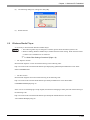
Select the required level of brightness. (4 levels)
(3)
Click [OK] and end.
• PS-2000B does not have this function.
6.3 KeyClick
This is a software keyboard (KeyClick32) of IN-fINITY soft make. Please surely read the License agreement
on the appendix before using it.
)"1 [IN-fINITY soft KeyClick32] Agreement"(Page.A-2)
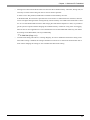
When changing font size, set the setting referring the following diagram.
KeyClick Settings Procedure
• Before setting the KeyClick, disable the Write Filter setting. When the Write Filter is effective,
the change is not reflected.
) "3.1 Write Filter Settings Procedure"(Page.1-8)
• You have to log on as Power User in order to set the KeyClick.
(1)
Start as the next. [Start]-->[All program]-->[KeyClick]
(Executable file is C:\Proface\KeyClick\KeyClick.exe)
(2)
When changing font size, set the setting referring the following diagram.
1-15