1
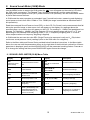
11.4 OPTION MODE
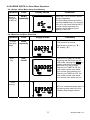
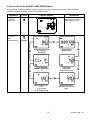
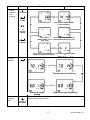
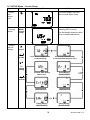
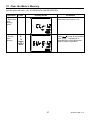
The OPTION menu below lists the parameters that can be viewed and/or
configured. Instructions for navigation and use are provided in the menu
table and screen shots below.
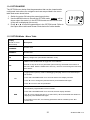
1. Switch the meter ON using the power/menu button.
2. Use the MENU button to access the OPTION mode. OPTION will be
shown when the meter is in the OPTION mode and the current time
of day will be displayed (hh:mm:ss).
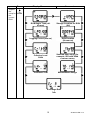
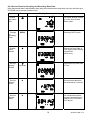
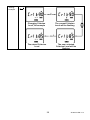
3. Press ◄ or ► to scroll the parameters in the OPTION mode. Refer to
the Option Menu table and Screen Shots below for further details.
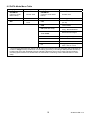
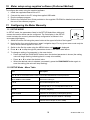
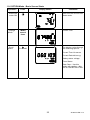
11.5 OPTION Mode - Menu Table
Display
(Use ► to scroll
items below)
Description
HH:MM:SS
Current Time
DD:MM:YY
Current Date
bAt
Battery voltage level (new alkaline batteries ~4.6V)
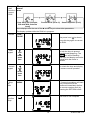
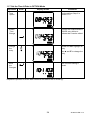
TIMER. Press RUN/PAUSE to toggle the Timer ON/OFF.
Press ► to skip to the CLrxx parameter (Clear memory) discussed at the bottom of
this menu table. With the TIMER set to ON only, use ▼ to scroll through the test setup
items below:
tImr
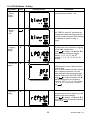
Logging Period (mm:ss). Select a datalogging sampling rate from one second up to
60 minutes.
LP
Press and hold RUN/PAUSE for 3 seconds and the time display will flash.
Press ▲ or ▼ to change the period and then press RUN/PAUSE again.
Press ▼ to move to the next parameter.
Test duration programmable in hh:mm format.
Press and hold RUN/PAUSE for 3 seconds; the time display will flash.
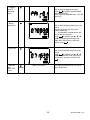
DUR
Use ▲ or ▼ to change the time (or to select OFF). When the desired test duration is
displayed, press RUN/PAUSE again.
If the DUR is set to OFF, the following parameters will be available; press ▼ to
access them.
21
SL355-EU-EN-V1.4