1
TRACKING YOUR TREATMENT
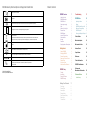
Treatment Days
Treatment days are the number of
days that you have completed a
20-minute treatment.
Cumulative Partial
Treatments
Cumulative Partial Treatments are the
number of partial treatment minutes
that add together to count against
your treatment card.
When the sum of your partial
treatment reaches 20 minutes,
it will count as one full treatment
against your card.
Treatment History
=
Missed Treatment Days
Missed Treatment Days are the
number of days that you did not
complete a 20-minute treatment.
This is the total of all days marked
with an X.
100%
Compliance Percentage
Compliance Percentage is the number
of days a full treatment was delivered
divided by the number of total days
since you began using EXOGEN.
After using EXOGEN over time, you
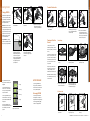
If you have EXOGEN for 60 days, but forgot to treat 8 of those days,
and 2 days you only treated for 10 minutes, you will have the following
numbers:
may want to view your treatment history and
show it to your doctor. EXOGEN lets you
view your treatment history without having
to start a treatment. You can start EXOGEN
Fifty 20-minute
treatments delivered
8 missed treatment days
in “Treatment History” mode. You cannot
enter “Treatment History” mode when
EXOGEN is being charged. To view
1 cumulative
partial treatment
(sum of two 10-minute
partial treatments)
= 50
=1
= 51/250
=8
your treatment history, perform the
®
83%
% compliance
50/60
following steps:
51 treatments
used on the card
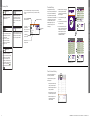
1.EXOGEN must be “OFF” and unplugged
from the charger. Press and hold the
power button until the Treatment History
Start screen appears.
85-126
®
1
5
6
7
120 121 122 123 124 125 126
= 116
=0
=0
®
100%
= 116/250
Treatment HIstory Start Screen
1
Treatment Card is the ratio of the
number of 20-minute treatments used
versus the number of treatments
assigned to the Treatment Card
inserted into your EXOGEN device.
The total number of treatments used
is the sum of the Treatments (
)
and Cumulative Partial Treatments
(
).
4
22 23 24 25 26 27 28
Treatment History Screen 1
1-42
43-84
Treatment Card
3
29 30 31 32 117 118 119
3.This continues until your entire treatment
history has been shown.
250 treatments
assigned to card
2
8 9 10 11 12 13 14
15 16 17 18 19 20 21
2.The recent treatment history appears
for 5 seconds.
4.After the last treatment history screen
displays for 5 seconds, EXOGEN beeps
and turns itself off. You may exit the
Treatment History mode at any time
by pressing and holding the button
until EXOGEN turns itself off.
TRACKING YOUR TREATMENT
Summary Data
2
3
4
5
6
1
7
2
3
4
5
6
7
8 9 10 11 12 13 14
15 16 17 18 19 20 21
8 9 10 11 12 13 14
15 16 17 18 19 20 21
22 23 24 25 26 27 28
22 23 24 25 26 27 28
29 30 31 32 33 34 35
29 30 31 32 33 34 35
36 37 38 39 40 41 42
36 37 38 39 40 41 42
= 116
=0
=0
= 116/250
®
100%
Treatment History Screen 2
= 116
=0
=0
= 116/250
®
100%
Treatment History Screen 3
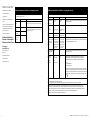
Pause Treatment History
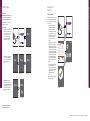
You can pause the treatment history to
view it for longer than 5 seconds.
To pause the treatment history, perform
the following steps:
12
1.When you see the treatment history
screen, press the button to pause.
2.The treatment history will pause, and
a pause symbol flashes.
3.Press the button again to un-pause
the treatment history and continue.
4.The treatment history screen will
automatically un-pause after 2
minutes and continue.
1-42
1
2
3
4
5
6
7
8 9 10 11 12 13 14
15 16 17 18 19 20 21
22 23 24 25 26 27 28
29 30 31 32 33 34 35
36 37 38 39 40 41 42
=0
=0
= 0/60
=0
®
100%
Customer Service:
Australia: 1800 428 220
Ireland: 1800 552197
UK: 0800 0516384
13