1
5. Applicable Devices and Support Software
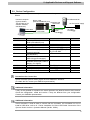
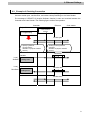
5.2. Device Configuration
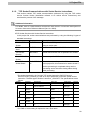
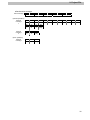
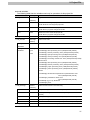
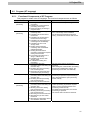
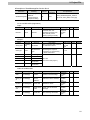
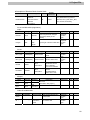
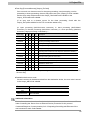
The hardware components to reproduce the connection procedure of this document are as
follows.
Personal computer
(Sysmac Studio,
TouchFinder for PC
software installed,
OS:Windows7)
NJ501-1500
(Built-in EtherNet/IP port) Switching Hub
W4S1-05C
USB cable
LAN cable
Manufacturer
OMRON
OMRON
OMRON
OMRON
OMRON
-
OMRON
OMRON
OMRON
OMRON
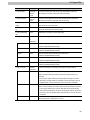
Name
NJ series CPU Unit
(Built-in EtherNet/IP port)
Power Supply Unit
Switching Hub
Sysmac Studio
Sysmac Studio project file
Personal computer
(OS:Windows7)
USB cable
(USB 2.0 type B connector)
LAN cable (Ethernet STP
(Shielded twisted-pair) cable of
category 5 or higher)
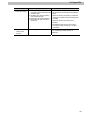
Code Reader
I/O cable
FQ Ethernet cable
Touch Finder for PC
FQ Ethernet
cable
FQ-WN[][][]
FQ-CR20100N-M
24 VDC power supply
I/O cable
FQ-WD[][][]
Model
NJ501-1500
NJ-PA3001
W4S1-05C
SYSMAC-SE2[][][]
OMRON_FQCR_ETN(TC
P)_EV100.SMC
Version
Ver.1.00
Ver.1.00
FQ-CR20100N-M
FQ-WD[][][]
FQ-WN[][][]
Ver.1.20
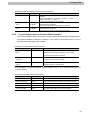
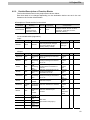
Precautions for Correct Use
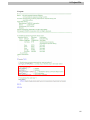
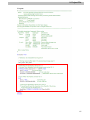
Obtain the latest Sysmac Studio project file from OMRON in advance.
(To obtain the file, contact your OMRON representative.)
Additional Information
It may not be possible to reproduce the same operation with different devices and versions.
Check the configuration, model and version. If they are different from your configuration.
Contact your OMRON representative.
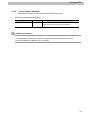
Additional Information
In this document, a USB is used to connect with the Controller. For information on how to
install a USB driver, refer to A-1 Driver Installation for Direct USB Cable Connection of the
Sysmac Studio Version 1 Operation Manual (Cat.No. W504).
6