1
Unit 4—Interfase Supervisor’s Guide
4.1 Student Passthrough Authentication
Overview
This authentication functionality is designed to allow a school to authenticate students with their local
campus system. After the student has authenticated with the campus system they can be seamlessly
directed into the Interfase site without a second login. The pass-through authentication provides
the feel of a single portal solution for the students. Each student will use only one user name and
password to enter the campus system and Interfase.
The pass-through is designed to only send the student’s user name to Interfase. Passwords and other
sensitive credentials never leave the school’s system. The school can use the new Student Upload
feature to populate the student database with student data. The only requirement for the passthrough authentication is that the user name in the campus system and the user name in Interfase
match.
Technical Details
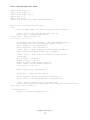
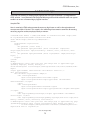
The pass-through authentication is accomplished through the use of an encrypted query string token.
The token is encrypted using the AES (Rijndael) block cipher algorithm. The AES algorithm is very
secure and has been recommended by security analysts as a replacement for the 3DES algorithm that
is used extensively in banking and finance applications.
The encrypted token contains two values separated by a hexadecimal delimiter. The first value is
the student user name. This user name should be the campus user name and needs to match the
user name in Interfase. The second value is a timestamp formatted as MM/DD/YYYY HH:MM:SS,
representing a 2 digit month and day, 4 digit year, and 24 hour 6 digit time of the day. All timestamps
are compared to CST time. The values combined should look like:
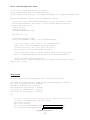
<user name><0x08><MM/DD/YYYY HH:MM:SS>
This entire query string is then encrypted using the AES block cipher. The resulting cryptographic
array of bytes is then base 64 encoded to a string. Finally, the base 64 string is html encoded so that it
can safely be passed in the query string c_id value.
Once the encrypted query string c_id token has been generated, the token will only be good for 10
seconds. The short lifetime of the token prevents malicious users from retrieving tokens contained in
proxy and web server logs and using them to automatically authenticate as the student. The redirect
should be formatted:
http://…/student/school_login.aspx?c_id=<token>
Key and IV
The key and IV are generated in each Interfase site and are used for encryption/decryption of
passthrough data. See the Key Management section in this guide for more information on how to
obtain or change your key and IV.
The key and IV for Interfase need to be rigorously protected by the campus system. If a malicious user
(Copyright © CSO Research, Inc. )
70