1
Appendix B: Using GS1 AC Drives with AutomationDirect PLCs
AutomationDirect PLC Modules for Use with GS1 AC Drives (continued)
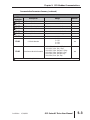
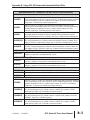
DL06 PLCs
D0-06DD1
DL06 CPU, 20 DC in / 16 DC out, 110/220VAC Power Supply, with 0.3A 24VDC Auxiliary
Device Power Supply. Inputs: 20 DC inputs, 12-24 VDC current sinking/sourcing, 5 isolated
commons (4 inputs per common). Outputs: 16 DC outputs, 12-24 VDC current sinking,
1.0A/pt. max., 4 commons non-isolated (4 pt/common).
D0-06DR
DL06 CPU, 20 DC in / 16 Relay out, 110/220VAC Power Supply, with 0.3A 24VDC
Auxiliary Device Power Supply. Inputs: 20 DC inputs, 12-24 VDC current sinking/sourcing,
5 isolated commons (4 inputs per common). Outputs: 16 Relay outputs, 6-27 VDC,
6-240 VAC, 2A/pt. max., 4 isolated commons (4 pt/common).
D0-06AR
DL06 CPU, 16 AC in / 20 Relay out, 110/220VAC power supply, with 0.3A 24VDC auxiliary device
power supply. Inputs: 20 AC inputs, 90-120 VAC, 5 isolated commons (4 inputs per common).
Outputs: 16 Relay outputs, 6-27 VDC, 6-240 VAC, 2A/pt. max., 4 isolated commons (4 pt/common).
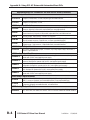
DL06 CPU, 20 DC in / 16 DC out, 12/24VDC Power Supply. Inputs: 20 DC inputs, 12-24
D0-06DD1-D VDC current sinking/sourcing, 5 isolated commons (4 inputs per common). Outputs: 16 DC
outputs, 12-24 VDC current sinking, 1.0A/pt. max., 4 commons non-isolated (4 pt/common).
D0-06DR-D
DL06 CPU, 20 DC in / 16 Relay out, 110/220VAC Power Supply. Inputs: 20 DC inputs,
12-24 VDC current sinking/sourcing, 5 isolated commons (4 inputs per common). Outputs: 16
Relay outputs, 6-27 VDC, 6-240 VAC, 2A/pt. max., 4 isolated commons (4 points per common).
DL05/DL06 DC Input/Output Module
D0-08CDD1
4 pt. 12-24VDC current sinking/sourcing input, 1 common, 4 pt. 12-24VDC sinking output,
0.3A/point, 1.2A/module, removable terminal, no fuse
DL05/DL06 DC Output Modules
D0-10TD1
10 pt. 12-24 VDC current sinking output module, 2 commons non-isolated (5 pts. per
common), 0.3A/point, 1.5A/common, removable terminal, no fuse
D0-16TD1
16 pt. 12-24 VDC current sinking output module, 2 commons non-isolated (5 pts. per
common), 0.3A/point, 1.5A/common, removable terminal, no fuse.
DL05/DL06 Analog Module
F0-2AD2DA-2 2 channel in, 2 channel out voltage analog option card; 0-5V, 0-10V.
F0-4AD2DA-2 4 channel in, 2 channel out voltage analog option card; 0-5V, 0-10V.
F0-4AD2DA-1 4 channel in, 2 channel sourcing out current analog option card; 4-20mA.
DL105 PLCs
F1-130DR
DL06 CPU, 20 DC in / 16 DC out, 110/220VAC Power Supply, with 0.3A 24VDC Auxiliary
Device Power Supply. Inputs: 20 DC inputs, 12-24 VDC current sinking/sourcing, 5 isolated
commons (4 inputs per common). Outputs: 16 DC outputs, 12-24 VDC current sinking,
1.0A/pt. max., 4 commons non-isolated (4 points per common).
F1-130DD-D
DL130 CPU, 10 DC in / 8 DC out, 12/24VDC Power Supply. Inputs: 10 DC inputs, 12-24
VDC current sinking/sourcing, 3 isolated commons. Outputs: 8 DC outputs, 5-30VDC
current sinking, 0.5A/pt. max, 3 internally connected commons.
F1-130DR-D
DL130 CPU, 10 DC in / 8 Relay out, 12/24VDC Power Supply. Inputs: 10 DC inputs, 12-24
VDC current sinking/sourcing, 3 isolated commons. Outputs: 8 relay outputs, 12-30 VDC,
12-250VAC, 7A/pt. max., 4 isolated commons.
F1-130DD-D
DL130 CPU, 10 DC in / 8 DC out, 12/24VDC Power Supply. Inputs: 10 DC inputs, 12-24
VDC current sinking/sourcing, 3 isolated commons. Outputs: 8 DC outputs, 5-30VDC
current sinking, 0.5A/pt. max, 3 internally connected commons.
2nd Edition
07/06/2011
GS1 Series AC Drive User Manual
B–3