1
ENVIRONICS TECHNICAL BULLETIN #137
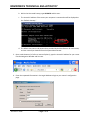
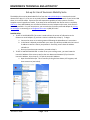
b. Within the Command Prompt, type IPCONFIG and hit enter.
c. The internal IP address of the router your computer is connected to will be displayed as
the “Default Gateway.”
d. The default User Name and password are provided by the Manufacturer for each router,
and can normally be obtained from the System Administrator.
3. Open a web browser (ie Firefox or Internet Explorer), type the internal IP address for your router
into the Navigation Window and hit enter.
4. Enter the requested information in the Login Window to login to your router’s configuration
page.
TECH137.DOC
Page 2 of 6