1
ENVIRONICS TECHNICAL BULLETIN #137
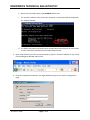
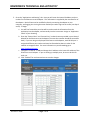
5. Go to the “Applications and Gaming” tab. Here you will enter the internal IP address and port
number for the Ethernet-to-serial adapter. This information is supplied by the manufacturer of
the adapter. Both of these can be modified by directly connecting the adapter to your
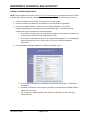
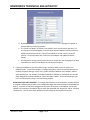
computer, and logging into it using the same method you used to log into the router (see Step 3
and 4). To begin:
a. You will first forward the port that will be used to send the information from the
application into the adapter, and eventually into the instrument. Assign an “Application
name” of your choosing.
b. Enter the “External Port” and “Internal Port” number that was provided in your Owner’s
Manual for the Ethernet-to-serial adapter (The same Port number should be entered for
both). If you are using a multiple port Ethernet-to-serial adapters, each RS-232 port is
assigned a different port number and must be forwarded as above in order for the
network to recognize them. For more information on port forwarding go to:
http://portforward.com/
c. Change the “Protocol” to TCP and change the IP address to the internal IP address of the
Ethernet-to-serial adapter. If you are setting up multiple ports, be sure to do this for
each one.
d. Click “Enabled” for each entered row to save the changes.
TECH137.DOC
Page 3 of 6