1
03 multifunzione GB 2009:digitali
26-06-2009
8:37
Pagina 92
1RAEMCS
1RAEMCS485 - 1RAEMBL485
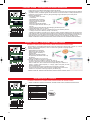
OPERATION
27.12.04
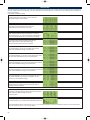
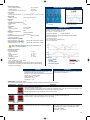
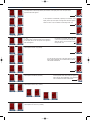
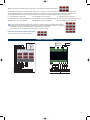
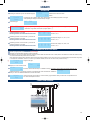
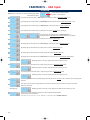
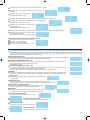
Powering the instrument you can see the following page
Software date revision and version.
22.0
PowerOn
Ready
Introduction page.
Update
First powering page. A different page can be selected within teh available page present on this type.
At first powering the display shows automatically this page
RAE
RAE
TRMS CS
22.0
or
TRMS CS
Prog
RAE
485
or
TRMS CS
Adr: 001
or
RAE
BL
RAE TRMS CS
485 Adr:001 Prog
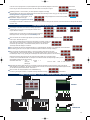
Correct sequence of
phases indication.
Light OFF = correct sequence
TRMS CS
Adr: 001
or
RAE TRMS CS
BL Adr:001 Prog
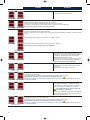
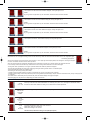
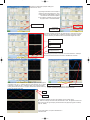
Program page.Entering in this page and maintaining pressed the button, it is possible to program the parameters of instruments. “Prog” flashes until to enter in
program phase.
( )
*
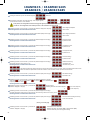
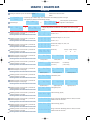
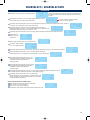
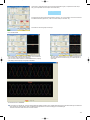
Maintaining pressure on the front button you will see the
parameters displayed on this page.
Releasing the button the measurements will be shown
Vp V12 V23 V31
A I1 I2 I3
Phase-phase voltage L1-L2, L2-L3, L3-L1
Maintaining pressure on the front button you will see the
parameters displayed on this page.
Releasing the button the measurements will be shown
Vn V1
A I1
Phase-neutral voltage L1-N, L2-N, L3-N
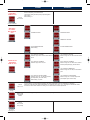
Maintaining pressure on the front button you will see the
parameters displayed on these pages.
Releasing the button the measurements will be shown
V2
I2
V3
I3
Pf1 Pf2 Pf3
1.00 1.00 1.00
L1
W
Act Power
0
Current I1, I2, I3
Current I1, I2, I3
Current I1, I2, I3
Phase Cosϕ
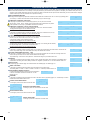
Maintaining pressure on the front button you will see the
parameters displayed on this page.
Releasing the button the measurements will be shown
T.Act.P
W
Maintaining pressure on the front button you will see the
parameters displayed on these pages.
Releasing the button the measurements will be shown
L1
var
Pf
I+1.00
Rea Power
0
L2
W
Act Power
0
Tot Rea Power
var
0
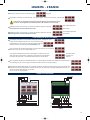
Maintaining pressure on the front button you will see the
parameters displayed on these pages.
Releasing the button the measurements will be shown
L1
VA
App Power
0
Apparent power L1
L2
L3
W
Active power L3
Total Active power
I/C Total Cosϕ
(L1+L2+L3)
(I=Ind, C=Cap)
L2
var
L3
Act Power
0
Active power L2
Reactive power L1
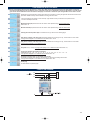
Maintaining pressure on the front button you will see the
parameters displayed on this page.
Releasing the button the measurements will be shown
Ind/Cap Ind/Cap Ind/Cap
L1
Active power L1
92
Frequency
3V:
I1
Maintaining pressure on the front button you will see the
parameters displayed on this page.
Releasing the button the measurements will be shown
F:
I2
I3
Medium phase voltage (L1+L2+L3)/3
Maintaining pressure on the front button you will see the
parameters displayed on this page
Releasing the button the measurements will be shown
Rea Power
0
L3
var
Reactive power L2
Rea Power
0
Reactive power L3
Total Reactive power
L2
VA
App Power
0
Apparent power L2
L3
VA
App Power
0
Apparent power L3
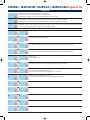
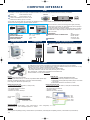
Maintaining pressure on the front button you will see the
parameters displayed on this page.
Releasing the button the measurements will be shown
Tot App Power
VA
0
Total Apparent power
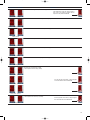
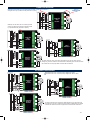
Maintaining pressure on the front button you will see the
parameters displayed on this page.
Releasing the button the measurements will be shown
T.Act +Ene kWh
0
Total Active Energy (Import)
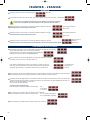
Maintaining pressure on the front button you will see the
parameters displayed on this page.
Releasing the button the measurements will be shown
Tot Act +Ene Res
0
Energy counter reset. Maintaining pressure on button, word “Res”
flashes until the end of the reset.
Maintaining pressure on the front button you will see the
parameters displayed on this page.
Releasing the button the measurements will be shown
T.Act -Ene kWh
0
Total Active Energy (Export)