1
Get started with MyMoodle
This folder adresses the most important steps in your Moodlework. The steps are, at
the same time, a logic workflow to set up a basic course room.
Innehåll
Get started with MyMoodle
2
Learn more about developing your course room
2
Support2
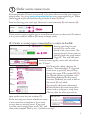
Order a new course room
A: Create a course room connected to a course in Ladok
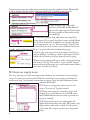
B: Create an empty room
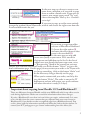
Important about copying from Moodle 1.9/2 and Blackboard 9
Logging in, your profile and your new room
The anatomy of a room
3
3
4
5
6
7
Settings8
Important settings/administrative tools
Menu option: ”Edit settings”
Menu option: ”Users”
9
9
10
Start editing the introduction section
12
Create your topics/sections/themes
13
More on groups, forums and assignments
15
Groupings15
Subscriptions to Forums
15
More on Assignments
16
Learn more about developing your course room
At the faculty we try to gather information about how to develop your ICT-knowledge. You will also find contact information about the ICT pedagogues:
https://medarbetare.lnu.se/organisation/fsv/kansli/ikt-stod
Support
Doesn’t Mymoodle behave? Having problem? Call or e-mail IT-helpdesk. Phone:
0480-44 67 00.
E-mail: [email protected]
2