1
Issues Addressed in this Release
The following are known issues that existed in previous releases of the ADR Plus Firmware which have been rectified in
Version 5.3-AS:
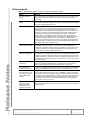
Table 2 – Issues fixed in this release
Issue
Resolution
Sensor cards inserted into an ADR may not have always been
recognized.
The recognition of sensor cards by the ADR
has been made more robust.
Per vehicle record (PVR) data previously was output with a 60 in
the seconds field. For example, a vehicle recorded at 9:10:00 am
would be reported in the data download as 9:09:60.
This did not affect internal calculations or the
accuracy of data. The display problem has
been fixed.
When formatting ADR memory media, the unit would report the
number of unread files incorrectly. It was showing all files as
unread, even if they were previously viewed or downloaded.
The FORMAT dialog now shows the correct
number of unread files that are stored within the
selected memory media.
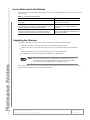
Upgrading the Firmware
To upgrade an ADR Plus unit in the field via a direct connection, you will need the following items:
Notebook or portable PC with Peek’s ADR Firmware Upload Utility Program installed
DB-9 to CPC-8 direct-connect serial cable (Peek p/n 81-321) for the ADR-1000 Plus and ADR-2000 Plus
or
DB-9 to DB-9 direct-connect serial cable (Peek p/n 81-296A) for the ADR-3000 Plus.
the ADR Version 5.3-AS firmware update file (V 5 3 0 - A S _ 9 7 - 4 9 6 - A . b i n)
Note Some ADR-1000 units may not be upgradeable in the field due to the lack of a
motherboard. This was an optional configuration on some units. Please contact
Customer Support for additional guidance on updating such units.
If you need additional assistance to perform an ADR Plus firmware update, contact the Peek Customer Service Center
using the contact information provided on page 4 of this bulletin.
Release Notes: ADR Plus Firmware v5.3
Copyright © 2003 Peek Traffic, Inc.. All rights reserved.
Page 3 of 4
99-351, Rev 1