1
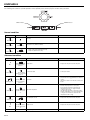
MENU POSITION ...................................... Use to select the position of the menu on the screen,
opt.
SVGA60
(upper left) or
(lower right).
CINEMA MODE ......................................... When AUTO is selected, the film mode will be automatiFEATURE
cally activated when a film source signal is inputted.
MENU POSITION
When OFF is selected, the film mode will not be actiCINEMA MODE
AUTO
vated.
ANAMORPHIC
OFF
ANAMORPHIC........................................... Select ON when playing DVD discs containing data of
PASSWORD
OK
widescreen images.
AË
ENGLISH
LANGUAGE
PASSWORD FUNCTION ............................. Use to change the mode of the password lock or to
RESET ALL
OK
enable or cancel the password lock. See page 21 for
details.
LANGUAGE ............................................... Use to select the language used in the menu. (ENGLISH / DEUTSCH /
/
/ FRANÇAIS /
/
/
).
ESPAÑOL / PORTUGUÊS / ITALIANO /
RESET ALL................................................ Use to reset the menu settings (except PASSWORD FUNCTION, and LANGUAGE ).
• CINEMA MODE can be adjusted only when a TV50, TV60, 480I, 576I signal is being displayed.
4 SIGNAL
HORIZ. POSITION..................................... Use to adjust the horizontal position of the image.
opt.
VERT. POSITION ....................................... Use to adjust the vertical position of the image.
FINE SYNC ................................................ Use to synchronize the projector with the PC input signal SIGNAL
so that the image is not blurred.
HORIZ. POSITION
TRACKING................................................. Use to eliminate image noise such as wide stripes.
VERT. POSITION
COMPUTER INPUT .................................. The projector adjusts its settings automatically when
FINE SYNC.
connected to a DVD player equipped with a component
TRACKING
video output (Y, CB, CR). When the projector is conCOMPUTER INPUT
nected with a device having an RGB terminal, choose
SET UP
RGB manually.
SET UP ...................................................... When OFF is selected, the black area becomes make
lighter. When 7.5% is selected, the black area becomes thicker.
R
RG
GB
B
SVGA60
0
0
0
0
RGB
OFF
Important:
•
You can set the IMAGE, and SIGNAL menus only when the signal is supplied.
EN-17
ENGLISH
3 FEATURE