1
IMAGE
CONTRAST
BRIGHTNESS
WHITE ENHANCE
COLOR TEMP.
COLOR *3
TINT *2
SHARPNESS *3
GAMMA MODE
INSTALLATION
FEATURE
AUTO POWER ON
AUTO POWER OFF
SPLASH SCREEN
BACK COLOR
LAMP MODE
IMAGE REVERSE
LAMP HOURS
SIGNAL
±30 (0)
±30 (0)
0 ~10
(STANDARD)
LOW
CONTRAST R
HIGH
CONTRAST G
USER
CONTRAST B
0~100 (50)
0~100 (50)
0~31 (16)
(AUTO) / DYNAMIC / STANDARD / THEATER
ON / (OFF)
(ON) / OFF
(BLUE) / BLACK
(STANDARD) / LOW
(OFF) / MIRROR / INVERT / MIRROR INVERT
Time elapsed
(1.UPPER LEFT) / 2.LOWER RIGHT
(AUTO) / OFF
ON / (OFF)
PASSWORD FUNCTION
MENU ACCESS
HORIZ.POSITION *2
VERT.POSITION *2
FINE SYNC. *2
TRACKING *2
COMPUTER INPUT *2
SET UP *2
0~100 (50)
0~100 (50)
0~100 (50)
(OFF) / 5min / 10min / 15min / 30min / 60min
MENU POSITION
CINEMA MODE *4
ANAMORPHIC
LANGUAGE
RESET ALL
ENGLISH
Menu operation
LOCK
UNLOCK
OK
OK
(ENGLISH) / 11 LANGUAGES
OK
50 (0) *1
50 (0) *1
0 ~ 31
20 (0) *1
RGB / YCBCR / YPBPR
(OFF) / 7.5%
*1: The value range of Horiz. and Vert. Positon may be varied according to different source.
*2: Not available with certain signals.
*3: Not available when the source is PC signal.
*4: Not available when the source is non interlaced signal.
Basic operation
4.
Press the S or T button to select AUTO POWER OFF.
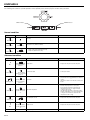
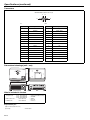
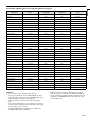
Several settings can be adjusted using the menu.
Example : Auto power off time setting
1.
Press the MENU button.
opt.
SVGA60
5.
OFF
AUTO POWER ON
OFF
AUTO POWER OFF
30 MIN
Press the W or X button to select INSTALLATION.
6.
opt.
SVGA60
•
Press the ENTER button (or T button).
opt.
Exit the menu by pressing the S button several times,and then
the MENU button.
Important:
INSTALLATION
3.
OFF
AUTO POWER OFF
Press the W or X button to adjust the auto power off time.
IMAGE
2.
AUTO POWER ON
•
SVGA60
•
INSTALLATION
AUTO POWER ON
OFF
AUTO POWER OFF
OFF
When the button doesn’t function, unplug the power cord from the
wall outlet. Wait about 10 minutes, plug the power cord in, and try
again.
After selecting the items marked with
, press the ENTER button.
In case of outline characters on a colored background, it means
that function is not available.
EN-15