1
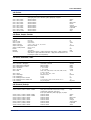
List of Parameters
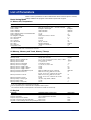
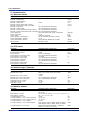
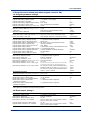
<#3 AUX (Auto message, Display position)>
Parameter
Selectable Range or Selections
Initial Value
AUX (Auto message, Display position) >
Auto message for program Run/Reset On/Off
AUX (Auto message, Display position) >
Program display position > Position > Loop 1 to 6
AUX (Auto message, Display positin) >
Auto change to program run display
On, Off
On
1 to 6
Loop 1 to 6: 1 to 6
On, Off
Off
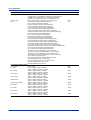
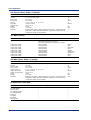
Parameter
Selectable Range or Selections
Initial Value
AUX (Event group) > Pattern number
AUX (Event group) > 1 to 5
AUX (Event group) > On 1 to 5 > Kind
AUX (Event group) > Number
1 to 4 (/PG1) or 1 to 30 (/PG2)
On, Off
PVEvent, TimeEvent
01 to 05
1
On
Time Event
1 to 5: 01 to 05
<#4 AUX (Event group)>
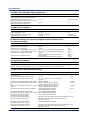
#8 Detailed settings (#7 when the program control function is OFF)
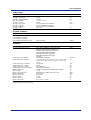
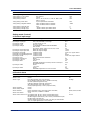
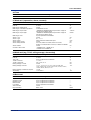
<#1 Control function>
Parameter
Selectable Range or Selections
Initial Value
Control function > Loop number
Control function > SP Tracking
Control function > PV tracking
Control function > Target setpoint limiter > Lower
Control function > Target setpoint limiter > Upper
Control function > Output velocity limiter
1 to 6
Off/On
On/Off
EU (0.0% to 100.0%) of the measurement span
EU (0.0% to 100.0%) of the measurement span
On/Off
Enter the value for On: 0.1%/s to 100.0%/s
Auto or Manual
Enter the value for Manual: 50.0% to 200.0%
1
On
Off
–200.0
1370.0
Off
100.0%/s
Auto
100.0%
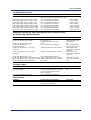
Selectable Range or Selections
Initial Value
Control function > Anti-reset windup
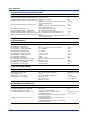
<#2 Hysteresis (Alarm)>
Parameter
Hysteresis (Alarm, PV event) > Alarm > Loop number 1 to 6
Hysteresis (Alarm, PV event) > Alarm > Hysteresis1 to 4 EUS (0.0% to 10.0%) of the measurement span
1
7.8
<#3 DIO monitor and operation setting>
Parameter
Selectable Range or Selections
Initial Value
DIO monitor and operation setting >
DIO entry number
DIO monitor and operation setting > On/Off
DIO monitor and operation setting > Kind
01 to 36
01
On, Off
DI-1, DO-1, DO-2, DIO-11, DIO12, DO-2P,
DIO-12P
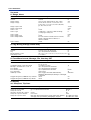
DIO monitor and operation setting > SW number
SW001 to SW036
DIO monitor and operation setting > DO number > DO001 to DO006, DO101 to DO106,
ON
DO201 to DO206, RO001 to RO012,
DIO monitor and operation setting > DO number > DO001 to DO006, DO101 to DO106,
OFF
DO201 to DO206, RO001 to RO012,
DIO monitor and operation setting > DI number
DI001 to DI006, DI101 to DI106,
DI201 to DI206, RI001 to RI012,
DIO monitor and operation setting > Tag
Up to 8 alphanumeric characters
DIO monitor and operation setting > Tag comment Up to 8 alphanumeric characters
DIO monitor and operation setting >
Up to 8 alphanumeric characters
Operation property >ON > Label
DIO monitor and operation setting >
Red, green, blue, blue violet, brown, orange, yellow-green,
Operation property >ON > Color
light blue, violet, gray, lime, cyan, dark blue, yellow,
light gray, or purple
DIO monitor and operation setting >
Up to 8 alphanumeric characters
Operation property >OFF > Label
DIO monitor and operation setting >
Red, green, blue, blue violet, brown, orange, yellow-green,
Operation property >OFF > Color
light blue, violet, gray, lime, cyan, dark blue, yellow,
light gray, or purple
54
Off
DI-1
SW001
DO001
DO001
DI001
–
–
–
Red
–
Red
IM 04L31A01-02E