1
Contents
Contents
1
2
3
4
5
6
Introduction
Getting Started
Overview
Your VM-100CA
Installing on a Rack
Connecting the VM-100CA
7
Technical Specifications
6.1
6.2
Connecting a Single VM-100CA Unit
Connecting Several VM-100CA Units
1
1
1
2
6
7
7
9
10
Figures
Figure 1: VM-100CA 1:10 Video Component / Audio Distributor Front Panel
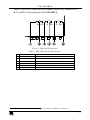
Figure 2: VM-100CA 1:10 Video Component / Audio Distributor Rear Panel
Figure 3: VM-100CA Underside
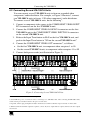
Figure 4: Connecting a VM-100CA Unit
Figure 5: Connecting Several VM-100CA Units
3
3
5
8
9
Tables
Table 1: Front Panel VM-100CA 1:10 Video Component / Audio Distributor Features
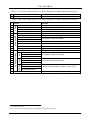
Table 2: Rear Panel VM-100CA 1:10 Video Component / Audio Distributor Features
Table 3: VM-100CA Underside Features
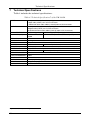
Table 4: Technical Specifications of the VM-100CA
4
4
5
10
i