1
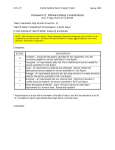
Enabling SD Interface
Table 2. SDK 1.0.1 Muxing (continued)
Switch Selection
SPI Flash
Interfaces Available in u-boot and Linux
IFC-CS0 on
NAND Flash
No
No
Yes
Yes
Yes
Yes
No
Conf
Notes:
1. Refer to P1010RDB user’s manual for the details of SW4 and SW6. Look for P1010RDB pilot board information.
2. Conf refers to “configurable” through hwconfig in u-boot. For more information, see P1010RDB Board Bring-up Guide.
The SD interface and USB-ULPI are not available in any of the boot scenarios. The SD interface is the
cause of concern as USB-ULPI is a redundant interface on P1010RDB because of the UTMI availability.
The SD interface can be made available in SPI boot as the IFC or SD bus can be enabled here. By default,
IFC is enabled in QorIQ SDK 1.0.1 (see Table 2).
This table lists the updated muxing if the SD bus is enabled in SPI boot.
Table 3. Updated Muxing on P1010RDB
POR Config
Selected
through
Switches
Interfaces Available in U-Boot and Linux
Boot location
through SW4
Bus selection
through SW6
SD
USB-ULPI
IFC-NOR IFC-NAND IFC-CPLD SPI Flash TDM and
SPI-SLIC
CAN
NAND Flash
IFC-CS0 on
NAND Flash
No
No
Yes
Yes
Yes
Conf
Conf
Conf
NOR Flash
IFC-CS0 on
NOR Flash
No
No
Yes
Yes
Yes
Conf
Conf
Conf
SPI Flash
SD
Yes
No
No
No
No
Yes
No
No
NOTE
As CPLD is not available in SPI boot in revised mux strategy, the TDM, SPI
SLIC, and CAN are also not available in case of SPI boot.
3
Enabling SD Interface
To enable SD interface in SPI boot on P1010RDB:
1. Perform the following updates in u-boot
a) Modify pmuxcr to enable SD bus in case of SPI boot
b) Update the corresponding static mux implementation in u-boot
2. Perform the following updates in Linux
a) Disable IFC from device tree and kernel defconfig
Enabling SD Interface on P1010 Reference Design Board, Rev. 0
Freescale Semiconductor
3