1
User Manual
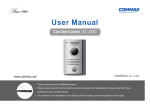
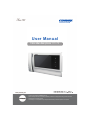
Color video door phone CDV-70K
• Thank you for purchasing COMMAX products.
• Please carefully read this User’s Guide (in particular, precautions for safety) before using a product and follow
instructions to use a product exactly.
• The company is not responsible for any safety accidents caused by abnormal operation of the product.
Greetings
● Thank you for choosing COMMAX.
● Please read this manual carefully before you use the product.
Table of contents
Greetings ..................................................................................................................1
Table of Contents .....................................................................................................1
1. Warnings and caution ...........................................................................................2
2. Product Overview..................................................................................................4
3. How to use ............................................................................................................5
4. Settings .................................................................................................................7
5. Installation .............................................................................................................9
6. Wiring .................................................................................................................10
7. Package Contents...............................................................................................12
8. Caution in use ....................................................................................................13
9. Miscellaneous .....................................................................................................13
10. Specification......................................................................................................13
1
2. Product Overview
No.
Description
1
HANDSET
2
MONITOR
3
MONITOR BUTTON
4
INTERPHONE BUTTON
5
DOOR RELEASE BUTTON
6
RINGTONES VOLUME
7
MENU BUTTON
8
SELECT BUTTON
No.
9
10
11
Description
UP BUTTON(△) /
DOWN BUTTON(▽)
POWER SWITCH
EXTERNAL CONNECTION
TERMINAL
HANDSET
MONITOR: The image of visitor is shown.
MONITOR BUTTON(ENTRANCE) : Check the situation of entrance.
INTERPHONE BUTTON : Call the interphone.
DOOR RELEASE BUTTON : Release the door for visitor.
RINGTONES VOLUME : Adjust the ringtones volume.
MENU BUTTON
To enter the menu for screen control, mute setting and product information.
SELECT(SELECT BUTTON): Press to select an item from the menu.
UP BUTTON : Move from the menu items to up and right.
DOWN BUTTON : Move from the menu items to down and left.
POWER SWITCH : Turn your device on and off.
EXTERNAL CONNECTION TERMINAL : For product update and connection
between lobby and interphone.
4
3. How to use
Call from a visitor
When the visitor calls from the entrance(door camera), the calling sound rings and
the image of the visitor is shown on the screen.
By picking up the handset, you can talk with the visitor. If you press door release
button, door will be released.(Door release works only while talking and it is possible
only when the door camera is interlocked with door release function.)
3-way communication is possible when another user picks up the handset of
extended interphone, when you are talking with door camera on video door phone.
(Entrance-Household-Interphone simultaneous communication mode)
If you put down the phone, talking is finished and turns to stand-by mode.
Call with additional interphone
(1) Call from interphone to video door phone(household)
The calling sound rings when there is a call from interphone.
By picking up the handset, you can talk with the person using interphone.
Image of visitor is shown on the screen and 3-way communication is possible
between household, interphone and door camera when visitor calls from door
camera, while household is talking with interphone.
(2) Call from video door phone to interphone
After picking up handset of video door phone, and then press INTERPHONE
BUTTON in order to call the interphone.(Interphone is called only while the
interphone button on household is being pressed.)
When you receive the call from interphone, enjoy the call.
Monitoring : function to see the image of visitor in the entrance.
(On stand-by mode - status of putting handset down ) Operation
- By pressing the Monitor button repeatedly, the monitor will work as following in order.
Camera 1 Camera 2 OFF Camera 1 ......
(One talking mode - status of putting handset up) Operation
- By pressing the Monitor button repeatedly, the monitor will work as following in order.
Camera 1 Camera 2 Camera 1 Camera 2 ......
5
Adjust the volume
When you press volume key repeatedly on stand-by status, you can hear each level
of ringtone and volume level will be pop up on the screen. Ringtone of additional
interphone is same with volume level of video door phone.
Caution
When the call volume switch is clicked for call volume adjustment, call sound will be
heard from the handset 1 time for a user to check the sound.
Please make sure that handset is in position, when the call volume function is
being used.
- When call volume control switch is clicked, it will operate in order as follows.
- (Stand by mode - In position)
- CHIME-VOL0 CHIME-VOL1 CHIME-VOL2 CHIME-VOL3 CHIME-VOL0
6
4. Settings
You can adjust DOOR VIDEO SET, UTILITY and check INFORMATION(model name
&version) with (UP)‚ / (DOWN) button after pressing Menu button on the right of the
product in video talk mode or stand-by mode.
•Products settings need the following 4 buttons on the right of product.
* Start Menu / Exit : MENU button
* Select and in-put : SELECT button
* Move up / Move right : (UP button) * Move down / Move left : (DOWN button)
4-1. Screen setting (Brightness/Contrast/Color adjustment function)
Press the Menu button and access to DOOR VIDEO SET and enter the setting menu
by pressing SELECT button.
(1) BRIGHTNESS : Adjusting Brightness of Screen
(2) CONTRAST : Adjusting Contrast of Screen
(3) COLOR : Adjusting Color of Screen
※ How to adjust
Move to Menu you want to adjust with / button on the list of DOOR VIDEO
SET
Press SELECT button to choose an icon.
Adjust the set value with / button
To complete the set, press SELECT button.
(4) RESET : Initializing
※ How to reset.
Move to RESET menu in DOOR VIDEO SET menu
Press SELECT to enter the menu.
Select YES with / button
Press SELECT button.
(5) EXIT : Go back to setting mode
4-2. UTILITY(additional function)
Press the Menu button and access to Utility SET and enter the menu by pressing
SELECT button.
(1) CHIME-BELL VOLUME : setting volume sound .
Move to CHIME-BELL VOLUME icon with / button in UTILITY Menu.
Press SELECT to enter the menu.
Select the volume sound or not with / button.
7
To complete the set, press SELECT button.
(2) SCREEN MODE : to set for screen ratio
ZOOM: Zoon in(expansion) image maintaining actual ratio(4:3) is shown.
(full of the screen)
4:3: Image of 4:3 ratio without expansion is shown.(This is actual ratio for
camera)
WIDE: Full of the screen. Not actual ratio (4:3). Image is expanded
according to LCD (WIDE LCD) ratio.
How to adjust
Access to SCREEN MODE with / button in UTILITY Menu
Press SELECT button to enter the menu.
Adjust screen ratio value with/ button.
To complete the set, press SELECT button.
(3) EXIT : Go back to Setting menu
4-3. INFORMATION (The function to check Model name & Version)
In order to check the product information, press menu button and move to
INFORMATION menu with / button.
(1) MODEL : You can check the model name.
(2) VERSION : You can check the model version.
(3) VIDEO : You can check the video transmission formats(NTSC/PAL)
(4) SOURCE :
You can check the position of camera(DOOR1 / DOOR2) which is shown on
the screen for now.
4-4. EXIT(Finish setting menu)
4-5. RESET : Initializing
Keep pushing interphone and door open button for 3 seconds(Screen setting and
Call volume will be initialized)
Caution
If initialization is activated, all data including screen setting will be
initialized) (Screen setting and Call volume)
8
5. Installation
1. Installation Method of camera monitor
Note
① Avoid the range of direct sunlight
② Recommended height is pertinent
from 1450 ~ 1500mm
③ Avoid the installation near magnetic
activity, humid temperatures and gas
2. Installation Method of camera
Note
① Do not install the camera where
it is exposed to Direct sunlight
② Keep cleaning up its lens to
capture good views.
9
6. Wiring
The wiring of this equipment is as follows.
Camera connector polarity
1. RED : VOICE 2. BLUE : GND 3. YELLOW : POWER(+12V) 4. WHITE : VIDEO
Wiring precautions
Each device should be connected by separated cables.
If you use UTP CABLE[CAT.5] for CAMERA1and CAMERA2, 2 lines of UTP cable
are required.
10
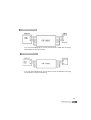
DOOR Camera Wiring
CAM1
CAM2
• If you use UTP CABLE[CAT.5], connect the rest 4 lines to GND after connecting
4 lines between monitor and camera.
INTERPHONE Wiring
• If you use UTP CABLE[CAT.5], connect the rest 4 lines to GND after connecting
4 lines between monitor and interphone.
11
7. Package Contents
i GGjk}T^Wr
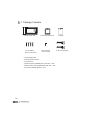
Body
of CDV-70K
t
Bracket for wall mount
iGGG
{[GGX_O[lhP
tZGG]OXlhP
zGGG
zGG T4 X 18(4EA)
Screw for wall mount
[wGjOYlhP
M 3 X 6(1EA)
Screw for body
Monitor(CDV-70K)
Wall bracket for monitor
User Manual
Mounting Screw (SCREW GH1T 4X18 ZnY) – 4EA
Monitor fixing screw (SCREW PHM 3X6 ZnY) – 1EA
Connector (CONN. 4PX300) – 2EA
12
Manual
4P Connector(2EA)
8. Caution in use
1. Turn on the power switch.
2. Please contact your local agent for product maintenance when you have a
problem in use of CDV-70K
3. For your safety, power switch with a safety device must be used in your building.
4. Unplug before installing or repairing the product.
5. Unplug when you connect monitor with door cameras.
9. Miscellaneous
Please carefully read this User's Guide before calling service man
After checking the entire check list, please contact customer service center.
We will do our best to make you satisfy with our services.
10. Specification
CDV-70K
MODEL
Wiring
4 wires with door camera(Polarity)
4 wires with interphone(Polarity)
Rating Voltage
100-240V~, 50/60Hz (FREE VOLTAGE)
Power consumption
Stand-by : 4.5W
Transmission way
HAND SET
Screen
17.78Cm(7") TFT-DIGITAL LCD
Ringtone
Maximum : 16W
Entrance : electronic chime
Interphone : electronic buzzer
Screen Display
Monitoring : 30 ±5sec , Talk : 60 ±5sec
Cable thickness &
Pie 0.5mm
Distance
28m
0.65mm
0.8mm
50m
70m
Working temperature 0 ~+40℃ (32℉ ~ 104℉)
Dimension
305(W) X 166(H) X 49(D)
13
513-11, Sangdaewon-dong, Jungwon-gu, Seongnam-si, Gyeonggi-do, Korea
Int’l Business Dept. Tel. : +82-31-7393-540~550 Fax. : +82-31-745-2133
Web site : www.commax.com
PM0270K00010
•
•
Printed In Korea / 2013.01.104
•