1
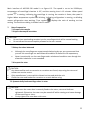
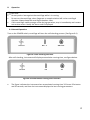
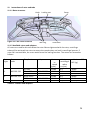
Main interface of 400.003.210 model is as figure 6-3. The speed is set to be 15000rpm, temperature of centrifugal chamber is 4℃, and the running time is 12 minutes. When speed symbol is rotating, indicating the centrifuge is running, the rotation is faster, the speed is higher. When temperature symbol is blinking, indicating refrigeration is running, no blinking means refrigeration stop working. Time symbol displays the ratio of working to time setting. The total time setting is divided into 10 scales. 7. Rotor Preparation 7.1 Prepare the sample 7.2 Inject the sample into tubes. CAUTION: Do not inject overloading samples into the centrifuge which will be caused leaking. Do not exceed the actual capacity allowed in the user manual. 7.3 Keep the tubes balanced Although the centrifuge can accept sample balancing by eye, we recommend that you use this centrifuge in a well-balanced condition to extend its life expectancy. Never intentionally run the centrifuge under unbalanced condition even though the allowable imbalance is not exceeded. 7.4 Inspect the rotor CAUTION: Any abnormalities such as corrosion or scratches are found, stop using the rotor and contact our service centre. Only manufacturer’s rotors which claimed can be used with the unit. Check the rotor and bucket for corrosion or scratch before using. 7.5 Symmetrically load centrifuge tubes in rotor CAUTION: Make sure the rotor door is securely fixed on the rotor, rotor and shaft are tightened. Otherwise, the rotor may be moved off while rotating and cause damage of the centrifuge or rotor. Firmly tighten the rotor door with rotor. 11