1
J206 PCIB40 Technical Manual
2192-09066-000-000
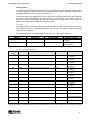
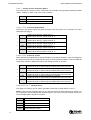
Links 3 & 4 Counter 1 and 2 Output Select
The outputs from counter 1 and 2 can be connected to the D-50 connector using LK4 and 3
respectively.
NOTE: The counter outputs are interfaced to the I/O connector using an inverting open-collector
driver. The output state is therefore the inverse of the counter output state defined in the data
sheet. When using the counter outputs, it is necessary to ensure that the I/O signals for group 2,
bits 0 and 1, are set for input mode by writing ‘1’s to both bits. This avoids the counter output
conflicting with the I/O port output.
LK3
Connects T2 output via inverter buffer, to RC24 (Digital group 2, bit 1)
LK4
Connects T1 output via inverter buffer, to RC23 (Digital group 2, bit 0)
LKA9
LKA8
LKA7
LKA6
LKA5
LKA4
LKA3
LKA2
LKA1
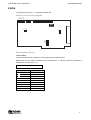
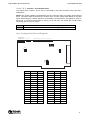
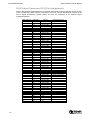
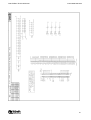
User Configuration Record Diagram
LK24 LK14
LK1B
B A
B
A
B A
LK22 LK12
B A
B A
LK21
B A
LK11 LK20 LK10
B A
B A
B A
B
LK1A
LK1C
A
LK23 LK13
LK4
LK3
IRQ2
IRQ3
IRQ4
IRQ5
IRQ7
Link
LKA1
LKA2
LKA3
LKA4
LKA5
LKA6
LKA7
LKA8
LKA9
LK10
LK11
LK12
LK13
LK14
LK20
Default
User
Link
LK21
LK22
LK23
LK24
LK1A
LK1B
LK1C
LK3
LK4
IRQ2
IRQ3
IRQ4
IRQ5
IRQ3
IRQ7
Default
User
9