1
APEX 104 CPU
&
APEX 104 CI-2
User Manual
APEX 104 CPU
&
APEX 104 CI-2
User Manual
Document Part N°
Document Reference
Document Issue Level
127-150
APEX\..\127-150.DOC
2.0
Manual covers PCBs with the following Revision N° A
All rights reserved. No part of this publication may be reproduced, stored in any retrieval system or
transmitted, in any form or by any means, electronic, mechanical, photocopied, recorded or otherwise,
without the prior permission, in writing, from the publisher. For permission in the UK contact Blue Chip
Technology.
Information offered in this manual is correct at the time of printing. Blue Chip Technology accepts no
responsibility for any inaccuracies. This information is subject to change without notice.
All trademarks and registered names acknowledged.
Blue Chip Technology Limited
Chowley Oak, Tattenhall,
Chester, Cheshire
CH3 9EX
Telephone : 01829 772000 Facsimile : 01829 772001
Amendment History
Issue
Level
Ci
2.0
Issue
Date
07/03/95
14/12/95
Author
PD
BH
Amendment Details
Split and updated
Joined, EMC statement added,
Parallel port detection changed in
BIOS section
Page i
APEX 104
CONTENTS
INTRODUCTION .......................................................................................... 1
COMPANY PROFILE ................................................................................... 3
PREFACE....................................................................................................... 4
THE PC AS AN EMBEDDED CONTROL SOLUTION .............................. 4
THE APEX PRODUCT RANGE................................................................... 5
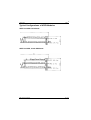
TYPICAL CONFIGURATIONS OF APEX MODULES.............................. 6
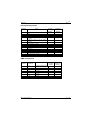
APEX 104 CPU & CI-2 STACK ......................................................................... 6
APEX 104 CPU, CI-2 & SSD STACK ................................................................ 6
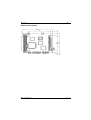
APEX 104 CPU OUTLINE ................................................................................. 7
STACKING AND EMBEDDING THE APEX SYSTEM ............................. 8
USING THE APEX WITH A DESKTOP PC................................................ 8
SPECIFICATION........................................................................................... 9
ON-BOARD FEATURES ........................................................................................ 9
MEMORY OPTIONS........................................................................................... 10
POWER REQUIREMENT (TYPICAL) ..................................................................... 10
ENVIRONMENT ................................................................................................ 10
BIOS.............................................................................................................. 11
INTRODUCTION................................................................................................ 11
System BIOS .............................................................................................. 11
Video BIOS ................................................................................................ 12
Keyboard BIOS........................................................................................... 13
Expansion ROMs........................................................................................ 13
AMI HI-FLEX SYSTEM BIOS ........................................................................... 14
Features ...................................................................................................... 14
Hot Keys..................................................................................................... 14
AMIBIOS Power-on Self Test..................................................................... 15
POST Error Messages and Beep Codes ....................................................... 15
Blue Chip Technology
127-150
APEX 104
Page ii
AMIBIOS SETUP ............................................................................................16
STANDARD CMOS SETUP ................................................................................16
ADVANCED CMOS SETUP................................................................................16
ADVANCED CHIPSET SETUP ..............................................................................16
PERIPHERAL SETUP ..........................................................................................16
UTILITIES ........................................................................................................16
RUNNING THE AMIBIOS SETUP .......................................................................17
ACCESSING SETUP ...........................................................................................17
SETUP KEY USE ...............................................................................................18
Using the CMOS Setup Program.................................................................20
Date............................................................................................................21
Time ...........................................................................................................21
Floppy Disk Configuration..........................................................................21
Hard Disk Configuration.............................................................................21
Display .......................................................................................................21
Keyboard ....................................................................................................21
Using the Advanced CMOS Setup...............................................................22
Help Screens ...............................................................................................23
Typematic Rate, Delay and Programming ...................................................23
Mouse Support Option ................................................................................23
Above 1MB Memory Test ...........................................................................23
Memory Parity Error Check ........................................................................23
Hit <DEL> Message Display.......................................................................23
Hard Disk Type 47 RAM Area....................................................................24
Wait for <F1> If any Error..........................................................................24
System Boot Up Num Lock .........................................................................24
Floppy Drive Seek at Boot...........................................................................24
System Boot Up Sequence...........................................................................24
System Boot Up CPU Speed........................................................................25
Fast Gate A20 Option .................................................................................25
Password Checking Option .........................................................................25
ROM Shadow .............................................................................................25
Boot Sector Virus Protection .......................................................................26
Using the Advanced Chipset .......................................................................26
Low CPU Speed..........................................................................................27
Early Ready Mode.......................................................................................27
Bus Clock Speed Select...............................................................................27
DMA Clock Select ......................................................................................27
Additional RAM Wait State ........................................................................27
RAS Timeout Feature .................................................................................27
Extended Boundary.....................................................................................28
Blue Chip Technology
127-150
APEX 104
Page iii
Global EMS................................................................................................ 29
EMS I/O Port Access .................................................................................. 29
EMS Page Register ..................................................................................... 29
Hidden Refresh ........................................................................................... 29
Refresh On Idle........................................................................................... 29
AT Refresh Disable..................................................................................... 29
Video BIOS Area Cache (32K) ................................................................... 30
F000 BIOS Area Cache (64K) .................................................................... 30
Using the Peripheral Setup.......................................................................... 31
On-Board Floppy Drive .............................................................................. 31
On-Board IDE Drive................................................................................... 32
First Serial Port Address ............................................................................. 32
Second Serial Port Address ......................................................................... 32
Auto Configuration with Defaults ............................................................... 33
Change Passwords ...................................................................................... 33
Bypassing Password Support....................................................................... 33
Enabling Password Support ........................................................................ 33
If a Password is Used .................................................................................. 33
Password Storage........................................................................................ 34
Password Options Control Prompt .............................................................. 34
Using a Password........................................................................................ 34
Auto Detect Hard Disk................................................................................ 34
Write to CMOS and Exit ............................................................................ 35
Do Not Write to CMOS and Exit ................................................................ 35
WATCHDOG TIMER .......................................................................................... 37
E²PROM ACCESS ............................................................................................ 38
FLASH ACCESS ................................................................................................ 38
ON-BOARD SERIAL AND PARALLEL PORTS......................................................... 39
SERIAL PORTS ................................................................................................. 39
PARALLEL PORT .............................................................................................. 39
BATTERY ........................................................................................................ 40
BACKPLANE..................................................................................................... 40
MEMORY MAP ................................................................................................. 42
Typical Memory Map for a 1MByte APEX CPU & CI 2 ............................. 42
Blue Chip Technology
127-150
APEX 104
Page iv
APEX CONFIGURATION JUMPERS........................................................43
P1: PC/104 8 BIT (64 WAY) .............................................................................44
P2: PC/104 16 BIT (40 WAY) ...........................................................................45
P3: 3½" DISK DRIVE (4 WAY HEADER)..............................................................45
P4: PERIPHERAL (20 WAY HEADER)..................................................................46
P5: BATTERY (3 WAY HEADER) ........................................................................46
P6: PARALLEL (26 WAY HEADER) .....................................................................47
P7: CO-PROCESSOR (36 WAY HEADER).............................................................47
P8: SERIAL 1 RS232 (10 WAY HEADER)............................................................48
P9: SERIAL 2 RS485 (10 WAY HEADER)............................................................48
APEX BUS SIGNAL DESCRIPTIONS ...................................................................49
I/O ADDRESS MAP ...........................................................................................56
INTERRUPT ASSIGNMENTS ................................................................................57
DMA ASSIGNMENTS........................................................................................57
POST ERROR CODES .......................................................................................58
WIRING TO THE PERIPHERAL CONNECTOR.........................................................61
APEX BIOS EXTENSIONS .................................................................................62
FLASH MEMORY FUNCTIONS ............................................................................63
WRITE FLASH SECTOR ...................................................................................64
FLASH FORMAT .............................................................................................64
E2 FUNCTIONS ................................................................................................65
WATCHDOG FACILITY ......................................................................................66
APEX UTILITIES .............................................................................................68
REMOTE DISK ..................................................................................................68
FLASH DISK .....................................................................................................71
APEX CI-2 ....................................................................................................73
INTRODUCTION ................................................................................................73
SPECIFICATION.........................................................................................73
ON-BOARD FEATURES ......................................................................................73
VIDEO .............................................................................................................74
SERIAL PORTS..................................................................................................74
DIGITAL PIO ...................................................................................................75
DISK DRIVES ...................................................................................................75
FLOPPY ...........................................................................................................75
HARD (IDE) DRIVE ..........................................................................................76
HARD DISK TYPES ...........................................................................................76
Blue Chip Technology
127-150
APEX 104
Page v
APEX-CI 2 CONFIGURATION JUMPERS ............................................... 79
APEX-CI 2 CONNECTOR PIN-OUTS ....................................................... 80
P1: PC/104 8 BIT (64 WAY) ............................................................................. 80
P2: PC/104 16 BIT (40 WAY) ........................................................................... 81
P3: RS422/485 SERIAL (10 WAY HEADER)........................................................ 81
P4: LCD INTERFACE (40 WAY SOCKET)............................................................ 82
P5: IDE/HARD DRIVE (40 WAY HEADER).......................................................... 83
P6: DIGITAL I/O PORT (26 WAY HEADER)......................................................... 83
P7: VIDEO (10 WAY HEADER)........................................................................... 84
P8: SERIAL 1 (10 WAY HEADER)....................................................................... 84
P9: FLOPPY (34 WAY HEADER) ......................................................................... 84
P10: SERIAL 2 (10 WAY HEADER) ..................................................................... 85
P11: IDE ACTIVITY LED (2 WAY HEADER) ...................................................... 85
I/O ADDRESS MAP........................................................................................... 86
APEX 104-CI 2 EXTENDED I/O PORT MAP ...................................................... 87
INTERRUPT ASSIGNMENTS................................................................................ 88
DMA ASSIGNMENTS ....................................................................................... 88
APPENDIX A - USING THE DIGITAL PIO .............................................. 89
Electrical Options ....................................................................................... 91
GENERAL TTL REQUIREMENT.......................................................................... 98
PIO GLOSSARY ............................................................................................... 99
APPENDIX B - CONNECTING TO DISPLAYS & PERIPHERALS...... 100
CONNECTING TO THE CRT DISPLAY HEADER .................................................. 100
VIDEO OUTPUTS ............................................................................................ 102
CRT DISPLAY TYPES.............................................................................. 103
IBM STANDARD VIDEO MODES ..................................................................... 103
CIRRUS LOGIC EXTENDED VIDEO MODES ....................................................... 103
VIDEO DRIVERS ............................................................................................. 104
ELECTROMAGNETIC COMPATIBILITY (EMC) ............................... 115
Blue Chip Technology
127-150
APEX 104
Page 1
Introduction
This manual describes the Blue Chip Technology APEX processor card. There
are several versions of the card; these will be identified separately where
appropriate. We strongly recommend that you study this manual carefully before
attempting to change the configuration. Whilst all necessary information is
available in this manual we would recommend that unless you are confident, you
contact your supplier to effect any changes. Please be aware that it is possible to
create configurations that make booting impossible. If this should happen
disconnect the battery for approximately two hours, then reconnect the battery
and on power-up the default values will be written into the CMOS. This product
uses the Chips & Technologies 82C836 VLSI device, this provides a complete
AT compatible environment. For further detailed information on this device
please call your supplier.
WARNING
The devices on this card can be fatally damaged by static electricity. Ensure that
you touch a suitable ground to discharge any static build up before touching the
card. This should be repeated if the handling is for any length of time.
If this product proves to be defective, Blue Chip Technology is only obliged to
replace or refund the purchase price at Blue Chip Technology's discretion
according to the accompanying terms and conditions of the registration card.
Blue Chip Technology
127-150
APEX 104
Page 2
Limitations of Liability
In no event shall Blue Chip Technology be held liable for any loss, expenses or
damages of any kind whatsoever, whether direct, indirect, incidental or
consequential, arising from the design or use of this product or the support
materials supplied with this product.
Trademarks
IBM, PC, AT and PS/2 are trademarks of International Business Machines
Corporation.
AMI Hi-Flex BIOS is a trademark of American Megatrends Inc.
Intel is a registered trademark of Intel Corporation
80386SX is a registered trademark of Intel Corporation
CX486SLC is a registered trademark of Cyrix Corporation
Blue Chip Technology
127-150
Page 3
APEX 104
Company Profile
Blue Chip Technology is based in the North West, the purpose built 15,000 sq ft
complex contains our research & development facility, engineering workshop,
conventional & SMT production lines.
Specialising in the provision of industrial computing and electronic solutions for
a wide range of UK and European organisations we have one of the UK's largest
portfolios of industrial PC's, peripherals and data acquisition cards. This
extensive range of products coupled with our experience and expertise enables
Blue Chip Technology to offer an industrial processing solution for any
application. APEX is the latest addition to our portfolio, providing a cost
effective product development and volume production tool for OEMs.
A unique customisation and specialised system integration service is also
available, delivering innovative solutions to customers problems. The company's
success and reputation in this area has lead to a number of large design and
manufacturing projects for companies such as BNFL, Aston Martin, Jaguar
Sport and British Gas.
British Standards Institute approval (BS5750 Part1, ISO 9001) means that all
of Blue Chip Technology's design and manufacturing procedures are strictly
controlled, ensuring the highest levels of quality, reliability and performance.
Blue Chip Technology are committed to the single European market and
continue to invest in the latest technology and skills to provide high performance
computer and electronic solutions.
Blue Chip Technology
127-150
Page 4
APEX 104
Preface
The PC as an Embedded Control Solution
As today's OEMs battle to develop leading edge products as fast as possible with
minimal cost, the APEX embeded PC system provides a innovative solution.
Designed to provide a high performance, compact hardware solution with
maximum configuration compatibility and flexibility, APEX is essentially a
range of modular building blocks wich allow OEMs to embedd microprocessor
control into a wide range of products.
Traditional methods of embedding computer control into products are being
challenged by the latest developments in embedded PC technology. This has
resulted in a dramatic increase in the number of applications which are using
PC as an embedded control solution.
Until recently, the only options were expensive and bulky bus board products
such as VME or STE or the resource hungry solution of designing a
microcontroller from scratch. By using the APEX processor as a "drop-in"
alternative, OEMs can gain clear cut advantages in design, production and
product enhancement.
•
•
•
•
•
•
•
•
•
•
PC is the best understood hardware interface in the world
Because the PC is a complete subsystem, design effort is minimised
Resource can be focused on the application specific features of the
target product
Development resource is reduced, saving time and money
Access to PC application software enhances product functionality
A large pool of engineering and programming talent reduces
development times
User familiarity with DOS and Windows interfaces enhances product
attractiveness
Low cost and well understood development tools reduce personnel
learning curves
An off the shelf solution reduces material needs and costs
Reduced time to market maximises sales and optimises profit window
Blue Chip Technology
127-150
Page 5
APEX 104
The APEX Product Range
The APEX range consists of a processor base and a series of Functional Support
Modules which allow highly integrated control systems can be built. All of the
products in the range can be plugged into an OEM circuit board, connected via
the AT stackthrough bus or plugged into a standard passive
backplane.
Summary of Product Range
APX-3S/4SL
Processor
Functional Support Modules
APX-CI 2
General interface controller
Other Functional Support Modules
A range of functional support modules have also been designed. Measuring
90mm by 96mm, they provide a wide range of interfaces to the outside world.
Blue Chip Technology are one of the UK's leading manufacturers of data
acquisition and specialised I/O cards. Our unique design and manufacturing
capabilities, enable us to provide a customised embedded processing solution,
providing you with a range of FSM's tailor made for your needs.
Blue Chip Technology
127-150
APEX 104
Page 6
Typical Configurations of APEX Modules
APEX 104 CPU & CI-2 Stack
APEX 104 CPU, CI-2 & SSD Stack
Blue Chip Technology
127-150
APEX 104
Page 7
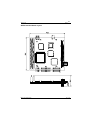
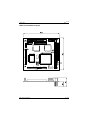
APEX 104 CPU Outline
Blue Chip Technology
127-150
APEX 104
Page 8
Stacking and Embedding the APEX System
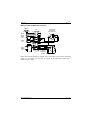
Where space and complexity rule out a passive backplane or card cage, APEX
modules can be stacked on top of each other to form the complete subsystem.
The example below shows how a unit can be configured to allow a fully
functional PC with VGA, IDE, 24 channels of programmable I/O and solid state
disk capability, to be achieved in a form factor of (100mm x 114mm x 48mm).
This allows the APEX to be used as a standalone development tool. By adding a
keyboard and monitor, you have a complete PC system which will function
exactly the same as your desktop PC.
APEX can also be plugged into a custom built electronic assembly, allowing you
to add microprocessor control to any application specific electronic design.
Further functionality can be designed in by adding FSM's as required.
Using the APEX with a Desktop PC
Your desktop PC can be used as a programming tool or emulator to write
application specific programmes, debug them, then transfer them to APEX
processor. An adapter card (APX-PC) allows all APEX products to be plugged
into a standard passive backplane for this purpose. This allows you to develop
your software in a known environment and take advantage of existing PC
software.
Blue Chip Technology
127-150
APEX 104
Page 9
Specification
The Blue Chip Technology APEX embedded PC is an ultra compact high
performance computer that provides 100% IBM PC/AT compatibility.
On-board Features
•
•
•
•
•
•
•
•
•
•
•
•
•
•
•
•
•
•
•
•
•
Choice of 25 MHz 80386SX 80486sSLC or 80486SLC2 50MHz
microprocessor
80387SX coprocessor support (optional)
Up to 8MB of DRAM memory, supports 256K x 9, 1MB x 9, and 4MB x 9
SIMM modules.
High performance memory Page Interleave access
Up to 1MB on board FLASH
AMI BIOS with built in setup program
Hardware EMS support (LIM 3.2 & 4.0 compatible)
PC/104 Compatible
Selectable Shadow RAM for system & video BIOS
Selectable Bus speed
Automatic or Manual Peripheral Configuration.
2 Asynchronous serial ports (16C450 compatible) with LC filters - 1 RS232
& 1 RS485
Uni-directional parallel port
AT compatible keyboard port
PS/2 Mouse port
Customer "sign-on" information held in EEPROM (64 bytes available for
user operation)
Software selectable Watchdog timer
On-board "Power Good" generation
Speaker drive circuitry
5 Volt only operation
6 layer PCB with Surface Mount Technology (SMT)
Blue Chip Technology
127-150
Page 10
APEX 104
Memory Options
Option
1
2
3
SIMM1
256KB
1MB
4MB
SIMM2
256KB
1MB
4MB
Total DRAM
512KB
2MB
8MB
Note:
•
•
•
•
•
Bank 0 is made up of two 30 pin standard SIMM carriers.
All SIMMs must have an access time of 70ns or faster (e.g 60ns).
Three chip SIMMs are prefered because of their lower power consumption.
All SIMMs within a Bank must be the same, you cannot mix 256KB, 1MB
and 4MB within the same Bank.
JP4 selectes between option 1&2 or 3
Power Requirement (typical)
Configuration
APEX 386SX @ 25MHz with 8MBytes of DRAM
APEX 486SLC @ 25MHz with 8MBytes of DRAM
APEX 386SX @ 25MHz with 8MBytes of DRAM + CI
APEX 486SLC @ 25MHz with 8MBytes of DRAM + CI
APEX 486SLC2 @ 50mhz with 8mbytes of DRAM + CI
Current @ 5V
1.2 Amperes
1.3 Amperes
1.6 Amperes
1.8 Amperes
2.0 Amperes
Environment
Operating Temperature
Storage Temperature
Relative Humidity
Blue Chip Technology
0°C to 60°C.
-20°C to 70°C.
10-90% non-condensing.
127-150
APEX 104
Page 11
BIOS
Introduction
There are several types of Basic Input Output Systems (BIOS) in a PC system.
System BIOS
This controls the local electronics. It also provides the interface to the hardware
for the operating system.
Video BIOS
This controls the interface between the video hardware and the computer.
Keyboard BIOS
This controls the keyboard matrix operation and communicates with the PC.
Adapter
Adapter ROM BIOSes that control specific hardware add-ons.
Each of these BIOSes will now be described :
System BIOS
The primary function of the System BIOS is to provide a series of software
interrupts, functions and subfunctions that perform specific system tasks; such as
writing or reading to and from disks and video screens.
The operating system uses the System BIOS as the route to communicate and
control the microprocessor and its immediate peripherals. This exchange of data
occurs via a strict protocol .
The secondary function of the System BIOS is the series of tests and
initialisations that occur after power-on. The results of these operations are
written to the POST display (not fitted) as they are completed, thereby indicating
its progress.
Blue Chip Technology
127-150
APEX 104
Page 12
The System BIOS on the APEX is contained in a 128KB EPROM; of this space
the System BIOS occupies 64KB. The EPROM is located at address F0000 hex
and continues to FFFFF hex. The supplier of the BIOS is AMI, currently the
leading supplier of PC BIOSes in the world. BLUE CHIP TECHNOLOGY have
selected this supplier because of their experience, support and committment to
future developments in this critical area of a PC/AT design.
Video BIOS
The Video BIOS acts as an interface between the System BIOS and the video
hardware. It is critical that this interface is compatible, fast and reliable. The
Video BIOS provides a relatively high level of access to the hardware. The
companion APEX-CI 2 provides a video interface and is based on the Cirrus
Logic 6235. This device offers proven VGA compatibility in a single device and
is able to drive both CRT & LCD displays simultaneously. It is supported by a
512KB of video memory. The Video BIOS coexists in the System BIOS EPROM
and locates in the address range C0000 to C7FFF hex. This BIOS is enabled and
disabled with J2 on the APEX CPU board(fit to disable).
Blue Chip Technology
127-150
APEX 104
Page 13
Keyboard BIOS
The Keyboard BIOS is contained in the 8042 (or 8742) keyboard controller. This
device provides a parallel interface to the microprocessor bus allowing a bidirectional streams of data to be passed between the PC and the keyboard. In
addition the Keyboard BIOS handles several of the switch and LED functions on
the PC. The BIOS is programmed into the 8042. It occupies none of the memory
map.
Expansion ROMs
APEX and conventional PC hardware allow add-on cards to be inserted on the
expansion bus. If software is required to control the electronics on the card the
supplier may choose to provide this software in the form of an expansion ROM
or adapter ROM. On power-up the PC, once initialised, checks for the presence
of ROMs within the memory space of C8000 to DFFFF hex. If present the code
within the ROM is run and the specific hardware on the card controlled
accordingly. In addition this software can then be used as the interface to the
electronics by the operating system; therby acting as an extension to the System
BIOS for the new electronics.
Blue Chip Technology
127-150
Page 14
APEX 104
AMI Hi-Flex System BIOS
Features
•
•
•
•
•
•
•
•
•
•
•
•
•
•
•
Keyboard Speed Switching
Memory Detection
Password Support
Autodetection of IDE Hard Drive Parameters
Autodetection of Processor Type and Speed
Autodetection of Memory Size and Type
Customisation of the System
User definable Hard Disk Types
PS/2 Mouse Support
Boot Sector Virus Support
Local Peripheral Support
Shadow RAM Support
Keyboard Typematic Rate and Delay
Num Lock Power-on Status
Fast Gate A20 Support
Hot Keys
The Hi-Flex AMIBIOS provides hot keys to switch speed and cache operation.
These key operations are:
<Ctrl>,<Alt> and <+>
<Ctrl>,<Alt> and <->
<Ctrl>,<Alt>,<Shift> and <+>
<Ctrl>,<Alt>,<Shift> and <->
<Ctrl>,<Alt> and <DEL>
Selects High Speed
Selects Low Speed
Enables External Cache
Disables External Cache
Causes a Soft Reset
All keys should be pressed down together.
Blue Chip Technology
127-150
Page 15
APEX 104
AMIBIOS Power-on Self Test
The Hi-Flex AMIBIOS provides all IBM standard POST routines as well as
enhanced AMIBIOS routines. All POST checkpoint codes are written to the
POST display at I/O location 80 hex (not fitted). See the POST error codes on
page 58 for detailed checkpoint codes.
POST Error Messages and Beep Codes
If the BIOS cannot configure the display controller it will communicate the
identification of fatal errors (except error code 8) via a series of beeps. These
errors will only occur during power-on tests. The beep codes are as follows:
Beeps
1
2
Error Messages
Refresh Failure
Parity Error
3
4
Base 64KB Memory Failure.
Timer not Operational.
5
6
Processor error.
8042 - Gate A20 Failure.
7
Processor Exception Interrupt
Error.
8
Display Memory Read/Write
Error.
ROM Checksum Error.
9
10
CMOS Shutdown Register
Read/Write Error.
Blue Chip Technology
Description
Memory Refresh circuitry faulty.
Parity error in the first 64KB of
memory.
Memory failure in the first 64KB.
Timer 1 is not functioning.
Alternatively, memory in the first
64KB faulty.
CPU error.
BIOS cannot switch to protected
mode.
CPU generated an exception
interrupt
error.
Video adapter is not responding or
its memory is faulty.
ROM checksum embedded in the
ROM
does not match the calculated
value.
The shutdown register in the
CMOS RAM failed. Check access
to CMOS.
127-150
APEX 104
Page 16
AMIBIOS Setup
The Hi-Flex AMIBIOS Setup utility is divided into five parts:
Standard CMOS Setup
The Hi-Flex AMIBIOS Standard CMOS Setup permits the user to configure and
set system components such as floppy drives, hard disk drives, time and date,
monitor type and keyboard. These options are discussed on page 20.
Advanced CMOS Setup
The Advanced CMOS Setup allows the user to configure more advanced parts of
memory operation and peripheral support. These options are discussed on page
22.
Advanced Chipset Setup
The Advanced Chipset configures the C&T SCATSX specific features and is
discussed further on page 26.
Peripheral Setup
The Peripheral Setup configures the APEX-CI 2 companion card's floppy, IDE,
serials and parallel devices. These are all controlled by the C&T 82C711 device.
These options are discussed further on page 31.
Utilities
The AMIBIOS provides support for Password security access. This will be
discussed further on page 33.
Blue Chip Technology
127-150
Page 17
APEX 104
Running the AMIBIOS Setup
The system parameters (such as amount of memory,disk drives, video displays
and numeric coprocessors) are stored in CMOS RAM. When the APEX is turned
off, a back-up is provided by an external battery (3.7V Lithium) connected to P5.
Each time the APEX is powered-on, it is configured with these values, unless the
CMOS RAM has been corrupted. The AMIBIOS Setup resides in the ROM
BIOS and is available each time the APEX is switched on.
If, for some reason, the CMOS RAM becomes corrupted, the system is
reconfigured with the default values stored in the System BIOS. There are two
sets of BIOS values stored in the BIOS: the BIOS default values and the PowerOn default values.
Accessing Setup
Setup is accessed by pressing the 'DEL' key on the keyboard when the screen
displays the message:
Hit <DEL> if you want to run Setup
If you press 'DEL' too late, reset the APEX and try again.
Blue Chip Technology
127-150
Page 18
APEX 104
Setup Key Use
Keystroke
Esc
→,←,↑ and ↓
<PgUp> and
<PgDn>,
<Ctrl><PgUp>,
<Ctrl><PgDn>
<F1>
<F2>
<F3>
<F5>
<F6>
<F7>
<F10>
Action
Returns to the previous screen.
Move the cursor from one option to the next.
Modify the default value of the options for the
highlighted parameter. If there are fewer than 10
options, <Ctrl><PgUp> and <Ctrl><PgDn> operate like
<PgUp> and <PgDn>.
<Ctrl> can also be used to increment a setting.
Displays help.
Changes background colours.
Changes foreground colours.
Restores the values resident when the current Setup session
began. These values are taken from the CMOS RAM if it was
uncorrupted at the start of the session. Otherwise, the
AMIBIOS Setup default values are
used.
Loads all features in the Advanced CMOS Setup/Advanced
Chipset Setup with the AMIBIOS
Setup defaults.
Loads all features in the Advanced CMOS Setup/Advanced
Chipset with the Power-On defaults.
Saves all the changes made to Setup and continues
the boot process.
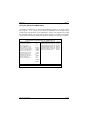
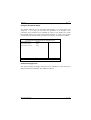
The APEX AMIBIOS Setup main Menu is shown below. The options are
selected by using the ↑ and ↓ keys and then pressing <Enter> .
AMIBIOS SETUP PROGRAM - BIOS SETUP UTILITIES
© Copyright 1992 American Megatrends, Inc. All Rights Reserved
STANDARD CMOS SETUP
ADVANCED CMOS SETUP
ADVANCED CHIP SET SETUP
PERIPHERAL SETUP
AUTO CONFIGURATION WITH DEFAULTS
CHANGE PASSWORD
AUTO DETECT HARD DISK
WRITE TO CMOS AND EXIT
DO NOT WRITE TO CMOS AND EXIT
Standard CMOS Setup for changing time, Date, Hard Disk Type, etc.
Blue Chip Technology
127-150
Page 19
APEX 104
Each option is described in detail on the pages identified as follows:
Main Menu Option
Described on Page
STANDARD CMOS SETUP
ADVANCED CMOS SETUP
ADVANCED CHIP SET SETUP
CI2 PERIPHERAL SETUP
AUTO CONFIGURATION WITH DEFAULTS
CHANGE PASSWORD
AUTO DETECT HARD DISK
WRITE TO CMOS AND EXIT
DO NOT WRITE TO CMOS AND EXIT
20
22
26
31
33
33
34
35
35
Blue Chip Technology
127-150
Page 20
APEX 104
Using the CMOS Setup Program
The default condition for the CMOS Setup Menu is as shown below. This menu
sets the basic system parameters, such as date, time, floppy disk and hard disk
types. By using the ←↑↓→ keys you can select the parameter to be changed.
Once positioned on the parameter to be modified the <PgUp> and <PgDn> keys
rotate the available options. The value selected when the menu is exited is the
one that will be written to CMOS, should you decide to commit your changes to
CMOS.
AMIBIOS SETUP PROGRAM - CMOS SETUP PROGRAM
© Copyright 1992 American Megatrends, Inc. All Rights Reserved
Date (mm/date/year) Fri, Aug 07, 1992
Base memory 640 KB
Time (hour/min/sec) 09 : 38 : 09
Ext memory 0 KB
Cyln Head WPcom Lzone Sect Size
Hard disk C: type
Not Installed
Hard disk D: type
Not Installed
Floppy drive A:
1.44 MB, 3½
Floppy drive B:
Not Installed
Primary Display
VGA/PGA/EGA
Keyboard
Installed
Esc = Exit
↑→↓←: Select F2: Colour PU/PD: Modify
Blue Chip Technology
127-150
APEX 104
Page 21
Date
This entry allows you to set the Date, Month and Year. Ranges for each value
are shown in the lower left corner of the CMOS Setup Screen.
Time
This entry allows you to set the Hours, Minutes and Seconds. The clock operates
in 24 hour mode; that means that for a PM time add 12 to the hour e.g. enter
6:35 PM as 18:35:00.
Floppy Disk Configuration
The APEX supports None, 360KB, 720KB, 1.2MB, 1.44MB & 2.88MB drives.
Two drives are supported A: and B:.
Hard Disk Configuration
Two hard disk drives are supported directly by the BIOS C: and D:. Each drive
can select drive types 1 to 46. In addition type 47 is user definable allowing all
parameters for the drive to be customised. Both drives can be set to a different
type 47 if required. To set the values for type 47 use the ←,↑,↓ and → keys to
select the appropriate field and then type in as required. A complete list of the 46
hard disk type is contained in the APEX-CI 2 manual.
Display
This entry allows the user to select MDA, CGA or EGA/PGA/VGA display
controllers. If your system is to operate without a display then select Disabled.
Failure to do this will result in an error being generated during the power-on
diagnostics check.
Keyboard
The APEX keyboard interface is AT compatible. It can be connected to either
AT or PS/2 keyboards. The default setting is Enabled. If your system is to
operate without a keyboard then select Disabled. Failure to do this will result in
an error being generate during the power-on diagnostics check.
Blue Chip Technology
127-150
APEX 104
Page 22
Using the Advanced CMOS Setup
The default condition for the Advanced CMOS Setup Menu is as shown below.
By using the ←↑↓→ keys you can select the parameter to be changed. Once
positioned on the parameter to be modified the <PgUp> and <PgDn> keys rotate
the available options. The value selected when the menu is exited is the one that
will be written to CMOS, should you decide to commit your changes to CMOS.
AMIBIOS SETUP PROGRAM - ADVANCED CMOS SETUP
© Copyright 1992 American Megatrends, Inc. All Rights Reserved
Video ROM Shadow C000, 32K : Enabled
:
Typematic Programming
Adaptor ROM Shadow C800, 16K : Disabled
Disabled
Typematic Rate Delay
Adaptor ROM Shadow D000, 16K : Disabled
: 500
Typematic Rate (Chars/sec)
Adaptor ROM Shadow D800, 16K : Disabled
: 15.0
Mouse Support Option
Adaptor ROM Shadow E000, 16K : Disabled
:
Above 1 MB Memory Test
Adaptor ROM Shadow E800, 16K : Disabled
Disabled
Memory Parity Error Check
System ROM Shadow F000, 64K : Enabled
: Enabled
Hit <DEL> Message Display
Boot Sector Virus Protection
: Disabled
: Enabled
Hard Disk Type 47 RAM Area
: Enabled
Wait for <F1> If Any Error
: 0:300h
System Boot Up Num Lock
: Enabled
Floppy Drive Seek At Boot
: On
System Boot Up Sequence
: Enabled
System Boot Up CPU Speed
: A:, C:
Fast Gate A20 Option
: High
Password Checking Option
: Enabled
:
Enabled:
↑→↓←: Select (Ctrl) Pu/Pd: Modify F1: Help F2: Colour
Esc = Exit
F5: Old Values F6: BIOS Setup Defaults F7: Power-on Defaults
Blue Chip Technology
127-150
APEX 104
Page 23
Help Screens
Help can be invoked at any time by pressing <F1>.
Typematic Rate, Delay and Programming
The control of Typematic rate Programming allows the auto repeat and delay
before repeat to be selected. The defaults are as shown above. The Typematic
Rate Delay describes the delay before auto repeat starts. The Typematic Rate is
the frequency of the key generation once in auto repeat.
Mouse Support Option
This enables or disables the mouse support. The mouse control is effected by the
8042 keyboard controller on the APEX. It is PS/2 compatible.
Above 1MB Memory Test
By enabling this test any RAM above 1MB will be exercised by the POST
diagnostics thereby taking longer to boot. If your APEX is not fitted with more
than 1MB of RAM or you wish to shorten the boot time set this option to
disabled.
Memory Parity Error Check
This option selects whether the parity circuit is active on the system RAM. We
strongly recommend that this is set to enabled at all times thereby providing
communication of any RAM corruption. If this option is not required select
disabled.
Hit <DEL> Message Display
Disabling this option removes this message from appearing during power-up.
This may be required when you do not wish to draw attention to existence of the
Setup Menus within the BIOS. The default is enabled.
Blue Chip Technology
127-150
Page 24
APEX 104
Hard Disk Type 47 RAM Area
As described in the CMOS Setup details previously the AMIBIOS supports type
47 user definable input. This data is stored at either:
0:300h in lower system RAM
or
Top 1KB of applications memory
The information will be stored in shadow RAM if shadowing is enabled.
Wait for <F1> If any Error
If any of the tests run during the POST cause an error then this message will be
displayed. If this message is enabled then after displaying it the APEX will halt
waiting for <F1> to be pressed. If you expect errors during the POST or do not
wish the boot to be halted if any error occurs then disable this option.
System Boot Up Num Lock
If you wish the numeric keypad to be active after a boot then select ON. If,
however, you wish the ←,↑,↓ and → keys instead after power-up then set the
option to OFF.
Floppy Drive Seek at Boot
If enabled, a seek is performed on floppy drive A: at system boot time. The
options are Enabled or Disabled. By disabling this option the boot time can be
reduced. If very old 360KB drives are used it may be necessary to enable this
option to ensure that the heads are recalibrated before the drive is accessed.
System Boot Up Sequence
The default boot sequence is drive A: and then C:. This would mean that if drive
A: is not ready then the boot occurs from C:. The alternative is to boot from
drive C: and then A: if C: is not ready. Hence the settings are either: A:, C: or
C:, A:.
Blue Chip Technology
127-150
APEX 104
Page 25
System Boot Up CPU Speed
The Setup allows the selection of the CPU at boot time. The default is High
speed. The alternative is Low.
Fast Gate A20 Option
Gate A20 controls the method of accessing memory addresses above 1 MB by
enabling or disabling access to the processor line A20. To provide XT
compatibility address line A20 must always be low and therefore the option
should be Disabled. However, some applications both enter protected mode and
shut down through the BIOS. For this software, Gate A20 must be constantly
enabled and disabled via the keyboard controller (8042), which slows down the
processing.
Fast Gate A20 is another method for handling Gate A20 using the SCATsx
internal circuitry. It speeds programs that constantly change from addressing
conventional memory to addressing memory addresses above 1MB (from real
mode to protected mode and back). Network operating systems in particular
benefit from this enhanced circuitry.
The Default is Fast Gate A20 enabled.
Password Checking Option
This option enables a password check every time the systems boots or Setup is
executed. The settings are Always or Setup. If Always is selected the user
password prompt appears every time the system is turned on. If Setup (the
default) is chosen, the password prompt appears if Setup is executed.
ROM Shadow
ROM shadow is a technique in which the BIOS code is copied from slower ROM
to faster RAM. The BIOS is then executed from the RAM.
For each of the areas of memory identified in the Setup table the option is there
to Enable or Disable shadowing for that particular area. The default is that both
the Video and System areas are shadowed. Care must be taken where expansion
cards are occupying an area that is set for shadowing. If the expansion card has
its own internal RAM located at the address that is shadowed then its operation
Blue Chip Technology
127-150
APEX 104
Page 26
will be corrupted (examples are network cards). For such cards the setting
should be Disabled.
Boot Sector Virus Protection
When enabled, the BIOS issues a warning when any program or Virus issues a
Disk Format command or attempts to write to the boot sector of the hard disk.
The settings are Enabled or Disabled.
Using the Advanced Chipset
The default condition for the Advanced Chipset Setup Menu is as shown below.
By using the ←↑↓→ keys you can select the parameter to be changed. Once
positioned on the parameter to be modified the <PgUp> and <PgDn> keys rotate
the available options. The value selected when the menu is exited is the one that
will be written to CMOS, should you decide to commit your changes to CMOS.
AMIBIOS SETUP PROGRAM - ADVANCED CHIPSET SETUP
© Copyright 1992 American Megatrends, Inc. All Rights Reserved
: CXIN/4
Low CPU Speed
: Enabled
Early Ready Mode
: CXIN/4
Bus Clock Speed Select
: B/2
DMA Clock Select
: 82C836
Coprocessor Ready Control
: Enabled
Additional RAM Wait State
: Disabled
RAS Timeout Feature
: Internal
Video Controller
: None
Extended Boundary
: Disabled
Global EMS
: Enabled
EMS I/O Port Access
: EMS0
EMS Page Register
: Disabled
Hidden Refresh
: Disabled
Refresh On Idle
: No
AT Refresh Disable
: Disabled
Video BIOS Area Cache (32K)
: Disabled
F000 BIOS Area Cache (64K)
↑→↓←: Select (Ctrl) Pu/Pd: Modify F1: Help F2: Colour
Esc = Exit
F5: Old Values F6: BIOS Setup Defaults F7: Power-on Defaults
Blue Chip Technology
127-150
APEX 104
Page 27
Low CPU Speed
Selects the fraction of the main oscillator frequency to be used for the Low CPU
speed. Default is CXIN/4 which for a 25MHz APEX would be: 50MHz / 4 =
12.5mhz operation.
Early Ready Mode
When enabled allows external devices to assert READY during the first T2 after
T1 state to terminate the memory cycle after only two T-states. The default is
Enabled.
Bus Clock Speed Select
The actual Bus Clock Speed is set by this option. The AT standard is 8MHz. We
advise a frequency as close to this as possible. However, for applications where
the other cards on the backplane are capable of working at a higher speed this
option is available. The formula is: CXIN (twice the processor speed) / the
setting.
Therefore for a 25MHz APEX: 50MHz / 6 (default) = 8.33MHz.
DMA Clock Select
The speed of the DMA clock is set by this option. The options are Bus Clock
Speed (see above) or Bus Clock Speed/2. We recommend that B/2 is set unless
you are sure that your additional cards can operate at the full bus speed.
Additional RAM Wait State
The Setup allows the RAM to operate with either 0 or 1 wait state. The default is
1 wait state. For improved performance this can be reduced to 0 wait state.
RAS Timeout Feature
This option is provided to support DRAM that allow a maximum RAS active
time of 10 microseconds. If the timeout is Enabled the RAS is not allowed to
remain low for more than 9.5 microseconds. With this option disabled the
maximum RAS active time is about 15 microseconds, limited by the refresh
cycle time.The default setting is Disabled.
Blue Chip Technology
127-150
APEX 104
Page 28
Extended Boundary
This option defines the upper limit of available memory. The options are:
No Limit, 1MB, 1.25MB, 1.5MB, 2MB, 3MB, 4MB, 5MB, 7MB, 8MB, 9MB,
10MB, 11MB, 12MB, 13MB, 15MB.
Blue Chip Technology
127-150
APEX 104
Page 29
Global EMS
This option is used to select whether the EMS hardware is to be operational. If
the setting is Disabled then the following EMS setting is ignored. The default is
Disabled.
EMS I/O Port Access
This setting again enables or disables the use of the EMS memory. If you wish to
use EMS select enabled. This is the default.
EMS Page Register
The EMS registers are accessed using three I/O ports. These ports are located at
either 208h-20Ah or 218h-21Ah.
This setting selects which block of addresses are used.
Setting EMS0 would enable 208h-20Ah
Setting EMS1 would enable 218h-21Ah
The default is EMS0.
Hidden Refresh
Enabling this option can improve the APEX performance. However, some
applications may not function correctly in this mode. The default is Disabled.
Refresh On Idle
Enabling this option can improve the APEX performance. However, some
applications may not function correctly in this mode. The default is Disabled.
AT Refresh Disable
The default is No. This option allows the Refresh signal on the AT Bus to be
disabled. It should be remembered that some add-on memory cards rely on the
bus Refresh signal to maintain their RAM validity.
Blue Chip Technology
127-150
APEX 104
Page 30
Video BIOS Area Cache (32K)
This option enables the caching of the video BIOS.
F000 BIOS Area Cache (64K)
The default is Disabled. We recommend that this setting is not changed.
Blue Chip Technology
127-150
APEX 104
Page 31
Using the Peripheral Setup
The default condition for the Peripheral Setup Menu is as shown below. By
using the ←↑↓→ keys you can select the parameter to be changed. Once
positioned on the parameter to be modified the <PgUp> and <PgDn> keys rotate
the available options. The value selected when the menu is exited is the one that
will be written to CMOS, should you decide to commit your changes to CMOS.
AMIBIOS SETUP PROGRAM - CI SETUP
© Copyright 1992 American Megatrends, Inc. All Rights Reserved
: Enabled
On-Board Floppy Drive
: Enabled
On-Board IDE Drive
: 03E8H
First Serial Port Address
: 02E8H
Second Serial Port Address
:
↑→↓←: Select (Ctrl) Pu/Pd: Modify F1: Help F2: Colour
Esc = Exit
F5: Old Values F6: BIOS Setup Defaults F7: Power-on Defaults
On-Board Floppy Drive
This option enables the floppy controller on the APEX-CI 2. This setting can
either be Enabled or Disabled. The default is Enabled.
Blue Chip Technology
127-150
Page 32
APEX 104
On-Board IDE Drive
This option enables the IDE controller on the APEX-CI 2. This setting can
either be Enabled or Disabled. The default is Enabled.
First Serial Port Address
This option allows the first serial port address on the APEX-CI 2 to be
configured as either:
03F8h (Com1), 02F8h (Com2), 03E8h (Com3), or Disabled
Default = 03E8H (Com3)
The interrupt selection will be made automatically to:
Com1 and 3 will be Interrupt 4
Com 2 will be Interrupt 3
Disabled will remove the Interrupt connection.
Second Serial Port Address
This option allows the second serial port address on the APEX-CI 2 to be
configured as either:
03F8h (Com1), 02F8h (Com2), 02E8h (Com4) or Disabled
Default = 02E8H (Com4)
The interrupt selection will be made automatically to:
Com1 will be Interrupt 4
Com 2 and 4 will be Interrupt 3
Disabled will remove the Interrupt connection.
Blue Chip Technology
127-150
Page 33
APEX 104
Auto Configuration with Defaults
By selecting this option you automatically configure the system using the default
values. These values are worst case values for system performance, but are the
most stable values in the harsh conditions where we expect our products to be
used. If you experience any erratic problems with APEX we strongly suggest that
you configure with default values and test the system again.
Change Passwords
The Hi-Flex AMIBIOS has an optional password feature. The system can be
configured so that you have to enter a password every time the system boots or
when the AMIBIOS Setup is executed.
Bypassing Password Support
You can bypass the password support by pressing <Enter> when the password
prompt appears.
Enabling Password Support
The password check option is enabled in Advanced CMOS Setup by choosing
either Always or Setup. The password, which can be up to 6 characters in length,
is stored in CMOS RAM.
If a Password is Used
You must type correctly the current password when
'enter CURRENT Password'
appears. After the current password has been correctly entered, the user is asked
to retype it.
If the password information is incorrect, an error message appears. If the new
password confirmation is entered without error, the end user presses <Esc> to
return to the Main Setup Menu.
Blue Chip Technology
127-150
Page 34
APEX 104
Password Storage
The password is stored in CMOS RAM after Setup completes. The next time the
systems boots, you must enter the password if the password function is present
and has been enabled.
Password Options Control Prompt
Enter CURRENT Password
appears if the Password Option is enabled.
When and if the prompt appears is dependent upon the options chosen in the
Advanced CMOS Setup. If Always was set the prompt appears every time the
system is powered on. If Setup was set the prompt will not appear when the
system is powered on, but is displayed when Setup is run.
Using a Password
You should keep a record of the new password when the password is changed. If
you forget the password and password protection is enabled; the only way to boot
the system will be to disable the CMOS RAM. This is achieved on the APEX by
removing the battery for approximately two hours to allow the CMOS RAM to
clear. After this time reconnect the battery. On power-up the CMOS RAM will
be
loaded with default values. Obviously, all previous settings will be lost so it is
important that you keep a record of any changes you make to any of the Setup
screens each time a new configuration is created so that this information will not
be lost forever.
Auto Detect Hard Disk
This option detects the hard disk parameters for non-standard hard disk drives
with RLL, ESDI, IDE or SCSI interfaces. It displays the parameters that it
detects and allow the you to accept or reject the parameters. If accepted, these
parameters are displayed for the hard disk drive in Standard CMOS Setup.
Please note that when an Auto Detect is run on a drive that is not present (drive
D: in most systems) then there will be a delay before the test is completed.
Blue Chip Technology
127-150
Page 35
APEX 104
Write to CMOS and Exit
The configuration settings in Standard Setup, Advanced CMOS Setup,
Advanced Chipset Setup, Peripheral Setup, Password and AutoDetect Hard Disk
are stored in the CMOS RAM when this option is selected. A CMOS RAM
checksum is calculated and written to CMOS RAM; control is then passed to the
BIOS. You are asked to confirm or deny the action by entering either <Y> or
<N>. Press <Y> and <Enter> to save the new system parameters and continue
the boot process. Press <N> and <Enter> to return to the Main Menu.
Do Not Write to CMOS and Exit
This option passes control to the ROM BIOS without writing any changes to the
CMOS RAM. Press <Y> and <Enter> to continue the boot process without
saving any system parameters changed in Setup. Press <N> and <Enter> to
return to the Main Menu.
In addition to the AMI BIOS Setup Utility there is an APEX extended setup
option. This option allows the user to configure further Apex 104 CPU and CI2
options. It is invoked by pressing the DEL key after the display message
Hit [DEL] now to run APEX Extended SETUP
The options are selected using the curser key and toggled using thePGUP and
PGDN keys.
The Extended setup options are as follows:
Apex 104 Com1 port
Apex 104 Com2 port
Apex 104 LPT port
CI2 PIO port
CI2 Com port 1 mode
CI2 Com port 2 mode
Remote disk
Onboard Flash
Sign on message
Blue Chip Technology
:Enabled
:Enabled
:Enabled
:Disabled
:RS232
:RS232
:Disabled
:Disabled
:
127-150
APEX 104
Page 36
Apex 104 Com1 port
This option allows the first serial port on the APEX CPU to be enabled ( 03f8h )
or disabled
Interrupt 4 will be assigned to Com1 if the port is enabled
Apex 104 Com2 port
This option allows the second serial port on the APEX CPU to be enabled (
02f8h ) or disabled
Interrupt 3 will be assigned to Com2 if the port is enabled
Apex 104 LPT1 port
This option allows the parallel port on the APEX CPU to be enabled ( 0378h ) or
disabled
Interrupt 7 will be assigned to LPT1 if the port is enabled
CI2 PIO port
This option configures the base address for the CI2 8255 PIO chip. the available
options are
IO address 0200h
IO address 0300h
Disabled
CI2 Com port 1 mode
This option configures the output drivers for the first serial port on the CI2 card
The available options are:
RS232
RS485/Full Duplex
RS485/Half Duplex
CI2 Com port 2 mode
This option configures the output drivers for the second serial port on the CI2
card
The available options are:
RS232
RS485/Full Duplex
RS485/Half Duplex
Remote Disk
This option configures the system to boot from a remote disk over the serial port.
See the section on REMOTE DISK for a full description of this option.
Blue Chip Technology
127-150
Page 37
APEX 104
Onboard FLASH
This option configures the flash to be either enabled, memory mapped or
disabled. See the section
on FLASH DISK for a full description on the use of this option.
Sign on message
This facility allows the user to entera sign on message that will be displaed on
the screen during the boot sequence. Upto 31 characters are available for sign on
messages.
Note these configuration options are stored in a nonvolatile serial EEPROM on
the APEX CPU card and will therefore be retained even if the CMOS battery is
removed and the unit is powered down.
Watchdog Timer
The APEX is fitted with an on-board Watchdog timer. It can be enabled or
disabled via software allowing the user to decide whether their application
requires protection against processor failure.
The Watchdog is controlled as follows:
I/O Hex
0101
Access
Write
Operator
Bit 0
0101
Read
Byte
Action
0 - Disable Watchdog operation
1 - Enable Watchdog operation
Read every 500mS to reset timer
If the Watchdog is enabled and I/O location 0101H is not read within 500mS
(500mSec to 2Sec variation possible) the Watchdog will generate a Reset to both
the APEX and the expansion bus.
The Watchdog is disabled on power-up/reset.
Blue Chip Technology
127-150
Page 38
APEX 104
E²PROM Access
The APEX comes equipped with a serial E²PROM, 64 bytes of which are
available for user configuration in formation. Access to the device can be made
through the APEX BIOS extensions ( See APEX software utilities section).
I/O Hex
0100
Access
Write
0100
Read
Operator
Bit 0
Bit 1
Bit 2
Bit 3
Bit 0
Action
E²PROM Chip Select
E²PROM Clock Signal
E²PROM Write Data
Read E²PROM data
Flash Access
The Flash device has a capacity of either 128KB, 256KB, 512KB or 1MB (Rev
C only). The Flash device is located in memory at E0000H to EFFFFH (64KB).
To access all of the Flash device it is necessary to page 64KB sections into the
window at E0000H. This is achieved by writing a data byte to 102H thereby
accessing the Flash as shown below. It is important to insure that the code being
executed is not in Flash when pages are switched. If this were to happen CPU
control would be lost. The on-board generated 12 volts will be applied to the
Flash when bit 3 is set high (providing J1 is fitted). To program the Flash device
the supplied Blue Chip Technology utility "ProgFlash" should be used.
I/O
Hex
0102
Access
Operator
Action
Read/Write
Data Bits 0-2,5
0000 (128 - 128KB)
0001 (128 - 512KB)
0010 (256 - 512KB)
0011 (256 - 512KB)
0100 (512KB - 1MB)
0101 (512KB - 1MB)
0110 (512KB - 1MB)
0111 (512KB - 1MB)
1111 (1MB only)
Data Bit 3
Selects a 64KB page in the Flash device.
Selects 00000-0FFFFH in Flash
Selects 10000-1FFFFH in Flash
Selects 20000-2FFFFH in Flash
Selects 30000-3FFFFH in Flash
Selects 40000-4FFFFH in Flash
Selects 50000-5FFFFH in Flash
Selects 60000-6FFFFH in Flash
Selects 70000-7FFFFH in Flash
Selects 80000-1FFFF in Flash
0 - Disable Flash Programming Voltage
1 - Enable Flash Programming Voltage
Write
Data Bit 4
1 - Set user output
0 - Reset user output
Read/Write
Blue Chip Technology
127-150
Page 39
APEX 104
Note : J3 is used to select the 512 KB devices only and must be fitted to position
1 in order to access these devices.
The user output on bit 4 can be used to directly drive an LED connected between
pins 13 and 14 on connector P4
On-board Serial and Parallel Ports
The APEX processor card has a 16C452 peripheral device fitted as standard.
This offers two serial and one parallel ports. These ports can be disabled via
software control.
Serial Ports
The 16C452 provides two compatible asynchronous serial ports. These are
mapped as follows:
Serial Port
1
2
I/O Address
03F8 Hex (COM1)
02F8 Hex (COM2)
Interrupt
4
3
Interface
RS232
RS485
Connector
P8
P9
This configuration cannot be changed other than to disable it.
Parallel Port
The APEX provides one fully compatible uni-directional parallel printer port. It
has a fixed configuration as detailed below and can be enabled or disabled using
the setup utility.
Parallel Port
1
I/O Address
0378 Hex (LPT1)
Blue Chip Technology
Interrupt
7
Connector
P6
127-150
APEX 104
Page 40
Battery
The APEX requires an external battery to be fitted to connector P5. This should
have an output of 3.6 volts, capacity of 1.8AH and be fitted with a 10K series
resistor for safety. This battery provides power for the Real Time Clock and
CMOS RAM when there is no power applied to the board. Under normal
conditions the recommended battery should last for several years.
Great care should be taken with this battery; under NO circumstances should:
the outputs be shorted
be exposed to temperatures in excess of 100°C
be burned
be immersed in water
be unsoldered
be recharged
be disassembled
If the battery is mistreated in any way there will be a possibility of fire,
explosion. and harm.
For battery connector pinouts see page 46.
Backplane
APEX combines the FULL driving capability of the traditional IBM/AT and the
compact physical arrangement of the PC/104 specification. The pinouts are
detailed in depth in the connector section.
The PC/104 interface as provided by APEX allows for cards to be stacked on top
of one another or optionally to be interfaced to a traditional IBM/AT backplane.
This interfacing is achieved by using the APX-PC adaptor card. This
configuartion is particularly valuable when in the early stages of a development
allowing the APEX processor to directly control current PC/AT cards or
prototypes.
The APEX is capable of driving up to an 8 slot multilayer backplane with the
appropriate termination.
Blue Chip Technology
127-150
Page 41
APEX 104
Backplanes are available with three possible types of termination:
None
Resistive
RC
Not recommended for backplanes with more than 2/3 slots
Recommended for small backplanes (<6 slots)
Essential for 8 slot backplanes.
The actual val ues of termination depend upon the particular installation. Please
contact your supplier for assistance.
Blue Chip Technology
127-150
Page 42
APEX 104
Memory Map
Typical Memory Map for a 1MByte APEX CPU & CI 2
1MB
100000
FFFFF
BIOS/Shadow BIOS
F0000
EFFFF
Flash 64KB Page
Available For Expansion
adapters
APEX BIOS
Extensions
E0000
DFFFF
D0000
C8000
C0000
Video BIOS/Shadow BIOS
BFFFF
Video
Memory
Array
A0000
9FFFF
640KB
Base Memory
Blue Chip Technology
127-150
Page 43
APEX 104
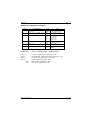
APEX Configuration Jumpers
Jumper
J1
Area of Influence
APEX generated +12 Volts
applied to FLASH
Link
None
Fitted
J2
On-board Video BIOS
J3
On-board FLASH selection
J4
Select DRAM size
J5
On-board Serial port RS485 mode
J6
On-board Serial port RS485 mode
None
Fitted
Factory
Fitted
2M
8M
1
2
Fitted
None
Action
Not applied - programming
disabled
Applied - programming
enabled
Enabled
Disabled
Position 1 for 512KB only
512KByte or 2MB fitted
8MB fitted
Half Duplex selected
Full Duplex selected
Half Duplex selected
Full Duplex selected
Note
When half duplex RS485 mode is selected, DTR is used to direction control.
With DTR asserted in the half duplex mode the RS485 transceiver is
transmitting.
Blue Chip Technology
127-150
Page 44
APEX 104
APEX Connector Pinouts
P1: PC/104 8 bit (64 way)
A
1
2
3
4
5
6
7
8
9
10
11
12
13
14
15
16
17
18
19
20
21
22
23
24
25
26
27
28
29
30
31
32
Signal
-IOCHCK
SD7
SD6
SD5
SD4
SD3
SD2
SD1
SD0
IOCHRDY
AEN
SA19
SA18
SA17
SA16
SA15
SA14
SA13
SA12
SA11
SA10
SA9
SA8
SA7
SA6
SA5
SA4
SA3
SA2
SA1
SA0
0 Volts Ground)
Blue Chip Technology
B
1
2
3
4
5
6
7
8
9
10
11
12
13
14
15
16
17
18
19
20
21
22
23
24
25
26
27
28
29
30
31
32
Signal
0 Volts (Ground)
Resetdrv
+5 Volts
IRQ9
-5 Volts
DREQ2
-12 Volts
-0WS
+12 Volts
0 Volts (Ground)
-SMEMW
-SMEMR
-IOW
-IOR
-DACK3
DREQ3
-DACK1
DREQ1
-REF
CLK
IRQ7
IRQ6
IRQ5
IRQ4
IRQ3
-DACK2
T/C
BALE
+5 Volts
OSC
0 Volts (Ground)
0 Volts (Ground)
127-150
Page 45
APEX 104
P2: PC/104 16 bit (40 way)
D
1
2
3
4
5
6
7
8
9
10
11
12
13
14
15
16
17
18
19
20
Signal
0 Volts (Ground)
-SBHE
LA23
LA22
LA21
LA20
LA19
LA18
LA17
-MEMR
-MEMW
SD8
SD9
SD10
SD11
SD12
SD13
SD14
SD15
No Connection
C
1
2
3
4
5
6
7
8
9
10
11
12
13
14
15
16
17
18
19
20
Signal
0 Volts (Ground)
-MEMCS16
-IOCS16
IRQ10
IRQ11
IRQ12
IRQ15
IRQ14
-DACK0
DREQ0
-DACK5
DREQ5
-DACK6
DREQ6
-DACK7
DREQ7
+5 Volts
-Master
0 Volts (Ground)
0 Volts (Ground)
P3: 3½" Disk Drive (4 way header)
Pin No.
1
2
3
4
Signal
+5 Volts DC
0 Volts (Ground)
0 Volts (Ground)
+12 Volts DC
Blue Chip Technology
127-150
Page 46
APEX 104
P4: Peripheral (20 way header)
Pin No.
1
3
5
7
9
11
13
15
17
19
Signal
Audio +ve
Reset +ve
Turbo LED +ve
Keyboard inhibit
Power LED +ve
Mouse Data
220WPull up
+5V (fused)
+ve Battery input
Keyboard Data
Pin No.
2
4
6
8
10
12
14
16
18
20
Signal
Audio -ve
Reset -ve (Ground)
Turbo LED -ve
0 V (Ground)
Power LED -ve (Ground)
Mouse clock
Reserved
0 Volts (Ground)
0 Volts Battery (Ground)
Keyboard Clock
P5: Battery (3 way header)
Pin No.
1
2
3
4
Signal
+3.6 Volts DC
Not used (key)
0 Volts (Ground)
0 Volts (Ground)
Blue Chip Technology
127-150
Page 47
APEX 104
P6: Parallel (26 way header)
Pin No.
1
3
5
7
9
11
13
15
17
19
21
23
25
Signal
-Strobe
Data bit 0
Data bit 1
Data bit 2
Data bit 3
Data bit 4
Data bit 5
Data bit 6
Data bit 7
-Acknowledge
Busy
Paper Empty
Select (Output)
Pin No.
2
4
6
8
10
12
14
16
18
20
22
24
26
Signal
-Auto Feed XT
-Error
-Initialise
-Select (input)
0 Volts (Ground)
0 Volts (Ground)
0 Volts (Ground)
0 Volts (Ground)
0 Volts (Ground)
0 Volts (Ground)
0 Volts (Ground)
0 Volts (Ground)
Not Used
P7: Co-Processor (36 way header)
Pin No.
1
3
5
7
9
11
13
15
17
19
21
23
25
27
29
31
33
35
Signal
+5 Volts
+5 Volts
+5 Volts
+5 Volts
LD0
LD1
LD2
LD3
LD4
LD5
LD6
LD7
LD8
LD9
LD10
LD11
LD12
LD13
Blue Chip Technology
Pin No.
2
4
6
8
10
12
14
16
18
20
22
24
26
28
30
32
34
36
Signal
LD14
LD15
-READY
-M/IO
PROCLK
RESET
-BUSY
-ADS
-W/R
-NPBUSY
-NPERR
LA23
LA2
386PEREQ
0 Volts (Ground)
0 Volts (Ground)
0 Volts (Ground)
0 Volts (Ground)
127-150
Page 48
APEX 104
P8: Serial 1 RS232 (10 way header)
Pin No.
1
3
5
7
9
Signal
-Data Carrier Detect
Receive Data
Transmit Data
-Data Terminal Ready
0 Volts (Ground)
Pin No.
2
4
6
8
10
Signal
-Data Set Ready
-Ready To Send
-Clear To Send
-Ringing Indicator
Not used
P9: Serial 2 RS485 (10 way header)
Pin No.
1
3
5
7
9
Signal
Full Duplex RX +ve
Full Duplex RX -ve
TX +ve Full Duplex
TX/RX +ve Half
Duplex
TX -ve Full Duplex
TX/RX -ve Half
Duplex
4K7WPull down(0V)
Blue Chip Technology
Pin No.
2
4
6
Signal
4K7WPull up (+5V)
RESERVED
NC
8
NC
10
NC
127-150
APEX 104
Page 49
APEX Bus Signal Descriptions
The following is a description of the APEX (ISA) Bus signals. All signal lines
are TTL compatible.
AEN (O)
'Address Enable' is used to degate the microprocessor and other devices from the
I/O channel to allow DMA transfers to take place. When this line is active, the
DMA controller has control of the address bus, the data-bus Read command
lines (memory and I/O), and the Write command lines (memory and I/O).
BALE (O) (Buffered)
'Address latch enable' is provided by the bus controller and is used on the system
board to latch valid addresses and memory decodes from the microprocessor. It
is available to the I/0 channel as an indicator of a valid microprocessor or DMA
address (when used with 'AEN'). Microprocessor addresses SA0 through SAl9
are latched with the falling edge of 'BALE. ' 'BALE' is forced high during DMA
cycles.
CLK (O)
This is the system clock. The clock has a 50% duty cycle. This signal should
only be used for synchronization. It is not intended for uses requiring a fixed
frequency.
-DACKO through -DACK3 and -DACK5 through -DACK7 (O)
-DMA Acknowledge 0 through 3 and 5 through 7 are used to acknowledge
DMA requests (DRQ0 through DRQ7). They are active low.
DRQ0 through DRQ3 and DRQ5 through DRQ7 (I)
DMA Requests 0 through 3 and 5 through 7 are asynchronous channel requests
used by peripheral devices and the I/O channel microprocessors to gain DMA
service (or control of the system). They are prioritized, with DRQ0 having the
highest priority and DRQ7 having the lowest. A request is generated by bringing
a DRQ line to an active level. A DRQ line must be held high until the
corresponding 'DMA Request Acknowledge'(DACK) line goes active. DRQ0
Blue Chip Technology
127-150
APEX 104
Page 50
through DRQ3 will perform 8 -bit DMA transfers; 'DRQ5' through DRQ7 will
perform l6 bit transfers.
-I/O CHCK (I)
'-I/O channel check' provides the system board with parity (error) information
about memory or devices on the I/O channel. When this signal is active, it
indicates an uncorrectable system error.
I/O CHRDY (I)
'I/O channel ready' is pulled low (not ready) by a memory or I/O device to
lengthen I/O or memory cycles. Any slow device using this line should drive it
low immediately upon detecting its valid address and a Read or Write command.
Machine cycles are extended by an integral number of clock cycles. This signal
should be held low for no more than 2.5 microseconds.
-I/O CS16 (I)
'-I/O 16 bit Chip Select' signals the system board that the present data transfer is
a 16 bit, 1 wait state, I/O cycle. It is derived from an address decode. '- I/O CS
16' is active low and should be driven with an open collector or tri-state driver
capable of sinking 20mA.
-IOR (I/O)
'-I/O Read' instructs an I/O device to drive its data onto the data bus. It may be
driven by the system microprocessor or DMA controller, or by a microprocessor
or DMA controller resident on the I/O channel. This signal is active low.
-IOW (I/O)
'I/O Write' instructs an I/O device to read the data on the data bus. It may be
driven by any microprocessor or DMA controller in the system. This signal is
active low.
Blue Chip Technology
127-150
APEX 104
Page 51
IRQ3 to IRQ7, IRQ9 to IRQ12 and IRQ14 to 15 (I)
Interrupt Requests 3 through 7, 9 through 12, and 14 through 15 are used to
signal the microprocessor that an I/0 device needs attention. The interrupt
requests are prioritized, with IRQ9 through IRQ12 and IRQ14 through IRQ15
having the highest priority (IRQ9 is the highest) and IRQ3 through IRQ7 having
the lowest priority (IRQ7 is the lowest). An interrupt request is generated when
an IRQ line is raised from low to high. The line must be held high until the
microprocessor acknowledges the interrupt request (Interrupt Service routine).
LA17 through LA23 (I/O)
These signals (unlatched) are used to address memory and I/O devices within the
system. They give the system up to 16MB of address capability. These signals
are valid when 'BALE' is high. LA17 through LA23 are not latched during
microprocessor cycles and therefore do not stay valid for the whole cycle. Their
purpose is to generate memory decodes for 1 wait- state memory cycles. These
decodes should be latched by I/O adapters on the falling edge of 'BALE. ' These
signals also may be driven by other microprocessors or DMA controllers that
reside on the I/O channel.
-Master (I)
This signal is used with a DRQ line to gain control of the system. A processor or
DMA controller on the I/O channel may issue a DRQ to a DMA channel in
cascade mode and receive a '- DACK'. Upon receiving the '- DACK', an I/O
microprocessor may pull '- Master' low, which will allow it to control the system
address, data, and control lines (a condition known as tri-state). After '- Master'
is low, the I/O microprocessor must wait one system clock period before driving
the address and data lines, and two clock periods before issuing a Read or Write
command. If this signal is held low for more than 15 microseconds, system
memory may be lost because of a lack of refresh.
-MEMCS16 (I)
'-MEM 16 Chip Select' signals the system board if the present data transfer is a 1
wait-state, 16 bit, memory cycle. It must be derived from the decode of LA17
through LA23. '-MEM CS 16' should be driven with an open collector or tristate driver capable of sinking 20 mA.
Blue Chip Technology
127-150
APEX 104
Page 52
OSC (O)
'Oscillator' (OSC) is a high speed clock with a 70 nanosecond period (14.31818
MHz). This signal is not synchronous with the system clock. It has a 50 % duty
cycle.
0WS (I)
The 'Zero Wait State' (0WS) signal tells the microprocessor that it can complete
the present bus cycle without inserting any additional wait cycles. In order to run
a memory cycle to a 16 bit device without wait cycles, '0WS' is derived from an
address decode gated with a Read or Write command.
In order to run a memory cycle to an 8 bit device with a minimum of two wait
states, '0WS' should be driven active on system clock after the Read or Write
command is active gated with the address decode for the device. Memory Read
and Write commands to a 8 bit device are active on the falling edge of the
system clock. '0WS' is active low and should be driven with an open collector or
tri-state driver capable of sinking 20 mA.
-Refresh (I/O)
This signal is used to indicate a refresh cycle and can be driven by a
microprocessor on the I/O channel.
Reset Drive (O)
'Reset drive' is used to reset or initialize system logic at power up time or when
the power supply drops below its minimum level. This signal is active high.
SA0 through SAl9 (I/O)
Address bits 0 through 19 are used to address memory and I/O devices within
the system. These twenty address lines, in addition to LA17 through LA23,
allow access of up to 16MB of memory. SA0 through SAl9 are gated on the
system bus when 'BALE' is high and are latched on the falling edge of 'BALE. '
Blue Chip Technology
127-150
APEX 104
Page 53
These signals are generated by the microprocessor or DMA Controller. They
also may be driven by other microprocessors or DMA controllers that reside on
the I/O channel.
Blue Chip Technology
127-150
APEX 104
Page 54
SBHE (I/O)
'Bus High Enable' (system) indicates a transfer of data on the upper byte of the
data bus, SD8 through SD15. 16 bit devices use 'SBHE' to condition data bus
buffers tied to SD8 through SD15.
SD0 through SD15 (I/O)
These signals provide data bus bits 0 through 15 for the microprocessor,
memory, and I/O devices. D0 is the least significant bit and Dl5 is the most
significant bit. All 8 bit devices on the I/O channel should use D0 through D7
for communications to the microprocessor. The l6 bit devices will use D0
through D15. To support 8 bit devices, the data on D8 through D15 will be gated
to D0 through D7 during 8 bit transfers to these devices. 16 bit microprocessor
transfers to 8 bit devices will be converted to two 8 bit transfers.
-SMEMR (O)- MEMR (I/O)
These signals instruct the memory devices to drive data onto the data bus. 'SMEMR' is active only when the memory decode is within the low lMB of
memory space. '- MEMR' is active on all memory read cycles. '- MEMR' may be
driven by any microprocessor or DMA controller in the system. '- SMEMR' is
derived from 'MEMR' and the decode of the low lMB of memory. When a
microprocessor on the I/O channel wishes to drive '- MEMR', it must have the
address lines valid on the bus for one system clock period before driving 'MEMR' active. Both signals are active low.
-SMEMW (O)- MEMW (I/O)
These signals instruct the memory devices to store the data present on the data
bus. '- SMEMW' is active only when the memory decode is within the low 1 MB
of the memory space. '- MEMW' is active on all memory write cycles. '- MEMW'
may be driven by any microprocessor or DMA controller in the system. 'SMEMW' is derived from '- MEMW' and the decode of the low lMB of memory.
When a microprocessor on the I/O channel wishes to drive '- MEMW', it must
have the address lines valid on the bus for one system clock period before
driving '- MEMW' active. Both signals are active low.
T/C (O)
Blue Chip Technology
127-150
APEX 104
Page 55
'Terminal Count' provides a pulse when the terminal count (end of) for any
DMA channel is reached.
Blue Chip Technology
127-150
Page 56
APEX 104
I/O Address Map
Hex Range
0000 - 00lF
0020 - 003F
0040 - 005F
0060 - 006F
0070 - 007F
0080 - 008F
00A0 - 00BF
00C0 - 00DF
00F0
00F1
00F8 - 00FF
0100H
0101H
0102H
0103H
0104H
0105H
01F0 - 01F8
0200 - 0207
0278 - 027F
0208 - 021A
02E8 - 02EF
02F8 - 02FF
0300 - 031F
0360 - 036F
0378 - 037F
0380 - 038F
03A0 - 03AF
03B0 - 03DF
03E8 - 03EF
03F0 - 03F7
03F8 - 03FF
Device
DMA Controller 1
Interrupt Controller 1, Master
Timer & Index registers for SCATsx
8042 (Keyboard & Mouse)
Realtime Clock, NMI Mask
POST, DMA Page Register
Interrupt Controller 2, Slave
DMA Controller 2
Clear Maths Coprocessor Busy
Reset Maths Coprocessor
Maths Coprocessor
E²PROM Access
Watchdog
FLASH Access
Peripheral disable
Serial Port Rs232 or 485/ Half or Full
Duplex
24 Digital I/O
Hard (fixed) Disk Controller
Games port
Parallel Printer Port 2
EMS Page registers ( either 208 or 218,
etc)
Serial Port 4
Serial Port 2
Prototype Card/Digital PIO
Reserved
Parallel Printer Port 1
SDLC, Bi-synchronous 2
Bi-synchronous 1
Video Adapter
Serial Port 3
Floppy Diskette Controller
Serial Port 1
Blue Chip Technology
Occupied by
APEX
(default)
9
9
9
9
9
9
9
9
9
9
9
9
9
9
Occupied by
APEX-CI 2
(default)
9
9
9
9
9
9
9
9
9
9
9
9
127-150
Page 57
APEX 104
Interrupt Assignments
Interrupt
NMI
0
1
2
3
4
5
6
7
8
9
10
11
12
13
14
15
Device
Parity Check (generates IOCHCK on error)
Timer
Keyboard (Output Buffer Full)
Cascaded from Interrupt 9
Serial Port 2 (also 4, 6 & 8 if sharing
interrupts)
Serial Port 1 (also 3, 5 & 7 if sharing
interrupts)
Parallel Port 2
Floppy Diskette Controller
Parallel Port 1
Real Time Clock
VGA controller
Unassigned
Unassigned
PS/2 Mouse
Unassigned
Hard (Fixed) Disk Controller
Unassigned
Occupied
on APEX
(default)
9
9
9
9
9
Occupied by
APEX-CI 2
(default)
9
9
9
9
9
9
9
9
DMA Assignments
DMA
Channel
8/16 bit
Peripherals
0
8 bit
1
2
3
4
8 bit
8 bit
8 bit
16 bit
5
6
7
16 bit
16 bit
16 bit
Blue Chip Technology
Device
Available (usually Refresh
but free on APEX)
Available
Diskette Drive
Available
Cascaded to 1st DMA
controller
Available
Available
Available
Occupied
on APEX
(default)
Occupied by
APEX-CI 2
(default)
9
9
127-150
Page 58
APEX 104
POST Error Codes
The BIOS performs a Power On Self Test after a reset or reboot. During the
POST the microprocessor indicates the state of the test by writing codes to the
I/O port address 80 hex. The APEX offers on-board decode of this information
and can drive the optional POST display without modification. The following
codes indicate the progress of the microprocessor during the test.
Code
(Hex)
01
02
03
04
05
06
07
08
09
0A
0B
0C
0D
0E
0F
10
11
12
13
14
15
16
17
18
19
1A
1B
20
21
22
23
24
25
26
27
28
29
2A
2B
Description
Processor register test starting. NMI disabled next.
NMI disabled. Power-on delay starting.
Power-on delay complete. Keyboard initialisation.
Keyboard initialisation complete.
Checking soft or cold start via keyboard SYS bit.
Enabled ROM. Calculating BIOS checksum.
Sending BAT command to the keyboard controller.
BAT command sent.
BAT verified.
Keyboard command code byte sent.
Keyboard command data byte sent.
Keyboard controller blocked and unblocked.
Keyboard controller NOP command complete.
CMOS RAM shutdown register test passed.
CMOS RAM checksum complete and the DIAG byte is written.
CMOS RAM initialised.
CMOS RAM status register initialised.
DMA and Interrupt controllers disabled.
Video display disabled.
SCATsx initialisation complete. Auto memory detection complete.
8254 timer channel 2 test half complete.
8254 timer channel 2 test complete.
8254 timer channel 1 test complete.
8254 timer channel 0 test complete.
Memory refresh started.
Memory refresh toggling test completed.
Memory refresh test at 15uS completed.
Start 64KB base memory test.
Memory address line test completed.
Memory parity toggling completed.
Base 64KB memory read/write test passed.
System configuration before vector initialisation completed.
Interrupt vector initialisation completed.
8042 input port read. Turbo initialisation completed.
Global data initialisation done.
Initialisation complete.
Monochrome mode is set.
Colour mode set.
Parity toggle completed.
Blue Chip Technology
127-150
Page 59
APEX 104
2C
2D
2E
2F
30
31
32
33
34
35
36
37
38
39
3A
3B
40
41
42
43
44
45
46
47
48
49
4A
4B
4C
4D
4E
4F
50
51
52
53
54
55
56
57
58
59
60
61
62
63
64
65
66
67
80
Initialise for video ROM done.
Video ROM check complete.
Complete video ROM processing.
No EGA or VGA adapter has been found.
Video display read/write test completed.
Video display read/write or retrace test failed.
Alternate video display read/write test passed.
Video display check completed.
Verification of video adapter done.
Video display mode set.
BIOS ROM data area check completed.
Cursor setting for power-on message done.
Display power-on message.
New cursor position has been read and saved.
BIOS identification string displayed.
Hit "DEL" message displayed.
Prepare virtual mode test.
Verifying display memory completed.
Descriptor tables prepared.
Entered virtual mode.
Interrupts are enabled if the diagnostics switch is on.
Data initialised for memory wrap around check.
Memory wrap around check completed. Memory size check completed.
Memory test patterns written to extended RAM.
Memory test patterns written to conventional RAM.
Memory size below 1MB established.
Memory size above 1MB established.
BIOS ROM data area check completed.
Memory below 1MB cleared via a soft reset.
Memory above 1MB cleared via a soft reset.
Memory test started. No soft reset was performed.
Memory size display has begun. The display is updated during the test.
Memory test below 1MB is completed.
Memory size has been adjusted for memory relocation above 1MB.
Memory test above 1MB complete.
CPU registers saved.
CPU in real mode. Shutdown successful.
CPU registers restored.
Gate A20 address line disabled.
BIOS ROM data area check partially complete.
BIOS ROM data area check complete.
"Hit DEL" message has been cleared.
DMA page register test passed.
Display memory test completed.
DMA controller1 test passed.
DMA controller2 test passed.
BIOS ROM data area check partially complete.
BIOS ROM data area check complete.
DMA controllers 1&2 programmed.
8259 interrupt controller initialisation done.
Keyboard test started.
Blue Chip Technology
127-150
Page 60
APEX 104
81
82
83
84
85
86
87
88
89
8A
8B
8C
8D
8E
8F
90
91
92
93
94
95
96
97
98
99
9A
9B
9C
9D
9E
9F
A0
A1
A2
A3
A4
A5
A6
A7
A8
A9
00
Keyboard reset command passed.
Keyboard controller interface test done.
Command byte written and global initialisation complete.
Lock key checking done.
Memory size check done.
Password has been checked.
Programming before Setup complete.
Returned from Setup program and cleared the screen.
Programming after Setup completed.
The power-on screen message is displayed.
The "Wait..." message is displayed.
System and video BIOS shadowing successful.
Setup options are programmed.
Mouse test and initialisation done.
Floppy Disk check identify that the drive needs initialising.
Floppy Disk configuration complete.
Hard Disk presence check completed.
Hard Disk configuration completed.
BIOS ROM data area check partially complete.
BIOS ROM data area check fully completed.
Memory size adjusted because of mouse support and hard disk type 47.
Display memory verified.
Pre-initialisation for expansion ROM operation completed.
Expansion ROM control test completed.
Initialisation for option ROM test completed.
Set timer data area and parallel printer base address.
Set asynchronous base addresses.
Initialisation for coprocessor test completed.
Coprocessor partially initialised.
Coprocessor initialised.
Extended keyboard flags checked.
Keyboard ID command issued.
Keyboard ID flag reset has been done.
Cache memory test completed.
Soft error test completed.
Keyboard typematic rate is set.
Memory wait states set.
Screen cleared.
NMI and parity enabled.
Initialisation before E0000H adapter ROM control invoked.
E0000H adapter ROM control completed.
System configuration displayed. Passing control to INT 19H bootstrap
Loader now.
Blue Chip Technology
127-150
Page 61
APEX 104
Wiring to the Peripheral Connector
Speaker
-Ve
PS/2 Mouse
Front View
6 Pin Mini Din
6
5
P4
+ve
1
2
Reset
Switch
Turbo
Led
4
3
2
1
Power
Led
N/C
N/C
+
Option 1
Battery
3.6v
-
10k
Rear View
Keyboard
5 Pin DIN
Socket
Please note that all LED drive outputs have a 220 ohm serial resistor connected
to the +5 volt supply rail, and the +5v supply to the keyboard is fused (via a
SMD fuse) at 1 Amp.
Blue Chip Technology
127-150
APEX 104
Page 62
Apex BIOS Extensions
The APEX provides a BIOS extension at address C800:0000 which provides the
programmer with access to the additional hardware found on the board. The
BIOS extension hooks into software interrupt 50. The programmer loads a
particular function code into the AH register followed by a specific set of
parameters in the other registers before executing the interrupt. Most high level
languages allow access to software interrupts through a particular function call.
For example, in Quick Basic :' Read E2 Data via interrupt 50 call
$include:'QB.BI'
DIM INARY%(7),OUTARY%(7)
CONST AX=0,BX=1,CX=2,DX=3,BP=4,SI=5,DI=6,FL=7
INARY%(AX) = &H0400
' Read e2 data
INARY%(BX) = &h21
' address &h31
CALL INT86OLD(&h50,INARY%(),OUTARY%()) ' Call the APEX ' service
PRINT "E2 ADDRESS &h31 CONTAINS: ";OUTARY%(DX)
Similarly in C :#include <stdio.h>
#include <dos.h>
#define APEX 0x50
void main(void)
{
union REGS regs;
regs.x.ax = 0x0400; /* read e2 */
regs.x.bx = 0x31; /* address 0x31 */
int86(APEX, ®s, ®s);
printf("e2 Address 0x31 contains %x\n",regs.x.dx);
}
Blue Chip Technology
127-150
Page 63
APEX 104
Flash Memory Functions
The APEX has on-board Flash memory options of 128KB, 256KB, 512KB and
1MB. Flash memory is similar to UV erasable EPROM in that all the memory
locations must be erased before it can be reprogrammed. The advantage over
EPROM is that Flash can be erased electrically with the device in situ.
The APEX BIOS Extension provides 3 functions which allow the programmer
access to
the flash memory, these are:
A.
Read one or more FLASH Sectors into RAM
B.
Write one or more FLASH Sectors
C.
Erase all FLASH
Read FLASH Sector
Calling Registers:
AH = 00
AL = Device number (00 for internal flash)
CX = Number of sectors to transfer
DX = Start Sector
DS:BX = Pointer to users buffer
Return Registers:
Carry Clear if successful
Carry Set if unsuccessful with error code in AX
This function is provided to allow transfer of data from the internal FLASH
EPROM. Each FLASH sector is 512 bytes long. The maximum value for the
starting sector is 254.
Blue Chip Technology
127-150
Page 64
APEX 104
Write FLASH Sector
Calling Registers:
AH = 01
AL = Device number (00 for internal
flash)
CX = Number of sectors to transfer
DX = Start Sector
DS:BX=Pointer to users buffer
Return Registers: Carry clear if successfully
Carry set if unsuccessful
This function is provided to allow transfer of data from a user buffer to the
internal FLASH. Each flash sector is 512 bytes long and the maximum value for
the starting sector
is 254.
NOTE: Each flash sector can only be programmed once - in order to re-write a
sector
the FLASH FORMAT function must be called first.
FLASH Format
Calling Registers:
Return Registers:
AH = 02
Carry clear if successful
Carry Set if unsuccessful
This function erases the entire contents of the FLASH. Depending on the age of
the FLASH this can take up to 10 seconds to complete.
Blue Chip Technology
127-150
Page 65
APEX 104
E2 Functions
Unlike the FLASH ROM, e2 does not require to be completely erased before a
single location is written. It is therefore more useful for storage of configuration
information.
The APEX contains 64 16bit words of e2 memory - the lower 32 are reserved for
use by Blue Chip Technology for configuration information, the top 32 are
available to the user for any purpose.
The APEX BIOS extension provides two functions to allow access to the e2
memory these are:
1.
Write to a single e2 memory location
2.
Read from a single e2 memory location
1.
Write to e2 Memory
Calling Registers:
AH = 03
BL = Location to write to (0-63)
DX = Data to Write (16 bit value)
Return Registers:
Carry flag clear if successful
Carry flag Set if unsuccessful
2.
Read e2 Memory
Calling Registers:
AH = 04
BL = Location to read (0-63)
Return Registers:
DX = e2 Data
Blue Chip Technology
127-150
Page 66
APEX 104
Watchdog Facility
The APEX contains a simple hardware watchdog function. When enabled, the
watchdog will generate a hardware reset if a RESET WATCHDOG function call
is not made at least once every 1.5 seconds
Two functions are available to control the watchdog
1.
Enable/Disable Watchdog function
2.
Reset Watchdog
1.
Enable/Disable Watchdog
Calling Registers:
AH = 05
AL = 00 or 01
if AL is 00, watchdog function is disabled
if AL is 01, watchdog function is enabled
Return Registers: NONE
2.
Reset Watchdog
Calling Registers:
AH = 06
Return Registers: NONE
System Identification
In order to detect whether software is running on an APEX unit a function has
been provided which returns a unique unit identification.
Calling Registers:
AH = 09
Return Registers:
DX = 4981
Blue Chip Technology
127-150
Page 67
APEX 104
The following C routine demonstrates the use of this function
****************************************************************
unsigned int System_ID(void)
{
// return system ID code
struct REGPACK
reg.r_ax = 0x0900
reg.r_dx = 0x0000
intr(0x50,®)
return reg.r_dx
regs;
// Function to return ID code
// Clear DX
// ID returned in DX
// APEX returns 0x4981
// Any other system will return 0x0
}
*****************************************************************
******
Blue Chip Technology
127-150
Page 68
APEX 104
APEX Utilities
Remote Disk
The remote disk facility allows the APEX to communicate with floppy diskette
drives and hard disk drives through a serial communications link to a PC-based
host computer running DOS.
i.
Configuration
Use the Extended Setup program to configure the remote disk - If the remote is
enabled, all other options relating to disks are overridden.
ii.
Making the Connection
The remote disk requires only RX ,TX and Ground lines from the serial port to
operate correctly. Connect the RX line from the serial port on the Host computer
to the TX line on the serial port on the APEX ,and the RX line from the APEX
to the TX line on the Host
iii.
The Server
In order for the host computer to operate as a server, two files are required from
the APEX UTILITIES disk, these are
REMSVR.SYS - A Device driver
SERVER.EXE - A remote disk monitor program
Copy both of these files onto the host computer, make sure that REMSVR.SYS
is copied into the root directory and add the following entry to CONFIG.SYS
DEVICE = REMSVR.SYS
If the host is using a COM port other than COM1 for communication to the
APEX add the comport number after REMSVR.SYS on this line.
Reboot the host computer and run SERVER.EXE - if the device driver is
installed correctly, the remote disk status screen will be displayed, if not, check
the entry in the CONFIG.SYS file.
Blue Chip Technology
127-150
APEX 104
Page 69
iv.
Using the Remote Disk
Connect the APEX to the Host computer and reboot the APEX with the Host
running the SERVER.EXE program.If all is well the APEX should display:
REMOTE DISK INSTALLED
[Connected]
Prior to booting.
The APEX will then attempt to boot from the host's disk, the serial link operates
at 115Kbaud - even so, the data transfer rate is typically only 2 or 3 Kbytes per
second which is slow even compared to floppy disks, so please be patient!
WARNING
The remote disk will only operate correctly with operating systems which rely on
the BIOS disk services for disk access - certain operating systems such as
WINDOWS which communicate directly with disk hardware will cause the
remote disk to hang. In extreme cases data on the disk can be corrupted - Blue
Chip Technology accept no responsibility for data corrupted in this way, we
recommend that the remote disk is used initially to access floppy drives only,
where potential damage is less likely.
Blue Chip Technology
127-150
Page 70
APEX 104
Overview
Desk Top
PC
I/O Res Turbo
PC runs Server Program
which lets the APEX CPU
access the PC's drive A:
A
Simple 3 wire
RS232 Serial Link.
Link Normally on
Com1 of the PC
to Com1 of the
APEX unit
C
Keyboard
Display
APEX CPU
Com1
Power Input
APEX unit runs special Remote Disk
program via the BIOS
Blue Chip Technology
127-150
Page 71
APEX 104
Flash Disk
The on-board FLASH can be configured to appear to the system as a read only
720KB or 1.44MB floppy disk. Use the Extended Setup program to enable the
FLASH as either drive A or drive B.
In order to copy files onto the FLASH first take a blank
formatted diskette. Copy the files required on the FLASH disk onto this diskette.
Once all the required files are assembled on the diskette run the program
PROGFLSH.EXE, found on the APEX UTILITIES disk - the command line for
this program is PROGFLASH <src. drive> , where src. drive is the source drive
of the floppy diskette containing the files to be copied on the FLASH Disk.
PROGFLASH will copy from the diskette onto the FLASH Disk. The FLASH
Disk is now ready for use.
For APEX systems which contain no floppy drives, a utility is provided which
copies data from a floppy disk on a remote PC.
The program PFREMOTE.EXE operates in exactly the same way as
PROGFLAS.EXE except the disk is copied from another computer connected to
the APEX via a serial cable.
To use PFREMOTE the host system must be prepared by loading the Remote
Disk Server REMSVR.SYS.
Add the line :
DEVICE = REMSVR.SYS <port>
to the CONFIG.SYS file, add ,port. to specify the serial port the host will use to
communicate with the APEX.
Now load the program SERVER.EXE on the host system.
Connect COM1 on the APEX to the host serial port (the cable should cross TX
and RX, no modem control signal need be connected).
Blue Chip Technology
127-150
APEX 104
Page 72
The host is now ready for remote access. To re-program the FLASH disk on the
APEX run PFREMOTE.EXT on the APEX (the command line is the same as
PROGFLAS.EXE and insert the 720KB disk to copy into the floppy drive of the
host system.
Blue Chip Technology
127-150
APEX 104
Page 73
APEX CI-2
Introduction
The APEX-CI 2 is a member of the APEX 104 family. It stacks to the APEX
104 CPU via the PC/104 compatible interface (P1 & P2). The APEX-CI 2
provides standard computer interfaces by the use of two VLSI devices. These
are:
CL-GD6235 which provides VGA compatible video output to both CRT & LCD
displays. SMC37C663 which provides floppy, ID & 2 serial ports
For further information on these devices please contact your supplier.
Specification
On-board Features
•
•
•
•
•
•
•
•
VGA compatible with CRT resolutions up to 1024 by 768 by 16 colours
with 512KByte video memory as standard
VGA compatible with LCD resolutions up to 640 by 480 driving mono,
colour STN, dual scan STN, TFT LCDs & EL displays
2 Asynchronous 16C550 compatible software selectable serial ports
providing either RS232 or RS485 interfaces
Dual IDE interface for embedded hard drives
Dual Floppy Disk controller (UPD72065B compatible) with on-chip Analog
data separator
24 Channel programmable I/O
Low power operation
PC/104 compatible
Blue Chip Technology
127-150
APEX 104
Page 74
Video
The APEX-CI 2 offers a VGA compatible interface with resolutions up to 1024
by 768 by 16 colours. The BIOS is resident on the APEX processor card at
memory address C0000 to C7FFF hex and is enabled/disabled by J2 on the
APEX CPU. The data highway to APEX is via a 16 bit interface ensuring
optimum speed for graphics applications. Connections to a CRT monitor are
made via P7 on the APEX CI-2 . This is a 10 way header and requires an custom
cable to interface to the standard 15 way condensed D type connector used on
most monitors. The CRT output is compatible with VGA mono, colour and
multisync monitors.
Connections to the LCD output are made via P4 on the APEX CI-2. This is a 40
way socket. For connection details please refer to the Display connection
Appendix at the rear of this manual.
Serial Ports
Two asynchronous 16C550 compatible interfaces are provided by the APEX-CI.
Both serial ports can operate in either RS232 or RS485 modes. When in RS485
mode either half (2 wire) or (4 wire) full duplex operation can be software
selected via the Setup menu. DTR is used for direction control. The APEX-CI 2
generates its own RS232 levels on-board allowing 5 volt only operation. The
AMI BIOS provides built-in configuration of I/O addresses and interrupt usage.
Note
If the APEX CPU’s on-board serial & parallel ports are enabled then COM1,
COM2 and LPT1 will already be occuppied. Use Extended Setup Menu to enable
and disable the APEX CPU serial ports.
Blue Chip Technology
127-150
Page 75
APEX 104
Digital PIO
The APEX-CI 2 has an on-board 8255 (NEC 71055) I/O device allowing the up
to 24 digital (TTL) input/outputs. Connector P8 is a 26 way header providing
interfacing for three 8 bit ports and two digital grounds (0 volts). The base
address is selectable as 0200 or 0300 Hex and is configured via the Extended
Setup Menu.
For full details on programming this device please refer to Appendix A at the
rear of this manual.
Disk Drives
Floppy
The APEX-CI 2 has built in support for two floppy disk drives. These drives can
be any permutation of the following:
Capacity
360KB
720KB
1.2MB
1.44MB
2.88MB
Drive Size
5¼"
3½"
5¼"
3½"
3½"
The BIOS Setup allows you to configure the drives for your installation.
A standard PC 34 way ribbon cable with twisted lines can be connected to two
drives both set as drive 1 (as opposed to 0). This is possible because the IBM
convention twists the drive select and motor control lines between the two drive
connections. Connection to floppy is made using P9.
Remember that only one drive in the chain should be terminated. That should be
the drive furthest from the APEX. Without correct termination drive operation
can be unreliable. In high noise environments it may be necessary to use
shielded ribbon cable. Do not extend the cable length beyond 1 metre.
Blue Chip Technology
127-150
Page 76
APEX 104
Hard (IDE) Drive
The on-board IDE interface allows the connection of up to two hard drives.
These connect to the APEX-CI 2 via P5 which is a 40 way header. The
maximum length of ribbon cable to be used for reliable operation is 450mm.
Each drive can be one of the following 46 types or alternatively a custom type 47
(i.e. each drive can be a different type 47).
Should problems be experienced with the hard disk operation please check the
status of both J4 & J5 on the APEX-CI 2 card. J4 selects whether the ALE
(Address Latch Enable) signal is passed through to the hard drive. Where
problems are being experienced, especially in electrically noisy environments,
try changing the link.
J5 selects whether pin 34 of the IDE interface is grouded or left floating. This
should only be changed after consulting your IDE drive data sheet. With the link
present ground is applied to pin 34.
Hard Disk Types
Hard disk drive types are identified by the following parameters:
Parameter
Type
Cylinders
Heads
Write
Precompensation
Landing Zone
Sectors
Capacity
Blue Chip Technology
Description
A designation for a hard disk drive with
predefined parameters
The number of cylinders in the disk drive.
The number of heads.
The size of a sector gets progressively smaller
as the track diameter diminishes. Yet each sector must still hold
512 bytes. Write precompensation circuitry difference in sector
size by boosting the write current for sectors on inner tracks. This
parameter is the track number where write precompensation
begins.
The number is the cylinder location where the
heads normally park when the system is shut
down.
The number of sectors per track. Hard drives that use MFM have
17 sectors per track. RLL drives have 26 sectors per track. ARLL
and ESDI drives have 34 sectors per track. SCSI and IDE drives
may have even more sectors per track.
The formatted capacity of the drive based on the following
formula:
(Number of heads) * (Number of cylinders) * (Number of
sectors per cylinder) * (512 bytes per sector)
127-150
Page 77
APEX 104
The standard 46 hard disk type are as follows:
Type
No. of
No. of
Write
Landing
No. of
Cylinders
heads
Precompen-
Zone
Sectors
Size
1
306
4
128
305
17
10MB
2
615
4
300
615
17
20MB
3
615
6
300
615
17
31MB
4
940
8
512
940
17
62MB
5
940
6
512
940
17
47MB
6
615
4
65535
615
17
20MB
7
462
8
256
511
17
31MB
8
733
5
65535
733
17
30MB
9
900
15
65535
901
17
112MB
10
820
3
65535
820
17
20MB
11
855
5
65535
855
17
35MB
12
855
7
65535
855
17
50MB
13
306
8
128
319
17
20MB
14
733
7
65535
733
17
43MB
16
612
4
0
663
17
20MB
17
977
5
300
977
17
41MB
18
977
7
65535
977
17
57MB
sation
15
19
1024
7
512
1023
17
60MB
20
733
5
300
732
17
30MB
21
733
7
300
732
17
43MB
22
733
5
300
733
17
30MB
23
306
4
0
336
17
10MB
24
925
7
0
925
17
54MB
25
925
9
65535
925
17
69MB
26
754
7
754
754
17
44MB
27
754
11
65535
754
17
69MB
28
699
7
256
699
17
41MB
29
823
10
65535
823
17
68MB
30
918
7
918
918
17
53MB
31
1024
11
65535
1024
17
94MB
32
1024
15
65535
1024
17
128MB
Blue Chip Technology
127-150
Page 78
APEX 104
33
1024
5
1024
1024
17
43MB
34
612
2
128
612
17
10MB
35
1024
9
65535
1024
17
77MB
36
1024
8
512
1024
17
68MB
37
615
8
128
615
17
41MB
38
987
3
987
987
17
25MB
39
987
7
987
987
17
57MB
40
820
6
820
820
17
41MB
41
977
5
977
977
17
41MB
42
981
5
981
981
17
41MB
43
830
7
512
830
17
48MB
44
830
10
65535
830
17
69MB
45
917
15
65535
918
17
114MB
46
1224
15
65535
1223
17
152MB
Blue Chip Technology
127-150
Page 79
APEX 104
APEX-CI 2 Configuration Jumpers
Jumper
J1
J3
Area of Influence
Serial port 1 RS485 Duplex
termination
Serial port 2 RS485 Duplex
termination
LCD Mode Select
J4
IDE interface
J5
IDE interface
J6
Video Controller selection
J2
Link
None
Fitted
None
Fitted
3 2 1
0 0 0
0 0 1
0 1 0
0 1 1
None
Fitted
None
Fitted
DIS
EN
Action
No termination on-board
100R & 100nF in circuit
No termination on-board
100R & 100nF in circuit
See Table below
Panel Class 0
Panel Class 1
Panel Class 2
Panel Class 3
Removes ALE from IDE
Connects ALE to IDE
Pin 34 floats
Pin 34 is grounded
Disable
Enable
LCD Table:
Note: 0 = link present, 1 = no link present
Class 0:
Class 1:
Class 2:
Class 3:
8 colour, single panel, single scan, 16 bit
Monochrome, 2 shade, dual panel, dual scan, 8 bit
8 colour, dual panel, dual scan, 16 bit
256K colour,single panel, 18 bit
4096 colour, single panel, 12 bit
512 colour, single panel, 9 bit
and
and
Blue Chip Technology
127-150
Page 80
APEX 104
APEX-CI 2 Connector Pin-outs
P1: PC/104 8 bit (64 way)
A
1
2
3
4
5
6
7
8
9
10
11
12
13
14
15
16
17
18
19
20
21
22
23
24
25
26
27
28
29
30
31
32
Signal
-IOCHCK
SD7
SD6
SD5
SD4
SD3
SD2
SD1
SD0
IOCHRDY
AEN
SA19
SA18
SA17
SA16
SA15
SA14
SA13
SA12
SA11
SA10
SA9
SA8
SA7
SA6
SA5
SA4
SA3
SA2
SA1
SA0
0 Volts Ground)
Blue Chip Technology
B
1
2
3
4
5
6
7
8
9
10
11
12
13
14
15
16
17
18
19
20
21
22
23
24
25
26
27
28
29
30
31
32
Signal
0 Volts (Ground)
Resetdrv
+5 Volts
IRQ9
-5 Volts
DREQ2
-12 Volts
-0WS
+12 Volts
0 Volts (Ground)
-SMEMW
-SMEMR
-IOW
-IOR
-DACK3
DREQ3
-DACK1
DREQ1
-REF
CLK
IRQ7
IRQ6
IRQ5
IRQ4
IRQ3
-DACK2
T/C
BALE
+5 Volts
OSC
0 Volts (Ground)
0 Volts (Ground)
127-150
Page 81
APEX 104
P2: PC/104 16 bit (40 way)
D
1
2
3
4
5
6
7
8
9
10
11
12
13
14
15
16
17
18
19
20
Signal
0 Volts (Ground)
-SBHE
LA23
LA22
LA21
LA20
LA19
LA18
LA17
-MEMR
-MEMW
SD8
SD9
SD10
SD11
SD12
SD13
SD14
SD15
No Connection
C
1
2
3
4
5
6
7
8
9
10
11
12
13
14
15
16
17
18
19
20
Signal
0 Volts (Ground)
-MEMCS16
-IOCS16
IRQ10
IRQ11
IRQ12
IRQ15
IRQ14
-DACK0
DREQ0
-DACK5
DREQ5
-DACK6
DREQ6
-DACK7
DREQ7
+5 Volts
-Master
0 Volts (Ground)
0 Volts (Ground)
P3: RS422/485 Serial (10 way header)
Pin No.
1
3
5
7
9
Signal
+ve Receive Data 1
-ve Receive Data 1
+ve Transmit Data 1
-ve Transmit Data 1
10KWpull down (0V)
Blue Chip Technology
Pin No.
2
4
6
8
10
Signal
10KWpull up (+5V)
+ve Receive Data 2
-ve Receive Data 2
+ve Transmit Data 2
-ve Transmit Data 2
127-150
Page 82
APEX 104
P4: LCD Interface (40 way socket)
Pin
No.
2
4
6
8
10
12
14
16
18
20
22
24
26
28
30
32
34
36
38
40
Description
LCDRST
NPD
FVSYNC
FHSNYC
STANBY
SUSPEND
DE
FPBACK
FPVCC
FPVEE
VCC (APEX)
GND (APEX)
GND (APEX)
GND (APEX)
GND (APEX)
N/C
B1 / SLD1 / LD1
B0 / SLD0 / LD0
VCC (APEX)
N/C
Blue Chip Technology
Pin
No.
1
3
5
7
9
11
13
15
17
19
21
23
25
27
29
31
33
35
37
39
Description
FPVDCLK
MOD
LFS
LLCLK
R5
R4
R3 / SUD7
R2 / SUD6
G5 / SUD5
G4 / SUD4
G3 / SUD3
B5 / SUD2
B4 / SUD1
B3 / SUD0
R1 / SLD7 / UD3
R0 / SLD6 / UD2
G2 / SLD5 / UD1
G1 / SLD4 / UD0
G0 / SLD3 / LD3
B2 / SLD2 / LD2
127-150
Page 83
APEX 104
P5: IDE/Hard Drive (40 way header)
Pin No.
1
3
5
7
9
11
13
15
17
19
21
23
25
27
29
31
33
35
37
39
Signal
-Reset
Data bit 7 (HD)
Data bit 6 (HD)
Data bit 5 (HD)
Data bit 4 (HD)
Data bit 3 (HD)
Data bit 2 (HD)
Data bit 1 (HD)
Data bit 0 (HD)
0 Volts DC (Ground)
Not used
-IO Write (HD)
-IO Read (HD)
Not used
Not used
IRQ14
Address 1 (HD)
Address 0 (HD)
-Chip Select 0 (HD)
IDE LED Drive
Pin No.
2
4
6
8
10
12
14
16
18
20
22
24
26
28
30
32
34
36
38
40
Signal
0 Volts DC (Ground)
Data bit 8 (HD)
Data bit 9 (HD)
Data bit 10 (HD)
Data bit 11 (HD)
Data bit 12 (HD)
Data bit 13 (HD)
Data bit 14 (HD)
Data bit 15 (HD)
Not used
0 Volts DC (Ground)
0 Volts DC (Ground)
0 Volts DC (Ground)
ALE (HD)
0 Volts DC (Ground)
IOCS16
Ground/Float (via link)
Address 2 (HD)
-Chip Select 1 (HD)
0 Volts DC (Ground)
P6: Digital I/O Port (26 way header)
Pin No.
1
3
5
7
9
11
13
15
17
19
21
23
25
Signal
PA0
PA1
PA2
PA3
PA4
PA5
PA6
PA7
PC0
PC1
PC2
PC3
0 Volts (Ground)
Blue Chip Technology
Pin No.
2
4
6
8
10
12
14
16
18
20
22
24
26
Signal
PB0
PB1
PB2
PB3
PB4
PB5
PB6
PB7
PC4
PC5
PC6
PC7
0 Volts (Ground)
127-150
Page 84
APEX 104
P7: Video (10 way header)
Pin No.
1
3
5
7
9
Signal
Analogue RED
Analogue GREEN
Analogue BLUE
Horizontal Sync
Vertical Sync
Pin No.
2
4
6
8
10
Signal
0 Volts (Ground)
0 Volts (Ground)
0 Volts (Ground)
0 Volts (Ground)
0 Volts (Ground)
P8: Serial 1 (10 way header)
Pin No.
1
3
5
7
9
Signal
-Data Carrier Detect
Receive Data
Transmit Data
-Data Terminal Ready
0 Volts (Ground)
Pin No.
2
4
6
8
10
Signal
-Data Set Ready
-Ready To Send
-Clear To Send
-Ringing Indicator
Not used
P9: Floppy (34 way header)
Pin No.
1
3
5
7
9
11
13
15
17
19
21
23
25
27
29
31
33
Signal
0 Volts (Ground)
0 Volts (Ground)
0 Volts (Ground)
0 Volts (Ground)
0 Volts (Ground)
0 Volts (Ground)
0 Volts (Ground)
0 Volts (Ground)
0 Volts (Ground)
0 Volts (Ground)
0 Volts (Ground)
0 Volts (Ground)
0 Volts (Ground)
0 Volts (Ground)
0 Volts (Ground)
0 Volts (Ground)
0 Volts (Ground)
Blue Chip Technology
Pin No.
2
4
6
8
10
12
14
16
18
20
22
24
26
28
30
32
34
Signal
+RPM/Low Current
Not used
Not used
-Index
-Motor 0
-Drive select 1
-Drive select 0
-Motor 1
+Direction
-Step
-Write Data
-Write Gate
-Track 0
-Write Protect
-Read Data
+Head Select
+Disk Change
127-150
Page 85
APEX 104
P10: Serial 2 (10 way header)
Pin No.
1
3
5
7
9
Signal
-Data Carrier Detect
Receive Data
Transmit Data
-Data
Terminal
Ready
0 Volts (Ground)
Pin No.
2
4
6
8
Signal
-Data Set Ready
-Ready To Send
-Clear To Send
-Ringing Indicator
10
Not used
P11: IDE Activity LED (2 way header)
Pin No.
1
2
Signal
IDE LED +ve
IDE LED -ve
Blue Chip Technology
127-150
Page 86
APEX 104
I/O Address Map
Hex Range
0000 - 00lF
0020 - 003F
0040 - 005F
0060 - 006F
0070 - 007F
0080 - 008F
00A0 - 00BF
00C0 - 00DF
00F0
00F1
00F8 - 00FF
0100H
0101H
0102H
0103H
0104H
0105H
01F0 - 01F8
0200 - 0207
0278 - 027F
0208 - 021A
02E8 - 02EF
02F8 - 02FF
0300 - 031F
0360 - 036F
0378 - 037F
0380 - 038F
03A0 - 03AF
03B0 - 03DF
03E8 - 03EF
03F0 - 03F7
03F8 - 03FF
Device
DMA Controller 1
Interrupt Controller 1, Master
Timer & Index registers for SCATsx
8042 (Keyboard & Mouse)
Realtime Clock, NMI Mask
POST, DMA Page Register
Interrupt Controller 2, Slave
DMA Controller 2
Clear Maths Coprocessor Busy
Reset Maths Coprocessor
Maths Coprocessor
E²PROM Access
Watchdog
FLASH Access
Peripheral disable
Serial Port Rs232 or 485/ Half or Full
Duplex
24 Digital I/O
Hard (fixed) Disk Controller
Games port
Parallel Printer Port 2
EMS Page registers ( either 208 or 218,
etc)
Serial Port 4
Serial Port 2
Prototype Card/Digital PIO
Reserved
Parallel Printer Port 1
SDLC, Bi-synchronous 2
Bi-synchronous 1
Video Adapter
Serial Port 3
Floppy Diskette Controller
Serial Port 1
Blue Chip Technology
Occupied by
APEX
(default)
9
9
9
9
9
9
9
9
9
9
9
9
9
9
Occupied by
APEX-CI 2
(default)
9
9
9
9
9
9
9
9
9
9
9
9
127-150
Page 87
APEX 104
APEX 104-CI 2 Extended I/O Port Map
104Hex:
Serial Com port mode select register (write only)
(As per DX Rev B)
Data bit 0:
primary port RS485 Full/half duplex.(0=full, 1=
half)
secondary port RS485 Full/half duplex.(0=full, 1=
half)
primary port RS232/485.(0=232, 1= 485)
secondary port RS232/485.(0=232, 1= 485)
Data bit 1:
Data bit 2:
Data bit 3:
Note:
The power on default is all bits = 0.
105Hex:
8255 enable/address select (write only)
Data bit 0:
Data bit 1:
Base address select 0=200H, 1= 300H
Enable/ disable 8255 0=disable, 1= enable
Note : The power on default value for each of the above is 0.
Blue Chip Technology
127-150
Page 88
APEX 104
Interrupt Assignments
Interrupt
NMI
0
1
2
3
4
5
6
7
8
9
10
11
12
13
14
15
Device
Parity Check (generates IOCHCK on error)
Timer
Keyboard (Output Buffer Full)
Cascaded from Interrupt 9
Serial Port 2 (also 4, 6 & 8 if sharing
interrupts)
Serial Port 1 (also 3, 5 & 7 if sharing
interrupts)
Parallel Port 2
Floppy Diskette Controller
Parallel Port 1
Real Time Clock
VGA controller
Unassigned
Unassigned
PS/2 Mouse
Unassigned
Hard (Fixed) Disk Controller
Unassigned
Occupied
on APEX
(default)
9
9
9
9
9
Occupied by
APEX-CI 2
(default)
9
9
9
9
9
9
9
9
9
DMA Assignments
DMA
Channel
8/16 bit
Peripherals
0
8 bit
1
2
3
4
8 bit
8 bit
8 bit
16 bit
5
6
7
16 bit
16 bit
16 bit
Blue Chip Technology
Device
Available (usually Refresh
but free on APEX)
Available
Diskette Drive
Available
Cascaded to 1st DMA
controller
Available
Available
Available
Occupied
on APEX
(default)
Occupied by
APEX-CI 2
(default)
9
9
127-150
Page 89
APEX 104
Appendix A - Using the Digital PIO
Introduction
The CI card contains one 8255 chip. The chip has three 8 bit ports which can be
programmed as input or output by writing a control word to the control port.
(See Table 3). Port A and B must be all input or all output. Port C may be split
into two 4 bit sections each of which may be input or output.
The chip occupies 4 read/write addresses in the IBM-PC port map.
Address
Base + 0
Base + 1
Base + 2
Base + 3
Port A
Port B
Port C
Command Port
Blue Chip Technology
127-150
Page 90
APEX 104
Output Ports
7
6
5
4
3
2
1
0
DATA (8255 PORT A)
7
6
5
4
3
2
1
0
DATA (8255 PORT B)
7
6
5
4
3
2
1
0
DATA (8255 PORT C)
7
6
5
4
3
2
1
0
CONTROL
Control Bit Operations
Bit 0
Bit 1
Bit 2
Bit 3
Bit 4
Bit 5,6
=
=
=
=
=
=
Port C (Lower)
Port B
Mode Selection
Port C (Upper)
Port A
Mode Selection
Bit 7
=
Mode Set Flag
0 = Output
0 = Output
0 = Mode 0
0 = Output
0 = Ouput
00 = Mode 0
1X = Mode 2
0 = Inactive
1 = Input
1 = Input
1 = Mode 1
1 = Input
1 = Input
01 = Mode 1
1 = Active
See Table 3 for Quick Set-up Guide
Blue Chip Technology
127-150
APEX 104
Page 91
Electrical Options
Input Conditioning
The 8255 has high impedance inputs. In electrically noisy environments it is
advised to terminate the input lines with resistors. The termination may be pull
up (to 5V) or pull down to 0V).
Input/Output Connections
A 26 way insulation displacement connector (IDC) is provided (P6) on the CI
board for I/O channel signal connection. If access to individual channels is
required, a 26 way IDC ribbon cable may be used to connect the I/O channels to
screw terminal blocks or other similar output connectors.
Blue Chip Technology
127-150
Page 92
APEX 104
Connector Pin Details (P6)
Pin No.
1
3
5
7
9
11
13
15
17
19
21
23
25
Signal
PA0
PA1
PA2
PA3
PA4
PA5
PA6
PA7
PC0
PC1
PC2
PC3
0
Volts
(Ground)
Blue Chip Technology
Pin No.
2
4
6
8
10
12
14
16
18
20
22
24
26
Signal
PB0
PB1
PB2
PB3
PB4
PB5
PB6
PB7
PC4
PC5
PC6
PC7
0
Volts
(Ground)
127-150
Page 93
APEX 104
Programming Guide
The state of the input lines may be determined by using either of the following
methods :
(a)
Microsoft BASIC A or GW BASIC
X = INP (P)
Returns the byte from port P and assigns this value to the variable, X.
(b)
8088/8086 Assembly Language
PORT EQU 0300H
GETDAT :
MOV
IN
RET
DX, PORT
AL,DX
The state of the output lines may be modified by using either of the following
methods :(a)
Microsoft BASIC A or GW BASIC
OUT P,D
Outputs the byte D to port P.
(b)
8088/8086 Assembly Language
PORT EQU 0300H
PITDAT :
MOV DX, PORT
MOV AX, DATA
OUT DX,AL
RET
Blue Chip Technology
127-150
Page 94
APEX 104
The following table gives a summary of the most commonly used 'control words'
which must be written to the control port to configure the 8255 before using this
module.
The 8255 can operate in one of 3 modes (Mode 0-2).
In the first mode (mode 0) the 8255 provides simple I/O for 3, 8 bit ports. Data
is simply written to or read from a specified port (A, B or C) without the use of
handshaking. The following Control Code Table (3) assumes mode 0 is required.
Mode 1 enables the transfer of data to or from a specified 8 bit port (A or B) in
conjunction with strobes or handshaking signals.
In mode 2 data is transferred via one bi-directional 8 bit port (A) with
handsheskes (Port C).
Control
Word
(Hex)
80
81
82
83
88
89
8A
8B
90
91
92
93
98
99
9A
9B
Control
Word
Decimal
128
129
130
131
136
137
138
139
144
145
146
147
152
153
154
155
Sets All
of Port
A
Output
Output
Output
Output
Output
Output
Output
Output
Input
Input
Input
Input
Input
Input
Input
Input
Sets All
of Port
B to
Ouput
Output
Input
Input
Output
Output
Input
Input
Ouput
Output
Input
Input
Output
Ouput
Input
Input
Sets High
4 Bits of
Port C to
Output
Output
Ouput
Ouput
Input
Input
Input
Input
Output
Output
Output
Output
Input
Input
Input
Input
Sets Low
4 Bits of
Port C to
Output
Input
Output
Input
Output
Input
Output
Input
Output
Input
Output
Input
Output
Input
Output
Input
Table 3 - Control Word Table
Blue Chip Technology
127-150
APEX 104
Page 95
Example Program
The following program written in Microsoft QBASIC will test the operation of
the PIO if a loopback is connected.
The loopback connector should loop all bits of port A to all bits of port B and the
bottom four bits of port C to the top four bits of port C.
REM ****** APEX PIO LOOP BACK TEST PROGRAM *********
REM Set base address of PIO
BASEADDR = &H300
REM Set PORT A to OUTPUT, PORT B to INPUT
REM Low 4 bits of PORT C to OUTPUT, High 4 bits of PORT C to INPUT
OUT BASEADDR + 3, &H83
errnum = 0
REM ** First check ports A and B **
outval = 0
errnum = 0
REM output to port A
DO
OUT BASEADDR, outval
REM Check the value on port B
IF INP(BASEADDR + 1) <> outval THEN
PRINT "PORT A-B Failed"
outval = 256
errnum = 1
ELSE
outval = outval + 1
END IF
LOOP UNTIL outval = 256
IF errnum = 0 THEN PRINT "PORT A-B Passed"2
REM ** Now check port C **
outval = 0
errnum = 0
DO
REM Output to port C
Blue Chip Technology
127-150
APEX 104
Page 96
OUT BASEADDR + 2, outval
IF (INP(BASEADDR + 2) / 16) <> outval THEN
PRINT "PORT C Failed"
outval = 15
errnum = 1
ELSE
outval = outval + 1
END IF
LOOP UNTIL outval = 15
IF errnum = 0 THEN PRINT "PORT C Passed"
END
Blue Chip Technology
127-150
APEX 104
Page 97
Application Notes for Interfacing to the 8255 I/O Port
The signals present at ports A, B and C on either the NMOS or CMOS 8255 are
TTL (Transistor Transistors Logic) compatible, that is they will interface into
standard 74LS logic. However, TTL has limitations when interfacing to other
circuitry.
The following should be considered when attempting to interface to the 8255 I/O
Port.
1.
The 8255 cannot drive high capacitances.
2.
The 8255 cannot sink loads greater than 2.5mA and retain an output
voltage that is TTL compatible.
3.
The 8255 cannot source loads greater than - 200uA (1-400uA for CMOS
version) and retain an output voltage that is TTL compatible.
4.
The 8255 cannot interface to any voltage greater than VCC (VDD) +
0.5 or lower than -0.5V.
5.
The 8255 cannot drive long lengths of cable into other TTL compatible
devices. TTL is a standard for on-board interfacing primarily and is
too susceptible to interference and noise to be used with long cable runs.
Blue Chip Technology
127-150
Page 98
APEX 104
General TTL Requirement
LOW
HIGH
Input 0.5 - 0.8V
Output 0 - 0.45V
2.0 - Vcc (VDD)
2.4 - Vcc (VDD)
Characteristics :
DC Parameter
Symbol
ILIL
8255
MIN MAX
LIMITS
2 VCC
-0.5V 0.8V
2.4V @-20uA
IOL=1.7MA
0.45V
VI=VCC
10uA
-10uA
IL0H
10uA
IL0L
-10uA
IDD1
120mA
82C55/71055
MIN MAX
LIMITS
2.2 VDD+0.3V
-0.5V 0.8V
3.5 IOH=400uA
IOL=2.5MA
0.4V
VI=VDD
10uA
VI-0V
-10uA
VO=VDD
10uA
VO = 0V
-10uA
15MA
IDD2
120mA
15MA
Input Voltage High
Input Voltage Low
Output Voltage High
Output Voltage Low
VIH
VIL
V0H
VOL
Input Leakage Current
High
Input Leakage Current
Low
Output
Leakage
Current High
Output
Leakage
Current Low
Supply
Current
(Dynamic)
Supply
Current
(Standby)
ILIH
Blue Chip Technology
127-150
APEX 104
Page 99
PIO Glossary
VIH
High level input voltage - the minimum and maximum voltages that can
be applied (reference to 0V) for a high to be recognised.
VIL
Low level input voltage - the minimum and maximum voltages that can
be applied (reference to 0V) for a low to be recognised.
VOH High level output voltage - the minimum voltage that will be presented at
the output as a high at a given maximum current source current.
VOL Low level output voltage - the maximum voltage that will be presented at
the output as a low at a given maximum current load.
Blue Chip Technology
127-150
Page 100
APEX 104
Appendix B - Connecting to Displays & Peripherals
Connecting to the CRT display Header
The specifications of the types of CRT displays you can use via this connector
are listed in the Technical Hardware Section, but as a good starting point use
either a standard VGA or SVGA PC compatible screen.
Locate the connector P7 on the PCB and either :a.
b.
connect the optional cable labelled CRT to this connector
or
wire the connector as per the details below :15 Way D Type
Condensed Version
Rear View
P7
1
2
6
1
11
9
10
15
5
10
Please note that the pinout of P7 is incompatible with normal condensed 15 way
D type connector used to drive CRT displays and that the above translation is
required.
Blue Chip Technology
127-150
Page 101
APEX 104
Connecting to the LCD Display Header (P4)
The specifications of the types of LCD displays you can use via this connector
are listed in the Technical Hardware Section, but as a good starting point use a
standard VGA TFT screen.
Locate the connector P4 on the PCB and wire the connector as follows :Reset
NPD
LFS
N/C
N/C
Stanby
Suspend
TFT Colour Display
FPVDCLK
1
MOD
2
LLCLK
DCLK
HSYNC
VSYNC
DTMG
R5
R4
R3
R2
DE
FPback
FPVcc
FPVee
G4
Vcc
G3
6
6
6
R(5:0)
G(5:0)
B(5:0)
G5
Power Input
B5
B4
GND
B3
R1
R0
N/C
B1
B0
G2
Vcc
G0
B2
G1
N/C
DC Power Module
BPO
PDO
PWR_BIAS
PWR_LOGIC
PWR_INV
VEE
VLP
VBL
BLO
AC Power
LCD_res
P4
LCD_res
NPD
Note
The cable is not supplied for this connector due to the varied nature of LCD
display interfaces and pin outs.
Blue Chip Technology
127-150
APEX 104
Page 102
Video Outputs
The APEX-CI 2 unit offers dual output video drive capability. By using the new
CIRRUS LOGIC CL-GD6235 video controller the APEX-CI 2 unit is capable of
driving both CRT and LCD displays in various modes. Connected to the video
controller is 512KBytes of VRAM in the form of a single 256K x 16 bit memory
IC. This device offer the user a wide range of display types giving excellent
display features.
A full specification of the CIRRUS LOGIC CL-GD6235 IC is obtainable via
from your supplier. However we have listed in the following sections some of
the more important features which we think will be of use and interest in
helping you get the most from this APEX-CI 2 unit.
CRT Display Mode
The CRT output is capable of driving VGA displays with resolutions upto 1024
x 768 pixels by 16 colours and 800 x 600 with 256 colours.
The 16 bit local-bus interface is used to connect to the microprocessor.
Using the SimulSCAN™ feature (a technique introduced by CIRRUS LOGIC
for achieving simultaneous CRT and LCD output) it is possible to develop your
application on a desktop PC screen and then to convert over to an LCD display
with the smallest of effort. The fact that you can run both displays together can
greatly ease the the display formating process for LCDs.
CRT Displays
The Cirrus Logic 6235 display driver can drive many different CRT display
configurations. The following table shows the most popular formats. If the CRT
type you require is not shown please call your supplier for further details.
Blue Chip Technology
127-150
Page 103
APEX 104
CRT Display Types
IBM Standard Video Modes
Mode
No.
VESA
No.
Colours
Char
Row
0,1
2,3
4,5
6
7
D
E
F
10
11
12
13
0,1
2,3
4,5
6
7
D
E
F
10
11
12
13
16/256K
16/256K
4/256K
2/256K
Mono
16/256K
16/256K
Mono
16/256K
2/256K
16/256K
256/256K
40 x 25
80 x 25
40 x 25
80 x 25
80 x 25
40 x 25
80 x 25
80 x 25
80 x 25
80 x 30
80 x 30
40 x 25
v
Char
Cell
Screen
Format
Display
Mode
9 x 16
9 x 16
8x8
8x8
9 x 16
8x8
8 x 14
8 x 14
8 x 14
8 x 16
8 x 16
8x8
360 x 400
720 x 400
320 x 200
640 x 200
720 x 400
320 x 200
640 x 200
640 x 350
640 x 350
640 x 480
640 x 480
320 x 200
Text
Text
Graphics
Graphics
Text
Graphics
Graphics
Graphics
Graphics
Graphics
Graphics
Graphics
Horiz
Freq
KHz
31.5
31.5
31.5
31.5
31.5
31.5
31.5
31.5
31.5
31.5
31.5
31.5
Vert
Freq
Hz
70
70
70
70
70
70
70
70
70
60
72
70
31.5
31.5
31.5
35.2
37.8
48.1
35.2
37.9
48.1
35.5
48.3
56
58
31.5
37.9
35.5
48.3
56
58
31.5
37.9
35.2
37.8
31.5
37.9
31.5
48
48
31.5
35.5
70
70
70
56
60
72
56
60
72
87<
60
70
72
60
72
87<
60
70
72
60
72
56
60
60
72
56
87=
87=
60
87=
Cirrus Logic Extended Video Modes
14
54
55
58,6A
58,6A
58,6A
5C
5C
5C
5D=
5D
5D
5D
5F
5F
60<
60
60
60
64
64
65
65
66
66
67
6C=
6D=
71
74=
10A
109
102
102
102
103
103
103
104
104
104
104
101
101
105
105
105
105
111
111
114
114
110
110
113
106
112
-
16/256K
16/256K
16/256K
16/256K
16/256K
16/256K
256/256K
256/256K
256/256K
16/256K
16/256K
16/256K
16/256K
256/256K
256/256K
256/256K
256/256K
256/256K
256/256K
64K
64K
64K
64K
32K
32K
32K
16/256K
256/256K
16M
64K
Blue Chip Technology
132 x 25
132 x 43
132 x 25
100 x 37
100 x37
100 x 37
100 x 37
100 x 37
100 x 37
128 x 48
128 x 48
128 x 48
128 x 48
80 x 30
80 x 30
128 x 48
128 x 48
128 x 48
128 x 48
160 x 64
160 x 48
80 x 30
-
8 x 16
8x8
8 x 14
8 x 16
8 x 16
8 x 16
8 x 16
8 x 16
8 x 16
8 x 16
8 x 16
8 x 16
8 x 16
8 x 16
8 x 16
8 x 16
8 x 16
8 x 16
8 x 16
8 x 16
8 x 16
8 x 16
-
1056 x 400
1056 x 350
1056 x 350
800 x 600
800 x 600
800 x 600
800 x 600
800 x 600
800 x 600
1024 x 768
1024 x 768
1024 x 768
1024 x 768
640 x 480
640 x 480
1024 x 768
1024 x 768
1024 x 768
1024 x 768
640 x 480
640 x 480
800 x 600
800 x 600
640 x 480
640 x 480
800 x 600
1280 x 1024
1280 x 1024
640 x 480
1024 x 768
Text
Text
Text
Graphics
Graphics
Graphics
Graphics
Graphics
Graphics
Graphics
Graphics
Graphics
Graphics
Graphics
Graphics
Graphics
Graphics
Graphics
Graphics
Graphics
Graphics
Graphics
Graphics
Graphics
Graphics
Graphics
Graphics
Graphics
Graphics
Graphics
127-150
APEX 104
Page 104
< denotes INTERLACED modes
denotes 32K Direct-Colour/256 colour Mixed Mode
Shaded modes required 2MBytes of video memory fitted.
Video Drivers
Blue Chip Technology provide drivers for a wide range of operating systems and
popular applications. Diskettes containing drivers required for DOS & Windows
are located at the rear of this manual. For other operating systems please contact
BCT.
Blue Chip Technology
127-150
APEX 104
Page 105
LCD Display Modes
The LCD output is capable of driving the following display types :•
•
•
•
•
•
Dual-Scan Monochrome
Dual-Data Monochrome
Passive-matrix Monochrome
Colour TFT
Colour STN
Dual Scan STN
Grayscale mapping is provided by AutoMap™ which maps 256 colours into a
monochrome image; the colours then appear either in 16 shades of grey with
greyscale enhancement, or 64 shades of grey in 256-colour mode. There are also
four greyscale mapping options available through register control:
•
•
•
•
NTSC weighted
DAC Look-up table "green' output
4 or 6 bit video data direct
Attribute Controller 64-shade colour data
A colour STN panel can be driven by either 8 or 16 bit interfaces, and give 256
simultaneous colours from a palette of 256K.
A colour TFT panel can support 9, 12, 15 or 18 bit panels and give 256
simultaneous colours from a palette of 256K.
The CL-GD6235 offers true packed-pixel addressing, colour expansion for 8 bitper-pixel graphics, and a hardware cursor,
thus improving Windows
performance.
Power Management
The family also offers Standby and Suspend power-management modes which
reduce the power consumption when the system is not in active use. The
internal Standby Counter initiates Standby mode without software intervention.
During this reduced-power mode, the LCD panel is turned off while the video
memory can still be accessed and modified.
Blue Chip Technology
127-150
Page 106
APEX 104
The CL-GD6235 provides efficient power management of the display system by
turning-off, or shutting-down the LCD flat panel and CRT when not being used.
The device offers both hardware methods (using device pins) and software
methods (using programmable timers and on-chip registers) to control the LCD
panel and or CRT display.
In NORMAL MODE the LCD is being used, and the following occur :
• Display is active and receives power
• Full-screen refresh occurs
• CPU and access :
- Video memory
- RAMDAC
- I/O registers
• Refresh is provided to the video memory
In STANDBY MODE the controller stops power to the LCD panel. As a result
the following occurs :
•
•
•
•
•
•
•
•
LCD panel power-down sequence occurs automatically when this mode is
entered
VCLK oscillator is stopped
MCLK is divided by six
No clock is provided to the CRT controller
Video DAC is in lower power mode
Video display memory refresh is maintained
CPU can access and modify the video memory
When standby mode is terminated the previous state is restored
Blue Chip Technology
127-150
Page 107
APEX 104
LCD Connector (P4) Pin out Details
The following table shows the pin out for the LCD connector together with a
description for each pin. Note the connector is a female type and the table
shows looking down on top of the connector from the main component side of
the PCB.
Pin
No.
2
4
6
8
10
12
14
16
18
20
22
24
26
28
30
32
34
36
38
40
Description
LCDRST
NPD
FVSYNC
FHSNYC
STANBY
SUSPEND
DE
FPBACK
FPVCC
FPVEE
VCC (APEX)
GND (APEX)
GND (APEX)
GND (APEX)
GND (APEX)
N/C
B1 / SLD1 / LD1
B0 / SLD0 / LD0
VCC (APEX)
N/C
Pin
No.
1
3
5
7
9
11
13
15
17
19
21
23
25
27
29
31
33
35
37
39
Description
FPVDCLK
MOD
LFS
LLCLK
R5
R4
R3 / SUD7
R2 / SUD6
G5 / SUD5
G4 / SUD4
G3 / SUD3
B5 / SUD2
B4 / SUD1
B3 / SUD0
R1 / SLD7 / UD3
R0 / SLD6 / UD2
G2 / SLD5 / UD1
G1 / SLD4 / UD0
G0 / SLD3 / LD3
B2 / SLD2 / LD2
LCD Signal Descriptions
B[5:0]
BLUE BITS [5:0]. These bits contain the BLUE colour data for TFT colour flat
panel displays.
DE
DISPLAY ENABLE. For those flat panels that require an external display
enable, this pin is used to provide a data enable. For the CL-GD6235 it is the
second Shift Clock output for STN single-scan dual-clock colour panels.
Blue Chip Technology
127-150
APEX 104
Page 108
FPVDCLK
FLAT PANEL VIDEO CLOCK. This signal is used to drive the flat panel shift
clock which is designated as CP0 by some panel manufactures.
G[5:0]
GREEN BITS [5:0]. These bits contain the GREEN colour data for TFT colour
flat panel displays.
LD[3:0]
LOWER DATA [3:0]. The lower Data bits [3:0] are typically used with
monochrome dual-scan flat panels to provide 4-bit parallel data for the lower
portion of the panel.
LFS
LCD FRAME START. This output provides a pulse to start a new frame on flat
panels.
LLCLK
LCD LINE CLOCK. This output is used to drive the LCD panel line clock.
This signal is also designated as LP or CP by some panel manufactures.
MOD
MODULATION. This output provides AC inversion. It should be connected to
the MOD, FR or DF inputs of the panel, and is appropriate. Some panel
manufactures provide this function in the panel circuitry.
R[5:0]
RED BITS [5:0]. These bits contain the RED colour data for TFT colour flat
panel displays.
Blue Chip Technology
127-150
APEX 104
Page 109
SLD[7:0]
STN LOWER DATA [7:0]. The lower Data bits [7:0]are for use with colour
STN LCD panels and are only available on the CL-GD6225/'35 chips.
SUD[7:0]
STN UPPER DATA [7:0]. The Upper Data bits [7:0] are for use with colour
STN LCD panels and are only available on the CL-GD6225/'35 chips.
UD[3:0]
UPPER DATA. The Upper Data bits [3:0] are typically used with monochrome
dual-scan flat panels to provide 4-bit parallel data for the upper portion of the
panel.
LCDRST
LCD Reset. This active low signal is an optional LCD display reset input. Any
logic high to low transistion on this input will clear both the LCD and CRT
Enable bits in the Power Management register (CR20[6:5]). This will initiate
the LCD-panel power down sequence, and will stop video memory refresh.
The logic high to low transistion on this pin does NOT restore the CRT or LCD
Enable bits. These bits MUST be restored by writing to the appropriate
registers.
This pin has an internal pull-up resistor and when not used it should not be
connected to.
STANDBY (Input or Output function pin)
When the panel is on and this input is driven high, the power down sequence
will start to put the system into Standby Mode. Standby Mode terminates when
this pin goes low, as long as CR20[4] =' 0 ' and the standby timer has been reset.
Please ask for more detailed information if your application needs to make use of
this function.
Blue Chip Technology
127-150
APEX 104
Page 110
SUSPEND
This input pin can be used in one of two ways :
To initiate the Hardware-Suspend mode. If the SUSPEND pin is used to control
Suspend Mode, CPU access will not be allowed.
To turn off the LCD display for a 'closed cover' type condition. In a closed cover
type condition, CPU access is allowed, and the CRT outputs remain active.
Please ask for more detailed information if your application needs to make use of
this function.
Blue Chip Technology
127-150
APEX 104
Page 111
FPBACK (Output pin)
Flat Panel Backlight. This output pin is part of the panel power sequencing, and
it should be connected to the panels backlight enable pin.
FPVCC (Output pin)
Flat Panel VCC. This output pin is part of the panel power sequencing, and it
should be connected to the panels logic power enable input pin.
FPVEE (Output pin)
Flat Panel VEE. This output is pin part of the panel power sequencing, and it
should be connected to the panels power enable input pin.
NPD (Input pin)
NO POWER-DOWN. This pin, when 'high', stops the power-down counters
from decrementing. This pin is used to inhibit automatic power-down, when for
example the system is supplied from an AC power source.
FVSYNC
VERTICAL SYNC. This is a copy of the vertical sync line as output on the
CRT display connector, and would not be used in normal LCD flat panel
operation.
FHSYNC
HORIZONTAL SYNC. This is a copy of the horizontal sync line as output on
the CRT display connector, and would not be used in normal LCD flat panel
operation.
Blue Chip Technology
127-150
Page 112
APEX 104
LCD Power Sequencing
The internal logic of the 6235 controls the sequencing of the LCD contrast
voltage, logic power, data input and control pins. To minimise the possibility of
damage to the LCD display, the 6235 provides the recommended power-up/down
sequences shown below. These sequences meet most panel manufactures
specifications.
It should be noted however that not all LCD display panels provide direct input
channels for power sequencing control. Please ask your panel supplier for this
information. If the panel you intend to use does not support power sequencing
directly then a custom circuit will be needed to carry out these functions.
Blue Chip Technology can supply suitable PC/104 add on boards at extra cost.
LCD Panel Power-Down Sequence
1)
2)
3)
4)
5)
6)
Shut off FPVEE and FPBACK
Wait 96 - 128 ms
Force all 6235 panel control signals low
Wait 32 ms
Shut off FPVCC
Shut off internal VCLK
LCD Panel Power-Up Sequence
1)
2)
3)
4)
5)
6)
Turn on VCLK increase MCLK frequency
Wait 32 ms
Enable FPVCC
Wait 32 ms
Enable 6235 panel control signals
Enable FPVEE and FPBACK
Blue Chip Technology
127-150
APEX 104
Page 113
APEX 104 CPU Board Layout
Blue Chip Technology
127-150
APEX 104
Page 114
APEX 104 CI-2 Board Layout
Blue Chip Technology
127-150
APEX 104
Page 115
Electromagnetic Compatibility (EMC)
This product meets the requirements of the European EMC Directive
(89/336/EEC) and is eligible to bear the CE mark.
It has been assessed in a representative enclosure for an embedded application.
However, because the board is designed to be installed in a variety of enclosures,
certain conditions have to be applied to ensure that the compatibility is
maintained. It meets the requirements for an industrial environment (Class A
product) subject to those conditions.
• The board must be installed in a conductive housing which provides
screening suitable for the industrial environment. Avoid holes wherever
possible, where they are essential keep them as small as possible. Many
small holes are preferable to a few large ones. All covers should be earthed
and not create slots in the housing.
• The board must be securely screwed to the chassis to ensure good contact at
the fixing holes. Cutting washers are essential.
• The power supply must be capable of filtering mains-borne transients, and
must not create mains interference.
• Most EMC problems are caused by the external cabling to boards.
Intermediate connectors at the chassis are strongly recommended rather than
connecting external cables direct to the board. Keep internal wiring as short
and direct as possible. Where practicable run internal cables against the
metal chassis.
• It is imperative that any external cabling to the board is totally screened, and
that the screen of the cable connects to the metal chassis and hence to earth.
This facilitates shunting interference to earth rather than allowing it onto the
board.
• It is recommended that round screened cables with a braided wire screen are
used in preference to those with a foil screen and drain wire. Use metal
connector shells which connect around the full circumference of the screen;
they are far superior to those which earth the screen by a simple “pig-tail”.
Blue Chip Technology
127-150
Page 116
APEX 104
• If a display is incorporated it must be compatible with the EMC
requirements.
• The keyboard will play an important part in the compatibility of the
processor card since it is a port into the board. A fully compatible keyboard
must be used otherwise the keyboard itself may radiate or behave as if keys
are pressed when subject to interference. Under these circumstances it may
be beneficial to add a ferrite clamp on the keyboard lead as close as possible
to the connector. A suitable type is the Chomerics type H8FE-1004-AS.
• Ensure that the screens of any external cables are bonded to a good RF earth
at the remote end of the cable.
Failure to observe these recommendations may invalidate the EMC compliance.
Warning
This is a Class A product. In a domestic
environment this product may cause radio
interference in which case the user may be
required to take adequate measures.
Blue Chip Technology
127-150
APEX 104
Page 117
EMC Specification
The card meets the following specification when installed in a suitable
representative housing:
Emissions
EN 55022:1995
Radiated
Class A
Conducted
Class A & B
Immunity
EN 50082-1:1992 incorporating:
Electrostatic Discharge
IEC 801-2:1984
Radio Frequency Susceptibility IEC 801-3:1984
Fast Burst Transients
IEC 801-4:1988
Blue Chip Technology
Performance Criteria B
Performance Criteria A
Performance Criteria B
127-150