1
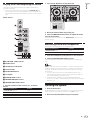
2 Press the [f] button to play the track.
The following describes the procedure for outputting the channel 1
sound as an example.
! Set the volume of the device connected to the [MASTER OUT] terminals (power amplifier, powered speakers, etc.) to an appropriate
level. Note that the output sound may be loud if the volume is set too
high.
English
Playing tracks and outputting the sound
0
Mixer section
HI
MIN
MIN
MAX
MID
CUE
BACK
4
PANEL
MIN
MIN
MAX
MASTER LEVEL
LOW
L
a
MIN
MAX
FILTER
MIN
0
FI
HEADPHONES MIX
b
5
LPF
HPF
CUE
6
CUE
MASTER
LPF
HEADPHONES LEVEL
C
c
1
MIN
3 Move the channel fader away from you.
4 Turn the [MASTER LEVEL] control to adjust the audio
level of the speakers.
Adjust the audio level output from the [MASTER OUT] terminals to an
appropriate level.
MAX
Monitoring sound with headphones
7
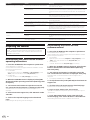
Set the positions of the controls, etc., as shown below.
FILTER FADE
8
CH FADER START
ON
CH FAD
Names of controls, etc.
Position
HEADPHONES MIX control
Center
HEADPHONES LEVEL control
Turned fully counterclockwise
9
1 Press the headphones [CUE] button for the channel 1.
2 Turn the [HEADPHONES LEVEL] control.
Adjust the sound level output from the headphones to an appropriate
level.
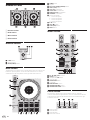
4 EQ (HI, MID, LOW) controls
5 FILTER control
Note
6 Headphones CUE button
This unit and the Serato DJ Intro software include a variety of functions
enabling individualistic DJ performances. For details on the respective
functions, see the operating instructions and the Serato DJ Intro software manual.
! This unit’s operating instructions can be downloaded from the
Pioneer DJ support site. For details, see Downloading the latest version of these operating instructions (p. 12).
! The Serato DJ Intro software manual can be downloaded from
Serato.com. For details, see Downloading the Serato DJ Intro software
manual (p. 12).
7 Channel fader
8 FILTER FADE button
9 Crossfader
a MASTER LEVEL control
b HEADPHONES MIX control
c HEADPHONES LEVEL control
1 Set the positions of the controls, etc., as shown
below.
Quitting the system
Names of controls, etc.
Position
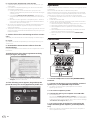
1 Quit Serato DJ Intro.
EQ (HI, MID, LOW) controls
Center
FILTER control
Center
When the software is closed, a message for confirming that you want to
close it appears on the computer’s screen. Click [Yes] to close.
Channel fader
Moved forward
2 Disconnect the USB cable from your computer.
MASTER LEVEL control
Turned fully counterclockwise
En
9




![[DDJ-SB] on the Pioneer DJ](http://vs1.manualzilla.com/store/data/005911358_1-8424a2f3864458698a09081438abbcc0-150x150.png)