1
Videophone for iOS user manual . 8
2.3
FUNCTIONALITY
2.3.1
VIDEO DOOR COMMUNICATION
Standard-function: If a door call is processed from an external unit (analogue intercom connected to the
Videophone-Box, OPENDOOR or other compatible IP door station) the Videophone app will show the
corresponding video sources inside the video window; with the appropriate swipe gesture on the active video
window it’s possible to switch between the single video sources defined for the calling external unit. At the
same time the status bar shows the name and caller ID of the calling external unit. The call can then be
accepted, rejected, or just the door opener can be activated. If the Key-button is pressed without answering the
call, the Videophone-Software automatically performs the following sequence: "Accept" - "Send DTMF-tone to
activate the door opener" - "Hangup". Of course it is also possible to activate the door opener during an open
conversation with the guest outside by pressing the Key-button.
Conversely, it is also possible to establish a conversation with the door station, when no one has pressed a ring
button outside: first enter the call number of the outside door station through the dial pad of the Videophone
App byentering the ID which should be called or by pressing one of the quick dial buttons.
2.3.2
SPY-FUNCTION
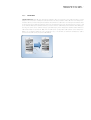
Standard-function: If there isn’t any active call, with the Camera-button the spy-function can be enabled and
disabled. If the spy-function is activated, the video window sows all the video sources defined for the external
unit selected as doorspy. With the appropriate horizontal swipe gesture on the active video window it’s possible
to switch between the single video sources.












![PLAS A O ]-OR](http://vs1.manualzilla.com/store/data/005852706_1-5db0b7ed584537f0e62af161fb124638-150x150.png)