1
Introduction
Thank you for purchasing the Wireless Keypad (LM172). The keypad has been integrated a LED backlight
key feature. It will bring you great pleasure and convenience while you use it to operate LM/MK series
Swing Gate Opener and DSC/R or SFG/SCG series Sliding Gate Opener. Be sure to read the manual
carefully and completely before you permanently mounting the keypad, please program the keypad and
test its range.
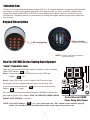
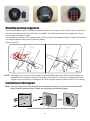
Keypad Description
Battery Holder
LED backlight key
Use 3×AAA(1.5V) battery
NOTE: 3×AAA(1.5V) battery is required to
power the keypad
Use For LM/MK Series Swing Gate Opener
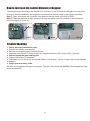
“Learn” Transmitter code
Make sure the control board of the opener is power on and in standby
mode (LED flashes “
”(“- -”)).
Step 1. Press and release “LEARN” button and then LED will
display “
”(“Ln”).
Step 2. Press ”OK” button on the Keypad LM172 once to learn
the keypad. Once the keypad has been learnt successfully, LED
of the control board will flashes “
flashes “
INC
DEC
”(“Ln”) for 2 seconds and then
13
” (“- -”) again.
14
15
16
17
Now you can use the factory default password “888888” to operate the
18
+ BAT - - SOLAR + PHOTOCELL
gate opener (Refer to the chapter “HOW TO OPERATE LM/MK SERIES
SWING GATE OPENER” in manual).
NOTE: Once LED displays “
FUNC
19
20
LEARN
O/S/C
Control Board of LM/MK
Series Swing Gate Opener
”(“Ln”), you must press the “OK” button on the wireless keypad
within 1-2 seconds to learn the transmitter code, or you may have to start over.
1