1
Rev 2.3
3.1.3
Preparing the DHCP Server in Linux
Running the DHCP Server
NOTE: This section is applicable only when the Initiator's IP address is empty.
In order for the DHCP server to provide configuration records for clients, an appropriate
configuration file needs to be created. By default, the DHCP server looks for a configuration
file called dhcpd.conf under /etc. You can either edit this file or create a new one and provide
its full path to the DHCP server using the -cf flag. See a file example at docs/dhcpd.conf of
this package.
The DHCP server must run on a machine which has loaded the IPoIB module.
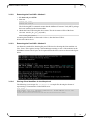
To run the DHCP server from the command line, enter:
dhcpd <IB network interface name> -d
Example:
host1# dhcpd ib0 –d
3.1.4
Adding Device Driver Support in Linux Kernels/Initrd
NOTE: A DHCP client can be used if you need to prepare a diskless machine with an IB
driver. See Step 11 under Example: Adding an IB Driver to initrd (Linux).
3.2
Case II: Ethernet Ports
When a FlexBoot client boots, it sends the DHCP server various information, including its
DHCP hardware Ethernet address (MAC). The MAC address is 6 bytes long, and it is used to
distinguish between the various DHCP sessions.
3.2.1
Extracting the MAC Address – Method I
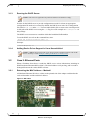
All Mellanox Ethernet NICs have a label on the printed side of the adapter card that has the
card serial number and the card MAC address.
Figure 1: NIC Label
14
Mellanox Technologies