1
CHAPTER 4. OMS FRONT-END DESIGN
31
the database workspace and it uses quite a lot of scrolling activity. Nevertheless we decided to
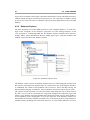
list the collection members since the editor area only shows one object at a time. Collection
members and collections cannot be visible side by side in the editor area and therefore it
makes sense to display the collection members in the database explorer tree to allow drag and
drop operations and to complete the information in the database explorer.
Collection members are represented as strings comprising the type, the object id and an attribute value. By default the first attribute value of an object is taken, but the user has the
possibility to choose a different attribute value for every collection. Displaying an attribute
value for every collection member contributes to an improved usability by reducing the use
of object ids. The user is able to choose a key attribute in order to find objects without having
to know objects ids by heart or opening all objects until the desired one is found.
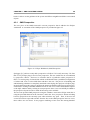
Every type of object introduces its own icon in the database tree which is used throughout the
whole OMS perspective. Consistently used icons support the user to identify objects visually.
The user can execute various actions in the database explorer that are gathered in a context
menu. The context menu adapts according to the user selection in the tree. An important
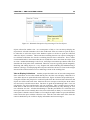
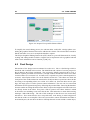
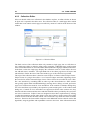
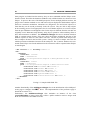
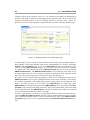
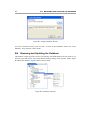
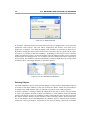
menu entry is the ‘New’ menu which enables the user to create new databases and new database objects. In most of the cases choosing a ‘New’ action launches a wizard. As an example,
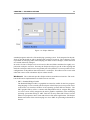
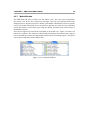
the wizard to create new OMS databases is shown in figure 4.7.
Figure 4.7: Wizard to Create a New OMS Database
The wizards are necessary since the user has to indicate preliminary information in order to
enable a precise object creation. The entry fields in these wizards are pre-filled depending
on the selection in the database explorer. This helps the user to efficiently create new objects
without having to fill in large forms. For example to create a new association between two
collections, it is possible to select two collections in the database explorer and launch the
wizard. The user only has to indicate which of the collections should be the source collection
and the association can be created. If the user wants to create database objects which do
not need any preliminary information as for example a new macro, wizards are omitted to
simplify the process of creating new objects.