1
Table of Contents
1 Introduction ........................................................................................................ 5
1.1 Purpose............................................................................................................. 5
1.2 Contents............................................................................................................ 5
2 Handling Precautions ........................................................................................ 5
3 Quick Start (using USB connection) ................................................................ 6
4 On-Board Peripherals ........................................................................................ 9
4.1 RESET and ON_OFF Push-Button ................................................................... 9
4.2 Antenna............................................................................................................. 9
5 LED’s ................................................................................................................. 10
6 Design-in Support ............................................................................................ 11
6.1 Terminal Block ................................................................................................ 11
6.2 DIP Switch Settings......................................................................................... 13
6.3 ICC Jumper ..................................................................................................... 14
7 NMEA Port ........................................................................................................ 14
8 EVA2035-H Firmware and NMEA Sentences ................................................. 14
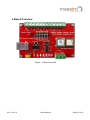
9 Board Overview ................................................................................................ 15
10 Board Schematics .......................................................................................... 16
11 Related Information ....................................................................................... 17
11.1 Contact.......................................................................................................... 17
11.2 Related Documents....................................................................................... 17
11.3 Related Tools ................................................................................................ 17
12 List of Figures ................................................................................................ 18
13 List of Tables .................................................................................................. 18
V0.3– Jun-12
User’s Manual
Page 4 of 18