1
handles different formats—HTML, Word, PDF,
PostScript, and E-mail messages, to name but a few.
Images, video and audio require accompanying textual
metadata.
For the purposes of the present paper it is necessary
to learn a little about three key design features of
Greenstone: plug-ins, classifiers, and the collection
configuration file. In Greenstone, the structure,
organization, and presentation of any particular collection
are determined when the collection is set up. This
includes such things as the format or formats of the
source documents, how they should be displayed on the
screen, the sources of metadata, what browsing facilities
are to be provided, what full-text search indexes are
required, and how the search results should be displayed.
Once the collection is in place, it is easy to add new
documents to it—so long as they have the same format as
the existing documents, and the same metadata is
provided, in exactly the same way. The structure,
organization, and presentation of the collection is
recorded in a text file called the “collection configuration
file.”
Source material is imported into the system through
“plug-ins” that cater for different document formats. Any
given collection may have source documents in many
different forms. There are plug-ins to handle all the file
formats mentioned above, along with some proprietary
formats, and for generic tasks such as recursively
traversing directory structures containing such
documents. Plug-ins can be written to accommodate new
document types.
Greenstone builds browsing indexes from metadata.
This is done using “classifiers,” which are analogous to
plug-ins. Classifiers create browsing indexes of various
kinds, based on metadata—alphabetically tabbed lists (of
titles, for example), date-selected lists, and hierarchical
browsing structures. Like plug-ins, new classifiers can be
written for special-purpose browsing structures.
It is modeled after popular end-user installation software
(such as InstallShield 2). Frequently called a software
“wizard”—a term we deprecate because of its appeal to
mysticism and connotatio ns of utter inexplicability—this
interaction style suits novice users because it simplifies
the choices and presents them clearly.
The Collector is implemented as a web-based system.
A user goes to a certain web address in any Greenstone
installation to find a page that facilitates collection
building. The ability to build collections is protected:
users must log in first, and only those with appropriate
privileges are allowed to build collections. Being webbased imposes certain restrictions. First, there are security
issues with letting remote users transfer files to the site
running the web server. Second, the user’s local file space
is only available in a limited way through the file -upload
mechanism, meaning that only one file at a time can be
specified. Third, web-based interaction was not designed
for lengthy processes such as building digital library
collections (which can take many hours of processor time
for non-trivial collections), and special measures must be
taken to ensure that the user receives appropriate
feedback, and that the right things happen on moving to
another page, or pressing the Back button, while the
collection is being built.
Greenstone is so easy to install and run that, contrary
to the assumptions we made when designing the
Collector, users often work on a local copy of the
software that runs on their own computer. They quite
reasonably expect there to be a convenient mechanism for
populating their collections with local files, which the
Collector cannot do directly.
3.3 The Organizer
One of Greenstone’s early adopters, SimpleWords of
Brasov, Romania, uses it to build and distribute
collections for humanitarian purposes—collections that
share a common collection configuration file but have
different content. Librarians must manually assign a
substantial amount of metadata to each document in the
collection. They do this using a uniform metadata scheme
called the Development Library Set (DLS). However, the
Collector does not provide any interactive way of
specifying metadata to be added to documents. Although
Greenstone accommodates different metadata formats,
including a simple but flexible XML format, OAI, MARC
records, a spreadsheet format, BibTeX, and even Refer, all
metadata must be available in advance, stored in files.
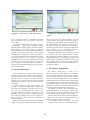
SimpleWords implemented a separate utility, the
Organizer, to create and edit the material associated with a
collection conforming to their humanitarian format [12].
3.2 The Collector
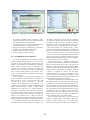
Part of Greenstone, the Collector is a utility for collection
building with the following basic functions [15]:
§ create a new collection with the same structure as an
existing one;
§ create a new collection with a different structure from
existing ones;
§ add new material to an existing collection;
§ modify the structure of an existing collection;
§ delete a collection;
§ write an existing collection to a self-contained, selfinstalling CD-ROM.
2
326
www.installshield.com