1
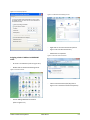
Figure 11.14: TCP/IP Properties Figure 11.13: Local Area Connections Properties - Click properties - Input your IP Address and subnet mask (refer to Figure 11.14: TCP/IP Properties). The IP Addresses on the network must be within the same range. The default IP address from the WCAP is 192.168.1.111 so the computer should have an IP Address that is within the same subnet, like 192.168.0.11 and 192.168.0.20. The subnet mask must be the same for all equipment on the network: 255.255.255.0) - Click OK Televic Conference Systems Assigning a Static IP Address with MACINTOSCH OSX Go to the Apple Menu and select System Preferences Click on Network Select Built-in Ethernet in the Show pull-down menu Select Manually in the Configure pull-down menu Input the Static IP Address and the Subnet Mask Address in the appropriate fields. (The IP Addresses on the network must be within the same range. The default IP address from the WCAP is 192.168.0.10 so the computer should have an IP Address that is sequential, like 192.168.0.11 and 192.168.0.20. The subnet mask must be the same for all equipment on the network: 255.255.255.0) Click Apply Now 2013-09-11 55