1
01MP8749 01.11.22 9:40 AM ページ 7
INSTALLATION (continued)
ENGLISH
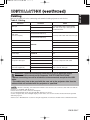
Cabling
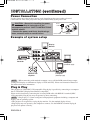
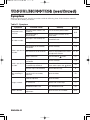
Refer to the table below for connecting each terminal of the projector to each device.
Table 2. Cabling
Function
RGB input
RGB output
Audio input
(from the computer)
Terminal
RGB IN 1
RGB IN 2
RGB OUT
Cable
Accessory RGB cable or optional RGB
cable with D-sub 15-pin shrink jack and
inch thread screws
AUDIO IN 1
(interlocked with RGB IN 1)
Accessory audio cable with stereo mini jack
AUDIO IN 2
(interlocked with RGB IN 2)
PS/2 mouse control
Accessory PS/2 mouse cable
ADB mouse control
Optional ADB mouse cable
CONTROL
Serial mouse control
Optional Serial mouse cable
RS-232C communication
Optional RS-232C cable
USB mouse control
USB
Optional USB cable
S-video input
S-VIDEO IN
Optional S-video cable with mini DIN 4-pin
jack
Video input
VIDEO IN
Accessory video/audio cable
COMPONENT VIDEO Y
Component video input
COMPONENT VIDEO CB/PB
Accessory component video cable
COMPONENT VIDEO CR/PR
Audio input
(from video equipment)
AUDIO IN L
AUDIO IN R
Accessory video/audio cable or optional
audio cable with RCA jack
Audio output
AUDIO OUT
Accessory audio cable with stereo mini jack
CAUTION • Incorrect connecting could result in fire or electrical shock.
Please read this manual and the separate “SAFETY INSTRUCTIONS”.
• Before connecting, turn off to all devices to be connected, except for the USB
cable.
• The cables may have to be used with the core set to the projector side. Use the
cables which are included with the projector or specified.
NOTE • Before connecting, read instruction manuals of the devices to be connected, and make sure that the
projector is compatible with the device.
• Secure the screws on the connectors and tighten.
• For some RGB input modes, the optional Mac adapter is necessary.
• Some computers may have multiple display screen modes. Use of some of these modes will not be possible
with this projector.
• Refer to the “TECHNICAL” section for the pin assignment of connectors and RS-232C communication data.
ENGLISH-7