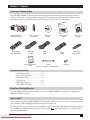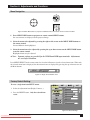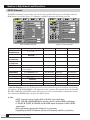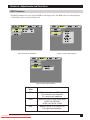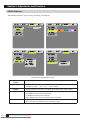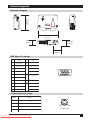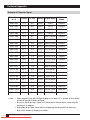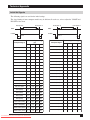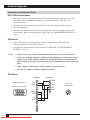
1
MP8746/MP8747 Personal Projector Operator’s Guide MP8746/MP8747 Projecteur personnel Guide de l’opérateur MP8746/MP8747 Personal Projektor - Benutzerhandbuch MP8746/MP8747 Guía del usuario del proyector personal MP8746/MP8747 Guida dell’operatore per il Proiettore personale MP8746/MP8747 Bruksanvisning för Personlig projektor MP8746/MP8747 Personal Projector – gebruiksaanwijzing © 3M IPC 2000 Downloaded From projector-manual.com 3M Manuals 3M™ Personal Projector MP8746/MP8747 1 (This page intentionally left blank for printed version.) 2 3M™ Personal Projector MP8746/MP8747 Downloaded From projector-manual.com 3M Manuals © 3M IPC 2000 Table of Contents On the CD-ROM, please click on any section to jump to that section. Introduction Safeguards .................................................................................... 4 Thank You for Choosing 3M .......................................................... 6 Warranty ........................................................................................ 6 Section 1: Unpack Contents of Shipping Box .............................................................. 7 Optional Accessories .................................................................... 7 Keep Your Packing Materials ......................................................... 7 What’s Next? ................................................................................. 7 Section 2: Product Description Machine Characteristics ................................................................ 8 Part Identification List .................................................................... 9 System Setup—Connecting to Various Equipment ..................... 10 Remote Control Transmitter Identification ................................... 12 Changing Remote Control Battery .............................................. 13 Mouse Emulation ........................................................................ 14 Attaching Handle ......................................................................... 15 Section 3: Basic Operations Projector Startup and Shutdown ................................................. 16 Section 4: Adjustments and Functions How to Use Height Adjustment Foot ........................................... 17 Plug & Play and Other Functions ................................................ 18 Menu Navigation ......................................................................... 19 Factory Default Setting ................................................................ 19 SETUP Submenu ........................................................................ 20 INPUT Submenu ......................................................................... 21 IMAGE Submenu ........................................................................ 22 OPT Submenu............................................................................. 23 Section 5: Maintenance Cleaning the Air Filter .................................................................. 24 Section 6: Lamp Lamp ........................................................................................... 25 Display Lamp Operation Hours ................................................... 25 Reset Lamp Hours ...................................................................... 25 Replacing the Lamp .................................................................... 26 Section 7: Troubleshooting Symptoms/Solutions Table .......................................................... 27 Messages/Solutions Table ........................................................... 28 Indicator Lights Table .................................................................. 29 Service Information ..................................................................... 30 Section 8: Accessories. ............................................................... 30 The Technical Appendix is in English only. Please click here (on the CD-ROM) to read it. © 3M IPC 2000 Downloaded From projector-manual.com 3M Manuals 3M™ Personal Projector MP8746/MP8747 3 Introduction Intended Use Before operating the machine, please read this entire manual thoroughly. The 3M™ Personal Projector MP8746/MP8747 was designed, built, and tested for use indoors, using 3M lamps, 3M ceiling mount hardware, and nominal local voltages. The use of other replacement lamps, outdoor operation, operation in environments containing heavy cigarette smoke or different voltages has not been tested and could damage the projector or peripheral equipment and/or create a potentially unsafe operating condition. Important Safeguards 1. Read and understand all instructions before using. Pay particular attention to areas where these symbols are shown: WARNING Indicates a potentially hazardous situation which, if not avoided, could result in death or serious injury. Caution Indicates a potentially hazardous situation which, if not avoided, could result in minor or moderate injury. It may also be used to alert against unsafe practices. ✓ Note - Used to emphasize important conditions or details. 2. Close supervision is necessary when any appliance is used by or near children. Do not leave appliance unattended while in use. 3. Never look directly into the projector lens when the lamp is on. The lamp produces a strong light that could damage your eyesight. 4. Care must be taken, as burns can occur from touching hot parts. 5. Do not operate appliance with a damaged cord or if the appliance has been dropped or damaged, until it has been examined by a qualified service technician. 6. Position the cord so that it will not be tripped over, pulled or placed in contact with hot surfaces. 7. If an extension cord is necessary, a cord with a current rating at least equal to that of the appliance should be used. Cords rated for less amperage than the appliance may overheat. 8. Always unplug appliance from electrical outlet before cleaning and servicing and when not in use. Grasp plug and pull to disconnect. 9. To reduce the risk of electric shock, do not immerse this appliance in water or other liquids. 10. To reduce the risk of electric shock, do not disassemble this appliance. Take it to a qualified technician when service or repair work is required. Incorrect reassembly can cause electric shock when the appliance is subsequently used. 11. Connect this appliance to a grounded outlet. 12. Do not expose this projector to direct sunlight or use it outside. 13. Keep all ventilation openings free of any obstructions. 14. Always open the lens shutter or remove the lens cap when the projector lamp is on. 15. Do not look directly into light beam of laser pointer. The pointer produces a strong light which could damage your eyesight. 16. The projection lamp contains mercury. Always dispose of it in a proper manner according to local regulations. 17. To prevent lamp from bursting, do not continue using the same lamp after changing the mounting position of the projector (desktop to ceiling mount or ceiling mount to desktop mount). 18. Always operate machine on a flat, sturdy surface. 4 3M™ Personal Projector MP8746/MP8747 Downloaded From projector-manual.com 3M Manuals © 3M IPC 2000 Introduction Location of Product Safety Labels The following safety labels are used on or within the MP8746/MP8747 projector to alert you to items or areas requiring your attention. CAUTION/VORSICHT/MESURE DE PRÉCAUTION/ATTENZIONE/PRECAUCIÓN Turning the knob too much makes it come off. / Der Verstellknopf löst sich wenn er überdreht wird. / Si vous manipulez excessivament la poignée, elle se detachera. / Se si gira troppo la manipola si stacca. / Grandola demasiado la manivela se desprende. H L HIGH TEMPERATURE / HAUTE TEMPERATURE / HOCHTEMPERATUR / ALTA TEMPERATURA / ALTA TEMPERATURA 1 2 3 5 4 6 7 12 6 When replacing lamp, turn off and unplub unit, wait 45 minutes to let lamp cool. High-pressure lamp when hot, may explode if improperly handled. Pour changer la lampe, éteindre et débrancher la machine. Attendre 45 minutes de maniére á laisse tefroidir la lampe. La lampe haute pression risque d’exploser si elle est manipulée sans précaution lorsqu’elle est encore chaude. Vor Austausch der Lampe, das Gerät abschalten und den Stecker herausziehen; 45 minuten warten, warten, um die Lampe abkühlen zu lassen. Falls die heiße Hochdrucklampe falsch gehandhabt wird, kann sie explodieren. Prima di sostituire la lampadina, spegnere il proiettore, scollegarne la presa di alimentazione ed attendere 45 minuti circa che la lampadina si raffreddi. Se calda, essa è sottoposta ad alta pressione interna e puó esplodere. Cuando tenga que reemplazar la lámpara, desconecte la alimentación y desenchufe la unidad, y espere 45 minutos para dejar que se enfrié la lámpara. La lámpara, que está a alta presión cuando está caliente, quede explotar si se manipula indebidamente. AVOID EXPOSURELASER RADIATION IS EMITTED FROM THIS APERTURE VIDEO STANDBY/ON LASER RGB BLANK CAUTION LASER RADIATIONDO NOT STARE INTO BEAM WAVE LENGTH: 650 nm MAX. OUTPUT: 1 mW CLASS 2 LASER PRODUCT AUTO MENU POSITION MENU SELECT RESET FREEZE VOLUME MAGNIFY OFF MUTE TIMER RADIAZIONI LASER NON GUARDARE NEL RAGGIO LUCE APPARECCHIO LASER DI CLASSE 2 RAYONNEMENT LASER NE PAS REGARDER DANS LE FAISCEAU APPAREIL A LASER CLASSE 2 MANUFACTURED LASER STRAHLUNG NICHT INDEN STRAHL BLICKEN LASER KLASSE 2 PLACE OF MANUFACTURER May-00 A MADE IN JAPAN IEC80825-1-1993+A1: 1997 Caution In some countries, the line voltage is NOT stable. This projector is designed to operate safely within a bandwidth of 90 to 132 volts / 198 to 264 volts (50 to 60 Hz) ± 10 volts, but could fail if power drops or surges of ±10 volts occur. In these high-risk areas, it is recommended to install a power stabilizer unit. Save These Instructions The information contained in this manual will help you operate and maintain your 3M™ MP8746/MP8747 Personal Projector. © 3M IPC 2000 Downloaded From projector-manual.com 3M Manuals 3M™ Personal Projector MP8746/MP8747 5 Introduction Thank You for Choosing 3M Thank you for choosing 3M multimedia projection equipment. This product has been produced in accordance with 3M’s highest quality and safety standards to ensure smooth and troublefree use in the years to come. For optimum performance, please follow the operating instructions carefully. We hope you will enjoy using this high performance product in your meetings, presentations, and training sessions. Warranty Limited Warranty 3M warrants this product against any defects in material and workmanship, under normal usage and storage, for a period of two years from date of purchase. Exclusion to Warranty: The lamps are considered a consumable item and are warrantied for 90 days or 180 hours, whichever occurs first. Proof of purchase date will be required with any warranty claim. In the event this product is found to be defective within the warranty period, 3M’s only obligation and your exclusive remedy shall be replacement of any defective parts (labor included). To obtain warranty service, immediately notify the dealer from which you purchased the product of any defects. In the USA call 1-800-328-1371 for warranty or repair service. Limitation Of Liability THE FOREGOING WARRANTY IS MADE IN LIEU OF ALL OTHER WARRANTIES, EXPRESSED OR IMPLIED, AND 3M SPECIFICALLY DISCLAIMS ANY IMPLIED WARRANTY OF MERCHANTIBILITY AND FITNESS FOR A PARTICULAR PURPOSE. 3M SHALL NOT BE LIABLE FOR ANY DAMAGES, DIRECT, CONSEQUENTIAL, OR INCIDENTAL, ARISING OUT OF THE USE OR INABILITY TO USE THIS PRODUCT. Important: The above warranty shall be void if the customer fails to operate product in accordance with 3M’s written instructions. This warranty gives you specific legal rights, and you may have other rights which vary from state to state. FCC STATEMENT - CLASS B: This equipment generates, uses and can radiate radio frequency energy and, if not installed and used in accordance with the instructions, may cause harmful interference to radio communications. However, there is no guarantee that interference will not occur in a particular installation. If this equipment does cause harmful interference to radio or television reception, which can by determined by turning the equipment off and on, the user is encouraged to try to correct the interference by one or more of the following measures: • Reorient or relocate the receiving antenna. • Increase the separation between the equipment and receiver. • Connect the equipment into an outlet on a circuit different from that to which the receiver is connected. • Consult the dealer or an experienced radio/TV technician for help. Instructions to Users: This equipment complies with the requirements of FCC (Federal Communication Commission) equipment provided that following conditions are met. The cables (power cord, RGB cable and other cables) may have to be used with the core set to the projector side. Use the cables which are included with the projector or specified. Caution Core Changes or modifications not expressly approved by the party responsible for compliance could void the user’s authority to operate the equipment. For customers in Canada NOTICE: This Class B digital apparatus complies with Canadian ICES-003. Pour les utilisateurs au Canada AVIS: Cet appareil numérique de la Classe B est conforme à la norme NMB-003 du Canada. EEC STATEMENT: This machine was tested against the 89/336/EEC (European Economic Community) for EMC (Electro Magnetic Compatibility) and fulfills these requirements. Video Signal Cables: Double shielded coaxial cables (FCC shield cable) must be used, and the outer shield must be connected to the ground. If normal coaxial cables are used, the cable must be enclosed in metal pipes or in a similar way to reduce the interference noise radiation. Video Inputs: The input signal amplitude must not exceed the specified level. Patents, Trademarks & Copyrights IBM is a registered trademark of International Business Machines Corporation. Apple Macintosh and Apple Powerbook are registered trademarks of Apple Computer, Inc. Microsoft and Windows 95 and Windows 98 are registered trademarks, and Windows and Windows for Workgroups are trademarks of the Microsoft Corporation. Toshiba is a registered trademark of Toshiba Corporation. All other products are trademarks or registered trademarks of their respective companies. 6 3M™ Personal Projector MP8746/MP8747 Downloaded From projector-manual.com 3M Manuals © 3M IPC 2000 Section 1: Unpack Contents of Shipping Box The 3M™ MP8746/MP8747 Personal Projector is shipped with the necessary cables required for standard VCR, PC, Macintosh™ or laptop computer connections. Carefully unpack and verify that you have all of the items shown below. If any of these items are missing, please contact your place of purchase. P8747 MP8746/Mia Projector Multimed fety Guide Product Sa VIDEO STANDBY/ON LASER RGB BLANK MP8746/MP8747 Operator’s Guide You will need Adobe Acrobat version 4.0 or later to read this CD-ROM AUTO MENU 47 MP8746/MP87 Projector Multimedia Guide Quick Start POSITION MENU SELECT RESET © 3M IPC November 2000 Rev. A FREEZE Acrobat® Reader copyright © 1987-1996 Adobe Systems Incorporated. All rights reserved. Adobe and Acrobat are trademarks of Adobe Systems Incorporated which may be registered in certain jurisdictions. VOLUME MAGNIFY OFF MUTE 78-6970-9050-0 VIDEO STANDBY/ON LASER RGB BLANK AUTO POSITION MENU MENU SELECT RESET TIMER FREEZE VOLUME MAGNIFY OFF MUTE TIMER Visual Systems Division 3M Austin Center A145-5N-01 6801 River Place Blvd. Austin, TX 78726-9000 MP8746/MP8747 Personal Projector Power Cables (US, UK, Europe) Operator’s Guide Remote Control Transmitter RCA Video Cable Product Registration Card RGB Cable Product Safety Guide S-Video Cable Handle Quick Start Guide PS/2 Mouse Adapter Cable Batteries Figure 1.1 Contents of Shipping Box Optional Accessories • • • • • • Serial Mouse Cable ............................. (1) RS-232 Control Cable ........................ (1) USB Mouse Cable .............................. (1) Carrying Case ..................................... (2) Macinstosh Adapter ............................ (1) Stereo Mini-Jack Cable ...................... (1) Keep Your Packing Materials Save the shipping box and packing materials in the event the MP8746/MP8747 should require shipping to a 3M Service Center for repair. What’s Next? After you have unpacked the MP8746/MP8747 and identified all the parts, you are ready to set up the projector. Please read this guide thoroughly before operating your new projector. Be sure to check our web site (www.3m.com/meetings) regularly for updates and supplemental information. On the CD-ROM, you can link directly to the web site by clicking here or on “3M Innovation” in the lower right corner of the Main Menu. © 3M IPC 2000 Downloaded From projector-manual.com 3M Manuals 3M™ Personal Projector MP8746/MP8747 7 Section 2: Product Description Machine Characteristics The MP8746/MP8747 Personal Projector integrates ultra-high bright lamp and polysilicon LCD display technology into a single unit. It accepts input from two computer sources and two video/audio sources, and projects a bright, super-crisp image. Switching your presentation from a computer input to a video input, then back to a computer input simply requires the push of a button on the remote control keypad or control panel keypad. The MP8746/MP8747 Personal Projector offers the following features: • UHB (ultra-high bright) projection lamp • Two built-in speakers (1.0 watt) • XGA resolution (3 separate 1024 x 768 LCD panels are used for the R, G and B signals) • Horizontal and vertical image inverting function • Horizontal and vertical image position control • Intelligent SXGA, VGA, and SVGA scaling • Digital keystone correction • Compact size, lightweight for portability • On-screen menu with nine languages • RGB (computer video) output terminal • Universal power supply • Manual zoom and focus functions • 4x digital magnification • IR sensor in front and rear for maximum remote control range • Easy to set up and use • RS-232 control capability • Ability to display 16.7 million colors • Color balance control for data/video • Two computer input connections • Plug & Play compatible • Two video input connections (composite and S-video compatible) • Freeze function • Slim, lightweight remote control • Kensington™ Lock slot Microsaver needed) • Eight blank-screen colors available • Aspect ratio 16:9, 4:3, or 4:3 small K (Kensington™ ✔ Note: The MP8746/MP8747 is one of the brightest personal projectors in the marketplace. The brightness of your machine will vary depending on the ambient room conditions and contrast/brightness settings. 8 3M™ Personal Projector MP8746/MP8747 Downloaded From projector-manual.com 3M Manuals © 3M IPC 2000 Section 2: Product Description Part Identification List 2 3 VIDEO STANDBY/ON LASER 1 RGB BLANK AUTO MENU POSITION 4 MENU SELECT RESET FREEZE VOLUME MAGNIFY OFF MUTE TIMER 13 19 6 14 17 12 16 10 11 9 7 15 AUDIO IN R AUDIO-1 VIDEO IN 5 8 1 S-VIDEO IN RGB IN 2 L 2 AUDIO-OUT USB RGB OUT CONTROL IN 18 Figure 2.1 Identifying MP8746/MP8747 Parts 1. Remote control transmitter 2. Control panel keypad (see below) a) STANDBY/ON button b) ON, LAMP, TEMP indicators c) INPUT, MUTE, RESET buttons d) MENU disk button 3. Stereo speakers 4. Kensington™ Lock slot 5. Tilt adjustment knob 6. Air filter cover and intake 7. Height adjustment foot lock button 8. Cooling fan exhaust 9. Remote control sensors 10. 11. 12. 13. 14. 15. 16. 17. 18. 19. Zoom knob Focus ring Projection lens Sliding lens door Height adjustment foot Terminal connection panel a) S-Video, Video, Audio inputs b) RGB inputs c) RS-232C, PS/2, Serial, ADB Control terminals AC power cord connection Main power switch Handle Handle hooks Control Panel Keypad Buttons STANDBY/ON The control panel keypad is located on top of the projector. • Press the STANDBY/ON button to turn the projector off and on. • Press the INPUT button to select the source of the signal to be displayed on the screen. The type of signal will be displayed at the bottom right of the screen. • Press the MUTE button to turn the audio output off and on. • Press the RESET button to return the projector to its default settings. • Press the MENU DISK PAD button to access on-screen menus and select items. (For more information on this feature, see page 19.) MUTE INPUT RESET MENU Figure 2.2 Control Panel Keypad Buttons © 3M IPC 2000 Downloaded From projector-manual.com 3M Manuals 3M™ Personal Projector MP8746/MP8747 9 Section 2: Product Description System Setup—Connecting to Various Equipment Power Cable AC Power Outlet RGB PC or Mac Cable Mouse Cable Desktop Computer Mac Adapter Mac Adapter (if needed) Audio (if needed) RGB Cable PC or Mac Cable USB Cable or RGB Laptop Computer Cable Audio Cable VIDEO IN AUDIO IN R 1 S-VIDEO IN RGB IN 2 L AUDIO-1 2 AUDIO-OUT RGB OUT USB CONTROL RGB Cable S-VHS Cable Video Cables IN Audio USB Cables Cable Video Monitor Audio Cable VCR with Audio Speaker S jack (with built-in amplifier) Figure 2.2 Cable Connections • Turn power off to all devices before making connections. Never plug anything into the projector or computer while any device is in operation. Caution • The MP8746/MP8747 must be powered down when making connections. The mouse emulation may not work if the unit is not powered down before the mouse cable connections are made. • Do not use place projector on its side or tilt at an angle greater than 20°. 10 3M™ Personal Projector MP8746/MP8747 Downloaded From projector-manual.com 3M Manuals © 3M IPC 2000 Section 2: Product Description System Setup—Connecting to Various Equipment (continued) Cable Connections RGB Signal input (video from computer) Connect one end of the enclosed RGB cable to the RGB IN 1 or 2 terminal of the projector. Connect the other end to the RGB signal output or RGB OUT of the computer. ✓ Note: For Macintosh computers, the optional Mac adapter is necessary. Please consult your dealer to order one, if necessary. Ordering information is on page 30. Figure 2.3 Mac Adapter Audio signal input (from computer) Connect one end of the optional audio cable to the AUDIO IN 1 or 2 terminal of the projector. Connect the other end to the audio signal output terminal of the computer. Video signal input (from videotape recorder [VCR] or similar video device) Connect one end of the enclosed audio/video cable to the VIDEO IN terminal of the projector. Connect the other end to the video signal output terminal of the video device. S-Video signal input Connect one end of the optional S-Video cable (with Mini-DIN 4-pin jack) to the S-VIDEO IN terminal of the projector. Connect the other end to the S-Video output terminal of the video device. Audio signal (from VCR or similar video device) Connect the ends of the enclosed audio/video cable (with RCA jack) to the AUDIO R and L terminals of the projector. Connect the other ends to the audio output terminal of the video device. RGB signal output (connecting to a monitor) Connect one end of the optional RGB cable (with D-Sub 15-pin shrink jack) to the RGB OUT terminal of the projector. Connect the other end to the RGB input terminal of the computer. Audio signal output (connecting to a speaker) Connect one end of the optional audio cable (with stereo mini-jack) to the AUDIO OUT terminal of the projector. Connect the other end to the audio input terminal of the computer. PS/2, ADB, Serial, or RS-232C communication (mouse emulation) Connect one end of the appropiate mouse cable to the CONTROL terminal of the projector. Connect the other end to the appropriate port (PS/2, ADB, serial, or RS-232C) of the computer. For PS/2 mouse emulation (IBM-compatible computers), use the enclosed PS/2 mouse adapter cable. For other cables, please consult your dealer. USB communication (mouse control only) Connect one end of the optional USB cable to the USB jack (B-type) of the projector. Connect the other end to the USB jack (A-type) of the computer. ✓ Note: When connecting laptop computer, set the RGB external image output to valid. See your computer’s user manual for more information. • Use only the cables which are included with the projector or are specified. Caution • Incorrect connection could result in fire or electrical shock. • Please review this manual and its safety precautions before connecting. © 3M IPC 2000 Downloaded From projector-manual.com 3M Manuals 3M™ Personal Projector MP8746/MP8747 11 Section 2: Product Description Remote Control Transmitter Identification Use the remote control transmitter within a distance of approximately 3 meters (or 9.8 feet) from the sensor of the front of the projector, and within a range of 30° to the left and right. Strong light and obstacles may interfere with operation of the remote control transmitter. STANDBY/ON VIDEO STANDBY/ON Press STANDBY/ON button to begin projection mode (lamp on) or press and hold button for one second to switch to standby mode (lamp off). LASER VIDEO and RGB RGB BLANK Press to select the input source. Press again to select the next source. BLANK Press to turn ON/OFF the screen blanking function. LASER DISK PAD Press to turn ON/OFF laser beam pointer. Press to operate the mouse shift function and left-click function. MOUSE / RIGHT Press to click the right mouse button. *AUTO Press to make projector automatically adjust 4 items (V. POSIT, H. POSIT, H. PHASE, and H. SIZE) for RGB input signal. (Please see note at bottom right.) *POSITION Press this and any menu directional arrows for corresponding movement of the picture (with RGB signal only). AUTO RESET MENU MENU Press to turn ON/OFF the menu screen display. POSITION MENU SELECT MENU directional arrows Press to return a displayed menu item to its default setting. Press to click right mouse button. Press after scrolling with POSITION to return picture to original position. *FREEZE Press to select menu items when the menu screen is displayed. Press to operate the mouse shift function. After the POSITION button has been pressed, press these buttons to move the picture upward, downward, and to the left and right. RESET Press to turn ON/OFF the freeze (still) image display. VOLUME FREEZE Press to adjust loudness of sound. MUTE VOLUME MAGNIFY *MENU SELECT OFF Press to display individual menu items. Can also be used to click the left mouse function. MUTE TIMER *MAGNIFY Press to stop audio output. Press again to resume audio output. TIMER Press to turn ON/OFF the Timer on the Menu screen. (Timer cannot be displayed during Freeze function.) Press to magnify the displayed image. Press (+) to enlarge the center of the image. Press again to enlarge up to 4x magnification. Press (-) to reduce display magnification. (Can also be used with POSITION to select image area to be magnified.) VOLUME and MUTE *This button will not function if the messages “NO INPUT IS DETECTED” or “SYNC IS OUT OF RANGE” are displayed. Pressing these at the same time will operate the page-up or page-down function of the USB mouse. AUTO ADJUST Notes: Requires several tens of seconds. May not operate correctly in some cases, depending on the connected computer and its signal and type of image. Execute auto adjust with display of the running application set at maximum. After auto adjust, image may be slightly darker due to automatic adjustment of signal level. Figure 2.4 Basic Remote Control Transmitter 12 3M™ Personal Projector MP8746/MP8747 Downloaded From projector-manual.com 3M Manuals © 3M IPC 2000 Section 2: Product Description Changing Remote Control Battery When remote control transmitter becomes difficult to operate or does not respond, it usually needs new batteries. 1. Turn over the remote control transmitter to access the battery holder. 2. Push the battery cover tab as indicated and lift up to remove it. 3. Lift old batteries out of compartment. 4. Replace with two AA batteries. Make sure the positive (+) and negative (-) terminals are correctly oriented. 5. Place battery cover back on top and snap down into place. Figure 2.5 Changing Remote Control Batteries • Avoid excessive heat and humidity. Caution • Do not mix old and new batteries or different types of batteries. • Remove batteries if remote will not be used for an extended period of time. Mouse Emulation Apple™ Desktop Mouse—The Macintosh operating system should recognize the MP8746/MP8747 as a mouse without any drivers being loaded. VirtualMouse for PC Computer—For IBM™ -compatible computers, the operating systems will need to be set to “Serial Mouse,” “PS/2 Mouse,” or “USB Mouse” to recognize the projector as a mouse pointer device. Change mouse driver information to “Serial Mouse,” “PS/2 Mouse,” or “USB Mouse.” a) Windows™ 95/Windows™ 98—Click “Start;” select “Settings;” select “Control Panel.” Click on “Mouse;” select the “General” tab; (see what driver is currently loaded and make note of it); select “Change;” select “Show all devices;” (make note of the current Manufacturer and Model); select “Standard Mouse Type” for Manufacturer; then select “Standard Serial Mouse,” “Standard PS/2 Mouse,” or “USB Mouse.” Click OK to change and apply the new driver. Restart Windows if prompted. USB mouse emulation is not supported in all versions of Windows™ 95. b) Windows™ 3.1—From “Program Manager” click “Main;” then click “Windows Setup;” (make note of what the current mouse driver is). Click “Options;” then “Change Systems Settings.” Choose “Mouse.” It should be listed as “Microsoft or IBM PS/2.” USB mouse emulation is not supported in Windows™3.1. © 3M IPC 2000 Downloaded From projector-manual.com 3M Manuals 3M™ Personal Projector MP8746/MP8747 13 Section 2: Product Description Mouse Emulation (continued) The mouse type and cable type are determined by the type of computer used. Use the table shown below to select the appropriate cable or refer to your computer’s user manual. Connect as shown in the diagram. Mouse Type Accessory Cable PS/2 PS/2 + Serial ADB (Mac) Mac + Serial Serial Serial USB PC Connector Projector Control/USB Terminal MINI-DIN 6P (female) D-Sub 15P (female) MINI-DIN 4P (female) D-Sub 15P (female) D-Sub 9P (male) D-Sub 15P (female) USB A type (host) USB B type (device) USB Figure 2.6 Mouse Connection Table ✓ Note: USB, Serial, and ADB mouse cables are optional accessories. Please refer to page 30 for ordering information. Remote Control Mouse Function For PS/2, ADB (Mac), Serial 1. Turn off the computer and use the appropriate cable to connect the computer to mouse unit. 2. Turn on the computer and use the mouse function of the remote control. If there are any problems, check the cable connections and reboot the computer. 3. Refer to the remote control instructions on page 12 for more instructions concerning mouse operation. • • • • Before connecting, read the manual(s) of the equipment being connected. Turn off the computer power supply before connection. Use only the mouse cable provided. In the case of laptop computers with a built-in pointing device (such as a trackball), the device will sometimes have priority even if a mouse is Caution connected. If necessary, disable the device and change the BIOS setting (system setup) so that an external mouse can be selected. Restart the com puter after changing the BIOS setting. Refer to the computer manual for more information on this setting. • Some computers may not have the utility program to operate a mouse. Refer to the computer hardware manual. 14 3M™ Personal Projector MP8746/MP8747 Downloaded From projector-manual.com 3M Manuals © 3M IPC 2000 Section 2: Product Description Remote Control Mouse Function (continued) For USB 1. Use the enclosed USB cable to connect the computer to the mouse unit. Turn on the computer power before or after connecting the USB cable. 2. When this mouse is connected for the first time, a message may appear on the screen concerning the installation of USB software. Follow the instructions on the screen and install suitable software. 3. If there are still problems, reconnect the cables. 4. Refer to the remote control instructions on page 12 for more instructions concerning mouse operation. • Before connecting, read the manual(s) for equipment being connected. • Use only the designated USB cable to connect. • Effective with USB only when the mouse is used. Caution • Do not use with any device other than a personal computer. • If using Windows 95, it is necessary to set it so that USB can be used with version OSR 2.1 or higher. Depending on the kind or version of the host controller, operation may not be possible in some cases. • Some computers may not have the utility program to operate a mouse. Refer to the computer hardware manual. Attaching the Handle Attach the enclosed handle to the projector for easier carrying and portability. 1. Raise the handle hooks on the right side of the projector. 2. Insert one end of the handle strap through the handle hook. 3. Thread the end of the strap through the buckle as shown. 4. Repeat for the opposite end of the handle strap. Handle hook Buckle Handle Figure 2.7 Handle and How to Attach • Make sure the handle is securely attached before lifting or carrying. If the handle is not secure, it may drop the projector. Caution • If the projector is dropped, take it to a service center for inspection and repair before using again. Using a dropped projector can cause malfunctions that could result in fire and electrical shock. • Do not swing or hang the projector by the handle. © 3M IPC 2000 Downloaded From projector-manual.com 3M Manuals 3M™ Personal Projector MP8746/MP8747 15 Section 3: Basic Operations Projector Start-up STANDBY/ON MUTE INPUT RESET Figure 3.1 Projector Controls 1. Make all equipment and cable connections with the power off. 2. Turn on the MAIN POWER SWITCH 3. Press the STANDBY/ON button . The ON indicator will blink green during warm-up and lamp ignition, then stay green to indicate correct operation. When power is turned off, there is a 60-second reset period before the STANDBY/ON button will function again. 4. Turn on all connected equipment. (Refer to “System Set-up—Connecting to Various Equipment,” page 10.) 5. Open sliding lens door. 6. Press the INPUT button on the projector or the INPUT SELECT (VIDEO or RGB) button on the remote control transmitter to select the source of the signal to be projected on the screen. The selected signal input is displayed at the bottom right of the screen. The display will show the last selected input source before power was turned off. 7. Adjust picture size using the projection lens Zoom knob. Adjust focus using the projection lens Focus ring. of the projector. The ON indicator will light up orange. Projector Shutdown 1. Press and hold the STANDBY/ON button for approximately two seconds. The ON indicator blinks orange and the lamp turns off. After approximately one minute, the fan stops and the indicator stays orange. 2. Turn off the MAIN POWER SWITCH. 3. Close the sliding lens door. Caution 16 • Do not turn off the POWER SWITCH before pressing the STANDBY/ON button. After the STANDBY/ON button is pressed, the fan rotates for about one minute to cool the projector. • If the projector is connected to a computer or video device, turn computer or video device off before turning the projectr on or off. • If using RS-232C connection, turn on the computer before turning on the projector. 3M™ Personal Projector MP8746/MP8747 Downloaded From projector-manual.com 3M Manuals © 3M IPC 2000 Section 4: Adjustments and Functions How to Use Height Adjustment Foot Adjust the image elevation and projection angle (within 0 to 9°) using the height adjustment foot at the front of the projector and the tilt adjustment knob at the rear of the computer. 1. 2. 3. 4. 5. Raise the front end of the projector so the foot is not touching the tabletop. Push the lock button on the left side of the projector to unlock the foot. Extend or retract the foot to the desired height. Release the lock button to lock the foot into position. For finer adjustment, rotate the tilt adjustment knob on the left rear foot of the projector. Caution Do not unlock the foot adjuster if the projector is not supported. Tilt Adjustment Lock Knob Button Height Adjustment Foot Figure 4.1 Height Adjustment Screen Chart Place the projector at the recommended distance from the screen, according to the desired image size in the chart below. Screen Size Distance to Screen a = distance from the projector Width Height Diagonal Minimum Maximum to the screen INPUT POWER TEMP 81.2 cm 60.9 cm 101.6 cm 94.4 cm (32 in.) (24 in.) (40 in.) (3.1 ft.) 115.8 cm (3.8 ft.) 121.9 cm 91.4 cm 152.4 cm 146.3 cm 176.7 cm (48 in.) (36 in.) (60 in.) (4.8 ft.) (5.8 ft.) 162.5 cm 121.9 cm 203.2 cm 195.0 cm 237.7 cm (64 in.) (48 in.) (80 in.) (6.4 ft.) (7.8 ft.) 203.2 cm 152.4 cm 254 cm 243.8 cm 295.6 cm MUTE STANDBY/ON MENU RESET LAMP The distances shown in the chart are for full size (1024 x 768). (80 in.) (60 in.) (100 in.) (8.0 ft.) (9.7 ft.) 243.8 cm 182.8 cm 304.8 cm 295.6 cm 353.5 cm (96 in.) (72 in.) (120 in.) (9.7 ft.) (11.6 ft.) 304.8 cm 228.6 cm 381.0 cm 368.8 cm 441.9 cm (120 in.) (90 in.) (150 in.) (12.1 ft.) (14.5 ft.) 406.4 cm 304.8 cm 508 cm 493.7 cm 591.3 cm (160 in.) (120 in.) (200 in.) (16.2 ft.) (19.4 ft.) Figure 4.2 Screen Angles and Screen Chart ✓ Note: These sizes are ±10%, due to variations in the manufacture of the lens. If you are close to an endpoint, you should verify that the image is the proper size (1024 x 768) and at the proper distance. K a © 3M IPC 2000 For your own customized screen chart, please click here (on the CD-ROM) or visit our Projector to Screen Calculator on the 3M web site (www.3m.com/meetings/screen/ 7630_html). Downloaded From projector-manual.com 3M Manuals 3M™ Personal Projector MP8746/MP8747 17 Section 4: Adjustments and Functions Plug & Play Function Plug & Play is a system configured with peripheral equipment (including a computer and display), and a compatible operating system. This allows the user to connect various peripheral equipment successfully without having to adjust settings manually. The equipment and projector exchange this information automatically. This projector is VESA DDC (Display Data Channel) 1/2B compatible. Plug & Play is possible by connecting to a computer that is VESA DDC compatible. ✔ Note: Use the RGB cable included with this projector when using plug & play. With other cables, pins (12) - (15) are sometimes not connected (effective only for RGB 1 terminal). Freeze Function The Freeze function is used to display (freeze) a single frame of the image being projected. This function can be used with the Magnify function to freeze the image and then enlarge (magnify) part of the image to view it in greater detail. Press the FREEZE button repeatedly to engage or disengage this function. ✔ Note: The FREEZE function will turn off during the operation of the MENU, VOLUME, MUTE, BLANK, TIMER, AUTO or POSITION functions. Magnify Function The Magnify function is used to enlarge a portion of the projected image. Press the MAGNIFY (+) button to magnify the center of the displayed image. Press again to magnify up to 4x. Press the MAGNIFY (-) button to reduce image size. Press OFF to return to normal image size. Position Function To move the display area being magnified, press the POSITION button, then use the menu directional arrow buttons to move the magnified area up, down, left or right. ✔ Note: To return to normal display, press the MAGNIFY OFF button. The MAGNIFY function will turn off during the operation of the KEYSTONE or AUTO functions. Input Select Function To change the input signal being received by the computer, select RGB1, RGB2, VIDEO, or S-VIDEO. The selected signal name is displayed for approximately three seconds when the input signal is changed. Reset Function To restore an item to its default (initial) setting, select the item and press the RESET button. For position adjustment, press the RESET button and the POSITION button. (Valid only with RGB signal input.) RESET function is not valid in VOLUME, LANGUAGE, or H. PHASE items. The RESET button may also operate as a mouse control button. 18 3M™ Personal Projector MP8746/MP8747 Downloaded From projector-manual.com 3M Manuals © 3M IPC 2000 Section 4: Adjustments and Functions Menu Navigation MENU POSITION MENU SELECT RESET Figure 4.3 Menu Disk button on projector and Menu buttons from basic remote control transmitter 1. Press MENU DISK button on projector or remote control MENU buttons. On-screen menus are displayed on the projected image. 2. Select the menu to be adjusted by pressing the right or left arrows on the MENU DISK buttons or the remote control. Selected Menu is then highlighted. 3. Select the menu item to be adjusted by pressing the up or down arrows on the MENU DISK button or on the remote control. Highlighted items may be adjusted. ✔ Note: Separate settings are provided for the VIDEO and RGB input terminals. Adjustments are saved after shutdown. Press MENU SELECT on the remote control to view the full menu or just the selected menu item. When only the selected menu item is displayed, the other menu items are displayed by pressing the up or down arrows on the Menu buttons. BRIGHT Figure 4.4 Single Selected Menu Item. Factory Default Setting: To reset a single item from SETUP menu: 1. Select the adjustment item (Bright, Contrast...). SETUP INPUT IMAGE OPT. BRIGHT CONTRAST 2. Press the RESET button. Only the selected item resets. SHARPNESS COLOR TINT COLOR BAL R COLOR BAL B Figure 4.5 Default Settings © 3M IPC 2000 Downloaded From projector-manual.com 3M Manuals 3M™ Personal Projector MP8746/MP8747 19 Section 4: Adjustments and Functions SETUP Submenu The SETUP sub-menu is used to adjust and move the image position. The projector will display either the RGB (Figure 4.6) or Video (Figure 4.7) submenu, according to the input source being projected. SETUP INPUT IMAGE OPT. SETUP INPUT BRIGHT BRIGHT CONTRAST CONTRAST V POSIT SHARPNESS H POSIT 121 H PHASE 57 TINT H SIZE COLOR BAL R 800 COLOR BAL R OPT. COLOR 7 H SIZE IMAGE COLOR BAL B COLOR BAL B ASPECT Figure 4.6 RGB signal input Adjustment Item Figure 4.7 Video signal input Details of Adjustment BRIGHT (BRIGHTNESS) Dark CONTRAST Lower Bright Higher Freeze On Magnify On Both On Adjustable Adjustable Adjustable Adjustable Adjustable Adjustable V.POSIT (V.POSITION) Moves the picture up or down.* Not Adjustable Not Adjustable Not Adjustable H.POSIT (H.POSITION) Moves the picture left or right.* Not Adjustable Not Adjustable Not Adjustable H.PHASE Decreases the picture flicker.* Not Adjustable Adjustable Not Adjustable H.SIZE Widens or Narrows the horizontal size of picture.* Not Adjustable Not Adjustable Not Adjustable Not Adjustable Adjustable Not Adjustable Not Adjustable Adjustable Not Adjustable SHARPNESS Soft TINT Red COLOR Less COLOR BAL R Less red COLOR BAL B Less blue ASPECT Sharp Green More More red More blue 4:3, 4:3 small, 16:9 Not Adjustable Adjustable Not Adjustable Adjustable Adjustable Adjustable Adjustable Adjustable Adjustable Not Adjustable Not Adjustable Not Adjustable *Auto Sync Function: Press the AUTO button on the remote control to engage the automatic sync function. The message “AUTO IN PROGRESS” will display for several seconds as the projector adjusts the V. POSIT, H.POSIT., H.PHASE, and H. SIZE settings. Auto Sync can also be executed from the control panel key pad. Press and hold the RESET button, then press the INPUT button. ✔ Note: • TINT cannot be adjusted with a PAL or M-PAL video signal input. • TINT, COLOR, and SHARPNESS cannot be adjusted with an RGB signal input. • V. POSIT, H. POSIT, H. PHASE, and H. SIZE cannot be adjusted with a VIDEO signal input. • Menu operation is not possible during Freeze functions. • Displaying the SETUP submenu will cancel the Magnify and Freeze functions. 20. 3M™ Personal Projector MP8746/MP8747 Downloaded From projector-manual.com 3M Manuals © 3M IPC 2000 Section 4: Adjustments and Functions INPUT Submenu The INPUT submenu is used to select the RGB or video input source. The RGB values are shown in Figure 4.8. The Video values are shown in Figure 4.9. SETUP INPUT RGB IMAGE FH: 48.3 VIDEO OPT. SETUP KHz FV: 60 INPUT IMAGE OPT. RGB Hz AUTO VIDEO AUTO NTSC AUTO PAL SECAM NTSC4.43 M-PAL N-PAL Figure 4.8 RGB Input Submenu SETUP Figure 4.9 Video Input Submenu INPUT IMAGE OPT. RGB VIDEO AUTO EXECUTE CANCEL Figure 4.10 Auto Input Submenu © 3M IPC 2000 Adjustment Area Value RGB Displays the following RGB inputs: FH: horizontal sync frequency FV: vertical sync frequency Video Selects the VIDEO signal format Auto, NTSC, PAL, SECAM, NTSC 4.43, M-PAL, N-PAL Auto Selects EXECUTE or CANCEL for Auto signal input detection. Downloaded From projector-manual.com 3M Manuals 3M™ Personal Projector MP8746/MP8747 21 Section 4: Adjustments and Functions IMAGE Submenu The IMAGE submenu is used to change the image characteristics. SETUP INPUT IMAGE KEYSTONE BLANK MIRROR START UP SETUP KEYSTONE BLANK MIRROR START UP OPT. ±0 INPUT IMAGE NORMAL H: INVERT V: INVERT H&V: INVERT OPT. SETUP INPUT IMAGE OPT. INPUT IMAGE OPT. KEYSTONE BLANK MIRROR START UP SETUP KEYSTONE BLANK MIRROR START UP TURN ON TURN OFF Figure 4.11 Image Adjustment Screens Adjustment Screen KEYSTONE Reduce distortion at bottom of image. Reduce distortion at top of image. BLANK Selects the blank screen color: red, orange, green, blue, purple, white or black. MIRROR Inverts the picture horizontally or vertically. H: INVERT Inverts the picture horizontally. V: INVERT Inverts the picture vertically. H&V: INVERT Inverts the picture horizontally and vertically. STARTUP 22 Value Enable / Disable startup screen. When canceled, the background color will change to blue. 3M™ Personal Projector MP8746/MP8747 Downloaded From projector-manual.com 3M Manuals © 3M IPC 2000 Section 4: Adjustments and Functions OPT. Submenu The OPT. submenu allows you to control communication function. SETUP INPUT IMAGE OPT. SETUP 8 VOLUME MENU COLOR TIMER LANGUAGE AUTO OFF AUTO OFF SYNC ON G SYNC ON G IMAGE OPT. SETUP INPUT VOLUME VOLUME MENU COLOR MENU COLOR TIMER TIMER 15 min. LANGUAGE OPT. IMAGE OPT. VOLUME TIMER INPUT IMAGE MENU COLOR LANGUAGE SETUP INPUT ENGLISH LANGUAGE AUTO OFF AUTO OFF SYNC ON G SYNC ON G FRANAIS DEUTSCH ESPAOL ITALIANO NORSK NEDERLANDS JAPANESE PORTUGUæS SETUP INPUT IMAGE OPT. SETUP INPUT VOLUME VOLUME MENU COLOR MENU COLOR TIMER TIMER LANGUAGE LANGUAGE AUTO OFF SYNC ON G IMAGE OPT. AUTO OFF 0 min. SYNC ON G TURN ON TURN OFF STOP Figure 4.12 OPT Adjustment Screens Adjustment Screen VOLUME MENU COLOR Value Adjusts the loudness of audio coming through the speaker. Selects the background color in which the menu system will be displayed. Choice of red, orange, green, blue, purple, white and black. Default 8 Blue (All menus have white text except white menu, which will have black.) TIMER Sets the timer ( 0-15 minutes). — Selects the language on-screen menu. (English, French, German, Spanish, Italian, Norwegian, Netherlands, Japanese, and Portuguese) — AUTO OFF Selects how long projector will stay on in minutes, if no input is detected. Select 0 to disable this function. — SYNC ON G Sets the SYNC on G function to ON/OFF (for older Apple computers). LANGUAGE © 3M IPC 2000 Downloaded From projector-manual.com 3M Manuals 3M™ Personal Projector MP8746/MP8747 23 Section 5: Maintenance Cleaning the Air Filter ✔ Note: Clean the air filter about every 100 hours or if the message “CHECK AIR FLOW” is displayed on the screen. If air is restricted due to dust accumulation on filter, the projector may overheat and shut down automatically. Turn off the MAIN POWER SWITCH of the projector and pull out power cord. Let cool for 20 minutes. Vacuum dust and dirt from filter. If the filter cannot be cleaned and needs to be replaced, please consult your dealer. K Figure 5.1 Cleaning Air Filter Cleaning the Inner Components For safety reasons, have your dealer check and clean inside the projector every two years. (Cleaning it yourself can be hazardous.) Cleaning the Lens Gently wipe the lens with lens cleaning paper. Do not touch the lens with your hands. Cleaning the Projector Case and Remote Control Transmitter Gently wipe with a soft cloth. If necessary, slightly dampen cloth with water and/or a neutral detergent. Wipe dry with a soft, clean cloth. Caution 24 • Turn off the power and remove power cord from outlet before beginning any maintenance work. • Do not use projector without air filter. • Do not use harsh detergents or chemicals (like benzene or thinners). • Do not use cleaning sprays. 3M™ Personal Projector MP8746/MP8747 Downloaded From projector-manual.com 3M Manuals © 3M IPC 2000 Section 6: Lamp Lamp The following symptoms may indicate that the lamp needs to be replaced: • LAMP indicator lights up red. • “CHANGE THE LAMP” message appears on the screen. Display Lamp Operation Hours To determine the lamp operation hours: 1. While the projector is running, press and hold the TIMER button on the remote control for three seconds. 2. The operating time of the lamp will be displayed at the bottom of the screen. The message “CHANGE THE LAMP, AFTER REPLACING LAMP RESET THE LAMP TIMER” will appear after the lamp has reached the end of the normal lamp life. The message “POWER WILL TURN OFF AFTER 20 HOURS” will appear when 20 or less lamp hours remain. The number of hours left until shutdown will decrease until 0 hour is reached, then power will turn off automatically. ✔ Note: After normal lamp operating time has expired, the projector will only run for 10-minute intervals when restarted until the lamp is replaced and the lamp timer is reset. The message “CHANGE THE LAMP” will blink at projector startup to remind you to change the lamp. Reset Lamp Hours The lamp operation hours must be reset after changing the lamp. When the lamp has been replaced after the LAMP indicator is red, or the CHANGE THE LAMP” message is displayed, you must complete the folowing within 10 minutes after switching on the power. Otherwise, the power will automatically shut down after 10 minutes. 1. To display the total lamp hours, press the RESET button on the projector or the TIMER button on the remote control and hold for three seconds. The “LAMP xxxx hr” message will display at the bottom of the screen. 2. To reset the lamp timer, press the RESET button on the projector or MENU button on the remote while the lamp hours are displayed. The lamp hour reset message will display. Use the left-arrow button on the remote control or the Menu Disk Pad button on the projector to select 0, and wait until the timer display has cleared. © 3M IPC 2000 Downloaded From projector-manual.com 3M Manuals 3M™ Personal Projector MP8746/MP8747 25 Section 6: Lamp Replacing the Lamp WARNING WARNING To reduce the risk of electrical shock, always turn off projector and disconnect power cord before changing lamp. ✔ Note: For maximum lamp life, do not shock, handle or scratch the lamp glass when it is hot. Do not use an old or previously used lamp as a replacement lamp. 1. Remove lamp access door: The lamp access door is located on the bottom of the machine. Use a flathead screwdriver to remove the two screws from the lamp access door. Lift off the lamp access door and set it aside. 2. Use the screwdriver to remove the lamp module retaining screws. ✔ Note: These screws are self-containing screws that cannot be removed from the lamp module or access door. 3. Remove lamp module: Carefully slide the lamp module out by pulling straight up on the retaining wire on top of the module. 4. Insert lamp module: Carefully insert the new lamp module by sliding it straight down into the opening. Ensure that it is fully seated. Reinsert and tighten the lamp module retaining screws to secure the lamp module in place. 5. Insert the hinge tabs on the bottom of the lamp access door, and close. Reinsert and tighten the two screws to secure the lamp access door. ✔ Note: Reset the lamp operation hours. See the previous page for details. Lamp Access Door Retaining Screws Lamp Module Retaining Screws Retaining Wire Figure 6.1 Changing Lamp Module Caution 26 This lamp contains mercury. Consult your local hazardous waste regulations and dispose of this lamp in the proper manner. 3M™ Personal Projector MP8746/MP8747 Downloaded From projector-manual.com 3M Manuals © 3M IPC 2000 Section 7: Troubleshooting Symptoms/Solutions Symptom Cause Solution Power cannot be turned on. • MAIN POWER switch is not turned on. • Turn the MAIN POWER switch on. • The power cord is disconnected. • Insert the power cord into an AC socket. • 60 seconds have not elapsed since • Wait 60 seconds before turning on power. the power was turned off. No picture or sound. • The setting of the input source is not • Set the correct input using the input select button of correct. the projector or the remote control. • RGB/Video/Audio wiring to projector is • Connect the cable to correct input/output source. not correct. Sound is heard without picture. • RGB/Video/Audio wiring to projector is not correct. • The brightness is set fully to dark. • Lens cap is on. • Connect the cable to correct input/output source. • Press the MENU button and increase BRIGHTNESS. • Remove lens cap. Picture is displayed without sound. • Audio wiring to projector is not correct. • Connect the cable to correct input/output source. • The volume is set to minimum. • Press the VOL button to increase Volume. • The volume is muted. • Press the MUTE button. Color is weak and tint is incorrect. • The color and tint have been adjusted incorrectly. • Adjust the color and tint correctly. Picture is dark. • The brightness and contrast has not been adjusted correctly. • The lamp needs to be replaced. • Adjust the brightness and contrast correctly. Picture is not clear. • Projector is out of focus. • Adjust the focus and H. PHASE. LAMP indicator lights red. • Lamp will not ignite. LAMP indicator blinks red. • Lamp access door on bottom of case is open. • The lamp usage has reached maximun operating hours. • Ensure lamp access door is closed. • Cooling fan not operating. • Contact your dealer. TEMP indicator blinks red. © 3M IPC 2000 • Replace the lamp with a new one. • Turn off power and let cool for 20 minutes, then restart. • If problem persists call your dealer. • Temperature inside projector is too hot. • Check and clear blocked ventilation holes. • Check and clean air filter. Downloaded From projector-manual.com 3M Manuals • Replace the lamp. 3M™ Personal Projector MP8746/MP8747 27 Section 7: Troubleshooting Messages/Solutions Cause Error Message Displays Solution NO INPUT IS DETECTED ON ** The projector is not detecting a signal. Check cable connections to input device. If input device not connected to this input mode, switch to next mode. SYNC IS OUT OF RANGE ON ** The horizontal frequency of input signal exceeds projector capability. Switch projector to correct resolution. See Appendix. CHANGE THE LAMP. AFTER REPLACING LAMP, RESET THE LAMP TIME. Nearing end of normal lamp operating time. Change the projector lamp and reset the lamp operation hours to zero. The message clears automatically after 3 minutes, and appears each time power is turned on until lamp is changed. CHANGE THE LAMP. AFTER REPLACING LAMP, RESET THE LAMP TIME.THE POWER WILL TURN OFF AFTER ** HR. Remaining lamp operation time = 20 hours or less. *Indicates number of hours until power turns off automatically. Change the projection lamp and reset the lamp operation hours to zero. The message clears automatically after 3 minutes, and appears each time power is turned on until lamp is changed. CHANGE THE LAMP. (blinking) Normal lamp operating time has expired. Safety feature shuts projector down after 10 minutes. Change the projector lamp and reset the lamp operation hours to zero. CHECK THE AIR FLOW. The internal temperature has risen. Switch power OFF and let projector cool for 20 minutes. Check the following and switch ON again. • Are ventilation openings dirty or blocked? • Is air filter dirty or blocked? • Is ambient temperature over 35°C (95°F)? 28 3M™ Personal Projector MP8746/MP8747 Downloaded From projector-manual.com 3M Manuals © 3M IPC 2000 Section 7: Troubleshooting Indicator Lights POWER Indicator Light LAMP Indicator Light TEMP Indicator Light Lights orange Turns off Turns off Standby status Blinks green Turns off Turns off Warming up. Wait. Lights green. Turns off. Turns off. Operation status. Blinks orange. Turns off. Turns off. Cool down. Turns off. The lamp does not light. Wait approx. 20 minutes before turning on power again. If indicator still lights, the lamp may have failed. Replace lamp. Turns off. A lamp has not been inserted or the lamp cover is missing. Turn off projector, disconnect power and wait 45 minutes for projector and lamp to fully cool. Replace lamp and/or lamp cover door, then re-connect power and turn on projector again. Lights red. Lights red. Lights red. Blinks red. Meaning Lights red. Turns off. Blinks red. The cooling fan is not operating. Switch power off, and wait for 20 minutes until the equipment cools. Check to see if air filter or ventilation openings are blocked. Clear any obstructions. Lights red. Turns off. Lights red. Internal overheating.Turn off projector, disconnect power, and let cool for 20 minutes.Check to see if air filter or ventilation openings are blocked. Clear any obstructions. © 3M IPC 2000 Downloaded From projector-manual.com 3M Manuals 3M™ Personal Projector MP8746/MP8747 29 Section 7: Troubleshooting Service Information For product information, product assistance, service information, or to order accessories, please call: • In U.S. or Canada: 1-800-328-1371 • In other locations, contact your local 3M sales office. Section 8: Accessories Accessories Part Number UHB lamp module, 160 W Power cable (US) Power cable (UK) Power cable (Germany) VGA cable RCA video/audio cable Remote Control S-VHS video cable PS/2 mouse adapter cable Not Included with Basic Packet Ceiling mount Adjustable height suspension Shipping case Soft carry case Deluxe leather carry case RS-232 control cable USB mouse cable Mac adapter Stereo mini jack cable 78-6969-9260-7 DY-0205-1356-9 DY-0205-1355-1 DY-0205-1354-4 78-8118-8611-4 78-8118-3234-0 78-8118-8652-8 78-8118-3238-1 78-8118-3424-7 Part Number 78-6969-9261-5 78-6969-8312-7 78-6969-9259-9 78-6969-9203-7 78-6969-9144-3 78-8118-3312-4 78-8118-8186-7 78-8118-3308-2 78-8118-8290-7 How to Order Please order these parts through your dealer, or contact 3M Customer Service at the following number: • In U.S. or Canada: 1-800-328-1371 • In other locations, contact your 3M sales office. The contents of this manual are subject to revision without prior notice. 3M assumes no responsibility for the infringement of special rights of a third party or other rights that may arise out of the information contained in this manual. Reproduction of this manual in any form without prior permission is strictly prohibited. 3M will replace the manual if any pages are missing or collated incorrectly. 30 3M™ Personal Projector MP8746/MP8747 Downloaded From projector-manual.com 3M Manuals © 3M IPC 2000 Technical Appendix K Dimension Diagram MENU POWER RESET MUTE INPUT STANDBY/ON TEMP 228 mm (8.9 in.) LAMP 298 mm (11.7 in.) 76 mm (2.9 in.) 94.6 mm (3.7 in.) 76.5 mm (3.0 in.) RGB Signal Pin Assign Pin No. Signal Pin No. Signal 1 Video input Red 11 - 2 Video input Green 3 Video input Blue 4 - 5 Ground 6 Ground Red 7 Ground Green 8 Ground Blue 9 - 10 Ground RGB IN 1: SDA (DDC) 12 RGB IN 2: - 5 4 3 2 1 10 9 8 7 6 15 14 13 12 11 RGB OUT: - 13 H. sync. / Composite sync. 14 Vertical sync. RGB IN 1: (SCL (DDC) 15 RGB IN 2: RGB OUT: - S-Video Signal Pin Assign Pin No. 1 Signal 1 Color:0.286Vp-p (burst signal), 75 terminator 2 Brightness:1.0Vp-p, 75Z terminator 3 Ground 4 Ground 2 3 4 mini DIN 4-pin © 3M IPC 2000 Downloaded From projector-manual.com 3M Manuals 3M™ Personal Projector MP8746/MP8747 31 Technical Appendix Example of Computer Signal Resolution HxV fH (kHz) fV (Hz) Rating Signal Mode Display Mode 640 x 350 37.9 85.1 VESA VGA-1 Zoom in 640 x 400 37.9 85.1 VESA VGA-2 Zoom in 720 X 400 37.9 85.0 VESA TEXT Zoom in 640 X 480 31.5 59.9 VESA VGA-3 Zoom in 640 X 480 35.0 66.7 Mac13"mode Zoom in 640 x 480 37.9 72.8 VESA VGA-3(72Hz) Zoom in 640 x 480 37.5 75.0 VESA VGA-3(75Hz) Zoom in 640 x 480 43.3 85.0 VESA VGA-3(85Hz) Zoom in 800 x 600 35.2 56.3 VESA SVGA(56Hz) Zoom in 800 x 600 37.9 60.3 VESA SVGA(60Hz) Zoom in 800 x 600 48.1 72.2 VESA SVGA(72Hz) Zoom in 800 x 600 46.9 75.0 VESA SVGA(75Hz) Zoom in 800 x 600 53.7 85.1 VESA SVGA(85Hz) Zoom in 832 x 624 49.7 74.5 Mac16"mode Zoom in 1024 x 768 48.4 60.0 VESA XGA(60Hz) 1024 x 768 56.5 70.1 VESA XGA(70Hz) 1024 x 768 60.0 75.0 VESA XGA(75Hz) 1024 x 768 68.7 85.0 VESA SXGA(85Hz) 1152 x 864 67.5 75.0 VESA SXGA(75Hz) Zoom out 1280 x 960 60.0 60.0 VESA SXGA(60Hz) Zoom out 1280 x 1024 64.0 60.0 VESA SXGA(75Hz) Zoom out 1280 x 1024 80.0 75.0 VESA SXGA(75Hz) Zoom out ✓ Note: • Some computers may have multiple display screen modes. Use of some of these modes will not be possible with this projector. • Be sure to check jack type, signal level, timing and resolution before connecting this projector to a computer. • Depending on the input signal, full-size display may not be possible in some cases. Refer to the number of display pixels above. 32 3M™ Personal Projector MP8746/MP8747 Downloaded From projector-manual.com 3M Manuals © 3M IPC 2000 Technical Appendix Initial Set Signals The following signals are used for the initial settings. The signal timing of some computer models may be different. In such case, refer to adjust the V.POSIT and H.POSIT of the menu. Back porch b Back porch b Front porch d Front porch d Display interval c Display interval c DATA DATA HYSNC VYSNC Sync a Computer/Signal Sync a Horizontal signal timing (µs) Vertical signal timing (µs) Computer/Signal a b c d VGA-1(85Hz) 3 60 350 32 VGA-2(85Hz) 3 41 400 1 TEXT 3 42 480 1 VGA-3 2 33 480 10 Mac 13" mode 3 39 480 3 VGA-3(72Hz) 3 28 480 9 VGA-3(75Hz) 3 16 480 1 VGA-3(85Hz) 3 25 480 1 SVGA(56Hz) 2 22 600 1 SVGA(60Hz) 4 23 600 1 SVGA(72Hz) 6 23 600 37 SVGA(75Hz) 3 21 600 1 SVGA(85Hz) 3 27 600 1 Mac 16" mode 3 39 624 1 0.4 XGA (60Hz) 6 29 768 3 13.7 0.3 XGA (70Hz) 6 29 768 3 2.2 13.0 0.2 XGA (75Hz) 3 28 768 1 1.0 2.2 10.8 0.5 XGA (85Hz) 3 36 768 1 1152 x 864 (75Hz) 1.2 2.4 10.7 0.6 1152 x 864 (75Hz) 3 32 864 1 1280 x 960 (60Hz) 1.0 2.9 11.9 0.9 1280 x 960 (60Hz) 3 36 960 1 1280 x 1024 (60Hz) 1.0 2.3 11.9 0.4 1280 x 1024 (60Hz) 3 38 1024 1 1280 x 1024 (75Hz) 1.1 1.8 9.5 0.1 1280 x 1024 (75Hz) 3 38 1024 1 a b c d VGA-1(85Hz) 2.0 3.0 20.3 1.0 VGA-2(85Hz) 2.0 3.0 20.3 1.0 TEXT 2.0 3.0 20.3 1.0 VGA-3 3.8 1.9 25.4 0.6 Mac 13" mode 2.1 3.2 21.2 2.1 VGA-3(72Hz) 1.3 3.8 20.3 1.0 VGA-3(75Hz) 2.0 3.8 20.3 0.5 VGA-3(85Hz) 1.6 2.2 17.8 1.6 SVGA(56Hz) 2.0 3.6 22.2 0.7 SVGA(60Hz) 3.2 2.2 20.0 1.0 SVGA(72Hz) 2.4 1.3 16.0 1.1 SVGA(75Hz) 1.6 3.2 16.2 0.3 SVGA(85Hz) 1.1 2.7 14.2 0.6 Mac 16" mode 1.1 3.9 14.5 0.6 XGA (60Hz) 2.1 2.5 15.8 XGA (70Hz) 1.8 1.9 XGA (75Hz) 1.2 XGA (85Hz) © 3M IPC 2000 Downloaded From projector-manual.com 3M Manuals 3M™ Personal Projector MP8746/MP8747 33 Technical Appendix Connection to the Mouse Control PS/2, ADB or Serial Mouse 1. Turn off the projector and computer, and connect the two units with the appropriate cable. For PS/2 mouse control (for IBM and compatible), use the enclosed mouse cable. For others, consult your dealer. 2. Disconnect the USB cable from the projector if it is connected. Then turn on the projector. 3. Turn on the computer. 4. Start the mouse function. If the mouse has not been started, reboot the computer (soft reboot or reboot buttons). Refer to the descriptions of “DISC PAD” and “MOUSE/RIGHT BUTTON” on page 12. USB Mouse 1. Connect the projector and computer with a suitable commercially available USB cable. Consult your dealer to get the cable, if needed. 2. Start the mouse function. Refer to the descriptions of “DISC PAD” and “MOUSE/RIGHT BUTTON” on page 12. ✓ Note: • Before connecting, read the instruction manuals of the devices to be connected. • In the case of laptop computers with an internal pointing device, the mouse control will not work. In this situation, disable the internal pointing device and change the BIOS setting to select an external mouse before the operations described in the steps above. • Some computers may not have utility program to operate a mouse. • Refer to the computer hardware manual for details. PS/2 Mouse Projector 1 CLK 2 DATA 3 4 5 SELO 6 RTS 7 8 +5V 9 GND 10 11 12 13 14 15 CONTROL Terminal D-sub 15-pin shrink jack 5 4 3 2 1 10 9 8 7 6 15 14 13 12 11 34 Computer 1 2 3 4 5 6 DATA GND +5V CLK 3M™ Personal Projector MP8746/MP8747 Downloaded From projector-manual.com 3M Manuals Mouse jack Mini DIN 6-pin 5 6 3 4 2 1 © 3M IPC 2000 Technical Appendix Connection to the Mouse Control (continued) ADB Mouse Projector Computer 1 2 DATA 3 4 5 6 RTS 7 8 +5V 9 GND 10 11 12 13 14 15 CONTROL Terminal D-sub 15-pin shrink jack 5 4 3 2 1 10 9 8 7 6 15 14 13 12 11 1 2 3 4 ADB (POWER ON) +5V GND Mouse jack Mini DIN 4-pin 3 4 1 2 Serial Mouse Projector Computer 1 2 3 4 5 SELO 6 RTS 7 8 9 GND 10 11 12 13 TD 14 15 CONTROL Terminal D-sub 15-pin shrink jack 5 4 3 2 1 10 9 8 7 6 15 14 13 12 11 1 2 3 4 5 6 7 8 9 CD RD TD DTR GND DSR RTS CTS RI Mouse jack D-sub 9-pin 1 2 3 6 7 4 5 8 9 USB Mouse USB jack (B type) 2 3 © 3M IPC 2000 1 Projector +5V 1 Computer 1 +5V -DATA 2 2 -DATA +DATA 3 3 +DATA GND 4 4 GND 4 Downloaded From projector-manual.com 3M Manuals USB jack (A type) 1 2 3 4 USB Cable 3M™ Personal Projector MP8746/MP8747 35 Technical Appendix RS-232 Communication 1. Turn off the projector and computer power supplies and connect with the RS-232C cable. 2. Turn on the computer power supply and, after the computer has started up, turn on the projector power supply. Projector Computer 1 2 3 4 5 SELO 6 RTS 7 8 9 GND 10 11 12 RD 13 TD 14 15 CONTROL Terminal D-sub 15-pin shrink jack 5 4 3 2 1 10 9 8 7 6 15 14 13 12 11 1 2 3 4 5 6 7 8 9 CD RD TD DTR GND DSR RTS DTS RI RS-232C jack D-sub 9-pin 1 2 3 6 7 4 5 8 9 Communications Setting 19200bps, 8N1 1 Protocol Consist of header (7 bytes) + command data (6 bytes). 2 Header BE + EF + 03 + 06 + 00 + CRC_low + CRC_high CRC_low: Lower byte of CRC flag for command data. CRC_high: Upper byte of CRC flag for command data. 3 Command data byte_0 byte_1 byte_2 Action low Action 36 byte_3 Type high Classification low byte_4 byte_5 Setting Code high low high Content 1 SET Change setting to desired value. 2 GET Read projector internal setup value. 4 INCREMENT Increment setup value by 1 5 DECREMENT Decrement setup value by 1 6 EXECUTE Run a command. 3M™ Personal Projector MP8746/MP8747 Downloaded From projector-manual.com 3M Manuals © 3M IPC 2000 Technical Appendix Requesting projector status (Get command) 1. Send the request code Header + Command data (‘02H’ + ‘00H’ + type (2 bytes) + ‘00H’ + ‘00H) from the computer to the projector. 2. The projector returns the response code ‘1DH’ + data (2 bytes) to the computer. Changing the projector settings (Set command) 1. Send the setting code Header + Command data (‘01H’ + ‘00H’ + type (2 bytes) + setting code (2 bytes)) from the computer to the projector. 2. The projector changes the setting based on the above setting code. 3. The projector returns the response code ‘06H’ to the computer. Using the projector default settings (Reset command) 1. The computer sends the default setting code Header + Command + data (‘06H’ + ‘00H’ + ty[e (2 bytes) + ‘00H’ + ‘00H’) to the projector. 2. The projector changes the specified setting to the default value. 3. The projector returns the response code ‘06H’ to the computer. Increasing the projector setting value (Increment command) ‘ 1. The computer sends the increment code Header + Command data (‘04H’ + “00H’ + type (2 bytes) + 00H’ + ‘00H’) to the projector. 2. The projector increases the setting value on the above setting code. 3. The projector returns the response code ‘06H’ to the computer. Decreasing the projector setting value (Decrement command) 1. The computer sends the decrement code Header + Command data (‘05H’ + ‘00H’ + type (2 bytes) + ‘00H’ + ‘00H’) to the projector. 2. The projector decreases the setting value on the above setting code. 3. The projector returns the response code ‘06H’ to the computer. When a command sent by the projector cannot be understood by the computer When the command sent by the projector cannot be understood, the error command ‘15H’ is returned by the computer. Sometimes, the projector ignores RS-232C commands during other tasks. If the error command ‘15H’ is returned, please send the same command again. When data sent by the projector cannot be practiced When the command sent by the projector cannot be practiced, then the error code ‘’1cH’ + ‘xxxxH’ is returned. When the data length is greater than indicated by the data length code, the projector will ignore the excess data code. Conversely, when the data length is shorter than indicated by the data length code, an error code will be returned to the projector. ✓ Note: • Operation cannot be guaranteed when the projector receives an undefined command or data. • Provide an interval of at least 40µs between the response code and any other code. • The projector outputs test data when the power supply is switched ON, and when the lamp is lit. Ignore this data. • Commands are not accepted during warm-up. © 3M IPC 2000 Downloaded From projector-manual.com 3M Manuals 3M™ Personal Projector MP8746/MP8747 37 Technical Appendix Command Data Names Operation Type Header CRC Action Type Setting code Red BE EF 03 06 00 3B D3 01 00 00 30 00 00 Orange BE EF 03 06 00 AB D2 01 00 00 30 01 00 Green BE EF 03 06 00 5B D2 01 00 00 30 02 00 Blue BE EF 03 06 00 CB D3 01 00 00 30 03 00 Purple BE EF 03 06 00 FB D1 01 00 00 30 04 00 White BE EF 03 06 00 6B D0 01 00 00 30 05 00 Black BE EF 03 06 00 9B D0 01 00 00 30 06 00 BE EF 03 06 00 08 D3 02 00 00 30 00 00 Normal BE EF 03 06 00 C7 D2 01 00 01 30 00 00 H Inverse BE EF 03 06 00 57 D3 01 00 01 30 01 00 V Inverse BE EF 03 06 00 A7 D3 01 00 01 30 02 00 H & V Inverse BE EF 03 06 00 37 D2 01 00 01 30 03 00 BE EF 03 06 00 F4 D2 02 00 01 30 00 00 Normal BE EF 03 06 00 83 D2 01 00 02 30 00 00 Freeze BE EF 03 06 00 13 D3 01 00 02 30 01 00 BE EF 03 06 00 B0 D2 02 00 02 30 00 00 Red BE EF 03 06 00 46 D3 01 00 02 20 00 00 Orange BE EF 03 06 00 EF D2 01 00 03 30 01 00 Green BE EF 03 06 00 1F D2 01 00 03 30 02 00 BLUE BE EF 03 06 00 8F D3 01 00 03 30 03 00 Purple BE EF 03 06 00 BF D1 01 00 03 30 04 00 Transparent BE EF 03 06 00 2F D0 01 00 03 30 05 00 Gray BE EF 03 06 00 4C D3 02 00 03 30 00 00 BE EF 03 06 00 75 D3 02 00 02 20 00 00 Turn ON BE EF 03 06 00 0B D2 01 00 04 30 00 00 Turn OFF BE EF 03 06 00 9B D3 01 00 04 30 01 00 BE EF 03 06 00 38 D2 02 00 04 30 00 00 English BE EF 03 06 00 F7 D3 01 00 05 30 00 00 Franç ais BE EF 03 06 00 9B D3 01 00 05 30 01 00 Deutsch BE EF 03 06 00 97 D2 01 00 05 30 02 00 Españ ol BE EF 03 06 00 07 D3 01 00 05 30 03 00 Italiano BE EF 03 06 00 37 D1 01 00 05 30 04 00 Norsk BE EF 03 06 00 A7 D0 01 00 05 30 05 00 Nederlands BE EF 03 06 00 57 D0 01 00 05 30 06 00 Português BE EF 03 06 00 C7 D1 01 00 05 30 07 00 Japanese BE EF 03 06 00 37 D4 01 00 05 30 08 00 BE EF 03 06 00 C4 D3 02 00 05 30 00 00 Set Blank Color Get Set Mirror Get Set Freeze Get Set Menu Color Get Set Startup Get Language Set Get 38 3M™ Personal Projector MP8746/MP8747 Downloaded From projector-manual.com 3M Manuals © 3M IPC 2000 Technical Appendix Command Data Names Operation Type Header CRC Action Type Setting code Get BE EF 03 06 00 7C D2 02 00 07 30 00 00 Increment BE EF 03 06 00 1A D2 04 00 07 30 00 00 Decrement BE EF 03 06 00 CB D3 05 00 07 30 00 00 Get BE EF 03 06 00 C8 82 02 00 00 31 00 00 Increment BE EF 03 06 00 AE 82 04 00 00 31 00 00 Decrement BE EF 03 06 00 7F 83 05 00 00 31 00 00 Get BE EF 03 06 00 C8 72 02 00 00 32 00 00 Increment BE EF 03 06 00 AE 72 04 00 00 32 00 00 Decrement BE EF 03 06 00 7F 73 05 00 00 32 00 00 Brightness Reset Execute BE EF 03 06 00 58 D3 06 00 00 70 00 00 Contrast Reset Execute BE EF 03 06 00 A4 D2 06 00 01 70 00 00 V.Position Reset Execute BE EF 03 06 00 E0 D2 06 00 02 70 00 00 H.Position Reset Execute BE EF 03 06 00 IC D3 06 00 03 70 00 00 H.Size Reset Execute BE EF 03 06 00 68 D2 06 00 04 70 00 00 Color Balance R Reset Execute BE EF 03 06 00 94 D3 06 00 05 70 00 00 Color Balance B Reset Execute BE EF 03 06 00 D0 03 06 00 06 70 00 00 Aspect Reset Execute BE EF 03 06 00 2C D2 06 00 07 70 00 00 Video Format Reset Execute BE EF 03 06 00 38 D1 06 00 08 70 00 00 Sharpness Reset Execute BE EF 03 06 00 C4 D0 06 00 09 70 00 00 Color Reset Execute BE EF 03 06 00 80 D0 06 00 0A 70 00 00 Tint Reset Execute BE EF 03 06 00 7C D1 06 00 0B 70 00 00 Keystone Reset Execute BE EF 03 06 00 08 D0 06 00 0C 70 00 00 Mirror Reset Execute BE EF 03 06 00 F4 D1 06 00 0D 70 00 00 Blank Color Reset Execute BE EF 03 06 00 B0 D1 06 00 0E 70 00 00 Startup Reset Execute BE EF 03 06 00 4C D0 06 00 0F 70 00 00 Auto Execute BE EF 03 06 00 91 D0 06 00 0A 20 00 00 off BE EF 03 06 00 FB D8 01 00 20 30 00 00 on BE EF 03 06 00 6B D9 01 00 20 30 00 00 BE EF 03 06 00 C8 D8 02 00 20 30 00 00 off BE EF 03 06 00 07 D9 01 00 21 30 00 00 on BE EF 03 06 00 97 D8 01 00 21 30 00 00 BE EF 03 06 00 34 D9 01 00 21 30 00 00 BE EF 03 06 00 D9 D8 02 00 Magnify Timer Auto off Set Blank on/off Get Set Timer on/off Get off Set on Error Status Get © 3M IPC 2000 Downloaded From projector-manual.com 3M Manuals (Example of Return) 00 00 01 00 (Normal) (Cover-error) 02 00 (Fan-error) 20 60 00 00 03 00 (Lamp-error) 04 00 05 00 06 00 (Temp-error) (Air flow-error) (Lamp-Time-over) 3M™ Personal Projector MP8746/MP8747 39 Technical Appendix Command Data Names Operation Type Header CRC Action Type Setting code OFF BE EF 03 06 00 2A D3 01 00 00 60 00 00 ON BE EF 03 06 00 BA D2 04 00 00 60 01 00 BE EF 03 06 00 19 D3 05 00 00 60 00 00 RGB1 BE EF 03 06 00 FE D2 02 00 00 20 00 00 RGB2 BE EF 03 06 00 3E D0 01 00 00 20 04 00 Video BE EF 03 06 00 6E D3 04 00 00 20 01 00 SVideo BE EF 03 06 00 9E D3 05 00 00 20 02 00 Get BE EF 03 06 00 CD D2 02 00 00 20 00 00 Get BE EF 03 06 00 31 D3 02 00 01 20 00 00 Increment BE EF 03 06 00 57 D3 04 00 01 20 00 00 Decrement BE EF 03 06 00 86 D2 05 00 01 20 00 00 Normal BE EF 03 06 00 46 D3 01 00 02 20 00 00 Mute BE EF 03 06 00 D6 D2 01 00 02 20 01 00 Get BE EF 03 06 00 75 D3 02 00 02 20 00 00 Get BE EF 03 06 00 89 D2 02 00 03 20 00 00 Increment BE EF 03 06 00 EF D2 04 00 03 20 00 00 Decrement BE EF 03 06 00 3E D3 05 00 03 20 00 00 Get BE EF 03 06 00 FD D3 02 00 04 20 00 00 Increment BE EF 03 06 00 9B D3 04 00 04 20 00 00 Decrement BE EF 03 06 00 4A D2 05 00 04 20 00 00 Get BE EF 03 06 00 01 D2 02 00 05 20 00 00 Increment BE EF 03 06 00 67 D2 04 00 05 20 00 00 Decrement BE EF 03 06 00 B6 D3 05 00 05 20 00 00 Get BE EF 03 06 00 45 D2 02 00 06 20 00 00 Increment BE EF 03 06 00 23 D2 04 00 06 20 00 00 Decrement BE EF 03 06 00 F2 D3 05 00 06 20 00 00 Get BE EF 03 06 00 B9 D3 02 00 07 20 00 00 Increment BE EF 03 06 00 DF D3 04 00 07 20 00 00 Decrement BE EF 03 06 00 0E D2 05 00 07 20 00 00 4:3 BE EF 03 06 00 9E D0 01 00 08 20 00 00 16:9 BE EF 03 06 00 0E D1 01 00 08 20 01 00 Small BE EF 03 06 00 FE D1 01 00 08 20 02 00 BE EF 03 06 00 AD D0 02 00 08 20 00 00 Default BE EF 03 06 00 62 D1 01 00 09 20 00 00 Bottom BE EF 03 06 00 F2 D0 01 00 09 20 01 00 Top BE EF 03 06 00 02 D0 01 00 09 20 02 00 BE EF 03 06 00 51 D1 02 00 09 20 00 00 Set Power Get Set Input Source Volume Set Mute Brightness Contrast Color Balance R Color Balance B Keystone Set Aspect Get Display Position at 16:9 or Small Set Get 40 3M™ Personal Projector MP8746/MP8747 Downloaded From projector-manual.com 3M Manuals © 3M IPC 2000 Technical Appendix Command Data Names Operation Type V. Position H. Position H. Size Header CRC Action Type Setting code Get BE EF 03 06 00 0D 83 02 00 00 21 00 00 Increment BE EF 03 06 00 6B 83 04 00 00 21 00 00 Decrement BE EF 03 06 00 BA 82 05 00 00 21 00 00 Get BE EF 03 06 00 F1 82 02 00 01 21 00 00 Increment BE EF 03 06 00 97 82 04 00 01 21 00 00 Decrement BE EF 03 06 00 46 83 05 00 01 21 00 00 Get BE EF 03 06 00 B5 82 02 00 02 21 00 00 Increment BE EF 03 06 00 D3 82 04 00 02 21 00 00 Decrement BE EF 03 06 00 02 83 05 00 02 21 00 00 Normal BE EF 03 06 00 49 83 02 00 03 21 00 00 Mute BE EF 03 06 00 2F 83 04 00 03 21 00 00 Get BE EF 03 06 00 FE 82 05 00 03 21 00 00 Get BE EF 03 06 00 F1 72 02 00 01 22 00 00 Increment BE EF 03 06 00 97 72 04 00 01 22 00 00 Decrement BE EF 03 06 00 46 73 05 00 01 22 00 00 Get BE EF 03 06 00 B5 72 02 00 02 22 00 00 Increment BE EF 03 06 00 D3 72 04 00 02 22 00 00 Decrement BE EF 03 06 00 02 73 05 00 02 22 00 00 Get BE EF 03 06 00 49 73 02 00 03 22 00 00 Increment BE EF 03 06 00 2F 73 04 00 03 22 00 00 Decrement BE EF 03 06 00 FE 72 05 00 03 22 00 00 Auto BE EF 03 06 00 9E 75 01 00 00 22 0A 00 NTSC BE EF 03 06 00 FE 71 01 00 00 22 04 00 PAL BE EF 03 06 00 6E 70 01 00 00 22 05 00 SECAM BE EF 03 06 00 6E 75 01 00 00 22 09 00 NTSC 4.43 BE EF 03 06 00 5E 72 01 00 00 22 02 00 M-PAL BE EF 03 06 00 FE 74 01 00 00 22 08 00 N-PAL BE EF 03 06 00 0E 71 01 00 00 22 07 00 BE EF 03 06 00 0D 73 02 00 00 22 00 00 Set H. Phase Sharpness Color Tint Set Video Format Get © 3M IPC 2000 Downloaded From projector-manual.com 3M Manuals 3M™ Personal Projector MP8746/MP8747 41 (This page intentionally left blank for printed version.) 42 3M™ Personal Projector MP8746/MP8747 Downloaded From projector-manual.com 3M Manuals © 3M IPC 2000 Important Notice All statements, technical information, and recommendations related to 3M’s products are based on information believed to be reliable, but the accuracy or completeness is not guaranteed. Before using this product, you must evaluate it and determine if it is suitable for your intended application. You assume all risks and liability associated with such use. Any statements related to the product which are not contained in 3M’s current publications, or any contrary statements contained on your purchase order shall have no force or effect unless expressly set forth in a written agreement signed by an authorized officer of 3M. Warranty and Limited Remedy. This product will be free from defects in material and manufacture for a period of two years from the date of purchase. Exclusion to Warranty: The lamps are considered a consumable item and are warrantied for 90 days or 180 hours, whichever occurs first. 3M MAKES NO OTHER WARRANTIES, INCLUDING BUT NOT LIMITED TO, ANY IMPLIED WARRANTY OF MERCHANTABILITY OR FITNESS FOR A PARTICULAR PURPOSE. If this product is defective within the warranty period stated above, your exclusive remedy shall be, at 3M’s option, to replace or repair the 3M product or refund the purchase price of the 3M product. Limitation of Liability. Except where prohibited by law, 3M will not be liable for any loss or damage arising from this 3M product, whether direct, indirect, special, incidental or consequential regardless of the legal theory asserted. Let us help you make the most of your next presentation. We offer everything from presentation supplies to tips for better meetings. And we’re the only transparency manufacturer that offers a recycling program for your used transparencies. For late-breaking news, handy reference and free product samples, call us toll-free in the continental United States and Canada, 24 hours a day, or visit our Internet Website. 3M Austin Center Building A145-5N-01 6801 River Place Blvd. Austin, TX 78726-9000 © 3M IPC 2000 3M Canada P.O. Box 5757 London, Ontario N6A 4T1 Downloaded From projector-manual.com 3M Manuals 3M Mexico, S.A. de C.V. Apartado Postal 14-139 Mexico, D.F. 07000 Mexico 3M Europe Boulevard de l’Oise 95006 Cerge Pontoise Cedex France 3M™ Personal Projector MP8746/MP8747 Litho in Japan Copyright © 2000 3M IPC. All Rights Reserved 78-6970-9050-0 Rev. A 43 Downloaded From projector-manual.com 3M Manuals