1
1
Introduction
1.1
Overview
This manual details the key functionality provided by the jMPC Toolbox. The toolbox is a collection of
m-files, Simulink models and compiled C-MEX functions for use in simulating and controlling dynamic
systems using Model Predictive Control. Key functionality offered by this toolbox includes:
• Easily build linear MPC controllers.
• Simulating controllers within linear and nonlinear environments.
• Applying linear inequality constraints to inputs and outputs.
• Various Quadratic Programming (QP) solvers are provided to solve the quadratic cost function.
• Implement advanced functionality such as state estimation, blocking and soft constraints.
• View real-time MPC control using the supplied Graphical User Interface (GUI).
• Connect the Simulink MPC block to real world dynamic systems using an A/D and D/A.
This work is the result of my research into embedded MPC during my time at AUT University. It is a
work in progress over the last two years and will continue to be upgraded as time allows.
1.2
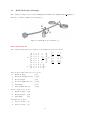
MPC Block Diagram
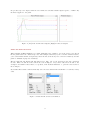
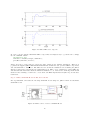
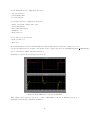
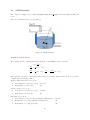
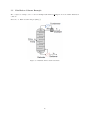
Figure 1: jMPC Toolbox Block Diagram
The above figure illustrates the functionality provided by the jMPC Toolbox within an example application. The Plant represents a dynamic industrial process which is to be controlled to a setpoint by the
MPC controller. Two forms of disturbances can be added to the simulation, a load disturbance on the
input and/or measurement noise on the plant output. The measured output is then fed back to the MPC
controller in order to calculate the next control move. Also viewable within this toolbox are controller
model states and outputs for post analysis of model/plant mismatch.
The MPC controller is created as a jMPC object while the Plant can be a jSS object for linear simulations,
or a jNL object for nonlinear simulations. These classes are described in detail within this document
together with several examples illustrating their use.
2